Details have been published of a critical flaw in the programming language PHP, which is the backbone of more than 70% of all websites. Left unfixed, the flaw would allow hackers to easily take over and compromise millions of websites and the information held on their servers.
Editor’s Note: Ten years on, Russia’s 2016 interference operation on behalf of Trump, and the Trump administration’s dismantlement of all the U.S. federal government organs dedicated to tracking and analyzing state-sponsored efforts to interfere in U.S. institutions, elections, and society, offer two lessons, Julia Cutler writes. First, a foreign intervention pays off most durably and reliably when its beneficiary has every incentive to hide the intervention sponsor’s hand.
Russian hostile activity costs the UK at least £2 billion annually, according to a recent report by Scottish MP Graeme Downie, who has called on the government to measure what these actions cost Britain. But this figure is just the baseline. In reality, a profound shift in Moscow’s approach to sabotage means the true cost is set to climb higher.
The vibe-coding platform said all of its customers should revoke and rotate their private keys, after hackers were able to decrypt some customer secrets.
OpenCode is an open source AI coding agent that's become a popular alternative to Claude Code and Cursor. But hackers got into part of its online platform and stole some users’ API keys, and the AI tools it turned to for help kept refusing to look at the malicious code.
University of British Columbia researchers have uncovered a vulnerability that could allow hackers to target and disrupt critical infrastructure such as water treatment plants and energy grids without needing to break into a facility’s own systems or crack its encryption.
The technique targets facilities that communicate with cloud-based monitoring and control systems over encrypted connections. An attacker would first need to compromise a router carrying traffic between the facility and the cloud.
Most of us now carry in our pockets devices capable of running small AI chatbots. These chatbots have little safety oversight to ensure they don’t provide information and answers with the potential to encourage self-harm, financial loss, or other extremist notions—especially when operating offline. Now, a team of two physicists publishing in the Cell Press journal Patterns on October 8 have developed a mathematical formula that predicts when AI models will switch from appropriate responses to potentially dangerous ones.
On Sept. 23, the FBIdisclosed it is investigating a claim from the hacking group ShinyHunters that it stole thousands of FBI employees’ personal information.
Nexus claimed that it had gained unauthorized access to a major identity verification company and had spent more than a year “continuously” exfiltrating new data into a private database. Krebs on Security noted that in a single day the number of licenses in the database increased by nearly 400,000, suggesting regular ingestion of new data.
One of the fundamental principles that separates Linux from other operating systems is its philosophy that nearly everything is a file, and more often than not, these files contain plain text. Configuration files that control how services behave, log files that record system activity, and network captures that reveal traffic patterns. Countless other critical components of the system exist as text files that you can read, modify, and manipulate using simple command-line tools.
In this article, we will explore the essential commands and techniques for manipulating text in Linux. Let’s get rolling!
Step 1: Cat That File
For demonstration purposes, we will use files from the world’s best Network Intrusion Detection System (NIDS), Snort. If some of you have prior experience with Snort, you probably know that the configuration file was called snort.conf. However, in Snort 3, the traditional snort.conf file has been replaced by Lua-based configuration files in snort.lua serving as the primary configuration file.
Now, let’s move on to the cat command. As demonstrated in an earlier tutorial, cat is one of the most basic text display commands. Let’s use cat to view the Snort configuration file located in /etc/snort.
kali > cat /etc/snort/snort.lua
As you can see, snort.lua is displayed on our screen until it reaches the end of the file. Not the most convenient or practical way to work with this file.
Step 2: Take the Head
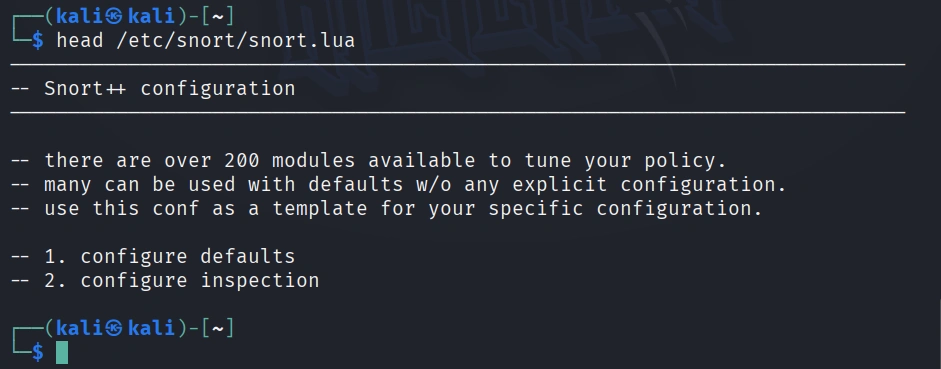
To view the beginning of a file, use the head command. This command displays the first 10 lines of a file, by default.
kali > head /etc/snort/snort.lua
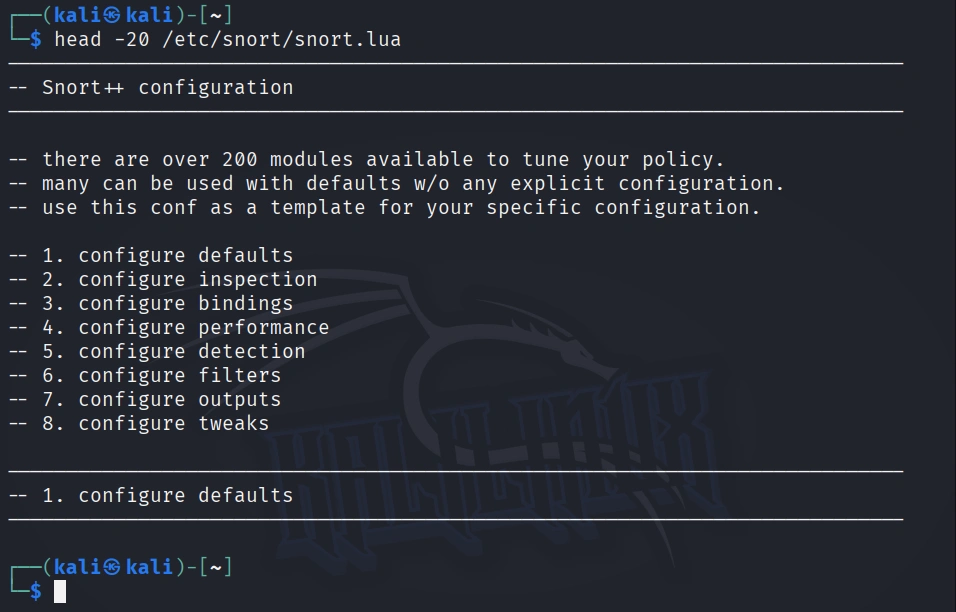
If we want to see more or fewer than the default 10 lines, we can tell head how many lines to display by putting the number of lines we want (with the – n switch) between the command and the file name.
kali > head -20 /etc/snort/snort.lua
Here we can see that only the first 20 lines of snort.lua are displayed.
Step 3: Grab That Tail
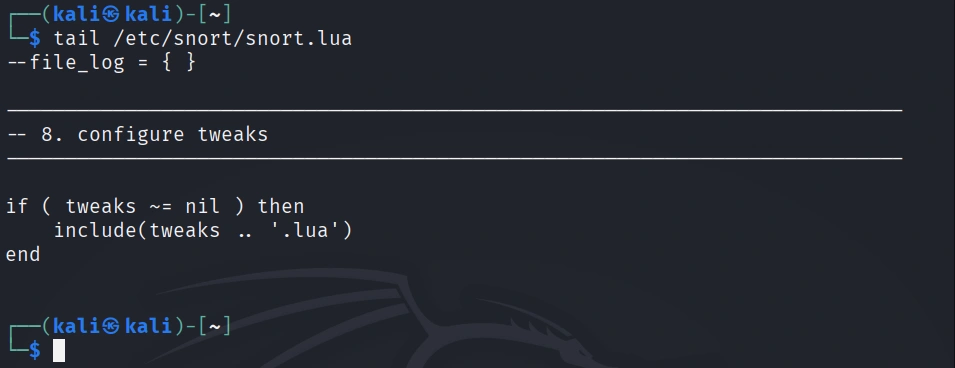
Similar to the head command, we can view the last lines of a file with the tail command. Let’s use it on the snort.lua.
kali > tail /etc/snort/snort.lua
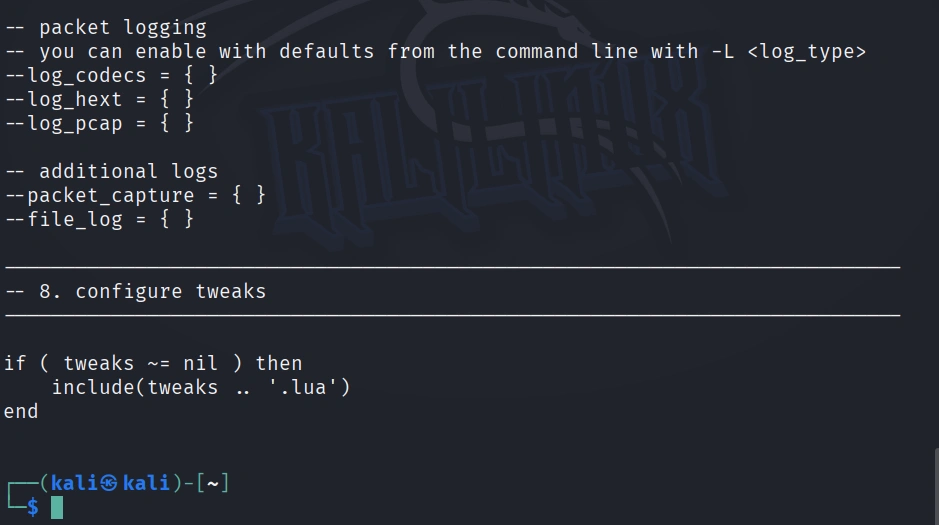
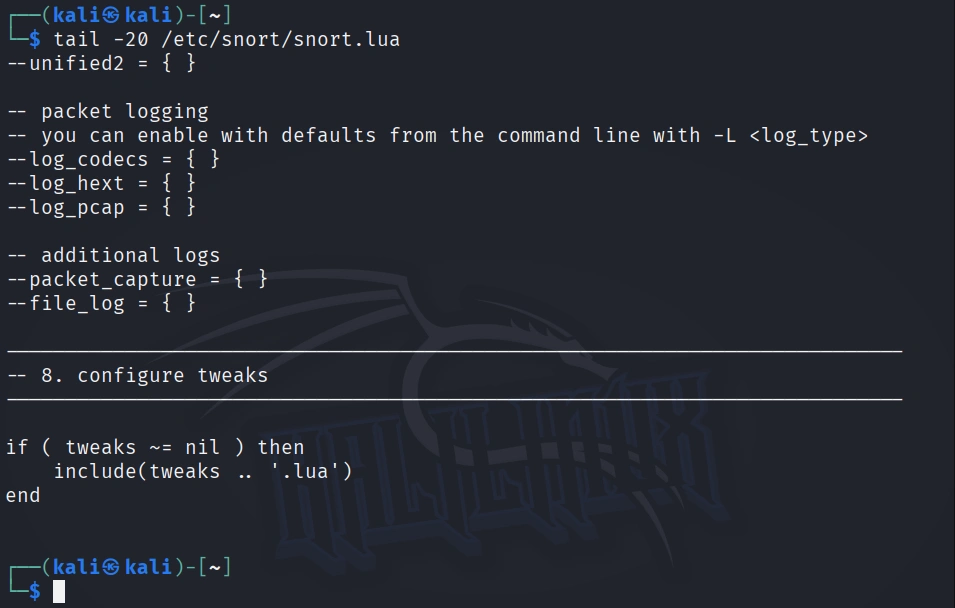
Note that it shows some logging configurations but not all. Let’s see if we can display all of them by retrieving the last 20 lines of the snort.lua file.
kali > tail -20 /etc/snort/snort.lua
Now we can view nearly all the logging rules on one screen.
Step 4: Numbering Those Lines
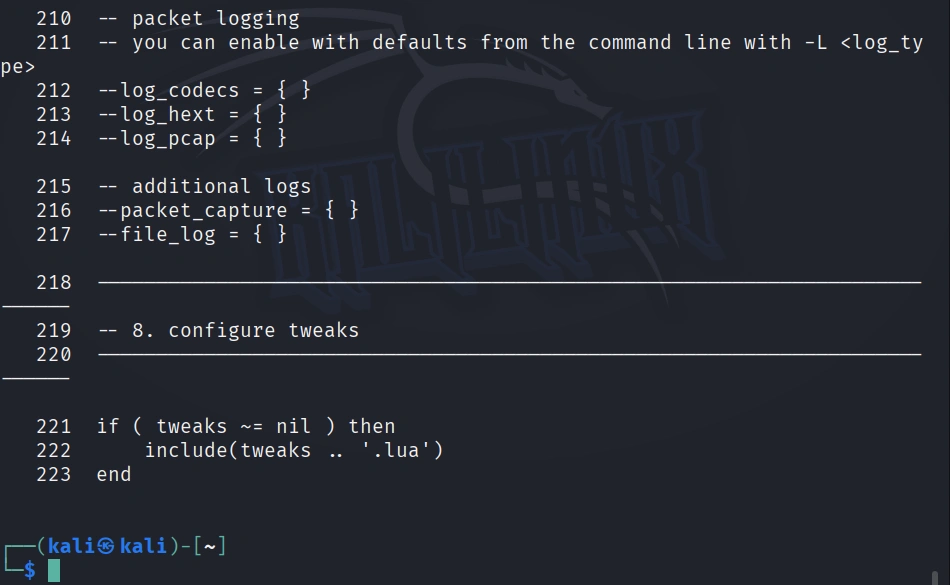
Sometimes—especially with very long files—we may want the file displayed with line numbers. This is probably the case with snort.lua, which has over 200 lines. This makes it easier to reference changes and come back to the same place within a file. To display a file with a line number, we simply type:
kali > nl /etc/snort/snort.lua
Note that each line now has a number, making referencing much easier.
Step 5: I Grep That
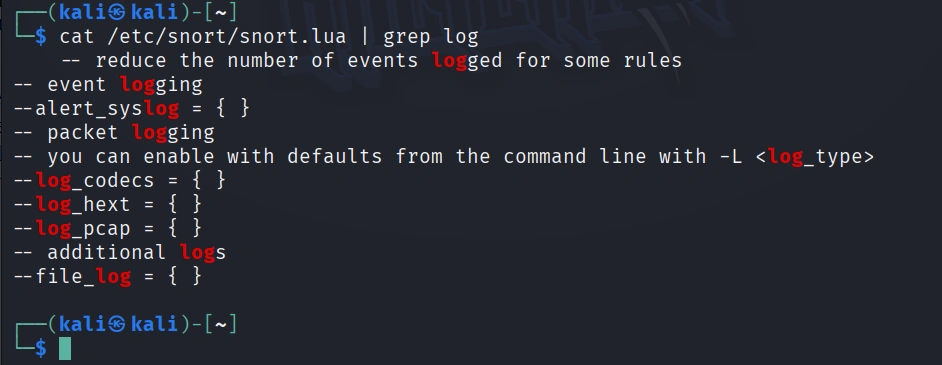
After cat, grep is the most widely used text manipulation command. It’s a filtering command; in other words, it enables us to filter the content of a file for display. If, for instance, we wanted to see all the instances of where the word “log” occurs in our snort.lua file, we could ask cat only to display those lines where it occurs by typing:
kali > cat /etc/snort/snort.lua | grep log
This command will first grab the snort.lua and then “pipe” it (|) to grep, which will take it as input and then look for the occurrences of the word “log” and only display those lines. Grep is a powerful and essential command for working in Linux, as it can save us hours searching for every occurrence of a word or command.
Step 6: I Sed That Works
The sed command allows us to search for occurrences of a word or text pattern and then perform some work on them. The name comes from the concept of a stream editor and is a contraction of those two words. At its most basic, sed operates like the Find and Replace function in Windows. Let’s search for the word “modbus” in the snort.lua file using grep.
kali > cat /etc/snort/snort.lua | grep modbus
We can see that the grep command found four occurrences of the word modbus.
Let’s say we want sed to replace every occurrence of modbus with Modbus (remember, Linux is case-sensitive) and then save the new file as snort2.lua.
We could do this by typing:
kali > sed s/modbus/Modbus/g /etc/snort/snort.lua > snort2.lua
This command says, “search (s) for the word modbus and replace it with the word Modbus globally (i.e., wherever you find it in the file).”
kali > cat /etc/snort/snort2.lua | grep Modbus
Now, when we grep snort2.lua for Modbus, we see that none were found, and when we grep for Modbus, we find four occurrences of Modbus.
If we want to replace only the first occurrence of the word modbus, we could leave out the trailing ‘g’ (for global), and it would replace only the first occurrence.
kali > sed s/modbus/Modbus/ snort.lua > snort2.lua
Step 7: Less is More
Although cat is a good utility for creating and displaying small files, it certainly has its shortcomings when displaying large ones. When we catch the snort.lua, it scrolls through numerous pages until it comes to the end. Not very practical.
For working with larger files, we have two other utilities, more and less. More came first and is the utility that the man (manual) pages use. Let’s open snort.lua with more commands.
kali > more /etc/snort/snort.lua
Notice that more displays only the first page and displays for us in the lower left corner how much of the file is shown (13% in this case).
To see additional lines or pages, we can use the ENTER key, PAGE UP, or PAGE DOWN to move an entire page. To exit more, type “q” for quit.
Less is very similar to more, but with additional functionality; hence the common Linux aficionado quip: “Less is more.”
Let’s open snort.lua with less.
kali > less /etc/snort/snort.lua
Notice near the bottom-left of the screen that ‘less’ has highlighted the file path.
If we hit the / key, less will enable us to search for terms in the file. For instance, let’s search for filters:
/filter
This will immediately take us to the first occurrence of output and highlight it.
We can then look for the next occurrence of filter by typing “n” for next.
As you can see, less took us to the next occurrence of the word filter, highlighted all the search terms, and in this case, took us directly to the filter section of Snort. How convenient!
Summary
This article illustrates essential commands and techniques for manipulating text in Linux, emphasizing the importance of text files in system configuration and logging. We explored commands such as cat, head, tail, nl, grep, and sed, demonstrating how they can enhance your efficiency in handling configuration files like snort.lua.
For more information on using Linux for hacking, check out the book “Linux Basics for Hackers” on Amazon or visit our training center.
Artificial intelligence systems are starting to do more than answer questions. New AI “agents” can remember information from previous interactions, plan a series of steps and use digital tools to complete tasks.
First-of-its-kind research from Finland’s Aalto University’s School of Business reveals the modus operandi and operating model of the pro-Russian hacking group responsible for thousands of Distributed Denial of Service (DDoS) attacks against NATO and European targets.
Today we start our series on PowerShell for hackers. In this opening article we’ll explore the core techniques of PowerShell, starting with foundational concepts before working with PowerView and crafting scripts for backdoors, data exfiltration, and extracting password hashes.
The methods we cover here come from real engagements. You’ll see different terminals and interfaces, since we’ll be shifting targets. So get comfortable with older Windows systems, a lot of which are still in use today (ATMs, medical devices, point of sale systems, and so on), mainly due to budget constraints.
Defenders should also understand how Windows can be used for attacks, since they’re not limited to Linux only. Its administrative functions offer stealth during operations, which helps hackers stay under the radar.
Understanding PowerShell
PowerShell is a powerful scripting language that was initially designed for system administration and automation. It has direct access to the .NET framework and Windows Management Instrumentation (WMI), which gives you control over system components, processes and network configurations.
It also comes with “living off the land” (LOL) tools. These help hackers work without bringing in external binaries that could trigger alerts. That way they can discreetly execute commands, set up remote sessions, find credentials, check system configuration, manipulate the system, and run payloads in memory. PowerShell helps you blend into a normal system routine.
Now let’s look at its capabilities.
Core PowerShell Commands
To make the transition from Linux easy, here’s a table with common commands that exist in PowerShell.
That’s the backbone. It does have some unique commands too, but these are enough to start.
Legacy CMD commands are also supported. For instance, type will print the contents of a text file:
PS > type example.txt
It’s worth learning a few CMD commands just as a fallback.
You can change directories with cd, but sometimes you run into a non-English system where files and directories are in a foreign language. Evil-WinRM often struggles with this, corrupting the characters you type. In this case, you can use variables:
PS > $items = Get-ChildItem
PS > cd $items[4].FullName
Keep in mind, PowerShell uses zero based indexing (so $items[0] is the first item). This trick comes in handy when you have a PowerShell session inside some hacking tool that doesn’t play well with other languages.
Wildcards are another time-saver for complex file names:
PS > cat *.txt      # Displays all .txt files
PS > cd *           # Enters the only subdirectory in the current location
PS > cat 1*         # Reads files starting with "1"
When you’re digging through a lot of corporate data, changing directories manually gets exhausting. Use tree to recursively view the file structure:
PS > tree /F
Credential Harvesting
To move laterally you need credentials. You can find passwords manually on the Desktop, in the browser or in messaging apps, but this whole process can be automated with a one liner, since you never know where those credentials are sitting on a system.
Findstr
With findstr you can search for specific patterns in files or command outputs. It’s present on every Windows system:
This searches recursively (/S), case insensitively (/I), for “password” across various files, listing matching files (/M).
Registry
The Windows Registry is another source of credentials. It stores system and user configurations. Here are some commands:
PS > reg query HKLM /f password /t REG_SZ /s
This searches the HKEY_LOCAL_MACHINE (HKLM) hive for string values containing “password”, potentially finding credentials used by software or services.
PS > reg query HKCU /f password /t REG_SZ /s
This targets the HKEY_CURRENT_USER (HKCU) hive for user settings with “password”. This may have application configurations.
Checks Simple Network Management Protocol (SNMP) settings for community strings. These are weak credentials for network devices that are often overlooked by administrators.
Finds saved PuTTY (SSH) session data, including IP addresses and usernames
These reg queries can be used for quick credential discovery, that way you don’t run external tools.
LaZagne
LaZagne isn’t a PowerShell tool, but it’s often used to extract credentials. It looks for passwords in browsers, email clients, WiFi settings, FTP tools and databases by analyzing config files, registry entries and memory.
For example, discovering an Outlook password for a department head could be used for social engineering attacks. More articles on social engineering are available on our website.
SMB Hash Leak
The SMB Hash Leak technique captures NTLMv1 or NTLMv2 hashes by creating a fake Windows shortcut (.lnk) file pointing to a nonexistent remote resource. When a user opens a folder with this file in it, Windows attempts an SMB connection, sending the user’s hashed credentials to your server. These hashes can then be cracked offline or relayed.
Using Inveigh, you can set up a fake SMB/HTTP listener:
PS > powershell -ep bypass
PS > . .\Inveigh.ps1
PS > Invoke-Inveigh -ConsoleOutput Y -NBNS Y -HTTPS Y -PROXY Y
Success depends on timing and network interface configuration.
Captured hashes can be cracked using Hashcat in NTLMv2 mode (5600).
Managing Execution Policy
An execution policy in PowerShell is a safety feature that controls whether and how PowerShell scripts can run on a system. It’s a built-in warning system meant to stop users from accidentally running untrusted or harmful scripts. To bypass it for the current session:
PS > powershell -ep bypass
For a persistent change (you need admin privileges):
This disables script execution restrictions machine wide, unless Group Policy overrides it.
Downloading and Executing Files
You can use cmdlets like Invoke-WebRequest (iwr) or wget to download files. Besides these, there are plenty of other techniques out there that don’t get monitored.
This command downloads a script from the URL and pipes it directly into the PowerShell interpreter using Invoke-Expression, executing it in memory without ever touching the disk. That’s a classic fileless execution technique.
A PowerShell downgrade attack is a technique where you deliberately launch an older version of PowerShell (version 2.0) to bypass some modern security features.
PS > powershell -version 2
Antivirus Software
When you gain system access, always check whether the AV is running:
Base64 can encode binary or text into a portable format. When you convert something into Base64, it makes it harder to immediately understand what the code does.
Encoded reverse shells can be customized on revshells.com and used to connect back to your listener.
Profile Persistence
Profile persistence is a technique of embedding code into a user’s PowerShell profile so the code executes every time a new PowerShell session starts. When PowerShell launches, it checks for profile scripts and runs whatever commands they hold.
-WindowStyle Hidden makes a PowerShell script or command run without showing any visible window to the user. When hackers run scripts, they don’t want to draw attention. If you run PowerShell normally, a window might briefly flash on screen and alert the victim.
Listing command lines for each process can help you find usernames, passwords, IPs and other things.
PS > gwmi win32_process | select CommandLine
Scheduled Tasks
Scheduled Tasks get used for persistence and privilege escalation. Each task is defined by a set of triggers (at logon, at a given time, or on an event), actions (the program, script, or command to run), and optional conditions or settings that control retries and timeouts.
For privilege escalation you want to find vulnerable tasks. We’ll output all the scheduled tasks to a file and then look for “SYSTEM”:
PS > schtasks /query /fo LIST /v > schtask.txt
For persistence, create your own task or modify the existing one:
If you accidentally trigger the creation of a new user profile by signing into a computer where that user has never logged in before, kill the session tied to that user first, then delete the created user folder:
PS > cmd.exe /c "rd /s /q C:\Users\username"
Logs
Hackers clear Windows logs to cover their tracks. Here’s how:
First the command clears the classic Windows event logs, then it uses wevtutil.exe to clear the more modern ones.
Other Commands
Below you can find other useful commands.
Bonus: Establishing a Backdoor
Once a system’s been compromised, you can establish a backdoor. There are many of them, depending on your objectives and the environment. Our technique uses utilman.exe.
Utilman
Utilman.exe is the Windows Utility Manager. It’s the program that runs when you click the “Ease of Access” button on the login screen or press Win+U. It’s meant to provide accessibility tools (Narrator, Magnifier, or On-Screen Keyboard) before you log in.
It can be exploited by tweaking the registry so it points to cmd.exe instead. As a result, pressing the Ease of Access button at the login prompt launches a CMD prompt with SYSTEM privileges.
After that you need to reboot the system or wait for an administrator to do it.
If you use Sticky Keys instead, you won’t need to reboot at all.
Conclusion
PowerShell is a powerful tool, as you can see. In this first part, we’ve covered essential commands, credential harvesting, persistence and stealth. In the next part, we’ll build on this foundation with more advanced tools.
If you want to learn how PowerShell can be used in both red team and blue team scenarios, get our PowerShell for Hackers training. We’ll show things that can’t be covered here.
Among the areas that Linux newcomers find problematic, managing user environment variables is often the most obscure. Although Windows operating systems support environment variables, most users seldom—if ever—manage them. To get the most from our Linux hacking system, you need to both understand and manage environment variables for optimal performance, convenience, and possibly even stealth.
These environment variables are used in our particular user environment. In most cases, that environment will be your BASH shell. Each user, including root, has a set of environment variables with default values unless they’re changed. You can change these values to make our system work more efficiently and tailor our work environment to meet our individual needs best.
View Our Environment Variables
Let’s start by viewing all your environment variables by entering env.
Note that all environment variables are in all uppercase, such as HOME, PATH, SHELL, etc. As you will see later in this article, you can create your own user-defined variables (see below), and if you do, it is advisable—but not required—that they also be in all uppercase.
In addition, we can view all variables, including user-defined variables and command aliases, by entering the command set.
This command lists numerous variables specific to our system. In most cases, this list is so long that it can’t be viewed on a single page. To see all these variables line-by-line, you can pipe the output to the more command, such as:
Now, the list of variables fills up one screen and stops, waiting for us to hit the ENTER key to advance to the next line. You can do this until we come across any variable we are looking for. If we press ENTER a few times, we will find a variable named HISTSIZE. Hitting the ENTER key will take you through each of these variables, one by one. Whenever you use the more command for output, you can use the q to exit or quit and return to the command prompt.
Rather than scrolling through this long list of variables tediously looking for the variable of interest, you can use the filtering command grep to find it. For instance, as you saw above, there is a variable named HISTSIZE. This variable contains the number of commands stored in your command history file. That is, the commands that you have previously typed and can recall by using the UP and DOWN arrows from the BASH shell.
Let’s try to find it using set and filtering the output with grep to find the HISTSIZE variable.
As shown above, this command finds the variable HISTSIZE and displays its value. The default value of this variable is set to 1000 on your system. This means that the HISTSIZE variable stores your last 1000 commands by default.
Viewing Variables Values
The set command displays all your variable names, but if you want to see the value stored in the variable, you can use the keyword echo followed by the dollar sign $ and the variable name, such as:
It’s important to note that when you want to use the value stored in a variable, such as here, you need to put a $ before the variable name. The dollar sign ($) before the variable name indicates you want to work with the value inside the variable, rather than the label of the variable.
As I noted above, the HISTSIZE variable contains the number of commands stored in our history file. As you can see in this screenshot, the HISTSIZE variable is set to 1000. In some cases, we may NOT want our past commands stored in the history file. This may be because you don’t want to leave any evidence of your activity on the system. In that case, you can set your HISTSIZE variable to 0, and the system will NOT store any past commands.
Now, when we try to use the UP or DOWN arrows to recall commands, nothing happens because the system no longer stores them. Stealthy, but inconvenient.
Exporting our Environment Variables
When you change an environment variable, it’s only for that particular environment. In this case, that environment is the BASH shell. This means that once we close that terminal, any changes we made to these variables are lost or reset to their default values. If we want the value to remain for our next terminal session and another terminal session, we need to export the variable. Think of it as “exporting” the new value from your current environment (the BASH shell) to the rest of the system so that it is available in every environment.
We can do this by simply entering export and then the variable name, such as:
Now, the HISTSIZE variable is set to 0 when we leave this environment and return later. Of course, we can set the HISTSIZE variable back to 1000 by simply entering:
Changing Our Shell Prompt
The default shell prompt in Kali takes the following format;
username@hostname:current_directory>
If you are the root user, this translates to a default prompt of;
root@kali:current_directory
We can change the default command prompt by setting the PS1 variable. This variable has a specific set of placeholders for information to be inserted into the prompt. These include;
u =name of the current user
h = host name
W= current working directory
Let’s have a little fun and change the prompt in our terminal. The environment variable that contains our prompt for the first terminal is PS1. We can change it by typing:
Now, every time you open a terminal, you are reminded that you are “World’s Best Hacker”.
Remember that our pr ompt will now be “World’s Best Hacker” whenever we open the first terminal (PS1), but the second terminal will still be the default command prompt. This means that if we really like this new command prompt and want to keep it, we need to export the variable PS1 so that each time we open this terminal or any terminal, the prompt will be “World’s Best Hacker: #”
Changing Our Path Variable
Probably the most important variable in our environment is our PATH variable. This variable controls where your shell looks for the commands you type, such as cd, ls, and echo (they are usually located in the sbin or bin sub-directories, such as /usr/local/sbin or/usr/local/bin). If the BASH shell doesn’t find the command in one of the directories in our path, it returns an error “command not found” even if it DOES exist in another directory not in our PATH.
Let’s take a look at the contents of our PATH variable by echoing its contents:
Notice the directories included in our PATH variable. These are usually the/bin and /sbin directories, where our system commands are found. When we type ls, the system knows to look in each of these directories for the ls command, and when it does, it executes it.
If we were to download and install a new hacking tool named “newhackingtool” into the /root/newhackingtool directory, we could only use it when we were in that directory. This means that every time we wanted to use that tool, we had to navigate to /root/newhackingtool first. That might be just fine, but a bit inconvenient. To be able to use this new tool from ANY directory, you could add this directory to the PATH variable.
To add this newhackingtool directory to our PATH variable, you can enter:
In this command, you are saying “take the PATH variable (PATH) and assign it (=) the value of the old PATH variable ($PATH) and add /root/newhackingtool.”
It’s important to note here that we have appended the /root/newhackingtool directory to your PATH variable. If you now go back and examine the contents of the PATH variable, you will see that this directory has been appended to the end of the PATH.
This means when you want to run your newhackingtool, you won’t need to navigate to the /root/newhackingtool directory. You can now execute newhackingtool applications from anywhere on your system. The BASH shell will now look in that directory for our new tool!
A common mistake made by those new to Linux is to assign the new directory, /root/newhackingtool, to the PATH variable, such as;
kali > PATH=/root/newhackingtool
kali > echo $PATH
/root/newhackingtool
Now, your PATH command ONLY contains the/root/newhackingtool directory, not the system binaries directories such as /bin, /sbin, and others. This is NOT good. In this case, when you go to use any of the system commands, you are likely to receive the error “command not found” (unless in the unlikely case you are in the system binaries directories when you execute it).
kali > cd
bash: cd: command not found
kali >
Remember, you want to append to the PATH variable, not replace.
This can be a very useful technique for directories we use often, but be careful not to add too many directories to your PATH variable, as the system will have to search through each directory in the PATH to find commands, which could potentially slow down your terminal and your hacking.
Creating a New User-Defined Variable
You can create your own custom, user-defined variables in Linux by simply assigning a value to your new variable. The syntax is rather straightforward; first the name of your variable, then the assignment symbol “=”, and finally the value in the variable, such as;
kali > MYNEWVARIABLE = “Hacking is the most valuable skill set in the 21st century”
Now, to see the value in that variable, you can use the echo command followed by the $ and the variable name.
kali > echo $MYNEWVARIABLE
Hacking is the most valuable skill set in the 21st century
If you want to delete this new variable or any system- or user-defined variable, you can use the unset command. You should be cautious when deleting a system variable, as your system will likely operate very differently afterwards.
kali > unset MYNEWVARIABLE
Summary
Although environment variables seem a bit obscure, they can control the settings and appearance of your Linux working environment. You can manage them to tailor our environment to your needs by changing any of those variables and exporting the changes. In addition, we can create new variables to help manage your system.
For more information on using Linux for hacking, check out the book “Linux Basics for Hackers” on Amazon or visit our training center.
During Black Hat and DEF CON, you can expect to run into more than 400 vendors and 50,000 attendees. Both conferences are going to be full of life, with various...
A deadman’s switch can be very powerful defensive weapon. A deadman’s switch is only triggered if the human being holding is dead. Hence, the name. This can be powerful weapon if one’s life is threatened. You set up a deadman’s switch to trigger some powerful event (emails, data exposure, videos, graphics) if you are dead and can not maintain the switch. This might save you life someday!
As you know, Mr. Robot is my favorite TV show because of its realistic depiction of hacking. Nearly all of the hacks in the show are real, although the time frame may be compressed (real hacking is not like a TikTok video).
In the first season, Elliot’s “girlfriend”, Shayla, has been kidnapped and held as hostage by the psychopathic drug dealer, Vera. Vera has been arrested and is sitting in jail waiting for trial. He insists that Elliot get him out of jail by some sort of elaborate hack in 24 hours! For more of the prison hack, see my tutorial here and my David Bombal YouTube video here.
Elliot goes to the jail to visit Vera and explain the difficulties of hacking him out jail in 24 hours. Vera insists. Elliot explains that he has all the evidence from Vera’s brothers cellphone (he hacked it over the LAN in his apartment probably using the shellshock vulnerability) to put Vera and his brother away forever. When Vera threatens him, he explains that if anything happens to him, a deadman’s switch will be triggered and send all the evidence to law enforcement, thereby guaranteeing his safety,
Deadman’s switch is not a new concept. It has a long and storied history in its many physical forms. A deadman’s switch is simply a safety mechanism that triggers if there is NO user action. This means that if the owner or holder of the switch is dead or otherwise incapacitated, an action is triggered. They have long been used within industrial society to stop machines if the operator is “dead” such as locomotives, amusement rides, and aircraft refueling, among many applications. It has also been used by to preserve the operator’s life. Imagine a person wearing a suicide vest. They often hold a deadman’s switch that triggers the explosive should they be killed. You have probably seen this in many TV shows and movies.
Elliot is using this strategy to preserve his life from Vera’s assassins except that here he creates a digital deadman’s switch. If he is dead, the program triggers and notifies law enforcement with all the digital evidence against Vera and his brother.
Let’s see whether we can create such a digital deadman’s switch in Python, the favorite language of cybersecurity and artificial intelligence.
Step # 1: Getting Started
A deadman’s switch is a safety mechanism that triggers an action if the user fails to perform a periodic task (like pressing a key or sending a signal) within a certain time frame. In our script, we will wait to get receive an ENTER from the user. If you user does not hit ENTER within a specified period of time, we assume they a are dead and execute the action, in this case send an SMS message.
To develop our deadman’s switch, we will need;
code or a function to send the message when the user is dead
some code or function to track the time and determined time is exhausted
a main function to take user input on the desired time out and determine when that time has exhausted and trigger the action function
Let’s get started by importing the modules necessary:
import threading
The threading module in Python allows your program to run multiple operations concurrently within the same process by using threads.
Wait for input or other blocking operations (like in your deadman’s switch).
Perform background tasks while the main program continues (e.g., downloading a file while updating a UI).
import requests
The requests module in Python is a simple and powerful library for making HTTP requests — it lets your program talk to websites or APIs over the internet
Step # 2: Create a function named action to send an SMS Message If the User is Dead
Now that we have all the necessary modules, let’s create a function called action. In this function, we will use the requests.post command to send a SMS message through textbelt.com (we have used this service before with the sending a fake SMS message here). This function executes if the action indicating life (hitting ENTER) is not completed within specified amount of time entered by the user in the main function below. So, to simplify, the user defines the amount of time and if no action is detected within that time period, the switch is triggered.
In this function, we named wait_for_input, we use the threading module to create a timer.
def wait_for_input(timeout):
“””
Waits for user input with a timeout.
Returns True if input received, False if timeout occurs.
“””
timer = threading.Timer(timeout, deadman_action)
timer.start()
try:
input(f”Press Enter within {timeout} seconds to reset the deadman’s switch: “)
timer.cancel()
return True
except Exception:
timer.cancel()
return False
Step 4: Create a main function
Here, we create our main function. In this function, we prompt the user for the number of seconds to wait and convert it into integer, then print the timeout for the user to see and another print statement simply telling the user that the switch is activated and they must press enter to keep it alive.
def main():
timeout = int(input(“Enter the length of timeout in seconds: “)) # seconds
print(“Deadman’s switch activated. Press Enter regularly to keep it alive.”)
while True:
if not wait_for_input(timeout):
break # Deadman’s switch triggered, exit loop or take other action
Step # 5
In this section, we use a python convention that ensures that some code only runs when the file is executed directly, not when it’s imported as a module in another script.
As you already know;
name is a special built-in variable in Python.
When a file is run directly, name == “__main__” is True.
When a file is imported, name is set to the module’s name, not “__main__”.
Now, we only need to give ourselves execute permissions;
kali > sudo chmod 755 deadmans_script.py
Now, if Vera’s thugs kill Elliot, the deadman’s switch will be triggered and law enforcement will be notified with all the evidence on Vera’s brother’s phone!
How It Works
The program waits for the user to press Enter within the timeout.
If the user presses Enter in time, the timer is canceled, and the loop continues.
If the user fails to press Enter before the timer expires, the action() function is called.
You can customize action() to perform any critical task (e.g., email, alerting, shutting down, encrypting files, etc.).
Summary
Mr. Robot is a fascinating TV show that demonstrates many of the realistic hacks we all use but in compressed time frames. In this tutorial, we demonstrated how you can use the hacker’s favorite scripting language, Python, to create a Deadman’s Switch that will only be triggered if the user fails to do the required action in the required time frame.
For more on Python, check out my upcoming book, Python Basics for Hackers!
Synack Red Team researcher Malcolm Stagg takes the stage at Black Hat USA 2026 on August 6 to present three years of independent research on a new class of network infrastructure attacks. Here's who he is and why the talk belongs on your calendar.
As hackers, we often need to automate running multiple commands, sometimes across multiple tools. To become an elite hacker, you not only need to have advanced shell scripting skills, but also the ability to script in one of the widely-used scripting languages, such as Ruby (Metasploit exploits are written in Ruby) or Python (many hacking tools are Python scripts).
We will start with basic shell scripting, move to advanced shell scripting, and then to each of these scripting languages, developing hacking tools as we go. Our ultimate goal is to develop enough scripting skills to develop our own exploits. Let’s get rolling!
Step 1: Types of Shells
A shell is an interface between the user and the operating system. This enables us to run commands, utilities, and programs, and to manipulate files, etc.
There are several shells available for Linux. These include the Korn shell, the Z shell, the C shell, and the Bourne Again Shell (or BASH). Kali Linux now uses Z Shell by default. But the BASH shell is available in Kali Linux and in nearly all Linux and UNIX distributions (including Mac OS X); we will be using BASH exclusively here.
To check the current shell on your system, write the following command:
kali> echo $SHELL
To switch to BASH, use the following:
kali> chsh -s /bin/bash
Then log out and back in (or reboot).
Step 2: BASH Basics
To create a shell script, we need to start with a text editor. You can use any text editor in Linux, including vi, vim, emacs, gedit, kate, etc., but I will be using Mousepad in these tutorials. Using a different editor should not affect your script or its functionality.
Besides running system commands, utilities, and applications from a BASH shell script, the BASH shell includes its own commands. These include:
I will address these commands in a later tutorial, but I want you to know that this shell has built-in commands that have their functionality within the BASH shell.
Step 3: Comments
Like any coding, we may want to add comments. Comments are simply notes to ourselves or anyone else reading the code about what we were trying to do with the script or that section of the script. These notes or “comments” are not read or executed by the interpreter.
The BASH shell enables comments by preceding a line with the “#”, so if I wanted to note that this was my first script, I could write in my text editor:
This is my first script!
The interpreter would ignore everything after the # and then move to the next line.
Step 4: “Hello, Hackers-Arise!”
For our first script, we will start with a simple script that returns a message to the screen that says “Hello, Hackers-Arise!”.
We start by entering the shebang or “#!”. This tells the operating system that whatever follows the shebang is the interpreter we want to use for our script.
We then follow the shebang with /bin/bash, indicating that we want the operating system to use the BASH shell interpreter. As we will see in later tutorials, we can use other interpreters such as PERL or Python, but here we want to use the BASH interpreter.
#! /bin/bash
Next, we enter echo, a command in Linux that tells the system to simply repeat or “echo” back to our monitor (stdout) what follows. In this case, we want the system to echo back to us “Hello, Hackers-Arise!”. Note that the text or message we want to “echo back” is in double quotation marks.
echo “Hello, Hackers-Arise!”
Now, let’s save this file as HelloHackersArise. After saving, we can see that code highlighting appears.
Step 5: Set Execute Permissions
When we create a file, it’s not necessarily executable, not even by us, the owner. Let’s look at the permissions on our new file by typing ls -l in our directory.
As you can see, our new file has rw-rw-r– (664) permissions. The owner of this file only has read (r) and write (w) permissions, but no execute (x) permissions. The group has the same permissions, and all others have only read permission. We need to modify it to give us execute permissions in order to run this script. We do this with the chmod command. To give the owner, the group, and all others execute permissions, we type:
kali > chmod 755 HelloHackersArise
Now when we do a long listing (ls -l) on the file, we can see that we have execute permissions.
kali > ls -l
Step 6: Run HelloHackersArise
To run our simple script, we type:
kali > ./HelloHackersArise
The ./ before the file name tells the system to run the script in the current directory. This means don’t look in the directories in the PATH variable for this file, but rather look just in my current directory and run HelloHackersArise
When we then hit enter, our very simple script returns to our monitor.
Hello Hackers Arise!
Success! We just completed our first simple script!
Step 7: Using Variables
So, now we have a simple script. All it does is echo back a message. If we want to create more advanced scripts, we will likely want to add some variables.
Variables are areas of memory where we can store values. That “something” might be some letters or words (strings) or numbers. It can help to add functionality to a script that has values that might change.
Let’s go back to the script we wrote earlier to use nmap to scan for vulnerable machines with a particular port open. Remember the (in)famous hacker, Max Butler, used a similar script to find systems running Aloha POS, which he then hacked, exposing millions of credit card numbers.
As you can see, this script was written to scan a range of IP addresses for port 5505 (the port Aloha left open for tech support) and create a report of all IP addresses with this port open. The IP address range is “hard-coded” into the script and can only be changed by opening and editing the script file.
What if we altered this script to prompt the user for the range of IP addresses to scan and the port to scan for? Wouldn’t it be much easier if we were prompted for these values and they were entered into the script?
Let’s take a look at how we could do that.
Step 8: Adding Prompts & Variables to Our Script
First, we could replace the specified subnet with an IP range. We can do this with a variable called “FirstIP” and then a second variable named “LastIP” (the name of the variable is irrelevant, but best practice is to use a variable name that helps you remember what it holds).
Next, we can replace the port number with a variable named “port.” These variables will serve as storage areas for the user’s input before running the scan.
Next, we need to prompt the user for these values. We can do this by using the echo command we learned above in writing the HelloHackersArise script.
So, we can echo the prompt “Enter the starting IP address:” to display on the screen and prompt the user for the first IP address in their nmap scan.
echo “Enter the starting IP address:”
Now, when the user sees this prompt on the screen, they will enter the first IP address. We need a way, then, to capture the user’s input. We can do this by following the echo line with the read command and the variable name. The read command reads a value from the keyboard (stdin) and assigns it to a variable that follows it.
read FirstIP
The above command assigns the user-entered IP address to the variable FirstIP. Then we can use that value in FirstIP throughout our script.
Of course, we can do the same for each variable: first prompt the user to enter the information, then use a read command to capture it.
Next, we need to edit the nmap command in our script to use the variables we just created and filled. When we want the value stored in a variable, we can prefix the variable name with a $, such as $port.
So, to use nmap to scan a range of IP addresses starting with the first user input IP through the second user input IP and look for a port input by the user, we can rewrite the nmap command like this:
nmap -sT $FirstIP-$LastIP -p $port -oG Aloha
As written, the script will scan the IP address range from FirstIP to LastIP, looking for the port the user entered. Let’s now save our script file and name it Scannerscript.
Step 9: Run It with User Input Variables
Now we can run our simple scanner script with the variables specifying the IP address range and the port to scan, without having to edit the script.
kali > ./Scannerscript
As you can see, the script prompts for the starting IP address, the last IP address, and the port to scan for. To scan the full 10.0.2.0/24 network range with this simple script, enter 10.0.2. (including the trailing dot) as the starting IP address and 254 as the last IP address. This makes nmap interpret the target as 10.0.2.-254, which it correctly expands to scan from 10.0.2.1 to 10.0.2.254. After collecting this information, the script runs the nmap scan and produces a report in the file Aloha3 that shows every IP address in that range where the specified port is available.
Summary
Learning shell scripting is a crucial skill for anyone venturing into cybersecurity, whether as a hacker or a system administrator. The concepts and commands discussed in this tutorial serve as a foundation for learning advanced scripting techniques. Understanding how to create and execute shell scripts, manage file permissions, and use built-in BASH commands enables users to automate tasks effectively and efficiently.
For more information on using Linux for hacking, check out the book “Linux Basics for Hackers” on Amazon or visit our training center.

 Login
Login