❌

Reading view

There are new articles available, click to refresh the page.

Circle Shareholder Sues Trump, Alleging Unconstitutional Profits From $2B UAE Crypto Deals

Bitcoin Magazine

Circle Shareholder Sues Trump, Alleging Unconstitutional Profits From $2B UAE Crypto Deals

A shareholder from one of the world’s biggest digital asset companies has sued U.S. President Donald Trump for alleged crypto corruption. 

The lawsuit, filed on Thursday by shareholder and former Circle employee J. Benjamin Greenberg, alleges that a member of the United Arab Emirates ruling family agreed to pay half a billion dollars into the Trump-backed World Liberty Financial business — in direct violation of the Constitution. 

Circle is the fintech company behind the stablecoin, USDC. Regulators in the U.S. are fast pushing ahead with pro-crypto rules despite lawmakers last month blocking landmark digital asset legislation, which President Trump backed. 

A number of lawmakers didn’t back the draft legislation — the Clarity Act — because they said that the Trump family had illicitly cashed in on crypto ventures. 

“The corruption at issue is not subtle, and it is not hidden,” the lawsuit alleges. “Since returning to office,  President Donald J. Trump and his family have built a cryptocurrency business and invited foreign states to route money to him by paying into it. Foreign money has answered.”

The lawsuit goes on to allege that an investment fund created by the government of Abu Dhabi also gave the president $2 billion via World Liberty Financial’s USD1 stablecoin product. 

World Liberty Financial is a decentralized finance project co-founded by the president and his sons.

President Trump stopped being involved in the project after taking office in 2025. 

Thursday’s lawsuit adds that the president allegedly gave the Emirati leadership access to advanced artificial intelligence chips and pardoned a convicted felon in turn for the crypto investment. It references a February Wall Street Journal article that reported the deal. 

“Although the President has dressed his corrupt arrangements in the language of new technology — tokens and stablecoins, holding companies and reserve yields — that vocabulary must not obscure what this is: the oldest form of public corruption, a public official taking money from a foreign power,” the lawsuit further says. 

It alleges that the president has “corruptly” profited from $2 billion via the deals. 

President Trump, World Liberty, and U.S. Middle East Special Envoy Steve Witkoff are named as the defendants in the lawsuit. 

The president campaigned on a ticket to help the crypto industry and received major financial backing from the space but some Washington lawmakers have criticized the way the Trump family has profited from digital asset ventures.

Trump and the White House have always denied any conflicts of interest. The president in August, ahead of the crypto Clarity Act vote, said that Democrats criticizing his family crypto ventures had made money from stock trading. 

This post Circle Shareholder Sues Trump, Alleging Unconstitutional Profits From $2B UAE Crypto Deals first appeared on Bitcoin Magazine and is written by Mathew Di Salvo.

$20B AUM Siebert Analyst: Bitcoin to $175K in 2027

Bitcoin Magazine

$20B AUM Siebert Analyst: Bitcoin to $175K in 2027

Siebert Financial sees Bitcoin reaching $175K within the next 12 months, and Strategy hitting $350 a share along with it. Brian Vieten, head of digital assets research at Siebert Financial, joins Grace Remington and Sean Hagan to explain his path to $175K, starting with the June low near $58K that he says marked exhaustion across miners, exchanges, treasury companies, and lenders. He then breaks down Siebert’s Buy rating on Strategy and its $350 price target, which is based on that $175K Bitcoin forecast and doesn’t assume any mNAV expansion. He also explains why Strategy’s digital credit engine, sticky ETF demand, and the GENIUS Act give Bitcoin “a clean runway” from here

Chapters:
0:00 – Siebert’s Brian Vieten on His $175K Bitcoin Price Target
0:27 – Why the $58K June Low Marked Seller Exhaustion
3:04 – How Big Banks Changed the Bitcoin Lending Complex
4:22 – ETFs: Sticky Capital and Bitcoin’s Biggest Market Structure Shift
5:10 – Strategy at 1x mNAV and the Digital Credit Tax Advantage
6:36 – The GENIUS Act, Stablecoins and Tokenization as New Demand
8:42 – Does the Four-Year Cycle Still Matter?
10:21 – What Institutions Need Before Increasing Bitcoin Allocations
12:12 – How the GENIUS Act Could Spark Institutional FOMO
16:11 – Strategy’s $350 Price Target and How It Compares With Younger Treasury Companies

DISCLAIMER: The views and opinions expressed in this show are those of the participants and do not necessarily reflect the official policy or position of BTC Inc., Bitcoin Magazine, or any affiliated entities. This content is provided for informational and educational purposes only and should not be construed as investment, legal, tax, or accounting advice. Nothing contained in this show constitutes a solicitation, recommendation, endorsement, or offer to buy or sell any securities or financial instruments. Viewers should consult their own advisors before making financial or business decisions.

This post $20B AUM Siebert Analyst: Bitcoin to $175K in 2027 first appeared on Bitcoin Magazine and is written by Patrick Green.

Crypto Fell Hard in 2026. Stablecoin Supply Barely Moved. What Broke the Link?

Prices are down roughly a third from the top. Dollar supply onchain is down 4.5%. That gap is the most important chart in crypto right now.

Dark editorial cover graphic with a red line falling steeply and a teal line staying almost flat, headlined “Crypto fell hard. Stablecoin supply barely moved. What broke the link?”
Two lines that used to move together. In 2026 they stopped.

Bitcoin’s record close was $128,198 on 6 October 2025. In late September 2026 it trades near $84,000.

Ethereum peaked at $4,953 in August 2025. It now sits around $2,670.

More than $810 billion of market value came off the board during the 2026 selloff.

Now look at the dollars.

Total stablecoin supply peaked at $322.4 billion on 17 May 2026. By 13 August it was $308.0 billion. That is a 4.5% drawdown, set against a price drawdown of roughly a third.

For a decade those two lines moved together. This year they did not.

Stablecoin supply vs crypto prices in 2026: what the numbers actually say

The gap is wider than most people realise. Here is the 2026 scoreboard.

  • Global crypto market capitalisation sat near $2.98 trillion in late September, with Bitcoin dominance around 56.5%
  • Bitcoin is roughly 34% below its October 2025 record
  • Ethereum is roughly 46% below its August 2025 record, and touched a 60% drawdown earlier in the year
  • Total stablecoin supply is still up 14.3% year over year, from $269.4 billion in August 2025 to $308.0 billion in August 2026
  • Stablecoins now account for around 13% of the entire crypto market by capitalisation
  • Roughly 269 million onchain addresses held a stablecoin balance as of mid-2026
Bar chart comparing drawdowns from cycle peak as of late September 2026: Ethereum down 46%, Bitcoin down 34%, total stablecoin supply down only 4.5%.
Drawdown from cycle peak. Prices lost a third to a half. Dollar supply onchain lost 4.5%.

One more number makes the point properly. June 2026 set a record for adjusted stablecoin transfer volume at $1.79 trillion, in the same quarter that supply was falling.

Balances shrank. Usage grew. Those two things are not supposed to happen at once.

Forbes called it the first sustained contraction the sector had seen in four years.

The framing that stuck with me was simpler: supply falling while velocity climbed means the behaviour underneath the number changed.

Supply fell 4.5%. Prices fell roughly a third. In every previous cycle, those two numbers fell together.

Why stablecoin supply crashed 26% in 2022 but held firm in the 2026 bear market

The last downturn is the control group, and the contrast is brutal.

  • Combined stablecoin market cap fell from about $166 billion in March 2022 to $122 billion by September 2023, a contraction of more than 26%
  • USDC alone dropped from $55 billion in July 2022 to below $24 billion by November 2023
  • The 2026 pullback, by comparison, is the sharpest since 2023 and still only a few percent off the peak
Horizontal bar chart comparing stablecoin contractions: USDC down 56% from July 2022 to November 2023, total stablecoin supply down 26.5% from March 2022 to September 2023, and total supply down only 4.5% from May to August 2026.
The 2022 to 2023 contraction was a structural exit. The 2026 pullback is a rotation.

There is also a rehearsal worth noting. Between December 2025 and February 2026, supply contracted by roughly $9 billion, then recovered to a fresh record. Short contractions have become normal. Structural collapse has not.

So what changed? In 2022, most stablecoin balances were trading collateral. They existed to buy the next thing. When the next thing stopped looking attractive, holders redeemed and went home.

In 2026, a large share of those balances have a job that has nothing to do with the next trade.

What broke the link between stablecoin supply and the crypto cycle?

Three structural shifts, all of which landed inside eighteen months.

Regulation split the category in two

The GENIUS Act, signed in July 2025, prohibits payment stablecoin issuers from paying yield to holders, with the framework taking effect no later than 18 January 2027.

Hold a plain payment stablecoin and you are lending the issuer a dollar for free. That is now the law, not an accident of market structure.

Balances became working capital

Stablecoins are settling payroll, cross-border invoices, card spend and treasury operations. That demand does not care what Bitcoin did last week.

Yield replaced price expectation as the reason to hold

When a dollar onchain can generate a return from a transparent, verifiable source, the holder has a reason to stay through a drawdown.

That third shift is the one most commentary still misses. For scale: yield-generating instruments make up somewhere between 55% and 65% of traditional financial markets.

In crypto, the comparable figure has sat closer to 8% to 11%. The gap is not a quirk. It is a queue of capital waiting for a legitimate route.

If the money did not leave crypto, where did it actually go?

It rotated. The data on this is unusually clean.

Bar chart of market capitalisation added in Q1 2026 showing tokenized treasuries adding $2.12 billion versus all stablecoins adding $1.19 billion, the first time tokenized treasuries out-added stablecoins.
The capital did not exit crypto. It moved from balances that pay nothing to balances that do.

This is the distinction that makes the headline number misleading. “Stablecoin supply fell” describes an average of two categories moving in opposite directions.

USDS is a useful illustration of the entry point, and sUSDS of the destination. USDS is the fully backed unit of account. sUSDS is the yield-generating version of it, redeemable at any time, with no lockups.

Why a governance-set savings rate behaves differently in a drawdown

Here is the part that actually explains the durability.

The Sky Savings Rate is a variable rate set by SKY-token-holder governance.

It is funded by Net Protocol Revenue generated when the Sky Agent Network, a set of independent capital allocators, draws USDS liquidity from Sky Protocol and deploys it into diversified strategies under public risk limits.

Five-step flow diagram showing USDS liquidity going to the Sky Agent Network, generating Net Protocol Revenue, funding the governance-set Sky Savings Rate, and accruing to sUSDS holders.
How the Sky Savings Rate is funded. No issuer marketing budget, and no dependence on funding rates staying positive.

Read that again with a market crash in mind. The rate does not depend on funding rates staying positive.

It does not depend on token prices. It depends on whether a diversified allocation network keeps generating revenue.

In 2026, it did. Per Sky Frontier Foundation:

  • Protocol Collateral grew 18.2% year over year to $11.10 billion at the August close
  • Sky Agent Network vaults expanded from $5.63 billion to $6.06 billion during August alone
  • Sky Protocol stablecoin supply closed August at $9.53 billion, up from $9.41 billion in July
  • Q2 2026 delivered $107.35 million in Gross Protocol Revenue and $33.29 million in Net Protocol Surplus, the fifth consecutive positive quarter
  • sUSDS supply grew 149% year over year to $5.52 billion at the Q2 close
Bar chart of year-over-year growth rates: total stablecoin market supply up 14.3%, Sky Protocol Collateral up 18.2% in August 2026 and 45.5% in Q2 2026, and sUSDS supply up 149% in Q2 2026.
Growth rates inside a shrinking market. The top line contracted. The savings layer underneath it did not.

A market shrinking 4.5% at the top line. A savings layer inside it growing at triple digits. That is the decoupling, in one comparison.

The question stopped being “where is the price going” and became “who is paying me to wait”.

Who is backing the structural demand argument with real money?

Institutions, and recently.

Token Terminal data as of 21 August placed Sky Protocol at $4.6 billion in tokenized funds, the largest single share of a $34.4 billion category, ahead of several far better-known issuers.

Then on 23 September, Galaxy added $100 million of sUSDS to its corporate balance sheet and approved it as eligible collateral across its institutional trading business.

Sky Agent Network exposure to Galaxy moved from $27 million at the Q2 close to roughly $304 million by 1 September.

Bar chart showing Sky Agent Network exposure to Galaxy rising from $27 million at the Q2 2026 close to roughly $304 million by 1 September 2026, with a note on the $100 million sUSDS balance sheet allocation of 23 September 2026.
An 11x increase in Sky Agent Network exposure to Galaxy in a single quarter, in the middle of a price drawdown.

Sky.money reported $7.1 billion across its full product suite on 19 August, of which $4.92 billion sat in the Sky Savings Rate.

None of that is speculative positioning. It is a treasury decision made during a drawdown.

Is falling stablecoin supply still a bearish signal for crypto prices?

Less than it used to be, and that is the honest answer.

Stablecoin supply was once a single-purpose gauge. It measured dry powder waiting on the sidelines. Today it measures at least three different behaviours at once:

  • Dry powder waiting to buy
  • Working capital moving through payment and settlement rails
  • Yield-generating balances that have no intention of leaving

When one number tracks three behaviours, the number stops being a signal and starts being noise.

A 4.5% drawdown tells you almost nothing about whether the next leg is up or down.

Better things to watch:

  • Net issuance split by category, payment versus yield-generating
  • Adjusted transfer volume rather than parked balances, and the underlying supply data behind both
  • Collateral composition and backing ratios, which you can verify onchain rather than infer
  • Whether protocol revenue holds up when prices do not

What this actually means for the next cycle

The stablecoin market has stopped being a mirror of crypto prices. It has started behaving like a savings layer that happens to live onchain.

That changes what the metric is good for. Supply used to tell you about sentiment. Now it tells you about allocation.

And allocation, unlike sentiment, tends to be sticky.

If you want to check any figure in this piece rather than take my word for it, Sky Ecosystem publishes protocol collateral, revenue and supply data continuously.

So here is the question worth arguing about in the comments. If stablecoin supply no longer tracks the crypto cycle, what is the honest replacement metric for onchain liquidity? Net issuance by category? Transfer volume? Something else entirely? I do not think the market has settled on an answer yet, and I would rather hear a good disagreement than a consensus.


Crypto Fell Hard in 2026. Stablecoin Supply Barely Moved. What Broke the Link? was originally published in Coinmonks on Medium, where people are continuing the conversation by highlighting and responding to this story.

On a Power Trip

My laptop is one of my most important tools. While my servers and office systems have all of my configured software and documents, I can't take them with me on customer trips, or even to the living room for some late-night catching up while watching TV. The laptop is basically my portable window into my office.

I don't need a powerful laptop. I'm not a gamer and I rarely develop software directly on it. The biggest applications I use are Impress for presentations and VLC for watching movies on airplanes. Most of the time, I'm simply accessing websites, running diagnostics, or remotely logging into my office. (If someone were to steal my laptop, they won't get much. They can't access the office without my passwords and biometrics. If it ever were stolen, I can immediately lock down all network access to my office with a single unpublished URL.)

More Laptop

Last year, I wrote about my laptop. Back then, the Windows 10 operating system was hitting end-of-life and needed to be replaced. The final straw was the "Patch Tuesday" where the laptop sat at "Restarting" forever. Since the laptop is only used for remote access, there was nothing that needed keeping. I ended up reinstalling it with Ubuntu Linux.

This OS switch came with a few pleasant surprises:
  • The laptop was significantly faster. (Windows is a resource hog!)

  • The hard drive had a lot more room. (Linux is smaller than Windows.)

  • Restoring the network from suspend worked perfectly. This had been a problem under Windows.

  • The original battery lasted 8-9 hours under Windows, but had aged to lasting 4-6 hours from a full charge. With Linux, I was getting 10-12 hours of use from the same hardware.

  • I had some touchpad issues under Windows. Switching to Linux made those issues mostly go away.

Touchpad

While the touchpad issues were mostly resolved, they weren't completely gone. The mouse cursor would move correctly, but sometimes the mouse buttons would become non-responsive or require multiple presses before they worked. A reboot would fix the problem temporarily, so I didn't think it was the hardware wearing out.

Under Windows, I found a few other people with the same problem, but "reboot Windows" was the cure for everything. With Linux, there are enough tools for a real diagnosis and easy fix.

The laptop communicates with the touchpad using a two-wire protocol called I2C. When the laptop suspends and restores, the I2C drivers can get into an inconsistent state, causing the buttons to fail. The solution? I created a system restore script that restarts the I2C drivers when it wakes up. With Ubuntu, create the executable file "/lib/systemd/system-sleep/restart-touchpad":
#!/bin/sh
case "$1" in
post)
# Unload the ACPI and I2C drivers
rmmod i2c_hid_acpi
rmmod i2c_hid

# Reload them for a clean reset
modprobe i2c_hid
modprobe i2c_hid_acpi
;;
esac
That's it. You don't need to restart anything. Now the touchpad works properly all of the time.

Old Hardware

I usually keep hardware until it stops working. For example, I had an old Pentium computer with a 120MB hard drive that I used as my mail server for over 20 years. OS patches? Ha! It was still running Redhat 5.1! (Old hacker security tip: nobody looks for 20-year-old vulnerabilities, and newer vulnerabilities didn't work on old systems.) In my opinion, as long as the system is stable, why risk replacing it? The only reason I retired that old mail server was that everyone was moving to TLS for secure email transfers and some of the OpenSSL dependencies were too complicated to port to the old system. The 30+ year old hardware itself still worked fine.

The same goes with laptops. For someone who has been in the computer field for over 40 years, I've only ever owned four laptops. My first one was an Apple. (Never again.) It lost OS support after 2 years. However, I didn't move off of the laptop until the browser providers (Chrome and Firefox) stopped supporting it. I needed a modern browser, so that meant a modern laptop.

My Asus EeePC was my favorite because it was tiny and lightweight. However, after a decade most OS's dropped support for the Atom processor, so I had to update again.

These days, I'm using a Dell XPS that I purchased in 2017. The hardware is designed to last, the only issue was the touchpad -- and that's fixed now. That just left the battery.

Battery

No laptop batteries last forever. With lithium-ion, they start with a long lifespan and then slowly degrade over time. However "slowly" isn't linear. After a few years, you'll start seeing the battery runtime decline, and as time passes it will decline very rapidly. When it's completely dead, it might hold a charge for five minutes.

Lithium-ion batteries typically last seven to ten years, although heavy cycling, deep discharges, and heat can shorten that lifespan. My laptop was from 2017, putting it well into the "old battery" range. When it was new, it could hold a charge for 8-10 hours while running Windows. After eight years, Windows was lasting 4-6 hours before I switched to Linux. Linux lightened the power requirements, bringing it back to a 10 hour battery. That doesn't mean that the battery is fresh; it just means that the new OS was more power efficient.

Over the last year, it had entered the fast decline that is typical for lithium batteries. Last month, a full charge was lasting 2.5 - 3.5 hours (still under Linux). If I can't last an entire airplane flight, then that's effectively a dead battery. While I'm thrilled to have had nearly 9.5 years out of this battery, I had to make a choice:
  • (A) Get a new laptop. These days, that would cost me $900 - $1500.

  • (B) Get a new battery. I saw prices that varied from $25 to $100.
My thought: if I could get a new battery and maybe another 7 years of life out of this laptop, then it was definitely worth it. (Also, I wouldn't have to lose all of the stickers I had plastered on the laptop.) In the worst case, either a new battery wouldn't help or I'd damage the laptop while swapping batteries. But for under $100? I was willing to experiment.

The huge price range really bothered me. As far as I can tell, all of the sub-$75 batteries were from pop-up providers. Vendors who were here today and gone tomorrow. Each had reviews that ranged from "5 stars: It works!" to "1 star" with long paragraphs about all of the problems and non-responsive vendors. Even though the batteries were all marketed as "new", they were probably "newly rebuilt" and not really "new".

Dell no longer makes this battery, but a few companies still have good reputations for selling genuinely new batteries rather than rebuilt packs. I had never purchased from iFixIt before. And now that I have, I highly recommend them. (I am not a paid spokesperson, I'm just a very happy customer. As an aside, I often blog about problems with vendors. This time, I only have positive things to say.)

The battery was affordable (under $100 and with free shipping). It arrived on time. It arrived well-packaged and undamaged. (This is always a concern with lithium batteries.) It said that the package included a small toolbox, but that wasn't part of my decision process. Now that I've used it, this is one of the nicest toolboxes I've ever had for repairing equipment. It includes:
  • A metal shim, for prying open lids without cracking the tabs.

  • A bunch of plastic shims, so the lid doesn't close while sliding the metal shim around the seams.

  • Every screw driver bit size you might need.

  • High quality tweezers.

  • A plastic tool that is great for helping peel up tape.

  • A suction cup, in case you're repairing a cellphone screen.

  • Even the toolbox lid is well-designed, with grids for holding screws. I populated it with the screws I pulled out (each type and location went in a different holder) and put the screwdriver bit next to it as I went.
I found out the hard way that it is designed for use with one hand! With my laptop, I had removed the screws and was using the metal shim to pry off the back. I realized that I needed a plastic shim to prevent the lid from snapping back on while I worked. With one hand, I held the metal shim in the lid. With the other hand, I was able to push down on one side of the plastic shim and have it pop up so I could grab it. I didn't realize that there were multiple plastic shims until they popped up and exploded all over the desk. This was a very pleasant surprise.

Here's the toolbox:
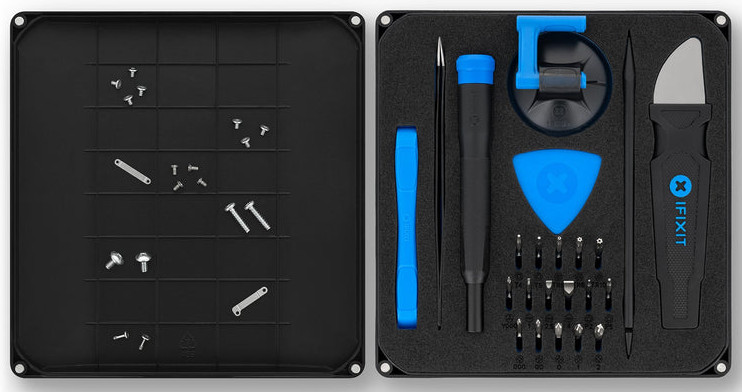
(Be careful pushing on the blue plastic triangular shims in the middle. There are a bunch of them and they will all suddenly pop out!)

And here's the laptop mid-replacement:
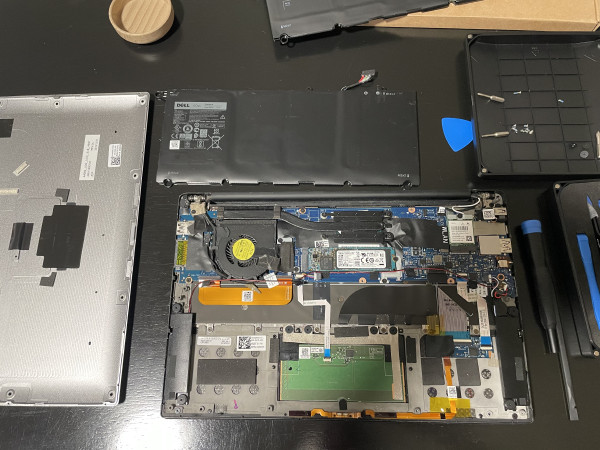
(The old battery is off the top of the photo. The new battery is the black rectangle in the top center. It goes over the touchpad, which is the green board at the bottom of the screen.)

A few years ago, I tried to replace the battery in my Samsung tablet. I had a hodgepodge collection of tools and ended up destroying the tablet. I was worried about doing the same thing to the laptop. But with the right tools, going slowly, and taking photos, I managed to replace the battery without any problems in under 30 minutes. (Now that I know what I'm doing, I could probably do it in 10 minutes without feeling rushed.) It was truly painless.

Calibration

After swapping the battery, the laptop wouldn't turn on. That's fine -- the new battery shipped without a charge. After 10 minutes of charging, I could turn the laptop on. (Good! I didn't break anything.)

The next step is to calibrate the battery. This isn't for the battery's health; it calibrates the software that reports how much power remains.
  • Typical batteries: With regular lead-acid and alkaline batteries, the output voltage is pretty linear. You can measure the voltage to determine the battery's remaining capacity.

  • Lithium-ion batteries: Lithium-ion batteries have a long, flat discharge rate. You can't just look at the voltage and determine how much battery time is left. During the flat discharge rate, the micro-voltage differences can be too small for the hardware to detect; there may be no measurable difference between 30% and 70% capacity. To estimate the remaining time, the OS uses a combination of measured voltage and a timer for how long it took to drain. For the calibration, you put it through a full charging cycle, full discharge, and full charge again. This helps the software guestimate the capacity during the flat discharge rate.
My laptop's battery is rated at 7.6V and 60Wh. With Windows, I was getting nearly 10 hours with the original battery. But now I'm on Linux, which consumes much less power. I had no idea how long this new battery would last.

To calibrate with Linux, you should remove the power history. This forces it to learn based on the new battery.
sudo systemctl stop upower
sudo rm /var/lib/upower/history-*
sudo systemctl start upower
Next, fully charge the battery. Let it charge for at least two hours beyond "fully charged".

The full discharge step is kind of a challenge, since the OS wants to be as efficient as possible. Turn off power-saving mode, turn off the screen saver, turn off suspend, etc. I gave it something to do: play the movie "The Bourne Identity" over and over until the battery was fully drained. (The computer will warn about low voltage, and then shutdown automatically. That's the full discharge.) With this new battery? I expected it to last for 12 or 14 hours. Instead, it ran for 30 hours! (I suspect that it was using a hardware-based video decoder which is very power-efficient, and letting the CPU itself effectively rest and consume flea power.)

The final full charge cycle probably only needed a few hours, but I let it go overnight.

With the new battery installed and calibrated, Linux reports "15 hours remaining". After five hours of use, I still have "14 hours remaining", and if I start compiling code, it drops to "10 hours remaining." I'm not too worried about the calibration's accuracy since it may take the OS time to learn. I might not be able to tell the time remaining with extreme accuracy, but I'm sure it will last an entire plane flight on travel days.

Right to Repair

There's an entire movement centered around the right to repair equipment. Being able to change a battery in a working device is one of those basic tenets. My Samsung tablet appeared designed to self-destruct when opened. My Dell laptop was built to be repaired, and the tools from iFixIt simplified this process. I'm sure my laptop is good for at least another seven years.

In my home town of Fort Collins, they are building a new library. This one will include an "innovation maker-space". They recently had an open house to discuss wants and needs with the community. People wanted everything from a 3D printer and laser cutter to sewing machines, button makers, and classes on gardening. One of the things that was repeatedly mentioned by attendees was a repair station. Whether it's a team of volunteers, one-time hands-on classes, or something in between, people have a strong desire to repair electronics before buying a replacement.

My successful weekend project is exactly why community maker-spaces are so vital. When manufacturers design hardware to be opened, and companies like iFixIt provide the exact toolkits to do it safely, fixing our own tech transitions from a stressful gamble to a rewarding afternoon project. We don't need to throw away perfectly good silicon just because a battery gets old. Keeping this laptop out of a landfill isn't just a win for my wallet, it's a small victory for a more sustainable, fix-it-first mindset.

The combination of a lightweight Linux OS, a fresh battery, and the right tools completely resurrected a piece of hardware that most people would have recycled years ago. It may not be the latest or greatest, but it's perfect for the next time I leave the office.

❌