❌

Reading view

There are new articles available, click to refresh the page.

Password Cracking: Stealing Credentials with PCredz

PCredz is a network credential analysis tool that examines packet captures to identify potentially exposed authentication data. Security professionals can use it to investigate insecure protocols, understand credential exposure, and identify weaknesses in network authentication.

Welcome back, fellow cybersecurity enthusiasts!

In this tutorial, we will explore PCredz, a tool used for network traffic analysis, credential exposure assessment, PCAP analysis, and authentication security testing. Rather than manually inspecting every packet, PCredz can help identify supported authentication artifacts within captured network traffic.

Understanding how credentials travel across a network is an important part of ethical hacking, penetration testing, incident response, and defensive cybersecurity. Analyzing these artifacts can help organizations discover legacy authentication protocols and reduce the risk of credential theft.

Official GitHub repository: PCredz on GitHub

1. What Is PCredz?

PCredz is an open-source tool designed to extract supported credential artifacts and other sensitive information from network packet captures. It is useful when examining traffic generated by older protocols or authentication mechanisms that may expose sensitive information.

Depending on the protocol and the available packet data, PCredz can identify artifacts associated with authentication mechanisms such as NTLM and Kerberos, as well as certain HTTP authentication methods and credentials associated with services such as FTP, POP, SMTP, and IMAP.

It may also identify other sensitive data patterns, including certain payment-card number patterns and SNMP community strings. Detection depends on the capture contents, protocol support, and tool version.

A critical distinction is that finding an authentication artifact does not automatically mean that a valid, reusable password has been recovered. Some protocols expose hashes, challenge-response exchanges, or other material that requires further analysis.

2. Key Features and Capabilities of PCredz

Network Packet Capture Analysis

PCredz can process supported packet capture files, making it useful for investigating previously recorded traffic. PCAP files may contain evidence of insecure authentication, accidental data exposure, or legacy protocols that should be reviewed.

Authentication Artifact Identification

The tool can help identify supported authentication-related data, including certain NTLM and Kerberos artifacts. These findings can support a wider security assessment of authentication configurations and network exposure.

Multiple Protocols

Depending on the captured traffic and implementation, the tool can inspect authentication exchanges associated with several common network services. Support for IPv4 and IPv6 traffic also makes it relevant to mixed network environments.

Structured Output

PCredz can write discovered artifacts to output files, including a credential dump file. Structured output helps security analysts review findings, document evidence, and investigate potential exposure without manually collecting every result.

3. When Would You Use PCredz?

PCredz is relevant to both offensive security assessments and defensive network investigations when its use is explicitly authorized.

Internal Security Assessments

Security teams can analyze approved packet captures to determine whether legacy services or authentication configurations expose sensitive data. The results can help prioritize the migration of insecure services and the improvement of network segmentation.

Incident Response

During an investigation, analysts may inspect existing packet captures for authentication artifacts associated with suspicious activity. Any discovered credentials or hashes should be handled as sensitive evidence and stored securely.

Legacy Protocol Audits

Older business environments may still contain services that use outdated authentication mechanisms or transmit information without adequate protection. PCredz can help identify evidence of these weaknesses when relevant traffic is available.

Security Training and Research

In a controlled lab, PCredz can demonstrate why encrypted transport, modern authentication, and strong network security policies matter. Students can compare insecure and secure authentication configurations using traffic generated specifically for the exercise.

Important: Only inspect traffic that you own or are explicitly authorized to analyze. Captured network traffic can contain personal information, session tokens, credentials, and other confidential data.

4. Installing PCredz on Linux

PCredz is available through its official GitHub repository. Before installation, review the repository's current instructions and dependencies. The commands below illustrate a basic Linux setup; exact requirements may vary with the current version of the project and your distribution.

Step 1: Install the Required Packages

On Debian-based systems, such as Kali Linux, update the package index and install Python virtual environment support and relevant development dependencies.

sudo apt update
sudo apt install python3 python3-venv python3-pip
sudo apt install libpcap-dev file git

Step 2: Clone the Official Repository

git clone https://github.com/lgandx/pcredz.git
cd pcredz

Step 3: Create a Virtual Environment

A Python virtual environment keeps project dependencies separate from system-wide Python packages. This is particularly useful on recent Kali Linux and Debian releases, where system Python environments are managed by the operating system.

python3 -m venv pcredz-env
source pcredz-env/bin/activate

Step 4: Review and Install Dependencies

Check the repository for its current dependency instructions before installing packages. If the project provides a requirements file, review it and install the documented dependencies inside the activated environment.

python -m pip install --upgrade pip
# If the repository provides requirements.txt:
python -m pip install -r requirements.txt

Do not assume that every version of PCredz uses the same dependency list. If installation fails, consult the official repository documentation and the error message before changing system packages.

5. Understanding Live Network Traffic Analysis

Live traffic analysis involves examining packets as they pass through a network interface. It can help authorized network administrators identify insecure authentication exchanges and investigate suspicious network activity.

Before performing live capture, identify the correct interface and verify that the capture is approved by the network owner. Interface names differ between systems, so do not assume that every machine uses eth0.

To list available interfaces, use:

ip -br addr

For an authorized assessment, follow the current usage instructions provided by the official PCredz repository. Confirm that the selected interface is appropriate and that the capture scope is limited to the approved environment.

Capturing on an interface does not guarantee visibility into all network traffic. Switching infrastructure, VLAN configuration, Wi-Fi encryption, virtualization, and network topology can affect which packets are observable.

6. Analyzing Existing PCAP Files

Offline PCAP analysis allows investigators to examine previously captured network traffic without continuously monitoring a live interface. This can be useful for incident response, security audits, and controlled training exercises.

PCAP files are commonly generated by packet analysis tools such as Wireshark and tcpdump.

Inspecting a Capture with Wireshark

Open the authorized PCAP file in Wireshark and examine the relevant protocols, endpoints, and authentication exchanges. Display filters can help narrow the investigation to specific protocols or conversations.

When reviewing a capture, pay particular attention to:

  • Services that use unencrypted or inadequately protected communication.
  • Authentication exchanges involving legacy protocols.
  • Unexpected connections to internal services.
  • Sensitive information accidentally included in application traffic.
  • Repeated authentication failures or unusual communication patterns.

Using PCredz for Offline Analysis

When using PCredz against an authorized capture, consult the current repository documentation for the supported command-line options.

The project's documented usage includes options for processing a capture file or a directory of captures. Confirm the precise syntax for your installed version before running an analysis.

After processing, store the results in a protected directory. Review the output carefully, because a discovered artifact may require additional context before it can be classified as a security finding.

Evidence-handling tip: Preserve the original capture, record its cryptographic hash when appropriate, document the analysis environment, and restrict access to extracted data. Avoid transferring confidential PCAP files to third-party systems unless that transfer is explicitly authorized.

7. PCredz and Hashcat: Understanding the Difference

PCredz and Hashcat serve different purposes in a security assessment.

PCredz identifies supported credential-related artifacts in captured network traffic. Hashcat is a password recovery and password-strength auditing tool that supports many hash formats.

Some authentication artifacts identified by PCredz may be suitable for further analysis with a compatible password-auditing tool. Compatibility depends on the exact artifact format, the protocol, and the supported mode in the installed version.

For example, Hashcat documents different modes for certain NTLM and Kerberos-related formats. A mode number must not be selected solely from a generic label: analysts should verify the exact format against the official documentation.

Hash analysis can help organizations determine whether their password policies resist common guessing attacks. A recovered password, however, does not by itself establish that an account is currently accessible or that the account has elevated privileges.

Official resource: Hashcat.

8. Security Risks and Defensive Measures

Credential exposure can allow an attacker to impersonate users, access internal services, or attempt further compromise. The actual risk depends on the credential type, account privileges, network architecture, and additional security controls.

Use Encrypted Protocols

Replace insecure protocols with appropriately configured encrypted alternatives. Use HTTPS for web applications and secure configurations for remote administration, email, and file transfer.

Strengthen Authentication

Use modern authentication mechanisms wherever possible. Disable obsolete authentication methods when they are no longer required, and enforce multifactor authentication for sensitive accounts and remote access.

Reduce Credential Reuse

Encourage unique passwords and use an approved password manager. Privileged accounts should have separate credentials and carefully controlled access.

Apply Least Privilege

Give users and services only the permissions they need. Segment sensitive systems and restrict unnecessary communication between network zones.

Monitor and Respond

Monitor authentication logs for suspicious access, repeated failures, unusual source systems, and unexpected use of privileged accounts. If credential exposure is confirmed, follow the incident response process, rotate affected credentials, and revoke compromised sessions where appropriate.

9. Common Misconceptions About PCredz

Does PCredz Crack Every Password?

No. PCredz is primarily used to identify supported artifacts in network traffic. Whether a password can be recovered depends on the data captured, the authentication protocol, and the availability of a compatible analysis method.

Can It Read Every HTTPS Password?

No. Properly configured HTTPS encrypts application traffic in transit. A normal packet capture generally cannot reveal the protected application contents simply because PCredz is being used.

Does Finding a Hash Mean an Account Is Compromised?

Not necessarily. A hash or authentication exchange must be assessed in context. Its security impact depends on the protocol, account status, password strength, and whether the artifact can be abused.

Is Live Capture Always Better Than Offline Analysis?

No. Live capture may help investigate current activity, while offline analysis is often more suitable for examining preserved evidence. The right approach depends on the investigation scope, authorization, and operational requirements.

10. Conclusion

PCredz is a useful tool for understanding credential exposure in network traffic. By examining authorized packet captures, cybersecurity professionals can identify authentication artifacts, investigate legacy protocols, and discover weaknesses that require remediation.

However, the value of PCredz goes beyond extracting data. Its findings can help organizations improve encryption, modernize authentication, reduce password reuse, and strengthen their incident response practices.

For anyone learning network security, the key takeaway is simple: understanding how authentication data moves across a network is essential to protecting it.

For more cybersecurity tutorials, ethical hacking resources, OSINT guides, and network security insights, visit Hackersking.


Topics covered: PCredz tutorial, PCredz Kali Linux, network credential analysis, PCAP analysis, network traffic analysis, NTLM authentication, Kerberos authentication, Hashcat, password security, ethical hacking tools, cybersecurity tools, incident response, network security, penetration testing, information security.
```

Attackers Abuse Legitimate Infrastructure to Distribute Phishing Emails

Researchers at Cisco Talos are tracking a significant increase in phishing campaigns that abuse legitimate platforms. Attackers abused more than 25 legitimate services over the past year, including “collaboration, productivity, file-sharing, survey, payment and AI-related platforms.”

In two campaigns, attackers used order notifications from Staples and Dell to distribute phishing messages. The organizations themselves were not compromised, but the threat actors inserted phishing content into the fields that were supposed to contain shipping information.

How Bad Is That Bridge: A Government Database

Bridges! We kind of expect them to just be there and do their job, ad infinitum. They are built into the landscape, and we often take them and the routes they open up for granted.

The reality, as any civil engineer will tell you, is that bridges are living, breathing things that require endless maintenance and monitoring to keep them safe, standing, and functional. A great example of this is found in the US Department of Transportation, and its publicly accessible register of bridge health reports.

Stay Standing

The thing about bridges is that we rely on them. They serve as vital transport links in our communities, ferrying people to and from work and school, and acting as the very arteries of commerce as trucks and trains haul goods to and fro. When a bridge crossing has to close, either for maintenance or at end of life, this link is severed, often with serious economic and logistical impacts. For that reason, we tend to like to keep our bridges in service as long as possible. The result, of course, is that if pursuing this goal means that proper maintenance and repairs aren’t seen to, there is a risk of collapse—which often comes with worse consequences. Loss of life is common when bridges fail, and replacing a collapsed bridge is often much harder and more time consuming than handling things properly ahead of time.

In the United States, it’s a well known fact that the bridges are getting old. The average bridge is 44 years old, which is bumping up against the 50-year service limit many were originally built for. Being an average number, it’s indicative that many bridges are exceeding that figure significantly. Obviously, a bridge’s age isn’t a perfect proxy for its condition, but closer examinations indicate there’s definitely a problem. A 2024 report from the American Road & Transportation Builders Association noted that 36 percent of US bridges are in need of repair or replacement, a total of 221,800 spans. 42,067 spans were considered to be in “poor” condition, which in their total see 168.5 million motorists crossing them every day. It’s a particularly sobering figure as it highlights the size of the disaster possible if these structures are to fail.

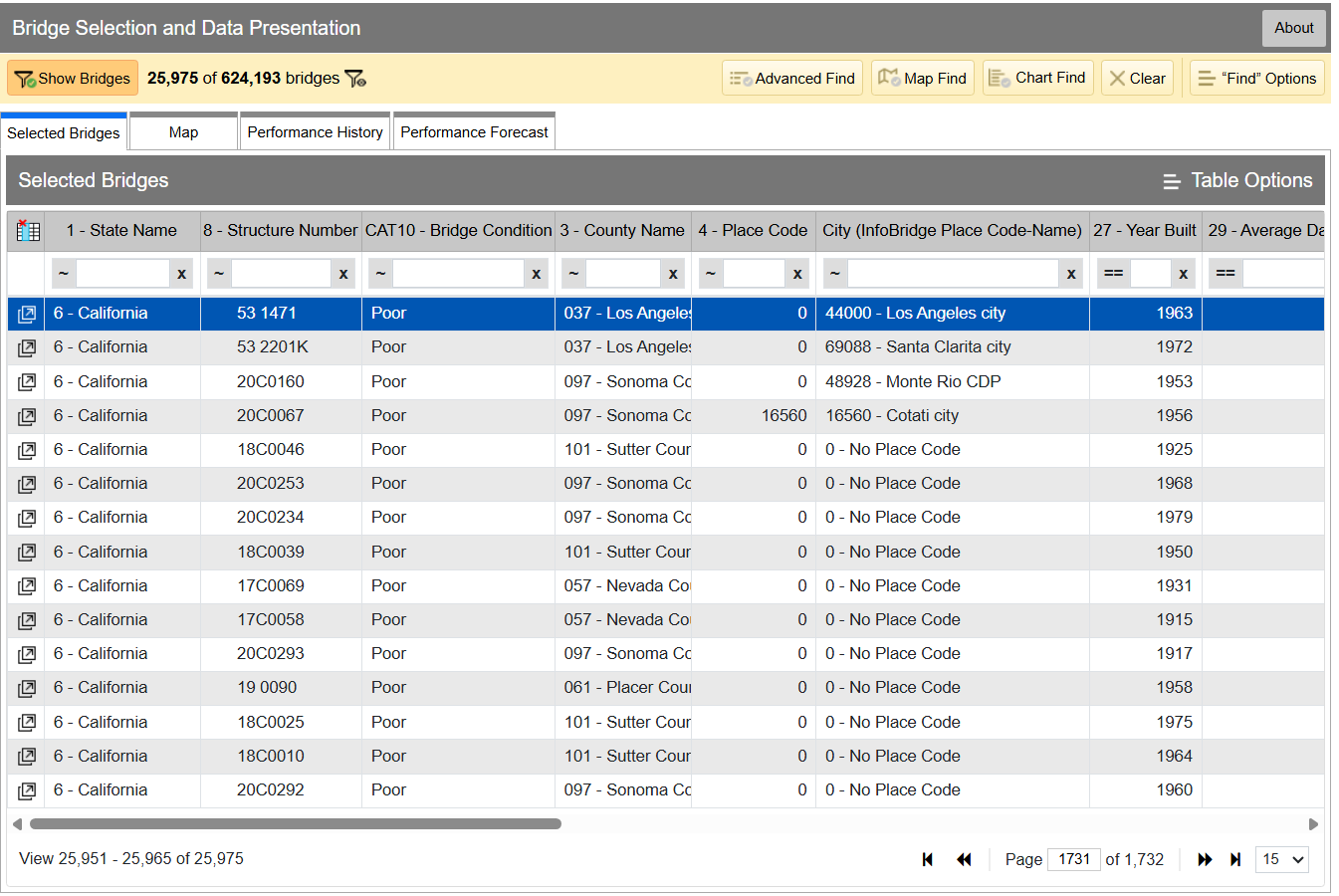
InfoBridge quickly lets you sort through data by all kinds of different factors. If you’re looking for the worst bridges in town, it’s easy to flick through CAT10 – BRIDGE CONDITION to see which bridges as listed as Good, Fair, or Poor. Bridges are rated on the condition of their deck, superstructure, and substructure, and the lowest scoring section influences which bin the bridge lands in, as per federal code—specifically, 23 CFR 490 Subpart D. Credit: InfoBridge screenshot

You can drill down into the data yourself if you desire. Within the Department of Transport, the Federal Highway Administration maintains LTBP InfoBridge, a database of information on bridges all across the country. It was developed by the Long Term Bridge Performance program, because the goal of the project is to understand how these structures hold up and perform over the decades. The database is publicly accessible, and serves as a portal for all the available data and statistics on how US bridges are doing. It hopes to enable everyone from state and federal authorities, to university students, faculty, and other researchers, to dive into bridge data and visualize and understand it better.

Data available is from a wide number of sources, including the National Bridge Inventory and National Bridge Element datasets, as well as climatic data collected from NASA’s MERRA-2 database. There’s also construction and design data sourced by the LTBP program, along with non-destructive evaluations that have been carried out. Data from various other special projects is available too, such as from Federal Highway Administration projects investigating timber bridges, steel weathering, and the use of ultra-high performance concrete structures.

Just glancing at the Vincent Thomas bridge won’t tell you how the structure is doing. Credit: The Port of Authority, CC BY-SA 3.0

If you have a particular bridge of interest, it’s easy to get a quick break down of how it’s doing. For example, you might like to know about the Vincent Thomas Bridge, in Los Angeles, California: National Bridge Inventory number 53 1471. It links San Pedro with Terminal Island, and is a suspension bridge with a total length of 6,060 feet and a longest span of 1,500 feet. Built in 1963, we can see from the data alone that it’s now showing its age.

The bridge condition is listed as “Poor,” and if we dive deeper into the National Bridge Elements data, we can see why. The health indexes of the deck, substructure, and superstructure have all been trending down in recent years as the bridge’s age has increased, with a particular drop off from 2019 or so. In particular, the steel cables and girders on the bridge have been showing their age, and the concrete columns supporting the bridge have been similarly degrading. The deck, too, is in need of repair, with the California Department of Transport recently dedicating some $706 million to replace it ahead of the 2028 Olympic Games.

However, InfoBridge will let you drill down into detailed reports on the bridge conditions, down to a level which indicates which parts of the bridge are most in need of maintenance, repair, or replacement. Credit: Screenshot, InfoBridge

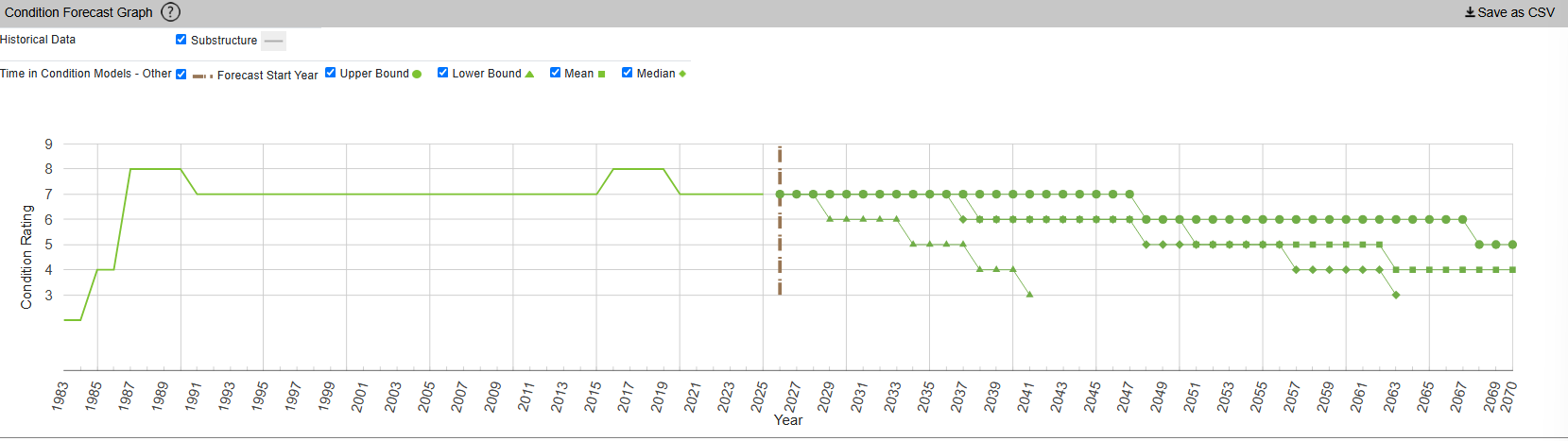
InfoBridge also offers condition forecasts for many bridges across the country. For example, the 24th Street Bridge over Rio Linda Creek is currently listed as being in “Good” condition. Current forecasts show that the deck and superstructure is expected to be in much poorer shape somewhere between 2035 and 2055, while the substructure is expected to hang on in good shape for a bit longer.

The Long Term Bridge Performance Program has developed a variety of models—base, survival, and machine-learning—to predict bridge condition over time. The aim is to guide maintenance efforts over time and allow for better planning. Credit: InfoBridge, screenshot

You might think that you’d have to query a government department and delve deep into some dusty records room to learn about the condition of your local bridges. Instead, thanks to the efforts of diligent civil servants, you can instead access all the rich inspection data you like from the comfort of your own web browser. It’s not just good for citizen oversight, either. It aids local authorities and bridge owners in making the right decisions, by putting the necessary data right at their fingertips.

It also creates a certain level of accountability—having the data available means there’s little room for anyone to make excuses that they were unaware of a bridge’s condition prior to something going wrong. Ultimately, it’s just one arm of a project that hopes to take US bridges safely long into the future.

Featured image: “Brooklyn Bridge – New York City” by [Simone Roda]

Job Seekers Who Use AI for Applications Need to be on the Lookout for Scams

Researchers at Malwarebytes warn that job seekers are increasingly vulnerable to scams as AI enables them to take a “spray-and-pray” approach to job applications.

Users who have automated their job application process are more likely to forget where they’ve applied, and an unsolicited message from a recruiter may seem more plausible. Job seekers can also be more willing to overlook or ignore red flags associated with scams, since they’re anxious to avoid missing an opportunity.

Warning: Calendly Phishing Pages Are Targeting Job Seekers

Researchers at Malwarebytes warn that a phishing campaign is using spoofed Calendly pages to trick users into handing over their Facebook and Google account credentials. The phishing sites pose as Calendly booking pages for job interviews at Meta, asking users to enter their information to sign up for a phone call with a recruiter.

Floating-Point Addition and Subtraction on Intel’s 8087

Although you can do basic floating point format operations like addition and subtraction just fine on any CPU, having specialized hardware for it can provide a significant speed boost. Here Intel’s 8087 was the first mainstream floating-point coprocessor to provide this option to a wide audience, with [Ken Shirriff] recently reverse-engineering using an 8087 die how these basic operations were implemented.

The real-world speed-up of even simple operations like adding two floating point numbers compared to the 8086 CPU was on the order of a hundred times, which is very relevant the moment you start doing interesting things with spreadsheets, not to mention rendering 3D scenes in CAD software or even games.

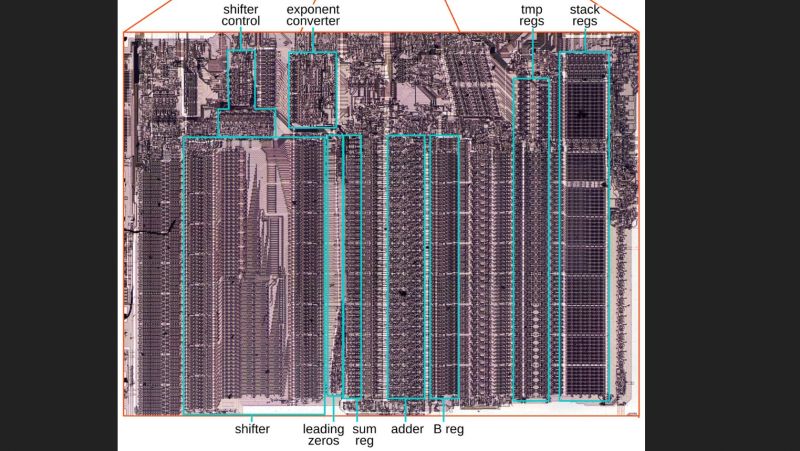
As always, the devil is in the details, with sneaky infinities and edge cases also providing the biggest potential for speed-ups in dedicated silicon, along with the large circuitry spent on the shifter. With floating point values being very much about aligning values with shifting by a number of bits, this circuitry along with the detecting of over- and underflows is the key element why the 8087 and its successors were so crucial in making floating-point operations at all feasible in PC applications.

How this shifting works in theory is detailed in the article by [Ken], along with how the 8087 implements this in its circuits. Naturally, a large part of this is implemented in microcode, the listing for which is also provided. From this it’s quite clear how what seems like a simple set of operations is actually quite complex, making even the now much maligned x87 ISA an improvement over doing it all in integer-based software.

‘Difficult relationship’: UW task force proposes splitting Allen School from College of Engineering

The Paul G. Allen Center, a brick building with a banner for the Paul G. Allen School of Computer Science & Engineering, on the University of Washington campus.
The Paul G. Allen Center on the University of Washington’s Seattle campus, home to the Allen School of Computer Science & Engineering, which a university task force has recommended separating from the College of Engineering. (GeekWire Photo / Kurt Schlosser)

University of Washington leaders are weighing whether to separate the Allen School of Computer Science & Engineering from the broader College of Engineering, after a task force recommended the move as part of proposed changes to UW’s computing and AI programs.

The split would give new independence to what has become one of the world’s leading schools for computer science and AI, and a major source of talent for the Seattle region’s tech industry.

As an independent, college-level school, the Allen School would gain greater control over its finances and a seat at the table with UW’s other deans. It could also put more of its own revenue toward teaching, as student demand for computing courses continues to outstrip its capacity.

The task force’s report, released this week, concluded that UW’s successes in computing, data science and AI have come “not because of the organizational structures we have in place but in spite of them.” The nine-member group included UW faculty leaders from across campus, two outside academics and an Amazon executive.

The report also described a “difficult relationship” between the Allen School and the College of Engineering, and “significant distrust” across campus over resources and priorities.

Portrait of Nancy Allbritton, dean of the University of Washington College of Engineering.
Nancy Allbritton, dean of the UW College of Engineering, said the college supports the university’s decision to “carefully evaluate” the task force recommendations. (UW Photo)

UW Engineering Dean Nancy Allbritton, in a statement to GeekWire on Tuesday, called the relationship “complex rather than difficult.”

The College of Engineering supports the university’s decision to “carefully evaluate” the task force’s recommendations, Allbritton said. She praised the Allen School and said the school and college share a long history of working together, with a commitment to students, research and service to Washington state.

The stakes extend well beyond university politics: The Allen School’s graduates are in high demand across the tech industry. Nearly 100 graduates from the 2025-26 class went to work full time at Amazon, and more than 70 went to Google, Microsoft or Meta, according to a survey of recent graduates by the school. In all, graduates went to more than 150 different companies.

No decision yet: UW President Robert J. Jones and Provost Tricia Serio said Monday that they aren’t making a decision yet. In a letter to the UW community, they announced two implementation committees.

  • One committee will plan for a possible independent Allen School, including its finances. The letter calls the continued strength and growth of the College of Engineering “a central consideration.”
  • The other will develop plans for a new campus-wide “Federation of Information, Computing and Society,” which would coordinate computing, data science and AI work across UW, including fundraising, and hold its own funding for hiring across departments.

Both committees are due to report by the end of winter quarter 2027, and UW leaders plan to announce next steps in spring 2027. Any changes would still need approval through the university’s usual processes, including the Faculty Senate and Board of Regents, with a goal of putting them in place by the end of the 2027-28 academic year.

The task force was co-chaired by Andy Connolly of UW’s eScience Institute and Kathy Yelick of Lawrence Berkeley National Laboratory. Its other members were Dan Grossman, now the Allen School’s interim director; Remzi Arpaci-Dusseau of the University of Wisconsin; UW’s Elizabeth Nance (chemical engineering), Abel Rodriguez (statistics), Emma Spiro (Information School) and Peter Tarczy-Hornoch (UW Medicine); and Anne Szeto of Amazon.

Allen School faculty voted 83-0 in late September in support of “moving forward with a process to determine how the Allen School would become an independent school,” with 13 not voting because they were absent or on leave, according to the school. A formal decision and vote would follow that process, the school said.

Budget and a seat at the table: The issue comes down to money and influence. UW’s budget model sends tuition and a share of research grant funding to the college where the courses are taught and the research is based.

For the Allen School, that’s the College of Engineering. As an independent school, the Allen School would control those funds directly, and its leader would sit with UW’s other deans when the university sets strategy on AI and other priorities, a voice the task force says computing has largely lacked.

UW’s Information School already operates as an independent, college-level unit. But the report says its focus on the human, societal and organizational side of computing and information is different from the Allen School’s focus on computing as a discipline.

Dan Grossman, interim director of the Allen School, has been invited to participate in UW’s Board of Deans and Chancellors. (UW Photo)

As an initial step, Jones and Serio invited Grossman to participate in the Board of Deans and Chancellors. The letter says the move is “independent of any future decision about administrative structure.”

In a message to the Allen School community, Grossman called the invitation “a reflection of the Allen School’s scale and reach,” adding, “I’m pleased to have this opportunity to make meaningful contributions to discussions among UW’s leaders.”

He described the task force’s proposals as “exciting recommendations that will be great for the whole of UW and its impact on Washington state and beyond.”

Grossman also said there are “no planned changes to the Allen School’s structure, staffing, budget, policies and procedures, or degree programs” while the committees do their work.

A longtime Allen School professor and its former vice director, Grossman was named interim director this summer when Magdalena Balazinska’s nearly seven-year term as director ended. At the time, UW said it was opting for an interim leader for about a year while it weighed the task force’s recommendations, which hadn’t yet been made public.

The board seat was one of several early steps the task force recommended to show that UW was committed to the process. The task force also suggested having the Allen School’s director report jointly to the provost and giving the school more control over its budget, but UW hasn’t taken those steps for now.

Microsoft co-founder Paul Allen speaks at UW in March 2017, when his $40 million gift turned the university’s computer science department into the Allen School. Allen died in 2018. (GeekWire Photo / Kevin Lisota)

Rooted in Paul Allen’s gift: The prospect of independence goes back to the Allen School’s creation in 2017.

When a $40 million gift from Microsoft co-founder Paul Allen turned UW’s longtime computer science department into the Allen School, the gift agreement said the school would “remain a unit of the College of Engineering, at least for the time being,” according to a copy obtained by GeekWire.

The agreement called for the school to receive the same prominence, visibility, support and privileges as UW’s other schools and colleges “to the greatest extent possible,” and anticipated that it could someday become “a free-standing School or College.”

The agreement also spelled out what would happen to the name if the school were ever “elevated to a College of the University”: it would change to reflect the new structure, but would “always prominently include” Allen’s name.

Impact on Engineering: The College of Engineering would lose its largest unit. The Allen School, which awarded 894 of the college’s 3,132 degrees in 2025-26, accounts for a little more than a quarter of the college by degrees, enrollment and faculty, according to figures from the college.

The report acknowledges “significant short- and long-term financial implications” from a separation and suggests options such as permanent financial support for Engineering to offset the loss.

Allbritton said the college is committed to helping shape an outcome that “strengthens the College of Engineering, strengthens computer science as an independent discipline, and advances the University of Washington’s broader mission of innovation, discovery, economic opportunity and public impact.”

The Allen School “is an extraordinary unit that has experienced remarkable growth and operates at a scale unlike any other department in the College,” she said. “As both organizations have evolved, there have naturally been questions about structure, governance, and how best to support future growth.”

She also noted that the College of Engineering has nearly doubled in size over the past decade “amid increasingly constrained public resources,” and said the college’s focus is on ensuring that students, faculty, staff, research partnerships and industry relationships “continue to thrive.”

“What has remained constant is a shared commitment to student success, research excellence and service to Washington state,” Allbritton said.

The report doesn’t detail the friction between the Allen School and Engineering. It says independence “does not directly address concerns voiced about collegiality” but could remove “a structural asymmetry that has complicated those relationships.” Opinion across campus on Allen’s independence was “genuinely divided,” the report says.

The federation’s role: The proposed federation is partly a way to keep the rest of campus on board. Other units worried that the Allen School would win independence while the federation never got real resources, according to the report, which recommends that the split not be finalized until the federation is up and running.

Much of the “distrust” cited in the report centers on whether one recommendation would advance at the expense of the other.

If the Allen School’s separation is finalized first, the report says, “other stakeholders are unlikely to trust that the federation will ever achieve the size and stature it needs.”

If the federation moves ahead without a clear commitment to independence, the Allen School and its supporters “are unlikely to trust that their important contributions toward the federation’s success will achieve meaningful change.”

The Allen School is already helping lead cross-campus efforts, including a new AI minor for students in all majors, developed with 18 academic units and set to launch in spring 2027.

Toward a college of computing: Other top universities have taken similar paths. Carnegie Mellon and Georgia Tech run computer science as standalone, college-level schools, while MIT, UC Berkeley and Cornell have created broader colleges of computing, according to the report.

Peer institutions’ computing colleges were “frequently propelled by a transformational naming gift,” the report notes, as with MIT’s Schwarzman College of Computing and Cornell’s Bowers College of Computing and Information Science.

The report describes the federation as a possible “transitional phase” toward a full College of Computing at UW, which would house the Allen School alongside other units, and recommends revisiting that idea in about five years.

Correction: An earlier version of this story overstated the Allen School’s size relative to the rest of the College of Engineering. The story has been updated with figures from the college.

Charlotte’s New Runway Gets A Digital Twin

The first viable powered aircraft predated the first proper runway by two decades. While it’s entirely possible to launch some planes from austere dirt or grass strips, the aviation world eventually realized that aircraft would be better off launching from a flat, paved surface.

Over the years, paving technology has gradually improved in the aviation world as it has for roads and highways. Now, there’s a project being built in Charlotte with new digital features that hopes to push the state of the art of runways even further.

Twinsies

Charlotte Douglas International Airport (CLT) serves the city of Charlotte, North Carolina. It’s by no means the most famous airport in the United States; it wouldn’t make the top 10 in notoriety despite being the 11th busiest in the country).. Still, it serves as a major hub for American Airlines, and has three operating runways that are interesting for the fact that they are all laid out parallel to each other.

Much of the work will involve embedding strain gauges in the runway to monitor how loads affect the structure when the runway is in use. Credit: CLT press release

The airport’s major grand project of late has been the installation of its fourth parallel runway, with the official ground breaking taking place in June 2023. The hope is that the new 10,000 foot runway will add significant capacity for both arrivals and departures to keep the airport competitive while also adding resilience in difficult operational conditions. As the new runway is built, the existing runways have been renamed to 19R/1L, 19L/1R, and 18/36 respectively. The fourth runway will wear the designation 19C/1C.

The new Fourth Parallel Runway, as it is otherwise currently known, will be unique for its “smart runway” features. Unlike a smart fridge, smart oven, or smart bulb, it doesn’t just mean that the runway will have a pointless and annoying WiFi connection and dodgy smartphone app. Instead, it’s all about sensing and telemetry, which is intended to create a better understanding of the runway and its performance and state over time.

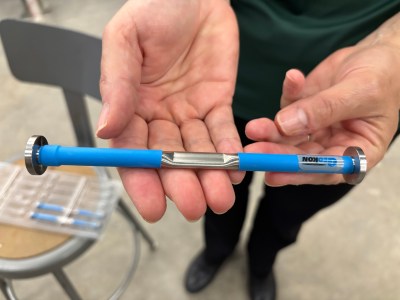
The strain gauges, seen here assembled on rebar, are to be embedded in the concrete itself, where they will provide the most useful readings. However, this does mean that the sensors will not be practical to maintain or repair over time. Their expected lifetime is approximately ten years. Credit: CLT press release

During construction, over 2,000 sensors will be installed in the 18-inch deep concrete being poured to lay out the Fourth Parallel Runway. The sensors in question will be used to measure everything from engineering basics like stress and strain, as well as tracking factors like moisture ingress, settlement, friction, and the presence of snow and ice.

The sensors are no different from those that have been deployed on highway bridges and interstates previously for similar purposes. However, this will mark the first time that a US runway has been similarly instrumented in such a way, such that the airport can create a “digital twin” of the runway.

Jointmeters will also be installed in the runway to measure the behaviour of expansion joints in the runway. Credit: CLT press release

This is effectively a digital model that is fed by the sensor data and helps authorities determine the condition of the runway, both from an engineering and operational standpoint. Moisture, snow, and ice sensors can be used to guide the employment of deicing resources and what measures to take on the ground, while monitoring the stress and strain on the runway will guide maintenance decisions over the runway’s lifetime. The latter in particular will provide a very clear idea of how aircraft operations are impacting the very structure of the runway itself. The hope is that this data will be a boon for implementing predictive maintenance. In a busy airport, preventing a time-consuming runway shutdown with a little well-placed maintenance could save huge amounts of money by preventing or limiting the number of flight cancellations, to say nothing of the reduced frustrations for travellers passing through.

Of course, the problem with embedding sensors in 18 inches of concrete is that it’s not particularly easy to get at them for service or replacement purposes. The runway’s sensor system is slated for an expected life of 10 years, during which time data will be collected to better understand the runway and its performance and robustness over time. The hope is that by learning exactly what’s going on in the concrete itself, engineering lessons could be learned on how better to build runways in future. It could lead to new guidelines on concrete mixes, thickness, density, or other factors that influence how long the runway holds up under heavy use by commercial airlines. Despite the limited sensor lifetime, though, the runway itself is expected to last much longer, with the pavement itself slated for 30 to 40 years of use.

Embedding sensors into runways won’t always be a seen as a necessity. It’s perfectly possible to build a runway that doesn’t have telemetry, and just exists as a big old slab of concrete that takes a pounding from air traffic on the regular. However, where a greater understanding of the pavement is desirable, instrumentation can help. Time will tell if the lessons learned from the new CLT runway prove useful enough to justify the investment—but it’s easy to imagine that it would only take a couple of runway shutdowns to be avoided to pay for the $6.5 million project cost. Time will tell!

NIS2 Part Two: How Stolen Vendor Data Fuels Downstream Attacks

In part one of this NIS2 series, we examined why vendor questionnaires fall short and how third-party breaches impact downstream organizations across Europe. But what happens after a supplier containment phase ends? The long-term danger lies in how attackers leverage exfiltrated supplier data to launch hyper-targeted social engineering attacks against an organization’s employees.

Social Engineering: Exploiting Human Psychology in Offensive Security

Welcome back, aspiring pentesters!

Social engineering is one of the most important parts of pentesting, and in many real attacks it’s the part that decides whether the whole operation succeeds or fails. Sometimes it even makes the technical side easier. 

Earlier we looked at BadUSB attacks and several persistence methods, and those examples already showed how much can be done when a person simply plugs in a device or follows a convincing instruction. In a pentest, you can achieve real impact after just walking into an office and interacting with the environment without breaking into the corporate network remotely and hoping some serious vulnerability was left unpatched.

Many pentesters are stronger with systems than with people in everyday life. That’s one reason they gravitate toward technical work. Social engineering forces them to step out of that comfort zone even further. But understanding how people make decisions is a practical skill. When you design a scenario with human behavior in mind, the success rate of your interactions can rise. That’s why both red teams and blue teams will benefit from it. 

Evolutionary Legacy

The brain is an old application. It’s software that has been running for thousands of years. New features have been added over time, but the core logic was never fully rewritten. Different developers came and went. Some old functions were never documented. Some code paths were never reviewed. The system kept growing, but the original structure remained inside it.

That is a pretty good description of the human brain.

Our brains are the result of evolution, and the most vulnerable mechanisms are often the oldest ones. These mechanisms helped our ancestors survive in situations where there was no time for deep analysis. We cannot delete that legacy. We can only learn to control it at a higher level of thinking. But the older layer is still there, and every person remains vulnerable to it in the right conditions.

Who Is More Vulnerable?

If you follow the media, you might get the impression that older people are always the easiest targets. Stories about elderly victims are emotionally powerful, so they get more attention. But that does not mean the data supports the stereotype in a simple way. Europol statistics on fraud victims who reported to the police show that the 18-34 age group made up 27.7 percent of victims, the 35-54 group 23.4 percent, the 55-64 group 21.7 percent, and the 65+ group 18.5 percent. That already shows that younger adults are very much in the picture. And that is only the official reporting side.

Age itself does not seem to make a person automatically more or less likely to be deceived. Cognitive ability also does not give the protection many people assume. A joint study by several American universities involving 1,220 participants found no meaningful correlation between cognitive ability and the likelihood of becoming a fraud victim. So being smart does not make you immune. Even very intelligent people can be tricked. Paul Frampton, a respected particle physicist and Nobel Prize candidate, was caught in a simple dating scam that led him to attempt to carry cocaine across a border. That case became famous not because he was foolish, but because it showed that intelligence alone does not protect a person from manipulation.

Vulnerable Optimization

The human brain has barely changed in size for thousands of years, but the amount of information we ask it to process has exploded. An ancient Greek farmer had roughly our brain and a tiny fraction of our information load. Today we face constant messages, deadlines, alerts, meetings, and decisions.

To cope, the brain optimizes. One of its oldest shortcuts is stereotypical sequential behavior (SPB). I’ve seen something like this before, so I’ll react quickly instead of thinking it through. This saves energy and speeds up decisions, which was vital for our ancestors since a fast response to danger could save a life. It’s the short route in thinking, faster and cheaper than analysis, and usually good enough.

Giving a logical reason can raise the success rate, but surprisingly, even a meaningless reason works almost as well. The brain didn’t evaluate the explanation, it simply reacted to the fact that one existed.

A phishing email with a short explanation (edited). Source: CaniPhish

Brain DoS

One of the easiest ways to force the brain into this energy-saving mode is to overwhelm it.

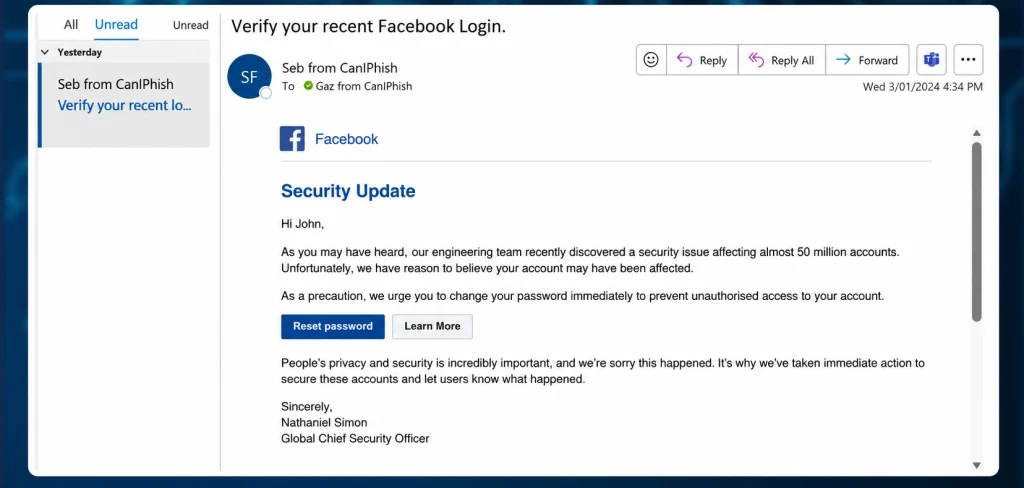
Emotional overload is one method. If someone triggers fear, stress, panic, or even strong excitement, they reduce the victim’s ability to think clearly. A frightened person doesn’t evaluate things carefully. They react, and that reaction is often automatic. Positive excitement can work too.

Hackers try to flood the brain with too much information from too many channels at once. A person trying to write a document, answer messages, listen to a coworker, and process notifications in the background will burn out mentally pretty fast. In that state, analysis gets difficult and the brain starts skipping into automatic behavior. That’s why overload is such a powerful social engineering tool. It pushes people away from deliberate thinking and into fast reaction.

A phishing email exploiting fear. Source: CaniPhish

Most Common Psychological Exploits

The psychology of influence contains many principles, and they show up everywhere, in marketing, advertising, sales, politics, therapy, and more. But for a hacker writing a phishing email or planning a phone script, only a few of these tend to matter most.

The three big ones are authority, scarcity, and consistency.

Principle of Authority

People naturally trust experts in areas where they themselves aren’t experts. If someone appears qualified, successful, wealthy, or powerful, we tend to listen. That’s part of how we navigate the world.

The real vulnerability is that authority can be faked.

People use white coats on television to sell toothpaste. So-called success coaches pose in front of expensive cars or Dubai skyscrapers to create an illusion of status. Well-known restaurant chains use actors from popular TV shows to advertise food. That’s exactly how fake authority works. The external costume creates the internal belief.

The Milgram experiment is a good demonstration of this. In 1963, participants were willing to obey an authority figure even when it made them uncomfortable and conflicted with their own moral instincts. The lesson is that authority has a very real psychological effect. Evolution plays a part here too. Human society developed through division of labor, and that made us more dependent on specialists. We got used to trusting experts. Hackers abuse that instinct all the time.

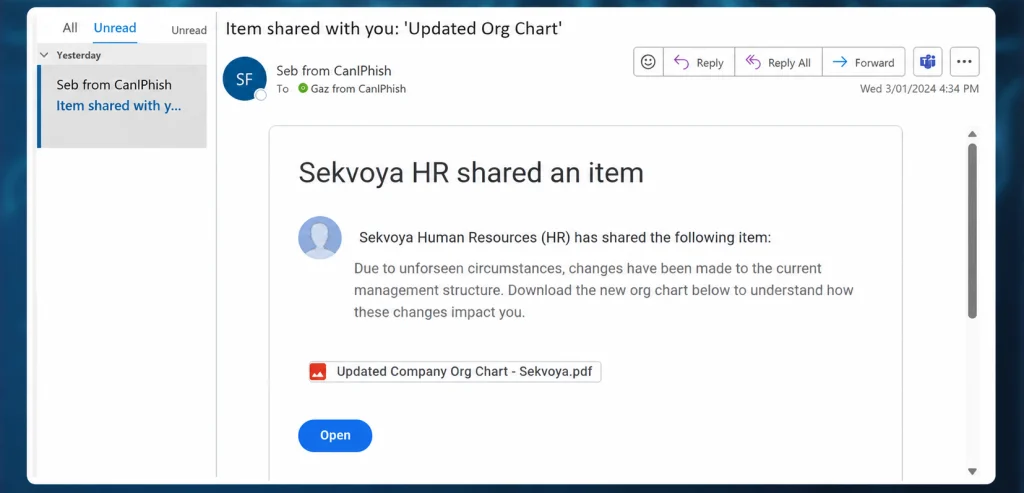
Here’s an example of a phishing email that appears to come from a manager and can’t be ignored.

A phishing email exploiting the principle of authority (edited). Source: CaniPhish

Principle of Scarcity

Scarcity is about the fear of missing out. People value things more when they are rare, limited, or disappearing. A product that says “only three left” feels more urgent. A limited-time offer feels more valuable. Even when the item is not actually better, scarcity makes it feel that way. This is an old human pattern. Imported or hard-to-find goods often seem more valuable than ordinary local alternatives, even when they are not objectively better. The absence of abundance created desirability.

Principle of Consistency

Consistency is one of the least obvious but most effective manipulation principles. 

People prefer to be consistent with their earlier actions and statements. Society rewards consistency. A person who constantly changes their opinion is often viewed as unreliable or weak. A person who follows through is seen as stable and trustworthy. That social pressure matters a lot.

The problem is that being consistent is not the same as being correct. Once a person takes an initial step, they often become more willing to continue in the same direction. That saves mental energy and reduces self-doubt. It also fits the brain’s tendency to follow a behavioral script instead of starting analysis from scratch each time. Patricia Pliner’s study showed this clearly. Participants who first wore a badge supporting cancer research were later much more willing to donate to the cause. The first small commitment made the second one easier.

When a victim has already made a small commitment, continuing becomes easier than stopping.

Exploitation

To turn these principles into real social engineering operations hackers build scenarios. That scenario is most effective in a phone call, because a call allows hackers to guide the victim step by step and react to hesitation. Email phishing can also use these ideas, but the room for dynamic adaptation is smaller. The best phishing messages are not necessarily the loudest. They are the ones that fit the target’s mental state at the exact moment of delivery.

Emails and the 7% rule

In many social engineering assessments, a pattern appears again and again. When you send a large batch of phishing emails, a certain percentage of recipients will almost always act. The exact figure changes by organization, but the baseline rarely disappears.

Even when companies train users, run simulations and repeat awareness courses, there is often still a small percentage of people who click or respond. Why? Because at that moment, some of them are tired, stressed, busy, distracted or simply overloaded. At that moment, the person does not reach the analysis stage.

That is why training alone is not enough. Training helps, but it does not eliminate the human condition.

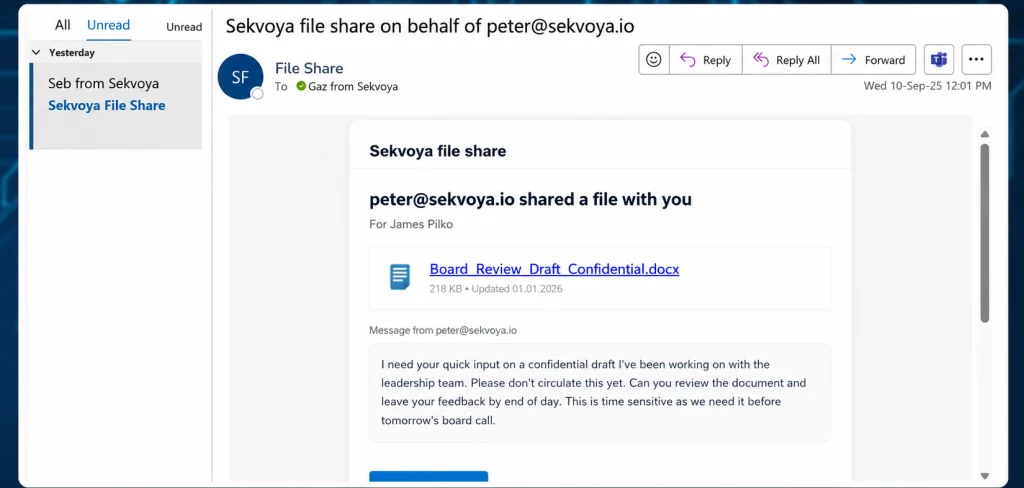
A phishing email triggering excitement. Source: CaniPhish

The most effective emails are often the ones that trigger stress or excitement directly. A message that creates urgency or a strong emotional reaction can overpower careful thinking. Once that happens, hackers move into the next steps.

Trigger Bypass Techniques

Most people have simple mental triggers that hold up even under pressure. The trick is that attackers can sometimes bypass those triggers by shifting the context.

A person might say they never share passwords. But that rule can get bypassed if the attacker presents a password generator, an IT support request, or a command they’re told to run for verification. The target can still believe they’re following their rule, even while being manipulated out of it. Verification habits can also be bypassed with fake signatures, familiar names, or a two-step sequence that starts with something safe. A short first interaction lowers suspicion, and then a second one carries the real pressure. That’s often more effective than starting aggressively. Company rules can be bypassed by changing the frame. A USB drive disguised as a personal gift feels different from an unknown device dropped on a desk. The same object reads very differently depending on the story around it.

That’s why social engineering isn’t about one universal trick. It’s about adapting the story to the trigger.

Protection

For companies, the best defense is a mix of organizational measures, technical controls, and incident response. Training lowers the success rate of simple attacks. Technical controls reduce the damage when someone does make a mistake. And since no defense is perfect, response procedures matter too. Organizations need to know what to do when a suspicious message, call, or request slips through.

Individuals should not be afraid to refuse. Don’t feel obligated to be polite when something feels wrong. If a call creates stress, stop and think instead of reacting automatically. Never make important decisions while overwhelmed. Learn to recognize manipulation patterns, and don’t keep a suspicious conversation going just because the other side sounds official.

Sometimes the safest choice is just to hang up.

Summary

There’s no guaranteed technique for success, and no guaranteed protection either. Human beings are vulnerable because evolution made us efficient, not perfect. That efficiency helps us survive, but it also gives social engineers a way in.

To reduce the probability of these attacks, we offer our Security Awareness and Risk Management training for companies. For pentesters, we offer The Science and Art of Social Engineering, where Master OTW walks you through the tools and techniques needed to become an effective social engineer.

The post Social Engineering: Exploiting Human Psychology in Offensive Security first appeared on Hackers Arise.

So You Want To Make Your SDR Work On Other Frequencies

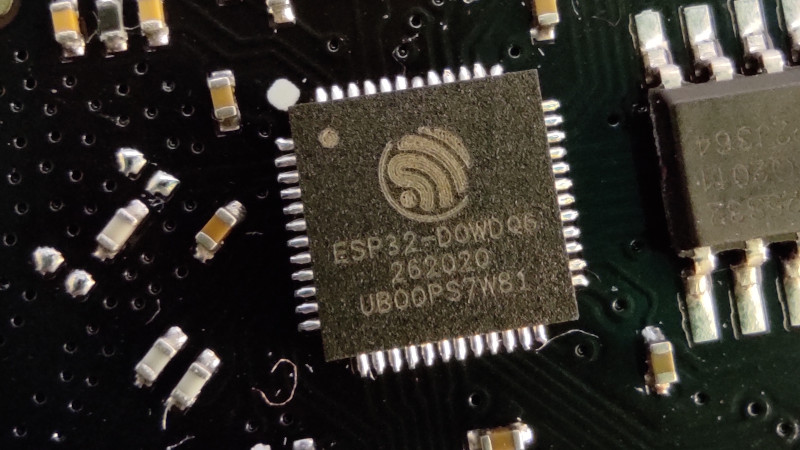
Perhaps the most exciting news of the past few weeks in the world of hardware hacking has been the unlocking of hidden SDR functionality in the Wi-Fi radios found on Espressif ESP32 microcontrollers. They can be used as both transmit and receive SDRs, and given that it’s early days for this hack we expect that great things are yet to come.

There’s one snag though, despite speculation that they might be dragged down to much lower frequencies, as far as we know they’re only proven to work around the Wi-Fi frequencies. Though the reality may be wider we’ll take that for a 2.4 GHz part as a 100 MHz slice from 2.4 GHz to 2.5 GHz. Plenty of possibilities there, and they might even work down to 1.8 GHz, but there would be so much more to do if it could work elsewhere in the spectrum. So it’s time to look at the converter, a tried and tested old way to make a radio work on a different frequency.

A Lesson From Analogue Receivers

TV tuner front end block diagram. Derived from Chetvorno (Own work) [CC0], via Wikimedia Commons
TV tuner front end block diagram. Derived from Chetvorno (Own work) [CC0], via Wikimedia Commons.
I hope most of you will be familiar with what happens when you mix two frequencies; the resulting spectrum contains both their sum, and their difference. This was the mechanism behind the tuning dial on your analogue radio or TV, the dial moved an oscillator, and a sensitive circuit tuned to a so-called intermediate frequency would filter out the difference frequency between the oscillator and the station you wanted. A few years ago we had a deep dive into the UHF hackers playground of an analogue TV tuner, where we examined this in depth.

A converter uses exactly this principle. The antenna frequency range is mixed with the output of a fixed oscillator whose frequency is chosen so that their difference represents the frequency band of your radio. THus tuning your radio tunes across the output of your mixer, which is the same as tuning across the antenna frequency range. For a numerical example, if the ESP32 receives from 2.4 GHz to 2.5 GHz, a mixer on its input with a 2 GHz local oscillator would allow the ESP32’s receiver to pick up the 400 MHz to 500 MHz band. In practice the circuit requires filters for both input and output to keep out-of-band stuff from going where it shouldn’t, but it really is that simple. Best of all, with appropriate handling of power and amplification, it works for transmitters too, and such a device is called a transverter.

Towards An Achievable Receive Converter

To make a practical converter then, we need an input filter, a mixer, an output filter, and a local oscillator. The filters are often off-the-shelf parts and needn’t be too expensive, the mixer can be as simple as a fast Schottlky diode, and the local oscillator could even in this case be another ESP32, they’re that cheap. You can add amplifiers if you want and what I am about to describe is a somewhat janky receive converter, but it can be made to work.

The Filter

A very simple Pi network low pass filter

In most cases such a converter will be intended to receive signals lower than the ESSP32’s range, so let’s assume you’re looking somewhere from HF through to VHF. The input filter has to reject anything above your maximum input frequency and stop any stray local oscillator leakage to the antenna, which most of you will identify as a low-pass filter. These can be bought off the shelf for a price, but are easy enough to make for yourself.

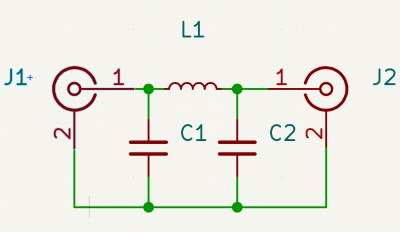
The most common low pass filter is often referred to as a Pi network because its circuit superficially resembles a Greek letter Pi, and takes the form of an inductor in the signal path with a capacitor to ground either side of it. If you know your maths you can calculate the values for yourself, but if you don’t there are many online Pi network calculators to help you. Constructing a Pi network at these frequencies is straightforward enough.

For the output filter, you need something that rejects the local oscillator frequency as much as possible, and passes the ESP32 receive range. Here you’re in luck, because the Wi-Fi hardware industry needs exactly those filters, so they can be had from Mouser or Digi-Key for cheap. I’m not going to specify a particular part, but I’d like to point you at the TDK Wi-Fi filter range and invite you to pick one with the bandwidth you need.

The Local Oscillator

Your local oscillator for an ESP32 working at much lower frequencies is likely to be around or above 2 GHz. Back in the day you would have used a crystal oscillator and multiplier circuits, if you like you can buy an expensive PLL oscillator module, but your simplest and probably cheapest method is to use another ESP32, now that it can be used as an SDR transmitter. Program it to output a single carrier on your desired frequency, dial down the output level, and there you have it, a 2 GHz local oscillator for a dollar or two.

The Mixer

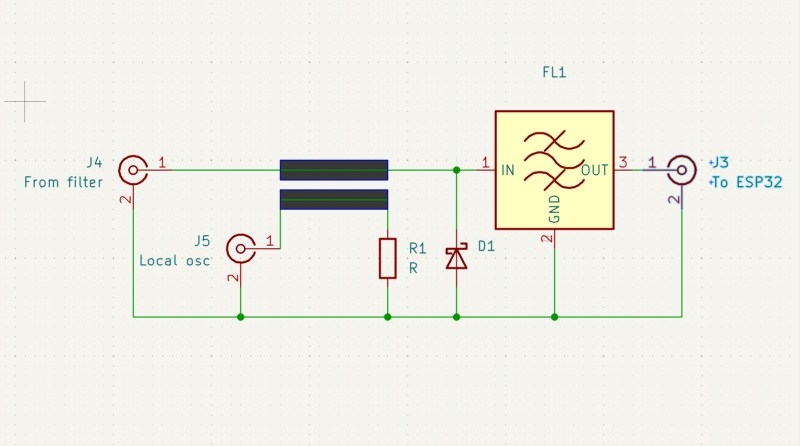
Yet again you can buy an off the shelf mixer as a module, though one for a 2.4 GHz output will be expensive. Happily there’s a simple circuit which can do the job, and it uses a diode as a non-linear element fed with both antenna and local oscillator signals. At these frequencies you are looking for a very fast small-signal Schottky diode with as low a capacitance as you can find, and happily such parts are available from multiple manufacturers at cent rather than dollar prices. The basic circuit is shown below, and as you can see it’s quite simple.

The circuit of a simple unbalanced diode mixer with a bandpass filter on its output.

In the circuit above the diode is your Schottky device, the input low pass filter isn’t shown, and the output filter is an off-the-shelf Wi-Fi bandpass filter. The two thick lines represent a stripline coupler, and they are simply two parallel PCB traces side by side over a groundplane. Their size should ideally be calculated to present the right impedance, often 50 ohms which is also the value of R1, but in practice the jankiest solutions can work here. With an ESP32 as a local oscillator I would hazard a guess that laying the trace on the PCB under the module’s antenna with the power turned down would be enough. I may earn the scorn of some of my peers, but I have a long history of RF bodging and I think it might just work.

Making It Transmit

The same technique as above works for shifting the ESP32’s transmit output down to the desired frequency, but there’s a catch. Even the modest output from an ESP32 can be enough to damage or overload parts designed for receivers, so you have two choices. Pick transmit-appropriate parts, or dial back the power to a low level, and amplify it at the lower frequency.

By Now, You Should Be Able To Bodge A Converter

The information above isn’t a ready-to-go design for a receive converter to get your ESP32 listening to lower frequencies, but it should give you all the signposts you need to get there. People have built converters for the RTL-SDR for ages now, so you could pilfer ideas there too. If you build a downconverter, for transmit or receive or both, let us know!

At a superconference about a decade ago there was a talk about RF construction techniques which will save you a lot of pain, and with luck such a simple circuit should be within your grasp. Good luck.

Report: 9 out of 10 Americans Have Been Targeted by Scams

91% of Americans have been targeted by a scam, and 17% have fallen victim to one, according to a new survey by Consumer Reports. Notably, 20% of respondents said the latest scam they encountered was personalized, indicating that attackers are increasingly using automation and public or leaked information to craft targeted phishing attacks.

Pager Converted to Meshtastic Node

Text messaging has been around on cellular networks en masse for around three decades now. It’s so common that it’s difficult to remember a time without it. Its two-way quick messaging is incredibly useful, but for even simpler communications there’s a one-way system that predates it. Pagers are able to receive simple messages, but outside of hospitals are rarely used nowadays. Eventually some added in two-way communications like this Motorola T900, but they’re still mostly obsolete. That’s why [zindustries87] converted it to operate on the Meshtastic network instead.

To get this pager working, a lot of reverse engineering was needed. There is essentially no documentation on the chips in these devices, so the screen and keyboard both were reverse-engineered to work with other hardware. In this case, [zindustries87] found space for a Heltec V4 with an ESP32-S3, a popular Meshtastic node with a small form factor. Some programming was needed to get everything communicating together, but from the looks of things it seems to have basic functionality.

[zindustries87] points out that this is a prototype, and didn’t know going in if the keyboard and screen could be brought back to life, or if the other hardware would fit in the case. But with it working on this level, they plan to add a number of other features in and possibly build a drop-in PCB replacement for these devices. They were once fairly popular so there are plenty around, and they’re a good form factor for a dedicated Meshtastic device that doesn’t need a smartphone to work. The only other ways of bringing pagers back to life involve bootstrapping an entire pager network, and Meshtastic is a bit more useful than that now.

❌