Bridges! We kind of expect them to just be there and do their job, ad infinitum. They are built into the landscape, and we often take them and the routes they open up for granted.
The reality, as any civil engineer will tell you, is that bridges are living, breathing things that require endless maintenance and monitoring to keep them safe, standing, and functional. A great example of this is found in the US Department of Transportation, and its publicly accessible register of bridge health reports.
Stay Standing
The thing about bridges is that we rely on them. They serve as vital transport links in our communities, ferrying people to and from work and school, and acting as the very arteries of commerce as trucks and trains haul goods to and fro. When a bridge crossing has to close, either for maintenance or at end of life, this link is severed, often with serious economic and logistical impacts. For that reason, we tend to like to keep our bridges in service as long as possible. The result, of course, is that if pursuing this goal means that proper maintenance and repairs aren’t seen to, there is a risk of collapse—which often comes with worse consequences. Loss of life is common when bridges fail, and replacing a collapsed bridge is often much harder and more time consuming than handling things properly ahead of time.
In the United States, it’s a well known fact that the bridges are getting old. The average bridge is 44 years old, which is bumping up against the 50-year service limit many were originally built for. Being an average number, it’s indicative that many bridges are exceeding that figure significantly. Obviously, a bridge’s age isn’t a perfect proxy for its condition, but closer examinations indicate there’s definitely a problem. A 2024 report from the American Road & Transportation Builders Association noted that 36 percent of US bridges are in need of repair or replacement, a total of 221,800 spans. 42,067 spans were considered to be in “poor” condition, which in their total see 168.5 million motorists crossing them every day. It’s a particularly sobering figure as it highlights the size of the disaster possible if these structures are to fail.
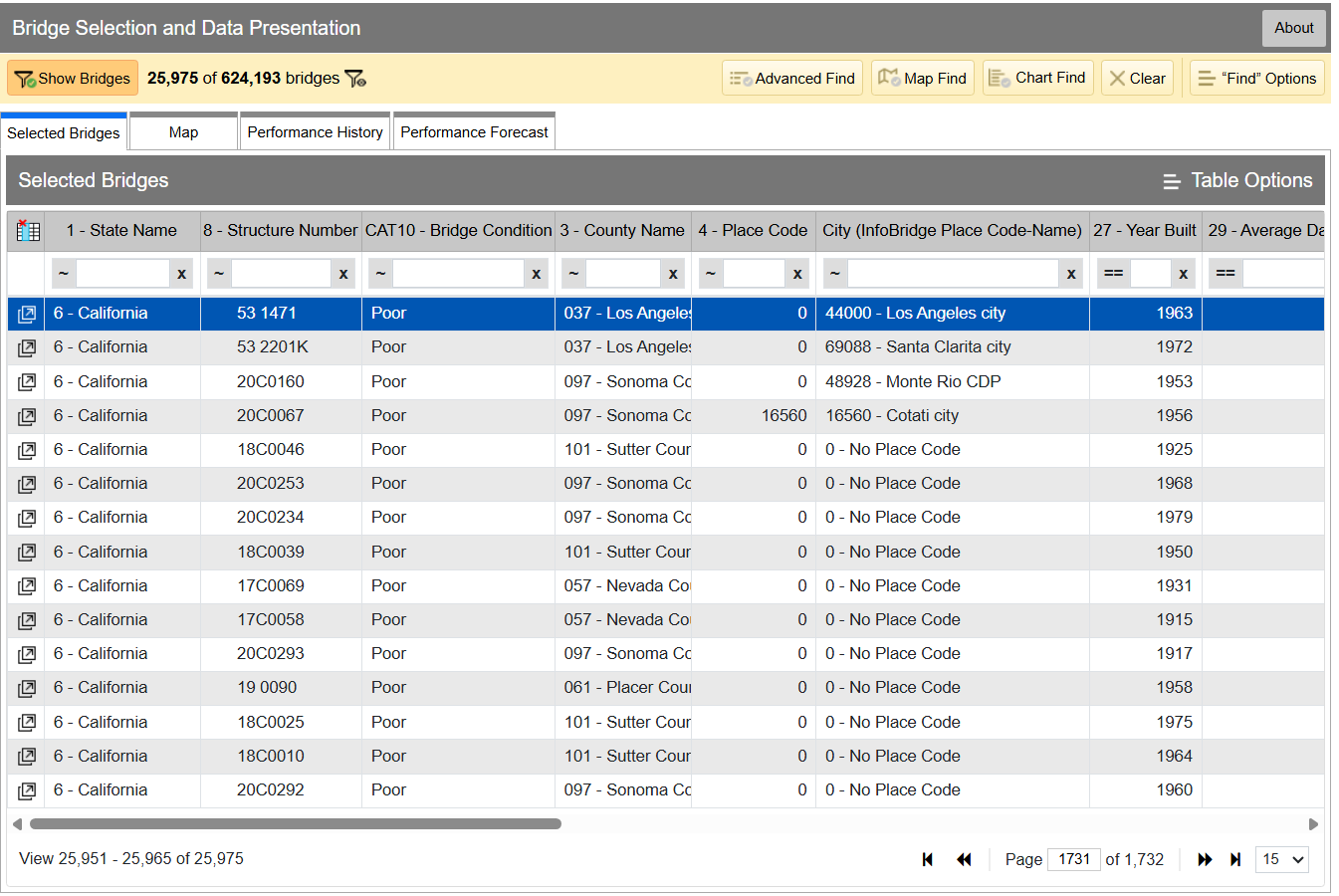
InfoBridge quickly lets you sort through data by all kinds of different factors. If you’re looking for the worst bridges in town, it’s easy to flick through CAT10 – BRIDGE CONDITION to see which bridges as listed as Good, Fair, or Poor. Bridges are rated on the condition of their deck, superstructure, and substructure, and the lowest scoring section influences which bin the bridge lands in, as per federal code—specifically, 23 CFR 490 Subpart D. Credit: InfoBridge screenshot
You can drill down into the data yourself if you desire. Within the Department of Transport, the Federal Highway Administration maintains LTBP InfoBridge, a database of information on bridges all across the country. It was developed by the Long Term Bridge Performance program, because the goal of the project is to understand how these structures hold up and perform over the decades. The database is publicly accessible, and serves as a portal for all the available data and statistics on how US bridges are doing. It hopes to enable everyone from state and federal authorities, to university students, faculty, and other researchers, to dive into bridge data and visualize and understand it better.
Data available is from a wide number of sources, including the National Bridge Inventory and National Bridge Element datasets, as well as climatic data collected from NASA’s MERRA-2 database. There’s also construction and design data sourced by the LTBP program, along with non-destructive evaluations that have been carried out. Data from various other special projects is available too, such as from Federal Highway Administration projects investigating timber bridges, steel weathering, and the use of ultra-high performance concrete structures.
Just glancing at the Vincent Thomas bridge won’t tell you how the structure is doing. Credit: The Port of Authority, CC BY-SA 3.0
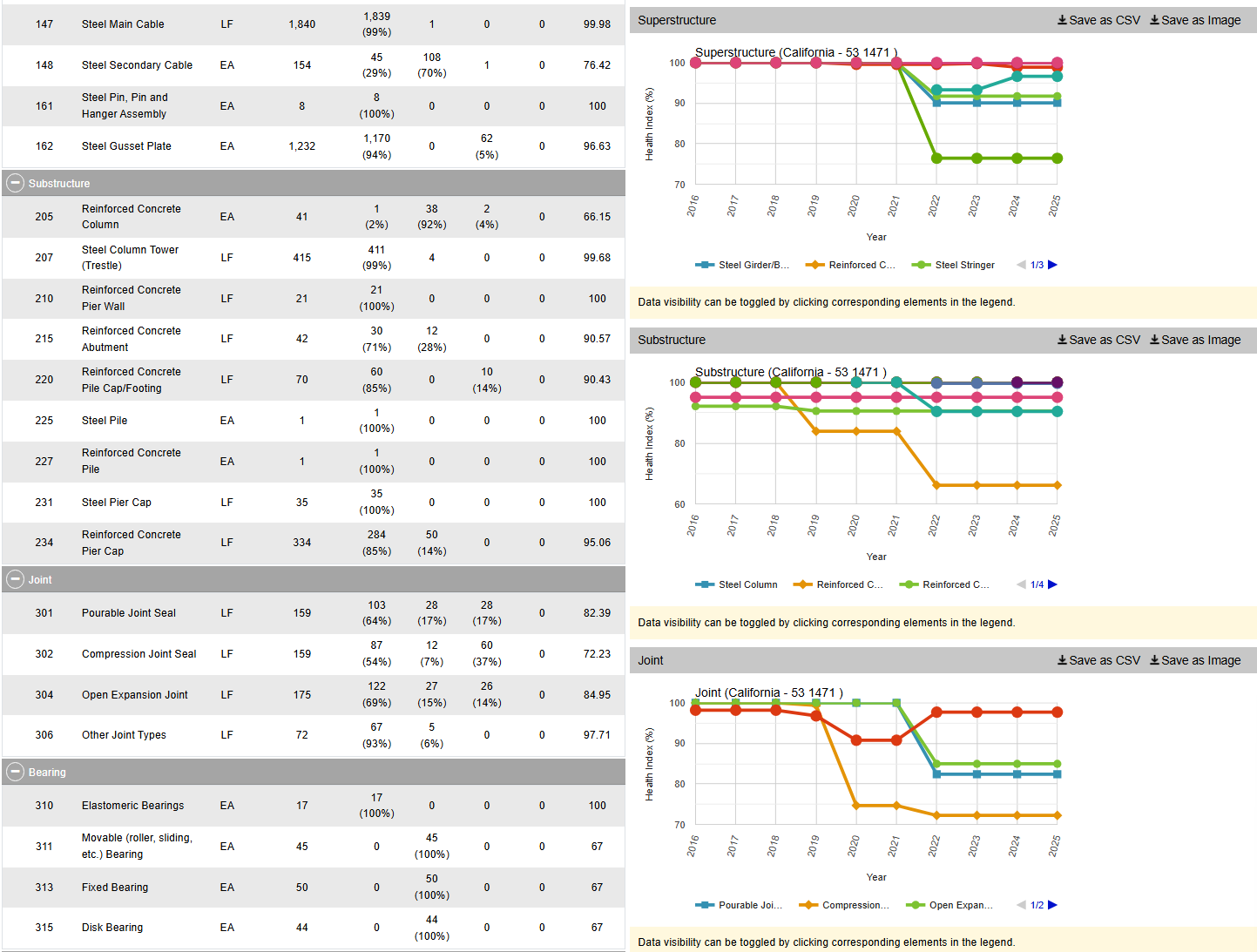
If you have a particular bridge of interest, it’s easy to get a quick break down of how it’s doing. For example, you might like to know about the Vincent Thomas Bridge, in Los Angeles, California: National Bridge Inventory number 53 1471. It links San Pedro with Terminal Island, and is a suspension bridge with a total length of 6,060 feet and a longest span of 1,500 feet. Built in 1963, we can see from the data alone that it’s now showing its age.
The bridge condition is listed as “Poor,” and if we dive deeper into the National Bridge Elements data, we can see why. The health indexes of the deck, substructure, and superstructure have all been trending down in recent years as the bridge’s age has increased, with a particular drop off from 2019 or so. In particular, the steel cables and girders on the bridge have been showing their age, and the concrete columns supporting the bridge have been similarly degrading. The deck, too, is in need of repair, with the California Department of Transport recently dedicating some $706 million to replace it ahead of the 2028 Olympic Games.
However, InfoBridge will let you drill down into detailed reports on the bridge conditions, down to a level which indicates which parts of the bridge are most in need of maintenance, repair, or replacement. Credit: Screenshot, InfoBridge
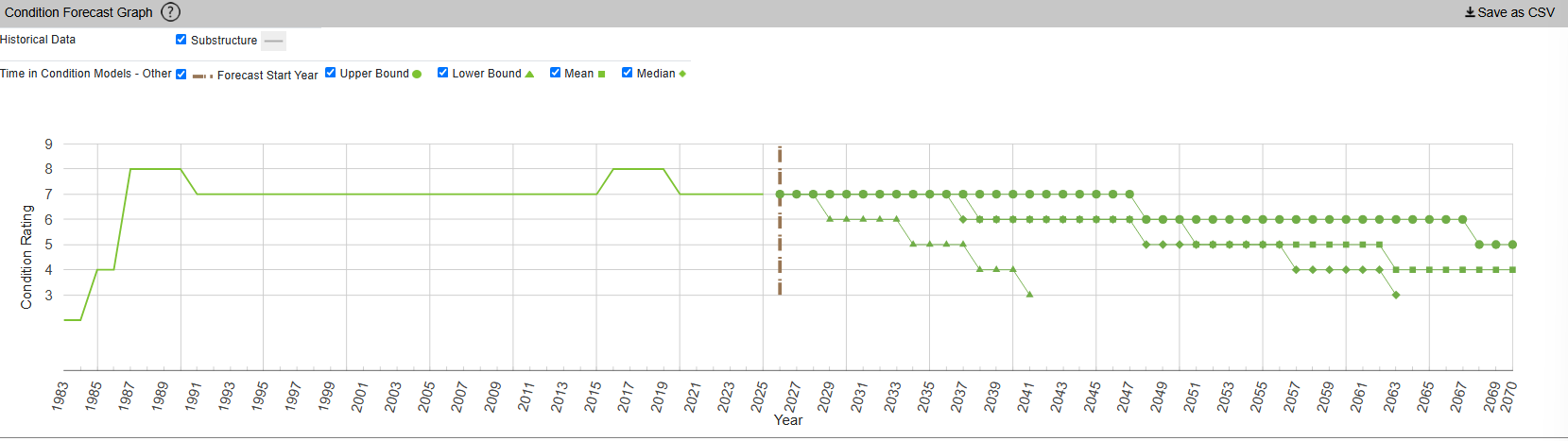
InfoBridge also offers condition forecasts for many bridges across the country. For example, the 24th Street Bridge over Rio Linda Creek is currently listed as being in “Good” condition. Current forecasts show that the deck and superstructure is expected to be in much poorer shape somewhere between 2035 and 2055, while the substructure is expected to hang on in good shape for a bit longer.
The Long Term Bridge Performance Program has developed a variety of models—base, survival, and machine-learning—to predict bridge condition over time. The aim is to guide maintenance efforts over time and allow for better planning. Credit: InfoBridge, screenshot
You might think that you’d have to query a government department and delve deep into some dusty records room to learn about the condition of your local bridges. Instead, thanks to the efforts of diligent civil servants, you can instead access all the rich inspection data you like from the comfort of your own web browser. It’s not just good for citizen oversight, either. It aids local authorities and bridge owners in making the right decisions, by putting the necessary data right at their fingertips.
It also creates a certain level of accountability—having the data available means there’s little room for anyone to make excuses that they were unaware of a bridge’s condition prior to something going wrong. Ultimately, it’s just one arm of a project that hopes to take US bridges safely long into the future.
Some disappointing, but perhaps not entirely unsurprising news this week out of Denmark — after announcing last year that they would transition away from Microsoft’s proprietary software, the realities of making it work seem to have caught the government off guard. The word is that a trial program immediately ran into problems when government employees that had been given Collabora tried to collaborate with their peers running Office, and has since been quietly abandoned.
Although there’s probably a joke to be made about different parts of the government not knowing what the other ones are talking about, the reality is that if one group of staffers can’t reliably access the data being produced by another, that’s a pretty big problem. Of course, had they simply asked us nerds, we could have advised them that these sort of issues are inevitable if you don’t fully commit to the effort.
Had the entire government moved to the Open Document Format (ODF) at once they would have avoided the issue, at least when it came to newly created documents, but obviously that’s a considerably larger undertaking than installing Collabora or OpenOffice on a few dozen machines and calling it a day. There’s no word yet on how this stumble will impact Denmark’s larger effort to free themselves of proprietary software, but we’d hazard a guess it’s not a great sign. Hopefully things go better for the Dutch.
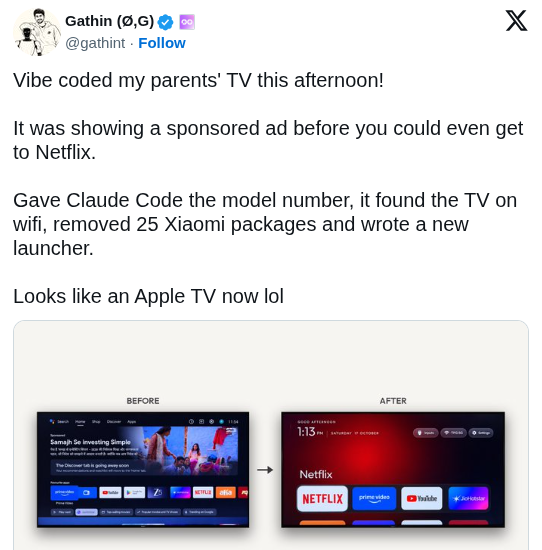
Speaking of users trying to improve their personal software situation, The Verge has an interesting article on a recent trend of frustrated users pointing AI tools like Claude at their smart TVs, with a few success stories posted to social media showing off interfaces that have been stripped of ads or replaced with something else entirely. It’s compelling stuff for anyone who’s unhappy with their current smart TV experience, but the whole thing isn’t quite as technically impressive as it might seem on the surface.
As the TV’s in question are running Android, all the AI tools need to do is connect to them over Android Debug Bridge (ADB) and uninstall any offending packages that might be providing ads, and similarly creating a customized launcher interface is a matter of spinning up an Android app and installing it over the network. The results may look like arcane magic to the uninitiated, so we appreciate The Verge pointing out that it’s all pretty basic stuff for anyone familiar with Android development.
On the subject of extracting unwanted components, a delicate operation to remove the masts of the sunken WWII cargo ship SS Richard Montgomery was completed successfully earlier this week off the coast of Sheerness, England. To those unfamiliar with this particular vessel that might not sound like a big deal, but when you’re dealing with a wreck holding an estimated 1,400 metric tons of explosives that have been deteriorating since 1944, even approaching the area needs careful planning and coordination.
Masts of the SS Richard Montgomery in 2014. Image Credit: Christine Matthews
There was a concern that the masts and their supporting structures were on the verge of collapsing into the hull of the wreck, which experts warned could potentially trigger an explosion large enough to endanger life and property. Actually removing the explosives from the ship itself will be a far larger undertaking, but at least for the time being, removing the masts has helped stabilize the situation.
Finally, if you’re looking to learn about something a little more local than a potentially explosive situation in Sheerness (apologies to anyone in Sheerness), check out Local Wikipedia. Created by [Ed Jefferson], the site lets you filter Wikipedia pages by their distance from your location or whatever other landmark you wish. By default it shows results that are within 1.5 miles, but if you don’t have anything too exciting within range it will start opening up the radius to pull in more results.
See something interesting that you think would be a good fit for our weekly Links column? Drop us a line, we’d love to hear about it.
In January, we responded to the Lazarus Group’s novel attack campaign against South Korea, which followed last year’s Operation SyncHole. In this new operation, the group employed an updated malware chain that included both their old and new malware, which we disclosed in full, and used another mandatory South Korean security software program as a part of infection chain using a watering‑hole strategy. Notably, the group targeted victims more selectively, sending spear‑phishing emails with links to fabricated but relevant sites, such as portfolio and résumé pages tailored to each target. We dubbed this activity Operation FlashHole.
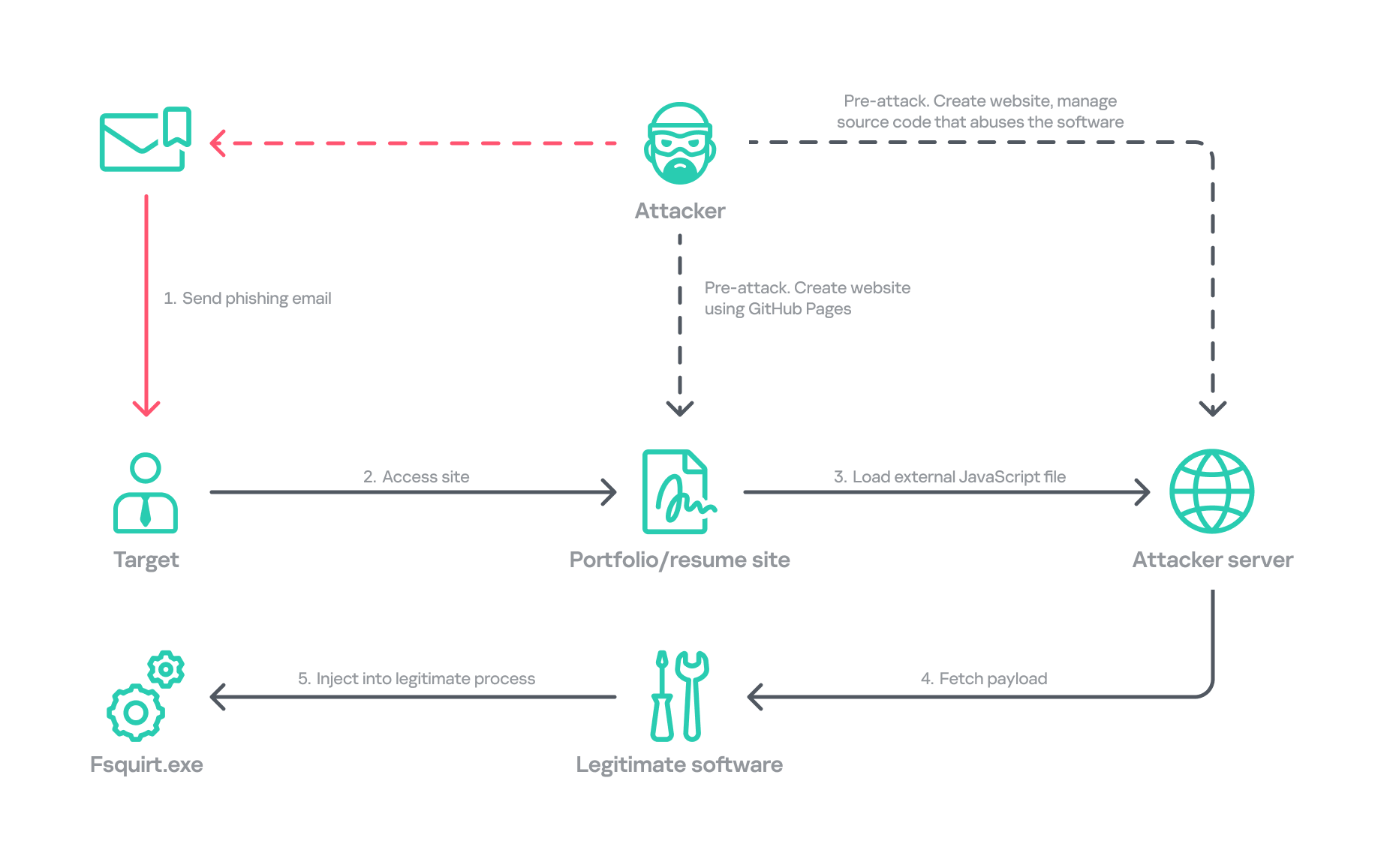
Operation FlashHole attack flow during initial compromise
Our examination reveals that the earliest evidence of this new operation dates back to July 2025. This suggests the group began preparing for the campaign shortly after ending Operation SyncHole, which lasted at least four months. We identified a minimum of three organizations impacted by the campaign in South Korea’s software, construction, and wired communication equipment manufacturing sectors. These sectors differ from those affected by Operation SyncHole, indicating that the group has expanded its target scope over time.
Background
After more than a year since the first observation of Operation SyncHole, we detected a suspicious execution chain originating from legitimate South Korean software. This chain mirrors the one from the previous operation; however, this time, the attacker abused CrossWeb EX instead of Cross EX, which was abused in Operation SyncHole. Both applications appear to be maintained by the same vendor, and both are related to financial security. CrossWeb EX is a financial security solution that is required to access widely used online banking and government websites. It encrypts communications between the user’s browser and the web server using public key infrastructure (PKI). This is not the first time Lazarus has abused this software. It was also used in 2021 to deploy the Racket downloader and again in 2022 and 2023. Although the exact method by which CrossWeb EX was abused remains unclear, we determined that the attack chain ultimately leads to the execution of the malware in memory.
We noted that the spawned process was running with a high integrity level. The parent process, INISAFECrossWebEXSvc.exe, originates from the installation bundle of INISAFE CrossWeb EX V3 version 3.4.1.2, released in 2023 after KrCERT’s public advisory.
As we already mentioned in our SyncHole blog post, this pattern closely mirrors the long‑standing strategy employed by the Lazarus Group to target South Korea. Since CrossWeb EX and similar software is mandatory for South Korean users and typically runs in the background to interact with the browser, it has been leveraged as a critical attack vector by the group. In 2025, a paper was presented at the USENIX Security Symposium that investigated vulnerabilities in South Korea’s mandatory security software and demonstrated how such software can unintentionally create a massive attack surface.
In July 2026, the South Korean government and several local security vendors also published a joint security advisory covering typical Lazarus attack techniques, including exploitation of financial security software. While this advisory overlaps with our findings from Operation FlashHole and Operation SyncHole, and AhnLab’s detailed analysis report Operation Double Barrel covers a wide range of recent Lazarus Group activities, we are conducting a more granular classification based on their TTPs. We will discuss this further in the attribution section.
Initial infection vector
Although we could not precisely determine what triggered the infection chain, our analysis uncovered a suspicious website hosted on GitHub Pages that is associated with the GitHub account used as the C2 channel. The GitHub account was created last September, and the initial version of the site was designed to showcase the résumé of a senior network appliance developer. In January, however, this site was replaced with another featuring an interior design showcase. The first site was likely accessed by an employee of a wired communication manufacturing company, while the second site likely affected a target in the construction sector.
Appearance of the malicious websites
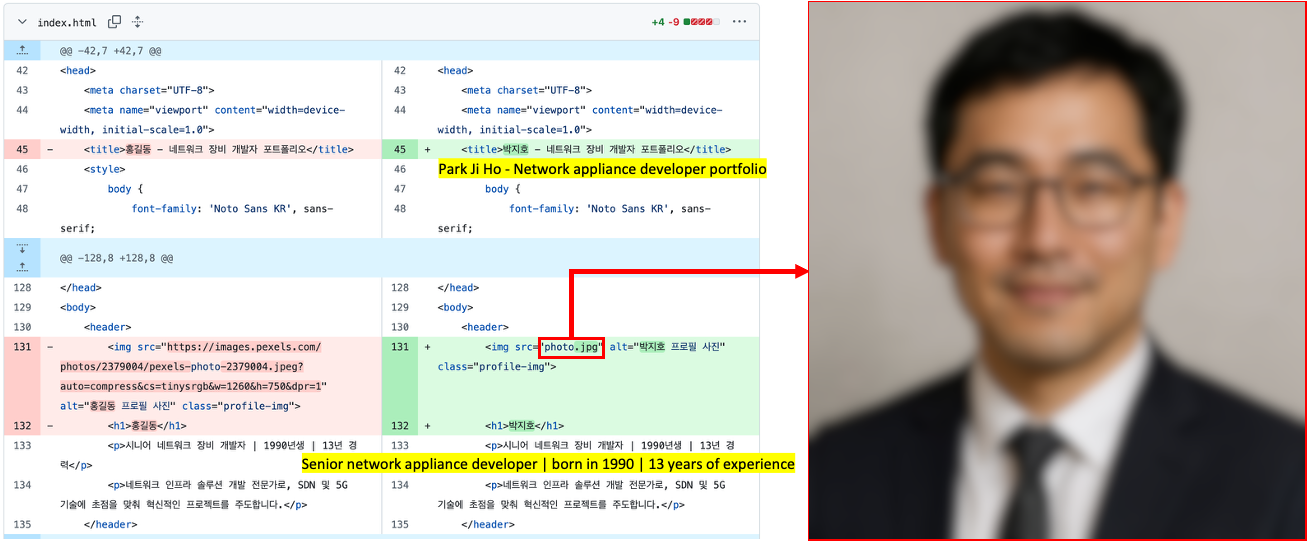
The first site with the résumé had a photograph supposedly of a job seeker, but the lack of EXIF metadata and the unnatural texture of the image indicate that it was generated by AI. This suggests the Lazarus Group has incorporated AI into its long‑standing strategy, like other Korean‑speaking threat actors (1, 2). The group most likely also used AI to create the lure site: the job seeker’s name resembles the Korean version of “John Doe,” and the portfolio was populated with seemingly meaningless details and random companies. The generated site was then manually tailored to specific targets.
Suspected use of an AI-generated image on the résumé site
The websites contained embedded links that loaded an external JavaScript file via a script tag.
Malicious link embedded in the résumé site: hxxps://javadevhouse.co[.]kr/ajax/libs/jquery/1.7.3/jquery.min.js
Malicious link embedded in interior design site: hxxps://pythonapischool[.]com/api/detach
Based on the analysis, we assess with medium-to-high confidence that the targets received phishing emails containing links to the malicious site hosted on GitHub Pages (using the domain <username>.github.io). The research results showed a high possibility that visiting the malicious site initiated an infection process involving CrossWeb EX software. This assessment aligns with Lazarus’s recent approach, as detailed in the joint advisory published by the South Korean government and security companies.
Full infection chain
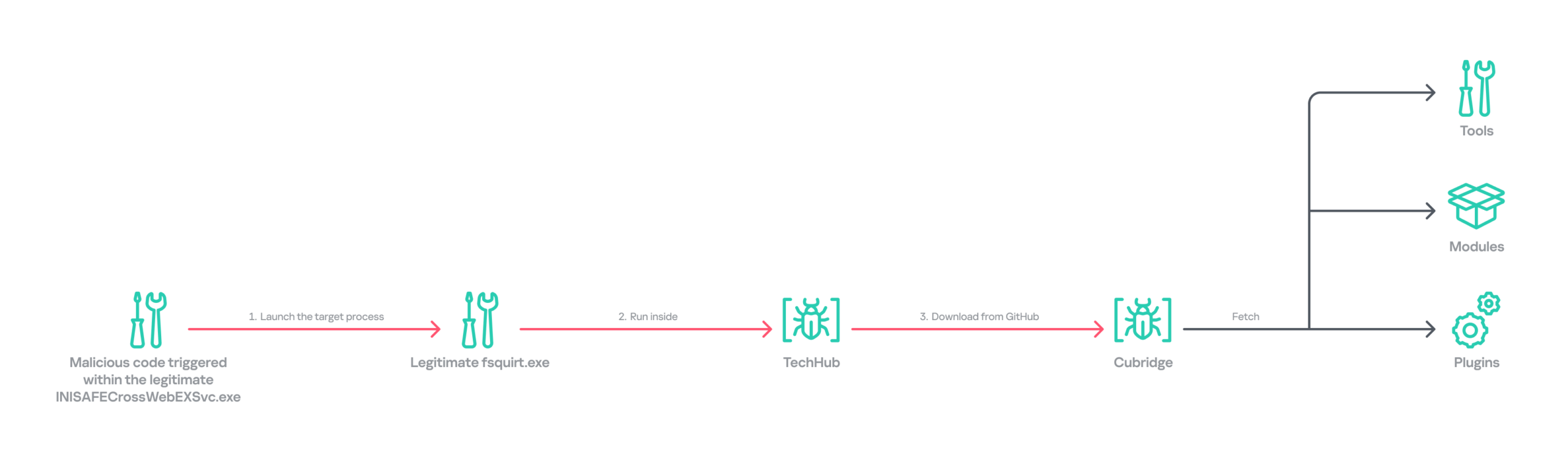
Following the initial compromise, the legitimate Windows binary fsquirt.exe was executed under the CrossWeb EX process and injected with shellcode containing a malicious DLL – TechHub malware. From our extensive and thorough examination, we identified several malicious payloads and reconstructed the complete infection chain. The infection chain is rather complex and reveals the Lazarus Group’s advanced operational techniques on targeted hosts. These techniques conceal their malicious payloads, intent and their sophisticated malware delivery framework. The latter was updated extensively compared to the previous campaign, despite the new operation starting less than a year later. Significantly, the execution chain below exists only in memory during the initial infiltration, highlighting the attackers’ considerable efforts to hide the initial compromise.
Initial infection chain
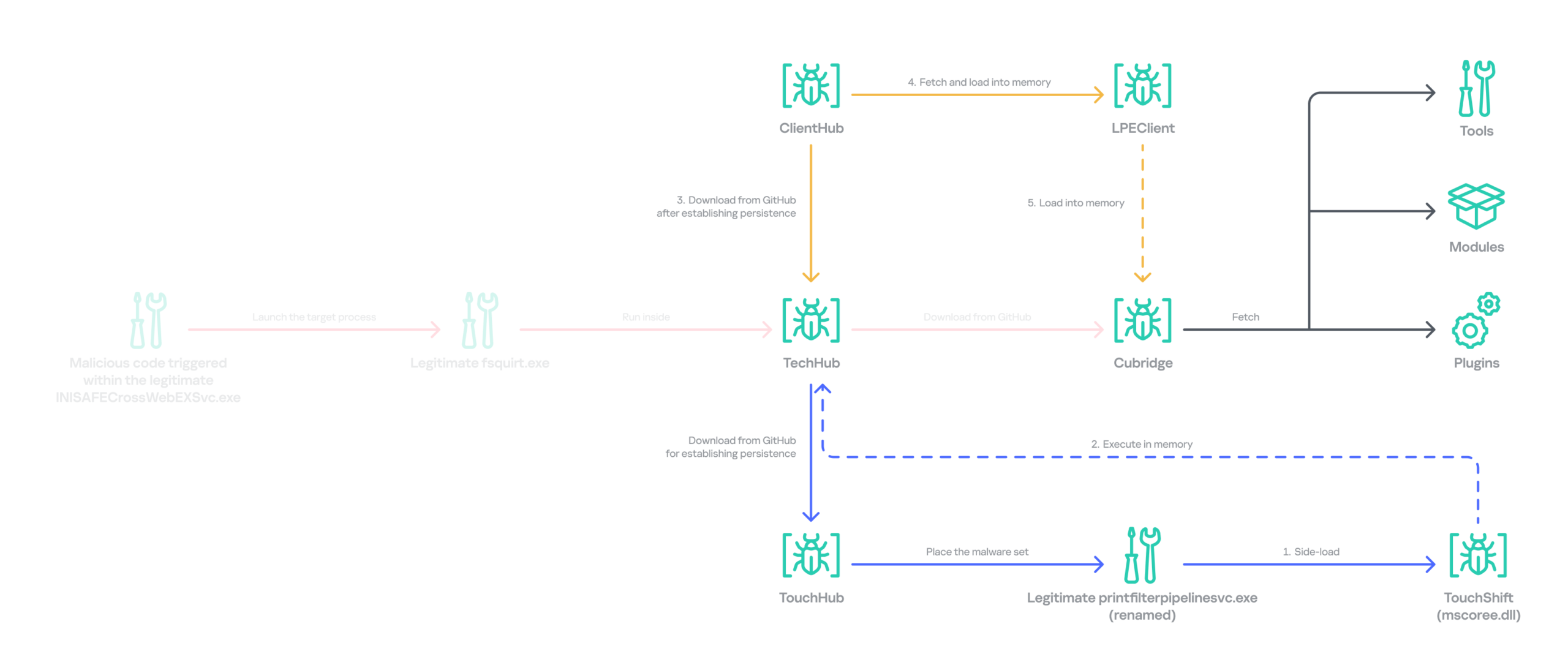
Following the initial compromise, the group sought to maintain persistence on the network by installing a pair of malware strains – TouchHub and TouchShift – leveraging DLL side‑loading under the name mscoree.dll. TouchHub was deployed by the first instance of TechHub. It then used DLL side-loading to launch TouchShift, which led to the in‑memory execution of another TechHub instance. After launching the second time, TechHub deployed another pair, ClientHub and LPEClient, rather than executing Cubridge directly. Only minimal traces of these files were found on disk; the remainder of the malicious code persisted exclusively in memory.
Expanded infection chain after gaining persistence
Since Cubridge remains only in memory at the initial compromise stage, we suspect the group designed this indirect, multistage chain to deliberately redeploy Cubridge after gaining persistence, as it serves as the most sophisticated orchestrator of the attack.
Malware set
The full chain comprises advanced variants of the known Lazarus malware strains, including TechHub, Cubridge, TouchShift, LPEClient, and the newly identified TouchHub and ClientHub.
TechHub – the start of the chain
TechHub, a downloader that plays a central role in this attack, communicates with GitHub using a Personal Access Token (PAT). It serves as the initial payload, providing the top of the chain with sufficient functionality to profile compromised hosts and facilitate subsequent payloads.
This variant is a more advanced version of the malware named CLOUDBURST by Mandiant and NickelLoader by ESET. According to their reports, the earlier version communicated with a C2 server via HTTP(S) to fetch additional payloads. The latest iteration we found, however, communicates with GitHub instead and has updated command strings.
We identified three variants of TechHub in the chain: an in‑memory version, a simple DLL side‑loading version, and a DLL side‑loading version that uses a registered Windows service. Depending on which stage loads the malware, it contacts a private GitHub repository via the GitHub API using either hard‑coded credentials or credentials retrieved from its configuration file.
When TechHub loads, it creates a 4‑byte hexadecimal identifier (ID) in the range 0x1000–0xFFFF or reads one from the configuration file, enabling the attackers to distinguish between compromised hosts. TechHub then checks a GitHub issue by sending the request GET /issues?state=[open/closed] to determine whether any previous communication remains active and removes any traces of it if found. It then proceeds with the handshaking process.
It creates a new issue titled 1[ID] with the body “hel” using the POST /issues request, and sets its status to open.
It then retrieves a file from the repository containing the 2[ID] value in its name. This file contains the RSA public key.
It generates a random 16‑byte XOR key, encrypts it with the provided RSA public key, and uploads the result, prefixed with 1[ID], to the repository.
The hard‑coded IV is XORed with the generated 16‑byte key and then used after the handshake.
During file exchange, filenames follow the pattern [1|2][ID][random-16-byte-key] throughout communication. The “2” prefix indicates delivery from the repository to TechHub, while “1” indicates delivery from TechHub to the repository. The random 16‑byte key in the filename is used for AES encryption or decryption of each file’s contents, employing either a hard‑coded IV or an updated IV.
After the key exchange is complete, TechHub reads a file with the prefix “2” once again and verifies that the delivered data equals “hel”. If the check passes, TechHub gathers extensive information from the infected host. This data is then encrypted and sent to the repository. After transmitting the device information, the process concludes by updating the body of the previously created issue from “hel” to “hey” using PATCH /issues/[issue number]. The malware is now fully prepared to receive commands from the repository.
TechHub supports four commands. The laeca command deploys a payload packaged in shellcode that reflectively loads the embedded payload directly into memory.
Command
Description
mqdrz
Collect information about the device and its running processes
laeca
Directly invoke the received shellcode in memory
aqvxp
Terminate the current process
rtcya
Beaconing after finishing the handshake process
Cubridge – the framework orchestrator
Cubridge, deployed via TechHub on the compromised host, is capable of retrieving various payloads through multiple methods. It serves as the central orchestrator of the entire malware framework, supporting a range of plugins, modules, and tools. An earlier version of Cubridge was also disclosed in the reports covering the previous version of TechHub. In those reports, Mandiant identified it as SIDESHOW, and ESET identified one of its modules as LightlessCan.
To establish communication with the C2 server, Cubridge randomly selects one of the predefined C2 servers and constructs a dedicated C2 URL for every request, using the pattern [C2_URL]/[page1]/[page2]/[page3]. This is achieved by concatenating terms from predefined word lists. Our analysis identified a single hardcoded C2 server – hxxps://cubedesign[.]co[.]kr/news/AABBCC – associated with the examined instance that is configured to version 5.1. During URL generation, AABBCC is substituted with a null value. The page3 segment is assigned a randomly generated integer between 10000000 and 99999999. Consequently, each generated URL is designed to appear authentic and remain unique for each request.
The predefined list for page1 is shown below. TechHub randomly selects one item from the list.
The predefined word list for page2 is shown below.
article, list, story
This means the hardcoded URL can later be transformed, for example, into hxxps://cubedesign[.]co[.]kr/news/economy/article/12345678 by following the steps described above.
Authentication using the POST request with the C2 server requires three parameters in the form of key‑value pairs. Each key is randomly generated using a different predefined word dictionary, and the associated values consist of a randomly generated 8‑byte hexadecimal bot ID, a fixed authentication token (KW4Ofw982CNJjxd51AVqkGAop), and a randomly generated 16‑byte hexadecimal session ID.
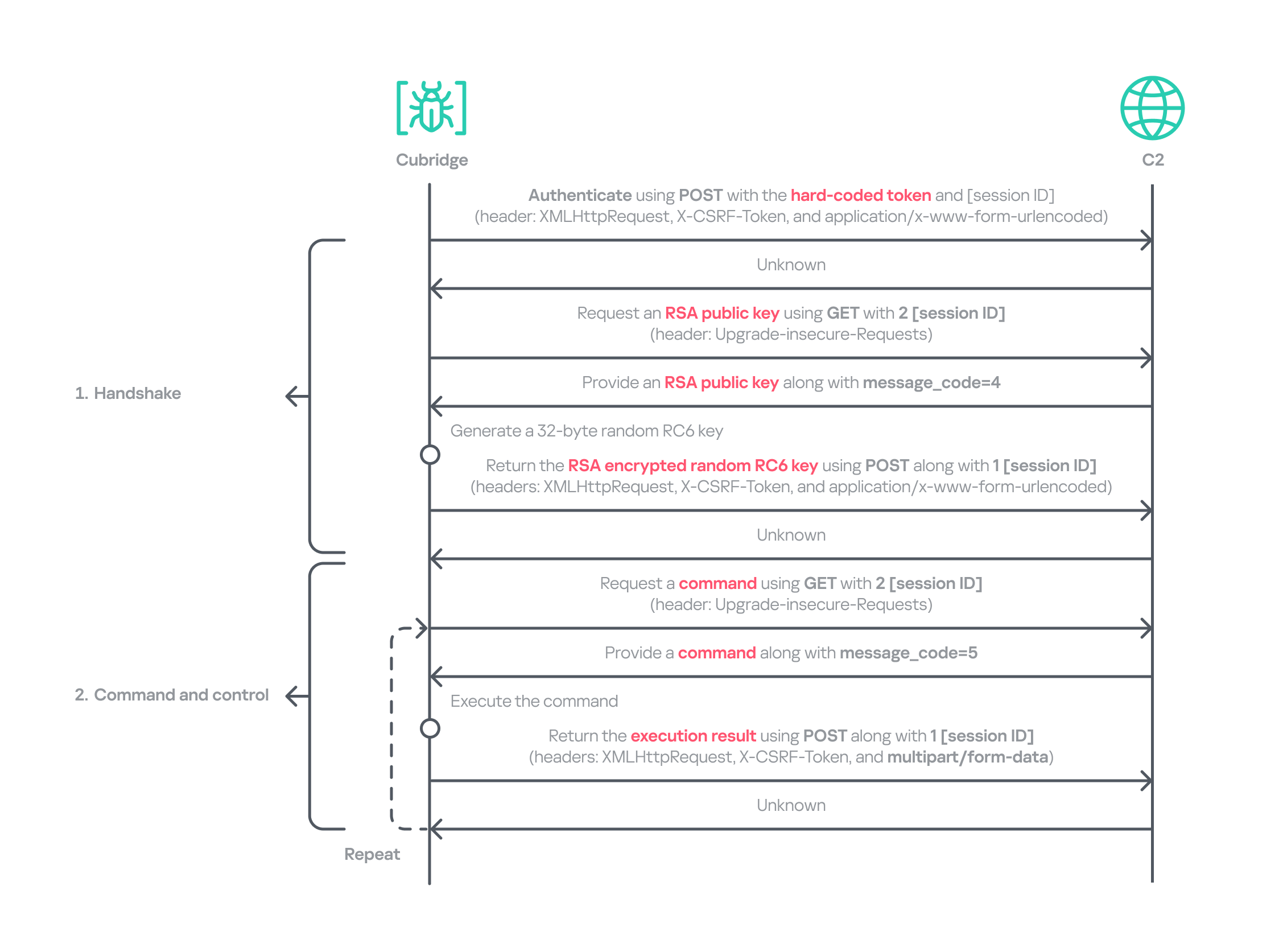
Cubridge employs a more robust handshaking process than TechHub, combining the RSA and RC6 algorithms. Unlike TechHub, it skips the profiling step and proceeds directly to command and control after the handshake. During communication, the malware mimics browser requests, using X‑CSRF‑Token and X‑Requested‑With headers for authentication and the Upgrade‑Insecure‑Requests header to request additional data.
Cubridge’s communication sequence
Cubridge contains extensive functionality, with a particular focus on loading subsequent‑stage payloads. The commands employ various techniques, such as DLL injection, reflective loading, and section‑mapping injection. The payloads may be delivered in various forms:
Plugins – reusable extensions that add functionality as needed and can be invoked at any time (in shellcode and DLL form);
Tools (in DLL form) – independent utilities that perform one-off tasks;
Modules – components that are loaded once and remain active providing an extended set of functionalities.
It is anticipated that the commands for plugins and shellcode will load identical types of plugins because both support a similarly formed exported function for subsequent activity. The shellcode can be generated using the open‑source sRDI tool to package a DLL‑style plugin. The capabilities of a single DLL are likely utilized to load a tool that works independently because when a single DLL is loaded, only its DllMain entry point and its parameters are accessible; no other exported functions are exposed.
Command
Payload type
Description
0
–
Collect device info including the computer name, time zone, PID, and other similar details
1
Archive the specified file/directory using the legacy ZipCrypto algorithm and the hard‑coded password: xdkiTajAAxc3i/w[<881fnC!G*cb1Dit2sh.gAk/
2
Create a file at the specified path
3
Possibly plugin
Inject the provided DLL payload into the target process and load it reflectively using reflective DLL injection
4
Plugin
Reflectively load a plugin in DLL format
5
Retrieve the address of the specified exported function from the target plugin and run it with the provided parameters
6
Retrieve all information about the loaded plugins
7
Unload the specified plugin
8
Shellcode
Inject the provided shellcode into the target process and load it using section mapping injection
9
Load the provided shellcode directly into memory
10
Retrieve the address of the specified export function from the target shellcode (likely a plugin in shellcode form) and run it with the provided parameter
11
Retrieve all information about the loaded shellcode
12
Unload the specified shellcode
13
–
Set the scheduled Cubridge execution time (in minutes) by updating a global variable
14
Set the scheduled Cubridge execution time (in minutes) by updating a global variable, while disabling monitoring by also updating another global variable
15
Terminate in a controlled manner
16
Get the configuration for Cubridge: retrieve the global flags, the number of C2 servers, the C2 addresses, etc.
17
Update the global flags, the number of C2 servers, the C2 addresses, etc.
18
Tool
Load a DLL reflectively with the specified parameter
19
Configure the parameters for loading a single DLL
20
Unload the single DLL
21
Module
Load the “action module” (ActionModule.dll) reflectively and invoke its AppinfoView export function
22
Load the “function module” (FunctionModule.dll) reflectively and invoke its PresentationFontConfig export function
Commands 21 and 22 each load a different module. As their internal names imply, the action module manages basic file and process operations, while the function module implements Windows’ default commands. The action module covers commands 23–41, and the function module handles commands 42–79.
The action module handles system operation commands, file system interactions, and process behavior. It is invoked by passing the appropriate command and parameters to its AppinfoView export function. The module supports 19 commands, numbered 23 through 41. Execution results are first sent to Cubridge, which then forwards them to the C2 server.
Command
Role
23
Get local disk space for each drive
24
Get information about the specified file or directory
25
Execute the provided command
26
Get information about the specified file or directory (similar to command 24)
27
Execute the provided command under the target process (PPID spoofing)
28
Execute the provided command under the target process within the provided session (PPID spoofing + session impersonation)
29
Get detailed information about processes
30
Terminate the provided process
31
Suspend all threads belonging to the specified process
32
Resume all threads belonging to the specified process
33
Permanently delete the file by overwriting its entire contents with the sequence: 0 → 1 → random bytes → 1 → 0
34
Rename the provided file to :EFS (the alternate data stream area) and delete it using the native API SetFileInformationByHandle
35
Set the current working directory
36
Copy the specified file to the provided path
37
Delete the specified directory
38
Move the specified file to the provided path
39
Create the provided directory
40
Initiate a non‑blocking connection attempt to the specified IP address and port (possibly for port scanning)
41
Read the specified file
The function module implements commands that emulate Windows’ built-in commands. Similar to the action module, its DllMain routine initializes all supported command functions, which are later accessed through the PresentationFontConfig export. Altogether, the module offers 38 commands, numbered from 42 to 79. While we believe this module is based on the previous LightlessCan, this is the first time we’ve seen it in the form of a separate module.
Command
Role
42
Capture all displays and archive them using the legacy ZipCrypto algorithm with the hard‑coded password: xdkiTajAAxc3i/w[<881fnC!G*cb1Dit2sh.gAk/
43
Synchronize the MAC (Modified, Accessed, and Created) times of the file provided in the second argument to match those of the file provided as the first argument
44
Get information about the specified directory
45
Get information about the specified drive
46
Inject the provided DLL payload into the target process
47
Unload the specified DLL from the specified process
48
Implementation of the ipconfig command
49
Implementation of the net command
50
Implementation of the netsh advfirewall firewall command
51
Implementation of the netstat command
52
Implementation of the ping -6 command
53
Implementation of the reg command
54
Implementation of the sc command
55
Implementation of the ping command
56
Implementation of the whoami command
57
Implementation of the nslookup command
58
Implementation of the schtasks command
59
Implementation of the systeminfo command
60
Implementation of the arp command
61
Call the CryptUnprotectData function to retrieve the AES key that DPAPI protects. Extract the key using the encrypted_key keyword from Chromium’s Local State file located at: %LOCALAPPDATA%\Google\Chrome\User Data\Local State
62
Not implemented
63
Not implemented
64
Read the specified file and decrypt it using an XOR operation with the key 0x59. Then extract the paths from the decrypted buffer and archive files and directories at these paths with the legacy ZipCrypto algorithm, using the hard‑coded password: xdkiTajAAxc3i/w[<881fnC!G*cb1Dit2sh.gAk/
65 ~ 79
Not implemented
Besides the modules, we also observed that the actor deployed various plugins and tools.
Type of payload
Name
Description
Plugin
ADFinder (AdFinder.dll)
Launches LDAP queries in an Active Directory environment, taking six arguments such as log file path, ADsPath, search filter, and attribute names
Plugin
FileCollector (Dll.dll)
Recursively scans every subdirectory and file in the provided directory, gathering detailed information about each
Tool
Browser stealer
Can be injected into Chromium-based browsers, such as Google Chrome, Microsoft Edge, and Brave. Once injected, it extracts files and credentials from the victim’s browsers, including stored passwords, bookmarks, history, preferences, and cookies
Tool
Process collector
Iterates over all running processes, collecting each process’s ID, path, and command line
TouchHub installs a service for TouchShift
During our analysis, we obtained a previously unknown malware sample from TechHub’s private GitHub repository, which served as a parent installer for TouchShift. We dubbed this malware TouchHub. Upon execution, it copies the legitimate printfilterpipelinesvc.exe to C:\Windows\System32\RasConv\ImeBroker.exe, registers it as a service, and places an embedded TouchShift payload named mscoree.dll in the same directory. Following creation, the malware synchronizes the MAC timestamps of C:\Windows\System32\drivers\monitor.sys with those of the newly written file, hindering forensic analysis.
It then goes through the service registration process by collecting up to 100 legitimate service names that are registered under the netsvcs svchost group in HKLM\SOFTWARE\Microsoft\Windows NT\CurrentVersion\Svchost. It randomly selects one of these names, appends two random alphabetic characters to form a new service name, and uses this name to create a service that runs the hard‑coded command line C:\Windows\System32\RasConv\ImeBroker.exe -TimeBroker with the description Microsoft Service. The newly created service is started immediately.
Overall, TouchHub creates three files in the designated directory to launch TouchShift with SYSTEM privileges.
Path
Type
Description
C:\Windows\System32\RasConv\ImeBroker.exe
Executable file registered as a service
Copied from C:\Windows\System32\printfilterpipelinesvc.exe
C:\Windows\System32\RasConv\mscoree.dll
Side-loaded TouchShift payload
Dropped by TouchHub. It contains encrypted payloads and includes portions of a legitimate DLL’s contents, which significantly inflates its size
C:\Windows\System32\RasConv\ActivationStore.dat
TechHub’s configuration file
Dropped by TouchHub after extracting configuration values
TouchShift, a prevalent loader employed across multiple infection chains
The version of TouchShift dropped by TouchHub is almost identical to the version described in Mandiant’s blog post, even sharing the same malicious export function, LockClrVersion. It takes the argument supplied by TouchHub and XORs it with a hard‑coded key. The resulting value is XORed once more with the executable’s filename, and this result is used as the AES key. All strings involved in this process (the argument, the XOR key, the filename) must be exactly 16 bytes long. If a string is shorter, it is padded with NULL bytes (\x00); if it is longer, it is truncated to 16 characters. For example, one of the string combinations in the obtained sample was:
Argument: -TimeBroker\x00\x00\x00\x00\x00 (padded with NULL)
Hard-coded XOR key: x809G736iC3f8Wp8
Executable filename: ImeBroker.exe\x00\x00\x00 (padded with NULL)
After deriving the key, the malware decrypts the embedded payload using AES‑CBC‑128 without padding. The decrypted data is shellcode that starts with a call instruction. It wraps the next‑stage payload – identified as the third version of TechHub (DLL side-loading with a registered service) – that reads the ActivationStore.dat file as an external configuration.
ClientHub
We also identified a new piece of malware stored in TechHub’s private repository, which we named ClientHub. It supports various commands formed using a bitmask. There are at least two versions of ClientHub: one that communicates with websites via HTTP(S) and one that interacts with the Dropbox API using credentials.
Depending on the version, its configuration is sourced from internal resources or the external configuration file C:\Program Files\Common Files\System\msadc\msadc.inc. The configuration comprises keys and IVs for the SNOW 1.0 algorithm, scheduled execution times, and C2 server addresses encrypted with the SNOW stream cipher. The SNOW cipher is a family of high‑speed stream ciphers used for secure data encryption in telecommunications and wireless networks. This is the first time it has been observed in the malware of the Lazarus Group.
To establish C2 communication, the malware initially generates a 32‑byte random array. It subsequently overwrites portions of this array with data collected from the compromised device. The resulting 32‑byte array comprises a blend of random bytes and relevant information. This array is later used as the key for the SNOW algorithm to decrypt data received from the C2 server. Finally, the key array is encrypted with a hard‑coded RSA public key and encoded in Base64.
Offset
Size
Field value
0
4
Current process ID
4
4
First four bytes of the decrypted C2 server information.
8
7
Randomly generated bytes
15
1
Calculated flag value that indicates a state machine.
16
8
Current system time, represented as a FILETIME structure.
24
8
Randomly generated bytes
The ciphertext is delivered to the C2 server via GET requests. Each request contains headers that are atypical for malware: Sec-CH-UA, Sec-CH-UA-Platform, Sec-CH-UA-Mobile, Sec-Fetch-Mode, and Sec-Fetch-Dest. These headers are normally used by legitimate Chromium‑based browsers and enable malware to imitate legitimate traffic and evade detection. The C2 server replies with commands in a custom header and message body.
struct header
{
  int has_more_data // whether more body data remains
  int body_checksum;// ROR13 checksum for the body data
  int body_type;    // specifies the body type
  int unknown;
  int body_length;  // Length of the body data
  int IV[2];        // Random IV used to encrypt the body data
};
The body_type field in the header determines how the subsequent payload is processed. This value functions as a bitmask, with each bit representing a distinct flag (e.g., 0x1, 0x2, 0x4, etc.). The resulting behavior also depends on whether the least‑significant bit (bit 0) is set: when the value is odd, the malware interprets the incoming message body as an additional payload that is subsequently loaded into memory. Conversely, when the value is even, the malware invokes the previously loaded payload.
The odd value supports four distinct loading methods based on the received message body and ensures that each method executes only once.
Bitmask
Value in decimal
Description
Result sent to the C2
0x00000001
1
DLL loading: load the received body reflectively along with the provided parameter
The payload’s image base
0x00000011
3
Plugin: load the received body reflectively, obtain the address of a function in the payload, and then invoke that function along with the provided parameter
The payload’s image base, the address of the invoked function, and the execution result
0x00000101
5
Plugin: load the received body reflectively, obtain the address of a function in the payload, but refrain from invoking it immediately
The payload’s image base, the address of the function
0x00001011
11
Plugin: execute the behavior associated with value 3, then unload immediately after invoking the plugin
–
0x00010001
17
DLL loading: load the received body reflectively with the provided parameter, maintaining stateful communication via a persistent interactive session using a shared buffer
The payload’s image base, the address of the interactive shared buffer, and the execution result
The even value provides two distinct invocation methods for DLLs and plugins that have already been loaded and are associated with the odd‑value bitmask. The 2 (0x10) flag allows the payload previously loaded with the 1, 3, or 5 bitmask to be reused and invoked directly. The value 16 (0x10000) corresponds to the 17 (0x10001) flag in loading mode and uses the established interactive shared buffer to exchange data. All values are guaranteed to act independently.
Bitmask
Value in decimal
Description
Result sent to the C2
0x00000010
2
Invoke the previously loaded DLLs and plugins along with the provided parameter
The execution result
0x00000100
4
Not implemented
–
0x00001000
8
Unload the previously loaded DLLs and plugins
The execution result
0x00010000
16
Send the updated parameter to the payload loaded by the command with the value 17, and exchange data through the interactive session. This command also determines whether to retrieve the execution result or unload the payload
The execution result
Taking into account the loading mechanism, we identified four plugins deployed to the target that work perfectly with ClientHub.
Plugin
Description
File archiver
Archives the provided file using the legacy ZipCrypto algorithm (without password protection) and returns the compressed data
File collector
Searches for all files matching the provided search pattern and collects metadata including filename, MAC timestamps, file size, and attribute values
File cleaner
Overwrites the provided file with NULL bytes, renames it to a randomly generated filename of the same length, and then deletes it. If a directory with a search pattern is provided, it locates all matching files, renames each to a randomly generated name of identical length to its original name, and deletes them
Drive and session monitor
Monitors remote session changes and local drive changes for the provided duration (in 10-minute intervals) and returns the collected status information
In addition to the plugins, ClientHub supports the loading of LPEClient malware and communication with it. We found that ClientHub’s body_type values 16 and 17 correspond to LPEClient’s C2 communication mechanism.
LPEClient
LPEClient is the only malware that was also observed in Operation SyncHole, indicating that the actor relies heavily on it for sophisticated victim profiling and payload delivery across multiple operations. LPEClient first appeared in 2019, and was discovered in 2020. Since then, the tool has been widely observed in the Dream Job and Cascade Hole campaigns that targeted South Korea. Recent research conducted by Check Point revealed that LPEClient was used to deploy the FudModule malware using a zero-day.
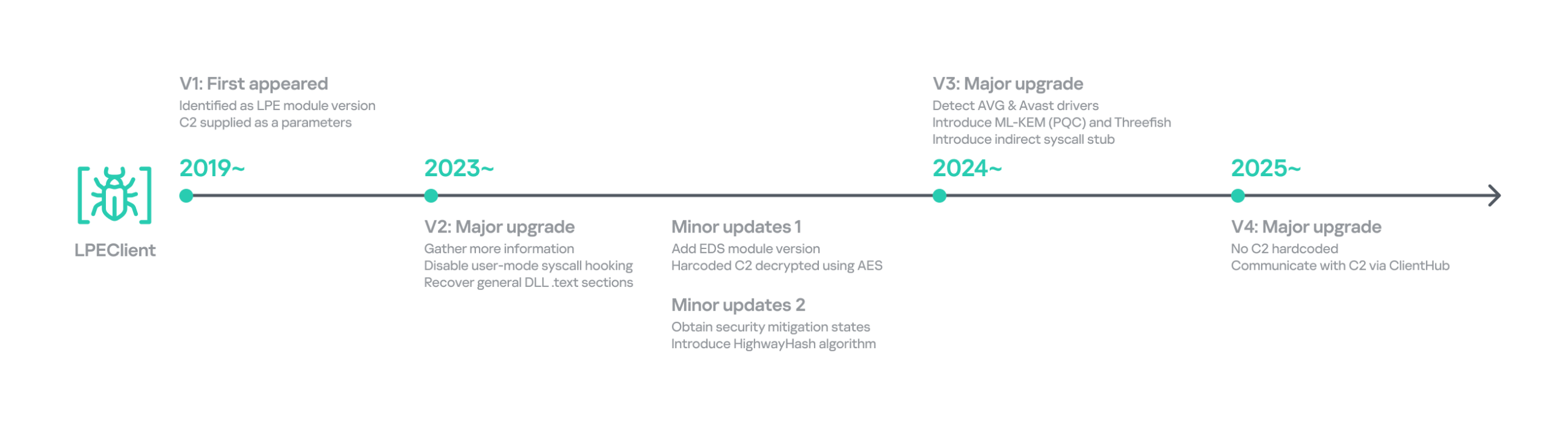
LPEClient has evolved continuously over time, but we discovered that it recently underwent a major operational revamp. It no longer contains the C2 server address itself; instead, it interacts with ClientHub via a shared buffer. We believe this change is intended to enhance concealment.
Timeline of LPEClient
The previous version collected the computer name, memory status, CPU specifications, operating system details, version of the ntoskrnl.exe file, firmware table, antivirus name, domain name, user name, the integrity level of the current process, and a random byte sequence of 1,568 bytes. The newly updated LPEClient variant mostly collects the same information; however, it also introduces several changes.
It does not collect the version of the ntoskrnl.exe file by querying the FileVersion value. Instead, depending on the specific build, it reads either the HKLM\SOFTWARE\Microsoft\Windows NT\CurrentVersion\UBR registry key or the SYSTEM_BUILD_VERSION_INFORMATION structure to retrieve the revision portion of the Windows build number. These values can be used to infer the system’s cumulative update or patch level.
To collect information about installed antivirus products, it switched from querying a WQL command to reading the WMI repository file directly. It now reads C:\Windows\System32\wbem\Repository\OBJECTS.DATA and searches for keywords such as AntiVirusProduct, companyName, and displayName to identify the installed products.
It also collects low‑level Windows security mitigation states. To achieve this, it queries the SYSTEM_KERNEL_VA_SHADOW_INFORMATION structure for the Kernel VA Shadow mitigation status and the SYSTEM_SHADOW_STACK_INFORMATION structure for the Shadow Stack (CET) protection status.
Additionally, it generates a 32‑byte random unique identifier by using the HighwayHash algorithm and an XOR operation with the current system time. The collected information, including the generated identifier, is compressed with the XPRESS Huffman algorithm using the maximum compression setting. The compressed data is then concatenated with the message ID 0xF07D6B34 and encrypted using GOST (also known as Magma), Russia’s national cryptographic standard that employs a DES‑like structure, before being sent to the ClientHub via a shared buffer. Initially, KrCERT described the algorithm as a custom DES‑like scheme. However, further analysis by us and Check Point confirmed that it is actually the GOST algorithm. The key is randomly generated by a proprietary key‑generation algorithm and prepended to the encrypted message.
The next request handles the key exchange by delivering the message ID 0xA39CF278 together with the generated unique identifier. The response is decrypted using the AES‑CBC‑256 algorithm. The SHA‑256 hash of the previously generated 1,568‑byte random value, which was originally sent to the C2 server during the collection phase, serves as the key for this decryption.
Through this process, LPEClient obtains a byte array comprising four 1,568‑byte blocks from the C2 response. Each block contains an ML‑KEM‑1024 public key, where ML‑KEM is a NIST‑standardized post‑quantum key encapsulation mechanism derived from CRYSTALS‑Kyber. LPEClient then generates four distinct pairs of shared keys and ciphertexts from these blocks, encrypts the ciphertexts with the GOST algorithm, and transmits them to the C2 server via ClientHub together with the message identifier 0xEF8C0D51 and the associated identifier. Now that the preparation phase for receiving payloads is complete, the malware is ready to receive payloads forwarded by ClientHub from the C2 server, along with the necessary parameters. The use of post-quantum cryptography shows that the group intends to hide subsequent payloads.
The response to the 0xEF8C0D51 message is decrypted with the Threefish algorithm using a 128-byte key, composed of the four distinct shared keys. Threefish is a tweakable block cipher that accepts a ‘tweak’ value alongside the key and the message. The concept of a tweak is similar to that of a nonce or initialization vector, which are used in different types of ciphers. In LPEClient communication, the tweak for the decryption is derived by XORing the unique identifier with 165 (0xA5). The first four bytes of the decrypted message must specify the parameter’s length, followed by the parameter itself and then the payload. The payload must be larger than 4 KB and start with the characters 'MZ', which indicates that the decrypted payload is an executable file. The payload is then reflectively loaded into memory. After successful loading, LPEClient sends the message ID 0xCB790A25 to the C2 server.
Before loading the acquired payload, LPEClient takes measures to bypass security products. Instead of invoking VirtualProtect directly, the malware uses the identified HeapPageAllocator::ProtectPages in jscript9.dll to modify the memory page protection of the MD4Update function. The beginning of the function is then overwritten with a hard‑coded opcode sequence that serves as a syscall stub with the required arguments. LPEClient then uses the syscall stub to disable a user‑mode syscall instrumentation hook.
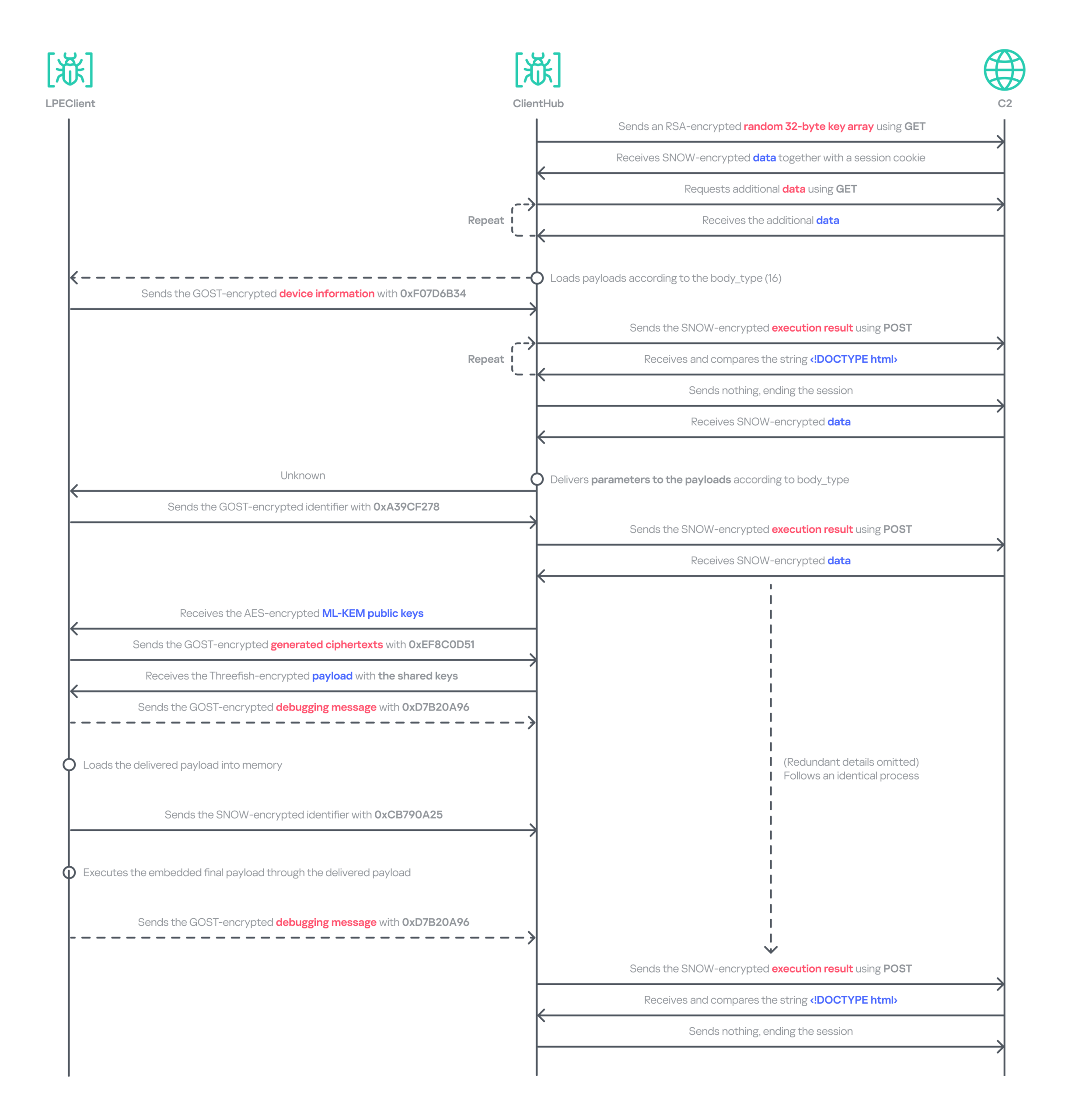
We identified the final payload that was ultimately loaded as Cubridge. The overall communication process is as follows.
Data relay flow between LPEClient and C2 via ClientHub
Comparison of plugins and modules
Throughout the engagement, we identified a variety of payloads deployed by TechHub, Cubridge, and ClientHub. These payloads have been categorized as tools, plugins, and modules that constitute the group’s modular malware framework. While we have not yet ascertained which payloads are deployed under specific conditions, the evidence suggests that the Lazarus Group’s toolkit is becoming increasingly sophisticated and segmented into specialized components rather than a single comprehensive backdoor. We also believe that TechHub and Cubridge may share similar tools.
These modularizations are not confined to the instances within this campaign. As previously noted, similar patterns have been identified in CookiePlus, MISTPEN, SIGNBT, and IMETHOD. Note that we have reclassified the ThreatNeedle variant used in Operation SyncHole as the latest version of IMETHOD, the predecessor of ThreatNeedle in use since at least 2016.
Infrastructure
Based on the information we obtained from the TechHub malware, we identified at least three primary repositories used as the C2 server and one fallback repository. The earliest evidence indicates that the group has been leveraging GitHub as a C2 server since at least July 2025. We suspect that all the accounts were created using hijacked email accounts, and disguised as normal repositories by copying or creating normal projects to avoid suspicion.
For the Cubridge and ClientHub C2 servers, the Lazarus Group employed only a minimal number of compromised yet legitimate South Korean media and interior design websites. Later, we observed that a broader range of compromised legitimate sites across various industries were also exploited. In addition, one ClientHub sample that we detected used Dropbox as a C2 channel.
Victims
We have identified at least three firms from the software, construction, and wired communication equipment industries in South Korea that were targeted by Operation FlashHole. As with the previous operation, however, we remain confident that a considerably larger number of organizations across a broader spectrum of industries have been affected.
The software sector was the only sector targeted in both the SyncHole and FlashHole campaigns. This suggests the actor is eager to compromise the sector, steal source code, and exploit vulnerabilities for further attacks.
Attribution and links to other campaigns
Operation FlashHole is the latest wave in the broader Cascade Hole campaign, which involves the use of South Korean software as a potential entry point to deliver malware targeting the country. Although the malware chain has advanced significantly since last year, we assess with medium-to-high confidence that the same actor is responsible for both the SyncHole and FlashHole operations based on the initial vector, targets, multi‑stage chain, and technical and operational improvements. The use of LPEClient in particular is a strong indicator supporting this assessment.
The malware strains used in the attack are historically linked to the toolsets observed in the Lazarus Group’s notorious Dream Job campaign. Earlier versions of TechHub (also known as CLOUDBURST and NickelLoader), Cubridge (also known as SIDESHOW and LightlessCan), and TouchShift were all observed in that campaign, especially between 2022 and 2023.
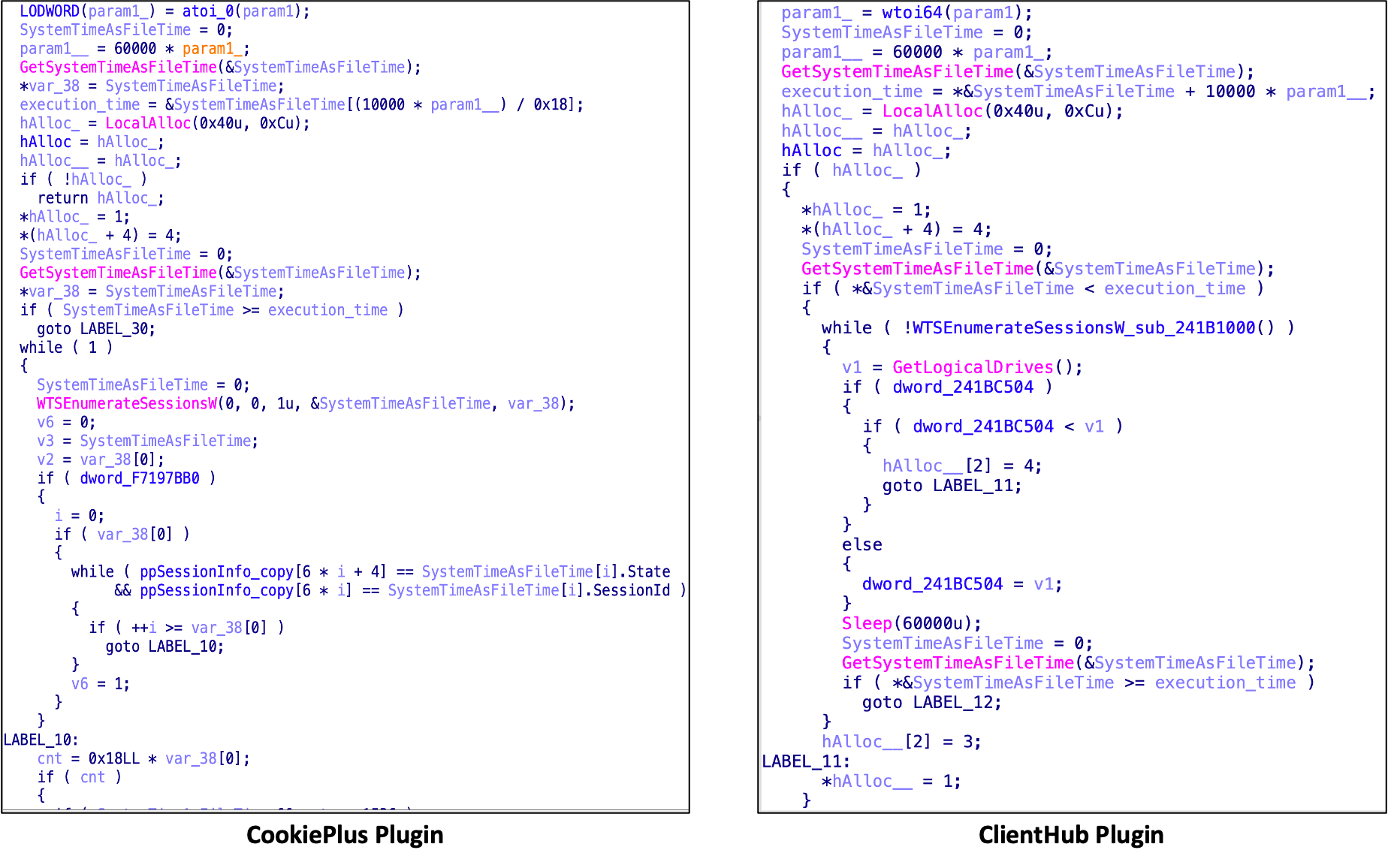
We also discovered that both CookiePlus and ClientHub have significant overlaps in class name, configuration path, and plugins. Based on these similarities, we assess with medium‑high confidence that ClientHub is an advanced version of CookiePlus.
Since July, around the time Operation SyncHole began winding down, we have also observed several notable attacks against South Korea employing the COPPERHEDGE backdoor and targeting various South Korean organizations. Interestingly, the start times of these activities align with the earliest evidence we have identified for Operation FlashHole. Although the backdoor was part of the second phase of Operation SyncHole, it has been operating independently with its custom loader since then. These incidents featured malware chains and tools that were distinct from those used in Operation SyncHole and FlashHole.
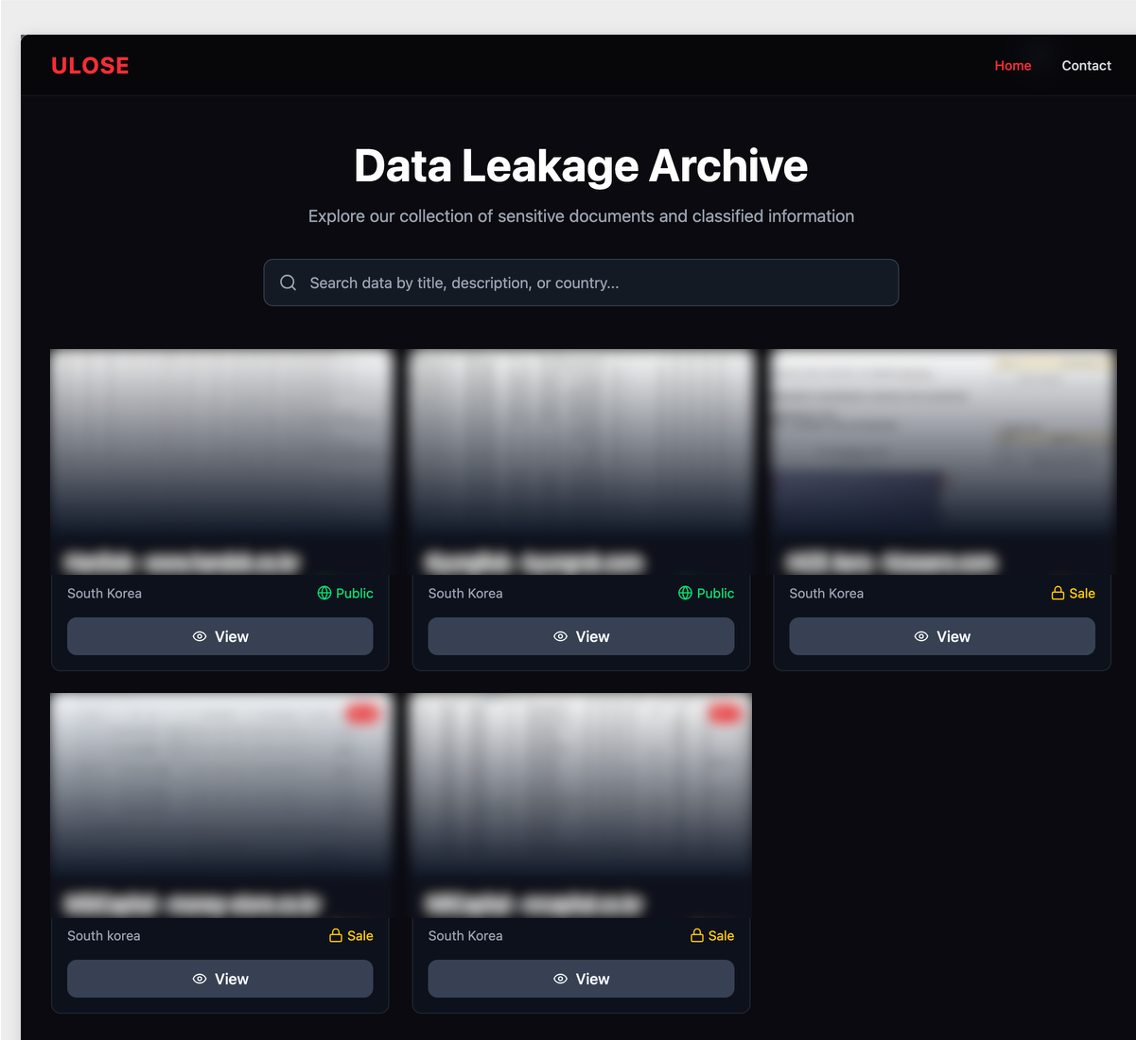
As AhnLab noted in their report, the same backdoor was likely observed in atypical activity, specifically the Gunra ransomware infection. Our investigation further revealed that one instance of a backdoor infection ultimately resulted in the exfiltration of data to a dark web leak site, which clearly differed from Gunra’s. The site appears to have been crafted exclusively for this activity. In summary, unlike other attacks, the backdoor was used in conjunction with both ransomware and data exfiltration.
Data leakage site linked to the COPPERHEDGE backdoor on the dark web
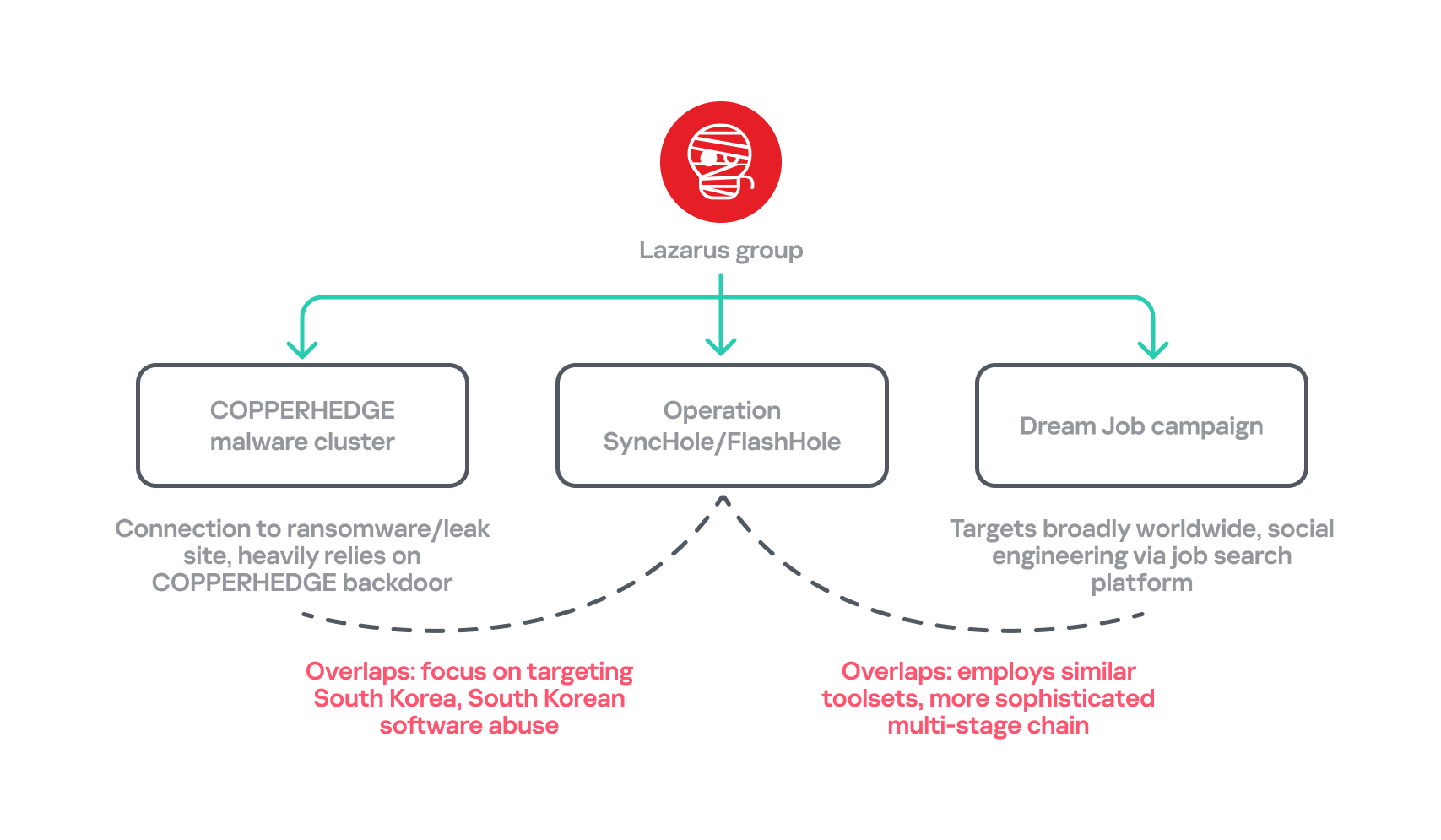
Another noteworthy point is that the recent Dream Job campaign employs an updated malware chain that, since around 2024, has primarily involved MISTPEN and ForestTiger rather than the earlier arsenal that included tools such as TechHub and Cubridge. However, the updated versions of this older malware have now re-emerged as part of Operation FlashHole. Considering these changes and all aspects of each attack’s TTPs, we have organized a classification for each attack.
Overlaps between the recent attacks by Lazarus Group
Conclusion
Our analysis shows that the Lazarus Group begins preparing for its next operation shortly after completing the previous one, ultimately deploying an enhanced malware chain by refining existing tools. The group continues to use the advanced version of LPEClient for profiling and payload delivery, indicating that the tool is meticulously managed and well maintained. Ironically, the group seems to have adopted more secure post-quantum cryptography faster than many legitimate security products. These observations suggest the involvement of a dedicated developer, with others orchestrating comprehensive attack scenarios against newly targeted software.
We anticipated that specialized attacks targeting South Korea would persist. However, we did not foresee multiple attack campaigns being executed simultaneously, each leveraging different types of software and tools. Notably, the COPPERHEDGE cluster appears to be involved in monetizing the attacks, while Operation FlashHole is focused on espionage. We are closely monitoring these changes to understand their motivations and ultimate goals.
In October 2025, the South Korean government unveiled a comprehensive cybersecurity plan that will phase out the mandatory installation of security software for users beginning in 2026. We estimate that operations exploiting this software will remain highly active for some time, maximizing efficiency, before the software is fully eliminated or mitigated.
Kaspersky products detect the exploits and malware used in this attack with the following verdicts: MEM:Trojan.Win64.Shellcode.gen, Trojan.Win64.DLLhijack.*, Trojan.Win64.Lazarus.*.
Cysic has suspended its cross-chain bridge after an attacker created 10 million unauthorized CYS tokens on BNB Chain and converted part of the supply into assets moved toward Ethereum.
TL;DR:On-chain analysis traced the sale of about 7.2 million CYS and the receipt of 306.6 ETH, valued at roughly $727,000 at the time. The bridge was stopped while the incident was investigated.
The mechanics of the attack illustrate why bridges remain an awkward security problem. A token minted on one network is supposed to correspond to an authorized event elsewhere. When that verification breaks, an attacker can create assets with no legitimate backing and sell them into whatever liquidity is available before a project can respond.
Blockchain records reviewed in the incident showed the attacker exchanging the newly minted tokens through decentralized venues and routing proceeds across chains. Cysic took action to suspend the bridge and block an address, but intervention came after a substantial portion of the unauthorized issuance had already been traded.
The immediate damage is not limited to the amount ultimately received in ETH. New tokens entering the market can also pressure CYS’s price, expose liquidity providers to losses and leave honest holders uncertain about which balances are valid. Recovery becomes harder as swaps and bridges split proceeds across multiple destinations.
Cysic will need to account for the failure in its message-verification process and explain any corrective action before normal operations can safely resume. Users should distinguish between the bridge’s security and the wider network’s functioning rather than assuming that every component suffered the same compromise.
The incident is another example of a technical shortcut in cross-chain accounting becoming a market-wide event in minutes.
Written by the News Desk and edited by Samuel Rae.

 Login
Login