Login
Login
2 Easy Methods to Bypass Netflix Household
After allowing password sharing for years, Netflix has recently changed its policy. The password sharing is now only allowed for a single physical household. However, we also have multiple methods to bypass Netflix household. Want to know more? Make sure to read till the end. Let’s being!
Since its initial years, Netflix encouraged password sharing with your friends and family, which allowed them to generate a strong user base. After they were done with this, Netflix unexpectedly started to impose a BAN on password sharing. This helped them surpass the expected revenue in Q4 of 2023, due to an overflow of new subscriptions.

Current Netflix Password-sharing Policy
Netflix only allows account sharing under a single, physical household. In simple terms, Netflix will only allow sharing your account with those who stream from the same internet as yours (the main account), preferably your family members.
However, to beat this, we first need to understand the concept of a single physical household.
Enforcement of the Policy
The policy is not enforced on smartphones because it is natural for mobile phones to be active outside of Netflix household. Currently, Password-sharing under single household policy is enforced for TVs, smart TV boxes, PCs, and all other similar devices.
What is a Single Physical Household?
As soon as the Netflix restrictions will move to your region, you will start getting monitored for your activity. On the basis of this activity, Netflix will automatically determine a “primary location” where your account is used the most. If your account is used by other devices, using the same internet, as you are using at your primary location, all the devices, including yours, will considered to be under a single physical household, known as Netflix Household. If you trying logging into an account which has a different Netflix Household you will be presented by an error message “your TV isn’t part of the Netflix household for this account” followed by an explanation that why you can not access Netflix.
Since we have looked at what is Netflix Household, and what the restrictions for it are, let’s just move to our main topic on how to bypass Netflix Household.
How to Bypass Netflix Household
It must be clear by now, that to bypass Netflix household, we must make Netflix think that all the users sharing the account are living in the same “physical household” or the same “primary location”. As Netflix determines the location by the IP of the primary device, we can do so by simply routing the traffic of all the additional devices from one primary device.
To make it clear, imagine you and your 4 friends plan to share the same Netflix account. You own the account and you run it in your house, on the TV. So the primary location is the IP address of your home internet router. Now, if all your friends route their Netflix traffic from your IP address while physically being on different locations, Netflix will think all of you 5 are in the same physical household, and you must not have an issue sharing the same account.
But if any of your friend is not in the same physical household i.e. Netflix Household , they will get a message “your TV isn’t part of the Netflix household for this account” while he tries to access Netflix.
Now let’s dwell into the methods on how we can bypass Netflix Household so that you can access Netflix even if you are not sharing the same location or internet. Lets discover them one by one.
Method 1: Tailscale to
If thinking of a Virtual Private Network or VPN brings you the idea of a consumer VPN, like SurfShark or ProtonVPN, we are not going to use that here, since the crackdown by Netflix for consumer VPNs have begun for years. We will however, set up our very own Private Network from our primary location to route all the traffic of shared devices from our IP. Now under this, we again have a few third-party services we can use. One of the easiest and most convenient to use is “Tailscale”.
What is Tailscale VPN?
Tailscale is a free VPN which allows you to route and monitor the traffic, you are sending or receiving from your IP. We will be using it to redirect all the traffic from the devices using shared account i.e. Outside of Netflix Household, to the device running from the primary location. To get started, you will have to follow these steps.
Set up Tailscale to Bypass Netflix Household
First of all, you need to download Tailscale. It’s simple and easy.
- Visit the Tailscale official website.
- Scroll down until you see “Download for Free”.
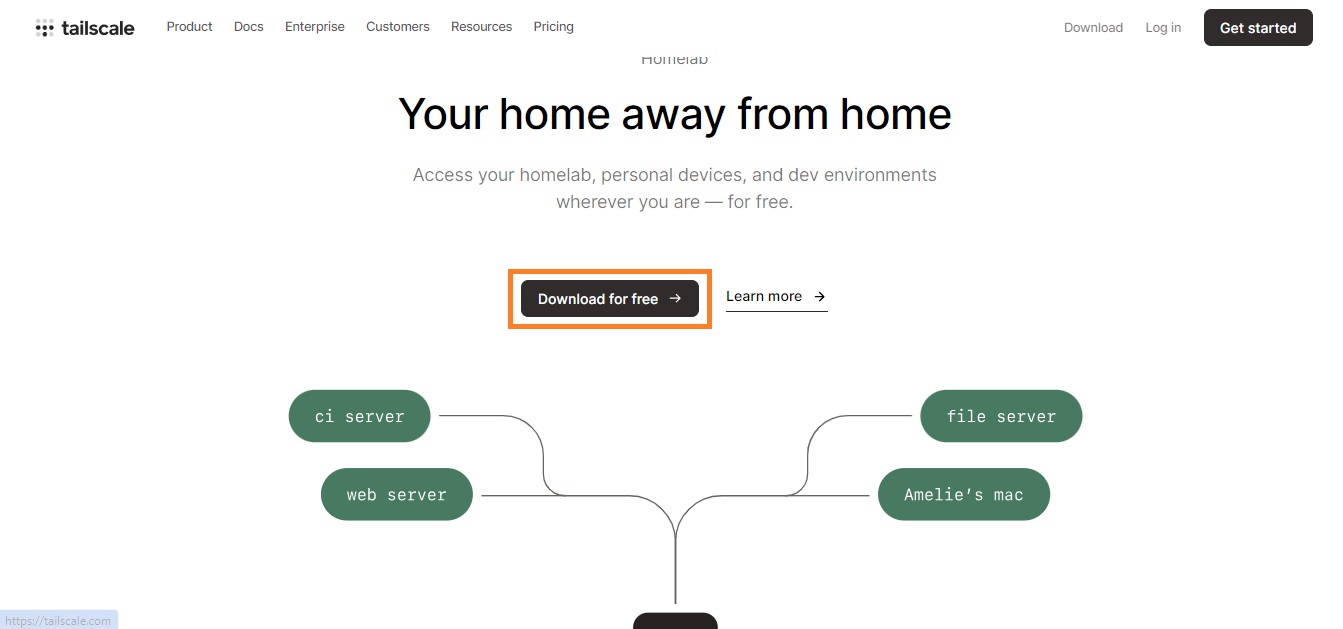
- Click the button and Sign Up with the option of your choice.
- Next up, you need to select the type of your primary device.
- It is important to note that your primary device needs to always be online.
- You can use Windows, Raspberry Pi, or a Mac to run your Netflix account.
- Select the respective option and click on “Download for Windows (in this case)”
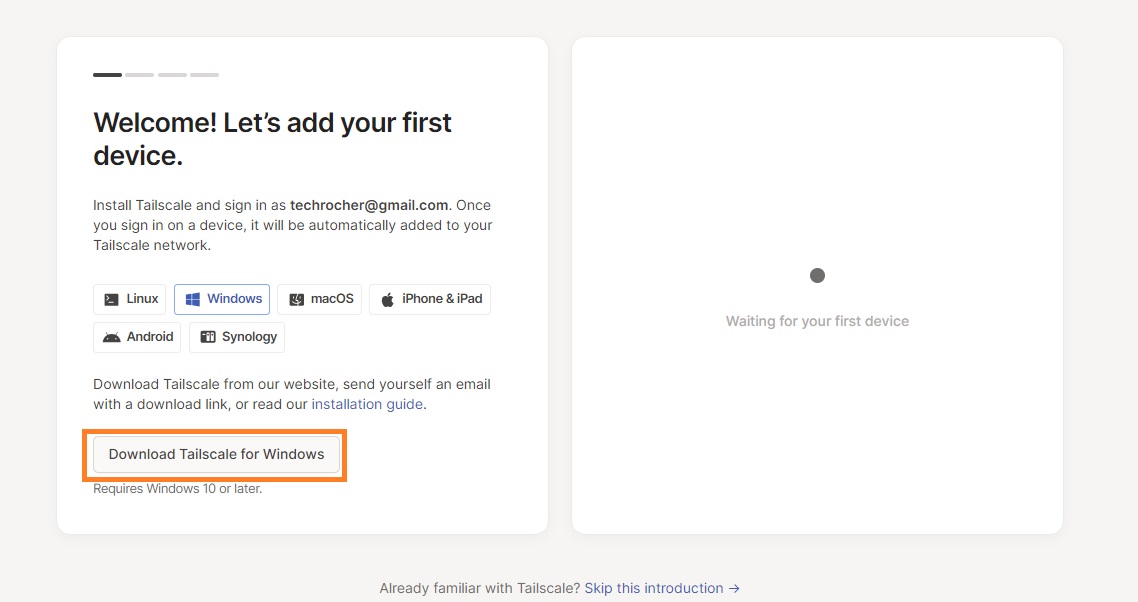
Tailscale – Add the Primary Device
Once you have downloaded Tailscale, you will need to log in to the account you created previously. After the installation is completed, simply run the Tailscale app and link the account you just created, by signing in. This will add your device as a primary device.
Tailscale – Add Second Device
Next up, you will need to add a second device that is intended to run the same Netflix account. To add a second device, install the Tailscale VPN on that device and log in with the same account you created earlier. After you have logged in with the same account on your secondary device, simply go back to your primary device to check if the device list is updated.
Once the device list is updated, you will see your secondary device, which in our case is
“iphone”. Although the device is for testing purposes, this is to be noted, that this method will not entertain any smartphone users – moreover smartphones are not barred by Netflix Household restrictions.
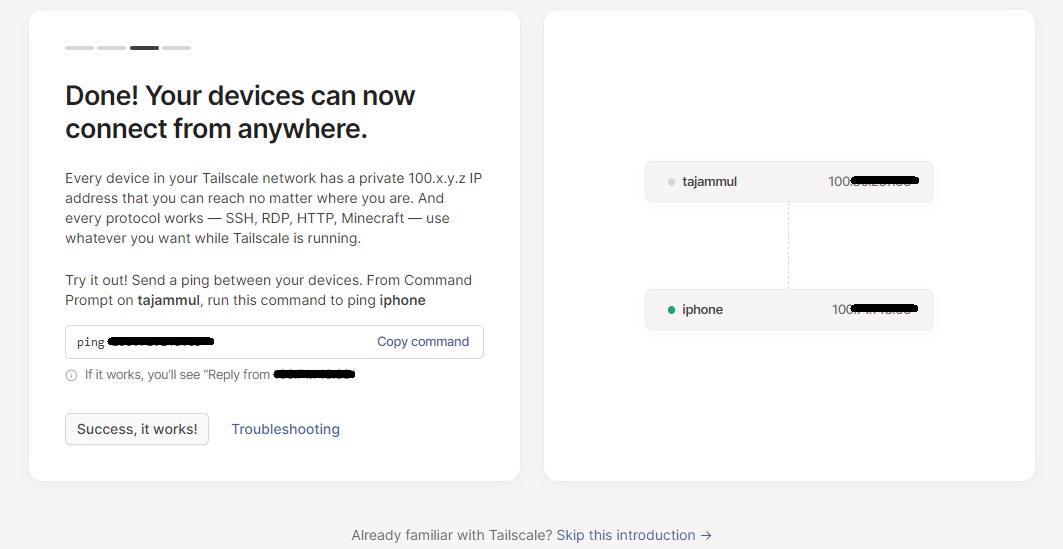
Anyways, once your device list is updated, click on “Success, it works”.
Tailscale – The Admin Console
On the next screen, click on “Go to the admin console” to access full control of all the devices.
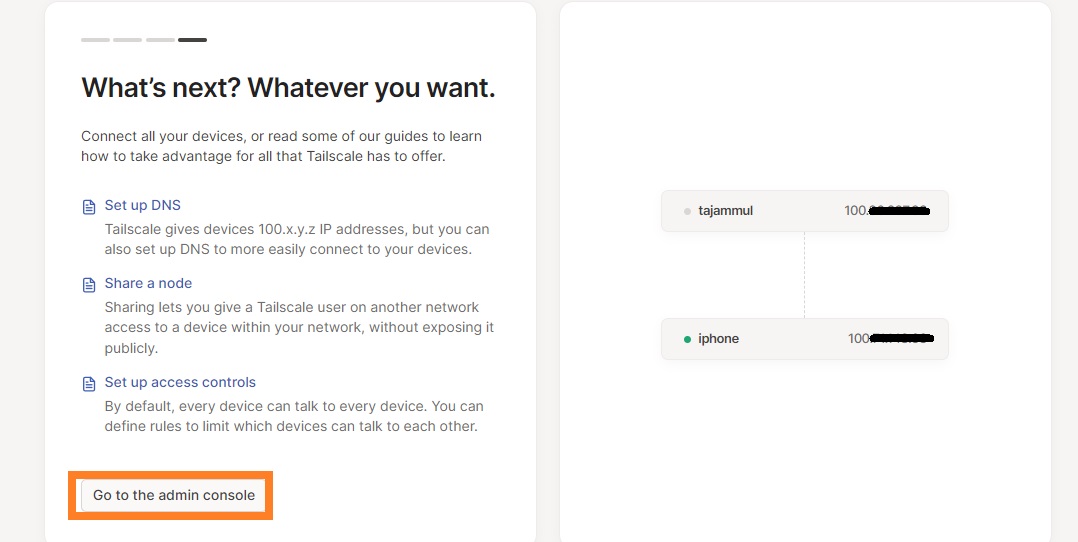
This will show all the available devices that are currently connected to current account.
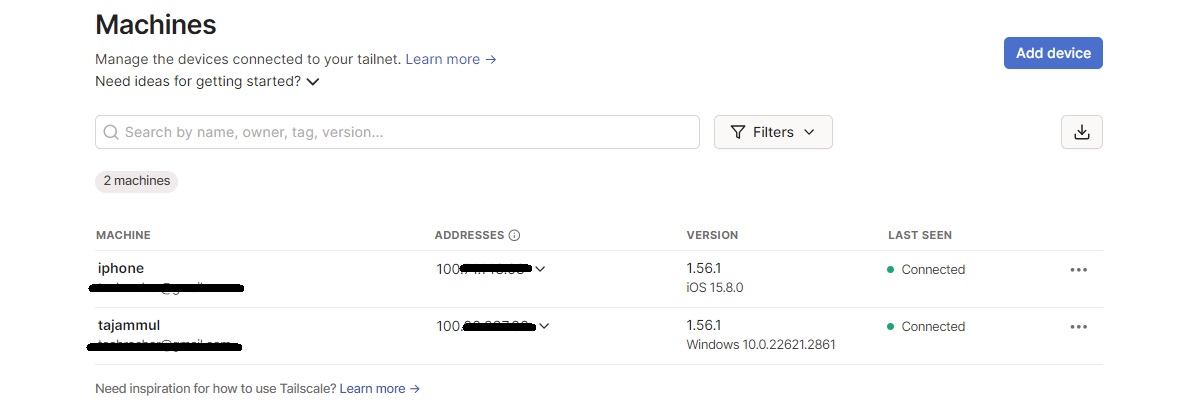
Now it’s time to set up our main server, which will route all the traffic from other devices. It will be our primary device which will be online all the time. And as we have decided already, this is going to be our Windows machine. Let’s set it up as an exit node (server).
Tailscale – Specify Primary Device as Exit Node
Go to little windows tray in taskbar and right click on Tailscale icon. Under “Exit Node” click on “Run exit node” and confirm it by clicking “Yes” for the pop-up.
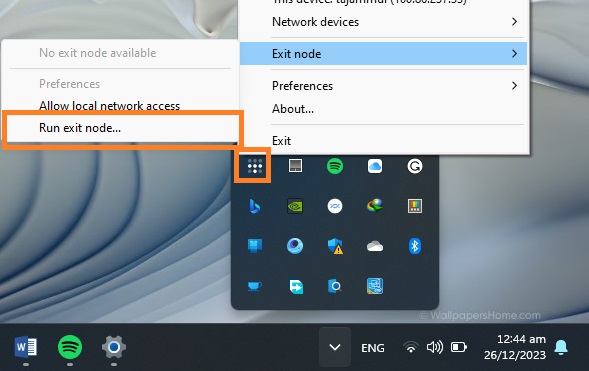
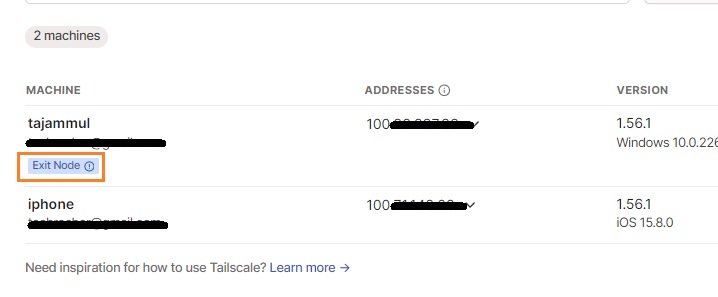
As soon as the exit node will be reflected on the application, a little badge will appear under the device name, indicating it is acting as exit node.
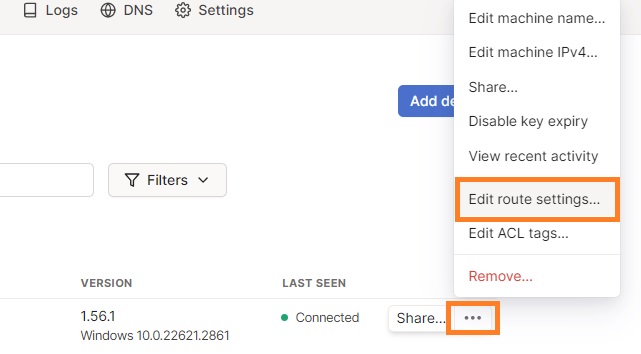
We will also need to approve this change from the admin console. For that, click on three dots against the name of the machine and click on “Edit route settings”.
Under this window, check the box before “Use as exit node” and click “Save”.
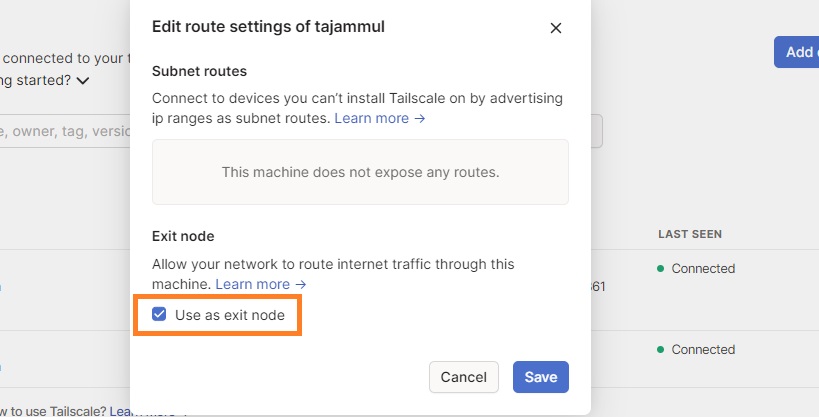
Now we have verified that we want our Windows machine to act as our server or exit node.
Tailscale – Disable Key Expiry
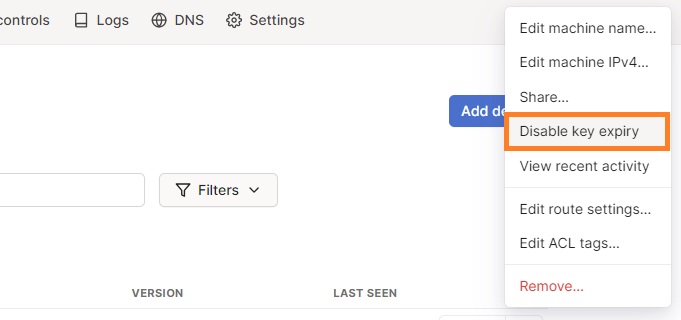
Another thing we have to do is, to disable expiry, that is, we have to authenticate all the devices periodically if the expiry is enabled. We can turn that off by click on three dots against our Windows machine name and click on “Disable Expiry”.
Tailscale – Make Primary Device a Service
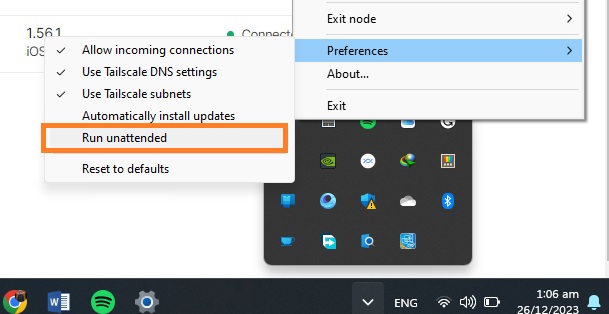
Now, we want our machine to act as a service, so even if no device is connected, it still functions as a server. For that, simply click on the little tray icon and right-click on the Talescale icon. Go to Preferences and enable “Run unattended”. Confirm by clicking “Yes” for the pop-up that appears.
Now we are done with our Windows machine. For the next step, we need to go to the Talescale app in our client device, and select our Windows machine as exit node. Once done, all our internet traffic will go through our primary device.
This was it for the first method. We can run Netflix on all of our devices and it will be good to go. As all internet traffic will go through the Talescale server we created above which is residing in the Netflix Household and Netflix will consider your outside session to be coming from the same location / IP thus allowing you to view Netflix.
Tailscale Alternative Services
Tailscale is not only the VPN offering this solution. We can use some other fantastic VPNs that do the same thing:
- SoftEther VPN
- WireGuard VPN
- PiVPN (for single-board computer and Linux)
Method 2: Meshnet by NordVPN to Bypass Netflix Household
If the previous method seems too technical or time-consuming to you, here is an alternate method for you. Although this method is relatively simple and easy, it comes with a question of reliability. Still there is nothing bad with giving it a shot. So let’s jump straight into it.
We will use NordVPN’s Meshnet service for this method. Meshnet is primarily aimed to provide a LAN network which can help route the traffic from a single device, transfer files in a network, and link multiple devices. We will, however, use this feature to bypass Netflix household restrictions. This method is easy, simple, and totally free of cost. For that, you will have to follow these steps:
Meshnet – Set up NordVPN
- First of all, download and install NordVPN in your primary device, which is again Windows machine in our case. (Setting up MeshNet is Free, however you can use this referral to get upto 3 months additional for free if you opt to buy)
- Sign Up or log in to your account
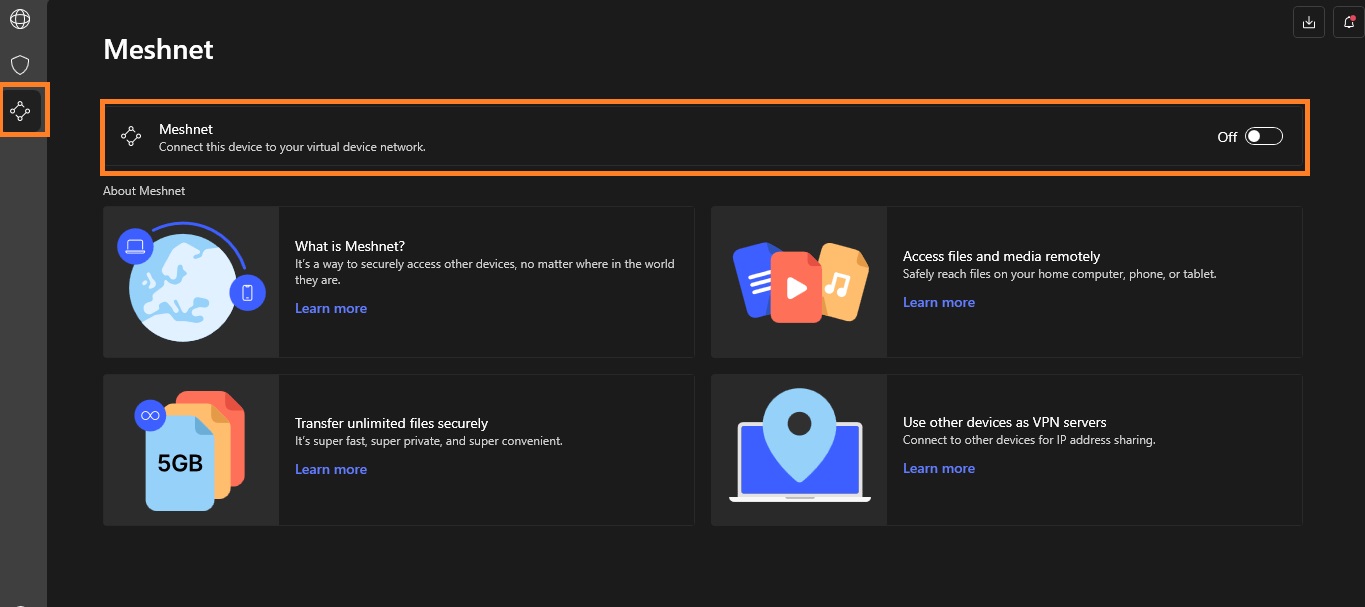
- Click at the third button from the top, at upper left corner and turn on Meshnet.
Meshnet – Set up Meshnet on Client Device
- On the client device, install NordVPN and log in with the same account.
- Turn on Meshnet.
- Come back to your host device (Windows PC) and check, the device list must be updated by then.
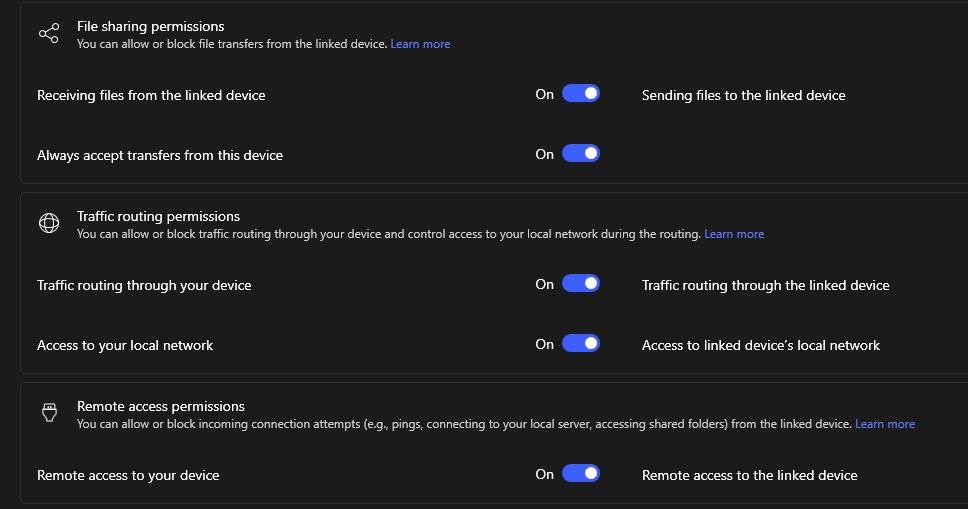
- Click on the 3 dot icon in front of the client device name and click “manage device”.
- Make sure all the options shown below are turned on.
- Now come back to your client device, and click on the Route Traffic option.
- You should see the host device.
- Simply click on “Route all Traffic”.
- Repeat the process for all the devices you want to add to the same network.
Once done, you will see the number of the devices on your host device that are routing their traffic from your device.
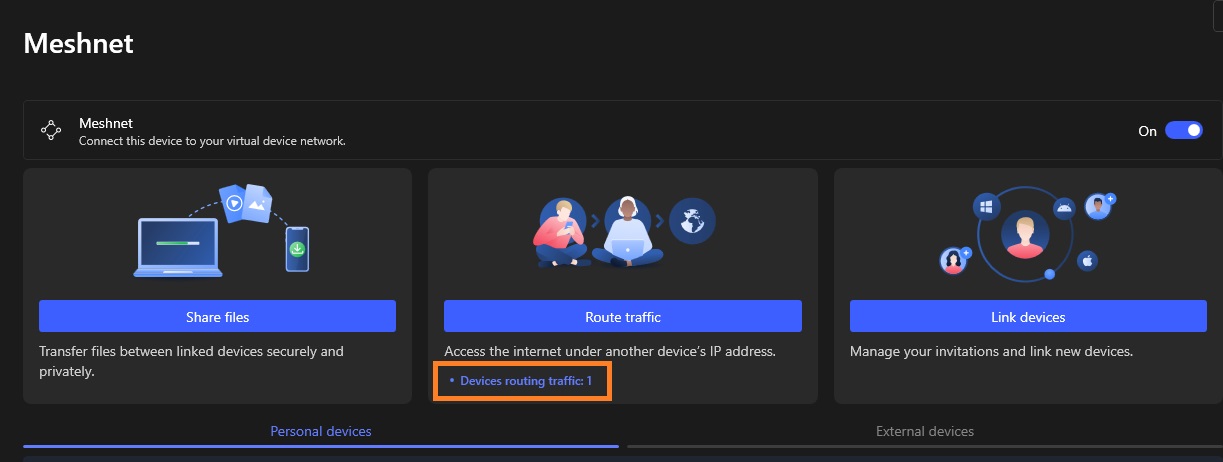
And that was it! Now all the devices are running under the same IP and you will be able to successfully bypass Netflix household restrictions.
Cautions and Restrictions
Although these bypass methods will let you enjoy the same Netflix account for all your buddies, here are a few cautions and restrictions you should be aware of.
Security Risks
The biggest caution for this method is the security. When you are routing all the traffic from multiple devices to a single device, it simply means you are allowing all the devices to access each other exposing your cyber footprint. And that any of your private information is easily visible to other devices connected to the same network.
So it is important to share your account and server with only the people you truly trust. While NordVPN Meshnet will regard your data security / privacy the Tailscale will give you more flexibility but lesser security protection.
Internet Speed
For the first method, Tailscale VPN informs its users that their services are not yet fully optimized for Windows devices. This means users can experience a lower internet speed compared to normal streaming.
This is also worth noting, that as the primary device is routing the internet for multiple devices, it must have a faster internet connection for a smooth Netflix experience.
Occasional Practices
As mentioned earlier, Netflix automatically determines a user’s primary location by analyzing it’s log data, we must take some measures to make Netflix determine our desired location i.e., as primary location.
Netflix usually checks for the household every 30 days. So to keep enjoying your streams, you must perform this routing practice at least within 30 days. However, the more frequently you perform the practice, the lesser the chances of you getting barred with this Netflix Household restriction will be. Ideally, a one or two week gap would be the best to make things going as desired.
Conclusion
After allowing password sharing for years, it seems like Netflix is now focusing on making some money. Netflix recently imposed a password-sharing ban to bring more users under their subscription model. Currently, they only offer “Password Sharing in Household”. This means, only people in the same physical household are allowed to share their passwords.
We can, however, use several methods to bypass Netflix household, allowing multiple devices to run physically on different locations, and virtually, under same IP. This is what this guide exactly talks about.
The post 2 Easy Methods to Bypass Netflix Household first appeared on Internet Security Blog - Hackology.