
❌

Reading view

There are new articles available, click to refresh the page.

Confessions of a Professional Hacker: Can the CIA or other Intelligence Agencies Track My Every Move?

Welcome back my aspiring cyberwarrior and others interested in cybersecurity!

When people find out I am a professional hacker, one of the most common questions they ask is, “Can the CIA (or other intelligence agency) track my every move?” The short answer is Yes!, they can track your every move if you have a cellphone AND the interested party (CIA or other intelligence agency) has your phone’s unique IMEI number.

Let’s look at how they do this and what you can do to make their job much harder.

IMEI

The IMEI or the International Mobile Equipment Identity number is unique to each phone and can not be altered. If the CIA or other intelligence agency knows this number of your phone, they can track your movements by tracking your phone. This number is available to them by subpoena, search warrant or US Patriot Act provisions.

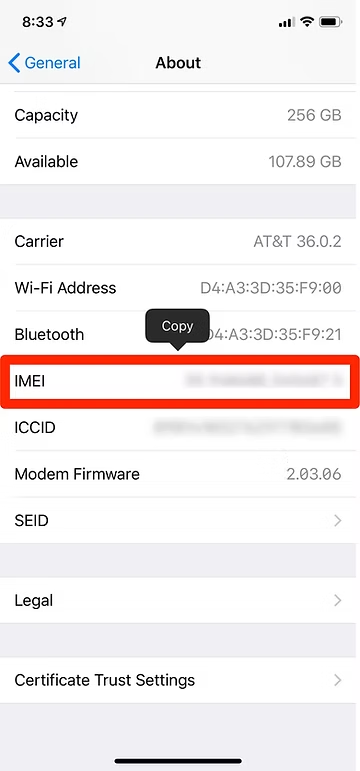
The IMEI is stamped on your phone and when you open the phone you can find it like below.

In addition, you can find the IMEI under settings of your phone. It is different places in different phones, but look for something such as “About Phone” like below.
IMSI

It is also possible to track a phone and its user by its IMSI (International Mobile Subscriber Identity) number of the phone. Fortunately, this IMSI can be changed out by changing out the SIM (Subscriber Identification Module) card.
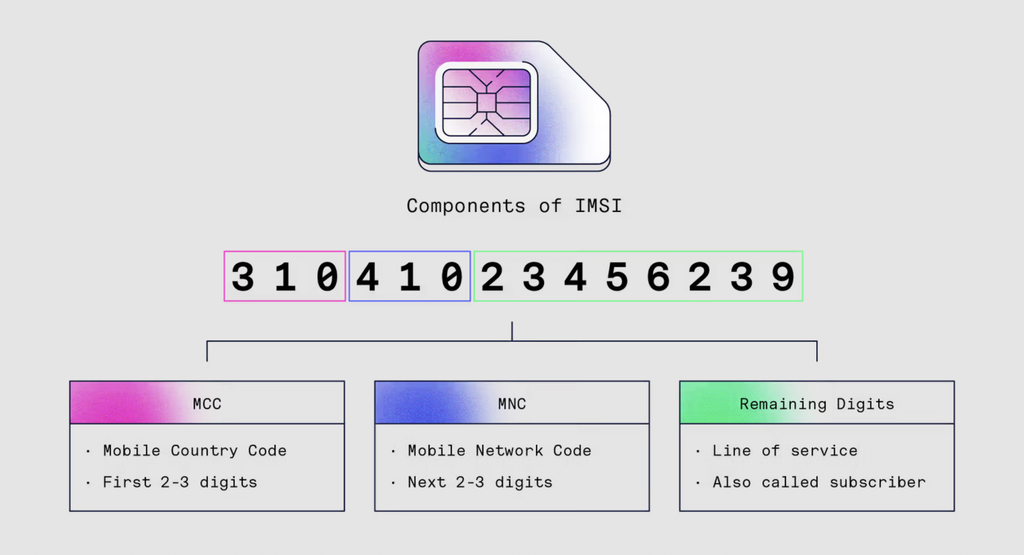
MSI numbers are broadcast by your phone when its sends a beacon to connect to the cell tower. It is possible for anyone with the right equipment to intercept and read those IMSI numbers. 

Every time a cell phone attempts to connect, it pings the cell towers in the area to determine which is closest. Every cell phone or other device connecting to the cellular network (such as iPads) does this. Every time a cellphone pings a tower, the phone’s IMSI, IMEI numbers as well as the the location of the cell tower is stored in the carrier’s database.
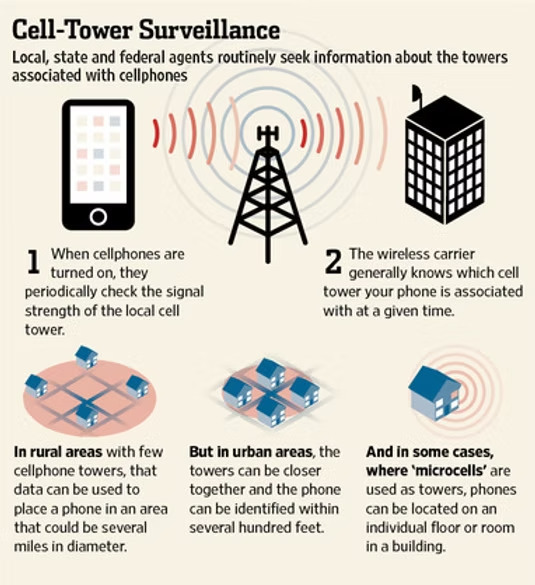
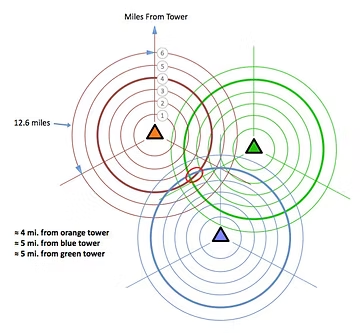
By triangulating (multiple towers are used to track the phone’s location by measuring the time delay that a signal takes to return back to the towers from the phone) between the pings to the towers in the area, the location of the phone can be determined within 50-500 meters, depending upon the concentration of cell towers. The closer the cell towers are together, such as in an big city, the more precise the data on the location of the phone. In urban areas, your location can be narrowed down to within 50 meters.
Stingrays

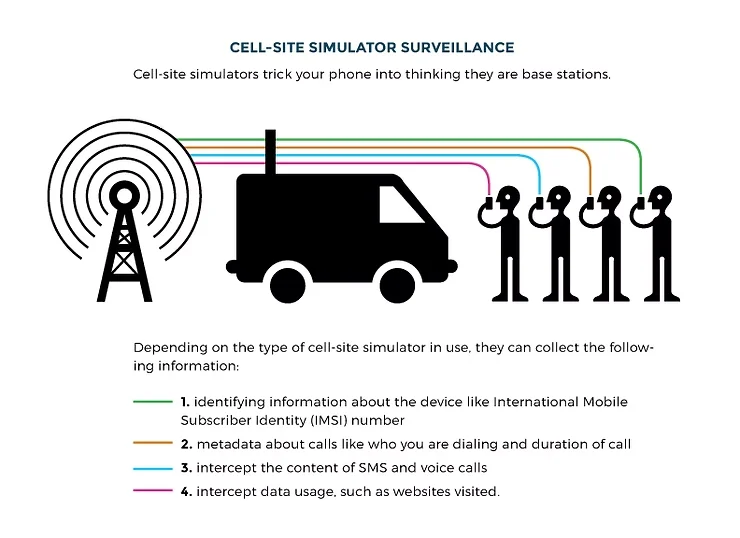
Although not a method of tracking but rather of eavesdropping, stingrays are one of the tools intelligence agencies and law enforcement use to listen to cellphones. A stingray is just a compact, mobile cell tower. Law enforcement and intelligence agencies can simply move one into your neighborhood. Your phone will then connect to the closest cell tower. The stingray looks and acts just like a cell tower so you phone connects to it without asking further questions. Once your cell phone connects to the cellular network, the owner of the stingray has access to all the calls and data leaving your phone. For more on stingrays, see my article here.
In the US and other countries (they are banned in the EU), you can buy an inexpensive, limited-feature, pre-paid phone at a local retailer without having to register your name. In this way, it is very difficult for intelligence agencies to connect the phone and its unique IMEI to your identity. To take further precautions, the phone should be purchased with cash so that no credit/debit card trail remains.
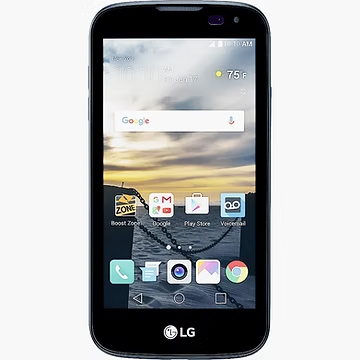
When purchasing a burner phone, make certain that you are NOT carrying your other phone with you. Your other phone is tracking all your movements. If you are carrying your that phone, you are creating a record of your visit to the “burner phone” retailer linking you to the purchase and the IMEI of the burner phone thereby frustrating your attempts to remain anonymous. 

Summary

The CIA, any intelligence agency or law enforcement can track your every move very precisely by tracking the cell towers your phone pings before it connects. All this data is stored in the phone carrier’s database and can be accessed by these agencies. The burner phone is probably the best way to frustrate this type of tracking but make certain to take the precautions described above.

The post Confessions of a Professional Hacker: Can the CIA or other Intelligence Agencies Track My Every Move? first appeared on Hackers Arise.

Bluetooth Hacking and Security: The WhisperPair Exploit and Bluehood Surveillance

Welcome back, aspiring cyberwarriors!

Bluetooth is often seen as something short range and therefore harmless. Many people think that because it only works over a limited distance, it must also be secure by design. But that’s not true. Bluetooth is convenient, but convenience often comes at the cost of security and privacy. A big number of vulnerabilities show that Bluetooth devices can expose much more information than many realize. At a technical level, they constantly announce their presence to the surrounding environment. Even when you are not actively using them, they still send small pieces of data. Over time these pieces form patterns that show detailed information about people’s lives.

Hackers can take control of devices, pair with them without permission and even use them as remote listening tools. In other cases, simply listening is enough. 

WhisperPair Vulnerability

In January 2026, researchers from KU Leuven disclosed a critical Bluetooth vulnerability known as WhisperPair (CVE-2025-36911). This vulnerability affects hundreds of millions of Bluetooth audio devices, including headphones and headsets that rely on modern pairing mechanisms. The attack takes advantage of a feature called Fast Pair in Android. Fast Pair was designed to simplify the user experience. With a single tap users can connect their Bluetooth accessories and synchronize them with their account. It’s convenient and widely adopted.

However, some devices don’t properly ignore pairing requests when they aren’t in pairing mode. A hacker can exploit this by sending crafted pairing initiation packets to a vulnerable device. Even if the device isn’t actively trying to connect, it may still respond. Once the hacker receives that response, they can establish a normal Bluetooth connection.

whisperpair-cli
Source: WhisperPair

From that point on, the hacker gains control over the accessory. 

scanning for nearby ble devices
Source: WhisperPair

Then they can activate the microphone to record conversations. The attack works from up to 14 meters away, which is plenty for offices, cafes or public transport.

hijacking ble devices
Source: WhisperPair

This can be combined with device tracking. Some Bluetooth accessories integrate with Google’s Find Hub network, which allows lost devices to be located using nearby Android devices. If a vulnerable accessory has never been paired with an Android device before, a hacker can register it under their own Google account. In doing so, they become the “owner” of the device in the tracking system.

ble device surveillance with Find Hub
An attacker tracks the victim’s location through the Find Hub network. Source: WhisperPair

The victim may eventually receive a notification about unwanted tracking, but the alert can appear misleading. If the user’s own device is responsible for tracking, that will cause confusion and reduce the likelihood that the threat is taken seriously. Meanwhile, the hacker continues to track the device over time. It affects multiple vendors, chipsets and product lines. As a result, exploitation is likely to continue well beyond 2026.

Bluehood Scanner

Sometimes, attacks are completely passive. In February 2026, a developer released a Bluetooth scanner called Bluehood. It looks like a monitoring tool and shows how much information can be extracted from the environment without ever connecting to a device.

showing devices in bluehood

Bluetooth is almost always enabled. Phones, laptops, smartwatches, headphones, cars and even medical devices continuously broadcast signals. Bluehood listens to that data and builds patterns over time. By passively listening to this traffic over days or weeks, hackers can reconstruct behavior.

For example, you can find out when delivery vehicles arrive and whether the same driver appears regularly. You can see daily routines by tracking when certain devices appear and disappear. You can also correlate devices that are always seen together, such as a phone and a smartwatch, which likely belong to the same person. You can even determine approximate schedules when someone leaves for work or returns home.

You don’t need to buy hardware for that. In many cases, a laptop will do the job. If you want, you can get a Raspberry Pi with a Bluetooth adapter. 

bluehood alert configuration

Some devices are designed to always keep Bluetooth active. Hearing aids, for instance, rely on Bluetooth Low Energy for configuration and diagnostics. Pacemakers may also broadcast BLE signals for similar reasons. These aren’t devices that users can simply turn off.

Many cars use Bluetooth for diagnostics, driver assistance and connectivity features. Consumer devices add even more noise to the environment. Smartwatches, pet trackers and fitness equipment all give off signals. Together, they create a dense network of signals that can be analyzed.

bluehood

Bluehood works only in passive mode. It doesn’t try to connect to devices. It identifies them based on manufacturer data and BLE service UUIDs, then tracks when they appear and disappear. The tool also includes a web dashboard. It generates hourly and daily heatmaps, tracks dwell time and has filters. New devices often use randomized MAC addresses for privacy and Bluehood can detect and filter these.

Installation

You can install  the tool quickly using Docker.

kali > git clone https://github.com/dannymcc/bluehood.git
kali > cd bluehood
kali > docker compose up -d
setting up bluehood with docker

Alternatively, you can install it using package managers and Python tools.

kali > sudo apt install bluez python3-pip
kali > pip install -e .
kali > sudo bluehood

After the installation you can start the scanner.

# Start with web dashboard (default port 8080)
kali > bluehood

# Specify a different port
kali > bluehood --port 9000

# Use a specific Bluetooth adapter
kali > bluehood --adapter hci1

# List available adapters
kali > bluehood --list-adapters

# Disable web dashboard (scanning only)
kali > bluehood --no-web

Keep in mind that if you installed the app with Docker Compose, it should be accessible at http://localhost:8080.

bluehood dashboard

Collected data is stored in SQLite, and the tool can optionally send notifications through ntfy.sh when devices arrive or leave a location.

Summary

Bluetooth security is often underestimated because the technology feels invisible and low risk. That’s not the case though. There are active and passive techniques that can be used for tracking. Big cities often have listeners scattered around public places and stations, working like Bluehood. Active techniques like WhisperPair can lead to full device compromise with tracking and audio surveillance.

If you enjoy experimenting with frequencies and trying new things, we have our SDR for Hackers training. With Master OTW, you’ll learn how to use your computer and inexpensive SDR hardware to explore and hack a wide range of radio signals.

The post Bluetooth Hacking and Security: The WhisperPair Exploit and Bluehood Surveillance first appeared on Hackers Arise.

Open Source Intelligence (OSINT): Using Osiris for Global Intelligence

Welcome back, aspiring investigators!

We recently updated our article on ShadowBroker, which a lot of you liked. The latest release brought some new features and made the dashboard even richer.

But ShadowBroker is resource intensive and might need you to allocate a good chunk of resources to your VM, which not all systems have. Instead, there’s Osiris and it can do similar things without any installation. You can run it in the browser or host it on your Kali. Both versions are identical.

Osiris

Osiris is a global intelligence dashboard that aggregates live flight tracking, CCTV, earthquake monitoring, conflict zone mapping and 24/7 news feeds. It’s made to give you situational awareness across multiple intelligence domains. The tool was built with Next.js 16 and MapLibre GL and every data point is rendered via WebGL for 60fps performance even with thousands of concurrent entities on screen.

Dashboard

Let’s start with the live version. It’s available here.

The world looks busy once you enable all the data layers on the left side of the screen.

Camera Feeds

There’s a huge number of cameras available around the world that are free to access. They are usually scattered across different websites and don’t look nearly as good as they do on a map. The dashboard has integrated a big number of them, marked with green dots on the map.

Here’s a camera in Toronto. Looks empty at 5 am.

Aircraft Tracking

All kinds of aircraft and maritime vehicles can be tracked. Not only that, you can do a deep dive on the intel available for each one. Below you can see we picked a random flight over the UAE and the dashboard pulled up the company it belongs to, Tim Clark who is the CEO and some publicly known information on him.

You can do similar things with other objects on the map.

So if you’re monitoring military activity in a certain region, that can come in handy.

Critical Infrastructure

There are different data assets you can display by clicking the database icon on the right side of the screen. The data is relevant for various places, but mostly for the US.

Above you can see the critical infrastructure in New York (red) and nationwide (yellow).

Conflicts and Dangerous Zones

Wars, tensions and threats are differentiated by color and notes are assigned to each with a severity level.

Market Analysis

When someone loses, someone else wins. Osiris can do some Market AI overview, which you obviously shouldn’t take as legit advice. But you can see it does some basic analysis and warns of potential price spikes.

Satellite Tracking

All kinds of satellites are available on the dashboard and they can also be tracked. Here you can see Starlink flying over the Atlantic and Canada.

Malware Threats

Finally, you can view malware threats and attacks on the map. There was a big node in China linked to a lot of attacks, with more scattered around the rest of the country.

Hosting Locally

Although the live version is stable and its uptime is good, you might still want to run it locally. It’s pretty easy to set up:

kali > sudo apt install npm
kali > git clone https://github.com/simplifaisoul/osiris.git
kali > cd osiris
kali > npm audit fix --force
kali > npm run dev

Then it’ll be available at http://localhost:3000

Summary

As you can see, there are different platforms available for different setups. Having compared the two, ShadowBroker looks richer and more professional, but Osiris hosts a live version you can use without any installation and it already has most of what you’d want to test. The installation itself is quick and easy and the dashboard consumes way fewer resources than ShadowBroker. Test it yourself and see what you like.

You can learn more with us! Get our Cybersecurity Starter Bundle II and unlock WiFi Hacking, Python for Hackers, Radio Basics and other training.

The post Open Source Intelligence (OSINT): Using Osiris for Global Intelligence first appeared on Hackers Arise.

Open Source Intelligence (OSINT): Tracking World Events with ShadowBroker

Welcome back, investigators!

The world is moving fast and it’s hard to keep up with everything happening around us. Not long ago, news from foreign places could take days or weeks to arrive. Now it’s different. Planes, ships, satellites, news and basically everything else is indexed and on the internet. The only problem is there are so many services and this fragmentation can drain your focus fast. But all these things can be integrated into one platform that runs locally.

We want to talk about ShadowBroker today. The developers did a great job making the tool professional, so it does deserve your attention. 

ShadowBroker

ShadowBroker is an OSINT dashboard designed to collect a wide variety of public intelligence feeds into its map interface. It visualizes live information from different sources, which includes aircraft and maritime tracking, satellite orbit data, reports on world conflicts and so much more.

The developers built it using Next.js for the frontend and MapLibre GL for rendering the interactive mapping layer. FastAPI and Python are used for the backend.

Setting Up

Before we start working with the dashboard, we need to set up a couple of things first. The tool does support different OS, but we’ll use Kali. 

ShadowBroker needs Docker and Docker Compose to be installed on the system.

Here are the commands that will help you set things up:

kali > sudo apt update
kali > sudo apt install docker.io
kali > sudo systemctl start docker
kali > sudo systemctl enable docker
kali > sudo apt install docker-compose
kali > sudo usermod -aG docker $USER
kali > newgrp docker
installing docker

When you run these commands, you might be asked to restart different services. Press “Ok” and wait for the installation to complete. After the installation is complete, restart your Kali.

When your Kali boots, the Docker service should already be running. Now we can install ShadowBroker:

kali > git clone https://github.com/BigBodyCobain/Shadowbroker.git
kali > cd Shadowbroker

Once you’re in its directory, you need to run Docker commands with root privileges, otherwise it will throw an error:

kali > sudo su
root > docker compose pull
root > docker compose up -d
docker completed and installed the app

It will take a few minutes to install. Time spent on waiting really depends on you hardware and internet speed. It might take roughly 10 minutes. When Docker is done, see if ShadowBroker is up:

root > docker ps
docker ps

You should see its containers in the output. Your system will keep them running in the background every time you boot.

Dashboard

Now we are ready to test it. Make sure you have allocated enough resources to your Kali VM to let it run smoothly. Open your browser and put this in the search bar: http://localhost:3000 (or try http://127.0.0.1:3000 if it doesn’t open anything).

api keys are optional

When you open it for the first time, it will ask you for API keys. These keys are optional and you can skip this part. It will also offer you the option to hook up an AI agent to parse through the data and find correlations, but there is already enough data without it.

overview

On the left side, there is a panel with many Data Layers with information that can be enabled or disabled. They include military flights, private jets, commercial aircraft, maritime vessels, satellite tracking, seismic activity and other global monitoring feeds. The list continues to expand.

It may feel overwhelming at first to work with the dashboard, so there is a legend with icon references. You can find it at the top of the left side, it has a small book icon.

map legend

News 

News alerts appear on the lower right side of the interface, categorized by their level of importance.

news

When significant events occur in a particular region, the platform aggregates related news articles and shows them as yellow clusters on the map. You can open these clusters and see the headlines with links that lead to original sources.

news in clusters

Red clusters contain information collected from Telegram. You can see them scattered across the globe. Quite often they have media attached to them. 

telegram news in red clusters

There is also Threat Intercept, these are big banners with alerts that you see on the screen in different regions. You can click and see more detailed information

threat intercept

Military Bases

The recent update brought military bases to the map. Here are some of them near the Strait of Hormuz

military bases

Antennas and Nodes

Antennas and Metastatic nodes are also available in the dashboard. You can tune in or send a message.

antennas and nodes

Satellite Monitoring

Satellites orbiting the Earth have different purposes. Some of them are used for weather forecasting, others give us communication services. There are also some used for recon, military and scientific missions. If you enable the satellite layer, you can see them moving across the planet.

satellites

GPS Jamming

GPS jamming can happen for several reasons, including military exercises, electronic warfare operations or just experimental testing.

gps jamming

Here you can see parts of Romania being jammed near the capital.

Aircraft Tracking

The dashboard has several categories of aircraft, including military planes, tracked VIP aircraft and commercial flights.

tracking airplanes

Some aircraft are tagged with additional information that identifies their owner. The one above belongs to the government of Morocco. You can look up specific individuals in the search bar. For instance, searching for the President of the United States will show the location of his aircraft if he’s flying somewhere. 

Satellite Captures

The satellite captures are updated on a daily basis. They can be useful for environmental monitoring and weather observation.

sat imagery

You can play with different layers under Satellites to see other things. For example, here is VIIRS Nightlight by NASA.

night time sensors

Summary

OSINT is generally about connecting many small pieces of publicly available information into one thing. It’s an arduous thing to do, since you have to jump from tab to tab and find ways to piece it all together. ShadowBroker brings all that aggregated and prioritized information into one platform. The developers have been taking good care of the project for almost half a year now since they published it. New things keep getting integrated, expanding the amount of data available for analysis. Given how simple it is to set up, it’s worth giving it a shot.

If you want to improve your OSINT skills, consider our OSINT training. Those who need assistance in finding the truth, don’t hesitate to reach out to us at hackers-arise@protonmail.com. We will conduct an investigation for you.

The post Open Source Intelligence (OSINT): Tracking World Events with ShadowBroker first appeared on Hackers Arise.

❌