A modern organization protects its information systems with a whole suite of technologies that generate thousands of security alerts every day. Looking at these alerts in bulk, you’ll see that a significant share are false positives. Ideally, these alerts would be filtered out automatically so that analysts could focus on the ones that may point to a real incident. However, writing filters is a time-consuming task in itself. To create a correct filter, an analyst needs to:
Review the logs
Identify the source of the activity
Define filtering boundaries
Choose filtering criteria
Write a rule
Check that the filter is robust
This post looks at how filter creation itself can be automated to reduce analyst workload.
Filter validity criteria
In the context of security alerts, a filter is a combination of event field values that marks a detection as a false positive and not worth the analyst’s attention. Filters can be generated for any combination of event fields, but not every combination yields a valid filter. That’s why we need to define validity criteria: conditions showing that a specific filter actually removes noise and doesn’t suppress useful alerts.
Detection rules in security systems typically contain a set of conditions, and each of them can generate an alert. A specific event triggers a given fragment of a detection rule. The set of events that a given fragment responds to is what we’ll call its context. A good filter should cover the entire context where possible, without going beyond it. Filters that are too broad or too narrow are useless. For example, a filter based solely on PowerShell would exclude too many events, including some that deserve the analyst’s attention. Most of the filtered events would also be unrelated to the rule in question. A filter on a specific ID, on the other hand, would cover only one event, which may never recur.
Problems in filter generation
We can run into a number of problems when creating filters. First, events often contain an excessive number of fields (around 400 on average), and most of them aren’t needed for filtering. At the same time, generating and ranking combinations of these fields is also fairly resource-intensive. So, the first step is to discard the irrelevant fields and keep only those worth using in the filter. For example, out of 400 fields in an event, four may be enough for filtering.
Another problem is string normalization. Field values (for example, the path to the same application on different systems) can vary depending on system settings, user folder names, and so on. For a filter to account for all these variations, the strings must be normalized. For file paths, in particular, you can replace the drive letter and user folders with standard environment variables and convert all paths to a single case.
Finally, if a filter completely mirrors the query of a detection rule, it effectively disables that rule. To fix this, remove the event fields used in the detection rule from the filter. For example, if a rule triggers on a file path, there are two ways to filter out unwanted alerts:
In the filter, use fields other than the file path.
Use a part of the file path that the rule doesn’t use. For example, for the rule file_path: ".../something.exe", you can set up a filter that excludes events with the user/unique_files/ directory in the file path.
Filtering security alerts with an algorithm
Given the problems described above, automatically generating filters for security alerts should consist of the following steps:
An analyst receives a security alert that they assess as a false positive and uses the filter generator.
The generator takes the 400-field event from the alert, along with the rule that triggered on it, and determines the context.
The generator selects the fields that are relevant to the filter.
The generator normalizes the strings.
The generator builds different combinations of the selected fields. To do this, we applied the FP-Growth (frequent pattern growth) algorithm to the context determined earlier. FP Growth builds a tree of frequently occurring items (fields) from a dataset (in our case, the context) and discards items that aren’t frequent enough. This reduces the number of combinations to check, which lowers the cost of finding the most relevant ones.
The generator ranks the resulting combinations and offers the analyst the top three to choose from.
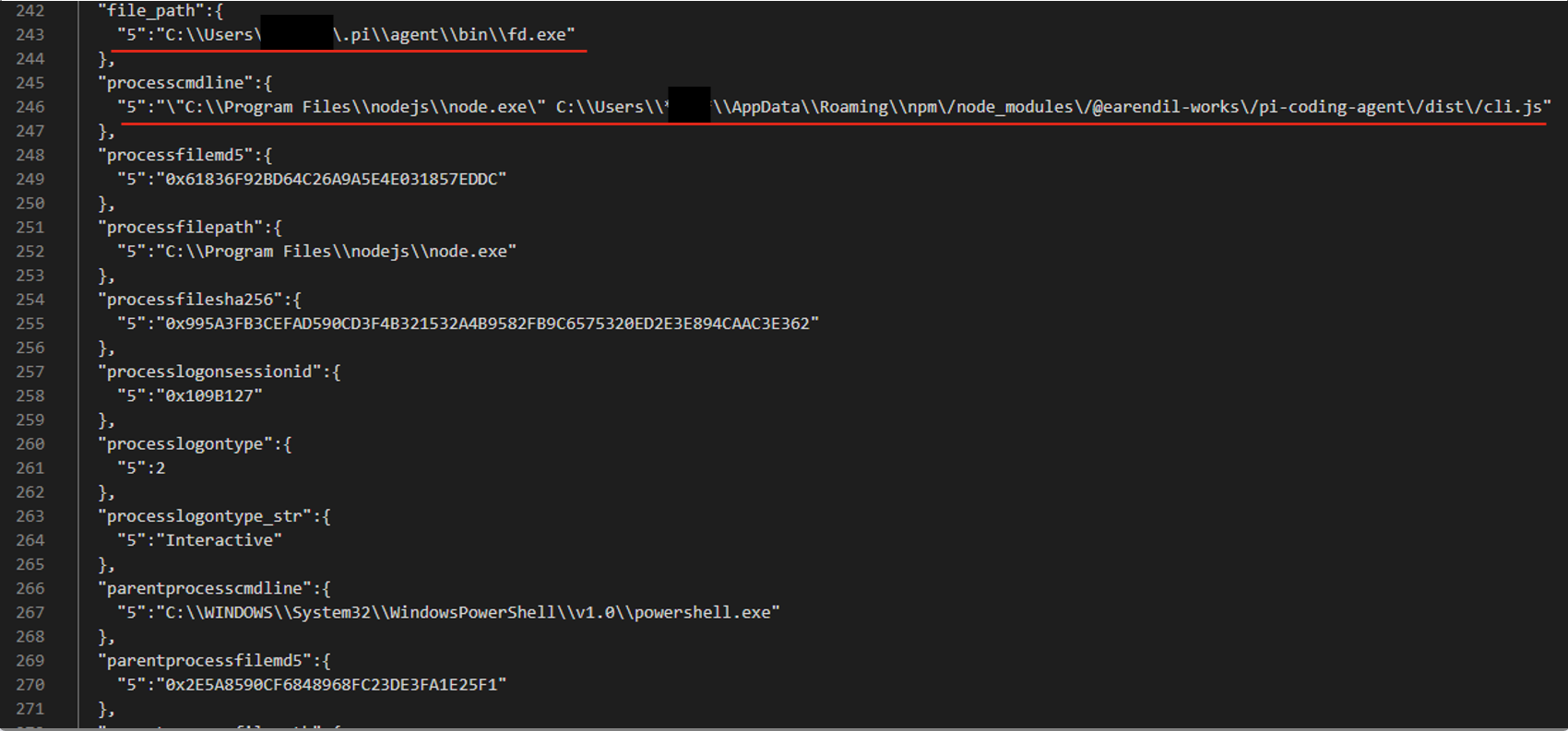
For example, consider an event described by the following JSON:
After generating and ranking the combinations, we got three filters based on file paths:
processcmdline:("nodejs\\node.exe" AND "*****\\appdata\\roaming\\npm\/node_modules\/pi-coding-agent\/dist\/cli.js")
file_path:"*****/.pi\\agent\\bin\\fd.exe"
processcmdline: "programfiles\\nodejs\\node.exe"
The last filter turned out to be too broad, but the analyst marked the other two as valid.
Pros and cons of the algorithmic approach
The algorithmic approach to filter generation has several advantages. First, it’s simple and deterministic: the same alert always produces the same result. Second, it’s interpretable, meaning we can see why a given combination ranked near the top of the list and why a particular field didn’t make it into the list of candidate fields at all. Third, the stages of the process are independent of each other, so individual steps can be improved and tuned without the risk of breaking the algorithm elsewhere. Finally, it has no external dependencies or models, which makes it easy to deploy in any customer environment.
However, it also has drawbacks. The first is its dependence on context. If there’s no context for some reason — for example, the rule’s first-ever trigger — a filter can’t be created. The second problem is string normalization. There’s a high chance of running into atypical cases that the normalization rules don’t cover. Often such cases can’t be described correctly at all, because they contradict each other.
These problems can be solved with large language models (LLMs). When an LLM generates the filters, no context is needed, because the LLM doesn’t iterate over or rank combinations. The LLM also takes a more flexible approach to string normalization, including non-standard cases. That said, an LLM doesn’t have to be involved at every stage of the generation process. We decided to keep the algorithmic solution where it works well. For example, a simple algorithm selects suitable fields without errors, so we didn’t move this stage to the model.
Filter generation with an LLM
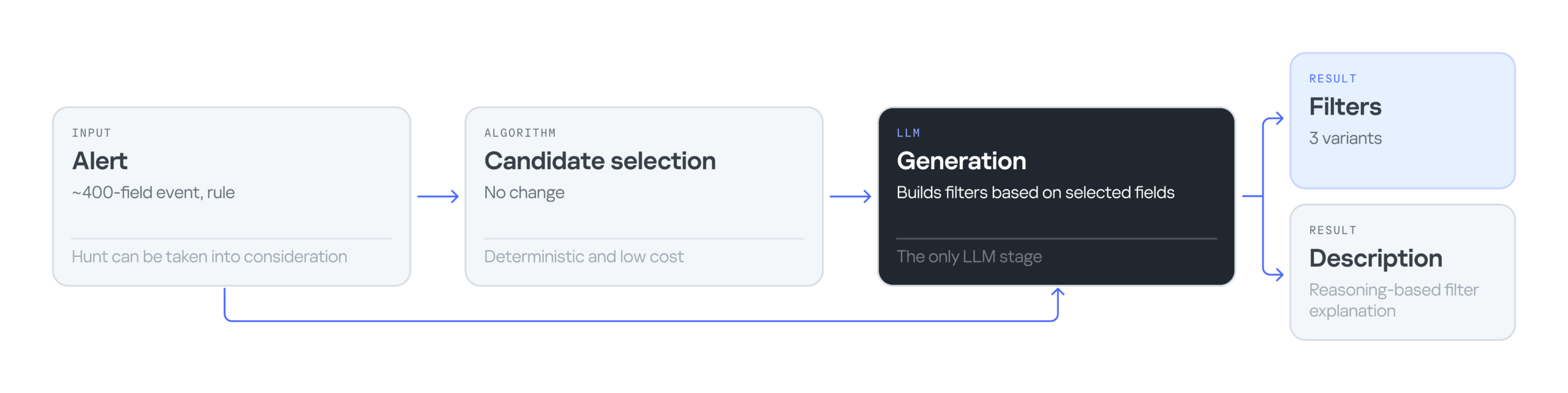
The LLM-based filter generation looks like this:
The input is still an alert containing an event with 400 fields, plus the rule that triggered on that event. Then an algorithm selects the most suitable fields for the filter. Next, the LLM processes the input — the event, the selected fields, and the detection rule — and generates three filter options along with an explanation for them. The explanation helps the analyst understand why these particular filters were suggested and make an informed choice.
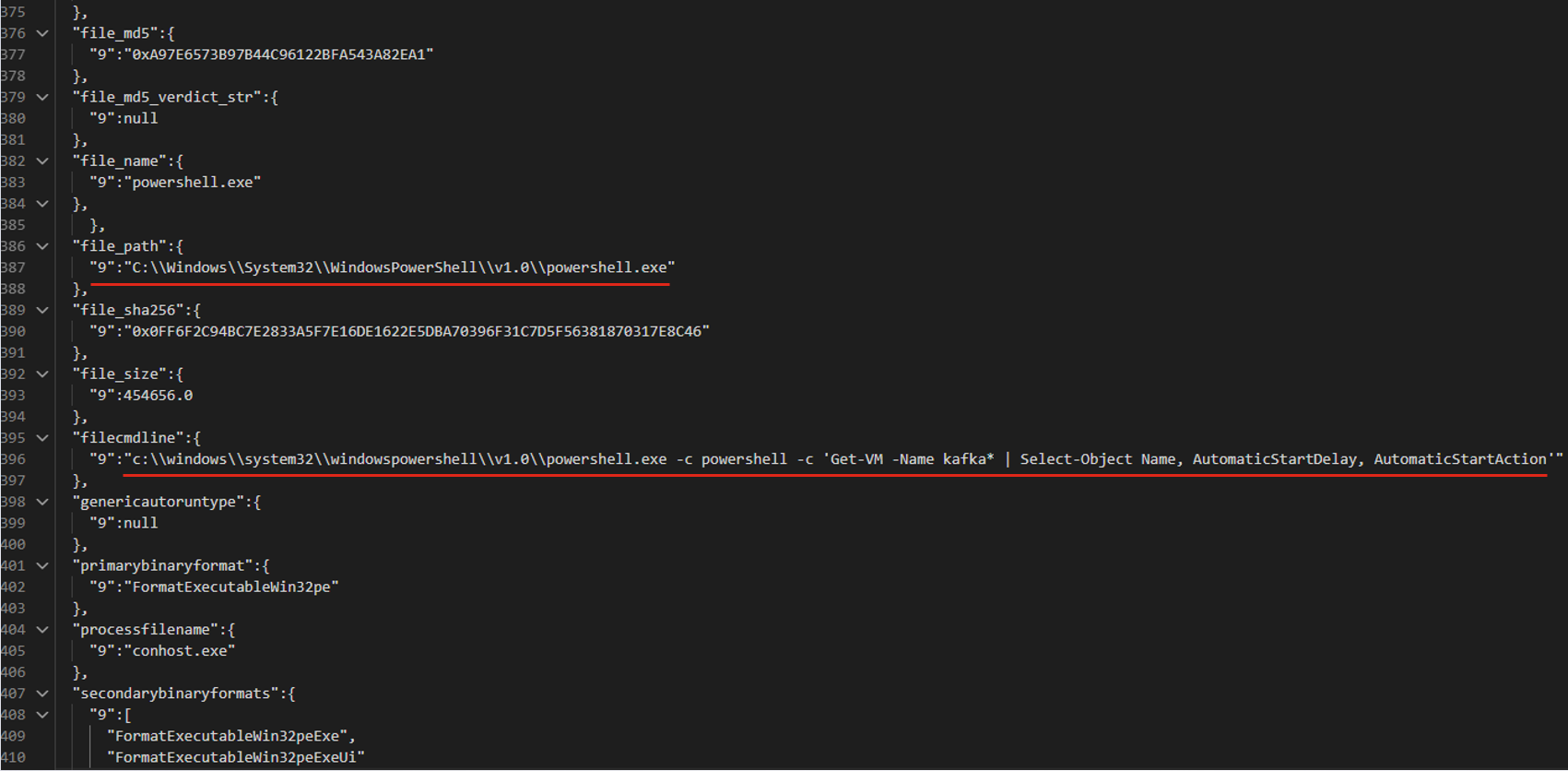
Consider the following event in JSON format:
The LLM suggested three filter options that all contain the same command line fragment:
file_path: "\\WindowsPowerShell\\powershell.exe" AND filecmdline: "Get-VM -Name kafka\*"
filecmdline: "Get-VM -Name kafka\*"
filecmdline: "kafka*"
As in the previous example, two of the three output filters were valid. The last one was too broad to be usable. The analyst chose the first filter with minor edits:
file_path: "powershell.exe" AND filecmdline: "Get-VM -Name kafka\*"
Pros and cons of generating filters with an LLM
Using an LLM solved the problems of purely algorithmic filter generation: dependence on context and errors in string normalization. However, the single-request approach had its own drawbacks. First, it had no output validation. The LLM returned filters as-is, with no syntax check and no way to correct errors. Second, unlike in the algorithmic version, all filter generation tasks were handled by a single system prompt. As a result, a minor fix in one place could break the logic in another.
Using multiple AI agents
To address the problems of generating filters with a single model and a single system prompt, we tried distributing the tasks across different LLM agents. In this version, we brought in agents as early as the stage of selecting relevant fields. The chain includes four agents in total:
Selector: selects the relevant fields.
Generator: generates filters.
Validator: evaluates the generated filters. If the filters are found to be invalid, it returns the task to the generator. If the selected fields are found to be irrelevant, it starts a new field selection cycle. If the filters pass validation, or the limit on regeneration attempts is reached, the valid filters (or the best ones available) are passed to the analyst.
Commentator: analyzes the output filters and explains which field values were used and why.
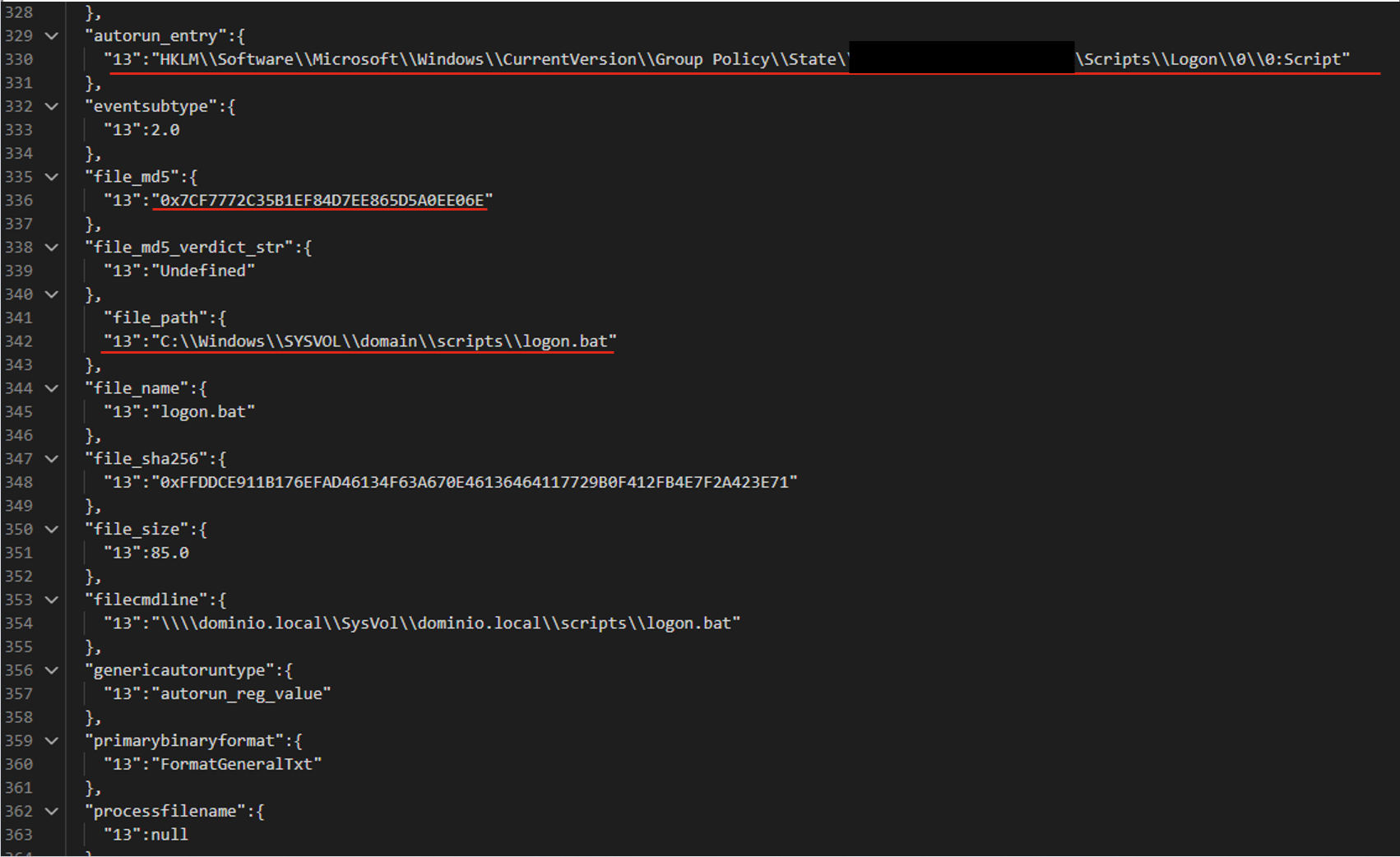
For the following JSON event, the agents produce three valid filters based on the file path.
The filters differ in the additional parameters that support the detection:
file_path:"sysvol\\domain\\scripts\\logon.bat"
file_path:"sysvol\\domain\\scripts\\logon.bat" AND file_md5:"0x7..6E"
autorun_entry: "Group Policy\\State" AND file_path: "SYSVOL\\domain\\scripts\\logon.bat"
Pros and cons of the agent-based approach
LLM agents give us a system that can validate and correct filters. Its modular architecture also lets us tune and improve different stages of generation independently. However, this approach makes more LLM calls than the previous ones, so the system is slower. It also depends on access to a model, which may not be available in the organization’s isolated environment.
Evaluating the filter generation system
To evaluate how well the filter generation system works, we use two main metrics:
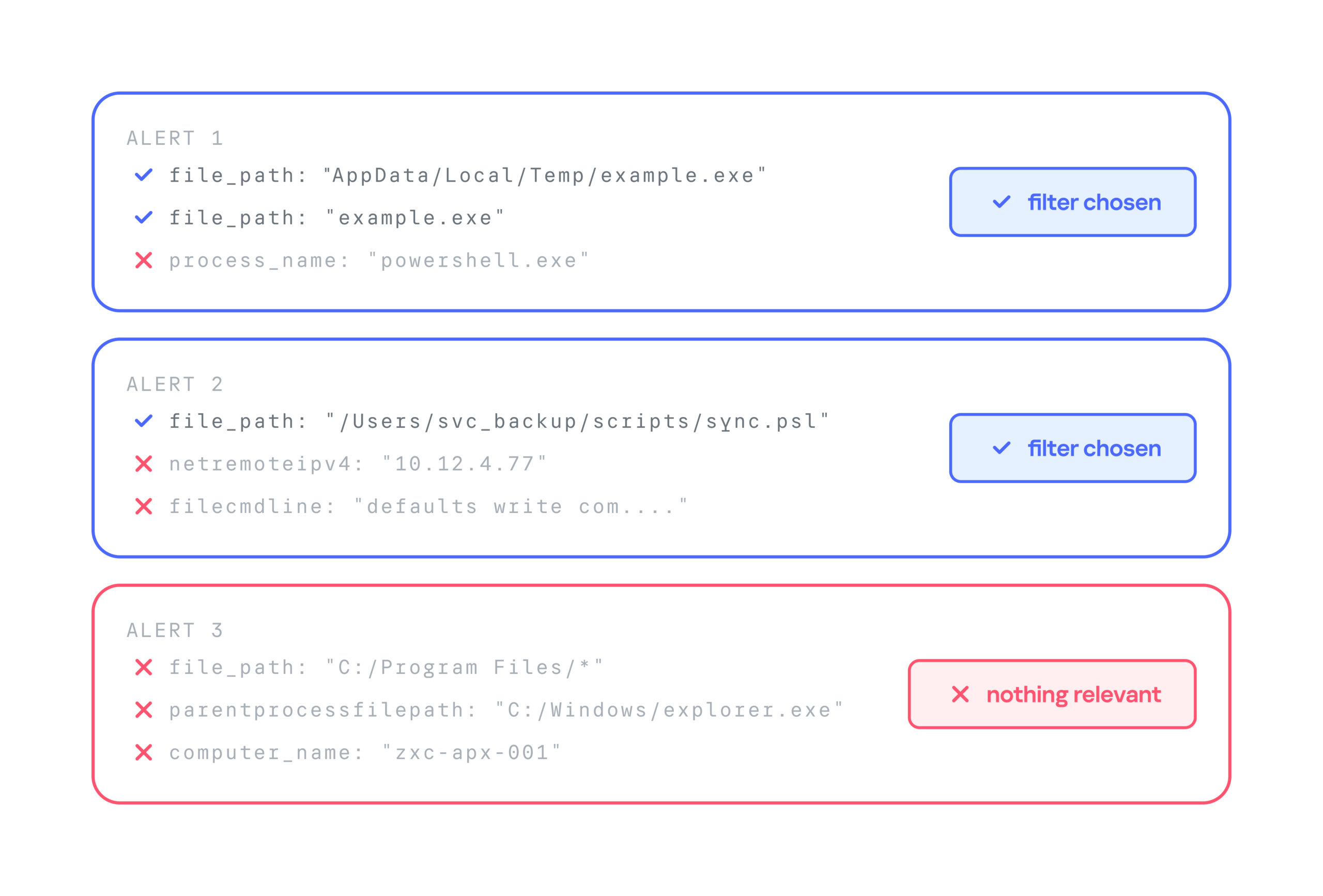
Approval rate. For each security alert, the system suggests three filters. If the analyst selects at least one of them, we count the generation as successful. For example, in the case below, the approval rate is 2/3.
False positive reduction rate (FP drop). This metric shows how much a filter helps reduce the number of false positives. It can only be measured over time, because we need to compare the number of false positive alerts received during a set period before and after the filter is deployed.
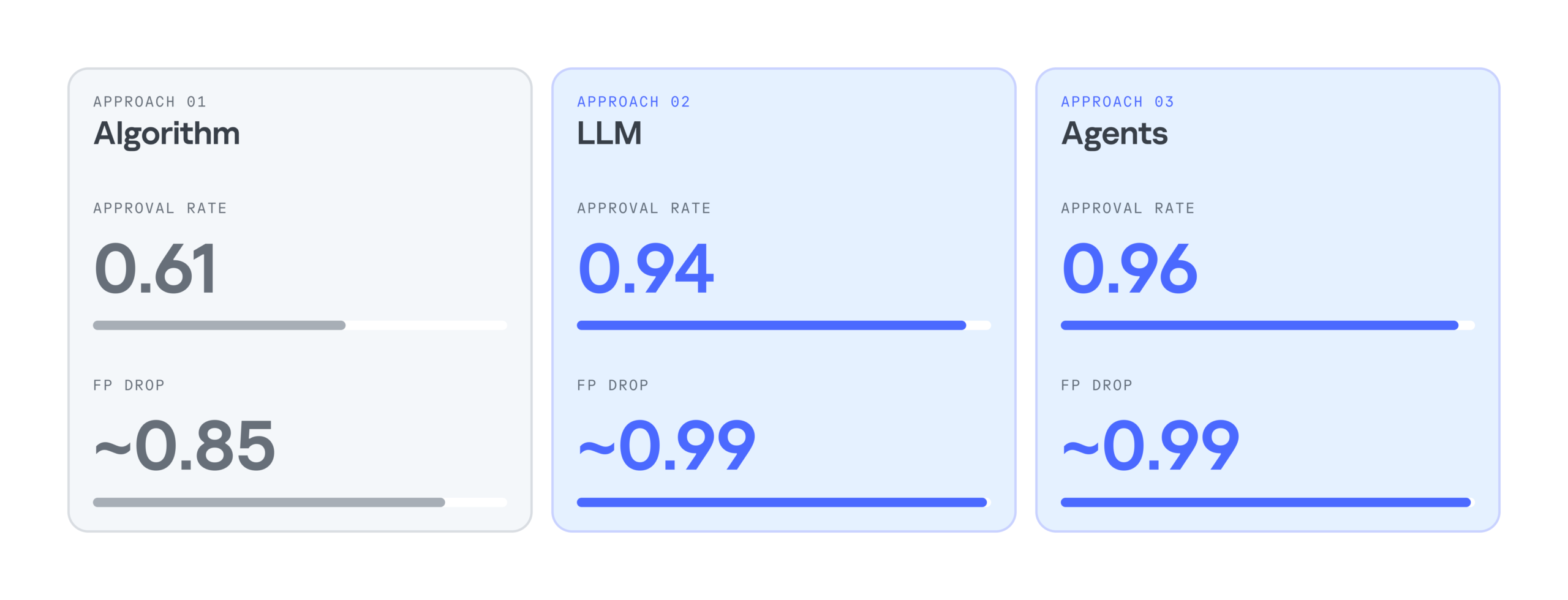
Below is a comparison of the three filter generation approaches by these metrics:
As the results show, LLMs significantly improve the efficiency of filter generation. At the same time, the LLM agentless and agent-based approaches perform almost identically. So we chose the simpler and faster option: an LLM with a single system prompt. As a result, we cut false positives by 99%, increased the number of filters generated per day by 28%, and made analysts’ alert handling 17% more efficient.
Takeaways
Practice has shown that filter generation can be automated effectively. We’ve looked at several options for automatically generating filters for false-positive security alerts: a purely algorithmic approach, an LLM-based approach, and an approach built on a group of LLM agents. All of them can generate valid filters and make the analyst’s work much easier, but each has its own pros and cons.
The algorithmic approach scored lower on the evaluation metrics, but in two-thirds of cases, it still produces filters that satisfy the analyst. It works especially well when there’s already a set of similar events to filter out, meaning enough context has accumulated. The algorithmic generator can also be deployed in any environment. Both standalone LLM and multi-agent LLM approaches show high accuracy, and their results differ only slightly, so the slower agent-based approach looks excessive at this stage. If an LLM is available, the best option appears to be a single model that handles several stages of the generation cycle.
AI agents and associated tooling are becoming increasingly common in corporate infrastructure. Agents can perform a range of actions with the user’s privileges, such as accessing data, running commands, and interacting with external services. This creates new security risks, especially when these tools are used without the security team’s oversight or well-designed policies.
Detecting, tracking, and controlling AI agents is becoming one of the most pressing tasks for security teams today. We closely follow technological developments and continuously update our solutions to respond to new threats in a timely manner amid a rapidly changing technology landscape. This post describes new expertise built into Kaspersky products that helps counter the threats posed by the proliferation of AI agents. We approach this problem from several angles.
First, you need to thoroughly understand the threat you are dealing with. To this end, we added profiles to the Kaspersky Threat Intelligence Portal that describe various AI agents and how attackers exploit them. At their core, AI agents are programs (processes) that run in the operating system on endpoints and can also launch other processes. This means that Endpoint Detection and Response solutions are among the key endpoint controls for this threat. These solutions detect the presence and launch of AI agents, track their activity, and identify potentially dangerous behavior. When needed, they also take action, such as stopping a suspicious process, blocking the activity, or isolating the host, to reduce the likelihood of an incident escalating. For this purpose, we developed specially adapted detection rules.
You can use Kaspersky Endpoint Security, now also available as Kaspersky Next, to control and restrict the launch of AI agents. This solution uses two components to detect AI agents and control how they are used. Application Control categorizes the application processes launched on endpoints, and Web Control manages access to specific categories of web resources for users on endpoints.
Finally, even harmless AI agents can contain malicious instructions (skills), such as those downloaded from unsafe external sources. Kaspersky Scan Engine analyzes installed applications to detect these threats and also checks LLM files for malicious code. Let’s take a closer look at these solutions and technologies.
Popular AI applications and services in organizations
Tools from Anthropic and OpenAI take the top spots in the September 2026 ranking of AI agents by popularity among Kaspersky users. This list is based on telemetry from Kaspersky solutions. It shows the number of users who had the relevant AI vendors’ products installed at the time of the study.
#
AI product
1
Claude
2
Claude Code
3
Codex
4
OpenCode
5
Zed
6
Wispr Flow
7
LM Studio
8
ZCode
9
Chatbox
10
Cherry Studio
The data shows that agentic systems, especially AI agents for software development, are the most popular AI applications. The TOP 10 also includes an application for running large language models locally (LM Studio) and a voice note-taking app (Wispr Flow).
According to open sources, these are the most widely used AI services in 2026:
Number of published vulnerabilities in LLMs, AI tools, and plugins with similar functionality, 2025–2026 (download)
* Data for previous quarters was updated and may differ slightly from previously published data.
Application Control and Web Control
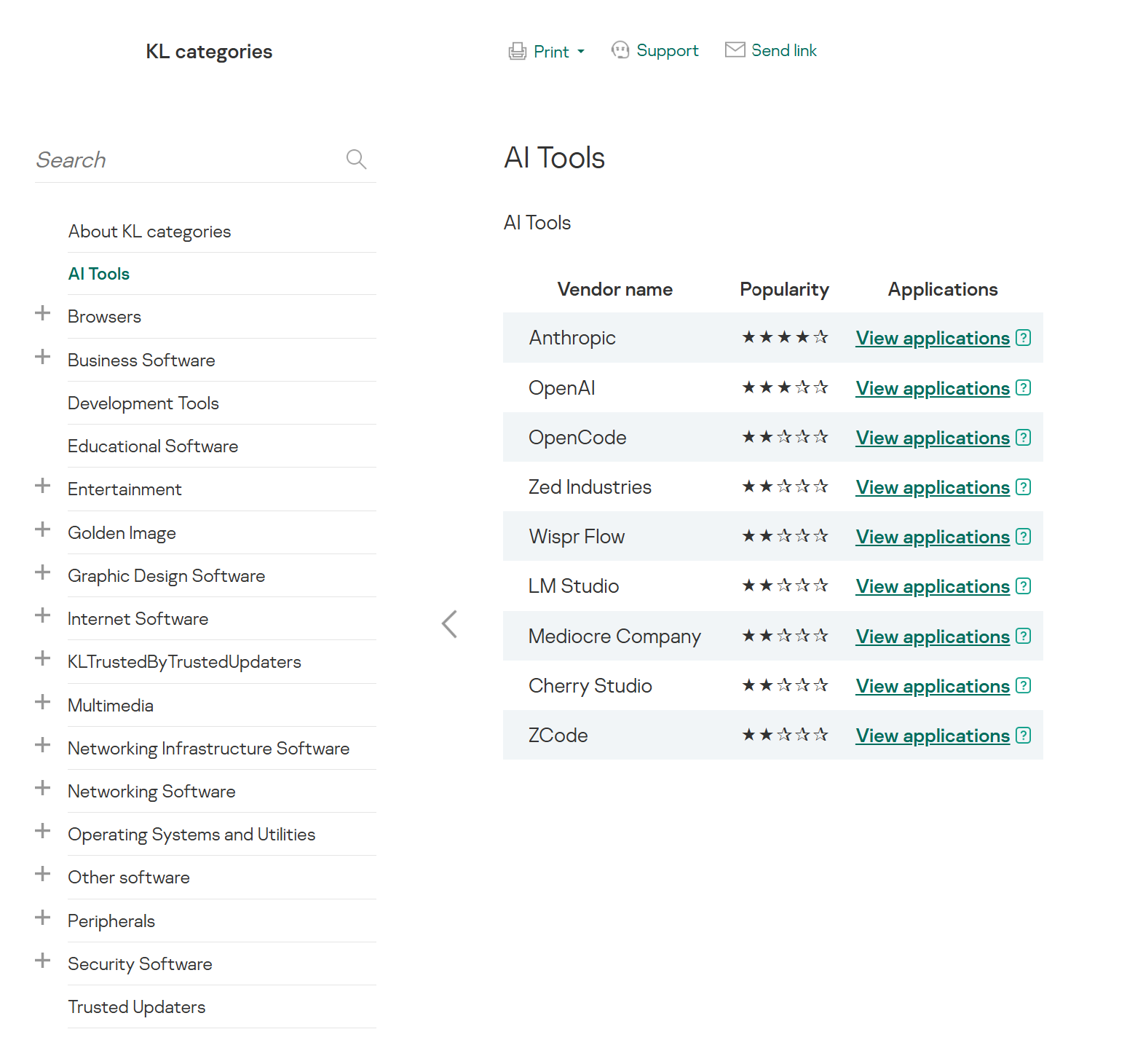
To enforce the organization’s security policy for AI agents and other AI applications on the corporate network, Kaspersky products offer application control based on KL categories. These categories classify installed software and give you granular control over which approved applications can run in the organization.
Application Control analyzes the processes launched on endpoints, tracking which AI agents are running in corporate systems at any given moment, on which hosts, and under which accounts. Application Control also shows how long a given program has been in use.
This makes it easier for the Kaspersky Security Center (KSC) administrator to control applications. Administrators can use KL categories to allow or block AI agents inside the company for specific groups of employees.
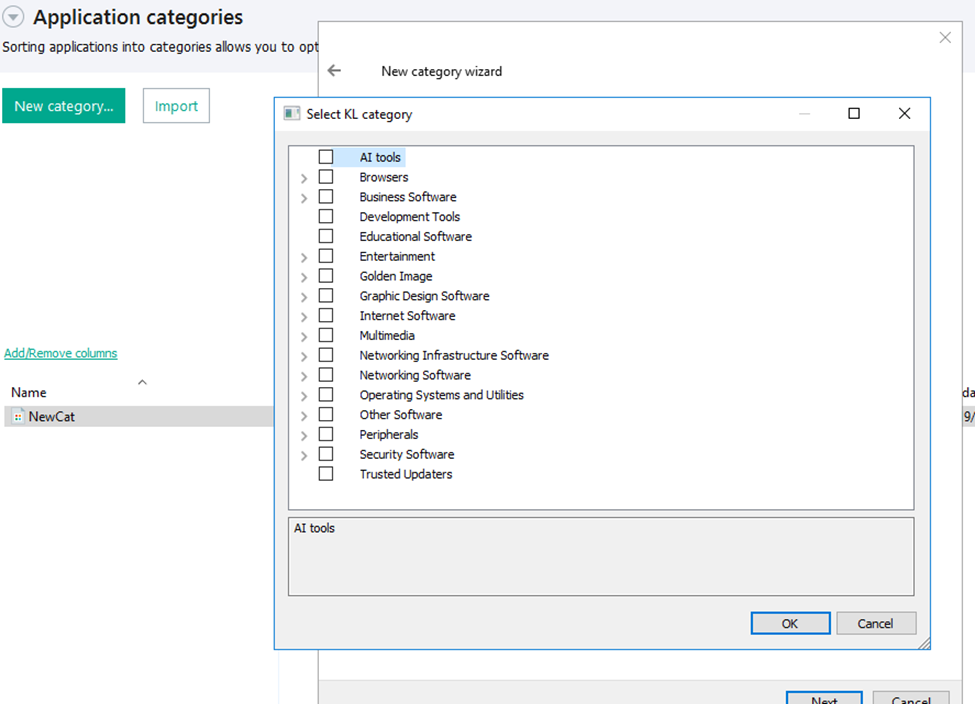
Here is what this functionality looks like to KSC administrators:
KL categories available when configuring Application Control
For details on how to configure Application Control in KSC, follow this link.
In Kaspersky Endpoint Security (KES), Application Control can operate in two modes:
Denylist. In this mode, Application Control lets users run any applications except those blocked by Application Control rules. This is the default mode.
Allowlist. In this mode, Application Control blocks users from running any applications except those explicitly allowed by Application Control rules.
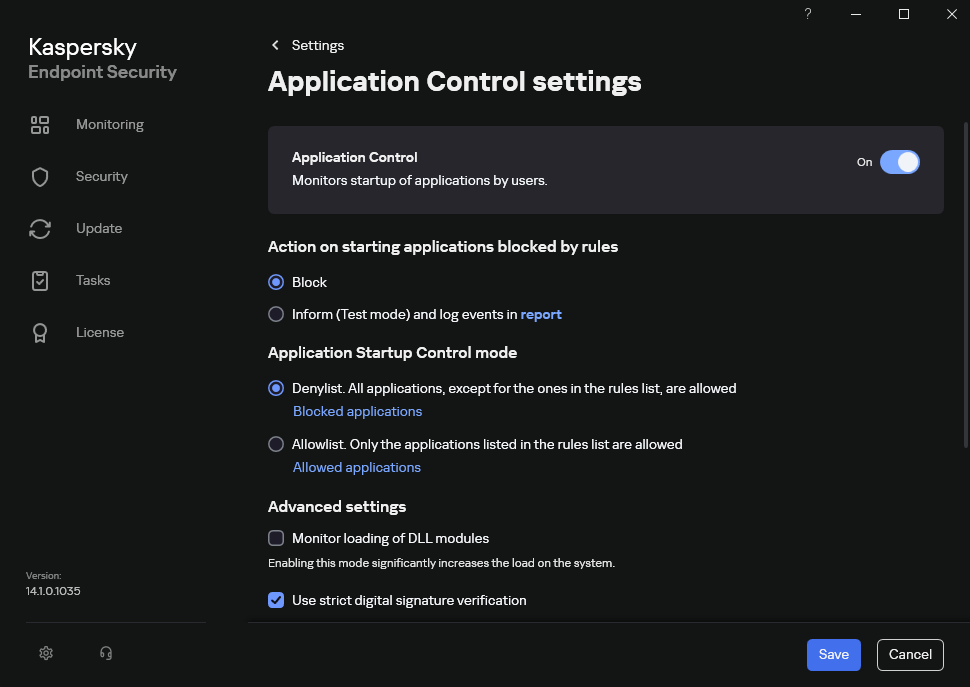
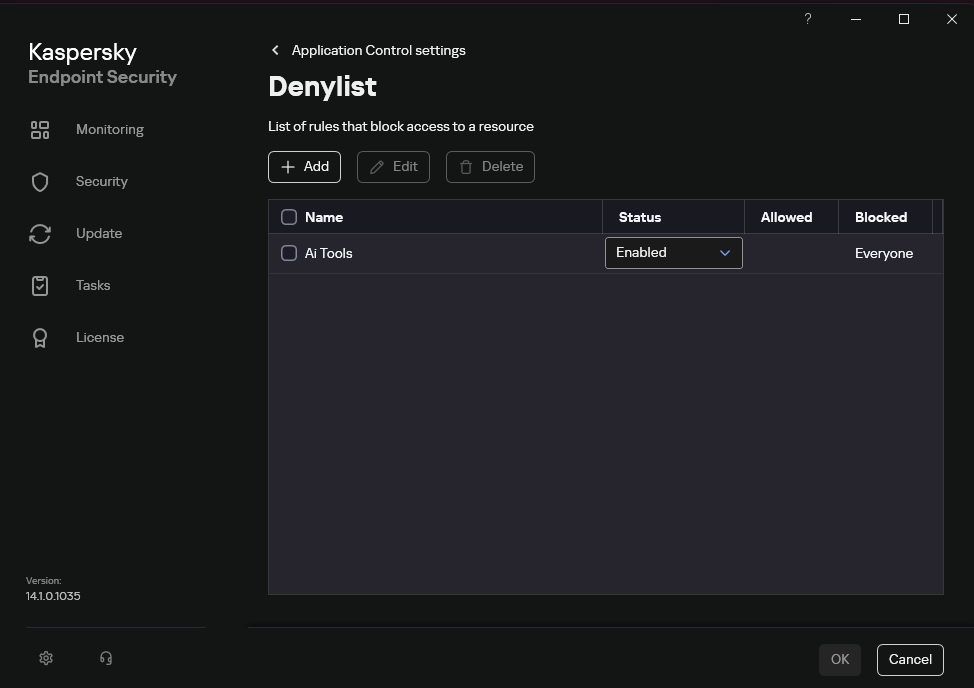
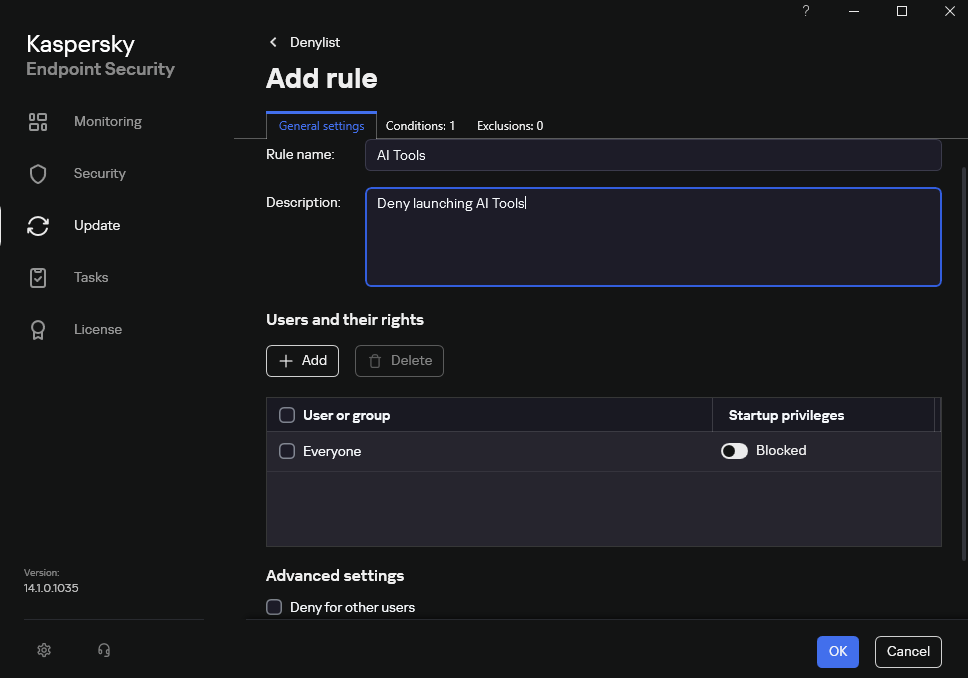
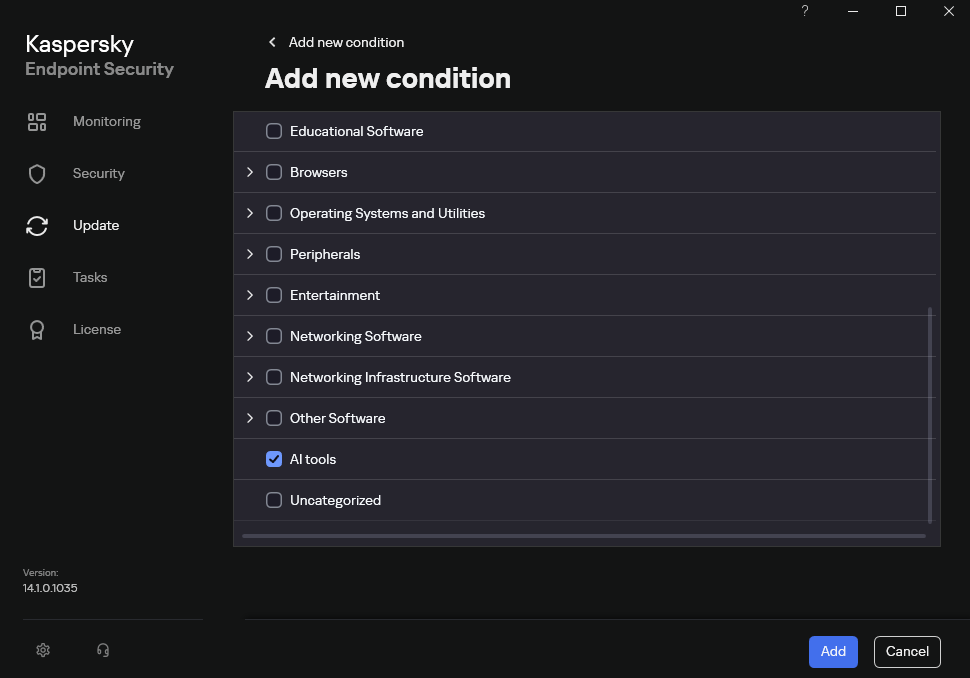
Below are the steps to configure Application Control to block AI tools.
Configuring Application Control for the AI Tools category in KES
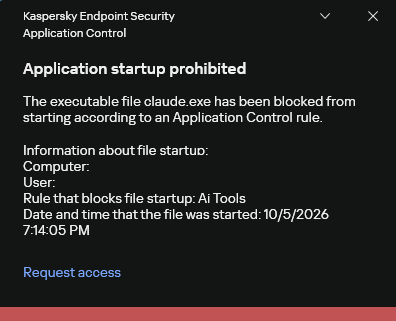
With this setup, when a user tries to launch an AI agent, they get a notification and the agent doesn’t start.
KES notification about an attempt to launch an AI agent
The View applications drop-down list shows products for a specific vendor.
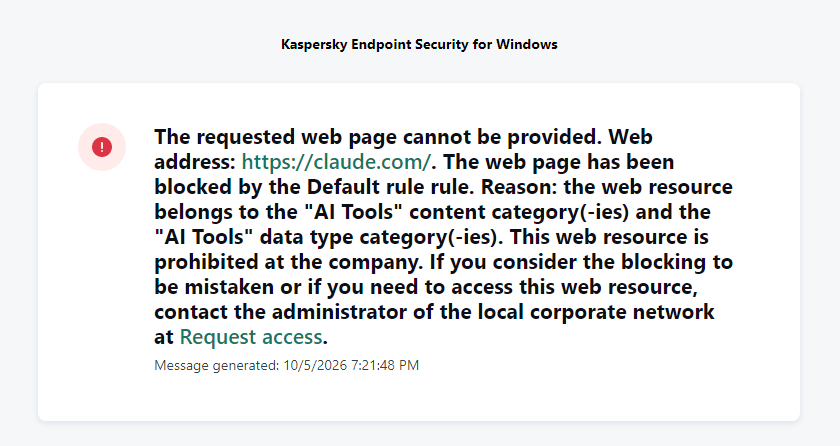
Similarly, Web Control lets you manage user access to web resources. If a user tries to open a denylisted website, KES blocks access and shows a warning.
KES notification about an attempt to access a prohibited web resource
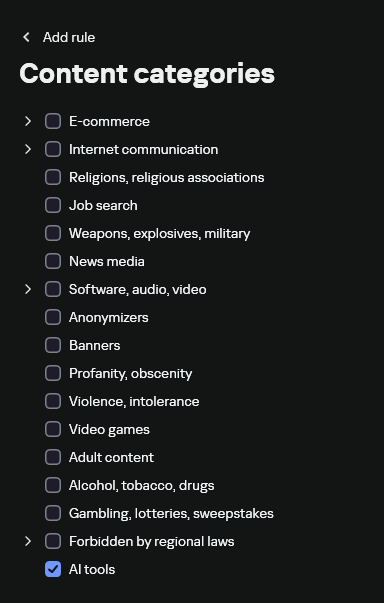
When configuring access, the administrator can block websites that provide AI as a service.
Website categories
For more on configuring Web Control, follow this link. The help portal also provides information on website categories that can be assigned to resources to configure access control.
Kaspersky Endpoint Detection and Response
To an EDR solution, an AI agent is a regular process. It has its own executable, a tree of child processes, and network communications, all of which need to be monitored for suspicious activity. An attacker can use an AI agent as an automation tool. An AI agent installed as a legitimate user tool can also be leveraged in a ClickFix attack, where it executes a malicious instruction received from an untrusted source, such as a document, web page, or email. That said, unsafe actions by an agent do not always indicate an attack. There may be no malicious intent in the chain at all. An incident can result from what looks like an ordinary instruction from a user who doesn’t fully understand the consequences of having it executed. The mere fact that an agent was launched does not reveal whether it is being used in an attack. That is why Kaspersky EDR (KEDR) uses both conventional behavioral rules and rules written and adapted to detect AI tools. The latter identify risky agent actions and settings, and help determine which AI tool was involved in suspicious activity.
Conventional KEDR rules detect the vast majority of familiar malicious techniques, including when performed by an AI agent. A suspicious PowerShell launch, persistence via Task Scheduler, or an attempt to steal credentials leaves clear, identifiable traces. These traces look the same no matter what initiated the actions. The rules analyze launch parameters, process relationships, affected files, network activity, and other telemetry events.
For example, in a recent Armored Likho campaign, we found signs that AI had been used to create loader and dropper samples, which were later compiled with NSIS (Nullsoft Scriptable Install System). The key telltale artifacts were icons in the scripts and excessive comments on every function, which is uncharacteristic of human-written code. In addition, the group continues to generate new modules for its BusySnake Stealer and BusySnake RAT samples. For example, the attackers used AI to develop a module that runs multiple checks for virtual environment artifacts and calculates a score. Depending on the score, the sample either runs or exits with code 0. Even though the initial access samples, payloads, and their modules were AI-generated, the commands they execute via rundll32 and PowerShell are detected by the shell_creation_by_rundll32 and suspicious_powershell_cmd_or_script_spawning rules.
So, for detecting an attack like this, it is not important who wrote the loader, the payload, or its modules: they are given away by the commands they execute, process relationships, and other traces of activity in the system. AI can be involved both in preparing the code and in carrying out the attack directly on the device.
In the latter case, the attacker uses the agent to carry out their tasks and lets it choose and run the required commands within the privileges it has. For effective protection, it is critical to link suspicious actions back to the AI tool and the conditions under which it operates. In KEDR, several specialized rules handle this task.
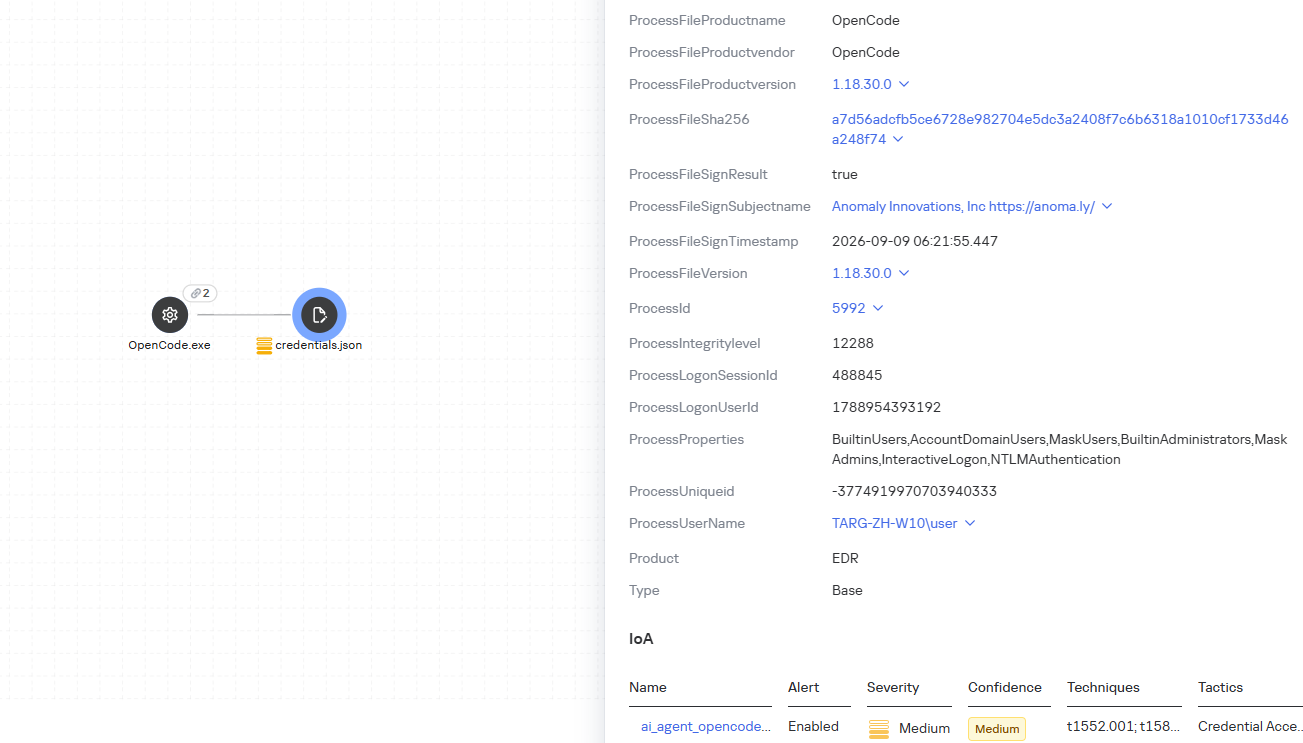
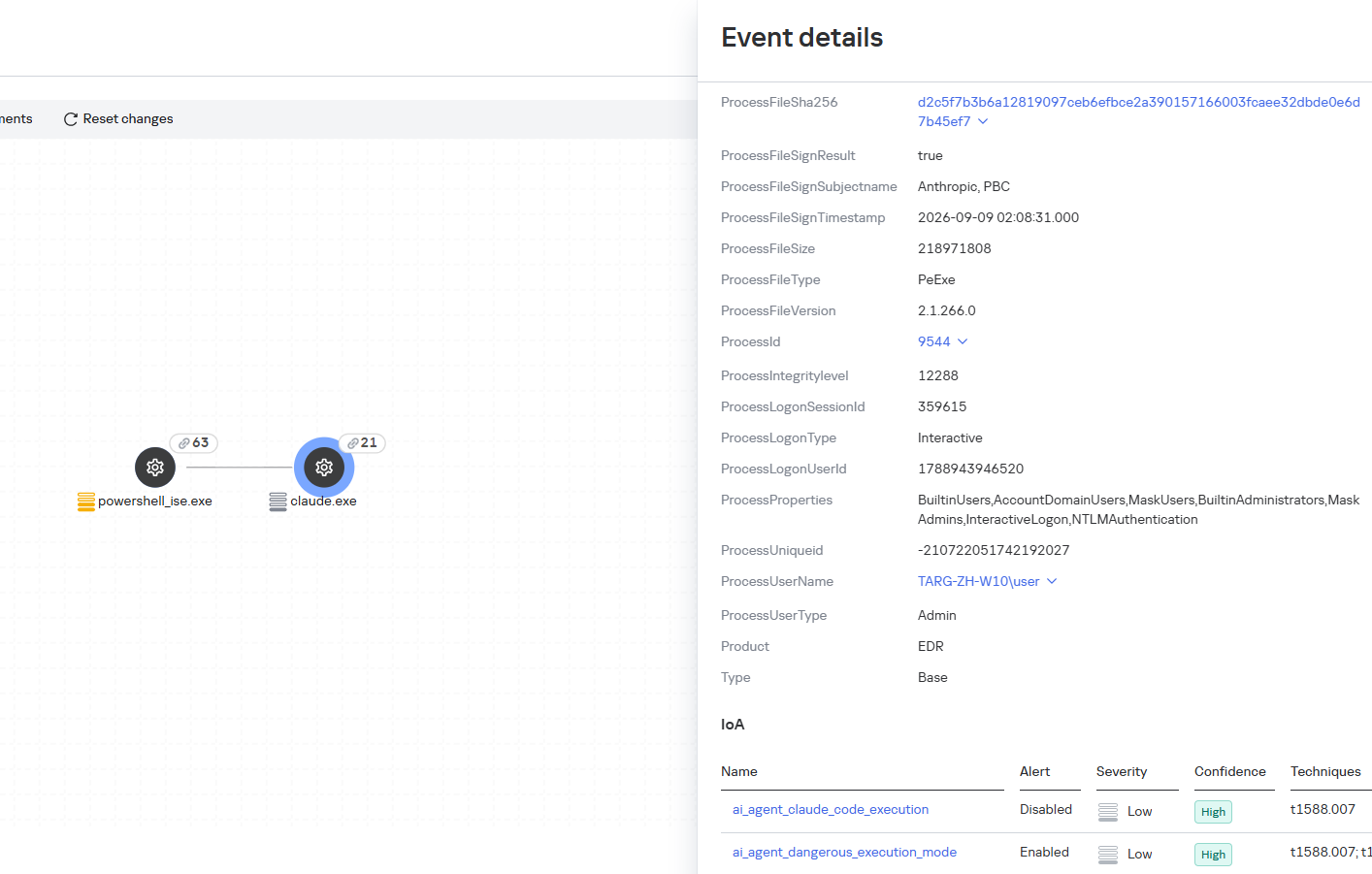
We have created separate rules for popular AI agents, ai_agent_*_access_to_sensitive_file_**, where * is the tool name and ** is the operating system. They generate alerts when an agent accesses files that contain credentials, tokens, or keys.
The ai_agent_dangerous_execution_mode rule detects agents launched with auto-approval of all actions (so-called YOLO mode) or with the sandbox disabled. These settings do not indicate an attack on their own, but they let the agent perform dangerous actions without user confirmation.
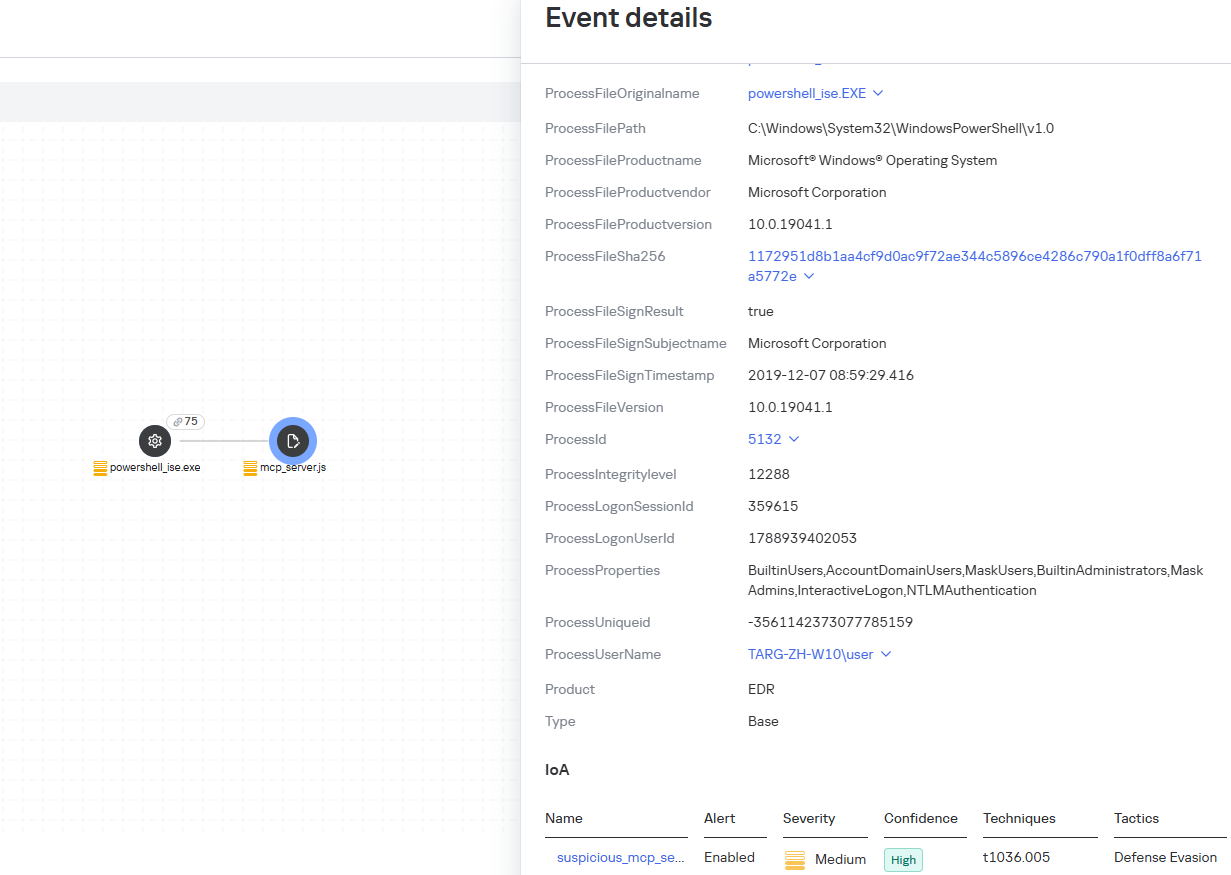
The suspicious_mcp_server_artifact rule triggers when MCP server scripts are created or modified in hidden, temporary, or cache directories. Attackers can place an MCP server in these locations to quietly connect it to the agent: through the MCP server, they can pass instructions to the agent, call third-party tools, and access the user’s data.
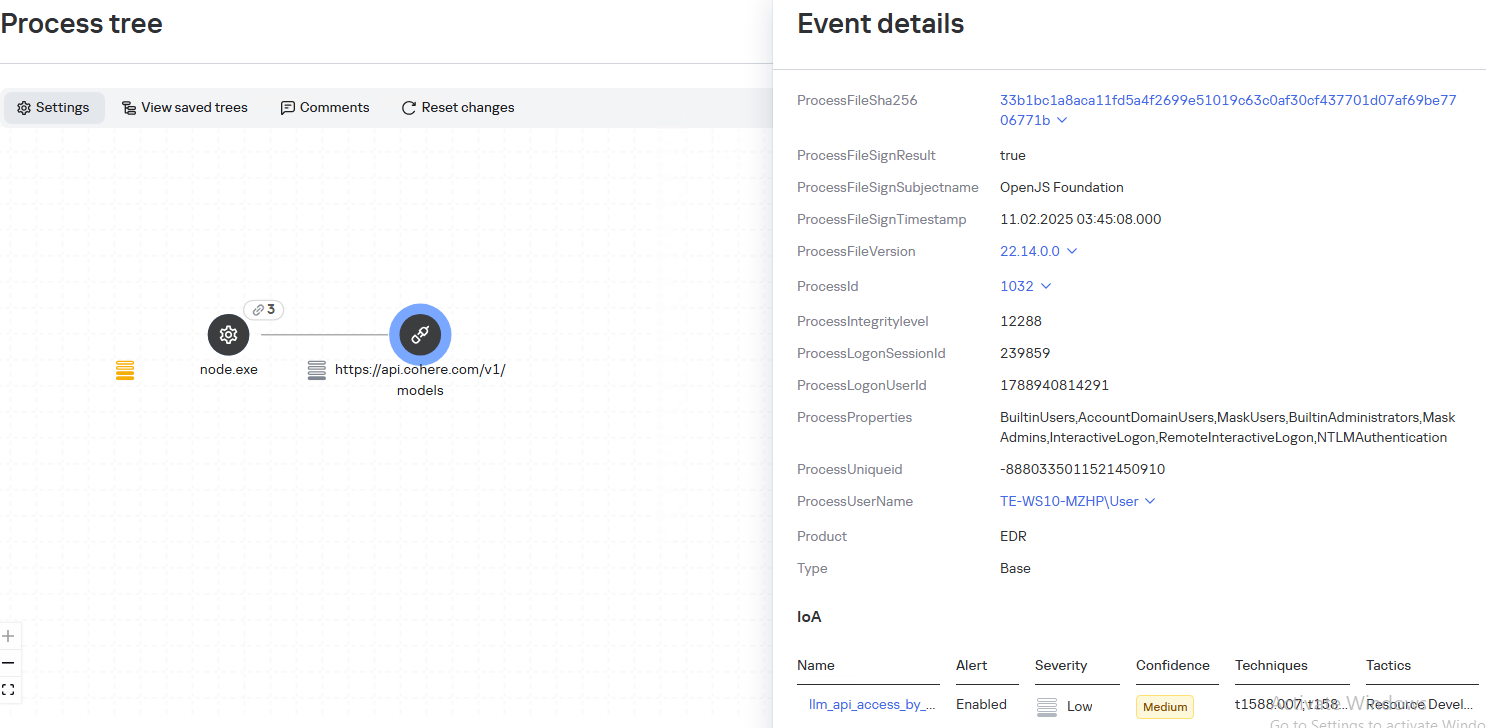
The llm_api_access_by_unusual_apps rule generates an alert when an application on Windows, Linux, or macOS connects to the API of a known external LLM service, unless this activity falls under predefined exclusions. This helps spot model access by applications that do not normally behave this way.
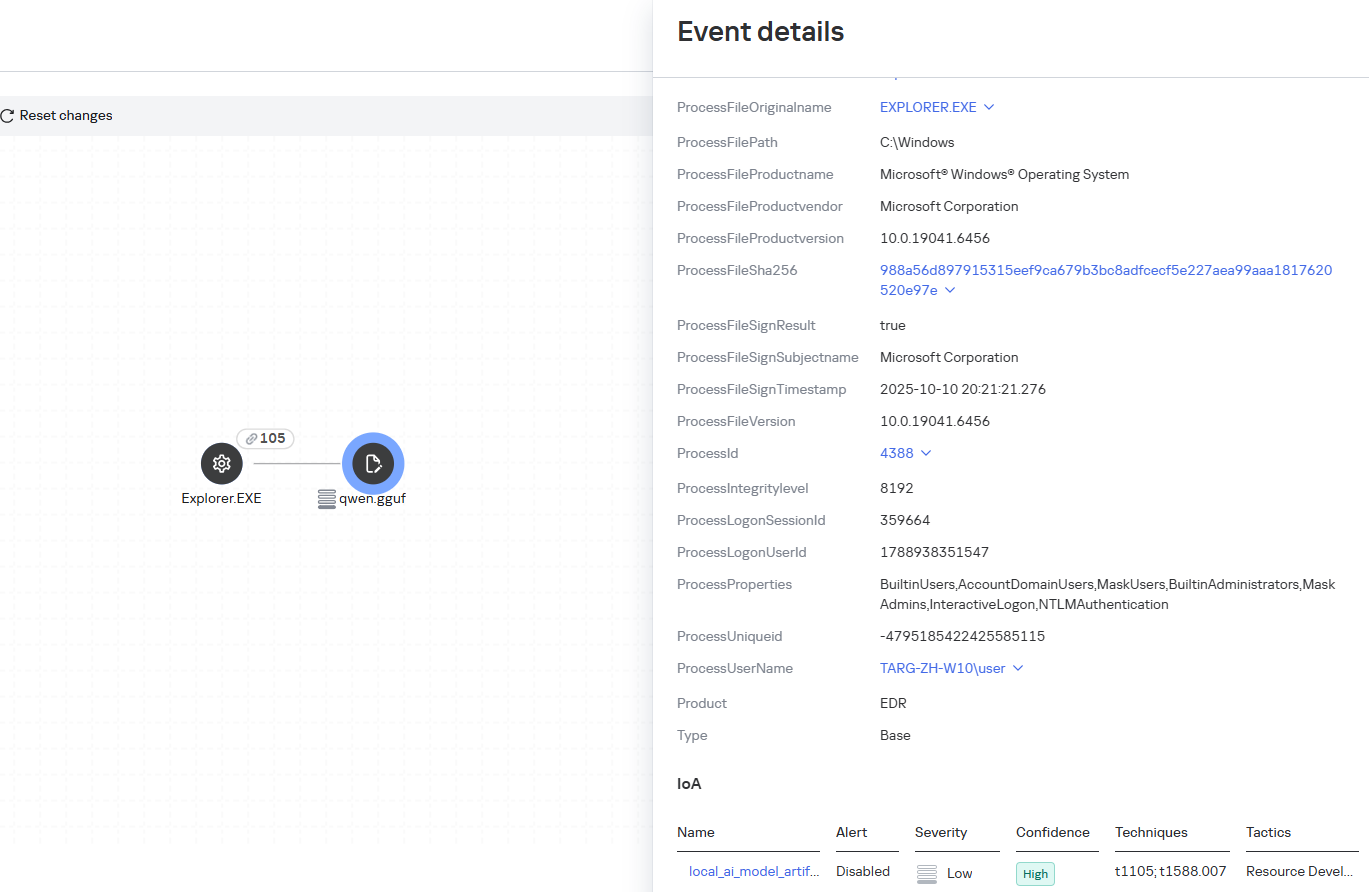
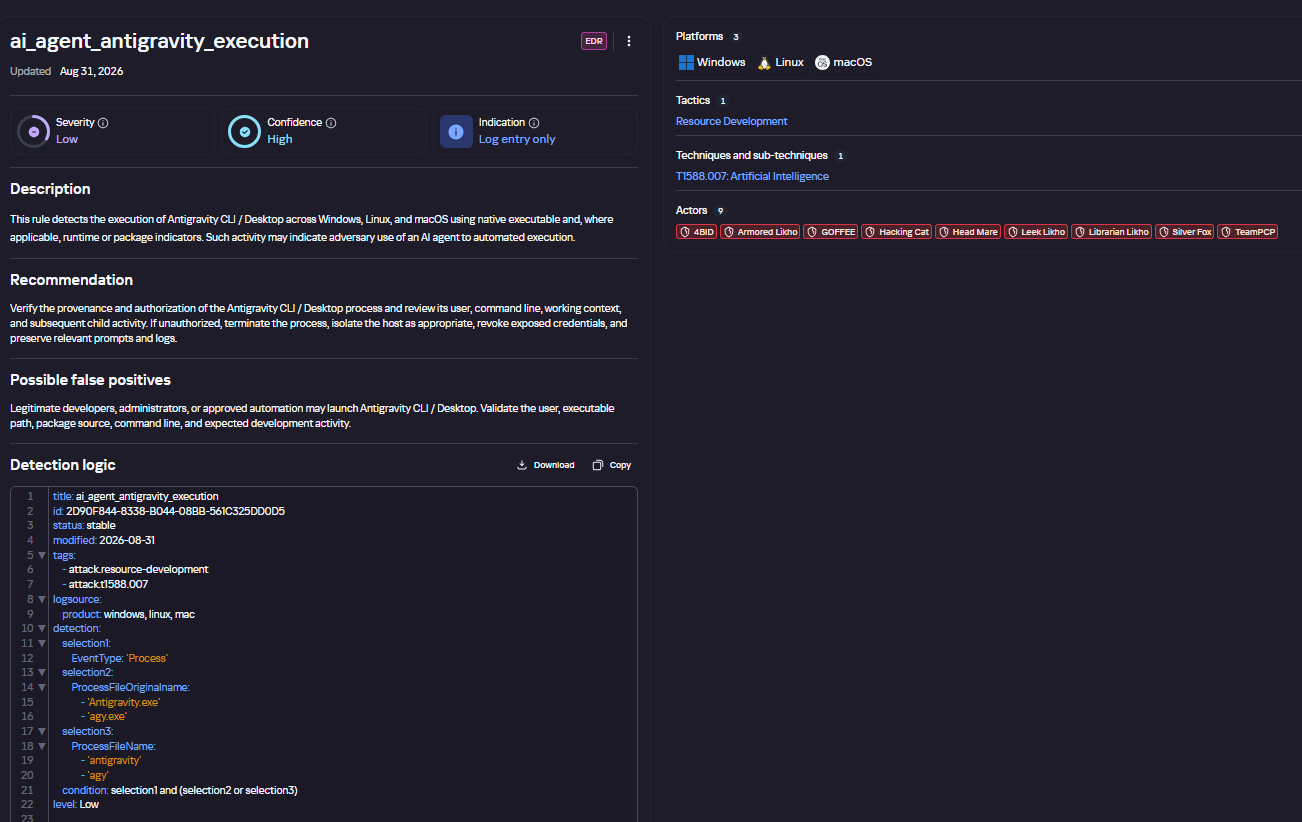
Some Kaspersky EDR rules tag events for investigation but do not generate alerts. For example, the ai_agent_**_execution rules flag launches of known agents on Windows, Linux, and macOS. The local_ai_model_artifact rule records the creation or modification of AI model files in typical application, runtime, and cache directories. These events reveal AI tools on the device, including tools that run on local models and never call an external API.
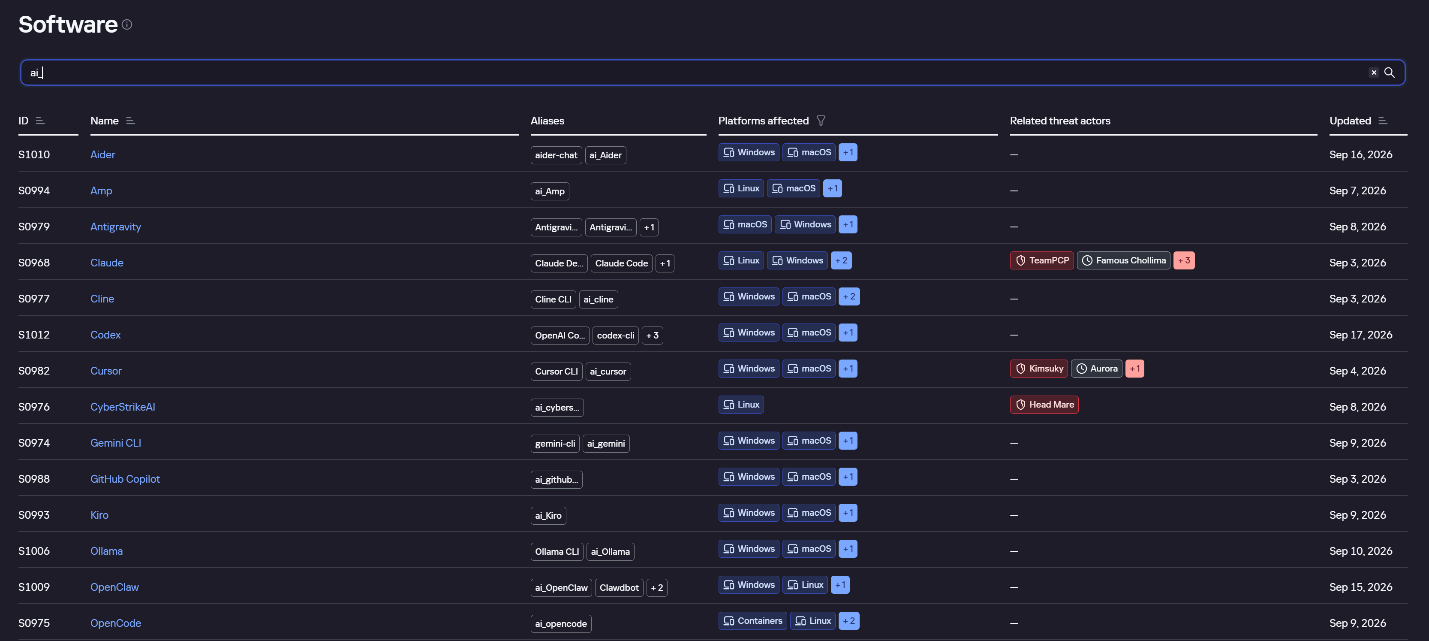
The Kaspersky Threat Intelligence Portal offers a large number of software profiles, including profiles of AI agents. You can sort them by the ai_ prefix:
AI agent profiles on Kaspersky TIP
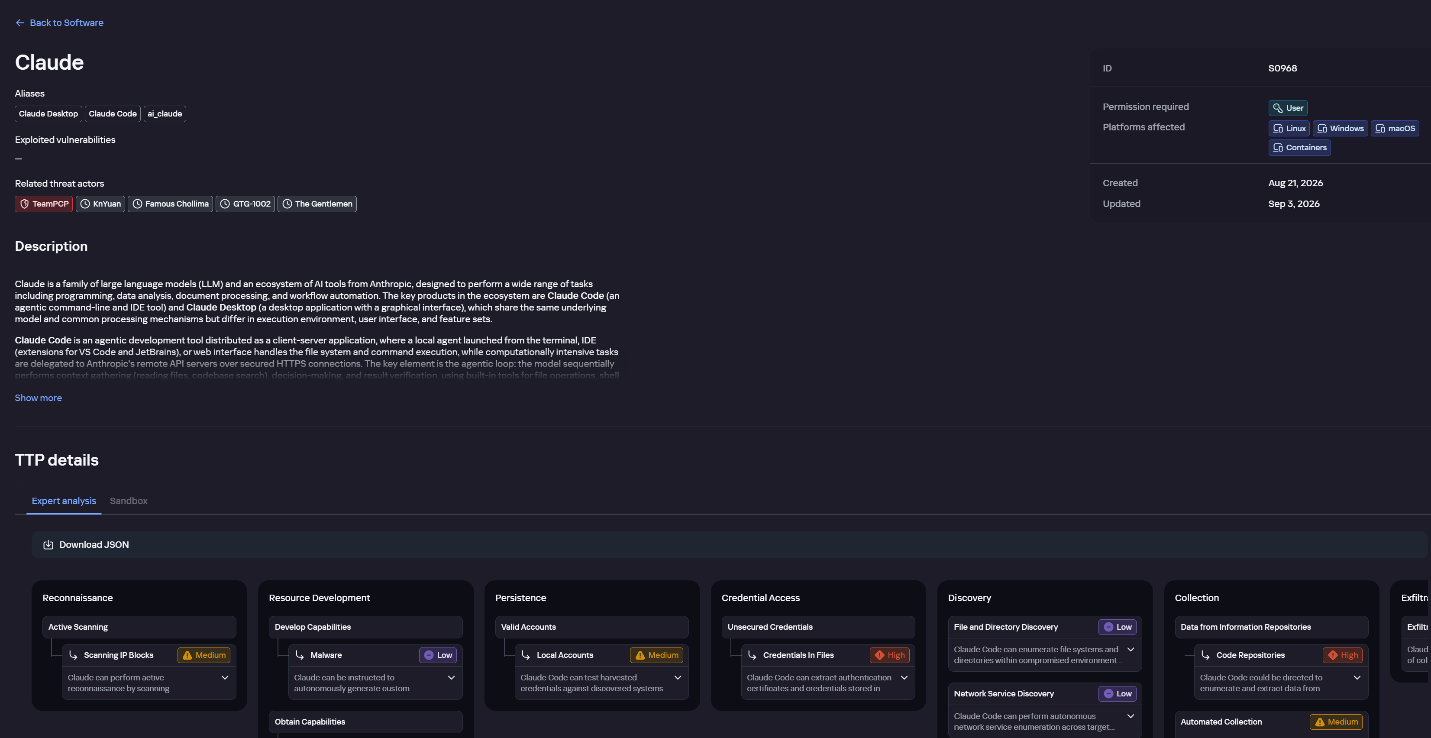
The profile of an AI agent such as Claude Desktop includes a detailed description of the software, the privilege level required to run it, supported platforms, and threat actor groups known to use it. It also lists tactics and techniques mapped to the MITRE ATT&CK framework, with descriptions of the procedures the tool can be used for.
Claude profile on Kaspersky TIP
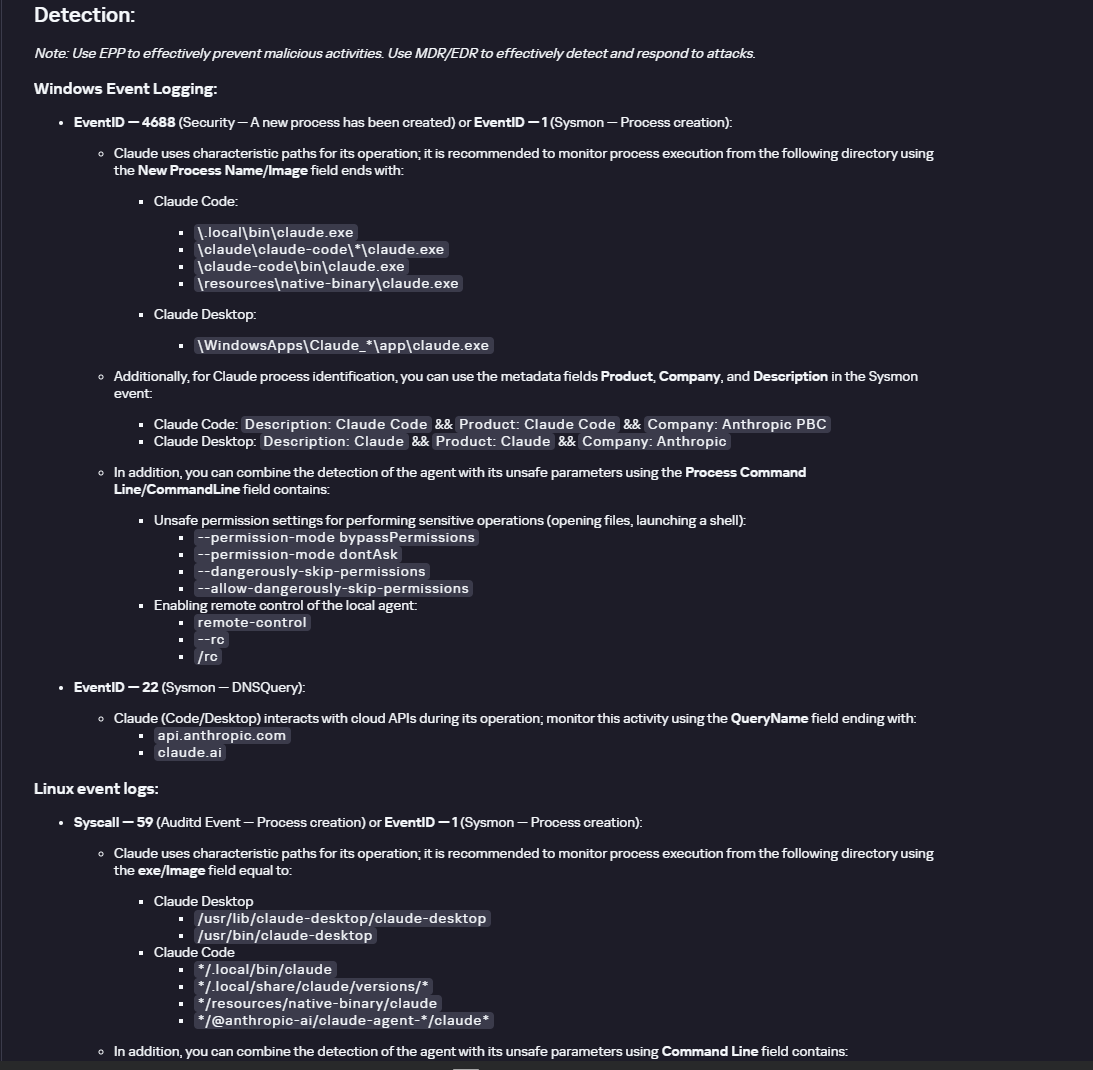
The description also lists ways to detect the software through standard system auditing mechanisms:
Windows: events from standard audit logs and Sysmon events
Linux: syscall audit events and Sysmon events
Network auditing: a set of protocols and the traffic generated by the software
The detection section lists the main artifacts the software leaves in the system: command lines, possible launch parameters, names of the services and scheduled tasks it creates, and the key network artifacts.
Detection section in the Claude profile
Hunt Hub
In December 2025, the Kaspersky Threat Intelligence Portal added Hunt Hub (HH), a repository of detection rules. This is a unique Kaspersky project, and we developed it in response to growing market demand.
This functionality is available in the Threat Landscape section of the portal. It gives analysts access to detection rules: their descriptions and their mapping to MITRE ATT&CK tactics and techniques, as well as to the associated cybercriminal groups.
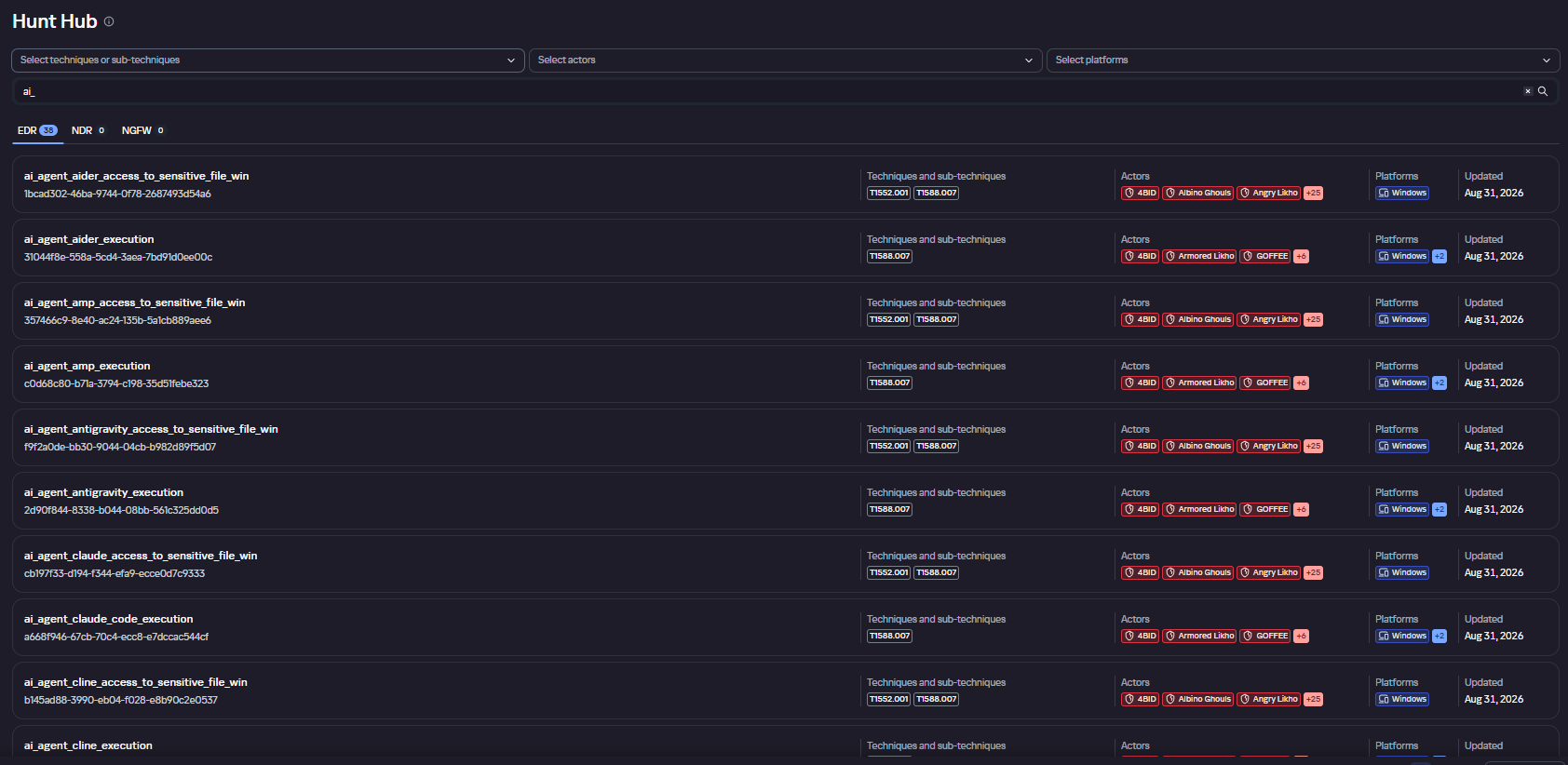
In the Hunt Hub section, customers can explore the detection logic of EDR, NDR, and NGFW products, including the logic for detecting AI agents.
Rules in the Hunt Hub repository
The rule card provides:
Detailed description
Rule’s severity level, confidence level, and alert format
Detection tips
Description of possible false positives
Platforms the rule can run on
Tactics, techniques, and sub-techniques covered by the rule
Groups that use the technique covered by the rule
Detection logic that shows what exactly triggers the rule
Detection rule card in Hunt Hub
Kaspersky Scan Engine
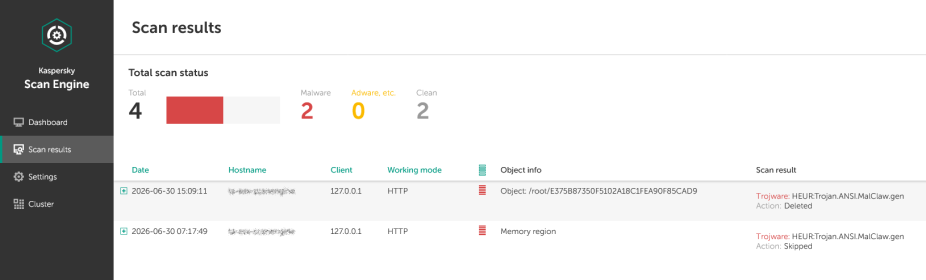
Skills are a key component of the AI agent ecosystem. They’re prewritten sets of natural-language instructions that extend agent functionality. We previously covered the risks that malicious skills pose to agent users. A skill can require the usage of additional programs and services, come with helper scripts (for example, written in Python), or contain a malicious command embedded right in the instruction text. This means that adding skills to an originally harmless AI agent opens up several new ways for malicious code to enter the system. To prevent this, any skills obtained from external sources must be scanned. Kaspersky Scan Engine is well suited for this task. This is a cyberthreat detection and response solution that seamlessly integrates with various applications. It can detect malicious code in agent skills, associated scripts, and in files generated by running agents.
Detection of a malicious agent skill in Kaspersky Scan Engine
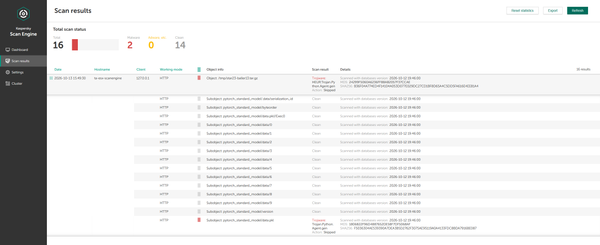
Trained LLMs come in many formats. Some of them (PTH, PT, PKL, KERS, and others) also store parameters and weights (training datasets). These files can also contain malicious code, so it’s critical to scan them before running and using them. Kaspersky Scan Engine scans potentially dangerous LLM formats for infected data. It can deserialize and analyze models to detect malicious code regardless of model size.
Detection of an LLM with malicious code in Kaspersky Scan Engine
Conclusion
AI agents are rapidly making their way into corporate environments: they help employees work faster and take on a wide range of tasks, but they also open up new opportunities for attackers. To take advantage of this technology without compromising security, organizations need to build multi-layered protection and minimize risks. A range of Kaspersky solutions can help with this:
Kaspersky TIP keeps you up to date on current scenarios in which attackers use AI agents, and its Hunt Hub section provides rules for detecting suspicious AI agent activity.
Kaspersky EDR detects AI agents in the infrastructure and monitors their activity on endpoints. If it detects potentially dangerous actions, the product can log the event, notify the SOC, and take response actions, such as stopping the process or isolating the host.
Application Control in Kaspersky products can fully restrict the use of AI agents within the company by using application categorization. The Web Control component can restrict access to AIaaS web resources.
Kaspersky Scan Engine can be integrated into various company processes to detect malicious code in any files, including AI agent skills and LLMs.
When companies combine the tools described above in a comprehensive approach, they can adopt AI agents in an informed way: with an understanding of the associated risks and effective means of minimizing them.
Once the attacker has breached the corporate network, subsequent stages of the attack often involve leveraging standard domain infrastructure protocols: using Kerberos, running DNS queries, accessing internal services, opening network shares, and other common networking actions. Because this activity is virtually indistinguishable from legitimate network traffic, it is extremely difficult to detect it with traditional network attack detection tools.
Kerberoasting and DNS tunneling have long ceased to be exotic techniques. They are becoming standard methods in modern attacks because they allow attackers to execute critical compromise stages while remaining undetected by traditional security tools. A clear example of this trend is seen in latest campaigns, employing both Kerberoasting and DNS tunneling.
Traditional network security tools perform well when the attack features a distinct and identifiable indicator: a characteristic query string, a known malicious traffic pattern, or the source code of an already discovered exploit. While this approach to threat detection remains effective, it cannot always be applied to discovering network attacks that blend seamlessly with legitimate traffic inside a corporate network.
Instead of searching for explicit indicators of attack, Network Anomaly Detection (NAD) analyzes all traffic for suspicious artifacts that deviate from the host’s typical network activity. Within Kaspersky’s solution portfolio, this technology is implemented specifically in the Kaspersky Anti Targeted Attack (KATA) platform.
The system analyzes network traffic data (DNS, DCE/RPC, Kerberos and other packets) and extracts key parameters used to identify anomalous behavior. This approach enables searching for attacks on domain controllers, signs of traffic tunneling and exfiltration, C2 communications, and other scenarios that may point to compromise of network infrastructure.
However, Network Anomaly Detection is not built on a single, universal set of indicators. Each attack scenario employs tailored detection models that account for the specifics of the corresponding network protocol, typical host behavior, and characteristic deviations from that baseline. This article examines two practical examples – detecting Kerberoasting and DNS tunneling – to demonstrate how these principles are implemented in KATA’s NAD rules and why this approach proves more effective than traditional signature-based analysis.
Kerberoasting attack detection by KATA
Why standard tools have a hard time detecting Kerberoasting
The Kerberoasting attack leverages the standard operational logic of the Kerberos protocol. The attacker identifies service accounts configured with a Service Principal Name (SPN), requests a Ticket-Granting Service (TGS) ticket for them, and attempts to crack the password offline using a dictionary attack against the retrieved ticket. If the password is weak or hasn’t been changed in a long time, the adversary can bruteforce it to get it in cleartext. Subsequently, these compromised credentials can be leveraged for both vertical and horizontal movement across the network.
The essence of a Kerberoasting attack is that an adversary possessing a compromised low-privileged account and a valid Ticket-Granting Ticket (TGT) for that account can request TGS tickets with weakened encryption for service accounts with SPNs. Crucially, it doesn’t matter whether the compromised account actually holds access permissions for those services. Having obtained these tickets, the attacker can then take them offline and bruteforce the service account’s password by trying to decrypt the corresponding ticket locally, without generating any network activity. As the encryption key is based on the password hash, the adversary can guess the password upon finding the correct key.
The attacker’s objective is to find a service account that has a simple password. Most likely, this will be an account created manually by the administrators of the infrastructure or a service. This is precisely why attackers are not interested in system service accounts with SPNs (such as CIFS/fileserver.company.local); these are generated automatically and feature highly complex passwords that are impossible to bruteforce.
We should note that the TGS ticket requests made by attackers are identical to standard, legitimate requests. Every domain naturally exhibits a high volume of Kerberos traffic. Therein lies the primary challenge of detecting Kerberoasting: legitimate service ticket requests (TGS-REQ) are indistinguishable from those issued by attackers. Consequently, the primary detection method relies on correlating indirect indicators rather than signature matching. Key indicators include an anomalous request source (atypical host or user account), a surge in requested SPNs within a short time window, attempts to obtain service tickets for sensitive or privileged service accounts, and off-hour timing or unusual request volume when benchmarked against the historical profile of both the user and the host.
Most of these indicators can be detected using NAD technology, which helps analysts cut through high volumes of Kerberos traffic to establish a concrete hypothesis: who initiated the Kerberoasting attack, which service accounts are at risk, and why this activity deviates from the baseline.
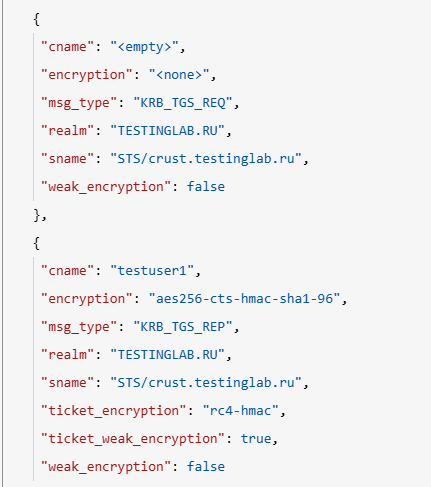
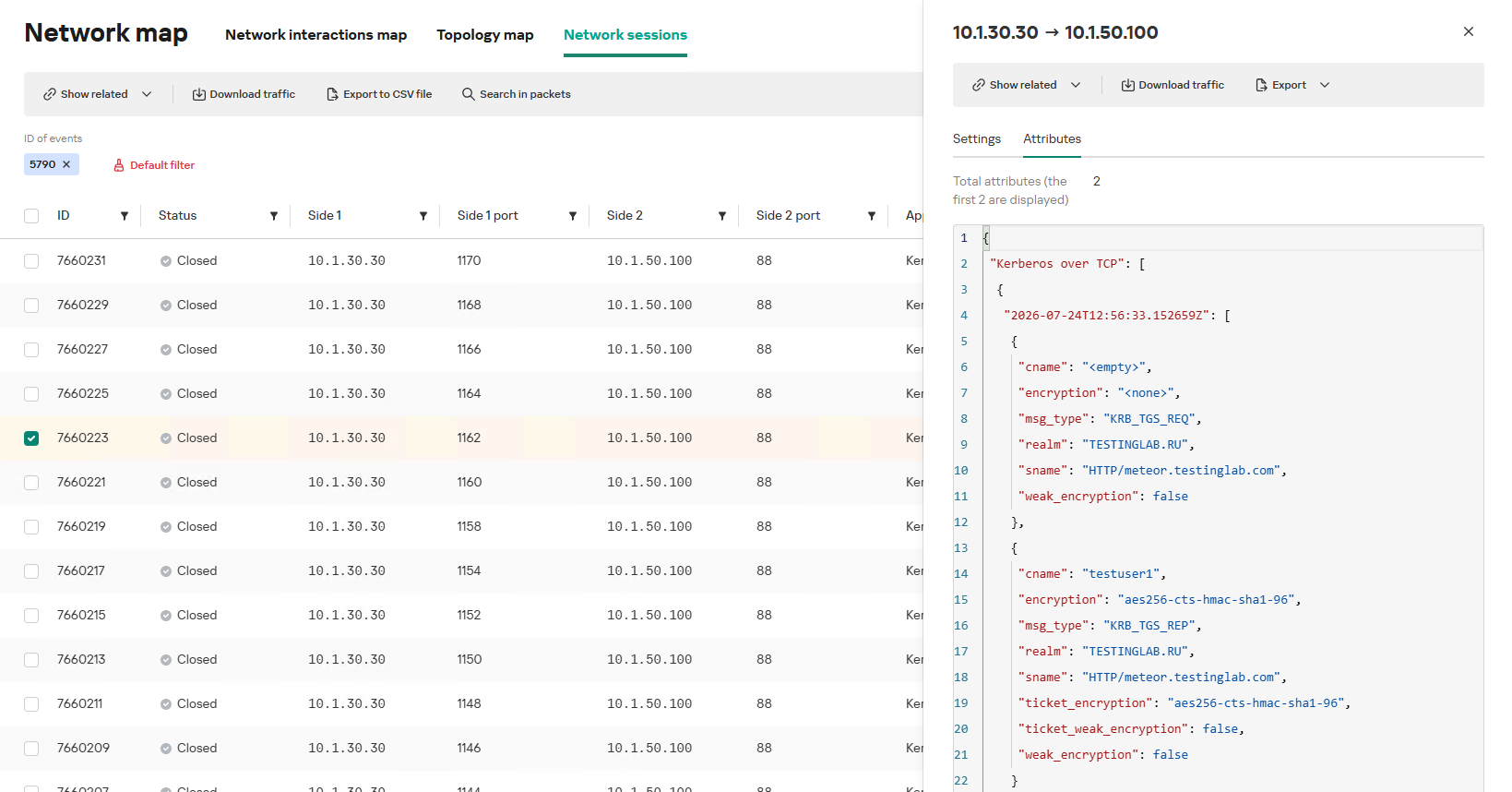
In the context of this attack, the network anomaly stems from a single host – likely using a single user account (cname) – receiving TGS tickets ("msg_type": "KRB_TGS_REP") for numerous unique services with SPNs (sname) within a short timeframe. These service accounts are non-system accounts.
Example of a TGS-REQ – TGS-REP event pair from network session attributes
To detect this anomaly, the NAD rule titled “Signs of a Kerberoasting attack” implements the following logic:
From Kerberos network sessions during the search depth period, select only those with a successful Kerberos TGS-REP response, subject to the following conditions:
The IP address that initiated the session must not be excluded in the excl_sip variable.
The requesting client name (cname) must not be included in the excluded users list (excl_users variable).
The SPN (sname) must not be excluded within the rule. System SPNs are omitted from detection logic because they exist across most corporate environments and hold no interest for adversaries in this attack vector; including them in the total count of unique SPNs could lead to predefined threshold being exceeded, triggering false positives.
Extract the cname (the name of the client requesting the TGS-REQ) and sname (SPN itself) from these qualifying sessions.
Group the sessions by the source IP address and client account name (cname), while aggregating sessions with unique SPNs.
Generate an alert if a single IP address using a single client account receives TGS-REP responses for N unique SPN names within the specified search depth window, where N equals or exceeds the threshold variable count_spns.
Within the event regeneration window, group under the initial alert all subsequent alerts associated with the same client IP address. This avoids creating duplicate event records by incrementing the aggregation counter (Total appearances).
We should note that this type of logic cannot be implemented using IDS signatures. Consider creating a Suricata rule designed to detect Kerberos TGS-REP packets. To minimize false positives, we’ll exclude system SPNs (which carry highly complex passwords) and apply a threshold for the number of responses a single client can receive. However, such a rule cannot evaluate the uniqueness of the requested SPNs; it can only track packet counts. As a result, this signature would produce a high volume of false positives because any domain naturally generates large amounts of identical legitimate TGS-REP messages.
Furthermore, adding exclusions and tuning thresholds to fit your specific infrastructure environments is significantly more practical when managed through user variables in the interface rather than directly modifying the underlying structure of the IDS rule itself.
Creating a Network Anomaly Detection rule
Network Anomaly Detection (NAD) rules are written as SQL queries executed against KATA’s ClickHouse database. Below, we demonstrate how to add and deploy a rule.
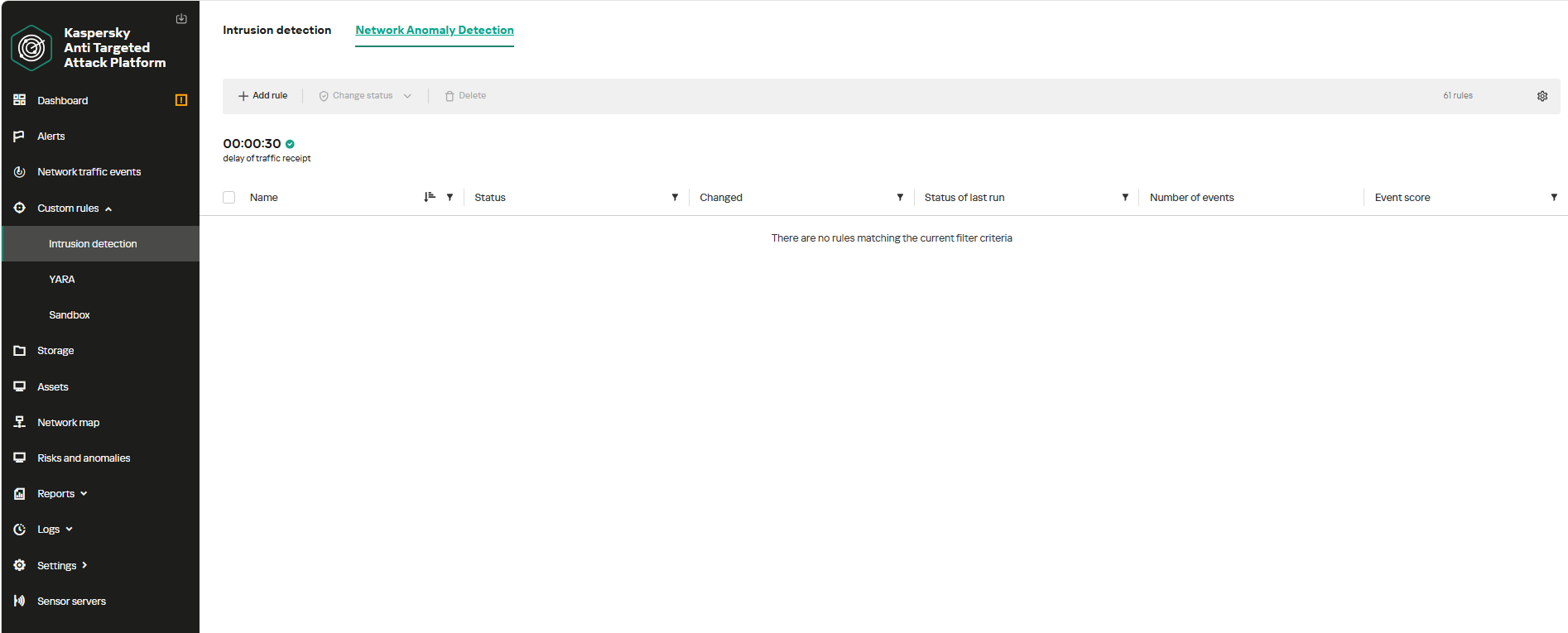
To begin working with NAD rules, navigate to the “Custom rules” section of the interface and select “Intrusion detection”. Under the “Network Anomaly Detection” tab, you can create a new rule.
The Network Anomaly Detection page UI
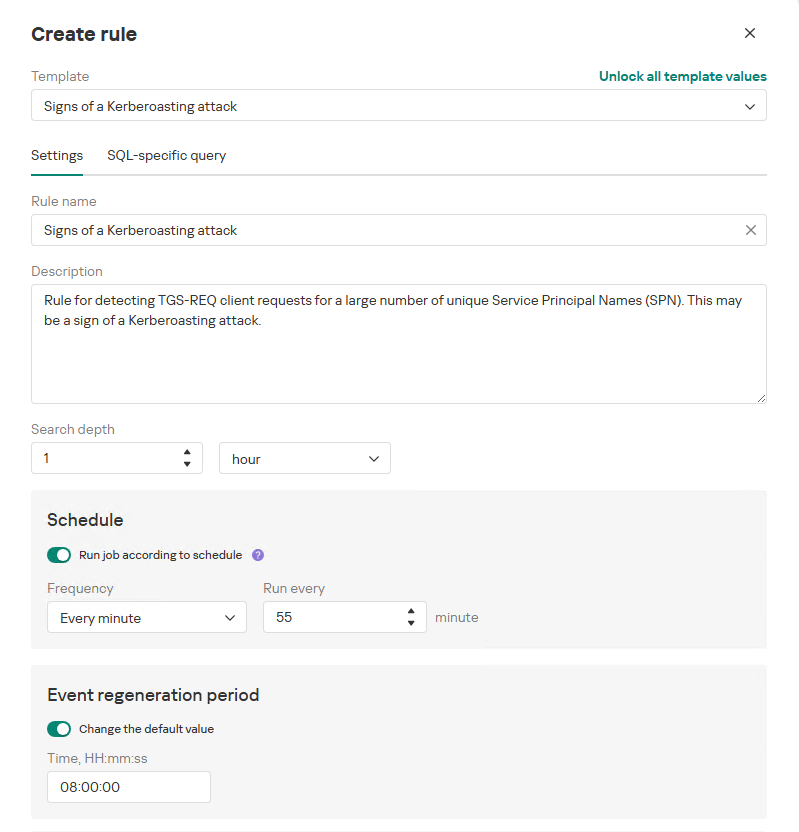
When adding a new rule, an analyst can select an appropriate rule template from the prebuilt set supplied with product updates. They can also manually modify the rule added from the template (converting it to a custom rule while keeping the original template intact) or author a rule from scratch using the provided guide.
Upon selecting a template, the analyst can review the rule description and either adjust or leave the default values for the following settings:
Search depth (the lookback window over which the SQL query will run)
Schedule (the execution frequency for running the query against the specified search depth)
Event regeneration period (the timeframe during which identical alerts will be aggregated into a single record rather than displayed as distinct events)
UI for creating a new NAD rule
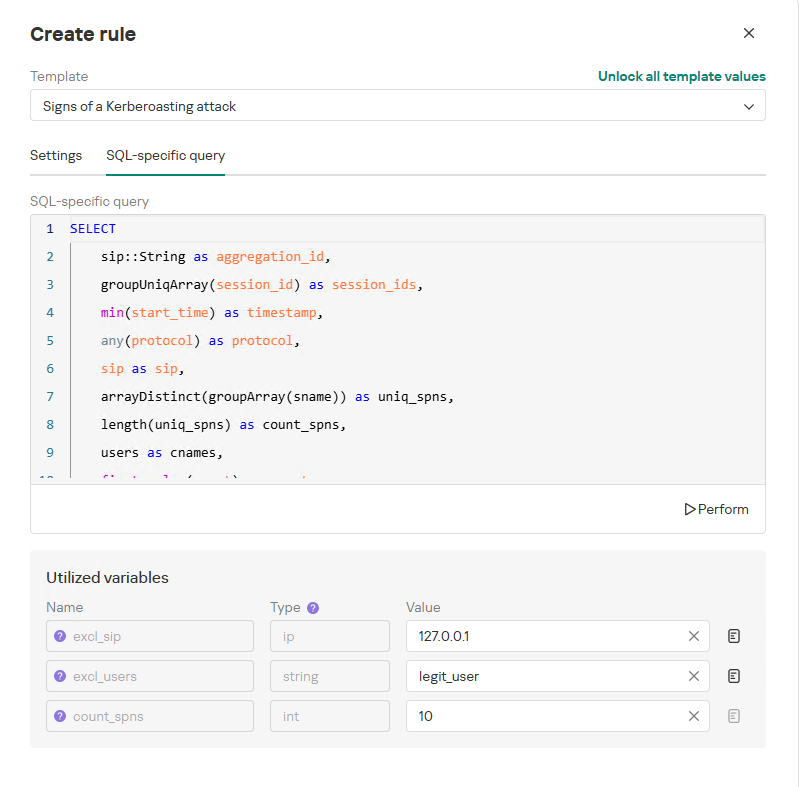
To ensure the rule functions correctly, we recommend navigating to the “SQL-specific query” tab before deployment to review the variables used within the rule – a description for each variable is available by hovering over the question mark icon.
The variables are lists of IP addresses, dates, strings or numeric values that define the network infrastructure – such as domain controllers, DNS servers, time ranges, critical segments, and other entities. This allows you to tailor each rule to different network environments and incorporate specific infrastructure characteristics without modifying the underlying logic.
In our example, using variables allows you to adjust the “Signs of a Kerberoasting attack” rule as follows without altering the underlying SQL query:
Exclude the source IP address of the TGS-REQ requests from the scope of detection logic (you can specify a single address, a subnet mask, or a dictionary containing addresses and subnets) as well as the requesting client account (accepts a single value or a dictionary with multiple values).
Adjust the threshold value required to trigger an alert based on the number of unique SPNs in the TGS-REQ messages.
Query contents and variables used in the new rule
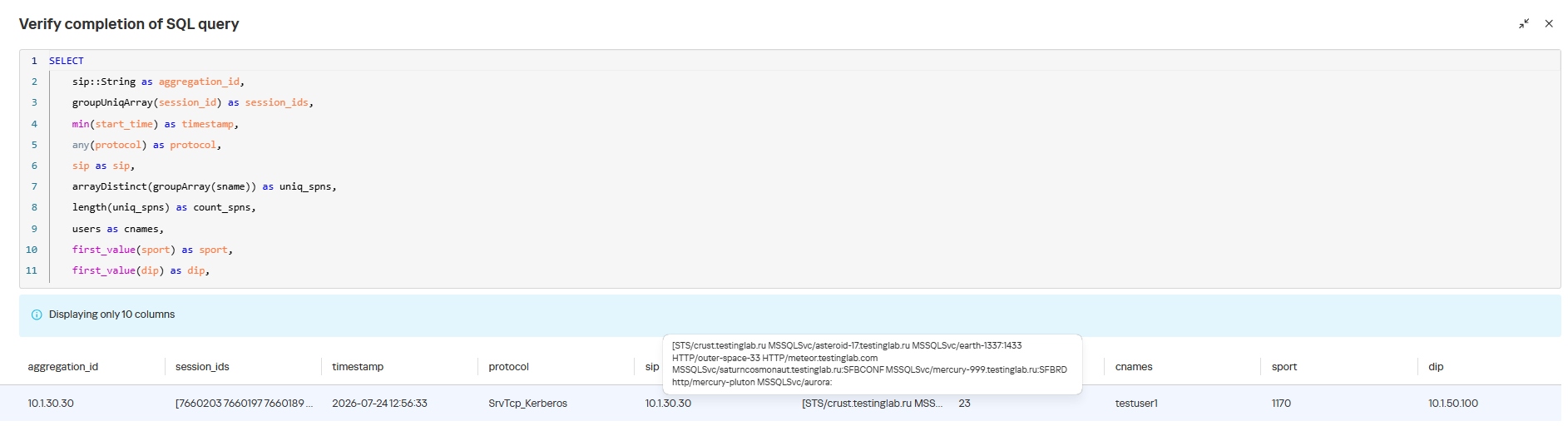
On this same page, you can test if the rule is functional prior to saving it.
Rule execution test results
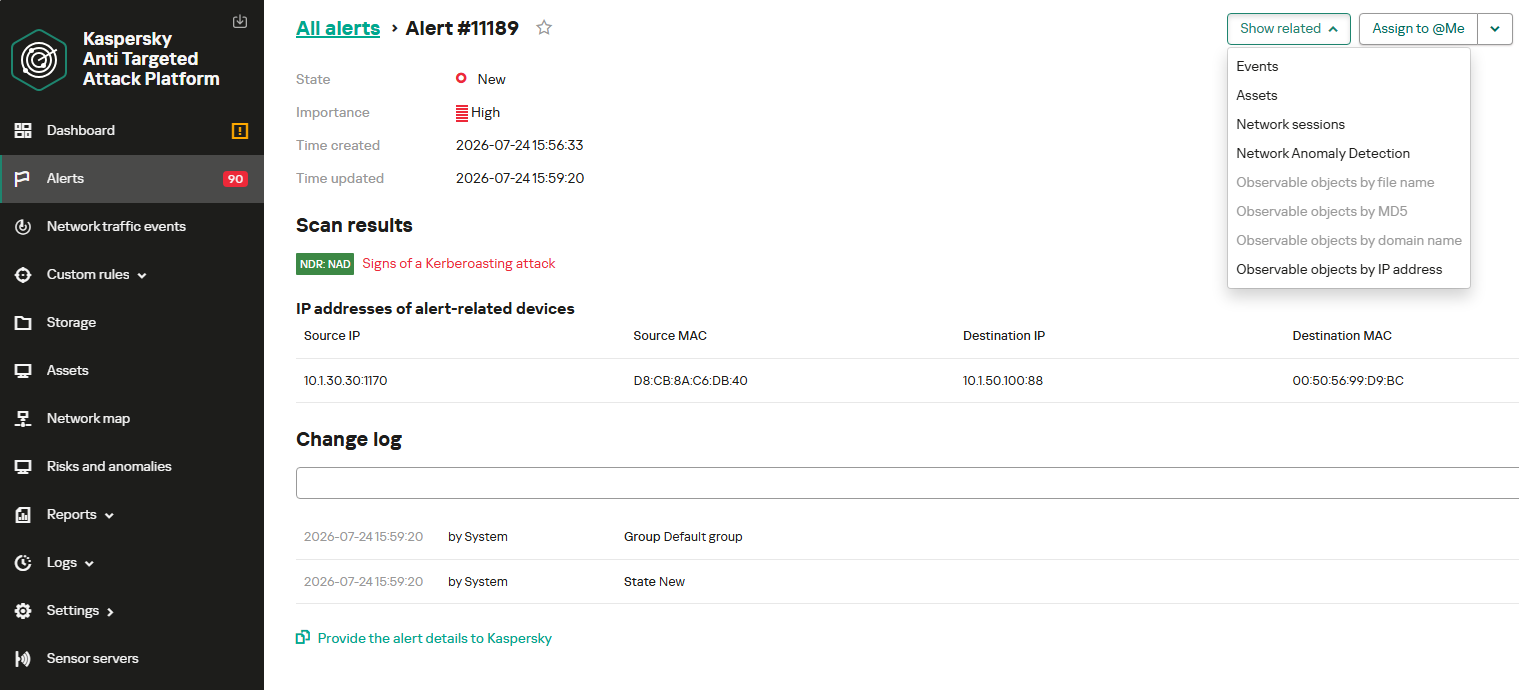
When this rule triggers, an NDR:NAD alert is generated. In the alert card, the analyst can review basic information: IP addresses, ports, and participating network endpoints.
Alert card for the NAD rule
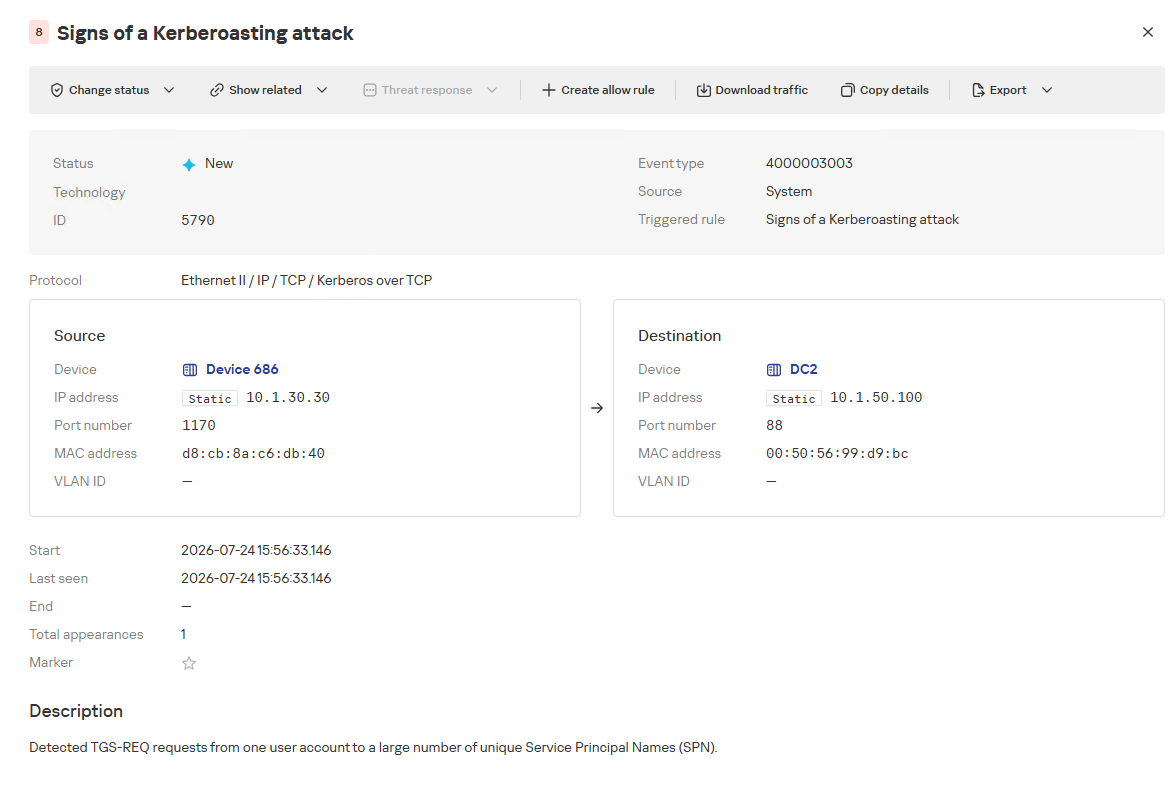
From there, the analyst can navigate to the associated event, which provides a detailed breakdown of the anomaly alongside links to the affected hosts.
NAD rule triggering event
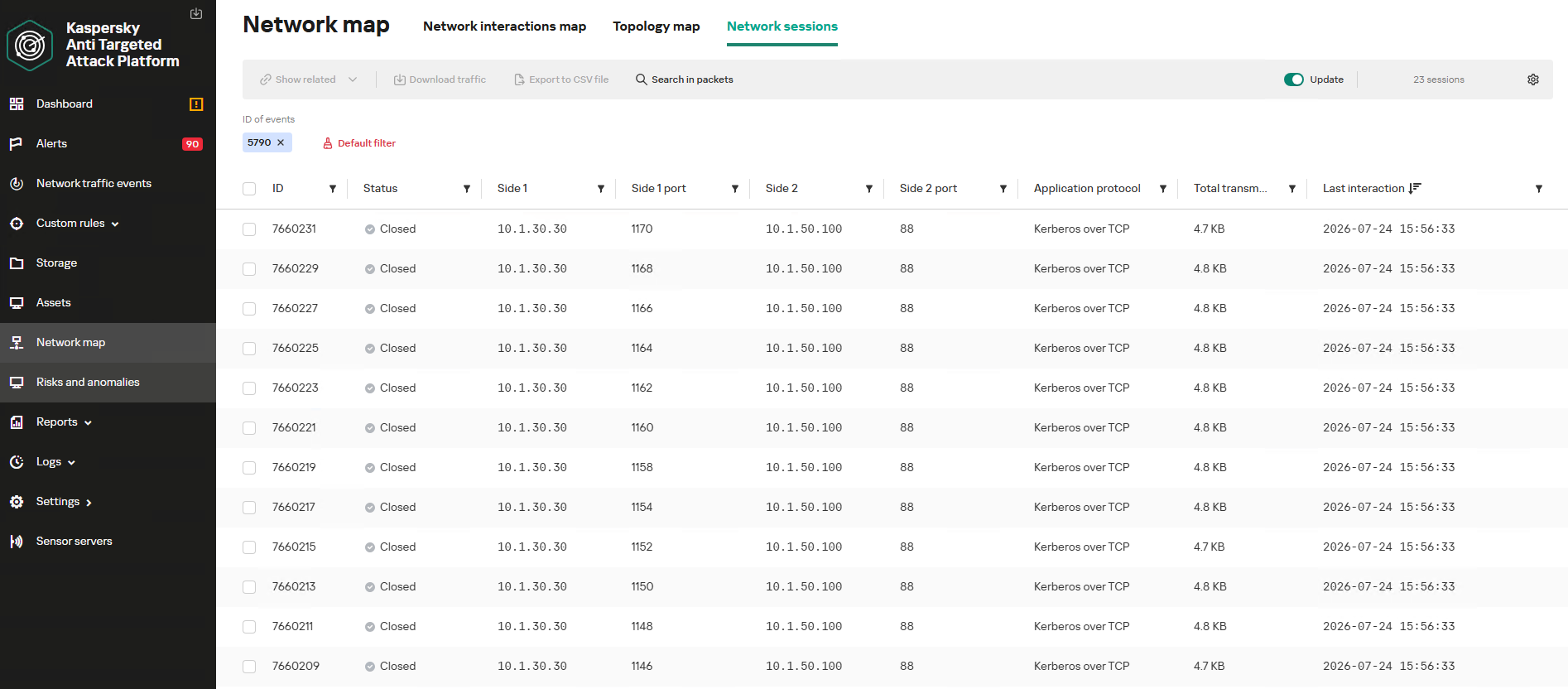
If needed, the analyst can view and export the network sessions associated with the alert. These sessions can be accessed directly from the alert or within the event card via the “Show related” drop-down list.
Network sessions that triggered the rule
Within an individual session, the analyst can inspect standard details including interacting parties, data volume sent and received, and other fields and metrics. On the “Attributes” tab, the analyst can review the specific events recorded within that session.
Network session attributes
Detecting DNS tunneling in KATA
How DNS tunnels work
DNS tunneling is a technique used to transmit data or control malware through firewalls by encoding information within DNS protocol requests and responses. Instead of performing standard name resolution, an infected host transmits data encoded within subdomain strings and receives response data via DNS records. This covert channel can be leveraged for C2 communication, bypassing network restrictions, or data exfiltration.
One method of implementing DNS tunneling involves utilizing TXT records. In this scenario, the client issues DNS TXT record queries for domain names where the right-hand portion of the domain name (the higher-level domains) remains static, while the left-hand portion (the lowest-level subdomain) carries encoded or encrypted data sent from the client to the server. Under this structure, a sample domain name might look like ZFcABQAIBA[.]testlab[.]local, where testlab[.]local serves as the static right-hand portion and ZFcABQAIBA represents the variable left-hand string containing the data transmitted by the client.
In response to these queries, the server delivers commands or messages inside the data field of the TXT response. Because the right-hand portion of the domain name remains static, all client queries are consistently routed to the same C2 server, even if the intermediate DNS resolvers targeted by the client change.
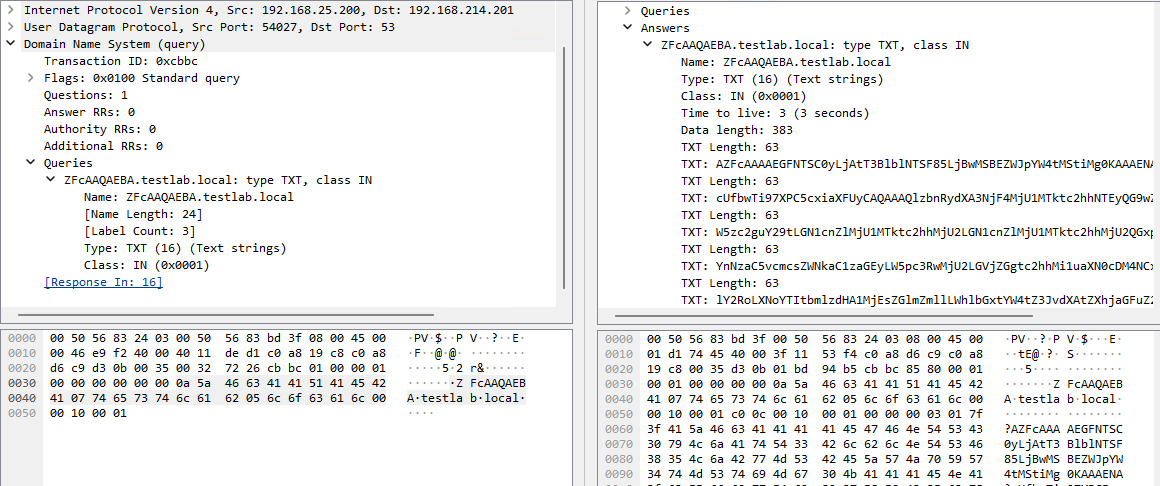
DNS query (left) and corresponding response (right) during DNS tunneling via TXT records
It is rather challenging to identify this malicious activity within DNS traffic without generating false positives. DNS traffic is permitted across almost all corporate networks, long domain names occur routinely in both internal and external environments, and TXT records are frequently leveraged for legitimate operational purposes.
Suspicion is established through a combination of indicators: a high volume of long, seemingly random subdomains associated with a single top-level domain, high request frequency, an unusually large number of unique names, non-standard record types, and significant data transfer volumes within a single DNS session.
By analyzing DNS traffic for threat detection, we identified three primary fields of interest:
Requested DNS name
DNS record type
TXT data field within the response
As shown in the image above, all of these fields are present in the DNS response. In a real-world scenario, a tunnel of this nature will transmit a volume of data that is abnormally large compared to standard DNS traffic.
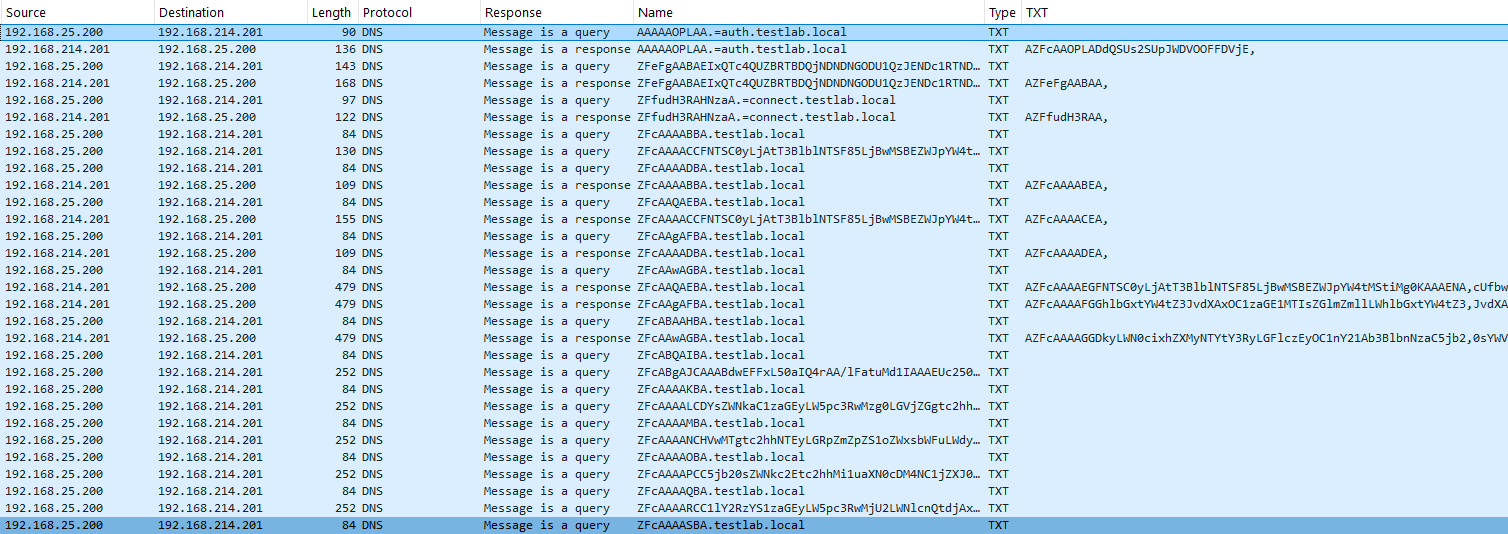
Data exchange within a DNS tunnel
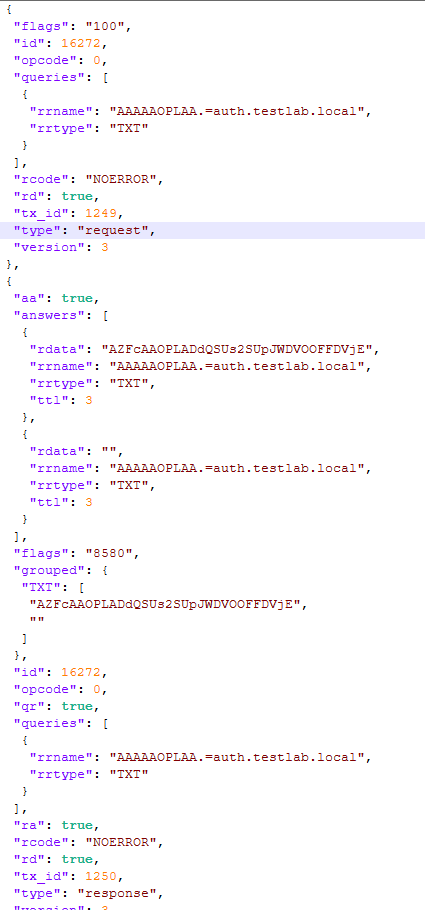
Thus, in the context of DNS tunneling, a network anomaly occurs when 1) a single query source host sends data embedded in the variable left-hand portion of domain names (rrname) while 2) maintaining a static right-hand portion (rrname) and 3) receives DNS server responses containing TXT records (rtype) with varying data (rdata), while 4) the total volume of data transmitted in the left-hand portion of the requested domain name together with the TXT data response (rdata + rrname) exceeds a predefined threshold.
Request and response events from DNS session attributes
When detecting DNS tunneling, the following nuances must be considered:
A single tunnel will not be constrained to a single DNS session; data may be transmitted across multiple sessions with the DNS server, or each individual request may occur within a separate session.
A client DNS query can contain more than one requested domain name.
A DNS response can contain multiple TXT records, as well as a large volume of various non-TXT record types.
Traffic between DNS servers must be excluded, as it duplicates client requests and can trigger false positives.
Although the factors outlined above (an abnormally large or frequently changing left-hand subdomain alongside a static right-hand domain, or an unusually long string in a TXT record) serve as key indicators of DNS tunneling, they can also occur within legitimate network traffic.
These challenges create a high likelihood of false positives when detecting DNS tunneling, particularly when using IDS-based tools. Writing an accurate IDS rule for this type of activity is practically impossible. With rare exceptions, DNS tunneling tools possess static markers that can be leveraged for signature-based detection. However, in the absence of such markers, signature methods fail to deliver high detection accuracy without generating an overwhelming number of false positives. In these cases, a comprehensive approach combining multiple correlated indicators is essential to improve overall detection quality.
DNS tunneling detection logic
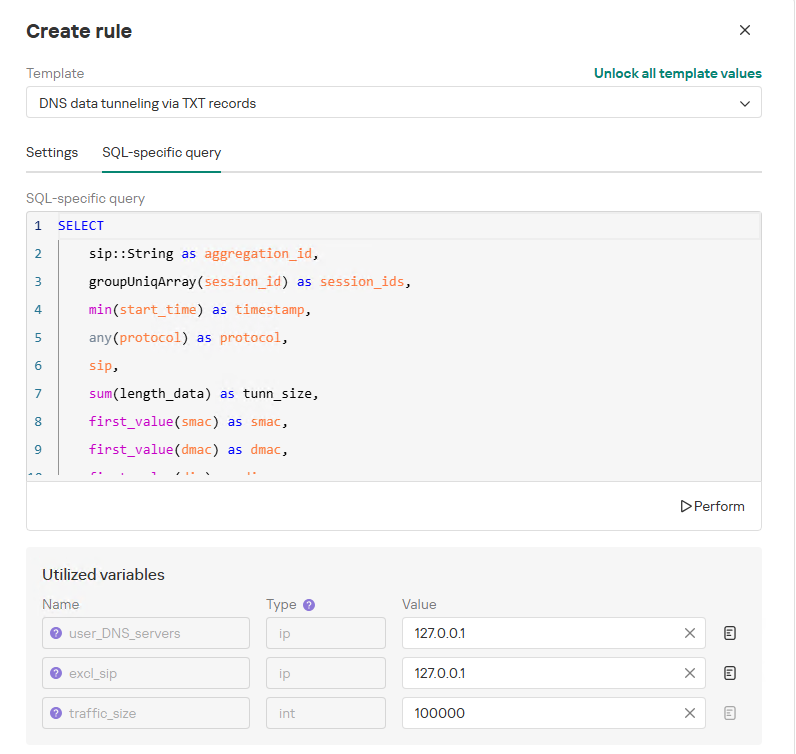
To add a rule for detecting this anomaly, you can use the prebuilt “DNS data tunneling via TXT records” template in the new rule creation interface. The “SQL-specific query” tab will display the list of variables used:
user_DNS_servers: a list of internal DNS server addresses within the infrastructure, required for the rule to function correctly and minimize potential false positives
excl_sip: IP addresses to be excluded from the scope of the rule (you can specify a single address, a subnet mask, or a list containing both addresses and subnets)
traffic_size: the threshold value for the total volume of data (in bytes) transmitted through the tunnel
Variables used in the “DNS data tunneling via TXT records” rule
The detection logic for this network anomaly is structured as follows:
From network sessions using the DNS protocol within the timeframe defined by the rule’s search depth, select only those sessions containing at least one TXT response.
Additionally:
The IP address that initiated the session must not be excluded in the excl_sip variable.
The source IP address that initiated the session must not belong to the internal DNS servers listed in the user_DNS_servers variable.
The DNS names requested by the client must not be excluded within the rule.
Split qualifying DNS sessions into individual log lines, each corresponding to an individual request or response. Retain only DNS responses containing TXT data.
Extract DNS names and their associated TXT data from these DNS responses. Retain only unique values.
Group all resulting records by the session’s source IP address, aggregating all unique DNS names and TXT data blocks.
Generate an alert if the combined size (in bytes) of the unique DNS names and TXT response data for a single IP address within the search depth window exceeds the specified threshold (the traffic_size parameter).
Within the event regeneration window, group under the initial alert all subsequent alerts associated with the same client IP address. This avoids creating duplicate event records by incrementing the aggregation counter (Total appearances).
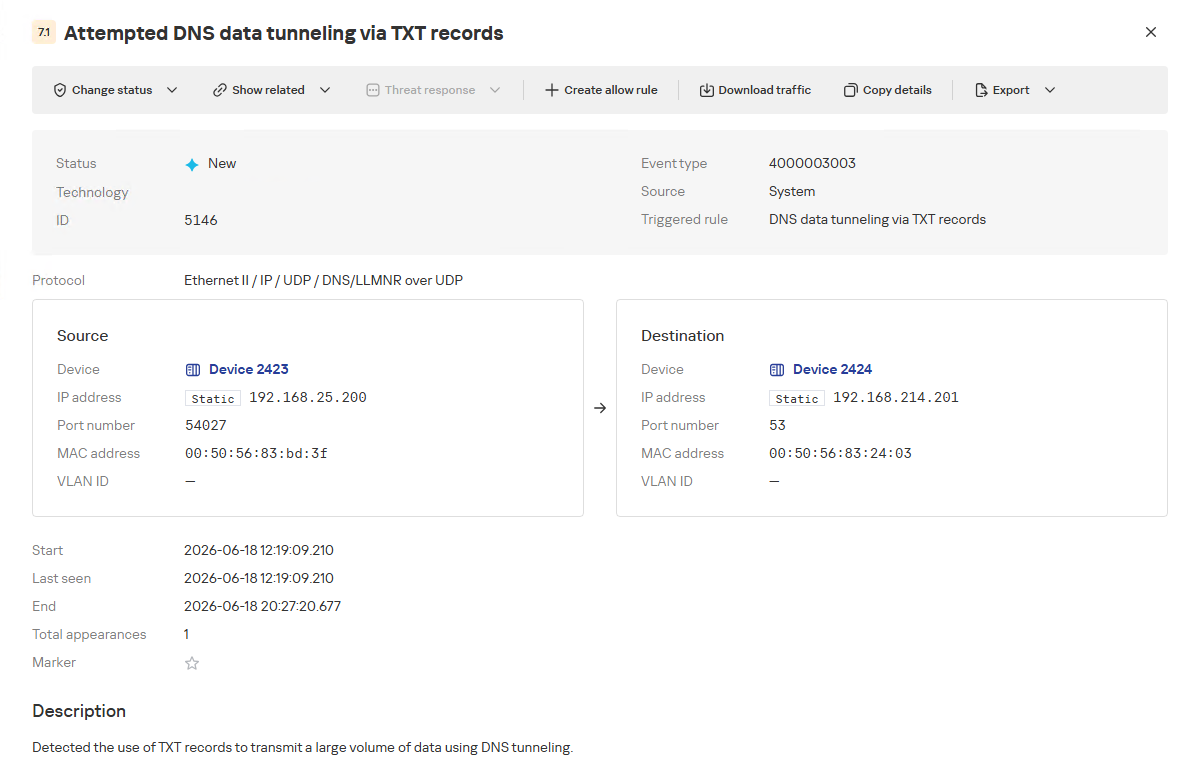
“DNS data tunneling via TXT records” rule triggering event
The primary value of NAD technology in this scenario lies in noise reduction – by minimizing false positives – and faster investigation times. A DNS tunnel rarely presents itself as a single, blatantly malicious request. Instead, it leaves behind a behavioral footprint: repetition, length, domain structure, unusual record types, numerous subdomains branching off an unchanging root domain, and anomalous host behavior. KATA consolidates these indicators into a single alert, presenting the analyst with an actionable attack hypothesis rather than a set of fragmented DNS events.
Prebuilt rules for detecting network anomalies in KATA
KATA users should note that Network Anomaly Detection (NAD) rules are not enabled by default. Rules must be added manually using the procedure described in the preceding sections. This design ensures that analysts can fine-tune rules to fit specific network infrastructures using variables.
Analysts have three ways of creating new rules:
Adding a rule from a prebuilt template and adjusting custom variables. In this case, the rule is classified as a system rule.
Adding a rule from a prebuilt template and modifying its underlying SQL query (which requires enabling the “Unlock all template values” option) to create a custom rule based on the template. When modified this way, the rule transitions from a system rule to a custom rule.
Authoring a custom rule from scratch, which requires a basic understanding of ClickHouse SQL queries and familiarity with the product documentation.
As of this publication, the product ships with 59 prebuilt NAD rule templates (with additional templates delivered via product updates). KATA supports running up to 200 active rules simultaneously.
Prebuilt rules are divided into six categories:
Large Data Transfers: tracking abnormally large network sessions across various protocols during regular hours, at night, or over weekends.
Suspicious Connections: detecting suspicious connections that may indicate hazardous activity, shadow IT, evasion of attack detection mechanisms, and other threats.
Connections to Suspicious Resources: detects actions that violate security policies, potential data exfiltration beyond the perimeter, and unauthorized internet access originating from secured network segments.
C2 Communication: identifies network sessions characteristic of a potential C2 communication channel or tunnel.
The table below lists the rule templates for detecting network anomalies in KATA:
Rule category
Rule name
Protocols used
Large Data Transfers
Data tunneling in DNS traffic
DNS
ICMP, TCP, UDP, RDP, SSH or LDAP sessions with a large volume of traffic (6 rules)
ICMP, TCP, UDP, RDP, SSH, or LDAP (depends on selected rule)
ICMP, TCP, UDP, RDP, SSH or LDAP sessions with a large volume of traffic at nighttime (6 rules)
ICMP, TCP, UDP, RDP, SSH, or LDAP (depends on selected rule)
ICMP, TCP, UDP, RDP, SSH or LDAP sessions with a large volume of traffic on non-working days (6 rules)
ICMP, TCP, UDP, RDP, SSH, or LDAP (depends on selected rule)
Suspicious Connections
Queries to unknown DNS servers
DNS
Use of unauthorized routes
TCP, UDP
Use of suspicious ports for connections to external addresses
TCP, UDP
Use of non-typical protocols for connections
TCP, UDP, HTTP, HTTPS, DNS, SMTP
Inconsistencies with firewall configuration
TCP, UDP
Use of unauthorized ports for RDP or SSH sessions (2 rules)
RDP or SSH (depends on selected rule)
Interactions with external IP addresses over the RDP or SSH protocol (2 rules)
RDP or SSH (depends on selected rule)
Suspicious RDP sessions with domain controllers
RDP
Connection to an unknown server via Kaspersky Security Center ports
TCP, UDP
Domain Attacks
Signs of a DCSync attack
DCE/RPC
Signs of a DCShadow attack
DCE/RPC
Signs of DHCP spoofing
DHCP
DNS queries to Canarytoken domains
DNS
Signs of a Kerberoasting attack
Kerberos
Signs of an AS-REP Roasting attack
Kerberos
Signs of a brute-force password attack on SSH
SSH
Signs of SOAPHound usage
LDAP
Large-volume Active Directory object data collection via LDAP queries
LDAP
Reconnaissance Activity
Getting information about a task in the Task Scheduler
DCE/RPC
Getting a list of Kerberos users
Kerberos
LDAP queries to rights delegation attribute
LDAP
LDAP queries to attribute for getting administrator passwords
LDAP
Signs of an internal horizontal port scan
TCP, UDP
Signs of an internal vertical port scan
TCP, UDP
DNS zone data replication requests sent from sources other than DNS servers
DNS
Successfully completed requests for DNS zone data replication sent from sources other than DNS servers
DNS
LDAP query targeting a critical attribute of insecure credentials
LDAP
Enumeration of domain accounts via LDAP queries
LDAP
Exceeding the threshold for requested critical attributes in LDAP queries
LDAP
LDAP search queries containing a high number of critical attributes
LDAP
Connections to Suspicious Resources
Queries to unauthorized domain names
DNS
Transmission of large data volumes to cloud storages
TCP, UDP, DNS
Connections to cloud storages or file transfer services
TCP, DNS
Connections to public repositories
TCP, DNS
Connections to resources of programs for traffic tunneling
TCP, DNS
С2 Communication
Possible queries to DGA domains
DNS
DNS data tunneling via TXT records
DNS
Numerous blocked connections to external addresses
TCP, UDP
Conclusion
The examples of Kerberoasting and DNS tunneling clearly demonstrate why modern security defenses cannot rely solely on looking for known signatures and indicators of compromise. Both attack techniques abuse protocols that operate inside corporate networks every day. At the individual event level, they may look like legitimate activity, yet in behavioral context, they stand out as clear indicators of compromise.
NAD directly addresses this gap. Instead of relying purely on signature matches across Kerberos or DNS traffic, it highlights deviations from established baselines: who initiated the activity, how frequently it recurred, which services or domains were targeted, and why that matters for a specific infrastructure.
As a result, analysts gain a clear, actionable starting point for investigation. This capability is especially valuable for spotting the signs of APT group activity, which runs stealthily and is designed to blend in with legitimate operations. The importance of this capability will only grow: as attack techniques evolve, detecting suspicious activity at its earliest stages – before it escalates into critical service compromise or a data breach – becomes increasingly vital.

 Login
Login