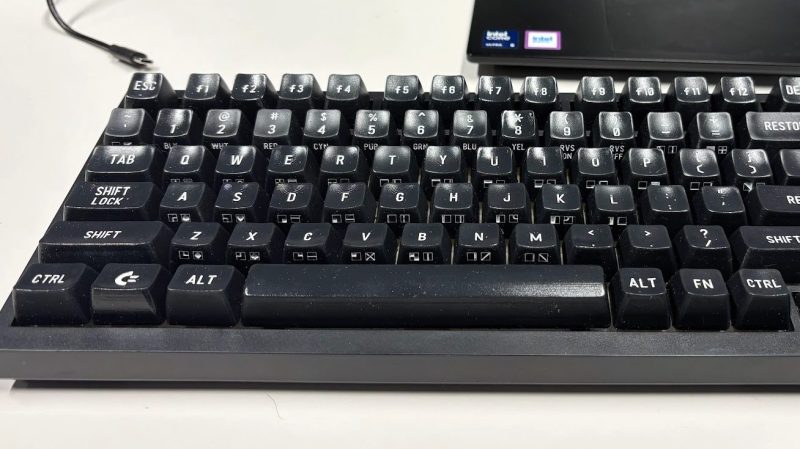
The project started as an attempt to produce a set of C64 keycaps for an Ajazz 75% keyboard layout, but [Levente] kept pushing until it developed into a universal set. The keys have C64 legends, plain legends, or blank, and work for ANSI boards from 60% to full size. There are a few ways they can be printed. — you can do two-color printing with an FDM machine, or you can print the caps alone and fill the legends with paint, either in FDM or resin.
As a part of this work, [Levente] had to obviously create the glyphs to print upon all the keycaps. He thus decided to release that as the C64 keyboard font, in fact. It’s available in TTF and OTF formats, and you can preview the font in your browser, if so desired. It includes the function key labels, the 63 PETSCII graphic font legends, and various symbols, punctuation, and selected accented letters, too.
We’ve seen lots of vintage C64 parts recreated from scratch. It’s been at the point for a while where you can build a new machine with what’s available off the shelf. They said Amiga would never die, but it’s the earlier Commodore that really lives on today…
Many of the image formats we’re familiar with have been around for decades. We all know JPEG and PNG like the back of our hands, and GIF even had a bit of a resurgence when tiny annoying looping animations became cool again on social media. There has been a growth in newer formats, though, like WEBP, and AVIF, with various platforms and software companies adopting them for greater efficiency, performance, and image quality.
Amongst the new crop of formats vying for relevance is JPEG XL. It was touted as a format that improved on what JPEG could do in the lossy compression space, while also adding on a lossless mode. There were grand hopes that it would become a universal replacement for all existing raster formats on the Web. A major problem was that Google was seemingly against it, only to backflip—with the format now slated to hit the big time with renewed backing from the search giant. So what’s going on?
Got You JPEG’d
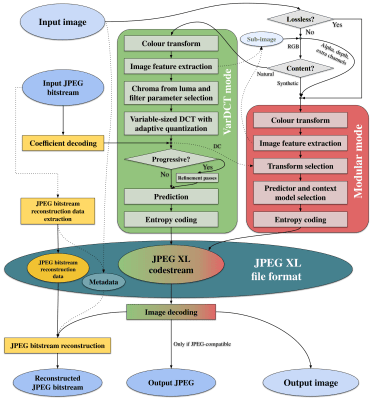
The JPEG XL codec architecture. Credit: Jon Sneyers, CC BY SA 4.0
The JPEG XL standard is modern, but by no means brand new. It was initially released on 13 October 2021, having been developed by a consortium of the Joint Photographic Experts Group, Google, and Cloudinary. It was deveoped from earlier work from Jon Sneyers on the Free Universal Image Format (FUIF), and work from Google on the PIK format.
It was decided the resulting format would use the *.jxl file extension. The spec defined a format with a wide range of features well beyond what classic JPEG ever offered. It has lossless compression, including for the alpha channel, but also lossy compression available in different modes to suit both photographic and synthetic imagery.
It remains fast to decode—almost as fast as JPEG and much quicker than HEIC with x265. A key future proofing feature is that it can also handle 32-bit sample precision, and images with over a billion pixels per side—that’s a terapixel, if you’re playing along at home.
The JPEG XL logo, which pretty much solely exists for people who need an image for their article about JPEG-XL. Credit: Joint Photographic Experts Group
A wide range of major tech companies have backed the standard in the years since it dropped, from Meta, to Adobe, Intel, and Flickr. While it might seem like Google was fully onboard from the get-go, having literally been involved in development of the standard, the history is more complicated, as reported by TT Lab.
Chromium implemented a libjxl-based decoder all the way back in 2021, which seemed to signal JPEG-XL support would soon be a thing in Chrome and other products besides. However, soon enough, there was a change in direction. In late 2022, it was slated for removal, with a notice that ecosystem support wasn’t great enough to justify continued efforts to bring JPEG-XL into the fold.
In Chrome 110, there was no trace left—JPEG-XL was not going to be a part of things. And yet, in the years that followed, debate raged on the Chrome issue tracker as to whether the nascent format would earn its inclusion. Elsewhere, JPEG-XL was struggling to find a footing. Apple rolled it into Safari in 2023, while Mozilla continued to hedge, noting that including another C++ image decoder was undesirable for reasons around memory safety.
A screenshot of an Android media app displaying a *.jxl image. Credit: Syced, CC0
New movement happened in November 2025, when Rick Byers, Area Tech Lead on Google Chrome, noted that the landscape had shifted. He posted that in light of JPEG-XL support being added to things like the PDF format and Safari, amidst other signals of support in the wider ecosystem, that the development team would be open to “integrate a performant and memory-safe JPEG XL decoder in Chromium.”
With Chrome having over 65% of the browser market, this would be a game changer for the format and likely see its adoption skyrocket across the web. It just needed to actually be implemented. However, Byers was careful to note that the inclusion of the new format would be contingent on a commitment to long-term maintenance of the decoder.
Things moved fast, and when Chrome 145 dropped in February this year, JPEG-XL was on the docket. This was thanks to the development of the jxl-rs decoder, which was implemented in Rust. This was an intentional decision for security reasons, with Google relying on the Rule of 2 to keep its browser safe. However, the new decoder was not activated by default. It would take another half a year or so before the new format would become a mainstream part of Chrome, rather than being hidden behind an experimental flag or anything like that. As of Chrome 155, though, JPEG-XL will be fully supported in the browser.
Don’t expect to see a ton of *.jxl files out on the wider web immediately. However, with the new format offering 30-50% better compression than JPEG, it will be appealing to just about any content provider looking to slimline data budgets and improve page loading times. When the performance gains start boosting traffic to a degree that makes up for the loss of users from older non-compliant browsers, expect to see things changing more quickly.
What does it mean for you, the end user? Probably little more than some minor headaches. You’ll struggle here and there when you download a *.jxl and try and load it into older software that doesn’t support it. You might get a device that shoots pictures in JPEG-XL and then find you can’t upload them to an older website with an out-of-date image submission form.
It’s the same problem we’ve all dealt with as HEIC, AVIF, and WEBP have started bouncing around the web, and we’ll have to weather it again. At least, at the end of the day, we’ll have slightly prettier images that take up a little less space. It’ll all be worth it, to be sure.
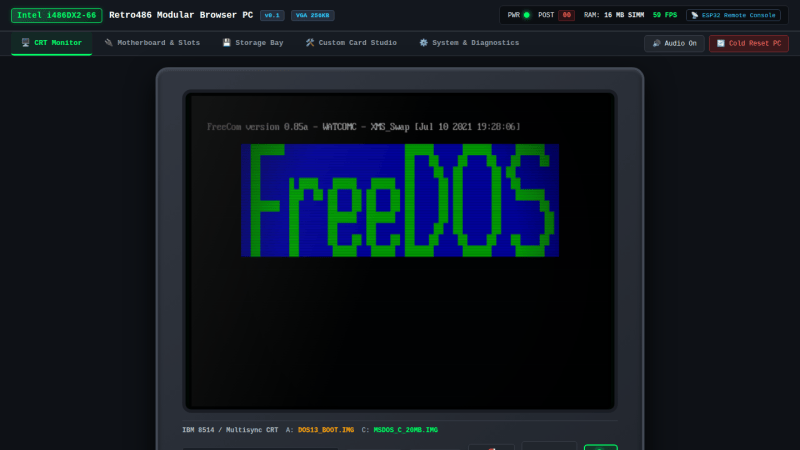
What [Jan] has built is a 100% browser-based emulator for an Intel 80486DX2-66 PC. Obviously, it’s not just a CPU that’s being emulated here—[Jan] has gone so far as to throw in the motherboard and ISA/VLB adapter card emulation necessary to make this a real and functioning computer that runs inside a solitary browser tab.
It’s all written in ES6 JavaScript. It will happily run SeaBIOS, VGA BIOS, FreeDOS 1.3, and a whole bunch of classic games, like Wolfenstein 3D, Duke Nukem, and DOOM. There’s even a control panel where you can configure the PC how you like, from storage to expansion cards and all the rest.
Once upon a time an emulator was an application you had to download and run, hoping all the while that your new machine had enough grunt to emulate the classic hardware of your desires. These days, we have endless piles of CPU cycles to throw at everything and you can do it all within a browser. Or even on a tiny microcontroller, if you feel like it!
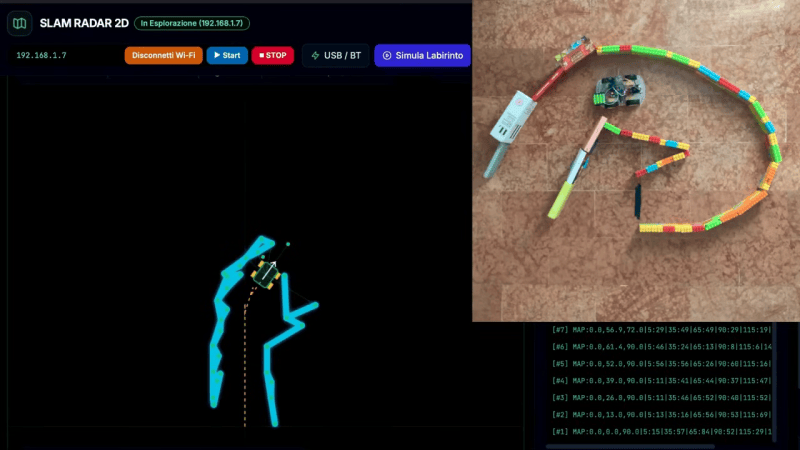
There are plenty of “robot” projects out there that are really just a small remote control platform of some sort. We often like to think of robots of having some sort of autonomy though. [Luca Fagioli] demonstrates a great example of this with his explorer robot that uses Simultaneous Localization and Mapping (SLAM) to navigate its environment.
The robot is a built on a small plastic chassis, with one gear motor per drive wheel. Running the show is an Arduino Uno R4 Wi-Fi, paired with the Sensor Shield 5.0 and an L298N motor driver board. There’s also an HC-SR04 ultrasonic sensor module onboard, mounted atop an SG-90 servo motor so it can be panned around. The ultrasonic sensor determines the range between the robot and surrounding walls, and a map is constructed at the same time as the robot is localizing itself within it. There are also infrared sensors on the bottom of the robot for detecting tape marks on the floor for checkpointing purposes.
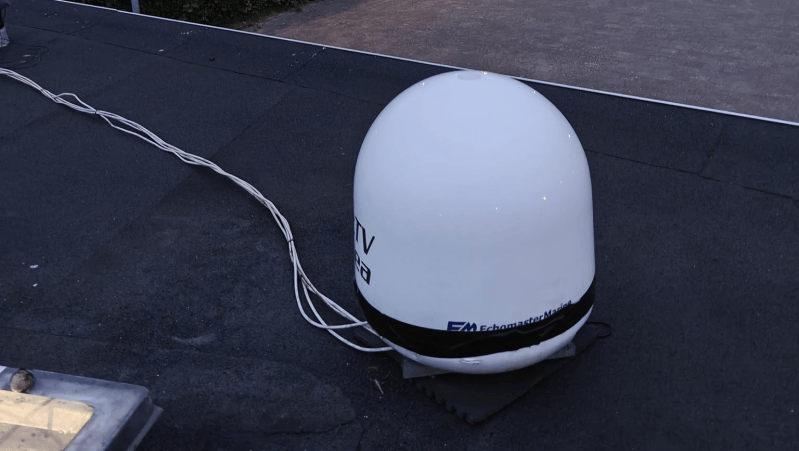
Having watched some fun videos on repurposed satellite dishes on YouTube, [Melan] wanted to get in on the action, managed to source an Intellian i4 — a dish built for marine use — and set about hacking it.
[Melan] first needed to convince the antenna that it was still on a boat by using an RP2040 microcontroller and an RS-422 module to send NMEA sentences. This was necessary to tell the i4 the “heading” of the “boat”, even though [Melan] was really using the rig stationary on land. From there, a simple email to the company itself sufficed to get the Intellian software running on the antenna.
But could it be controlled without the software?. Sniff the communications between the software and the Antenna Control Unit, and decompile the code. This done, it was relatively straightforward to put together a protocol description and figure out how to command the antenna where to point simply by issuing commands for azimuth and elevation.
Bridges! We kind of expect them to just be there and do their job, ad infinitum. They are built into the landscape, and we often take them and the routes they open up for granted.
The reality, as any civil engineer will tell you, is that bridges are living, breathing things that require endless maintenance and monitoring to keep them safe, standing, and functional. A great example of this is found in the US Department of Transportation, and its publicly accessible register of bridge health reports.
Stay Standing
The thing about bridges is that we rely on them. They serve as vital transport links in our communities, ferrying people to and from work and school, and acting as the very arteries of commerce as trucks and trains haul goods to and fro. When a bridge crossing has to close, either for maintenance or at end of life, this link is severed, often with serious economic and logistical impacts. For that reason, we tend to like to keep our bridges in service as long as possible. The result, of course, is that if pursuing this goal means that proper maintenance and repairs aren’t seen to, there is a risk of collapse—which often comes with worse consequences. Loss of life is common when bridges fail, and replacing a collapsed bridge is often much harder and more time consuming than handling things properly ahead of time.
In the United States, it’s a well known fact that the bridges are getting old. The average bridge is 44 years old, which is bumping up against the 50-year service limit many were originally built for. Being an average number, it’s indicative that many bridges are exceeding that figure significantly. Obviously, a bridge’s age isn’t a perfect proxy for its condition, but closer examinations indicate there’s definitely a problem. A 2024 report from the American Road & Transportation Builders Association noted that 36 percent of US bridges are in need of repair or replacement, a total of 221,800 spans. 42,067 spans were considered to be in “poor” condition, which in their total see 168.5 million motorists crossing them every day. It’s a particularly sobering figure as it highlights the size of the disaster possible if these structures are to fail.
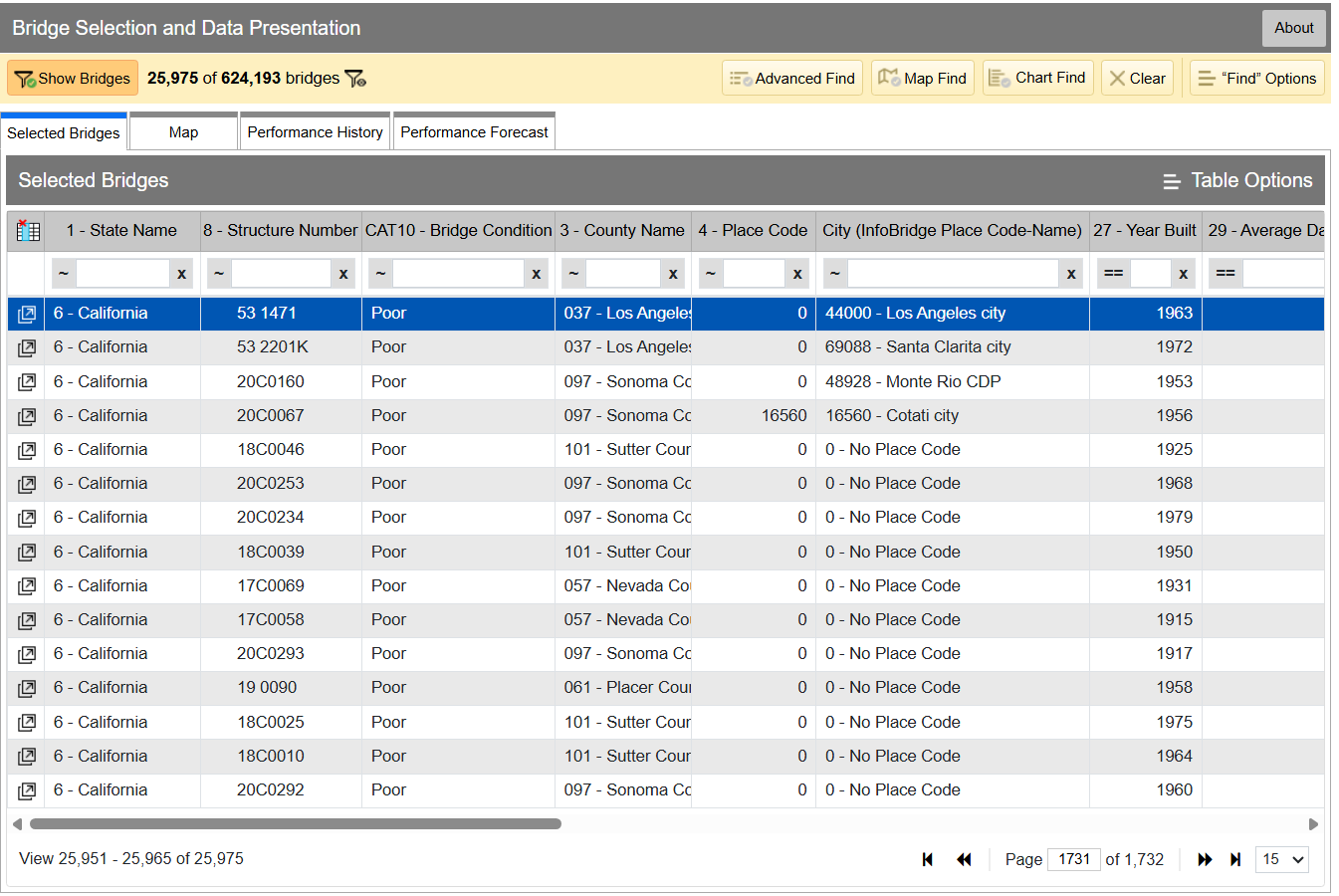
InfoBridge quickly lets you sort through data by all kinds of different factors. If you’re looking for the worst bridges in town, it’s easy to flick through CAT10 – BRIDGE CONDITION to see which bridges as listed as Good, Fair, or Poor. Bridges are rated on the condition of their deck, superstructure, and substructure, and the lowest scoring section influences which bin the bridge lands in, as per federal code—specifically, 23 CFR 490 Subpart D. Credit: InfoBridge screenshot
You can drill down into the data yourself if you desire. Within the Department of Transport, the Federal Highway Administration maintains LTBP InfoBridge, a database of information on bridges all across the country. It was developed by the Long Term Bridge Performance program, because the goal of the project is to understand how these structures hold up and perform over the decades. The database is publicly accessible, and serves as a portal for all the available data and statistics on how US bridges are doing. It hopes to enable everyone from state and federal authorities, to university students, faculty, and other researchers, to dive into bridge data and visualize and understand it better.
Data available is from a wide number of sources, including the National Bridge Inventory and National Bridge Element datasets, as well as climatic data collected from NASA’s MERRA-2 database. There’s also construction and design data sourced by the LTBP program, along with non-destructive evaluations that have been carried out. Data from various other special projects is available too, such as from Federal Highway Administration projects investigating timber bridges, steel weathering, and the use of ultra-high performance concrete structures.
Just glancing at the Vincent Thomas bridge won’t tell you how the structure is doing. Credit: The Port of Authority, CC BY-SA 3.0
If you have a particular bridge of interest, it’s easy to get a quick break down of how it’s doing. For example, you might like to know about the Vincent Thomas Bridge, in Los Angeles, California: National Bridge Inventory number 53 1471. It links San Pedro with Terminal Island, and is a suspension bridge with a total length of 6,060 feet and a longest span of 1,500 feet. Built in 1963, we can see from the data alone that it’s now showing its age.
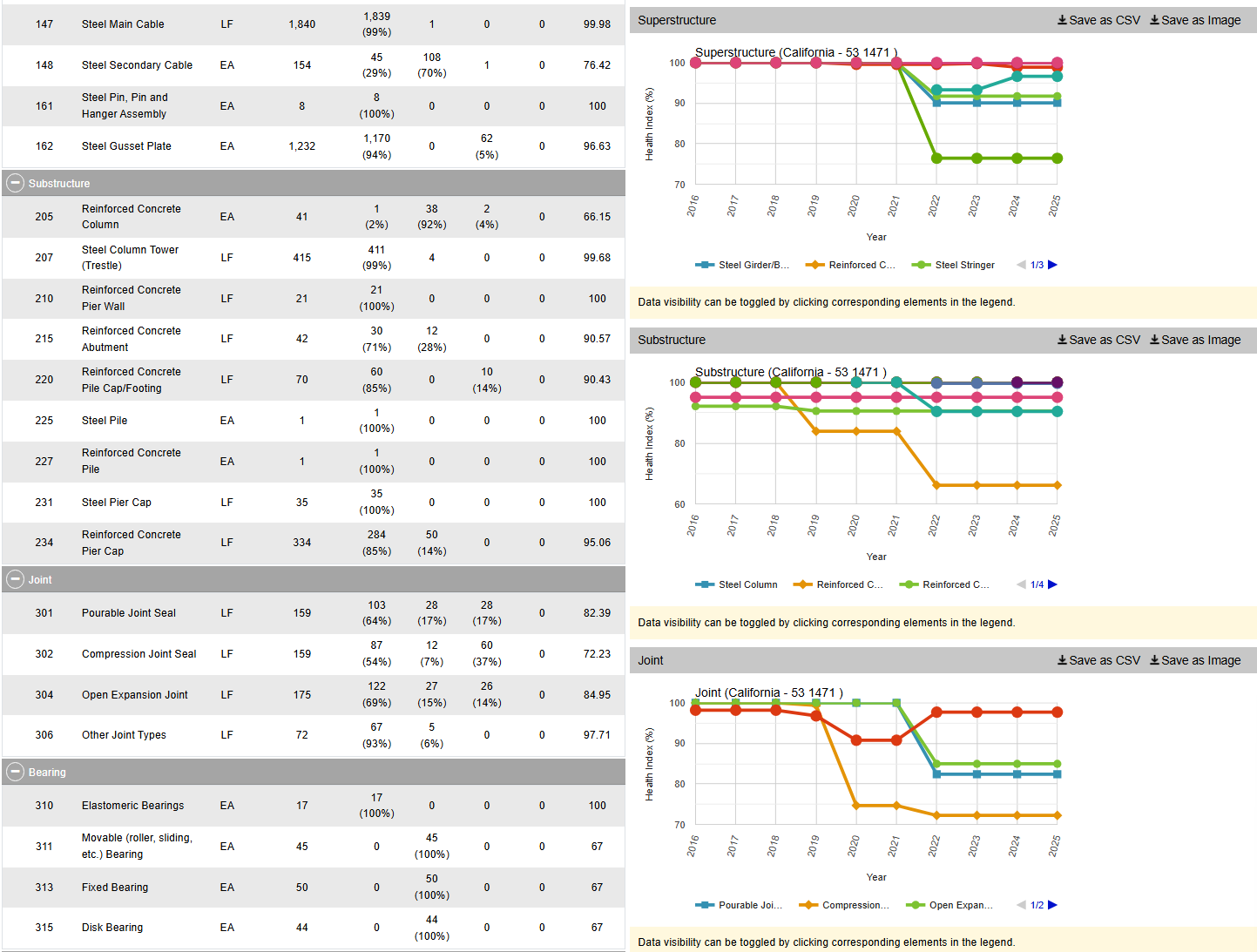
The bridge condition is listed as “Poor,” and if we dive deeper into the National Bridge Elements data, we can see why. The health indexes of the deck, substructure, and superstructure have all been trending down in recent years as the bridge’s age has increased, with a particular drop off from 2019 or so. In particular, the steel cables and girders on the bridge have been showing their age, and the concrete columns supporting the bridge have been similarly degrading. The deck, too, is in need of repair, with the California Department of Transport recently dedicating some $706 million to replace it ahead of the 2028 Olympic Games.
However, InfoBridge will let you drill down into detailed reports on the bridge conditions, down to a level which indicates which parts of the bridge are most in need of maintenance, repair, or replacement. Credit: Screenshot, InfoBridge
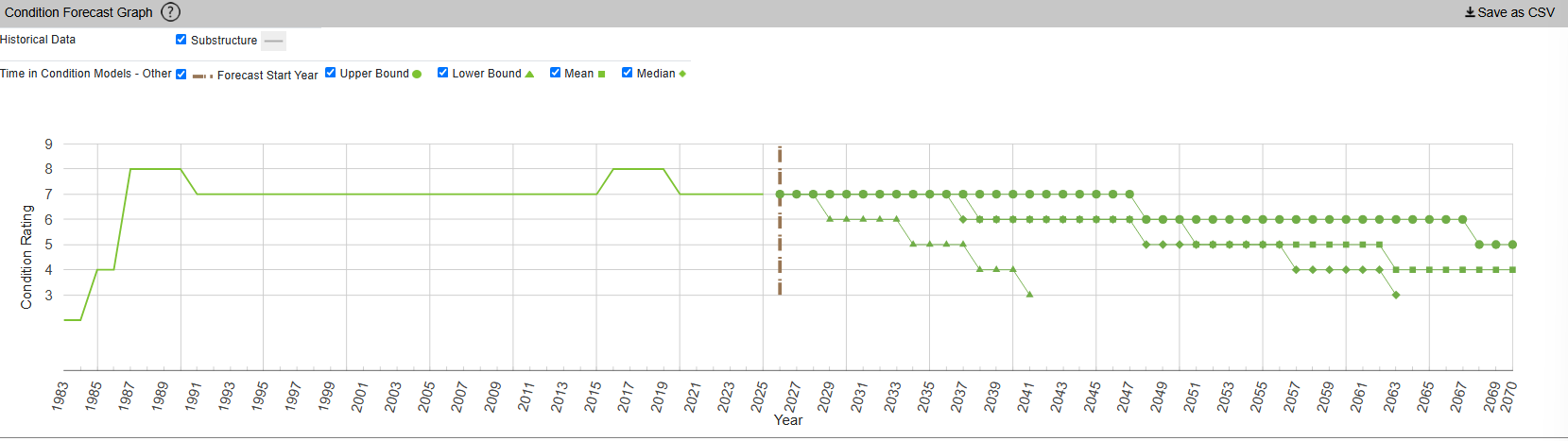
InfoBridge also offers condition forecasts for many bridges across the country. For example, the 24th Street Bridge over Rio Linda Creek is currently listed as being in “Good” condition. Current forecasts show that the deck and superstructure is expected to be in much poorer shape somewhere between 2035 and 2055, while the substructure is expected to hang on in good shape for a bit longer.
The Long Term Bridge Performance Program has developed a variety of models—base, survival, and machine-learning—to predict bridge condition over time. The aim is to guide maintenance efforts over time and allow for better planning. Credit: InfoBridge, screenshot
You might think that you’d have to query a government department and delve deep into some dusty records room to learn about the condition of your local bridges. Instead, thanks to the efforts of diligent civil servants, you can instead access all the rich inspection data you like from the comfort of your own web browser. It’s not just good for citizen oversight, either. It aids local authorities and bridge owners in making the right decisions, by putting the necessary data right at their fingertips.
It also creates a certain level of accountability—having the data available means there’s little room for anyone to make excuses that they were unaware of a bridge’s condition prior to something going wrong. Ultimately, it’s just one arm of a project that hopes to take US bridges safely long into the future.
The Nintendo DSi was released in November 2008, and boasted a new feature not formerly seen on the brand’s handhelds—it had two cameras, inside and outside. It let the console take photos, a feature rather fitting given it was an era in which phone cameras had become the norm. Only, it wasn’t so good out of the box. However, [gavff] recently found an accessory from way back when that aimed to make the DSi’s camera somewhat more capable.
For some reason, the console accessories company Nyko decided that that the Nintendo DSi deserved an 8x optical zoom lens. Never mind that the console’s cameras were limited to a resolution of just 640 x 480 pixels, it was deemed important that the handheld have the ability to capture images of things that were somewhat farther away. The lens mounted to a specially-designed case that fit around the original DSi’s shell. It’s not particularly clear what the intended use case was, but if you wanted to expand the capability of your DSi camera, this was one way to do it. You could get some pretty sharp photos if you knew what you were doing, as [gavff] demonstrates in the video.
The video then takes things farther, putting an even larger, sillier telescopic camera lens on the DSi. [gavff] used it to capture a photo of the Moon, with the benefit that unlike modern smartphones, there’s no AI faking the results. The video also touches on the goofy Mad Catz flash accessory that used the DSi’s charge port.
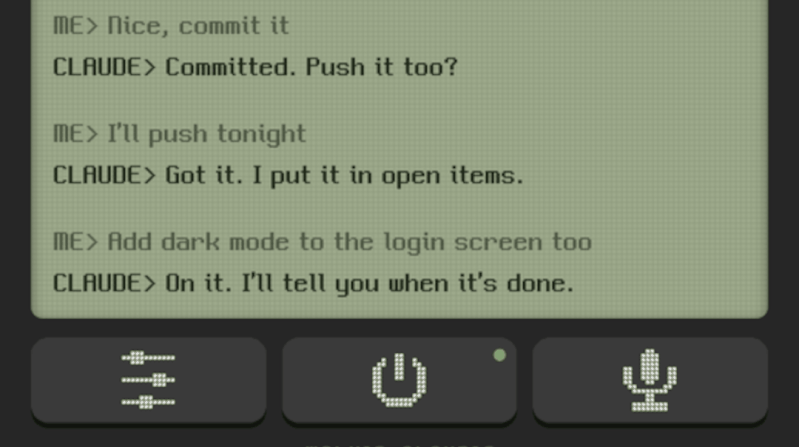
[Bookmari] had a problem — working as a delivery driver, they wanted to work on various projects with Claude Code while out and about. Unfortunately, it simply wasn’t practical to write prompts and read answers on the job. Thus, they whipped up Walkie Claudie, so they could use their voice instead.
The concept is simple enough, it’s an interface that lets you talk to Claude using speech recognition, and lets Claude talk back to you with a text-to-speech engine. It runs on a smartphone, with a direct network connection to the PC running Claude, though you can use a VPN if you’re distantly located. [Bookmari] has a push-to-talk setup so that pushing a button on their Bluetooth earbuds lets them talk directly to Claude. There’s also a special mode to keep the channel active during long pauses if you need a while to collect thoughts and vocalize them. Just for fun, the interface is styled like an old-school walkie LCD, and there’s fun little details like synthesized squelch and channel-switch noises and so on.
If you’re looking for a way to stay hooked up to your AI assistant at all times, this could prove useful to you. Alternatively, consider if maybe it’s worth taking a break sometimes, or check out other Claude Code projects we’ve seen of late.
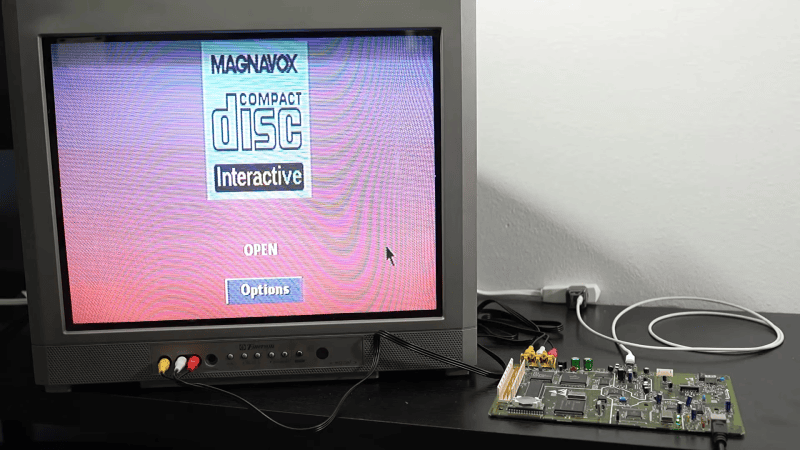
The Philips CD-i is a console with many shortcomings, and those include the power supply. For whatever reason, the engineering team decided it should use an 8P8C connector just like Ethernet. Thus, just like your Ethernet cables, it has that annoying problem of the tab snapping off all the time. [MattKC] wondered if the CD-i could benefit from a USB power upgrade instead, and set about making it a reality.
The plan was simple enough—get the CD-i running off of USB-C instead of the ungainly original power supply that shipped with the unit. Given the console runs almost exclusively off of 5 V power, it should have been pretty easy. Only, the original spec adds one little detail that makes things a bit harder. The console is designed to draw up to 3 A from the 5 V line, while also having a -5 V line at 0.2 A. If not for that negative supply, it would have been easy to run the unit off any old 15 W USB-C charger spitting out 5 V. That extra negative line complicates things, because while the negative line could be created with some supporting electronics, it’s hard to find that extra watt from most chargers. While there are plenty of higher-wattage USB-C chargers, the majority tend to use higher voltages to deliver the additional power, capping the 5 V output at 3 amps.
Thus, it was necessary to work a little harder. [MattKC] decided to build a board that would negotiate with a USB-C charger for 9 V operation to get the power budget necessary. This would then be stepped down to 5 V, while there would also be an inversion step to supply the -5 V line, too. A CH221K chip does the job of negotiating a 9 V USB-C power supply, while a TPSM84538 steps the voltage down to 5 V with the capacity to supply up to 5 A. An LT3580 chip then inverts this voltage for the 5 V line. There’s also a power switching circuit on board because the CD-i included some of that functionality in the original power brick.
If we’re honest, there aren’t a whole lot of accessories coming out for the MSX computer line this holiday period. There is, however, a new sound expansion cartridge for the diehard fans out there, thanks to [Ricardo Suzuki].
It’s called the Misato MSX, and it’s a cartridge you can build yourself to give your computer a grander set of sound capabilities than it ever had before. At the heart of the cartridge lies the Yamaha YMF288, an OPN3 chip that offered three Software Sound Generator (SSG) channels, six FM channels, and six rhythm channels. Paired with a decent DAC chip, it provides deliciously rich synthesized sound very characteristic of that 1980s/1990s FM synthesis era. The cart can be used for play of a wide variety of OPN music, or creating your own compositions with the right software tools. Audio output can be had either from the stereo line out jack on the cart itself, or mixed down to mono and passed to the MSX’s internal mixer.
If you’ve got an MSX that is a little weedy in its sound capabilities, this cart could be just the thing you’re looking for. We’ve looked at some fun MSX machines before, too. If you’re cooking up your own upgrades for retro machines, don’t hesitate to let us know on the tipsline!
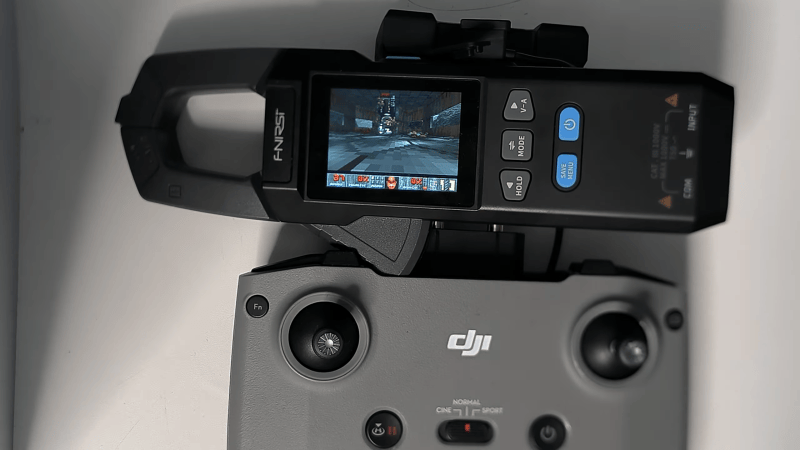
DOOM. Boil it, mash it, stick it in a stew, it’s the game that runs on anything and everything. Now, the classic shooter is running on a rather unlikely target—a cheap clamp meter of very limited resources, thanks to the work of [Artur Bieniek].
The clamp meter in question is the FNIRSI DMC-100, which can be had for the low price of just $30 or so if you know where to look. It’s a far cry from the many thousands of dollars you’d pay for a heavy old 486-based machine back in 1993. [Artur] got the doomgeneric engine running on the Artery AT32F415 chip that runs the clamp meter.
The chip is pretty capable, with its 150 MHz clock speed, though the 32 KB of RAM posed rather a big limitation to the project. It may be one of the lowest RAM DOOM ports out there. Even with this limit, [Artur] was able to get Episode 1 of Freedoom: Phase 1 loaded on to the thing, including E1M1 to E1M9 along with the title screen, intermissions, the finale, the menu, and four save slots. Color graphics are displayed on the meter’s 320 x 240 screen, and there are even sound effects on the built-in buzzer. Controls are mapped to the rather curious choice of a DJI RC-N1 drone controller.
We’ve seen DOOM running on everything from desk phones to completely custom CPUs. These days you have to try pretty hard to find something it hasn’t already been ported to.
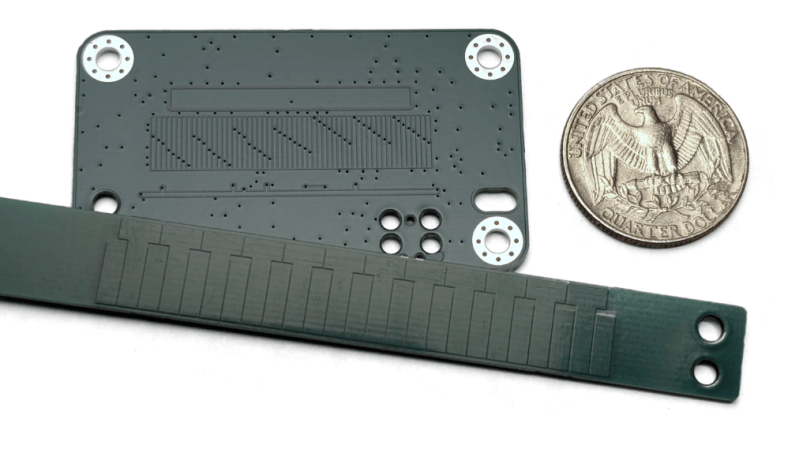
If you’ve ever pulled apart a set of digital calipers, you’ve probably marvelled at the capacitive encoder that does all the measuring work. There’s nothing stopping you from using the same techniques yourself, as [Nick] demonstrates with an open-source capacitive encoder of his own design.
The sensor PCB works by by having a grid of eight transmitting antennas, etched into a PCB, beneath a larger receiving antenna. The transmitting antennas pulse out a pattern as the sensor PCB moves, with the signals bouncing back from the reflector PCB which is fixed in place. The varying capacitance caused by the position of the reflector elements relative to the sensor PCB varies the strength of the pulses hitting the receiving antenna. A microcontroller—in this case an STM32—can read those pulses to determine the displacement of the sensor PCB relative to the reflector down to a very fine degree. In this case, to an accuracy of 40 micrometers. Not bad!
If you need ultra-fine linear tracking for something you’re building, you might find this project very useful. Files are available on Github for the curious, along with a great explainer on exactly how the capacitive coupling becomes a positional reading. You can also study previous teardowns we’ve featured on cheap digital calipers, just to round out your education further. If you’re working on your own impressive workshop equipment, or subcomponents of such things therein, don’t hesitate to let us know on the tipsline!
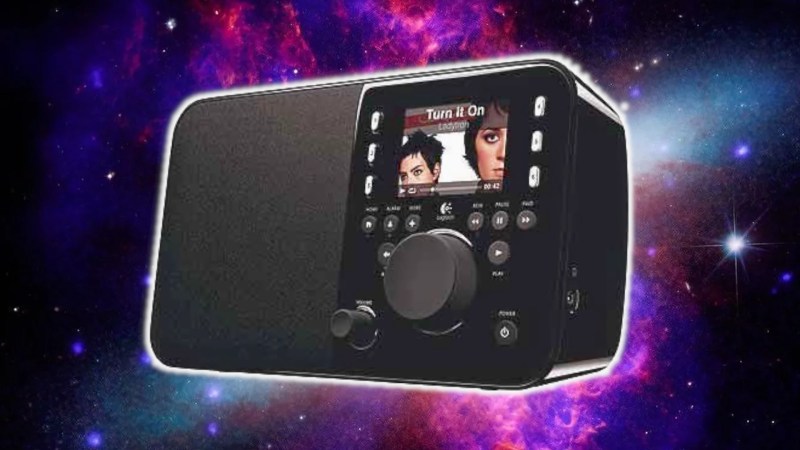
There are plenty of Wi-Fi radios out there that were built over the last two decades or so. However, many older models are now becoming less useful because many internet radio stations are switching to newer streaming formats that they don’t support. [Clifford Farrugia] has been working on a little project to save these appliances from the e-waste bin.
The HLS Radio Converter is the result of that work. It’s a small open-source tool that converts modern HTTP Live Streaming (HLS) protocol streams into regular old HTTP MP3 streams that older internet radio appliances are built to decode. You can run the tool on something as simple as an old Raspberry Pi. To make it work, you just give the tool the URL of the stream you’re looking to convert, and it then spits out a new URL to point your radio to which has the stream in the old-school format instead.
It’s a simple tool, but one that should prove very useful if you have a beloved old internet radio that can’t handle modern streams. We’ve featured lots of fun projects in this vein before, too, like this ultra-tiny internet radio build. If you’re working on your own projects in this space, be sure to let us know via the tipsline.
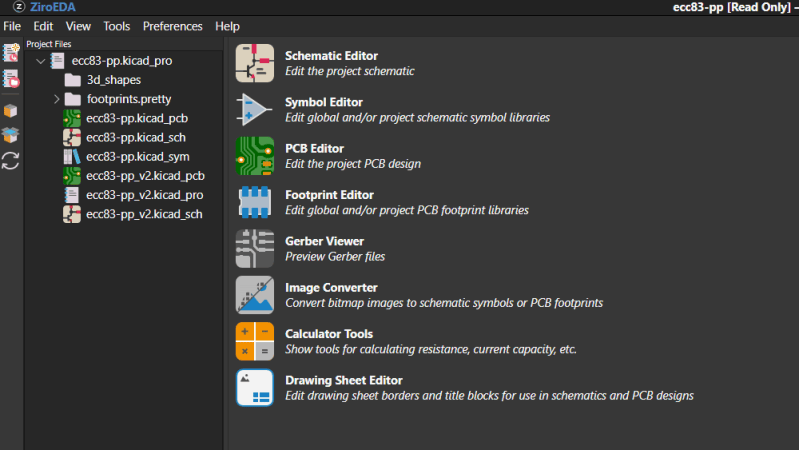
KiCad is a useful tool for designing printed circuit boards, but it’s of no use to you if you can’t install it on the computer you’re on. To get around that, [Akshay Rukade] has whipped up a browser-based alternative to help keep you working in less permissive environments. It’s called ZiroEDA.
Quite simply, ZiroEDA is a TypeScript port of KiCad 10.0.6’s C++ source code. You get the schematic editor, the PCB editor, the interactive router, and the electrical and design rule checkers all running in a browser. It can open .kicad_pro files as you’d expect, and you can edit and save them as you would if you were working in standard KiCad directly.
[Akshay] reports that KiCad’s own kicad-cli was used for compatibility testing, and that zone fills came out vertex-identical from ZiroEDA versus using KiCad itself. With that said, the project is still a work in progress, and some dialogs from the original software are still missing. Projects are said to be end-to-end encrypted, but you’ll hopefully lose your job quickly if you try and put anything important to national security through a tool like this. You can always try it, just to give your higher-ups a heart attack.
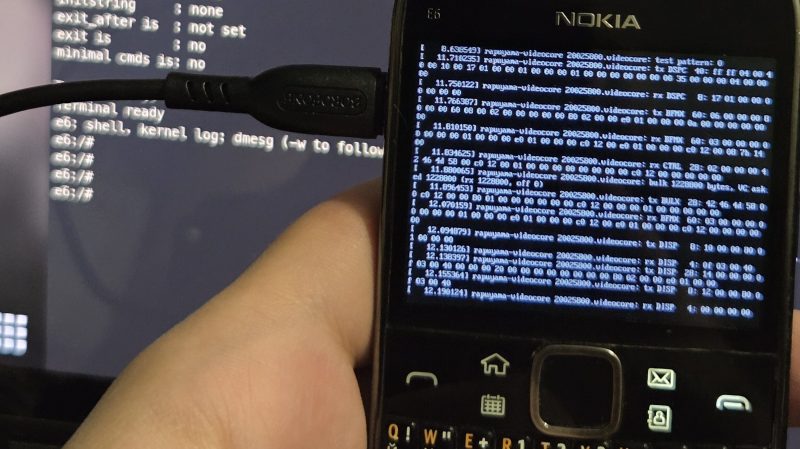
The Nokia E6 is a smartphone from back in the old days when Symbian was a thing. [fluffleswaffled] has been doing the work to get the ancient handset running Linux instead, because that’s ultimately cooler than what the phone shipped with out of the box.
There isn’t an unlocked bootloader on the E6, so instead, [fluffleswaffled] used an altogether different route to boot Linux. A Symbian app is used to load the kernel and device tree into RAM, at which point the MMU and caches are turned off and the device jumps into Linux. It’s a one-way trip, from which there is no way back to Symbian without a power cycle. The setup nets a terminal on the phone’s own screen, and the hardware keyboard and touchscreen are functional. The display is controlled by a Broadcom VideoCore III, with [fluffleswaffled] capturing messages from Nokia’s original display driver to create a custom kernel driver that replays them.
There’s an issue, though. The phone doesn’t stay in Linux land for long — it always resets within a couple minutes of booting into the alternative OS. [fluffleswaffled] believes this is because the phone’s baseband chip is supervising the application processor, and killing things once it’s detected that the Symbian mobile stack has stopped running. They’re hoping that someone with experience with Nokia basebands or the relevant hardware can point them in the right direction to get this hack running for more than 3.5 minutes at a time.
There probably isn’t a great deal of utility in getting Linux running on a 2011 smartphone, but we love the hustle nonetheless. We’ve seen this done before, though, and it’s always interesting to learn what it takes to get the OS booting on a new platform. If you’re whipping up similar hacks in your home lab, don’t hesitate to let us know on the tipsline.
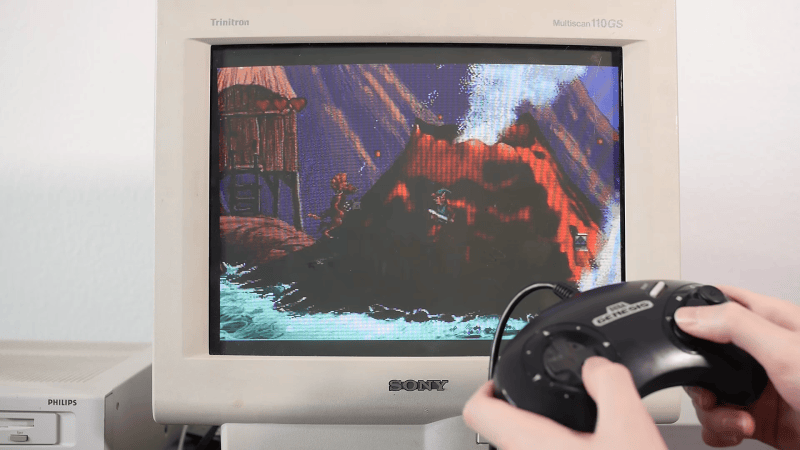
The Philips CD-i was not popular upon its launch in 1991, and is barely acknowledged today. In the opinion of [MattKC], it had a particularly poor selection of controllers, too, and it’s often hard to find used examples anyway. To rectify this situation, he whipped up an adapter to let him use Sega Genesis controllers instead.
The benefit of the Genesis controller is that it uses DB-9 connectors that are readily available, and it’s got a simple pinout that is compatible with the Atari joystick port, too. It makes interfacing the controllers supremely easy. Converting the controllers required using a Arduino Pro Micro to read the Genesis pad and translate it into something suitable for the CD-i.
On the Sega controller side, the microcontroller just has to strobe one pin while reading the state of others to determine what all the buttons are doing. The CD-i, however, expects a serial data stream from the original Philips controllers. Thus, the microcontroller is set up to poll the Genesis controller, and then translate this into the serial commands for the CD-i. It gets a little complicated, because the CD-i wasn’t really built for game controllers, but mouse-like inputs instead. But it’s not too hard to get things working once you understand what the weird Philips console is looking for.
There aren’t really any good games on the CD-i, so this isn’t a project that the retro gaming masses will be flocking to. Still, if you have a CD-i and you want to hook up some controllers on the cheap, this might come in handy. Alternatively, you could also try the BlueRetro project.
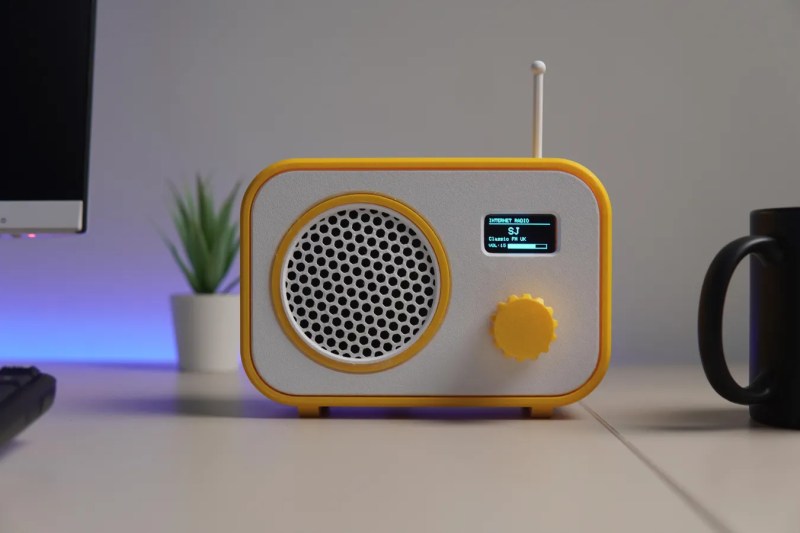
Broadcast radio isn’t as popular as it once was, its popularity suffering in turn due to technologies like MP3 players and music streaming services. If you don’t fancy either of those, you might like to listen to some internet radio stations, using a rig like the one [CodersCafeTech] built.
It’s a simple desktop radio set, but instead of tuning in to AM or FM broadcast bands, it has an antenna for 2.4 GHz instead. That’s because inside this radio is an ESP32-S3 development board, which is equipped with onboard WiFi hardware that lets it connect to the internet. It’s hooked up to a 1.3-inch OLED display over I2C, which acts as a user interface in concert with a rotary encoder. Sound is handled with a MAX98357 I2S audio amplifier, hooked up to a small 3 W speaker. Once programmed appropriately, all the unit needs is a WiFi SSID and password, and the URL for the internet radio station you’d like to listen to.
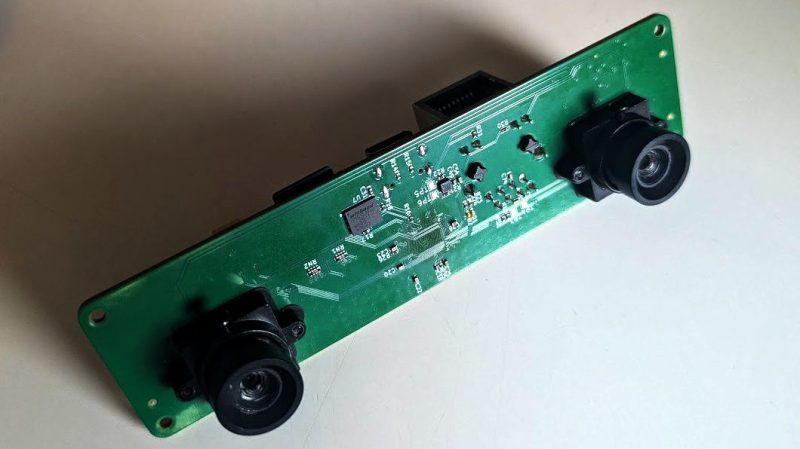
The project came about because [machinehum] was particularly excited about the Rockchip RV1103, a 1.1 GHz single-core ARM chip. It comes with 64 MB of DDR2 RAM and a has a MIPI CSI-2 bus on board, which comes in handy for interfacing cameras. Thus, it was the perfect part to whip up a stereo vision board with on-board compute capability and Linux support right out of the box. The processor is paired with two OV9281 global-shutter cameras, as well as a LI2HH12 3-axis accelerometer to provide motion sensing. There’s also 4 MB of flash memory thrown on board, as well as a 10/100 Mbit Ethernet interface for good measure. [machinehum]’s write-up also lays out the software stack and how everything works in concert with Video4Linux2.
If you’re new to experimenting with stereo vision, you might find this to be a useful platform for getting started. Design files are on GitHub for the curious. We’ve seen similar projects built using the Raspberry Pi before, too, which itself is essentially just a fast ARM powered computer with useful camera interfaces built-in. Funny that.
The first viable powered aircraft predated the first proper runway by two decades. While it’s entirely possible to launch some planes from austere dirt or grass strips, the aviation world eventually realized that aircraft would be better off launching from a flat, paved surface.
Over the years, paving technology has gradually improved in the aviation world as it has for roads and highways. Now, there’s a project being built in Charlotte with new digital features that hopes to push the state of the art of runways even further.
Twinsies
Charlotte Douglas International Airport (CLT) serves the city of Charlotte, North Carolina. It’s by no means the most famous airport in the United States; it wouldn’t make the top 10 in notoriety despite being the 11th busiest in the country).. Still, it serves as a major hub for American Airlines, and has three operating runways that are interesting for the fact that they are all laid out parallel to each other.
Much of the work will involve embedding strain gauges in the runway to monitor how loads affect the structure when the runway is in use. Credit: CLT press release
The airport’s major grand project of late has been the installation of its fourth parallel runway, with the official ground breaking taking place in June 2023. The hope is that the new 10,000 foot runway will add significant capacity for both arrivals and departures to keep the airport competitive while also adding resilience in difficult operational conditions. As the new runway is built, the existing runways have been renamed to 19R/1L, 19L/1R, and 18/36 respectively. The fourth runway will wear the designation 19C/1C.
The new Fourth Parallel Runway, as it is otherwise currently known, will be unique for its “smart runway” features. Unlike a smart fridge, smart oven, or smart bulb, it doesn’t just mean that the runway will have a pointless and annoying WiFi connection and dodgy smartphone app. Instead, it’s all about sensing and telemetry, which is intended to create a better understanding of the runway and its performance and state over time.
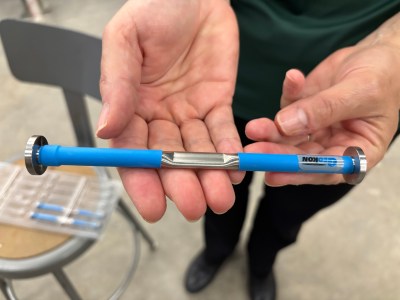
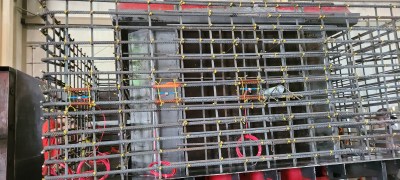
The strain gauges, seen here assembled on rebar, are to be embedded in the concrete itself, where they will provide the most useful readings. However, this does mean that the sensors will not be practical to maintain or repair over time. Their expected lifetime is approximately ten years. Credit: CLT press release
During construction, over 2,000 sensors will be installed in the 18-inch deep concrete being poured to lay out the Fourth Parallel Runway. The sensors in question will be used to measure everything from engineering basics like stress and strain, as well as tracking factors like moisture ingress, settlement, friction, and the presence of snow and ice.
The sensors are no different from those that have been deployed on highway bridges and interstates previously for similar purposes. However, this will mark the first time that a US runway has been similarly instrumented in such a way, such that the airport can create a “digital twin” of the runway.
Jointmeters will also be installed in the runway to measure the behaviour of expansion joints in the runway. Credit: CLT press release
This is effectively a digital model that is fed by the sensor data and helps authorities determine the condition of the runway, both from an engineering and operational standpoint. Moisture, snow, and ice sensors can be used to guide the employment of deicing resources and what measures to take on the ground, while monitoring the stress and strain on the runway will guide maintenance decisions over the runway’s lifetime. The latter in particular will provide a very clear idea of how aircraft operations are impacting the very structure of the runway itself. The hope is that this data will be a boon for implementing predictive maintenance. In a busy airport, preventing a time-consuming runway shutdown with a little well-placed maintenance could save huge amounts of money by preventing or limiting the number of flight cancellations, to say nothing of the reduced frustrations for travellers passing through.
Of course, the problem with embedding sensors in 18 inches of concrete is that it’s not particularly easy to get at them for service or replacement purposes. The runway’s sensor system is slated for an expected life of 10 years, during which time data will be collected to better understand the runway and its performance and robustness over time. The hope is that by learning exactly what’s going on in the concrete itself, engineering lessons could be learned on how better to build runways in future. It could lead to new guidelines on concrete mixes, thickness, density, or other factors that influence how long the runway holds up under heavy use by commercial airlines. Despite the limited sensor lifetime, though, the runway itself is expected to last much longer, with the pavement itself slated for 30 to 40 years of use.
Embedding sensors into runways won’t always be a seen as a necessity. It’s perfectly possible to build a runway that doesn’t have telemetry, and just exists as a big old slab of concrete that takes a pounding from air traffic on the regular. However, where a greater understanding of the pavement is desirable, instrumentation can help. Time will tell if the lessons learned from the new CLT runway prove useful enough to justify the investment—but it’s easy to imagine that it would only take a couple of runway shutdowns to be avoided to pay for the $6.5 million project cost. Time will tell!
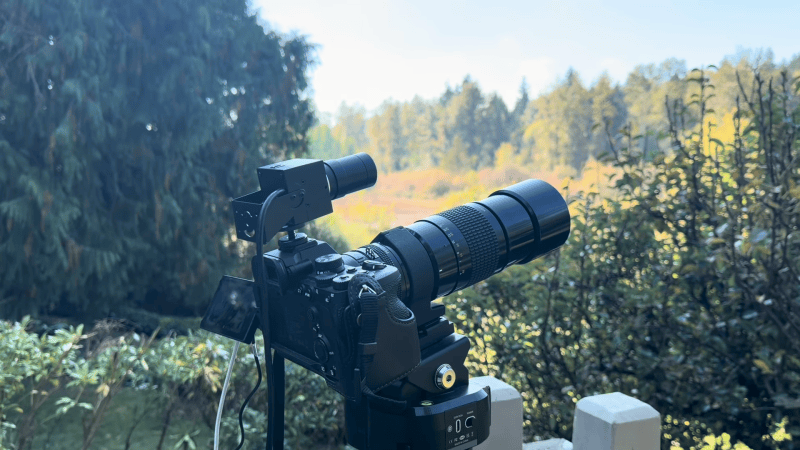
The Soonpho M7 Pan Tilt Head is a useful photography tool for remotely aiming a decently-sized camera. Only, [Kyle Housley] wanted a little more control than was available out of the box. Hence, he built a custom controller that could deliver just that.
The project is based around an ESP32-S3 paired with an NRF24L01 wireless module. The ESP32-S3 is hooked up to a computer to receive commands over serial on what movements to make. It then transmits over the NRF24L01 to another NRF24L01 module that has been hacked into the original M7’s controller. In doing so, it can command the M7 to move to a given specific pan and tilt position, or to make a smooth motion along a vector. It can also trigger shutter release in the attached camera as needed, to capture whatever is being looked at.
[Kyle] has used this rig to create a motion tracking system for aircraft photography. With a Yolo vision model running on a laptop, the pan-tilt head can be commanded to track aircraft passing by and photograph them when they’re in frame. It’s a pretty slick setup; we’d love to see similar done with the aid of ADS-B data, too—perhaps even with automatic image tagging and upload.

 Login
Login