❌

Reading view

There are new articles available, click to refresh the page.

2026 Retrocomputing Challenge: 16-Bit Homebrew Relay Computer
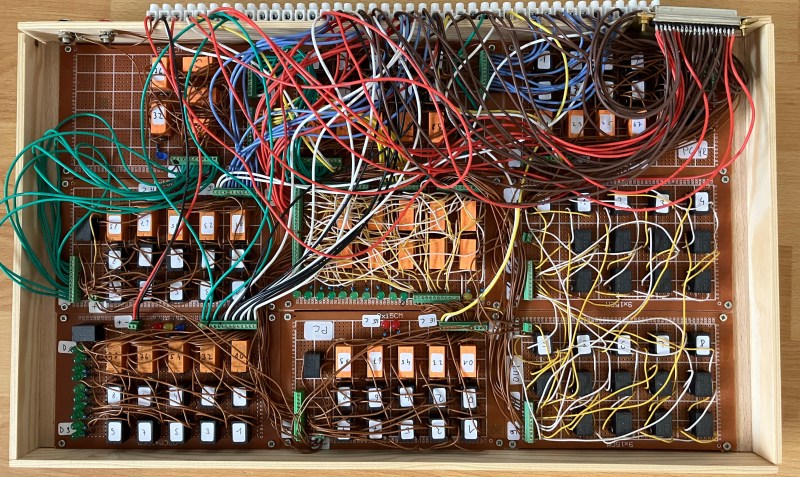
One module of the relay computer

You want Retro? We did, when we started our retrocomputing challenge. [Peter] decided that transistors weren’t retro enough, and sent us this lovely homebrew relay computer, complete with 16- bit CPU, which is rather more bits than one normally associates with clicky clacky contacts.

The architecture is very simple– it just uses an accumulator register, ACCU, and goes from there. All mathematics and save/load operations go through ACCU. There whole instruction set is only 19 commands, and he’s used that set to program such lovely things as calculating 3 digits of Pi– which only took 8 minutes of glorious clicking. There’s a demo video of that embedded below. [Peter] has even implemented a display by hooking his computer to a 32Γ—32 LED matrix, but don’t expect it to relay updates really quickly.

If this computer looks familiar, it’s because its earlier incarnation was one of the more β€œextra” entries in last year’s one-hertz challenge, where it was used to blink an indicator lamp. Yes, even relay computers apparently get started with the β€œblinky” sketch.

If you want in on the fun, our retrocomputer challenge runs until October 27th, so there’s lots of time left to turn back the clock.
A Vacuum Tube Computer For The Home

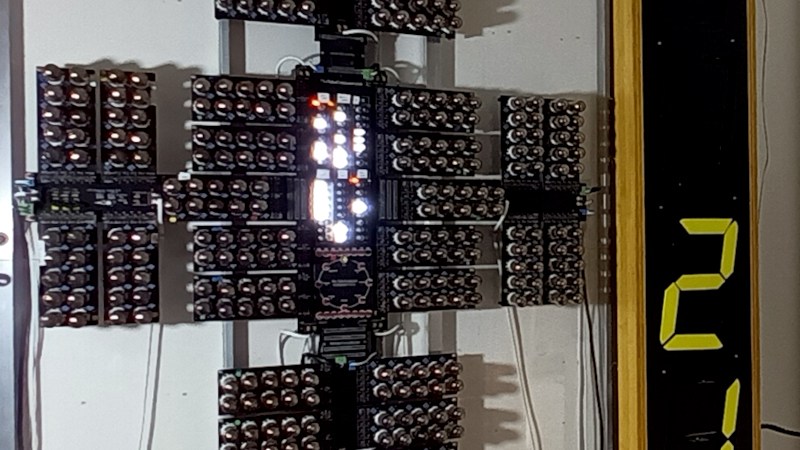
The earliest all-electronic computers used vacuum tubes, and most of us will know about machines such as ENIAC or Colossus. Vast machines that required the budget of a country at war to build, andfill very large rooms. It’s very pleasing then to see that a useful vacuum tube computer can be made which has neither of these requirements, as with this example from [Mike] that uses former eastern bloc double-triodes.

It’s an 8-bit design following a von Neumann architecture with 16 instructions, whose operational block diagram would be instantly recognisable to anyone used to working with a 1970s-era 8-bit microcomputer. It follows a NOR-based design in the same manner as the famous NASA machines from the Apollo programme, and as we understand from the description it uses more modern parts for its I/O circuitry. Physically it’s a surprisingly compact wall-mounted unit, and it has an accompanying ex-British Rail flip-digit display as well as a control panel for a simple airship simulator game. There’s a website with full details, if you are interested.

We like this machine, a lot. It may not be the largest computer we’ve seen and it certainly isn’t the first one with vacuum tubes, but it’s a very impressive achievement to have created it. If tubes in computing interest you meanwhile, we took a trip to see the daddy of them all.

Should [Mike] enter this into the Retrocomputing Challenge? We think so.

HDMI For the Color Computer 2

[Scott Baker] bought a TRS-80 Color Computer off eBay some five years ago. He’d always intended to add a CoCoVGA or CoCoDV upgrade to hook it up to a monitor, but the device was sold out and his name never made it off the waitlist. Thus, he decided to build his own solution to give the classic machine a proper HDMI output.

The concept behind the project is simple enoughβ€”grab the digital signals that feed the MC6847 IC responsible for generating the analog video output, and use them to create an all-digital video output over HDMI. [Scott] achieved this by using a Tang Nano board, which hosts a Gowin GW1N-1 FPGA. It’s able to snoop the signals heading to the MC6847 and, with some supporting components and level shifters, it can spit out video befitting modern screens. To make the system nicely complete, an analog-to-digital converter is also included to pick up the analog sound output from the TRS-80 and spit it out down the same HDMI cable. Such convenience!

There’s something strangely anachronistic about grabbing a TRS-80 off the shelf and hooking it up to a flatscreen with a single HDMI cable. Regardless, it’s a pretty great way to play with your old machine without having to futz with heavy old CRTs. We’ve featured plenty of similar projects before, too.

Announcing the 2026 Hackaday Retrocomputing Challenge

What is it about retrocomputing? For some people, it’s nostalgia. For others, it’s the appeal of simplicity. For still others, it’s the chance to save old machines from the graveyard. Whatever your motivation, there’s no denying that we’ve seen a metric ton of retrocomputer projects here at Hackaday. And we’d like to see more!

We’re happy to announce the 2026 Hackaday Retrocomputing Challenge!

Now’s the chance to put your retrocomputer project up for all to see. Open up a Hackaday.io project that features your retrocomputer project, and we’ll pick our three favorites for a $150 gift certificate courtesy of this contest’s sponsor, DigiKey. You have until Tuesday, October 27th. So get hacking!

Honorable Mention Categories

    • Old Iron: Are you saving an old C64 from the scrapyard? Restringing the core memory of a PDP-8? Or working on even more esoteric ancient devices? If you’re restoring or running the old hardware itself, it’s an β€œOld Iron” project.
    • Modern Retro: Computing power is plentiful, but the nice interfaces of past computer made them a joy, or a terror, to use. This honorable mention category is for emulations, work-alikes, and all the other retrocomputers that are TRS-80 on the outside, but modern electronics on the inside.
    • Retro-Modern: You love your classic machine, but you also love reading Hackaday on the Internet Of The Futureβ„’, so you built a web-modem to bring the old beast into the modern era. This category is for keeping old hardware relevant.

    • Coding Like It’s 1999: Retrocomputers don’t run without software, and it’s a continual source of amazement to us how programmers today can get more out of old machines than we could back in the day. Think of the demoscene, for instance. But it doesn’t have to be showy either. If you’re writing new code for old boxes, it fits in here.
2026 Hackaday Retrocomputing Contest

Toy Computer Restored

In the 1960s, the home computer was barely a twinkle in anyone’s eye. This was the decade in which computers were used by a handful of companies and organizations and took up entire rooms. It was the decade that saw the birth of the first integrated-circuit computer, the Apollo Guidance Computer, and, rather strangely, one of the first home computers of sorts: the Digi-Comp 1.

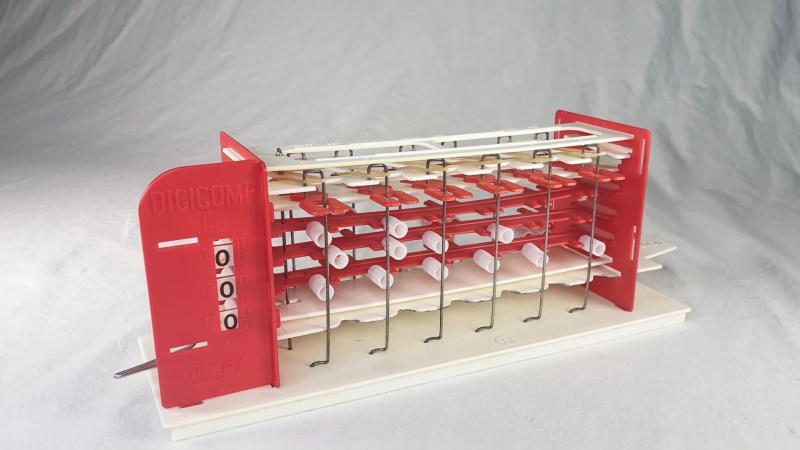
In 1963, E.S.R. introduced this little programmable educational toy computer. It relies on simple mechanical logic gates, programmed by positioning tubes on sliders. Their original intention was to create actual computers, but one thing led to the next, and E.S.R. became the premier educational computer toy company of the 1960s. The Digi-comp is a rather simple device. A program is entered by soda-straw-like tubes placed on sliding rails. These tubes interact with spring-loaded levers which move in accordance with the β€œclock” switch. The result is a simple binary computer you can program.

[Chris Staecker] got a remarkably well-preserved Digi-Comp I to demonstrate its unique functioning. With some rubber bands and a touch of modern technology in the form of 3D printing, [Staecker] got the toy working like new. The programming process is quite manual, and its functioning is not obvious. But it can compute binary outputs of given functions. Unfortunately, this is not a Turing-complete process, but rather a state machine with 88 (or 16,777,216) possible states. The toy, with all its limitations, is highly reflective of the state of computing at the time, and a rather neat look at what the future was, back in 1963.

Make sure to take a look at E.S.R.’s successor to the Digi-Comp I, the creatively named and quite different Digi-Comp II.Β We’ve looked at other old β€œsort of” computers like the Geniac. You can even simulate that one in your browser.

❌