Reading view

There are new articles available, click to refresh the page.

Decoding the NEC V20 Microcode ROM

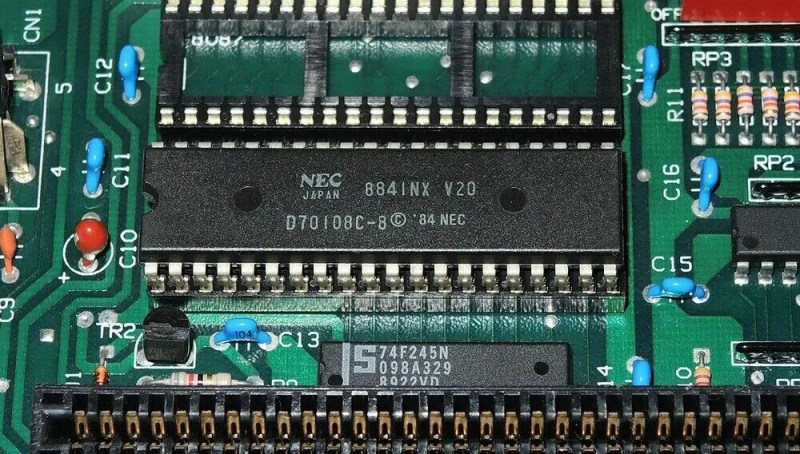
The NEC V20 is an Intel 8088-compatible processor that features the same use of microcode, though with its own characteristics. This makes it important to use this same microcode if your goal is to create a cycle-accurate emulator of this processor, as [GloriousCow]’s goal is. Cue decoding the microcode ROM in a die shot of this CPU, in order to create a usable ROM image.

As with any fabricated ROM you can technically do it by hand, the ROM section in the die shot contained 29,928 bits which even at a pretty zippy pace would take up a considerable amount of time to parse. Here you can divide-and-conquer by handing parts of the ROM off to good friends, or you can use automation and some machine vision and theoretically get an answer as soon as you have finished writing and testing the tool.
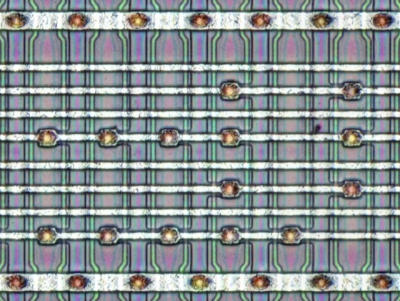
Close-up of some of the microcode bits.

Although [Travis Goodspeed]’s MaskRomTool exists exactly to automate bit detection, it was found that there wasn’t enough contrast in the die shot for it to work reliably. What it did provide were the locations of the bits and from it 42×42 pixel PNG files of each bit.

Next a convolutional neural network (CNN) was trained to determine the difference between a 0 and 1 bit. This still took the manual classifying of 1,000 images, but seemed to work fairly well. Although some bits were marked as ambiguous, it was easy enough to use Mark 1 eyeballs to run a classification on these handful of images than to tweak the CNN model.

With this microcode in hand it was then possible to match it against the V20’s internal architecture to fully determine what each part does. Although not quite finished yet, there’s a GitHub repository containing the progress so far.

The V20’s microcode has been the focal point of much legal fighting back when NEC and Intel were still duking it out in how far one could make a CPU compatible with that of a competitor.


Same As It Ever Was

Whether you like it or not, the use of LLMs to write code is kind of a big deal at the moment. We’ve been asking ourselves what, if anything, this means for us here at Hackaday. Should we try to figure out what percentage of a project was done by an actual human and how much was done by a machine? Does it really matter? What is our AI policy anyway?

Clearly, Hackaday is pro-human. We’re in it for the hackers as much as for the hacks. Our community is, like Soylent Green, made of people. It’s your inspirations and innovations that keep us reading and writing every day. And we produce 100% of our content the old-fashioned way, with projects selected through the taste and judgement of our writers, and their own words telling the story.

What about the hacks? We’ve seen a lot of projects recently that were coded with the help of an LLM. Does that diminish the work? In the end, what rings truest to us is what has always been Hackaday’s editorial guiding star: Is there something special in the hack that makes it worth talking about? Then we write about it. Was it written using vim or emacs? Did the author consult friends or a chatbot while working on the project? That’s not really relevant.

But in the past few years, the BS-generation machines have found our hobby, and we’re finding a lot more projects that don’t have any spark to them. We’re seeing circuits that make no sense, and claims that defy physics. Of course, we always have. The LLM-nonsense project is today’s version of the perpetual motion machines of old. Just like we never trust a hardware project that is all renders, seeing only AI-generated images is a huge red flag. It’s our job to separate out the wheat from the chaff for you all, but it’s something that you must be doing everyday as well.

We’ve seen amazing hacks over Hackaday’s 22-year history. Hackaday is older than YouTube and older than Stack Overflow. We’ve seen technology come and go. We’ve seen C-beams glitter in the dark near the Tannhäuser gate. (OK, maybe not.) And in the end, our AI policy is our same-old policy: we write up hacks that inspire us in the hope that they inspire you.

So if you’re using Claude to help you with the UI bits, or if you’re hand-writing it all in assembly, or wiring up the logic in diodes, we just want to see your cool hacks. And we hope that our collective signal will be so loud that we drown out the noise, at least in our own little corner of the hacker universe.

This article is part of the Hackaday.com newsletter, delivered every seven days for each of the last 200+ weeks. It also includes our favorite articles from the last seven days that you can see on the web version of the newsletter. Want this type of article to hit your inbox every Friday morning? You should sign up!

Compress Links For Optimal QR Codes

Link shorteners have been a staple of the online world for over two decades now, but they’ve got some issues– for one thing, it’s totally non-transparent where the link actually goes, leaving you open to all sorts of shenanigans, of which RickRolling is probably the best case. For two, your traffic is going through an external service who may have their own nefarious intent. [PortalRunner] had an idea: don’t shorten the link, but compress it.

You see, a traditional URL shortener like tinyurl just generates a random code and associates that with your original link in its database. That’s fine, but you’re relying on a third party database. The alternative is to take the URL, encode it in some way, and apply some compression algorithm to the data. If the encoding and compression are open-source– which [Portal ]’s absolutely are— then you can check yourself before following the link, and/or self-host the whole thing for piece of mind. As a bonus [Portal]’s Ha.mr– that’s pronounced Hammer– also gives you a QR code optimized for easy scanning. QR codes have a specific alphanumeric character set built in, and it isn’t the full UTF-8– if you naively use random text, you’re in byte mode, which needs a lot more QR real estate. Or inverting that, the fewer bits it has to store, the easier a qr code is to scan at the same size. The text version of the compressed links can use UTF-8– including emoticons– but they don’t have to.

The whole project has a “why isn’t everyone doing it this way” vibe about it. We’d probably want to self-host this if we were using it seriously– [Portal] put this together on a lark and makes no promises it will be online forever–but again, this is open source, so we can. [Portal] is using normal compression algorithms here, but if you really want to squeeze text, use a neural net. 

Store Tunes on Paper and Stream Them Over LoRA

Some projects seem too good to be true until you dig into it and find the secret magic that makes it all work. Take Paper Tunes by [Makestreame], a project which purports to store a song on a single sheet of paper via QR code and transmit the data over LoRA. If it was a MIDI sequence, maybe. But the promise of Paper Tunes is to take any MP3 and give it this treatment, and that just seems like an impossible level of compression at first glance.

The music is heavily compressed, make no doubt about that. There’s samples in the Instructables link above and in the video below, but it sounds far better than it has any right to. The secret is Meta’s EnCodec neural codec, which like you’d guess uses neural nets to squeeze the absolute minimum information needed to reconstruct a sample. With it [Makestreame] is able to get a 2.9 MB MP3 file down to just 21.44 kB.

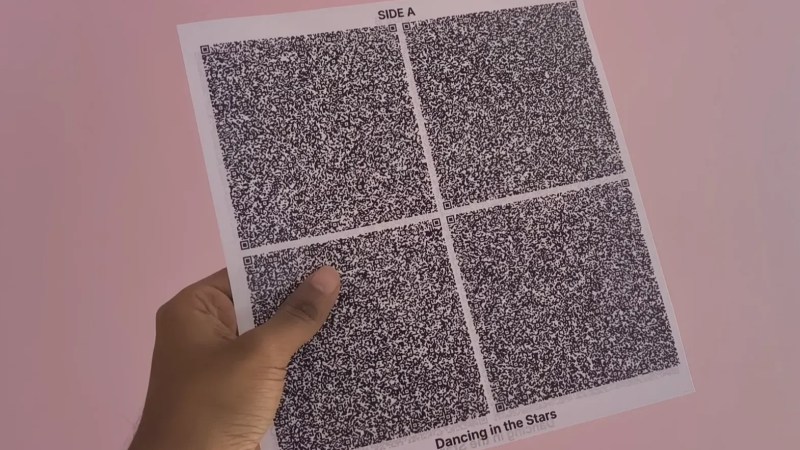
Of course, that’s still not going to fit in a 3.3 kB QR code. But by simply making eight of them, [Makestreame] is able to fit the song onto the front and back of a piece of paper. Yes, each song has an “A” and a “B” side — and you thought flipping a record halfway through got old fast. Having to scan eight codes to get one song may strike some as a bit silly, but we do enjoy some silly things here.

The same EnCodec compression that gets the song so tiny as to fit in a brace of QR codes is obviously also what enables its transmission over LoRA. While it’s got far lower bandwidth than something like WiFi, 21 kB is well within its limits. It’s often said that LoRA isn’t suitable for audio, but this project is another example that one person’s “unsuitable” is another person’s “challenge accepted”.

We’ve seen other LoRA audio projects before. Speaking of things not suitable for audio, we once featured an entire album crammed onto a floppy disk.

❌