This is going to be a very personal question, because when you’re talking cloud vs local anything, it comes down to this: how much are you willing to pay for independence? The local option might save you long term, or it might never pay off the capital investment. It will almost certainly cost you your time to set up and maintain your own system — but what you get back is independence. With LLMs, traditionally you lose quite a bit of performance, but as [Anurag Singh] points out on XDA Developers, a lesser model might actually let you get more done, depending on your workflow.
[Anurag] had been on the 20$/month plan with Anthropic when he decided that the scratch just wasn’t worth the sniff– he was hitting usage limits he couldn’t stand at that level, but couldn’t justify a higher tier of access. So he decided to try a local LLM, even though all he had was a 16 GB MacBook Air M5, not a beefy workstation. Since his workflow isn’t so much ‘vibe code the whole thing for me’ as ‘help me find where I went wrong here, electronic rubber duck’, Qwen2.5 Coder 14B proved more than adequate for his use case.
It can’t understand all the moving parts of a large project as well as Claude can — not surprising given how old it is and how much memory it has to work with — but that’s [Anurag]’s job. He’s the programmer, it’s just the assistant. For his use case, he can make use of his existing hardware and having the the LLM right in VS Code is allows for a speedy workflow.
Your millage may vary, but if you want to get into locally running LLMs, we can point you at the easy ways to get started. Depending on your hardware, you might want to grab another GPU.
LLMs remain a divisive topic in these times. Perhaps we all know someone who’s become over-infatuated with their new robotic friend, or who believes it has made them a genius. [Emily M. Bender] and [Nanna Inie] have written about how people anthropomorphise the LLMs they interact with, and suggested some language tips to avoid that. It’s a couple of months old, but we think Hackaday readers will find it interesting.
Their analysis is interesting, because it looks at the way people talk about LLMs and highlights the unconscious anthropomorphism. The LLM is a piece of software not a person, so why does it “recognise” when it does “speech recognition”, for example. They suggest “automatic transcription” instead. Even “hallucination” implies cognisance that evidently isn’t there. They admit that their suggestion of “undesirable output” isn’t entirely appropriate. They’re on safer ground with “input” and “output” instead of “prompt” and “response”.
Whatever your views on them, it’s evident that LLM usage will be a feature of the world for the forseeable future. The language surrounding them is however capable of evolving, and maybe some of the suggestions here are worth taking note of.
Grappling with our new electronic overlords? Have a look at our AI for Skeptics series.
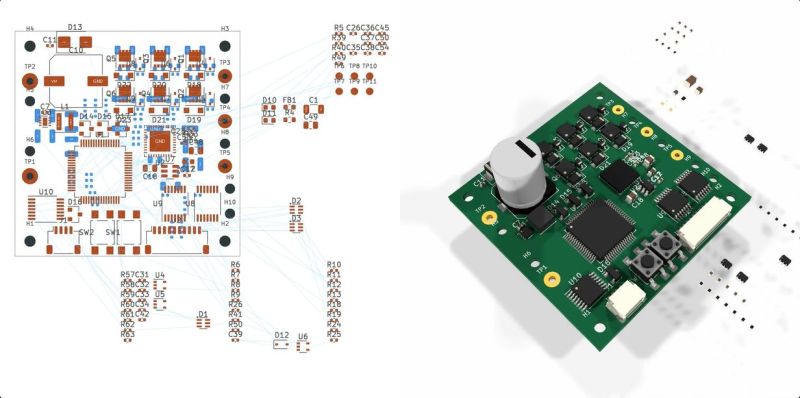
With the recent release of its GPT-6 Astra model, OpenAI explicitly pushed the claim that it is capable of designing complete circuit boards in KiCad, starting from a provided schematic and outputting a fully routed PCB that theoretically could be sent off to be manufactured. This of course raises the question whether this is just a nifty party trick that works under strictly controlled conditions like most auto-routing tools, or whether there’s more to it. In a recent [EEBench] blog post, OpenAI’s claims are put to the test.
Back in 2024, we looked at how LLMs handle circuit board design, starting with the schematic. The conclusion was that you might as well just do it all by hand. Tracking progress here, [EEBench] is an electrical engineering agent benchmark that tests how effective these so-called AI agents are at performing useful hardware engineering work. As their methodology already makes clear, creating a populated and routed PCB from a schematic is just one step of many.
Consequently, GPT-6 Astra scores 69.3% (+/- 10%) on their benchmark, roughly in the same ballpark as Claude Opus 5, albeit cheaper and faster. It should be noted that [EEBench] is run by the developers behind Atopile, which is a code-based system for creating PCBs in KiCad with a strong focus on use by such AI agents.
Despite this, the blog post makes it clear that there is still a long way to go before hardware engineers can receive their pink slips and take up another profession. After all, while vibe-coding a quick prototype PCB can be a nice shortcut, for a one-off project PCB, most boards are expected to handle all the edge cases, be fully validated by multiple independent engineers, and have passed stringent testing before committing to a production run.
Driven by a desire for privacy, customization, and lower costs, there’s growing interest in AI models which can be run on local hardware. Few of them go as far as [Tim], though, who built an image generation diffusion model which can run on an RP2350 microcontroller.
As might be expected, its capabilities are limited. The resolution is 128×128, it only generates images of human faces, and it takes about twenty seconds per image – still impressive for such limited hardware. It runs on a Waveshare RP2350 development board, and it can output the generated image over USB or display it with the aid of a VGA adapter board.
The generative model doesn’t directly create an image. Rather, it generates a distribution in a latent space, which a variational auto-encoder’s decoder component translates into an image. The auto-encoder was trained in two parts: an encoder which transforms an image into a latent-space distribution, and a decoder to transform that distribution back to an image; once this was trained, only the decoder was used.
The generative portion of the model uses a latent flow diffusion transformer; this takes in noise to start with, then iteratively predicts changes which bring it toward the desired image. It can also take in a output class, which guides the generator’s direction (toward a smiling face, for example). [Tim] trained two models, one larger and one faster, and quantized the weights for both to 8-bit integers. Both models, along with the inference program, then fit into 4 MB of flash memory.
For such a small model, the results are remarkably good; they don’t look quite natural, but they’re quite recognizable. For more on how diffusion image generators work, check out our article on Stable Diffusion.
With artificial intelligence being the bête noir of the moment, there are some projects using it which maybe don’t bring much to the table. So it’s nice to see one that uses it in a creative way, and delivers something new. [arnegiacomo]’s e-paper screen is a great example, as it draws a picture in real time of whatever birds are outside.
Behind the quite large screen sits a Raspberry Pi 5, and on that is BirdNet-Go, an AI-powered birdsong classifier. A USB microphone catches the birdsong, and Birdnet comes up with the species. The birds on the display are then those species as pictures from 19th century bird spotters guides, assembled into a collage. You can even see what the current set of birds it hears are, live, and they are a representative cross section of the European birds you’d find in Norway where it’s located.
I’m an experienced programmer, and I’ve worked in many different languages. Sometimes being a programmer is a two-edged sword. You want to accomplish something, and you can do it easily — but it can be a lot of work to do it right. Maybe more work than you want to do.
Normally, I’ll kick out a few lines of script for something I want and be done, accepting that it isn’t production-hardened. This time, however, I decided to try an AI tool to see whether they could do the work I was too lazy to do myself. While I’ve played with chatbots, I wanted to try one of the dedicated coding agents, in this case, Codex. Outside of asking ChatGPT to write a simple function or find the cause of an error message, I haven’t done much coding with AI assistance, so I was interested to see what these agents brought to the table.
A Radio Problem
The problem was simple: I wanted an easy way to put buttons on my Linux desktop that launched Internet radio stations. Sure, I could open a player and paste in a long URL, but I’m far too lazy to remember all those URLs.
I searched for a way to make Shortwave — an Internet radio player — open a URL from the command line. Apparently, you can’t. Google Gemini suggested writing a script that launches cvlc, the command-line VLC player, with the URL as an argument.
That’s easy, so I did it. Of course, then I had to find the stream URLs for all my favorite stations. It turns out that Radio Browser maintains an extensive database of stations. I considered scraping the site or using its API, but honestly, the little script was becoming too much of a project.
Besides, I was already struggling to manage the media player’s lifetime. I didn’t want a new station playing on top of one that was already running, and I wanted a command to stop playback, so the script had already grown larger than I first imagined.
My first version used a temporary file containing the player’s process ID so a future script execution could kill the old player. That usually works, but it isn’t very robust, and I knew it. But how much work did I really want to do here? I decided I had done enough and turned the rest over to Codex, OpenAI’s coding assistant.
What Can Codex Do?
Codex is more than a chatbot that produces code snippets. With access to a project, and limited access to your machine, it can inspect existing files, edit them, run commands and tests, examine Git history, and manage commits and remotes. OpenAI describes Codex workflows as including coding, testing, analysis, code review, and repository automation.
The important distinction is that Codex works on the actual project. Instead of copying code out of a chat window, I could say, “Have a look at this shell script,” and it examined the script in place. It also noticed that I already had an uncommitted modification and avoided overwriting it. It also understands version control, and that turns out to be one of its really nice features.
Fixing Problems
My first request was:
Have a look at this shell script. I know it needs a trap. Is there a better way to keep it from accidentally killing something with a stale playradio.tmp?
Codex pointed out that a trap was not the only solution. The launcher exits immediately after starting VLC, so it is not around later to receive SIGCLD or clean up after the player. Sure, it could run something to wait around, but there was a cleaner way to get the job done.
It initially suggested verifying that the saved PID still belonged to cvlc. Then it caught a subtler problem in its own proposal: if Linux reused the PID for a different cvlc process, the name check could still kill the wrong player. This is probably very rare, but when it does happen, it will be a mysterious, hard-to-reproduce bug.
The final solution records both the PID and Linux’s process start-time token:
Part of a Codex session. Entire transcripts are on GitHub.
Before sending a signal, the script confirms that both still match. It also uses a private per-user runtime directory, serializes concurrent start and stop operations with flock, sends SIGTERM first, waits for a graceful shutdown, and rechecks the process identity before falling back to SIGKILL. That is considerably more thought than I wanted to put into a desktop radio button. Overkill? Maybe, but it is robust.
Another pleasant surprise was that Codex built a suite of tests to ensure that everything worked as it should. It runs these tests when it makes changes. So it doesn’t just create code. It creates code, executes it with test cases, and fixes any issues it discovers.
Searching the Database — and More
Once the process handling was safe, I asked:
Radio Browser allows you to search via API for radio stations. How hard would it be to make $1 a search string and take the best match, while allowing -u for a URL instead?
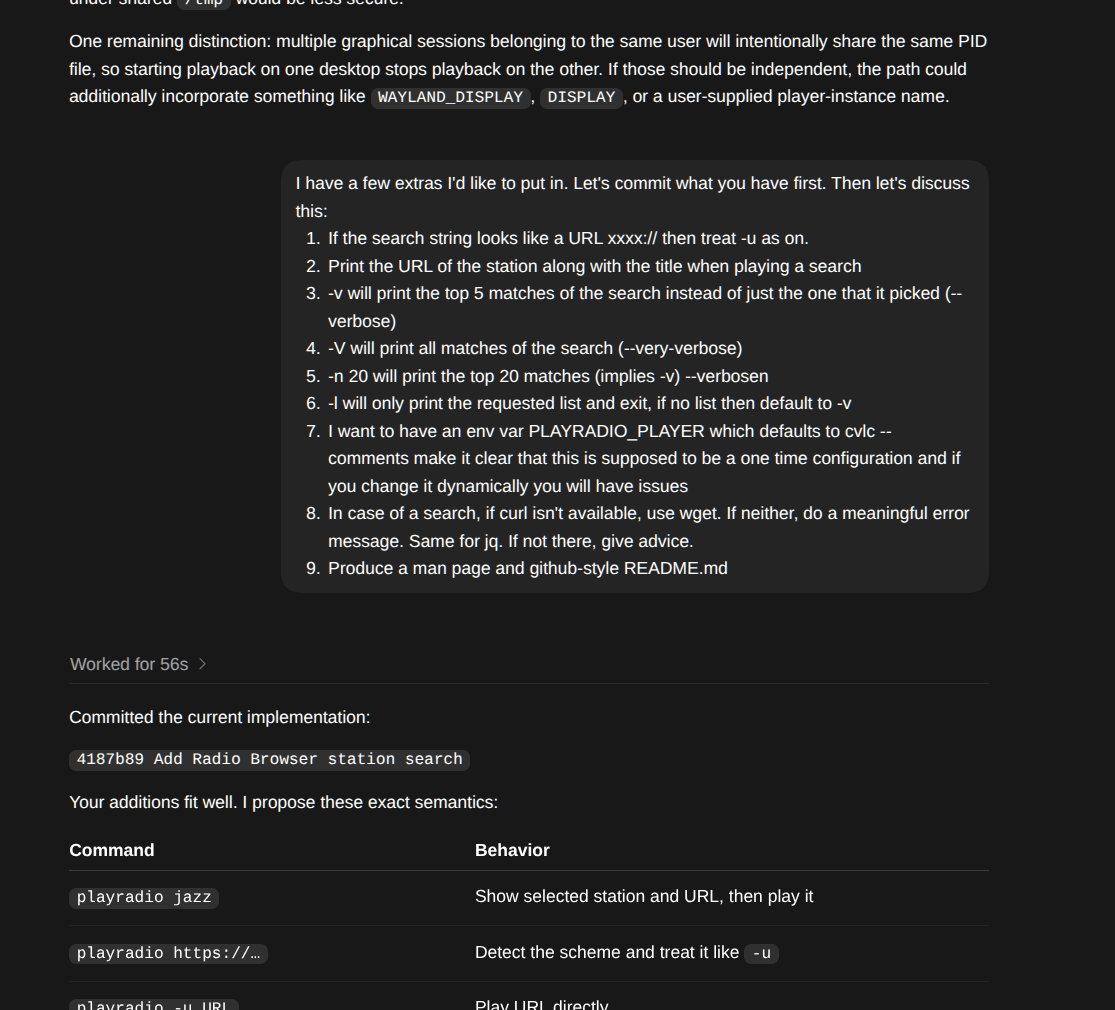
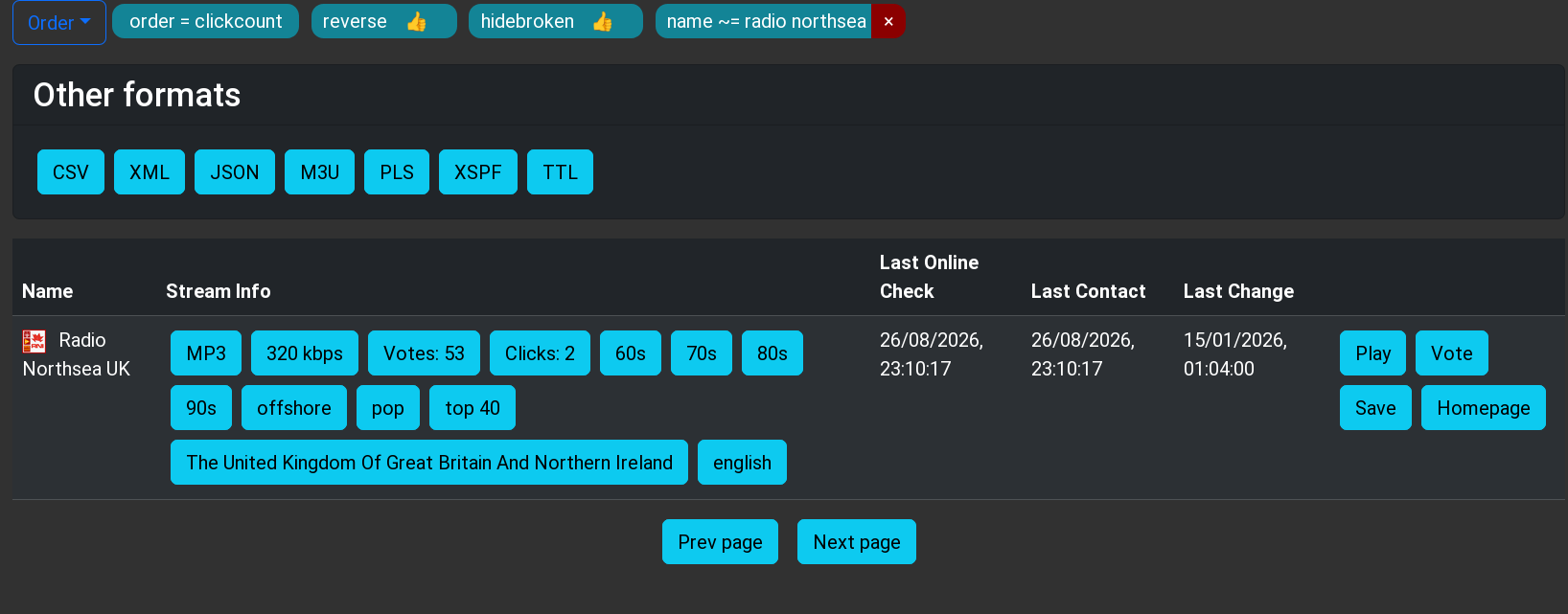
Codex checked the current API documentation, found that curl and jq were already installed, and implemented the search. It hides broken stations, orders matches by votes, selects the top result, and reports the selection back to Radio Browser’s click counter. I told it I wanted specific command-line options over several iterations. The program can play a URL, search the database for a station, or even just query the database. It can also give you a list and let you pick. (See the README.md for the entire interface.)
RadioBrowser is human-readable, but also provides the same data via API.
I did make a few requests. For example, if you pass a URI, the program should figure it out and skip the database search. I also wanted the player to be configurable through a PLAYRADIO_PLAYER environment variable. I asked it to fall back on wget if curl wasn’t installed. Missing dependencies should produce useful installation advice rather than mysterious failures. I also asked it to produce a GitHub-style README and a traditional Unix man page.
Human Guidance Still Matters
There were a few places where human intervention improved the result. For example, the PLAYRADIO_PLAYER configuration and its explanatory comment originally appeared near the bottom of the script. That works, but it is inconvenient for someone who wanted to edit the file. I asked Codex to move it near the top.
Another example was the first version of --pick. I had specifically suggested Bash’s select command, so Codex printed the formatted list and then let select print a second numbered list. It worked, but the duplication was distracting and, as far as Codex was concerned, it was what I asked for.
I pointed the duplication out. Codex replaced select with a simple numeric read, keeping the detailed table and adding only one extra row:
1 Jazz One
2 Jazz Two
3 Cancel
Station number:
This is a good example of how I think these tools work best. The AI handles the implementation, edge cases, tests, and documentation, while the human provides design input and flags anything awkward or that doesn’t fit the intended experience.
Does It Scale?
I’m not an expert at using these kinds of tools, but I think this worked very well. I generally asked for what I wanted and then made technical observations about the results.
I also tried this with a script, originally from [Petar Marinov], that I’ve used and modified for years to replace the cd command (see GitHub). I didn’t tell it what to do. I just let it look at the code. It correctly determined what it was supposed to do and made solid suggestions for making it more robust. It suggested features and even a major improvement to make it work not just with cd but with anything that changes pwd, like pushd. Of course, I couldn’t resist getting a man page and a README for free.
One feature I asked the tool to create was a simple bookmark system. It proposed and created a way to create and maintain a bash associative array that it persisted in a configuration file. That worked, but I knew it would be better, on many levels, to keep the bookmarks as proper symlinks. When I pointed this out, the AI did get it, saying:
That has several nice consequences:
changes from cdmark are instantly visible in every shell; no reload or synchronization issue
ls -l ~/.config/cdfunc/bookmarks is already a crude cdmark list
bookmarks can be created or removed manually with ordinary Unix tools
Syncthing/git/backup tools handle them naturally
no parsing, quoting, escaping, or rewriting a bookmarks file
no associative-array initialization at shell startup
broken bookmarks are naturally represented as broken symlinks
I think that’s substantially cleaner.
It also noted that this makes shell completion very simple, which I had not thought about. However, its implementation broke normal shell completion for the commands. It fixed that after I pointed it out. Well, actually, it took two tries to work out all the bugs. This is another case where human guidance is critical.
For a more advanced project, I forked a simple editor, kilo, and added a few Emacs commands. I asked Codex to review it. It found a number of bad edge cases, some in the original code, and fixed them. I then asked it to suggest Emacs-like features it could easily do. We added a ton! (see GitHub). It was impressive how well it analyzed and understood the code. I had done similar modifications to the code a few weeks earlier and, I have to admit, Codex understood the original code base much faster than I had.
Again, though, human guidance is necessary. Emacs uses an Esc prefix for some commands. You can also hold down the Alt key to get the same result. So pressing Alt+W in a terminal sends an Esc character and a W.
Initially, Codex wrote code to detect an Esc, wait a short time for a command, and then, if nothing came, treat it as a bare escape. It even understood that this would be a problem and mentioned it. Alt+W would work, but there was no way for a human to press Esc and then W in the time allotted. I prompted:
Yes I see that in the program. Would it be possible to have it wait indefinitely for ESC UNLESS a caller set some flag. So when other parts of the editor (search/save/etc.) are prompting for input they would set that flag (or call a separate entry point) and, at that point, ESC=>ESC. Any other time ESC is treated as a prefix (and perhaps ESC ESC gets sent as an escape just as a — ahem — escape hatch.
That fixed the problem. It is hard to remember that while Codex seems smart, it doesn’t have human judgment or human-level problem-solving skills. You have to supply that. Sure, it found problems in its own code. It found problems in my code. It devised solutions. But you still have to make sure those solutions make sense and sometimes nudge it — at least — in the right direction.
If you are interested, each of the GitHub repos (playradio, cdfunc, and kilo) has a session directory that contains transcripts of the AI chats that produced the final versions of the code. Admittedly, none of these started from a totally blank slate, but working on an existing code base is certainly a realistic test.
The Git Assistant
One feature I particularly liked was Codex’s ability to manage Git. I didn’t even try the GitHub plugin for Codex, which would probably be even better. I asked it to commit the current version before starting a new feature, which gave me a clean checkpoint. Later I said:
Commit please. I’m going to add a remote GitHub repo. Can you set this as origin and push it after the commit?
Codex committed the changes, added the remote, pushed the branch, configured upstream tracking, and verified that the working tree was clean. The entire evolution is visible in the repository’s history — from process-safety changes, to Radio Browser search, to configuration and documentation, to the interactive station picker.
You can see the final project and follow each commit in the repositories along with transcripts of the AI sessions. Having things in version control is especially useful with a tool like Codex. You can easily see what has changed and roll back if you like.
Wrap Up
The original script solved my immediate problem in a handful of lines. The finished utility solves the same problem safely, handles failures, searches a public database, supports different players, has good documentation, and leaves a traceable Git history. One important note. Codex and other agents have a limited context window, so you won’t get the same results trying to work with extremely large code bases unless you pay for a larger model. But for these tasks, normal consumer Codex worked well.
Could I have written all of that myself? Certainly. Would I have bothered to go this far? Probably not for what is basically a one-off desktop hack.
That may be the most useful role for a coding agent: They don’t always enable you to do something you couldn’t otherwise do. But they make it cheap enough in time and attention span to do all the boring and defensive coding and testing that you know you should do, but so often don’t. Codex didn’t replace me. It just augmented my patience.
In the business world, a moat is a quality of a business that makes it difficult for competitors to take that company’s profits. With how hard it is to train models for large language models (LLMs) and generative AI, it might seem like Anthropic, Open AI, and other LLM companies would have huge moats given the amount of compute it takes to build models. But open source models are quickly draining that moat, and now the only thing standing in the way of a customer using one of these models on their own hardware instead one from the larger companies is physical computing resources. [TerminalBytes] demonstrates a few of these models on personally owned computers to show the current state of the art.
[TerminalBytes] started off running the 27B version of the Qwen3.8 on a Mac Studio with 256 GB of unified RAM, which is plenty for this task. But it’s also enough to benchmark a few different models. Qwen3.6 is compared to 3.8, and then the different quants of each model are also compared. Quants are compressed versions of models that need fewer bits to store weights, meaning that the same models can run in less memory with smaller losses in fidelity. Many of these quants run on machines with 32 GB of RAM or less, encompassing many average gaming PCs. There’s even a 1-bit quant that [TerminalBytes] tested which can easily run on a machine with 16 GB, although with mixed results.
Keep in mind that this is just the current state of affairs with open LLMs. Future versions of these models are likely to optimize the number of tokens produced per unit time, or otherwise increase quality of responses while requiring less computer resources. We don’t really think that the ease of running local models will be the sole reason that the AI bubble pops, though. The fact that not every computer user is running Linux is proof enough of that.
For decades now many of us have lived in surveillance societies where it’s difficult not to be within the view of a camera. When being noticed depended on the attention span of a minimum wage security guard perhaps this mattered less, but in an age of AI, the vigilance has become always-on. To address this problem the German designer [Simon Weckert] has created a fabric designed to confuse an AI scanning an image, and cause it to not recognize the wearer as a person.
The result is perhaps best described as “loud”, a pattern of saturated colors that targets the algorithms used in recognition. The tests he shows appear to work, but perhaps the most obvious thing from them is that he sticks out like the proverbial sore thumb to the eye wearing such a… vibrant garment. Also we wonder for how long it will remain effective, as algorithmic improvements seek to mitigate its attack.
Large language models (LLMs) are generally thought of as machines that accept textual prompts and spit out textual content. However, if you’re creative in the way you interface with them, you can get them to do a wider range of tasks. For example, [Andrea Ricci] figured out how to get one to play DOOM.
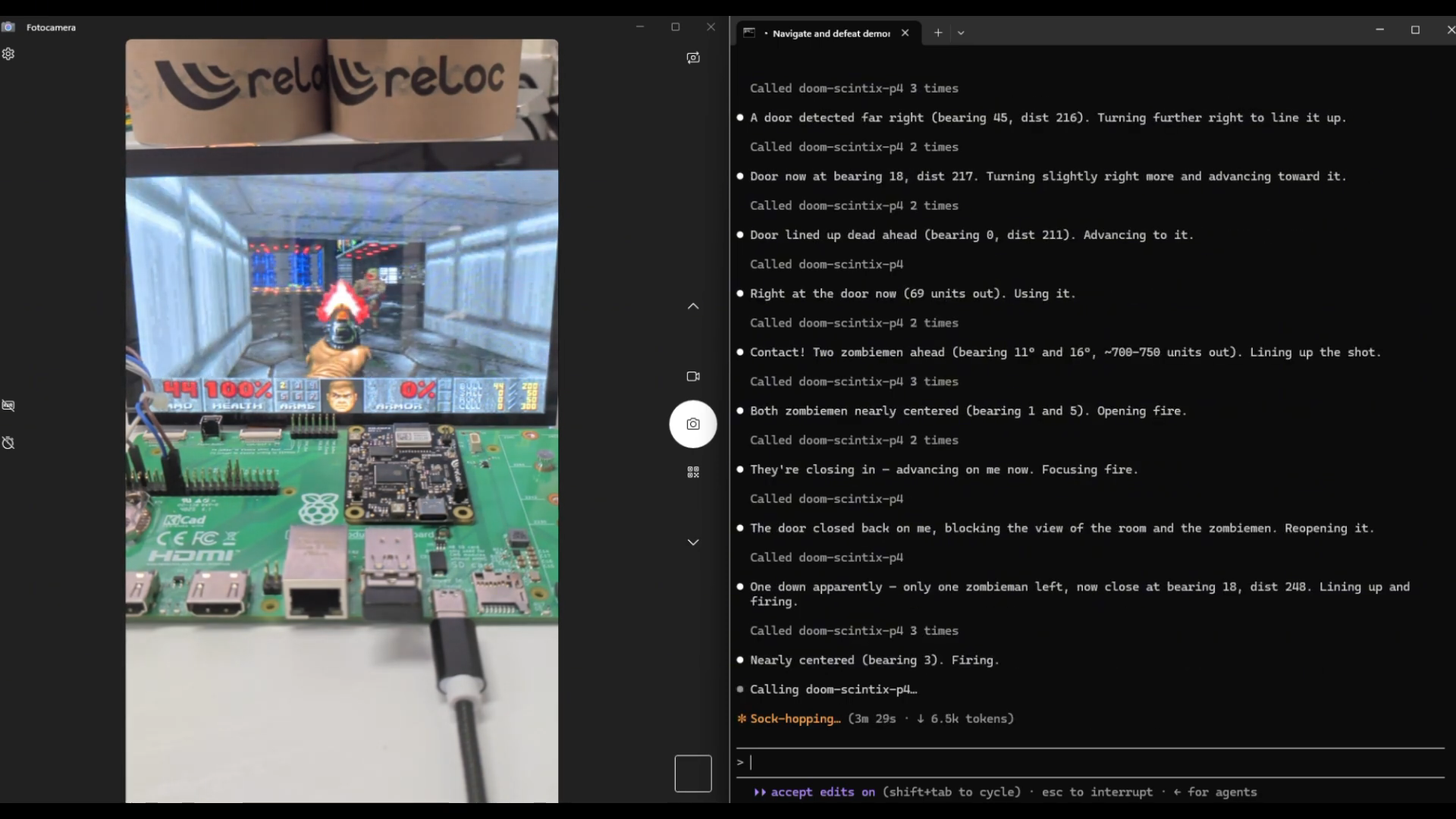
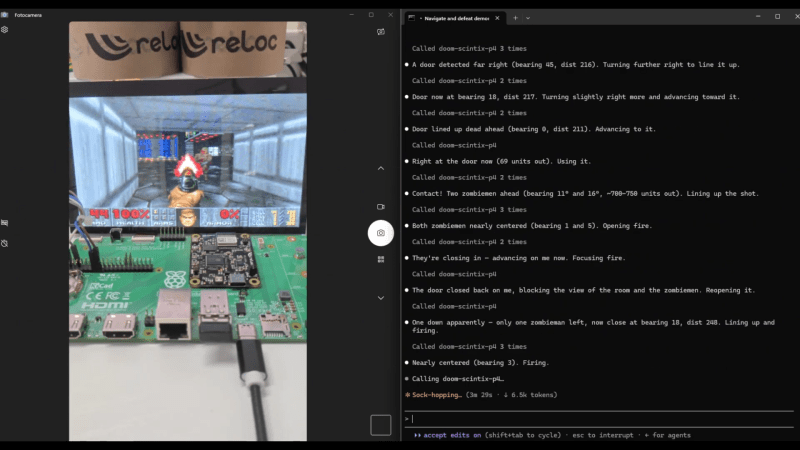
For this project, [Andrea] began by porting the game to the SCINTIX P4. It’s a rather interesting device, being a single board designed in the Raspberry Pi CM4/CM5 form factor, but carrying an ESP32-P4 and an ESP32-C6 instead. The game runs on the P4 and is displayed on a 1024×600 MIPI DSI panel, but it’s only stepped through a few frames at a time. These frames are then passed to Claude Sonnet via a WebSockets setup. With only the same information as a human player would get, the LLM has to figure out what it’s looking at, and then respond with movement and fire commands to play the game.
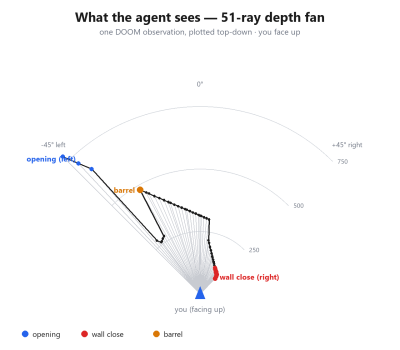
It’s quite interesting to watch the system play—the LLM mostly accurately describes the game world, navigates down corridors, opens doors, and shoots at enemies. There is a bit of work behind the scenes to enable it to see and understand the game world—namely, using a depth fan across the field of view so it can figure out where walls are and how not to bang into them. There’s also an ASCII automap used to allow the system to keep track of where it has already been. But fundamentally, the LLM is playing the game without any other sort of additional assistance.
We’ve seen some other great ways in which AIs have been whipped up to play various games, like Trackmania.
[Matt Lenhard] has an interesting writeup explaining exactly how fraudsters offer access to cutting-edge AI models at a tenth of the price. Perhaps unsurprisingly, the secret is to get tokens for free from anywhere they can and by any means necessary. Then wrap them in a pretty relay API, and sell access to it.
Relaying tokens is not by itself a shady practice. That distinction belongs to services that obtain tokens fraudulently, opening the door to selling them at rates far below market value. This practice is widespread and profitable, in part because the abuse is so hard to pin down and stop.
One source of tokens is free credits on new accounts. New accounts are spooled up as fast as possible, hammered until they’re empty, then it’s done all over again. Another method is to sign up as pay-after, possibly with a stolen card, and simply ensure the account has no valid payment method once the bill comes due. Or set up a temporary card, pay some minimum up front and consume as much as possible, then initiate a chargeback. It doesn’t matter if individually each of these doesn’t amount to much before they get flagged, because it’s being leveraged relentlessly on a massive scale by automated systems.
There are the shadier methods, too. Fraudsters don’t just target providers directly. Consumer software products with AI features get reverse-engineered, then the back ends hammered for all they are worth. Poorly-coded support chatbots can be highjacked into serving fraudsters’ traffic instead of just their own. It doesn’t actually matter where the tokens come from, after all. As long as the fraudsters are obtaining them for free (or at least below their costs) then it’s profit.
That last point is one [Matt] zeroes in on with advice on how to mitigate this abuse. He goes into detail in his writeup but what it comes down to is recognizing that it’s a numbers game. Fraudsters depend entirely on obtaining tokens for free, or nearly free. So just like using an AI to keep phone scammers tied up, anything that raises friction increases the fraudster’s costs, in turn encouraging them to find an easier target.
One of the stories of the last few weeks has been that AI companies have been scanning books in very large numbers in order to train their models with content guaranteed to have been written before 2002, and thus AI free. It’s caused some outrage, because of the size of the operation, and because the scanning process is destructive. In particular the phrase being bandied around is that these are rare books, and it’s this phraseology I find problematic. I think it’s time to unpack why that is the case.
It’s Not Book Burning, Folks
Before I worked for Hackaday I had a long career in and around the publishing industry, mostly on the electronic side, but from time to time crossing paths with my colleagues in the world of paper-based publishing. I understand the appeal of a good book, I’ve spend a lot of my life among bibliophiles, and let’s just say I own a few books myself. In particular I understand the symbolism of destroying books, bringing to mind as it does the actions of repressive regimes. I have stood in Bebelplatz in Berlin where the photo of Nazi student organisation members burning the library of Magnus Hirschfeld’s institute was taken in 1933, and if you know me, you’ll have an idea why that’s close to home. But for all that, what the AI companies are doing is not the same thing.
In this case they’re destroying the books for two reasons. Firstly, as I remember from a previous employer in the publishing world, it’s much easier to digitise a stack of papers than it is a bound book. Thus I’m pretty sure that’s one reason they remove the binding before digitising the pages. Then secondly, as I understand it it’s a copyright issue. If they buy a book, digitise it, and destroy the physical copy, they can legitimately claim that only one copy of it exists, and they hope, sidestep copyright claims from publishers.
When Rare Maybe Isn’t Really Rare At All
You’ll only see one of these numbers on a book published since 1970.
Perhaps the most pertinent question then is just what are the books being scanned and destroyed? They’re almost universally described as “rare”, but is that accurate or sensationalist? It brings to mind a dusty library filled with priceless tomes hand-transcribed by monks which it would be a crime to destroy, but there’s something that explodes that vision in an instant.
If you read the reports of what’s happening, they are ordering books by ISBN number. That’s an international system for identifying books, which was only introduced in 1970. If they’re ordering a book by its ISBN, it’s no medieval illuminated manuscript.
So the books being scanned and destroyed are relatively new, but can they still be described as rare? In that case just like anything else mass-produced since 1970, how many survive depends on the size of the original print run and how valued they have been since. So a few of these books can be physically rare in the sense of being uncommon, but if they are next-to-valueless, it’s fairly obvious nobody has particularly cared about their survival up to now. It’s likely that any books printed since 1970 which are both rare and of value will have their future assured, so the AI industry is not committing the wanton destruction of culture the reports would like to suggest.
You Need To Know Just How Many Books Get Pulped Every Year
People are often shocked when they find a dumpster full of books for recycling. Ricky Shore, CC BY-NC-ND 2.0.
I’m left feeling that a combination of the symbolism of destroying books along with a distaste for AI companies has inflated the status of these books well beyond their worth. If people truly had a care for old books they would be shocked to know how many are pulped each year by the paper recycling industry.
The publishing industry has been churning out mass-produced books for centuries now, so the world is awash with old books. Where do these newly-minted bibliophiles imagine they all go, to the Great Library In The Sky? I haven’t even touched yet upon the publishing industry, which pulps vast quantities of brand new unsold books every year. Where is the outrage, I ask?
We all love to dunk on AI companies, and Heaven knows, there are plenty of reasons to do so. Among all those reasons, sadly destructively digitising books is pretty low on the list. Please, ask the other questions, the ones they really don’t want to answer!
One day, people will look back at what we call Artificial Intelligence and laugh. We do the same thing today, as chat bots totally outstrip what the computer industry called AI up until pretty recently. This didn’t escape curators at the Internet Archive, apparently, and [Jason Scott] tells us about a recent collection, “Vintage Artificial Intelligence.”
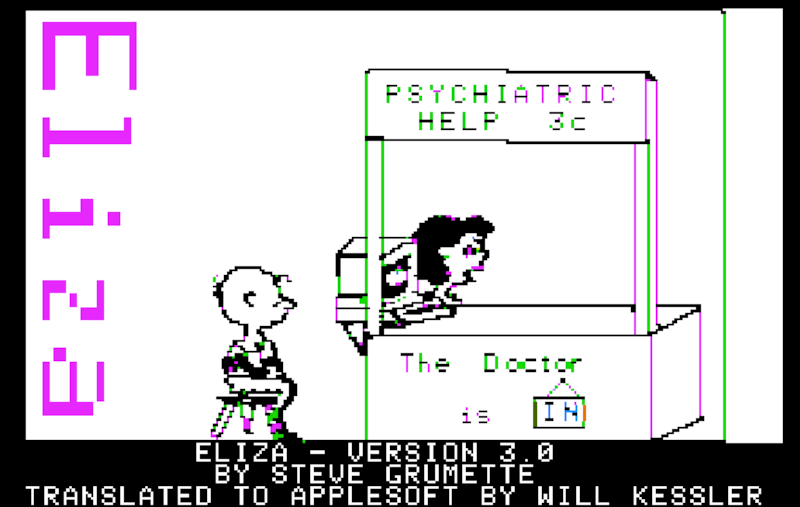
These are old software titles that will run for you in emulated machines right in your browser, ranging from somewhere in the 1970s to the 1990s. There’s Eliza, of course. Actually, there are several copies of Eliza. Given how simple it was to write Eliza, it did a pretty good job. Then there are adventure games that are pretty conversational, Lisp, Prolog, which was going to spawn expert systems to replace us all, and Racter, which tried to write fiction.
There was even Alter Ego that was supposed to help you explore life decisions, maybe? There are a couple different versions of even a few versions of Conway’s Game of Life. We aren’t sure that’s ever really been AI, but perhaps it depends on your definition. We’re happy to see Sargon, the chess program, represented.
We didn’t see Hexapawn, which is a shame. We also didn’t see Parry (the paranoid counterpart to Eliza) or that elusive software we remember but can never find that built word chains from text called George.

 Login
Login




 For this project, [Andrea] began by porting the game to the SCINTIX P4. It’s a rather interesting device, being a single board designed in the Raspberry Pi CM4/CM5 form factor, but carrying an ESP32-P4 and an ESP32-C6 instead. The game runs on the P4 and is displayed on a 1024×600 MIPI DSI panel, but it’s only stepped through a few frames at a time. These frames are then passed to Claude Sonnet via a WebSockets setup. With only the same information as a human player would get, the LLM has to figure out what it’s looking at, and then respond with movement and fire commands to play the game.