Among all the machines of the 8-bit home computer era which booted straight to a BASIC prompt, there were a very few that went their own way with another language. The Jupiter Ace springs immediately to mind, a diminutive Z80-based machine similar to Sinclair’s ZX81, which booted to FORTH.
The Ace wasn’t a commercial success, but what would have happened had it booted to a more accessible language? It’s a question [jordanhubbard] appears to be trying to answer, with an OS that boots to a Python interpreter.. The OS is Python, and everything on top of it uses the interpreter. Better still, it has a GUI mode.
The OS boots on an x86-64 platform or in QEMU, and appears to have been created using an LLM. There are two build options for the GUI version or the interpreter version. It provides a set of UNIX-like commands for interacting with the OS and disk, something which brings back memories of disk-based systems back in the BASIC days. We’re surprised to see no screenshots of the GUI in action though, an omission he’d do well to correct, we think.
It’s fair to say that in 2026 this is more a bit of fun than a serious OS contender, but maybe someone will run with it. It has competition too, not so long ago we featured a similar OS that runs a BASIC interpreter.
Nintendo has made many game consoles in its long history — one that famously overlaps that of the Ottoman Empire — but only one of them was ever Super. It’s that console, the Super Nintendo Entertainment System, that [Inkbox] has decided to delve deeply into as he crafts a game in assembly using all the hardware tricks he can.
Hardware tricks he’ll need, given he’s limited to the two 64 kB RAM banks and 3.58 MHz Ricoh 6502-based CPU. Even the 4 MB limit he sets for a historically-accurate homemade cartridge seems positively claustrophobic by modern standards. The game he’s after making is a top-down adventure game a la Zelda, and [Inkbox] gets right into the weeds explaining how the SNES works as he shows his work in this nearly hour long video. If you’re looking for a deep dive into the architecture, along with how it is meant to be used, you could certainly find worse sources. Everything from the different graphics modes to what registers handle sound are covered in this and the previous video in the series.
We can’t help but call out his dedication to open source — the SNES Sound Engine he has put up on GitHub looks like it could be a real asset to anyone else doing this kind of homebrew. The game itself is on itch.io and is pay-what-you-want.
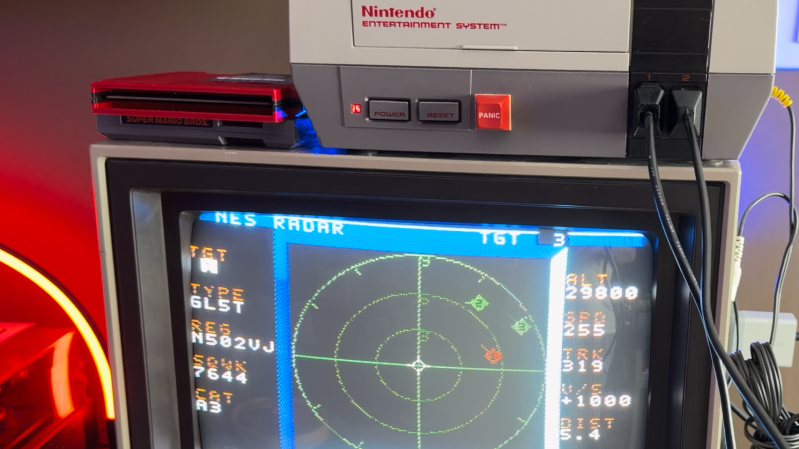
Air traffic visualizers seem to be having a bit of a moment right now, and now that moment has come to the venerable NES thanks to [k6lcm]’s NES Radar project, which is open-source under the GPL on GitHub. In spite of the name, there’s no Radio Direction or Range-Finding involved in this project– no radio at all, in fact, which makes this a bit interesting. It’s just an NES cartridge and a carefully constructed cable.
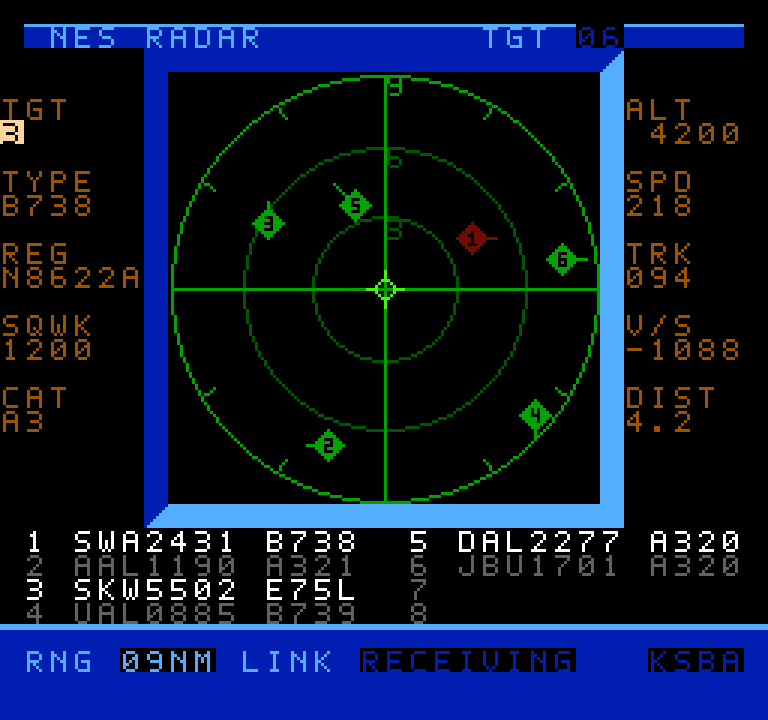
It looks like a period game, but it’s current-day air traffic.
The cartridge is a standard ROM cart that holds the software — no hidden ESP32 or PicoW here, which is what we initially suspected the project would be. So how is it that when you start up the NES with the cartridge inside, you can input an International Civil Aviation Organization (ICAO) code, like, say, KATL, and get a visualization of the traffic? Well, okay, if you put in KATL, you won’t get all the traffic, since the software is limited to 8 sprites, and that’s the world’s busiest airport. Still, how does it know where those airplanes are?
The secret is in the carefully constructed cable mentioned above: this project is using the second controller port on the NES as a serial port, and getting the data that way. A handy Python script on a nearby computer is what actually fetches aircraft positions. It’s based on c64u-radar, also by [k6lcm], which does the same Python server trick but relies on the Commodore 64 Ultimate’s LAN port to get data rather than using serial. The NES has no such ports available, though, so the controller port it was. We saw a similar trick used for satellite tracking on the NES some years ago.
If you like the idea of tracking flights, perhaps you’d like to see it done on a real radar CRT, or projected directly onto the ceiling. Thanks to ADS-B and free APIs, it seems airplane trackers are everywhere; if an interesting one has come onto your radar, please send us a tip.
Speaking of tips, thanks to [Levi] for putting this one on our scopes!
Oftentimes, when we’re using a microcontroller, we’re whipping up some very specific code focused on executing a particular task. The device is set up to execute code that does exactly what we want with minimal overhead. However, sometimes, there are scenarios where it pays to go with a somewhat heavier setup, wherein the microcontroller runs an operating system for the benefits that offers.
Federico Terraneo came to Hackaday Europe to discuss this very topic. He talks about kernel architecture, real-time operating systems, and how to best use C++ in the world of microcontrollers.
Microcontrolling
The talk begins in a helpful place. Federico starts by explaining what an operating system actually is. Basically, it’s the software that exists between the hardware and the applications that run upon it. Breaking it down into parts, an operating system typically consists of a main kernel, atop which sits things like the basic system services, libraries, and device drivers, along with utility programs necessary to maintain and work with the system. The user interface sits on top of all that, which allows the user to select and run applications and generally use the operating system to get things done.
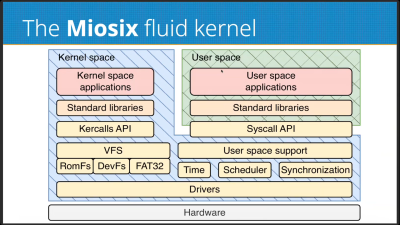
Federico talks about the Miosix RTOS as a practical implementation of the fluid kernel architecture.
Of course, different operating systems differ in the specifics of their architectures. Monolithic kernels, such as Linux relies on, keep a split between kernelspace and userspace. This is where where the kernel has full hardware access running on the CPU in system mode, while the applications run in user mode without such direct access. Monolithic kernels typically only run on architectures with memory management units (MMU)—think full-scale computers with proper CPUs, like your laptop or desktop. Unikernel operating systems, like FreeRTOS, are a little different, where applications and the operating system are collapsed down into a single executable binary that runs with raw hardware access. There is no abstraction, no memory protection, or anything like that, which makes the architecture easier to run on typical microcontrollers. There are also microkernels, which aim to minimize the amount of code that runs in system mode, pushing things like drivers and filesystem access into userspace. This architecture still needs an MMU, and is mostly only seen in niche uses where high security and/or attention to safety is critical.
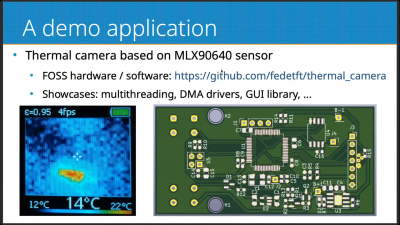
A thermal camera running on a fluid kernel system serves as a great demo application for the platform, showcasing several important features like multithreading and DMA.
When it comes to microcontrollers, unikernels are the most relevant architecture to think about. However, they have limitations–in stability, in security, in the fact that there is no run-time code loading or any way to easily partially upgrade the system. The fluid kernel, which Federico came to explain, aims to solve some of these issues. It hopes to offer a scalable operating system solution that works across the world of embedded computing, where sometimes microcontroller resources are limited and where memory management units seldom exist. It’s also intended to be compatible with standard APIs—think POSIX, C++ standard libraries, and all that. Federico calls it the “UNIX on a chip” concept.
The fluid kernel aims to exist at the intersection of the monolithic kernel and the unikernel. It allows hosting applications in kernelspace or in userspace as needed. A fluid kernel is also built to be POSIX compliant twice—with the same API whether you’re operating in kernelspace or userspace. The fluid kernel concept is designed around achieving process abstraction via the hardware Memory Protection Unit (MPU) common in modern 32-bit microcontrollers. It’s not quite an MMU, and can’t do all the same fancy virtual memory tricks, but it’s enough to provide a basic level of memory protection on a microcontroller platform. The fluid kernel can also become a unikernel if so desired as a compile-time option, which takes away process support while reducing code size significantly. It allows for unikernel devleopment that can be upgraded into a fluid kernel later by flipping the compile-time option the other way.
Federico does a great job of explaining the pros and cons of the fluid kernel architecture, and explores the security implications inherent in going this route. The Miosix RTOS is discussed as the practical implementation of this philosophy, and there’s even a helpful diversion into the efficient use of C++ on microcontrollers. If you’re getting serious about embedded development, or you just want to learn about a new architecture you might find useful one day, it’s a great talk to dive into on your next lunch break.
Disk Defragmenter was a wonderful utility that Microsoft included with Windows back in the day. Back then, you’d use it to theoretically speed up disk access. Today, you can run a fun simulation right in your browser thanks to [Dennis Morello].
The theory behind defragmenting hard disks was simple. Your hard drive would store data on spinning magnetic platters. Sometimes, a given file or group of files would end up with their different parts scattered across different parts of a platter, or even multiple platters, as the file system tried to slot everything into the space available over time. On a drive accessed with a literal physical mechanism, this fragmentation of files across multiple areas of a disk could cause functional read speeds to drop. To solve this, you could defragment the drive, wherein a utility would grab disparate bits of different files and put them physically closer together on the drive platters, such that the read heads could access larger contiguous chunks of files more easily.
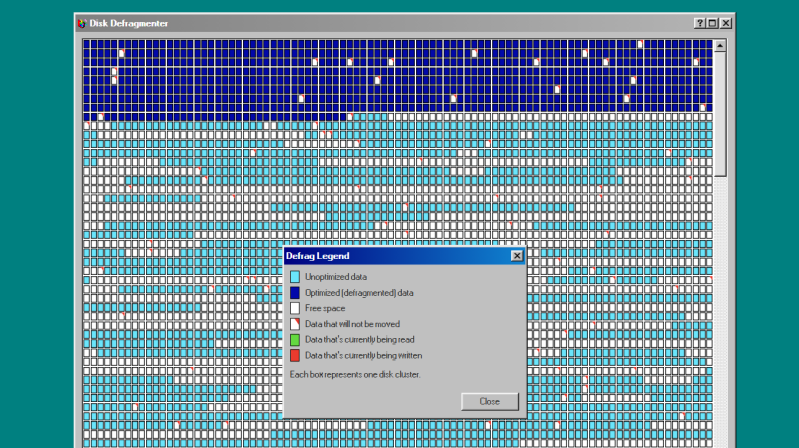
[Dennis’s] project does none of that. It just simulates the visuals and sound of running Microsoft’s disk defragmenter tool from Windows 98. It’s got the little rows of squares that get rearranged, blue for unoptimized data, dark blue for defragmented data, and white boxes for free space. It’s got the progress bar along the bottom, too, and a nice little simulated sound of a hard disk ca-chunking away as it shuffles little bits of data to and fro. This was the kind of thing you’d do on a rainy Saturday afternoon in the 1990s, just watching your PC make itself a few percent faster while you drank coffee and wondered if your ex-wife Jacinta was ever coming back. She never did, but you did notice that Age of Empires II loaded a fair bit quicker after you ran a full defrag on your main drive. Sometimes, that’s as good as it gets.
Modern file systems are better at managing issues like fragmentation, and the virtually instant seek speeds of solid-state drives essentially eliminated the need for defragmentation for good. Still, it’s fun to visit an ancient tool from yesteryear and remember what it meant to us way back when. Maybe you could give Jacinta a call, too, just for old times sake, and discuss that time a Janet Jackson song started crashing brand-new Windows laptops right out of the box…
The average hot water is a relatively simple appliance to understand. It uses gas or electricity to dump energy into water in the form of heat, keeping it at a pleasant temperature for uses like bathing and cleaning. Basic mechanisms are in place to ensure the water stays at a relatively constant temperature, neither too hot where it could cause burns, nor too cold such that it wouldn’t be fit for purpose.
Legionella pneumophila is a bacteria that loves to grow in warm water. It can enter the body via aerosol and cause of Legionella’s disease. Credit: CDC, public domain
One of the interesting problems of our modern era is that changing our water usage has changed the risk profile for pathogens growing in hot water. NIST has noted for some time that while the pipes in our walls haven’t changed size, things like our shower heads have changed their flow rate to save water. Less flow rate in the same sized pipes means that water stays in the pipes for longer, increasing the time in which harmful pathogens have to grow in that environment.
Chief amongst these pathogens? The one most commonly feared is legionella pneumophila, the bacterium responsible for causing Legionnaires’ disease. The severe form of pneumonia comes with a fatality rate of 10%, and infection typically comes from inhaling aerosolized droplets containing the bacteria.
Of course, a great way to create aerosolized droplets filled with bacteria is to spray not-quite-hot water through a shower head. This is why hot water systems, particularly in large multi-occupancy buildings, are a risk for such infections. Legionnaires’ disease is rare, but it’s always out there, with 6000 confirmed cases showing up in the US each year. It’s possible that the true number is up to 10 times higher because the disease isn’t routinely tested for. The disease’s rarity is in part because engineers and tradespeople put in plenty of work to minimize the ability for the bacterium to breed in hot water systems. As NIST’s work demonstrates, though, there is possibly even more that could be done to tackle this problem.
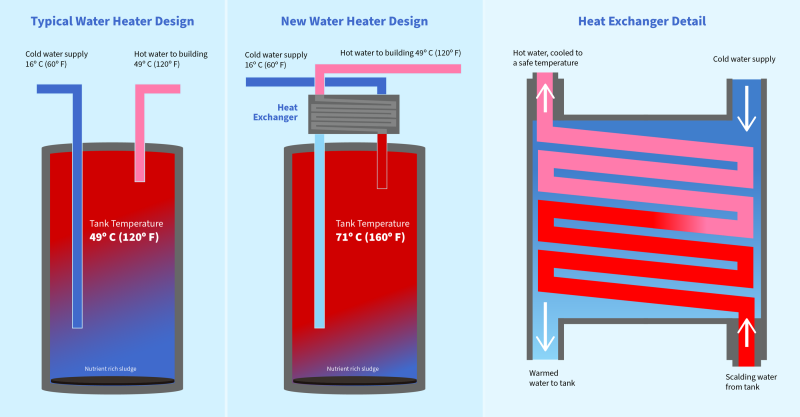
Ideally, your hot water pipes in your house would not host any nasty bacteria. But often, hot water systems sit around 49 °C (120 °F), a temperature that’s hot enough to be useful and pleasant without a major scalding risk. Legionella pneumophila won’t easily grow at that temperature; the bacteria thrives between 20 °C to 45 °C (68 °F – 113 °F). Unfortunately, though, it’s not hot enough to kill the bacteria completely. Furthermore, water cools as it travels through pipes to an outlet, and thus pipes can be a perfect environment to spur further growth.
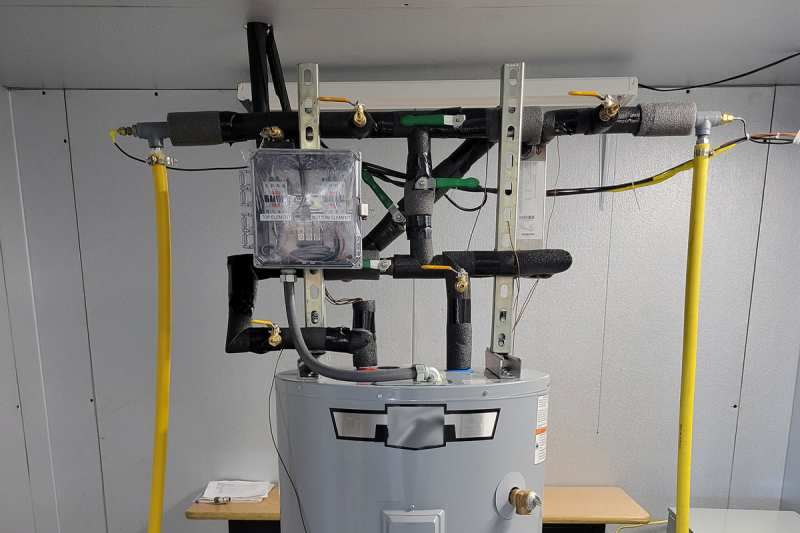
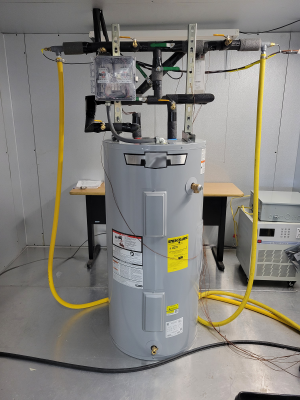
The solution developed by NIST is simple—jack up the set point of the hot water heater, then fit a heat exchanger on top to cool outgoing hot water with the incoming cold supply. Credit: Brandon Hayes/NIST
The simple solution would be to simply jack up the hot water system to store water at a much higher temperature, say around 70 °C (160 °F). This could be undesirable in many contexts, though, as water that hot can more easily cause burns. It would be ideal to store the water at a higher temperature, while making sure it was delivered at a slightly lower temperature so it didn’t hurt anybody when it left the tap or shower head.
A prototype unit whipped up by NIST cost only about $100. Credit: NIST
It turns out that there is a remarkably simple way to achieve this. NIST developed a simple heat exchanger which can be mounted atop any old hot water system. It’s designed such that the hot water leaving the tank passes through a heat exchanger where it’s surrounded by cold water which is running to the water heater’s intake pipe. This has dual benefits. The hot water inside the tank can be stored in the tank at 70 °C, which kills almost all legionella peumophila almost instantly. That water, though, is then cooled to a slightly safer temperature as it passes through the heat exchanger and out to the tap or shower. The hot water remains at a safe temperature for the user, and contains far less harmful bacteria, and cooling it doesn’t introduce any pathogens from another source. In turn, the cold water coming into the tank is pre-warmed slightly by the hot water, so the energy isn’t simply wasted.
This trick isn’t just simple, it’s also cheap. NIST engineers were able to fabricate a prototype unit to fit to a residential water heater using just $100 of components. It could be a useful addition for homeowners looking to make their hot water service a little cleaner. However, the real benefits are likely to be for larger operators of multiple-occupancy facilities, like nursing homes and hotels. These facilities often have to take great care to avoid the build up of harmful bacteria in building-wide hot water systems. Having the ability to increase the tank temperature to the point that legionella pneumophila bacteria simply die off would be a huge boon to this effort.
Sometimes, it’s possible to make great gains with a simple hack. Using the cold water service to cool hotter outgoing water is a smart trick that uses only minimal additional equipment to offer a safer hot water supply. It could yet become a common install for hot water systems in order to fight the good fight against a harmful disease that likes to lurk in our pipes. If you happen to see a heat exchanger atop a hot water heater in future, you can smile that someone has done the work to try and make that hot water supply just a little safer going forward.
The introduction of optical media in the form of CDs meant a revolution in the world of gaming consoles, escaping the restrictions of a few dozen MB of storage and instead offering a theoretically infinite amount of storage through the miracle and tedium of swapping discs. After the SNES narrowly escaped getting a CD add-on and the N64 doubled down on cartridges, we can now at least get an impression of what it’d be like if the Nintendo Entertainment System had been gifted a CD add-on back in the 1980s, courtesy of a project by [Throaty Mumbo].
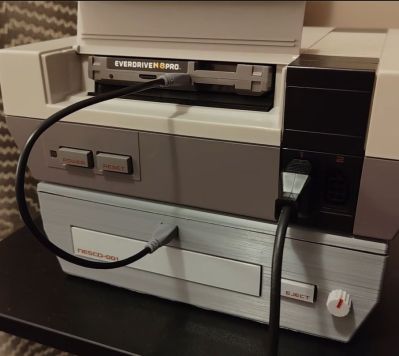
The NES future we could have had.
There’s also an accompanying video containing typical hijinks and a demonstration of this system. Initially [Throaty Mumbo] was going to make a SNES CD add-on to match that console’s initial prototype, but doing it for the NES seemed more fun. Obviously, since the NES is quite limited hardware-wise it was always going to be a struggle, even if the original front-loading NES conveniently has a mostly unused expansion slot.
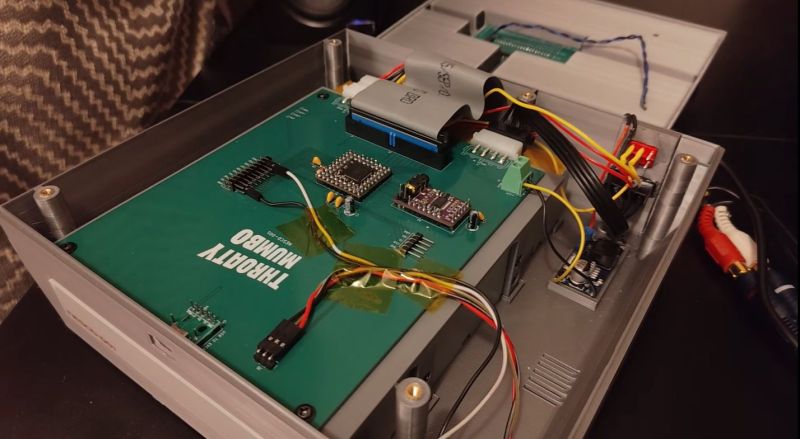
On the custom PCB there is an RP2350B microcontroller that mediates between an Everdrive N8 Pro cartridge and an IDE CD drive, along with a PCM5102 audio DAC. The expansion port is hereby used to receive the audio samples on its audio mix input pin, along with power. After boot the game ROM is read off the CD by the MCU and streamed over USB to the Everdrive.
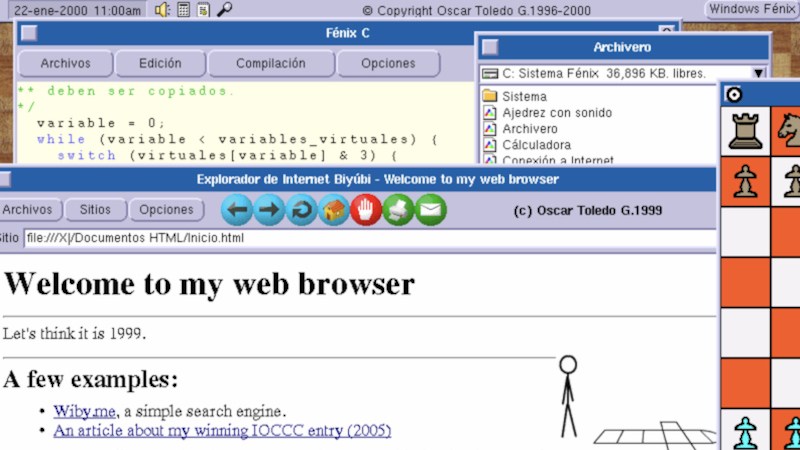
The AM29000 series of processors were AMD’s entry into the world of super-fast next-generation silicon of the late 1980s. It was a time when ARM was still a niche architecture in a British educational computer, the 68000 series was still a major player, and it was by no means certain that the x86 would maintain its position. It therefore wasn’t an unreasonable choice for someone building a high performance computer at the time, which is what [Oscar Toledo G.] and his father did. If that wasn’t enough, he went on to write an operating system for it in AM29000 assembly, complete with a GUI, a C compiler, and an up-to-date web browser for the late 1990s. The story makes for an engaging read.
It’s written across two parts, with the first looking at the computer and the early software development, and the second at the C compiler and web browser. It’s a tale of epic mastery of the machine, and something we remember ourselves, piecing together knowledge in a time before the Internet placed it all at our fingertips. Tales such as hand porting — we can’t really say compiling — C code into AM29000 machine code are completely next-level. You have to read these two write-ups, and there’s even an in-browser emulator should you want to try it.
Meanwhile, in case you think something is a little familiar here, he’s the same person who brought us a Transputer in the browser.

 Login
Login