❌

Reading view

There are new articles available, click to refresh the page.

Is This The Only Instrument You Need?

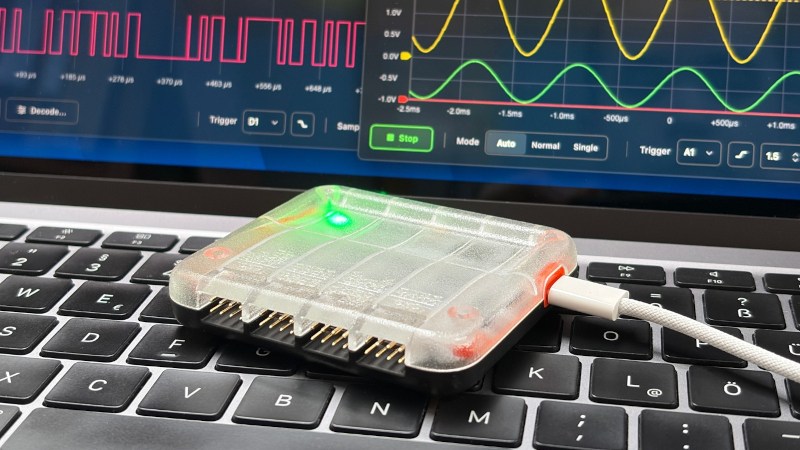
When working on an electronic project it’s likely you will find yourself working with a variety of different instruments, be they logic analysers, oscilloscopes, or whatever. These can take up a lot of space, not to mention cost a bundle of cash. [Max.K] came up with PicoLab as a solution, it’s an all-in-one box containing a four-channel oscilloscope, eight-channel logic analyser, GPIOs, a data logger, and serial, SPI, and i2C interfaces. There’s even an adjustable power supply!

Behind it all is an RP2350, in its larger package with more pins, coupled to some custom interface and protection circuitry. Perhaps the cleverest part is its interface, which it serves as a web site on the network card it exposes through the USB port. Any OS that supports a web browser and USB networking can thus use this thing. You can find all the code in a GitHub repository, should you wish to have a go at building one yourself. We like this idea.

A 3D Printed Marble Clock, but it’s Scrolling Text

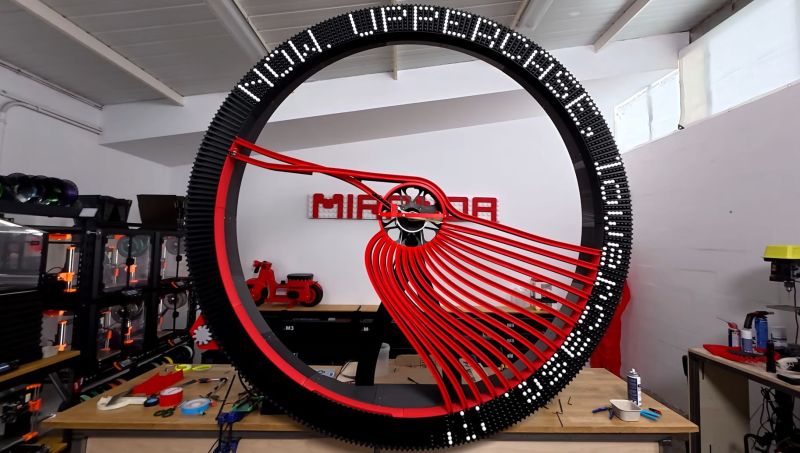
With the topic of marble clocks having been quite well explored at this point, it raises the question of how easy it would be to take the basic principle and create a text display using black and white marbles. As [Ivan Miranda] found out in a recent marble text scroller project, this is far from easy.

The reason why a scrolling text display was picked comes down to not wanting to be limited to a fixed number of digits. This resulted in a round wheel design, with inner steel ball bearings and a stepper motor on both the wheel and an inner selector mechanism. These respectively align the marble channels and pick the right color of marbles to be dropped into any of the wheel’s slots, creating the right sequence of marbles for the target text.

Perhaps the most amazing thing about it is that it’s an absolutely massive structure, yet it’s all 3D printed and bolted together. It took a number of trial-and-error cycles, and debugging issues like the IR sensors getting confused by daylight, but it now mostly seems to work all right.

There are still some remaining issues, such as having to manually home the wheel before starting, and the ratio of black vs white marbles can cause unexpected gaps in the final text. Despite this the text is quite legible and definitely infinite.

Valve Releases Hardware and CAD Reference For New VR Headset

Valve recently began shipping its long-awaited VR headset, the Steam Frame. Now, there is a hardware reference repository that includes everything a budding modder might need, and then some.

No need to 3D scan or break out the calipers if one wants to design their own add-ons.

Want to design and 3D print some add-ons, or a carrying case, or some other doodad? There’s no need to break out the calipers or 3D scan the hardware. The repository contains STEP format models of the VR core module, head strap, and controllers, so it’s as easy as possible to design things that’ll fit. The location of the IR tracking LEDs embedded in the controllers is also documented, so one can ensure their design doesn’t occlude them.

That’s not all. The Frame has a user-accessible hardware expansion port at its front. This port exposes two interfaces: high-speed MIPI camera and PCI Express. This expansion port is documented in the repository, and even has a simple reference design built in both KiCad and Altium.

We’re glad to see Valve maintain their hacker-friendly hardware design with the Steam Frame. Demand for The Frame outstrips supply so far, so if you’re on the waitlist, you might want to browse the repository and get an early start on whatever customizations you have in mind while you wait for your confirmation. And when you get something working, drop us a note on the tips line!

❌