Reading view

There are new articles available, click to refresh the page.

Running Linux 6.11 on the ESP32-S3 with a Few Tweaks

With the Xtensa Lx7 twin CPU cores in the ESP32-S3 running at a relatively zippy 240 MHz and accompanying PSRAM of up to 16 MB, you might find yourself wondering whether it could run Linux. As [Paulneja] demonstrates with Linux kernel 6.11, the answer is a ‘yes’, though with the usual caveats.

What complicates matters with the ESP32-S3 is that it lacks certain amenities that spoiled OSes like Linux have come to take for granted, such as a Memory Management Unit (MMU). To deal with this, the NOMMU Linux configuration was used, along with a custom fork() implementation. Although the previous 0.7 version sort-of worked, the current 0.8 release is the first that manages to actually boot reliably and has a usable amount of RAM available after boot.

You can see the comparison between the two versions in the header image, with v0.8 having a blistering 3.7 MB available after booting and with overall resource usage and performance having improved massively. Note that only one core is available to Linux, with the other used by the typical FreeRTOS ESP-IDF stack to provide WiFi and Bluetooth.

This was all run on an ESP32-S3 with the N16R8 configuration, meaning 16 MB Flash that’s also used for writable storage and 8 MB of octal PSRAM. As for practical applications, it’s noted by [Paulneja] that this is a research project, though one could imagine this being an embedded Linux project along the lines of a network router running something like BusyBox.

Linux Fu: Speak Up!

Apparently, people hate typing. As every movie and TV show suggests, the future is talking to computers. There was a time when speech recognition was complex and not very good. But these days, even our lowly phones can do a pretty good job of speech recognition. Of course, one problem is that your phone probably isn’t actually doing the speech recognition. It sends it to the big business of your choice to interpret. I’ve been using Handy, a speech recognition system that works well for me. I’ve also looked at some that didn’t.

After all, it is sometimes nice to dictate to your computer, and it would be even nicer if you could keep your data local. On Windows, oddly enough, there is a well-developed speech feature that, as far as I can tell, almost no one talks about or uses. One video estimates that 99% of users don’t use it. Linux, of course, has many options, but historically, these have been difficult to set up or finicky.

Of course, the good news is that many of the Linux tools are open source and the models are quite good. That means other people have had the freedom to fork the tools and make them easier to use, at least in theory. The licensing of the models themselves may be different, but those will be hard to modify, anyway and they generally work well. The biggest problems on Linux isn’t the technology itself, but the tremendous variety of systems and setups.

Suppose you want to write a speech-to-text program. Will it work on ARM? What desktops will it integrate with? Can it use a GPU? What kind? What about specialized instructions in some CPUs? Then there’s the forced input situation; typing into arbitrary programs once you know what the user said. On X11, it is easy, but Wayland needs different handling.

A Shortcut

I’ve thought about using my phone with KDE Connect, which is an excellent program. It can let you use your phone as a keyboard and mouse for your Linux computer. Unfortunately, it is aimed at character-at-a-time input, and I’ve never found a way to make it work with voice.

Besides, the phone is beaming all the data to “the cloud.” You probably type things you’d rather not broadcast to the ether.

I had looked at Speech Note before, but it is sort of a speech recognition notepad. I didn’t find it seamless, and it didn’t work well on my system anyway. Vocalinux looks nice, but a quick test kept complaining that my Intel extensions were not available. Makes sense, since I have an AMD CPU. Even though the documentation said it should work, I was never able to get it to work.

The Easy Way

Turns out the application that worked readily on my machine was Handy. Keep in mind, Handy is just another tool that uses one of several models out there, along with other open-source tools. You might need to install some tools to deal with your system like xdotool or dotool, but they are probably already installed anyway. That isn’t to minimize the value of Handy. It is — well — Handy. You don’t have to load and configure models, set up a bunch of system-level hooks, or install a bunch of libraries. You install it, and it works.

You can configure it. The best model for you, for example, may depend on your machine and the languages you speak. You can configure the hotkeys and how the app types into your computer. But it does all the work of downloading and configuration.

No Cloud, Unless…

The models do run on your computer and you can make sure it takes advantage of your hardware. However, there is an optional alternate hotkey that takes your speech, processes it to text, and then sends it to your choice of AI engines to clean it up.

Of course, you could be running your own AI engine, but normally you’ll have it sent somewhere else with a prompt. You can tune the prompt or create your own, but the default one starts: “Clean this transcript: 1. Fix spelling, capitalization, and punctuation errors 2. Convert number words to digits (twenty-five → 25, ten percent → 10%, five dollars → $5) 3. Replace spoken punctuation with symbols (period → ., comma → ,, question mark → ?) 4. Remove filler words (um, uh, like as filler)…”

You do need an API key, but there are free options available. For experimenting purposes, I went to OpenRouter, generated a key, and attached it to one of several free models they have. The nice thing is that you can experiment with different models while keeping the same key.

If you search for free in the models box, you will find a few choices including openrouter/free which just picks a free model that isn’t too busy. That can be important because some of the models will introduce long wait times into your transcription.

On the other hand, you can make a new prompt, copy the original one in, delete the part about keeping the language the same, and add instructions to translate the output to French, and that will work, at least most of the time. So there are a lot of possibilities.

Rather than tell you all about it, we’d encourage you to install it and try it or watch the reveiw video below.

Special Mention

Although Handy is my first choice for day-to-day transcription use, there is another open source project that’s worth mentioning. Nerd Dictation is a very lightweight wrapper around the Vosk model. It does take a little bit to set up, and then it provides you with a command line tool that can start and stop dictation. Of course, you can assign those to macro keys. However, there is also a switch that allows you to simply output to stdout. That opens up a lot of possibilities for writing programs or even shell scripts that respond to voice.

To see what’s possible, run nerd-dictation begin --help. This will show you how to output to stdout, set a timeout, and handle other options.

Of course, the obvious project would be a voice typewriter. Many of the tools mentioned here either rely on or can use OpenWhisper and, of course, you can use it too, if you roll your own code.

Fixing a Ubiquiti 16-Port PoE Switch With an Extra Hole

After saving a £300, 16-port Ubiquiti network switch from getting tossed into the trash, [Buy It Fix It] got the honor of trying to repair it. With four ports and their associated PoE function having some major issues it looked like it might take some debugging, but after taking the lid off, the cause seemed rather obvious.

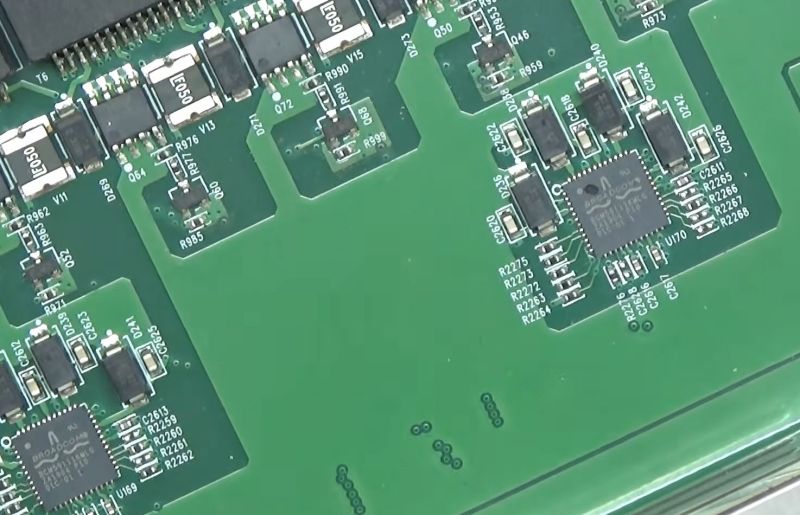
One of the Broadcom BCM5911 controller chips had a rather suspicious chip of the plastic packaging missing, with additional probing of connected components showing that numerous MOSFETs and a diode having had their proverbial guts blown out and were shorted as well. Whatever happened to some connected Ethernet device would appear to have left a serious trail of damage that nearly wrecked the entire switch.

The biggest challenge here was probably to find a replacement for the Broadcom IC, as this isn’t an IC that stores like Digikey or Mouser stock any more. Fortunately it was still available for sale over at AliExpress for £1.84, with the usual caveat that it could be salvage, fake, a factory reject, etc. In this case it appears that it was a legit Broadcom IC, with the four affected ports springing back to life including powering a PoE camera.

With a total cost of about £5 plus the time invested it wasn’t a bad deal to save a pretty nice PoE switch with 16 Ethernet and 2 SFP ports.

An Open Heart Rate Monitor

If you spend any time near a gym, you may be familiar with Bluetooth heart rate monitors — a small pack of electronics mounted on a strap round the chest which can relay heart rate data to an external logger or display. We’re pleased to see [Milos Rasic]’s project then, an open-source version of one of those monitors.

The heart rate capture is done by an AD8232, while the Bluetooth part is handled by a Seeed Studio XAIO ESP32 board. Power is provided by a single 3.7 V cell, with a boost converter to push that up to 5 V. The design omits a charge controller to keep things simple, so figuring out how to top off the cell is left as an exercise — no pun intended — for the user. Software is loaded through the Arduino IDE, which raises the possibility that other ESP32 CPUs could be supported with a bit of modification. All in all it’s a surprisingly simple project, and while the manufactured version is cheap enough it’s still very much worth having one that’s open source.

If you’d like to know more about his quest to develop open medical devices, check out the talk [Milos] gave on the intricacies of blood pressure monitoring earlier this year at Hackaday Europe.

Writing an ESP32 Bluetooth Printer Driver In Two Acts

[Bas BotBerg] wanted to use a portable Bluetooth thermal printer to run off reports on sensor data collected by an ESP32-C3 microcontroller. But as is so often the case these days, the only official way to interface with the printer was through a proprietary smartphone application provided by the manufacturer. With no documentation on how the thing works, he set out to reverse engineer the printer’s communications protocol so he could control it from the MCU — but the route he took to get there was a bit different than what we usually see, and is an excellent case study for those who might have similar projects in mind.

The standard procedure for something like this, if it can be called that, is to use Android’s built-in debugging capability to log Bluetooth communications while running the manufacturer’s application. The resulting file can be fed into Wireshark, and with patience and some educated guesses, you can usually work out the various commands and values that get passed to the hardware.

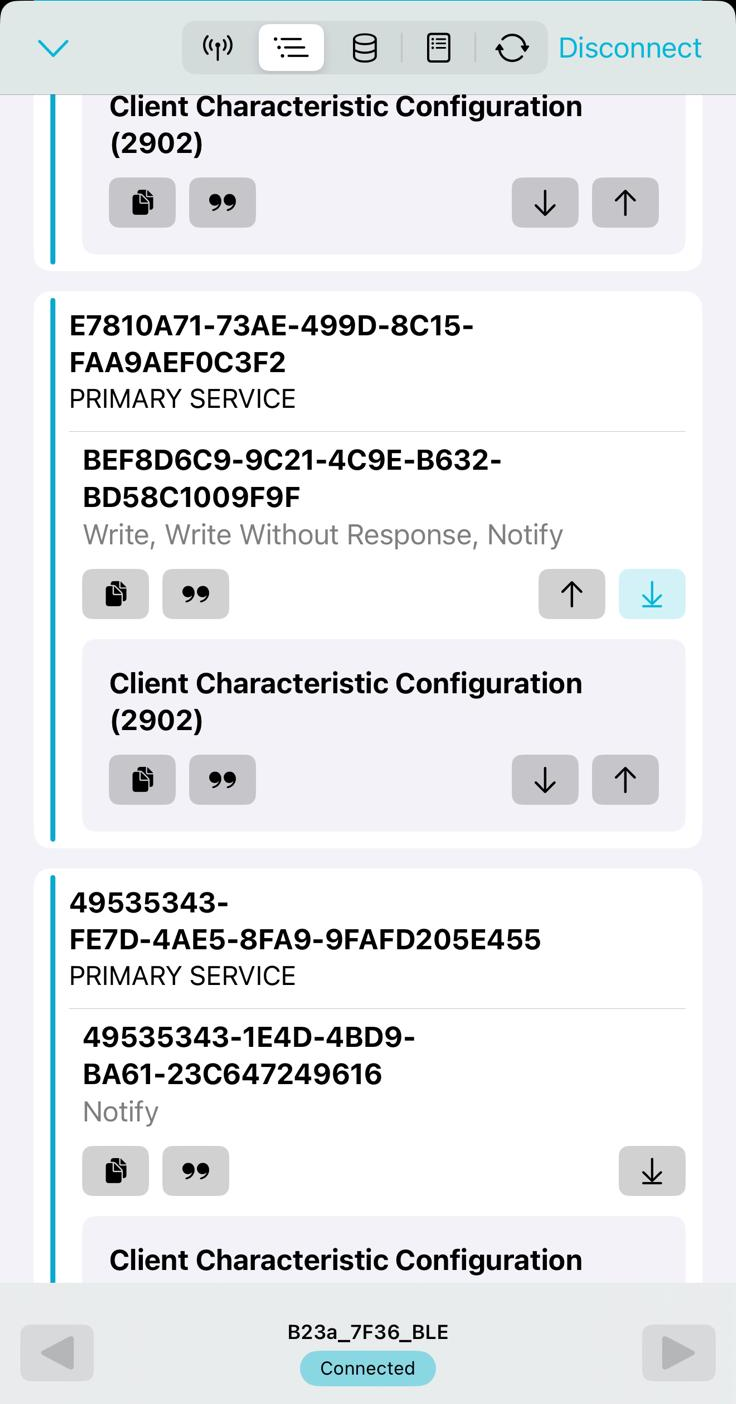
But in this case, [Bas BotBerg] ignored the manufacturer’s software and instead used an application that can query a device and list its Bluetooth Low Energy services and characteristics. Specifically, he looks for services that are marked as writable, and starts pushing data into them to see how the printer responds. For this he uses Python with the Bleak library, as it allows him to rapidly iterate and adapt his code. After a bit of poking and experimentation, he finds the proper incantation to get the printer’s motor to kick on an advance the paper — a critical first milestone that tells him he’s on the right path.

Once [Bas BotBerg] mapped out what data needed to be sent to what endpoints to operate the printer in Python, it was a relatively straightforward process to send those same payloads using C++ code on the ESP32. For extra style points he also brought in the Adafruit GFX library so he could produce icons and more easily format the output of the printer.

It doesn’t look like [Bas BotBerg] has released the code in this case (perhaps if we all ask nicely), but we’ve seen similar efforts to bring open source drivers to these cheap Bluetooth printers for the good of the community.

How High-Voltage Current Transformers Monitor the Grid

Being able to monitor voltages and currents is essential for many applications, with the national electrical grid being no exception. The obvious complication here is that the voltages and currents are massively higher than for those other applications, making safely monitoring these somewhat of an engineering challenge. The used systems for current monitoring are detailed by [Jordan Taylor], also known as [The Electric Brit], in an explainer of grid-level current transformers (CTs) and associated elements that help to provide galvanic isolation for safe current measurements.

Even if the basic principles remain the same, when you’re dealing with currents of 5 kA and more, the associated clearances and penalties for getting a detail wrong increasing correspondingly. The CTs help to implement over-current protection (OCP), over-voltage protection (OVP) as well as differential protection, which is useful to detect leakage and shorts, which could also happen inside the CT if the windings become damaged.

Any such failure condition can trigger a circuit breaker to be tripped, or other corrective measures to be taken. Incidentally this is also how it can be detected when someone is tapping off power in an illicit manner. As with all transformers they’re never perfect due to issues like core saturation, and thus performing accurate measurements and picking the right type of transformer is an art in itself, as explained in the video.

Ultimately CTs and the associated equipment are what makes an AC power grid responsive to any changes and with it into the reliable foundation of modern-day society.

CircuitPython Goes Turbo With Precompiled Functions

It would not be at all original to declare that Python is the new BASIC. Like BASIC, it has been the first programming language for a whole generation of coders, and its main advantage is that it’s quick and easy to write in. Like BASIC it is an interpreted language, and thus rather slow to execute.

Thus while CircuitPython can be very useful for beginners and quick projects, it hits the limitations of the hardware far sooner than it needs to — unless you can pre-compile critical parts of the code, which you now can, thanks to CircuitPython Turbo by [Mikey Sklar] with some help from Anthropic’s Claude LLM.

Now if that sounds a lot like MicroPython’s ‘Viper’ and machine-code compiler, that’s because it is. CircuitPython is a fork of MicroPython with some handy extras on Adafruit boards, but Viper wasn’t one of them until now. Before the Turbo version, CircuitPython only ran in interpreted mode.

Like MicroPython, using CircuitPython Turbo you can flag sections to run as ‘native’, where instructions are compiled but values stay as python objects, which gets you about a 3X speedup. A little more rewriting to declare your variables and pointers and you can use ‘viper’ mode, which can — depending on what you’re up to — result in a 20x to 70x speedup. In Adafruit’s documentation, they demonstrate a Metro RP2040 calculating the Mandelbrot set 3x faster in Native and 19.7 times faster with Viper than normal Python bytecode.

The one thing that we miss from BASIC that CircuitPython Turbo doesn’t give is inline assembly– though interestingly enough, that is in the upstream MicroPython implementation, so perhaps its day will come here too. Not every job is suited to the use of Python on microcontrollers, but we’ve seen it used for everything from e-bikes to a Winamp-inspired music player.

Dramatically Increasing Usable Closet Space

As any science YouTuber or first-year physics student is quick to point out, the universe is mostly empty space. Not just space itself, but the amount of “empty” space between nuclei and their electrons is also huge. Getting rid of this empty space results in all kinds of interesting phenomena like degenerate matter and black holes. But the concept can be extrapolated into our daily lives as well; many things are so filled with air that we can get a lot more usable storage space by compressing them down a little bit. [Super Valid Designs] took this concept to a coat closet, building one that can hold an impressive number of coats.

He started by looking at an existing closet, which could hold around 21 coats but only if someone used two hands to cram the coats into the space. After a trip to a store which sells rugs, he saw a much better design that lets all the rugs pivot like the pages on a book, and took this idea to his closet using a similar mechanism designed for storing large blueprints instead of rugs. The closet he built around this mechanism has two hinged doors which allow a person easy access to the coats, and when opened the blueprint hangers pivot out like a book, allowing the coats to not only be easily accessed without disrupting the other coats, but also allow them to be compressed down by the closet door for storage.

For comparison, the original closet could only hold 10 coats when restricted to single-hand operation and 21 when using both. The new closet design is smaller, and can hold 24 coats with a single hand and over 30 when using both, a dramatic improvement of closet efficiency. To top it off, a set of cupboards on top and bottom allow for storing shoes and hats as well, and there’s even a garage for a robotic vacuum cleaner. Surprisingly, we don’t see many closet optimization builds around here. The closest we can come is another traditionally small space, a college dorm.

Rusting an E-scooter (In a Good Way)

It is a classic Hackaday situation. You have an Egret GT E-scooter. It has a screen that shows the usual dash stats, but that led to an annoyance. You could accidentally enter firmware update mode and, from there, enter operational mode without the security PIN. [Ben] couldn’t let that stand, so he reverse-engineered the protocol and rewrote the firmware in Rust. As he put it, “… because I have to break… everything I own…” We get it.

The mobile app was useful for some basic info, since sniffing Bluetooth is fairly easy and analyzing mobile code is, more or less, straightforward. Analysis revealed some data that doesn’t show on the display and that several things are sent back to home base tagged with the scooter’s unique ID — another reason to gut the existing firmware.

Internally, the scooter uses the CAN Bus, so out came the oscilloscope and a homebrew CAN decoder.  Surprisingly, the CAN bus is accessible on the USB-C port’s data pins. Officially, the port is only for charging phones, so you have to wonder what your phone makes of the alien signals on the data pins when it is charging.

Firmware updates actually come in at least three flavors: display, input panel, and main controller. Reverse engineering the firmware update process was crucial to installing the new firmware.

If you own a similar scooter, this post is a goldmine. If you don’t, it is still a very detailed breakdown of a reverse-engineering workflow, and you can apply many of the tools and techniques to your next project.

Of course, another option is to just keep the scooter and replace the brains. If you want to learn more about reverse engineering, there are literally dozens of Hackaday posts to help you get started.

Keeping Time on Tumbling Icosahedra

An angular, 3D-printed base holds two icosahedra with numerals on their faces. Each icosahedron has a zig-zagging path running through it, showing red gears inside.

Clocks are almost the ideal devices to inspire creativity in hackers — they have a simple, well-defined task, but there’s an almost unlimited number of ways to carry it out. [ekaggrat singh kalsi]’s OVODYO is a particularly intriguing approach, tumbling a pair of icosahedral counters to display the current time.

Each 3D-printed icosahedron has numerals sunk through each of its twelve sides, and is raised above the base of the clock on a brass support shaft. An inner drive shaft runs through the center of the support shaft and drives a set of beveled gears. These spin the outer shells around two axes, periodically cycling through all twelve faces. The pattern in which an icosahedron rotates means that only set of numerals appears upright at a time, making it easier to distinguish the time.

A split path around the icosahedra both lets them rotate around the support shaft and shows off the internal gearing. On the control side, an ATmega8 drives a pair of stepper motors with drv8833 motor drivers, using a hall effect sensor to detect each indicator’s position. Since the minutes dial only gives the time in five-minute intervals, it also drives an LED strip to indicate the exact minute.

[ekaggrat] has a long history of creative clock designs, from this dynamic chain-link sculpture to a hair-tie clock or a mechanical seven-segment display.

Whip-Cracking Machine Reliably Breaks the Sound Barrier

On the left side of the image, a mannequin holds a blade of grass in its mouth. A trail of dust follows a blurred green trail past the piece of grass. A man in the background is pointing a wooden device toward the mannequin.

We tend to think of breaking the sound barrier as a comparatively modern accomplishment, but on a smaller scale, cattle herders have been breaking it for centuries: the cracking sound of the tip of a bullwhip snapping comes from a small-scale sonic boom. Reliably getting a crack out of a whip takes skill and practice, though, which is why [Craig Turner] built a whip-cracking machine.

The first step was to build the whip itself, which was surprisingly complicated. Bullwhips taper down toward the end of the whip. As the whip uncurls during a crack, momentum passes down the whip; since the whip becomes continually narrower and lighter, conservation of momentum means that different stretches of the whip must move progressively faster. To get this effect, [Craig] joined together a series of increasingly thin and light ropes. The heavy end of the whip terminated in an eyelet connected to a length of elastic shock cord. Stretching the whip back on the shock cord and releasing it whipped it around, resulting in a fairly reliable crack.

For greater convenience, [Craig] built this into a launcher mechanism, with the elastic cord wrapped around the end of the launcher, an electrical-conduit guide for the whip, and a spring-loaded trigger mechanism to release it. This worked even better than expected, getting a reliable crack every time. The tip of the whip could slice leaves, tear open aluminium cans, put out candle flames, knock the cap off a bottle without tipping it over, and reliably hit small targets on the first shot.

As [Craig] mentioned, this setup would make it much easier to study the cracking effect with a schlieren imaging setup.

Spin FV-1 Emulator Simplifies Sound Pedal Development

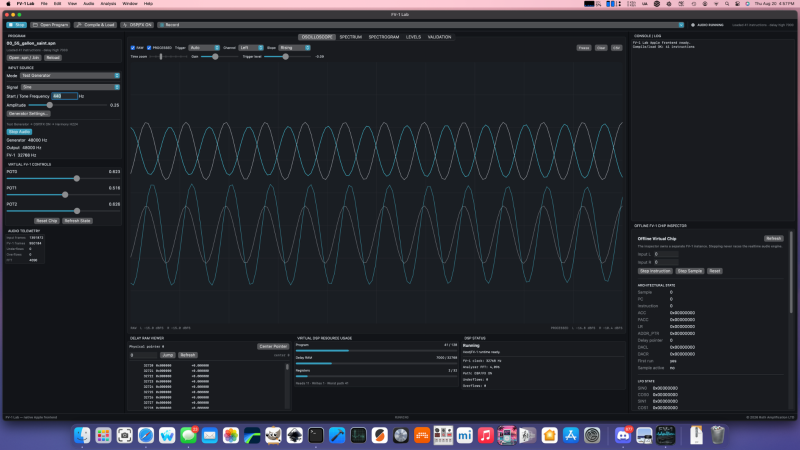
If you’ve never heard of the Spin Semiconductors FP-1 digital signal processor chip, don’t worry– that just means you haven’t been deep into guitar petals and audio effects hardware lately. [adamjvr], a.k.a. [avr] has, and he’s gone to the point of creating a PC-based emulator of this sound chip to simplify development.

If you don’t see the utility, stop and think about the development cycle without a simulation like this: you program, you flash to a board, and you test there. Not only does the ‘flash to the board’ step add time and friction, you do also have a limited number of flashes on the board’s memory. With an emulator on your PC, the workflow tightens to ‘code, test’ and you don’t flash the board until the simulated DSP is doing the sounds you want it to.

As for the FV-1 itself, it’s an interesting little chip in that it’s quite a full-featured DSP– rather, it’s small instruction set is focused entirely on audio effects. If you’re into that world– be it guitar pedals or otherwise– you may find this project very useful. There are releases for Linux, MacOS and Windows, and it’s all open-source on GitHub, under the Mozilla Public License. It’s not the most common choice, but we’re hardly going to complain about licenses to anyone willing to share their hard work.

If you like the idea of testing your work before you go to the bench, we’ve seen software that offer the same functionality for Arduino projects, as well as other AVR and PIC micros. It’s been a while since we featured a programmable guitar pedal, so we hope this tool enables others to rock out.

Making an Air-Powered Circular Saw with LEGO

The all-LEGO version barely cuts paper. (Credit: Jamie's Brick Jams, YouTube)
The all-LEGO version barely cuts paper. (Credit: Jamie’s Brick Jams, YouTube)

Although building a table saw out of LEGO is probably not the first thing that comes to mind when you look at those colorful bits of plastic, [Jamie] has been on a bit of a search for more applications of his LEGO-based air-powered motors. Naturally this led to the idea of doing something useful with it, like making a table saw you can actually use for real wood.

Starting off with a basic prototype using only regular LEGO pieces to get the mechanism figured out, [Jamie] then builds this up into said air-powered table saw featuring an actual metal blade. Suffice it to say that this isn’t something that you want your children to do with their LEGO while unsupervised.

The star of the show is of course the air-powered turbine that spins the blade. This is something that [Jamie] has been working on for a while, going through a number of prototypes to figure out a 3D printed geometry for the turbine blade that helps to convert as much of the high-pressure air into rotation.

Along the way it was also discovered that 3D printing saw blades is pretty hard, probably due to the lack of a sharp edge. This is definitely an area where it’s hard to beat a real table saw blade, with the added caveat that anything that’s good at cutting up boards of wood and sausages will just as happy slice through careless primate fingers.

In terms of safety features, the air supply is cut automatically with a sort of dead-man switch that requires you to keep one hand on it while using the final table saw design. There also an auto-feeding system added that tries to guide the board into the saw, but this turned out to be finicky. Suffice it to say that an air compressor and a handful of non-LEGO-approved components created a pretty convincing table saw.

Big Infinity Mirror Clock Invites You To Gaze Deeply

[Andy Huot] has a fantastic-looking infinity mirror digital clock that really raises the bar. It uses high quality components, smart use of RGB LED animations, and a clever “stacked diffuser” vertical design to the 7-segment display elements that really enhances the infinity mirror effect. It needs to be seen in action, so check it out.

The end result is expressly portal-like, with the smooth animations of the LEDs really playing into the effect. The size helps, too. It’s 24 inches in diameter, giving it considerable presence.

The stacked diffuser design for each display element really enhances the effect.

A basic infinity mirror design consists of lit elements sandwiched between a reflective back surface and a partially-reflective, partially-transmissive top cover. That same basic principle is used here, but with great care given to ensure nothing so much as a fingerprint spoils the illusion. For example, the top cover is a disk of acrylic with a 90% reflective film affixed to the inside surface. That’s easy enough to DIY with some car tint, but [Andy] found that for the very best results it was worth having high-quality film professionally applied.

We like the use of 3D-printed custom jigs for soldering the segments of RGB LED strips, and holding the pre-measured wires in place with some putty is a great way to keep them in place while working. In case you’re wondering, the mirrored acrylic making up the back wall has holes in it for mounting each segment’s LED strip in a holder, and running the wires to the rear.

The video (embedded below) documents every step of the assembly, and it’s a serious build. While the design files for the 3D-printed parts are not free, there’s certainly enough detail for an enterprising hacker to replicate the design in their own way.

This Mac Is Open Source Hardware

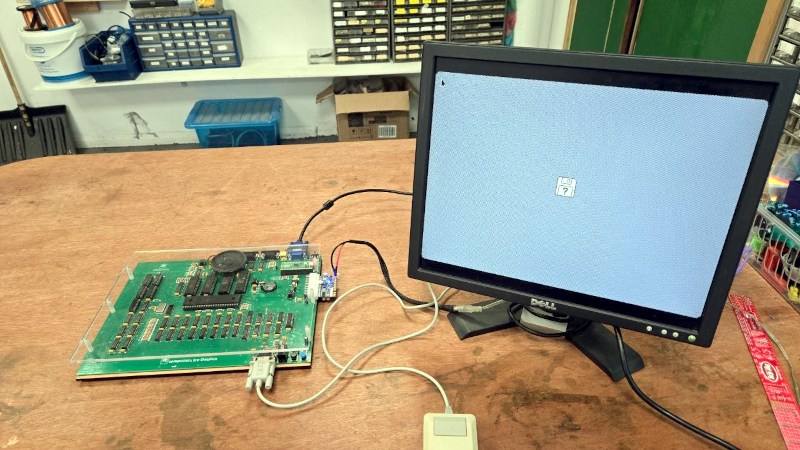
Apple hardware has always been proprietary, sometimes to an extreme. But that’s not to say that it’s impossible to make something that does the same job, which is what [DosFox1] appears to have done with the OSHintosh. It’s an open source PCB that implements a Mac 512k. Is it a 68k Hackintosh? You decide.

While it boots into a classic Mac OS image, it’s not quite a Mac. For a start, there are no disks, and no SCSI. Instead it boots from a disk held in ROM, which we guess will be a lot faster than the floppy from back in the day. They’ve even managed to do it on a 2-layer board, which means that despite its size, it shouldn’t be too expensive to have made.

We’re not sure quite what the legality of dumping a Mac ROM image to the ROM on this board would be, but assume for a moment that you own a copy in a defunct original Mac. This board can’t yet replace the original due to the disk issue, but given that original Macs are now long in the tooth, a modern replacement for those who must have hardware rather than an emulator sounds like a good idea. Perhaps for some people it will join the FPGA Amiga.

All The Best Computers Boot To… Python?

Among all the machines of the 8-bit home computer era which booted straight to a BASIC prompt, there were a very few that went their own way with another language. The Jupiter Ace springs immediately to mind, a diminutive Z80-based machine similar to Sinclair’s ZX81, which booted to FORTH.

The Ace wasn’t a commercial success, but what would have happened had it booted to a more accessible language? It’s a question [jordanhubbard] appears to be trying to answer, with an OS that boots to a Python interpreter.. The OS is Python, and everything on top of it uses the interpreter. Better still, it has a GUI mode.

The OS boots on an x86-64 platform or in QEMU, and appears to have been created using an LLM. There are two build options for the GUI version or the interpreter version. It provides a set of UNIX-like commands for interacting with the OS and disk, something which brings back memories of disk-based systems back in the BASIC days. We’re surprised to see no screenshots of the GUI in action though, an omission he’d do well to correct, we think.

It’s fair to say that in 2026 this is more a bit of fun than a serious OS contender, but maybe someone will run with it. It has competition too, not so long ago we featured a similar OS that runs a BASIC interpreter.

How To Fold Curved Lines in Metal Without Fancy Tools

Folding a sheet of metal in a straight line is one thing, but how does one fold multiple curved lines into a sheet of aluminum without fancy machines? [John] demonstrates how to do exactly that with little more than hand tools and a fair bit of patience. The secret is drilling a lot of small holes along each fold line.

Complex shapes are possible with planning, hand tools, and patience.

First, a bit of background. [John] wanted to fabricate a curved piece of aluminum as cover that would match the sleek aerodynamic lines of a Belly Tank Lakester. The trick is that there isn’t a single straight line to be found, and the fold lines are all curves. How can one do such folding with only hand tools?

[John] found that fabrication was possible by drilling small holes all along each fold line, then carefully bending as needed. The line of holes weakens the metal, acting like a score line, and allow the required curves to be made cleanly. There’s some finishing work and straightening involved, but the hard part of making the actual folds is taken care of.

One method that didn’t work was cutting a shallow groove in the metal to create something like a pre-scored fold line. [John] tried this and found that while the metal does indeed fold along the weakened line, the aluminum tends to crack in the process. When making a line of holes instead, the metal between each hole bends nicely.

This technique does mean the finished part ends up with small perforations along each fold, but the part is mounted on the bottom of the car and [John] says that he’d have to look quite closely to notice. A little polishing goes a long way, too.

We have covered many ways to bend sheet metal and while machinery exists to do it exceedingly well, great results can be had with little more than simple tools and some patience.

Watch [John] go through the process in the video embedded below, or skip to 7:55 if you just want to see the end result.

Hand-Coded ASM Powers Homebrew SNES Game

Nintendo has made many game consoles in its long history — one that famously overlaps that of the Ottoman Empire — but only one of them was ever Super. It’s that console, the Super Nintendo Entertainment System, that [Inkbox] has decided to delve deeply into as he crafts a game in assembly using all the hardware tricks he can.

Hardware tricks he’ll need, given he’s limited to the two 64 kB RAM banks and 3.58 MHz Ricoh 6502-based CPU. Even the 4 MB limit he sets for a historically-accurate homemade cartridge seems positively claustrophobic by modern standards. The game he’s after making is a top-down adventure game a la Zelda, and [Inkbox] gets right into the weeds explaining how the SNES works as he shows his work in this nearly hour long video. If you’re looking for a deep dive into the architecture, along with how it is meant to be used, you could certainly find worse sources. Everything from the different graphics modes to what registers handle sound are covered in this and the previous video in the series.

We can’t help but call out his dedication to open source — the SNES Sound Engine he has put up on GitHub looks like it could be a real asset to anyone else doing this kind of homebrew. The game itself is on itch.io and is pay-what-you-want.

[Inkbox] doesn’t just limit himself to the SNES’s 6502-esqe assembly — he’s done impressive work in x86 ASM, too.

This Machine Makes 35mm (Almost) Film

The revival in film photography has brought a range of specialist films to tempt the experimenter, as well as increased the popularity of loading your own cartridges. But perforating the film from blank stock has always been beyond the reach of home gamers. Now [Jon Schiereck] has done it, but not quite with film. He’s made a perforator for photographic paper, producing a strip which can be shot in a camera. It’s film, but it’s not exactly film.

The machine takes the form of a 3D printed mechanism which feeds a strip of photographic paper through a pair of punches to make the sprocket holes. In this case those holes are circular, being made by a pair of drill bits ground for the purpose, and they’re moved up and down by a crank driven by a set of gears from a hand crank or even a cordless drill. A rubber roller pulls the film forward.

It seems to be a well-thought-out machine, and you can try it yourself for free via a slightly unusual distribution medium, his Ko-Fi page. In case you’re worried about finding a slitter to make those 35mm paper strips, it seems he’s also working on a 3D printable one of those. So you can shoot on paper, and develop it just as you would a print.

If you’re further into extending what you can film through the use of a 3D printer, how about 8 mm movie film?

This Week in Security: It’s Patch Tuesday Again, TVs Spying, Supply Chain Worms Return, Prolonged Hack Impacts, Stolen IDs

Several times this summer, Microsoft’s Patch Tuesday, the monthly roundup of major security patches for Microsoft products, has included record-breaking numbers of security fixes. The August 2026 patch set actually seemed to catch up. Was this a sign of the bug apocalypse lessening? Ha, nope!

Brian Krebs at Krebs On Security once again brings his excellent roundup of Patch Tuesday events, with this months patch set absolutely crushing previous numbers with nearly 1,000 security fixes.

Two of the fixes are for zero-day vulnerabilities under active exploitation in the wild, both allowing privilege escalation on Windows. Privilege escalation bugs turn general vulnerabilities in applications and games into full administrator access to gain persistence and deploy ransomware, and generally make any vulnerability significantly worse.

Krebs also calls out a CVSS 9.8 (so close to a perfect 10!) vulnerability that allows remote code execution in the Windows shell with no user interaction and no authentication, a remotely exploitable DNS bug present since Windows Server 2012 and Windows 10 which will likely see exploitation in the wild soon, and over a hundred other bugs are ranked “Critical”.

How the sheer volume of vulnerabilities in this patch will fit with recent Microsoft recommendations that companies should apply the patches immediately remains to be seen. (Likely: not very well, depending on what new behavior and issues the fixes cause!)

Is Your LG TV Spying on You?

Gamers Nexus continues their trend of high-quality investigation, and they have posted another tremendous multi-hour investigatory video. This time Gamers Nexus focuses on the ecosystem of LG televisions and monitors.

It shouldn’t likely surprise many here that “smart” devices are usually more to the benefit of advertisers than consumers. Similarly, it shouldn’t be a surprise that a “smart” device harvests user data to sell to advertises. What may be surprising is the degree to which LG devices appear to collect data, how much data is sent even when collection is turned off, and how overt executives at the company are, with multiple executives making statements in pitches to advertisers that LG “owns the glass”, “owns the living room”, and is designed to correlate devices, inhabitants of the environment, and viewing habits so that ads can be served to the TV and mobile devices in the same room simultaneously.

With tracking enabled, the smart TV captures telemetry of what applications are used, as well as continually capturing the video displayed and reporting fingerprints to LG servers and ad partners. The screen content is tracked not only for TV, but for the HDMI inputs, including if the TV is used as a PC monitor. If voice control is enabled, the TV also records audio and analyzes it. The TV also continually scans the local network and nearby Wi-Fi networks, reporting all the devices it finds on the local network, including host name, MAC address, and sometimes software running depending on the MDNS advertisements. Near-by Wi-Fi networks are sufficient for very precise geolocation, so LG effectively knows the location of every customer, as well.

Gamers Nexus makes the point that while the invasive ad tech is gross, it’s mostly limited if the user does not agree to the end-user license agreement – but the infrastructure required to enable it is riddled with security flaws, both discovered and likely additional undiscovered issues. A smart TV is basically a computer, usually running either some flavor of Android or Linux, with the attendant flexibility, power, and problems. A vulnerability in the TV operating system or its apps can provide a route into your internal network. (Not that this required an exploit: LG was called out earlier this summer because 42% of apps on the official app store contained residential proxy systems to sell your home Internet connection.) But it can also access any of the attached hardware, like the microphone.

Gamers Nexus demonstrates that a LG TV can be exploited to gain local root, and from there, it can record audio from attached devices – even when the primary microphone is muted. Gamers Nexus also discovered that muting the microphone on some models does not disconnect or disable the microphone, it simply sets the gain levels extremely low; recording is still possible, and with amplification, audio is still recoverable.

Spy tech and ad tech goes hand in hand; it will be interesting to see if LG responds by at least hardening the security on the devices, or if another company finds traction in selling modern televisions and monitors without the “smart” advertising.

Shai-Halud NPM Worm Returns

Aikido.dev reports that after 111 days, the Shai-Halud worm returned to the NPM repository.

Shai-Halud was one of several worms hitting package repositories in the Spring of 2026, installing backdoors, stealing cryptocurrency wallets, and taking every login credential and authentication token it could find before infecting every package the tokens linked to. Since then, infections have remained quiet, and repositories like NPM have stated that they now scan every package as it is uploaded.

Charlie Erkisen at Aikido.dev observed that on September 7, 2026, four additional packages uploaded to NPM were infected with Shai-Halud; not a variant of the worm, but the original code, matching the known public signatures. Whatever scanning is in place in the NPM repository didn’t filter them, and if an exact match for a known, major worm isn’t caught by the infrastructure, it’s unclear how a new threat would be.

Boston Scientific Hack Continues

The apparent ransomware attack against Boston Scientific continues to have impacts, with Boston Scientific filing a report with the SEC that the attack is expected to have an impact on the company earnings.

Boston Scientific makes medical devices, like pacemakers, stents, and monitoring equipment. It has not yet been publicly disclosed what happened, or if customer data was compromised, but the SEC filing confirms that unauthorized access on “certain systems” causing an outage. After several weeks of outages, the company reports that it is able to ship almost at capacity, and that the sterilization facilities for medical devices are online. While there is no estimate provided for full recovery, efforts are ongoing.

Commerce Sites Vulnerable

Adobe released a security bulletin that the Adobe Commerce and Magento platforms are under active exploitation from CVE-2026-75650, a flaw in the template engine.

These platforms power tens of thousands of commerce sites, and vulnerabilities in them are usually used to steal payment data or serve malware to customers during the checkout process. Previously this year, Magento patched another vulnerability which allowed uploading executable files to any store, and indications are that the current vulnerability has been exploited in the wild since early September 2026.

The current vulnerability allows implantation of PHP code by injecting custom styles into a query, which is then executed when Magento generates a failure email and renders the template. The attackers then download and install a control binary written in Rust which masquerades as a kernel thread task, which then monitors the store and collects payment data.

The vulnerability was publicly known and used for several days before Adobe made official statements of a fix being available, leaving any store running on Magento vulnerable with no official fixes, but as of writing this, Adobe has published patches and an advisory.

Microsoft to Block Unpatched Servers

Microsoft plans to block emails to to the cloud-hosted Exchange Online from unpatched on-premises Exchange servers.

Apparently the urge to self-host Microsoft Exchange is coupled with antipathy about actually patching it, to such a significant level that Microsoft is taking the steps to detect incoming mail from servers that have not patched since October 2025. While Microsoft updates rarely apply with zero problems, nearly a year is more than enough time to have tested and deployed a security fix.

“This update released nearly a year ago, and all organizations should have updated to it”: so say we all.

Hackers Pose as Recruiters

Government-backed groups in Iran have been posing as recruiters trying to infect targets with malware.

The group, designated “Nimbus Manticore”, is known to develop custom malware and remote access tools (RATs), and typically target specific individuals via spear-phishing attacks. The latest malware from the group is cross-platform and can infect Windows, macOS, and Linux, installing services to run websocket-based remote access tunnels, SSH tunnels, and a command-and-control client that allows live control of the infected device.

The group contacts targets posing as recruiters, but first the target must solve a coding challenge contained in a zip file. The zip contains a trojaned Node.js project which infects the victim system when compiled, deploying the remote access tools and setting up persistence to relaunch them if disabled. Multiple variants have already been spotted, generally targeting different countries, predominately Egypt, Afghanistan, and Ethiopia.

The latest version of the malware package also looks for settings and data from major security vendors like Symantec, CrowdStrike, and SentinelOne, as well as the contents of directories related to Google and Microsoft services.

The fake recruiting method has also been used by other groups in Iran and North Korea. Remember: any project with a build script can execute any commands as part of the build, and most IDE project files also allow embedding custom plugins and commands into the project. Triggering a compile on a project is the same as running arbitrary commands!

150 Million US Drivers Licenses Stolen

As many outlets are now reporting, a major ID validation company was compromised, leading to the theft of scans and data of 150 million US drivers licenses.

IDScan provides drivers license and identification card scanning services used by car rental companies, bars and dispensaries, hotels, concert venues, and a multitude of other businesses. If you’ve ever had to hand your ID over for validation, there’s a high chance you’ve interacted with IDScan or a similar company.

Evidence points to IDScan being compromised for at least a year, with full scans of licenses continually exfiltrated. The scans include everything visible on a typical license or ID card, including name, license identification number, ID photo, and home address, but also the date that it was scanned in. The collection even includes additional scans of the ID in ultraviolet and infrared to catch any watermarks. With 150 million entries, the data set contains everyone from the security researcher Brian Krebs who broke the story, to government officials like Pete Hegseth.

The data has been available for sale, individually or in bulk, although with the recent press coverage the site claiming to sell the data has gone offline for now. Before disappearing, the site claimed that all data was exfiltrated into their own databases, which means it’s still available somewhere, and shutting them out of the IDScan service won’t protect data already stolen.

Many aspects of this echo the scanned ID data stolen from validation services used by Discord and other online services: almost like scanning unchangeable government IDs is a bad plan?

American Meteor Society Knocked Offline

It’s all fun and games until they come for the geek hobbies. The American Meteor Society Fireball tracking program is was knocked offline, seemingly from a ransomware attack. Fortunately it looks like as of writing this, the admins were able to restore a backup and the site is online again.

❌