❌

Reading view

There are new articles available, click to refresh the page.

How Bad Is That Bridge: A Government Database

Bridges! We kind of expect them to just be there and do their job, ad infinitum. They are built into the landscape, and we often take them and the routes they open up for granted.

The reality, as any civil engineer will tell you, is that bridges are living, breathing things that require endless maintenance and monitoring to keep them safe, standing, and functional. A great example of this is found in the US Department of Transportation, and its publicly accessible register of bridge health reports.

Stay Standing

The thing about bridges is that we rely on them. They serve as vital transport links in our communities, ferrying people to and from work and school, and acting as the very arteries of commerce as trucks and trains haul goods to and fro. When a bridge crossing has to close, either for maintenance or at end of life, this link is severed, often with serious economic and logistical impacts. For that reason, we tend to like to keep our bridges in service as long as possible. The result, of course, is that if pursuing this goal means that proper maintenance and repairs aren’t seen to, there is a risk of collapse—which often comes with worse consequences. Loss of life is common when bridges fail, and replacing a collapsed bridge is often much harder and more time consuming than handling things properly ahead of time.

In the United States, it’s a well known fact that the bridges are getting old. The average bridge is 44 years old, which is bumping up against the 50-year service limit many were originally built for. Being an average number, it’s indicative that many bridges are exceeding that figure significantly. Obviously, a bridge’s age isn’t a perfect proxy for its condition, but closer examinations indicate there’s definitely a problem. A 2024 report from the American Road & Transportation Builders Association noted that 36 percent of US bridges are in need of repair or replacement, a total of 221,800 spans. 42,067 spans were considered to be in “poor” condition, which in their total see 168.5 million motorists crossing them every day. It’s a particularly sobering figure as it highlights the size of the disaster possible if these structures are to fail.
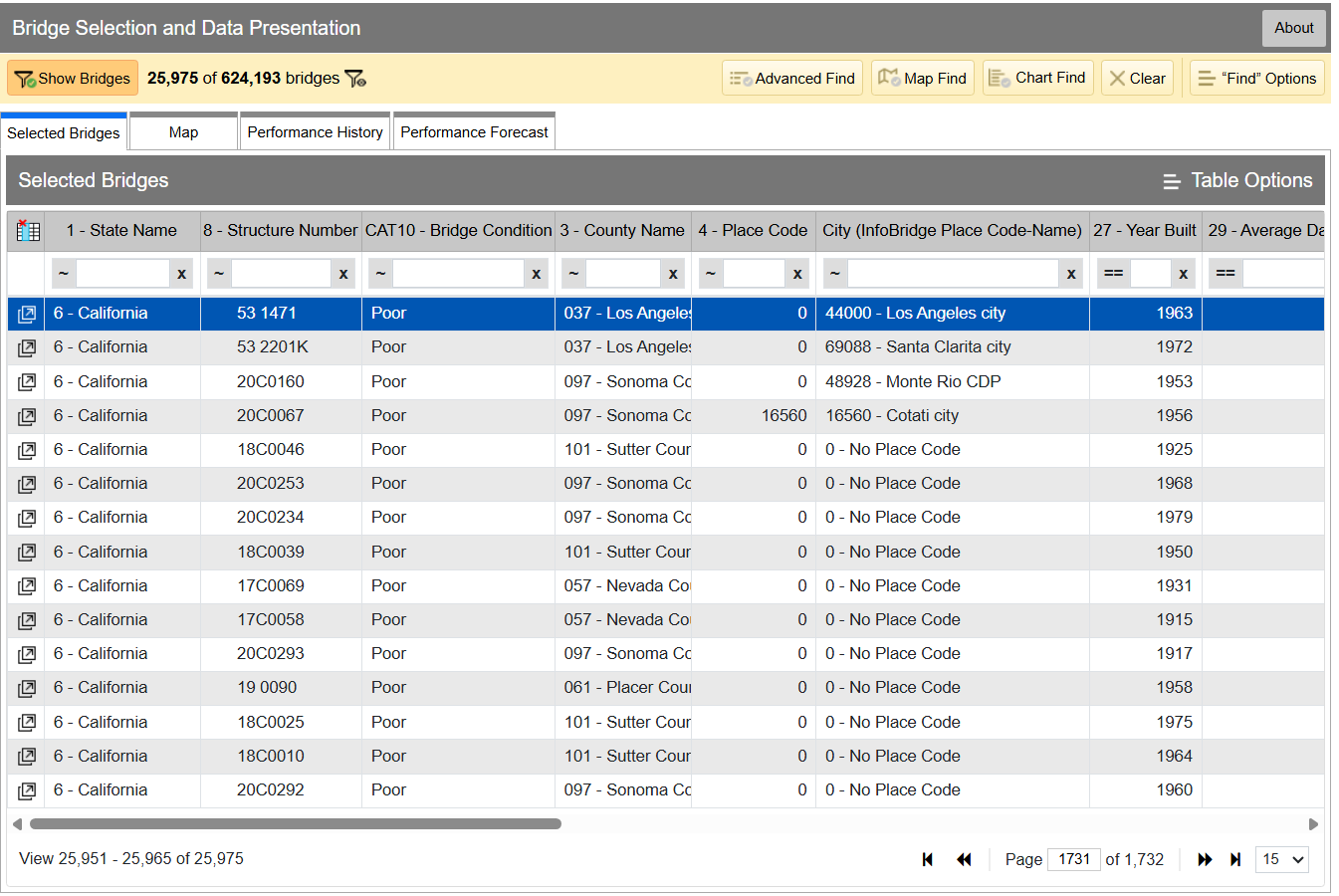
InfoBridge quickly lets you sort through data by all kinds of different factors. If you’re looking for the worst bridges in town, it’s easy to flick through CAT10 – BRIDGE CONDITION to see which bridges as listed as Good, Fair, or Poor. Bridges are rated on the condition of their deck, superstructure, and substructure, and the lowest scoring section influences which bin the bridge lands in, as per federal code—specifically, 23 CFR 490 Subpart D. Credit: InfoBridge screenshot

You can drill down into the data yourself if you desire. Within the Department of Transport, the Federal Highway Administration maintains LTBP InfoBridge, a database of information on bridges all across the country. It was developed by the Long Term Bridge Performance program, because the goal of the project is to understand how these structures hold up and perform over the decades. The database is publicly accessible, and serves as a portal for all the available data and statistics on how US bridges are doing. It hopes to enable everyone from state and federal authorities, to university students, faculty, and other researchers, to dive into bridge data and visualize and understand it better.

Data available is from a wide number of sources, including the National Bridge Inventory and National Bridge Element datasets, as well as climatic data collected from NASA’s MERRA-2 database. There’s also construction and design data sourced by the LTBP program, along with non-destructive evaluations that have been carried out. Data from various other special projects is available too, such as from Federal Highway Administration projects investigating timber bridges, steel weathering, and the use of ultra-high performance concrete structures.

Just glancing at the Vincent Thomas bridge won’t tell you how the structure is doing. Credit: The Port of Authority, CC BY-SA 3.0

If you have a particular bridge of interest, it’s easy to get a quick break down of how it’s doing. For example, you might like to know about the Vincent Thomas Bridge, in Los Angeles, California: National Bridge Inventory number 53 1471. It links San Pedro with Terminal Island, and is a suspension bridge with a total length of 6,060 feet and a longest span of 1,500 feet. Built in 1963, we can see from the data alone that it’s now showing its age.

The bridge condition is listed as “Poor,” and if we dive deeper into the National Bridge Elements data, we can see why. The health indexes of the deck, substructure, and superstructure have all been trending down in recent years as the bridge’s age has increased, with a particular drop off from 2019 or so. In particular, the steel cables and girders on the bridge have been showing their age, and the concrete columns supporting the bridge have been similarly degrading. The deck, too, is in need of repair, with the California Department of Transport recently dedicating some $706 million to replace it ahead of the 2028 Olympic Games.
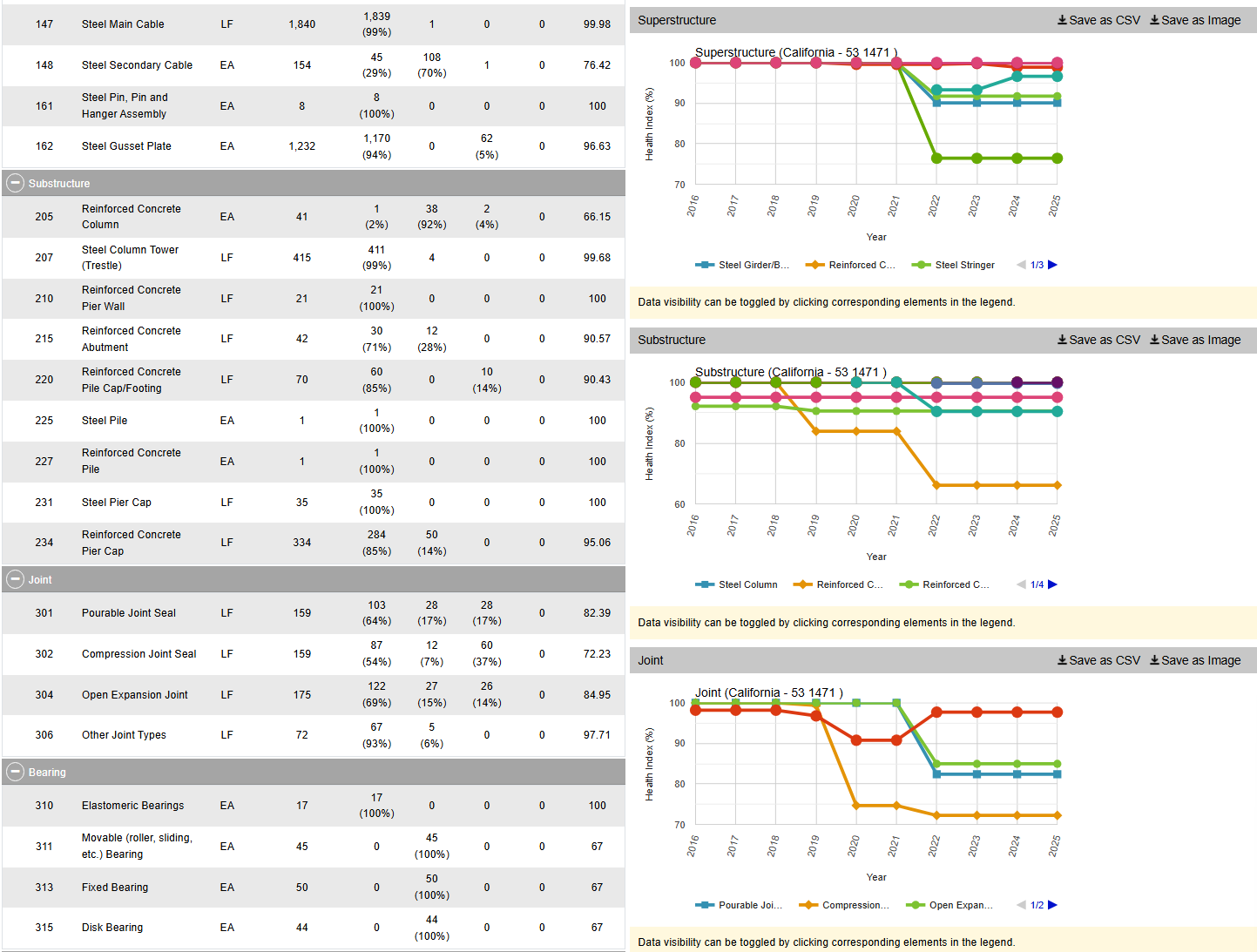
However, InfoBridge will let you drill down into detailed reports on the bridge conditions, down to a level which indicates which parts of the bridge are most in need of maintenance, repair, or replacement. Credit: Screenshot, InfoBridge

InfoBridge also offers condition forecasts for many bridges across the country. For example, the 24th Street Bridge over Rio Linda Creek is currently listed as being in “Good” condition. Current forecasts show that the deck and superstructure is expected to be in much poorer shape somewhere between 2035 and 2055, while the substructure is expected to hang on in good shape for a bit longer.
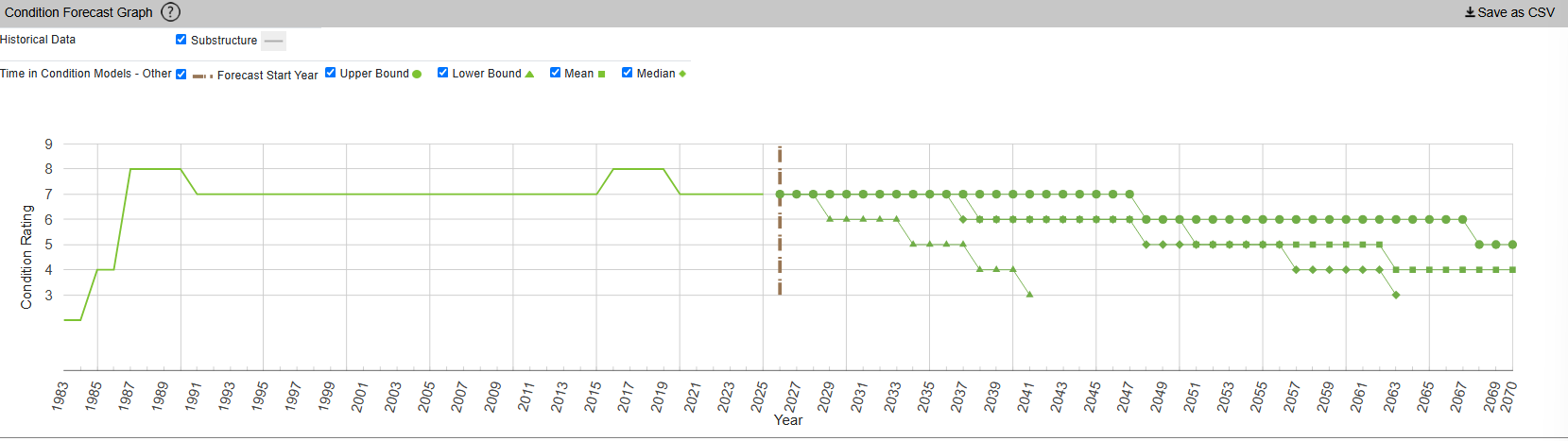
The Long Term Bridge Performance Program has developed a variety of models—base, survival, and machine-learning—to predict bridge condition over time. The aim is to guide maintenance efforts over time and allow for better planning. Credit: InfoBridge, screenshot

You might think that you’d have to query a government department and delve deep into some dusty records room to learn about the condition of your local bridges. Instead, thanks to the efforts of diligent civil servants, you can instead access all the rich inspection data you like from the comfort of your own web browser. It’s not just good for citizen oversight, either. It aids local authorities and bridge owners in making the right decisions, by putting the necessary data right at their fingertips.

It also creates a certain level of accountability—having the data available means there’s little room for anyone to make excuses that they were unaware of a bridge’s condition prior to something going wrong. Ultimately, it’s just one arm of a project that hopes to take US bridges safely long into the future.

Featured image: “Brooklyn Bridge – New York City” by [Simone Roda]
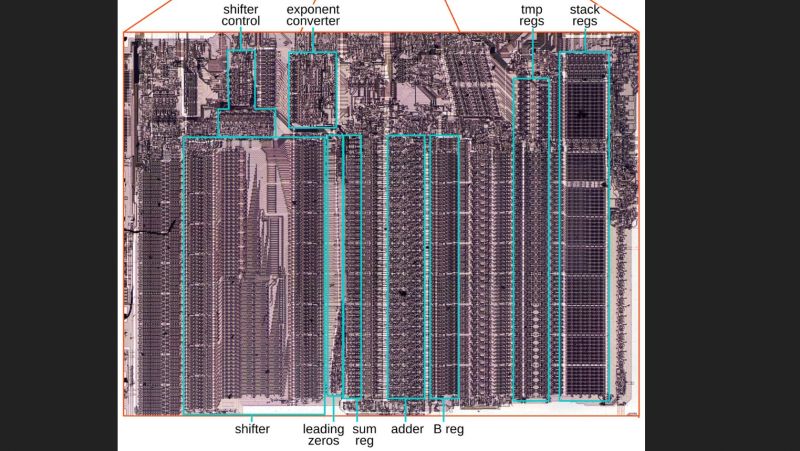
Floating-Point Addition and Subtraction on Intel’s 8087

Although you can do basic floating point format operations like addition and subtraction just fine on any CPU, having specialized hardware for it can provide a significant speed boost. Here Intel’s 8087 was the first mainstream floating-point coprocessor to provide this option to a wide audience, with [Ken Shirriff] recently reverse-engineering using an 8087 die how these basic operations were implemented.

The real-world speed-up of even simple operations like adding two floating point numbers compared to the 8086 CPU was on the order of a hundred times, which is very relevant the moment you start doing interesting things with spreadsheets, not to mention rendering 3D scenes in CAD software or even games.

As always, the devil is in the details, with sneaky infinities and edge cases also providing the biggest potential for speed-ups in dedicated silicon, along with the large circuitry spent on the shifter. With floating point values being very much about aligning values with shifting by a number of bits, this circuitry along with the detecting of over- and underflows is the key element why the 8087 and its successors were so crucial in making floating-point operations at all feasible in PC applications.

How this shifting works in theory is detailed in the article by [Ken], along with how the 8087 implements this in its circuits. Naturally, a large part of this is implemented in microcode, the listing for which is also provided. From this it’s quite clear how what seems like a simple set of operations is actually quite complex, making even the now much maligned x87 ISA an improvement over doing it all in integer-based software.

Charlotte’s New Runway Gets A Digital Twin

The first viable powered aircraft predated the first proper runway by two decades. While it’s entirely possible to launch some planes from austere dirt or grass strips, the aviation world eventually realized that aircraft would be better off launching from a flat, paved surface.

Over the years, paving technology has gradually improved in the aviation world as it has for roads and highways. Now, there’s a project being built in Charlotte with new digital features that hopes to push the state of the art of runways even further.

Twinsies

Charlotte Douglas International Airport (CLT) serves the city of Charlotte, North Carolina. It’s by no means the most famous airport in the United States; it wouldn’t make the top 10 in notoriety despite being the 11th busiest in the country).. Still, it serves as a major hub for American Airlines, and has three operating runways that are interesting for the fact that they are all laid out parallel to each other.

Much of the work will involve embedding strain gauges in the runway to monitor how loads affect the structure when the runway is in use. Credit: CLT press release

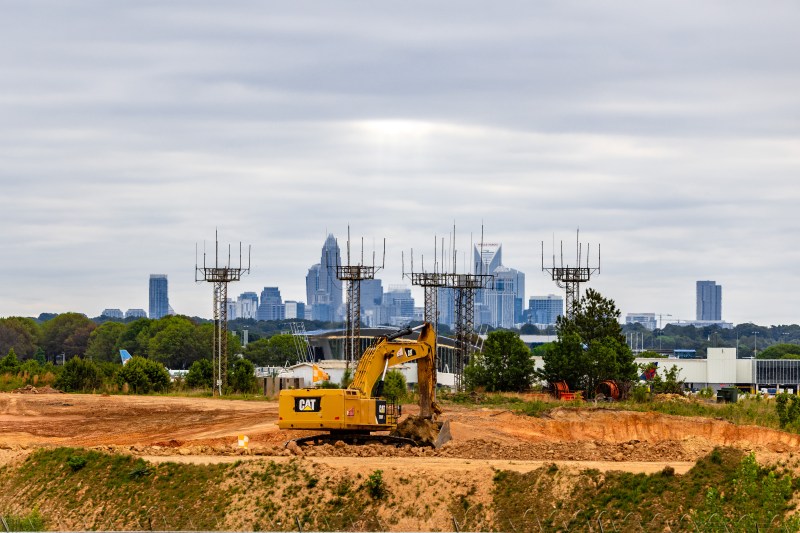
The airport’s major grand project of late has been the installation of its fourth parallel runway, with the official ground breaking taking place in June 2023. The hope is that the new 10,000 foot runway will add significant capacity for both arrivals and departures to keep the airport competitive while also adding resilience in difficult operational conditions. As the new runway is built, the existing runways have been renamed to 19R/1L, 19L/1R, and 18/36 respectively. The fourth runway will wear the designation 19C/1C.

The new Fourth Parallel Runway, as it is otherwise currently known, will be unique for its “smart runway” features. Unlike a smart fridge, smart oven, or smart bulb, it doesn’t just mean that the runway will have a pointless and annoying WiFi connection and dodgy smartphone app. Instead, it’s all about sensing and telemetry, which is intended to create a better understanding of the runway and its performance and state over time.

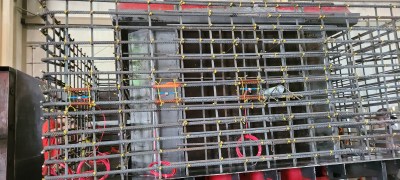
The strain gauges, seen here assembled on rebar, are to be embedded in the concrete itself, where they will provide the most useful readings. However, this does mean that the sensors will not be practical to maintain or repair over time. Their expected lifetime is approximately ten years. Credit: CLT press release

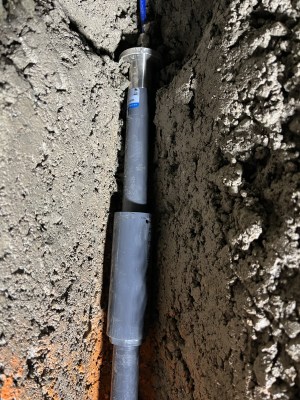
During construction, over 2,000 sensors will be installed in the 18-inch deep concrete being poured to lay out the Fourth Parallel Runway. The sensors in question will be used to measure everything from engineering basics like stress and strain, as well as tracking factors like moisture ingress, settlement, friction, and the presence of snow and ice.

The sensors are no different from those that have been deployed on highway bridges and interstates previously for similar purposes. However, this will mark the first time that a US runway has been similarly instrumented in such a way, such that the airport can create a “digital twin” of the runway.

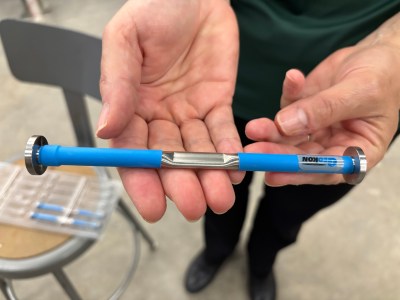
Jointmeters will also be installed in the runway to measure the behaviour of expansion joints in the runway. Credit: CLT press release

This is effectively a digital model that is fed by the sensor data and helps authorities determine the condition of the runway, both from an engineering and operational standpoint. Moisture, snow, and ice sensors can be used to guide the employment of deicing resources and what measures to take on the ground, while monitoring the stress and strain on the runway will guide maintenance decisions over the runway’s lifetime. The latter in particular will provide a very clear idea of how aircraft operations are impacting the very structure of the runway itself. The hope is that this data will be a boon for implementing predictive maintenance. In a busy airport, preventing a time-consuming runway shutdown with a little well-placed maintenance could save huge amounts of money by preventing or limiting the number of flight cancellations, to say nothing of the reduced frustrations for travellers passing through.

Of course, the problem with embedding sensors in 18 inches of concrete is that it’s not particularly easy to get at them for service or replacement purposes. The runway’s sensor system is slated for an expected life of 10 years, during which time data will be collected to better understand the runway and its performance and robustness over time. The hope is that by learning exactly what’s going on in the concrete itself, engineering lessons could be learned on how better to build runways in future. It could lead to new guidelines on concrete mixes, thickness, density, or other factors that influence how long the runway holds up under heavy use by commercial airlines. Despite the limited sensor lifetime, though, the runway itself is expected to last much longer, with the pavement itself slated for 30 to 40 years of use.

Embedding sensors into runways won’t always be a seen as a necessity. It’s perfectly possible to build a runway that doesn’t have telemetry, and just exists as a big old slab of concrete that takes a pounding from air traffic on the regular. However, where a greater understanding of the pavement is desirable, instrumentation can help. Time will tell if the lessons learned from the new CLT runway prove useful enough to justify the investment—but it’s easy to imagine that it would only take a couple of runway shutdowns to be avoided to pay for the $6.5 million project cost. Time will tell!

So You Want To Make Your SDR Work On Other Frequencies

Perhaps the most exciting news of the past few weeks in the world of hardware hacking has been the unlocking of hidden SDR functionality in the Wi-Fi radios found on Espressif ESP32 microcontrollers. They can be used as both transmit and receive SDRs, and given that it’s early days for this hack we expect that great things are yet to come.

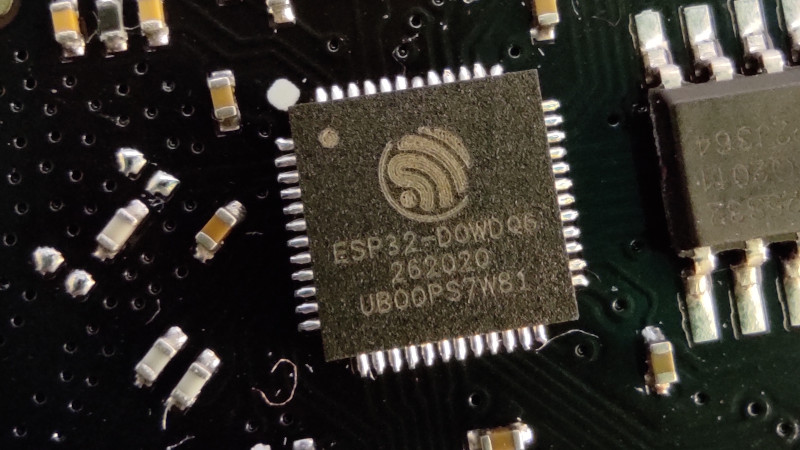
There’s one snag though, despite speculation that they might be dragged down to much lower frequencies, as far as we know they’re only proven to work around the Wi-Fi frequencies. Though the reality may be wider we’ll take that for a 2.4 GHz part as a 100 MHz slice from 2.4 GHz to 2.5 GHz. Plenty of possibilities there, and they might even work down to 1.8 GHz, but there would be so much more to do if it could work elsewhere in the spectrum. So it’s time to look at the converter, a tried and tested old way to make a radio work on a different frequency.

A Lesson From Analogue Receivers

TV tuner front end block diagram. Derived from Chetvorno (Own work) [CC0], via Wikimedia Commons
TV tuner front end block diagram. Derived from Chetvorno (Own work) [CC0], via Wikimedia Commons.
I hope most of you will be familiar with what happens when you mix two frequencies; the resulting spectrum contains both their sum, and their difference. This was the mechanism behind the tuning dial on your analogue radio or TV, the dial moved an oscillator, and a sensitive circuit tuned to a so-called intermediate frequency would filter out the difference frequency between the oscillator and the station you wanted. A few years ago we had a deep dive into the UHF hackers playground of an analogue TV tuner, where we examined this in depth.

A converter uses exactly this principle. The antenna frequency range is mixed with the output of a fixed oscillator whose frequency is chosen so that their difference represents the frequency band of your radio. THus tuning your radio tunes across the output of your mixer, which is the same as tuning across the antenna frequency range. For a numerical example, if the ESP32 receives from 2.4 GHz to 2.5 GHz, a mixer on its input with a 2 GHz local oscillator would allow the ESP32’s receiver to pick up the 400 MHz to 500 MHz band. In practice the circuit requires filters for both input and output to keep out-of-band stuff from going where it shouldn’t, but it really is that simple. Best of all, with appropriate handling of power and amplification, it works for transmitters too, and such a device is called a transverter.

Towards An Achievable Receive Converter

To make a practical converter then, we need an input filter, a mixer, an output filter, and a local oscillator. The filters are often off-the-shelf parts and needn’t be too expensive, the mixer can be as simple as a fast Schottlky diode, and the local oscillator could even in this case be another ESP32, they’re that cheap. You can add amplifiers if you want and what I am about to describe is a somewhat janky receive converter, but it can be made to work.

The Filter

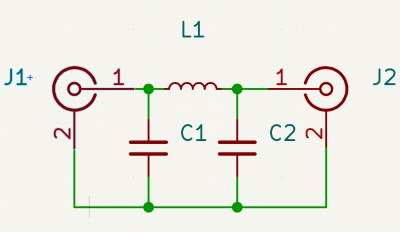
A very simple Pi network low pass filter

In most cases such a converter will be intended to receive signals lower than the ESSP32’s range, so let’s assume you’re looking somewhere from HF through to VHF. The input filter has to reject anything above your maximum input frequency and stop any stray local oscillator leakage to the antenna, which most of you will identify as a low-pass filter. These can be bought off the shelf for a price, but are easy enough to make for yourself.

The most common low pass filter is often referred to as a Pi network because its circuit superficially resembles a Greek letter Pi, and takes the form of an inductor in the signal path with a capacitor to ground either side of it. If you know your maths you can calculate the values for yourself, but if you don’t there are many online Pi network calculators to help you. Constructing a Pi network at these frequencies is straightforward enough.

For the output filter, you need something that rejects the local oscillator frequency as much as possible, and passes the ESP32 receive range. Here you’re in luck, because the Wi-Fi hardware industry needs exactly those filters, so they can be had from Mouser or Digi-Key for cheap. I’m not going to specify a particular part, but I’d like to point you at the TDK Wi-Fi filter range and invite you to pick one with the bandwidth you need.

The Local Oscillator

Your local oscillator for an ESP32 working at much lower frequencies is likely to be around or above 2 GHz. Back in the day you would have used a crystal oscillator and multiplier circuits, if you like you can buy an expensive PLL oscillator module, but your simplest and probably cheapest method is to use another ESP32, now that it can be used as an SDR transmitter. Program it to output a single carrier on your desired frequency, dial down the output level, and there you have it, a 2 GHz local oscillator for a dollar or two.

The Mixer

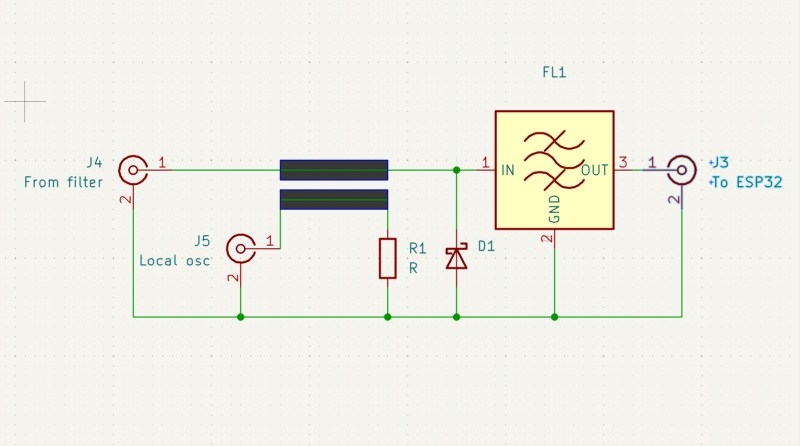
Yet again you can buy an off the shelf mixer as a module, though one for a 2.4 GHz output will be expensive. Happily there’s a simple circuit which can do the job, and it uses a diode as a non-linear element fed with both antenna and local oscillator signals. At these frequencies you are looking for a very fast small-signal Schottky diode with as low a capacitance as you can find, and happily such parts are available from multiple manufacturers at cent rather than dollar prices. The basic circuit is shown below, and as you can see it’s quite simple.

The circuit of a simple unbalanced diode mixer with a bandpass filter on its output.

In the circuit above the diode is your Schottky device, the input low pass filter isn’t shown, and the output filter is an off-the-shelf Wi-Fi bandpass filter. The two thick lines represent a stripline coupler, and they are simply two parallel PCB traces side by side over a groundplane. Their size should ideally be calculated to present the right impedance, often 50 ohms which is also the value of R1, but in practice the jankiest solutions can work here. With an ESP32 as a local oscillator I would hazard a guess that laying the trace on the PCB under the module’s antenna with the power turned down would be enough. I may earn the scorn of some of my peers, but I have a long history of RF bodging and I think it might just work.

Making It Transmit

The same technique as above works for shifting the ESP32’s transmit output down to the desired frequency, but there’s a catch. Even the modest output from an ESP32 can be enough to damage or overload parts designed for receivers, so you have two choices. Pick transmit-appropriate parts, or dial back the power to a low level, and amplify it at the lower frequency.

By Now, You Should Be Able To Bodge A Converter

The information above isn’t a ready-to-go design for a receive converter to get your ESP32 listening to lower frequencies, but it should give you all the signposts you need to get there. People have built converters for the RTL-SDR for ages now, so you could pilfer ideas there too. If you build a downconverter, for transmit or receive or both, let us know!

At a superconference about a decade ago there was a talk about RF construction techniques which will save you a lot of pain, and with luck such a simple circuit should be within your grasp. Good luck.

Pager Converted to Meshtastic Node

Text messaging has been around on cellular networks en masse for around three decades now. It’s so common that it’s difficult to remember a time without it. Its two-way quick messaging is incredibly useful, but for even simpler communications there’s a one-way system that predates it. Pagers are able to receive simple messages, but outside of hospitals are rarely used nowadays. Eventually some added in two-way communications like this Motorola T900, but they’re still mostly obsolete. That’s why [zindustries87] converted it to operate on the Meshtastic network instead.

To get this pager working, a lot of reverse engineering was needed. There is essentially no documentation on the chips in these devices, so the screen and keyboard both were reverse-engineered to work with other hardware. In this case, [zindustries87] found space for a Heltec V4 with an ESP32-S3, a popular Meshtastic node with a small form factor. Some programming was needed to get everything communicating together, but from the looks of things it seems to have basic functionality.

[zindustries87] points out that this is a prototype, and didn’t know going in if the keyboard and screen could be brought back to life, or if the other hardware would fit in the case. But with it working on this level, they plan to add a number of other features in and possibly build a drop-in PCB replacement for these devices. They were once fairly popular so there are plenty around, and they’re a good form factor for a dedicated Meshtastic device that doesn’t need a smartphone to work. The only other ways of bringing pagers back to life involve bootstrapping an entire pager network, and Meshtastic is a bit more useful than that now.

❌