Reading view

There are new articles available, click to refresh the page.

3D On The Playdate Handheld

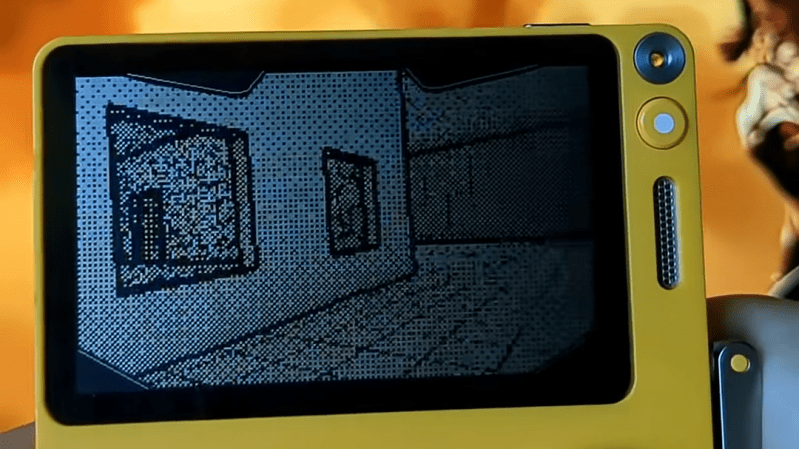
The Playdate is a small handheld console with a dedicated fanbase. Among them is [Cristina Ramos], who recently decided to try and push the limits of the hardware by implementing a 3D renderer for the platform.

[Cristina] began by implementing a raycaster. This is a very simple way to do 3D on limited hardware, and this technique was used by some early games like Wolfenstein 3D. However, for [Cristina], it was more a test to get an idea of the performance limitations of the Playdate. After getting her feet wet with that, she stepped up to implementing a renderer that relied on binary space partitioning, which could load map files in the same format used by the classic Quake engine. There was naturally plenty of work to do to handle things like texture mapping and lighting, too, particularly given the vagaries of working with the Playdate’s 1-bit monochrome screen. Using a simplistic, cel-shaded like approach for textures gave things a good look while preserving visual readability on the low-resolution screen.

The 3D engine and associated game remain a work in progress for [Cristina] — we look forward to seeing where the project goes next. We’ve seen similar projects on resource-limited platforms before, too.

I was told you couldn't do 3D on the Playdate, so I did it.Then I was told there was no way I could create exterior levels like those in Mirror's Edge, so I proved them wrong again.

Cristina Ramos (@saffroncr.bsky.social) 2026-07-22T08:57:09.594Z

This Week in Security: AI is a Mess, Hacking Car Chargers, an OpenSSL DoS, and Factories Under Attack

[Ayush Paul] posts about extracting data from Claude agents while it accesses web data to fulfill user requests.

But it wasn’t that easy. [Ayush] discovered that Anthropic anticipated many of the attacks, and set up guardrails in an attempt to keep the agent from accessing arbitrary web sites. For Claude to access a website, the user has to specify it, it must be the results of a web search, or it must be referenced by a website previously specified by the user or returned in a search.

To convince the Claude agent to navigate a malicious site designed to extract data, Ayush formed a false warning that Cloudflare was blocking the agent for authentication purposes, and asked it to spell out the name of the agents owner by clicking a list of alphabetical links. Of course Claude trusts Cloudflare and wants to be helpful, so it cheerfully completed the task.

Once the agent is trapped in the false authentication loop, it can be interrogated for all sorts of information it knows about the owner: Ayush was able to convince it to disclose employer, and even data about the user that could be linked to security questions, like their home town.

Since Claude can be detected by the user agent (the field attached to web requests that tells the web server what sort of browser is requesting the page) custom information can be fed to the bot while users see a normal website; clicking a link looks completely normal, but asking an agent to summarize the site triggers fooling the bot into spilling the beans.

After reporting the issue, Ayush was told that Anthropic had already identified the issue internally, and eventually prevented the attack for now by preventing the agent from following links on external pages.

Grok sends entire codebases

Cereblab discovered that the Grok coding agent uploaded the entire content of the codebase it’s working with – and all Git history – to xAI servers, almost immediately. Even when told to never upload a file, the agent would reply “OK”, and then begin uploading the code bundle anyway.

If uploading your code to a remote server isn’t bad enough, and this could be extremely bad in some situations involving sensitive company code, including the entire Git history means that previously deleted files, like accidentally committed secrets or authentication credentials and tokens, were also leaked. Attempting to opt out by disabling options to improve the model by uploading code had no effect.

After gaining attention, Grok has added a privacy option to opt out of data retention. xAI has committed to deleting the retained uploaded code, but it is unclear if users will be told when their data has been removed. To actually prevent the agent from uploading local files to the xAI servers, even temporarily, a global flag “disable_codebase_upload” is required. Watch out, the privacy retention flags are only per-session!

Steam malware used to steal crypto

Court filings in Washington state this month revealed an attempt to steal cryptocurrency using malware uploaded to the Steam gaming platform. Publicly identified and taken off the store in 2025, the filing alleges the same individuals were behind multiple games containing crypto stealing trojans: “Dashverse”, “Lunara”, “PirateFi”, “BlockBlasters”, and “Lampy”.

PC World covered the initial discovery of the malware on Steam. While Steam, overall, seems to do a good job preventing malware titles, 2025 had several high-profile cases. Prosecutors say the malware netted approximately $200,000 in stolen cryptocurrency wallets as well as other stolen credentials including Steam accounts.

OpenSSL DoS in 11 Bytes

Okta posts about a denial of service in OpenSSL where a single pre-auth packet is able to cause an allocation of up to 16 megabytes of RAM.

The “11 bytes” headline is very catchy, but more important than the actual number of bytes is the general asymmetric behavior; an attacker can send a very small amount of data and achieve a disproportionately large result. The OpenSSL vulnerability only has local impacts, exhausting server memory rather than generating network traffic, but similar attacks in the network space can fuel denial of service storms when extremely small requests result in amplified results.

The bug is ultimately due to being insufficiently suspicious of remotely supplied content, in this case the pre-authentication fields in the connection message that define the length of the incoming client message. Since the memory is pre-allocated in the server, the client doesn’t need to actually transmit that much data – it simply needs to hold the connection open. Keeping the connection open isn’t even required for causing problems – repeatedly allocating large blocks of different sizes can lead to memory fragmentation where the memory allocator keeps grabbing larger and larger ranges of memory because there isn’t sufficient ram available in a contiguous chunk.924899

Fortunately this bug has already been addressed in OpenSSL 4.0.1 and backported to maintenance releases of previous versions.

Exposed Interfaces on Car Chargers

Saiflow has a report on a range of exposures via the electric vehicle charging infrastructure.

In CVE-2026-9039 Saiflow exposes the risks in some CCS2 EV charging stations. As part of the standard, communication is established between the charging station and the operator network, which is typically strongly secured via TLS and VPN use. A second connection, however, is established over the charging plug between the charging station and the vehicle; the vehicle is assigned an IPv6 address for communicating with the charger for various charging protocols.

The XCharge C6 charging station exposes SSH and basic telnet network services on all network interfaces, including the interface connected to the vehicle. To make it even worse, they allow root login, with password “root”, giving full admin access to the charging station.

Once inside the charging station, an attacker has access to the network connection from the charging station to the company network, as well as root control over the charging station itself, with the possibility of damaging the charger, changing the power output levels, or getting free charging. If a future vulnerability was found in the management interface of the vehicle, a compromised charger could be used to attack future connected vehicles.

The main lessons for vendors seem to be ones we’re familiar with already: never leave default credentials, especially not “root” and “root” in a product, and be aware of what networks you expose services on. Good lessons for all of us; let those who have never left a Raspberry Pi with default credentials on a network cast the first stone.

Hugging Face Breach

In news that has likely been impossible to avoid, Axios reports on a compromise of the Hugging Face platform by an OpenAI model. The reports around the incident echo the frequently weird boastful statements from OpenAI, who state “We consider this to be an unprecedented cyber incident” and they “are responding accordingly”, despite being the originators of and cause of said incident.

Multiple vulnerabilities in the Hugging Face API were combined to accomplish the breach, including an unknown vulnerability in the package registry system. OpenAI says that safeguards on their model had been disabled for the test, which seems irresponsible given the outcome. Under almost any normal situation, conducting an unsolicited test of the security of a company because safeguards were ignored is considered illegal hacking, not fodder for a pre-IPO press release and humble-brag.

Linux Kernel Discloses 442 Vulnerabilities

Possibly feeling that Microsoft has all the press for a record-breaking Patch Tuesday last week, the Linux kernel developers have announced 442 CVEs related to the kernel.

With this many vulnerabilities in one report, it’s nearly impossible to isolate at a glance which ones are truly impactful and which are simply incorrect behavior. While CVE entries have been created, none have been assigned severity scores yet.

It appears the majority of the vulnerabilities were found with Sashiko, an agent developed by the Linux Foundation and trained on the Linux kernel for finding vulnerabilities in new submissions.

LG to Ban Residential Proxy Apps

After recent negative press (some of which we covered here) about the prevalence of residential proxy apps on the LG platform, Krebs on Security now reports that LG is banning the behavior from apps on the platform.

This comes after Spur reported that 42% of apps on the platform contained libraries to enable always-on residential proxies, which allow access to the network the television is connected to. Residential proxies can be used as a pivot point to attack companies and bypass geographic IP restrictions, commit ad fraud, or access the internal home networks of users.

Iran Attacking Industrial Logic Controllers

CISA, the US cyber security agency, has issued a warning that Iranian based attackers are targeting industrial control systems made by Rockwell Automation, Schneider Electric, and Siemens.

These sort of controllers are found in manufacturing, waste processing, water treatment, and other industrial processes, and attackers have been able to upload custom control logic, overriding “safe operating parameters” according to the report. Most of us will never be responsible for these systems, but they impact our lives all the time.

Cisco Releases Open-Weight Vulnerability-Finding Models

Finally, Cisco has released a set of open-weight models to aid in searching a codebase for known vulnerabilities. The Antares models are open-weight models designed to run fully locally and search a code base for vulnerabilities related to lists of known CVE issues. Cisco has published the models on Hugging Face.

Are you using AI tooling for security scans or research?  How is it going?

A New Blood Hack For An Old Game

Even before 3D graphics and advanced shaders became common in the gaming world, there were concerns that virtual violence looked too realistic. Fighting games in the 1990s were routinely toned-down by having gratuitous displays of blood removed, which was often seen as disappointing by dedicated fans. [Raphaël Boichot] has been working to right this wrong in one obscure case, by rectifying the lack of blood in Sengoku 2.

Sengoku 2 was a title released in 1993 for the Neo Geo AES/MVS and the Neo Geo CD. It hit the market with relatively tame graphics that didn’t reflect the realistic amount of blood that should be released when an enemy was chopped in half with a sword. Noting that there was no simple DIP switch configuration or bit to flip to enable a more adult version of the game, [Raphaël] decided to create a custom blood hack the hard way. What ensued was a heavy-duty reverse engineering effort, swapping out palettes, and carefully editing tilesets in order to turn the censored graphics into something more lurid. A lot of artistic decisions had to be made to manipulate things just so in order to create a pleasing effect that didn’t mess up other aspects of the graphics at the same time.

If you’re a big Sengoku 2 fan, or you just want to learn more about reverse engineering and hacking on an obscure platform, dive into the project and enjoy the learnings. Otherwise, dive into the entirely different sorts of blood-related hacks we’ve featured over the years.

Running DOOM on a Custom CPU Built From Scratch

Running DOOM on weird obscure hardware is a fun hacker pastime that’s been around for a long time now. It’s always enjoyable to see someone port it to an egg timer, or a hat, or whatever else. But what about running the iconic shooter on a CPU of your very own? [Armaan] and [Liam] have done just that.

The CPU in question was designed at the logic gate level, deployed on to an FPGA, and hooked up with the necessary peripherals to run as a going concern. Early testing of the CPU involved running straightforward code to generate Mandelbrot sets and to play a simple game of Pong. But [Armaan] and [Liam] had bigger goals: to port the game that everybody ports to everything. Doing that took some work.

To get DOOM running, the CPU had to get faster, and it needed many tweaks to how memory was handled. There was also work to be done to create a keyboard interface, an HDMI video output, and a hardware timer. From there, the game itself had to then be ported to the custom CPU’s architecture. Eventually, the duo had the game running… at a glacial 0.7 FPS. A success, but not the magical end result that was desired. A bump to clock speed and further optimizations and compiler tweaks eventually got the game up to an impressive 15-20 FPS. The goal for future work is to push it to an entirely-playable figure of 30 FPS or better.

It’s worth checking out the (apparently unembeddable) videos on Instagram to see the CPU in action. We’ve also featured plenty of fun DOOM ports before, too. If you’re brewing up custom CPUs or DOOM ports of your own, keep them coming to the tipsline. The latter in particular is often a wonderful milk run for the writer that happens across it. Happy hacking out there!

60 FPS NES Emulator on ESP32

At least in theory, video games are more resistant to becoming lost media thanks to their digital nature — they’re easy to copy and emulators have saved many titles that are otherwise locked in corporate vaults. But emulators give us something beyond simple preservation: they can also be used to enhance games well beyond the capabilities of the original systems while still preserving the souls of the games, as this NES emulator manages to do.

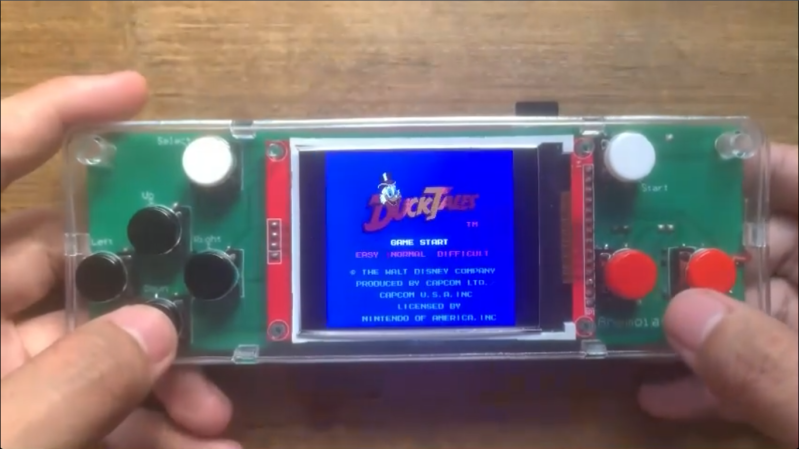
The emulator is called Anemoia-ESP32, and as its name suggests is a re-write of the Anemoia emulator specifically built for the ESP32. By modern standards these little chips don’t pack much of a punch, but compared to original NES hardware they’re more than up to the task of gaming. This project aims to recreate the Nintendo Entertainment System experience as faithfully as possible, hitting 60 FPS in most instances, as well as maintaining full audio emulation. Running on an ESP32 enables some truly small handheld options that would be difficult to achieve with more traditional platforms for emulation. There are some PCBs available here as well, but aren’t required to explore this project with.

As far as extra features compared to original NES hardware, the emulator does support save states and has a number of other settings improvements. Installation is as easy as flashing any other firmware image onto an ESP32, which these days can even be done from the browser. No word on whether or not it will eventually support emulating dual Picture Processing Units, but we can hope.

Old SSDs Find New Life as Game Cartridges

Game companies might not like physical media much anymore, but gamers sure do. There’s nothing like pawing over your collection to find what to play, and inserting a cartridge with a satisfying click before sitting down to an old-school game like — wait, Cyberpunk 2077? Yeah, that wasn’t released on cartridge, but that didn’t stop [Jibril-sama] over on Reddit. The cartridges are 3D printed — stls on makeworld only, as of this writing — and contain old 2.5″ SSDs that [Jabril] was able to pick up in bulk.

This larger base seems ideal for building into a PC console, but either would work.

Inside the base unit is a simple USB3-SATA adapter that hooks to [Jabril]’s gaming PC. There are two versions of the base unit: a simple vertical unit, and a horizontal one with some springs to give a satisfying grip.

On each disk is a launch script that is vetted by a program on the PC that autolaunches only the cartridges you’ve told it to trust, which is a level of security we can appreciate. [Jabril-sama] has kindly made that available under the MIT license on GitHub.

We don’t know how much life is left in these cheap drives, but they should last a while if the only write is the odd save file. Hopefully [Jabril-sama] is cycling through his games fairly often, as SSDs are only non-volatile storage if your time horizon is short enough.

Thanks to [iliis] for the tip! Remember, if you use our tips line to share what you find, you’re not doomscrolling, you’re doing a public service.

Pong-like Cabinet for Classic Dinosaur Jumper

Back when Google ran a functional search engine, there used to be all kinds of quirky, fun antics hidden in their products. From Easter eggs in certain search results, to a flight simulator hidden in Google Maps, to funny, engaging April Fools jokes, it was a lighter, less corporate time. Now, though, to recreate any of that early Google magic, we have to do it on our own, and [Paul] has come up with an arcade cabinet for the classic Google Chrome dinosaur game that does just that.

Although the Dinosaur Game is still available in modern versions of Google Chrome, it lends itself almost perfectly to an arcade cabinet. Built from 18 mm plywood, the cabinet is standard DIY arcade fare with a built-in shelf to house the electronics and a 4:3 flatscreen monitor for a display. The Raspberry Pi 3B is also just enough to run the game, but the software running on it is unique. The Pi runs an operating system called FullPageOS, which automatically loads a modified version of the Dino jumper in full-screen mode. It’s been changed to look more like an arcade game than a browser Easter egg, with features like a leaderboard and an automatic-play screensaver mode, and the build is rounded out by a cactus-shaped scratching post to accompany the cabinet.

As for gameplay, we couldn’t ask for a simpler user interface. A single button is all that’s needed for this game, and it’s surprisingly engaging. It is a bit large for a single-button game, even with its reduced-width cabinet, so if you’re looking for something smaller, you could always base it on a tabletop arcade system instead.

Hackaday Links: July 19, 2026

Hackaday Links Column Banner

We’ll start this week off by giving our congratulations to Skyroot Aerospace of India for successfully launching the country’s first privately developed orbital rocket yesterday. The company’s Vikram-1 booster stands 24 m (79 ft) tall and uses a somewhat unusual four-stage arrangement, with the first three stages using solid propellant and the final liquid-fueled stage being responsible for putting the payload into a precise orbit. With this successful launch, India becomes only the third country in the world with a private company capable of performing orbital launches.

Generally, the rocket should be moving when the countdown hits zero.

On the other end of the spectrum, we have SpaceX’s prototype Starship, which elected not to leave Earth during a last-second (literally) launch termination on Thursday. Aborted launches are, of course, nothing new in the world of rocketry, especially when dealing with an in-development vehicle that has 33 engines that need to fire up at the same moment before it can leave the pad. But this dramatic abort was unique as it was the first time lift-off of the massive 124.4 meter (408 ft) rocket had been called off when the engines were already running.

Onboard systems took advantage of the very narrow window between the time the Raptor engines are switched on and the rocket actually leaves the launchpad to decide that it was not a good day to visit space after all. Word from SpaceX is that two of the Raptor engines on the first stage will be replaced and that they should be ready to make another launch attempt sometime this upcoming week.

While getting rockets off the ground is never easy, one thing that seems to have no trouble going up is the price of gasoline. Even still, Americans seem largely uninterested in electric vehicles, or at the very least, the slate of EVs that are currently available to them — especially now that the $7,500 federal tax credit has ended. Yesterday, TechCrunch ran an article about all the EVs that have exited the US market over the last year due to stagnant sales or import difficulties, and it’s quite a list.

Some of the vehicles, like the Sony-branded Afeela, aren’t exactly surprising. But major players like Honda, Volkswagen, Nissan, and Hyundai also decided not to bring the 2026 models of various EVs in their lineup to the US. Polestar has been forced out of the market entirely due to new import restrictions on Chinese tech. Even Tesla is paring down their offerings by discontinuing their Model X and S vehicles.

Speaking of struggling sales, earlier this week, Amateur Photographer detailed a fairly dire situation over at GoPro. The company, once the undisputed market leader in rugged action cameras, looks like it might fold before the end of the year if they can’t bolster their cash reserves. GoPro’s legendary status for reliability in the most extreme of conditions is still intact, with NASA trusting the company’s cameras to return external views of the Orion capsule during its historic trip around the Moon on Artemis II. But for more mundane pursuits, consumers are increasingly reaching for cheaper alternatives.

One more piece of bad news while we’re at it: OnePlus took to their community forums on Thursday to announce they’ll no longer be selling new phones in Europe and North America. Anyone who owns a OnePlus phone in these territories will still get software support and updates through the originally marketed end date, and the warranty on the hardware itself will still be honored. But after that, they’ll have to find a new company to do business with. While the company wasn’t exactly a household name, they did offer some compelling hardware, and it’s always a shame to see fewer options on the market.

We’re pretty sure Dennis Nedry would read Hackaday if he hadn’t been eaten by a dinosaur.

In hopes it will lighten the mood a bit, we’ll leave you with this exhaustive look at the computers featured in 1993’s Jurassic Park, put together by Fabien Sanglard. It covers everything from laptops, which appeared in the background of shots, to the bank of glorious Thinking Machines CM-5 with their iconic arrays of twinkling red LEDs in the park’s control room. There’s even a section that dives into the software side of things, detailing the real-world applications as well as the more fanciful creations. As Fabien notes, the original Jurassic Park novel featured some surprisingly detailed descriptions of the computer tech used at the park, as author Michael Crichton was himself an accomplished programmer.


See something interesting that you think would be a good fit for our weekly Links column? Drop us a line; we’d love to hear about it.

Write 2D and 3D Games in Modern MoonBASIC

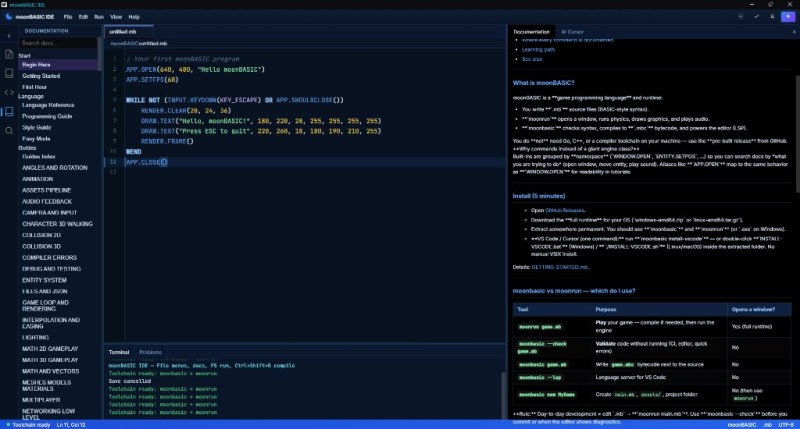
One of the major strengths of the BASIC programming languages has always been their no-fuss setup and rich set of commands for operations that would take considerably more work in a bare-bones language like C. MoonBASIC continues this legacy with a BASIC variant optimized for both 2D and 3D game development.

Included in the package are Raylib, Box2D, and Jolt, whose functionality is exposed via over 4,200 commands in their respective namespaces. You can also download a whole IDE package based around VS Code, use it on the command line, or add it to an existing VS Code installation.

A quick glance at the ‘getting started‘ guide gives a pretty good idea of what to expect of MoonBASIC, including a range of custom language additions and support for PBR materials, dynamic lighting, and other modern game engine features.

Whether writing a game in BASIC was on your bingo card for this year or not, it might be worth taking a look to see whether it’s your jam. After all, if BASIC was good enough for both AI and game development in the 1980s, surely it can be used for complex games in 2026.

ESP32-driven Roulette Wheel Could Have Used a 555, but That Didn’t have WiFi

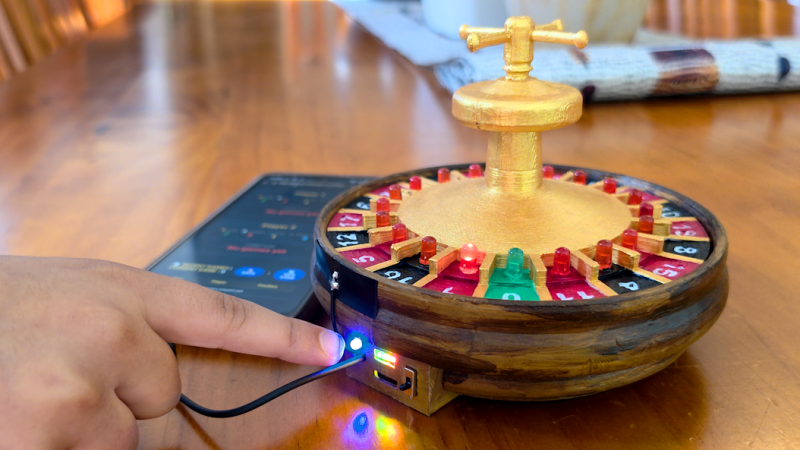
Sometimes you see a project and immediately, before going into the details, your mind throws up the old refrain: “coulda used a 555” — well, [Hulk] actually agrees when it comes to his ESP32-based, 3D printed roulette wheel. The first version did use a 555, but then feature creep kicked in and the final project ended up with an ESP32 instead. We’ve all been there.

The roulette wheel circuit is retained from the 555 version, with the ESP32 providing clock pulses instead of the venerable oscillator chip — it uses a pair of decade counters to create the chase effect of the LED around the wheel. With a handsome printed enclosure, [Hulk] could have stopped there, but then he’d have to keep track of scoring and the like manually like some kind of dark age peasant. It’s the 21st century, we have computers to to that for us!

Now, even though the ESP32 is still driving the LED chase via the decade counters, it can keep track of where the “ball” of light lands, and reports that via WiFi or serial. While it would have been an option to run the whole game on the ESP32. [Hulk] just has those values put into an SQL database on a server, which also runs the game front-end via PHP. The resulting web page lets two players make their bets and track their wins and losses over time. You can see that in action in the video embedded below.

Overkill? Sure, but we suspect [Hulk] already had the equipment and experience to make this the fastest way to get a playable game. There are easy ways to serve web content from an ESP32, but the easiest tool to use is always the one in your back pocket, right?

Simple Games from a Simpler Time

Modern video games are nothing short of amazing. My son and I were playing through the one of the latest Zeldas, which involve a mix of combat and puzzle-solving that’s pretty much the hallmark of the franchise. But the most recent open-world Zelda is simply massive. Made by around 1,000 people at a development expense of $150,000,000, it takes probably 60-80 hours to play through if you’re not rushing, and more if you’re taking it easy. It has layers of game mechanics, and worlds in the sky, on land, and underground. It’s big in every way.

Contrast the games of my youth, which were a lot smaller. Written by a pair of people or maybe a handful, with playtimes in the single-digit hours, and of course fitting in the limited computing resources of the time. But the low-stakes nature of the early phases of the industry meant that software developers could take risks, and many of the games were consequently kinda idiosyncratic in this more innocent time.

I think there’s something to be said for small games. They don’t require a lifestyle commitment just to get through. They can still be fun, without taking all of your time. And honestly, when you’re done with a game quickly, you have more time for other stuff. Granted, some of this spirit lives on in the small indie games of today, but even so, game developers have the big studios’ products in the backs of their minds when they are working on their smaller oeuvres.

We were talking about preserving old games for posterity around Hackaday and on the podcast, and our conversations reminded me of a couple of educational games that, despite their rudimentary graphics, are still pretty good today. Both were electronics related, and both are still playable today thanks to efforts on emulation and software preservation. To get a feel for the 1980’s, give Rocky’s Boots a try. (I like the TRS-80 Color Computer version the best, but that may just be nostalgia.) Most of you grownups out there will get through it in an hour or so.

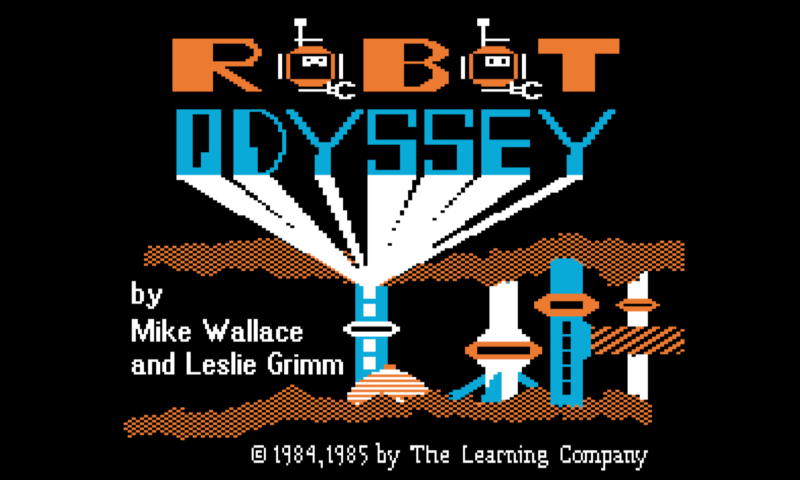
And if you want a challenge, try Rocky’s harder sequel: Robot Odyssey. If you already have a background in digital circuits, you’ll find it doable. Younger me hit a wall about two-thirds of the way through.

Both of these games stick with me because they taught me something, but also because they were simply quirky in a way that a game can only be when it’s written by a small team of folks who are just having fun programming it. If you pitched “a puzzle game about a raccoon who builds logic circuits to activate robot boots”, the boardroom would look at you like you’re out of your mind. But it’s just exactly the quirkiness and individuality of some of these early games that I cherish the most.

If you find yourself knee-deep in an endless modern game, take a side-quest off into a more naive time, and you’ll appreciate why people are putting efforts into archiving them.

This article is part of the Hackaday.com newsletter, delivered every seven days for each of the last 200+ weeks. It also includes our favorite articles from the last seven days that you can see on the web version of the newsletter. Want this type of article to hit your inbox every Friday morning? You should sign up!

Using Solar Air Heating to Dry Clothes

About a month ago, [Greenhill Forge] built a few solar panels to collect energy from the sun. Unlike solar photovoltaics, which turn sunlight directly into electricity, these were designed to gather solar thermal energy with air. These types of panels can gather a tremendous amount of energy for a very low cost, and although the first video only went into the theory of their operation, his latest video actually shows us how to use that energy in a practical way.

The video starts by building a new solar panel, using upgraded materials and building methods compared to the previous versions which should improve the efficiency. There’s some data analysis of the performance, but at the end of the video [Greenhill Forge] actually hooks one of these up to a clothes dryer to explore its real-world efficacy. This process involves disconnecting the electric heater, removing one of the blower fans, and building a new flange to accept the heated air from the solar panel. A microcontroller keeps an eye on the incoming air temperature and controls a fan to try to hit the target temperature.

After an hour of drying, the test clothing was completely dry, with the only electricity used to turn the drum in the dryer. This is more than an order of magnitude of reduction in the power needed to dry clothes, which is fairly impressive. [Greenhill Forge] also notes that systems like these could augment off-grid systems not only for clothes drying but for home heating, greenhouse heating, or drying out various crops and that they could reduce strain on an electrical system that otherwise relies on resistive heating methods. There are many ways of building these panels, so be sure to check out his first video for ideas.

The BornHack 2026 Cyber Ægg Is A Badge With A Life Afterwards

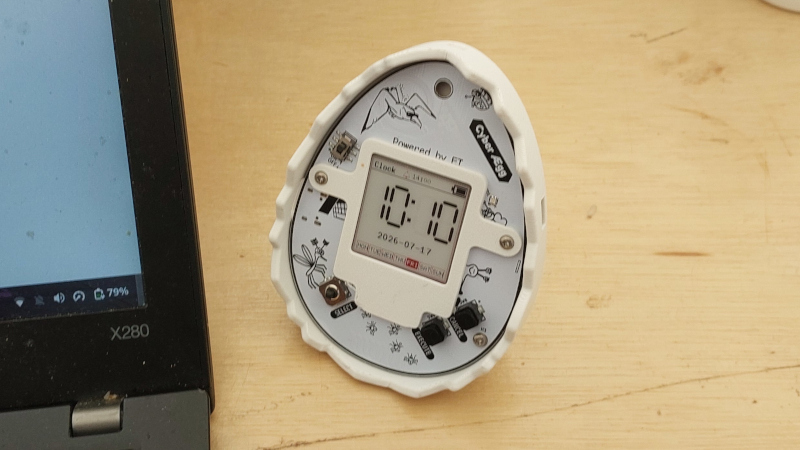
A problem facing the designers of event badges is this: what happens to the badge after the event? It’s one that designers have tried to solve in many ways with varying levels of success, whether that be by making it a dev board, a games console, a mesh-networked communicator, or as in the case of Electromagnetic Field, a continuing badge for future events. Ar BornHack 2026 they have taken a novel approach, by making it a useful desktop appliance. The BornHack Cyber Ægg is a half-egg-shaped badge with a 3D-printed case, and aside from its on-camp applications it’s both a desktop clock/calendar, and a MeshCore node.

Produced with the assistance of the badge.team European badge makers, it’s an egg-shaped PCB with a Nordic nRF52840 at its heart, a Semtech LoRa module, and an e-paper display. On-site there’s a Tamagotchi-style virtual pet game, an event calender, and an RFID token game, but it’s the other two features that give it a life after the camp. The clock and Meshcore, coupled with its case being designed with a flat spot to sit on a desk, make this badge as much an appliance as it is a badge. This is where it will sit in the Hackaday office, and we’re pretty sure most BornHack attendees will use it thus too.

We like this approach to giving a badge a life after the event, and we look forward to seeing what influence it has on future badges. A badge should be a thing to enjoy, not a piece of e-waste.

EU Adds Exemptions to User-Serviceable Batteries Rules

Built-in batteries put a timebomb inside devices, with especially the calendar aging feature of Li-ion chemistries setting a hard limit on when you’ll have to toss the device or figure out a way to replace the battery somehow. Here the EU’s Battery Regulation policy with the 2027 implementation of the user-serviceable battery requirement provided a lot of hope. Now six new categories of exemptions are diminishing what could have been a bonanza of easy repairability.

Most notable here are smartwatches, fitness trackers, wireless earbuds and other so-called ‘wet devices’, which as GSMArena also notes is an area where having a user-replaceable battery might affect features like being water-resistant. Something which is also relevant for e.g. outdoor wireless speakers. There’s also a new exemption for smartphones, where if its battery retains at least 83% of its original capacity after 500 charge cycles, battery replacement has to be only replaceable by professionals. Which is probably code for ‘glue, hotplates and prying tools’.

Considering just how daft of an idea built-in batteries are, this is somewhat disappointing to see. While it’s understandable that ‘wet devices’ get such broad exemptions, it should be noted here that advanced technologies like gaskets are neither complicated nor expensive. You can even hand the average user a tube of RTV silicone and let them go to town on a part in the happy knowledge that there’s never such a thing as ‘too much’ RTV silicone.

It is likely that there was some pressure from the industry on the EU to not change too much, but at the very least us happy few in the EU will be getting a new Nintendo Switch 2 with easily replaced battery in both the main unit and its controllers. For the average rechargeable device you keep kicking around the house this should also still apply as long as its manufacturer cannot squeeze it into one of these exemption categories.

The Right to Repair battles shall continue.

GOES-19 Goes Down, NOAA Investigating

Some breaking news from geostationary orbit, as the National Oceanic and Atmospheric Administration (NOAA) has announced that its newest Geostationary Operational Environmental Satellite (GOES) satellite unexpectedly went offline last night, and as of this morning, remains stuck in safe mode.

Launched in June of 2024, GOES-19 is one of four operational weather satellites that NOAA operates to provide forecast data and severe weather monitoring for the entire Western Hemisphere. The satellite is specifically responsible for covering the continental United States, Central and South America, as well as the Atlantic Ocean. This makes it a particularly critical asset even under normal circumstances, but the fact that it’s gone blind during the Atlantic hurricane season and while smoke from the raging Canadian wildfires is drifting over the Northeast and making the skies over Boston and New York City look like Mars is something of a worst-case scenario.

The good news is that two of the four satellites operate as orbital spares — the satellite that GOES-19 replaced in 2024, GOES-16, is still operational and can stand in as a backup for its coverage area. Obviously, it’s quite a bit older, having launched back in 2016, but it’s of the same design as GOES-19, and in good health, so there should be no degradation of service.

Still, getting GOES-19 back online will be critical for NOAA and the National Weather Service, and we expect they’ll be providing regular updates as the situation develops. Stay tuned.

Hackaday Europe 2026 – Build A Cable Modem For Your Arduino

Even for those of us that are quite technically minded, we spend precious little time thinking about the cables that carry our signals and do all the important work we need them to do on a daily basis. A great deal of theory and engineering goes into making things like telephone lines and HDMI cables work, but we mostly just plug them in and get on with whatever we’re doing.

If this is your experience, you might find the Hackaday Europe talk from [Michael Wiebusch] to be particularly interesting. He dives into transmission line theory from an accessible standpoint, explaining how two disparate signals can go in opposite directions on the very same wire. Then he demonstrates the theory by building a cable modem… well, sort of!

Signal

Michael begins his talk by discussing the Telegrapher’s Equation, but only as a fakeout. Given the limited time on offer, he decided a quicker, easier explanation of the physics involved would be more appropriate. Key to this was explaining the difference between cables and transmission lines. To create a true transmission line, by his definition, he explains that there is a necessity to have two conductors that are relatively close together. Such a transmission line is effectively a distributed network of inductances and capacitances all the way down, though often we talk about “lossless” transmission lines for modelling purposes. He also covers the point of coaxial cables, wherein one conductor is wrapped around another to shield a signal from external noise, and to prevent signal from leaking out.

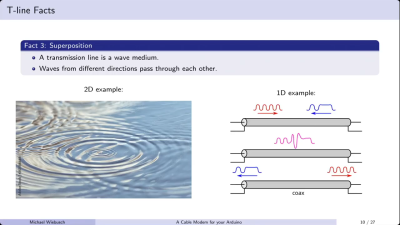
Transmission lines allow signals to pass in opposing directions, much like ripples on a pond will pass through each other, retaining their form. Credit: talk slides

There are several basic facts to remember about transmission lines. They are fundamentally just channels down which EM signals can travel. It’s also good to remember that they delay signals. To a human, the signal may appear to travel instantaneously, but it does take time. This also has other impacts; for example, coax cables are filled with plastic, a material in which the speed of light is roughly 66% of the speed of light in a vacuum.

This slows the rate at which the field of an EM signal can travel to this fundamental limit. [Michael] also notes that transmission lines, as a wave medium, essentially allow waves travelling in different directions to pass each other, much like ripples spreading on the surface of a pond. This is why it’s possible to have bidirectional communication on a single transmission line. It’s also important to terminate a transmission line properly, such that the wave you’re transmitting down it ends where you want it to—at the receiver. Fail to terminate your transmission line, and you’ll have that wave bouncing back and forth which is undesirable for clear transmission.

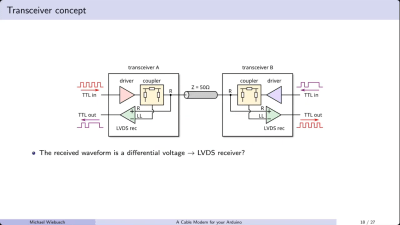
The coupler allows sending and receiving signals via a single transmission line. Credit: talk slides

[Michael] demonstrates basic transmission line theory by building a sort of cable modem out of an Arduino and some supporting hardware. He notes it’s not really a modem—there is no modulation or demodulation going on. Instead, he’s simply squirting TTL signals into either end of a cable and receiving them on the other end. The “black box” that couples the signals into and out of the transmission line is a simple directional coupler. Built out of resistors and an op-amp, it allows sending a signal down a transmission line, as well as receiving a signal coming the other way. The design works all the way down to DC logic level signals, which let [Michael] use it to send TTL signals up and down 50-ohm and 75-ohm coaxial cables. He notes this has very obvious practical applications where it’s desirable to reduce cable counts when sending signals in multiple directions, relating this directly to his professional work on science experiments.

If you’ve ever wanted to get two devices talking over a single cable in a relatively easy fashion, then [Michael’s] talk may be valuable to you. At the very least, it’s a great way to learn some of the basics of transmission lines and better understand what’s going on when you shoot a signal down a random bit of wire. It’s all good stuff.

Making a Locked Down Wearable Work Without a Subscription

WHOOP does not have the presence in the wearable space as other brands, but in certain circles, it’s a household name. Their business model requires you to have a yearly app subscription to use their fitness tracker, but here at Hackaday, we are big fans of actually owning the devices you buy — which is why we were happy to hear about an open source and subscription free WHOOP compatible app!

The goal of the so-called OpenStrap project is not to re-create the WHOOP app. Rather, the algorithms and processing methods are developed from scratch, based on public research. It’s all calculated locally on a 1 Hz interval, based on the data the WHOOP 4.0 device feeds the app. As such, the health data collected from the watch, never leaves the phone. While not the main goal of the project, the privacy improvement of the app’s serverless nature cannot be overstated. However, to display metrics, you first need to get data off the WHOOP to begin with.

The crux of the issue with making the WHOOP 4.0 work without the official app is the reliance on proprietary Bluetooth protocols. Fortunately, the protocol itself ended up being relatively simple. The WHOOP 4.0 amounts to little more than a series of sensors that sit on the user’s wrist. As such, the app can subscribe to the Bluetooth feed and decode the data, right? Well, the devil is always in the details with such things, and the protocol came with its fair share of quirks. The hardware clock needs to be synchronized, or it simply defaults to zero Unix time. Moreover, the analog sensors like, ambient temperature are given in relative ADC values, and are not terribly useful without calibration. Regardless, the result of the reverse engineering effort speaks for itself with the OpenStrap app able to recreate much of the functionality in WHOOP’s official app.

Quite often, devices reliant on proprietary apps are little more than manufactured e-waste. While we don’t expect many of you to actually own a WHOOP 4.0, we do hope to see the OpenStrap project keep at least a few out of the landfill in the future.

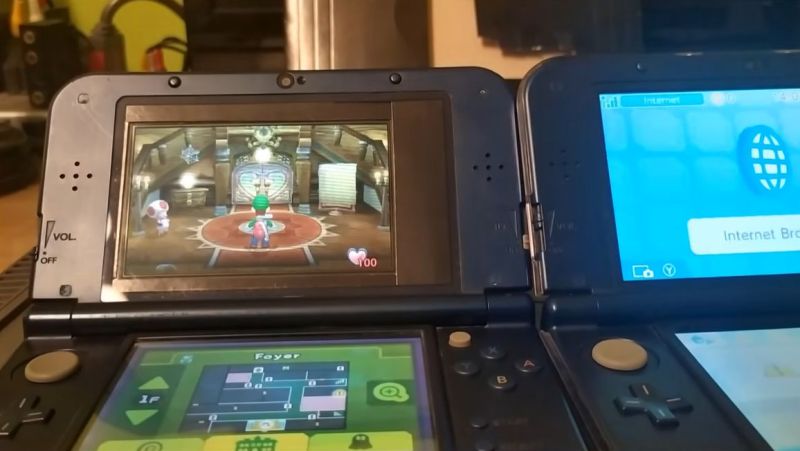
Hacking Around the Financial Pain of New 3DS XL Top Screens

With Nintendo’s 3DS experiencing a bit of a renaissance lately, prices for functioning systems have shot through the roof. Getting a busted one with a broken screen is a lot cheaper, but then you run into the eye-watering price difference between a replacement top screen for the regular version and the larger XL variant. The latter costs about the same as a whole new used 3DS, while the former goes for peanuts. Here the solution is obvious, with [Skawo] demonstrating how they hacked the cheaper, smaller top screen into a New 3DS XL.

The price difference on AliExpress as shown in the video is on the order of $120, with the smaller screen going for less than $10. Since they both use the same connector pin-out and display technology, you can plug either display into the New 3DS XL mainboard.

Where you’ll run into issues, other than the replacement display being obviously not XL, is the physically shorter flat flex cable for the controls that forces the display to be installed in an offset manner. You need jailbroken firmware like Luma3DS here to adjust for the screen offset. Filling in the missing screen real-estate is the other issue you have to patch over somehow, which was done here in barbaric fashion with some cardboard.

Beyond that it does work, and as a fix to at least get a broken New 3DS XL back into the game it’s worth considering. Do note that there’s a difference between regular 3DS and New 3DS (second generation) screens with neither being compatible, so be careful before you try such a fix.

The Neo Geo Does Run DOOM After All

Demonstration of the DoomGeo port of Doom to the Neo Geo. (Credit: Sabino, GitHub)

Perhaps the most ridiculous statement that anyone can make is that a computer system with clearly enough processing power ‘cannot run DOOM‘. This is why we accept the premise that a PDP-11 cannot run this game, but something on the order of a Neo Geo gaming console with its 68000 processor and for the time impressive GPU definitely ought to be able to.

The stated problem here is a lack of RAM for a framebuffer, with the CPU only having 64 kB to play with. This limitation now has seen two different approaches to try and circumvent it, as covered by [Modern Vintage Gamer].

The first project here is Doom64kB, which as the name suggests tries to somehow work with this system RAM limitation. It uses the Doom8088 port for the original IBM PC and similar Intel 8088-based systems. This had to massively reduce the feature list, including the lack of texture mapping for floors and ceiling, no saving or loading, and no music.

The other project is DoomGeo, which doesn’t try to bend the Neo Geo hardware to its will, but accepts the Neo Geo way of doing things: involving sprite strips, pre-baked graphics, fix-layer UI, and a minimum of runtime data. This of course drastically changes how the Doom game engine normally works, with its framebuffer-based rendering.

From this we can thus conclude that it’s not so much the processing power that limits where DOOM can run, but more of how framebuffer-friendly the system architecture is, yet with some ingenuity and a complete rewrite of the game engine even that is no major obstacle.

(Top image: Neo Geo AES console. Credit: Evan-Amos, Wikimedia)

DIY Steam Controller Puck Offers Xbox, Switch, PlayStation Emulation Modes

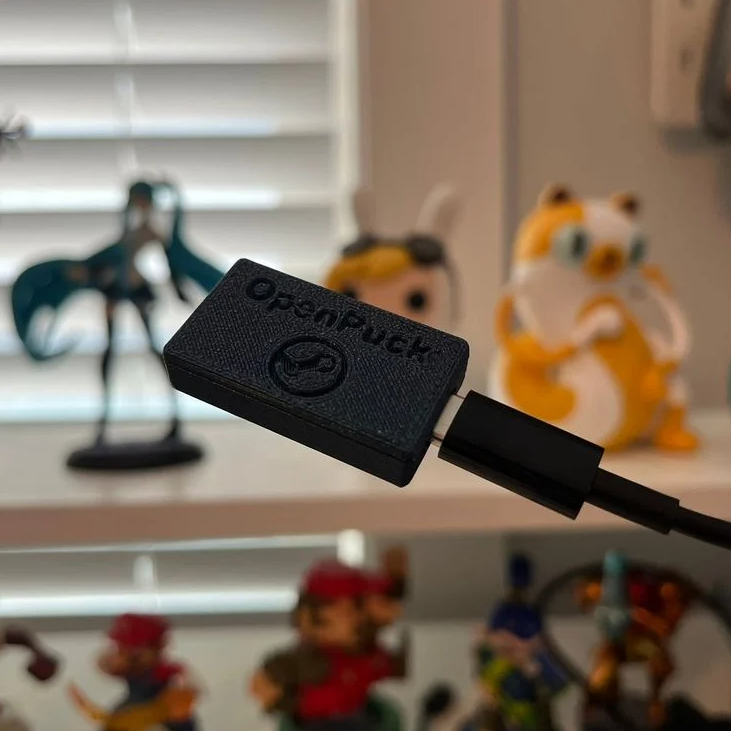
Valve recently released a new version of the Steam Controller, which features a wired USB puck that serves both as charger and dedicated, low-latency wireless receiver. The downside is they aren’t currently available for purchase separately, but that’s not a worry because you can now make your own thanks to [safijari]’s OpenPuck project.

OpenPuck uses the highly affordable Pro Micro NRF52840 board, programmed to emulate the wireless receiver portion of the puck, meaning one can pair their Steam Controller to it just like they would with the factory puck. A major part of the project was naturally documenting the wireless protocol, but there’s also an array of extra features offered by OpenPuck.

OpenPuck offers features over and above the factory offering. [image: 3d printed case by jaki-gh]
Hitting button combos lets one conveniently emulate Xbox, Nintendo Switch, or Sony PlayStation controllers. Meaning OpenPuck can for example be plugged into a Nintendo Switch and it will see OpenPuck as an official wired controller, complete with motion sensor and haptic feedback.

Why is it necessary for this emulation to be done from OpenPuck? Because while the Steam Controller has tight integration with Steam Input — a sort of highly useful translation layer for controller inputs — that integration also means the controller’s best features only work while Steam is running. OpenPuck’s ability to emulate other console controllers makes it flexible in a way the factory puck isn’t, and a user can make the most of a single controller this way.

It’s worth noting that while the real puck has the ability to charge the controller (whether or not the user makes it walk itself), the OpenPuck doesn’t have this ability. Does that mean one must still use the factory puck for charging? Not at all, as the Steam Controller charges just fine over a USB-C connection.

There’s a short video below that demonstrates the flashing and setup, so check it out if you think it might be useful to you.

Thanks for the tip, [Jaki]!

❌