Threat actors are increasingly weaponizing Microsoft’s Volume Shadow Copy Service (VSS) for two distinct objectives: removing recovery options before ransomware deployment and extracting credential material from protected Windows files. The shift means VSS telemetry should no longer be treated as a simple backup or disk-maintenance event, but as behavior requiring process, identity, and endpoint context. […]
Mantax OTAX is aggressive Android malware family combines ransomware, spyware, credential theft, and remote device-control features in a single infection chain. Linked to Indonesian threat actors, the campaign targets users through sideloaded APKs and turns compromised devices into tools for surveillance, financial fraud and real-time extortion. Unlike conventional Android ransomware that focuses primarily on locking […]
A new Windows remote-access trojan dubbed SloppyRAT, which appears to be positioned as an intrusion-enablement tool for ransomware operations. First observed in June 2026, the malware is delivered through a multi-stage ClickFix chain and combines host reconnaissance, stealthy command execution, reverse proxying, and resilient command-and-control mechanisms to support post-compromise activity and lateral movement. Rather than […]
A newly identified ransomware-as-a-service operation, Panzer, has surfaced with advertised payload support for Windows, Linux, VMware ESXi and FreeBSD, positioning it as a cross-platform threat to enterprise and virtualized environments. The group’s rapid victim posting cadence, affiliate-focused infrastructure, and double-extortion model make it a ransomware operation security teams should begin tracking despite the current absence […]
The Gentlemen ransomware-as-a-service operation can move from confirmed access inside a victim network to encryption in under 24 hours. Demonstrating how rapidly modern affiliates can turn stolen credentials or exposed infrastructure into a full-scale business disruption. Counter Threat Unit researchers tracking the operation as GOLD SHERWOOD found that the Gentlemen affiliates follow a repeatable post-compromise […]
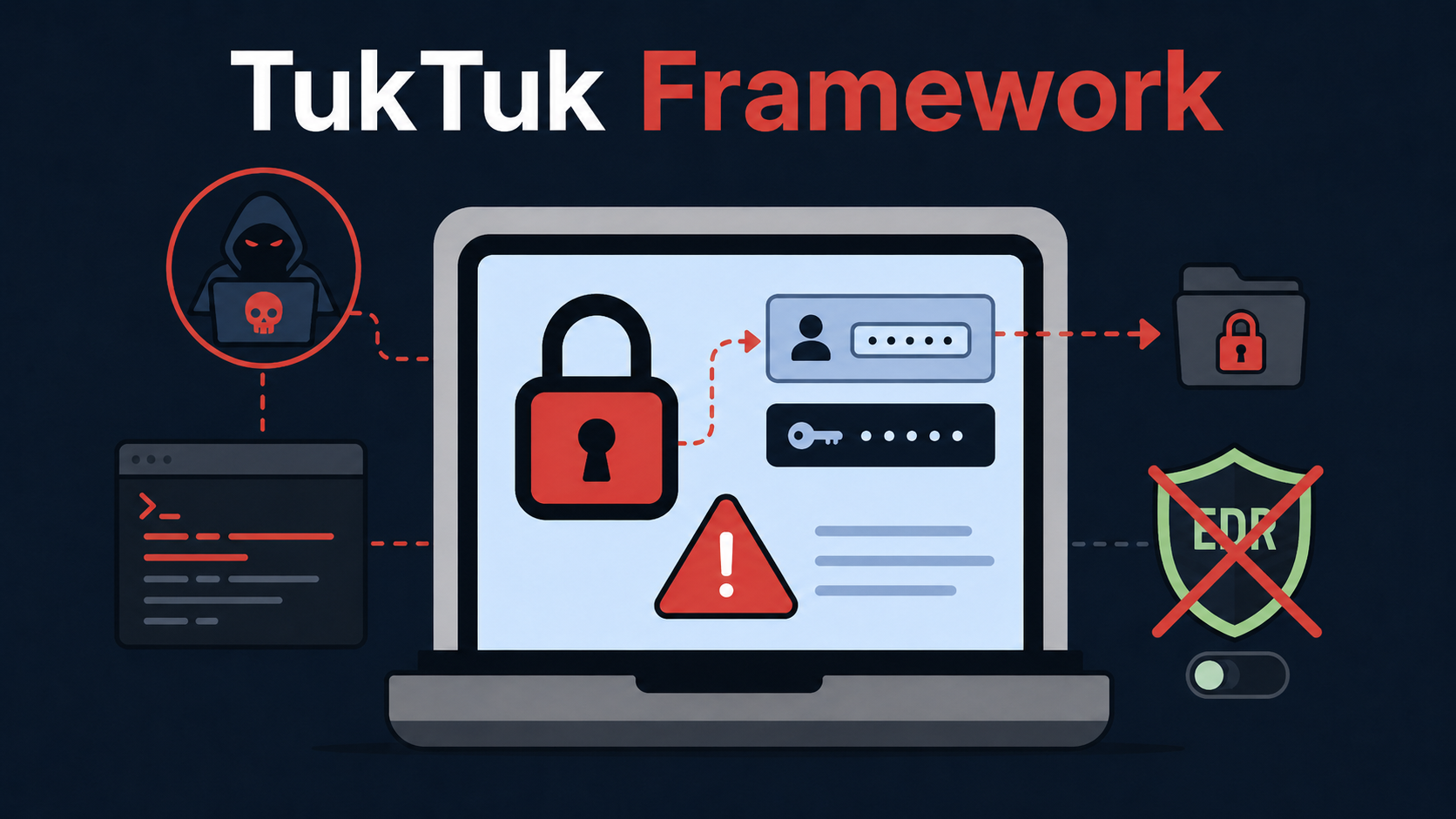
The Gentlemen ransomware operation has been linked to a previously undocumented, cross-platform command-and-control framework named TukTuk, alongside EDR-disabling tooling, DLL sideloading research, and datasets apparently stolen from technology and healthcare organizations. Analysis of a Finland-hosted server identified what researchers assess as the complete TukTuk development project, providing an unusually detailed view into the group’s post-compromise capabilities. […]
Criminals are now selling malicious AI tools for use in cyberattacks, according to researchers at Trellix. These tools dramatically lower the barrier for unskilled crooks to launch sophisticated attacks.
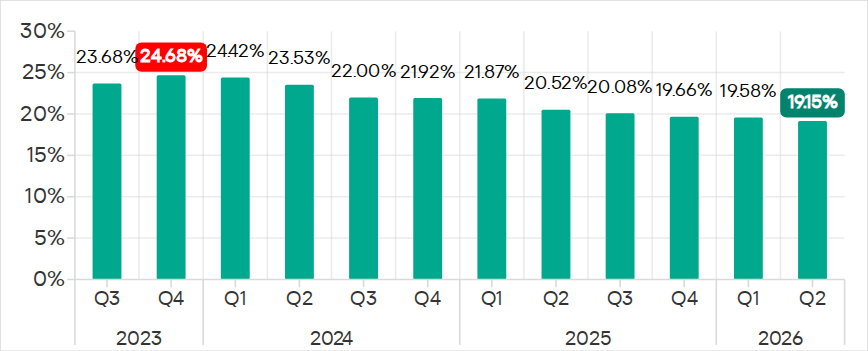
In Q2 2026, the percentage of ICS computers on which malicious objects were blocked continued to decrease, falling to 19.15%, its lowest level since 2022.
Percentage of ICS computers on which malicious objects were blocked, Q3 2023–Q2 2026
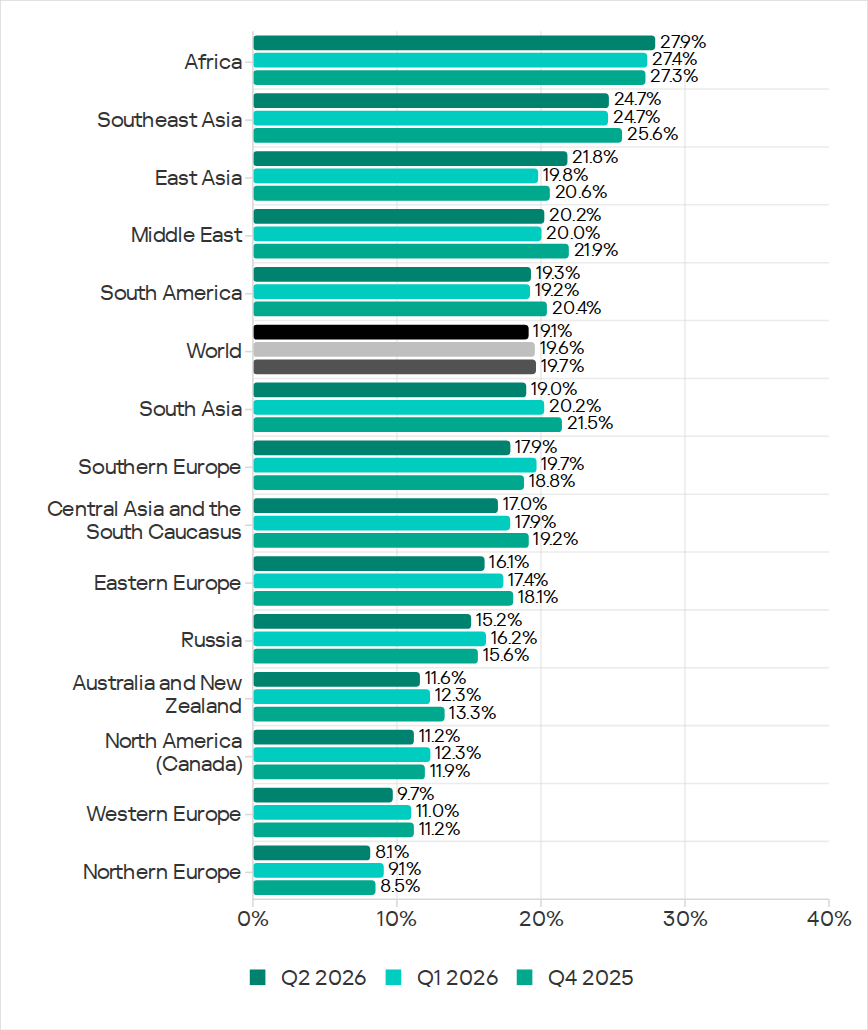
Regionally, the percentages ranged from 8.1% in Northern Europe to 27.9% in Africa.
Regions ranked by percentage of attacked ICS computers
The figures increased in five regions over the quarter, most notably in East Asia (by 2.0 pp) and Africa (by 0.5 pp).
East Asia saw increases in percentages for all threats except miners. The region ranked first in terms of growth for malicious scripts and phishing pages, spyware, and viruses. East Asia also led in terms of growth in threats from the internet. The percentage of ICS computers on which email threats were blocked also increased.
Selected industries
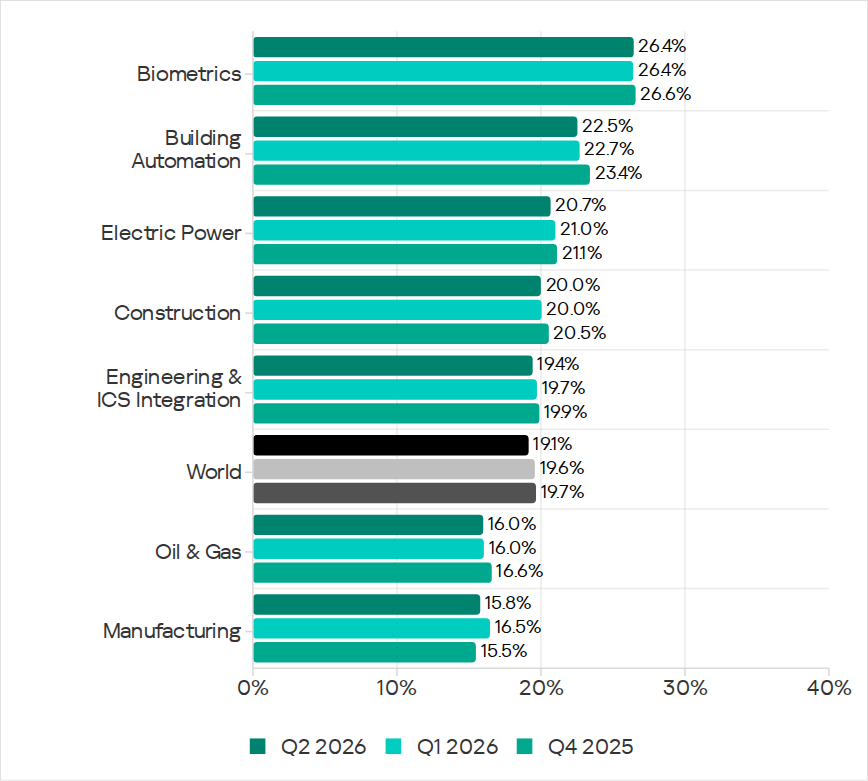
The biometrics sector (26.44%) has traditionally led the rankings of industries and OT infrastructures surveyed in this report in terms of the percentage of ICS computers on which malicious objects were blocked. Biometric systems are characterized by the availability of internet access, extensive email use for data exchange and approvals (e.g. access granting), and, in many cases, minimal cybersecurity controls within the organizations that use them.
Industries ranked by percentage of ICS computers on which malicious objects were blocked
The biometrics sector ranked first among industries in terms of the following threat categories: malicious scripts and phishing pages, malicious documents, spyware, ransomware, and worms. The sector is also leading among industries in terms of email threats. At the same time, unlike other industries, the percentage of affected ICS computers for email threats in biometrics exceeds that for internet threats.
In all selected industries, the global average follows a downward trend.
Threat categories
In Q2 2026, Kaspersky security solutions blocked malware from 10,904 different malware families of various categories on industrial automation systems.
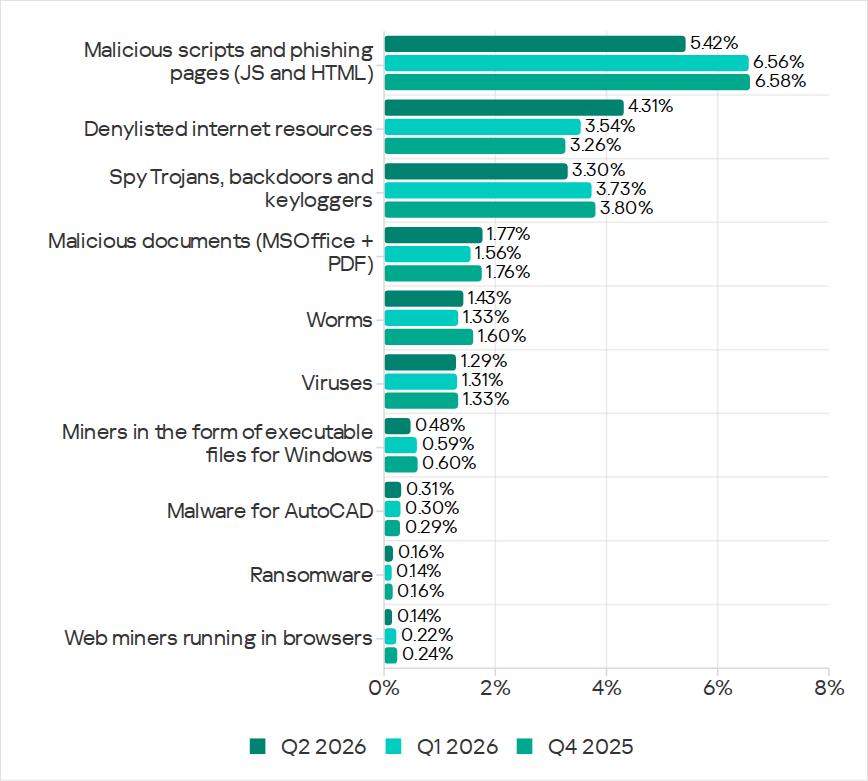
Over the quarter, the percentage of ICS computers on which malicious objects of the following categories were blocked increased: denylisted internet resources, malicious documents, worms, ransomware, and malware for AutoCAD.
Percentage of ICS computers on which the activity of malicious objects from various categories was blocked
Malicious scripts and phishing pages (JS and HTML)
Malicious scripts and phishing pages remained in first place in the threat category rankings based on the percentage of ICS computers on which the respective threats were blocked. In Q2 2026, the global average dropped to 5.42%.
Over the quarter, the figure for this category only increased in East Asia, rising by 0.93 pp to 4.86%. This is the second-highest figure in the region in the last three years.
In East Asia, the percentage of ICS computers affected by malicious scripts and phishing pages increased in all the industries surveyed, except construction. The highest figures were recorded for biometrics (9.01%) and building automation (6.49%).
Denylisted internet resources
In Q2 2026, denylisted internet resources rose in the threat category rankings from third to second place, displacing spyware. Globally, the percentage of ICS computers on which denylisted internet resources were blocked has been increasing for two quarters in row and reached 4.31%.
The figures increased in all regions over the quarter, most notably in Russia (by 1.33 pp). Moreover, Russia ranked first (5.17%) among the regions in terms of denylisted internet resources. Since 2022, the region has topped these rankings twice before, both times in Q2: in 2022 and 2024.
Among the selected industries in Russia, the highest figures for the denylisted internet resources were in the electric power (6.61%) and engineering and ICS integration (5.62%) industries.
Malicious documents (MSOffice + PDF)
Malicious documents ranked fourth in the threat category rankings by the percentage of ICS computers on which they were blocked. The percentage for this category decreased over the previous three quarters, reaching its lowest level in three years. However, in Q2 2026, it increased to 1.77%.
Over the quarter, the figures for malicious documents increased in seven regions, most notably in South America (by 1.35 pp) and Southern Europe (by 0.48 pp). These two regions are among the top three in terms of malicious documents, malicious scripts and phishing pages, as well as threats from email clients.
South America ranked second in the rankings of regions in terms of malicious documents. In Q2 2026, the percentage of ICS computers in the region on which this threat was blocked was 3.56%, which was the fourth highest in three years.
Among the selected industries in South America, the highest percentage of ICS computers on which malicious documents were blocked was in biometrics (6.67%).
Southern Europe ranked first in the rankings of regions in terms of malicious documents. In the previous quarter, the percentage of ICS computers in the region on which this threat was blocked was the lowest in three years, but in Q2 2026 it increased to 3.63%.
Among the selected industries in Southern Europe, the highest percentage of ICS computers on which malicious documents were blocked was once again in biometrics (11.48%).
Spyware
Spyware ranked third in the threat category rankings based on the percentage of ICS computers on which it was blocked. The percentage for this category (3.30%) is the lowest since 2022.
Over the quarter, the figures increased in three regions, most notably in East Asia (by 0.53 pp) and Southeast Asia (by 0.42 pp).
East Asia ranked third based on the figures for spyware (4.77%), behind Africa and Southeast Asia. This is the region’s highest rate since Q2 2025. Among the countries and territories in the region, the highest percentage of ICS computers on which spyware was blocked was in mainland China (6.61%). Among the selected industries in East Asia, the highest figures for spyware were in the electric power (11.75%) and manufacturing (5.87%) industries. In all the industries surveyed, the figures are higher than the regional average.
Southeast Asia ranked second after Africa in the ranking of regions in terms of spyware, with 5.32%. Among the selected industries in Southeast Asia, the highest figures for spyware were in biometrics (8.93%) and manufacturing (7.32%). The figures increased in all industries over the quarter.
Ransomware
The percentage of ICS computers on which ransomware was blocked decreased in the previous three quarters but increased to 0.16% in Q2 2026.
During the quarter, the percentage increased in all regions, except Western and Southern Europe and North America (Canada). Africa led the ranking in terms of growth for this metric.
In Q2 2026, Africa ranked first among the regions in terms of the percentage of ICS computers on which ransomware was blocked (0.29%). The only time the figure in the region was higher in the past three years was Q2 2025 (0.31%).
Among the selected industries in Africa, the highest figures for ransomware were in the electric power industry (0.72%) and biometrics (0.52%). Over the quarter, the figures increased in all industries, except manufacturing and construction. The biggest increase was recorded in the electric power industry.
In Russia, the percentage of ICS computers on which ransomware was blocked in biometric systems has increased for three consecutive quarters, reaching 1.22%. This is the highest level of ransomware across all industries in all regions.
Miners
In Q2 2026, the percentage of ICS computers on which miners were blocked was the lowest since 2021, for both miners in the form of executable files for Windows (0.48%) and web miners running in browsers (0.14%).
The figures for both categories decreased in all regions, except for Africa where figures for miners in the form of executable files for Windows increased slightly.
On average, the oil and gas industry led the rankings among the selected industries both in terms of miners in the form of executable files for the Windows OS (0.66%) and in terms of web miners (0.34%).
Worms
In Q2 2026, the percentage of ICS computers on which worms were blocked increased to 1.43%.
In Q2 2026, the Middle East (2.11%) was second (after Africa) in the rankings of regions in terms of worms, displacing Central Asia and the South Caucasus.
Among the selected industries in the Middle East, the highest percentage of ICS computers on which worms were blocked was in building automation (2.90%). Over the quarter, the figures increased in all industries.
Australia and New Zealand ranked 12th among the regions in terms of the percentage of ICS computers on which worms were blocked (0.41%). Over the past three years, the figure in this region was only higher in Q2 2024 (0.42%). The figures increased in all the surveyed industries in the region, most notably in manufacturing and electric power. As a result, for these industries they exceeded the regional average by 2.9 and 2.3 times, respectively.
Viruses
In Q2 2026, the percentage of ICS computers on which viruses were blocked decreased to 1.29%.
The top three regions for this metric remain unchanged: Southeast Asia (6.03%), Africa (4.22%), and East Asia (3.14%). These same regions lead the rankings in terms of malware for AutoCAD.
The figures increased in three regions: East Asia, Australia and New Zealand, and Africa, where it has been growing for four consecutive quarters and reached its highest value since 2022.
Among the selected industries in Africa, the highest percentage of ICS computers on which viruses were blocked was in construction (5.47%).
East Asia ranked third among the regions in terms of viruses, reaching the highest level in the region for the past three years. Among the countries and administrative regions of East Asia, mainland China is the clear leader in terms of viruses (5.07%).
Among the selected industries in East Asia, the highest percentage of ICS computers on which viruses were blocked was in construction (5.93%).
In Australia and New Zealand, the increase in the percentage of ICS computers on which viruses were blocked was primarily due to a 4.3-fold increase in the figure for the electric power industry: from 0.29% to 1.24%. For a region where the percentage of attacked ICS computers for all threats is 0.12%, this is a very high value.
Malware for AutoCAD
In Q2 2026, the percentage of ICS computers on which malware for AutoCAD was blocked increased to 0.31%.
The most notable increase over the quarter was observed in Africa. After more than doubling in the previous quarter, the figure for the region continued to rise (although not so dramatically), reaching 1.02%.
Among the selected industries across all regions, the highest percentage of ICS computers on which malware for AutoCAD was blocked was in construction in East Asia (6.38%) and in Southeast Asia (4.05%).
Main threat sources
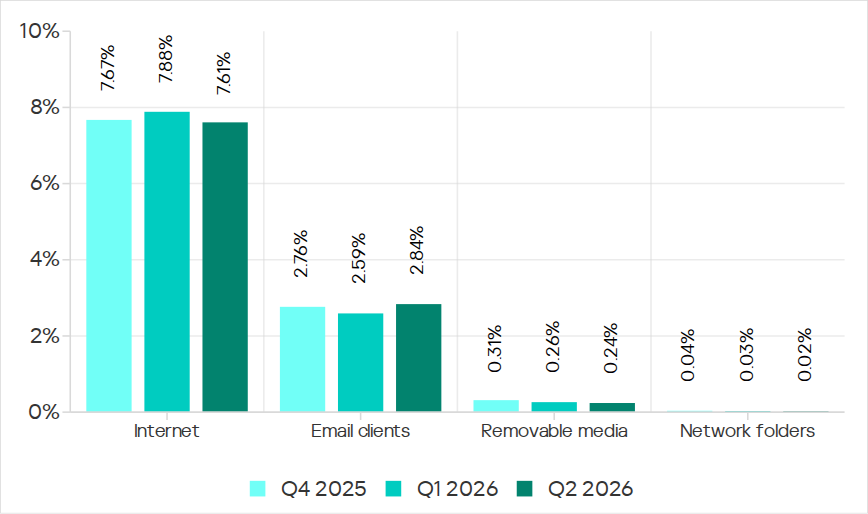
In Q2 2026, of all the threat sources, the percentage increased only for email.
Percentage of ICS computers on which malicious objects from various sources were blocked
Internet
The percentage of ICS computers on which threats from the internet were blocked decreased to 7.61%, reaching its lowest level since 2021.
Over the quarter, the percentage increased in three regions: East Asia by 0.8 pp (to 6.3%), South Asia by 0.3 pp (to 10.4%), and Russia by 0.3 pp (to 6.4%).
Among the selected industries across all regions, the highest percentage of ICS computers on which threats from the internet were blocked was in biometrics (13.03%) and engineering and ICS integration (12.16%) in South Asia.
Email
The percentage of ICS computers on which email threats were blocked increased to 2.84%.
In Q2 2026, the percentage of ICS computers on which email threats were blocked increased in South America by 1.0 pp (to 5.2%) and in Africa by 0.7 pp (to 4.3%).
Among the selected industries across all regions, the highest percentage of ICS computers on which email threats were blocked was in biometrics (19.14%) and building automation (12.49%) in Southern Europe.
Removable media
The percentage of ICS computers on which threats from removable media were blocked continued to decrease, reaching 0.24%, the lowest value for the period under review.
Among the selected industries across all regions, the highest percentage of ICS computers on which threats from removable media were blocked was in the electric power industry in East Asia (1.34%) and biometrics in Africa (1.29%).
Network folders
The percentage of ICS computers on which threats from network folders were blocked continued to decrease. In Q2 2026, it was the lowest for the period under review, at 0.023%.
The only region to see an increase in the percentage of ICS computers on which threats from network folders were blocked during the quarter was Africa. This was mainly due to an increase in the building automation figure to 0.05%.
Among the selected industries across all regions, the highest percentage of ICS computers on which threats from network folders were blocked was in biometrics (0.23%), building automation (0.17%), and engineering and ICS integration (0.13%) in East Asia.
AI is making social engineering attacks significantly more effective, according to a new report from cyber insurance firm Resilience. These attacks were behind more than 85% of losses in the first half of 2026, compared to less than 20% during H1 2024.
For years, ransomware was treated mostly as a malware problem. A user clicked something bad, files were encrypted, a ransom note appeared and everyone had a very bad week.
Like many, the travel and tourism industry has undergone a radical digital transformation over the last few years. From AI-curated itineraries and biometric check-ins to interconnected booking engines and smart room tech, the modern “Digital Guest Journey” is more seamless than ever before.
An initial access broker for ransomware gangs is targeting organizations with voice phishing (vishing) attacks through Microsoft Teams, according to researchers at Zscaler’s ThreatLabz.
Because of the amount of data that can be obtained and the high impact that successful attacks may have, educational institutions are frequent targets of cybercriminals. Both public and private schools and universities rely on software for managing personally identifiable information (PII) that is often insecure or insufficiently tested against known vulnerabilities. In addition, machines used by multiple people without accountability can be vulnerable to insider threats.
The complexity of academic environments amplifies this risk. Unlike corporate networks, educational institutions have to provide a network that supports students, professors, researchers, administrative staff, third-party contractors, and visitors. Each of these groups has different security requirements and access control levels, making it difficult to enforce consistent security policies. A security breach can have severe consequences since it may expose vast amounts of sensitive information, such as social security numbers (CPF in Brazil), addresses, phone numbers, and even parents’ names. Armed with this information, attackers can attempt phishing attacks and impersonate the victims in SIM swapping attacks, a common practice in Brazil.
In this article, we provide details about attacks on educational institutions in Brazil observed by our Global Emergency Response Team (GERT) since 2025. We share general statistics, common threats, initial access vectors, and the impact of such violations. Additionally, we present some interesting cases encountered by our team and the identified TTPs. Finally, we offer recommendations to help institutions protect themselves against future attacks.
Key findings and statistics
Our dataset encompasses incident response cases from January 2025 to June 2026. As the chart below shows, the majority of attacks targeted institutions in São Paulo state, Brazil’s most populous state and a significant center of economic and financial activity. We also had cases in Rio de Janeiro and Pernambuco.
Geographical distribution of incident response requests at educational institutions (download)
Of the customers who requested incident response, 60% were private institutions and 40% were public institutions.
The most frequent reasons for requesting IR services were related to suspicious endpoint activities, encrypted files, and the presence of suspicious files.
The high-severity incidents were mainly related to ransomware attacks. Interestingly, private institutions were the most targeted by ransomware, while incidents in public institutions were mostly related to suspicious endpoint activity and privilege escalation attempts. The most common ransomware families found in our dataset were DragonForce and LockBit 3, whose builder was leaked back in 2022. By using the leaked LockBit builder with a valid privileged account, attackers can build variants capable of disabling defenses and erasing logs.
The most common initial access vectors included the use of valid accounts, exploitation of public-facing applications, and insiders.
For privilege escalation, the attackers often relied on Potato variants (GodPotato, SweetPotato, and BadPotato).
We also observed attackers using tools like AnyDesk for remote access, PsExec for lateral movement within compromised infrastructures, and AV-killer malware to terminate the system’s defenses. The latter was mainly used in ransomware-related incidents.
These data reveal an interesting pattern in the threat landscape affecting educational institutions in the region. Many incidents were not caused by highly sophisticated techniques but rather by the abuse of common weaknesses such as valid accounts, exposed applications, and inadequate patch management, as well as the use of publicly available tools that are well-known to the adversaries. The prevalence of ransomware in private institutions suggests a stronger financial motivation, likely because attackers assume these organizations are more capable of paying for data recovery than public schools and universities.
Most attacks were discovered promptly and lasted from a few minutes to a couple of hours. However, technical incident response activities averaged 9.6 hours. This indicates that the impact caused by an incident often extends beyond the timeframe of the active attack, requiring extensive triage and analysis by the forensic investigators to fully restore operations.
One interesting fact is that we are still observing the use of Windows 10 in the infrastructures of educational institutions, even after Microsoft’s official end-of-support date of October 2025. In addition, we found that some customer organizations were using Windows Server 2016 without security patches and fixes. Using outdated and unsupported operating systems increases the attack surface of an infrastructure because attackers can exploit publicly available vulnerabilities to access vulnerable systems and expand their presence in the network. In addition, legacy operating systems may be incompatible with modern evidence collection tools, necessitating extra time and alternative procedures for forensic acquisition.
In one case, we identified the use of a custom version of LockBit that was generated using the leaked builder. The ransomware was delivered to the organization’s infrastructure via a valid account that had been leaked. It encrypted the organization’s internal systems, including file servers and databases that stored student profiles and other data. There was no evidence of data exfiltration from the affected machines.
During our analysis of the LockBit sample, we were able to extract its configuration. Interestingly, it was configured without the impersonation and spreading options. This meant the attacker had to perform manual lateral movement to deploy the malware across the network.
Further analysis revealed that the attacker used PsExec for lateral movement. By analyzing the Update Sequence Number (USN) Journal, we were able to identify .KEY files associated with PsExec that showed us the previously compromised machines used by the attacker.
After gaining access to the target machines, the adversaries deployed a batch script to disable the system’s defenses. Our analysis of this artifact showed that they had the administrative credentials to disable the EDR in place. In addition, the script enabled RDP, which gave the attackers remote access to the target. The listing below shows an excerpt of the script:
Finally, by cross-checking the Prefetch files, we were able to identify the precise dates of PsExecSvc.exe and LBB.exe (LockBit) execution. This revealed that the attacker established the initial connection to the analyzed machine around 5:30am UTC and ran LBB.exe for the last time at 10am UTC on the same day, resulting in an activity window of approximately four hours and thirty minutes. We were able to identify the extent of the compromise and the additional machines that required network isolation for further forensic analysis, containment, and remediation.
Case 02 – DragonForce deployed via AnyDesk
In another incident, we identified a compromised user account that the adversaries used to install the AnyDesk software to enable remote access. Although the attacker erased the system logs after encrypting the victim’s files, we were able to identify the ransomware execution event via the Prefetch and Amcache.hve files, which provided us with the SHA-1 hash of the sample.
Once we obtained the SHA-1 of the malicious artifact (named by the attacker as 1.EXE), we were able to confirm that it was a DragonForce variant. Even though the lack of evidence made the analysis more difficult, this case shows that forensic investigators must be prepared to identify information that the attackers missed or left untouched.
Case 03 – Python keylogger used by an insider
The third incident illustrates how a series of bad practices enabled an insider to collect passwords from other users inside the infrastructure. First, the customer contacted us stating that a machine was exhibiting strange behavior: files containing passwords were being created. We started with triage collection on one of the affected machines.
Evidence from the Program Compatibility Assistant (PCA) showed the execution of two suspicious files, Windows Host Widgets.exe and Windows Host Widgets_.exe, both located in the C:\Users\<user>\.vscode\dlo directory, where <user> represents a user account shared by everyone who uses the machine. The same artifacts were identified within the Amcache.hve file, and multiple executions were also confirmed by analyzing the Prefetch files. Another interesting source of evidence, UserAssist, confirmed that the threat actor also executed both EXE files by double-clicking on them.
MFT analysis showed that multiple log files named cacheX.txt were created in the previously mentioned directory, where X was a number that increased with each malware execution. We then analyzed the EXE files to confirm their behavior. Luckily, both proved to be the same Python script, which we could easily decompile.
As shown in the listing below, the script contains methods and strings with Portuguese names. It is capable of hiding the log files from view in Explorer. The developer also set a procedure to identify when the Caps Lock key was pressed, in order to record the correct passwords.
def get_base_path():
    ...

def encontrar_proximo_nome(base='cache'):
    ...

def set_file_hidden(filepath):
    ...
    ctypes.windll.kernel32.SetFileAttributesW(str(filepath), FILE_ATTRIBUTE_HIDDEN)
    ...

with open(log_file, 'a', encoding='utf-8') as f:
    f.write(f'\n\n--- Registro iniciado em {datetime.datetime.now()} ---\n')
set_file_hidden(log_file)
...

def is_capslock_on():
    return bool(ctypes.windll.user32.GetKeyState(20) & 1)

...

def on_press(key):
    ...

def on_release(key):
    ...

def main():
    with keyboard.Listener(on_press=on_press, on_release=on_release) as listener:
        listener.join()

if __name__ == '__main__':
    main()
This simple script did not implement any persistence or automated data exfiltration mechanisms. Therefore, the insider likely had to manually retrieve the generated log files containing the text typed by the victims. By revisiting the previously collected evidence, we identified USB connections around the same time as the script’s executions. This suggests that removable media was probably used to collect the generated keylogging logs from the environment. As a result of the investigation, the customer changed the passwords of all affected accounts. However, without additional evidence or footage, it was not possible to conclusively attribute the activities to a specific individual and take the appropriate disciplinary and legal measures.
Conclusions and recommendations
The incidents highlighted in this article demonstrate that Brazilian educational institutions face a diverse set of threats, ranging from ransomware operations to insider activity. In many cases, the attackers relied on valid credentials, exposed services, remote access tools, poor patch management, and insufficient endpoint hardening rather than advanced malware or new techniques. Based on these findings, educational institutions should prioritize controls that reduce the likelihood of account compromise and the impact of ransomware deployment. They should also improve forensic visibility after an incident.
Institutions should enforce the use of multi-factor authentication (MFA) for all publicly accessible services, especially VPNs, remote access portals, and email accounts. Since valid accounts were one of the most common initial access vectors observed in our dataset, MFA can significantly reduce the likelihood that stolen or reused credentials alone will compromise the entire environment. We also recommend periodically reviewing privileged accounts, removing unnecessary administrative permissions, and avoiding shared accounts, especially on machines accessed by multiple users, since this makes accountability extremely difficult.
Each user should have their own account, following the principle of least privilege to prevent unauthorized software execution. Additionally, it is advisable to restrict and monitor the use of remote access tools such as AnyDesk or TeamViewer. Unexpected installations or executions of these tools should be treated as high-priority alerts.
To minimize the impact of ransomware, educational institutions should improve their backup and recovery strategy. Backups should be isolated from the primary environment (preferably in more than one location) and tested regularly. Centralized logging, extended EDR telemetry retention, and proper time synchronization across hosts can also improve the ability to reconstruct an attack timeline and implement the necessary response measures.
The use of outdated systems increases the attack surface, so we recommend that organizations adopt an effective update and patch management policy. It is also important to raise security awareness, since users must understand the risks associated with credential sharing, unknown executables, and unauthorized software.
From a digital forensics and incident response (DFIR) perspective, the reviewed incidents demonstrate that effective incident response activities require correlating multiple forensic artifacts in order to reconstruct the attacker’s actions. Investigators should be aware of how to find information even when logs are missing. Many other artifacts are preserved and can be used for this purpose, such as Amcache, PCA, Prefetch, UserAssist, MFT, and USN Journal. The attackers may fail to erase all traces of their activity, so taking a broad forensic approach is of the utmost importance for determining the scope of the compromise and supporting containment and remediation actions.
Observed TTPs
The table below shows the observed TTPs in our dataset, including cases not detailed in this post.
The new GenieLocker ransomware family has been active since March 2026. It has been used in attacks against organizations in the Russian Federation, primarily in the manufacturing sector, and attributed to the Toy Ghouls group by open-source intelligence (link in Russian).
The Toy Ghouls, also known as Bearlyfy, Labubu and Laboo.boo, is a financially motivated extortion group, which previously relied on third-party encryption Trojans like RedAlert, LockBit, and Babuk. GenieLocker, apparently a custom design, upgrades their toolkit and reduces their reliance on third-party software. We discovered multiple samples of this Trojan in two variants: PE builds for Windows and ELF builds for Linux and ESXi.
Technical details
Modus operandi
We described typical TTPs and modus operandi of the Toy Ghouls threat actor in the previous post (link in Russian).
In this article, we aim to thoroughly describe the capabilities of Windows and Linux builds of the custom encryption Trojan GenieLocker. To give more context, we will also provide a brief overview of the attack that took place at the end of March 2026, where GenieLocker was deployed on the victim’s systems.
Initial Access
During the incident, the attackers first entered the environment through an OpenVPN connection originating from an external partner’s network. They likely exploited the trusted relationship with that partner and used stolen, yet still valid, credentials to connect.
Discovery and Credential Access
After breaching the target’s network, the attackers installed additional tools on the compromised hosts, including OpenSSH, socks5.exe, SoftPerfect Network Scanner, and Mimikatz. They employed SoftPerfect Network Scanner for discovery and used Mimikatz to dump credentials. Forensic analysis also shows that they accessed the KeePassXC password manager already installed on several compromised machines, likely attempting to extract the stored credentials from the KeePass databases.
Lateral Movement and Command and Control
Lateral movement was performed by using RDP to reach Windows machines and SSH for Linux servers. The widespread deployment of the encryption Trojan was conducted with the legitimate utilities PsExec and PAExec. Additionally, the attackers established a reverse SSH tunnel to communicate with their command‑and‑control server.
Impact
During the impact phase, the attackers encrypted files on the compromised Windows machines with the PE version of the GenieLocker ransomware. On the compromised Linux and ESXi servers, they stopped active virtual machines and encrypted their disks using the ELF version of GenieLocker.
The tactics, techniques, and procedures seen here match those documented in earlier attacks attributed to the Toy Ghouls group. As in those prior incidents, forensic analysis found no evidence of data exfiltration, which is typical behavior for this threat actor. Toy Ghouls have not employed a double‑extortion model and do not run a data‑leak website.
Encryption Trojan for Windows
The Windows version of GenieLocker (MD5: 5d62c1349b8981c396c9a23f4f8f053c) is primarily written in C, but compiled with the C++ libraries using Microsoft Visual C/C++. The malware incorporates several ransom‑related capabilities, including process termination, service shutdown, debugger evasion, and a sophisticated encryption routine. For its cryptographic operations, it relies on the open‑source libsodium library.
Aligned with the recent trend supported by our expertise, as observed in attacks of some other ransomware strains, GenieLocker doesn’t save the ransom notes on the victim’s system. The Trojan doesn’t contain any attackers’ contact info or negotiation addresses. Instead, the attackers will need to deliver the ransom demands and contacts manually during the attack. This approach may be an attempt by the GenieLocker developers to avoid proactive detection of the ransomware process being triggered by the creation of multiple readme files.
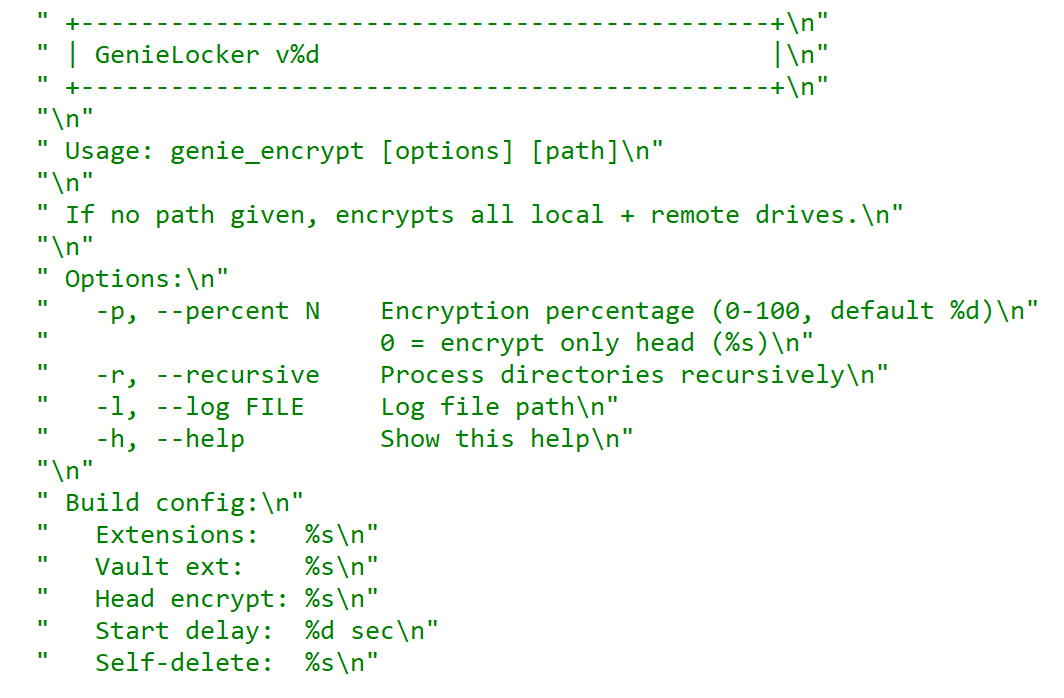
GenieLocker help message
Arguments and launch
GenieLocker supports multiple arguments for configuring its behavior.
Argument
Description
First argument
“Secret” argument, hex string value
-p, –percent N
Percentage of file content to encrypt
-r, –recursive
Process directories recursively
-l, –log <filename>
Set path for log file
-h, –help
Show help message
Last argument
Path to encrypt
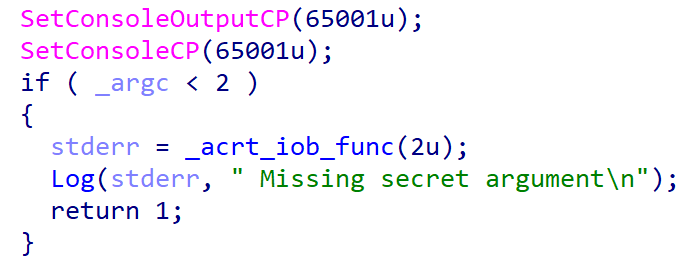
GenieLocker expects the first argument to be a hex string referred to in the malware code as the “secret argument”, which is required for the ransomware to start. Most likely, the purpose of this is to avoid execution on sandboxes and other automated analysis environments. Another reason may be to prevent unauthorized usage by other threat actors.
Checking the secret argument
The secret argument is a hex value with a variable size that does not exceed 4096 bytes. This hex string value is converted to bytes and hashed with the SHA‑256 algorithm. The result is compared to a hardcoded value. If they match, the literal string session is appended to the secret value, and the whole string is hashed with BLAKE2b‑256, but the resulting hash is never used. This may be a part of a feature still in development.
Secret value hashing
Anti-debugging
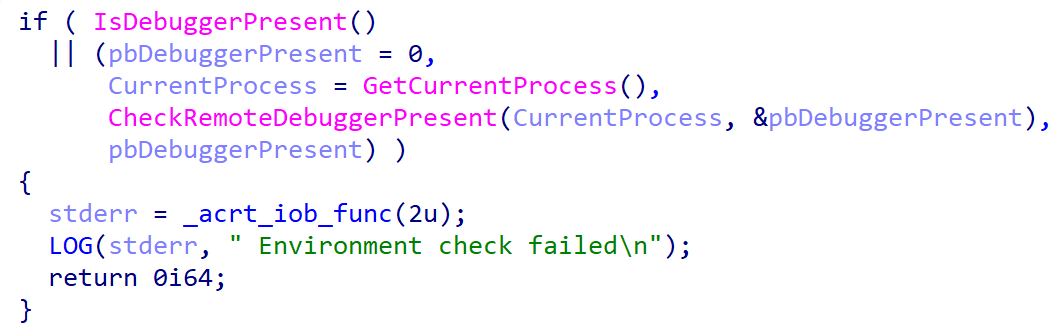
GenieLocker contains multiple methods to inspect if its process is under debugging. After launch it makes the first check named Environment check and uses WinAPI functions IsDebuggerPresent and CheckRemoteDebuggerPresent to detect the debugger.
Environment check
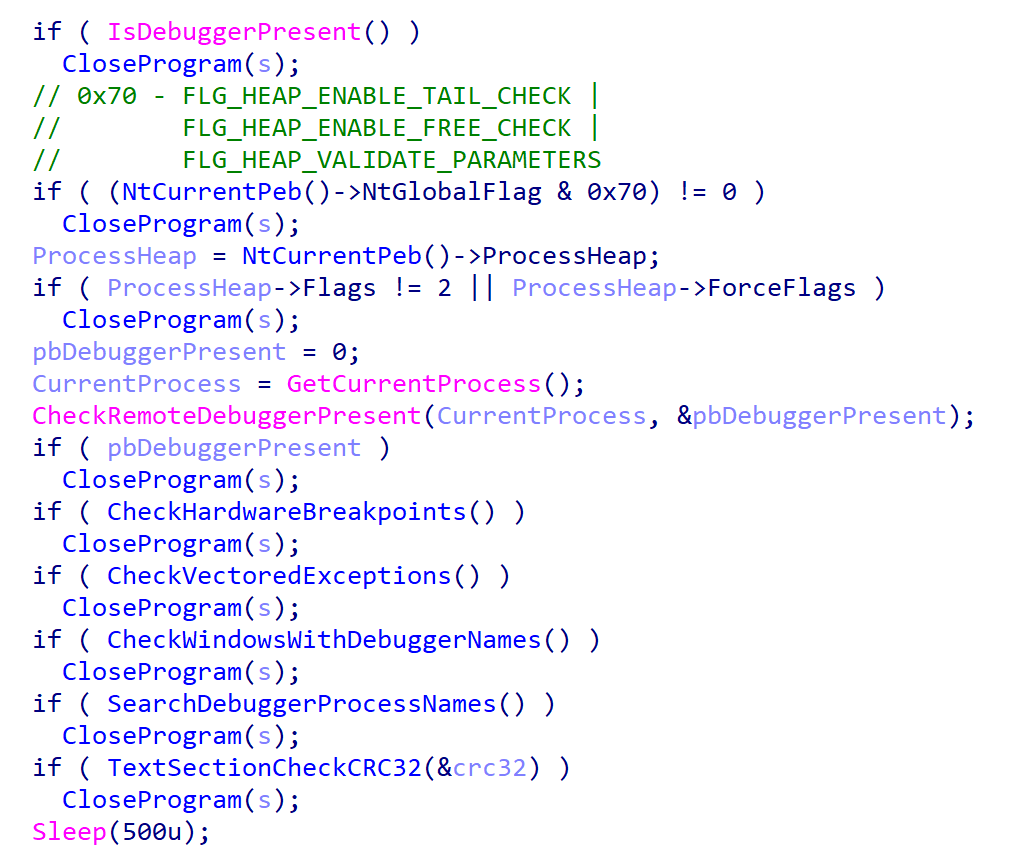
After the secret argument validation, GenieLocker starts a new parallel thread called watchdog. It runs in an infinite loop that performs a number of checks to detect well-known debuggers every 500 milliseconds. If at least one of the checks fails, the whole GenieLocker process immediately terminates.
Watchdog checks
The only thing worth elaborating on is that the GenieLocker process calculates the CRC32 of its .text section when the watchdog thread is starting, saves the resulting hash, and then recalculates it again in every loop and compares with the initial value. In case the code in this section is modified by the debugger or other program, this method allows the Trojan to detect this modification.
Preparing for encryption
GenieLocker contains multiple exclusion lists. For example, it does not encrypt folders with names from the list below. Among those, there are mostly system folders, which are skipped to avoid corrupting the OS.
Furthermore, the Trojan contains an exclusion list for host names. The malware retrieves the computer name using GetComputerNameA and checks it against this list, but in the sample in question, the list is empty.
Output for whitelisted hosts
If the host name is not excluded, GenieLocker starts to kill processes that could be using the files of interest and therefore prevent the Trojan from encrypting them. These processes are listed below. The Trojan stops them by using the TerminateProcess function.
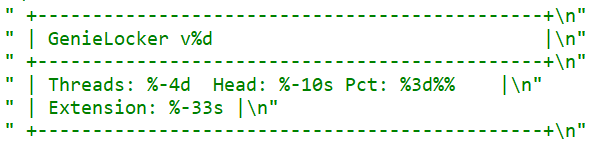
Finally, GenieLocker starts encryption threads and searches for all available drives, including network shares, to encrypt them.
Threads info output
File encryption and cryptography
The extension for the encrypted files is hardcoded in the Trojan’s body. In the sample under review, it is .03ffc1c4a3da0f02. Before starting to encrypt each file, GenieLocker creates two auxiliary files:
a lock file: <filename.fileext>.03ffc1c4a3da0f02.lock
a journal: <fileext>.03ffc1c4a3da0f02.journal
The lock file helps to protect files from double encryption by other threads or instances. Inside this file, the Trojan stores the current PID obtained from the GetCurrentProcessId function.
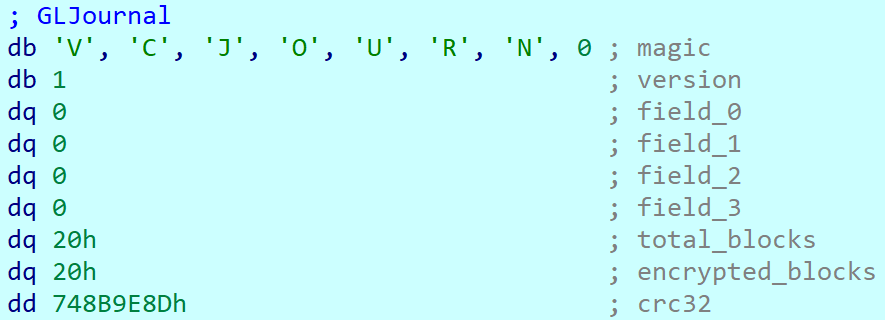
The journal file contains the hardcoded string VCJOURN, value 1 (possibly version), some unused zeroed fields, total blocks to encrypt, and the count of blocks that are actually encrypted. The last field is a CRC32 hash sum for the integrity check of the journal content.
Journal content
By default GenieLocker encrypts files using 0x1000000-byte chunks. If the argument -p is passed (it sets the percentage of the file contents to be encrypted), the ransomware calculates how many chunks with 0x1000000 size are necessary to encrypt the specified percentage. Each chunk has a random position inside the file. Regardless of whether the percentage is set, even if it is zero, the first chunk in the beginning of the file will be encrypted anyway.
The Trojan encrypts the file content using the Authenticated Encryption with Associated Data (AEAD) algorithm XChaCha20-Poly1305, with a unique key and nonce for each file. The Trojan also adds a footer that contains the data necessary for future decryption and metadata. The metadata parts are encrypted using the same cipher and key as the file contents, but with a different nonce. The file key is encrypted using the Curve25519-XSalsa20-Poly1305 scheme, with the attackers’ master public key hardcoded in the Trojan’s body.
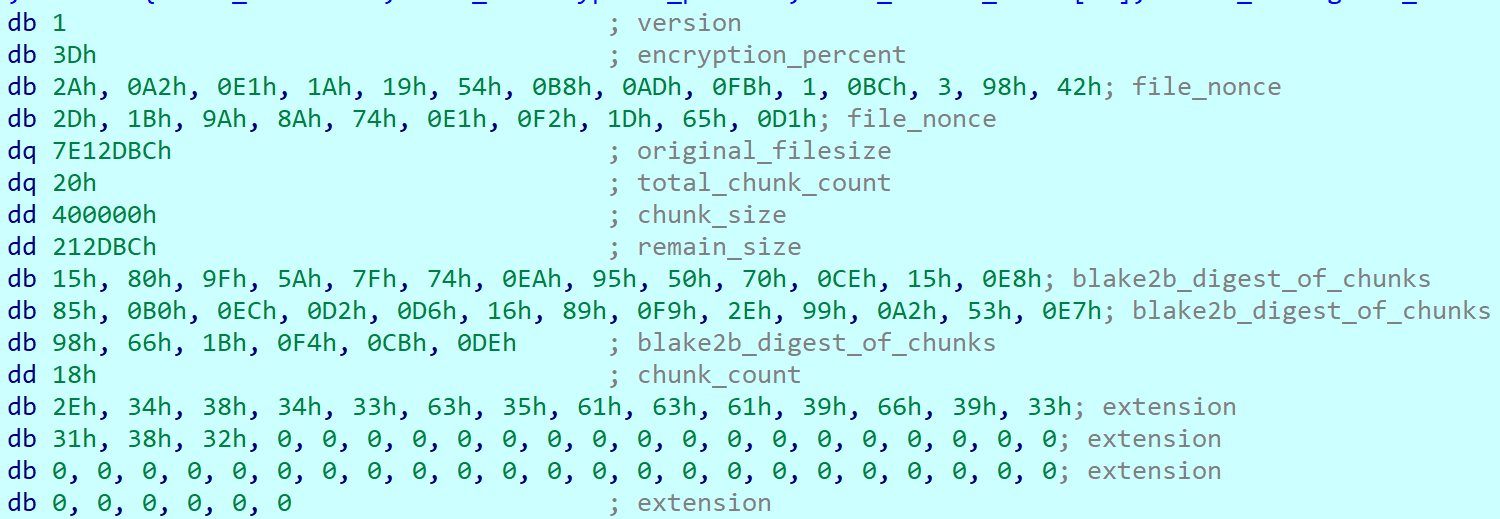
The metadata of each encrypted file contains the following fields.
Value or name
Size (bytes)
Description
version
1
Hardcoded byte with value 1, most likely the version.
encryption_percent
1
Percentage of file content to encrypt, value from -p argument.
file_nonce
24
Nonce used during encryption of the file content.
original_filesize
8
Original size of the file before encryption.
total_chunk_count
8
Max count of chunks inside the current file.
chunk_size
4
Size of a single encrypted chunk (by default, 0x1000000 bytes on Windows and 0x400000 on ESXi and Linux).
remain_size
4
The number of bytes remaining after splitting the file content into chunks.
blake2b_digest_of_chunks
32
BLAKE2b-256 hash calculated from the original data of all chunks before they are encrypted. Used for integrity checks.
chunk_count
4
Number of chunks that were encrypted.
extension
64
A string with the additional ransomware extension.
poly1305_tags (array)
16 bytes per chunk
Array of Poly1305 tags of encrypted chunks.
bitmask
varies, one bit per each chunk
Chunks bitmask; if set, the chunk is encrypted; otherwise, it is not.
The chunks bitmask contains as many bits as the maximum number of chunks inside a file at 100%. If a bit at a specific index is set to 1, the chunk is encrypted. The value 0 means that the chunk is not encrypted. Since the Trojan encrypts files based on the percentage value, it needs to know which chunks were encrypted.
Metadata structure at the end of an encrypted file (without a Poly1305 tags array or bitmask)
Encryption Trojan for ESXi and Linux
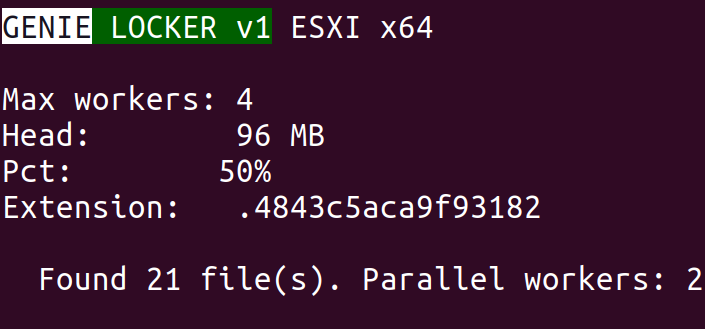
Compared with its Windows counterpart, the Linux and ESXi version of GenieLocker (MD5: 9201e35e2993612612919a3c71302cab) is simpler: there is no secret argument, anti‑debugging techniques, or exclusion lists. However, the sample has ESXi-specific features, such as double‑fork support and the ability to modify the Welcome Message. The sample has the version v1 and, similarly to the Windows version, uses the libsodium library for cryptography.
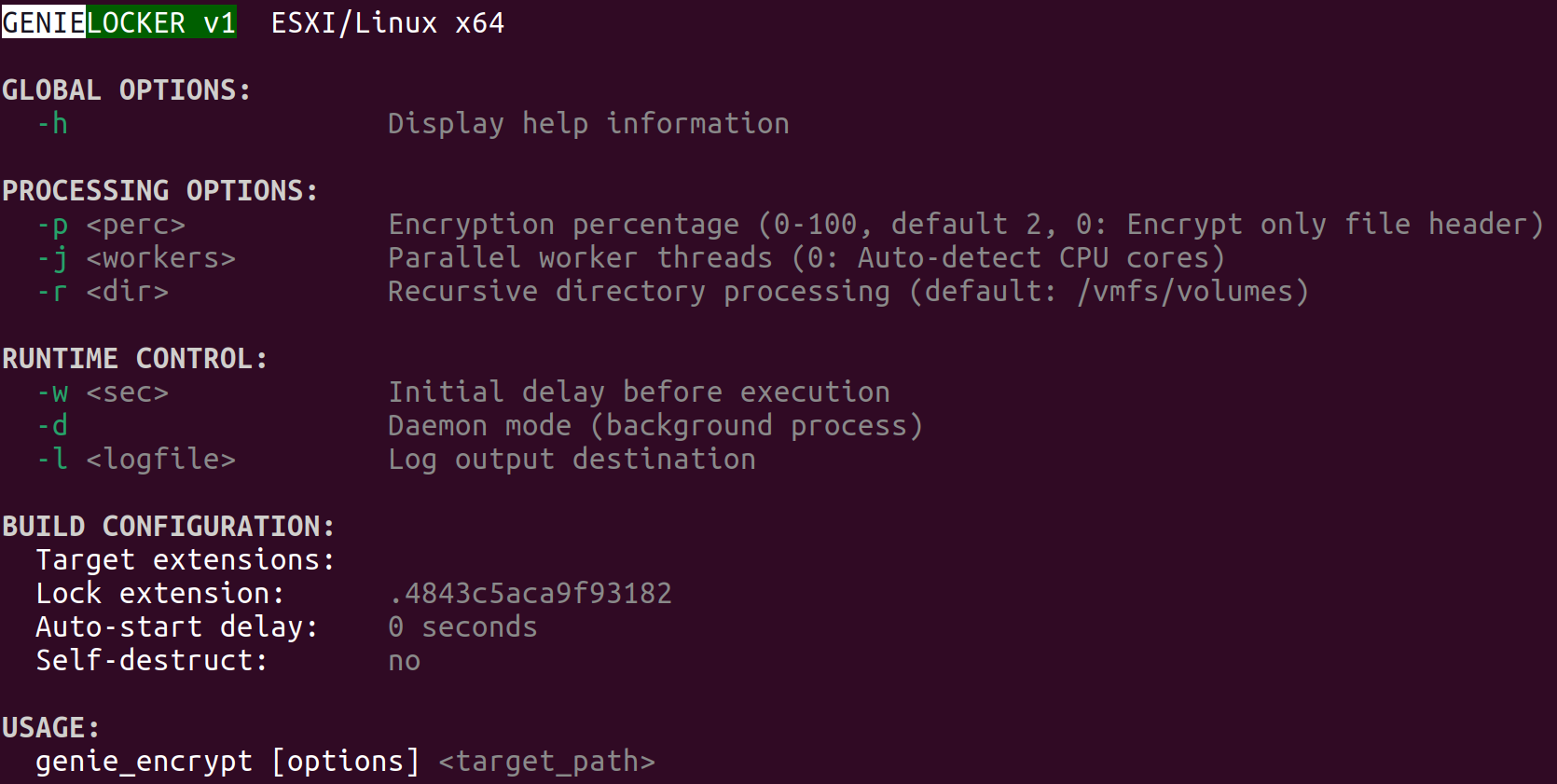
ESXi version description
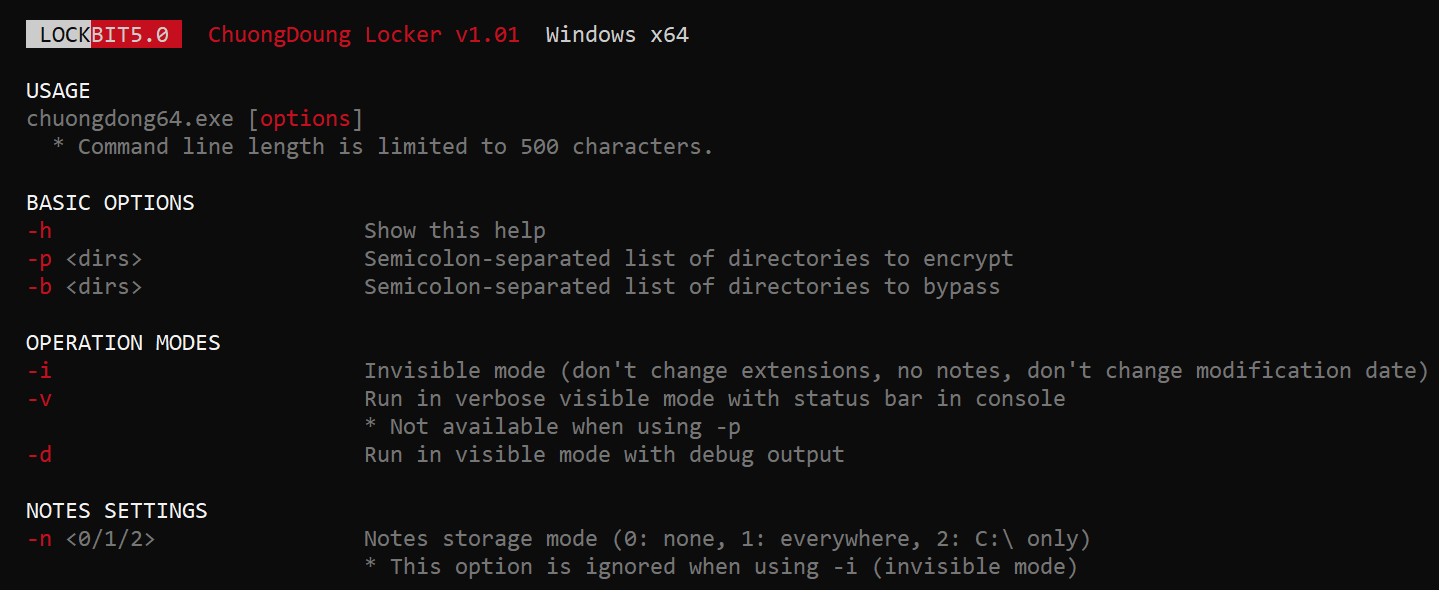
The command‑line help output mirrors LockBit’s styling, reinforcing the theory that GenieLocker’s creators set out to craft a LockBit‑style replacement for their own operations.
LockBit output design, possibly the source layout for the GenieLocker ESXi variant
Based on the default path of the encryption directory /vmfs/volumes, we can assume that this version is intended primarily for ESXi. Nonetheless, it can still be executed on Linux distributions.
Argument
Description
-p <perc>
Percentage of file content to encrypt
-j <workers>
Number of encryption threads
-r <dir>
Process directories recursively
-w <sec>
Delay before start
-d
Daemonizing the process
-l <logfile>
Path to log file
ESXi and Linux features
This build allows daemonizing its process with the -d flag, employing the classic double‑fork method so the new process becomes fully detached from its parent.
This variant also modifies the /etc/vmware/welcome file, which contains the Welcome Message (Message of the Day) on the ESXi operating system. On Linux distributions, it does not change anything, because they use different paths for the Message of the Day. In the GenieLocker sample examined here, the message is left empty.
Additionally, the ESXi version supports a few basic features that are not included in the Windows version. For instance, there is a launch‑delay option and the ability to set the number of encryption worker threads. This build also includes several features that already exist in the Windows variant, such as configuring the percentage of a file to encrypt, choosing the target directory, and setting the log file location.
File encryption
The encryption scheme for files is identical to the Windows version. The Trojan uses XChaCha20-Poly1305 to encrypt the file content and metadata, and Curve25519-XSalsa20-Poly1305 for key encryption.
File encryption summary
Victims
According to KSN telemetry, GenieLocker detections are overwhelmingly concentrated on endpoints located in the Russian Federation. In the March 2026 campaign, the primary sector under siege was manufacturing, with construction trailing closely, followed by financial services, retail, and technology.
Conclusions
Toy Ghouls are ramping up their campaign against Russian enterprises. The rollout of their home‑grown encryption Trojan GenieLocker marks a major upgrade to the group’s ransomware toolkit. By engineering bespoke ransomware that runs natively on Windows, Linux, and ESXi, the actor has cut their dependence on off‑the‑shelf ransomware families and unified the cryptographic backbone across all targeted platforms.
Kaspersky’s products detect this malware as Trojan-Ransom.Win64.Agent.genie, HEUR:TrojanRansom.Win64.Generic, Trojan-Ransom.Linux.Agent.genie.
LeakNet claims it stole 11TB of NYC Health + Hospitals data containing sensitive medical, financial and biometric records linked to more than 12 million people.
An AI-driven threat actor called JADEPUFFER built ransomware that hunts AI model files specifically, entering through a known Langflow RCE and pivoting via an exposed Docker socket.
Cisco Talos has detailed msaRAT, a Rust-based RAT used by the Chaos ransomware crew that drives a headless Chrome or Edge session over CDP to smuggle C2 traffic through Cloudflare and Twilio infrastructure.
Ransomware and phishing have always been linked, but the old model was blunt: a phishing email carried the payload, the recipient opened it, encryption followed within hours.
Fortinet has found a new TrickBot variant hiding commands in DNS traffic and using scheduled tasks and added modules to maintain access on infected Windows PCs.
Recently, our teams in Latin America investigated a series of incidents involving misconfiguration, the deployment of BitLocker, and the exploitation of corporate printers. Attackers used the devices to notify organizations that their infrastructure had been compromised and they had to pay a ransom to recover their data.
This article analyzes two incidents that occurred in June in Colombia and in May in Mexico. We highlight the similarities in the attackers’ communications and outline emerging trends in ransom amounts.
Initial sign of an attack
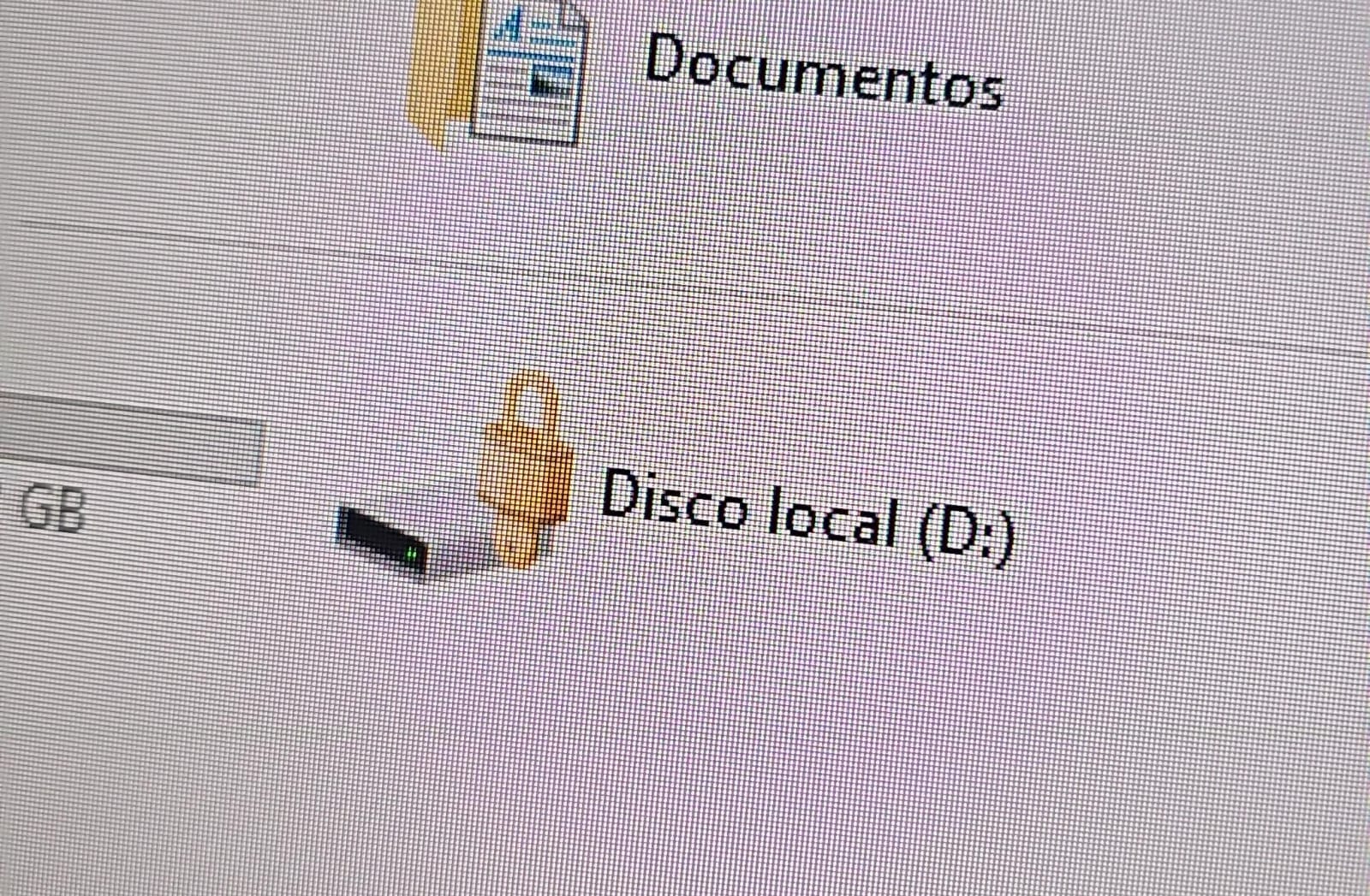
In both cases, the affected users initially noticed a padlock icon next to their drives in Windows Explorer. This indicated that the drive was encrypted with BitLocker, blocking access to its contents.
Drive icon indicating that the drive is locked
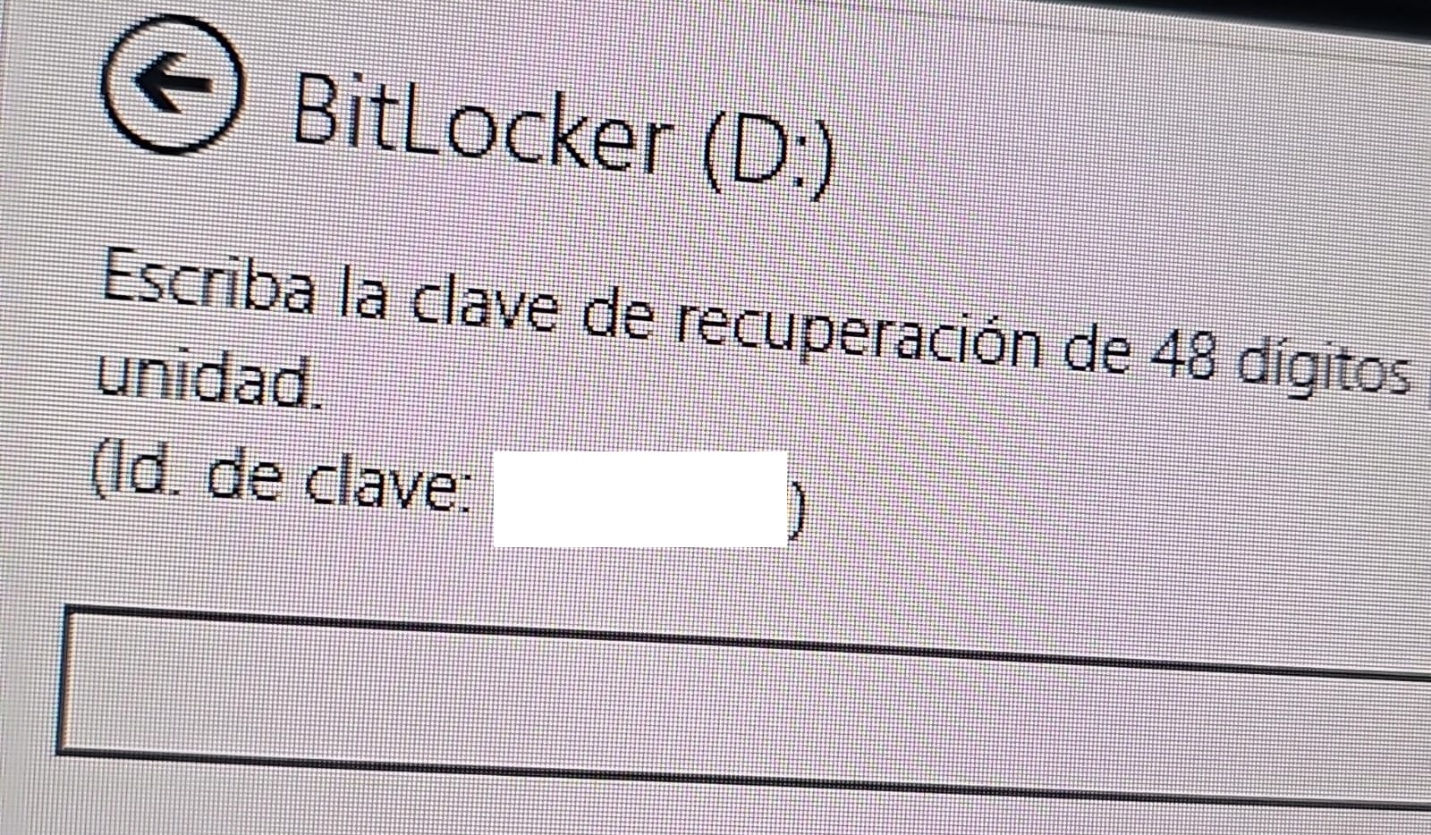
A recovery key was required to unlock the drive.
Attempt to access the disk’s contents and the prompt for the BitLocker recovery key
This is not the first time we have seen such threats; a few years ago, our team discovered a threat known as ShrinkLocker, which utilized BitLocker to achieve its goals.
First case: abusing RDP to encrypt data
One of the incidents occurred in Colombia in June. The attackers exploited an internet-exposed RDP service on a machine connected to an 8 TB storage device containing mission-critical data. After taking control of the system and manipulating user credentials, the attackers enabled BitLocker exclusively on the drive that primarily stored financial data. Once the encryption was complete, they locked the drive and used the company’s printers to produce ransom notes.
Ransomware note
Unfortunately, it was not possible to obtain evidence in the case due to the company’s rush to restore the encrypted disk. The communication with the attackers revealed a demand for just $3,000, and the company considered paying the ransom. After that, the system was restored before the forensic team could take any action, eliminating the evidence needed to assess the incident.
Attacker’s reply to the victim’s email sent to the address in the printed ransom note
This attack was made possible by an internet-facing remote desktop service (RDP) with additional open ports, which employees used to access corporate information. By exploiting this network exposure and misconfiguration, attackers breached the system, identified an additional drive, and leveraged BitLocker to encrypt the data and demand a ransom payment. Leaving RDP ports open without proper security controls jeopardizes the security of systems and information, as highlighted in the our “Global Report: Anatomy of a Cyber World“.
Exposed ports identified in the system in recent months
The company confirmed that, due to compatibility issues with applications required for operation, EPP (Endpoint Protection Platform) protection was disabled on the system, making it easier for attackers to validate, enumerate, and execute applications without revealing malicious activity to central monitoring systems.
Second case: meet the XEntry Team
In another incident, which occurred in Mexico in May, our team identified how the threat actor gained initial access to the infrastructure. They exploited a misconfigured MSSQL service. This allowed them to execute commands on the system after obtaining the database login credentials from code insecurely published on GitHub.
XEntry team attack
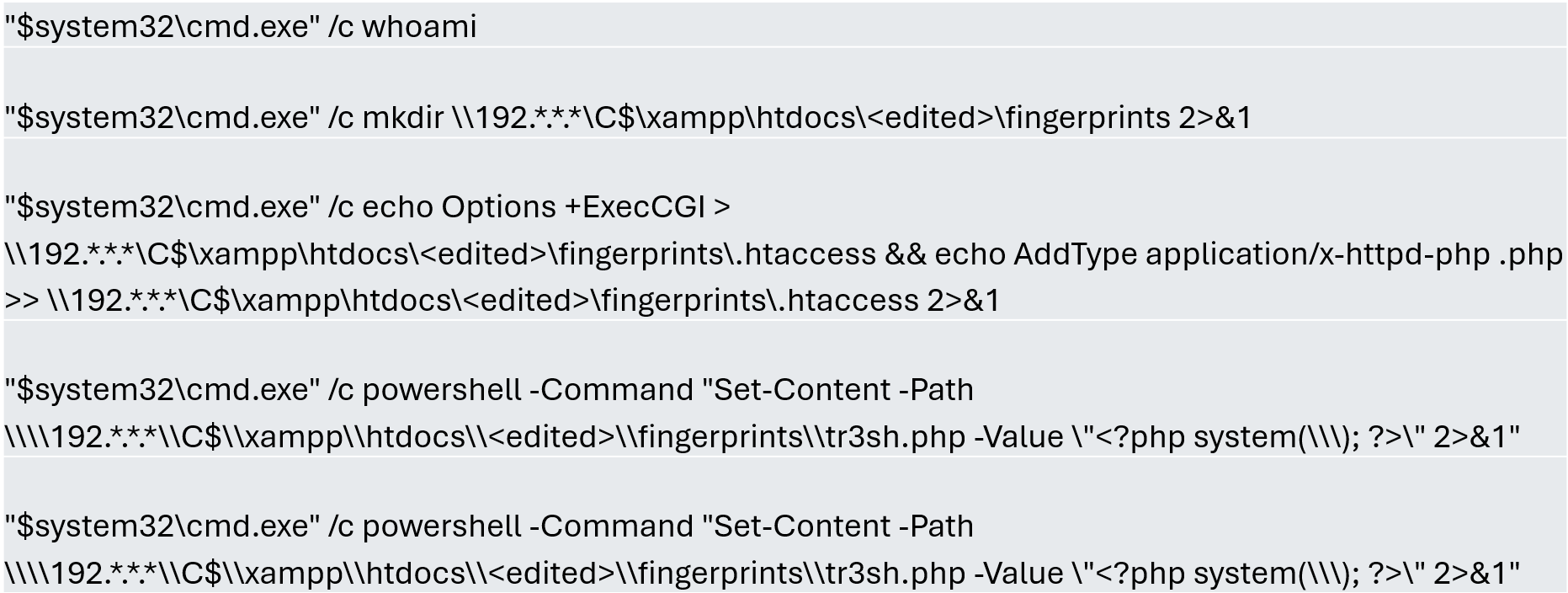
In this incident, the attack began three months prior to detection, with the intruder discovering and verifying their access to the environment. After confirming their access and privilege level within the MSSQL server settings, which extended beyond the DBMS to the underlying operating system, the attackers initially focused on manipulating certain aspects of the web server configuration on the same system. They lowered the server’s security settings and created web shell files in the publicly accessible folders. Many of these attempts to manipulate the service or create malicious files were contained by existing EPP security controls, but despite the alerts, the necessary investigation to address the activity was not conducted.
Commands executed when attempting to manipulate the web server
The attackers subsequently confirmed their ability to execute commands locally and set up their attack infrastructure to transmit data via a communications bridge. By exploiting the MSSQL service, they gained access to each of the organization’s internal systems.
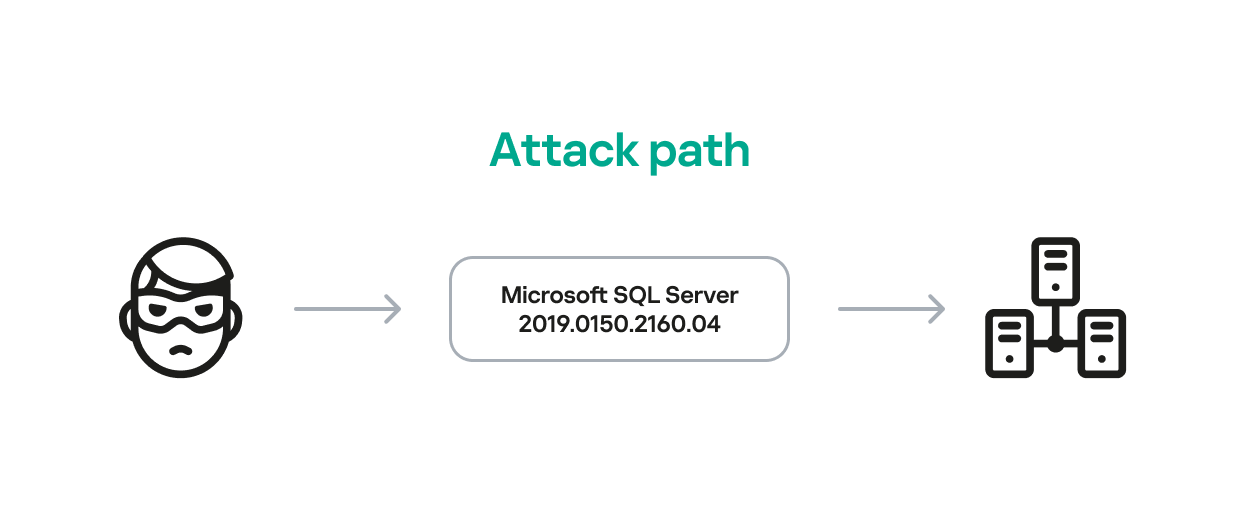
The database engine used by the company was Microsoft SQL Server 2019.0150.2160.04, misconfigured to allow operating system сommand execution via the xp_cmdshell extended stored procedure.
Due to this misconfiguration of an internet-exposed service, the attackers established a channel capable of executing any type of command directed at the server and the local infrastructure within its scope.
Attack path
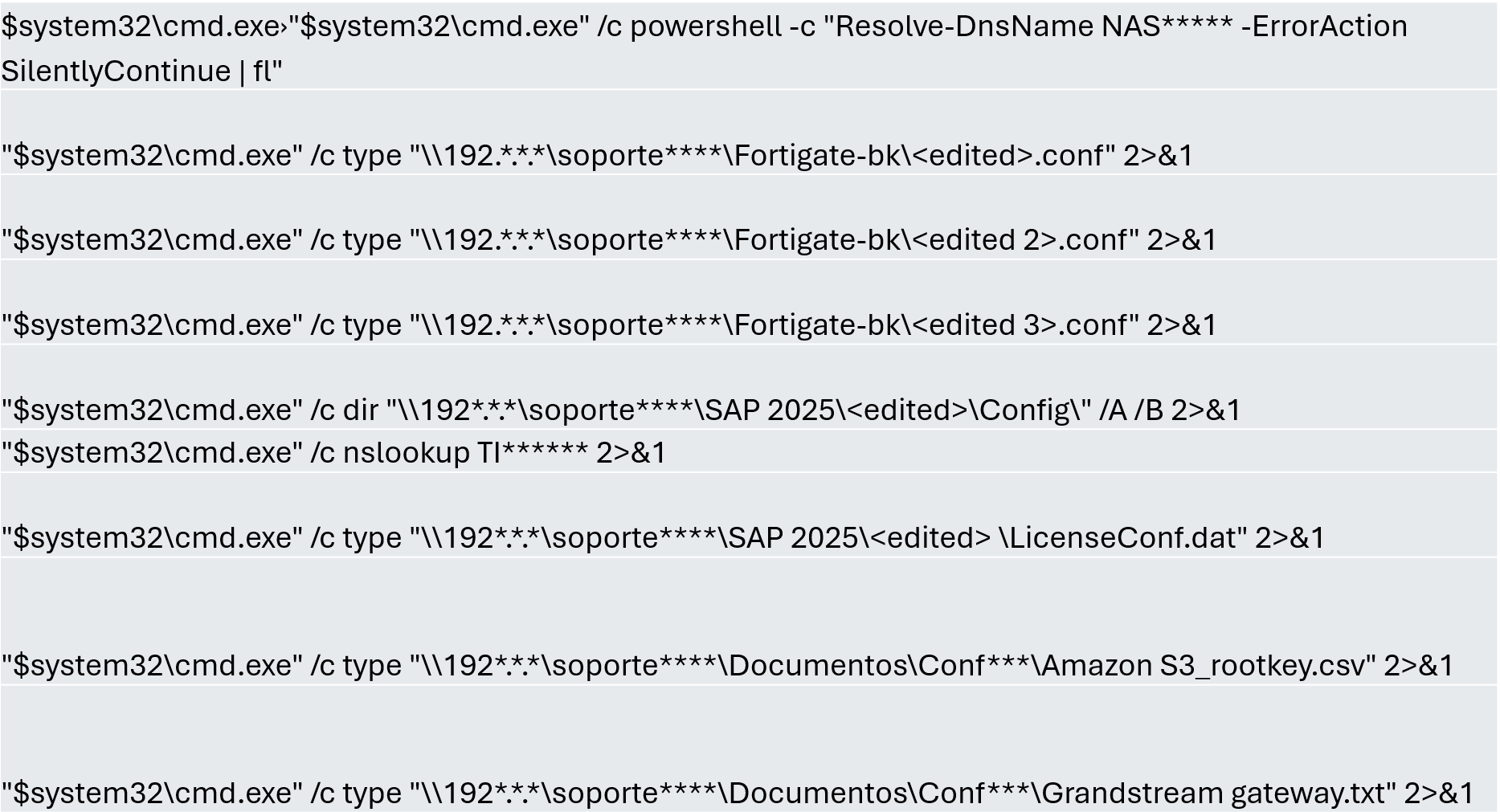
One of the main objectives was to identify shared systems and resources that provided access to critical information. Our analysis confirmed the attackers’ access to systems storing configuration parameters for networking, enterprise management, and cloud services, among others.
A subset of the critical information identified and collected by the attackers
In early May, the attackers focused on running additional scans and deploying ManageEngine’s Endpoint Central RMM (Remote Monitoring and Management) to establish persistence and begin the final stages of their intrusion.
Scanning and RMM deployment
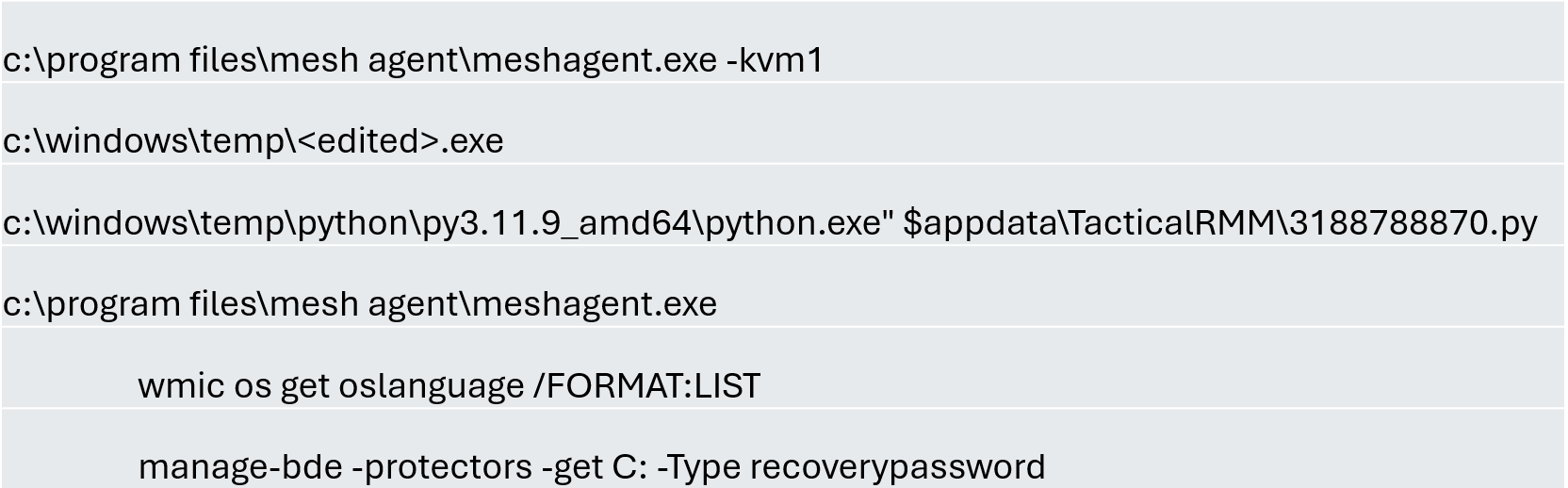
Further RMM-type applications, such as Mesh Agent and Tactical RMM, were installed in the days that followed. These were used to deploy scheduled tasks responsible for enabling the BitLocker service and individually encrypting the infrastructure’s disks, generating a key for each encrypted system.
Commands executed through RMM tools to collect Bitlocker keys
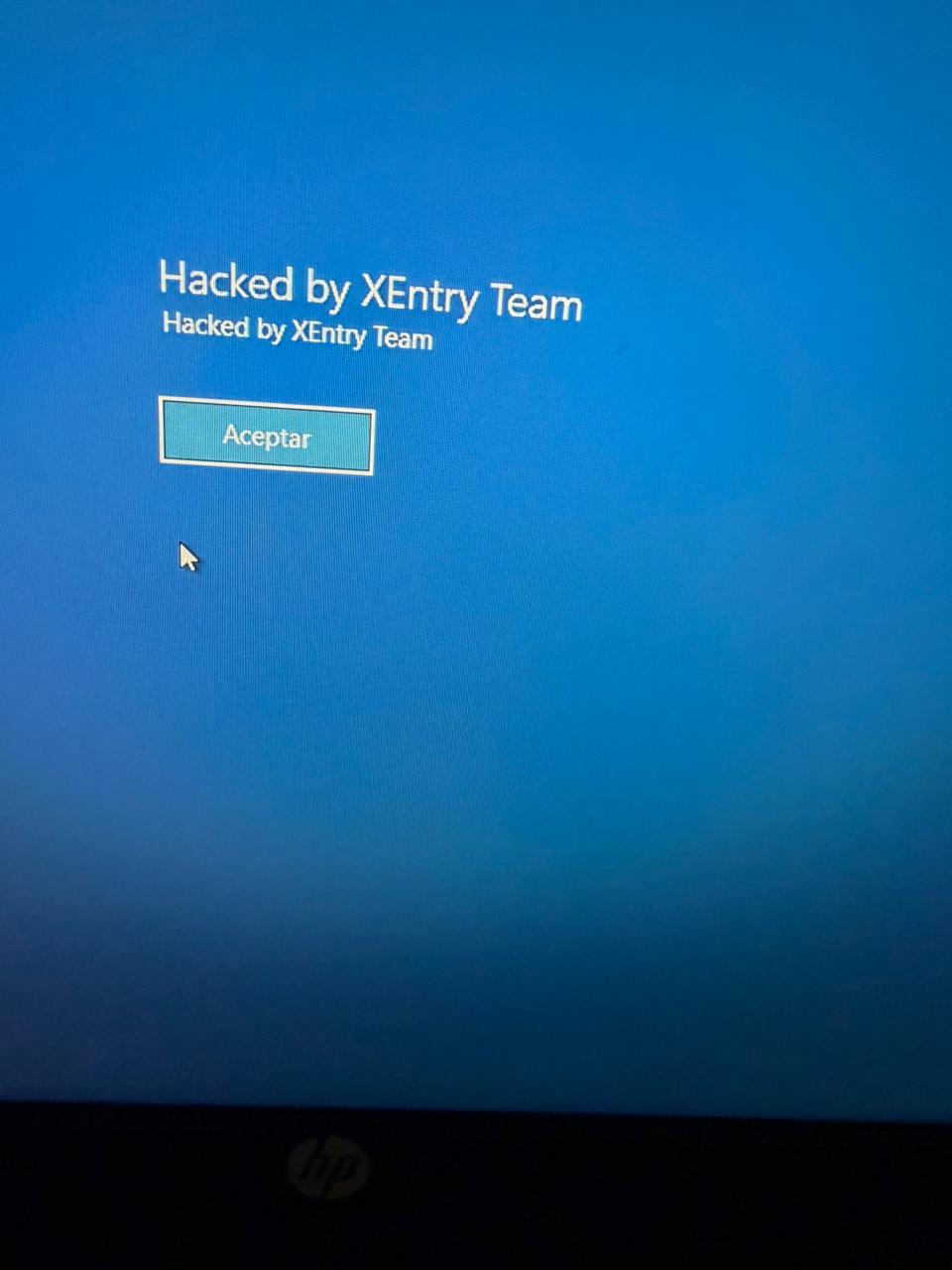
Finally, in mid-May, the attackers managed to execute a Group Policy Object (GPO) used to deploy activation and encryption tasks, as well as other policies responsible for continued deployment of RMM applications via scheduled tasks. The activity initially targeted critical systems but later spread to every system synchronized with the domain controller. Users became aware of the attack when their machines displayed a blue screen with the message “Hacked by XEntry Team”, and their credentials stopped working to access their systems.
A few hours later, ransom notes began emerging from office printers.
Ransom note printed by the XEntry team
These cases confirm that adversary’s objective is to gain access to infrastructure while avoiding investment in or partnership with ransomware groups. Instead, they leverage built-in Microsoft tools to facilitate data encryption and ransom payments. Monitoring and centralizing logs on protected resources, as well as promptly managing alerts, are critical to countering this type of intrusion.
Conclusions
Although the systems under review had security measures in place, there was a lack of proper alert management or inadequate decisions regarding application incompatibilities.
We strongly recommend configuring the Remote Desktop Protocol (RDP) in strict accordance with cybersecurity best practices to prevent unauthorized access. This is especially critical: according to our Global Report: Anatomy of a Cyber World, more than 13% of incidents are related to policy violations and configuration errors, confirming that misconfigurations continue to pose a significant risk.
Organizations should prioritize strict application control policies and active monitoring of network traffic for command-and-control (C2) communications. This is especially critical: according to the same report, more than 20% of incidents involved the abuse of RMM (Remote Monitoring and Management) tools for execution and C2 strategies. The fact that attackers used more than three distinct tools to gain control during a single incident further underscores the urgent need for these measures.
Some questions remain unanswered due to a lack of evidence and a hasty system restoration effort that bypassed critical stages of the incident response process. It is important to ensure an adequate incident response procedure, preserving evidence to confirm all related activities, and adjusting or proposing controls to prevent future incidents involving similar TTPs.
Although the ransom notes do not reveal a clear connection between the actors, certain words used in the messages, as well as the method of delivery and communication, may confirm a link:
“As a guarantee, we have no negative online reviews about non-fulfillment of our obligations…” (Ransom note from the first case)
“Our reputation is the guarantee that all content will be fulfilled…” (Ransom note from the second case)

 Login
Login