Reading view

There are new articles available, click to refresh the page.

Thingino Teaches Cheap IP Cameras New Tricks
I recently found myself in the market for a few IP cameras to keep an eye on my Prusa 3D printers, and quickly found that the options on the market weren’t exactly ideal. Prusa does offer up an official camera, but the price for a pair of them was a bit more than I wanted to spend on the project. Conversely, there’s no shortage of cheap network-connected cameras available online, but they come with expenses of a different sort, namely proprietary software and cloud services I didn’t want or need.

Somewhere in the deep and dark recesses of this particular rabbit hole, I came across a Reddit post mentioning how a camera running the community-developed Thingino firmware could be plugged into Prusa’s remote printer monitoring scheme. It wasn’t a project I’d heard of previously, and sure enough, a search of the Hackaday back catalog showed we’d never come across it before.

My interest was already piqued, but the discovery that I already owned a supported camera sealed the deal. It was time to explore a new entry in one of my absolute favorite project categories: an open source replacement firmware that turns a cheap consumer device into something more than the sum of its parts.

Joining the Thingino Club

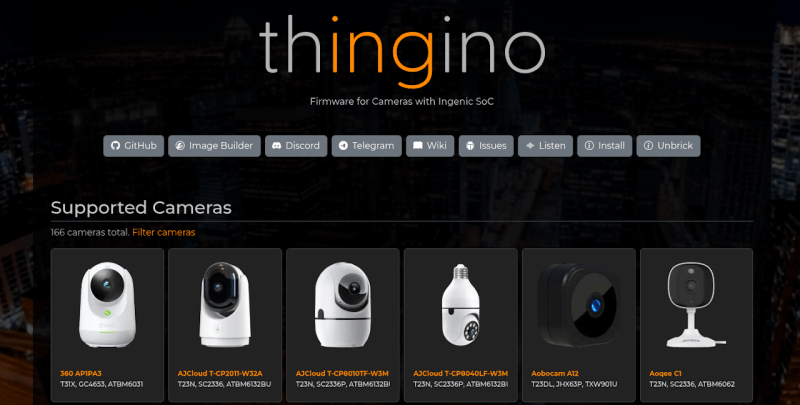
Thingino is a Linux-based firmware for cameras based on the Ingenic system on a chip (SoC), and as of this writing, boasts support for 166 cameras. There are some interesting entries in the compatibility list, but perhaps the most notable are the dozen or so cameras from Wyze, as they have enjoyed considerable commercial success and can be had cheaply on the second hand market.

If like me you happen to have a Wyze Cam 2 collecting dust, you’re in luck. As I soon found out, these devices happen to be supported by what the project calls a “No-Tool Installer.” That is, the installation mechanism for Thingino is the same as it is for official firmware updates: place a file on the micro SD card, power up the camera, and wait.

The situation is somewhat more complicated for most of the other devices on the list, however. While firmware images are provided for the devices that are officially supported by Thingino, most of them don’t have such a user-friendly installation procedure.
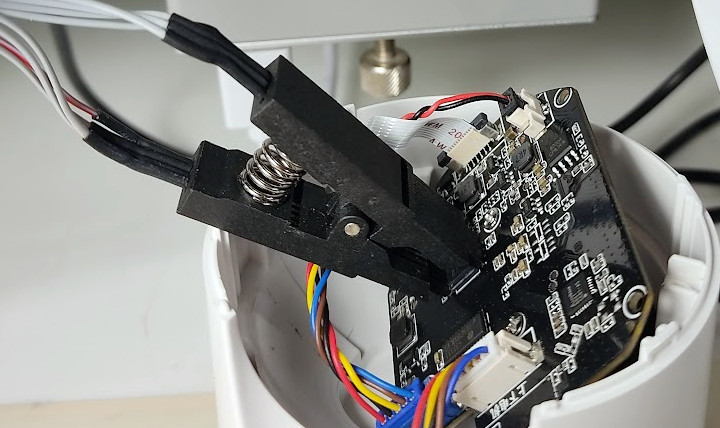
Depending on the camera, installation can be a bit…involved.

Depending on the specific camera, you may have to crack open the case and connect a USB-to-serial adapter to the board to get the image flashed. On some models, you’ll even have to pull the flash chip off the board and pop it into an external programmer. The project’s wiki covers how to perform the installation on a per-device basis, so you can get an idea of what’s involved before diving in.

Now, I have complete confidence that the average Hackaday reader is more than up to the task of installing Thingino on even the most stubborn of targets. There’s an excellent chance many of you have a USB-to-serial adapter within arm’s reach at this very moment, and a few readers probably even have their CH341A chip programmer connected and warmed up from some other project.

Still, there’s a difference between what one is capable of doing and what they actually want to spend their evening working on. So if you’re looking to get in on the action as quickly and as easily as possible, the current recommendation from the community is to pick up the Cinnado D1.

That’s what I ended up doing after kicking the tires a bit on the Wyze Cam 2. Amazon had them for $10 each, and they arrived on my doorstep the next day. Put the firmware image on the SD card, stick it in the camera, and you’ll be basking in the glory of open source in just a few minutes.

Opening the Toy Box

The first-time setup for Thingino will be familiar to anyone who’s configured a modern smart gadget: wait until a new WiFi device pops up, connect to it with your phone, and soon you’ll be presented with a configuration page where you can give the camera a name and point it towards your wireless network. To be clear this doesn’t strictly need to be done with a phone, and a laptop or other WiFi-enabled computer could technically get the job done.

Once the camera has this basic configuration information, it reboots and connects to your network. From there you’ll be doing most of the setup and operation of the device through the web interface, though more seasoned penguin wranglers can SSH in and get full access to the underlying system.
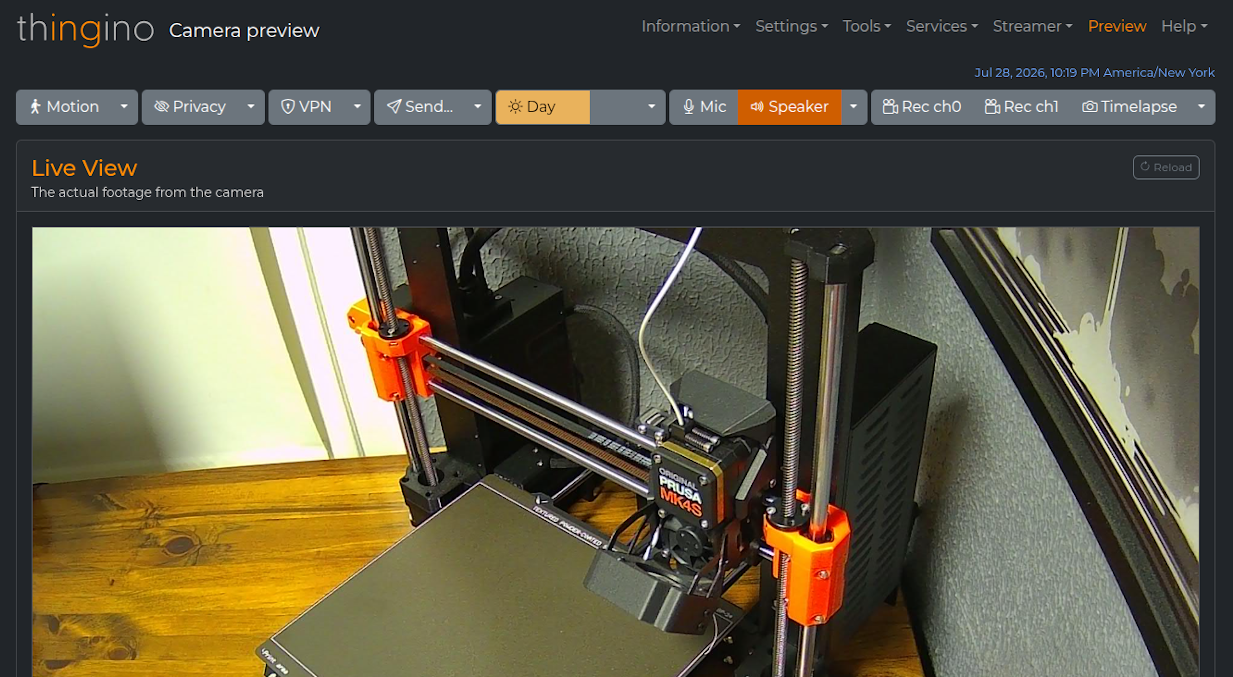
At the most basic level, Thingino offers up RTSP video streams as well periodic still snapshots to any device on the network. If that’s all you need, awesome. You can pretty much stop reading here, point vlc or mpv to the camera’s IP, and be done with it.
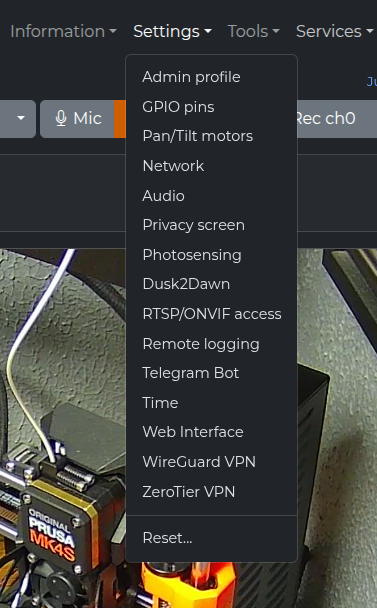
But if you want to dive a bit deeper, there’s an incredible amount of capability built into this firmware. You can enable on-device motion sensing, and configure what you want the camera to do when something triggers it. For example, you could set it to push the video clip to your FTP server and fire off an MQTT message when something passes by. It supports connecting to VPNs, multiple video streams, OSD customization, day/night detection, timelapse recording, and Home Assistant integration.

Although support is limited to just a few chipsets, Thingino even works with USB Ethernet adapters for situations where wireless won’t cut it. At the other extreme, the camera can also be setup to work independently of any network by operating as an access point for client devices to connect to directly.

For cameras with pan and tilt motors like the Cinnado D1, you can slew the camera around from the web interface and tweak the speed and acceleration settings to your liking. You can even have it remember specific camera positions and return to them later.

There’s truly a dizzying array of features and options in Thingino, and even after playing with the firmware for a week or so now, there are still menu options I haven’t fully explored. It reminds me of the first time I ran DD-WRT on the Linksys WRT54G in that the firmware elevates the device to a whole new level, introducing new capabilities that normally wouldn’t be present on a consumer-grade product.

Complete Control, If You Need It

As impressive as the web interface of Thingino is, that’s really only scratching the surface of what the firmware can do. Underneath it all there’s a full Linux operating system ready to do your bidding, and once connected over SSH you’re free to do whatever you wish. There’s even a sysupgrade tool that lets you pull down the latest firmware release and install it on the live running system, just in case things have been working too smoothly and you’re in the mood for some excitement.
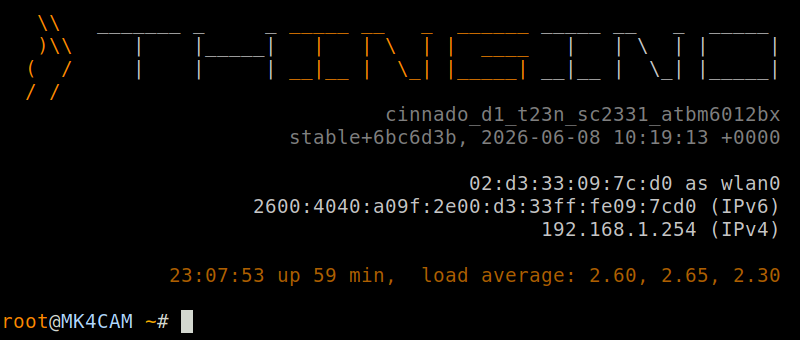
It’s this low-level access that brings the story full circle in my case. Remember that I started down this path because I wanted to push images from the camera up to Prusa Connect. While there’s actually official support for Prusa Connect in the Thingino development branch, it hasn’t yet been merged into the mainline. In the meantime, I’ve got a Bash script that runs on the camera and uses curl to push images into Prusa’s API.

While the vast majority of users will likely never have to SSH into their Thingino camera and run their own scripts and software from the terminal, the fact that the option is there is what’s important. This project is an excellent example of how you can simultaneously provide everyday usability with the freedom demanded by more advanced users.

If you’ve got an old camera that you end up installing Thingino on, or if you’ve already been running it and have thoughts and experiences you’d like to share, let us know in the comments below.


Hackaday Links: July 26, 2026

Hackaday Links Column Banner

At a time when so-called “artificial intelligence” seems inescapable, we were encouraged to see news that Amazon will be cracking down on third-party sellers that use AI-generated images for their product listings. They won’t be prevented from using the images, but they will need to clearly indicate that they don’t represent reality and were produced via artificial means. This comes in response to a recently enacted New York law that requires the disclosure of AI in advertisements.

Will this be the end of the cat sleeping bag?

But it’s not quite a clear cut as it might seem on the surface, as the New York law is actually about AI-generated people rather than products. Specifically, it’s designed to make it clear when a “synthetic performer” has been used in place of a human actor. As such, it would appear that the easiest way for Amazon sellers to dodge the new rule is to simply not include any humans in their AI slop images and videos. In other words, they can continue to post fake pictures of products without having to inform the consumer so long as they don’t show a fake person holding it.

Under normal circumstances we’d leave something like this next one for our weekly security column, but the utter lack of security in the Pope’s official “Click To Pray” mobile application revealed by researcher BobDaHacker on Friday is just too good a story to pass up. For one thing, who knew that there was an “official” prayer app? We don’t dabble in theology around these parts, but we’re fairly sure the good book didn’t mention anything about requiring a smartphone to give praise.

In any event, the service was so poorly constructed that you could simply step through the sequentially assigned numerical user IDs via the endpoint at api.clicktopray.org — because of course there’s a prayer API — and download any user’s personal information such as their full name, email address, and date of birth. There wasn’t even any rate limiting, so BobDaHacker was able to write simple script to quickly suck up the account details for each one of the service’s 700,000+ faithful users.

After waiting six months for a response from anyone at the Pope’s Worldwide Prayer Network, BobDaHacker took the story to the press. That seemed to get the pontiff’s attention, as the issue has now been addressed. Amen.

We know many readers appreciate a more minimalist approach to software, and still others are operating older devices that struggle with the admittedly ponderous bulk of the modern web. Both groups will likely appreciate brolly.sh, which provides a plain-text weather forecast for anywhere on Earth using data from Open-Meteo. It doesn’t just look the part either — we’re happy to report that if you pull down the forecast page for your location using something like wget, the resulting file is plain HTML which could be further parsed with grep and friends if you’re on a machine that doesn’t have a browser.

Speaking of older devices, Android Authority is reporting that Google has finally phased out support for Android 6.0 Marshmallow in Play services. This means that while devices running the older version of the mobile operating system will still be usable, they won’t be able to download software from the Play Store. Given that Marshmallow was released in October of 2015, this probably shouldn’t come as much of a shock. Any device out there that’s still running such an old release of the OS obviously hasn’t received any security updates in years, so the inability to download the latest mobile game should be the least of your worries if you are actually still using such a device as a daily driver.

Finally, given the impact Neuromancer has had on the hacker and maker communities over the decades, we felt obligated to point out that Apple has finally released a trailer for their upcoming adaptation. The ten episode series kicks off in January, and until now we haven’t had a good look at the aesthetic they were going for. Part of what made the novel so influential was how it described the world and the technology within it, but bringing those concepts to life on screen in a way that impresses modern audiences is going to be a unique challenge.

With how many hackers have put together their own real-world versions these last several years, we’re especially interested in the show’s depiction of cyberdecks. The novel itself doesn’t actually go into much detail about what they supposedly looked like, but contemporary illustrations were heavily influenced by 8-bit computers of the era from the likes of Amstrad and Atari. As much as we’d like to see something along those lines, we imagine a big-budget prestige television series probably demands something a bit sexier.


See something interesting that you think would be a good fit for our weekly Links column? Drop us a line; we’d love to hear about it.

Hackaday Podcast Episode 379: Driving E-ink DIY, NES on ESP, and the Other IRC

On this episode, Hackaday editors Elliot Williams and Tom Nardi discuss their love of electronic paper, clunky cartridges, and keeping old games alive by any means possible. You’ll also hear about getting the most out of the sensors in our 3D printers, playing with X-rays at home, a ring that runs Java, and a roulette wheel that outgrew its 555 timer. Stick around to the end to learn about a different sort of IRC that’s even more niche than the one you’re probably familiar with, as well as the logistical challenges and potential benefits of catching rockets with a giant net.

Check out the links if you want to follow along, and as always, tell us what you think about this episode in the comments!

Direct download in DRM-free MP3.

Where to Follow Hackaday Podcast

Episode 379 Show Notes:

News:

What’s That Sound:

  • We’re putting What’s That Sound on hold while we sort out new prizes. Stay tuned.

Interesting Hacks of the Week:

Quick Hacks:

Can’t-Miss Articles:

Dress Up Your YubiKey With This Web-Based Tool

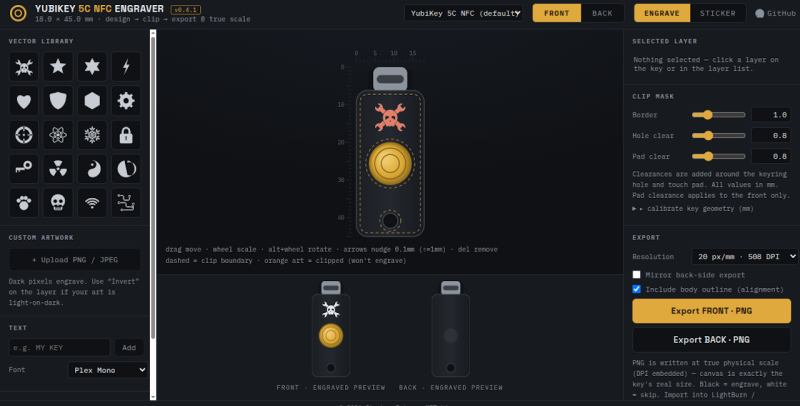
The combination of hardware required to make use of this project is specific enough that we imagine only a relatively limited number of readers will actually be able to try it out. But if you do happen to own a YubiKey and either a laser engraver capable of marking it or a fancy UV printer, [madeinoz67] has put together an awesome tool for adding some visual flair to your two-factor authentication device.

Running it is as simple as opening a web page, because that’s exactly how it’s implemented. You can either host it yourself or just launch it right from the GitHub repository. After opening the HTML file, you’re presented with a fairly intuitive user interface that lets you draw on top of a 2D outline of the YubiKey itself so you can get a better idea of what the final product will look like.

You can pick from an array of vector icons, upload your own images, and add custom text. There’s a pull-down at the top that lets you pick which specific YubiKey you want to work with, and there are different views depending on whether you plan on blasting your handiwork onto the device with a laser, doing a full-color UV print, or cutting it out of vinyl with something like a Cricut.

Even if you don’t have a YubiKey that’s begging for some custom artwork, we think there’s a lot to learn from this project. Obviously there are some very valid reasons to be concerned about how much of our modern software can only be accessed through a browser. If you’re going to use web technologies to create a piece of software, the least you could do is make it offline and self-contained like [madeinoz67] has.

Now if you’ll excuse us, we’ve got to go warm up the UV printer.

Launching Rockets is Hard, Bring them Back is Harder

Since the first V2 rocket sailed above the Kármán line back in 1944 and right up until the modern era, the trajectory of most space-bound rockets was more or less the same: after expending their propellants they would either crash into some desolate steppe or plunge into the ocean. In either event, the rocket was disposable. The important bit up top might go on to explore the stars or send a human crew off on their mission, but the booster rocket that lifted the spacecraft out of the atmosphere was always going to be sacrificed for the cause.

But in the 1970s NASA had a wild idea: what if we didn’t smash a brand-new rocket valued at millions of dollars into the ocean every time we wanted to put something in orbit? Instead, they would build a hybrid space vehicle that blended the vertical takeoff and raw power of a rocket with the capabilities of an airplane, allowing it and whatever it was carrying to make a gentle runway landing at the end of its mission. As such, the Space Shuttle was born.

With the benefit of hindsight, we now know the Shuttle wasn’t quite the spaceflight revolution that NASA had hoped for. The age of reusable rockets didn’t truly begin until 2015, when SpaceX landed the first stage of their Falcon 9. To date they’ve repeated the feat nearly 600 times, all the while increasing the reliability and speed of their operations. Today the Falcon 9 is the most prolific launch vehicle in history, and nearly every other rocket in active development is being designed to include some element of reusability.

Most recently, China demonstrated that they could recover their Long March 10B rocket by gently bringing it down into what amounts to a giant butterfly net. While it might seem a bit quaint compared to rockets that land on their tails like something out of a 1950s sci-fi movie, the idea offers considerable promise.

There and Back Again

But why did it take 70+ years before we were able to regularly refly orbital-class rockets? It’s not that there’s anything inherently complex about reusing a spent rocket. Sure, there’s a case to be made that material science improvements have made the engines robust enough for repeated use. But even if you had to rebuild the engines after each flight it would still be better than slamming the whole vehicle into the ocean. Similarly, there’s nothing particularly unique about the structure of the Falcon 9 that enables it to fly multiple times — it’s a big metal tube with tanks inside of it, just like essentially every rocket that has flown before it.

The revolutionary technology demonstrated by SpaceX in 2015 didn’t have anything to do with making their rocket go up, it was that they were able to safely bring it back without damaging or physically altering it. The Falcon 9 first stage that came back to Earth was in the same condition it was when it left the launch pad eight minutes or so earlier, albeit with empty propellant tanks and a layer of soot on the outside.

As such, most of the variability we see when comparing the reuse of past, present, and future rockets comes not from how the vehicle ascends, but how it ultimately comes to rest back down on Earth.

Splashdown is Easy, But Rough

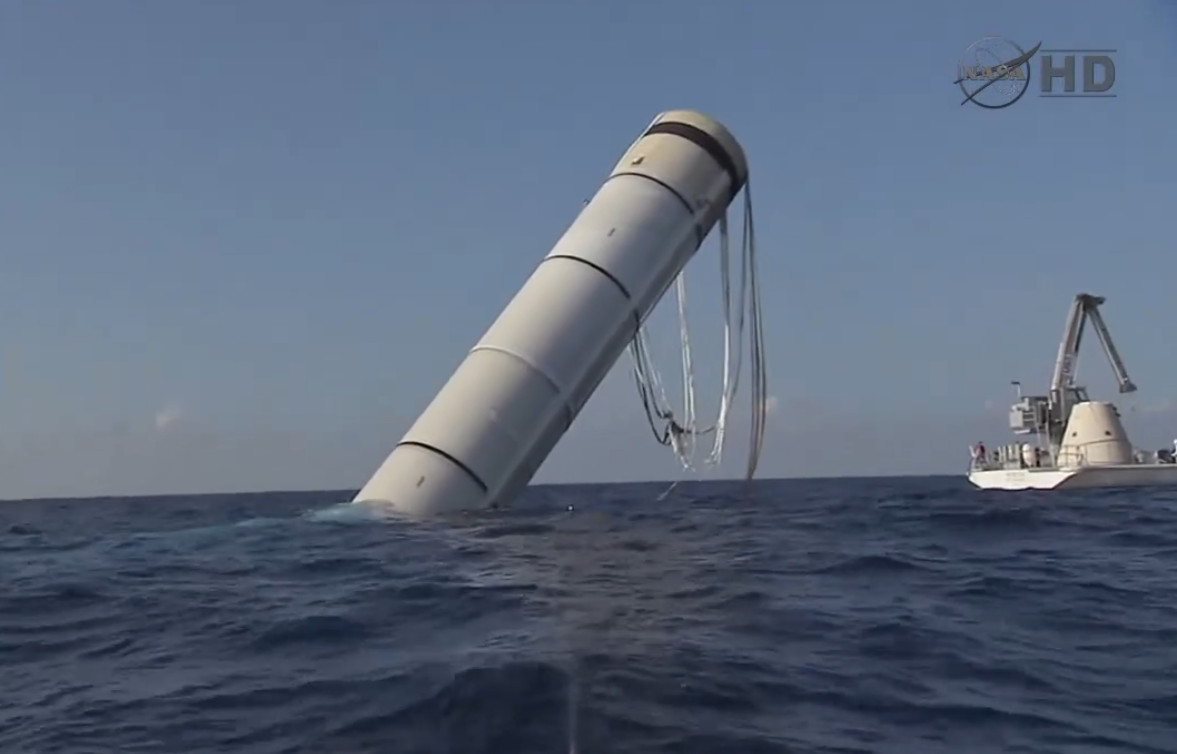
Without question, the easiest way to recover a rocket intact is to simply slow it down before it hits the surface of the ocean using parachutes This is how all American crewed capsules, and more applicably the Space Shuttle’s Solid Rocket Boosters (SRBs), have been recovered after their flights.

Once pumped out, the hollow SRBs could be towed to shore.

But even when descending under multiple huge parachutes, splashdown isn’t exactly a gentle event. It could probably best be described as “survivable”, in that the vehicle and crew will come through the experience in one piece, but neither is likely to be terribly happy about it.

The situation of course ends up being even worse for the rocket, as its structure is going to be subjected to the brunt of the impact force. Additionally, a complex aerospace vehicle getting partially submerged in salt water is a recipe for corrosion and electrical issues, to say nothing of the thermal shock the hot engines will experience when getting dunked.

One could argue that the only reason this method of recovery worked for the Shuttle SRBs is because of their relative simplicity when compared to a liquid-fueled rocket capable of independent flight. At the risk of oversimplifying the structure of the SRB, at splashdown it was effectively a hollow tube with minimal avionics and thrust vector control (TVC) hardware that could simply be replaced before the next flight.

Still, the NASA document Solid Rocket Booster (SRB) Refurbishment Practices goes over the considerable work required to bring each booster back to flight status after coming down in the ocean. Given the challenges of refurbishing the boosters, it’s perhaps unsurprising that NASA elected to forgo their reuse on the Space Launch System despite its SRBs being largely identical to their Shuttle predecessors.

Teaching Rockets New Tricks

In the very early days, while they were still trying to reach orbit with the Falcon 1, SpaceX had actually considered a Shuttle SRB-style recovery procedure. But in the end they decided to outfit the Falcon 9 with deployable landing legs and the rest, as they say, is history.

The DC-X demonstrated propulsive landing in 1993, but couldn’t reach orbit.

Landing legs allow a rocket to come down on effectively any flat surface, be it a concrete pad next to the launch facility or a floating platform. But there are some fairly serious drawbacks to this approach. For one thing, the requirement for precise terminal guidance means parachutes are out of the question. The rocket needs fins, attitude thrusters, or other control surfaces to come down on the center of the pad.

It also means the rocket needs to perform a propulsive landing. That is, use its own primary engines to bring its velocity on touchdown to as close to zero as possible. This in turn requires engines that can not only restart in flight — a capability that has not traditionally been required by first stage boosters — but are able to throttle down low enough to control the rocket’s descent without simply pushing it back upwards. It’s difficult to overstate how unnatural a state of operation this is for a rocket. Indeed, it’s the antithesis of how nearly every rocket has operated since the Song Dynasty started experimenting with gunpowder in the 10th century.

Even if you can accomplish all that, the true cost of landing a rocket is in the extra mass. Although the legs will be stowed away and unused for 99.8% of the rocket’s flight time, it still has to lug all that weight uphill. If that wasn’t bad enough, there’s also the extra weight of whatever control mechanism is in place to guide the rocket’s descent trajectory as well as the propellant that needs to be kept in reserve for the landing burn.

All told, landing a rocket on legs comes with a massive payload penalty. In the case of the Falcon 9, the rocket’s maximum capacity to Low Earth Orbit (LEO) in its expendable configuration is approximately 22,800 kg (50,300 lb). But when outfitted with the hardware necessary to land, that number is reduced by nearly 25% to 17,500 kg (38,600 lb).

Dropping the Dead Weight

There was a time, not so very long ago, when critics doubted the financial viability of recovering and reusing rockets like the Falcon 9. But today, reuse has gone from theoretical to standard operating procedure. Outside of a few Old Space holdouts, it’s top of mind for every launch provider and critical for remaining competitive in a fast-moving commercial market. In November, Blue Origin even managed to land their New Glenn heavy-lift rocket on only its second flight.

So at this point the question isn’t whether or not future rockets will be reusable, but rather, what is the most efficient way to achieve that reusability?

The first stage of Starship after being caught in mid-air.

With that in mind, it’s easy to see the appeal of China’s net recovery. While the rocket must still perform a propulsive descent — although in theory the necessary positional accuracy, and therefore the technical challenge, is somewhat reduced — it doesn’t need to have landing legs installed. This mass savings increases the vehicle’s useful payload capacity, which in turn makes it more profitable to operate. Achieving the same end goal while being easier and cheaper is an improvement in anyone’s book.

Admittedly, having the rocket come down in a huge net adds a certain amount of whimsy to the whole endeavor, but the overall logic is sound enough. It should also be said that SpaceX, for all the success they’ve had with landing their Falcon 9 on a set of deployable legs, are themselves planning on catching both the first and second stages of their next-generation Starship vehicle. Instead of a net, their goal is to pluck the rocket out of the air with a huge robotic pincer mechanism.

One is reminded of the old joke about how the Americans and Russians approached the problem of writing in space: NASA spent millions of dollars developing a pen that would work in microgravity, while their Russian counterparts simply used pencils. If China can demonstrate the ability to reuse a rocket they snagged in their net, the more elaborate methods of recovery employed by American rockets may one day look like a similarly overengineered solution.

Hackaday Links: July 19, 2026

Hackaday Links Column Banner

We’ll start this week off by giving our congratulations to Skyroot Aerospace of India for successfully launching the country’s first privately developed orbital rocket yesterday. The company’s Vikram-1 booster stands 24 m (79 ft) tall and uses a somewhat unusual four-stage arrangement, with the first three stages using solid propellant and the final liquid-fueled stage being responsible for putting the payload into a precise orbit. With this successful launch, India becomes only the third country in the world with a private company capable of performing orbital launches.

Generally, the rocket should be moving when the countdown hits zero.

On the other end of the spectrum, we have SpaceX’s prototype Starship, which elected not to leave Earth during a last-second (literally) launch termination on Thursday. Aborted launches are, of course, nothing new in the world of rocketry, especially when dealing with an in-development vehicle that has 33 engines that need to fire up at the same moment before it can leave the pad. But this dramatic abort was unique as it was the first time lift-off of the massive 124.4 meter (408 ft) rocket had been called off when the engines were already running.

Onboard systems took advantage of the very narrow window between the time the Raptor engines are switched on and the rocket actually leaves the launchpad to decide that it was not a good day to visit space after all. Word from SpaceX is that two of the Raptor engines on the first stage will be replaced and that they should be ready to make another launch attempt sometime this upcoming week.

While getting rockets off the ground is never easy, one thing that seems to have no trouble going up is the price of gasoline. Even still, Americans seem largely uninterested in electric vehicles, or at the very least, the slate of EVs that are currently available to them — especially now that the $7,500 federal tax credit has ended. Yesterday, TechCrunch ran an article about all the EVs that have exited the US market over the last year due to stagnant sales or import difficulties, and it’s quite a list.

Some of the vehicles, like the Sony-branded Afeela, aren’t exactly surprising. But major players like Honda, Volkswagen, Nissan, and Hyundai also decided not to bring the 2026 models of various EVs in their lineup to the US. Polestar has been forced out of the market entirely due to new import restrictions on Chinese tech. Even Tesla is paring down their offerings by discontinuing their Model X and S vehicles.

Speaking of struggling sales, earlier this week, Amateur Photographer detailed a fairly dire situation over at GoPro. The company, once the undisputed market leader in rugged action cameras, looks like it might fold before the end of the year if they can’t bolster their cash reserves. GoPro’s legendary status for reliability in the most extreme of conditions is still intact, with NASA trusting the company’s cameras to return external views of the Orion capsule during its historic trip around the Moon on Artemis II. But for more mundane pursuits, consumers are increasingly reaching for cheaper alternatives.

One more piece of bad news while we’re at it: OnePlus took to their community forums on Thursday to announce they’ll no longer be selling new phones in Europe and North America. Anyone who owns a OnePlus phone in these territories will still get software support and updates through the originally marketed end date, and the warranty on the hardware itself will still be honored. But after that, they’ll have to find a new company to do business with. While the company wasn’t exactly a household name, they did offer some compelling hardware, and it’s always a shame to see fewer options on the market.

We’re pretty sure Dennis Nedry would read Hackaday if he hadn’t been eaten by a dinosaur.

In hopes it will lighten the mood a bit, we’ll leave you with this exhaustive look at the computers featured in 1993’s Jurassic Park, put together by Fabien Sanglard. It covers everything from laptops, which appeared in the background of shots, to the bank of glorious Thinking Machines CM-5 with their iconic arrays of twinkling red LEDs in the park’s control room. There’s even a section that dives into the software side of things, detailing the real-world applications as well as the more fanciful creations. As Fabien notes, the original Jurassic Park novel featured some surprisingly detailed descriptions of the computer tech used at the park, as author Michael Crichton was himself an accomplished programmer.


See something interesting that you think would be a good fit for our weekly Links column? Drop us a line; we’d love to hear about it.

GOES-19 Goes Down, NOAA Investigating

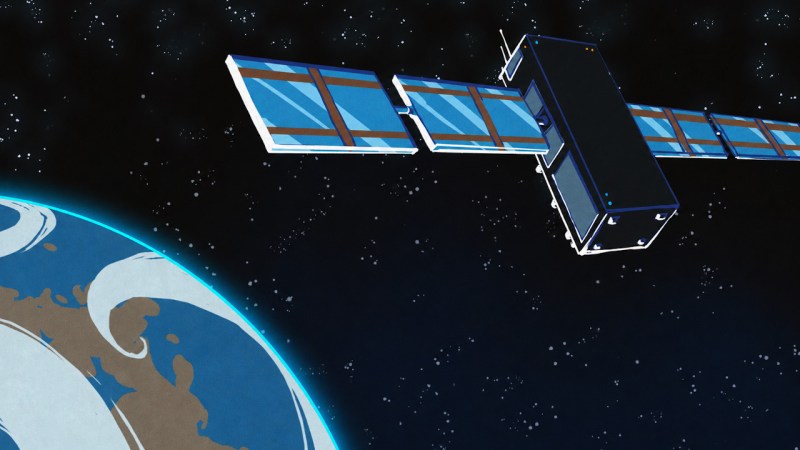
Some breaking news from geostationary orbit, as the National Oceanic and Atmospheric Administration (NOAA) has announced that its newest Geostationary Operational Environmental Satellite (GOES) satellite unexpectedly went offline last night, and as of this morning, remains stuck in safe mode.

Launched in June of 2024, GOES-19 is one of four operational weather satellites that NOAA operates to provide forecast data and severe weather monitoring for the entire Western Hemisphere. The satellite is specifically responsible for covering the continental United States, Central and South America, as well as the Atlantic Ocean. This makes it a particularly critical asset even under normal circumstances, but the fact that it’s gone blind during the Atlantic hurricane season and while smoke from the raging Canadian wildfires is drifting over the Northeast and making the skies over Boston and New York City look like Mars is something of a worst-case scenario.

The good news is that two of the four satellites operate as orbital spares — the satellite that GOES-19 replaced in 2024, GOES-16, is still operational and can stand in as a backup for its coverage area. Obviously, it’s quite a bit older, having launched back in 2016, but it’s of the same design as GOES-19, and in good health, so there should be no degradation of service.

Still, getting GOES-19 back online will be critical for NOAA and the National Weather Service, and we expect they’ll be providing regular updates as the situation develops. Stay tuned.

Google Earth Desktop Client to be Retired in 2027

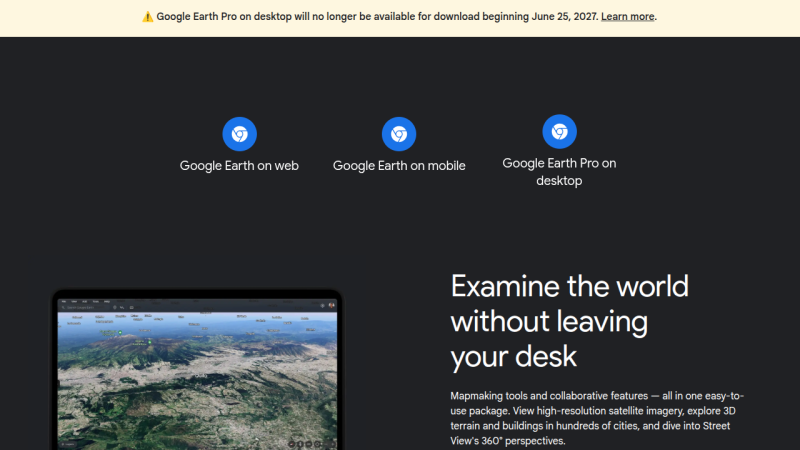
Come next year, those looking to explore the globe virtually via Google Earth will have to do so on their smartphone or from within their browser, as the search giant has decided to discontinue the service’s desktop client in June 2027.

The good news is, the lights won’t be going out immediately. According to a post made on Google Earth’s official support community by Community Manager [Aamir F.], the June cutoff date applies to new downloads, but nothing is changing on the backend, so existing installs will continue to work.

Now, while it’s safe to assume that you’ll have little trouble finding an alternate download of the Google Earth client for years to come, there’s no telling how long before they quit working. It probably goes without saying that Google won’t be providing updates to the software anymore, so if there’s any kind of breaking change on either the API side or at the OS level, that’s the end of the road. There’s always a chance that Google will decide to release the source and turn the whole thing over to the community… but we wouldn’t hold our breath on that one.

To be fair, we have absolutely no doubt that the majority of Google Earth users already access the service via the smartphone app or their browser. Honestly, you could say the same thing about most services these days. So in that respect, it’s not much of a surprise that Google doesn’t feel like keeping the native version going. That said, several commenters in the community thread pointed out features from the desktop client that aren’t available in the other versions.

Are you still using Google Earth on the desktop? Will this change impact something you’re working on? We’d love to get your take on this in the comments below.

Thanks to [Mark Lloyd] for the tip.

Pinch Puts an Arduino On a USB-C Connector

Compared to the Arduino Uno of old, modern microcontrollers are absolutely tiny — especially for the amount of processing power and I/O you get. But if you need something really small, like fits-on-the-tip-of-your-finger small, most of the turn-key development boards on the market are still a bit too big.

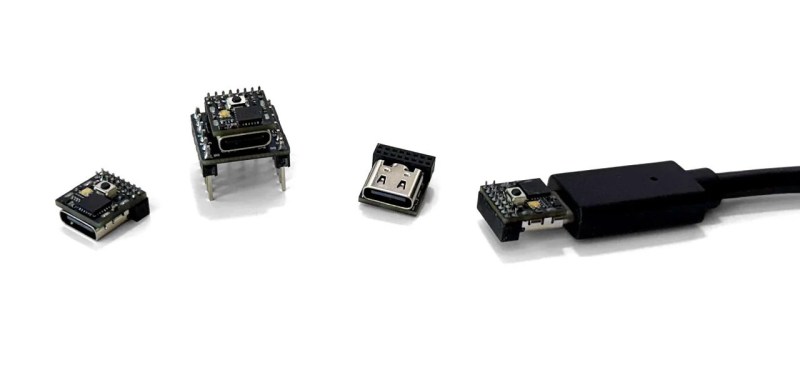
Enter the pinch from moddo, which they advertise as “The World’s Smallest 32-Bit Arduino-
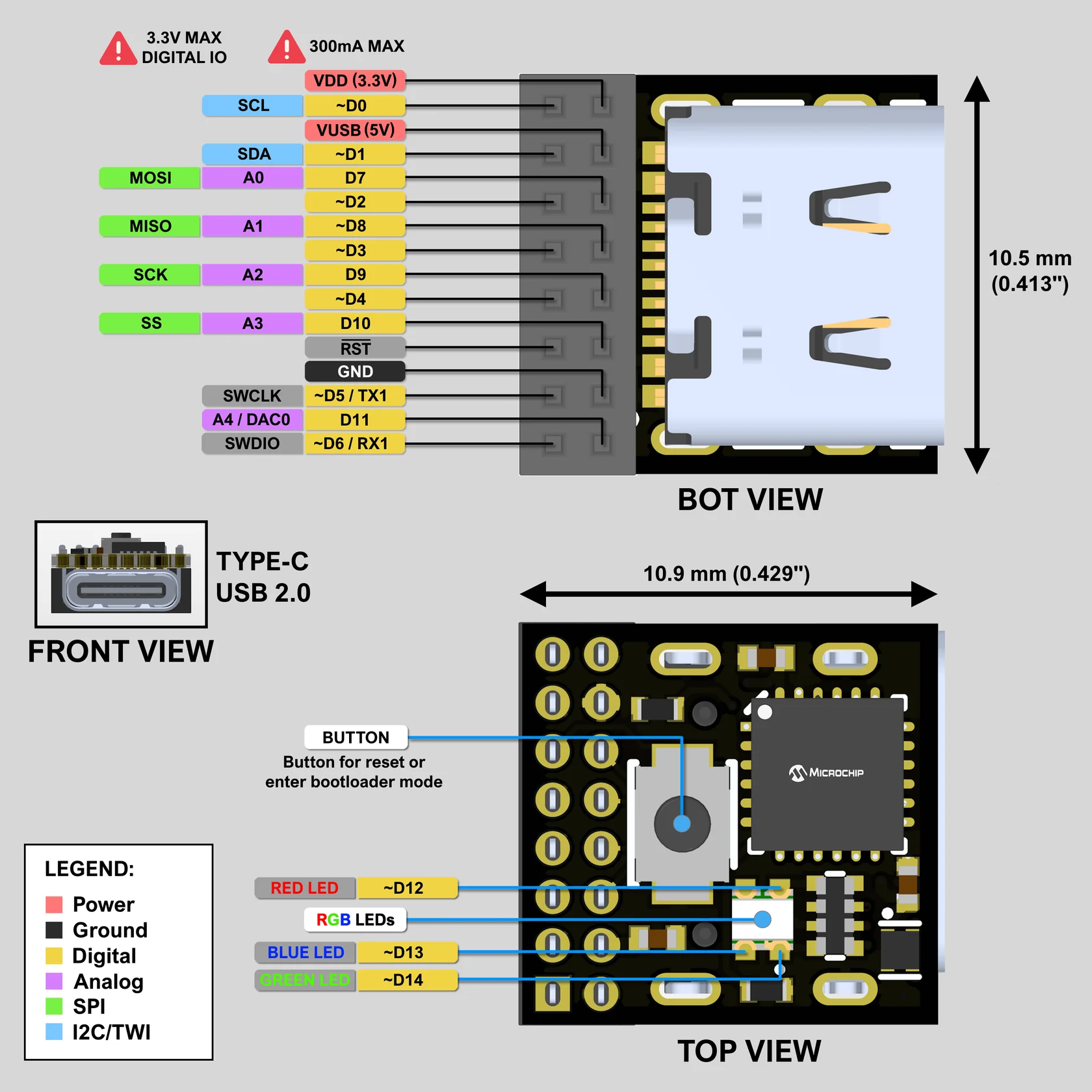
Compatible Board.” We can’t vouch for its world-record status, but we certainly can’t think of a smaller one. At least not a complete solution like this, which offers native USB and 15 GPIO pins in addition to the usual suspects like SPI, I2C, PWM, and UART. In fact, it’s so small that it even includes a breakout board to make prototyping a bit easier.

Coming from something like an ESP32, the biggest adjustment will probably be working around the relatively limited specs of the SAMD11. The ARM Cortex-M0+ under the hood tops out at 48 MHz, and there’s only 4 KB SRAM and 16 KB flash (of which the bootloader eats up 4 KB). Still, not bad for something that occupies roughly the same surface area as a female USB-C connector.

We’re told the team is in the final stages of testing and production of the pinch, and you can currently pre-order the $16 board ahead of its planned September ship date. A circuit schematic and STEP 3D model are already available, and it looks like board design files aren’t far behind.

Open Book Touch Makes Crowd Funding Debut

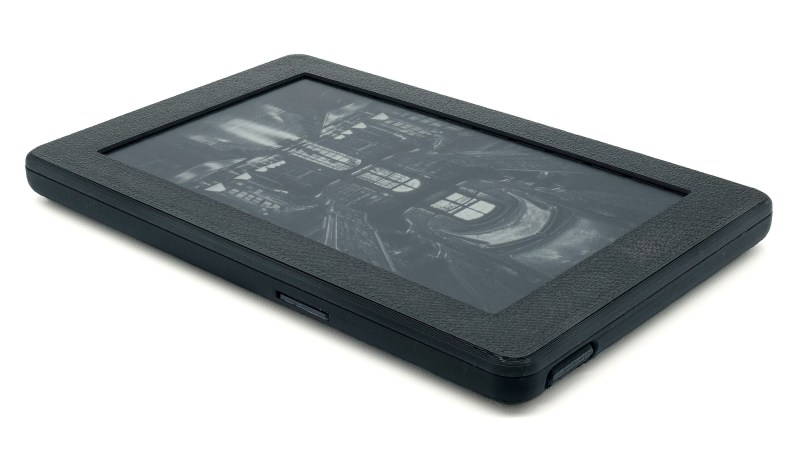
If you have even the slightest interest in open hardware e-readers, you’ve certainly heard of [Joey Castillo]’s Open Book project. We’ve covered his efforts to develop an affordable reader that delivers a Kindle-like experience without the Orwellian megacorp trappings for several years now, and watched with great interest as the core hardware has evolved.

So we were particularly excited over the weekend to see the Open Book Touch finally hit Crowd Supply, and judging by the fact that the campaign for the $149 device has already blown past 60% of its funding goal in just a few days, it seems like we weren’t the only ones.

As the name implies, this latest iteration of the e-reader does away with physical navigation buttons and introduces an intuitive touch-based interface. Those who like to enjoy their open source hardware under the covers will be glad to hear that not only does this new version of the Open Book finally include an illuminated display, but it even allows you to adjust the color temperature and brightness of the LEDs with the swipe of a finger.

While the hardware improvements over the previous Open Book are impressive, the software has really come a long way as well. The user interface lets you organize your books on virtual shelves and browse through their covers, providing the sort of slick experience that you’d expect from a modern e-reader. You can also look up the definitions of words, or dog-ear favorite pages so you can return to them later.

But what you won’t get is locked down with DRM — the Open Book Touch uses standard EPUB and TXT files loaded from a micro SD card, and thanks to the WiFi-enabled ESP32 at its heart, it offers up a web interface that lets you manage your collection over the network.

It’s been nearly a decade since the Open Book first graced our pages, and though we’re not in the habit of picking favorites here at Hackaday, this is one project where the stakes are so high that we can’t help but feel invested. Reading shouldn’t require a subscription fee, or depend on a proprietary piece of hardware that can get ejected from its own ecosystem once its maker decides you need a new one. Obviously the Open Book Touch won’t even make a dent in the market share that Amazon’s Kindle enjoys, at least there will be an option available for those who wish to keep reading on their own terms.

Hackaday Links: July 12, 2026

Hackaday Links Column Banner

Although we’d rather bring you news of clever modifications and repairs down on the farm, more often than not, the name “John Deere” has appeared on the pages of Hackaday because of their opposition to farmers actually being able to work on the machines their livelihoods depend on. But thanks to a settlement reached between the company and the Federal Trade Commission this week, farmers seem to have been handed a much-needed win in the Right to Repair battle.

When a lawsuit against a company ends in a settlement, it usually means spending money they would rather pay than go to court. Indeed, earlier cases against John Deere have resulted in plenty of checks being written. But this time around, the FTC agreement requires Deere to make its diagnostic and repair software available to owners and independent shops. It also has a clause that prevents them from retaliating against owners who want to handle their own repairs rather than going through the company’s official service channels — hard to believe that’s something that actually needs to be specified, but it does give you a hint as to just how bad the situation has been. We’ll definitely be keeping an eye on this story.

Sounds like the Feds were busy this week, as the Federal Communications Commission also gave the green light to Reflect Orbital to launch a prototype satellite for their controversial “sunlight as a service” concept. The company plans to put the spacecraft into a roughly 600 km orbit around the planet, where it will deploy its 324-square-meter reflector and angle itself to illuminate a spot on the ground. It might sound like something a Bond villain would come up with, but Reflect Orbital says the capability will be used to beam sunlight directly onto solar panels at night and to provide light for search-and-rescue operations.

As you might expect, providing such a service on a global scale would require many such reflectors, which is where the concern really comes in. Critics note that a sky full of literal mirrors can cause all sorts of issues, ranging from the scientific to the scenic. The American Astronomical Society points out that each satellite in the constellation could appear to be four times as bright as the full Moon, and that it’s possible an amateur sky watcher could get an eyeball full of redirected sunlight should one of them unexpectedly zip past the aperture of their backyard telescope.

Moving from 600 km above to 400 meters below the surface of the ocean, the Royal Canadian Geographical Society and Woods Hole Oceanographic Institution have provided our first look at the wreck of Ernest Shackleton’s final ship, Quest. The schooner-rigged steamship was launched in 1917 and had a storied career that included not only a number of scientific expeditions but service during the Second World War. The ship ultimately met its fate in 1962 when it was damaged by ice and sank off the north coast of Labrador. The exact location of the wreck was unknown until its discovery in June of 2024.

Now, before you start questioning your knowledge of history, we should probably clarify that Shackleton was not exploring the Labrador Sea in 1962. He did, however, die aboard Quest in 1922 at the age of 47 as he was preparing to depart on another expedition to the Antarctic.

This next one isn’t new, but it’s the first time we’ve come across this gallery of gorgeous Soviet-era control rooms. Hackaday isn’t the place to dive into the political and socioeconomic aspects of the USSR. All we know is that they were putting out some damn fine-looking control panels back then. Half of them look like they wouldn’t be out of place on a Moon base, and the white lab coats with the little hats really complete the retrofuturism vibe. Now we have to go watch Chernobyl again.

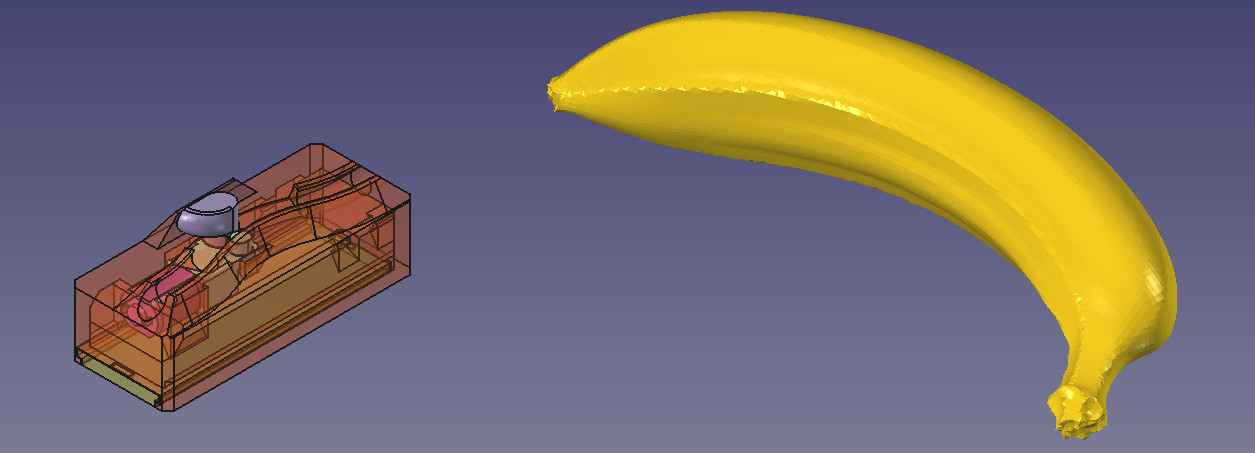
In software news, FreeCAD has received a new tool that we know many in the community will be excited about: Banana For Scale. Forget the confusion between Metric and Imperial measurements. Placing a 3D banana in the scene alongside your rendered part provides a globally recognized size reference. While the free and open-source CAD package has often been criticized for being behind its commercial counterparts in terms of user interface and overall feature set, we think this addition should go a long way toward evening the scales — no pun intended.

Finally, Phoronix reports that Linux 7.2-rc3 includes several vital updates to device drivers for the Sega Dreamcast. Users running Linux on the ill-fated PlayStation 2 competitor will benefit from improvements made to the keyboard, mouse, and joystick interfaces. These fixes join the improved code for the console’s GD-ROM optical drive that emerged back in April. The “Year of the Linux Desktop” continues to be elusive, but it certainly looks like 2026 may finally be the Year of Linux on the Dreamcast.


See something interesting that you think would be a good fit for our weekly Links column? Drop us a line; we’d love to hear about it.

Get a Handle on This Compact Pi Portable

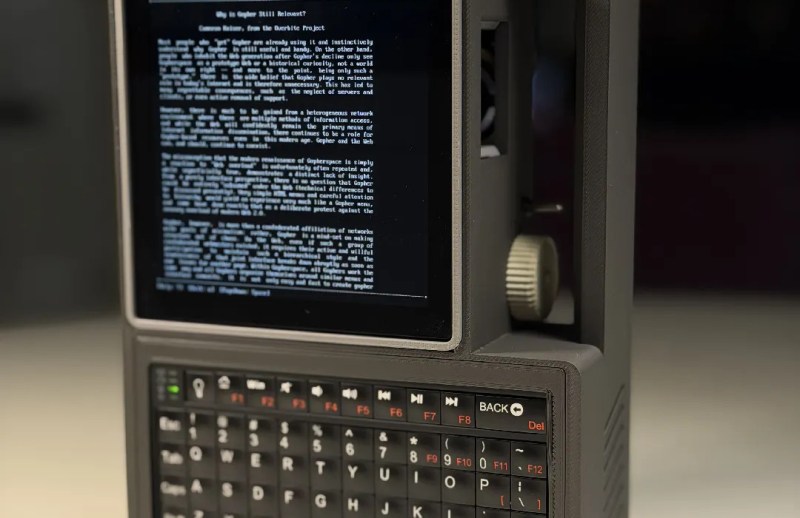
Between the speed and reliability of modern desktop 3D printers and the abundance of powerful single-board computers, there’s never been a better time to build a personal computing device that bucks traditional forms for something more bespoke. Whether you want to go all in on Gibsonian cyberdeck aesthetic or a distraction-free writing device to take notes on, there’s no shortage of examples out there that you can turn to for inspiration.

A recent entry into the field, the Don’t Panic Cyberdeck from [Paul Rickards], is a particularly approachable specimen for those looking to experiment with alternative computing experiences. While the final product certainly stands out among the throngs of nearly identical laptops, it doesn’t take a huge investment in time or money to put one of your own together.

Which is not to say the project is simplistic, exactly. Rather, as [Paul] released the design under the Creative Commons license and was kind enough to provide not only a detailed Bill of Materials but assembly instructions, the community is able to benefit from the sleepless nights he no doubt put into it.

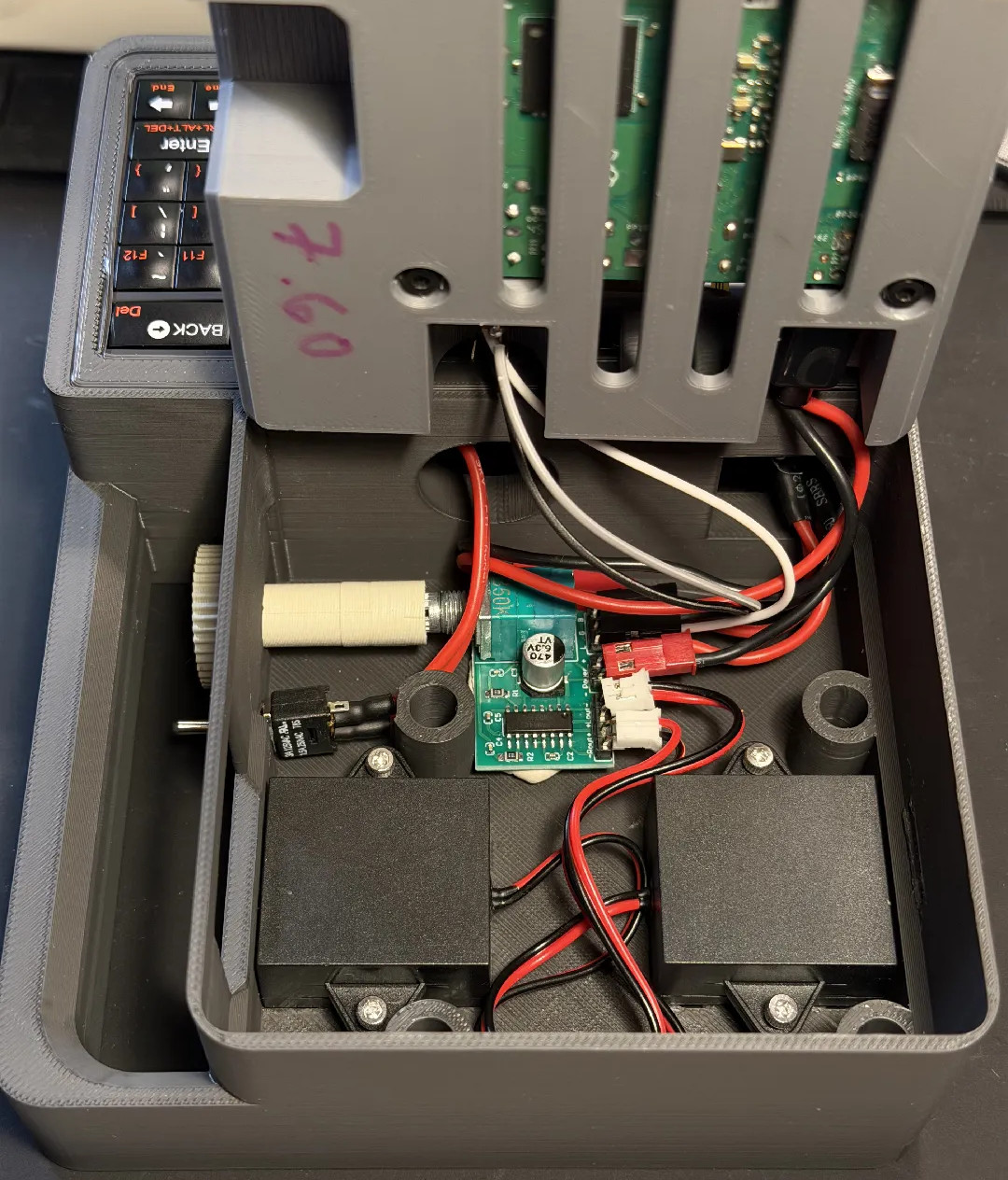
In it’s baseline configuration, the Don’t Panic uses a Raspberry Pi 3A+, a Pimoroni HyperPixel 4.0 Square LCD (touch optional), and a Rii 518BT keyboard. Those core components would be enough to get you up and running, but if you want battery power you’ll also need to add a LX-2BUPS UPS board and a pair of 18650 cells. Audio might be nice as well, and for that [Paul] recommends a PAM8403 breakout board. He’s even got a printable volume knob that slips over the board’s potentiometer and peeks outside the case.

Of course, the best cyberdeck builds are customized to meet their owner’s specific needs, so your loadout doesn’t need to match [Paul]’s exactly. Except the handle, anyway. That feature is non-negotiable. Mainstream computers have far too few handles for our liking.

This DIY Time Server is More Accurate Than You Need

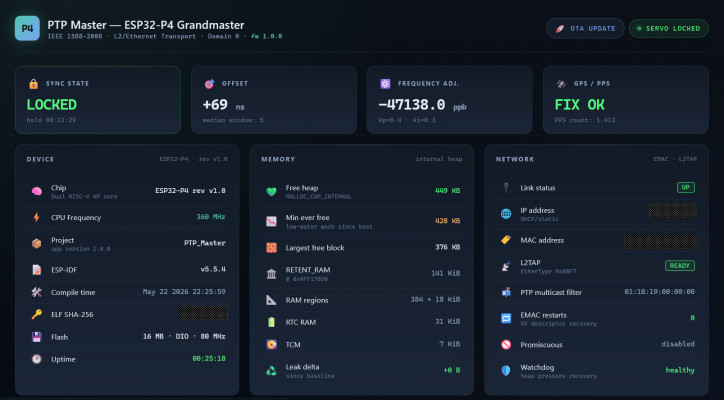
You almost certainly don’t have an application for the sort of accurate timekeeping that’s made possible by this enhanced version of [Cristiano Monteiro]’s satellite-backed time server. By his own admission, the vast majority of users will be more than happy to have their system’s time synchronized by the traditional Network Time Protocol (NTP). But if you’re really chasing those last few microseconds, that’s where the Precision Time Protocol (PTP) comes in.

With NTP, you can get within 10 milliseconds or so of your upstream time source — but PTP is accurate down to nanoseconds. Unless you’re performing some kind of scientific research, running a robotic assembly line, or perhaps doing high-speed financial trading, there’s no reason for this level of accuracy. In fact, PTP is such a niche technology that until the release of the ESP32-P4, [Cristiano] couldn’t even find an affordable enough chip that supported it.

Hardware-level support for PTP is important as there’s no way to achieve this level of accuracy with software alone, the capability needs to be baked into the Ethernet controller. As you might expect, it takes a highly accurate time source to make the most of PTP, and that’s where the navigation-grade Global Navigation Satellite System (GNSS) receiver comes in. All told the cost of the build is unsurprisingly higher than that of its predecessor, but [Cristiano] says it’s still a couple zeros shy of what a commercial offering would run.

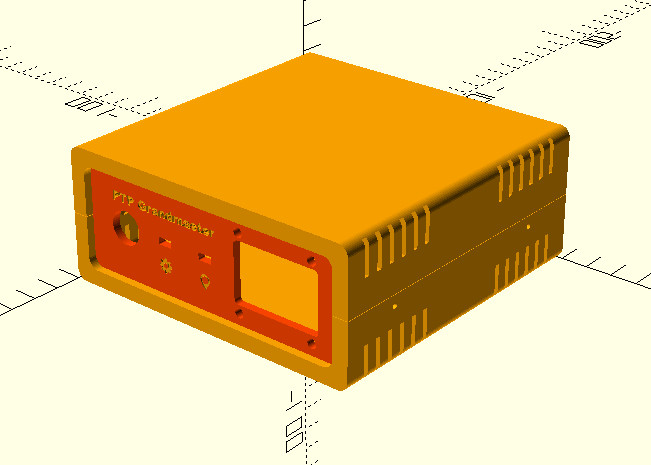
As with his original time server from 2021, [Cristiano] made sure this build was as friendly as possible for hackers and makers. We especially like the 3D printed case designed in OpenSCAD, and his insistence that the gadget have a front panel with blinking status LEDs. Again, the vast majority of us don’t need our clocks to be accurate down to the nanosecond…but it’s nice to know we have the option.

ESP32 Keeps Tabs on Your Local Airspace

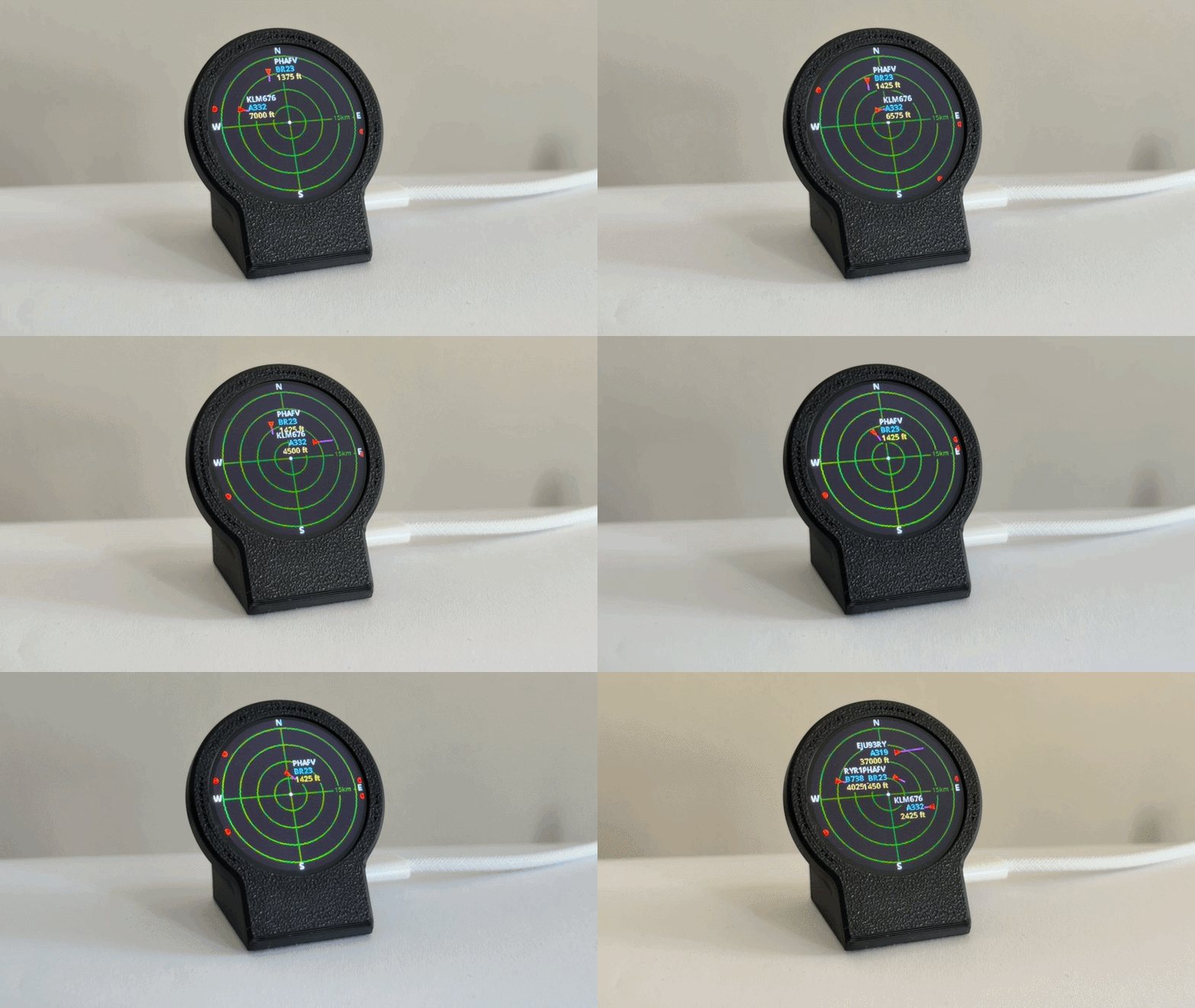
We know, we know. Despite being called ESP32-Plane-Radar, this project from [Mateusz Juszczyk] isn’t actually using radar. But thanks to the round LCD this desktop gadget does a fantastic job of recreating a classic radar display, and by pulling in Automatic Dependent Surveillance–Broadcast (ADS-B) data, the visuals even match nearby real-world aircraft.

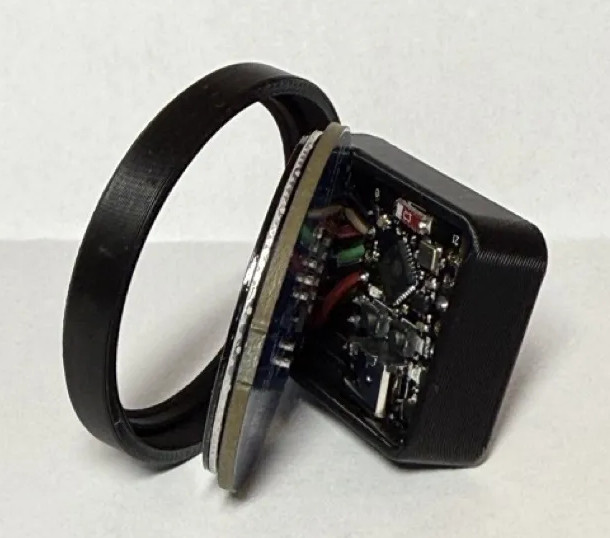
Perhaps the best part of this project is just how easy it is for others to get in on the action. Although the presentation certainly looks professional — and expensive, if we’re being honest — there’s nothing particularly exotic going on here. Specifically, there’s ESP32-C3 Super Mini behind the scenes cranking through the ADS-B data and pushing it out to a circular GC9A01 display. A minimalistic 3D printed enclosure holds both components, and while it’s undeniably slick as-is, we can’t help but think there’s potential here for more elaborate designs.

As you probably guessed from the lack of a radio in the parts list, the code [Mateusz] provides doesn’t actually sniff ADS-B out of the air. It connects to the local network over WiFi, and then hits adsb.fi to pull in crowdsourced flight data. Since the device has to connect to the network anyway, the code also offers up a web-based configuration interface which puts a little more polish on what’s already an impressive presentation.

We used a round GC9A01 display on the Vectorscope back in 2023, so if anyone ports this over to their old Supercon badge we’d love to see it in action.

Thanks to [Mauricio] for the tip.

It’s Now Imperative That You Copy That Floppy

In the early 1990s, Don’t Copy That Floppy was an anti-piracy campaign that attempted to connect with computer-savvy youth through the power of hip-hop. While somewhat difficult to imagine given our current draconian Digital Rights Management (DRM) hellscape, warning kids about the potential legal ramifications of duplicating floppy disks containing copyrighted software was seen as necessary since at the time there was usually nothing preventing users from simply copying the contents of one disk to another.

Unfortunately 30+ years down the road, we’re now finding that somebody really should have been backing up some of those disks. Which is why the University of Cambridge of launched the Future Nostalgia project and produced Copy That Floppy! — a phenomenal guide on preserving the contents of floppy disks while we still can.

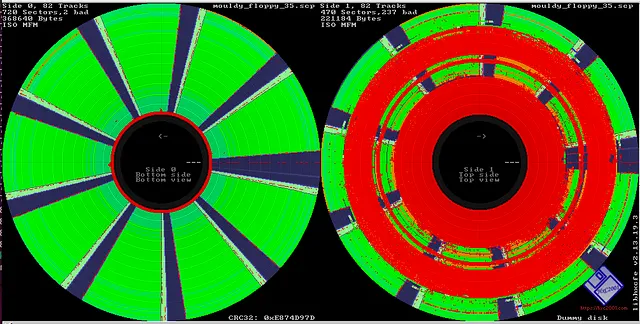
Visualizing a disk’s flux stream can identify debris and damage.

There’s no telling how much data could potentially be lost to time because its stuck on such an antiquated and fragile storage media, and the situation only gets worse with the passage of time. The problem isn’t just that modern computers don’t have floppy drives. The disks themselves degrade with age, a process which is accelerated if they aren’t stored properly.

As such, Copy That Floppy! only briefly touches on the most ideal situation — that is, buying a USB floppy drive and making copies of the bog standard 3.5 inch disks you might come across. It then moves right on into more advanced topics, such as interfacing with less common drive types, how to safely clean floppies, and the use of advanced tools such as Greaseweazle to analyze captured disk images.

We’ve seen demonstrations of some of these techniques before, and a few years back Adafruit got interested in floppy preservation with modern hardware. But in-depth guides like these that pull all that information together into one place are valuable resources.

❌