Recently the [Chornobyl Family] got their hands on an ES-4001 control panel for a 1970s-era Soviet mainframe, with the intention to restore it to full working order. Not just because they’re really into cool old Soviet technology, but also because of the connection that this control panel holds to the Chernobyl nuclear accident that was so instrumental to the area in modern times.
The Duga-1 computer room with what’s left of the ES-1060 mainframe. (Credit: Chornobyl Family, YouTube)
During the 1970s the USSR felt that it could not be left behind in the race to create better digital computers. This led them to not only create a few original designs, but also effectively clone the IBM System/360 and System/370. This resulted in the ES EVM-series of mainframes, with an ES-1060 finding itself installed at the Duga-1 early warning radar system near what is now the Chornobyl nuclear power plant in Ukraine.
Although the radar arrays are the most well-known feature of the Duga-1, below it is the computer center where the ES-1060 was installed. It was never put into service following the ChNPP Unit-4 accident — all that remains of a once pinnacle of Soviet engineering are the picked-over carcass of the mainframe and its control panel.
The control panel in question was obtained was from the early 1980s, serving a more gentle service life in a datacenter and looks to be in a mostly good condition. That said, there was still enough to be done to make it work and undo the damage of its violent removal from the mainframe. Along the way we also learn how the system was used and how the control panel works.
Although similar in some ways to the System/370, it’s still very different, and with only about 300 of these mainframes produced, it’s worth saving whatever elements still remain today, along with the surviving documentation.
Game consoles tend to have a weak spot or two that will take certain units out sooner than they would due to normal parts aging. In the case of the Wii U it’s the eMMC storage IC with the console’s firmware and any user data that likes to keel over, with the SK Hynix variant reportedly developing faulty cells much sooner than the Samsung and Toshiba chips. If you want to check the health of these eMMC ICs in your Wii U, you can do so easily now with the Wafel Installer project by [zer00p].
This doesn’t take much more than navigating to the wafel.xyz URL on the Wii U to launch the installer on any (unmodified) Wii U, or alternatively starting it from an SD card if you’re running a homebrew-enabled console. This can also install the Stroopwafel CFW, ISFSax and the Aroma homebrew environment, but the NAND testing option in the installer’s menu is what you want to select if you’re not into homebrew or have already cracked open the console for said sweet homebrew action.
All of this is covered in this video by [FunkyScott47], whose Wii U’s Samsung-branded eMMC is fortunately still all fine, but it shows off the variety of tests available. Unless the eMMC is already quite cooked this should take only a minute or two, so it’s pretty good for ease of mind.
With the heavily waffle, syrup and stroopwafel-coded naming scheme for these tools we can not be held responsible for a sudden case of the munchies, of course.
If you’ve been reading Hackaday for any length of time, you’ll know we love seeing hackers replacing the stock firmware on their devices with open source alternatives. Usually this is done because the open firmware offers more features, or lifts some arbitrary limitation. But if you find yourself installing OSIRIS on an Onkyo AV receiver such as the TX-NR717, it’s probably because you’re trying to bring the thing back to life.
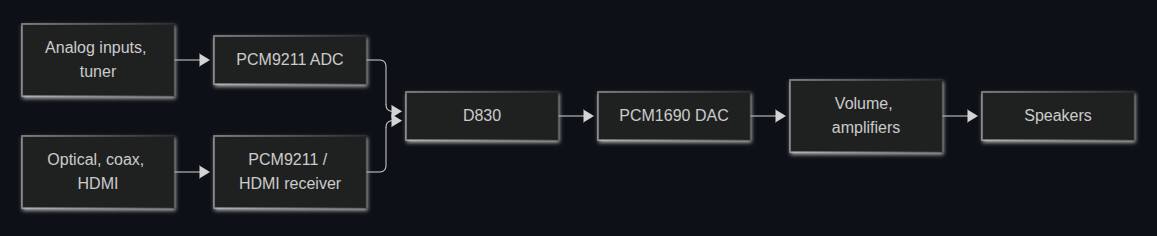
As developer [Jokūbas] explains, certain Onkyo receivers that use the Texas Instruments D830 are known to suffer from a very specific failure — the device will power on and appear functional, but no audio will come through. When this happens, it’s either because the D830 itself has failed or the 64 MiB NAND flash chip that holds the firmware it runs is cooked. Unfortunately, replacing either component is a bit more difficult than you might expect.
Everything passes through the Texas Instruments D830. If it goes, you’ve got a problem.
If you swap the D830 with a pin-compatible chip that’s easier to find and less prone to failure, the stock firmware won’t boot. If you try to replace the NAND, you’ll find that the original software is only capable of addressing 512-byte pages, while the flash you’ll find on the market today uses 2 KiB or 4 KiB pages. In both cases, it’s OSIRIS to the rescue.
The open firmware not only supports D830 compatible chips such as the OMAP-L137, but it’s able to address modern NAND flash, making the replacement of either or both component far more practical. With fresh hardware and the new firmware installed, your Onkyo receiver should spring back to life. That said, OSIRIS isn’t feature complete yet, and truthfully the items listed as untested or not implemented on the feature list currently outnumber the entries for what actually does work. But at least it’s a start.
It’s definitely a sign of the times when repair shops get handed sticks of registered ECC DDR5 RAM by businesses to try and fix, rather than just tossing the defective ones and slotting in a fresh bunch. This is how [northwestrepair] ended up with two of these ECC RDIMMs, with a current market valuation of a rather nice budget car.
The 128 GB stick was first on the bench, with the fault being that it would fail DDR5 training on boot. This suggests that one or more of the DRAM BGA packages had developed a cracked solder joint, which is something that you could conceivably fix with more diagnosing and testing for a single IC reballing.
In this case doing a reflow cycle was enough to bring the RAM back to life, with the DDR5 training now passing without issues in a test system.
For the 256 GB stick things wouldn’t be so easy, as it seemed completely dead. This suggested a dead PMIC, as this is the component on DDR5 RAM responsible for ensuring that the DRAM ICs even power on. The SPD ROM was another option, so that got swapped first, which does require reprogramming the RDIMM. For this the earlier SPD dump image was reflashed, but swapping this chip made no difference.
After some additional reflowing of a few suspect ICs, still nothing happened. Following this a lot of reballing and other troubleshooting steps followed, only for the problem to be one shorted MLCC and a broken PMIC, potentially caused by whoever dropped said RDIMM onto the server room floor.
Cracked MLCCs do appear to be a very common cause of failures, as they’re often used as filter capacitors, same as for this RDIMM. Checking for shorts across a number of such MLCCs can be a good way to shorten a diagnostic cycle. Since this RDIMM was dropped, reballing every IC probably was still a good move as this may have cracked some solder balls.
I started writing this from a commuter train passing at speed through the outskirts of London, and my headset had just broken. The flexible joint that attaches one earpiece to the headband has snapped, leaving the earpiece dangling on its cable. This is annoying on its own, but what is annoying me enough to write about it is that this isn’t the first time. This is only the latest in a succession of headsets I’ve taken on the road with me has broken, not because of rough treatment, but simply due to flimsy or bad design. What on earth can I do about this?
Failure Built-In
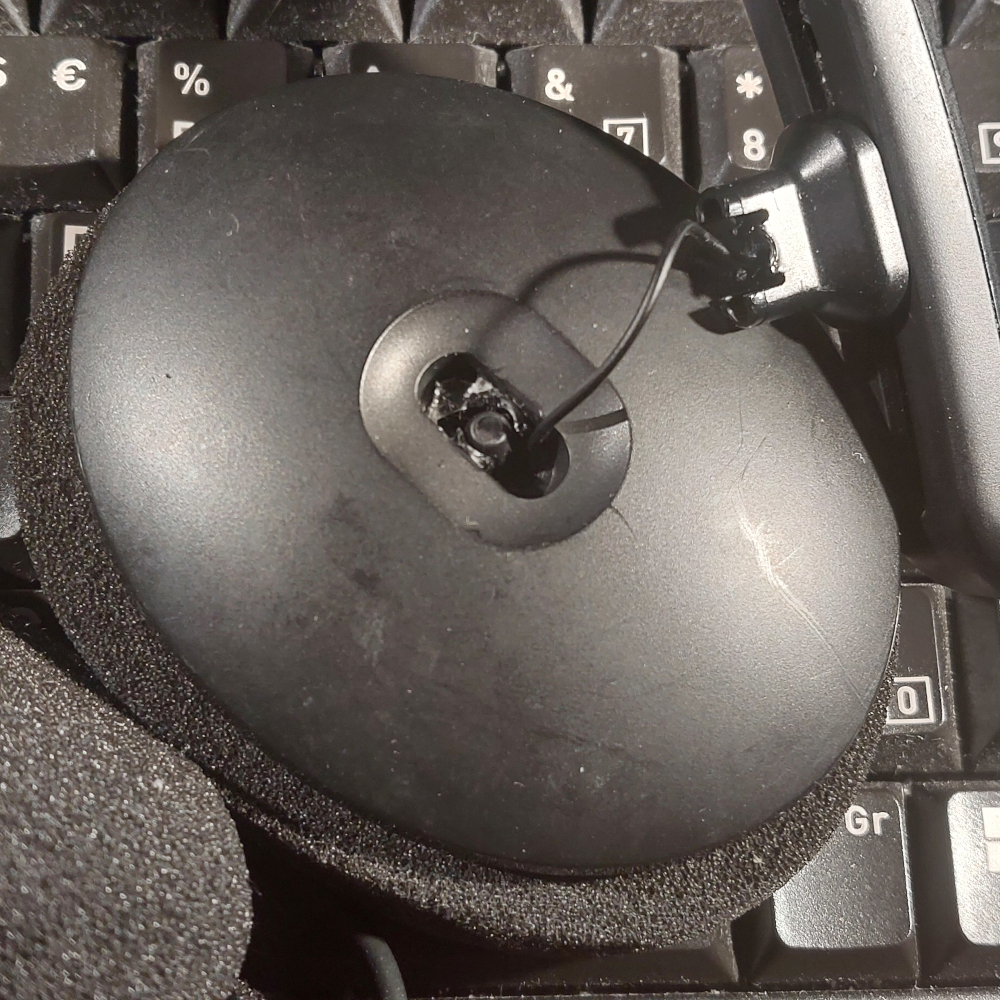
Failure inevitable: the whole headset relied on a tiny piece of plastic in the centre.
The most recent three have been a JVC whose rotating joint allowing the earpiece to lie at a slight angle with my ear has failed, a quite expensive Logitech whose ear sponges failed closely followed by its USB cable, and now an EPOS whose ball joint has failed.
I repaired the JVC and got a bit more life out of it and I’ll have a go at repairing this EPOS, but that’s hardly the point. I’m paying not inconsequential money and I’m getting good sound quality and electronics, but I’m not getting anywhere near the mechanical quality I need. I could buy a set of tough DJ headphones such as the Sennheiser HD25, but they don’t come with a microphone, they’re not a headset.
So if I can’t buy a decent headset without spending military grade money on one from an F16 fighter, what can I do to make my own? I’m an engineer, damnit!
At its most basic, a headset is a springy band that goes over the head, with an earpiece at its end. But a human head is not a cube with vertical parallel sides, it’s a complex shape and every one is different. So those earpieces have to have some “give” in them in order to fit comfortably against the ear. In the simplest case this is achieved by giving the earpiece a soft surround that moulds itself to the ear, but most headsets incorporate some articulation. The earpiece must rotate a little around a vertical line parallel with the ear, and also with a horizontal line at right angles to the axis of the ear. The EPOS managed both axes by means of a ball joint, while the JVC had a stirrup with pins to achieve the horizontal motion, and a circular joint — the part which broke — for the vertical. In both case the weak point was a thin part of the plastic moulding which broke, on the EPOS a short stalk for the ball in the ball joint, and in the JVC a similar stalk for the circular joint. Any design I come up with must avoid this type of weak point, and spread the load of an earpiece over considerably more material than my broken headset.
So, How Do I Make This Thing?
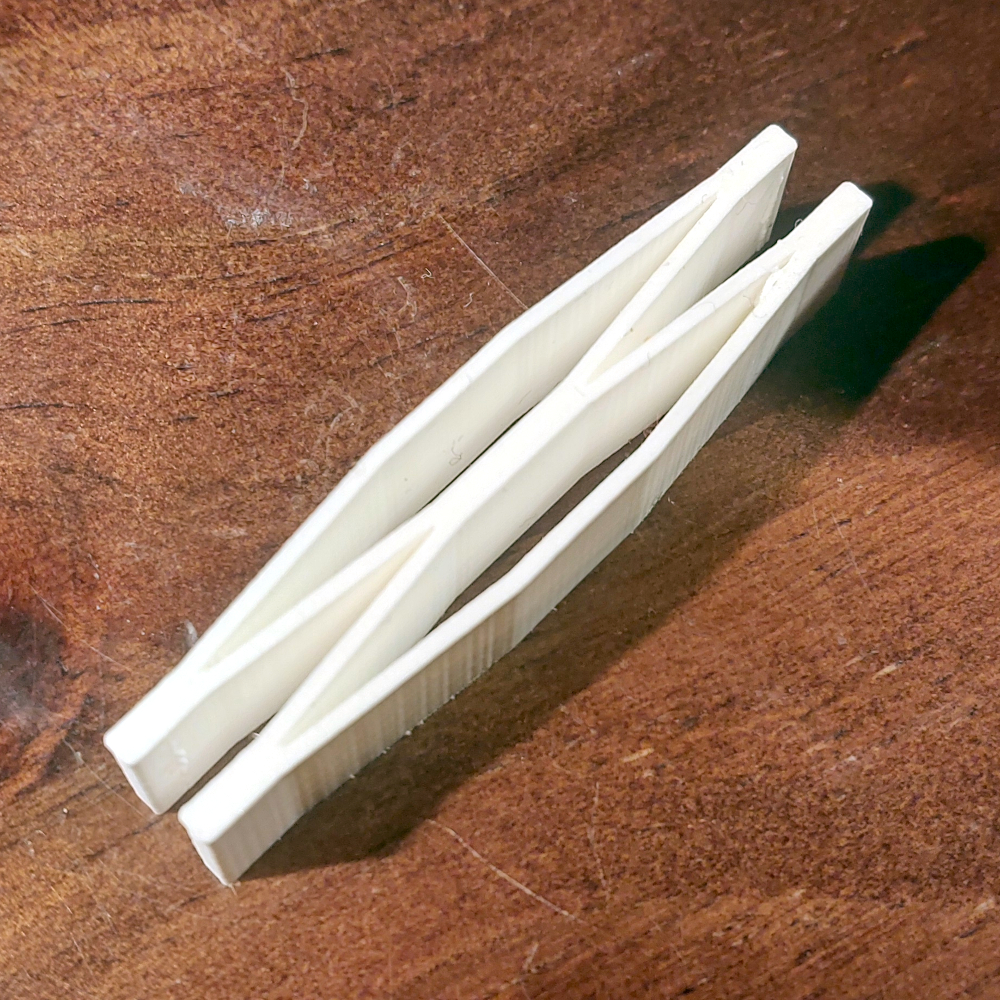
This is my test spring print, and it’s rather irresistible to play with.
For the headband I could re-use the ones I have from my broken headsets, find one of the many 3D printable designs online, or the choice I took, design my own. And since I can re-use the drivers, microphone, and electronics, aside from designing a physical adaptor to take them, my problem becomes one of making a tough version of that articulated joint. And there my choice is to either replicate the ball or rotating joints of the originals but in a much tougher form, or to make a one piece design with elasticity and flexibility in the planes I need. It’s time to break out OpenSCAD. I like things I can print in one go when it comes to builds like this one, as when it comes to assembly there is invariably a weak point where the different parts meet. So I’m going for the latter choice, and making my earpiece mount on a spring rather than a two-piece joint. My spring is a simple zig-zag leaf spring, which is both robust, and has some movement in X and Y rotational axes, and Z displacement. It’s an OpenSCAD library, and my little test print has all the compulsive manipulation of a fidget toy.
So with a bit more OpenSCAD bashing I have a sliding print in place headband with my springs attached. You can take a look at it in this GitHub repository, and even modify it for a broken donor headset of your own if you want.As I write this it’s not yet printed, the 3D printer gods have not smiled upon me with extra speed. Will my crafty print in place springs solve the problem? At least if they break I have only myself to blame.

 Login
Login