Normal view

There are new articles available, click to refresh the page.
Before yesterdayGoogle Online Security

Bringing Rust to the Pixel Baseband

10 April 2026 at 11:12
Posted by Jiacheng Lu, Software Engineer, Google Pixel Team

Google is continuously advancing the security of Pixel devices. We have been focusing on hardening the cellular baseband modem against exploitation. Recognizing the risks associated within the complex modem firmware, Pixel 9 shipped with mitigations against a range of memory-safety vulnerabilities. For Pixel 10, Google is advancing its proactive security measures further. Following our previous discussion on "Deploying Rust in Existing Firmware Codebases", this post shares a concrete application: integrating a memory-safe Rust DNS(Domain Name System) parser into the modem firmware. The new Rust-based DNS parser significantly reduces our security risk by mitigating an entire class of vulnerabilities in a risky area, while also laying the foundation for broader adoption of memory-safe code in other areas.

Here we share our experience of working on it, and hope it can inspire the use of more memory safe languages in low-level environments.

Why Modem Memory Safety Can’t Wait

In recent years, we have seen increasing interest in the cellular modem from attackers and security researchers. For example, Google's Project Zero gained remote code execution on Pixel modems over the Internet. Pixel modem has tens of Megabytes of executable code. Given the complexity and remote attack surface of the modem, other critical memory safety vulnerabilities may remain in the predominantly memory-unsafe firmware code.

Why DNS?

The DNS protocol is most commonly known in the context of browsers finding websites. With the evolution of cellular technology, modern cellular communications have migrated to digital data networks; consequently, even basic operations such as call forwarding rely on DNS services.

DNS is a complex protocol and requires parsing of untrusted data, which can lead to vulnerabilities, particularly when implemented in a memory-unsafe language (example: CVE-2024-27227). Implementing the DNS parser in Rust offers value by decreasing the attack surfaces associated with memory unsafety.

Picking a DNS library

DNS already has a level of support in the open-source Rust community. We evaluated multiple open source crates that implement DNS. Based on criteria shared in earlier posts, we identified hickory-proto as the best candidate. It has excellent maintenance, over 75% test coverage, and widespread adoption in the Rust community. Its pervasiveness shows its potential as the de-facto DNS choice and long term support. Although hickory-proto initially lacked no_std support, which is needed for Bare-metal environments (see our previous post on this topic), we were able to add support to it and its dependencies.

Adding no_std support

The work to enable no_std for hickory-proto is mostly mechanical. We shared the process in a previous post. We undertook modifications to hickory_proto and its dependencies to enable no_std support. The upstream no_std work also results in a no_std URL parser, beneficial to other projects.

The above PRs are great examples of how to extend no_std support to existing std-only crates.

Code size study

Code size is the one of the factors that we evaluated when picking the DNS library to use.

Code size
by category
Rust implemented Shim that calls Hickory-proto on receiving a DNS response 4KB
core, alloc, compiler_builtins
(reusable, one-time cost)
17KB
Hickory-proto library and dependencies 350KB


Sum 371KB

We built prototypes and measured size with size-optimized settings. Expectedly, hickory_proto is not designed with embedded use in mind, and is not optimized for size. As the Pixel modem is not tightly memory constrained, we prioritized community support and code quality, leaving code size optimizations as future work.

However, the additional code size may be a blocker for other embedded systems. This could be addressed in the future by adding additional feature flags to conditionally compile only required functionality. Implementing this modularity would be a valuable future work.

Hook-up Rust to modem firmware

Before building the Rust DNS library, we defined several Rust unit tests to cover basic arithmetic, dynamic allocations, and FFI to verify the integration of Rust with the existing modem firmware code base.

Compile Rust code to staticlib

While using cargo is the default choice for compilation in the Rust ecosystem, it presents challenges when integrating it into existing build systems. We evaluated two options:

  1. Using cargo to build a staticlib before the modem builds. Then add the produced staticlib into the linking step.
  2. Directly work with rustc and integrate the Rust compilation steps into the existing modem build system.

Option #1 does not scale if we are going to add more Rust components in the future, as linking multiple staticlibs may cause duplicated symbol errors. We chose option #2 as it scales more easily and allows tighter integration into our existing build system. Our existing C/C++ codebase uses Pigweed to drive the primary build system. Pigweed supports Rust targets (example) with direct calls to rustc through rust tools defined in GN.

We compiled all the Rust crates, including hickory-proto, its dependencies, and core, compiler_builtin, alloc, to rlib. Then, we created a staticlib target with a single lib.rs file which references all the rlib crates using extern crate keywords.

Build core, alloc, and compiler_builtins

Android’s Rust Toolchain distributes source code of core, alloc, and compiler_builtins, and we leveraged this for the modem. They can be included to the build graph by adding a GN target with crate_root pointing to the root lib.rs of each crate.

Pixel modem firmware already has a well-tested and specialized global memory allocation system to support some dynamic memory allocations. alloc support was added by implementing the GlobalAlloc with FFI calls to the allocators C APIs:

use core::alloc::{GlobalAlloc, Layout};

extern "C" {
    fn mem_malloc(size: usize, alignment: usize) -> *mut u8;
    fn mem_free(ptr: *mut u8, alignment: usize);
}

struct MemAllocator;

unsafe impl GlobalAlloc for MemAllocator {
    unsafe fn alloc(&self, layout: Layout) -> *mut u8 {
        mem_malloc(layout.size(), layout.align())
    }

    unsafe fn dealloc(&self, ptr: *mut u8, layout: Layout) {
        mem_free(ptr, layout.align());
    }
}

#[global_allocator]
static ALLOCATOR: MemAllocator = MemAllocator;

Pixel modem firmware already implements a backend for the Pigweed crash facade as the global crash handler. Exposing it into Rust panic_handler through FFI unifies the crash handling for both Rust and C/C++ code.

#![no_std]
use core::panic::PanicInfo;

extern "C" {
    pub fn PwCrashBackend(sigature: *const i8, file_name: *const i8, line: u32);
}

#[panic_handler]
fn panic(panic_info: &PanicInfo) -> ! {
    let mut filename = "";
    let mut line_number: u32 = 0;

    if let Some(location) = panic_info.location() {
        filename = location.file();
        line_number = location.line();
    }

    let mut cstr_buffer = [0u8; 128];
    // Never writes to the last byte to make sure `cstr_buffer` is always zero
    // terminated.
    let (_, writer) = cstr_buffer.split_last_mut().unwrap();
    for (place, ch) in writer.iter_mut().zip(filename.bytes()) {
        *place = ch;
    }

    unsafe {
        PwCrashBackend(
            "Rust panic\0".as_ptr() as *const i8,
            cstr_buffer.as_ptr() as *const i8,
            line_number,
        );
    }

    loop {}
}

Link Rust staticlib

The Pixel modem firmware linking has a step that calls the linker to link all the objects generated from C/C++ code. By using llvm-ar -x to extract object files from the Rust combined staticlib and supplying them to the linker, the Rust code appears in the final modem image.

There was a performance issue we experienced due to weak symbols during linking. The inclusion of Rust core and compiler-builtin caused unexpected power and performance regressions on various tests. Upon analysis, we realized that modem optimized implementations of memset and memcpy provided by the modem firmware are accidentally replaced by those defined in compiler_builtin. It seems to happen because both compiler_builtin crate and the existing codebase defines symbols as weak, linker has no way to figure out which one is weaker. We fixed the regression by stripping the compiler_builtin crate before linking using a one line shell script.

llvm-ar -t <rust staticlib> | grep compiler_builtins | xargs llvm-ar -d <rust staticlib>

Integrating hickory-proto

Expose Rust API and calling back to C++

For the DNS parser, we declared the DNS response parsing API in C and then implemented the same API in Rust.

int32_t process_dns_response(uint8_t*, int32_t);

The Rust function returns an integer standing for the error code. The received DNS answers in the DNS response are required to be updated to in-memory data structures that are coupled with the original C implementation, therefore, we use existing C functions to do it. The existing C functions are dispatched from the Rust implementation.

pub unsafe extern "C" fn process_dns_response(
    dns_response: *const u8,
    response_len: i32,
) -> i32 {
    //... validate inputs `dns_response` and `response_len`.


    // SAFETY:
    // It is safe because `dns_response` is null checked above. `response_len`
    // is passed in, safe as long as it is set correctly by vendor code.
    match process_response(unsafe {
        slice::from_raw_parts(dns_response, response_len)
    }) {
         Ok(()) => 0,
         Err(err) => err.into(),
    }
}

fn process_response(response: &[u8]) -> Result<()> {
    let response = hickory_proto::op::Message::from_bytes(response)?;
    let response = hickory_proto::xfer::DnsResponse::from_message(response)?;

   
    for answer in response.answers() {  
        match answer.record_type() {
            hickory_proto::RecordType:... => {
                // SAFETY:
                // It is safe because the callback function does not store
                // reference of the inputs or their members.
                unsafe {
                    callback_to_c_function(...)?;
                }
            }
            
            // ... more match arms omitted.
        }    
    }

    Ok(())
}

In our case, the DNS responding parsing function API is simple enough for us to hand write, while the callbacks back to C functions for handling the response have complex data type conversions. Therefore, we leveraged bindgen to generate FFI code for the callbacks.

Build third-party crates

Even with all features disabled, hickory-proto introduces more than 30 dependent crates. Manually written build rules are difficult to ensure correctness and scale poorly when upgrading dependencies into new versions.

Fuchsia has developed cargo-gnaw to support building their third party Rust crates. Cargo-gnaw works by invoking cargo metadata to resolve dependencies, then parse and generate GN build rules. This ensures correctness and ease of maintenance.

Conclusion

The Pixel 10 series of phones marks a pivotal moment, being the first Pixel device to integrate a memory-safe language into its modem.

While replacing one piece of risky attack surface is itself valuable, this project lays the foundation for future integration of memory-safe parsers and code into the cellular baseband, ensuring the baseband’s security posture will continue to improve as development continues.

Special thanks to Armando Montanez, Bjorn Mellem, Boky Chen, Cheng-Yu Tsai, Dominik Maier, Erik Gilling, Ever Rosales, Hungyen Weng, Ivan Lozano, James Farrell, Jeffrey Vander Stoep, Jiacheng Lu, Jingjing Bu, Min Xu, Murphy Stein, Ray Weng, Shawn Yang, Sherk Chung, Stephan Chen, Stephen Hines.

How Pixel and Android are bringing a new level of trust to your images with C2PA Content Credentials

10 September 2025 at 11:59
Posted by Eric Lynch, Senior Product Manager, Android Security, and Sherif Hanna, Group Product Manager, Google C2PA Core

At Made by Google 2025, we announced that the new Google Pixel 10 phones will support C2PA Content Credentials in Pixel Camera and Google Photos. This announcement represents a series of steps towards greater digital media transparency:

  • The Pixel 10 lineup is the first to have Content Credentials built in across every photo created by Pixel Camera.
  • The Pixel Camera app achieved Assurance Level 2, the highest security rating currently defined by the C2PA Conformance Program. Assurance Level 2 for a mobile app is currently only possible on the Android platform.
  • A private-by-design approach to C2PA certificate management, where no image or group of images can be related to one another or the person who created them.
  • Pixel 10 phones support on-device trusted time-stamps, which ensures images captured with your native camera app can be trusted after the certificate expires, even if they were captured when your device was offline.

These capabilities are powered by Google Tensor G5, Titan M2 security chip, the advanced hardware-backed security features of the Android platform, and Pixel engineering expertise.

In this post, we’ll break down our architectural blueprint for bringing a new level of trust to digital media, and how developers can apply this model to their own apps on Android.

A New Approach to Content Credentials

Generative AI can help us all to be more creative, productive, and innovative. But it can be hard to tell the difference between content that’s been AI-generated, and content created without AI. The ability to verify the source and history—or provenance—of digital content is more important than ever.

Content Credentials convey a rich set of information about how media such as images, videos, or audio files were made, protected by the same digital signature technology that has secured online transactions and mobile apps for decades. It empowers users to identify AI-generated (or altered) content, helping to foster transparency and trust in generative AI. It can be complemented by watermarking technologies such as SynthID.

Content Credentials are an industry standard backed by a broad coalition of leading companies for securely conveying the origin and history of media files. The standard is developed by the Coalition for Content Provenance and Authenticity (C2PA), of which Google is a steering committee member.

The traditional approach to classifying digital image content has focused on categorizing content as “AI” vs. “not AI”. This has been the basis for many legislative efforts, which have required the labeling of synthetic media. This traditional approach has drawbacks, as described in Chapter 5 of this seminal report by Google. Research shows that if only synthetic content is labeled as “AI”, then users falsely believe unlabeled content is “not AI”, a phenomenon called “the implied truth effect”. This is why Google is taking a different approach to applying C2PA Content Credentials.

Instead of categorizing digital content into a simplistic “AI” vs. “not AI”, Pixel 10 takes the first steps toward implementing our vision of categorizing digital content as either i) media that comes with verifiable proof of how it was made or ii) media that doesn't.

  • Pixel Camera attaches Content Credentials to any JPEG photo capture, with the appropriate description as defined by the Content Credentials specification for each capture mode.
  • Google Photos attaches Content Credentials to JPEG images that already have Content Credentials and are edited using AI or non-AI tools, and also to any images that are edited using AI tools. It will validate and display Content Credentials under a new section in the About panel, if the JPEG image being viewed contains this data. Learn more about it in Google Photos Help.

Given the broad range of scenarios in which Content Credentials are attached by these apps, we designed our C2PA implementation architecture from the onset to be:

  1. Secure from silicon to applications
  2. Verifiable, not personally identifiable
  3. Useable offline

Secure from Silicon to Applications

Good actors in the C2PA ecosystem are motivated to ensure that provenance data is trustworthy. C2PA Certification Authorities (CAs), such as Google, are incentivized to only issue certificates to genuine instances of apps from trusted developers in order to prevent bad actors from undermining the system. Similarly, app developers want to protect their C2PA claim signing keys from unauthorized use. And of course, users want assurance that the media files they rely on come from where they claim. For these reasons, the C2PA defined the Conformance Program.

The Pixel Camera application on the Pixel 10 lineup has achieved Assurance Level 2, the highest security rating currently defined by the C2PA Conformance Program. This was made possible by a strong set of hardware-backed technologies, including Tensor G5 and the certified Titan M2 security chip, along with Android’s hardware-backed security APIs. Only mobile apps running on devices that have the necessary silicon features and Android APIs can be designed to achieve this assurance level. We are working with C2PA to help define future assurance levels that will push protections even deeper into hardware.

Achieving Assurance Level 2 requires verifiable, difficult-to-forge evidence. Google has built an end-to-end system on Pixel 10 devices that verifies several key attributes. However, the security of any claim is fundamentally dependent on the integrity of the application and the OS, an integrity that relies on both being kept current with the latest security patches.

  • Hardware Trust: Android Key Attestation in Pixel 10 is built on support for Device Identifier Composition Engine (DICE) by Tensor, and Remote Key Provisioning (RKP) to establish a trust chain from the moment the device starts up to the OS, stamping out the most common forms of abuse on Android.
  • Genuine Device and Software: Aided by the hardware trust described above, Android Key Attestation allows Google C2PA Certification Authorities (CAs) to verify that they are communicating with a genuine physical device. It also allows them to verify the device has booted securely into a Play Protect Certified version of Android, and verify how recently the operating system, bootloader, and system software and firmware were patched for security vulnerabilities.
  • Genuine Application: Hardware-backed Android Key Attestation certificates include the package name and signing certificates associated with the app that requested the generation of the C2PA signing key, allowing Google C2PA CAs to check that the app requesting C2PA claim signing certificates is a trusted, registered app.
  • Tamper-Resistant Key Storage: On Pixel, C2PA claim signing keys are generated and stored using Android StrongBox in the Titan M2 security chip. Titan M2 is Common Criteria PP.0084 AVA_VAN.5 certified, meaning that it is strongly resistant to extracting or tampering with the cryptographic keys stored in it. Android Key Attestation allows Google C2PA CAs to verify that private keys were indeed created inside this hardware-protected vault before issuing certificates for their public key counterparts.

The C2PA Conformance Program requires verifiable artifacts backed by a hardware Root of Trust, which Android provides through features like Key Attestation. This means Android developers can leverage these same tools to build apps that meet this standard for their users.

Privacy Built on a Foundation of Trust: Verifiable, Not Personally Identifiable

The robust security stack we described is the foundation of privacy. But Google takes steps further to ensure your privacy even as you use Content Credentials, which required solving two additional challenges:

Challenge 1: Server-side Processing of Certificate Requests. Google’s C2PA Certification Authorities must certify new cryptographic keys generated on-device. To prevent fraud, these certificate enrollment requests need to be authenticated. A more common approach would require user accounts for authentication, but this would create a server-side record linking a user's identity to their C2PA certificates—a privacy trade-off we were unwilling to make.

Our Solution: Anonymous, Hardware-Backed Attestation. We solve this with Android Key Attestation, which allows Google CAs to verify what is being used (a genuine app on a secure device) without ever knowing who is using it (the user). Our CAs also enforce a strict no-logging policy for information like IP addresses that could tie a certificate back to a user.

Challenge 2: The Risk of Traceability Through Key Reuse. A significant privacy risk in any provenance system is traceability. If the same device or app-specific cryptographic key is used to sign multiple photos, those images can be linked by comparing the key. An adversary could potentially connect a photo someone posts publicly under their real name with a photo they post anonymously, deanonymizing the creator.

Our Solution: Unique Certificates. We eliminate this threat with a maximally private approach. Each key and certificate is used to sign exactly one image. No two images ever share the same public key, a "One-and-Done" Certificate Management Strategy, making it cryptographically impossible to link them. This engineering investment in user privacy is designed to set a clear standard for the industry.

Overall, you can use Content Credentials on Pixel 10 without fear that another person or Google could use it to link any of your images to you or one another.

Ready to Use When You Are - Even Offline

Implementations of Content Credentials use trusted time-stamps to ensure the credentials can be validated even after the certificate used to produce them expires. Obtaining these trusted time-stamps typically requires connectivity to a Time-Stamping Authority (TSA) server. But what happens if the device is offline?

This is not a far-fetched scenario. Imagine you’ve captured a stunning photo of a remote waterfall. The image has Content Credentials that prove that it was captured by a camera, but the cryptographic certificate used to produce them will eventually expire. Without a time-stamp, that proof could become untrusted, and you're too far from a cell signal, which is required to receive one.

To solve this, Pixel developed an on-device, offline TSA.

Powered by the security features of Tensor, Pixel maintains a trusted clock in a secure environment, completely isolated from the user-controlled one in Android. The clock is synchronized regularly from a trusted source while the device is online, and is maintained even after the device goes offline (as long as the phone remains powered on). This allows your device to generate its own cryptographically-signed time-stamps the moment you press the shutter—no connection required. It ensures the story behind your photo remains verifiable and trusted after its certificate expires, whether you took it in your living room or at the top of a mountain.

Building a More Trustworthy Ecosystem, Together

C2PA Content Credentials are not the sole solution for identifying the provenance of digital media. They are, however, a tangible step toward more media transparency and trust as we continue to unlock more human creativity with AI.

In our initial implementation of Content Credentials on the Android platform and Pixel 10 lineup, we prioritized a higher standard of privacy, security, and usability. We invite other implementers of Content Credentials to evaluate our approach and leverage these same foundational hardware and software security primitives. The full potential of these technologies can only be realized through widespread ecosystem adoption.

We look forward to adding Content Credentials across more Google products in the near future.

New AI-Powered Scam Detection Features to Help Protect You on Android

4 March 2025 at 11:59
Posted by Lyubov Farafonova, Product Manager, Phone by Google; Alberto Pastor Nieto, Sr. Product Manager Google Messages and RCS Spam and Abuse

Google has been at the forefront of protecting users from the ever-growing threat of scams and fraud with cutting-edge technologies and security expertise for years. In 2024, scammers used increasingly sophisticated tactics and generative AI-powered tools to steal more than $1 trillion from mobile consumers globally, according to the Global Anti-Scam Alliance. And with the majority of scams now delivered through phone calls and text messages, we’ve been focused on making Android’s safeguards even more intelligent with powerful Google AI to help keep your financial information and data safe.

Today, we’re launching two new industry-leading AI-powered scam detection features for calls and text messages, designed to protect users from increasingly complex and damaging scams. These features specifically target conversational scams, which can often appear initially harmless before evolving into harmful situations.

To enhance our detection capabilities, we partnered with financial institutions around the world to better understand the latest advanced and most common scams their customers are facing. For example, users are experiencing more conversational text scams that begin innocently, but gradually manipulate victims into sharing sensitive data, handing over funds, or switching to other messaging apps. And more phone calling scammers are using spoofing techniques to hide their real numbers and pretend to be trusted companies.

Traditional spam protections are focused on protecting users before the conversation starts, and are less effective against these latest tactics from scammers that turn dangerous mid-conversation and use social engineering techniques. To better protect users, we invested in new, intelligent AI models capable of detecting suspicious patterns and delivering real-time warnings over the course of a conversation, all while prioritizing user privacy.

Scam Detection for messages

We’re building on our enhancements to existing Spam Protection in Google Messages that strengthen defenses against job and delivery scams, which are continuing to roll out to users. We’re now introducing Scam Detection to detect a wider range of fraudulent activities.

Scam Detection in Google Messages uses powerful Google AI to proactively address conversational scams by providing real-time detection even after initial messages are received. When the on-device AI detects a suspicious pattern in SMS, MMS, and RCS messages, users will now get a message warning of a likely scam with an option to dismiss or report and block the sender.

As part of the Spam Protection setting, Scam Detection on Google Messages is on by default and only applies to conversations with non-contacts. Your privacy is protected with Scam Detection in Google Messages, with all message processing remaining on-device. Your conversations remain private to you; if you choose to report a conversation to help reduce widespread spam, only sender details and recent messages with that sender are shared with Google and carriers. You can turn off Spam Protection, which includes Scam Detection, in your Google Messages at any time.

Scam Detection in Google Messages is launching in English first in the U.S., U.K. and Canada and will expand to more countries soon.

Scam Detection for calls

More than half of Americans reported receiving at least one scam call per day in 2024. To combat the rise of sophisticated conversational scams that deceive victims over the course of a phone call, we introduced Scam Detection late last year to U.S.-based English-speaking Phone by Google public beta users on Pixel phones.

We use AI models processed on-device to analyze conversations in real-time and warn users of potential scams. If a caller, for example, tries to get you to provide payment via gift cards to complete a delivery, Scam Detection will alert you through audio and haptic notifications and display a warning on your phone that the call may be a scam.

During our limited beta, we analyzed calls with Gemini Nano, Google’s built-in, on-device foundation model, on Pixel 9 devices and used smaller, robust on-device machine-learning models for Pixel 6+ users. Our testing showed that Gemini Nano outperformed other models, so as a result, we're currently expanding the availability of the beta to bring the most capable Scam Detection to all English-speaking Pixel 9+ users in the U.S.

Similar to Scam Detection in messaging, we built this feature to protect your privacy by processing everything on-device. Call audio is processed ephemerally and no conversation audio or transcription is recorded, stored on the device, or sent to Google or third parties. Scam Detection in Phone by Google is off by default to give users control over this feature, as phone call audio is more ephemeral compared to messages, which are stored on devices. Scam Detection only applies to calls that could potentially be scams, and is never used during calls with your contacts. If enabled, Scam Detection will beep at the start and during the call to notify participants the feature is on. You can turn off Scam Detection at any time, during an individual call or for all future calls.

According to our research and a Scam Detection beta user survey, these types of alerts have already helped people be more cautious on the phone, detect suspicious activity, and avoid falling victim to conversational scams.

Keeping Android users safe with the power of Google AI


We're committed to keeping Android users safe, and that means constantly evolving our defenses against increasingly sophisticated scams and fraud. Our investment in intelligent protection is having real-world impact for billions of users. Leviathan Security Group, a cybersecurity firm, conducted a funded evaluation of fraud protection features on a number of smartphones and found that Android smartphones, led by the Pixel 9 Pro, scored highest for built-in security features and anti-fraud efficacy1.

With AI-powered innovations like Scam Detection in Messages and Phone by Google, we're giving you more tools to stay one step ahead of bad actors. We're constantly working with our partners across the Android ecosystem to help bring new security features to even more users. Together, we’re always working to keep you safe on Android.

Notes


  1. Based on third-party research funded by Google LLC in Feb 2025 comparing the Pixel 9 Pro, iPhone 16 Pro, Samsung S24+ and Xiaomi 14 Ultra. Evaluation based on no-cost smartphone features enabled by default. Some features may not be available in all countries. 

Safer with Google: New intelligent, real-time protections on Android to keep you safe

13 November 2024 at 12:59
Posted by Lyubov Farafonova, Product Manager and Steve Kafka, Group Product Manager, Android

User safety is at the heart of everything we do at Google. Our mission to make technology helpful for everyone means building features that protect you while keeping your privacy top of mind. From Gmail’s defenses that stop more than 99.9% of spam, phishing and malware, to Google Messages’ advanced security that protects users from 2 billion suspicious messages a month and beyond, we're constantly developing and expanding protection features that help keep you safe.

We're introducing two new real-time protection features that enhance your safety, all while safeguarding your privacy: Scam Detection in Phone by Google to protect you from scams and fraud, and Google Play Protect live threat detection with real-time alerts to protect you from malware and dangerous apps.

These new security features are available first on Pixel, and are coming soon to more Android devices.

More intelligent AI-powered protection against scams

Scammers steal over $1 trillion dollars a year from people, and phone calls are their favorite way to do it. Even more alarming, scam calls are evolving, becoming increasingly more sophisticated, damaging and harder to identify. That’s why we’re using the best of Google AI to identify and stop scams before they can do harm with Scam Detection.

Real-time protection, built with your privacy in mind.

  • Real-time defense, right on your device: Scam Detection uses powerful on-device AI to notify you of a potential scam call happening in real-time by detecting conversation patterns commonly associated with scams. For example, if a caller claims to be from your bank and asks you to urgently transfer funds due to an alleged account breach, Scam Detection will process the call to determine whether the call is likely spam and, if so, can provide an audio and haptic alert and visual warning that the call may be a scam.
  • Private by design, you’re always in control: We’ve built Scam Detection to protect your privacy and ensure you’re always in control of your data. Scam Detection is off by default, and you can decide whether you want to activate it for future calls. At any time, you can turn it off for all calls in the Phone app Settings, or during a particular call. The AI detection model and processing are fully on-device, which means that no conversation audio or transcription is stored on the device, sent to Google servers or anywhere else, or retrievable after the call.
  • Cutting-edge AI protection, now on more Pixel phones: Gemini Nano, our advanced on-device AI model, powers Scam Detection on Pixel 9 series devices. As part of our commitment to bring powerful AI features to even more devices, this AI-powered protection is available to Pixel 6+ users thanks to other robust Google on-device machine learning models.

We’re now rolling out Scam Detection to English-speaking Phone by Google public beta users in the U.S. with a Pixel 6 or newer device.

To provide feedback on your experience, please click on Phone by Google App -> Menu -> Help & Feedback -> Send Feedback. We look forward to learning from this beta and your feedback, and we’ll share more about Scam Detection in the months ahead.

More real-time alerts to protect you from bad apps

Google Play Protect works non-stop to protect you in real-time from malware and unsafe apps. Play Protect analyzes behavioral signals related to the use of sensitive permissions and interactions with other apps and services.

With live threat detection, if a harmful app is found, you'll now receive a real-time alert, allowing you to take immediate action to protect your device. By looking at actual activity patterns of apps, live threat detection can now find malicious apps that try extra hard to hide their behavior or lie dormant for a time before engaging in suspicious activity.

At launch, live threat detection will focus on stalkerware, code that may collect personal or sensitive data for monitoring purposes without user consent, and we will explore expanding its detection to other types of harmful apps in the future. All of this protection happens on your device in a privacy preserving way through Private Compute Core, which allows us to protect users without collecting data.

Live threat detection with real-time alerts in Google Play Protect are now available on Pixel 6+ devices and will be coming to additional phone makers in the coming months.

Google Pixel 7 and Pixel 7 Pro: The next evolution in mobile security

11 October 2022 at 13:01
Dave Kleidermacher, Jesse Seed, Brandon Barbello, Sherif Hanna, Eugene Liderman, Android, Pixel, and Silicon Security Teams

Every day, billions of people around the world trust Google products to enrich their lives and provide helpful features – across mobile devices, smart home devices, health and fitness devices, and more. We keep more people safe online than anyone else in the world, with products that are secure by default, private by design and that put you in control. As our advancements in knowledge and computing grow to deliver more help across contexts, locations and languages, our unwavering commitment to protecting your information remains.

That’s why Pixel phones are designed from the ground up to help protect you and your sensitive data while keeping you in control. We’re taking our industry-leading approach to security and privacy to the next level with Google Pixel 7 and Pixel 7 Pro, our most secure and private phones yet, which were recently recognized as the highest rated for security when tested among other smartphones by a third-party global research firm.1

Pixel phones also get better every few months with Feature Drops that provide the latest product updates, tips and tricks from Google. And Pixel 7 and Pixel 7 Pro users will receive at least five years of security updates2, so your Pixel gets even more secure over time.

Your protection, built into Pixel

Your digital life and most sensitive information lives on your phone: financial information, passwords, personal data, photos – you name it. With Google Tensor G2 and our custom Titan M2 security chip, Pixel 7 and Pixel 7 Pro have multiple layers of hardware security to help keep you and your personal information safe. We take a comprehensive, end-to-end approach to security with verifiable protections at each layer - the network, application, operating system and multiple layers on the silicon itself. If you use Pixel for your business, this approach helps protect your company data, too.

Google Tensor G2 is Pixel’s newest powerful processor custom built with Google AI, and makes Pixel 7 faster, more efficient and secure3. Every aspect of Tensor G2 was designed to improve Pixel's performance and efficiency for great battery life, amazing photos and videos.

Tensor’s built-in security core works with our Titan M2 security chip to keep your personal information, PINs and passwords safe. Titan family chips are also used to protect Google Cloud data centers and Chromebooks, so the same hardware that protects Google servers also secures your sensitive information stored on Pixel.

And, in a first for Google, Titan M2 hardware has now been certified under Common Criteria PP0084: the international gold standard for hardware security components also used for identity, SIM cards, and bankcard security chips.4 This means that the Titan M2 hardware meets the same rigorous protection guidelines trusted by banks, carriers, and governments.

To achieve the certification we went through rigorous third party lab testing by SGS Brightsight, a leading international security lab, and received certification against CC PP0084 with AVA_VAN.5 for the Titan M2 hardware and cryptography library from the Netherlands scheme for Certification in the Area of IT Security (NSCIB). Of all those numbers and acronyms the part we’re most proud of is that Titan hardware passed the highest level of vulnerability assessment (AVA_VAN.5) - the truest measure of resilience to advanced, methodical attacks.

This process took us more than three years to complete. The certification not only requires chip hardware to resist invasive penetration testing, but also mandates audits of the chip design and manufacturing process itself. The benefit for consumers? The now certified Titan M2 chip makes your phone even more resilient to sophisticated attacks.5

Private by design

Evolving our security and privacy standards to our fast-paced world requires new approaches as well. Earlier this year at I/O, we introduced Protected Computing, a toolkit of technologies that transforms how, when, and where personal data is processed to protect your privacy and security. Our approach focuses on:

  1. Minimizing your data footprint, by shrinking the amount of personally identifiable data altogether
  2. De-identifying data, with a range of anonymization techniques so it’s not linked to you
  3. Restricting data access using technologies like end-to-end encryption and secure enclaves.

Many elements of Protected Computing can be found on the new Pixel 7:

On Android, Private Compute Core keeps your information and AI-driven personalizations private with on-device processing. Data from features like Now Playing, Live Caption and Smart Reply in Messages are all processed on device and are never sent to Google to maintain your privacy. And even your device backups to the cloud are end-to-end encrypted using Titan in the cloud.6

With Google Tensor G2, Pixel’s advanced privacy protection also now covers audio data from events like cough and snore detection on Pixel 7.7 Audio data from cough and snore detection is never stored by or sent to Google to maintain your privacy.

On Pixel 7, Tensor G2 helps safeguard your system with the Android Virtualization Framework, unlocking improved security protections like enabling system update integrity checking to occur on-the-fly, reducing boot time after an update.

Extra protection when you’re online

Helping to keep you safe when you use your phone to browse the web and use apps is also critical. This is where a Virtual Private Network (VPN) comes in. A VPN helps protect your online activity from anyone who might try to access it by encrypting your network traffic to turn it into an unreadable format, and masking your original IP address. Typically, if you want a VPN on your phone, you need to get one from a third party.

To ensure more people have access to enhanced security, later this year, Pixel 7 and Pixel 7 Pro owners will be able to use VPN by Google One, at no extra cost.8 VPN by Google One is verifiably private, and will allow you to tap into Google’s world-class security for peace of mind when you connect online. With VPN by Google One, Pixel helps protect your online activity at a network level. Think of it like an extra layer of protection for your online security.

VPN by Google One creates a high-performance secure connection to the web so your browsing and app data is sent and received via an encrypted pathway. A few simple taps will activate the VPN to help keep your network traffic private from internet providers and hackers, giving you peace of mind when using cellular data, home Wi-Fi, and especially when connected to public networks, like a café or airport Wi-Fi. No need to worry about online intruders, hackers, or unsecure networks.

Unlike traditional VPN services, VPN by Google One uses Protected Computing to technically make it impossible for anyone at a network level, even VPN by Google One, to link your online traffic with your account or identity. VPN by Google One will be available at no extra cost as long as your phone continues to receive security updates. See here to learn more about VPN by Google One.

More protection and privacy with Android 13

Pixel 7 and Pixel 7 Pro have built-in anti-phishing protections from Android that scan for potential threats from phone calls, text messages and emails, and more anti-phishing protections enabled out-of-the-box than smartphones from leading competitors.9 In fact, Messages alone protects consumers against 1.5 billion spam messages per month.

Android also resets permissions for apps you haven’t used for an extended time. In a typical month, Android automatically resets more than 3 billion permissions affecting more than 1 billion installed apps. Similarly, if you use clipboard on Android 13, your history is automatically deleted after a period of time. This blocks apps running in the foreground from seeing old information that you previously copied.

You’re in control


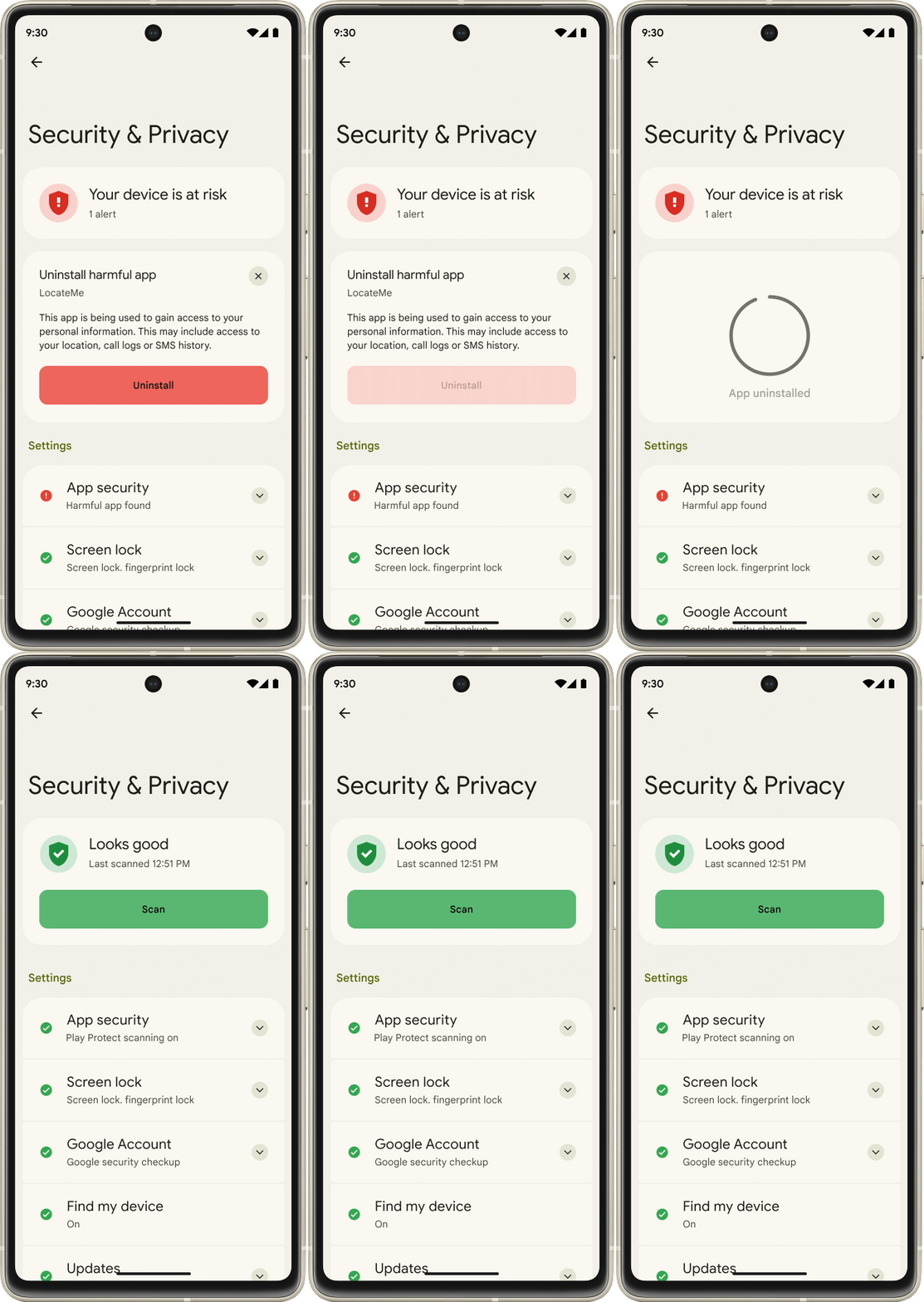
Core to your safety is knowing that you’re in control. You always have control over your settings and devices across all of our products. With Android 13, coming soon through a Feature Drop, Pixel 7 and Pixel 7 Pro will give you additional ways to stay in control of your privacy and what you share with first and third-party apps. With Quick Settings, you can act on security issues as they arise, or review which apps are running in the background and easily stop them. You’ll have a single destination for reviewing your security and privacy settings, risk levels and information, making it easier to manage your safety status.

With this new experience, you can review actionable steps to improve your safety status, like revoking a permission or app. This page will also have new action cards to notify you of any safety risks and provide timely recommendations on how to enhance your privacy. And with a single tap, you can grant or remove permissions to data that you don’t want to share with compatible apps. This will be coming soon first to Pixel devices later this year, and other Android phones soon after.

Verifiably secure

As computing extends to more devices and use cases, Google is committed to innovating in security and being transparent about the processes that we take to get there. We are leading the industry in verifiable security by not only having products that are tested against real-world threats (like advanced spam, phishing and malware attacks), but also in publishing the results of penetration tests, security audits, and industry certifications across our Pixel and Nest products.

Another way to verify our security is through our Android and Google Devices Security Reward Program where we reward security researchers who find vulnerabilities across products, including Pixel, Nest and Fitbit. Last year on Android, we awarded nearly $3 million dollars, creating a valuable feedback loop between us and the security research community and, most importantly, helping us keep our users safe.

To learn more about Pixel 7 and Pixel 7 Pro, check out the Google Store.

Notes


  1. Based on third-party global research firm. Evaluation considered features that may not be available in all countries. See here for more information.  

  2. Android version updates and feature drops for at least 3 years from when the device first became available on the Google Store in the US. Android security updates for at least 5 years from when the device first became available on the Google Store in the US. See g.co/pixel/updates for details. 

  3. Compared to Pixel 6. Speed and efficiency claims based on internal testing on pre-production devices.  

  4. Common Criteria certification for hardware and cryptographic library (CC PP0084 EAL4+, AVA_VAN.5 and ALC_DVS.2). See g.co/pixel/certifications for details. 

  5. Compared to Pixel 5a and earlier Pixel phones.  

  6. Excludes MMS attachments and Google Photos. 

  7. Not intended to diagnose, cure, mitigate, prevent or treat any disease or condition. Consult your healthcare professional if you have questions about your health. See g.co/pixel/digitalwellbeing for more information.  

  8. Coming soon. Restrictions apply. Some data is not transmitted through VPN. Not available in all countries. All other Google One membership benefits sold separately. This VPN offer does not impact price or benefits of Google One Premium plan. Use of VPN may increase data costs depending on your plan. See g.co/pixel/vpn for details. 

  9. Based on third-party research funded by Google LLC in June 2022. Evaluation based on no-cost smartphone features enabled by default. Some features may not be available in all countries. See here for more information. 

❌
❌