Login
Login
Group Policy hijacked: PAYLOAD ransomware weaponizes Active Directory GPO

Executive summary
In April 2026, we at Kaspersky’s Global Emergency Response Team (GERT) responded to a security incident at a manufacturing organization in the Middle East. The threat actor obtained domain admin-equivalent control of the organization’s Active Directory environment and authored a malicious Group Policy Object (GPO) named PAYLOAD, linking it at the domain root. Through that single object, the actor delivered ransom notes, hijacked the desktop wallpaper and lock screen, enforced a logon banner, and disabled the local administrator account across every domain-joined Windows workstation — all without dropping a ransomware binary or encrypting any data. The only ransomware we found in this incident was PAYLOAD sample targeting ESXi on Linux servers. Besides that, data exfiltration was observed originating from the file servers and several additional systems, and was later published on the dark web.
This case is an example of two converging trends that define the 2026 ransomware landscape:
- Living-off-the-land abuse of trusted AD infrastructure. Group Policy is a signed, allowlisted, SYSTEM-privileged distribution channel that the majority of endpoint detection and response tools is designed not to inspect. By delivering impact through GPO rather than through malware, the actor sidestepped the entire file- and process-based detection stack.
- Encryptionless extortion. Industry telemetry shows extortion-only incidents grow significantly year-on-year. PAYLOAD fits this model; the leverage is operational disruption and the threat of escalation rather than cryptographic denial of data.
We confirmed that no files were encrypted on Windows machines, no malicious binaries were resident on disk, no endpoint persistence was established, and no malicious processes were running at the time of analysis. The entire attack lived inside Active Directory itself. The defensive implication is stark: an organization whose detection strategy depends on catching a ransomware executable would have seen nothing until the first endpoint rebooted and the ransom wallpaper appeared.
In this article, we will describe the GPO attack chain and provide operational advice on how to detect such threats, including detailed remediation recommendations.
Group Policy as an attack surface
Attacks through group policies are nothing new. They can inflict significant, domain-wide damage with multiple malicious capabilities. A Group Policy Object (GPO) is essentially a combination of a Group Policy Container (GPC) in Active Directory and a Group Policy Template (GPT) in SYSVOL. The Group Policy scope depends on whether the GPC is linked to the directory tree at the domain, site, or organization unit (OU) level. A link at the domain root means the policy applies to every computer and user object beneath it. Thus, a GPO compromised at the domain root can affect all in-scope domain users and computers, potentially granting an attacker complete control over the corporate network. What makes GPO abuse even more dangerous is that group policies are processed in a trusted, high-privilege environment, ensuring persistence because endpoint cleanup is not enough to remove them.
We have already discussed GPO architecture and ways it can be compromised in greater detail in an earlier blog post. Other public threat intelligence has also repeatedly documented this technique in ransomware operations. Microsoft observed Ryuk operators distributing ransomware through Group Policy, SYSVOL startup items, and PsExec. LockBit affiliates have been documented modifying SYSVOL Group Policy files, including ScheduledTasks.xml, to support ransomware execution and propagation. BlackCat/ALPHV operators have also abused GPOs to create scheduled tasks and deploy ransomware.
Another notable example of GPO abuse is PAYLOAD ransomware, which weaponizes GPO Preferences and policy settings for pure impact rather than as a launcher for an encryptor. Let’s take a closer look at this attack, which is detailed further below.
Attack timeline
During the April 2026 investigation, we managed to reconstruct the attack timeline as outlined below:
| Date | Event |
| 11 April | Initial access. Threat actor authenticates to the FortiGate SSL VPN using a valid but compromised domain credential. |
| 13 April | GPO authored. Malicious GPO, PAYLOAD ({C897F2C7-C2AC-4E6F-BF48-58036FF29E79}) created and linked at the domain root, configuring ransom notes, wallpaper, lock screen, logon banner, and administrator account disablement. |
| 13 April | SYSVOL staging. The payload.jpg and hello.txt files written to \\DC.THECOMPANY.local\sysvol\THECOMPANY.local\. |
| 13 April | Second GPO. GPO named win Firewall Off ({22099AD2-E062-4F56-B574-5099BBA4E7A6}) linked at the domain root, disabling Windows Firewall on all profiles. |
| 13 April | Dormancy. GPO cached on endpoints but computer configuration not yet applied — no endpoint had rebooted since the policy update. |
| 13 April | Data exfiltration. Data exfiltration was observed originating from the file servers and several additional systems. |
| 14 April | Detonation. Most of the endpoints begin rebooting; computer configuration policies apply. Ransom wallpaper, logon banner, and notes appear. Operational disruption begins. |
| 15 April | Response. Kaspersky GERT engaged. Forensic triage of affected workstations and the domain controller initiated. |
| 16 April | Assessment. GERT confirms no file encryption, no resident malware, no endpoint persistence. |
Next, we will discuss each of these stages in more detail and share the findings from our incident response activities.
Incident overview
Initial access
The entry vector was a compromised valid account (MITRE ATT&CK T1078) used to authenticate through the organization’s FortiGate SSL VPN — an external remote service (T1133). Insufficient logging on the FortiGate appliance prevented us from reconstructing how the credential was originally compromised.
Three hypotheses were considered plausible in the context of the attack, in no particular order:
- Password spraying or credential stuffing against the SSL VPN portal.
- Phishing-led credential harvesting.
- Purchase of pre-compromised credentials from an initial access broker (IAB).
Once on the internal network, the actor operated with the compromised security principal’s privileges. Because the account was able to create and link a GPO at the domain root, it held either domain admin privileges or a delegated equivalent (e.g., membership of Group Policy Creator Owners combined with link rights on the domain object).
FortiGate SSL VPN authentication logs and ESXi/virtualization privilege escalation logs were insufficient to reconstruct the lateral movement and privilege escalation chain between initial VPN access and the GPO write privilege level. The most common real-world routes to GPO control — DCSync, Kerberoasting of privileged service accounts, and Pass-the-Hash/Pass-the-Ticket — could not be confirmed or ruled out.
Execution
Rather than deploying an encryptor, the actor abused the victim’s Active Directory policy infrastructure, resulting in malicious GPOs being configured and linked at the domain root to deliver the observed impact across domain-joined systems. The two GPOs below constitute the entire offensive toolkit observed.
The PAYLOAD GPO
We performed a Resultant Set of Policy (RSOP) analysis, which helped us list all policy settings on the affected workstations. From these results, we reconstructed the following changes delivered by PAYLOAD:
| GPO extension/CSE | Setting/path | Configured value/resulting action |
| Files (Group Policy Preference) | Source SYSVOL\hello.txt → Desktop, C:\, D:\ | Dropped as README-payload.txt (ReadOnly) |
| Registry (Computer) | HKLM\SOFTWARE\Microsoft\Windows\CurrentVersion\Policies\System\legalnoticecaption | Welcome to Payload! |
| Registry (Computer) | HKLM\…\Policies\System\legalnoticetext | (ransom demand text) |
| Personalization Policy | Lock Screen Image | \\DC.THECOMPANY.local\sysvol…\payload.jpg |
| Desktop Policy (User) | Wallpaper path | \\DC.THECOMPANY.local\sysvol…\payload.jpg |
| Security Settings (GptTmpl.inf) | Accounts: Administrator account status | Disabled |
The PAYLOAD GPO enabled the following actions:
- Drop SYSVOL\hello.txt to the desktop and root directories C:\ and D:\ as a read-only README-payload.txt by tampering with the “Group Policy Files” client-side extension (CSE).
- Modify the HKLM\SOFTWARE\Microsoft\Windows\CurrentVersion\Policies\System\ registry key, changing the
legalnoticecaptionvalue to"Welcome to Payload!"and thelegalnoticetextto the ransom note text through the “Group Policy Registry” CSE. - Set payload.jpg located in the targeted domain controller’s SYSVOL as the lock screen image by altering the personalization policy, and as the wallpaper by altering the desktop policy at the user level.
- Revoke administrator rights for the administrator account (locking the account) by editing the Security Settings CSE in the GptTmpl.inf file.
Settings changed by PAYLOAD GPO
This activity was enabled entirely through a legitimate group policy mechanism, meaning there is no malware code for security solutions to look for because the malicious logic is contained within the policy configuration.
The win Firewall Off GPO
A second domain-root-linked GPO, named “win Firewall Off”, disabled Windows Firewall across the domain, private and public profiles on all endpoints (T1562.004). Deployed independently of PAYLOAD, this object degraded host defenses and ensured the actor retained unimpeded network reach to endpoints for any follow-on activity.
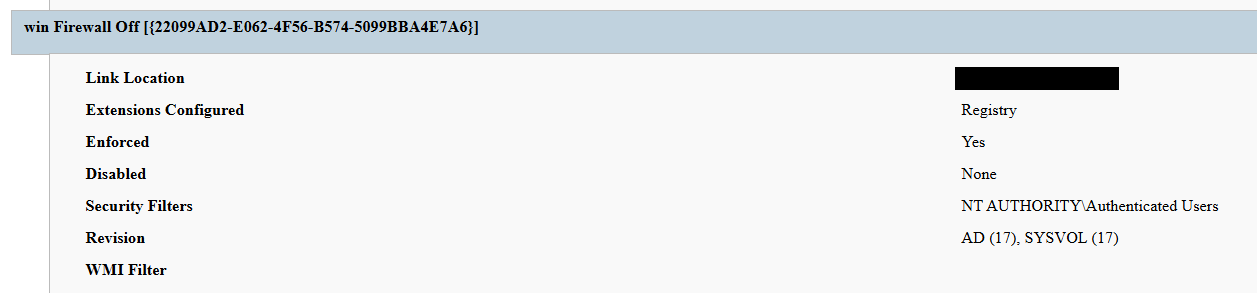
Settings changed by win Firewall Off GPO
The one-day delay detonation
The most forensically instructive detail is the one-day gap between GPO creation (13 April) and visible impact (14 April). Analysis of Master File Table (MFT) timestamps and the Group Policy History registry key confirmed the policy was written to SYSVOL and cached on endpoints on 13 April. However, computer configuration settings (wallpaper and lock screen machine policy, security settings, firewall disabling) only apply upon reboot or policy refresh — and no endpoint had rebooted in the interim. The attack therefore remained dormant in the GPO cache for one day before detonating en masse when machines were restarted in accordance with standard procedures.
We have to point out here that this delayed policy application is characteristic of GPO-based operations and has two potential consequences for defenders. Firstly, it may grant the actor a quiet window for exfiltration, persistence, or further staging between weaponization and impact. Secondly, it can be used to sever the temporal link between the cause (a GPO-creation event in the directory log) and the effect (mass user-visible disruption occurring at a later time), complicating timeline reconstruction unless directory service auditing is in place.
Forensic findings
Initial incident response engagement revealed a number of findings associated with the attack that we share below.
- No file encryption
A full review of the MFT on affected workstations found no files bearing a .payload extension characteristic to PAYLOAD ransomware and no evidence of bulk renaming or encryption I/O patterns. The attackers’ objectives were operational disruption and extortion via visual impact and access denial. - No endpoint persistence
All standard persistence locations were clean:- Scheduled tasks — no malicious tasks
- Run/RunOnce keys — clean
- Startup folders (user and system) — clean
- Services — no malicious service installed
- WMI event subscriptions — none
- Boot sector/MBR — unmodified
The attack’s persistence mechanism is the GPO link itself on the domain controller, with no endpoint-resident component.
- No active malicious processes
Live process and memory analysis revealed no injected threads, process hollowing or anomalous outbound connections. - Registry timeline analysis
Group Policy History, Shadow and State registry keys on the workstation recorded the application of PAYLOAD on 13 April:
HKLM\…\Group Policy\History\{35378EAC-683F-11D2-A89A-00C04FBBCFA2}\1
HKLM\…\Group Policy\Shadow\{827D319E-6EAC-11D2-A4EA-00C04F79F83A}\0
HKLM\…\Group Policy\State\Machine\GPO-List\7
HKCU\…\Group Policy\History\{7150F9BF-48AD-4da4-A49C-29EF4A8369BA}\1
HKCU\…\Group Policy\State\S-1-5-21-…\Loopback-GPO-List\5
The presence of the “Loopback-GPO-List” entry indicates the GPO was processed in loopback mode, ensuring the user configuration (wallpaper) applied regardless of which user logged on to the machine. - SYSVOL artifacts
Two files were staged on the domain controller’s SYSVOL share and served to endpoints through the Files Group Policy Preference CSE:- payload.jpg — the ransom image used for both wallpaper and lock screen.
- hello.txt — the ransom note, distributed to desktops and drive roots as README-payload.txt.
Detection engineering
Because no malicious binary or process exists, the detection logic should focus on the directory service and SYSVOL indicators. Below are the highest-value telemetry sources for identifying the described malicious activity.
- Directory service change auditing (DS Access)
Enable Advanced Audit Policy → DS Access → Audit Directory Service Changes on all domain controllers and set up alerts for the following events:Event ID Meaning Hunt focus 5137 A directory service object was created The account that created new groupPolicyContainerobjects must be an authorized GPO administrator5136 A directory service object was modified Changes to gPLinkon the domain root or sensitive organizational units; changes togPCMachineExtensionNames/gPCUserExtensionNames/gPCFileSysPath/versionNumberfor all GPOs5141 A directory service object was deleted GPO deletions (relevant for tamper detection and remediation assessment) A
gPLinkmodification at the domain root by a non-standard account is one of the most telling indicators of this attack class. - SYSVOL file integrity monitoring
Monitor \\DC.THECOMPANY.local\sysvol\THECOMPANY.local\Policies\ for unexpected files, particularly image files, text files, scripts, ScheduledTasks.xml, and modified registry.pol/GptTmpl.inf files that were created by sources other than legitimate replication. - Endpoint policy application telemetry
On endpoints, GPO application is logged in the Group Policy Operational log (Microsoft-Windows-GroupPolicy/Operational) and reflected in the History and Shadow registry keys shown above. A sudden domain-wide change to the applied policy set is a strong post-detonation signal. - Missing 5136 events
If the contents of a GPO’s SYSVOL change without a corresponding 5136 event, this can indicate direct SYSVOL/template editing (e.g., via open-source tools such as PowerView or SharpGPOAbuse) that bypasses the normal Group Policy Management Console (GPMC) modification path. While we recommend treating the absence of expected audit events as suspicious, it should be noted that this can be caused by misconfigured auditing.
Anti-forensics and recovery-inhibition capabilities
Confirmed PAYLOAD family capabilities
The Windows endpoint attack described in this report was implemented through malicious Group Policy Objects and did not involve a recovered ransomware executable, resident endpoint malware, confirmed file encryption or active malicious processes at the time of the forensic examination. However, PAYLOAD cryptomalware for Windows does exist, and other sources, including public analysis of its samples, reveal further malicious capabilities of this ransomware that could be used by security teams to enrich detection logic and security policies.
The behaviors documented in this section must therefore be interpreted as family-level capabilities identified through the public reverse engineering of PAYLOAD ransomware samples. They were not confirmed as having executed during the GPO-based incident unless corresponding evidence was identified in the host, memory, process, event-log, or hypervisor.
Windows Event Log clearing
Public reverse engineering of the PAYLOAD Windows variant reveals an optional event log clearing capability (T1685.005, formerly T1070.001). The ransomware dynamically resolves Windows Event Log APIs, enumerates available event log channels, and clears individual channels.
Implementation artifacts include:
- Runtime loading of wevtapi.dll
- EvtOpenChannelEnum
- EvtNextChannelPath
- EvtClearLog
- Enumeration of Security, System, Application, and PowerShell logs, and operational channels
- A command-line option controlling whether log clearing is performed
Clearing event logs reduces the availability of records related to process execution, authentication, PowerShell, service control, and system changes. However, it does not necessarily remove events that were already forwarded to a SIEM, Windows Event Collector, EDR backend, or protected log archive.
Forensic indicators
- Windows Security Event ID 1102
- Event logging shutdown or failure events
- Sudden reductions in event record identifiers
- Multiple event channels restarting from low record numbers
- Gaps between endpoint and centrally forwarded telemetry
- Execution of utilities or APIs associated with log management
- Direct access to EVTX files (Windows Event Log files) under the Windows event log directory
We should note that these indicators can’t be interpreted on their own. For instance, Event ID 1102 should be correlated with a number of aggravating factors, such as:
- Event ID 4688 or Sysmon Event ID 1 for process creation
- Event ID 4624 for the associated administrative logon
- EDR process trees
- PowerShell operational logging
- Windows Event Forwarding records
- Privileged access management activity
At the same time, the absence of Event ID 1102 does not prove that log clearing did not occur. Direct deletion, truncation, service impairment, or an incomplete audit configuration may produce different evidence.
Security process and service termination
PAYLOAD analysis reveals that the Windows ransomware variant contains logic that targets security processes and services (T1685 and T1489). This capability is intended to stop security products, backup software, database services, and applications that may lock files targeted for encryption.
Process and service termination serves several objectives:
- Reduce endpoint detection and response visibility.
- Release file handles so data can be modified.
- Interrupt backup and recovery services.
- Prevent databases and enterprise applications from protecting active data.
- Reduce interference with encryption operations.
Forensic indicators
- Security agent services changing from running to stopped
- Event ID 7036 service state changes
- Event ID 7040 service start type changes
- Event ID 4688 or Sysmon Event ID 1 for service control utilities
- Sysmon Event ID 5 for terminated processes
- EDR health degradation affecting many endpoints
- Repeated termination attempts against security or backup processes
- Execution of dedicated process killing utilities
VSS deletion, backup and recovery suppression
Public PAYLOAD sample analysis reports the deletion of Windows Volume Shadow Copies before encryption (T1490). This behavior removes local restore points and reduces the victim’s ability to recover files without external backups.
Recovery inhibition is broader than VSS deletion and may include multiple other malicious techniques, including the following:
- Deleting shadow copies, backup catalogs, and hypervisor snapshots
- Disabling recovery services
- Modifying boot recovery settings
- Compromising backup management platforms
- Deleting or encrypting backup repositories
In the PAYLOAD Windows sample that is proven to perform encryption, VSS deletion is confirmed to have taken place before encryption. A broader compromise of the backup platform was not established in the investigated incident.
Forensic indicators
- Execution of shadow copy management utilities
- Backup catalog deletion attempts
- Recovery configuration changes
- Backup service termination
- Mass snapshot deletions
- Backup administrator logons outside normal maintenance windows
- Backup retention or immutability changes
- Backup jobs failing immediately before disruptive activity
Ecosystem-relevant ransomware techniques
Above, we discussed the techniques specific to PAYLOAD ransomware. In this section, we’ll review other common ransomware techniques, such as BYOVD abuse and ESXi policy weakening, that remain relevant risks in the ransomware ecosystem. However, these techniques should not be attributed to this incident without supporting driver load, process, memory, ESXi, vCenter, or backup platform telemetry. We describe these techniques below as they may prove useful in other ransomware-related forensic investigations.
The examples used in this section are therefore ecosystem-relevant: they are commonly observed in ransomware operations but not conclusively attributed to the analyzed PAYLOAD samples.
ETW suppression and in-memory patching
Event Tracing for Windows (ETW) is a kernel-supported tracing architecture used by Windows components, diagnostic utilities, security products, and endpoint monitoring systems.
Although we didn’t encounter this technique in our case, some ransomware families can patch ETW-related functions inside the ransomware process (T1685, formerly T1562.001). The reported routine changes the memory protection of code pages, overwrites the beginning of selected ETW functions so they return without producing events, restores the original protection, and refreshes the instruction cache.
Reported target functions include EtwEventWrite, EtwEventWriteFull, EtwEventWriteTransfer, and EtwRegister.
This modification applies to the process-local mapping of ntdll.dll. It does not disable ETW globally across Windows, but it can reduce the telemetry generated by the modified process.
Forensic indicators
- Writable or recently modified executable pages within ntdll.dll
- Memory protection changes affecting ETW function addresses
- In-memory code differing from the corresponding clean DLL on disk
- EDR memory tampering alerts
- Unexpected calls to memory protection APIs followed by telemetry silence
- Process execution visible in network or filesystem telemetry but absent from expected ETW-derived sources
- Inconsistent telemetry between EDR, Sysmon, Windows Event Logs, and network monitoring
It should be noted that telemetry gaps are not conclusive evidence of ETW patching. Other factors include agent upgrades, network outages, endpoint shutdowns, SIEM ingestion failures, collector backpressure, and filtering or licensing changes.
Memory acquisition is the strongest validation source when process-local ETW patching is suspected.
Vulnerable signed driver abuse, BYOVD
Bring Your Own Vulnerable Driver (BYOVD) involves introducing or abusing a legitimately signed but vulnerable kernel driver (T1068 and T1685). The attacker exploits the driver’s exposed functionality to gain kernel-level capabilities, modify protected memory, terminate security processes, remove security callbacks, or bypass operating system security controls.
BYOVD is highly relevant to contemporary ransomware operations. However, the reviewed public PAYLOAD analyses do not provide sufficient evidence to conclude that BYOVD is an intrinsic PAYLOAD capability.
It should therefore be presented as an ecosystem-relevant technique rather than a confirmed PAYLOAD feature.
Forensic indicators
- Unexpected .sys files written to user-writable or temporary directories
- New kernel driver services
- Sysmon Event ID 6
- Driver hashes matching Microsoft or community vulnerable driver blocklists
- Invalid, revoked, expired, or unusual driver signatures
- Driver load followed by EDR termination
- New privileged processes immediately following driver loading
- Code Integrity or Defender alerts
- Service creation events referencing driver files
ESXi security policy weakening
Ransomware operators are increasingly targeting ESXi and vCenter because compromising the virtualization layer provides access to many business-critical virtual machines.
Public research typically describes operators performing the following activities (T1685, T1490 and T1489):
- Enabling SSH on ESXi hosts
- Changing root passwords
- Disabling
execInstalledOnly - Modifying lockdown mode exceptions
- Stopping virtual machines
- Deleting snapshots and backups
- Changing host firewall policies
- Copying custom ransomware binaries to hypervisors
On the target organization’s Linux servers we saw an ESXi PAYLOAD variant, which makes this behavior operationally relevant. Nevertheless, the reviewed evidence does not indicate that PAYLOAD operators used any of these policy-weakening actions in the investigated incident.
Forensic indicators
- Unexpected ESXi SSH enablement
- Changes to
execInstalledOnly - Secure Boot enforcement changes
- Lockdown mode configuration changes
- Root password changes
- New or unusual administrator accounts
- Bulk VM shutdown activity
- Bulk snapshot deletion
- New binaries in datastore or temporary paths
- vCenter tasks originating from unexpected accounts or systems
- Missing or disabled remote syslog forwarding
Remediation
To contain the described threat and limit possible damage, several remediation steps should be taken. Below, we recommend a four-phase remediation approach for containing this threat and restoring the affected environment.
Phase 1 — domain controller actions (to be performed first)
When dealing with PAYLOAD GPO, the first priority of the remediation plan should be to remove the source GPOs. Until this is done, endpoint cleanup is ineffective because the next policy refresh re-infects cleaned machines.
The immediate domain controller actions to be taken are:
- Delete PAYLOAD GPO. Remove {C897F2C7-C2AC-4E6F-BF48-58036FF29E79} via GPMC.
- Delete or revert win Firewall Off GPO. Remove {22099AD2-E062-4F56-B574-5099BBA4E7A6}.
- Clean SYSVOL. Delete jpg and hello.txt from \\DC.THECOMPANY.local\sysvol\THECOMPANY.local\.
- Rotate credentials. Reset the compromised account; audit all privileged accounts and group memberships for unauthorized changes; rotate krbtgt twice if domain admin compromise is confirmed.
- Force refresh. Perform
gpupdate /forceacross endpoints after deletion; re-enable local administrator and firewall via clean policy.
Phase 2 — Active Directory and GPO hardening
- Adopt the AD tiered administration model and confine domain admins to Tier 0 with no interactive logon to workstations and member servers.
- Separate GPO creation from GPO linking rights, and grant both only to a dedicated, audited administrator role.
- Enable GPO change auditing (Event IDs 5136, 5137, 5141) and forward to a SIEM.
- Monitor SYSVOL with file integrity tooling.
Phase 3 — credential and access hardening
- Enforce phishing-resistant MFA on all VPN and remote access entry points.
- Deploy Windows LAPS to generate unique, rotated local administrator passwords.
- Enable Credential Guard to protect LSASS-resident secrets.
- Adopt Privileged Access Workstations (PAW) for all administration.
- Implement just-in-time elevation through Privileged Identity Management (PIM) for domain admin.
Phase 4 — detection and monitoring
- SIEM rule: GPO creation or domain-root
gPLinkchange by a non-standard account. - SIEM rule: file creation events under SYSVOL from non-replication sources.
- Implement enhanced, centrally collected FortiGate SSL VPN logging (auth events, session detail, source IP geolocation, impossible travel check) and detailed perimeter monitoring.
- Deploy a canary GPO whose application anywhere signals attacker GPO write access.
Conclusion
PAYLOAD demonstrates a maturing tactic of turning the victim’s own trusted infrastructure into a weapon. By weaponizing Group Policy, the actor achieved a domain-wide impact without a single malicious binary on any endpoint, evaded file- and process-based detection entirely, and caused organization-wide disruption within seconds of the first reboot.
The absence of encryption is the most strategically significant finding and is consistent with the 2026 trend toward encryptionless extortion. At Kaspersky GERT, we assess with moderate confidence that the missing encryption reflects one of two scenarios: (1) a deliberate decision to stay below the irreversible data destruction threshold while preserving the option of a follow-on encryption phase, or (2) an operation interrupted before full execution.
The absence of encrypted files must not be mistaken for the absence of a serious compromise — the most critical impact lies in the actor gaining domain admin-level control. This incident proves that a threat actor with domain admin access and a working knowledge of group policy internals can inflict domain-wide disruption equivalent to a ransomware attack without writing a single malicious file to any endpoint.
Detection strategies anchored solely in file- or process-based indicators are blind to this attack class. Effective controls include directory service change auditing, SYSVOL integrity monitoring, and privileged access governance, which allow for GPO protection.
Detection by Kaspersky solutions
Kaspersky security solutions effectively detect the described malicious activity at various stages of the attack. Possible detection scenarios are listed below.
To protect organizations that use our Kaspersky SIEM system, we have prepared a package of correlation rules designed to help detect this type of malicious activity. The rules are now available for customers to download from the SIEM repository; the package name is: [OOTB] Group policy hijacked: PAYLOAD ransomware – ENG.
The “Group policy hijacked: PAYLOAD ransomware” package contains rules that detect suspicious file creation or modification in the SYSVOL shared folder on a domain controller, as well as changes to critical attributes and settings of domain group policies. Some rules may require adjustment if they trigger in response to legitimate activity, such as synchronization between domain controllers or the configuration of a new group policy.
To ensure the detection rules function correctly, verify that events from Windows systems are being received in full, including events with the following identifiers: Sysmon: 11, Security — 4663, 5136, 4657.
We also recommend applying the following rules available in the repository to detect all attack stages.
- Detection of Windows Event Log clearing to cover up traces of an attack:
R050_03_Windows Event Log was cleared - Detection of suspicious access to the LSASS process, which may indicate attempts to dump credentials:
R262_Suspicious access to the LSASS process - Detection of the Volume Shadow Copy service being started, which is used to create shadow copies before deleting them:
R231_20_Running the Volume Shadow Copy service - Detection of shadow copy deletion:
R321_Shadow copy deletion - Detection of Windows Defender disablement:
R076_01_Windows Defender Antivirus was disabled - Detection of attempts to disable or modify the system firewall:
R240_03_Disabling system firewall via the registry - Detection of a service installation from a non-system folder, which may indicate malware persistence techniques:
R281_01_Installation of a service from a non-system folder
For the rules in this list to function correctly, it is necessary to configure Security event auditing for event IDs 4663, 5136, 4657, 7036, and 1102.
In addition to the SIEM system, when audit settings are configured correctly, the process of creating, modifying, and deleting GPOs generates a large number of characteristic artifacts on the domain controller, enabling Kaspersky Endpoint Detection and Response Expert to promptly alert the user to anomalies in the infrastructure.
The creation of a new GPO is covered by the gpo_creation rule, which triggers in response to the corresponding event in the infrastructure. Changes to existing policies are detected by the following rules:
- The setting_the_gpcmachineextensionname_attribute rule detects changes to the
gPCMachineExtensionNamesattribute. - The setting_the_gpcfilesyspath_attribute rule detects the use of the
gPCFileSysPathattribute of a Group Policy Object, which specifies the path to the GPO’s contents in SYSVOL. - The broader rule setting_the_grouppolicycontainer_class detects a change to the
groupPolicyContainerclass.
GPO deletion is covered by the gpo_deletion rule.
In the next major version update of Kaspersky EDR Expert, a new event type, GPO, will be introduced, allowing users to track changes to Group Policy Objects.
For information security officers, GPO events will serve as an additional source of context when investigating activity in Active Directory and will help detect changes that could affect the configuration, access rights, and security of endpoints before a potentially malicious policy is deployed.
MITRE ATT&CK mapping
| Tactic | Technique | Observed behavior |
| Initial Access | T1078 — Valid Accounts | Compromised domain credential used for VPN authentication |
| Initial Access | T1133 — External Remote Services | FortiGate SSL VPN used as entry point |
| Privilege Escalation | T1078.002 — Domain Accounts | Account held domain-level GPO create/link rights |
| Privilege Escalation/Defense Impairment | T1484.001 — Group Policy Modification | Malicious PAYLOAD GPO created and linked at domain root; re-applies on every refresh/reboot; uses trusted channel to evade EDR |
| Defense Impairment | T1686 — Disable or Modify System Firewall | win Firewall Off GPO disables Windows Firewall on all profiles |
| Impact | T1491.001 — Internal Defacement | Wallpaper and lock screen replaced with ransom image |
| Impact | T1531 — Account Access Removal | Local Administrator account disabled via GPO Security Settings |
| Collection | T1005 — Data from Local System | Data exfiltration was observed originating from the file servers |
| Command and Control | T1071 — Application Layer Protocol | No live C2 confirmed; delivery achieved entirely via GPO |
Indicators of compromise
GPOs
PAYLOAD ransomware GPO: {C897F2C7-C2AC-4E6F-BF48-58036FF29E79}
win Firewall Off GPO: {22099AD2-E062-4F56-B574-5099BBA4E7A6}
File names and MD5 hashes
payload.jpg: Ransom wallpaper and lock screen image (SYSVOL)
hello.txt: Ransom note source (SYSVOL)
README-payload.txt: Ransom note dropped to desktops and drive roots
killer.exe (0108656A3E1ADE6CA4F21B084F5E1208): process killer tool
kill.exe (BEA5E267F24D7DA59F6821BFFDBFF293): process killer tool
IP addresses
37.19.210[.]12
146.70.117[.]239
149.102.229[.]154
104.164.55[.]46
104.28.162[.]228
104.28.163[.]162
64.190.76[.]14
192.42.116[.]50
192.42.116[.]12
192.42.116[.]56
192.42.116[.]97
192.42.116[.]52
Registry keys
HKLM\...\Policies\System\legalnoticecaption = Welcome to Payload!
SYSVOL path
\\DC.THECOMPANY.local\sysvol\THECOMPANY.local\payload.jpg
Event IDs
5137: GPO object creation on DC — review creator account
5136: GPO attribute modification — watch gPLink at domain root