Torrent trackers have long been abused for distributing malicious software, disguised as popular films, games, and other content. Our previous research has shown that cybercriminals repeatedly turn to torrents as an initial infection vector, using trojanized cracks and installers to reach a large number of users. Installation guides for pirated software routinely instruct users to disable their antivirus, conditioning them to ignore the potential threats they are inviting onto their computers.
During our analysis of malware that leverages blockchain networks for its C2 infrastructure, we discovered a previously unknown modular, multi-stage framework that we dubbed MovieReaper. This report details the new crimeware campaign that began with the mass infection of users via compromised torrent tracker file storage. We have identified several hundred victims, including both individual users and organizations in multiple countries, such as Russia, Türkiye, Japan, Kenya, Uganda, and Colombia, as well as in several European countries like Spain, the Netherlands, Belgium, and Germany. We analyze the techniques for evading detection by security and sandbox solutions, and examine the capabilities of the modular framework.
Kaspersky products detect this threat as HEUR:Trojan.Win64.Agent.gen.
Technical details
Background
In mid‑August 2026, during our threat‑hunting efforts, we identified a large‑scale infection campaign involving previously unknown malware disguised as popular movies. The campaign affected both individuals and organizations across multiple countries. Our initial analysis revealed a common denominator: all of the victims had used torrent trackers. This finding prompted us to investigate the campaign further and analyze its distribution mechanism, overall scope, and unknown malware implants.
Initial infection and spread
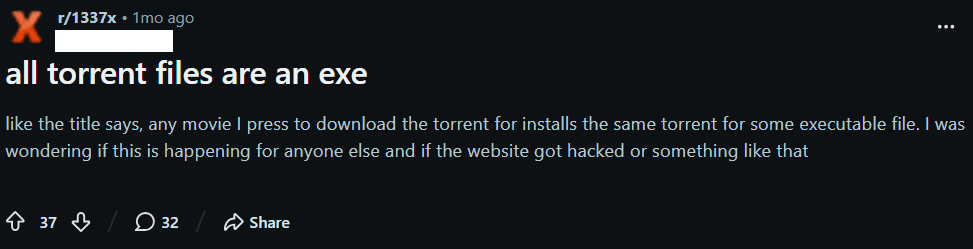
Compromised torrent trackers are the primary vector used to distribute malware. During our investigation, we identified multiple user reports describing suspicious files being downloaded instead of the intended content.
For example, a user of a popular movie torrent tracker reported the following case on Reddit:
Further analysis of the attack revealed that instead of compromising torrent trackers, the threat actor modified a widely used public repository of torrent files, itorrents[.]org. As a result, the trackers that relied on the repository began inadvertently distributing malicious torrent files to their users. This approach is particularly dangerous because it lets the threat actor reach users of multiple trackers without having to compromise each platform individually.
As of the publication date of this report, the archive remains compromised. When a user attempts to download a torrent via a magnet link, the legitimate torrent archive returns a different torrent file. This malicious torrent leads to the download of the malware loader, used to deploy a framework that we dubbed MovieReaper.
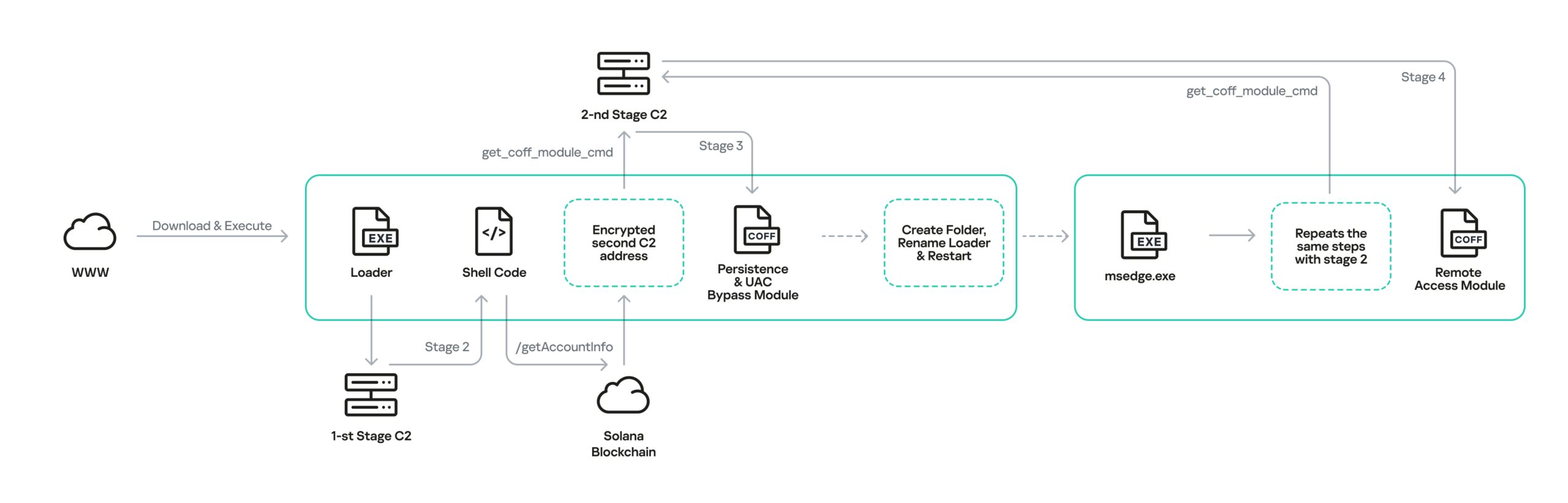
The loader initiates the infection chain shown in the diagram below. Each stage of the chain is described in detail in the following sections.
Malware implants
The infection chain consists of several steps, where only the initial one is dropped on the disk before it is executed to avoid detection. The malware itself is not heavily obfuscated, apart from strings being encrypted with a custom stream cipher. Most of the countermeasures were aimed at avoiding detection by AV sandboxes.
Step 1: Loader
The most popular initial executable was distributed through torrent trackers under many different names (for example, the odyssey (2026) [1080p] [webrip] [5.1].exe), but the file hash (MD5: A0B13781EDD7CFDAB13D79AFFF3C83C1) was identical across all downloads. We have seen multiple different loaders, where the executable file disguises itself with a long filename and an icon of some well-known application. Most of the filenames are rather long, presumably to hide the EXE extension at the end.
After the user manually starts the application, it establishes a global mutex to ensure that only one loader is executed at a time. We have seen several mutex variations in our samples, containing a randomly generated string (in the example Global\fnulSktzSqvVLXHU). This executable then performs a series of operations in order to avoid detection by AV sandbox solutions.
While performing those operations, the malware avoids making LoadLibrary and GetProcAddress calls to acquire the addresses of required functions. Instead, it searches for loaded libraries by traversing the double-linked list taken from the Ldr field of the PEB and then performs manual parsing of the loaded DLL to calculate the function address.
After all initial checks have passed, the binary prepares to establish a network connection to a C2 web server to download the shellcode, map it to the RWX memory and execute. While doing so, the loader decodes the domain name https://deadhub[.]org and if connection to it has failed, it uses the IP address http://193.23.118[.]155 as a fallback and connects to it using plain HTTP. The malware chooses a random group of strings and uses them as a path in the HTTP request to download the parts of the shellcode.
While mapping the address space and executing the shellcode, the loader registers a vectored exception handler and rewrites the handler address in memory in order to perform a debug break. This, will not crash the program, but instead redirect controlflow to the function that actually makes a raw NtProtectVirtualMemory syscall (via a previously located “0x0F 0x05” syscall instruction inside ntdll). Then it calls the undocumented ntdll function EtwpCreateEtwThread, which is a popular alternative to CreateThread for code executionm, and executes the shellcode.
Step 2: Shellcode
The second stage of this malware performs an HTTPS request to the Solana blockchain at the endpoint /getAccountInfo endpoint for the account 6pnDGAiHgyPdmckM5Qt1YbanGzrX43WLEU159nRaNLDm. The data in field of the response contains the base64‑encoded address of a second C2, which is encrypted with a static XOR key located within the shellcode itself. To store data in this account, attackers used a simple Solana program (address: CSiY8bQLBYPdfPWkwipBzH6sijTVQVVsA279JQdvwHtL).
Utilizing the Solana blockchain as a storage layer for next-stage C2 endpoints substantially complicates infrastructure takedown efforts by defenders.
The second stage payload communicates with its C2 server strictly through HTTPS via a TLS-pinned certificate using the nanopb protobuf library as a container for transferred data. The main logic of the stage 2 implant contains several initial commands, where the most important is the one that parses the COFF file, loads it into memory, and executes the module_init function from it. This provides a convenient interface for extension of the command list, which brings us to the next stage of the payload.
Step 3: UAC Bypass and persistence
Notably, the recovered modules were compiled with symbols, which accelerated reverse engineering.
After receiving the next stage from the second C2 server, the newly loaded module performs several tasks right in the module_init function.
Stage 3 performs UAC Bypass and achieves persistence using public techniques, masquerades the original binary as C:\ProgramData\Microsoft\Windows\Telemetry\msedge.exe, and restarts itself.
The respawned process starts with the initial loader, but with a special command-line argument, which allows it to skip most of the anti-sandboxing checks and proceed straight to downloading the next payload. The executable proceeds with the same steps as before, but this time, instead of downloading the persistence and UAC bypass module, a new one is downloaded from the second C2 server. This is because the malware uses the beacon to send a flag to the remote server, indicating whether the implant is running from the Telemetry folder, which allows the C2 to distinguish between first-run and respawned instances.
Step 4: The final implant
The final module (“file manager”) exposes 21 commands that give the operator filesystem access on the victim host. This allows remote the operator to download, upload, and read files on the system; list and enumerate directories; manipulate files with create, copy, rename, move, delete, chmod, and symlink commands; and use preview and thumbnail commands to exfiltrate previews of images and files before actually extracting them.
We suspect that other modules may be loaded on demand if requested by the operator.
Infrastructure
During this malware campaign, attackers are using various commercial hosting providers for their C2 infrastructure (see the IoC section for details). Furthermore, as noted above, the campaign leverages the legitimate Solana blockchain via the RPC endpoint api.mainnet.solana.com to deliver the address of the second‑stage C2 server to the malware. This approach provides the attackers with decentralized storage for C2 addresses, adding an additional layer of resilience and making it more difficult for defenders to disrupt the campaign by simply blocking the IP addresses of the C2 servers.
Victims
The observed campaign targeted both individuals and organizations across Europe, Asia, Africa, and Latin America, with infection attempts identified in Russia, Spain, Germany, Finland, Türkiye, Japan, Nepal, Kenya, Tanzania, Ghana, Uganda, Colombia, the Netherlands, Belgium, and other countries. The targeted organizations span a wide range of sectors, including enterprise, government, IT, consulting, retail, transportation, and agriculture.
Conclusions
Our research uncovered activity by the same actor dating back to October 2025. Although the campaign has evolved over time, with the malware authors expanding their arsenal and making the loader harder to detect, the pattern remains the same. This includes encoded strings, parts of shellcode downloaded through plain HTTP, and several techniques used to avoid sandboxes and virtual machines. We will continue monitoring this actor’s activity to catch new potential threats.
The first stage offers the clearest opportunity to disrupt this campaign: it relies on a single specific domain name and a single IP address to serve the shellcode, so taking down this server would prevent subsequent infection stages. This includes the second-stage payload, which uses the Solana blockchain network for a C2 and is therefore more resistant to conventional infrastructure takedowns.
However, this framework’s self-containment, modularity and in-memory execution has potential for reuse in later campaigns with minimal rework.
CoolClient is a backdoor family attributed to the HoneyMyte APT group (also known as Mustang Panda) that has been used in their cyber-espionage campaigns targeting organizations across Asia and Russia. It supports such capabilities as keylogging, clipboard theft, credential harvesting, file management, system reconnaissance, and plugin-based extensions.
Since its first public disclosure by Sophos in 2022 and subsequent analysis by Trend Micro in 2023, CoolClient has continued to evolve. In 2025, we analyzed a newer variant that introduced clipboard theft and HTTP traffic interception for credential harvesting.
In late 2025 and 2026, our latest investigation reveal another major evolution. The newest CoolClient variant can deploy a signed kernel-mode driver as a Windows service and communicate with it through IOCTL requests. The driver enhances the malware’s stealth by hiding the CoolClient process, protecting related files and registry entries, and preventing them from being inspected or modified. The overall design is comparable to the kernel-mode enhancements previously observed in ToneShell, but the CoolClient driver exposes dedicated IOCTL handlers that allow the user-mode backdoor to communicate directly with the driver.
We have observed this updated CoolClient variant and its accompanying driver in intrusions across multiple countries in Asia, including Pakistan, Mongolia, and Myanmar.
Technical analysis
In the observed campaign targeting Myanmar, HoneyMyte used PlugX as the initial post-compromise implant to deploy the CoolClient components. Before deploying the malware, the actor added both a folder exclusion and a file exclusion to Microsoft Defender for the fake Windows Defender installation directory and the renamed sideloader executable (defender.exe).
The actor then created a fake Windows Defender installation directory, copied the CoolClient components into it, and renamed a legitimate Sangfor executable, usually named Sang.exe, to defender.exe to serve as the DLL sideloader.
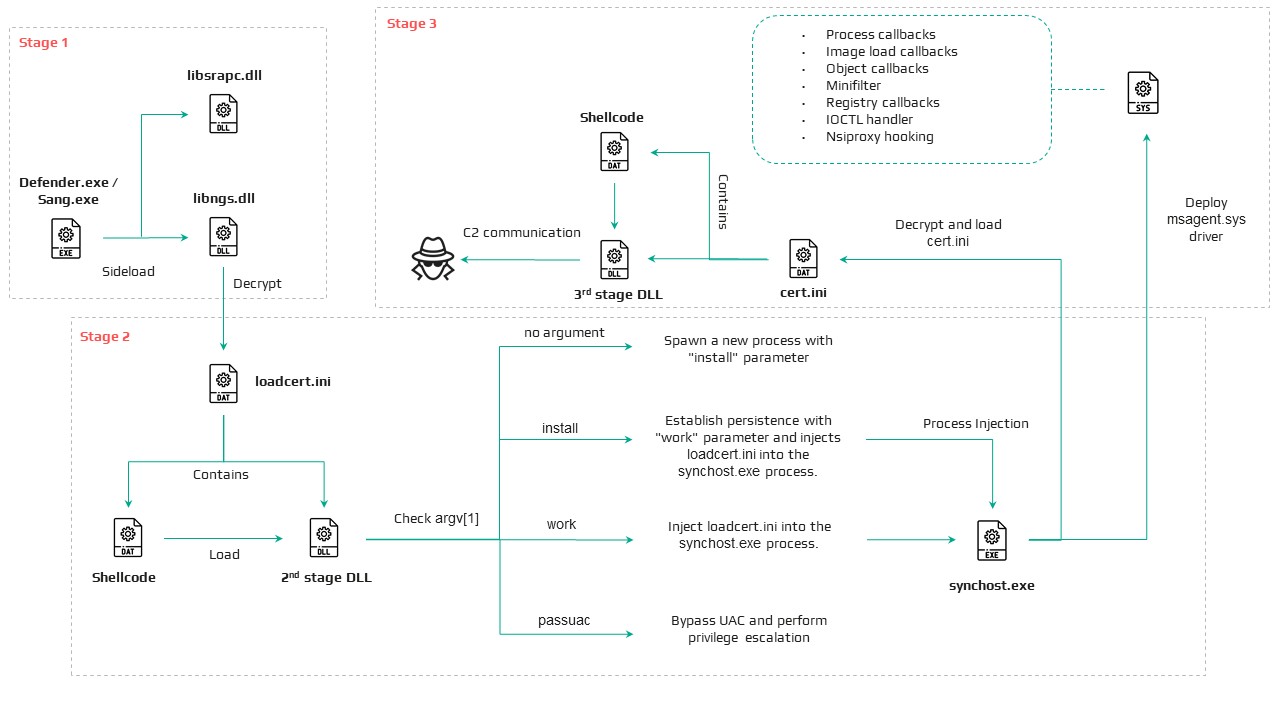
When executed, defender.exe sideloads the malicious libngs.dll, initiating the CoolClient execution chain described in the following sections.
CoolClient components
Similar to previous variants, the latest CoolClient user-mode component follows a multi-stage execution chain, with each component performing a distinct role during execution.
Component
Description
defender.exe / Sang.exe
Legitimate Sangfor application abused for DLL sideloading
libsrapc.dll
Benign dependency required for the Sangfor application to execute normally
libngs.dll
First-stage loader that decrypts and loads the next stage into memory (First stage)
loadcert.ini
Encrypted DLL implementing the core CoolClient functionality, including command handling, process injection, driver deployment, and persistence (Second stage)
cert.ini
Final-stage implant responsible for C2 communication and backdoor functionality (Final stage)
time.ini
CoolCleint configuration file
Our previous CoolClient analysis focused primarily on the final-stage implant (main.dat), including its backdoor commands and plugin framework, while the first-stage loader (libngs.dll) and second-stage component (loader.dat) received only a brief overview. In the latest variant CoolClient, loader.dat and main.dat have been renamed to loadcert.ini and cert.ini, respectively. This article revisits those earlier stages, focusing on the second-stage component and the newly introduced kernel-mode driver that extends CoolClient with rootkit capabilities.
Overview of the new variant of CoolClient
First stage: libngs.dll
Execution begins when the legitimate Sangfor application (defender.exe or Sang.exe) loads the malicious libngs.dll through DLL sideloading. As in previous CoolClient variants, the malware continues to abuse the same Sangfor application to execute its first-stage loader.
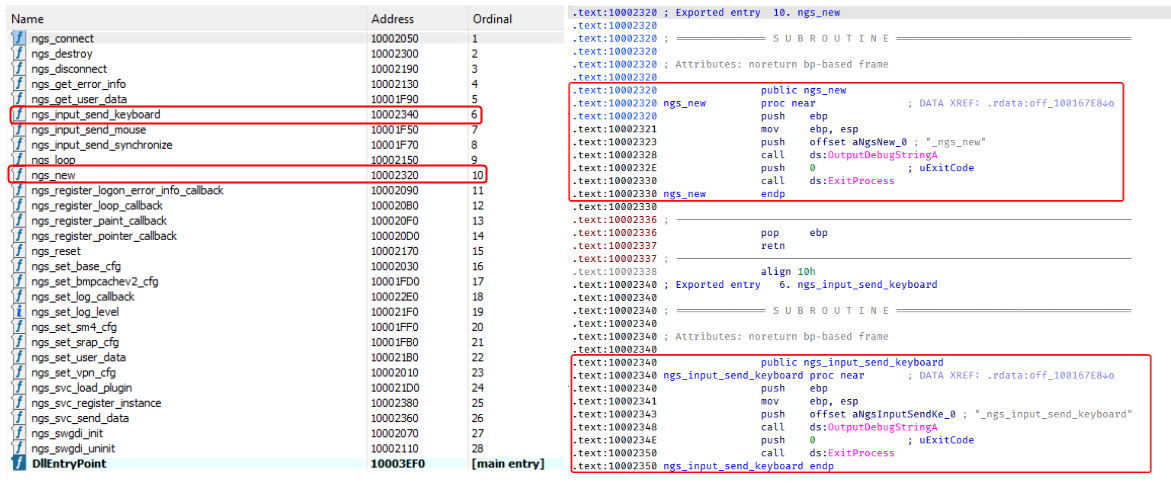
To make the DLL appear legitimate, libngs.dll exports numerous dummy functions. Each export simply calls OutputDebugStringA with its corresponding function name before immediately invoking ExitProcess, serving no functional purpose other than mimicking the expected export table of the legitimate DLL.
Dummy export functions in libngs.dll invoking OutputDebugStringA and ExitProcess
The actual malicious logic is executed from DllMain (DllEntryPoint). Although heavily obfuscated through control flow flattening and numerous unconditional jumps, the routine ultimately performs a straightforward task: loading, decrypting, and executing the encrypted second-stage DLL, loadcert.ini.
The loader resolves the required Windows APIs, reads loadcert.ini into memory, and decrypts it using a 0x32-byte repeating XOR keystream derived from a transformed seed value of 0xA4. After decryption, the DLL is loaded directly into memory, and execution is transferred to loadcert.ini.
Second stage: loadcert.ini (before synchost.exe injection)
The second-stage DLL, loadcert.ini, is responsible for preparing the execution environment before the malware transitions into its injected process. It first determines its execution context by checking whether the current module is synchost.exe.
If the DLL is running under the original sideloaded process (for example, Sang.exe), it performs the initial setup, including persistence, UAC bypass, registry modifications, and process injection.
If the DLL is already executing inside synchost.exe, it follows a different execution path that decrypts time.ini, deploys the kernel-mode driver, and loads the final-stage implant (cert.ini).
Command handler
The command handler remains largely unchanged from previous CoolClient variants, with one notable difference: the malware now injects into synchost.exe instead of write.exe.
Execution is controlled through three command-line parameters:
Parameter
Purpose
install
Performs the initial setup, including persistence, privilege checks, and preparation for the injected execution path.
work
Executes the primary second-stage functionality from the injected synchost.exe process, including driver deployment and third-stage loading.
passuac
Continues execution after privilege elevation.
If no parameter is supplied, the malware creates a new Sang.exe process with the install parameter using CreateProcessW.
Establishing AutoRun persistence
When executed with the install parameter, CoolClient creates an AutoRun entry under:
The registry value, named goopdate, launches Sang.exe (or defender.exe, depending on the deployment) with the work parameter whenever the user logs on.
Process injection into synchost.exe
Upon establishing the AutoRun registry entry, CoolClient decrypts loadcert.ini using a 0x32-byte repeating XOR keystream derived from the hardcoded base key 0x4D.
The decrypted DLL is then injected into a newly created suspended instance of synchost.exe. The malware allocates memory in the target process, writes the decrypted payload, redirects the thread context to the injected code, resumes execution, and finally terminates the original process with ExitProcess.
From this point onward, execution continues entirely within synchost.exe, where the malware proceeds with kernel-mode driver deployment before loading the final-stage implant (cert.ini).
Service installation
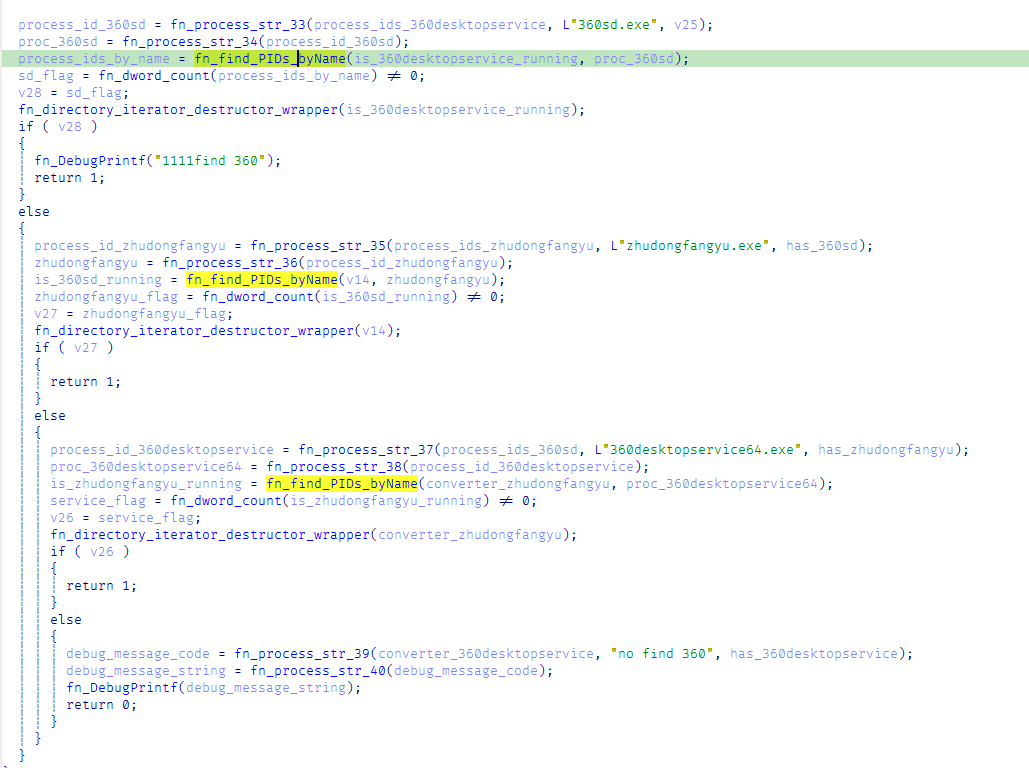
When executed with the install parameter, CoolClient establishes an additional persistence mechanism by installing itself as a Windows service. Before doing so, it verifies that it has sufficient access to the Service Control Manager and that no 360 Total Security software processes (360sd.exe, zhudongfangyu.exe, or 360desktopservice64.exe) are running.
Function to check for running 360 Total Security software processes
If both checks succeed, the malware decrypts time.ini to retrieve the service configuration, including the service name and description. It then checks whether the service media_updaten already exists. If found, the existing service is stopped and deleted before a new one is created.
The new service is configured to execute Sang.exe<.code> with the work parameter using CreateServiceA. The malware then starts the service by executing "sc start media_updaten" via WinExec.
Administrator privilege check
If the service installation path is not taken, CoolClient checks whether the current process is running with administrator privileges by verifying membership in the local Administrators group.
When administrative privileges are available, the malware relaunches itself with the passuac parameter before continuing with the remaining execution flow.
Elevated relaunch and UAC bypass
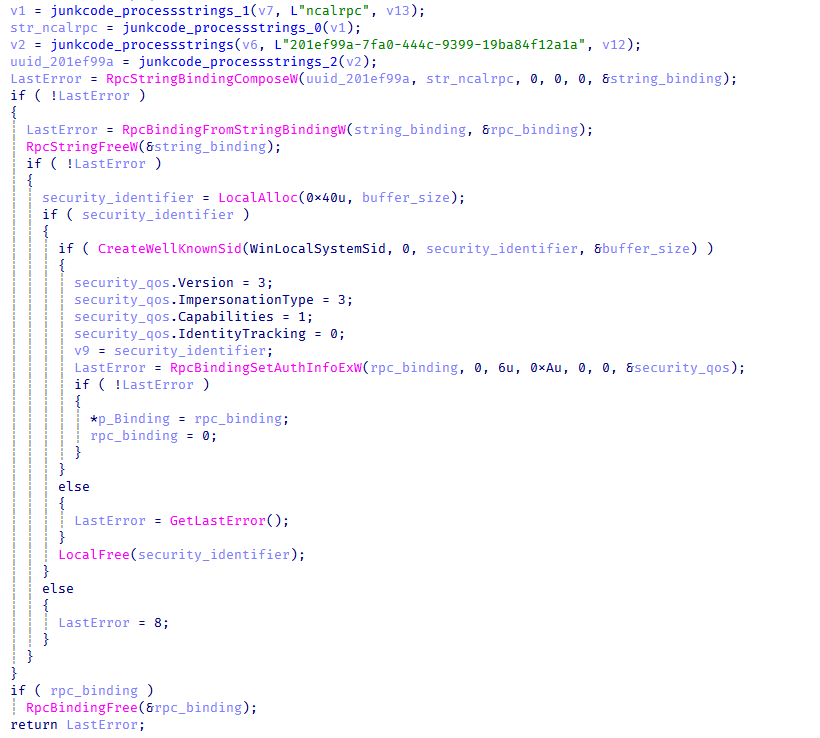
To continue execution with elevated privileges while concealing its true parent process, CoolClient implements an RPC-based process creation technique similar to the method described by Google Project Zero. The technique combines RPC process creation with parent process ID (PPID) spoofing to launch a new elevated instance of itself.
The malware first checks for the presence of escanmon.exe. If the process is running, it constructs the path to C:\Windows\System32\winver.exe and establishes a connection to the local ncalrpc endpoint (201ef99a-7fa0-444c-9399-19ba84f12a1a). It then invokes NdrAsyncClientCall to launch winver.exe through the RPC interface.
Authenticated RPC binding used during the RPC-based UAC bypass
After winver.exe is created, CoolClient retrieves its debug object using NtQueryInformationProcess, detaches the debugger through NtRemoveProcessDebug, and terminates the process. The obtained debug object is later reused during the remainder of the UAC bypass routine.
Next, the malware repeats the same RPC-based process creation technique to launch computerdefaults.exe. It associates the previously obtained debug object with the current thread using DbgUiSetThreadDebugObject, waits for the resulting process creation event through WaitForDebugEvent, and duplicates the process handle using NtDuplicateObject, obtaining a handle with full access rights.
Finally, CoolClient relaunches itself as Sang.exe passuac using CreateProcessW with an extended startup attribute list. By configuring PROC_THREAD_ATTRIBUTE_PARENT_PROCESS through UpdateProcThreadAttribute, the duplicated process handle is assigned as the parent of the new process. As a result, the new Sang.exe passuac instance executes with an elevated context while appearing to have been spawned by the trusted Windows process instead of the original CoolClient process.
Second stage: loadcert.ini (Injected Execution)
After being injected into synchost.exe, loadcert.ini follows its injected execution path, where it deploys the kernel-mode driver and launches the final-stage implant (cert.ini). If administrative privileges are unavailable, the malware skips driver deployment and proceeds directly to the third-stage injection.
Kernel-Mode driver deployment
The deployment routine begins by decrypting time.ini. CoolClient then verifies that it has sufficient privileges to install a kernel-mode driver by checking for full access to the Service Control Manager (SCM) and the presence of SeTcbPrivilege.
If both conditions are met, CoolClient extracts an embedded LZMA-compressed driver from loadcert.ini, decompresses it, and writes it to disk as msagent.sys in the same directory as cert.ini, for example:
Next, the malware checks whether a service named msagent already exists. If present, the existing service is stopped and deleted before a new driver service is created and started, loading the kernel-mode component into the operating system.
Driver initialization
After the driver is loaded, CoolClient establishes communication with it by opening the device \\.\msagent using CreateFileW. The user-mode component then initializes the driver by issuing three DeviceIoControl requests.
IOCTL
Purpose
0x222120
Registers the current CoolClient process with the driver.
0x2221E0
Sends the configured C2 IPv4 address to the driver.
0x2220F0
Registers filesystem and registry paths that should be protected or hidden.
The first request (0x222120) registers the current CoolClient process as a trusted process within the driver. The request includes the process ID, an operation code, and a flag that marks the process as trusted, allowing it to interact with protected files, registry keys, and processes.
The second request (0x2221E0) passes the configured C2 IPv4 address extracted from time.ini.
Finally, 0x2220F0 registers the CoolClient installation directory (for example, C:\Program Files\Microsoft\Windows Defender\) together with the service registry path (\Registry\Machine\SYSTEM\CurrentControlSet\Services\media_updaten). These entries allow the driver to protect the malware’s files and registry objects from inspection, modification, and deletion.
As part of the initialization, CoolClient updates the HKLM\SYSTEM\RNG\Wid_H1deF5Dirs registry value by appending its installation directory if it is not already present. This registry value is later used by the driver when applying its hiding and protection mechanisms.
The implementation of these IOCTL handlers and the corresponding driver functionality are discussed in the msagent.sys section.
Cert.ini process injection
Once the driver has been initialized, CoolClient proceeds to launch the final-stage implant (cert.ini). Before creating the target process, the malware enumerates active WinStation sessions to identify a suitable interactive user session.
After selecting a session, CoolClient duplicates its access token, updates the session identifier, and creates a new synchost.exe process using CreateProcessAsUserA. The decrypted cert.ini DLL is then injected into the suspended process using the same memory allocation, thread context modification, and ResumeThread technique described earlier.
This marks the final transition in the execution chain, where the third-stage implant takes over C2 communication and the remaining backdoor functionality.
Msagent.sys driver
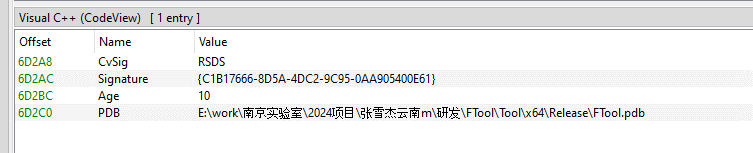
Analysis of the deployed kernel-mode driver reveals an embedded PDB path:
The path contains several notable strings, including “Nanjing Laboratory” (南京实验室) and “Zhang Xuejie Yunnan m” (张雪杰云南m), which likely refer to the driver’s development environment. However, our OSINT analysis did not identify any information linking these strings to a known organization, developer, or threat actor.
The driver is digitally signed with a certificate issued to "Nanjing Ranyi Technology Co., Ltd.", with serial number 3E 62 DC 5D 8D 61 2A 26 33 E7 6B DF D6 07 19 DD. The certificate was valid from August 2013 to September 2014.
We identified several older malicious drivers signed with the same certificate that were compiled around 2013. However, we found no evidence directly linking those samples to the CoolClient activity described in this article.
Driver configuration
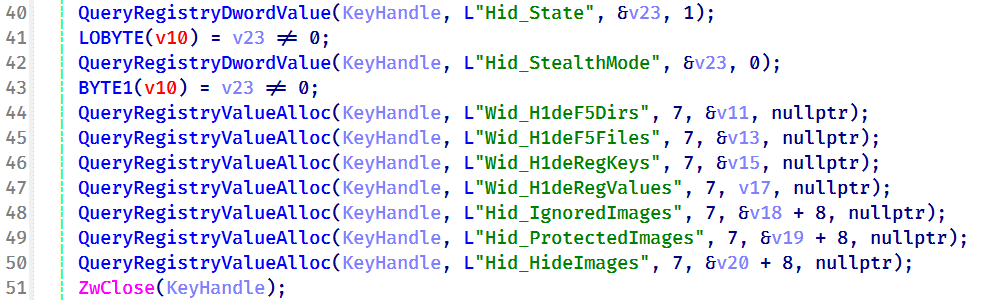
During initialization, the driver loads its stealth configuration from the registry key \REGISTRY\MACHINE\SYSTEM\RNG. The configuration defines which system objects should be hidden or protected and controls the driver’s operating mode.
Registry configuration loaded by the driver during initialization
Two REG_DWORD values control the driver’s operating mode:
Registry Value
Default
Description
Hid_State
1
Enables the driver’s rootkit functionality.
Hid_StealthMode
0
Controls additional stealth features used by selected driver routines.
In addition, the driver loads several REG_MULTI_SZ values that define the objects to be hidden or protected.
Registry Value
Purpose
Wid_H1deF5Dirs
Directories to hide
Wid_H1deF5Files
Files to hide
Wid_H1deRegKeys
Registry keys to hide
Wid_H1deRegValues
Registry values to hide
Hid_IgnoredImages
Processes to ignore
Hid_ProtectedImages
Processes to protect
Together, these registry values determine which filesystem paths, registry objects, and processes are managed by the driver’s protection mechanisms.
After loading the configuration, the driver converts the registry entries into internal lookup structures that are shared across its various protection components.
These structures are later referenced by the filesystem minifilter, registry callback, process callback, object callback, image load callback, and IOCTL handlers to determine whether a file, registry object, or process should be hidden, protected, or ignored.
Preparation for process hiding
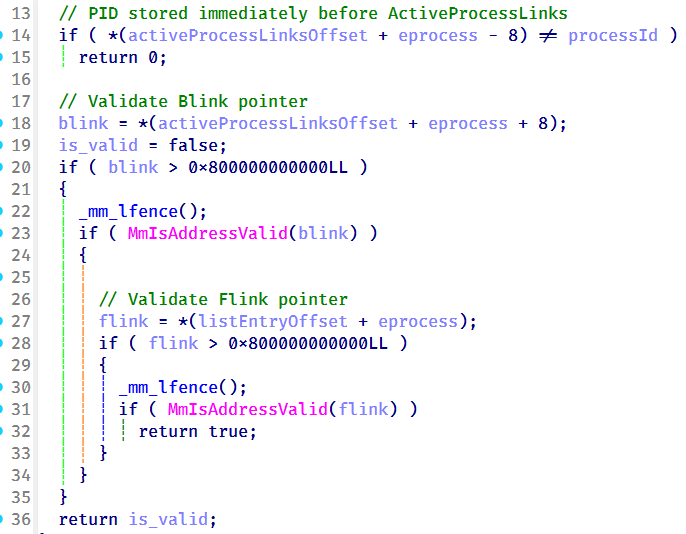
Next, the driver dynamically locates the ActiveProcessLinks (LIST_ENTRY) field within the EPROCESS structure instead of relying on hardcoded offsets. It first validates several predefined offsets and, if none match, performs a linear scan of the EPROCESS structure to identify the correct location. This approach allows the driver to remain compatible across different Windows versions, where the layout of EPROCESS may differ.
The driver validates candidate ActiveProcessLinks layouts before enabling process hiding
Once the correct offset has been identified, it is stored for later use by the process hiding routines. During process hiding and restoration, the driver uses IOCTLs 0x22219C and 0x2221A0 to unlink and relink entries in the Windows active process list, effectively hiding or restoring processes on demand.
Process, object, and image load callbacks
After preparing its process tracking structures, the driver initializes several AVL trees and populates them with configuration entries loaded from the registry, including Wid_H1deF5Dirs, Wid_H1deF5Files, Wid_H1deRegKeys, Wid_H1deRegValues, Hid_IgnoredImages, Hid_ProtectedImages, and Hid_HideImages.
These AVL trees provide efficient lookups for protected files, registry objects, and tracked processes, and are shared by the callback routines and IOCTL handlers.
The driver then registers three types of kernel callbacks that form the foundation of its protection and monitoring mechanisms:
Object callbacks using ObRegisterCallbacks
Process creation and termination callbacks using PsSetCreateProcessNotifyRoutineEx
Image load callbacks using PsSetLoadImageNotifyRoutine
Registration of object, process, and image load callbacks during driver initialization
After registration, these callbacks maintain the driver’s internal tracking structures as processes, threads, and images are created or loaded.
Object callbacks
To protect selected processes, the driver registers object callbacks for process (PsProcessType) and thread (PsThreadType) objects using ObRegisterCallbacks with an altitude of 1203. These callbacks intercept requests to open process and thread handles. If the target process is protected, the driver reduces the access rights granted to the requesting process, preventing operations such as process termination, code injection, and other forms of process manipulation. In this sample, the protected process is the injected CoolClient code running inside synchost.exe.
Process and image load callbacks
The driver registers process creation and termination callbacks using PsSetCreateProcessNotifyRoutineEx, together with an image load callback via PsSetLoadImageNotifyRoutine.
When a process is created, its image name is compared against the configuration lists Hid_IgnoredImages, Hid_ProtectedImages, and Hid_HideImages. Matching processes are added to the driver’s internal tracking structures, allowing them to be protected, hidden, or managed through subsequent IOCTL requests. When a tracked process terminates, its entry is removed from the tracking structures.
The image load callback monitors modules loaded into tracked processes and updates the driver’s internal state to support subsequent protection and hiding operations.
To ensure that processes already running before the driver is initialized are also tracked, the driver performs a one-time enumeration of all active processes after registering the callbacks and adds any matching processes to the tracking structures.
MiniFilter registration
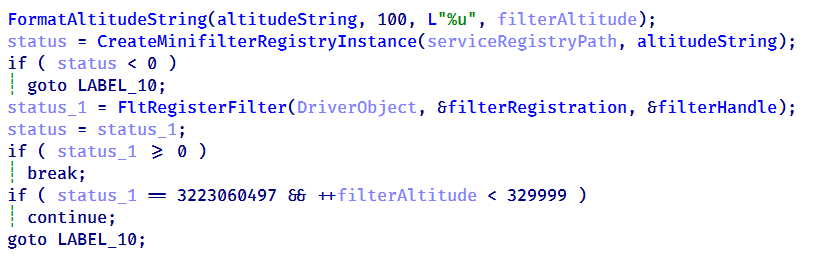
To protect files and directories, the driver registers a filesystem minifilter. During initialization, it creates internal path filter lists, loads the configured directory and file entries (Wid_H1deF5Dirs and Wid_H1deF5Files), and creates the required minifilter registry entries under HKLM\SYSTEM\CurrentControlSet\Services\msagent\Instances. To avoid altitude conflicts, the driver dynamically assigns a filter altitude and retries registration until a unique value is obtained.
Retrying minifilter registration with incrementing filter altitude values until FltRegisterFilter succeeds
The driver then activates the minifilter using FltRegisterFilter. The filter works together with the IOCTL interface, which dynamically adds, removes, or clears protected path entries (0x2220F0, 0x2220F4, and 0x2220F8). During filesystem operations, the minifilter compares accessed paths against its internal path lists and denies access to matching entries, effectively hiding protected files and directories from users and applications.
Registry callback registration
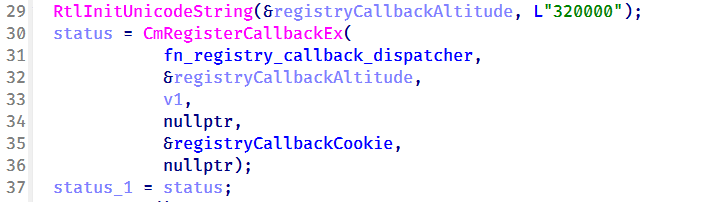
To protect registry keys and values, the driver registers a registry callback using CmRegisterCallbackEx with an altitude of 320000. During initialization, it creates separate lookup structures for protected registry keys and values, then populates them using the configured entries from Wid_H1deRegKeys and Wid_H1deRegValues.
Registration of the registry callback using CmRegisterCallbackEx with an altitude of 320000
Once registered, the callback intercepts registry operations and compares the target key or value against the protected entries. For enumeration requests, matching keys and values are removed from the results before they are returned to user mode, effectively hiding them from registry viewers. For direct access requests, such as opening, modifying, or deleting protected registry objects, the callback returns STATUS_ACCESS_DENIED, preventing the operation.
Before applying these restrictions, the driver verifies whether the requesting process is trusted. Processes registered through IOCTL 0x222120, including the CoolClient user-mode component, bypass the filtering logic and retain unrestricted access, while all other processes remain subject to the driver’s registry protection rules.
IOCTL command dispatcher
To communicate with the user-mode component, the driver creates a device object named \Device\ToolTool together with the symbolic link \DosDevices\ToolTool to allow the user-mode CoolClient component to communicate with the driver through DeviceIoControl requests.
The driver implements 33 IOCTL handlers, although the analyzed CoolClient sample uses only three during normal execution:
0x222120: registers the current CoolClient process with the driver.
0x2221E0: passes the configured C2 IPv4 address.
0x2220F0: registers filesystem and registry paths for protection.
The remaining IOCTL handlers were not invoked by the analyzed sample.
IOCTL
Handler
Functionality
0x222000
0x140001E04
Enable or disable the rootkit.
0x222004
0x1400020B0
Query the current rootkit state.
0x2220F0
0x140002320
● Register protected filesystem or registry paths
● Used by CoolClient to register its installation directory and service registry key.
0x2220F4
0x1400034DC
Remove a protected filesystem or registry path.
0x2220F8
0x140003464
Clear all protected filesystem and registry path entries.
0x222118
0x1400024B0
Register process or path protection entries.
0x22211C
0x140002A20
Query registered protection entries.
0x222120
0x140003794
Update process protection entries. Used by CoolClient to register itself as a trusted process.
0x222124
0x14000362C
Remove a protection entry.
0x222128
0x14000349C
Clear all process protection entries.
0x222130
0x14000265C
Register a protected process by PID.
0x222134
0x140010E88
Inject shellcode into a target process using NtCreateThreadEx.
0x222138
0x14000F498
Hide a kernel module by unlinking it from PsLoadedModuleList.
0x222144
0x14000270C
Delete a file.
0x222148
0x14000286C
Decrypt an embedded buffer and write it to disk.
0x22214C
0x1400027F4
Read and decrypt an encrypted file.
0x222168
0x140002780
Unmap the image section of a target process.
0x22216C
0x140013984
Terminate a process by PID.
0x222194
0x140011F50
Remove Protected Process Light (PPL) protection.
0x222198
0x140002940
Create or modify a registry value.
0x22219C
0x140010630
Hide a process by unlinking it from the active process list.
0x2221A0
0x140010670
Restore a previously hidden process.
0x2221A4
0x14000F8A0
Hide a module within a process.
0x2221A8
0x14000F954
Restore a hidden module.
0x2221AC
0x140016368
Enumerate and restore kernel notification callbacks.
0x2221B0
0x140016458
Disable or restore kernel notification callbacks.
0x2221B4
0x140012408
Manually load a secondary kernel driver.
0x2221B8
0x14001262C
Debug/test handler.
0x2221BC
0x1400165F6
Write to an arbitrary kernel address.
0x2221C0
0x14000BB00, 0x14000BB78
Enables deny-rootkit mode by registering image-load monitoring and enabling the patching logic.
0x2221C4
0x14000BB6C, 0x14000BB10
Disables deny-rootkit mode by clearing state and unregistering/removing the monitoring logic.
0x2221E0
0x1400126C0
Register a C2 IPv4 address.
0x2221E4
0x140012E50
Delete a C2 IPv4 address.
After initializing the IOCTL dispatcher, the driver releases the temporary configuration buffer that was previously loaded from \REGISTRY\MACHINE\SYSTEM\RNG.
Kernel module enumeration and hiding
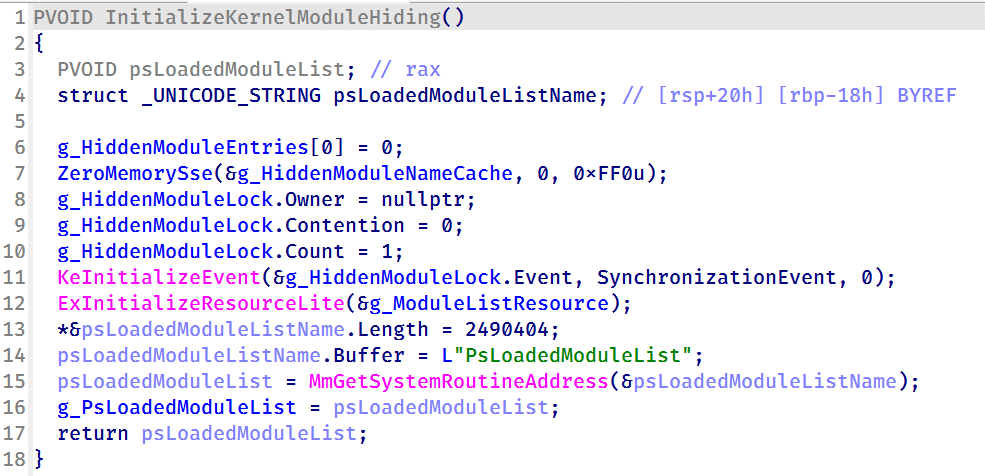
To support kernel module hiding, the driver resolves the address of the non-exported kernel variable PsLoadedModuleList at runtime using MmGetSystemRoutineAddress. This global linked list maintains information about all loaded kernel modules and drivers, allowing the rootkit to enumerate and manipulate module entries.
Driver initialization routine resolving the address of PsLoadedModuleList for subsequent kernel module hiding
This functionality is exposed through IOCTL 0x222138, which accepts a module name or path from the user-mode component. When a matching module is found, the driver locates the corresponding entry in PsLoadedModuleList and unlinks it by updating its Flink and Blink pointers. As a result, the hidden module no longer appears in standard kernel module enumeration routines.
Nsiproxy hooking and data filtering
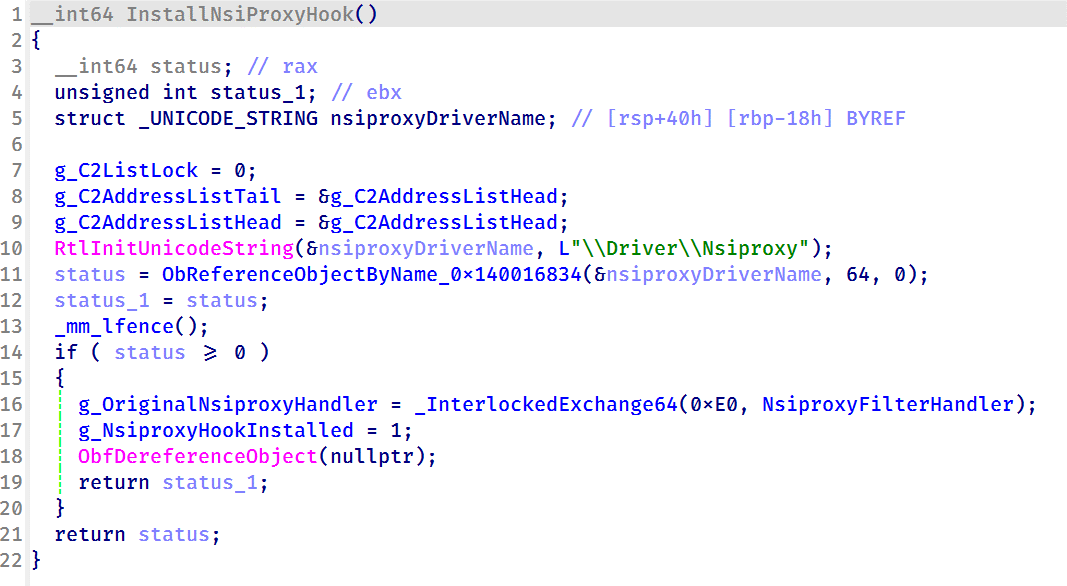
The driver also hooks the Nsiproxy driver to filter network-related data returned to user mode. This functionality is connected to IOCTL 0x2221E0, which allows the user-mode component to register C2 IPv4 addresses with the driver.
To install the hook, the driver obtains a reference to \Driver\Nsiproxy using ObReferenceObjectByName and replaces one of the Nsiproxy handler pointers with its own filtering routine. The hook preserves the original handler and forwards execution after processing the returned data.
Installing the Nsiproxy hook by resolving \Driver\Nsiproxy and replacing the original handler with the driver’s filtering routine
When the hooked routine processes network information, the driver compares the returned entries against its registered C2 address list. Matching IP addresses are removed before the data is returned to user mode, preventing applications that rely on Nsiproxy-provided network information from seeing the malware’s C2 addresses.
Finally, the driver registers a DriverUnload routine to release allocated resources when the driver is unloaded.
Victimology
The latest CoolClient variant continues to target organizations consistent with previously observed HoneyMyte activity. Based on our investigations, we identified victims in Myanmar, Mongolia, Pakistan, and Russia, including confirmed government entities.
Across the observed intrusions, CoolClient was consistently deployed as a secondary backdoor following a PlugX infection, indicating that HoneyMyte continues to use PlugX as its initial post-compromise implant before transitioning to CoolClient.
Attribution
Our analysis confirms that the investigated malware is a new CoolClient variant associated with the HoneyMyte threat group. While the overall execution flow remains consistent with previously documented CoolClient variants, this sample introduces a previously undocumented kernel-mode driver that significantly expands the malware’s stealth capabilities.
The deployment chain observed in this investigation is also consistent with previous HoneyMyte campaigns, in which PlugX serves as the initial foothold before CoolClient is deployed as a secondary backdoor, further reinforcing the attribution.
Conclusion
The latest CoolClient variant represents a significant evolution of the malware. Rather than operating solely as a user-mode backdoor with plugin support, it now deploys and communicates with a kernel-mode driver that extends its capabilities beyond earlier versions. Through this driver, CoolClient can hide and protect processes, files, and registry objects, as well as filter selected network information, making detection and analysis considerably more difficult.
HoneyMyte has previously introduced kernel-mode functionality in ToneShell. The addition of a kernel-mode driver to CoolClient suggests that the group continues to expand its use of rootkit capabilities to improve stealth, persistence, and defense evasion during post-compromise operations.

 Login
Login